

Website project management is the system that keeps scope, decisions, content, approvals, access, testing, and ownership from dissolving into a swamp of meetings and “I thought they had that” emails. A project is organized when someone who missed every meeting can still reconstruct what the business authorized, what the team agreed to build, who approved it, what changed, what remains unresolved, and who owns the result.
TL;DR: You do not need seventeen dashboards and a ceremonial daily stand-up. You need one reliable source of truth and seven durable records: a project brief, authority map, requirements and acceptance ledger, content and asset register, decision register, change and exception log, and release and handoff package. If an important decision exists only in somebody’s memory or a thumbs-up buried in chat, it is not controlled. It is future archaeology.
This guide is for business owners, marketing leads, internal project owners, and agency teams managing a serious website build or redesign. If you are still deciding how to choose a provider, start with our web design company selection guide. If you already selected one and need to define how client and agency should work together, read how to work with a web design company without derailing the project. This page handles the next problem: preserving the project’s institutional memory.
Reviewed August 2026. We revisit this guide annually and whenever the cited standards or Scope Design project process materially changes.
In this guide
What is website project management?
Website project management turns a business requirement into a launched, accepted, and supportable website through controlled scope, accountable ownership, documented decisions, measurable acceptance criteria, planned testing, and a complete handoff.
That definition is intentionally less sexy than “unlocking agile collaboration.” Sexy language is how ordinary responsibilities disappear into a fog bank.
A task board tells you what people are doing. Website project governance tells you who had authority to approve the work, what “done” meant, which risks were accepted, and what the business actually received. You need both on a meaningful project, but they are not the same thing.
The project manager’s job is not to make everyone look busy. It is to keep the decision system legible while the work changes shape.
A website project is more than page production
A serious website may involve positioning, information architecture, copy, structured content, design systems, development, integrations, accessibility, analytics, privacy, migration, search, quality assurance, hosting, DNS, training, and ongoing management. That is why website design is a business system rather than a coat of digital paint.
The project plan must connect those disciplines to business outcomes and acceptance evidence. Otherwise the team can complete every ticket while the business still receives the wrong thing.
A project-management tool is not a project-management system
Asana, ClickUp, Notion, Basecamp, Jira, Monday, Trello, spreadsheets, shared drives, client portals, email, and chat can all support a project. None of them can decide what deserves to be recorded.
Buying software before defining the operating rules usually produces a shinier junk drawer. Now the missing approval is in a card instead of an email. Tremendous progress.
Choose tools after answering these questions:
- Where is the approved project baseline?
- Who can approve business, content, design, technical, legal, and launch decisions?
- How does a draft become approved?
- Where are changes assessed and authorized?
- Which records must survive the project?
- Who controls the accounts and final assets?
- What proves the site is accepted and ready to operate?
One small project might answer those questions with a shared document, a task board, and a password manager. A custom operational platform may need requirements management, code repositories, environment controls, test evidence, release records, and formal risk review. Complexity should follow risk, not somebody’s software subscription.
Use the Scope Design Project Memory Stack
The Scope Design Project Memory Stack is a practical website project plan made of seven connected records:
| Record | Question it answers | Minimum useful evidence |
|---|---|---|
| Project brief | Why are we doing this? | job, audience, outcomes, constraints, exclusions |
| Authority map | Who may decide? | decision area, named approver, delegate, response window |
| Requirements and acceptance ledger | What are we building, and what proves it works? | requirement, owner, acceptance method, status |
| Content and asset register | What must exist, where did it come from, and may we use it? | item, owner, source, rights, status, destination |
| Decision register | What did we decide and why? | decision, rationale, approver, date, affected work |
| Change and exception log | What moved outside the baseline? | request or defect, impact, disposition, new baseline or accepted risk |
| Release and handoff package | What launched, what remains, and who owns operation? | test results, authorization, access, assets, training, support path |
The records do not have to be seven separate documents. They can be views in one project hub. Their jobs must remain distinct, though, because “meeting notes” are not an acceptance ledger and a task marked complete is not proof of approval.
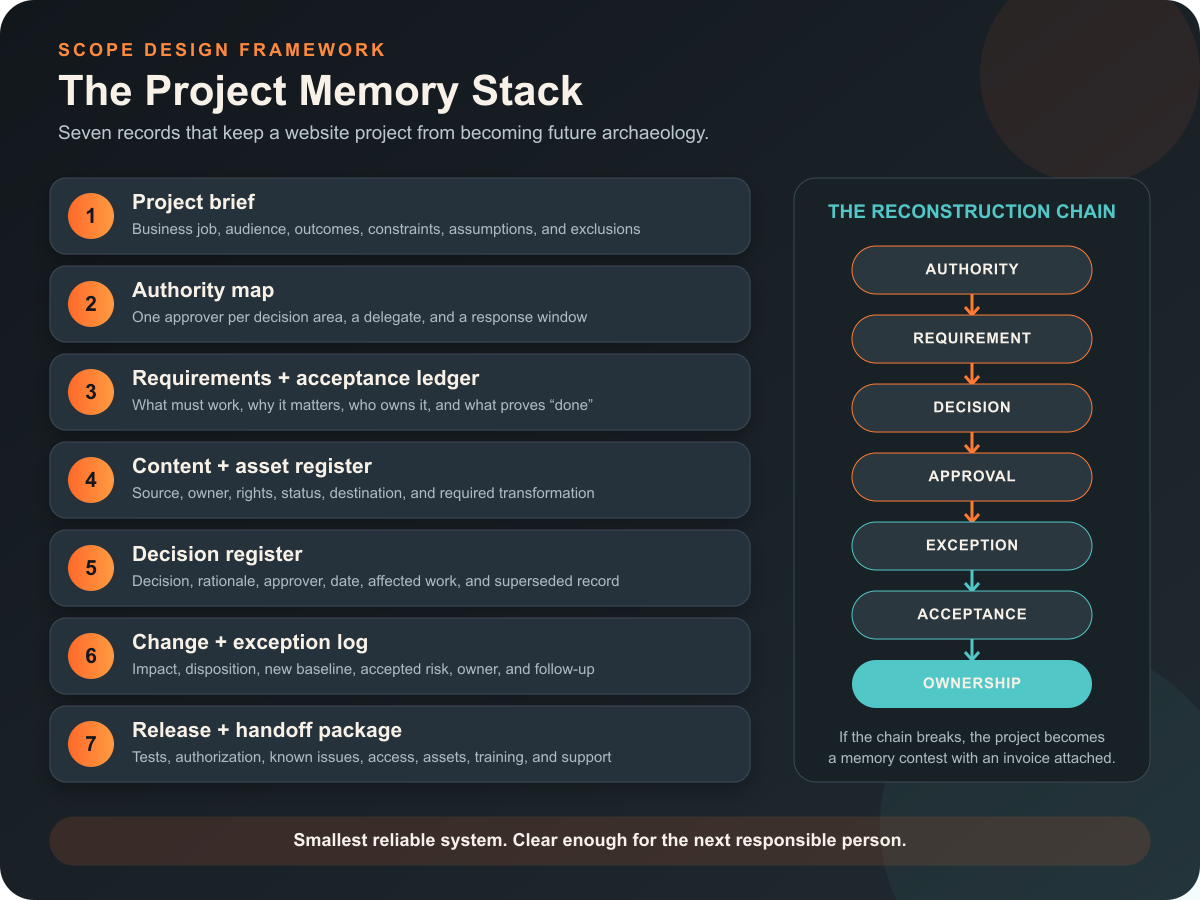
The Scope Design Project Memory Stack: enough project memory to reconstruct the work without preserving every stray conversation.
The reconstruction test is simple:
Can an independent person trace authority -> requirement -> decision -> approval -> exception -> acceptance -> ownership without interrogating the entire team?
If not, the project is not organized. It is temporarily remembered.
1. Write a project brief that controls the job
A project brief is the commercial and operational baseline. It explains the problem, desired result, audience, scope boundary, constraints, and measurement plan before page production starts.
At minimum, record:
- the website’s primary business job;
- the audiences and important arrival intents;
- the result the website can reasonably influence;
- the current constraint or failure being addressed;
- included deliverables and explicit exclusions;
- known integrations, data sources, and operational dependencies;
- legal, accessibility, privacy, security, or procurement requirements that apply;
- budget and schedule constraints;
- the post-launch owner and maintenance assumption;
- the evidence that will count as success.
The brief should not pretend certainty where discovery is incomplete. Label assumptions and open questions. A false answer in a polished brief is more dangerous than an honest blank.
Start with the business constraint, not the requested artifact
A client may request a redesign, landing page, calculator, portal, or ecommerce feature. The request proves dissatisfaction. It does not prove the requested artifact solves the actual problem.
Our Website Solutions pillar explains how to choose the least complex responsible route. The project brief should preserve that diagnosis so the team does not quietly revert to “make pages until the budget runs out.”
2. Map authority before the first disagreement
The authority map identifies who can approve each kind of consequential decision. A stakeholder list is not enough. Fifteen names copied on an email do not create governance; they create an audience.
Map at least:
| Decision area | Typical business authority | Typical professional lead |
|---|---|---|
| Business priority and budget | sponsor or product owner | agency advises on implications |
| Factual claims and content truth | designated client approver | strategist or copy lead shapes expression |
| Brand direction | brand owner | design lead translates into the system |
| UX and interaction method | product owner approves material tradeoffs | UX/design lead recommends method |
| Technical architecture | business approves cost, risk, and constraints | technical lead owns implementation recommendation |
| Privacy, security, accessibility, or legal acceptance | authorized internal owner or qualified adviser | agency supplies evidence and flags limits |
| Launch | named launch authority | agency reports readiness and exceptions |
For each area, name one final approver, a delegate, and a response window. “Marketing” cannot approve anything. A department has no inbox anxiety, vacation, or accountability.
W3C’s current accessibility planning guidance makes the broader principle concrete: assign responsibilities, budget the work, define milestones, monitor findings, and use acceptance testing for agency-delivered websites or components. Accessibility is shared across business, content, design, development, QA, and procurement roles; it is not a magical final scan owned by whoever remembers it at launch. W3C’s planning guidance is accessibility-specific, but the ownership discipline travels well.
3. Pair every requirement with acceptance evidence
A requirement says what the system must do. Acceptance criteria say how the parties will know it does that well enough to approve.
Bad requirement:
Add a flexible events section.
Useful requirement:
An authorized editor can create, update, schedule, and archive events without developer assistance. Each event includes date, time, location, registration link, status, and an accessible public detail page. The client will complete user acceptance testing with two designated editors before launch.
The second version reveals fields, roles, workflow, access, and the acceptance method. It gives design, development, content, training, and QA something testable.
For each material requirement, record:
- unique name or identifier;
- business reason;
- owner;
- priority;
- dependencies;
- acceptance criteria;
- verification method;
- current status;
- evidence or link;
- accepted exceptions.
Acceptance should match the risk. A brochure-page heading may need content and visual approval. A payment, account, application, search, or data-import workflow needs functional testing with realistic conditions and named acceptance responsibility.
“Looks good” is not universal acceptance
Design approval confirms the approved design direction. It does not prove the form delivers email, the data maps correctly, the checkout calculates properly, the page meets agreed accessibility criteria, or the analytics event fires.
One approval cannot silently swallow five disciplines. Record what the approval covers and what it does not.
4. Control content and assets like real dependencies
Content is routinely treated as a decorative substance that will arrive “later.” Then later arrives wearing a launch-day nametag.
The content and asset register should track:
- page, component, product, document, image, video, logo, testimonial, or data item;
- source and current location;
- content owner;
- person authorized to approve factual accuracy;
- rights, license, consent, or attribution status;
- draft, review, approved, scheduled, migrated, or blocked status;
- target page or system destination;
- transformation needed, such as editing, cropping, transcription, migration, or structured import;
- accessibility needs, such as alternative text, captions, transcripts, or document remediation.
Do not accept files named homepage-final-v7-USE-THIS-ONE-really.docx as a version-control philosophy. Use a stable item name and explicit status. The system should show which version is approved without interpreting panic punctuation.
Record ownership and license terms before handoff
Paying for a website does not automatically answer who owns every piece of source material, working file, licensed font, stock image, plugin, third-party service, code library, or agency tool.
The U.S. Copyright Office explains that copyright initially belongs to the author unless an applicable work-made-for-hire rule or transfer changes that result, and a transfer of copyright ownership generally requires a signed writing. Its website-registration guidance specifically notes that a hiring party may need a signed agreement to acquire exclusive rights from an independent contractor. Review the Copyright Office’s ownership and transfer rules and website copyright guidance, then have qualified counsel handle the actual agreement when the stakes justify it.
This is general project-planning information, not legal advice. The useful management move is simple: list the asset categories and write the ownership, license, access, and delivery terms before people start making assumptions.
5. Maintain a decision register, not a transcript landfill
Meeting notes record conversation. A decision register records the durable result.
Each consequential decision should include:
- the decision;
- the problem or tradeoff it resolves;
- options considered when useful;
- rationale;
- named approver;
- date;
- affected requirements, designs, pages, systems, cost, or schedule;
- next action;
- whether it supersedes an earlier decision.
The register prevents three common failures:
- The same debate restarts because nobody remembers the rationale.
- A late stakeholder treats an approved direction as an unopened question.
- The team implements a decision but forgets which other artifacts must change.
You do not need to record whether the hero image moved six pixels during exploration. Record decisions that affect meaning, scope, risk, ownership, cost, acceptance, or downstream work.
Link feedback to the decision it is supposed to improve
Good feedback identifies the audience, business concern, evidence, or failure condition. “I don’t like blue” is a reaction. “This color is too close to the competitor we are trying to differentiate from” is usable context.
Article 58 covers how to give feedback without trying to become the designer. The decision register preserves the approved outcome after that conversation ends.
6. Separate changes, defects, and exceptions
Not every unexpected item is scope creep. Some are defects. Some are clarified requirements. Some are new requests. Some are risks the business knowingly accepts.
Use four buckets:
| Item | Meaning | Typical response |
|---|---|---|
| Defect | agreed behavior does not meet the approved requirement | correct within the applicable responsibility |
| Clarification | existing requirement needs detail without materially changing the obligation | update the ledger and affected work |
| Change | new or altered requirement affects scope, cost, timing, or risk | assess impact and obtain authorization before work |
| Exception | known requirement, risk, or defect will not be resolved before acceptance | document owner, rationale, consequence, and follow-up |
A change record should state the request, reason, affected work, cost and timing impact, risks, decision, approver, and revised baseline. A chat message saying “can we also” is a request. It is not authorization.
The same discipline applies to risks. NIST Cybersecurity Framework 2.0 introduced a Govern function that emphasizes roles, responsibilities, authorities, policies, and alignment between cybersecurity risk and organizational obligations. NIST describes the framework as adaptable guidance rather than a prescribed checklist. Use its governance model where relevant; do not claim that every small website must implement the entire framework.
“We’ll fix it later” needs an owner and a date
An exception without an owner is not a plan. It is a defect wearing sunglasses.
For any accepted material exception, record:
- what remains unresolved;
- who may accept the risk;
- why launch may proceed;
- business or user consequence;
- mitigation;
- owner;
- target date or review trigger;
- whether customers, staff, or support need to know.
7. Build a release and handoff package before launch day
Launch is a controlled transition, not the moment someone gets brave near the Publish button.
The release and handoff package should include what is proportionate to the project:
- approved release scope and version;
- final requirements status;
- QA and user acceptance results;
- known defects and accepted exceptions;
- redirect and migration verification;
- analytics and conversion-event verification;
- privacy, security, and accessibility evidence where applicable;
- backup and rollback plan;
- launch authorization;
- domain, DNS, hosting, CMS, analytics, tag manager, search, repository, and vendor account ownership;
- administrator list and least-privilege access plan;
- delivered files, documentation, licenses, and credentials;
- training completed and recordings or guides delivered;
- warranty, support, maintenance, escalation, and emergency paths;
- post-launch review date.
The package does not have to be a 200-page binder nobody opens. It must let the operator run the system without keeping the original agency on psychic retainer.
Keep sensitive records deliberately, not forever
Do not turn the project archive into a permanent credential graveyard. Separate durable governance records from secrets and unnecessary personal information.
FTC guidance recommends inventorying sensitive information, keeping only what the business needs, limiting access, and using a written retention policy that states what is retained, how it is secured, how long it is kept, and how it is disposed of. See the FTC’s Protecting Personal Information guide. The correct retention period depends on legal, contractual, regulatory, operational, and litigation-hold requirements; there is no universal “keep website files for seven years” rule.
Organize the project around gates, not arbitrary weeks
The website development process often moves through discovery, strategy, content, design, development, testing, launch, handoff, and ongoing improvement. Scope Design was mapping that full sequence into a visible project system years before every software vendor discovered the word “workflow.”
The phases can overlap. The gates should remain explicit:
| Gate | Question that must be answered |
|---|---|
| Brief approved | Do we agree on the business job, boundary, and success evidence? |
| Structure approved | Do the information model, navigation, templates, and user paths support the job? |
| Content ready for build | Is enough real, approved content available to validate design and implementation? |
| Design direction approved | Are the representative system and material tradeoffs approved for build? |
| Build ready for acceptance | Do requirements have testable implementations in the intended environment? |
| Launch authorized | Are results, exceptions, ownership, rollback, and support acceptable? |
| Handoff accepted | Can the designated operator access, understand, and maintain the delivered system? |
Do not force every website into two-week sprints because a methodology diagram looked authoritative. Agile, iterative, sequential, and hybrid delivery can all work. The useful question is whether dependencies and approvals are visible enough to make the next commitment responsibly.
A real project taught the difference between pages and a system
A long-established specialty business approached Scope Design for a new website and new features. Discovery showed that the visible website sat in the middle of legacy software, disconnected data, manual processes, external services, account-access dependencies, content migration, customer-facing failures, and future operational plans.
The project could not be governed as “design eight pages.” It required a prioritized requirements baseline, data and access inputs from the client, explicit content responsibility, phased deliverables, milestone approvals, functional testing, training, and written handling for unplanned work.
The lesson is not that every website needs enterprise bureaucracy. It is that the project record must describe the system being changed. A task board full of page names would have hidden the actual work.
We use this example only in anonymized form. It supports the project-management method, not a performance claim.
How to measure whether the project is healthy
Do not measure project health by task volume or meeting attendance. Useful signals include:
- percentage of material requirements with an owner and acceptance method;
- decisions waiting beyond their agreed response window;
- content dependencies blocked by missing source, owner, rights, or approval;
- unresolved changes without impact decisions;
- rework caused by superseded or undocumented decisions;
- defects by requirement and severity;
- accepted exceptions without owners or review dates;
- launch requirements without evidence;
- accounts or assets without confirmed business ownership;
- handoff items not accepted by the operator.
These are diagnostic measures, not universal benchmarks. A five-page site and an operational platform should not have identical governance overhead. The useful metric exposes the current constraint instead of generating a handsome dashboard for the meeting.
Website project management checklist
Before approving a project plan, confirm that:
- the website’s primary business job is stated;
- scope, exclusions, assumptions, and dependencies are visible;
- one authorized approver exists for each consequential decision area;
- requirements have owners and acceptance methods;
- content, data, and assets have sources, rights, statuses, and destinations;
- important decisions have rationale, approver, date, and affected work;
- changes cannot quietly enter production without an impact decision;
- defects, changes, clarifications, and accepted exceptions are distinguished;
- project phases have meaningful gates rather than decorative dates;
- testing reflects the actual risk of the feature;
- launch authorization includes known exceptions and rollback readiness;
- the business controls critical accounts and receives agreed assets;
- training, support, maintenance, and escalation are defined;
- records containing sensitive information follow a retention and access policy;
- the post-launch operator has accepted the handoff.
If half of those answers live in somebody’s head, do not buy another tool. Fix the project memory.
Frequently asked questions about website project management
What should a website project plan include?
A useful website project plan includes the business objective, scope and exclusions, audiences, requirements, roles and approval authority, content and data dependencies, milestones, acceptance criteria, testing, change control, launch conditions, account ownership, handoff, maintenance, risks, and measurement. The schedule is one part of the plan, not the whole plan.
What are the major stages of a website project?
Most projects move through discovery, structure or information architecture, content, design, development, testing, launch, handoff, and ongoing improvement. The phases may overlap, but each major commitment should have an explicit approval or readiness gate.
Who should own a website project inside the business?
One named product or business owner should be accountable for the result and able to resolve internal priorities. Specialists can approve content, brand, legal, privacy, security, accessibility, or technical matters, but a committee should not become the default final authority for every decision.
What is the difference between a project manager and a product owner?
The product owner represents the business result and prioritizes what the system must achieve. The project manager keeps scope, dependencies, decisions, timing, records, and delivery moving. One person may perform both jobs on a small project, but the responsibilities should not disappear.
What are website acceptance criteria?
Acceptance criteria are observable conditions that prove a requirement is complete enough to approve. They may cover content, user behavior, data, performance, accessibility, integration results, permissions, or operational workflow. “Looks good” is valid only for the visual decision it actually evaluates.
How many people should approve a website?
Use one final approver per decision area and consolidate stakeholder input before it reaches the delivery team. More subject-matter reviewers may be necessary, but several people with equal and undefined veto power produce contradictory feedback and delayed decisions.
What belongs in a website decision log?
Record consequential decisions affecting scope, meaning, risk, ownership, cost, schedule, acceptance, or downstream work. Include the decision, rationale, approver, date, affected artifacts, next action, and any superseded decision.
How should website project files be organized?
Organize files by stable function and status, not by panic-driven filenames. Separate approved baselines from working drafts, use consistent item names, preserve version history, restrict sensitive material, and link files to the requirements or decisions they support. The exact folder structure matters less than making the approved version unmistakable.
What is a website change request?
A change request proposes an alteration outside or materially different from the approved baseline. It becomes authorized work only after the team assesses its effect on scope, cost, timing, dependencies, risk, and acceptance, and an authorized person approves the revised baseline.
What is the difference between a defect and a scope change?
A defect means the delivered behavior fails an approved requirement. A scope change adds or alters the approved requirement. Calling every defect a change unfairly moves delivery responsibility; calling every new idea a defect quietly expands the project.
Should a website project use Agile or Waterfall?
Use the delivery approach that matches uncertainty, dependencies, team capacity, and risk. Iterative design and development often benefit from short feedback loops, while migrations, compliance gates, and launch dependencies may require more sequential control. Most serious website projects are hybrids. Methodology loyalty is not a substitute for clear acceptance and ownership.
What records should the business keep after launch?
Keep the executed agreement and changes, approved requirements, material decisions, rights and licenses, release and acceptance record, known exceptions, delivered assets, account ownership, training and operating documentation, and applicable security, privacy, accessibility, or testing evidence. Apply a written retention policy; do not retain unnecessary secrets or personal information forever.
What should happen when a website project stalls?
Identify the blocked requirement or decision, its owner, the missing input, the date it became blocked, and the consequence. Escalate through the agreed authority map. If the baseline is no longer realistic, formally replan scope, cost, timing, or priority instead of leaving the project in indefinite “almost there” purgatory.
Make the project understandable enough to survive the project
Website project management is not performance art for organized people. It is how a business protects decisions, budget, rights, risk, and operational continuity while a complicated idea becomes a real system.
The best project record is not the one with the most fields. It is the smallest reliable system that lets the next responsible person understand what happened without summoning the original team for a séance.
If your website project is a pile of tabs, unowned approvals, mystery files, and launch anxiety, talk with Scope Design. We can diagnose the actual job, establish the project baseline, and build a delivery system that leaves you with a website you can approve, operate, and own.

