

The best remote work tools are the smallest set of systems that gives every important kind of work one obvious home, every account a responsible owner, and the business a credible way out. Most small teams need a secure identity layer, one communication system, one work tracker, one durable knowledge and file home, a meeting option, and a recovery plan. Start with capabilities and workflows. Add a product only when it closes a real gap. Buying fourteen apps because fourteen landing pages called them “essential” is how you build an expensive software junk drawer.
TL;DR: You need a working system, not a logo collection
- Choose one source of truth for work and one for durable knowledge and files.
- Use the collaboration features already included in your core business suite before buying more subscriptions.
- Require company-controlled administration, multifactor authentication, appropriate permissions, and a documented offboarding path.
- Evaluate accessibility, adoption effort, integration behavior, export formats, backups, and outage recovery before signing a contract.
- Count the whole cost: licenses, premium security tiers, connectors, implementation, training, maintenance, and migration.
- Audit the stack quarterly. Remove duplicate, abandoned, ownerless, insecure, and unrecoverable tools.
- Use Scope Design’s STACK Test: Start with the work, Trim overlap, secure Access, Connect ownership, and Keep the system portable and recoverable.
Remote work does not fail because a team forgot to buy enough software. It fails when conversations, tasks, files, decisions, credentials, and client information land in six different places and nobody knows which version is real.
In this remote-work tools guide
What remote work tools are actually necessary?
A remote team needs capabilities, not a predetermined shopping list. For most small businesses, the minimum useful stack covers six jobs:
- Identity and secure access.
- Communication and availability.
- Work tracking and ownership.
- Durable documentation and file storage.
- Live meetings and asynchronous explanation.
- Backup, recovery, and account offboarding.
One platform may cover several jobs. Microsoft 365 and Google Workspace, for example, can each provide identity, email, calendars, documents, storage, and meetings. That does not automatically make either one the correct choice. It means you should understand what you already own before adding Slack, Zoom, Dropbox, Notion, Loom, Miro, Asana, ClickUp, and three automation services on top of it.
The product names will change. The jobs will not. That is why this article is a selection system instead of another “27 best apps” roundup that starts rotting before the affiliate links finish loading.
Our broader AI automation for business guide applies the same principle to workflows: define the outcome, owner, exceptions, evidence, and maintenance before automating anything. Remote-work software deserves the same adult supervision.
The Scope Design STACK Test
Use the STACK Test before adopting, renewing, integrating, or replacing a remote-work tool.
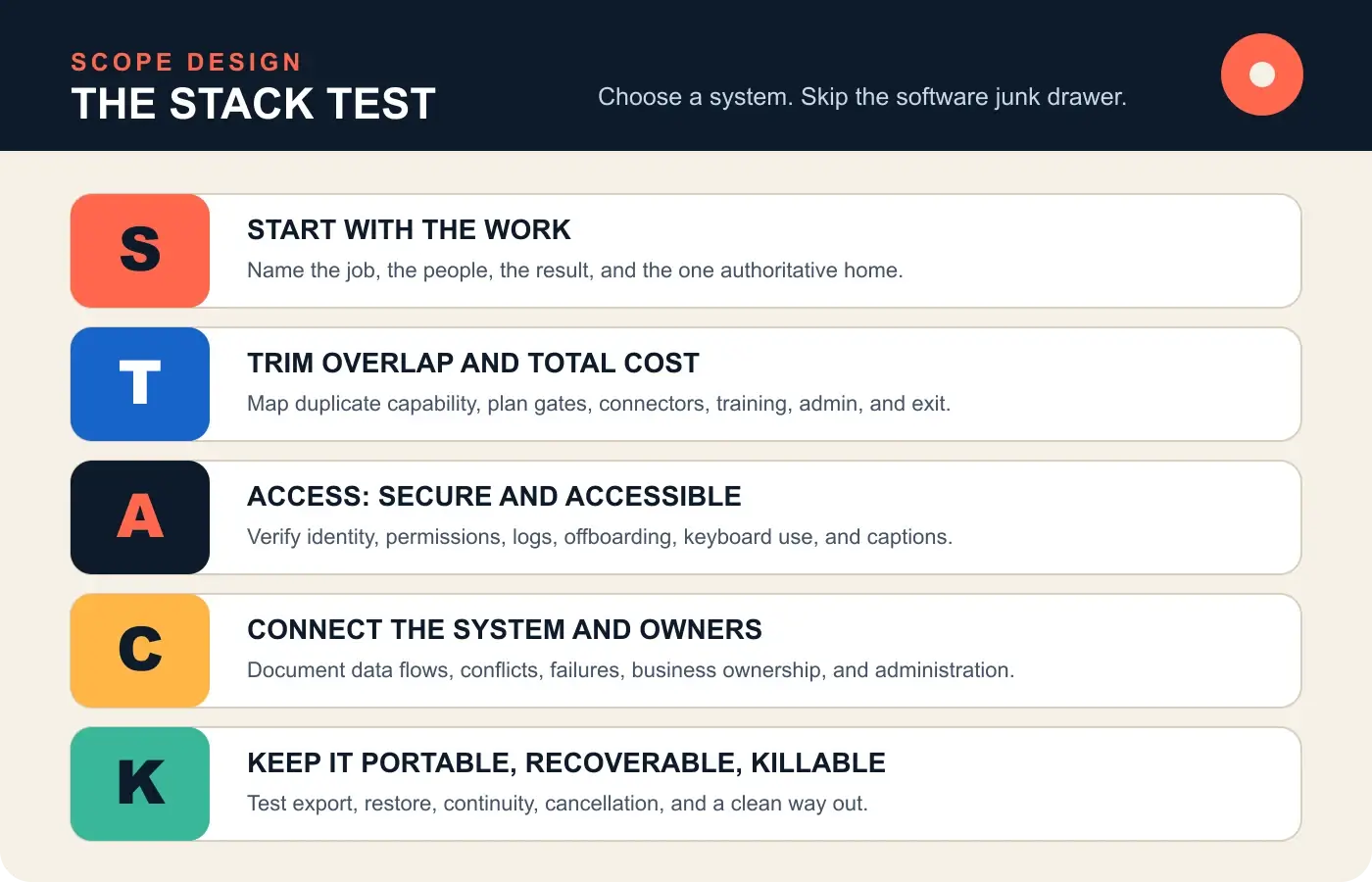
S: Start with the work and its source of truth
Write down the job the tool must perform, who performs it, what information moves through it, and what must be different when the work is done. Then name the authoritative home for the result.
A chat message may alert someone that a decision was made. It should not be the only surviving record of the decision. A meeting transcript may help create notes. It should not quietly become the project plan. A task tool may link to a document. It should not produce a second, conflicting copy of that document.
GitLab’s remote communication guidance starts asynchronously, records conclusions, and directs work toward a single durable source of truth rather than email or chat. You do not need to copy GitLab’s exact stack. You do need its refusal to let important knowledge dissolve into a scrolling conversation.
For every capability, finish this sentence: “The official place to find the current version of ___ is ___.” If the team gives four answers, the tool decision is not finished.
T: Trim overlap and calculate total cost
Feature overlap is not automatically bad. Deliberate redundancy can support continuity. Accidental redundancy creates confusion, duplicate notifications, scattered records, inconsistent permissions, and bills nobody remembers approving.
Build a capability map before comparing vendors. List every current tool across the top and every necessary job down the side. Mark which tool performs which job. The ugly little grid usually exposes three things quickly:
- Several tools are doing the same ordinary job.
- One critical job has no dependable owner or system.
- The team uses a separate app for something already included in a core suite.
Then calculate total cost of ownership, not the friendly number on the pricing page. Include required plan upgrades, implementation, data migration, integrations, automation runs, storage, backups, support, training, administration, and eventual exit. A $12 tool that needs a $40 security tier and a paid connector is not a $12 tool. It is marketing arithmetic wearing a cardigan.
A: Access must be secure and accessible
Remote-work tools sit outside the office perimeter, often on personal networks and multiple devices. Access is therefore both a security question and a human-accessibility question.
At minimum, evaluate company-controlled administration, unique user accounts, MFA, role-based permissions, session revocation, audit logs, device requirements, guest controls, and the treatment of connected third-party applications. CISA recommends MFA across systems such as email, file storage, and remote access, beginning with administrators and people handling sensitive data.
Security cannot be an enterprise-plan surprise discovered after rollout. Ask which plan includes SSO, stronger MFA, audit logs, retention controls, data-loss protections, guest restrictions, and automated provisioning. If the controls you need require a higher tier, price that tier from day one.
Accessibility belongs in the same gate. Test keyboard operation, screen-reader support, captions, transcripts, contrast, zoom behavior, mobile usability, notification controls, and multiple ways to participate. A tool is not collaborative if one employee has to fight it just to do the ordinary part of the job.
C: Connect the system and clarify ownership
Every tool needs a business owner and an administrative owner. The business owner decides whether the tool still solves a worthwhile problem. The administrative owner manages configuration, access, integrations, renewals, incidents, and offboarding. Sometimes one person holds both roles. “Everyone” is not a role. It is how expired contractors keep access for eleven months.
Map integrations as data flows, not colorful arrows in a sales demo:
- What data enters?
- What data leaves?
- Which system wins when records conflict?
- Which account authorized the connection?
- What permissions did the connection receive?
- What happens when it fails or duplicates a record?
- Who notices and who fixes it?
Native integrations are not automatically safe, and automation is not automatically progress. If moving data between two systems creates more exceptions than it removes, the integration is a small unreliable employee nobody remembers hiring. Our business automation service focuses on fitting automation to the real process and its failure modes, not merely making two logos touch.
K: Keep the data portable, recoverable, and killable
A business does not truly own a system it cannot leave, recover, or shut down cleanly.
Before adoption, test export. Do not accept “yes, we support export” as an answer. Ask what can be exported, in which formats, whether attachments and metadata are included, whether relationships survive, how long export takes, which plan includes it, and whether an administrator can perform it without professional services.
Then test recovery. SaaS availability is not the same thing as recoverability from accidental deletion, compromised accounts, bad automation, employee error, or a vendor outage. The UK’s National Cyber Security Centre recommends central SaaS management, correct access levels, account suspension, monitoring of audit logs, and planning incident response and disaster recovery for SaaS.
Finally, define the kill switch. Who can cancel the subscription? Where is the contract? How are data and logs retained? What integrations must be disconnected? How are users notified? What replaces the capability? If leaving the tool would paralyze the business, that dependency deserves a recovery plan before renewal, not during the outage.
Build the minimum viable remote-work stack
The minimum viable stack is the least complicated collection that covers the work reliably. It is not a universal product bundle.
| Capability | The business question | Common product examples | Default decision |
|---|---|---|---|
| Identity and access | Who can sign in, to what, and how is access revoked? | Google Workspace, Microsoft Entra, Okta | Use the directory tied to the core business suite unless requirements prove otherwise. |
| Communication | Where do time-sensitive conversations happen? | Microsoft Teams, Slack | Choose one primary channel system and document when email is still appropriate. |
| Work tracking | Where are commitments, owners, deadlines, and status recorded? | Asana, ClickUp, Jira, Linear, Trello | Pick one system that matches the complexity of the work, not the aspirations of the demo team. |
| Knowledge and files | Where does the current durable record live? | SharePoint, Google Drive, Notion, Confluence, Dropbox | Separate durable knowledge from chat and eliminate duplicate official homes. |
| Meetings and async explanation | When does live interaction earn its cost? | Teams, Google Meet, Zoom, Loom | Use included meeting capability first; add specialist tools for a demonstrated gap. |
| Security and recovery | Can the business control, audit, back up, and restore access and data? | Core-suite controls, password managers, endpoint tools, backups | Treat this as infrastructure, not an optional pile added after an incident. |
The examples are not rankings or endorsements. Product fit depends on your existing ecosystem, client requirements, compliance obligations, team size, workflow complexity, and internal capacity.
If the current suite already provides a good-enough capability, use it until evidence shows a meaningful constraint. “This other app has a nicer confetti animation” is not a constraint.
Choose tools in the right order
Tool selection should follow the dependency chain.
1. Establish identity and administration
Choose the company-controlled directory, administrator roles, authentication policy, device expectations, and account lifecycle. Personal email addresses should not own company systems. Shared passwords should not substitute for individual accounts.
2. Establish the durable record
Choose where files, policies, procedures, decisions, and project records live. Define naming, permissions, version ownership, and archival rules. This reduces the temptation to solve every retrieval problem with another app.
3. Establish work ownership
Choose how tasks, owners, deadlines, dependencies, and status are recorded. The system should make commitments visible without turning managers into surveillance enthusiasts. Our SIGNAL remote team management system explains the operating rules that software should support.
4. Establish communication and meeting rules
Choose the main channels and define which communication belongs where. Live calls are for interaction that benefits from shared attention. Our virtual meeting best practices cover agendas, facilitation, accessibility, security, decisions, and action capture.
5. Add specialist capabilities only for proven gaps
Whiteboards, async video, time tracking, CRM, design collaboration, password management, automation, support desks, and remote-access tools can be valuable. Add them because a named workflow has a material unmet need, not because somebody enjoyed a webinar.
A practical remote-work tool scorecard
Score every finalist against the same evidence. Do not let a charming sales call quietly rewrite the requirements.
| Area | Questions to verify | Evidence to request |
|---|---|---|
| Workflow fit | Does it support the real work, roles, exceptions, and volume? | Hands-on pilot using a representative workflow. |
| Source of truth | What becomes authoritative, and what stops being authoritative? | Written operating rule and migration map. |
| Security | Which plans include MFA, SSO, permissions, logs, retention, and session revocation? | Current plan documentation and tested admin settings. |
| Accessibility | Can people use it with keyboard, screen reader, captions, zoom, and mobile devices? | Accessibility documentation plus testing by real users. |
| Integration | What data moves, with which permissions, and how are failures exposed? | Field map, permission review, logs, and recovery test. |
| Adoption | Can the team understand the basic workflow without constant rescue? | Time-boxed pilot and observed completion rate. |
| Total cost | What will the working configuration cost over three years? | License, implementation, integration, admin, backup, and exit estimate. |
| Portability | Can the business export complete, usable data and metadata? | Actual test export in documented formats. |
| Offboarding | Can access, sessions, devices, guests, and integrations be revoked promptly? | Completed offboarding drill. |
| Recovery | What happens after deletion, outage, compromise, or vendor failure? | Restore test, continuity procedure, and named owner. |
NIST’s small-business CSF guidance recommends maintaining an inventory of software, systems, and services while identifying each asset’s official use, administrator or owner, sensitive-data access, MFA status, and business impact if access is lost. That is a far more useful procurement model than “our competitor uses it.”
Security is part of product fit
CISA’s collaboration guidance recommends assessing organizational needs, maintaining an approved product list, limiting the number of authorized collaboration tools, centrally managing configurations, and removing obsolete software. In plain English: more collaboration apps create more attack surface and more crap to govern. Read CISA’s collaboration-tool recommendations.
For each tool, document:
- The company tenant and its true owner.
- Primary and emergency administrators.
- Required authentication methods.
- User, guest, service-account, and integration permissions.
- Sensitive data stored or transmitted.
- Approved devices and browsers.
- Log availability and retention.
- Backup and recovery behavior.
- Incident contact and escalation path.
- Offboarding and deletion procedure.
NIST CSF 2.0 deliberately includes governance alongside identify, protect, detect, respond, and recover. The framework applies to organizations of any size. Security is not a plugin you install after choosing the fun tools. It is part of deciding whether the tool belongs in the business at all.
Accessibility and adoption are operational requirements
A technically capable platform can still fail if the team cannot or will not use it. That failure often appears as shadow systems: personal notes, private spreadsheets, side-channel messages, unapproved file sharing, and work that vanishes when someone leaves.
Adoption improves when the tool has a narrow job, clear operating rules, usable defaults, accessible interaction, sensible notifications, and visible benefits for the people doing the work. Adoption declines when leadership buys a giant platform, enables every module, imports nothing cleanly, trains nobody, and calls the resulting panic “change resistance.”
Run a pilot with actual work. Include the people who will use the system daily, including anyone relying on assistive technology. Measure whether they can complete the workflow, find the record later, recover from mistakes, and understand where the official result lives.
Do not use activity tracking as a substitute for management. If the real problem is unclear priorities or bad workload design, remote-work productivity needs a better operating system, not more screenshots of green dots.
Integrations should reduce ambiguity
An integration earns its place when it removes dependable manual work, reduces errors, or makes the source of truth easier to maintain. It fails when it creates duplicates, silent overwrites, mystery permissions, or records that nobody owns.
Before connecting systems, write a tiny integration contract:
- Trigger: What verified event begins the flow?
- Source: Which system owns the input?
- Transformation: What changes and why?
- Destination: Which system owns the result?
- Duplicate rule: How are repeated events handled?
- Exception rule: What stops, retries, or escalates?
- Evidence: What logs prove what happened?
- Owner: Who maintains and can disable it?
This is the same discipline used in good website project organization: roles, handoffs, approvals, and source files must be explicit or the tooling merely accelerates confusion.
Roll out the stack without causing a small rebellion
Do not replace five tools at once unless a genuine business event requires it. Sequence the change around dependencies and risk.
- Inventory current systems, owners, contracts, users, data, integrations, and costs.
- Define the target source-of-truth rules and minimum required capabilities.
- Pilot one representative workflow with a small cross-section of users.
- Configure identity, permissions, retention, backups, and logs before broad access.
- Migrate and validate real data, including attachments and metadata.
- Train people on the operating rules, not every button in the interface.
- Run offboarding, export, outage, and restore drills.
- Set a retirement date for replaced tools and verify that billing actually stops.
- Review adoption and workflow outcomes after 30, 60, and 90 days.
Microsoft researchers have documented the difficulty of task switching and recovering from interruptions in information work. Their diary study of task switching and interruptions is a useful reminder that every additional notification surface and fragmented record imposes a cognitive cost, even when the app itself works perfectly.
Run a quarterly tool-sprawl audit
Once a quarter, review the stack with the people who use and administer it.
| Audit question | Keep or improve | Consolidate or remove |
|---|---|---|
| Does it perform a necessary, named job? | The capability is still required and produces a useful result. | Nobody can explain the outcome beyond “we’ve always had it.” |
| Is it the declared source of truth? | Its ownership boundary is clear. | It duplicates an official record elsewhere. |
| Is there a named business and admin owner? | Both responsibilities are active and documented. | The purchaser left or the shared admin account is a mystery. |
| Is access governed? | Users, guests, integrations, and sessions are reviewed. | Former users, broad permissions, or unreviewed OAuth apps remain. |
| Is it used enough to justify its full cost? | Adoption and value are observable. | Licenses sit idle or a core suite covers the job. |
| Can the business export and recover its data? | Tests succeeded recently. | Export is incomplete, proprietary, untested, or plan-gated. |
| Can the tool be retired safely? | Exit steps and replacements are documented. | Cancellation would strand data or break unknown workflows. |
The goal is not ruthless minimalism for its own sake. The goal is intentional complexity. Keep a specialized tool when it produces enough value to justify its cost, risk, administration, and dependency. Remove it when its main output is another place to check.
The bottom line
The best remote work tools do not create remote work. They support a work system that already knows where communication belongs, where commitments live, who owns decisions, how access is controlled, and what happens when something breaks.
Choose the stack with the STACK Test:
- Start with the work and source of truth.
- Trim overlap and calculate total cost.
- Access must be secure and accessible.
- Connect the system and clarify ownership.
- Keep the data portable, recoverable, and killable.
If a product cannot survive those questions, it is not essential. It is another subscription with good lighting.
Frequently asked questions about remote work tools
What tools are needed for remote work?
Most remote teams need secure identity and access, communication, work tracking, durable documentation and file storage, meetings or asynchronous explanation, and backup and recovery. Several capabilities may come from one business suite. Add specialist software only for a demonstrated gap.
What are the best tools for remote workers?
There is no universal best list. The best tools fit the team’s workflows and existing ecosystem, provide appropriate security and accessibility, integrate without corrupting ownership, can be adopted and administered, and allow complete data export and clean exit.
What is remote work software?
Remote work software is any system that helps distributed people access company resources, communicate, coordinate work, store knowledge, collaborate, meet, secure accounts, or recover business information without sharing a physical office.
How do I choose remote work tools?
Map the required capability and workflow first. Then compare products using consistent criteria for source of truth, security, accessibility, integrations, adoption, total cost, portability, offboarding, and recovery. Pilot the real workflow before committing broadly.
How many tools should a remote team use?
Use the smallest number that covers necessary work reliably. There is no magic count. One suite plus a focused work system may be enough for a small team; a regulated or specialized business may need more. Every additional tool should have a distinct job and named owner.
Is Microsoft 365 or Google Workspace better for remote work?
The better choice is usually the suite that fits your existing identity, file, document, client, device, and administration environment. Both cover major remote-work capabilities. Migration cost, security configuration, partner requirements, team familiarity, and data governance matter more than generic feature-count arguments.
Do remote teams need project management software?
They need a dependable place for commitments, owners, deadlines, dependencies, and status. That may be dedicated project-management software or a simpler system inside an existing suite. Chat and email alone are poor task systems because important commitments disappear into conversation.
What is a single source of truth?
A single source of truth is the declared authoritative location for a specific kind of information. It does not mean everything lives in one application. It means the team knows which system wins when copies, messages, documents, or status reports disagree.
How do you prevent remote-work tool sprawl?
Maintain a tool inventory and capability map, require an owner and business case for new software, check existing-suite features first, review integrations and permissions, calculate total cost, and run quarterly consolidation and retirement reviews.
What security features should remote-work tools have?
Requirements vary, but common needs include company-controlled administration, individual accounts, strong MFA, role-based permissions, session revocation, guest controls, audit logs, encryption, secure integrations, device policies, retention controls, and tested incident and recovery procedures.
Should remote teams use employee monitoring or time tracking software?
Use time tracking when the business genuinely needs job costing, billing, capacity planning, or compliance evidence. Do not use surveillance as a substitute for clear outcomes and competent management. Presence data is not proof of useful work and can reward performative busyness.
What accessibility features matter in remote-work software?
Evaluate keyboard navigation, screen-reader support, captions and transcripts, contrast, text resizing, focus visibility, notification control, mobile usability, and multiple ways to participate. Test with the people who will actually use the system.
What hidden costs should businesses check?
Check premium tiers required for SSO, audit logs, API access, storage, guests, retention, and export. Add implementation, migration, integrations, automation usage, backups, training, administration, support, renewal increases, and eventual exit costs.
How should remote employees be offboarded from software?
Disable the primary company identity, revoke active sessions, remove group and application access, transfer owned files and work, rotate shared or service credentials, review connected apps and devices, preserve required records, and confirm licenses and guest access are removed.
What happens if a remote-work software vendor shuts down?
The answer should already exist in the continuity plan. Maintain current exports or backups, document dependencies and integrations, know the contract and notice terms, identify an acceptable fallback, and test whether exported data is actually usable outside the vendor.
How often should a company audit its remote-work tools?
Review the stack at least quarterly and whenever a vendor, plan, integration, security requirement, team structure, or core business process changes. Access and incident signals may require more frequent monitoring.
Are free remote-work tools enough for a small business?
They can be enough for low-risk early use, but free plans often limit administration, security, retention, support, export, or integration features. Evaluate the working plan you actually need, not the plan that makes the comparison table look inexpensive.
Do remote-work tools replace good management?
No. Software can make ownership, communication, decisions, and progress visible. It cannot decide priorities, create trust, resolve conflicting expectations, or make a weak manager accountable. A broken operating system with nicer apps is still broken.

