

An open-source CMS gives you licensed access to use, inspect, modify, and redistribute the software under its license. That can create real freedom—but it does not automatically give your business a portable website, competent support, clean code, secure operations, or an easy escape from the developer who built it. Source-code access is useful. A usable exit is better.
TL;DR: Choose the operating model, not the label
- Choose an open-source CMS when control, extensibility, hosting choice, a broad talent market, and long-term portability matter—and you can responsibly operate it.
- Choose a proprietary CMS when the packaged workflow, vendor accountability, predictable support, and reduced operational burden are worth accepting platform limits.
- “Free software” does not mean a free website. Hosting, implementation, maintenance, security, integrations, training, and migration still cost money.
- Run every option through Scope Design’s EXIT test: Exportability, eXpertise, Infrastructure control, and Total responsibility.
- If you cannot explain how the business leaves the platform or service provider, you have not chosen a system. You have chosen a future hostage negotiation.
What is an open-source CMS?
An open-source content management system is CMS software distributed under a license that grants rights beyond simply using a vendor’s hosted product. The exact rights and obligations depend on the license.
The Open Source Initiative’s definition makes an important point: open source does not merely mean that somebody lets you look at the code. An open-source license must meet criteria covering source availability, redistribution, modification and derived works, non-discrimination, and technology neutrality.
WordPress is one familiar example. WordPress.org states that the software is licensed under GPLv2 or later. That license applies to the WordPress software; it does not magically settle every ownership question around your custom design, content, photography, domain, hosting account, premium-plugin licenses, data, or agency contract.
Those are separate assets and agreements. Treating them as one blob called “the website” is how businesses discover, during a breakup, that the domain lives in somebody’s personal account and the only copy of the custom code is on a laptop named DESKTOP-4J7QNOPE.
What is a proprietary CMS?
A proprietary CMS is controlled under a vendor’s license and terms rather than an open-source license. The vendor typically controls the source code, product roadmap, hosting model or approved environment, pricing, and supported extensions.
That category includes very different products:
- hosted website builders;
- software-as-a-service content platforms;
- licensed enterprise CMS products;
- vertical systems built for a particular industry;
- agency-owned platforms available only through that agency.
Some proprietary systems provide excellent exports, APIs, integrations, service-level commitments, and support. Others let you export three CSV files and a folder of images, then wave cheerfully as the rest of your website disappears into the proprietary void.
The license category alone does not tell you whether a system is good. It tells you which questions to ask.
Open source and proprietary CMS comparison
| Decision factor | Open-source CMS | Proprietary CMS | What the buyer must verify |
|---|---|---|---|
| Source code | Available under an open-source license | Usually unavailable or restricted | Which code is included, which is custom, and what license applies? |
| Hosting | Often portable across compatible hosts | May be vendor-hosted or restricted | Can you move, and what must change if you do? |
| Customization | Potentially extensive | Limited to supported tools, APIs, and vendor roadmap | Does the business need custom behavior, or merely want it? |
| Support | Community, agencies, internal teams, or paid vendors | Usually vendor or certified partners | Who has response obligations, at what hours, for which failures? |
| Updates | Site owner or service provider usually chooses and operates them | Vendor may operate some or all updates | Who tests compatibility, takes backups, monitors failure, and rolls back? |
| Security | Shared across software maintainers, hosts, site owners, developers, and users | Shared across vendor, customer configuration, users, and integrations | Where does the contract place each responsibility? |
| Data export | May offer built-in exports and direct database access | Varies widely by product and plan | Can you export complete, documented, usable data? |
| Cost model | Implementation and operations without a core license fee in many cases | Subscription or license plus implementation and operations | What is the three-to-five-year total cost, including exit? |
| Talent market | May have many independent specialists | May require vendor-specific skills or partners | Can another qualified team take over? |
| Product roadmap | Community, foundation, project leadership, and contributors | Vendor controls roadmap | What happens when a required feature is deprecated or repriced? |
The Scope Design EXIT test for CMS independence
Before committing to a CMS, make sure the business has a credible exit. This applies to open-source and proprietary platforms.
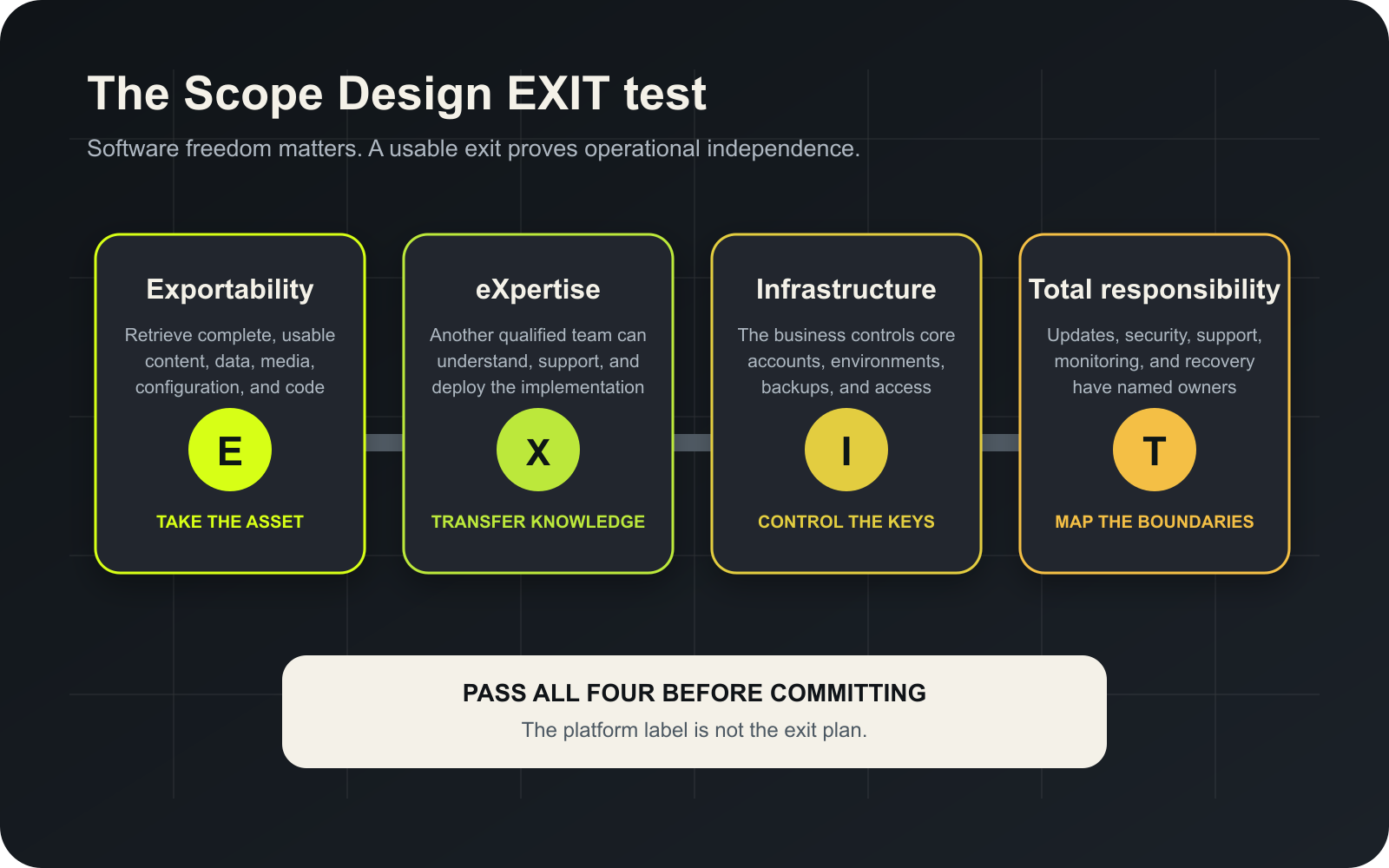
Exportability: Can you retrieve the whole business asset?
Exportability is more than a button labeled “Export.” The business should know whether it can retrieve:
- pages, posts, products, users, orders, submissions, and other structured records;
- categories, tags, relationships, custom fields, and taxonomies;
- original media files and their metadata;
- redirects, SEO metadata, menus, reusable content, and configuration;
- form definitions and submissions where permitted;
- analytics, consent, personalization, and search data where applicable;
- a database copy and uploaded files for self-hosted systems;
- custom code, theme files, build instructions, and repository history promised by contract.
WordPress includes a built-in export tool for posts, pages, custom post types, comments, custom fields, terms, and users in its WXR format. Useful? Absolutely. A complete, push-button recreation of every plugin, setting, media derivative, server rule, integration, and custom workflow? No.
Test the export before you need it. An exit plan that exists only in a sales deck is not an exit plan.
eXpertise: Can another qualified team operate the system?
Open-source code can reduce dependence on one vendor, but only when other capable people can understand and operate the implementation.
Ask:
- Is the stack common enough to hire for?
- Is the custom code documented?
- Are dependencies current and replaceable?
- Are development, staging, and production environments defined?
- Can a new team reproduce a deployment?
- Are credentials stored appropriately rather than baked into files?
- Does the business control the code repository where applicable?
- Is knowledge held by a team or trapped inside one person’s head?
A WordPress site built from an obscure abandoned theme, 63 overlapping plugins, and undocumented custom snippets may be technically open source and operationally radioactive.
Infrastructure control: Who controls the accounts and environments?
The business should know who controls:
- the domain registrar;
- DNS and CDN accounts;
- hosting and server access;
- CMS administrator accounts;
- email delivery and transactional services;
- code repositories and deployment accounts;
- analytics, advertising, search, and tag-management properties;
- backup storage;
- premium software licenses;
- third-party APIs and integration credentials.
Control does not mean the owner must personally administer every system. It means the business can authorize, revoke, transfer, and recover access without begging a former contractor.
Our small-business web hosting guide explains why hosting should be judged as an operating system for the website rather than a cheap storage locker with a monthly invoice.
Total responsibility: Who keeps the website working?
Every CMS has an operating model. Somebody owns updates, compatibility, backups, monitoring, security response, performance, support, and recovery.
With an open-source CMS, the project may publish secure software, the host may secure infrastructure, plugin vendors may maintain extensions, and an agency may operate the website. The site owner still needs to know who connects those responsibilities.
With a proprietary platform, the vendor may operate more of the stack. The customer may still own account security, user permissions, content, privacy configuration, third-party scripts, integrations, domain settings, and business-process failures.
“The vendor handles security” is not a complete responsibility map. Neither is “our developer takes care of it.” Write down the boundaries.
What are the benefits of an open-source CMS?
Greater freedom to modify the software
An open-source license can allow a qualified team to inspect and modify the software rather than waiting for a vendor roadmap. That is valuable when the website supports a differentiating workflow, a required integration, unusual data, or a business process that cannot be responsibly forced into an off-the-shelf box.
Custom work should still earn its cost. The ability to modify everything is not an obligation to modify everything.
More hosting and service-provider options
Many open-source CMS platforms can run across multiple compatible hosting providers and be supported by independent specialists. That can create negotiating leverage and reduce dependence on one company.
The implementation can still introduce lock-in through custom infrastructure, undocumented code, exclusive licenses, or inaccessible accounts. Open-source software makes portability possible; architecture and contracts make it practical.
A broader ecosystem
Popular open-source projects may have extensive documentation, extensions, integrations, training, and specialist communities. Businesses can often choose among multiple agencies, developers, and managed-service providers.
Ecosystem size is not the same as ecosystem quality. A plugin directory full of abandoned add-ons is still full. Evaluate maintenance history, ownership, compatibility, documentation, and support.
Direct access to data and code in self-hosted deployments
A self-hosted implementation can provide database, file, and code access that is unavailable in many hosted products. This can improve integration, auditing, migration, and recovery options.
That access also creates responsibility. Database credentials and server access are not collectible trading cards. They need appropriate permissions, logging, backup, and security practices.
What are the disadvantages of an open-source CMS?
The operating burden does not disappear
Open-source software may have no core license fee, but the website still needs hosting, setup, design, development, updates, testing, security, backups, monitoring, support, and recovery.
The official WordPress hardening guidance emphasizes ongoing updates, backups, appropriate permissions, trusted software sources, and layered security. Installing an open-source CMS and walking away is not independence. It is neglect with a login screen.
Compatibility can become your problem
Core software, themes, plugins, custom code, server software, APIs, and browser behavior change. An update may fix a vulnerability and expose an old integration that was already hanging on by dental floss.
Updates need a process: review, backup, test, deploy, verify, monitor, and roll back when necessary. Our WordPress plugin update guide covers that process in detail.
Freedom permits bad architecture
An open system can be clean and maintainable. It can also become a dumping ground for customizations, duplicated plugins, mystery snippets, and permanent exceptions.
The upcoming modular-architecture decision is relevant here: reusable, governed components make change safer, while unlimited flexibility produces inconsistent pages and brittle code. Open source gives a team options. It does not give the team judgment.
Support can be fragmented
The host may blame the plugin. The plugin vendor may blame the theme. The theme vendor may blame the custom code. Everyone may be technically correct while the checkout remains broken.
A managed service or accountable technical owner can coordinate those layers. Without one, the business becomes the unpaid project manager for a very boring detective story.
What are the benefits of a proprietary CMS?
One vendor can own more of the stack
A well-run proprietary platform may combine hosting, updates, backups, support, editor tooling, and infrastructure under one accountable provider. That can reduce operational coordination and simplify procurement.
Read the service terms and support scope. “Fully managed” can mean anything from proactive operational ownership to “we keep the server powered on and wish you luck with your custom integration.”
Predictable workflows and guardrails
A closed platform may offer polished workflows, controlled extensions, consistent releases, and fewer ways for editors or developers to damage the system. For a straightforward business need, those constraints can be a feature.
The best system is not the one that theoretically does everything. It is the one that reliably does what the business needs without creating unnecessary operational drag.
Lower internal technical burden
When the vendor operates infrastructure and software releases, the customer may need less in-house platform expertise. That can be economically sensible for teams that do not want to own a software stack.
The tradeoff is dependence on the vendor’s product, pricing, roadmap, service quality, and survival.
What are the disadvantages of a proprietary CMS?
Platform limits can become business limits
The system may not support a required integration, data model, workflow, accessibility need, or performance requirement. Workarounds can become more expensive than the constraint they avoid.
Discovery should determine whether the business actually needs customization. Paying for unlimited flexibility “just in case” is wasteful. Discovering after launch that a critical workflow is impossible is worse.
Pricing and terms can change
The vendor can change plans, limits, transaction fees, feature availability, API access, partner requirements, or licensing terms. The business should model switching cost before treating the current price as permanent.
Migration may require reconstruction
Even when content exports exist, layouts, themes, application behavior, forms, member accounts, automations, product configuration, and integration logic may not transfer. Migration can be a rebuild because the destination platform represents the site differently.
That can also happen between open-source systems. Portability is always specific, never ceremonial.
Is an open-source CMS more secure?
Not automatically—and neither is a proprietary CMS.
Security depends on the software, maintenance process, hosting, configuration, extensions, users, credentials, monitoring, backups, incident response, and business context. Public source code can enable broad review and fast collaboration. It also allows defenders and attackers to study disclosed weaknesses. Closed code can reduce casual inspection while concentrating trust in the vendor.
The useful question is not “Can strangers see the code?” It is:
- Who maintains it?
- How quickly are vulnerabilities addressed?
- How are updates delivered and tested?
- Which extensions and integrations expand the attack surface?
- Who monitors the live system?
- What happens when something goes wrong?
Our website security guide explains the shared operating responsibilities without pretending a plugin or platform label can eliminate risk.
Is an open-source CMS free?
The software may be available without a license fee. The operating website is not free.
Calculate total cost across:
- discovery and requirements;
- information architecture and content migration;
- design and development;
- hosting and infrastructure;
- premium extensions, services, or support;
- integrations and data work;
- accessibility and quality assurance;
- training and documentation;
- updates, monitoring, backups, and support;
- incident response and recovery;
- future enhancements;
- migration or exit.
A proprietary subscription may be cheaper than operating an open-source stack for a simple use case. An open-source implementation may be cheaper than forcing a complex business into expensive licenses and vendor constraints. Anyone giving you the universal answer before discovery is guessing with your money.
When should a business choose an open-source CMS?
Open source is often a strong fit when:
- the business needs control over hosting, code, or data access;
- multiple qualified providers should be able to support the system;
- custom integrations or structured content are strategically important;
- the website must evolve beyond one vendor’s roadmap;
- the organization can fund responsible maintenance;
- a credible export, handoff, and recovery process can be established;
- the chosen project’s ecosystem and governance are healthy.
It is a weak fit when the business wants software freedom but refuses the cost of operating software.
When should a business choose a proprietary CMS?
A proprietary CMS can be the right fit when:
- the requirements align closely with the product;
- speed and operational simplicity matter more than deep customization;
- the vendor provides meaningful support and accountability;
- the pricing remains sensible across realistic growth;
- integrations and exports are sufficient;
- the business accepts the platform roadmap and constraints;
- the exit cost is understood and tolerable.
Closed does not mean bad. Open does not mean virtuous. Both can be implemented brilliantly or sold by somebody waving a feature checklist like a magician’s cape.
Questions to ask before choosing any CMS
- What business process and customer decision must the CMS support?
- What content, data, media, configuration, and code can we export?
- Can another qualified provider operate the implementation?
- Who controls the domain, hosting, accounts, repository, licenses, and backups?
- Who owns updates, compatibility testing, security monitoring, support, and recovery?
- Which capabilities are native, extended, custom, or dependent on third parties?
- What breaks if the vendor, plugin, theme, developer, or integration disappears?
- What is the three-to-five-year total cost under realistic growth?
- What are the documented platform limits?
- What does an exit require in time, money, data conversion, and reconstruction?
These questions belong in the website development process before design screens and plugin shopping. The requested deliverable is not always the actual constraint.
Frequently asked questions about open-source CMS platforms
What are examples of open-source CMS platforms?
WordPress, Drupal, Joomla, and Ghost are widely known open-source CMS projects. Their licenses, architectures, ecosystems, hosting options, and operational requirements differ, so “open source” is a category—not a product recommendation.
Is WordPress open source?
Yes. WordPress.org states that the WordPress software is licensed under GPLv2 or later. A particular WordPress website can still depend on separately licensed services, premium extensions, custom contracts, and provider-controlled accounts.
What is the main benefit of an open-source CMS?
The main benefit is licensed freedom to use, inspect, modify, and redistribute the software, combined in many cases with provider and hosting choice. The business value appears only when the implementation remains exportable, supportable, controlled, and maintained.
What is the biggest disadvantage of an open-source CMS?
The biggest disadvantage is operational responsibility. Somebody must coordinate hosting, updates, compatibility, extensions, security, backups, performance, and recovery. When nobody owns the whole system, freedom becomes fragmentation.
Does open source eliminate vendor lock-in?
No. It can reduce licensing and platform lock-in, but an implementation can still depend on one developer, inaccessible accounts, undocumented custom code, proprietary extensions, custom infrastructure, or a difficult data model. Run the EXIT test on the implementation, not the logo.
Do I own my website if it uses open-source software?
Not automatically. Ownership and control may be split across the software license, content, design assets, custom code, domain, hosting, data, accounts, premium licenses, and contract deliverables. Document each asset explicitly.
Can I move an open-source CMS to another host?
Often, but compatibility and access determine whether it is practical. You need the files, database, configuration, credentials, licenses, DNS control, and a destination that supports the stack. Custom infrastructure can make a theoretically portable site expensive to move.
Is a proprietary CMS safer because the vendor manages it?
Vendor management can reduce some operational burden, but security remains shared. Customers still manage users, permissions, credentials, content, scripts, integrations, privacy settings, and business workflows. Verify the contractual and technical boundary.
Which CMS is best for a small business?
The best CMS is the smallest system that supports the business’s real content, workflows, integrations, growth, ownership requirements, and maintenance capacity. A simple managed platform may beat a custom stack. A well-managed open-source CMS may provide better long-term control. The answer depends on the operating model.
What should a CMS migration export include?
It should include all required structured content, media, metadata, users where appropriate, relationships, redirects, SEO data, forms and submissions where permitted, product or transaction data, configuration, code promised by contract, and documentation needed to rebuild the operating system around the content.
How often should an open-source CMS be updated?
There is no responsible universal calendar. Security releases may need rapid action; feature and compatibility updates may require staged testing. Establish monitoring, backups, test coverage, deployment, verification, and rollback instead of relying on a monthly reminder and optimism.
Can Scope Design manage an open-source CMS after launch?
Scope Design provides WordPress support and maintenance plans covering an agreed operating scope. The exact responsibility boundary should be documented so hosting, updates, backups, monitoring, security response, edits, licenses, and integrations do not fall into the gap between vendors.
Choose a CMS you can operate—and leave
The open-source versus proprietary debate becomes useful when it stops being ideological. Your business needs a system that supports the customer journey, fits the team’s capacity, protects the assets you care about, and has a credible future.
Scope Design evaluates the platform, implementation, accounts, responsibilities, and exit together. If you are choosing a CMS or trying to escape one, our website development team can help map the decision before a sales demo turns into a five-year architecture plan.

