Blog

  • Web Designer Lingo: Master Essential Terminology Before Hiring Your Design Team

    Web Designer Lingo: Master Essential Terminology Before Hiring Your Design Team

    Web design terminology is only useful if it helps you understand what you are buying, approving, owning, and verifying. Before you hire a web designer or agency, you do not need to memorize a hundred technical terms. You do need to understand the words that define project scope, design deliverables, technical responsibilities, quality standards, account ownership, and handoff.

    If you are still sorting out what a web designer may actually be responsible for, start with our guide to what website design includes. This article has a narrower job: translating web designer lingo into the decisions a client has to make.

    The web design terminology that matters most before you hire

    The most important web design terms fall into six practical stages: strategy, structure, interface, build, verification, and operation. A useful term should tell you something about what the team will produce, how you will review it, what standards apply, or who owns the result.

    That is why terms such as scope, wireframe, responsive design, CMS, API, WCAG, QA, UAT, DNS, and handoff usually matter more to a buyer than the name of a fashionable JavaScript framework.

    Use the Scope Design Definition → Deliverable → Decision test

    When a proposal, designer, or developer uses jargon, run it through three questions:

    • Definition: What does the term mean in plain English?
    • Deliverable: What page, file, behavior, account, test, document, or service proves that it is included?
    • Decision: What do you need to approve, provide, own, budget for, or verify?

    For example, a proposal may say the website will be responsive. The definition is straightforward: the layout should adapt to different screen sizes. The deliverable is not the word “responsive”; it is the implemented page behavior across the agreed range of screens. The decision is what devices, breakpoints, browsers, and acceptance checks are actually in scope.

    The same rule exposes vague promises. “SEO included,” “accessible website,” “optimized performance,” and “ongoing support” sound reassuring, but each phrase is still ambiguous until the provider explains the work, evidence, boundaries, and owner.
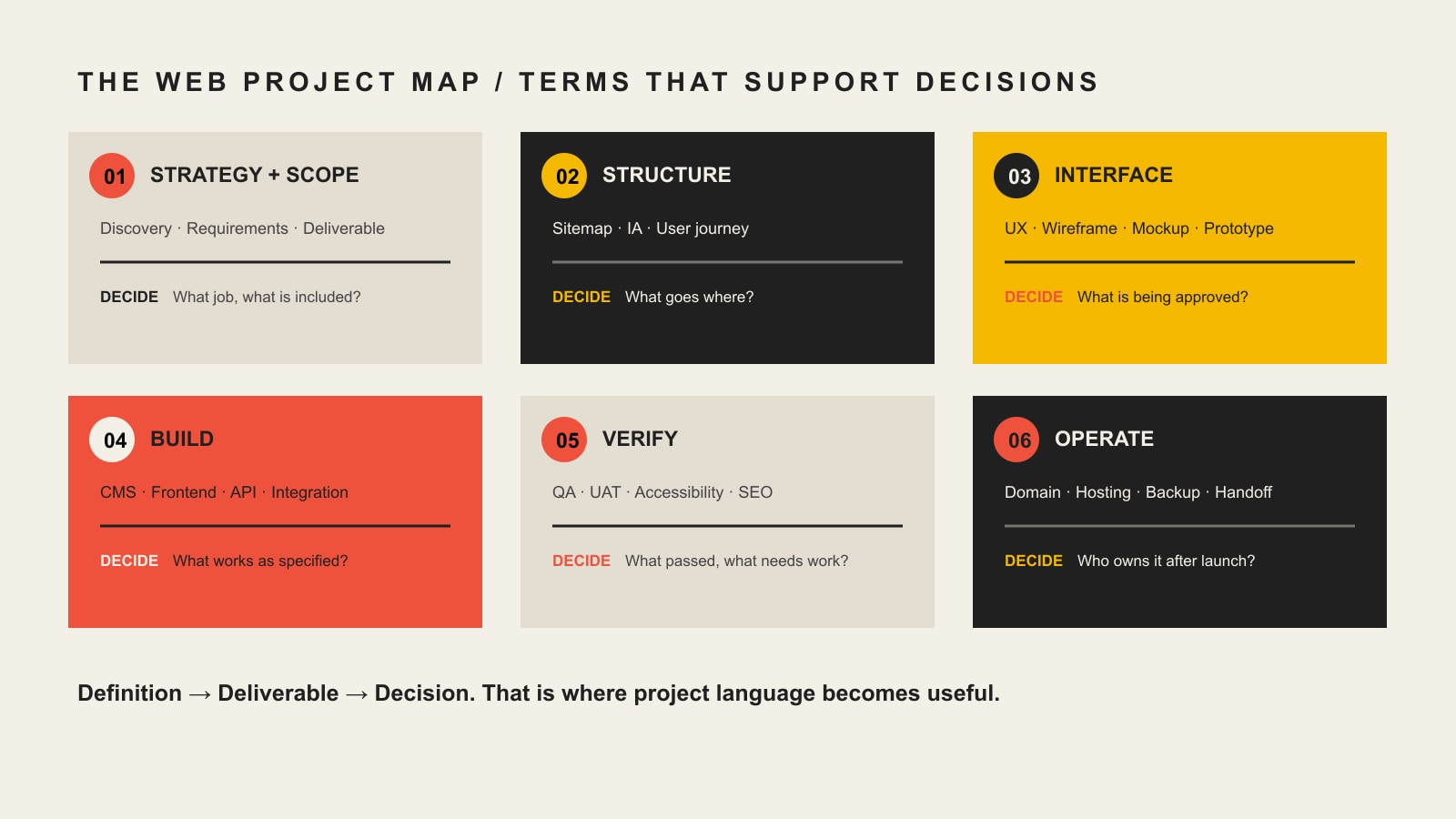
    A web project map connects strategy and scope, structure, interface, build, verification, and operation to the client decision at each stage.

    Web design terms at a glance

    Project stageTerms you may hearWhat those terms should clarify
    StrategyDiscovery, requirements, scope, deliverable, dependency, acceptance criteriaWhat problem is being solved and what is included
    StructureSitemap, information architecture, user journey, content hierarchyWhat pages and paths people need
    InterfaceUX, UI, wireframe, mockup, prototype, component, responsive designWhat you are reviewing and approving before or during build
    BuildFrontend, backend, CMS, template, API, integration, stagingWhat system makes the approved experience work
    VerificationWCAG, QA, UAT, cross-browser testing, Core Web Vitals, redirectsHow the team will prove the implementation meets the agreed requirements
    OperationDomain, DNS, hosting, admin account, license, backup, maintenance, handoffWho controls the website and what happens after launch

    Strategy and scope terminology

    Discovery

    Discovery is the work used to understand the business problem, audience, current website, constraints, evidence, content, technology, and success criteria before important design decisions are locked in. Depending on the project, discovery might include stakeholder interviews, analytics review, content inventory, technical review, audience research, competitive context, or workshop sessions.

    Ask: What exactly happens during discovery, who participates, and what decisions or documents come out of it?

    Requirements

    Requirements describe what the website must do or support. “We need a contact page” is a page request. “Qualified prospects must be able to choose a service, submit the correct project information, and route the inquiry to the right team” is closer to a functional requirement.

    Requirements can cover content, functionality, integrations, accessibility, performance, security, reporting, legal constraints, and operational needs. They create a basis for design and acceptance instead of leaving everyone to infer the job from a page count.

    Scope

    Scope is the agreed boundary of the project. It should make the included work, exclusions, assumptions, responsibilities, schedule, and change process understandable. Scope is not the same thing as a feature list. Two “10-page websites” can represent radically different amounts of strategy, copywriting, design, development, migration, testing, training, and support.

    Deliverable

    A deliverable is a concrete output the project is supposed to produce. Examples include a sitemap, copy deck, wireframe, approved design, component library, working form, CMS template, redirect map, training session, or handoff document.

    If a proposal uses a broad term such as “SEO,” “accessibility,” or “optimization,” ask what deliverables or checks are included under that label.

    Dependency

    A dependency is something another task relies on. Final page design may depend on approved copy. A payment integration may depend on credentials from your processor. Launch may depend on DNS access. Naming dependencies early makes schedule discussions more realistic.

    Change request

    A change request is a documented change to agreed scope, requirements, deliverables, or assumptions. It should explain what changed and whether the change affects cost, schedule, testing, or other work. A good change process protects both sides from silently turning a defined project into an unlimited one.

    Acceptance criteria

    Acceptance criteria describe the conditions that must be true for a deliverable or feature to be accepted. “Build a form” is vague. “The form validates required fields, sends the submission to the agreed destination, displays a confirmation, records the event in analytics, and works in the supported browsers” is testable.

    Structure and user-flow terminology

    Sitemap

    A sitemap in the planning sense is a map of the website’s pages and hierarchy. It helps the team decide what content exists, how pages relate, and what belongs in navigation. Do not confuse this planning artifact with an XML sitemap used by search engines.

    Information architecture (IA)

    Information architecture is the way information is organized, labeled, grouped, and connected so people can find and understand it. IA affects navigation, page hierarchy, labels, content relationships, and the paths users take through the site.

    User journey

    A user journey describes the steps a person may take while trying to accomplish a goal. For a service business, one journey might be: understand the service, verify fit, review proof, compare options, ask a question, and submit an inquiry. The point is not to draw a pretty diagram. It is to reveal what a visitor needs at each decision.

    Design and approval terminology

    UX and UI

    UX means user experience. It deals with how understandable, usable, efficient, and appropriate the experience is for the person trying to accomplish a task. UI means user interface. It covers the interface people see and interact with, including controls, visual hierarchy, states, components, spacing, typography, and presentation.

    They overlap, but they are not interchangeable. A beautiful interface can still produce a poor experience if users cannot find the right information or complete an important task. If you need to diagnose those problems, our UX diagnosis guide goes deeper.

    Wireframe

    A wireframe is a simplified representation of page structure and priority. It usually focuses on layout, content hierarchy, and interaction rather than final typography, color, imagery, and polish. Its job is to make structural decisions cheaper to discuss before visual detail distracts everyone.

    Mockup

    A mockup is a more visually complete representation of the intended interface. It may show real typography, colors, imagery, components, spacing, and brand treatment, but it is not necessarily interactive or implemented.

    Prototype

    A prototype simulates some part of the experience so flows and interactions can be evaluated before the full system exists. A prototype can be simple or high fidelity. It is still a model. Approving a prototype or mockup is not the same as accepting a functioning website.

    Design system and component

    A component is a reusable interface element or pattern, such as a button, card, form field, testimonial block, or navigation item. A design system organizes reusable components together with rules, tokens, patterns, and guidance so the interface can stay coherent as it grows.

    Responsive design, mobile-first, and breakpoint

    Responsive web design is an approach that allows layouts and content to adapt across different screen sizes and device conditions. Mobile-first is a way of designing or coding from a smaller-screen baseline and progressively adapting for larger screens. A breakpoint is a condition, commonly based on viewport width, where layout behavior changes.

    MDN’s responsive design guidance treats responsive design as an approach rather than a single device checklist. For a client, the important question is what responsive behavior will be tested and accepted, not whether the proposal contains the phrase “mobile-friendly.”

    Development and technology terminology

    Frontend and backend

    The frontend is the part of the website delivered to and interacted with by the user, including the rendered interface and browser-side behavior. The backend is the server-side or administrative layer that may handle data, business logic, authentication, content, integrations, or other services behind the interface.

    On many business websites, the boundary is less important to a client than the responsibility: who owns the interface, who owns data and integrations, and who fixes a problem when the two do not work together?

    CMS

    A content management system (CMS) is software used to manage website content. WordPress is a CMS. A CMS can make editing easier, but “CMS included” does not tell you how much control you will have, which content types are editable, whether custom fields exist, or how portable the site is.

    Ask: What can our team edit safely? Which roles will we have? Who holds the administrator account? What training and documentation are included?

    Template, theme, and component

    A template controls the structure for a type of page or content. A theme usually refers to a larger presentation layer or package of templates, styles, and behavior, especially in systems such as WordPress. A site can use a theme and still include original design; a theme can also impose real constraints. The useful question is what is custom, what is reusable, and what the licensing or maintenance implications are.

    API and integration

    An API, or application programming interface, is an interface that lets software interact with another system. An integration is the implemented connection that uses an API, webhook, feed, plugin, file exchange, or another method to move data or trigger behavior between systems. MDN describes an API as the interface or contract that exposes features for software interaction.

    An “API integration” line item should identify the systems involved, data or actions exchanged, authentication responsibilities, failure behavior, testing, and who maintains the connection when one platform changes.

    Staging and production

    Staging is a non-public or controlled environment used to review and test work before it affects the live website. Production is the live environment serving real users. Ask how changes move from staging to production, what gets backed up, and what the rollback plan is if a launch causes a problem.

    Domain, DNS, and hosting

    Your domain name is the human-readable address people use to reach the site. DNS is the system of records that directs that domain to services such as the website and email. Hosting is the infrastructure where the website application, files, or services run.

    These are related but separate. A provider can host your website without owning your domain. Your business should know who controls the registrar account, DNS records, hosting account, billing, recovery email, and multi-factor authentication.

    SSL certificate, HTTPS, and TLS

    You will still hear people say SSL certificate, but modern HTTPS uses TLS. HTTPS is HTTP carried over a secure TLS connection, and TLS is used to provide encryption, integrity, and server authentication. For a client, the practical concern is that HTTPS is correctly configured, renewed, monitored, and not broken by mixed content or bad redirects.

    Quality, accessibility, and measurement terminology

    Accessibility and WCAG

    Web accessibility means designing and building digital experiences so people with disabilities can perceive, understand, navigate, and interact with them. WCAG is the Web Content Accessibility Guidelines published by W3C. WCAG 2.2 is a W3C Recommendation and provides testable success criteria.

    If a proposal says “ADA compliant” or “WCAG compliant,” ask what standard and conformance target are being used, what pages or templates will be evaluated, what testing methods are included, who remediates failures, and what remains the client’s responsibility for future content.

    QA and UAT

    Quality assurance (QA) is the team’s process for checking whether the implementation works as intended and meets the agreed requirements. User acceptance testing (UAT) is the client or business-side verification that the system is acceptable for the intended real-world use before final acceptance or launch.

    They should not be treated as synonyms. QA asks whether the team built the thing correctly. UAT asks whether the delivered thing satisfies the agreed business use and acceptance criteria.

    Cross-browser and device testing

    Cross-browser testing checks behavior in the agreed browsers and versions. Device testing checks the experience across the screen sizes, input methods, and device conditions that matter to the project. “Works everywhere” is not a responsible test plan. A scope should state the supported range and how important exceptions are handled.

    Core Web Vitals

    Core Web Vitals are Google’s user-experience metrics for loading performance, responsiveness, and visual stability. The current metrics are Largest Contentful Paint (LCP), Interaction to Next Paint (INP), and Cumulative Layout Shift (CLS), as documented by web.dev.

    If performance is included in a project, ask what will be measured, under what conditions, and whether the promise concerns lab testing, real-user data, or a specific threshold. A score without context can be as misleading as a buzzword.

    SEO foundations

    SEO foundations usually refers to the technical and content setup that helps search engines discover, interpret, and present the site correctly. It can include crawl/index controls, titles and descriptions, canonical URLs, redirects, internal links, structured data, XML sitemaps, and migration checks. It is not the same as an indefinite promise to rank for competitive queries.

    Redirect

    A redirect sends an old URL to another URL. Redirect planning matters during redesigns and migrations because changing paths without a plan can break links, bookmarks, referrals, and search signals. If URLs will change, the proposal should say who inventories old URLs, creates the redirect map, implements it, and verifies the result.

    Analytics, event, and conversion

    Analytics is the measurement system used to understand activity on the website. An event is a recorded interaction or occurrence, such as a form submission, download, purchase, or qualified button click. A conversion is an action the business has decided represents meaningful progress or value.

    “Analytics installed” is not a measurement strategy. Ask which outcomes are being tracked, who owns the account, how consent requirements are handled, and what the team will verify before handoff.

    Ownership and handoff terminology

    This is where apparently small words can turn into expensive surprises. Our guide to working with a web design company covers the broader client-agency responsibility model. At minimum, understand the terms below before the final invoice or launch week.

    Administrator account

    An administrator account has elevated control over a system. Your business should know which systems require administrative access and whether a company-controlled account will exist for the domain registrar, DNS, hosting, CMS, analytics, search tools, payment services, email delivery, and other critical integrations.

    License

    A license grants permission to use software, fonts, images, plugins, themes, code, or other intellectual property under specific terms. “Included” does not always mean “owned forever.” Ask which licenses are recurring, transferable, agency-owned, client-owned, or replaced if the relationship ends.

    Source files and repository

    Source files are the editable originals used to create the delivered work. A repository is a system, commonly Git-based for code, that stores and tracks source changes. Not every simple website needs a client-managed code repository, but every client should understand what files and source materials exist, where they live, and what is transferred at handoff.

    Backup and restore

    A backup is a recoverable copy of website data or files. A restore is the tested process of returning the system to a usable state from that backup. Ask what is backed up, how often, how long copies are retained, where they are stored, and who is responsible for restoration.

    Maintenance and support

    Maintenance is planned work that keeps the website healthy over time, such as updates, backups, security work, compatibility checks, performance monitoring, and content-system care. Support usually refers to help when questions, incidents, or change requests occur. The scope should define what is included, what is billable, response expectations, and who owns urgent issues.

    Handoff

    Handoff is the transfer of the website, accounts, credentials, documentation, training, files, licenses, and operational responsibility at the end of a project or relationship. A good handoff is not “here is the login.” It is a controlled transfer that makes clear what the client now owns and what the provider still manages.

    Five web design terms people commonly confuse

    TermsPlain-English difference
    Wireframe vs. mockup vs. prototypeA wireframe emphasizes structure, a mockup emphasizes visual design, and a prototype simulates interaction or flow.
    Domain vs. DNS vs. hostingThe domain is the address, DNS directs the address to services, and hosting runs the website system.
    Responsive vs. mobile-firstResponsive is the broader adaptive approach; mobile-first starts design or implementation from smaller screens and expands upward.
    UX vs. UIUX concerns the quality of the experience and task flow; UI concerns the interface people see and operate.
    QA vs. UATQA is the delivery team’s quality verification; UAT is business-side acceptance of the delivered system for its intended use.

    Terms that should be defined in the written scope

    Some terminology is too important to leave as sales-call shorthand. When you compare proposals, require the important promises to become written responsibilities. Our full guide to choosing a web design company covers vendor evaluation in detail. For terminology, focus on whether the scope defines these items clearly:

    • Deliverables and exclusions: what is included and what is not.
    • Dependencies: what the client or a third party must provide and by when.
    • Revisions and change requests: how feedback works and when added work changes cost or schedule.
    • Acceptance criteria and UAT: how completion is judged.
    • Browser and device support: what environments are tested.
    • Accessibility target: what standard, conformance level, templates, and testing are included.
    • Performance target: what metrics are measured and under what conditions.
    • SEO and redirects: what migration or technical search work is actually included.
    • Ownership and licensing: who controls accounts, source, content, software licenses, and third-party services.
    • Handoff and training: what is transferred and how your team learns to operate it.
    • Recurring costs and support: what continues after the project and what happens if the relationship ends.

    A proposal does not become sophisticated because it uses sophisticated words. It becomes useful when important terms have enough definition that both sides can tell what will happen next.

    Questions to ask when a designer uses jargon

    • What does that term mean on this project?
    • What deliverable, behavior, account, or test proves it is included?
    • What do you need us to approve or provide?
    • Who owns this after the project ends?
    • How will we verify it before acceptance?
    • What is specifically excluded?
    • If a third-party tool changes or breaks, who is responsible?
    • Does this create a recurring license, hosting, maintenance, or support cost?

    Those questions are more useful than trying to impress a designer by repeating technical vocabulary. Good web professionals should be able to explain a decision without hiding behind terminology.

    Frequently asked questions about web design terminology

    What does web design terminology mean?

    Web design terminology is the vocabulary used to describe website strategy, structure, user experience, interface design, development, performance, testing, hosting, ownership, and maintenance. For a business owner, the useful terms are the ones that clarify what is being purchased, approved, tested, or handed over.

    What web design terms should I know before hiring a designer?

    Start with scope, deliverable, dependency, acceptance criteria, sitemap, information architecture, UX, UI, wireframe, mockup, prototype, responsive design, CMS, API, staging, domain, DNS, hosting, WCAG, QA, UAT, Core Web Vitals, administrator account, license, maintenance, and handoff. You can learn tool-specific vocabulary later if your project actually needs it.

    What is the difference between UX and UI?

    UX focuses on the quality of the user’s experience, including comprehension, navigation, task flow, and usability. UI focuses on the interface people see and interact with, such as controls, typography, spacing, visual hierarchy, and component states. Strong website work usually requires the two to support each other.

    What is the difference between a wireframe, mockup, and prototype?

    A wireframe is mainly about structure and hierarchy. A mockup is a more complete visual representation. A prototype simulates some interaction or flow. None of those automatically proves the final built website works correctly.

    Is a CMS the same thing as hosting?

    No. A CMS is software used to manage content. Hosting is the infrastructure that runs or serves the website. A WordPress website, for example, uses WordPress as its CMS while running on a hosting environment.

    Do I need to know how to code before hiring a web designer?

    No. A client does not need to become a frontend or backend developer. You should understand enough terminology to ask what is included, what is custom, what can be edited, how the work will be tested, what you will own, and what responsibilities continue after launch.

    Does “SSL certificate” still mean the same thing?

    People commonly still say “SSL certificate,” but modern secure web connections use TLS. The practical requirement is a correctly configured HTTPS connection, a valid certificate, reliable renewal, and monitoring for security or redirect problems.

    What is the difference between QA and UAT?

    QA is the delivery team’s process for finding defects and checking the implementation against requirements. UAT is the client or business-side process for confirming that the delivered website is acceptable for its intended use. Both matter, and neither should be replaced by a quick visual review.

    Know enough lingo to make better decisions, not to play designer

    The goal of learning web designer lingo is not to micromanage the people you hire. It is to recognize when an important promise is specific enough to approve and when it still needs a definition.

    Use the Definition → Deliverable → Decision test whenever a proposal or project conversation becomes fuzzy. If a term cannot be connected to a concrete output, behavior, account, test, responsibility, or owner, keep asking questions.

    If you want a web team that explains the work in business language and makes responsibilities explicit, talk with Scope Design about your website project.

  • How to Work With a Web Design Company Without Derailing the Project

    How to Work With a Web Design Company Without Derailing the Project

    Working with a web design company goes well when the client owns the business truth, timely decisions, factual approval, and control of critical accounts while the agency owns discovery, professional recommendations, project leadership, design, development, testing, and a usable handoff. Shared decisions—priorities, tradeoffs, scope changes, and launch readiness—need one named final owner. If “everyone” owns an approval, congratulations: nobody does.

    TL;DR: Do not arrive with a homemade sitemap, a preselected tech stack, and pixel instructions for a problem nobody has diagnosed. Bring the business facts, customer evidence, proof, access, constraints, and a decision-maker. Require the agency to lead the professional method, document responsibilities, explain tradeoffs, and prove what it delivered. Every dependency needs an owner, an input, a due point, and a stated consequence if it moves.

    This guide begins after provider selection. If you are still comparing agencies, use our guide to choosing a web design company without getting trapped. If you are trying to understand the full buying journey, start with how to create a business website without buying the wrong thing.

    Reviewed: August 2026. Conceptual review cadence: annually, or sooner if Scope Design changes its delivery process or standard project documents.

    “Good collaboration” is too vague to run a website project

    Nearly every agency promises collaboration. So do group projects where one person does all the work and four people change the font at the end.

    The problem is not whether people are friendly, responsive, or invited to meetings. The problem is whether the next consequential item has a clear owner. Website projects stall when content is “being worked on,” access is “with IT,” approval is “circulating,” and a new feature is “probably included.” Those phrases are project purgatory wearing business casual.

    A functioning relationship answers more useful questions:

    • Who owns the business decision?
    • Who owns the professional recommendation?
    • What evidence or access is required?
    • Who can approve the answer?
    • When is that decision needed?
    • What changes if it arrives late?
    • How will the team know the work is accepted?

    This is not bureaucracy for its own sake. It is how both parties avoid paying for confusion twice.

    Use the Scope Design No-Limbo Project Map

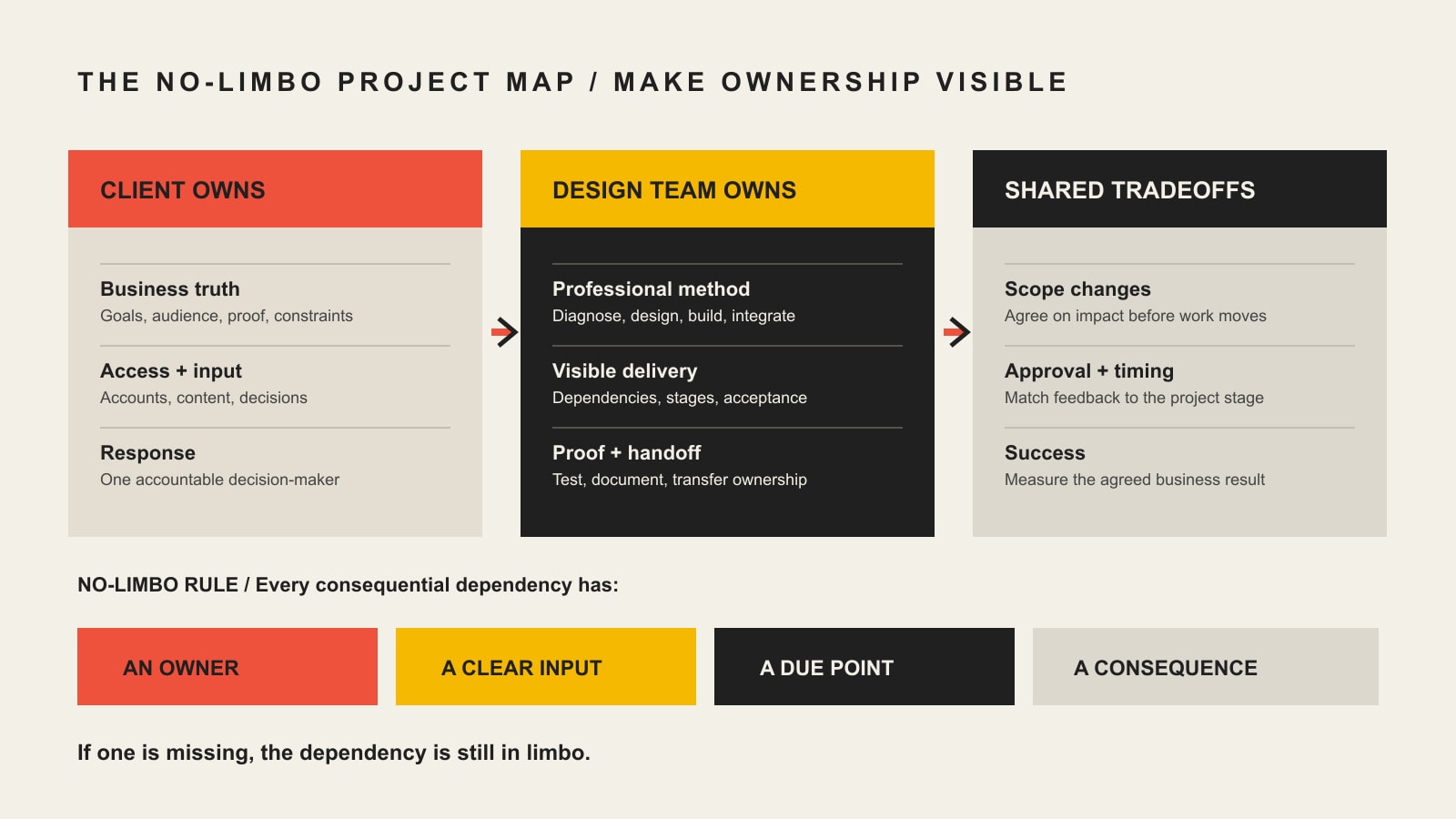
    The Scope Design No-Limbo Project Map gives every important dependency four fields:

    1. Owner: one primary person accountable for moving it.
    2. Input: the evidence, access, content, or decision required.
    3. Due point: when it must arrive relative to the next dependent task.
    4. Consequence: what changes in scope, schedule, cost, or acceptance if it moves.
    A project map showing what the client owns, what the design team owns, shared tradeoffs, and the owner, input, due point, and consequence needed for each dependency.
    Every consequential dependency needs an owner, an input, a due point, and a consequence.

    The key word is primary. Several people may contribute. One person still needs authority to move the item. W3C’s draft Accessibility Roles and Responsibilities Mapping decision tree uses a similar distinction: one primary owner is accountable while secondary owners and contributors support the task. The guidance is specific to accessibility, but the ownership principle travels well.

    Responsibility lanePrimary ownerSupporting roleAcceptance question
    Business truthClientAgency investigates and challenges assumptionsIs this accurate, authorized, and commercially meaningful?
    Professional methodAgencyClient supplies constraints and contextIs the recommendation defensible and inside the agreed scope?
    Content truth and rightsClient unless production is scopedAgency structures, edits, or produces as contractedIs every claim accurate and every asset permitted for use?
    UX, design, and technical executionAgencyClient provides business and user evidenceDoes the work solve the approved problem and meet the acceptance criteria?
    Accounts and accessClient owns; agency accessesBoth follow security and handoff rulesCan the business operate the asset and replace the provider?
    Tradeoffs and scope changesShared, with one named business approverAgency explains effect on solution, cost, and timingWas the changed decision documented before work continued?
    Launch and handoffAgency proves delivery; client accepts business readinessBoth resolve defects and assign operationsAre ownership, training, documentation, support, and ongoing care explicit?

    The map is deliberately not “client owns the what; agency owns the how” in every situation. That shorthand is useful, but reality has seams. A client owns its pricing and legal claims. An agency should still challenge whether the information is clear. The agency owns the interaction design. The client should still flag that a proposed workflow contradicts how customers actually buy. Shared context does not require shared ambiguity.

    What should the client prepare before kickoff?

    You do not need to do the agency’s job before the agency begins. If you could correctly diagnose the problem, map the experience, write the content, design the interface, select the technology, and test the result alone, hiring the agency would be an oddly expensive social event.

    You do need to bring the things only the business can supply.

    A business result, not merely a page request

    Explain what needs to change in the business and why it matters now. “We need a new homepage” describes a deliverable. “Qualified prospects cannot tell which service fits them, and sales keeps re-explaining the same distinctions” describes a useful problem.

    Bring whatever baseline is available:

    • current inquiries, sales stages, or booked appointments;
    • important entry pages and traffic sources;
    • common customer questions and objections;
    • services or products the business wants to prioritize;
    • operational steps after a visitor acts;
    • known technical, legal, timing, or staffing constraints;
    • what has already been tried and what happened.

    Do not invent precision because the analytics are thin. Five useful sales-call observations can be more honest than a dashboard nobody trusts.

    Our constraint-first website strategy guide explains why the requested deliverable is not automatically the real constraint.

    Business facts and proof

    The agency cannot manufacture the truth of your business. Prepare source material for:

    • services, products, pricing context, and geographic availability;
    • process, timing, limitations, and right-fit or wrong-fit conditions;
    • qualifications, licenses, awards, and affiliations that can be verified;
    • case studies, testimonials, outcomes, and permission to use them;
    • team, location, contact, support, and policy information;
    • existing photography, video, diagrams, documents, and brand assets;
    • legal or compliance requirements identified by qualified advisors.

    The material does not need to be pretty. It needs to be real. A chaotic folder of source documents can be organized. A beautiful claim with no evidence is just well-dressed bullshit.

    An honest inventory of systems and access

    List the systems the website touches: domain registrar, DNS, hosting, CMS, email, forms, CRM, scheduling, payments, analytics, search tools, advertising platforms, product data, inventory, customer portals, or legacy databases.

    For each system, identify:

    • the business owner;
    • the current administrator;
    • whether access still works;
    • what data enters and leaves;
    • whether the system must remain, migrate, or retire;
    • known vendors, renewals, licenses, and dependencies.

    Do not paste a password spreadsheet into ordinary email. Use controlled access, delegated roles, or a secure credential-sharing method appropriate to the system. The client should generally keep ownership of critical accounts while granting the agency the access required to do the work.

    One accountable decision-maker

    Stakeholders can contribute expertise. They do not all need veto power over every heading, color, and form label.

    Choose one person who can:

    • consolidate internal feedback;
    • distinguish mandatory requirements from preferences;
    • resolve contradictory stakeholder requests;
    • approve scope, content, direction, and launch;
    • understand the effect of a late decision.

    The executive who appears for the first time at final review and overturns three months of approved work is not adding strategic oversight. They are becoming an undocumented project dependency with excellent timing.

    Real internal capacity

    Name the people who will attend discovery, locate records, review content, answer specialist questions, test workflows, and approve milestones. Put that work on their calendars.

    The business does not need to be available every hour. It does need to be available when the project reaches a decision only the business can make. A deadline agreed by someone with no internal time is decorative.

    What should the web design company own?

    Client preparation does not excuse agency passivity. “Send us everything and tell us what you want” is not a professional process. It is order-taking with a mood board.

    Diagnose before prescribing

    The agency should turn the business problem into a testable project definition. That means examining the audience, offer, evidence, workflows, content, current performance, technical environment, constraints, and post-launch ownership before locking in the solution.

    It should be willing to say that the requested feature is not the first thing to build. Our strongest real projects have become clearer when discovery exposed operational dependencies beneath the visible website request. That is not scope inflation. Done responsibly, it is the difference between solving the system and decorating the symptom.

    Define deliverables, dependencies, and acceptance

    The agency should state:

    • what is included and excluded;
    • what each phase produces;
    • what the client must supply;
    • which assumptions affect the estimate;
    • how review and approval work;
    • what counts as a revision or scope change;
    • how delays affect the schedule;
    • how the work will be tested;
    • what “accepted” means;
    • what the client receives at handoff;
    • what happens after launch.

    The AIGA Standard Form of Agreement for Design Services is useful professional context because it separates proposal-specific terms, client responsibilities, deliverables, reusable designer tools, intellectual-property options, and discipline-specific terms. It is a starting point, not personalized legal advice. Significant agreements deserve review by qualified counsel.

    Lead the professional method

    The agency should recommend the information structure, user journeys, content approach, visual system, technology, accessibility practices, performance requirements, test plan, and release method appropriate to the approved problem.

    It should explain tradeoffs in business language. “We chose this because users need X and the system must support Y” is useful. “This is the trend now” is not a reason; it is a weather report from Dribbble.

    Run a visible project

    The agency should make the current stage, next decision, open dependencies, and schedule effect understandable. That does not require twenty-seven dashboards. It requires one reliable source of truth and communication people will actually use.

    A reasonable process includes:

    • a kickoff tied to the signed scope;
    • named contacts and decision rights;
    • a shared place for approved files and feedback;
    • milestone presentations with specific review questions;
    • written decisions and changes;
    • early warnings when an input threatens the schedule;
    • a clear route for urgent issues;
    • launch and handoff criteria.

    Prove the work before calling it done

    The agency should test what it built. The exact plan depends on the site, but it commonly includes responsive layouts, key browsers, navigation, forms, email delivery, integrations, accessibility, search controls, analytics, redirects, content accuracy, performance risks, permissions, backups, and rollback readiness.

    W3C’s planning guidance for web accessibility recommends documenting goals, scope, responsibilities, resources, acceptance testing, milestones, and ongoing monitoring. Accessibility is not one line the client can assume the developer “handled.” Its design, content, development, testing, procurement, and ongoing publishing responsibilities need owners.

    How should client and agency decisions work together?

    Some decisions cannot be thrown over the wall in either direction.

    DecisionClient contributionAgency contributionFinal authority
    Business priorityRevenue, operational, customer, and organizational contextDiagnosis, feasibility, dependency, and risk analysisNamed client decision-maker
    Messaging claimFactual truth, proof, permission, and business commitmentClarity, hierarchy, positioning, and user interpretationClient approves truth; agency owns execution if scoped
    UX directionReal customer behavior, exceptions, and operational realityResearch, architecture, interaction design, and validationAgency within scope; client approves material business tradeoffs
    Visual directionBrand truth, audience context, and constraintsVisual system, accessibility, responsive behavior, and craftAgency within approved direction
    TechnologyExisting systems, internal capacity, ownership needs, and budgetArchitecture, integration, security, maintainability, and portability analysisShared business decision after agency recommendation
    Scope changeNew need, changed priority, or newly discovered constraintImpact on solution, cost, schedule, risk, and existing workClient approves change before work proceeds
    LaunchBusiness readiness, staffing, policies, and final factual approvalQA evidence, migration plan, rollback plan, and technical readinessNamed launch owner using agreed criteria

    The agency is not entitled to make unapproved business commitments. The client is not entitled to overrule professional decisions without understanding the consequence. Either party can say no. Both should be able to explain why.

    How to give design feedback without becoming the designer

    Open Brain contains a simple design feedback loop adapted from progressive-design material:

    1. Present the work.
    2. Gather directed feedback.
    3. Interpret what the feedback means.
    4. Decide what to change.
    5. Iterate.

    The crucial distinction is that the client gives business and user feedback. The designer translates that feedback into design decisions.

    Describe the problem you see

    Useful feedback sounds like:

    • “Our highest-margin service feels secondary, but it is the main reason we are investing.”
    • “Customers use these two terms interchangeably, so this label may confuse them.”
    • “The people approving a purchase need the certification before they will contact us.”
    • “Most customers call from the job site; this action needs to work without completing a long form.”

    Less useful feedback sounds like:

    • “Make it pop.”
    • “Can we make the logo bigger?”
    • “I don’t like that blue.”
    • “Move this three pixels left.”
    • “My spouse prefers the competitor’s homepage.”

    Preferences are allowed. Just label them as preferences. A personal reaction should not impersonate user research or a business requirement.

    Match feedback to the stage

    Early concept review should ask whether the team is solving the right problem and exploring the right direction. Wireframe review should focus on hierarchy, content, tasks, and flow. Visual review should evaluate brand fit, clarity, consistency, responsive implications, and accessibility. Functional review should test real tasks and edge cases.

    Reopening the entire strategy during final visual polish is expensive. Arguing about button radius during discovery is merely adorable.

    Consolidate before sending

    The client should resolve internal contradictions before handing feedback to the agency. If sales wants prominent pricing and leadership refuses to discuss price, the designer cannot fix the organizational disagreement with typography.

    Send one review containing:

    • mandatory factual or legal corrections;
    • unmet requirements;
    • user or operational evidence;
    • business-priority concerns;
    • clearly labeled preferences;
    • the final decision where stakeholders disagreed.

    Explain why

    “Change the headline” is an instruction. “The headline implies this is only for enterprise buyers, but most qualified customers are regional owner-led firms” gives the agency a problem it can solve.

    The why protects the project from blindly implementing a symptom.

    Does all website content need to be finished before design starts?

    No. It does need an owner, a production plan, and enough real substance to shape the experience.

    Early discovery and structural work can begin before every sentence is polished. The team still needs to understand:

    • the main claims and offers;
    • the audiences and decisions;
    • the content types and approximate volume;
    • available proof;
    • key actions and workflows;
    • required legal or policy material;
    • who writes, reviews, and approves each item.

    Designing an entire site around lorem ipsum and pouring real content into it at the end is how teams discover that the actual business has inconvenient things such as explanations, tables, exceptions, and customers.

    Content responsibility should be explicit:

    Content taskPossible ownerMust be settled
    Business facts and claimsClientAccuracy, evidence, authorization
    Content strategy and hierarchyAgency if scopedAudience, intent, page job, narrative order
    CopywritingClient, agency, or specialistDeliverables, interviews, revision rounds, approvals
    Photography and videoClient, agency, or specialistShot list, rights, formats, accessibility alternatives
    Product or service dataClientSource of truth, completeness, update method
    Policies and regulated languageClient with qualified advisorRequired language and final approval
    CMS entry and migrationAgency or client as scopedVolume, formatting, cleanup, redirects, QA
    Final proofreadingClient and agency roles defined in scopeFactual, editorial, visual, and functional checks

    The business remains accountable for the truth and rights behind what it publishes even when the agency writes or edits the material.

    Who should own the domain, hosting, CMS, and source files?

    The business should generally control the domain registration and have appropriate ownership or administrative control of hosting, CMS, analytics, search, email, and other critical business accounts. The agency should receive the access needed to perform its work, not become the only human who can reach the fuse box.

    Ownership is more specific than “we paid for the website.” Separate:

    1. Client materials: the client’s existing brand, copy, photographs, data, trademarks, and supplied assets.
    2. Final deliverables: the specific designs, code, content, or configured system the agreement says the client receives.
    3. Reusable agency tools: frameworks, libraries, processes, utilities, and pre-existing components that may remain the agency’s intellectual property.
    4. Third-party materials: fonts, stock media, plugins, themes, software services, and other items governed by separate licenses.
    5. Working or source files: design files, drafts, repositories, raw production assets, and intermediate work that should be named explicitly rather than assumed.

    An AIGA Los Angeles source-file explainer makes the practical point: finished work and source files are not automatically the same deliverable, so expectations should be discussed early and written clearly. Again, this is general business context, not a substitute for legal advice.

    Our small-business website cost guide explains why ownership and exit terms belong in the cost comparison, not in a surprised email three years later.

    What happens when feedback is late or the scope changes?

    First: changes happen. Discovery can uncover a requirement nobody knew existed. The business can change priorities. A vendor can alter an integration. A regulator can ruin everyone’s afternoon. The goal is not to pretend change is a moral failure.

    The goal is to stop pretending change has no effect.

    A late dependency moves dependent work

    If approved content is required before page production, a content delay affects page production. If access is required to investigate an integration, the estimate may remain conditional until access exists. If the only decision-maker disappears for three weeks, the project cannot magically preserve the same delivery sequence by glaring at the calendar.

    The agency should identify the effect promptly. The client should not expect the agency to hide the delay by compressing QA or displacing other committed work.

    A scope change deserves a written decision

    A request may be small to say and large to implement. “Can customers just log in?” can introduce account security, password recovery, permissions, privacy, data, email, support, testing, and maintenance. The number of words in the request is not the unit of scope.

    For a proposed change, document:

    • the new or changed requirement;
    • why it is needed;
    • effect on current work;
    • cost and schedule effect;
    • new dependencies or risks;
    • what is removed, deferred, or added;
    • who approved the change.

    No agency should quietly perform substantial unplanned work and unveil the invoice later. No client should expect consequential added work to materialize from the phrase “while you’re in there.”

    What should you expect during the website project?

    The exact phases vary, but a responsible project usually makes these jobs visible.

    Discovery and definition

    The team defines the business problem, audiences, evidence, current environment, requirements, constraints, ownership, measurement, and acceptance boundary. The output should be a clearer decision—not just meeting notes and a strangely confident sitemap.

    Content and information planning

    The team inventories current material, identifies missing proof, maps user questions and tasks, defines content ownership, and creates an information structure based on the real material.

    UX and visual direction

    The agency develops journeys, wireframes, components, interaction patterns, and a visual system. Reviews use stage-appropriate questions. Approvals are documented before dependent work proceeds.

    Development and integration

    The agency implements the approved system, migrates or enters scoped content, configures integrations, and tests assumptions against real data and workflows. Newly discovered requirements enter change control rather than sneaking into the build under a trench coat.

    Quality assurance and acceptance

    The team tests agreed requirements and critical tasks. The agency resolves implementation defects. The client verifies business facts, permissions, operational fit, and acceptance conditions. Testing is not a final scavenger hunt performed the night before launch.

    Launch and handoff

    The team confirms backups, migration, redirects, forms, notifications, analytics, search controls, accounts, documentation, training, support, and rollback readiness. The client knows who owns post-launch monitoring and maintenance.

    To understand all the disciplines a complete build may include, use our guide to what website design actually includes.

    Website project kickoff checklist

    Use this before work begins. It is a conversation tool, not a substitute for a project-specific scope.

    Business and audience

    • ☐ The business outcome and current constraint are stated in plain language.
    • ☐ Primary audiences, buying context, and critical user tasks are identified.
    • ☐ Existing evidence, analytics, sales feedback, and known limitations are available.
    • ☐ Success and acceptance are defined without invented precision.

    People and decisions

    • ☐ One client decision-maker has final approval authority.
    • ☐ Specialist reviewers and their review stages are named.
    • ☐ Feedback will be consolidated before it reaches the agency.
    • ☐ Review windows and delay consequences are understood.

    Content and proof

    • ☐ Every content type has a writer, source, reviewer, and due point.
    • ☐ Claims, testimonials, case studies, and assets have evidence and permission.
    • ☐ Content volume and migration assumptions are visible.
    • ☐ Legal and regulated material has an appropriate qualified owner.

    Technology and access

    • ☐ Domains, hosting, CMS, email, analytics, integrations, and data sources are inventoried.
    • ☐ The business knows which accounts it owns.
    • ☐ Access can be granted securely and removed after the project.
    • ☐ Existing data, exports, and representative samples are available where needed.

    Scope and delivery

    • ☐ Deliverables, exclusions, assumptions, and dependencies are written.
    • ☐ Revision rounds and change control are defined.
    • ☐ Testing and acceptance responsibilities are clear.
    • ☐ Handoff, training, warranty, support, maintenance, and recurring costs are named.

    If half this list produces blank stares, pause. A kickoff meeting is not holy water. It will not bless missing ownership into existence.

    Frequently asked questions about working with a web design company

    What should I prepare before starting with a web design company?

    Prepare the business outcome, audience context, customer questions, current evidence, services and pricing facts, proof, brand assets, content sources, system inventory, required access, internal stakeholders, one decision-maker, and realistic availability. Do not predesign the solution unless the agency specifically asks for a bounded input.

    Do I need all website copy finished before design starts?

    No. Discovery, content strategy, and structural design can begin before every sentence is final. The team still needs the main claims, proof, content types, approximate volume, required functionality, and a clear writing and approval plan. Detailed page design should not proceed indefinitely against imaginary content.

    Who should write the website content?

    The client, agency, or a specialist can write it. The scope should name who owns strategy, interviews, drafting, editing, SEO research, approvals, CMS entry, and final proofreading. Regardless of who writes, the business must approve factual claims and confirm rights to supplied material.

    How involved should a client be in website design?

    The client should be deeply involved in business truth, customer context, constraints, evidence, tradeoffs, and approvals. The agency should lead UX, visual, content, and technical methods within its scope. Involvement is valuable; directing every pixel is not the same thing.

    How should I give feedback to a web designer?

    Describe the business or user problem, provide evidence or context, distinguish requirements from preferences, explain why the issue matters, and consolidate stakeholder input. Let the designer translate the problem into design changes. Match feedback to the stage instead of reopening strategy during final polish.

    How many people should approve a website design?

    One person should hold final approval authority, even when several specialists contribute. Legal, sales, operations, marketing, accessibility, or executive reviewers may be necessary, but their roles and review stages should be defined. Multiple uncoordinated final approvers create contradictory direction and rework.

    What happens if the client misses a feedback deadline?

    The dependent work and delivery sequence may move. The scope should explain review windows, hold or rescheduling rules, cost consequences, and how work restarts. The agency should communicate the effect promptly rather than silently compressing testing or other obligations.

    What counts as a website scope change?

    A scope change alters agreed deliverables, requirements, content volume, pages or templates, functionality, integrations, revision rounds, acceptance criteria, schedule, or responsibilities. The agency should explain the effect and receive written approval before performing consequential added work.

    Who should own the domain, hosting, CMS, and analytics accounts?

    The business should generally retain ownership or appropriate administrative control of critical accounts. The agency should receive necessary access with sensible security and return or remove that access at handoff. Ownership, billing, renewals, and exit procedures should be documented.

    Does paying for a website mean I own every source file and tool?

    Not automatically. Client materials, final deliverables, reusable agency tools, third-party licensed components, and working/source files can have different ownership or license terms. The agreement should identify what transfers, what is licensed, what remains with the agency, and what third-party rules apply. Obtain legal advice for consequential agreements.

    How many website design revisions are reasonable?

    The right number depends on the project’s complexity, review stages, and how clearly decisions are made. Defined rounds with directed, consolidated feedback are usually more useful than “unlimited revisions,” which often leaves the acceptance boundary undefined. The scope should say what a revision includes and what reopens approved work.

    What should be included in a website handoff?

    Include the deliverables promised in the agreement, account and access status, administrator roles, documentation, training, licenses, third-party dependencies, backups, analytics and search access, source or working files if contracted, known issues, warranty terms, maintenance responsibilities, and a process for removing unnecessary agency access.

    How long does a website project take?

    It depends on the number of unique decisions, content readiness, stakeholders, integrations, data migration, accessibility and compliance requirements, review cycles, testing, and launch risk. Page count alone is a poor schedule model. The useful timeline identifies dependencies and decision points instead of promising a universal number.

    A good web design company should make the relationship clearer

    The client should not outsource accountability for its business, claims, decisions, or accounts. The agency should not outsource professional leadership back to the client.

    The healthy middle is not mushy “collaboration.” It is explicit ownership with useful communication: the client brings truth, evidence, access, and decisions; the agency brings diagnosis, method, execution, testing, and handoff; both document the tradeoffs that change the project.

    That is how you avoid project limbo, committee-designed oatmeal, and the final-week discovery that nobody knows who owns the domain.

    If your website project is still a vague pile of pages, features, and stakeholder opinions, talk with Scope Design. We can help diagnose the actual job, define responsibilities, and turn the work into a project someone can responsibly approve and operate.

  • Social Media Conversions: 15 Strategies to Turn Traffic Into Revenue

    Social Media Conversions: 15 Strategies to Turn Traffic Into Revenue

    Social media conversions improve when the entire path stays aligned: the right person sees a relevant promise, lands in a place that continues that promise, gets enough proof to act, completes a useful next step, and then becomes a qualified business outcome. If one handoff breaks, sending more traffic usually amplifies the waste.

    That is why this guide does not start with a universal “good conversion rate” or a list of platform tricks. A click, form fill, booked call, purchase, and qualified opportunity are different outcomes. They also come from audiences with different intent. The practical job is to find the first weak handoff between social traffic and revenue, fix it, and only then scale what is working.

    What Counts as a Social Media Conversion?

    A social media conversion is a defined action that happens after a social touchpoint and moves someone toward a business objective. Depending on the business, that could be a purchase, qualified inquiry, booked appointment, estimate request, trial signup, lead form, or another meaningful next step.

    The important distinction is that a recorded conversion is not automatically a valuable conversion. A campaign can generate cheap form submissions while sales receives people who are outside the service area, cannot afford the offer, or never respond. It can also generate fewer leads that are much more likely to buy. The dashboard alone cannot tell you which outcome is better.

    Use an outcome ladder instead: social touchpoint → visit or click → on-site action → lead → qualified lead → opportunity or booking → customer or purchase. Measure the earliest steps for diagnosis, but optimize toward the last meaningful business outcome you can reliably observe.

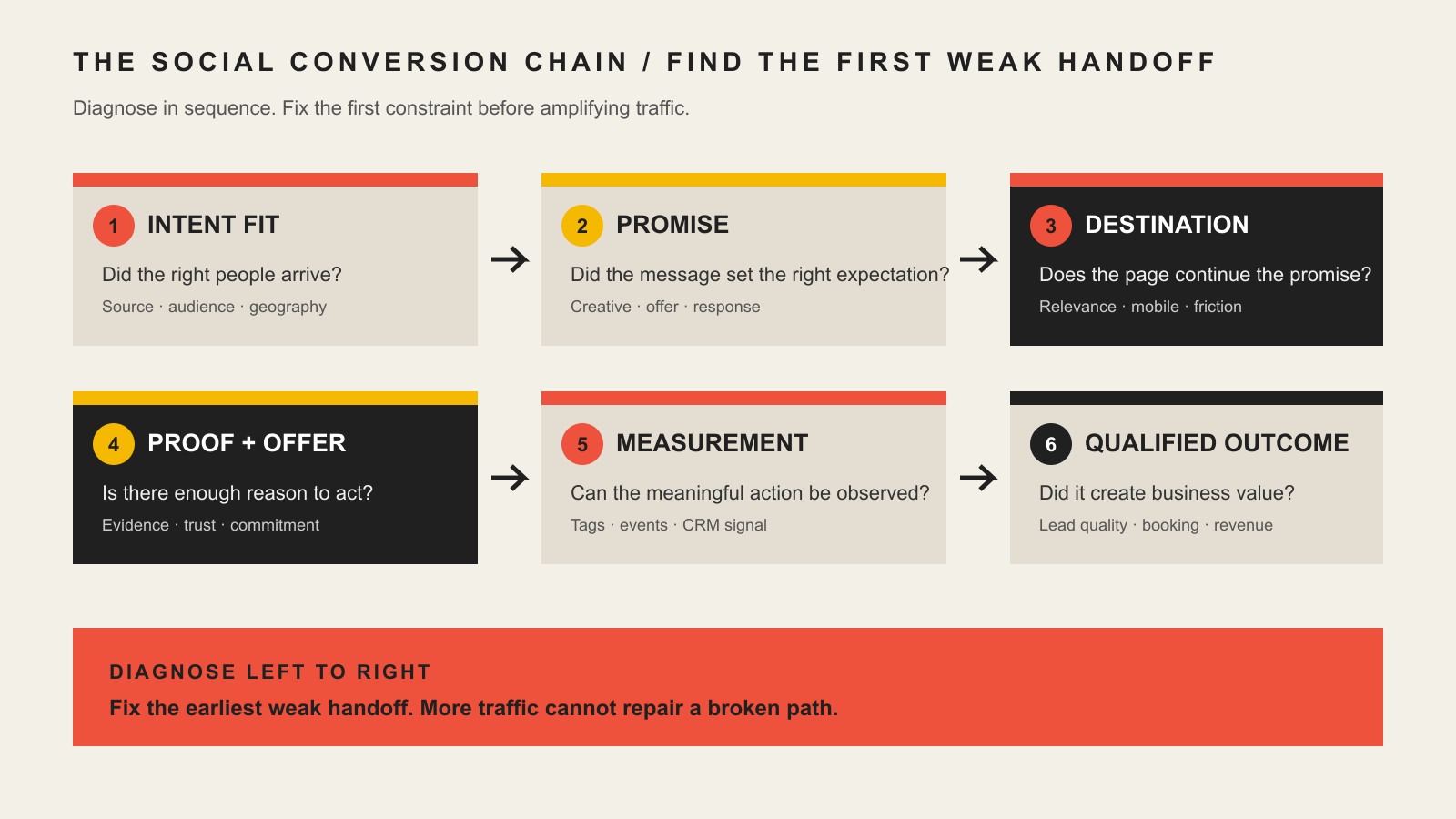
    The Social Conversion Chain: Find the First Broken Handoff

    Scope Design uses a constraint-first approach to conversion work. The broader website strategy and conversion framework starts with the objective, identifies the actual constraint, and only then chooses tactics. For social campaigns, that becomes a six-handoff diagnostic we call the Social Conversion Chain.

    Six social conversion handoffs from audience intent and campaign promise through the destination, proof, measurement, and qualified business outcome.
    HandoffQuestion to AskUseful Evidence
    1. Intent fitDid the right people arrive?Source, campaign, placement, geography, audience, lead quality
    2. Campaign promiseDid the creative attract the intent you wanted?Hook, offer, CTR, comments, search/DM language, audience response
    3. Destination and pathDoes the next page continue the promise and make the task easy?Landing behavior, mobile usability, form errors, abandonment, page relevance
    4. Proof and offerIs there enough reason and trust to act now?Offer clarity, objections, reviews, examples, process, pricing context
    5. Measurement signalCan the important action be observed accurately enough to manage?UTMs, key events, platform events, CRM fields, booking/order records
    6. Qualified outcomeDid the conversion create business value?Qualified leads, opportunities, booked work, customers, revenue, margin

    The order matters. If targeting is attracting the wrong people, changing a button color will not fix the campaign. If the page breaks on mobile, more retargeting just brings people back to the same broken path. If lead volume looks healthy but none of the leads qualify, reducing form friction further may make the business result worse.

    15 Strategies to Improve Social Media Conversions

    1. Define the Business Outcome Before You Pick the Tactic

    Start by naming the business outcome the campaign should influence. “Get more engagement” is not specific enough. “Generate qualified estimate requests from homeowners in our service area” is much more useful because it tells you what traffic, offer, page, fields, follow-up, and measurement actually matter.

    Then identify the last meaningful outcome the campaign and website can influence. For ecommerce, that may be a purchase. For a high-consideration service, it may be a qualified consultation or booked assessment. Revenue still matters, but blaming every upstream channel for every downstream sales variable creates bad optimization decisions.

    2. Verify Tracking Before You Optimize Performance

    If source or conversion tracking is broken, every later diagnosis gets weaker. Use a consistent naming convention for campaign URLs and verify that the important event actually fires. Google Analytics documents manual UTM tagging as a way to populate dimensions such as source, medium, campaign, term, and content. That makes campaign comparisons more useful, but it does not turn attribution into perfect truth.

    Test the full path yourself: click the tagged social link, load the correct destination, complete the conversion, confirm the event appears, and verify the source/campaign data reaches the reporting system you intend to use. For lead generation, also confirm that campaign/source data can survive into the CRM, booking tool, or sales record when that information is important to qualification.

    3. Segment Social Traffic by Source, Campaign, and Intent

    Do not blend all social traffic into one conversion rate. Paid retargeting, cold prospecting, an organic educational post, a creator mention, and a direct-message link can produce completely different intent. Combine them and you can hide both the strong segment and the broken one.

    At minimum, compare source/platform, paid versus organic, campaign, destination, and the downstream quality of the conversion. When volume allows, add audience, placement, creative, geography, or offer. The goal is not to build a beautiful dashboard; it is to discover where intent changes enough that the conversion path should change too.

    4. Match the Campaign Promise to the Destination

    A social ad or post creates a promise before the click. The destination should immediately continue it. If the creative promotes a specific service, pricing idea, checklist, product, or result, the next page should not make the visitor hunt through a generic homepage to find that context again.

    Repeat the important language, preserve the offer, and answer the next logical question. This does not mean duplicating the ad word for word. It means keeping the mental thread intact. If the destination itself needs deeper work, use our guide to landing page conversion optimization for the page-level implementation.

    5. Give Each Destination One Clear Job

    A conversion page can contain navigation, supporting information, and multiple ways to learn more, but the primary task should be obvious. A visitor should be able to answer three questions quickly: “Am I in the right place?”, “What should I do next?”, and “Why is that next step worth doing?”

    For high-intent campaign traffic, a focused service or offer page often works better than a generic destination because it can preserve the campaign context. But there is no rule that every social click needs a standalone landing page. If the homepage or product page genuinely supports the same task and intent, use it. The job determines the page—not a template.

    6. Remove Unnecessary Friction Without Removing Useful Qualification

    Friction is not automatically bad. A confusing form, broken validation, unclear CTA, forced account creation, irrelevant field, or poor mobile input is waste. A field that helps determine service area, project type, timing, budget fit, or another legitimate qualification factor may save everyone time.

    So do not shorten forms just because “fewer fields convert better.” Ask which information is necessary before the next step and which information can wait. The right form is the shortest form that still supports the business process and the visitor’s decision.

    7. Put Proof Where the Visitor Becomes Uncertain

    Proof works best when it resolves a real question. Near a service claim, show an example or result that demonstrates the capability. Near a purchase decision, show relevant reviews, guarantees you can actually honor, delivery details, or product evidence. Near a consultation CTA, explain what happens after submission so the visitor is not stepping into a mystery.

    A wall of logos or testimonials cannot rescue a weak offer by itself. Use genuine evidence, not manufactured scarcity or fake urgency. The goal is to reduce justified uncertainty, not pressure somebody into a conversion they will regret.

    8. Match the Offer to the Traffic Temperature

    Cold social traffic may recognize a problem without being ready to buy. Warm retargeting traffic may already understand the offer. Existing customers may need almost no education. Asking every audience for the same commitment can make a good campaign look broken.

    For lower-intent audiences, the best next step might be a useful comparison, diagnostic, guide, sample, calculator, or low-risk consultation. For high-intent audiences, hiding the purchase, booking, pricing, or estimate path behind unnecessary education can add friction. Match the commitment to the evidence that the visitor already has.

    9. Choose Native Lead Forms Versus Website Conversion Deliberately

    Native platform lead forms can reduce steps because the visitor does not need to leave the social app. A website destination can provide more context, qualification, proof, and control over the experience. Neither is universally better.

    Judge the choice on downstream quality, not raw cost per lead. Compare completion rate, valid contact rate, qualification rate, sales follow-up, booked opportunities, and customer value. A form that produces twice as many names is not a win if the added names never become viable prospects.

    10. Design the Conversion Path for Mobile Reality

    Social traffic frequently arrives in an in-app browser on a phone, so test the actual mobile path—not just the desktop page in a narrow browser window. Check tap targets, sticky elements, form keyboards, autofill behavior, error messages, page speed, cookie notices, payment or booking widgets, and whether the CTA remains understandable after a few swipes.

    Pay special attention to embedded tools. A booking calendar, chat widget, financing application, or form can look fine on the page while creating the real failure point on mobile. Complete the task on a real device and on the same path a social visitor would use.

    11. Measure Lead and Customer Quality After the Form

    A social conversion system becomes much more useful when marketing can see what happened after the form. For lead generation, connect campaign/source data to statuses such as valid lead, qualified lead, booked appointment, proposal, won customer, or disqualified reason. For ecommerce, connect campaign analysis to orders, revenue, returns, repeat purchase, or margin where practical.

    For Meta campaigns, Meta’s Conversions API documentation describes a direct connection between marketing data and Meta’s systems that can include website, app, offline, messaging, and CRM-related events. That can strengthen the signal available for measurement and optimization. It still does not make attribution perfect. For Meta-specific campaign implementation, see our Facebook ads optimization guide.

    If the campaign is creating healthy attention and leads but those people fail to become customers, the bottleneck may have moved downstream. That is the job of the follower-to-customer handoff, not more campaign tweaking.

    12. Judge Channel Economics Beyond CTR and CPC

    CTR and CPC are diagnostic metrics. They can tell you whether a creative is earning attention or whether a click is expensive, but neither tells you whether the campaign earns its keep. A more useful ladder is CTR → CPC → landing-page conversion → cost per lead → qualified lead rate → acquisition cost → revenue or ROAS → margin.

    Use the deepest reliable metric your business can support, and keep its limitations visible. Google Analytics defines attribution as assigning credit to touchpoints using a selected model. Google also documents that some key events may need to be modeled when they cannot be directly observed because of privacy, technical limitations, or cross-device behavior. Reporting is useful, but it is still a model of reality rather than an omniscient ledger.

    That is also why a social campaign should not be judged by one platform screenshot. Our guide to social media ROI problems goes deeper on diagnosing marketing activity that looks busy without producing enough business value.

    13. Retarget Around Unresolved Intent, Not Repetition

    Retargeting works best when the next message answers the reason a qualified visitor did not act. Someone who viewed pricing may need proof or process clarity. Someone who read an educational article may need a lower-commitment next step. Someone who abandoned a cart may need delivery, returns, stock, or payment information.

    Do not simply show the same ad more times and call it a funnel. Build audiences and messages around meaningful behavior where your privacy, consent, and platform settings allow it. Exclude people who already completed the objective when appropriate, and stop spending on repetition when the underlying offer or path is still broken.

    14. Test Bigger Hypotheses When Traffic Is Low

    Low-volume businesses often do not have enough repeated behavior to learn much from tiny page changes. If a campaign produces only a handful of meaningful conversions, a button-color test can run for a long time and still tell you almost nothing.

    Test larger hypotheses instead: a different offer, a clearer promise, a more specific audience, a dedicated destination, a different form commitment, stronger proof, or a new follow-up path. Combine quantitative evidence with sales notes, call questions, form quality, user feedback, and repeated objections. Directional learning is more valuable than fake statistical certainty.

    15. Scale Only When Quality and Economics Hold

    More budget is not the reward for a high conversion rate. Scale when the full system continues to produce the right kind of outcome at economics the business can support. Watch whether incremental spend changes audience quality, acquisition cost, sales capacity, close rate, fulfillment capacity, or margin.

    A rigid rule such as “put 60% of the budget here” ignores the business, market, platform, offer, and current constraint. Increase spend where qualified outcomes remain healthy. Reduce or redirect it when volume rises but quality, acquisition cost, or operational capacity deteriorates.

    A Practical Social Media Conversion Diagnostic

    • Outcome: What business result is this campaign supposed to influence?
    • Intent: Are the people arriving plausibly qualified for that result?
    • Promise: Does the ad or post attract the same intent the offer can satisfy?
    • Destination: Does the next page continue the promise immediately?
    • Friction: Is anything confusing, broken, slow, or needlessly difficult?
    • Proof and offer: Does the visitor have enough reason and evidence to take the next step?
    • Signal: Can you reliably see the source, key action, and downstream status?
    • Quality: Are conversions becoming qualified leads, customers, purchases, or another real business outcome?
    • Economics: Does the outcome justify the acquisition cost and operational burden?
    • Scale: Does performance remain healthy when you add spend or volume?

    Work down that list in order. The first failed handoff is usually a better place to spend your next hour than whatever metric happens to be red in the platform dashboard.

    Frequently Asked Questions About Social Media Conversions

    What is a good social media conversion rate?

    There is no universal rate that makes a social campaign good. The answer changes with the conversion definition, audience intent, platform, paid versus organic traffic, offer, price, sales cycle, and how much qualification happens before the recorded event. Compare like-for-like campaigns and then check whether the conversions become qualified business outcomes.

    How do I calculate a social media conversion rate?

    Use conversion rate = conversions ÷ the chosen eligible traffic count × 100. The denominator might be landing-page sessions, clicks, or another clearly defined audience. State the denominator every time you compare rates. A “5% conversion rate” means very little if one report uses clicks and another uses sessions.

    Why is my social media traffic not converting?

    Check the Social Conversion Chain in order: traffic intent, campaign promise, destination/path, proof and offer, measurement signal, then qualified outcome. Common failures include the wrong audience, a promise-to-page mismatch, unclear next step, avoidable mobile or form friction, weak evidence, an offer that asks for too much commitment, broken tracking, or leads that never qualify.

    How should I track social media conversions?

    Use consistent campaign tagging, configure the important analytics or platform event, test that it fires, and connect the conversion to the downstream system that records business quality. For lead generation, that is often a CRM or booking system. For ecommerce, it may be the order system and revenue data. Attribution will remain imperfect, so use multiple signals rather than pretending one dashboard observes every touchpoint.

    Should social traffic go to my homepage or a landing page?

    Send it to the page that best continues the campaign promise and supports the intended next step. A focused landing or service page is often useful for specific campaigns, but a homepage can be the right destination when it directly supports the visitor’s task. Choose by intent and message continuity, not by a blanket rule.

    When should I A/B test a social conversion page?

    Use controlled A/B testing when you have enough repeated traffic and conversions to learn from a meaningful comparison. At low volume, prioritize larger directional tests and obvious usability fixes. Changing tiny visual details without enough data often produces confidence theater rather than useful learning.

    Turn Social Activity Into a Business System You Can Diagnose

    The best social media conversion strategy is not a bag of tricks. It is a connected system: qualified intent, a credible promise, a relevant destination, useful proof, a proportionate offer, trustworthy-enough measurement, and a clear connection to business quality.

    If your social traffic is producing activity but not enough qualified business, Scope Design can help identify whether the real constraint is acquisition fit, message match, landing experience, offer, measurement, or follow-through before you spend more to amplify the problem.

  • How to Manage a Website Project Without Losing the Plot

    How to Manage a Website Project Without Losing the Plot

    Website project management is the system that keeps scope, decisions, content, approvals, access, testing, and ownership from dissolving into a swamp of meetings and “I thought they had that” emails. A project is organized when someone who missed every meeting can still reconstruct what the business authorized, what the team agreed to build, who approved it, what changed, what remains unresolved, and who owns the result.

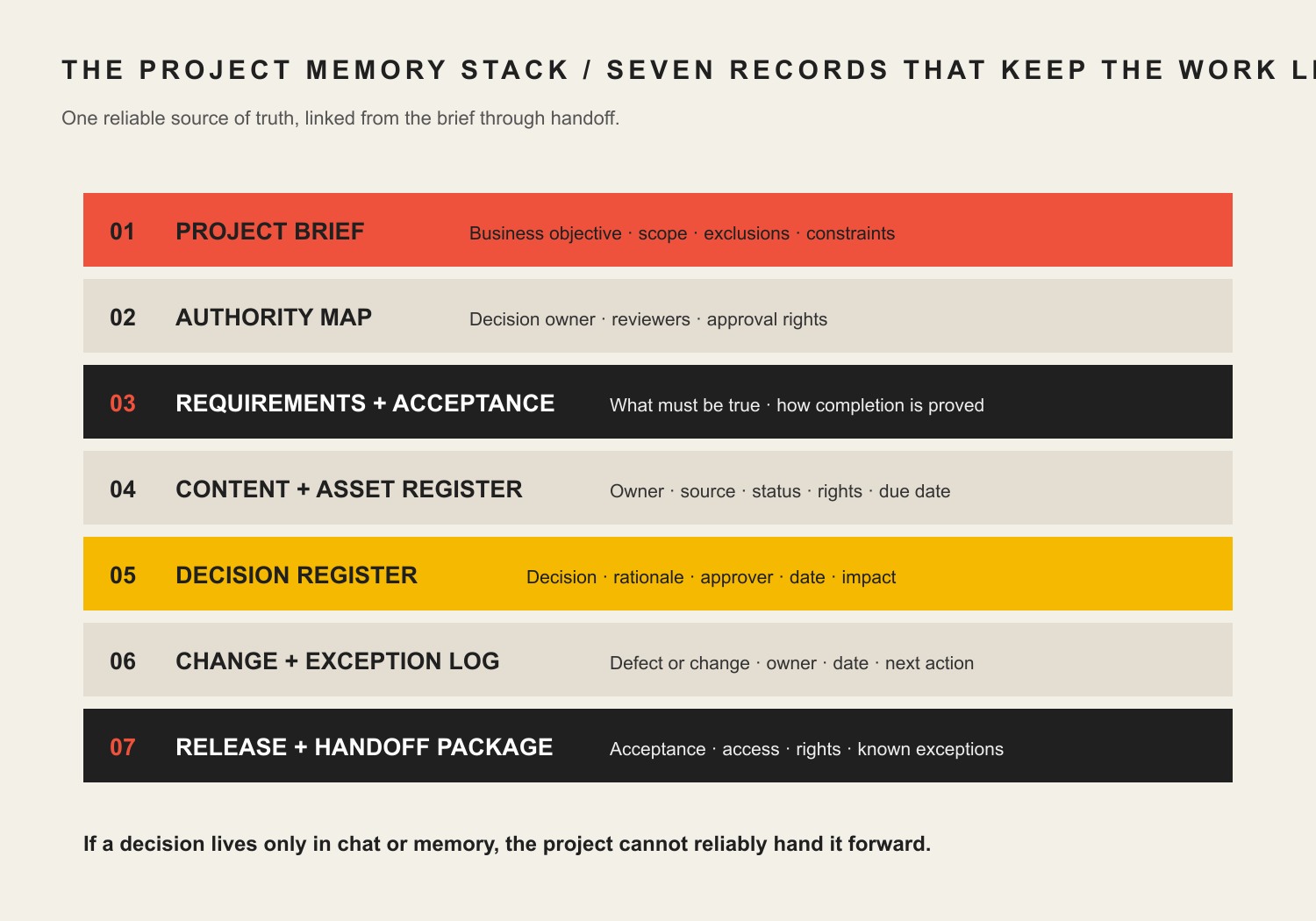
    TL;DR: You do not need seventeen dashboards and a ceremonial daily stand-up. You need one reliable source of truth and seven durable records: a project brief, authority map, requirements and acceptance ledger, content and asset register, decision register, change and exception log, and release and handoff package. If an important decision exists only in somebody’s memory or a thumbs-up buried in chat, it is not controlled. It is future archaeology.

    This guide is for business owners, marketing leads, internal project owners, and agency teams managing a serious website build or redesign. If you are still deciding how to choose a provider, start with our web design company selection guide. If you already selected one and need to define how client and agency should work together, read how to work with a web design company without derailing the project. This page handles the next problem: preserving the project’s institutional memory.

    Reviewed August 2026. We revisit this guide annually and whenever the cited standards or Scope Design project process materially changes.

    What is website project management?

    Website project management turns a business requirement into a launched, accepted, and supportable website through controlled scope, accountable ownership, documented decisions, measurable acceptance criteria, planned testing, and a complete handoff.

    That definition is intentionally less sexy than “unlocking agile collaboration.” Sexy language is how ordinary responsibilities disappear into a fog bank.

    A task board tells you what people are doing. Website project governance tells you who had authority to approve the work, what “done” meant, which risks were accepted, and what the business actually received. You need both on a meaningful project, but they are not the same thing.

    The project manager’s job is not to make everyone look busy. It is to keep the decision system legible while the work changes shape.

    A website project is more than page production

    A serious website may involve positioning, information architecture, copy, structured content, design systems, development, integrations, accessibility, analytics, privacy, migration, search, quality assurance, hosting, DNS, training, and ongoing management. That is why website design is a business system rather than a coat of digital paint.

    The project plan must connect those disciplines to business outcomes and acceptance evidence. Otherwise the team can complete every ticket while the business still receives the wrong thing.

    A project-management tool is not a project-management system

    Asana, ClickUp, Notion, Basecamp, Jira, Monday, Trello, spreadsheets, shared drives, client portals, email, and chat can all support a project. None of them can decide what deserves to be recorded.

    Buying software before defining the operating rules usually produces a shinier junk drawer. Now the missing approval is in a card instead of an email. Tremendous progress.

    Choose tools after answering these questions:

    • Where is the approved project baseline?
    • Who can approve business, content, design, technical, legal, and launch decisions?
    • How does a draft become approved?
    • Where are changes assessed and authorized?
    • Which records must survive the project?
    • Who controls the accounts and final assets?
    • What proves the site is accepted and ready to operate?

    One small project might answer those questions with a shared document, a task board, and a password manager. A custom operational platform may need requirements management, code repositories, environment controls, test evidence, release records, and formal risk review. Complexity should follow risk, not somebody’s software subscription.

    Use the Scope Design Project Memory Stack

    The Scope Design Project Memory Stack is a practical website project plan made of seven connected records:

    RecordQuestion it answersMinimum useful evidence
    Project briefWhy are we doing this?job, audience, outcomes, constraints, exclusions
    Authority mapWho may decide?decision area, named approver, delegate, response window
    Requirements and acceptance ledgerWhat are we building, and what proves it works?requirement, owner, acceptance method, status
    Content and asset registerWhat must exist, where did it come from, and may we use it?item, owner, source, rights, status, destination
    Decision registerWhat did we decide and why?decision, rationale, approver, date, affected work
    Change and exception logWhat moved outside the baseline?request or defect, impact, disposition, new baseline or accepted risk
    Release and handoff packageWhat launched, what remains, and who owns operation?test results, authorization, access, assets, training, support path

    The records do not have to be seven separate documents. They can be views in one project hub. Their jobs must remain distinct, though, because “meeting notes” are not an acceptance ledger and a task marked complete is not proof of approval.

    Seven project records: brief, authority map, requirements and acceptance, content and asset register, decision register, change and exception log, and release and handoff package.
    The Scope Design Project Memory Stack: enough project memory to reconstruct the work without preserving every stray conversation.

    The Scope Design Project Memory Stack: enough project memory to reconstruct the work without preserving every stray conversation.

    The reconstruction test is simple:

    Can an independent person trace authority -> requirement -> decision -> approval -> exception -> acceptance -> ownership without interrogating the entire team?

    If not, the project is not organized. It is temporarily remembered.

    1. Write a project brief that controls the job

    A project brief is the commercial and operational baseline. It explains the problem, desired result, audience, scope boundary, constraints, and measurement plan before page production starts.

    At minimum, record:

    • the website’s primary business job;
    • the audiences and important arrival intents;
    • the result the website can reasonably influence;
    • the current constraint or failure being addressed;
    • included deliverables and explicit exclusions;
    • known integrations, data sources, and operational dependencies;
    • legal, accessibility, privacy, security, or procurement requirements that apply;
    • budget and schedule constraints;
    • the post-launch owner and maintenance assumption;
    • the evidence that will count as success.

    The brief should not pretend certainty where discovery is incomplete. Label assumptions and open questions. A false answer in a polished brief is more dangerous than an honest blank.

    Start with the business constraint, not the requested artifact

    A client may request a redesign, landing page, calculator, portal, or ecommerce feature. The request proves dissatisfaction. It does not prove the requested artifact solves the actual problem.

    Our Website Solutions pillar explains how to choose the least complex responsible route. The project brief should preserve that diagnosis so the team does not quietly revert to “make pages until the budget runs out.”

    2. Map authority before the first disagreement

    The authority map identifies who can approve each kind of consequential decision. A stakeholder list is not enough. Fifteen names copied on an email do not create governance; they create an audience.

    Map at least:

    Decision areaTypical business authorityTypical professional lead
    Business priority and budgetsponsor or product owneragency advises on implications
    Factual claims and content truthdesignated client approverstrategist or copy lead shapes expression
    Brand directionbrand ownerdesign lead translates into the system
    UX and interaction methodproduct owner approves material tradeoffsUX/design lead recommends method
    Technical architecturebusiness approves cost, risk, and constraintstechnical lead owns implementation recommendation
    Privacy, security, accessibility, or legal acceptanceauthorized internal owner or qualified adviseragency supplies evidence and flags limits
    Launchnamed launch authorityagency reports readiness and exceptions

    For each area, name one final approver, a delegate, and a response window. “Marketing” cannot approve anything. A department has no inbox anxiety, vacation, or accountability.

    W3C’s current accessibility planning guidance makes the broader principle concrete: assign responsibilities, budget the work, define milestones, monitor findings, and use acceptance testing for agency-delivered websites or components. Accessibility is shared across business, content, design, development, QA, and procurement roles; it is not a magical final scan owned by whoever remembers it at launch. W3C’s planning guidance is accessibility-specific, but the ownership discipline travels well.

    3. Pair every requirement with acceptance evidence

    A requirement says what the system must do. Acceptance criteria say how the parties will know it does that well enough to approve.

    Bad requirement:

    Add a flexible events section.

    Useful requirement:

    An authorized editor can create, update, schedule, and archive events without developer assistance. Each event includes date, time, location, registration link, status, and an accessible public detail page. The client will complete user acceptance testing with two designated editors before launch.

    The second version reveals fields, roles, workflow, access, and the acceptance method. It gives design, development, content, training, and QA something testable.

    For each material requirement, record:

    • unique name or identifier;
    • business reason;
    • owner;
    • priority;
    • dependencies;
    • acceptance criteria;
    • verification method;
    • current status;
    • evidence or link;
    • accepted exceptions.

    Acceptance should match the risk. A brochure-page heading may need content and visual approval. A payment, account, application, search, or data-import workflow needs functional testing with realistic conditions and named acceptance responsibility.

    “Looks good” is not universal acceptance

    Design approval confirms the approved design direction. It does not prove the form delivers email, the data maps correctly, the checkout calculates properly, the page meets agreed accessibility criteria, or the analytics event fires.

    One approval cannot silently swallow five disciplines. Record what the approval covers and what it does not.

    4. Control content and assets like real dependencies

    Content is routinely treated as a decorative substance that will arrive “later.” Then later arrives wearing a launch-day nametag.

    The content and asset register should track:

    • page, component, product, document, image, video, logo, testimonial, or data item;
    • source and current location;
    • content owner;
    • person authorized to approve factual accuracy;
    • rights, license, consent, or attribution status;
    • draft, review, approved, scheduled, migrated, or blocked status;
    • target page or system destination;
    • transformation needed, such as editing, cropping, transcription, migration, or structured import;
    • accessibility needs, such as alternative text, captions, transcripts, or document remediation.

    Do not accept files named homepage-final-v7-USE-THIS-ONE-really.docx as a version-control philosophy. Use a stable item name and explicit status. The system should show which version is approved without interpreting panic punctuation.

    Record ownership and license terms before handoff

    Paying for a website does not automatically answer who owns every piece of source material, working file, licensed font, stock image, plugin, third-party service, code library, or agency tool.

    The U.S. Copyright Office explains that copyright initially belongs to the author unless an applicable work-made-for-hire rule or transfer changes that result, and a transfer of copyright ownership generally requires a signed writing. Its website-registration guidance specifically notes that a hiring party may need a signed agreement to acquire exclusive rights from an independent contractor. Review the Copyright Office’s ownership and transfer rules and website copyright guidance, then have qualified counsel handle the actual agreement when the stakes justify it.

    This is general project-planning information, not legal advice. The useful management move is simple: list the asset categories and write the ownership, license, access, and delivery terms before people start making assumptions.

    5. Maintain a decision register, not a transcript landfill

    Meeting notes record conversation. A decision register records the durable result.

    Each consequential decision should include:

    • the decision;
    • the problem or tradeoff it resolves;
    • options considered when useful;
    • rationale;
    • named approver;
    • date;
    • affected requirements, designs, pages, systems, cost, or schedule;
    • next action;
    • whether it supersedes an earlier decision.

    The register prevents three common failures:

    1. The same debate restarts because nobody remembers the rationale.
    2. A late stakeholder treats an approved direction as an unopened question.
    3. The team implements a decision but forgets which other artifacts must change.

    You do not need to record whether the hero image moved six pixels during exploration. Record decisions that affect meaning, scope, risk, ownership, cost, acceptance, or downstream work.

    Good feedback identifies the audience, business concern, evidence, or failure condition. “I don’t like blue” is a reaction. “This color is too close to the competitor we are trying to differentiate from” is usable context.

    Article 58 covers how to give feedback without trying to become the designer. The decision register preserves the approved outcome after that conversation ends.

    6. Separate changes, defects, and exceptions

    Not every unexpected item is scope creep. Some are defects. Some are clarified requirements. Some are new requests. Some are risks the business knowingly accepts.

    Use four buckets:

    ItemMeaningTypical response
    Defectagreed behavior does not meet the approved requirementcorrect within the applicable responsibility
    Clarificationexisting requirement needs detail without materially changing the obligationupdate the ledger and affected work
    Changenew or altered requirement affects scope, cost, timing, or riskassess impact and obtain authorization before work
    Exceptionknown requirement, risk, or defect will not be resolved before acceptancedocument owner, rationale, consequence, and follow-up

    A change record should state the request, reason, affected work, cost and timing impact, risks, decision, approver, and revised baseline. A chat message saying “can we also” is a request. It is not authorization.

    The same discipline applies to risks. NIST Cybersecurity Framework 2.0 introduced a Govern function that emphasizes roles, responsibilities, authorities, policies, and alignment between cybersecurity risk and organizational obligations. NIST describes the framework as adaptable guidance rather than a prescribed checklist. Use its governance model where relevant; do not claim that every small website must implement the entire framework.

    “We’ll fix it later” needs an owner and a date

    An exception without an owner is not a plan. It is a defect wearing sunglasses.

    For any accepted material exception, record:

    • what remains unresolved;
    • who may accept the risk;
    • why launch may proceed;
    • business or user consequence;
    • mitigation;
    • owner;
    • target date or review trigger;
    • whether customers, staff, or support need to know.

    7. Build a release and handoff package before launch day

    Launch is a controlled transition, not the moment someone gets brave near the Publish button.

    The release and handoff package should include what is proportionate to the project:

    • approved release scope and version;
    • final requirements status;
    • QA and user acceptance results;
    • known defects and accepted exceptions;
    • redirect and migration verification;
    • analytics and conversion-event verification;
    • privacy, security, and accessibility evidence where applicable;
    • backup and rollback plan;
    • launch authorization;
    • domain, DNS, hosting, CMS, analytics, tag manager, search, repository, and vendor account ownership;
    • administrator list and least-privilege access plan;
    • delivered files, documentation, licenses, and credentials;
    • training completed and recordings or guides delivered;
    • warranty, support, maintenance, escalation, and emergency paths;
    • post-launch review date.

    The package does not have to be a 200-page binder nobody opens. It must let the operator run the system without keeping the original agency on psychic retainer.

    Keep sensitive records deliberately, not forever

    Do not turn the project archive into a permanent credential graveyard. Separate durable governance records from secrets and unnecessary personal information.

    FTC guidance recommends inventorying sensitive information, keeping only what the business needs, limiting access, and using a written retention policy that states what is retained, how it is secured, how long it is kept, and how it is disposed of. See the FTC’s Protecting Personal Information guide. The correct retention period depends on legal, contractual, regulatory, operational, and litigation-hold requirements; there is no universal “keep website files for seven years” rule.

    Organize the project around gates, not arbitrary weeks

    The website development process often moves through discovery, strategy, content, design, development, testing, launch, handoff, and ongoing improvement. Scope Design was mapping that full sequence into a visible project system years before every software vendor discovered the word “workflow.”

    The phases can overlap. The gates should remain explicit:

    GateQuestion that must be answered
    Brief approvedDo we agree on the business job, boundary, and success evidence?
    Structure approvedDo the information model, navigation, templates, and user paths support the job?
    Content ready for buildIs enough real, approved content available to validate design and implementation?
    Design direction approvedAre the representative system and material tradeoffs approved for build?
    Build ready for acceptanceDo requirements have testable implementations in the intended environment?
    Launch authorizedAre results, exceptions, ownership, rollback, and support acceptable?
    Handoff acceptedCan the designated operator access, understand, and maintain the delivered system?

    Do not force every website into two-week sprints because a methodology diagram looked authoritative. Agile, iterative, sequential, and hybrid delivery can all work. The useful question is whether dependencies and approvals are visible enough to make the next commitment responsibly.

    A real project taught the difference between pages and a system

    A long-established specialty business approached Scope Design for a new website and new features. Discovery showed that the visible website sat in the middle of legacy software, disconnected data, manual processes, external services, account-access dependencies, content migration, customer-facing failures, and future operational plans.

    The project could not be governed as “design eight pages.” It required a prioritized requirements baseline, data and access inputs from the client, explicit content responsibility, phased deliverables, milestone approvals, functional testing, training, and written handling for unplanned work.

    The lesson is not that every website needs enterprise bureaucracy. It is that the project record must describe the system being changed. A task board full of page names would have hidden the actual work.

    We use this example only in anonymized form. It supports the project-management method, not a performance claim.

    How to measure whether the project is healthy

    Do not measure project health by task volume or meeting attendance. Useful signals include:

    • percentage of material requirements with an owner and acceptance method;
    • decisions waiting beyond their agreed response window;
    • content dependencies blocked by missing source, owner, rights, or approval;
    • unresolved changes without impact decisions;
    • rework caused by superseded or undocumented decisions;
    • defects by requirement and severity;
    • accepted exceptions without owners or review dates;
    • launch requirements without evidence;
    • accounts or assets without confirmed business ownership;
    • handoff items not accepted by the operator.

    These are diagnostic measures, not universal benchmarks. A five-page site and an operational platform should not have identical governance overhead. The useful metric exposes the current constraint instead of generating a handsome dashboard for the meeting.

    Website project management checklist

    Before approving a project plan, confirm that:

    • the website’s primary business job is stated;
    • scope, exclusions, assumptions, and dependencies are visible;
    • one authorized approver exists for each consequential decision area;
    • requirements have owners and acceptance methods;
    • content, data, and assets have sources, rights, statuses, and destinations;
    • important decisions have rationale, approver, date, and affected work;
    • changes cannot quietly enter production without an impact decision;
    • defects, changes, clarifications, and accepted exceptions are distinguished;
    • project phases have meaningful gates rather than decorative dates;
    • testing reflects the actual risk of the feature;
    • launch authorization includes known exceptions and rollback readiness;
    • the business controls critical accounts and receives agreed assets;
    • training, support, maintenance, and escalation are defined;
    • records containing sensitive information follow a retention and access policy;
    • the post-launch operator has accepted the handoff.

    If half of those answers live in somebody’s head, do not buy another tool. Fix the project memory.

    Frequently asked questions about website project management

    What should a website project plan include?

    A useful website project plan includes the business objective, scope and exclusions, audiences, requirements, roles and approval authority, content and data dependencies, milestones, acceptance criteria, testing, change control, launch conditions, account ownership, handoff, maintenance, risks, and measurement. The schedule is one part of the plan, not the whole plan.

    What are the major stages of a website project?

    Most projects move through discovery, structure or information architecture, content, design, development, testing, launch, handoff, and ongoing improvement. The phases may overlap, but each major commitment should have an explicit approval or readiness gate.

    Who should own a website project inside the business?

    One named product or business owner should be accountable for the result and able to resolve internal priorities. Specialists can approve content, brand, legal, privacy, security, accessibility, or technical matters, but a committee should not become the default final authority for every decision.

    What is the difference between a project manager and a product owner?

    The product owner represents the business result and prioritizes what the system must achieve. The project manager keeps scope, dependencies, decisions, timing, records, and delivery moving. One person may perform both jobs on a small project, but the responsibilities should not disappear.

    What are website acceptance criteria?

    Acceptance criteria are observable conditions that prove a requirement is complete enough to approve. They may cover content, user behavior, data, performance, accessibility, integration results, permissions, or operational workflow. “Looks good” is valid only for the visual decision it actually evaluates.

    How many people should approve a website?

    Use one final approver per decision area and consolidate stakeholder input before it reaches the delivery team. More subject-matter reviewers may be necessary, but several people with equal and undefined veto power produce contradictory feedback and delayed decisions.

    What belongs in a website decision log?

    Record consequential decisions affecting scope, meaning, risk, ownership, cost, schedule, acceptance, or downstream work. Include the decision, rationale, approver, date, affected artifacts, next action, and any superseded decision.

    How should website project files be organized?

    Organize files by stable function and status, not by panic-driven filenames. Separate approved baselines from working drafts, use consistent item names, preserve version history, restrict sensitive material, and link files to the requirements or decisions they support. The exact folder structure matters less than making the approved version unmistakable.

    What is a website change request?

    A change request proposes an alteration outside or materially different from the approved baseline. It becomes authorized work only after the team assesses its effect on scope, cost, timing, dependencies, risk, and acceptance, and an authorized person approves the revised baseline.

    What is the difference between a defect and a scope change?

    A defect means the delivered behavior fails an approved requirement. A scope change adds or alters the approved requirement. Calling every defect a change unfairly moves delivery responsibility; calling every new idea a defect quietly expands the project.

    Should a website project use Agile or Waterfall?

    Use the delivery approach that matches uncertainty, dependencies, team capacity, and risk. Iterative design and development often benefit from short feedback loops, while migrations, compliance gates, and launch dependencies may require more sequential control. Most serious website projects are hybrids. Methodology loyalty is not a substitute for clear acceptance and ownership.

    What records should the business keep after launch?

    Keep the executed agreement and changes, approved requirements, material decisions, rights and licenses, release and acceptance record, known exceptions, delivered assets, account ownership, training and operating documentation, and applicable security, privacy, accessibility, or testing evidence. Apply a written retention policy; do not retain unnecessary secrets or personal information forever.

    What should happen when a website project stalls?

    Identify the blocked requirement or decision, its owner, the missing input, the date it became blocked, and the consequence. Escalate through the agreed authority map. If the baseline is no longer realistic, formally replan scope, cost, timing, or priority instead of leaving the project in indefinite “almost there” purgatory.

    Make the project understandable enough to survive the project

    Website project management is not performance art for organized people. It is how a business protects decisions, budget, rights, risk, and operational continuity while a complicated idea becomes a real system.

    The best project record is not the one with the most fields. It is the smallest reliable system that lets the next responsible person understand what happened without summoning the original team for a séance.

    If your website project is a pile of tabs, unowned approvals, mystery files, and launch anxiety, talk with Scope Design. We can diagnose the actual job, establish the project baseline, and build a delivery system that leaves you with a website you can approve, operate, and own.

  • 18 Essential YouTube Tools for Better Content and Smarter Growth

    18 Essential YouTube Tools for Better Content and Smarter Growth

    The best YouTube tool stack is usually smaller than the list of tools you could buy. For most small businesses and creators, the right starting point is YouTube Studio, one thumbnail tool, one editor, and a reliable audio source. Add a specialist only when a repeated bottleneck proves you need it.

    That is the difference between a useful production system and a folder full of subscriptions. A keyword tool cannot rescue a weak topic. A video editor cannot fix an unclear promise. A scheduler cannot create demand. And an AI clipping tool cannot decide which moment actually matters to your customer.

    This guide compares 18 current YouTube tools by the job they perform: research, packaging, recording, editing, audio, captions, publishing, repurposing, and measurement. For each one, the important question is not “Is this popular?” It is “What problem would this remove from my workflow?”

    Which YouTube tools do you actually need?

    If you are starting from scratch, build a minimum viable stack before you shop for advanced features:

    • Plan and measure: YouTube Studio first; Google Trends for directional topic research.
    • Package: Canva or Adobe Express for thumbnails. Pick one unless your team already has a reason to use both.
    • Record: OBS Studio for screen/solo recording, Riverside for remote interviews, or StreamYard for live production.
    • Edit: choose one primary editor—DaVinci Resolve, Premiere Pro, CapCut, or Descript—based on the work you actually do.
    • Audio and captions: start with YouTube Audio Library and YouTube’s native captions; add a paid library or caption service when quality, licensing, or workflow demands it.
    • Distribute and repurpose: use YouTube’s native scheduling unless you truly need cross-platform coordination; add Buffer or OpusClip only for that proven gap.

    If your real problem is getting more qualified views rather than producing videos efficiently, use our dedicated guide on how to get more YouTube views. This article owns the tool decision; that one owns the growth diagnosis.

    Use the Scope Design GEAR Test before adding another tool

    Software decisions get easier when you start with the constraint instead of the feature list. We use a simple four-part test for YouTube tools:

    • G — Gap: What recurring bottleneck does this tool fix?
    • E — Evidence: What metric or workflow result will show that it helped?
    • A — Added overhead: What does it duplicate, cost, or complicate?
    • R — Reversibility: Can you export your media, data, and process and leave cleanly?

    A tool that cannot pass GEAR probably belongs on the “interesting” list, not the company card. This follows the same lean-stack principle we use in our broader small business marketing strategy: fix the system before buying more attention or more software.

    18 YouTube tools worth knowing

    1. YouTube Studio — the native command center

    YouTube Studio should be the first tool in almost every stack because it is the source closest to the platform itself. Current Studio analytics covers reach, engagement, audience, content performance, revenue for eligible channels, and a Trends area for idea discovery. At the video level, Reach helps you inspect impressions and click-through rate while Engagement helps you inspect watch time and retention.

    YouTube also now offers native title and thumbnail A/B testing for eligible content, testing up to three variants and selecting the result using watch-time share. That matters when evaluating third-party “optimization” tools: some jobs you once needed a plugin for may now exist natively.

    Use it when: always. Skip another tool when: Studio already answers the question you are trying to solve.

    2. Google Trends — directional topic research

    Google Trends is useful for comparing topic momentum, seasonality, and related interest before you commit time to production. It is especially useful when you are deciding between two ways of framing the same business problem.

    Do not treat Trends as exact YouTube search volume. Use it as directional evidence, then pair it with what your own audience watches, the questions customers ask, and the search terms visible in YouTube Analytics.

    Use it when: you need a free signal about topic direction. Skip it when: you are looking for channel-specific performance evidence—Studio is better for that.

    3. vidIQ — YouTube-specific research when research is the bottleneck

    vidIQ layers YouTube-specific keyword, trend, competitor, ideation, and optimization tools around the creator workflow. Its current keyword research can surface related terms, questions, rising keywords, and estimated search/competition signals.

    The important limitation is conceptual: an estimated keyword score is not a promise that a video will rank or satisfy viewers. YouTube itself describes search and recommendation as multi-signal systems. Use vidIQ to improve research speed, not to outsource editorial judgment.

    Use it when: topic and search research is repeatedly slow or inconsistent. Skip it when: Studio, customer questions, and a simple research process already give you enough evidence.

    4. TubeBuddy — a browser layer for YouTube workflows

    TubeBuddy is a browser extension that adds tools directly on top of YouTube. It remains useful for creators who want an integrated extension-based workflow around channel management and optimization.

    But compare every paid feature against current YouTube Studio before subscribing. Native Studio now handles more packaging, analytics, scheduling, and experimentation than it once did. If your only reason for buying a third-party tool is title or thumbnail testing, check whether your channel already has YouTube’s native A/B test first.

    Use it when: its extension workflow saves recurring channel-management time. Skip it when: it mostly duplicates Studio or another research tool you already pay for.

    Thumbnail and packaging tools

    5. Canva — fast, repeatable thumbnail production

    Canva is a practical choice when the bottleneck is producing consistent thumbnails without a full design workflow. Templates, reusable brand elements, and simple collaboration make it approachable for a small team.

    The risk is template sameness. A thumbnail is packaging, not decoration. Start from the video promise, then design the image. If the visual looks polished but says nothing specific, the tool did its job and the strategy did not.

    Use it when: speed and consistency matter more than advanced image compositing. Skip it when: your existing design stack already makes thumbnails efficiently.

    6. Adobe Express — a strong alternative for Adobe-oriented teams

    Adobe Express offers a fast template-driven route to YouTube thumbnails and branded social graphics. It is most compelling when your team already lives in Adobe’s ecosystem or prefers its asset workflow.

    You probably do not need both Express and Canva for the same job. Pick the one your team can use quickly, keep the source files organized, and create recognizable packaging with.

    Use it when: it fits your existing Adobe workflow. Skip it when: another design tool already owns thumbnail production.

    Recording and live-production tools

    7. OBS Studio — free screen recording and live production

    OBS Studio is free, open-source software for video recording and live streaming on Windows, macOS, and Linux. It is especially useful for tutorials, demonstrations, screen recordings, webinars, and more technical live setups where you want scene control without a subscription.

    Its strength is also its tradeoff: OBS gives you control, but that means setup. If your only requirement is a simple talking-head recording, a lighter tool may remove more friction.

    Use it when: screen capture, scenes, or live control are recurring needs. Skip it when: setup complexity is larger than the production problem.

    8. Riverside — remote interviews with separate source tracks

    Riverside is built around remote recording for interviews, podcasts, webinars, and video content. Its workflow can capture separate local tracks for participants, which gives an editor more control than relying on a compressed meeting recording.

    That makes it useful when guests are part of the content format. It is unnecessary overhead for a solo creator whose main job is recording a screen or camera locally.

    Use it when: remote guest quality and separate tracks matter. Skip it when: you rarely interview people.

    9. StreamYard — browser-based live shows and interviews

    StreamYard focuses on browser-based live streaming, guest interviews, podcasts, and webinars. It reduces some of the technical setup that comes with a more configurable broadcasting tool.

    Use it when: live or guest-based programming is a recurring format and ease of operation matters. Skip it when: you do not publish live content or already have a reliable OBS workflow.

    Video editing tools

    Editing is where tool overlap gets expensive quickly. Pick one primary editor based on the kind of videos you make. If you routinely export a project from one editor just to perform one minor task in another, that may be a real gap. If you bounce among four editors because each one has an interesting AI button, that is tool sprawl.

    10. DaVinci Resolve — powerful editing with a capable free tier

    DaVinci Resolve combines editing, color, visual effects, motion graphics, and audio post-production in one application. The current free version is substantial enough for many YouTube workflows, while Studio adds advanced capabilities.

    Use it when: you want a serious editor without automatically committing to a recurring editing subscription. Skip it when: your editing needs are simple enough that the learning curve becomes the bottleneck.

    11. Adobe Premiere Pro — mature post-production for Adobe teams

    Adobe Premiere Pro remains a strong choice for teams that already depend on Adobe workflows, hand projects between editors, or need a traditional timeline-based editing environment with a broad professional ecosystem.

    Use it when: the Adobe ecosystem, team compatibility, or advanced post-production work justifies it. Skip it when: you are paying for professional complexity but producing simple cuts that another tool handles faster.

    12. CapCut — fast editing for Shorts and social derivatives

    CapCut is useful when speed matters, particularly for vertical clips, captions, and social-first edits. Current CapCut documentation confirms auto-caption workflows across web, desktop, and mobile, with platform-specific differences.

    Use it when: short-form editing and caption styling are recurring production tasks. Skip it when: your long-form post-production already works cleanly in a primary editor and adding another timeline creates more handoffs than it removes.

    13. Descript — edit spoken video through the transcript

    Descript turns transcription into an editing interface: change the text and the underlying spoken video follows. That can be dramatically faster for interviews, tutorials, podcasts, and talking-head content where the edit is mostly about words, pacing, and cleanup.

    Use it when: transcript-first editing removes time from spoken-content production. Skip it when: your work depends heavily on visual timing, complex motion, or a timeline workflow your editor already knows well.

    Audio, music, and caption tools

    14. YouTube Audio Library — start here for music and sound effects

    The YouTube Audio Library is built into YouTube Studio and provides production music and sound effects that YouTube identifies as copyright-safe for use on the platform. Some Creative Commons tracks require attribution, so check the license details instead of assuming every track has identical terms.

    Use it when: you need a native, low-friction audio source. Skip a paid library when: the Audio Library already covers the sound and licensing job.

    15. Epidemic Sound — a broader paid music and SFX library

    Epidemic Sound is useful when a broader licensed music and sound-effects catalog materially improves production or saves licensing research time. The important part is choosing a plan that actually matches how you publish—including business or client work where applicable—not simply downloading tracks under the assumption that every subscription grants every use.

    Use it when: music selection and licensing are recurring production constraints. Skip it when: native/free audio already meets the job.

    16. Rev — transcription and captions when accuracy is the real requirement

    Rev can fill the gap when you need a dedicated transcription/caption workflow rather than accepting platform-generated text as-is. That may matter for accessibility, customer-facing transcripts, regulated or technical vocabulary, or content you plan to reuse elsewhere.

    Automatic captions are a starting point, not a reason to stop reviewing text. Names, jargon, numbers, and ambiguous audio still deserve human QA regardless of which tool created the first pass.

    Use it when: caption/transcript quality or downstream reuse justifies a specialist workflow. Skip it when: native captions plus a careful manual review already meet the requirement.

    Scheduling and repurposing tools

    17. Buffer — useful when YouTube is part of a multi-platform calendar

    Buffer currently supports planning and scheduling YouTube Shorts alongside other social channels. That can make sense for a team coordinating Shorts, Reels, TikTok, and other derivatives from one content calendar.

    But YouTube Studio can schedule YouTube uploads natively. Do not add a social scheduler just to recreate a button the platform already gives you. Add it when cross-channel coordination is the actual gap.

    Use it when: one team manages multiple social destinations and needs one queue. Skip it when: YouTube is the only destination or native scheduling is sufficient.

    18. OpusClip — turn long recordings into short-form candidates

    OpusClip can identify and reformat portions of a longer video into short-form clips, with automated captioning and reframing. It is useful when the bottleneck is the mechanical work of finding and formatting clip candidates.

    Do not confuse automated clipping with editorial judgment. The most quotable 30 seconds are not automatically the best 30 seconds for your customer, brand, or conversion path. Review every derivative against the promise of the destination channel. Our content repurposing guide explains why strong derivatives should preserve the source idea rather than turn it into generic fragments.

    Use it when: clip extraction/reformatting is a repeated time sink. Skip it when: your clips require enough editorial reconstruction that automation adds another review layer without saving time.

    Four practical YouTube tool stacks

    A lean small-business starter stack

    • YouTube Studio
    • Google Trends
    • Canva or Adobe Express
    • DaVinci Resolve, CapCut, or Descript—pick one primary editor
    • YouTube Audio Library

    This is enough to plan, package, edit, publish, and measure without buying a dozen subscriptions. Add a recording platform only if interviews/live content become part of the format.

    A search-led educational channel

    • YouTube Studio
    • Google Trends
    • vidIQ or TubeBuddy if deeper research is a proven need
    • one thumbnail tool
    • one primary editor

    Do not buy both YouTube SEO tools on day one. Trial one against a real research problem and compare the output to Studio, search terms, customer questions, and your own results.

    An interview or podcast-to-YouTube stack

    • Riverside for remote recording
    • Descript or DaVinci Resolve for post-production
    • Canva or Adobe Express for thumbnails
    • YouTube Audio Library or Epidemic Sound
    • YouTube Studio for publishing and measurement

    A multi-platform content team

    • YouTube Studio as the channel source of truth
    • your established editor
    • Buffer if cross-platform scheduling is genuinely centralized
    • OpusClip if derivative clipping is a high-volume bottleneck
    • a durable source-asset workflow so social clips still point back to useful complete content

    For the last point, our guide to content marketing for small business explains why one complete source asset should come before a publishing treadmill of fragments.

    Measure the bottleneck, not the size of the tool stack

    “Greater exposure” is too vague to manage. A useful YouTube workflow separates at least four questions:

    • Discovery: are the right people seeing the video? Review impressions, traffic sources, search terms, and the topics that actually bring viewers.
    • Packaging: do the right people choose the video? Review title/thumbnail performance in context, not CTR alone.
    • Experience: does the video deliver the promise? Review retention, watch time, and where viewers leave or rewatch.
    • Business continuation: does the viewer have a useful next step? Track the relevant page visit, inquiry, signup, sales conversation, or other outcome your business actually values.

    That last layer is easy to miss. A business channel can get more views and still fail to create business value. Scope Design’s internal YouTube strategy treats video as a client-attraction and trust system: answer a real problem, package it clearly, deliver the answer, and connect the right viewer to a useful next step.

    If you are deciding what role video should play in a larger marketing system, start with our guide to video marketing types and strategy before you choose production software.

    Frequently asked questions about YouTube tools

    What are the best YouTube tools for beginners?

    Start with YouTube Studio, a thumbnail tool such as Canva or Adobe Express, one editor, and YouTube Audio Library. Add a research tool, remote recorder, scheduler, or repurposing app only after you can name a recurring bottleneck it will solve.

    What are the best free YouTube tools?

    YouTube Studio, YouTube Audio Library, Google Trends, OBS Studio, and the free version of DaVinci Resolve can cover a surprising amount of a small-business workflow. Canva, Adobe Express, vidIQ, and other products also offer free entry points, but plan limits change; verify current terms before building a workflow around them.

    Do I need vidIQ or TubeBuddy for YouTube SEO?

    No. They can make research and channel workflows faster, but they are optional. YouTube Studio already provides first-party performance evidence, and YouTube Search is not a simple keyword-density game. Use an SEO tool when research is a real constraint, not because a score promises rankings.

    What is the best video editor for YouTube?

    There is no universal best editor. DaVinci Resolve is strong for a capable all-in-one post-production workflow, Premiere Pro fits Adobe-oriented professional teams, CapCut is fast for social/Shorts work, and Descript is unusually efficient for transcript-heavy spoken content. The best editor is the one that removes the largest editing constraint without creating a larger learning or handoff problem.

    Can YouTube Studio replace third-party tools?

    Sometimes. Studio already covers publishing, scheduling, analytics, research/trend signals, captions, audio resources, and—in eligible cases—title/thumbnail A/B testing. Check the native feature first, then pay for a specialist only when you can identify the missing capability or time savings.

    Should a small business measure YouTube success by views?

    Views are useful, but they are not the whole business result. Measure whether the right audience discovers the video, chooses it, stays long enough to receive the promised value, and has a sensible next step. Then connect YouTube performance to inquiries, leads, sales conversations, or another outcome the business actually values.

    The bottom line

    You do not need 18 YouTube subscriptions. You need a dependable production system and a small set of tools that remove real constraints.

    Start native. Pick one tool per job. Make every addition pass the GEAR Test. Measure the constraint it was supposed to fix. And remember that the software is supporting the content—not substituting for a clear audience, a useful promise, and a reason for the right viewer to continue.

  • How to Seamlessly Return to Business After Vacation: 5 Expert Strategies

    How to Seamlessly Return to Business After Vacation: 5 Expert Strategies

    Going back to work after vacation is easier when you treat the return as an operating-continuity problem, not an inbox problem. For a business owner, the real question is whether work had clear owners, decisions had clear boundaries, and important context survived while you were away.

    There is a good reason to protect the value of time off. A 2009 meta-analysis of seven vacation studies found a small positive effect on health and well-being, but also found that those effects can fade soon after work resumes. That does not mean every owner needs a perfect, stress-free first day. It means a return process that immediately recreates avoidable chaos is working against the break you just took.

    At Scope Design, we think of a planned absence as a practical stress test for the business. The goal is not to prove that nobody needs you. The goal is to learn what truly requires your judgment, what can move without you, and what broke because ownership or information was fuzzy.

    How to get back to work after vacation: the five strategies at a glance

    StrategyWhat it preventsWhat good looks like
    1. Build a usable handoffPeople waiting for context or approvalOne owner, clear outcome, decision rights, deadline, and exception path
    2. Protect continuity with ownership and selective automationRoutine work stopping because you are unavailableRepeatable tasks keep moving; exceptions reach the right human
    3. Protect a re-entry bufferYour first hours becoming a wall of meetings and reactionsTime to learn what changed before committing to new work
    4. Use a three-pass catch-up systemYour inbox becoming your priority systemScan, decide owner-only items, then schedule or delegate the rest
    5. Run the Owner-Absence Stress TestRepeating the same vacation scramble next timeFix one exposed dependency before the next planned absence

    1. Build a vacation handoff the next person can actually use

    A weak handoff says, “Keep an eye on the Acme project while I’m gone.” A usable handoff makes the work executable without requiring the backup person to reverse-engineer your brain.

    For each active item that could matter during your absence, capture:

    • Outcome: What result is the work supposed to produce?
    • Owner: Who is accountable while you are away?
    • Context: Where are the current files, history, client notes, or source data?
    • Already decided: What should not be reopened?
    • Decision rights: What can the backup owner approve, change, spend, or promise without you?
    • Exception path: What genuinely deserves escalation, and how should it reach you or another leader?
    • Deadline and dependency: What happens next, and who is waiting on it?
    • Definition of done: What must be checked before the item is considered complete?

    This mirrors the same discipline we use in our guide to remote-team handoffs and decision rights: vague ownership creates more communication, not more control.

    There is also a useful continuity-planning analogy here. FEMA’s overview of the Continuity Guidance Circular describes continuity capabilities as a way to keep essential functions moving when normal operations are disrupted. A vacation is not an emergency, but the operating principle transfers well: decide in advance who may act, within what boundaries, and when an exception needs escalation. Do not make people guess what they are allowed to decide when the normal decision-maker is unavailable.

    One security note: do not turn the handoff document into a password dump. Use your existing password-management system or account-access process and give the backup person only the access the role actually requires.

    2. Keep critical work moving with ownership and selective automation

    The old version of this article had a long shopping list of apps. That ages quickly and misses the point. Before vacation, start with the work, not the software.

    Sort recurring work into three buckets:

    • Can run automatically: routine reminders, scheduled reports, appointment confirmations, content already approved, recurring data movement, and other low-judgment tasks.
    • Can be delegated: work a trained teammate can own with clear inputs, boundaries, and a quality check.
    • Needs a human exception path: unusual client issues, material spending, legal or security concerns, high-impact changes, or decisions with consequences that are hard to reverse.

    Automation should remove repetitive handling, not automate ambiguity. Our guide to AI automation for business goes deeper on simplifying a workflow and clarifying ownership before automating it.

    For a solo owner, continuity can still be designed. A minimum viable absence might include an out-of-office message with a real emergency path, a temporary booking freeze, scheduled billing or reminders, a short vendor/contact list, and written instructions for the few events that cannot wait. You do not need a large team to stop every routine from depending on your real-time attention.

    3. Protect a re-entry buffer before you fill the calendar

    You do not need a magical weekday for returning to work after vacation. The legacy advice that owners should always return on a Thursday or Friday is too absolute. What matters is creating decision space before external commitments start consuming the day.

    If your schedule allows it, keep the first half-day or first few hours clear of nonessential client calls, sales meetings, presentations, and new-project commitments. If that is unrealistic, protect a smaller block. Even 60–90 minutes of structured review is more useful than opening Slack, email, voicemail, and a calendar meeting at the same time.

    Use that buffer to answer four questions:

    • What materially changed while I was away?
    • What is blocked right now?
    • What deadline or commitment is closest?
    • What decision genuinely requires me rather than simply being addressed to me?

    The distinction matters. A crowded inbox is evidence that messages arrived. It is not evidence that every message deserves equal priority.

    4. Use the three-pass catch-up system: Scan, Decide, Schedule

    Trying to “get caught up” is too vague. Give the return a sequence instead.

    Pass 1: Scan for changes, deadlines, and risk

    Do not start by reading every message from oldest to newest. Scan the systems that reveal consequences: project status, client escalations, financial or operational alerts, deadlines, security issues, team blockers, and anything that changed the plan while you were away.

    A workable default is a short, time-boxed scan. The purpose is orientation, not completion.

    Pass 2: Decide the owner-only items

    Pull out the small set of decisions that truly need your authority, expertise, relationship, or risk tolerance. If the decision is important enough to change direction, use a deliberate business decision-making framework instead of making it while you are still reconstructing context.

    Pass 3: Schedule, delegate, or drop everything else

    Convert the rest into a trusted work system. Give tasks owners and dates. Defer work that is real but not urgent. Decline or drop work that no longer matters. The inbox can remain the communication record without becoming the operating plan.

    Also resist the urge to “pay back” a vacation with sustained extreme hours. WHO and ILO estimates associate working 55 or more hours per week with higher risk of stroke and ischemic heart disease than working 35–40 hours. That finding is about sustained long hours, not one unusually busy afternoon, but it is a good reminder that chronic overwork is not a sound continuity system.

    5. Run the Owner-Absence Stress Test

    Your vacation created a small experiment. Instead of asking only, “How quickly can I catch up?”, ask, “What did my absence reveal about the business?”

    Five return-to-work strategies: create a useful handoff, keep routine work moving, protect re-entry time, scan then decide and schedule, and repair one exposed dependency.

    Five signals are especially useful:

    • Decisions waited for you: decision rights were never explicit.
    • The same questions kept returning: important knowledge still lives in a person instead of a durable home.
    • Client or project work stalled: ownership, context, dependencies, or “done” were fuzzy.
    • Your inbox became the task system: work is invisible until the owner reads it.
    • You returned to an impossible backlog: priorities and capacity were not bounded before the absence.

    The rule is simple: fix one exposed dependency before the next planned absence. Do not create a 40-page operations manual because one vacation was messy. Choose the failure with the highest business consequence and make the smallest durable improvement: define a decision threshold, create a checklist, assign a backup owner, move requests into the project system, or stop a low-value recurring task.

    This is also a useful test of owner capacity. As we explain in our guide to strategic business growth, adding more people to unclear ownership does not automatically create capacity. Sometimes the constraint is the owner still handling every exception.

    When a normal return is actually a business-recovery problem

    Most post-vacation issues are ordinary re-entry problems: messages piled up, priorities changed, a teammate needs a decision, or a handoff was incomplete. Those belong in the process above.

    If you return to a material cash-flow emergency, serious client loss, security incident, legal problem, broken delivery model, or a failure that threatens the business itself, that is different. Use a real business crisis-recovery process rather than labeling a structural problem “vacation catch-up.”

    Frequently asked questions about going back to work after vacation

    Why is it hard to go back to work after vacation?

    You are re-entering a system that kept changing while you were away, so there is an information gap before there is a workload problem. Vacation research also suggests that some health and well-being benefits can fade after work resumes. Operationally, the best response is to reduce uncertainty: learn what changed, identify what is blocked, and avoid treating every message as equally urgent.

    Should I go back to work the day after vacation?

    There is no universal rule. If travel, family logistics, or jet lag make an extra personal day useful and your schedule allows it, take one. If you return directly to work, protect a re-entry block with as few external commitments as possible. The key operational variable is not the weekday; it is whether you have enough space to rebuild context before making consequential decisions.

    How should I handle email on my first day back?

    Do not make “inbox zero” the first objective. Scan for time-sensitive clients, team blockers, deadlines, money, security, and changed commitments. Turn real work into tasks with owners and dates. Archive informational threads once the current decision or status is clear.

    What belongs in a vacation handover?

    At minimum: the desired outcome, accountable backup owner, source files/context, what has already been decided, what still requires a decision, decision limits, escalation rules, deadline/dependencies, and the acceptance check or definition of done.

    What should a business owner automate before vacation?

    Automate repeatable, low-judgment work with clear inputs and safe failure modes. Examples include routine reminders, approved scheduling, recurring reports, and simple data movement. Keep unusual, expensive, irreversible, legal, security, or relationship-sensitive decisions on a human exception path.

    What if I am a solo business owner?

    You can still design for absence. Decide what can pause, what can run automatically, which outside partners can handle true emergencies, what customers need to know, and what information you will need when you return. A solo business may not be able to operate normally without its owner, but it can still avoid preventable confusion.

    Make the next vacation easier before you need it

    The best post-vacation improvement is not answering email faster. It is making one part of the business less dependent on memory, constant availability, or owner-only approval.

    If your time away exposed a decision bottleneck, unclear ownership, or a workflow that only works when you are watching it, start there. Our business strategy approach focuses on finding the real constraint before adding more tools, meetings, or busywork.

    Return with a sequence: learn what changed, decide what only you can decide, put the rest back into the system, then repair one dependency before the next break. That is how going back to work after vacation becomes part of building a more durable business instead of a recurring recovery drill.

  • Business Password Manager Guide: 5 Strong Options and the ACCESS Test

    Business Password Manager Guide: 5 Strong Options and the ACCESS Test

    A business password manager should do more than remember logins. For a company, the real job is to give the right people access, keep credentials out of chat threads and spreadsheets, make stronger authentication easier to use, and let an administrator remove access cleanly when someone leaves. If a tool cannot make that lifecycle boring and repeatable, its encryption-page vocabulary will not rescue the rollout.

    There is no single best business password manager for every team. Based on current documented capabilities, our strongest shortlist is 1Password for polished workforce administration and identity integrations, Bitwarden for open-source flexibility and value, Keeper for high-control enterprise administration and a path toward privileged access management, NordPass for straightforward small-business administration, and Dashlane Omnix Password Management for password/passkey management tied to broader credential-risk controls. The better choice depends on how well each option fits your actual access lifecycle.

    Pricing and product names below were checked on August 21, 2026. Password-manager plans change frequently, so verify the current vendor page before buying. Scope Design did not perform a penetration test or laboratory security audit of these products; this guide compares current documented capabilities against an operational decision framework.

    Quick comparison: five strong business password managers

    OptionStrong fit whenUseful business differentiatorPublished pricing note
    1PasswordYou want a polished cross-platform experience plus identity-provider administrationGroups, provisioning, SSO options, activity controls, and mature workforce administrationBusiness: $8.99/user/month billed annually; Teams Starter: $24.95/month for up to 10 members
    BitwardenYou value open-source software, price transparency, or self-hosting optionsSCIM, directory sync, event logs, SSO options, account recovery, and an Enterprise self-host pathTeams: $4/user/month annually; Enterprise: $6/user/month annually
    KeeperYou need deeper policy, reporting, offboarding, or a future path toward PAMAdministrative policies, reporting, vault transfer, SSO/SCIM on Enterprise, and adjacent PAM toolingEnterprise packaging is configuration and quote dependent
    NordPassYou want an approachable team vault with a clear path from SMB controls to enterprise provisioningShared folders, groups, activity monitoring, password-health/breach tools, and Enterprise SSO/provisioningPricing varies by plan term and package; check the current quote or checkout page
    Dashlane Omnix Password ManagementYou want managed passwords/passkeys plus SSO/SCIM and Dashlane’s wider credential-protection ecosystemAdmin policies, sharing, SSO, SCIM, password/passkey management, and adjacent credential-protection options$8/user/month for Omnix Password Management
    Current first-party plan information checked August 21, 2026. Published prices can change and may exclude taxes, add-ons, minimums, or negotiated enterprise terms.

    If you are choosing between those five, do not start by arguing about which vendor has the fanciest cryptography paragraph. Start with the work your company needs the system to perform.

    Use the Scope Design ACCESS Test before you choose

    We use the ACCESS Test to evaluate a business password manager across the whole credential lifecycle. Each letter is a practical question that can expose a poor fit before you migrate hundreds of logins.

    The ACCESS Test checks administration, credential coverage, controls, exit and recovery, staff friction, and scope and cost.
    The ACCESS Test evaluates the complete business credential lifecycle, not just password storage.
    • A — Administration: Can an owner or administrator provision people, group access by role, audit activity, suspend accounts, and complete offboarding without hunting through individual devices?
    • C — Credential coverage: Does the system handle the passwords, passkeys, secure notes, shared logins, and account types your team actually uses?
    • C — Controls: Can you enforce MFA, role-based access, sharing rules, reporting, SSO, SCIM, or other identity controls required by your environment?
    • E — Exit and recovery: What happens when an employee leaves, an administrator is unavailable, a device is lost, or you decide to leave the vendor? Test recovery, vault transfer, and export before you need them.
    • S — Staff friction: Does autofill work on the browsers, operating systems, and mobile devices your staff uses? Can people share access without copying secrets into Slack, email, or a spreadsheet?
    • S — Scope and cost: Are you buying the right class of tool? A workforce password manager may not be enough for developer secrets or privileged infrastructure access, and an enterprise PAM platform may be overkill for a 12-person office.

    The best score is not the product with the most boxes checked. It is the product that covers your required jobs with the least dangerous workaround. A feature you never use has little value; a missing offboarding control can become an operational liability.

    Set the security baseline before comparing vendors

    A password manager is only one layer of authentication security. The current NIST SP 800-63B-4 authentication guideline, finalized in July 2025, explicitly notes that passwords are not phishing-resistant and identifies WebAuthn/FIDO2 as an example of phishing-resistant authentication. NIST’s document is a federal digital-identity standard, not a private-business law, but it is a useful benchmark for understanding why a password vault should coexist with stronger authentication rather than become an excuse to stop at passwords.

    CISA’s guidance for small and midsize businesses makes the same operational point: strong passwords alone are not enough, and businesses should use MFA, moving toward phishing-resistant methods where practical. For a password-manager deployment, that means protecting administrator and vault accounts with the strongest practical MFA or passkey option and treating recovery methods as security-sensitive assets too.

    1Password: strong workforce administration and identity integration

    1Password is a strong fit when employee usability and identity-provider administration both matter. Its Business product documents group-based access management, account suspension, identity-provider provisioning, and Unlock with SSO. Those capabilities are useful when your password manager needs to fit an existing employee onboarding and offboarding process instead of operating as a separate island.

    As of August 21, 2026, 1Password publishes Business at $8.99 per user per month billed annually. It also publishes Teams Starter at $24.95 per month for up to 10 members, billed annually. That is materially different from the old $2.99 figure previously carried by this article, which is why we now date volatile plan data instead of treating it as evergreen.

    1Password deserves a closer look if you need clean employee-facing apps plus serious administrative plumbing. The tradeoff is cost: a team that only needs a basic shared vault may be paying for capabilities it does not use. During a pilot, test provisioning, suspension, account recovery, shared-vault ownership, and the real browser/device mix rather than evaluating the demo vault alone. See 1Password’s Business administration documentation for current feature boundaries.

    Bitwarden: strong value, open-source transparency, and self-hosting options

    Bitwarden is compelling for organizations that value price transparency, open-source software, or a self-hosting path. Its current business plans separate Teams from Enterprise in a way that makes the upgrade decision relatively easy to inspect.

    Bitwarden currently publishes Teams at $4 per user per month annually and Enterprise at $6. Teams includes secure sharing, event logs, directory integration, and SCIM. Enterprise adds capabilities including SSO options, account recovery, more granular controls, and self-hosting. Confirm the exact plan matrix before purchase because plan packaging can change.

    Self-hosting can preserve control and fit organizations with specific infrastructure requirements, but it should not be marketed as automatically safer. Self-hosting transfers more patching, availability, backup, monitoring, and recovery responsibility to your team. If you choose it, score that operational burden honestly under the second S in ACCESS: scope and cost.

    Keeper: deeper policy and offboarding control with a path toward PAM

    Keeper becomes more interesting as administrative control and privileged-access requirements grow. Keeper’s current Business and Enterprise materials emphasize centralized policies, reporting, organizational records, and vault transfer for offboarding. Enterprise materials also document SSO and SCIM integrations, and Keeper offers privileged access management as an adjacent product family.

    That matters because some organizations eventually outgrow the simple question “Where do employees store passwords?” and start asking “Who may use a privileged credential, under what approval, for how long, and with what audit trail?” A normal workforce password manager and a PAM system are related, but they are not interchangeable.

    Keeper’s enterprise package is best treated as quote and configuration dependent rather than reduced to one evergreen number. Review Keeper Enterprise’s current feature set, then make the vendor demonstrate your exact offboarding, role, reporting, and recovery requirements during the trial.

    NordPass: approachable SMB controls with an enterprise upgrade path

    NordPass is worth shortlisting when a small or midsize team wants straightforward administration without giving up an upgrade path. Current business documentation describes Teams, Business, and Enterprise tiers. Depending on the tier, features include activity monitoring, shared folders, groups, password-health and breach-monitoring tools, and Enterprise SSO/provisioning options with identity providers such as Microsoft Entra ID and Okta.

    NordPass pricing is presented differently depending on term and package, so this guide intentionally does not freeze a promotional checkout number into an evergreen comparison. Review the current NordPass business plans and the vendor’s plan documentation on the day you compare finalists.

    The important question is not whether NordPass, or any competitor, uses a particular cipher name that sounds more modern. The operational question is whether the plan you are buying includes the administration, recovery, identity integration, and sharing controls your team actually needs.

    Dashlane Omnix Password Management: password and passkey management inside a wider credential-security portfolio

    Dashlane changed the product name, not the job. In July 2026, Dashlane announced that Dashlane Business was renamed Omnix Password Management. The company says the plan’s features, settings, pricing, and access remained unchanged through the rename. As checked August 21, 2026, Omnix Password Management is published at $8 per user per month. Dashlane’s current business password-management page describes the plan’s password/passkey, sharing, policy, SSO, and SCIM capabilities.

    The product documentation covers managed passwords and passkeys, secure sharing, administrative policies, SSO, and SCIM. Dashlane also sells broader credential-protection capabilities, which may appeal to organizations that want to address credential exposure beyond the vault itself. Treat those adjacent Omnix capabilities as separate plan decisions unless the current package explicitly includes them.

    Why a business password manager is different from a personal or browser password manager

    A personal password manager answers “How do I store my logins safely?” A business password manager also has to answer “Who owns this credential, who should receive it, how do we prove or review access, and what happens when a person leaves?”

    • Organization-owned sharing: access should belong to a role, team, or business collection instead of living in one employee’s personal vault.
    • Administration: the company needs a supported way to provision, suspend, recover, and deprovision users.
    • Audit and policy: the organization may need activity visibility, sharing rules, MFA policies, or identity-provider controls.
    • Recovery and continuity: one unavailable employee should not become the only route to a critical business account.
    • Exit: you should be able to transfer organizational records, export what you are entitled to export, and leave the vendor without rebuilding account ownership from memory.

    Google Password Manager, Microsoft browser/identity tools, and Apple Passwords can be useful for individual credential storage inside their ecosystems. That does not make them “unsafe,” and a dedicated business password manager is not automatically better. The question is whether your company needs cross-platform shared vaults, independent administrative ownership, richer audit controls, standardized offboarding, or an export/recovery process that your current ecosystem does not provide.

    Do passkeys and SSO make password managers obsolete?

    No. They reduce different parts of the password problem. Passkeys can replace passwords for services that support them and can provide phishing-resistant authentication when implemented with WebAuthn/FIDO2. SSO can centralize authentication for applications integrated with your identity provider. A password manager still has a job wherever passwords remain, shared or legacy accounts exist, secure notes must be controlled, or passkeys themselves need organized cross-device management.

    A healthy direction is fewer memorized passwords and fewer unmanaged shared secrets. That may mean combining an identity provider, passkeys, MFA, and a password manager rather than demanding that one product do everything.

    When a password manager is not the right tool

    Password managers are designed primarily for human-access credentials. Some secrets belong elsewhere.

    • Developer and machine secrets: API keys, service credentials, CI/CD tokens, and application secrets may need a secrets-management platform with automated injection, rotation, and machine identity controls.
    • Privileged infrastructure access: root, database-admin, network-admin, or other high-impact credentials may need PAM with approvals, time-limited access, session controls, or stronger audit requirements.
    • Compliance evidence: buying a password manager does not make a company compliant with SOC 2, GDPR, HIPAA, or another framework. It can support specific controls, but applicability, policy, evidence, contracts, and operating practice still matter. Our GDPR guide for U.S. small businesses explains that broader compliance boundary in more detail.

    A practical rollout and offboarding plan

    The fastest way to ruin a password-manager project is to buy licenses and send everyone a welcome email. Treat deployment as an access-governance change.

    1. Name an accountable owner. Someone must own policies, provisioning, recovery, support, and vendor renewals.
    2. Inventory account categories, not raw passwords. Identify finance, domain/DNS, website, analytics, social, SaaS, banking, vendor, infrastructure, and emergency accounts without creating a new spreadsheet full of secrets.
    3. Write the nonnegotiable requirements. Browser/OS support, mobile access, passkeys, MFA, SSO/SCIM, audit logs, recovery, shared collections, data region, contractual requirements, and export all belong on the list before demos.
    4. Pilot with a representative group. Include an administrator, a normal office user, a mobile-heavy user, and someone who regularly shares team credentials. Use real workflows, not toy records.
    5. Move shared credentials into organization-owned collections. Give access by role or function where possible. Stop using personal vaults as the business continuity plan.
    6. Protect the vault itself. Require MFA or phishing-resistant authentication where available, especially for administrators. Document recovery methods and keep them out of the same single point of failure.
    7. Run an offboarding drill. Suspend or remove a test user, transfer organization-owned records, rotate credentials that still require rotation, revoke sessions where appropriate, check linked recovery factors, and confirm the former user cannot regain access.
    8. Test recovery and export before renewal. A vendor exit plan is not pessimism. It is basic ownership hygiene.

    Emergency access should also fit your wider business-continuity process. A handoff document should not become a password dump. Our guide to keeping work moving when a decision-maker is away covers the ownership side of that problem.

    Measure adoption and control, not made-up ROI

    The previous version of this article claimed precise reductions in helpdesk time, onboarding time, audit findings, and password-related incidents without saved evidence. We removed those numbers. A better measurement plan starts with outcomes your own company can actually observe.

    • Percentage of employees enrolled and actively using the approved system
    • Percentage of known shared business credentials moved under organizational ownership
    • Weak, reused, or exposed credentials remaining where the selected platform reports them
    • Stale user access or failed offboarding checks found during periodic reviews
    • Whether recovery, emergency access, and export drills pass
    • Support friction: where users still copy credentials into chat, email, notes, or personal browsers because the approved workflow is too difficult

    If you want a more formal way to compare two finalists, use a weighted decision with reversible testing instead of a beauty contest. Our business decision-making framework explains how to match the decision method to the stakes and uncertainty.

    What auditing this exact article changed

    This revision was not a calendar update. We checked the page’s current search footprint, crawl status, links, competitive query shape, and source quality before deciding what deserved to survive.

    Signal checkedObservation on August 21, 2026What it changed
    GA4No exact landing-page rows in either the latest or previous 12-month period checkedNo behavior, conversion, or ROI claims can be inferred from this page’s analytics.
    Google Search ConsoleNo exact-page query rows; URL Inspection says “Crawled – currently not indexed,” while fetch, indexing permission, sitemap discovery, and self-canonical are correctImprove usefulness and internal support while preserving the established URL.
    Bing Webmaster ToolsURL recognized with 0 clicks and 0 impressions; site sitemaps report SuccessNo Bing equity requires preserving weak legacy copy.
    UbersuggestNo ranking-keyword data or backlinks returned for the exact page; “business password manager” shows stronger current commercial demand than the old year-stamped phraseRemove the stale year from the visible title and focus the article on the current buyer decision without changing the URL.

    Those observations do not prove nobody has ever read the page, and they do not guarantee this revision will rank. They support a narrower editorial decision: keep the established address, remove claims we cannot substantiate, answer the commercial comparison intent directly, and add something competitors cannot get by copying the same vendor list.

    Frequently asked questions about business password managers

    What is the best business password manager?

    There is no universal winner. For many teams, 1Password is a strong balanced choice for usability plus workforce administration; Bitwarden stands out for open-source flexibility, transparent pricing, and self-hosting options; Keeper fits higher-control environments and teams moving toward PAM; NordPass can fit small and midsize teams that want simpler administration; and Dashlane Omnix Password Management fits organizations that want password/passkey management inside Dashlane’s broader credential-security portfolio. Score finalists against your own ACCESS requirements and pilot the workflows that could fail.

    Is there a free business password manager?

    Free personal tiers exist, but “free” becomes less meaningful once a business needs centralized administration, organizational ownership, event logs, recovery, SCIM, SSO, or predictable offboarding. A very small team may start simply, but compare the cost of the required business controls rather than assuming a consumer plan is equivalent to a managed business deployment.

    Does Microsoft offer a password manager for business?

    Microsoft provides password and authentication capabilities across Edge, Microsoft accounts, and Entra, but that does not make every Microsoft deployment a direct substitute for a dedicated shared business vault. If you need cross-platform team collections, granular credential sharing, independent vault administration, or a particular offboarding/export workflow, test those requirements explicitly rather than choosing by ecosystem name.

    Is Google Password Manager good enough for business?

    It can be useful for individual credential storage in the Google/Chrome ecosystem. A business that needs organization-owned shared credentials, richer audit and policy controls, standardized recovery, or cross-platform offboarding may need a dedicated team product. The correct answer depends on which ACCESS jobs your organization actually has, not on a blanket claim that browser managers are unsafe.

    Do passkeys make business password managers obsolete?

    No. Passkeys can eliminate passwords for supported services and can provide phishing-resistant authentication, but companies still have legacy passwords, shared accounts, secure notes, recovery processes, and mixed platforms. Several business password managers now manage passkeys alongside passwords, so the systems are converging rather than simply replacing one another.

    Which password manager has never been hacked?

    “Never hacked” is a poor buying criterion because public incident history is incomplete and the absence of a known incident cannot guarantee future safety. Evaluate architecture, MFA/passkey support, administrative controls, recovery design, incident-response transparency, independent assurance where relevant, and your own configuration. A system also fails when employees bypass it because the approved workflow is unusable.

    How much does a business password manager cost?

    Current published examples range from Bitwarden Teams at $4 per user per month annually to Dashlane Omnix Password Management at $8 and 1Password Business at $8.99, while NordPass pricing varies by term and some enterprise packages are quote based. Prices change, and add-ons or minimums can matter. Compare the plan that includes your required administration, recovery, SSO/SCIM, support, and reporting features, not the cheapest headline tier.

    Sources and methodology

    This guide uses NIST SP 800-63B-4 and CISA’s small-business MFA guidance for authentication-security context. Vendor-specific features, names, and pricing come from current first-party 1Password, Bitwarden, Keeper, NordPass, and Dashlane documentation and are dated because they can change.

    Scope Design’s GA4, Google Search Console, Bing Webmaster Tools, Ubersuggest, and DataForSEO observations were used to audit this exact URL and the current search-question shape before revision. Content Studio and the internal link graph were used to keep this page focused on password-manager selection and operations instead of absorbing broader compliance, business-continuity, or decision-methodology topics.

    We did not preserve old statistics simply because they sounded precise, and we did not claim hands-on security testing that did not happen. The article’s original contribution is the ACCESS Test and the lifecycle-first way it connects product selection to administration, staff behavior, recovery, and exit.

    The next step: run a real offboarding drill

    Choose two finalists, configure a representative identity, sharing, recovery, and offboarding workflow in each trial, then remove a test user. The winner should make the boring administrative work easier without creating new single points of failure. That is a stronger signal than a vendor’s feature count or a review site’s universal “best” badge.

    If credential sprawl is part of a wider technology-management problem, Scope Design can help you make account ownership, website operations, maintenance, and access less fragile. Start with the system your team can actually operate consistently, then improve the surrounding controls one deliberate step at a time.

  • AI Content Creation Workflow: How to Use AI Without Publishing Slop

    AI Content Creation Workflow: How to Use AI Without Publishing Slop

    The best AI content creation workflow is human-led and AI-assisted: start with a real business question and actual subject expertise, research what people need to know, document the evidence, give AI bounded production tasks, then have a human verify, challenge, edit, optimize, publish, and measure the result. If AI chooses the topic, invents the expertise, writes the article, approves its own claims, and hits Publish, you have not built a content engine. You have built an extremely efficient beige-sludge machine.

    TL;DR: The seven-step content creation workflow

    Use the Scope Design HANDOFF Workflow:

    1. Human question: Define the business purpose, audience, problem, and useful outcome.
    2. Authority before automation: Gather firsthand expertise, original examples, internal knowledge, and credible external sources.
    3. Needs and search-intent research: Study queries, People Also Ask questions, search results, AI answers, and existing performance data.
    4. Document claims and sources: Build a claim ledger before drafting so facts do not magically appear from the model’s imagination.
    5. Organize and draft with AI: Use AI for bounded work such as synthesis, outlining, gap detection, and first-pass drafting.
    6. Fact-check, voice-edit, and challenge: Let a responsible human verify every meaningful claim, add the point of view, and remove generic mush.
    7. Finish and learn: Complete links, graphics, metadata, schema, accessibility, publication QA, distribution, measurement, and future refreshes.

    The order matters. Expertise before keywords. Evidence before prose. Editing before optimization. Publishing before celebrating.

    What is a content creation workflow?

    A content creation workflow is the repeatable system that moves an idea from a business question to a researched, reviewed, published, and measured asset. It defines the stages, owners, inputs, approval gates, and definition of done.

    That last part is where many content workflows go to die.

    A checklist that ends at “draft complete” is not a publishing workflow. An editorial calendar filled with titles is not a strategy. A folder containing 40 AI-generated documents is not a content library. Those are inventories of unfinished intentions.

    A useful workflow answers five practical questions:

    • Why should this content exist?
    • Who supplies the expertise and evidence?
    • What can AI safely accelerate?
    • Who is accountable for accuracy and quality?
    • How will we know whether the published asset did its job?

    The point is not to manufacture more words. The point is to create useful intellectual property that earns attention, explains your expertise, helps buyers make better decisions, and supports an actual business outcome.

    Why most AI content workflows produce more content and less authority

    AI makes production easier. That is useful. It is also dangerous, because it makes weak decisions cheaper to repeat.

    Give a capable model a vague prompt and it can produce a plausible article in seconds. The prose may be clean. The headings may look sensible. The facts may even be mostly right. But “plausible” is a rotten editorial standard when your name, company, and search visibility are attached to the page.

    NIST describes confident false output as confabulation, sometimes called hallucination. It is not a rare personality defect that one clever prompt permanently cures. Generative models produce statistically likely output, which means a polished sentence can still contain a fabricated source, stale detail, false certainty, or invented experience.

    The larger problem is not only factual error. AI-first workflows routinely produce four quieter failures:

    Commodity thinking

    If the model selects the topic from a keyword, summarizes the existing search results, and writes the same safe advice everybody else already published, the finished article has no reason to exist. It may be correct and still be useless.

    Google’s current guidance for generative search explicitly favors unique viewpoints and non-commodity content over warmed-over summaries. That is not mysterious GEO wizardry. It is the shocking discovery that a source is more citable when it contributes something worth citing.

    Borrowed authority

    AI can imitate the surface patterns of expertise. It cannot retroactively give your company experience it never had. Claims such as “our proven method,” “our clients typically see,” or “industry-leading results” need evidence. Without it, the model is not strengthening your authority. It is forging a little costume for it.

    Voice flattening

    Models tend toward the statistical middle unless given strong constraints and strong source material. That means every company becomes “passionate,” every solution becomes “innovative,” and every conclusion invites the reader to “unlock their full potential.” Nobody talks like that except copy assembled during a hostage situation.

    Output as the goal

    Teams celebrate time saved per draft while ignoring whether the content was indexed, cited, read, trusted, linked, or used by sales. Speed is only valuable when it accelerates a sound process. Otherwise, you are reaching irrelevance more efficiently.

    The Scope Design HANDOFF Workflow

    The HANDOFF Workflow is designed around a simple rule: do not hand AI the keys; hand it bounded tasks. Each stage produces an input for the next stage and ends with a human-owned gate.

    Seven HANDOFF stages: start with the human question, put authority before automation, research needs and intent, document claims and sources, organize and draft with AI, fact-check and challenge, then finish the publishing job.
    The HANDOFF Workflow keeps consequential decisions human-owned while AI accelerates bounded production tasks.

    H — Start with the human question

    Every article should begin with a question a real person needs answered and a reason your business is qualified to answer it.

    Before researching keywords, define:

    • The audience and the moment that brought them here
    • The problem they are trying to solve
    • The decision the article should help them make
    • The commercial job the article performs
    • The knowledge your organization can contribute that is not already everywhere

    The commercial job may be to attract qualified search traffic, reduce a recurring sales objection, help existing clients use a service, support a pillar topic, or establish a point of view. Those are all legitimate. “We need to post twice a week” is not a purpose. It is a recurring appointment with mediocrity.

    At Scope Design, we also ask what the content should repel. An article can clarify who is not a fit, challenge a bad industry habit, or make a costly tradeoff visible. Useful content does not have to charm everyone. It has to be clear enough that the right reader recognizes the value.

    Human gate: A named person can explain why the article should exist, what business outcome it supports, and what the reader should understand or do afterward.

    A — Put authority before automation

    The next step is not “open ChatGPT.” It is “find the person who knows something.”

    Authority can come from:

    • A subject-matter expert interview
    • A client story with permission or careful anonymization
    • Internal procedures, audits, proposals, support logs, or sales questions
    • Original analysis of first-party data
    • Hands-on product or service experience
    • Credible primary research and official documentation
    • A clearly argued professional opinion grounded in experience

    This is where a knowledge system such as Open Brain becomes valuable. It gives the writer and the model access to the company’s accumulated decisions, frameworks, examples, preferences, and language. But a knowledge base is not a vending machine. Old notes still need context, conflicts must be resolved, and private or client-specific details must be handled deliberately.

    Interview the expert before the first full draft whenever possible. Ask what most articles get wrong, what clients misunderstand, what the expert refuses to recommend, what changed their mind, and which example proves the point. Those answers create the material that generic competitors cannot reproduce by reading the same ten search results.

    Human gate: The source package contains real expertise, usable examples, clear permissions, and enough substance to make an original contribution.

    N — Research needs and search intent

    Keyword research belongs in the workflow. It just does not get to impersonate strategy.

    We use search data to understand the language people use, the questions surrounding the topic, and the formats already competing for attention. A serious research pass can include:

    • Primary and secondary keyword demand
    • Search intent and the current results page
    • People Also Ask questions
    • Related queries and competing page structures
    • Google Search Console and Bing Webmaster Tools performance
    • Analytics and conversion behavior
    • AI-search questions and the sources cited in generated answers
    • Sales-call, support-ticket, and on-site-search language

    People Also Ask is especially useful because it exposes the follow-up questions behind the head term. It is not an instruction to staple every visible question into a bloated FAQ. We keep the questions that serve the reader’s real decision, combine duplicates, and reject irrelevant bait.

    AI-query research has a similar purpose. Ask the questions a buyer might ask ChatGPT, Copilot, Gemini, or another answer engine. Then inspect which subtopics the answer covers, which entities it mentions, where it is vague, and which sources it trusts. The AI answer is research about coverage and retrieval behavior; it is not evidence for the article’s claims.

    The result should be a search brief, not a keyword casserole. One page needs a clear owner topic, a primary intent, useful supporting questions, and a defined relationship to the rest of the site’s content cluster.

    Human gate: The planned article matches a real reader need, owns a distinct place in the content cluster, and will not cannibalize another page.

    D — Document claims and sources before drafting

    This is the unsexy step that prevents most AI content disasters.

    Create a claim ledger before asking for polished prose. It can be a simple table:

    Proposed claimEvidence and statusPublication rule
    Generative AI can confidently output false informationNIST AI RMF Generative AI Profile; primary authorityState the known risk, but do not invent a failure rate. Editorial lead reviews.
    This client workflow reduced review timeInternal project records; first-party evidenceUse only if the measurement and permission are documented. Project owner approves.
    Google rewards AI contentUnsupported and misleadingDo not publish it.
    Google permits AI-assisted content that provides valueGoogle Search documentation; primary authorityExplain the policy accurately and never promise rankings. SEO lead reviews.

    The ledger forces useful distinctions:

    • A fact is not the same as an opinion.
    • A customer anecdote is not a universal benchmark.
    • A correlation is not a causal result.
    • A vendor study is not independent evidence.
    • An AI answer is not a source.
    • A source link does not support whatever sentence happens to sit beside it.

    It also makes later refreshes much easier. When a regulation, product feature, benchmark, or search policy changes, you know which claims need review instead of rereading the entire internet with a flashlight.

    Human gate: Every material factual claim has appropriate evidence or has been rewritten as clearly identified professional judgment.

    O — Organize and draft with AI

    Now AI gets invited into the room.

    At this stage, it has something useful to work with: a reader question, business purpose, expert source package, research brief, claim ledger, internal-link plan, and voice guide. This is the difference between using a model as an assistant and asking it to perform an elaborate séance with your brand strategy.

    AI is particularly useful for:

    • Clustering related research and interview notes
    • Comparing the brief against the current search landscape
    • Proposing outlines around the reader’s decision
    • Identifying missing objections or unanswered questions
    • Turning structured evidence into a first draft
    • Producing alternate explanations for technical concepts
    • Checking whether every documented claim appears accurately
    • Repurposing an approved article into derivative formats

    The prompt should define constraints, not just enthusiasm. Use the BRIEF Prompt Test for ChatGPT prompt engineering to specify the business job, approved sources, prohibited claims, intended reader, house voice, evaluation criteria, and what the model must flag rather than invent.

    A useful instruction is: “If the evidence package does not support a factual claim, insert [EVIDENCE NEEDED] instead of completing the sentence.” That tiny rule is worth more than 700 words about acting as a world-class copywriter.

    Draft in sections when the subject is complex. Review the argument before polishing the introduction. Check the evidence before generating the FAQ. Keep research, drafting, and approval as separate modes so the model is not grading its own homework in the same breath.

    Human gate: The draft faithfully uses the supplied evidence, follows the intended argument, and visibly flags gaps instead of filling them with fiction.

    F — Fact-check, voice-edit, and challenge the draft

    The first F is where the article becomes yours.

    Fact-check every number, named study, date, product capability, legal assertion, quotation, and strong causal claim against the original source. Open the link. Read the surrounding context. Confirm that the source still says what the draft claims it says.

    Then perform a separate expert review. The expert should challenge the article, not merely scan it for typos:

    • Is the recommendation actually how we work?
    • What important exception is missing?
    • Is this advice safe in the reader’s context?
    • Are we pretending a judgment call is a universal rule?
    • Would we defend this claim in front of a client or peer?
    • Where can a real example replace abstract advice?

    Finally, perform the voice edit. For Scope Design, that means direct, irreverent, mildly profane when useful, anti-mediocrity, and extremely clear about business outcomes. Snark should sharpen the point, not turn the article into an open-mic audition. If the joke makes the instruction harder to understand, the joke loses.

    We also remove common AI residue: symmetrical three-item lists everywhere, throat-clearing introductions, fake quotations, needless restatement, arbitrary line breaks, and conclusions that announce a “rapidly evolving landscape” before saying absolutely nothing.

    Run a readability pass, but do not confuse readability with treating readers like idiots. Clear sentences, descriptive headings, defined terminology, examples, tables, and intentional repetition help both humans and retrieval systems understand the page. Our guide to content readability and comprehension explains why clarity is a commercial feature, not cosmetic cleanup.

    Human gate: A responsible expert signs off on accuracy, usefulness, voice, permissions, and the final recommendation.

    F — Finish the whole publishing job

    The second F exists because content teams love declaring victory while the article is still stranded in a document.

    Finishing includes:

    • A direct answer near the top
    • Descriptive title and heading hierarchy
    • Useful original graphics with accurate alt text
    • Contextual internal links to the pillar, supporting articles, and relevant service pages
    • Helpful external citations to primary sources
    • Complete SEO title, meta description, canonical URL, and social metadata
    • Appropriate structured data that matches the visible page
    • Accessible tables, links, contrast, and mobile layout
    • Redirects from replaced URLs
    • Live checks for broken links, bad formatting, duplicate headings, and cache problems
    • Sitemap discovery or IndexNow submission where appropriate
    • Distribution through the channels the audience actually uses
    • A measurement and refresh plan

    This is also where the article is connected to the larger knowledge cluster. A content silo is not a folder label. It is a network of purposeful relationships. The pillar explains the broad subject, supporting articles answer narrower questions, and links help readers and search systems understand how the knowledge fits together.

    For example, this workflow supports Scope Design’s broader guide to AI-powered automation and productivity. Its search measurement belongs beside our SEO and analytics playbook, while distribution connects to our marketing and advertising pillar. The links are there because the subjects continue each other, not because a plugin demanded six blue underlines before lunch.

    Human gate: The public page works, the metadata and schema match it, its content-cluster relationships are intentional, and measurement is active.

    What AI should do—and what a human must own

    Workflow decisionAI may assist withHuman ownership and gate
    Topic selectionCluster questions and expose gapsChoose the business question and page owner; confirm audience need and cluster ownership.
    ExpertiseOrganize notes and transcriptsSupply experience, examples, and judgment; approve the source package and permissions.
    ResearchSummarize supplied material and compare coverageSelect credible sources, interpret them, and approve the claim ledger.
    DraftingOutline, synthesize, rephrase, and produce first passesDecide the argument and recommendation against an approved brief.
    AccuracyFlag inconsistencies and unsupported statementsVerify claims against original sources and retain a fact-check record.
    VoiceApply a documented style guideDecide what sounds authentic and appropriate during editorial review.
    SEO and AI visibilitySuggest headings, metadata, questions, and entitiesPrevent stuffing and protect search ownership using SERP and performance evidence.
    PublicationPrepare blocks, links, fields, and derivativesApprove, publish, inspect, accept accountability, and complete live QA.

    The dividing line is accountability. AI can perform work. It cannot be professionally embarrassed, legally responsible, or called into a client meeting to explain why it invented a benchmark. The person publishing the page owns the result.

    How to optimize AI-assisted content for Google, Bing, and AI search

    There is no magic “GEO schema” that makes an answer engine cite you. There is no guaranteed prompt that secures an AI Overview. There is definitely no need to publish 40 near-duplicate pages for every conversational variation of a query.

    Google says ordinary SEO foundations still apply to its generative search features. Its guidance emphasizes unique expertise, non-commodity information, clear organization, useful images, and content made for people. It also warns that generating many low-value pages can violate scaled-content policies.

    Bing’s AI Performance documentation points publishers toward clear headings, tables, FAQs, supporting evidence, current information, and subject depth. Bing now reports cited pages and the grounding queries that led to those citations, which means AI visibility can increasingly be measured instead of discussed through scented candles and vibes.

    For practical optimization:

    1. Answer the core question immediately. Do not make the reader survive an origin story before receiving the answer.
    2. Make the page’s ownership unambiguous. One primary topic, descriptive headings, consistent terminology, and a canonical URL help retrieval.
    3. Contribute original information. Expert judgment, firsthand examples, frameworks, and first-party analysis create citable units.
    4. Support claims at the point of use. Link to the primary source and explain what it proves.
    5. Use extractable structures naturally. Definitions, steps, comparison tables, and focused FAQs make complex knowledge easier to understand and quote accurately.
    6. Build the surrounding cluster. Contextual internal links reinforce relationships and let readers continue from broad concepts to specific decisions.
    7. Keep the page technically accessible. Indexability, rendering, mobile usability, image context, metadata, and structured data still matter.
    8. Measure both visits and citations. Track rankings, qualified organic behavior, conversions, Bing citations, cited pages, and grounding queries.

    The goal is not to write for robots. It is to make expert knowledge so clear, specific, supported, and accessible that humans understand it and machines are less likely to mangle it.

    What should you automate in a content production workflow?

    Automate stable, repeatable handoffs after the manual workflow works.

    Good candidates include transcript cleanup, file naming, task creation, approved-template population, image resizing, metadata validation, broken-link checks, schema testing, publication checklists, reporting, and distributing already-approved derivatives.

    Be cautious with automatic topic creation, unsupported research summaries, unsupervised claims, legal or medical advice, automatic publication, and mass page generation. The higher the reputational or factual risk, the stronger the review gate should be.

    An automation that saves 20 minutes but creates a new verification problem is not automatically useful. It has simply moved the labor into a less visible room.

    For a solo operator, one person may own every gate, but the stages should still be separate. Research, draft, fact-check, and final edit at different times or with distinct checklists. For a team, assign a named owner to each gate and make the handoff criteria visible in the project system.

    How to measure whether the workflow is working

    Production volume is a capacity metric, not proof of value.

    Measure the outcome closest to money that the content can reasonably influence. Depending on the article, that could include qualified organic leads, assisted pipeline, product adoption, reduced support demand, sales-cycle acceleration, newsletter growth, or a specific conversion action.

    Use supporting metrics to diagnose movement:

    • Search impressions, clicks, and qualified landing-page sessions
    • Bing AI citations, cited pages, and grounding queries
    • Engagement with the direct answer, framework, or relevant call to action
    • Internal-link paths into pillar, service, and decision pages
    • Sales usage and recurring objections answered
    • Backlinks, mentions, and references from credible sources
    • Refresh triggers such as declining performance or outdated evidence

    Do not update the date just to cosplay freshness. Google’s people-first guidance specifically warns against changing dates when content has not substantially changed. Refresh because the evidence, question, product, market, or performance changed—and record what you improved.

    Common AI content workflow mistakes

    Starting with a tool instead of a problem

    “We bought an AI platform” is not a content strategy. Start with the audience and business constraint, then select tools that support the workflow.

    Asking AI to research from memory

    A model can help organize sources. It should not be treated as the source. Require links, open them, and verify the claim in context.

    Optimizing before adding value

    Keywords cannot rescue an article that contributes nothing. Build the expert answer first, then make it discoverable.

    Publishing an unedited first draft

    The first draft is raw material. It has not been fact-checked, challenged, made specific, or made yours.

    Counting every PAA question as mandatory

    Search research reveals possibilities. Editorial judgment decides which questions belong. Relevance beats FAQ acreage.

    Letting AI approve AI

    Using a second model can expose gaps, but it does not replace a responsible human reviewer with access to the underlying evidence.

    Automating publication too early

    Fix the manual process first. Otherwise, automation turns every missing step into a repeatable system defect.

    Treating the article as an isolated page

    Connect it to the pillar, supporting knowledge, services, and future articles. Otherwise, even good content becomes an intellectual cul-de-sac.

    Frequently asked questions about AI content creation workflows

    What are the seven steps of content creation?

    The seven steps are: define the human question, gather authority, research audience and search needs, document claims and sources, organize and draft with AI, fact-check and voice-edit, then finish publication, optimization, measurement, and refresh. Scope Design calls this the HANDOFF Workflow.

    What are the five pillars of content creation?

    A useful five-pillar model is purpose, expertise, evidence, production, and distribution. Purpose defines why the content exists; expertise supplies the original value; evidence supports its claims; production turns knowledge into a usable asset; and distribution makes sure the intended audience can find it.

    What are the five basic steps in a workflow?

    At the highest level, most workflows contain intake, planning, production, review, and delivery. A responsible AI content workflow needs more explicit gates because research, factual verification, search optimization, and live publication checks should not be collapsed into a vague “review” box.

    How can AI be used for content creation?

    Use AI for bounded tasks such as clustering research, summarizing supplied documents, proposing outlines, detecting gaps, producing first drafts, generating alternate explanations, checking consistency, and repurposing approved content. Humans should own strategy, expertise, source selection, factual verification, voice, judgment, and publication approval.

    What is human-in-the-loop AI content creation?

    Human-in-the-loop content creation means a responsible person makes or approves the consequential decisions in an AI-assisted workflow. The human supplies context and expertise, verifies evidence, reviews risk, edits the final work, and remains accountable for what is published.

    What is the best AI for content creation?

    There is no universally best tool. The right choice depends on the task, required context, privacy constraints, integrations, output quality, and review burden. A tool that drafts beautifully but cannot work safely with your sources or workflow may be worse than a simpler tool with reliable controls.

    Can AI-generated content rank in Google?

    AI-assisted content can rank, but AI use is not a ranking advantage. Google evaluates whether content is helpful, reliable, original, accurate, and created for people. Mass-producing low-value pages with AI can violate Google’s scaled-content abuse policies.

    How do you make AI content citable in AI search?

    You cannot guarantee a citation. Improve the odds by publishing unique expert knowledge, answering questions directly, defining terms clearly, supporting claims with primary sources, using helpful headings and tables, keeping the page current and indexable, and building strong topical relationships through internal links.

    Should AI-generated content be disclosed?

    Disclose AI use when it helps the audience understand how the work was created, when automation materially shaped the output, or when law, policy, or industry expectations require it. Regardless of disclosure, the publisher remains responsible for accuracy, permissions, and harm.

    How do you maintain a consistent brand voice with AI?

    Give the model real examples, a specific voice guide, prohibited phrases, audience context, and a defined business purpose. Then have a human voice-edit the draft. A prompt can guide tone; it cannot decide whether the result genuinely sounds like your company.

    How do you fact-check AI-written content?

    Extract every meaningful factual claim, open the original source, verify the claim in context, confirm dates and units, and remove or qualify unsupported certainty. Check citations independently rather than trusting links generated by the model. Keep a claim ledger for high-value or frequently refreshed content.

    What parts of content creation should be automated?

    Automate repeatable, low-risk handoffs such as transcription cleanup, task creation, approved templates, image sizing, metadata checks, link validation, reporting, and distribution of approved assets. Keep human approval around topic ownership, claims, regulated advice, expert interpretation, brand voice, and publication.

    Is content creation still worth it?

    Yes, when it reduces a real business constraint or creates durable authority. Content that answers sales questions, attracts qualified demand, documents expertise, improves onboarding, earns citations, or supports customer decisions can compound in value. Publishing generic filler simply to maintain a schedule is mostly an expensive way to make the internet heavier.

    How should a beginner start a content creation workflow?

    Start with one recurring customer question. Interview the person who answers it best, collect two or three credible sources, write down the claims you can support, use AI to organize a simple outline, draft the answer, verify every fact, edit it in your own voice, and publish it with one clear next step. Repeat before adding more tools or automation.

    Build a content system that deserves to scale

    AI should reduce the cost of organizing knowledge, not reduce the amount of knowledge required.

    The strongest content systems make expertise easier to capture, evidence easier to audit, quality easier to repeat, and published knowledge easier to find. They do not remove humans from the loop. They remove avoidable bullshit from the humans’ path.

    If your current process is producing a mountain of drafts but very little authority, Scope Design can help diagnose the workflow, map the content cluster, and build the publishing system around the business outcome. Talk with Scope Design about your content and website strategy.

  • Compelling Taglines: What Psychology Actually Says About Memory, Emotion, and Brand Recall

    Compelling Taglines: What Psychology Actually Says About Memory, Emotion, and Brand Recall

    Compelling taglines do not need to “hack the brain.” They need to cue one useful idea, connect that idea to the right brand, survive a delay, and remain believable when a customer encounters the real business.

    That sounds less exciting than promises about subconscious triggers and neurological buy buttons. It is also much closer to what the evidence supports. Research on hundreds of real slogans shows that the wording people like most is not automatically the wording they remember best. Other research shows that repetition can help familiarity and liking, but not without limits. And decades of branding work point to another problem that famous-tagline lists often miss: people can remember the words and forget who said them.

    This guide focuses on the psychology of evaluating a tagline: memory, processing, repetition, brand association, credibility, and the limits of neuromarketing claims. If you need the full ideation and writing process, use our guide to writing memorable slogans and taglines. That page owns the writing craft; this one owns the evidence test.

    What Makes Compelling Taglines Work?

    A useful tagline is a compact brand cue, not a miniature sales page. It cannot explain the entire company, carry weak positioning on its back, or guarantee a sale by choosing the correct adjective.

    At minimum, a strong line should do five things well enough for its intended job:

    • Express one strategically useful idea. People should have a clear association to attach to the company.
    • Remain true. The line should survive contact with the actual product, service, proof, and customer experience.
    • Link to the brand. Remembered words have little value if the audience credits a competitor.
    • Leave useful memory. The goal is not merely immediate applause in a meeting.
    • Process well enough for the context. People must be able to understand, say, scan, or hear the line—but “easier” is not automatically “more memorable.”

    This is why a tagline should sit downstream from a coherent brand messaging system. The tagline compresses one idea from that system. It does not replace the system.

    Psychology Says Liking and Memory Are Different Jobs

    One of the most useful findings in slogan research is also one of the easiest to ignore: likability and memorability can pull in different directions.

    A Journal of Consumer Research study by Brady T. Hodges, Zachary Estes, and Caleb Warren analyzed more than 800 brand slogans and combined that work with laboratory experiments, eye tracking, and a field study. The researchers found a tradeoff between linguistic fluency and memory. Features that made slogans easier to process tended to improve liking while reducing memory; some less-fluent features improved memory at the cost of liking.

    In their data, shorter slogans, familiar words, and omitting the brand name were generally associated with greater liking. Longer slogans, more concrete or less-common words, and including the brand name were more likely to be remembered.

    That is not a recipe for making every tagline long or awkward. It is a warning against optimizing the wrong outcome.

    What the tagline needs to doWhat to testCommon mistake
    Create immediate easeComprehension and naturalnessAssuming the smoothest line will also be remembered
    Build recallDelayed unaided recallJudging memory immediately after exposure
    Strengthen brand linkageCorrect brand attributionCelebrating recall of the words alone
    Clarify the offerWhat people think the company means or doesConfusing cleverness with clarity
    Support a promiseCredibility and available proofChoosing a claim because it sounds powerful

    The practical question is not “What wording do we like best?” It is “What job does this line need to do, and what evidence would show that it is doing it?”

    Repetition Helps, but “More Is Always Better” Is Not Psychology

    Branding depends on repeated exposure. A line that appears once in a brainstorm deck is unlikely to become a durable cue. But the popular version of the mere-exposure effect—“show it enough and people will love it”—is too simple.

    A 2017 Psychological Bulletin re-examination of the mere-exposure effect synthesized 268 exposure-response curves from 81 articles. The results supported positive exposure effects, but also negative quadratic effects and meaningful moderators. In plain English: repeated exposure can increase familiarity and liking, yet the relationship is often curved rather than unlimited.

    For a business, the lesson is operational rather than mystical. Use a tagline consistently enough to build an association, but do not turn repetition into wallpaper. The line should appear where it has a job and alongside the same recognizable identity, promise, and experience. That is part of a larger brand strategy system, not a reason to stamp the same six words onto every available surface.

    Brand Linkage: Remembered Words Are Useless If the Wrong Brand Gets Credit

    Marketers often ask, “Will people remember the tagline?” A better question is, “Will they remember whose tagline it is?”

    In “Got slogan? Guidelines for creating effective slogans”, Chiranjeev Kohli, Lance Leuthesser, and Rajneesh Suri discuss the role slogans can play in recognition, recall, image, and differentiation—and the persistent problem of weak brand-slogan linkage.

    This changes how you evaluate famous taglines. A line may be culturally familiar because the company spent years pairing it with a logo, media budget, packaging, spokespeople, sound, and product experience. Copying its sentence shape does not copy the system that made it famous.

    It also changes the brand-name question. The Journal of Consumer Research work found that including the brand name could improve memory, even though omission tended to improve liking. That does not mean every company should force its name into the line. It means brand attribution is an outcome worth testing.

    Use the Scope Design STAMP Test for Compelling Taglines

    For this guide, we built the Scope Design STAMP Test to translate the evidence into a practical evaluation tool. It is not a neuroscience score. It is a way to stop five different questions from being mashed into one vague reaction like “I like it.”

    S — Strategic idea

    What useful association should this line create?

    The answer cannot be “we want something catchy.” Start with the thing worth remembering: a relevant difference, useful outcome, point of view, category cue, or promise. If the company has not decided why a buyer should choose it, the tagline is being asked to invent a position that does not exist. Our guide to brand differentiation goes deeper on finding a meaningful difference before turning it into language.

    T — Truth

    Can the business prove or consistently deliver what the line implies?

    A tagline can be aspirational without becoming fictional. If it contains a specific performance claim, the standard is higher. The Federal Trade Commission’s advertising guidance for small businesses explains that advertising must be truthful and non-deceptive and that objective claims need an adequate basis. That applies to meaningful implied claims too, not only numbers printed in giant type.

    The strongest brand claims are connected to actual evidence. That same principle is central to building brand authority from proof rather than from costume.

    A — Association

    Do people connect the line to the correct company and the intended idea?

    Ask people what company they think of and what they believe the line means. If the language could belong to ten competitors, you may have produced a pleasant sentence rather than a useful brand asset.

    M — Memory

    What survives after attention moves somewhere else?

    Do not ask people to repeat the line three seconds after reading it and call that brand recall. Add a filler task. Ask again later. If possible, check again the next day. Delayed memory is closer to the commercial job you actually care about: whether the brand can come back to mind when the buying situation appears.

    P — Processing

    Can the audience understand, say, hear, and scan the line in the places where it will actually appear?

    Processing matters, but do not turn fluency into an absolute rule. A line can become so generic and frictionless that there is nothing distinctive left to remember. Use the fewest words that preserve meaning, credibility, brand connection, and rhythm—not the fewest words at any cost.

    How to Test a Tagline Without Pretending Preference Is Proof

    You do not need a brain scanner to learn whether a candidate line is helping. A small business can get useful signal with disciplined message testing. The key is to separate the outcomes instead of asking one lazy question: “Which one do you like?”

    1. Test comprehension

    Show the line in realistic context, then remove it. Ask, “What do you think this company is trying to say?” and, when relevant, “What do you think this company does?” You are looking for the intended meaning, not verbatim repetition.

    2. Test brand linkage

    After exposure, ask which brand the line belongs to. If you are comparing candidates, keep presentation conditions consistent. A line that wins on recall but loses the brand is not a clean win.

    3. Test delayed recall

    Put another task between exposure and recall. For a more realistic check, follow up later rather than immediately. Ask what words or ideas they remember and which company they connect them with.

    4. Test credibility

    Ask, “What would have to be true for you to believe this line?” That question is more useful than “Does this sound trustworthy?” because it exposes the proof the audience expects.

    5. Test context

    A website hero, a trade-show banner, a social profile, a truck door, a podcast read, and a search result create different constraints. Test the line in the places where it will live. A tagline that needs a two-minute explanation beside it has failed at being a short brand cue.

    Avoid fake universal benchmarks such as “70% recall means success.” Compare candidates, look for consistent patterns across relevant people, and use the test to discover why a line succeeds or fails. For the actual writing and elimination process before testing, the ECHO slogan and tagline framework gives you the companion workflow.

    What Neuromarketing Can—and Cannot—Prove About a Tagline

    Neuromarketing is a broad label for using neuroscience, biometric, physiological, or behavioral measurement to study marketing response. Some of those methods can add useful information in a well-designed study. What they do not provide is a universal shortcut from a word choice to a sales percentage.

    If someone claims that a particular tagline structure “activates the reward center,” “bypasses rational thought,” or raises conversions by a fixed percentage, ask five questions:

    1. What study produced that result?
    2. Was the actual audience comparable to mine?
    3. Was the actual wording or message structure tested?
    4. Was the measured outcome attention, liking, memory, purchase intent, or actual behavior?
    5. Has the finding been replicated or corroborated outside the person selling the tactic?

    A change in attention is not automatically a change in preference. Preference is not automatically memory. Memory is not automatically brand attribution. Brand attribution is not automatically purchase. Those are different steps, and collapsing them into a single “neuro” claim is where marketing advice starts sounding scientific without behaving scientifically.

    For most small businesses, ordinary research is a better first investment: clarify the strategic idea, collect real customer language, generate multiple routes, test comprehension and brand linkage, check delayed recall, and verify the promise. Specialist research can come later if the decision is valuable enough to justify it.

    When the Tagline Is Not the Real Problem

    If every tagline option feels vague, the problem may not be copywriting. It may be that the business has not made the strategic choices the line is supposed to compress.

    Before polishing another round of three-word phrases, make sure you can answer:

    • Who is this for?
    • What problem or desired outcome matters most?
    • Why this option instead of the obvious alternatives?
    • What can the business credibly promise?
    • What proof supports that promise?
    • What should a customer remember when the buying situation appears?

    If those answers are fuzzy, return to brand messaging and positioning before you write the final line. A slogan can compress a position. It cannot invent one.

    Psychology is only one constraint. A tagline also has to survive commercial and legal reality.

    If the line contains an objective product or performance claim, make sure the evidence exists before using it in advertising. And if the line is intended to function as a protectable brand identifier, do not assume catchiness equals trademark strength. The U.S. Patent and Trademark Office notes that common phrases or slogans can be refused when consumers would not perceive them as identifying source, and other conflicts can arise from descriptiveness or similarity to existing marks.

    For a high-stakes launch, clearance is a legal task, not a creative-team confidence check. Search the relevant records and involve a qualified trademark attorney when the risk justifies it.

    Frequently Asked Questions About Tagline Psychology

    What makes a tagline memorable?

    Memorability can come from concrete or distinctive wording, meaningful association, brand-name linkage, repeated exposure, and consistent use. Research suggests that the line people like most immediately is not automatically the line they remember best later. Test delayed recall and correct brand attribution instead of relying only on preference.

    Are short taglines always better?

    No. Short lines are easier to place and repeat, but there is no universal ideal word count. The Journal of Consumer Research study described above found that shorter slogans tended to be liked more, while longer slogans were more likely to be remembered. Use the fewest words that preserve the intended meaning, brand connection, credibility, and rhythm.

    Should a tagline include the brand name?

    Sometimes. Including the brand name can strengthen memory and brand linkage, especially for an unfamiliar company, but it can make a line less smooth. The research points to a tradeoff rather than a universal rule. Test whether people remember the correct brand with and without the name.

    Does emotion make a tagline more persuasive?

    Emotion can matter because people respond to outcomes, identity, risk, relief, status, belonging, humor, and other meaningful associations. But there is no single emotional trigger that guarantees persuasion or lets a line bypass rational evaluation. The emotion still has to be relevant to the audience, credible for the brand, and connected to the experience that follows.

    Does repeating a tagline make it more effective?

    Repeated exposure can increase familiarity and liking, and repetition is necessary for building many brand associations. However, research on mere exposure shows that the effect is moderated and can follow an inverted-U pattern. Consistency is useful; unlimited repetition is not a law of psychology.

    Can neuromarketing prove that a tagline will increase conversions?

    Not from a generic principle or a recycled statistic. A specific study can measure specific responses from a specific sample under specific conditions. That does not create a universal conversion guarantee for another company, audience, offer, or channel. Ask what was actually measured before accepting a neuroscience-sounding claim.

    What is the difference between a tagline and a slogan?

    People often use the terms interchangeably. A practical distinction is that a tagline usually represents the enduring brand, while a slogan often supports a campaign, product, or initiative. There is no universally enforced terminology, so the more important question is what job the line needs to do.

    Does every business need a tagline?

    No. A weak tagline can consume space without adding meaning. If the business name, headline, product context, and visual identity already make the important idea clear, a separate line may not be necessary. Use one when it has a defined strategic job.

    The Bottom Line: Build a Useful Association, Not a Brain Hack

    The best psychology lesson for compelling taglines is not a secret word list. It is discipline.

    Decide what deserves to be remembered. Make the line true. Test whether people connect it to the correct brand. Measure memory after a delay. Keep the language easy enough to use without sanding away everything distinctive. Repeat it consistently, but do not confuse repetition with inevitability.

    If the STAMP Test exposes a deeper problem—no clear difference, no credible promise, no proof, or no consistent message—fix that system first. The tagline will get easier once the strategy has something worth compressing.

    Sources

  • Are Websites Still Relevant? When Your Business Actually Needs One

    Are Websites Still Relevant? When Your Business Actually Needs One

    Are websites still relevant in 2026? Yes—but not every business needs a large or complicated one. The useful question is no longer “website or social media?” It is: Which business jobs require a destination you can control, change, measure, and connect to the rest of your operation?

    A website earns its place when it helps buyers verify your claims, take a useful next step, find durable answers, or complete tasks that a platform profile cannot handle well. If referrals, a Google Business Profile, a marketplace, social profiles, and a phone number already handle those jobs adequately, a profile-first presence—or a very small site—can be a rational choice for now.

    That is a different answer from “every serious business needs a 20-page website.” It is also different from declaring websites dead because discovery increasingly happens in search results, maps, social feeds, marketplaces, and AI-generated answers. Discovery and destination are separate jobs.

    Are websites still relevant in 2026?

    They are relevant when they do work the business actually needs. A website is not strategic merely because it exists. A forgotten brochure site with stale copy, no proof, no clear next step, and no useful connection to sales or operations does not become valuable by surviving another calendar year.

    At the same time, the argument that social media or AI has “replaced” websites confuses where a customer discovers a business with where the business can organize evidence, guide a decision, and complete a transaction or handoff. A buyer may first encounter you in Maps, a TikTok video, a referral text, a marketplace listing, an AI answer, or a search result. The website can still be the place where that scattered discovery becomes a coherent decision.

    Google itself makes the distinction visible. Its Business Profile guidance explains that eligible local businesses can appear in Search and Maps, show hours and contact information, collect reviews, and direct customers to a website, booking link, or other next step. In other words, basic local discovery does not always require a substantial website. That is exactly why the website has to justify its own job.

    Four jobs websites still do well

    At Scope Design, we use a simple decision model before talking about pages, templates, features, or redesigns. We call it the Website Job Test. A website becomes more valuable as it takes responsibility for one or more of four jobs.

    Four jobs to test before building a website: proof, a controlled customer path, durable discoverability, and operational integrations.

    1. Proof and authority

    Can a potential customer verify that you are credible, relevant, and capable of doing what you claim? A strong website can organize case studies, work examples, reviews, credentials, people, policies, process, pricing context, service boundaries, and answers to objections in one coherent system.

    Social profiles can provide excellent evidence, but they usually organize it according to the platform’s format and feed logic. A website lets the business decide which proof belongs next to which claim. That matters when the purchase is expensive, risky, technical, unfamiliar, or simply hard to evaluate. Our brand authority framework goes deeper into building a body of proof instead of decorating weak claims.

    2. A controlled conversion path

    Can the right visitor take the right next step without fighting the interface or guessing what happens next? That step might be a purchase, appointment, quote request, assessment, application, download, account login, support task, or detailed inquiry.

    This does not mean “put a form on every page.” It means designing the path around the customer decision and the business’s ability to respond. If your site sends every visitor to the same generic contact form, while nobody owns follow-up, the problem is not a shortage of buttons. If you are still deciding what the site should be accountable for, start with the purpose of the business website before buying more features.

    3. Durable discoverability

    Do customers ask questions that deserve stable, crawlable, linkable answers? A useful website gives those answers a durable address. Search engines can index them, people can bookmark or share them, salespeople can send them, newsletters can point to them, and other sites can cite them.

    That matters even as AI changes how search results are presented. Google’s current guidance for AI experiences in Search still tells site owners to make pages accessible, useful, technically eligible, and easy to use. A website can therefore be a source and a destination in AI-assisted discovery. It is not, however, a guarantee of ranking, indexing, mention, or citation.

    4. Operations and integrations

    Does the customer-facing experience need to connect to booking, ecommerce, CRM, email automation, inventory, support, payments, memberships, portals, documents, calculators, account data, or internal workflow? At that point the website is not merely “marketing.” It is part of how the business operates.

    This job is where the difference between a profile, a simple website, and a custom system becomes obvious. A restaurant that mainly needs hours, directions, a menu, and a reservation link has a different website problem from a manufacturer with specification libraries and distributor workflows, or a service company that must qualify leads across multiple locations and route them to the right team.

    The Website Job Test: do you actually need one?

    Before deciding how much website to buy, answer these questions without assuming the website is the solution.

    1. Proof: Do buyers need evidence, explanation, comparison, policies, or reassurance that a profile cannot organize well enough?
    2. Path: Do you need to control or improve a meaningful next step such as booking, buying, applying, requesting an estimate, or getting support?
    3. Persistence: Do you need durable pages that can be searched, linked, cited, updated, and reused outside a platform feed?
    4. Operations: Do customer actions need to connect reliably to business systems or workflows?

    If the honest answer is “not really” to all four, do not invent a 30-page website project because somebody said every business needs one. If two or three answers are clearly yes, a website is probably doing real work. If all four are essential and the workflows are complex, you are no longer choosing between “a website” and “social media.” You are designing part of the business system.

    This is the same diagnostic discipline behind Scope Design’s constraint-first website strategy: the deliverable somebody requests is evidence of dissatisfaction, not proof that the requested deliverable is the binding constraint.

    How much website do you need?

    Website levelUsually fits whenTypical jobsWarning sign
    Profile-first or minimalDemand is mostly referrals, local/maps, marketplace, or direct contact; offer is simpleBasic legitimacy, contact, location, one destinationYou are hiding real buyer questions because the profile cannot answer them
    Simple business siteBuyers need a clear offer, proof, FAQs, and direct next stepExplain, reassure, route, contactPages multiply without a distinct decision job
    Growth/marketing siteSearch, content, campaigns, lead quality, multiple services, or longer decisions matterDiscovery, evidence, segmentation, conversion, measurementTraffic is blamed for an offer, follow-up, or positioning problem
    Custom or app-like siteTransactions, portals, integrations, data, rules, account flows, or operational logic matterCommerce, self-service, workflow, automation, system integrationCustom development is purchased before the process is understood

    The point is not to graduate every business toward the bottom row. The point is to match the investment to the job. A simple site that does three important things reliably can be more valuable than a custom site full of features nobody uses.

    When a business can rationally start without a big website

    Some businesses can function well for a period with a verified local profile, marketplace presence, social account, direct messaging, phone, email, and a lightweight landing page—or even no substantial site. That can be rational when:

    • the offer is simple and low-risk;
    • most qualified demand already comes through referrals or one dominant marketplace;
    • customers mainly need hours, location, availability, a phone number, or a booking link;
    • the business is validating demand before investing in a larger system;
    • there is little unique information to publish yet; or
    • the operational constraint is somewhere else, such as slow response, capacity, pricing, sales follow-up, or fulfillment.

    The word yet matters. Platform-first can be a stage, not a doctrine. As the business accumulates proof, creates distinct intellectual property, serves more audiences, needs deeper qualification, invests in search/content, or integrates systems, the cost of squeezing everything through a profile often rises.

    Website vs. social media is the wrong comparison

    A website and social media usually solve different parts of the customer journey. Social platforms are excellent for native distribution, conversation, community, discovery, and repeated exposure. A website is better suited to organizing durable information, controlling information architecture, connecting proof to decisions, and integrating with systems.

    Use social media where people already spend attention. Use the website when the buyer needs depth, structure, persistence, or a controlled task. If you are deciding which social channels actually fit the business, our guide to which types of social media can benefit a business owns that platform-selection question.

    Also be precise about “ownership.” A business can usually control its domain, website content, information architecture, conversion paths, and integrations more directly than it can control a platform profile. That is valuable. But it is not absolute ownership of hosting infrastructure, analytics vendors, third-party software, search distribution, or every piece of customer data. Those systems still have contracts, technical dependencies, privacy obligations, and failure modes.

    What AI search changes—and what it does not

    AI answers can resolve simple questions before a person visits any website. That increases the pressure on weak pages whose only purpose was to restate generic information. It does not eliminate the need for original evidence, current facts, detailed proof, transactional destinations, account experiences, or operational tools.

    For website owners, the practical requirement is not a magical “AI SEO” file. Google says the ordinary technical requirements still matter across classic and AI Search experiences: the page needs to work, be accessible to Google, and contain indexable content. Helpful, unique content and a usable page experience still matter too. None of that guarantees an AI citation.

    That is why the safest AI-search strategy is also a sound website strategy: publish things worth finding. Document real expertise. Answer recurring customer questions clearly. Show evidence behind claims. Maintain important facts. Give each page a defined job. Then make sure the system can technically access the page.

    What auditing this exact page taught us

    We applied the same diagnostic rule to this article before rewriting it. The old version made confident claims about “digital dominance,” mixed in trend predictions about progressive apps, voice interfaces, augmented reality, blockchain, and serverless technology, and still did not answer the business decision with enough precision.

    The performance data was even more useful because it kept us from pretending. In the 12 months ending August 19, 2026, the exact URL recorded only 5 GA4 landing sessions, all Direct, with 0 engaged sessions and 0 key events. The prior comparison returned no row. Correct exact-page Search Console filters returned no query rows for either 12-month period, and URL Inspection currently reports the URL as unknown to Google. Bing recognizes the page historically but currently reports 0 clicks and 0 impressions. Ubersuggest found no ranking-keyword data and no discovered backlinks for the exact page.

    Those numbers do not prove nobody cares whether websites are still relevant. They prove this version of this page had almost no measurable search footprint. Separate keyword research still shows modest informational demand around “are websites still relevant” and “do I need a website for my business.” That distinction matters: low page performance is not the same thing as no audience demand.

    So we did not change the long-standing URL just to force the keyword into the slug. We changed the job of the article: direct answer, explicit exceptions, first-party framework, right-sizing guidance, current platform/search evidence, and links to the deeper pages that own website purpose and strategy.

    What should you do next?

    1. Write down the business outcome. What should become easier or more likely because the website exists?
    2. Run the Website Job Test. Identify whether proof, conversion, durable discoverability, or operations actually require a website.
    3. Choose the smallest useful level. Profile-first, simple, growth, or custom is a business decision—not a status symbol.
    4. Assign one leading purpose. If several jobs matter, decide which wins when priorities conflict.
    5. Measure the whole handoff. A form submission nobody answers is not website success.

    If you already have a site, do not assume a redesign is the first move. Use the Website Fitness Test to see whether the current site is actually failing its assigned job. If you are starting from scratch or the diagnosis is unclear, Scope Design can help define the job before pages and features turn into an expensive substitute for strategy.

    Frequently asked questions about whether websites are still relevant

    Do people need websites anymore?

    Not everyone needs a substantial website, but many businesses still benefit from one when buyers need organized proof, a controlled next step, durable searchable information, or integrations that profiles and feeds do not handle well.

    Do I need a website for my business?

    You probably need at least a simple website when customers regularly need more context than a profile provides, when you need to qualify or convert inquiries, when search/content is part of acquisition, or when customer actions connect to business systems. If none of those conditions applies yet, a profile-first approach may be sufficient temporarily.

    Can social media replace a website?

    It can replace some discovery and communication functions, especially for simple offers and early-stage businesses. It is weaker when you need structured proof, durable information architecture, controlled conversion paths, deep search content, or custom integrations. In most mature systems, social media and the website do different jobs.

    Is a Google Business Profile enough without a website?

    For some eligible local businesses, it can cover important basics such as discovery in Search and Maps, hours, location, phone, reviews, photos, and links to booking or other destinations. It becomes limiting when the buying decision needs deeper proof, unique information, qualification, content, or workflows the profile cannot own.

    Are websites obsolete because of AI?

    No. AI can answer more informational questions without a click, which makes generic pages less defensible. But AI systems still depend on sources, businesses still need destinations for proof and transactions, and many customer tasks cannot be completed inside an answer box. A website should contain useful evidence and functionality rather than exist as a ceremonial homepage.

    What is the minimum website a small business needs?

    The minimum is the smallest site that completes the jobs the business cannot reliably handle elsewhere. For one company that may be a single clear page with proof and contact information. For another it may require service pages, FAQs, case studies, booking, ecommerce, or an integrated application. Start with the job, not an arbitrary page count.