Blog

  • Small Business Digital Transformation: 15 Priorities That Earn Their Keep

    Small Business Digital Transformation: 15 Priorities That Earn Their Keep

    Small business digital transformation works best when you start with a business constraint, not a software catalog. Pick one costly delay, failure, handoff, customer friction point, or repetitive workload. Map the people and data involved. Secure the foundation. Then test the smallest digital change that can improve the outcome without creating a bigger operating mess.

    That is the difference between transformation and tool collecting. Buying a CRM does not transform sales if nobody owns the pipeline. Adding AI does not transform service if the answers are unreliable. Moving files to the cloud does not transform collaboration if five versions of the truth still circulate by email. Technology earns its place when the work becomes measurably better and the business can still operate it after the launch meeting.

    This guide gives small-business owners a practical 15-priority roadmap plus the Scope Design SHIFT Test for deciding what deserves implementation, what should wait, and what should never be automated without stronger controls.

    TL;DR: transform the work, not the tool pile

    • Start with the constraint. Define the business problem and baseline before choosing a platform.
    • Map the real workflow. Include handoffs, exceptions, approvals, duplicate entry, and the places people quietly work around the official process.
    • Secure the foundation. Identity, updates, backups, recovery, access, and data ownership are part of transformation, not cleanup work for later.
    • Automate stable work before judgment. Repetitive, well-defined, reversible tasks are better candidates than rare or high-stakes decisions.
    • Run bounded pilots. Decide in advance what result would make you scale, revise, or stop.
    • Assign an owner after launch. A system without maintenance, review, and retirement responsibility is future tool debt.

    What small business digital transformation actually means

    For this guide, small business digital transformation means changing how the business creates, moves, protects, and uses information so customers and employees can complete important work with less friction, waste, risk, or delay. The technology matters, but the business process is the unit of change.

    That definition is intentionally less dramatic than the usual “reinvent your company with AI” pitch. A 2024 Small Business Majority study used six surveys and five focus groups over 18 months and found wide variation in how small businesses adopt digital tools. Time, capacity, money, and perceived need all shaped adoption. The useful lesson is not that every owner is behind. It is that the right digital stack depends on the business you actually have.

    The same study reported that 66% of participants used financial accounting software, 57% used electronic point-of-sale systems, 63% had a cybersecurity plan, and 69% used some form of AI technology. Roughly one-third had no website. Those numbers describe that study, not a universal maturity score. They are a reminder that “digital transformation” can mean very different things to a ten-person contractor, a professional-services firm, a retailer, and a manufacturer.

    The goal is not maximum digitization. The goal is a better operating system for the business.

    Use the Scope Design SHIFT Test before buying anything

    Before a proposed platform, integration, automation, or AI workflow earns implementation, make it answer five questions. If one answer is vague, the project needs more diagnosis before more software.
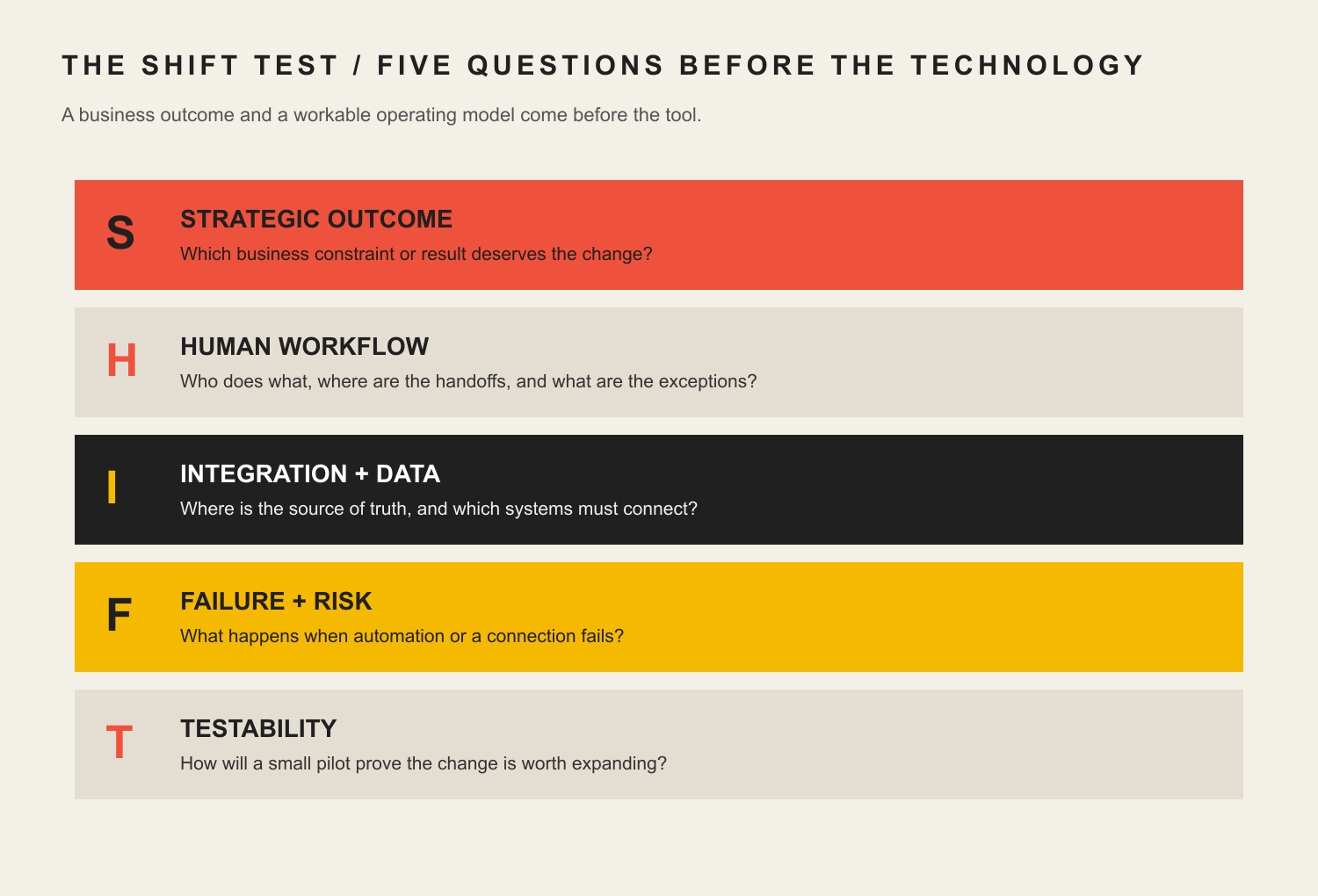
    Five SHIFT questions: strategic outcome, human workflow, integration and data, failure and risk, and testability.
    The Scope Design SHIFT Test turns a technology idea into five operating questions before implementation.
    SHIFT questionWhat to askWhy it matters
    S — Strategic outcomeWhat business result or constraint changes?Prevents “implement a tool” from impersonating a business objective.
    H — Human workflowWho owns the input, exception, approval, and handoff?Exposes hidden labor and the places automation still needs judgment.
    I — Integration & dataWhere is the source of truth, and what must connect?Prevents duplicate records, brittle copy-and-paste work, and conflicting answers.
    F — Failure & riskWhat happens if it is wrong, down, compromised, or abandoned?Forces recovery, security, privacy, vendor, and reputation risk into the design.
    T — TestabilityWhat bounded pilot and metric can prove or reject the investment?Creates a decision instead of an endless rollout.

    Example: “We need AI for customer service” fails the test. “We spend 12 staff-hours a week answering five repetitive pre-sale questions, the approved answers already exist, a person can take over uncertain conversations, and we can compare response time plus qualified handoffs for 30 days” is a project you can evaluate.

    Scope Design rule: a transformation project should make the business easier to operate, not merely more impressive to describe.

    Layer 1: decide what deserves transformation

    1. Name the business constraint before choosing technology

    Start with the most expensive or consequential friction you can describe in plain language. Maybe estimates take three days because information lives in three places. Maybe leads disappear between a website form and the salesperson. Maybe customers call for order status because nobody can see it. Maybe the owner is still the only person who knows how to assemble a quote.

    Write the current baseline before the solution: time, error rate, queue length, response time, rework, missed handoffs, cost, or another decision-relevant measure. Then describe the desired change. “Faster” is weak. “Reduce average quote turnaround from two business days to same-day for standard jobs without increasing pricing errors” gives the project something to prove.

    This is also where digital transformation connects to broader business strategy. If the business has not decided which customer, process, constraint, or capability matters, a technology roadmap will simply automate indecision.

    2. Map the workflow, handoffs, delays, and exceptions

    The official process is rarely the real process. Sit with the people doing the work and map what happens from trigger to finish. Where does information arrive? Who retypes it? Who checks it? Which spreadsheet exists because the main system cannot answer a practical question? Which approval happens in a text message? What happens when the normal case breaks?

    Exceptions matter because automation is easiest when everything follows one clean path, while real businesses are full of partial payments, reschedules, returns, rush jobs, special pricing, missing information, warranty questions, and customers who reply to the wrong email. A workflow is ready for automation when the normal path is understood and the exceptions have named owners.

    Do not optimize a step in isolation if the delay simply moves downstream. A faster lead form that creates twice as much manual cleanup is not an improvement. It is a handoff problem with a nicer interface.

    3. Assign one source of truth and one owner for important data

    Customer records, pricing, inventory, project status, documents, schedules, product information, and financial data need an authoritative home. That does not mean every business needs one giant all-in-one platform. It means people must know which system wins when two copies disagree.

    For each important data set, name the source of truth, owner, who may edit it, which systems receive copies, and how changes synchronize. If a CRM owns the customer record but the accounting system owns invoices, define the boundary. If the website displays product information from another system, decide what happens when the connection fails.

    This is where “cloud-first” advice often becomes lazy. Cloud software can make collaboration and access much easier, but the decision still depends on security, connectivity, workflow, integration, export, cost, and ownership. Choose an architecture because it fits the work, not because a slide deck said modern businesses live in the cloud.

    Layer 2: make the foundation safe and usable

    4. Secure identities, updates, backups, and recovery

    A digital transformation increases the number of systems that can help the business. It can also increase the number of systems that can fail or be abused. Security belongs in the foundation.

    NIST SP 1300 gives small and medium-sized businesses a quick-start path for using Cybersecurity Framework 2.0, while CISA’s small and medium business resources emphasize practical controls such as multi-factor authentication, software updates, backups, phishing awareness, encryption, and logging. You do not need an enterprise security theater production. You do need to know who has access, what gets backed up, how recovery works, and who responds when something goes wrong.

    Make multi-factor authentication the default wherever the service supports it, especially for email, finance, administration, hosting, cloud storage, and customer-data systems. Keep software supported and patched. Test restores instead of assuming “backup enabled” means recoverable. Remove old accounts. Separate normal work from privileged administration where practical. Security is an operating practice, not a checkbox a vendor can permanently complete for you.

    5. Fix the customer-facing home base only where it is a real constraint

    The legacy version of this article treated a sophisticated website as transformation step one for everybody. That is too broad. Your customer-facing home base matters when it is actually part of the problem: customers cannot understand the offer, find reliable information, book, buy, request service, upload what you need, or move into the next step without manual rescue.

    For many small businesses, the website is the durable place to explain the offer, establish credibility, route customers, and connect forms or scheduling to the rest of the operation. Our guide to building an online presence for a small business covers that narrower job in more detail.

    But do not rebuild a perfectly adequate website because “digital transformation” sounds like it should begin with a redesign. If the real constraint is inventory accuracy, quote turnaround, dispatch, collections, or internal approvals, fix that instead. Custom functionality should earn its place. Otherwise it is expensive theater.

    6. Connect the customer, service, finance, and fulfillment handoffs that matter

    The biggest improvements often happen between systems rather than inside one system. A qualified website inquiry should not require manual copying into a CRM. An approved quote should not need to be recreated as an invoice if the data is already structured. A completed service call should update the customer record and trigger the next appropriate step without relying on somebody remembering at 4:55 p.m.

    Start with the handoffs that create duplicated work or customer uncertainty. Define the event, data that moves, destination, owner, failure behavior, and whether the action needs approval. Use APIs, native integrations, middleware, or custom code according to the stakes and complexity. The integration method matters less than whether the business can see when it fails.

    Avoid integrations that silently create two masters. If both systems can overwrite the same field without a rule, you do not have synchronization. You have a future argument between databases.

    Layer 3: digitize and automate work carefully

    7. Digitize repetitive financial and administrative work where it reduces friction

    Standard estimates, invoices, payment reminders, expense capture, appointment confirmations, document assembly, recurring reports, and onboarding checklists are common places to remove repetitive work. The best candidates are frequent, rule-based, and easy to verify.

    Do not turn “paper is bad” into a religion. A paper checklist beside a machine may be safer and faster than making a technician sign into three apps. A digital form is useful when the data needs to be shared, searched, validated, routed, reported, or reused. Digitize because the information becomes more useful, not because paper offended the software budget.

    When replacing a spreadsheet, ask what job the spreadsheet is secretly doing. It may contain approval logic, comments, historical memory, and exception handling that nobody documented. Replacing the file without capturing those jobs is how a shiny new platform becomes an expensive second spreadsheet.

    8. Automate stable, low-judgment work before automating decisions

    Automation should usually begin with boring work: moving approved data, generating first-pass documents from structured inputs, routing notifications, creating tasks, checking for missing fields, scheduling routine follow-ups, and assembling repeatable reports. These tasks can often be tested against clear expected results and handed to a person when something unusual happens.

    Use our deeper guide to AI and business automation when the question shifts from “where does automation belong?” to workflow architecture, governance, custom integrations, and durability.

    Do not automate a process nobody agrees on. The machine will not resolve the disagreement. It will execute one version of it faster. Also avoid automating around a broken data model. If the same customer has four records and three naming conventions, the first transformation may be data cleanup and ownership rather than automation.

    9. Use AI as a bounded copilot with human accountability

    AI can be useful for summarizing notes, drafting variations, extracting structured information, classifying routine inputs, finding repeated questions, assisting with research, preparing first-pass documents, and helping employees work through approved knowledge. The U.S. Small Business Administration describes AI as a tool that can improve efficiency and help save time and costs in appropriate use cases. That is an opportunity, not a guaranteed ROI.

    NIST’s Generative AI Profile provides voluntary risk-management guidance for generative AI. The small-business translation is straightforward: define what the system may do, what data it may use, what must be verified, what requires human approval, what happens when confidence is low, and who owns a bad outcome.

    Keep humans in charge of pricing, contractual commitments, sensitive personnel decisions, legal or compliance judgments, safety-critical actions, and customer situations where context or reputation matters. “Human in the loop” is not a magic phrase. Name the person, trigger, evidence they see, and authority they have.

    Layer 4: turn tools into an operating system

    10. Document procedures, exceptions, approvals, and access

    A transformation that only one employee understands is not resilient. Write the minimum documentation needed to operate the workflow: what starts it, normal path, exception path, source systems, approval rules, access requirements, expected outputs, troubleshooting, support contact, and recovery path.

    Documentation does not need to become a 200-page manual nobody reads. A short operating note, diagram, checklist, and decision table can be enough if they reflect reality. Keep the documentation close to the work and update it when the workflow changes.

    This is particularly important when AI or automation uses business knowledge. An assistant cannot reliably distinguish current policy from an old campaign page unless the business itself knows which source is authoritative. Retrieval makes approved knowledge available. It does not make contradictory documentation good.

    11. Measure the decision, not dashboard decoration

    Before launch, define the measure that tells you whether the constraint improved. Useful metrics might include turnaround time, first-time-right rate, duplicate entry, support contacts per order, invoice age, conversion from a qualified inquiry, manual touches per job, backlog size, rework, missed appointments, or employee time spent on a repeatable task.

    Measure the baseline using the same definition you will use afterward. If the metric changes halfway through the pilot, write down why. Track guardrails too. An automation that saves two staff hours but doubles customer complaints did not earn a victory lap.

    Dashboard activity is not an outcome. Number of automations run, AI messages generated, CRM records created, or app logins can help troubleshoot adoption, but they do not prove the business is better. Measure the work that justified the project.

    12. Train the team on the real workflow, not just the buttons

    The old article was right about one thing: digital transformation succeeds or fails in the hands of the people who must use it. Training should cover more than where to click. Explain why the workflow changed, which system is authoritative, what good input looks like, what must never be entered, how exceptions work, when to escalate, and how people report problems.

    Use real examples, including the ugly ones. Give staff a safe place to practice. Train managers on how to interpret the new data and how not to punish people for surfacing defects in the process. A “digital culture” is not enthusiasm for tools. It is the habit of making the system visible, improving it with evidence, and keeping judgment where judgment belongs.

    If adoption requires constant private workarounds, investigate the design. Employees can resist change, but they can also be the first people to notice that the new workflow is slower, duplicative, or missing a real exception. Do not label useful feedback as resistance because the implementation plan needs better news.

    Layer 5: keep transformation from becoming tool debt

    13. Design for interoperability, export, and an exit path

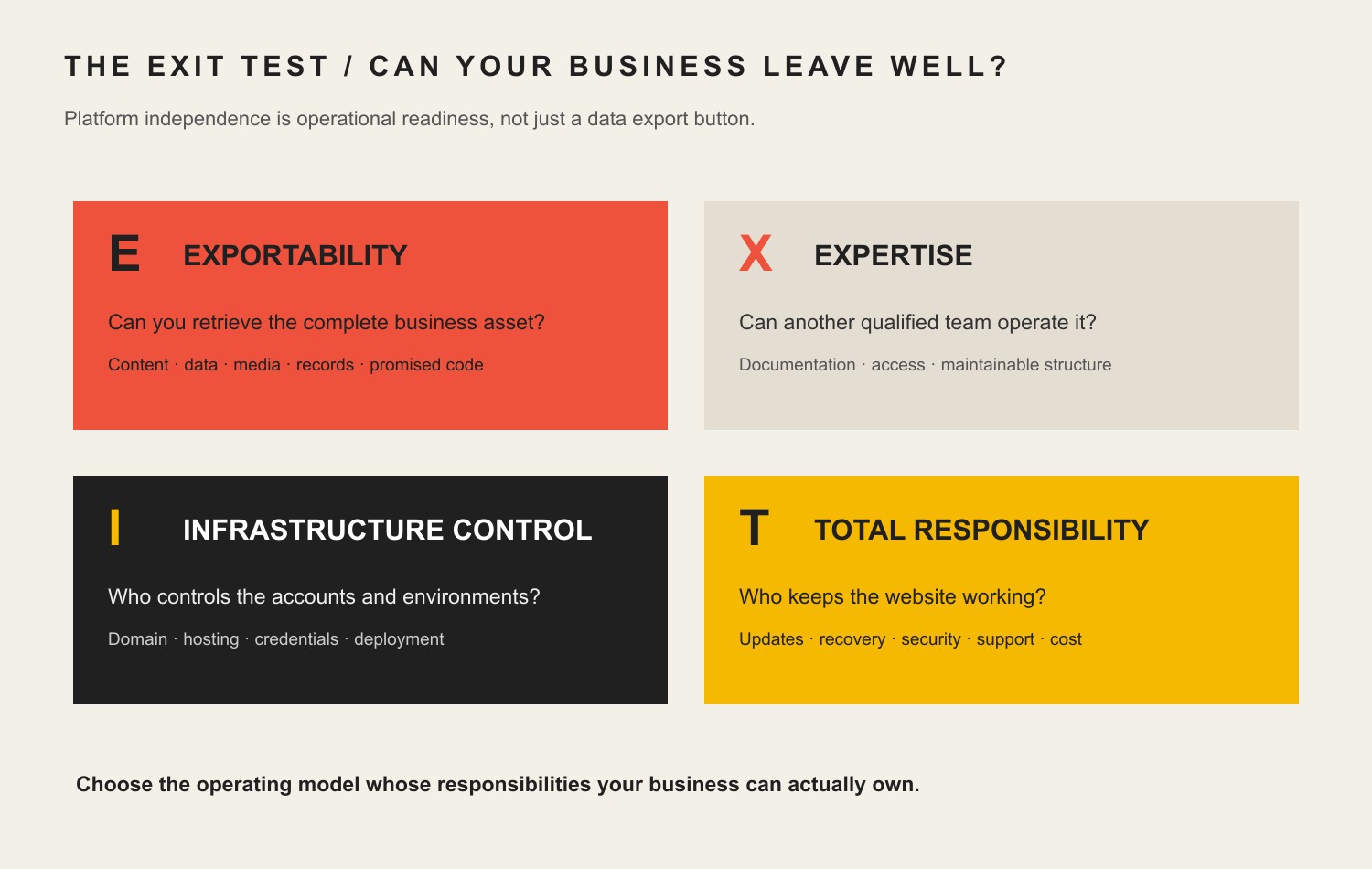
    Before committing to a platform, ask how you get your data out, which formats are available, whether APIs cover the records you need, how users and permissions are managed, what happens to automations if you leave, and how long you can operate during a migration. Vendor lock-in is not automatically bad; sometimes a tightly integrated platform is worth it. Lock-in you did not understand is the problem.

    Prefer boring, documented interfaces over clever dependencies that only one contractor understands. Record integration credentials, owners, renewal dates, vendor contacts, and custom code. Separate business rules from one vendor’s marketing language so the process can survive a platform change.

    Transformation should reduce trapped knowledge, not relocate it from a spreadsheet to a black box.

    14. Pilot one high-value change before scaling

    A useful pilot is small enough to control and large enough to answer the business question. Choose one workflow, one audience or team, a defined window, a baseline, success threshold, guardrails, and a decision date. Test the exception path, not only the happy path.

    Do not call every trial a “pilot” after launch. Write the decision rule first. What evidence means scale? What evidence means revise? What evidence means stop? If there is no stopping condition, you have already made the purchasing decision and the pilot is theater.

    Stopping a weak pilot is not failure. It is one of the cheapest successful outcomes available. The business learned before multiplying licenses, integrations, training, support, and sunk-cost politics.

    15. Assign maintenance, review, and retirement ownership

    Every important digital system needs an owner after implementation. Who reviews access? Who watches failed integrations? Who tests backups or recovery? Who updates business rules? Who checks vendor changes? Who measures whether the process is still worth operating? Who retires old tools and accounts?

    The maintenance load is part of the buying decision. A $50 monthly tool that needs three hours of senior staff attention every week is not a $50 tool. Include subscriptions, internal labor, support, training, audits, integration upkeep, custom development, and switching costs when comparing options.

    For one common subsystem, our website maintenance and ownership guide shows how updates, backups, security, performance, testing, and responsibility continue after launch. The same principle applies across CRMs, automations, analytics, AI workflows, and internal applications.

    A practical 90-day small business digital transformation roadmap

    You cannot “finish digital transformation” in 90 days, and anyone promising that is selling a calendar trick. You can make one important part of the business materially clearer in 90 days and leave with enough evidence to choose the next move.

    WindowMain jobConcrete outputs
    Days 1-30: Diagnose and baselineChoose the constraint, map the workflow, identify data owners, and close obvious security gaps.Current-state map; baseline metric; SHIFT assessment; access inventory; MFA/update/backup actions; one pilot brief.
    Days 31-60: Implement one bounded changeConfigure or build the smallest workflow that can test the hypothesis.Integration or system configuration; exception path; documentation; staff training; instrumentation; rollback plan.
    Days 61-90: Measure and decideCompare the result with baseline and guardrails.Outcome review; defects and adoption evidence; scale/revise/stop decision; maintenance owner; next constraint if the first change earned expansion.

    This sequence is deliberately boring. Boring is good. It gives the business time to discover that a field is missing, an approval is ambiguous, a vendor API behaves differently than the sales demo, or an employee needs a safer exception path before those problems spread across the whole company.

    What should a small business NOT automate yet?

    Do not automate a task merely because an AI demo or integration can perform it. Delay automation when any of these conditions are true:

    • The process is unstable. People disagree on the normal path or the rules change every week.
    • The data is unreliable. Duplicates, missing fields, conflicting sources, or poor permissions make automated action unsafe.
    • No one owns the exception. When the workflow breaks, the answer is “somebody will notice.”
    • The decision is rare and high-stakes. Legal, safety, employment, pricing exceptions, major refunds, or reputation-critical choices may need qualified human judgment even if AI assists.
    • The output cannot be verified cheaply. If checking every result costs more than doing the task, redesign the workflow before scaling automation.
    • The customer needs empathy or negotiation. Escalations, complaints, grief, unusual hardship, or complex sales conversations may be damaged by a system that optimizes only speed.
    • The business cannot recover from failure. If a vendor outage, bad rule, compromised account, or model error can stop operations, design fallback and recovery first.

    Automation should make a clear process cheaper, faster, more reliable, or easier to scale. It should not make an unclear process harder to see.

    What our audit of this exact article taught us

    We applied the same rule to this revision that we recommend to clients: inspect the system before changing it. The legacy article had a live, self-canonical, index/follow URL and several durable ideas, but it also had unsupported performance percentages, a long technology shopping list, no outgoing internal links, and a UX category assignment that Scope’s own silo map described as the wrong job.

    Signal checkedObservation on August 20, 2026What it actually supports
    GA4, last 12 complete months10 landing sessions total: 9 Direct, 1 Referral; 3 engaged sessions; 0 key events; no Organic Search landing row.The sample is too small for behavior conclusions. There is no measured organic or conversion footprint forcing us to protect unsupported legacy copy.
    Google Search ConsoleNo exact-URL query rows in the current or prior 12-month period; URL Inspection says “Discovered – currently not indexed.”Public accessibility did not equal confirmed Google indexing. The revision needs clearer ownership and usefulness, not a URL migration.
    Bing Webmaster ToolsThe page is recognized and crawled, with 0 clicks and 0 impressions in the URL traffic response.Bing knows the page, but there is no meaningful Bing traffic signal to protect.
    UbersuggestNo ranking-keyword data returned for the exact page and no exact-URL backlink rows.Third-party evidence also showed no strong page equity requiring content preservation.

    Scope’s GA4 attribution and key-event setup has known limitations, so zero key events is not proof of zero business impact. The point is narrower: the old article did not have a demonstrated search or conversion asset strong enough to justify keeping claims we could not support. We preserved the established URL because it already matches the primary query and creates no need for redirect risk. We changed the article’s job instead.

    Frequently asked questions about small business digital transformation

    What should a small business modernize first?

    Modernize the constraint that creates the most meaningful cost, delay, risk, customer friction, or owner dependence and that can be measured. Map the workflow and data first, then choose the technology. If the current problem cannot be described without naming a product, the diagnosis is probably not finished.

    What are the main areas of digital transformation?

    For a small business, five practical areas cover most of the work: strategic priorities, secure digital foundations, workflow digitization and automation, operational adoption and measurement, and lifecycle ownership. Different frameworks use four, five, or seven “pillars.” The count matters less than whether your roadmap covers people, process, data, technology, risk, and outcomes.

    How much should digital transformation cost?

    There is no responsible universal percentage. Cost depends on the business constraint, number of users, data cleanup, integrations, custom functionality, security requirements, migration, training, support, and ongoing ownership. Compare lifecycle cost with the value of the improved process, not with a vendor’s license price alone.

    Should every small business use AI?

    No. AI is useful when it fits a real workflow and the business can manage data, verification, risk, and human accountability. A ten-person company may get more value from fixing its quote process or customer records than from launching a chatbot. Use AI where it earns its keep.

    How long does digital transformation take?

    Transformation is ongoing because processes, customers, staff, vendors, threats, and technology change. A 30- to 90-day pilot can test one meaningful improvement. That is different from claiming the whole business will be “transformed” on a fixed calendar.

    Why do digital transformation projects fail?

    Common failure modes include choosing tools before defining the problem, automating an unstable process, poor data ownership, too many simultaneous changes, weak security or recovery planning, unclear accountability, inadequate training, no baseline, and no decision rule for scaling or stopping.

    Do I need a new website for digital transformation?

    Only if the website is part of the constraint. If customers cannot find, trust, book, buy, or provide the information your operation needs, the site may deserve work. If the site is fine and the real problem is scheduling, inventory, quoting, or internal handoffs, fix the real problem instead.

    What should a small business automate first?

    Start with frequent, repetitive, well-defined, low-risk work whose results are easy to verify: routing information, structured document assembly, reminders, task creation, data validation, and routine reporting are common examples. Keep high-stakes judgment and uncertain exceptions human-owned until the workflow and controls are stronger.

    Build a digital operating system your business can actually run

    Small business digital transformation is not a race to install the most advanced stack. It is the discipline of choosing where digital tools remove real friction, designing the human and data handoffs around them, protecting the business when they fail, and measuring whether the change earned the right to stay.

    Use SHIFT before the purchase. Start with one constraint. Build the smallest useful change. Make ownership explicit. Then scale only what survives contact with reality.

    If you need help diagnosing the constraint, mapping the workflow, connecting the website and business systems, designing an automation, or deciding what should stay human, contact Scope Design. We can help turn a pile of disconnected digital work into a system your team can understand, operate, and improve.

    Sources and further reading

  • UX Web Design and Content Strategy to Boost Website Value

    UX Web Design and Content Strategy to Boost Website Value

    UX content strategy is the practice of planning what a website needs to say, how people will find and understand it, and what should happen next as one connected system. For a business website, the most useful unit is not the page. It is the decision the visitor is trying to make on that page.

    That changes the job of web design. Instead of creating a polished layout and filling it with copy later, you start with the visitor’s intent, the business objective, the evidence needed to resolve doubt, and the path to an appropriate next action. UX shapes how that path works. Content strategy determines what information belongs in it, why it exists, who owns it, and how it stays useful.

    Scope Design’s rule: A requested tactic is evidence, not a diagnosis. Before redesigning pages or rewriting copy, define the objective, identify the binding constraint, clarify the positioning, choose the strategy, then select tactics and measurement.

    What does UX content strategy actually mean?

    UX design, content strategy, and copywriting overlap, but they are not interchangeable.

    • UX design shapes the experience of completing a task: navigation, hierarchy, interaction, forms, feedback, accessibility, and the sequence of steps.
    • Content strategy decides what information should exist, what purpose it serves, how it is structured and governed, who maintains it, and how success is measured.
    • Copywriting and UX writing turn that strategy into the actual words people read and act on.

    Nielsen Norman Group’s Content Strategy 101 describes content strategy as an ongoing practice for planning the creation, delivery, governance, maintenance, and eventual retirement of useful content. Its more recent comparison of content strategy and UX writing makes the same distinction: strategy establishes goals, systems, standards, research, and measurement; writing executes within that system.

    For a marketing website, those disciplines meet everywhere. A navigation label is content and UX. A service-page heading is content and information hierarchy. A form field is both a business qualification choice and a usability choice. A case study is content, but where it appears in the decision path determines whether a visitor sees the proof when doubt actually occurs.

    If the underlying problem is simply weak, generic, company-centered writing, our guide to why website content fails goes deeper on content quality. This article is about the larger system: making content and UX work together.

    Before integrating UX and content, diagnose the real constraint

    A prettier website can still fail. Better copy can still fail. Faster pages can still fail. Each is valuable only when it addresses the constraint currently preventing the business outcome.

    Scope Design diagnoses website problems upstream to downstream:

    1. Measurement and technical integrity: Do analytics, forms, notifications, mobile behavior, speed, and tracking actually work?
    2. Sufficient relevant volume: Is there enough intent-bearing traffic to evaluate conversion behavior?
    3. Traffic quality and acquisition fit: Are the right people landing on pages that match the promise that brought them there?
    4. Messaging clarity: Can visitors understand what you do, who it is for, why it matters, and what to do next?
    5. UX friction: Are interested visitors getting lost, blocked, surprised, or forced to work too hard?
    6. Offer and positioning: Do qualified visitors understand the offer but still believe the trade is not worthwhile?
    7. Sales and operational follow-through: Does the business respond, qualify, route, and close the opportunities the site creates?

    That order matters. If your tracking is broken, a conversion-rate diagnosis is weak. If almost nobody relevant reaches the page, changing button copy is unlikely to be the highest-value move. If good-fit prospects arrive and understand the offer but do not believe it, navigation tweaks may be treating the symptom.

    If you are specifically deciding which discipline to fix first, see Web Design vs. Content: Which Should You Fix First? If the broader question is why qualified visitors are not converting, use our UX diagnosis guide. Here, we will assume the website genuinely needs UX and content to be planned together.

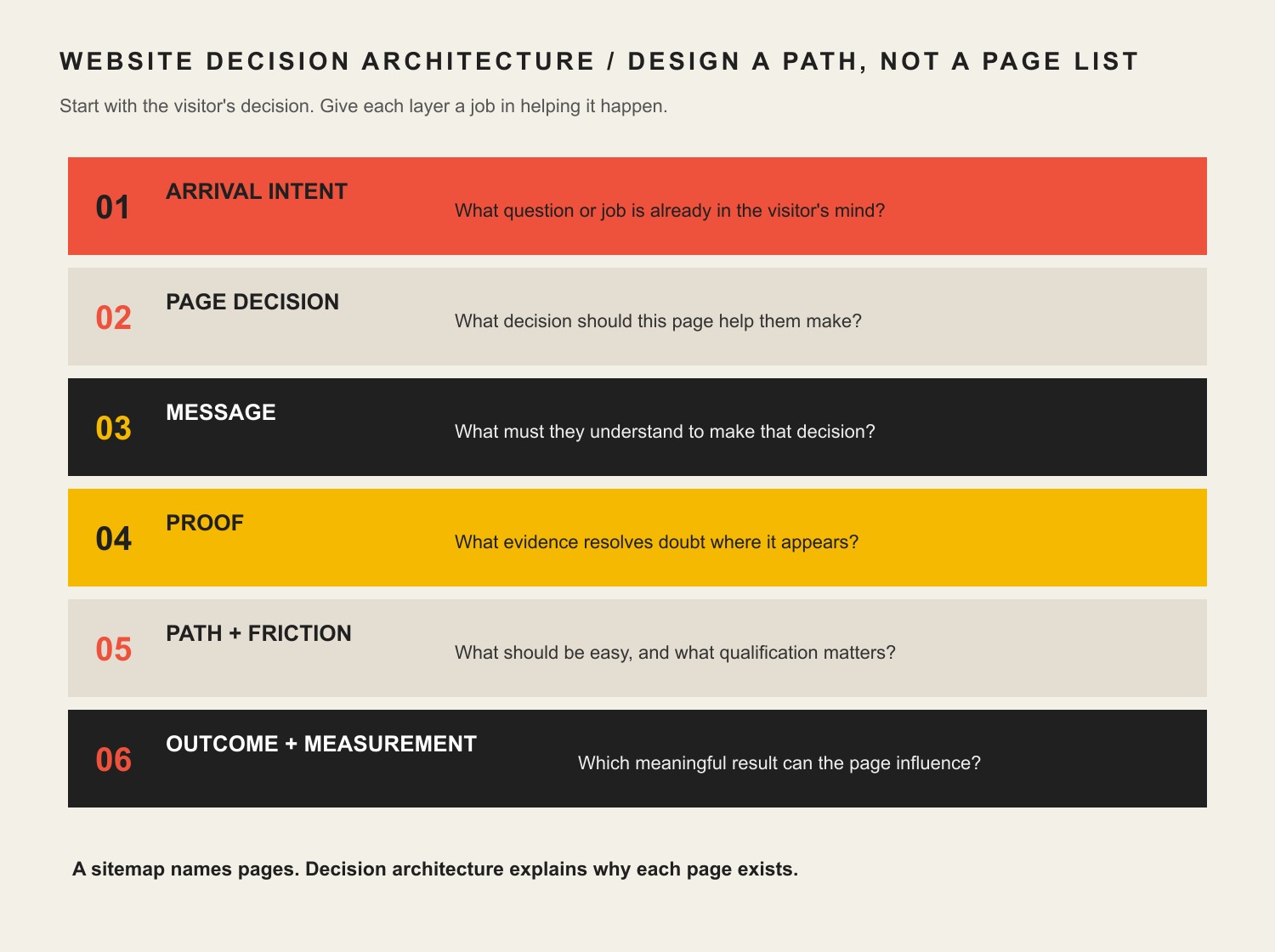
    Use a Website Decision Architecture instead of decorating a sitemap

    A sitemap tells you which pages exist. It does not tell you whether those pages deserve to exist, what decision each page supports, what evidence belongs there, or how the visitor moves from uncertainty to action.

    Six layers of website decision architecture: arrival intent, page decision, message, proof, path and friction, and outcome measurement.

    For every important page, answer six questions before polishing the visual design:

    Decision layerQuestion to answerWhat it changes
    Arrival intentWhat question or job is in the visitor’s head when they land?Page promise, search/acquisition fit, opening message
    Page decisionWhat decision should this page help them make?Scope, hierarchy, what to include or remove
    MessageWhat must they understand before they can decide?Headings, explanations, comparisons, objections
    ProofWhat evidence resolves doubt at the moment it appears?Case studies, examples, credentials, reviews, process proof
    Path + frictionWhat should be easy, and what qualification friction is intentional?Navigation, CTAs, forms, progressive disclosure
    Outcome + measurementWhat is the last meaningful outcome this page can influence?Analytics events, CRM handoff, success criteria

    The key is sequencing. Content should not merely describe what the business wants to say. UX should not merely make that content attractive. Both should help the visitor make the next reasonable decision with enough context and confidence.

    How to integrate UX design and content strategy in a website project

    1. Define the business objective and the website’s job

    Start with the outcome, not the deliverable. “Redesign the website” is a tactic. “Generate more qualified opportunities from referral and organic traffic” is an objective that can guide strategy.

    Then decide what the website can realistically control. A considered B2B site may be responsible for generating qualified conversations, not closing the sale by itself. A local service page may be responsible for booked-and-attended appointments. An ecommerce product page can be held much closer to purchase.

    2. Research arrival intent, not just demographics

    “Small-business owner, age 35–55” rarely tells a designer what to build. The useful question is what the person is trying to figure out right now.

    • A search visitor may need a direct answer before they trust the company.
    • A referral may already trust the brand but need proof of fit.
    • A paid-ad visitor needs the landing page to continue the exact promise in the ad.
    • A prospect sent by a salesperson may need pricing, process, proof, or implementation detail to reduce uncertainty.

    Design the experience for that arrival state. The same person can need different content on different visits.

    3. Give every important page a job

    Before wireframes, define the decision each page supports. A service page might help someone decide, “Is this company a fit for my problem?” A case study may answer, “Have they solved something like this before?” A pricing page may answer, “Is this option financially realistic?”

    This is where information architecture becomes strategic. Navigation, internal links, page hierarchy, and content structure should mirror the questions people need answered—not the departments on your org chart.

    4. Draft content structure and proof before polished visual design

    This does not mean every final sentence must be approved before design begins. It means the designer should know the real content requirements: the message hierarchy, likely content length, proof assets, objections, comparisons, CTAs, data, forms, media, and edge cases.

    NN/g explicitly recommends bringing content into the design process early and planning structure, information architecture, metadata, accessibility, standards, and governance before last-minute content insertion. That matches our experience: lorem ipsum can hide the very constraints the finished page must solve.

    5. Put proof where doubt occurs

    Do not dump every testimonial into one carousel and call it trust. Match the proof to the claim. If you claim a complicated migration is safe, show how you handled one. If you claim industry expertise, show relevant work or insight. If you claim a process reduces risk, explain the checkpoints.

    This is also where UX, content, and brand authority intersect. Authority is more useful as a body of evidence than as a visual costume. Good UX makes the right proof easy to encounter; good content strategy makes sure the proof exists and stays current.

    6. Design actions and forms around fit, not raw conversion volume

    Many conversion checklists say to remove fields and eliminate friction. Sometimes that is right. Sometimes it is exactly wrong.

    If a considered-service business cannot serve a certain geography, project size, or timeline, asking about that constraint may reduce total form submissions while improving the percentage that become real opportunities. The goal is not to maximize button clicks. The goal is to improve the business outcome after lead quality, staff time, no-shows, churn, and trust are counted.

    We use two ethical tests for conversion tactics: would the improvement survive if the visitor understood why the tactic was used, and does the improvement remain after downstream costs and trust are included? That rules out fake urgency, hidden costs, inaccessible design, and other mechanics that make the metric look better by making the experience worse.

    7. Test the combined experience

    Do not test content and interface as if they live in separate universes. Give people realistic tasks and watch where meaning or interaction breaks down. A participant who understands the service but cannot find the next step has a UX problem. A participant who can navigate perfectly but cannot explain the offer has a messaging problem. A participant who completes the form but is a terrible fit may expose a qualification or acquisition problem.

    Performance and accessibility are part of UX content strategy

    Content is not useful if the experience prevents people from reaching, reading, understanding, or operating it.

    Google’s current Core Web Vitals guidance measures loading performance, responsiveness, and visual stability. Google recommends aiming for Largest Contentful Paint within 2.5 seconds, Interaction to Next Paint under 200 milliseconds, and Cumulative Layout Shift under 0.1 for a good experience. Those metrics matter, but Google also makes clear that page experience is broader than any single metric.

    Accessibility has the same integrated character. WCAG 2.2 organizes accessibility around content and interfaces being perceivable, operable, understandable, and robust. At Level AA, for example, headings and labels must describe their topic or purpose. That is simultaneously a writing, hierarchy, design, and implementation responsibility.

    A fast page can deliver the wrong answer very efficiently. A beautiful page can be inaccessible. A technically compliant page can still be confusing. Treat performance, accessibility, structure, and meaning as one experience.

    Example: the requested redesign was not the real problem

    A long-established specialty auction business came to Scope Design asking for a new website and new features. Discovery showed that a prettier website was not the real constraint.

    The public site sat on top of broken or incomplete customer-facing functions, disconnected data, manual processes, legacy software, and systems that could not support where the business needed to go. Starting with visual page design would have made the surface look newer while leaving the underlying customer and operational experience fragile.

    So we mapped the business processes and rebuilt the foundation around them before treating requested features as isolated page components. The strategic lesson is bigger than that project: the requested deliverable was a symptom; discovery exposed the constraint.

    Measure the last meaningful outcome the website can influence

    Sessions, impressions, rankings, scroll depth, time on page, and button clicks are diagnostic signals. They are not automatically business success.

    Choose a primary outcome based on the website’s actual job:

    • Ecommerce: purchases, repeat purchase behavior, and average order value.
    • Considered B2B: qualified opportunities and pipeline value.
    • Local services: booked-and-attended appointments and correctly tracked calls.
    • Subscription businesses: activation, retention, and lifetime value.
    • Operational/self-service sites: staff time saved, errors reduced, or issues resolved without manual intervention.

    Then use supporting metrics to locate the bottleneck. Search visibility can diagnose acquisition. Engaged sessions can help diagnose landing-page fit. Form completion can reveal friction. Qualified-opportunity rate can reveal whether the content and form are attracting and filtering appropriately. Follow the chain far enough that optimizing one metric does not quietly damage the next one.

    What revising this exact page taught us

    We applied the same diagnosis to this article before rewriting it. The old version was about 1,300 words and contained broad UX/content advice, unsupported conversion statistics, and essentially one context-free internal CTA.

    In the latest complete 12-month analytics window ending August 19, 2026, it recorded only one organic-search session and no tracked key event. Search Console returned no page/query performance rows for either of the two 12-month comparison periods, and URL Inspection reported the live page as Discovered – currently not indexed. Bing showed zero clicks and zero impressions. Ubersuggest found zero ranking page keywords, backlinks, and referring domains.

    That does not prove the topic has no demand. Ubersuggest estimates about 170 U.S. monthly searches for “ux content strategy,” and the current Google results include an AI Overview plus high-authority articles from Nielsen Norman Group, HubSpot, and specialist UX publications. The more useful conclusion is that the old article did not earn a distinct enough job in that result set.

    This revision therefore changes the value proposition instead of merely adding words: it removes unverified statistics, makes the Constraint-First diagnosis explicit, introduces a reusable Website Decision Architecture, adds first-hand project evidence, connects the article to relevant Scope resources, and gives both search engines and readers a clearer reason this page should exist.

    UX content strategy FAQ

    What does “UX content” mean?

    UX content is the information people encounter while using a digital experience: headings, navigation labels, service explanations, buttons, instructions, forms, error messages, help content, proof, and more. The important point is not the label. The content helps people understand where they are, what something means, what choice they are making, and what happens next.

    How do UX design and content strategy work together?

    Content strategy defines the purpose, information, structure, ownership, and measurement. UX design turns those requirements into an experience people can navigate and operate. They should iterate together: real content changes layout and hierarchy, while prototypes and user testing expose missing, confusing, or badly timed content.

    Should content come before web design?

    The strategy and real content requirements should come before polished visual design, but the work should not be a rigid waterfall. Designers need enough real content to understand hierarchy, length, proof, edge cases, and interactions. Writers and strategists need prototypes to see whether the information works in context. Plan early, then iterate together.

    What are the seven pillars of UX design?

    There is no single universally accepted set of seven UX-design pillars. Different authors use different frameworks. For a business website, a more useful question is whether the experience is useful for the intended visitor, understandable, findable, operable, accessible, credible, and connected to a measurable business outcome. Do not force a numbered framework onto the project unless it improves the diagnosis.

    What is an example of a UX content strategy?

    For a B2B service page, the strategy might define the visitor as a comparison-stage buyer, the page decision as “Is this firm a fit?”, the core message as the problem and outcome, the proof as a relevant case study, the intentional friction as project-size and timeline qualification, and the primary outcome as a qualified consultation request. UX then determines how those elements are ordered, revealed, labeled, navigated, and completed on desktop and mobile.

    How do you measure whether UX content strategy is working?

    Measure the last meaningful outcome the website or page can directly influence, then use diagnostic metrics to locate problems. For a service company that may be qualified opportunities rather than raw form submissions. For ecommerce it is much closer to purchase. Tie page and traffic data to CRM or revenue data where possible so you can distinguish activity from value.

    Build the website around the decision you need to improve

    The strongest UX content strategy does not begin with “How should this page look?” or “How many words should we write?” It begins with the business objective, the visitor’s intent, and the constraint preventing the desired outcome.

    From there, design the argument, proof, navigation, interactions, qualification, and measurement as one system. That is how a website becomes more than a collection of attractive pages—it becomes an asset that helps the right people make good decisions.

    If your website looks fine but you are not sure whether the real problem is traffic, messaging, UX, content, the offer, or follow-through, contact Scope Design. We can help diagnose the constraint before you invest in the wrong fix.

  • Email Marketing for Small Business: Build a Relationship System, Not a Blast Calendar

    Email Marketing for Small Business: Build a Relationship System, Not a Blast Calendar

    Email marketing for a small business should be an owned relationship system that earns permission, sends useful messages at the right lifecycle moment, hands responses to a responsible person, and measures what happens next. It is not a newsletter calendar, an open-rate contest, or a magical machine that turns every dollar into forty-two more because an infographic said so.

    TL;DR: Start with one permissioned, exportable contact record. Define the job of each email. Segment by the customer relationship, authenticate the sending domain, automate only stable moments, assign every reply and sales signal, and measure qualified progress rather than vanity metrics. If those pieces are missing, sending more email merely scales the confusion.

    What Is a Small-Business Email Marketing Strategy?

    A small-business email marketing strategy defines whom the business may contact, why each message exists, what customer moment it supports, how the contact data is maintained, who owns the response, and which business outcome will be observed. The platform is only one component.

    That definition deliberately reaches beyond campaigns. A welcome email can be beautifully written and still fail if the contact source is unknown, the reply goes to an unattended inbox, the sales team cannot see the customer’s question, or nobody knows whether the recipient later booked, bought, renewed, or asked for help.

    Email remains useful because it can continue a direct relationship outside an algorithmic feed. But “owned channel” is often overstated. You do not own Gmail’s inbox, a vendor’s delivery infrastructure, or a person’s attention. You can own the business records, sending domain, permission history, message logic, exports, and operational process. That is the part worth building.

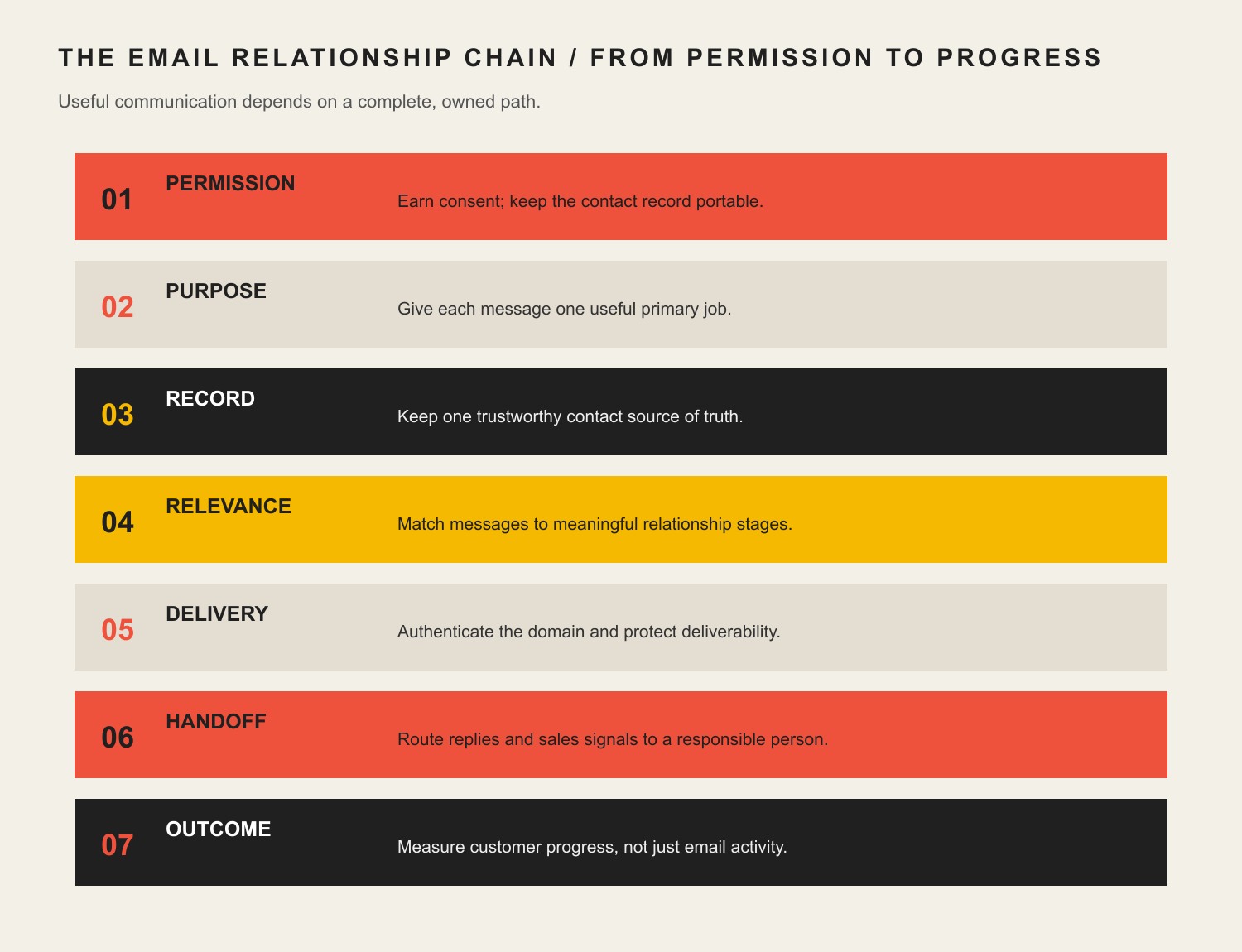
    The Scope Design Email Relationship Chain

    Seven email relationship stages: permission, purpose, trustworthy record, relevance, delivery, human handoff, and customer outcome.

    Use seven connected parts to plan or audit the system: Permission, Purpose, Record, Relevance, Delivery, Handoff, and Outcome.

    LinkQuestion it must answerTypical failure
    PermissionWhy is this person receiving this type of message?A mystery spreadsheet is treated as a marketing list
    PurposeWhat useful job should this message perform now?“We should send something this week” becomes the strategy
    RecordWhich system preserves source, preference, status, and ownership?Five conflicting lists and no reliable export
    RelevanceWhat relationship fact materially changes the message?Everyone receives the same generic blast
    DeliveryCan authenticated, wanted mail reliably reach and render in the inbox?Copy is polished while the domain looks untrustworthy
    HandoffWho or what owns the reply, purchase signal, service need, or exception?High-intent responses disappear into a shared inbox
    OutcomeWhat observable customer or business transition matters?Opens are celebrated while sales and service remain blind

    Every link affects the next. More relevance cannot rescue bad permission. Better deliverability cannot fix a pointless message. Automation cannot repair an unowned handoff. A dashboard cannot manufacture an outcome the business never defined.

    1. Earn Permission and Keep the List Portable

    Build the list through real customer interactions: a useful subscription, inquiry, purchase, event registration, account preference, resource request, or explicit offline signup. Record the source and date when the platform and process allow it. Tell people what they are choosing rather than hiding a marketing subscription beneath a button with the emotional warmth of a parking ticket.

    Permission is both a trust standard and a deliverability advantage. Google’s current sender guidance recommends that recipients opt in and that senders make subscription and unsubscription easy. The United States’ CAN-SPAM Act is not an opt-in law for ordinary commercial email, but it does establish a federal baseline for accurate sender information, truthful subject lines, a valid postal address, and an effective opt-out. Legal permission and a good reason to occupy somebody’s inbox are not always the same bar.

    List ownership also requires portability. The business should be able to export contacts, consent or source information, preferences, suppression status, and important lifecycle fields in a usable format. The sending domain and vendor accounts should be controlled by the business—not trapped in a former employee’s login or an agency account nobody can recover.

    Never buy a list and call it audience development. Purchased addresses lack relationship context, create complaint and reputation risk, and usually violate the acceptable-use rules of reputable email platforms. You acquired rows, not attention.

    2. Give Every Email One Primary Job

    “Engagement” is too vague to govern a message. Define the customer transition the email is supposed to help.

    Lifecycle momentUseful primary jobSensible next action
    New subscriberConfirm expectations and deliver promised valueChoose preferences, read the promised resource, or reply
    Evaluating prospectAnswer a consequential question or reduce uncertaintyRead evidence, compare options, request a diagnostic, or reply
    New customerExplain what happens next and prevent avoidable anxietyComplete onboarding, supply information, or contact the owner
    Active customerSupport successful use, service, or deliveryUse the service, resolve a problem, or access help
    Lapsed customerTest whether the relationship is still relevantReturn, update preferences, or leave cleanly
    Loyal customerRecognize the relationship and make the next value exchange appropriateRenew, refer, review, or use a relevant benefit

    One message may contain several links, but it should have one primary job. When every email tries to educate, sell, announce, survey, cross-sell, collect a review, and introduce the intern, the reader gets a digital junk drawer.

    This is where the broad strategy separates from an email newsletter. A newsletter is one recurring format. The strategy decides whether that format has a job, which audience should receive it, and what happens when somebody responds.

    Retention mechanics also deserve their own design. A small-business loyalty or rewards program can support repeat behavior, but email should reflect the actual customer relationship rather than spraying the same coupon at subscribers, active customers, and people who already left.

    3. Maintain One Trustworthy Contact Record

    Small businesses rarely begin with one clean database. Contacts live in the email platform, ecommerce system, accounting package, CRM, form plugin, event spreadsheet, support inbox, and somebody’s phone. The answer is not always one gigantic replacement system. It is clear authority for each important fact.

    At minimum, decide where the following information is maintained:

    • email address and customer or account identity;
    • acquisition source and permission basis;
    • subscription preferences and suppression status;
    • lifecycle stage or relationship type;
    • purchases, services, or inquiries that materially affect communication;
    • responsible employee or team;
    • promised next action and deadline;
    • export, backup, and account ownership.

    The email platform may execute sends while the CRM owns lead status and ecommerce owns purchases. That can work. The systems simply need defined synchronization and conflict rules. If three tools disagree about whether someone is a customer, “personalization” becomes a very efficient way to send the wrong message.

    This concern is grounded in Scope Design’s own operating experience. Greg has repeatedly worked to reduce email clutter while preserving searchability, assignment, long-term control, and the ability to delegate. The lesson is not that every business needs a complicated CRM. It is that communication should survive the person who currently remembers where everything is.

    4. Segment by the Relationship, Not Creepy Trivia

    Useful segmentation changes the message because the relationship is genuinely different. A new subscriber, active prospect, current customer, lapsed customer, and service contact should not all receive the same pitch.

    Start with fields the business can maintain and act on:

    • subscription or stated topic preference;
    • lifecycle stage;
    • customer versus prospect status;
    • product, service, or problem involved;
    • recent intentional action such as a purchase, request, reply, or registration;
    • location when it changes availability, regulations, events, or service;
    • engagement only when the signal is reliable enough to change treatment.

    Avoid accumulating demographic or behavioral trivia merely because software can. More data creates more responsibility, more opportunities for error, and more ways to sound unsettling. The minimum useful context usually beats the maximum collectible context.

    Before creating a segment, ask: What will we do differently, and can we keep this field accurate? If there is no operational answer, the segment is decorative complexity.

    5. Authenticate the Domain Before Polishing the Confetti

    Email deliverability begins with identity and reputation, not clever subject lines. Google recommends setting up SPF, DKIM, and DMARC for sending domains. Its requirements for senders delivering more than 5,000 messages per day to personal Gmail accounts include SPF and DKIM, DMARC, aligned sender domains, TLS, a spam rate below 0.3%, and one-click unsubscribe for marketing or subscribed messages. Yahoo’s sender requirements also emphasize timely, relevant email to active audiences.

    In plain English:

    • SPF identifies systems authorized to send for the domain.
    • DKIM adds a cryptographic signature that receiving systems can verify.
    • DMARC tells receivers how the visible sender domain should align with SPF or DKIM and provides reporting and policy controls.

    These records must reflect every legitimate sender: the email platform, business mailbox provider, transactional system, CRM, ecommerce service, or other authorized tool. Randomly pasting DNS records from three vendors can create multiple SPF records or broken alignment. Have somebody inventory the senders and test the result.

    Authentication does not guarantee inbox placement. List quality, complaints, bounces, relevance, sending patterns, and recipient behavior still matter. It does, however, establish that the business took the basic step of proving who is sending. Spending hours on emojis while the domain cannot pass authentication is marketing theater with a technical support sequel.

    Once those foundations are credible, email subject-line strategy can help the recipient understand why the message deserves attention. The subject line’s job is accurate relevance—not emotionally mugging the reader into an open.

    6. Build Automations Around Stable Lifecycle Moments

    Email automation is valuable when the trigger is reliable, the message has a defined job, exceptions are known, and a human can inspect what happened. Start with moments that recur and remain useful without daily improvisation.

    Good first candidates include:

    1. Requested-resource delivery: provide the promised guide, receipt, confirmation, or account information immediately.
    2. Welcome and expectation setting: explain what the subscriber will receive, how often it may arrive, and how to change preferences.
    3. Inquiry acknowledgement and routing: confirm receipt, state what happens next, and alert the responsible person.
    4. Onboarding reminders: request genuinely necessary information and stop when the step is completed.
    5. Post-purchase or post-service follow-up: help the customer succeed, find support, or take the next appropriate action.
    6. Re-engagement or preference check: ask whether the relationship remains wanted before continuing indefinitely.

    Automation should have an owner, review schedule, stop conditions, and failure alerts. A three-year-old sequence can quietly send obsolete pricing, introduce departed employees, link to dead pages, or pitch services the business no longer wants. “Set it and forget it” is usually how digital assets become haunted.

    For broader workflow design, see Scope Design’s business automation and AI services. The technology earns its place only when the process, data, exceptions, and ownership are understood first.

    7. Design the Sales and Service Handoff

    The email did not succeed merely because somebody clicked. Define what happens when a recipient replies, requests pricing, visits a high-intent page, starts a purchase, reports a problem, or asks to stop a particular communication.

    A responsible handoff specifies:

    • the event that creates the handoff;
    • the person or team receiving it;
    • the context they receive;
    • the expected response time;
    • the customer confirmation;
    • the backup when the owner is unavailable;
    • the record that proves completion;
    • the next step when no response occurs.

    The handoff should match capacity. If one owner receives every “hot lead” alert but checks the inbox twice a week, more automation creates faster disappointment. If service replies are mixed with promotional responses, the business may optimize a campaign while overlooking a customer who needs help.

    This is the same constraint-first principle used in the 90-day marketing framework: fix the binding operational problem before adding more activity. More sends are not progress when the response path is broken.

    When email must coordinate with the website, phone, sales, service, or an in-person experience, use the broader omnichannel handoff model to decide which context survives the transition and who owns the next moment.

    8. Measure Customer Progress, Not Just Email Activity

    Open rate is a diagnostic signal, not a business outcome. It is also less dependable than it once appeared. Apple’s Mail Privacy Protection can prevent senders from seeing whether recipients opened a message and may privately load remote content in the background. A neat open-rate trend can therefore reflect technology behavior as well as human attention.

    Use a measurement hierarchy:

    1. Business outcome: qualified inquiries, purchases, renewals, retained customers, completed onboarding, service resolution, or another traceable result.
    2. Lifecycle progression: subscriber to qualified prospect, prospect to conversation, customer to successful onboarding, or lapsed customer to a deliberate return.
    3. Intentional action: reply, useful click, form completion, booking, preference change, or resource use.
    4. System health: delivery, hard bounces, complaints, unsubscribes, authentication, and list growth or decay.
    5. Attention proxy: opens and read-time estimates, interpreted cautiously.

    Choose metrics according to the message’s job. A service notice should not be judged like a promotion. A welcome series may be evaluated by preference completion, replies, and downstream qualification. A newsletter may support return visits and useful conversations. A win-back message may succeed by reactivating a good customer—or by helping uninterested recipients leave cleanly so the list becomes healthier.

    Do not force perfect attribution where it does not exist. Record what can be traced, preserve useful source information, and combine campaign data with sales and service feedback. Hope is not an analytics strategy, but fake precision is not one either.

    9. Choose an Email Platform After Defining the System

    There is no universal “best email marketing platform for small business.” The right tool is the least complicated supported platform that can execute the required permissions, fields, segments, automations, authentication, integrations, exports, and reporting.

    Evaluate platforms against the real operating model:

    • Can contacts, fields, preferences, and suppression records be exported?
    • Can the business control its account, domain authentication, billing, and administrators?
    • Does the platform support the needed lifecycle triggers without brittle workarounds?
    • Can employees see replies and handoffs in the system where work is managed?
    • Does it support accessible templates and usable plain-text alternatives?
    • Can it honor unsubscribes and preference changes consistently across lists?
    • What will it cost at the expected contact and send volume over three years?
    • Can another competent provider maintain it if the current consultant disappears?

    Do not begin with a comparison chart containing seventy features. Start with the jobs and constraints. A simpler platform maintained well is more valuable than an “enterprise” stack nobody trusts.

    10. Use a Sustainable Sending Cadence

    There is no universal best day, hour, or frequency. A local retailer’s event reminders, a professional firm’s educational sequence, an ecommerce replenishment message, and a service company’s onboarding emails have different timing logic.

    Choose cadence from:

    • the promise made when the person subscribed;
    • how often the business has something genuinely relevant to say;
    • the customer lifecycle and buying interval;
    • urgency created by the customer’s action, not manufactured scarcity;
    • staff capacity to handle replies and next steps;
    • segment-level response, complaints, unsubscribes, and downstream results.

    Consistency matters because expectations matter. That does not mean filling every Tuesday because a content calendar has an empty square. If the only available message is “just checking in” wearing a promotional hat, wait until there is a useful reason.

    11. Treat Compliance as the Floor, Not the Personality

    For commercial email in the United States, the Federal Trade Commission’s CAN-SPAM compliance guide requires accurate header information, non-deceptive subject lines, clear identification as advertising when applicable, a valid physical postal address, a clear opt-out mechanism, and honoring opt-out requests within ten business days. The opt-out mechanism must remain available for at least thirty days after sending. A business cannot contract away responsibility simply by hiring a platform or agency.

    Google’s sender FAQ can demand faster and more technical behavior than the legal minimum. It recommends processing one-click unsubscribe requests within 48 hours to protect recipients, reputation, and list health. Follow the stricter operational standard when feasible instead of treating the legal deadline as a service goal.

    CAN-SPAM is only a United States federal baseline. State privacy rules, industry requirements, contracts, and laws in other countries may apply depending on the business and recipient. This article is operational guidance, not individualized legal advice. When the audience or data crosses jurisdictions, get appropriate counsel rather than asking a footer to perform legal magic.

    A Practical Small-Business Email Marketing Plan

    Build the first useful version in this order:

    1. Inventory every contact source, sending tool, domain, list, form, automation, and employee owner.
    2. Decide which records are legitimate, current, exportable, and still useful.
    3. Define the permission, purpose, and primary owner for each communication type.
    4. Choose a small lifecycle model the business can maintain.
    5. Authenticate the domain and test every legitimate sender.
    6. Establish one suppression and preference process across the system.
    7. Build one high-value lifecycle sequence, including replies, handoffs, exceptions, and stop conditions.
    8. Connect the sequence to an observable customer or business outcome.
    9. Test on real devices, inboxes, roles, and failure cases before expanding.
    10. Review the system quarterly and after material offer, staff, platform, or compliance changes.

    Do not launch eight automations because the software offers templates. Build one relationship path that the business can own, observe, and improve. Then earn the complexity of the next one.

    Frequently Asked Questions About Email Marketing for Small Businesses

    Is email marketing worth it for a small business in 2026?

    Yes, when the business has a permissioned audience, a useful recurring reason to communicate, and an operational next step. It is not automatically worthwhile when contacts are poor, the offer is weak, replies are ignored, or nobody can trace what happens after a click.

    What is the best email marketing platform for a small business?

    There is no universal winner. Choose the simplest maintained platform that supports your permission records, segments, automations, domain authentication, integrations, exports, accessibility needs, and three-year budget.

    How should a small business build an email list?

    Collect addresses through real value exchanges and customer interactions: useful subscriptions, purchases, inquiries, events, accounts, resources, or explicit offline signup. State what the person will receive and keep source and preference data when practical.

    Should a small business buy an email list?

    No. A purchased list does not contain permission, relationship context, or demonstrated interest. It also creates deliverability, complaint, platform-policy, and brand-trust risk.

    How often should a small business send marketing emails?

    Send often enough to fulfill the stated promise and support the customer lifecycle, but not merely to fill a calendar. Watch useful clicks, replies, conversions, complaints, unsubscribes, and downstream outcomes by segment instead of following a universal weekly rule.

    What is the 80/20 rule for email marketing?

    It is usually presented as a heuristic suggesting that most content should be useful or relationship-building and a smaller portion directly promotional. It is not a standard or guarantee. The better rule is that every message should have a legitimate customer job, even when that job is selling.

    What is the three-email rule or 3-3-3 rule?

    Several unrelated sales and marketing heuristics use those names. None is a universal email standard. Define the sequence from the customer’s situation, message purpose, buying cycle, urgency, and response instead of forcing every relationship into three messages or three days.

    What are the five Ts of email marketing?

    Different sources assign different words to the mnemonic, commonly including concepts such as targeting, timing, testing, and tracking. Treat it as a memory aid, not governing doctrine. Permission, purpose, ownership, delivery, handoff, and outcomes matter whether they fit a catchy letter.

    Does an LLC need to appear in the sender email address?

    Usually the email address should use a recognizable branded domain and sender identity; the legal suffix does not need to clutter the address itself merely because the company is an LLC. Commercial messages still need accurate sender information and a valid postal address, and the business should use its legal identity where applicable. Ask counsel about entity-specific requirements.

    What is email segmentation?

    Email segmentation divides contacts into groups whose relationship or needs justify different communication. Useful segments may reflect lifecycle stage, customer status, topic preference, service involved, location, or recent intentional actions—not irrelevant personal trivia.

    Which email automation should a small business build first?

    Start with the repeated moment causing the most meaningful friction. Often that is promised-resource delivery, welcome and expectation setting, inquiry acknowledgement and routing, onboarding, or post-purchase support. Include an owner, stop conditions, exception handling, and measurement.

    Which email marketing metrics matter most?

    Start with the business or customer outcome the message supports, then lifecycle progression, intentional actions, and system health. Opens can help diagnose patterns, but privacy features and remote-content handling make them an unreliable primary outcome.

    Build the Relationship Before Scaling the Sends

    The strongest small-business email strategy is not the one with the most campaigns. It is the one the business can explain, maintain, export, authenticate, hand off, and connect to an honest outcome.

    If the list, CRM, forms, automations, website, and staff workflow have become one unowned tangle, Scope Design’s Impact Consulting can diagnose the constraint before another platform or campaign is added. Sometimes the answer is better email. Sometimes it is fixing the system email has been politely exposing for years.

  • Online Presence for Small Business: 6 Steps to Win and Retain Customers

    Online Presence for Small Business: 6 Steps to Win and Retain Customers

    A strong online presence for small business growth is not a website, a Google Business Profile, a few social accounts, and an email list sitting beside one another. It is a connected system that helps the right people find you, understand you, take the next step, receive a competent response, and have a reason to come back.

    Most advice about an online presence for small business owners stops at the channel list. That distinction matters because customer retention is rarely won by one page or one channel. A site can generate a perfectly good lead and still fail if the form goes nowhere. Search can bring qualified visitors to a confusing offer. Social media can create attention that never reaches an owned audience. A polished redesign can hide the fact that slow follow-up—not design—is the real bottleneck.

    Scope Design’s approach is to treat the web presence as an acquisition-to-retention system and fix the earliest constraint in that system before adding more tactics downstream. We call the model the Presence-to-Repeat Loop: Home Base → Findability → Trust → Handoff → Follow-through → Feedback.

    If you remember one idea from this guide, make it this: build the loop, then improve the first stage that is actually failing. More channels are not automatically more presence, and more traffic is not automatically more business.

    TL;DR: Build the Smallest Complete Online Presence for Small Business Growth

    • Own the home base: keep the website clear, usable, accessible, measurable, and connected to the systems that receive customer actions.
    • Earn relevant discovery: use search, local listings, social, referrals, ads, and other channels only where they reach the right people.
    • Protect the handoff: test what happens after a form, call, booking, order, or signup so customer intent reaches a real owner and receives a useful response.
    • Improve the first constraint: use feedback and business outcomes to fix the earliest failing stage instead of stacking more tactics downstream.

    In This Guide

    Online Presence for Small Business: What It Should Actually Do

    Your online presence is every meaningful digital touchpoint where a prospect or customer can discover, evaluate, contact, buy from, or return to your business. That can include your website, search results, Google Business Profile, social profiles, review sites, marketplace listings, email, booking or ecommerce systems, and customer portals.

    The phrase online presence for small business can sound like a channel checklist. In practice, it is a customer-path problem: discovery only matters when it reaches a useful handoff and a customer experience worth repeating.

    Those touchpoints do not deserve equal strategic weight. Your website is normally the owned hub: the place where you control the message, structure, offers, calls to action, measurement, and integrations. Search, maps, social, directories, ads, and referrals are discovery or distribution surfaces that should send the right people toward that hub—or toward another intentional next step.

    That is why “being everywhere” is a poor goal. The better question is: what job should each channel perform, and what happens after it performs that job? Our broader SEO strategy and analytics framework applies the same logic to search: visibility matters only when it connects to a qualified business outcome.

    A useful web presence should do six jobs in sequence: provide an owned destination, earn relevant discovery, reduce uncertainty, make the next action easy, route that action into a real business process, and feed what you learn back into the system. That sequence is the Presence-to-Repeat Loop.

    The Presence-to-Repeat Loop

    The loop is not a funnel that ends when somebody submits a form. It continues through the operational handoff and customer experience, then brings evidence back to marketing and the website. That is what makes retention part of web strategy instead of an unrelated task owned by somebody else.

    1. Home Base: Own the Destination

    Your home base is the digital property where the business can explain what it does, for whom, why it is credible, and what should happen next. For most small businesses, that is the website. It should be stable enough to trust, easy enough to use, and structured around real customer decisions rather than around whatever pages came with the theme.

    Ownership also means maintainability. Forms need to work. Contact information needs to be current. Important pages need clear owners. Analytics should be installed correctly. Critical third-party dependencies should be understood. Accessibility belongs in this foundation, too: WCAG 2.2 is the current W3C Recommendation with testable, technology-neutral criteria for making web content more accessible, and W3C notes that following the guidance often improves usability more broadly.

    A redesign can help when the home base itself is the constraint, but redesign is not the default diagnosis. Before rebuilding, use a website redesign checklist that proves the need before the rebuild. If the real failure is lead routing, offer clarity, or follow-up, a prettier interface can leave the business problem untouched.

    2. Findability: Help the Right People Discover You

    Findability is not the same as traffic. The goal is relevant discovery from people who have a reasonable chance of becoming customers. Depending on the business, that can come from organic search, local search, paid media, referrals, social content, partnerships, directories, or direct demand created offline.

    Google’s SEO Starter Guide describes SEO as helping search engines understand content and helping users find a site. Google also says it primarily discovers new pages through links from pages it already crawled. In practical terms, useful content, logical internal links, clear page ownership, and crawlable navigation are part of being findable; publishing isolated pages and hoping search figures it out is not a strategy.

    For a local business, your website and your Google Business Profile should reinforce one another. Google says an eligible, verified Business Profile lets a business manage how it appears in Search and Maps, maintain key information, and interact through features such as photos and reviews. Our local SEO guide for small businesses goes deeper on being found and chosen in local search.

    3. Trust: Answer the Questions That Block Action

    Once the right person arrives, the site has to make a clear argument. What problem do you solve? Who is the offer for? What is included? What does the process look like? What proof supports the claim? What happens if the visitor is not ready to buy today?

    Trust is not a pile of badges. It is the reduction of relevant uncertainty. A service business may need strong examples, process clarity, scope boundaries, and credible reviews. A local retailer may need hours, inventory expectations, directions, policies, and real photos. A consultant may need a point of view that shows how decisions are made. Put proof near the doubt it resolves rather than hiding all credibility on a testimonial page.

    Social media can support this stage by showing activity, expertise, community participation, and evidence of work, but it should have a defined role. If social is one of your authority channels, our guide to building a social media presence that actually builds authority covers that specialist job without turning this article into a social-media checklist.

    4. Handoff: Make the Next Step Reach a Real Person or System

    This is the stage most “online presence” guides skip. A conversion is not complete because a form says “Thank you.” The business has to receive the inquiry, know what it means, assign responsibility, and act on it.

    Test the whole path. Submit the form. Call the tracked number. Make a test booking. Use a different email address. Check what reaches the CRM or inbox. Confirm who owns the response. Check mobile notifications. Verify that the customer receives the promised confirmation. If a lead can disappear into a generic mailbox or an integration can fail silently, the web presence has a business-process problem, not merely a page-design problem.

    The best handoff is usually boring: the visitor knows what will happen, the business knows who owns it, the data lands where staff can use it, and exceptions are visible instead of silently falling through the floor.

    5. Follow-through: Continue the Relationship After the Click

    Retention starts with delivering what the web presence promised. That can include prompt lead response, clear onboarding, appointment reminders, order updates, support information, replenishment or rebooking prompts, useful education, customer-only resources, and intentional requests for feedback or reviews.

    Email is useful here because it gives the business a direct channel it can operate intentionally rather than depending entirely on a social algorithm. But the job is not “send more email.” Each message should have a reason to exist and a useful next step. Our email newsletter strategy guide covers how to publish something worth opening.

    For U.S. commercial email, follow the rules as well as the strategy. The FTC’s CAN-SPAM compliance guide requires accurate sender information and subject lines, a valid postal address, a working opt-out method, and prompt honoring of opt-out requests. Retention does not mean trapping customers in a list they cannot leave.

    6. Feedback: Use Customer Evidence to Improve the Loop

    The final stage sends evidence back to the beginning. Search Console can show which queries and pages earn visibility. Analytics can show which landing pages and actions people use. CRM or booking data can show which leads become qualified opportunities. Support notes can expose confusion the website should prevent. Repeat purchases, renewals, referrals, cancellations, and reviews can show where the experience is helping or hurting the relationship.

    The important rule is to measure the last meaningful outcome the web system can control. A website cannot close every sale for a consultative service, but it can influence qualified inquiries, completed bookings, usable lead data, and clear handoffs. Measure those outcomes, then connect them to what happens next without pretending every downstream business result belongs to marketing.

    Find the Earliest Constraint Before Buying Another Tactic

    When performance is weak, small businesses often jump to the visible tactic: redesign the site, post more, run ads, add chat, buy a CRM, install another plugin, or publish more content. Scope Design uses a constraint-first diagnostic order instead. Start at the top and do not move down until the earlier stage is reasonably healthy.

    That makes online presence for small business planning a prioritization problem, not a shopping list. The first failed stage should determine the next investment.

    1. Measurement and technical integrity: Can the important pages load, forms submit, tracking record useful events, and systems pass data reliably?
    2. Sufficient relevant volume: Is there enough qualified discovery to judge what happens after arrival?
    3. Acquisition fit: Are the right people arriving for the right reasons, or are you attracting curiosity that will never become demand?
    4. Messaging clarity: Can a qualified visitor understand the offer, audience, difference, proof, and next step?
    5. UX friction: Is the site making a clear decision unnecessarily difficult through confusing navigation, unreadable layouts, broken mobile behavior, slow interactions, or forms that ask for the wrong things?
    6. Offer and positioning: Is the underlying offer compelling and appropriate for the market, or are you trying to optimize the interface around a weak proposition?
    7. Sales and operational follow-through: Once the site does its job, does the business respond, qualify, onboard, deliver, and follow up consistently?

    This ordering prevents expensive misdiagnoses. If tracking is broken, you cannot confidently diagnose conversion. If qualified traffic is tiny, a conversion-rate argument may be noise. If the right leads arrive but nobody responds for three days, another SEO campaign cannot fix the handoff. The constraint—not the trendiest tactic—should determine the next investment.

    What Should You Measure From First Visit to Repeat Customer?

    For an online presence for small business owners, measurement should follow the same customer path as the strategy. There is no universal dashboard that proves a web presence is working. The useful metric depends on the stage and the business model. A local service company, ecommerce store, professional practice, membership organization, and B2B consultant do not share one conversion definition.

    StagePrimary business signalUseful diagnosticsQuestion if weak
    FindabilityQualified discoveryRelevant impressions, visits, local actions, source/mediumAre enough of the right people finding us?
    TrustQualified next actionsService-page paths, calls to action, proof engagement, assisted pathsDo qualified visitors understand and believe the offer?
    HandoffUsable inquiries, calls, bookings, or ordersForm success, call routing, booking completion, integration errorsCan intent move into a real business process without getting lost?
    Follow-throughQualified opportunities and delivered customer actionsResponse time, appointment completion, onboarding completion, abandoned stepsDoes the business keep the promise made by the website?
    RetentionRepeat purchases, renewals, rebookings, referrals, or expansionCohorts, customer source, cancellation reasons, review themesWhat makes good customers return—or disappear?
    FeedbackBetter next decisionsSearch queries, support questions, lost-lead reasons, review languageWhat evidence should change the next website or marketing decision?

    Traffic still matters as a diagnostic. It simply does not deserve to be mistaken for the outcome. The same is true of rankings, followers, email opens, time on page, and any other intermediate signal. Use them to explain the system, not to replace the business result you actually care about.

    A First-Hand Example: The Website Was Not the First Constraint

    One Scope Design project involved a long-established specialty auction business that understandably wanted website and feature improvements. A superficial response would have started with layouts and a feature list.

    But the discovery work exposed a broader constraint. Important forms were unreliable, business data lived in disconnected places, staff depended on manual processes, and legacy systems shaped what could safely change. A new interface alone would have covered some of that complexity without fixing the operational handoff underneath it.

    So the first job was to map what happened from customer action through the internal process, identify fragile dependencies, repair foundation problems, and decide which changes would genuinely reduce friction. Design still mattered. It simply had to follow the constraint instead of pretending to be the diagnosis.

    That lesson generalizes: a requested deliverable is evidence of dissatisfaction, not proof of the binding problem. If somebody asks for a redesign, SEO, social media, automation, or a CRM, first trace the customer and data path far enough to see where value is actually leaking.

    Common Online-Presence Mistakes That Weaken Retention

    Treating Social Profiles as the Whole Business Presence

    Social networks can be excellent discovery and trust channels, but they are rented distribution. Account rules, reach, formats, and platform priorities can change. Use social where your audience actually participates, then give important prospects and customers an owned place to learn, act, subscribe, book, buy, or return.

    Adding Channels Without Giving Them Jobs

    A neglected TikTok account, a monthly newsletter with no purpose, an unused chat widget, and six directories do not become a strategy because they appear in the marketing plan. Every channel should have a job, an owner, a next step, and a reason to remain in the system.

    Collecting Leads Into a Dead End

    If form submissions land in an inbox nobody owns, booking exceptions are invisible, or sales staff cannot tell where an inquiry came from, the problem is not “conversion optimization.” Test handoffs as carefully as pages.

    Automating a Process You Have Not Defined

    Automation can make a good process faster, but it can also make a bad process fail at scale. Define ownership, required data, exceptions, response expectations, and escalation first. Then automate the repetitive parts that are actually stable.

    Promising an Experience Operations Cannot Deliver

    Marketing and retention separate when the website promises speed, customization, availability, or service quality that the operational system cannot consistently provide. The fix may be a better workflow, a narrower promise, clearer expectations, or more capacity—not a new headline.

    Measuring Activity Instead of Progress

    A rise in followers, traffic, impressions, or email sends can be useful, but those numbers do not tell you whether more suitable prospects became customers or whether good customers returned. Keep intermediate metrics attached to the customer path they are supposed to explain.

    Run a 90-Minute Online Presence for Small Business Audit

    A useful online presence for small business audit follows the customer path, not the marketing org chart. You do not need a three-month consulting engagement to find obvious breaks. In 90 minutes, a business owner or small team can walk the same loop and create a short constraint list. The goal is not to “audit everything.” It is to identify the first plausible failure that deserves deeper investigation.

    1. Minutes 0–15 — Home Base: Open the site on desktop and mobile. Check the main offer, contact details, key pages, primary calls to action, important forms, booking or checkout, security warnings, analytics presence, and obvious accessibility barriers. Write down anything that can stop a qualified visitor from using the site.
    2. Minutes 15–30 — Findability: Search your business name, core services, and local terms that real customers use. Check how your website, Business Profile, reviews, social profiles, directories, and ads represent the same business. Look for missing, stale, contradictory, or irrelevant discovery paths.
    3. Minutes 30–45 — Trust: Pretend you are a careful first-time buyer. Can you understand the audience, offer, process, proof, boundaries, and next step without calling to ask basic questions? Note every uncertainty that could reasonably delay action.
    4. Minutes 45–60 — Handoff: Submit a form, make a test call, or complete a booking. Follow the data. Who gets it? How quickly? What confirmation does the customer receive? What happens if the normal owner is absent? Record every place the inquiry can disappear.
    5. Minutes 60–75 — Follow-through: Map what happens from inquiry to onboarding, delivery, support, rebooking, renewal, review request, or next purchase. Look for promises that rely on memory instead of a defined process.
    6. Minutes 75–90 — Feedback: Pull only the evidence needed to judge the loop: search visibility, qualified actions, lead quality, response or completion data, repeat behavior, cancellations, reviews, and support themes. Choose the earliest stage with credible evidence of failure.

    Finish with one sentence: “The next constraint we need to prove or disprove is ______.” That sentence is more useful than a 40-item tactic list because it tells you what evidence to gather and what not to buy yet.

    Frequently Asked Questions About Online Presence for Small Business Owners

    How do I build my online presence?

    Start with an owned home base that clearly explains what you do and what visitors should do next. Then build the discovery channels your customers actually use, add proof that resolves buying doubts, connect every important action to a real internal owner or system, create intentional follow-up, and measure what happens through the first repeat-customer outcome. Do not launch every channel at once. Build the smallest complete loop first.

    Do small businesses need a website if they already use social media?

    Most established small businesses benefit from an owned website even when social media is important. Social platforms are useful discovery and authority channels, but the platform controls the account environment, reach, formats, and rules. A website gives the business more control over its message, customer paths, integrations, content organization, measurement, and owned conversion points. There are exceptions—especially very small or temporary businesses—but “we have social” is not the same as owning a durable digital hub.

    What should a small business website do after it generates a lead?

    It should hand the lead into a defined process. The inquiry needs to reach the right owner or system with enough context to respond, the prospect should receive a clear confirmation, and the business should have a response expectation plus a way to see failures. The website’s job is not finished at the form submission.

    Can a website redesign improve customer retention?

    Yes, when website friction is part of the retention problem—for example, customers cannot find support information, rebook easily, manage an account, understand next steps, or use the site reliably. But a redesign will not repair weak service delivery, an unclear offer, bad lead routing, or inconsistent follow-up. Diagnose the constraint first.

    Which online channels matter most for a small business?

    The channels that reach your real customers and perform a defined job in the Presence-to-Repeat Loop. A local service business may depend heavily on Google Search, Maps, reviews, its website, and direct follow-up. A B2B specialist may rely more on referrals, search, LinkedIn, email, and strong proof content. A retailer may need local discovery, ecommerce, social, and post-purchase communication. Start with customer behavior and the business model, not a generic platform list.

    How often should I review my online presence?

    Scope Design recommends lightweight monthly health checks for obvious technical, tracking, listing, and handoff problems, plus a deeper quarterly review of the customer journey. Revisit the loop sooner after a major offer change, site launch, system migration, staffing change, or repeated customer complaint. The cadence is a management recommendation, not a universal industry rule.

    Build the Loop, Not the Pile

    The strongest online presence for small business success is not the one with the most accounts, automations, pages, or dashboards. It is the one where discovery, trust, action, handoff, service, and feedback support one another.

    If your business is getting traffic but not good leads, generating leads but losing them after the form, or redesigning the site without knowing what problem the redesign is supposed to solve, start with the constraint. Map the Presence-to-Repeat Loop, identify the first failing stage, and make the next investment answer that evidence.

    That is also how Scope Design approaches website and digital strategy: diagnose the business job first, then choose the site, SEO, content, automation, or operational work that actually addresses it. If you need help mapping the system, Scope Design can start with the evidence instead of another pile of tactics.

  • Why You Need a Mobile-Optimized Website: A Practical Guide

    Why You Need a Mobile-Optimized Website: A Practical Guide

    A mobile-optimized website is a site where someone can find what they need, understand it, take the next step, and finish the task on a phone without fighting the interface. Responsive layout is part of that job, but it is not the whole job. Mobile optimization also includes content priority, readable type, touch behavior, form usability, performance, and the complete customer path.

    If your site merely squeezes a desktop page onto a smaller screen, it may technically “fit” while still failing the person using it. A button can be visible but hard to tap. A form can be responsive but miserable to complete. A page can look fine in a browser preview but break when a real customer opens the menu, accepts a cookie notice, tries to call, books an appointment, or checks out.

    This guide gives you a practical way to judge the difference—and a short list of fixes to make first.

    What does “mobile-optimized website” actually mean?

    Three terms get mixed together:

    • Responsive website: the layout adapts to available screen space using flexible grids, images, typography, and breakpoints. If you want the implementation details, see our guide to responsive web design.
    • Mobile-friendly website: a broad description for a site that is reasonably usable on phones. It tells you the result, not how the site achieved it.
    • Mobile-optimized website: a site deliberately tuned so the important customer task works well on a phone—from arrival to completion.

    That distinction matters. A responsive layout can still have a 12-field form, a giant hero video, tiny tap targets, a sticky banner covering the main button, a navigation menu that traps the user, or a checkout flow that becomes unusable when the keyboard opens.

    So the useful question is not, “Does the page resize?” It is, “Can a real customer finish the job on a phone?”

    Why mobile optimization matters

    Google evaluates the mobile version of your content

    Google’s mobile-first indexing guidance says Google uses the mobile version of a site’s content for indexing and ranking. Google also recommends responsive web design as the easiest mobile pattern to implement and maintain, and says the primary content on mobile should be equivalent to the desktop version.

    That is a more useful rule than “hide half the page on phones.” Mobile optimization should prioritize and reorganize information, not quietly remove the content that makes the page useful.

    A small screen exposes weak priorities

    Desktop layouts can hide indecision because there is room for everything: several navigation choices, multiple calls to action, long supporting copy, sidebars, comparison tables, and decorative elements. A phone forces choices. What does the visitor need first? What action matters? What can wait?

    That constraint is healthy. If the page cannot explain the offer and next step in a narrow viewport, the underlying information hierarchy may be weak on every device.

    Performance is part of the interaction

    Mobile usability is not only visual. A page can be beautifully responsive and still feel broken if the main content arrives late, the interface ignores a tap, or elements jump while the visitor is trying to use them.

    The current Core Web Vitals give three useful field-performance thresholds: good Largest Contentful Paint (LCP) is 2.5 seconds or less, good Interaction to Next Paint (INP) is 200 milliseconds or less, and good Cumulative Layout Shift (CLS) is 0.1 or less, evaluated at the 75th percentile. Those are diagnostics—not a promise that hitting three numbers automatically creates a good mobile experience.

    If performance is the main problem, use our deeper website speed optimization guide instead of treating this article as a full performance-remediation manual.

    Touch and typing change the interface

    A mouse pointer is precise. A thumb is not. Mobile users also have an on-screen keyboard consuming space, autofill behavior, browser chrome, orientation changes, and interruptions that do not exist in a tidy desktop mockup.

    WCAG 2.2’s Target Size (Minimum) criterion uses 24 by 24 CSS pixels or qualifying spacing/exceptions at Level AA. That is a compliance floor with exceptions, not a design goal that says every button should be exactly 24 pixels. Comfortable controls need enough size and spacing to avoid accidental taps.

    The Scope Design Mobile Task Test: Find → Understand → Act → Finish

    Instead of judging a mobile page by a screenshot, test the customer’s task in four stages. A page is only as mobile-optimized as the weakest stage.

    Four mobile experience stages: find the right information, understand the page, act through touch-friendly controls, and finish the task.

    1. Find: Can the visitor locate what they came for?

    Start with the likely reason someone opened the page. A local-service customer may want to know whether you handle their problem, whether you serve their area, and how to call. A shopper may need price, options, shipping information, and the add-to-cart button. A prospective client may need proof, scope, and a way to start a conversation.

    • Is the page’s main promise visible without hunting?
    • Is the primary action obvious and reachable?
    • Does the navigation expose the important destinations without becoming a puzzle?
    • Do sticky banners, chat widgets, or consent notices cover critical controls?

    If a visitor cannot find the next step, shrinking the font or moving a breakpoint will not solve the real problem.

    2. Understand: Can they read and grasp the page without zooming?

    Mobile copy does not need to be dumbed down. It needs a stronger hierarchy. Put the answer before the backstory, use descriptive headings, break dense paragraphs, and keep proof close to the claim it supports.

    • Can body text be read comfortably at the default zoom?
    • Are headings distinct enough to scan quickly?
    • Are lines, cards, tables, and labels understandable without horizontal scrolling?
    • Is essential content present on mobile instead of hidden only to make the page shorter?

    Typography is one of the most common hidden mobile problems. Our website font-size guide goes deeper into readable, responsive type systems.

    3. Act: Can they tap, type, call, choose, and navigate easily?

    Now use the controls. Do not just look at them.

    • Tap the menu, accordions, tabs, sliders, filters, and close buttons.
    • Try the primary call to action with one thumb.
    • Open every form field and check the keyboard type, labels, validation, and autofill behavior.
    • Tap the phone number and email address if those are intended actions.
    • Rotate the device and make sure controls do not disappear or overlap.

    This is where many “responsive” sites fail. The layout changed, but the interaction was never designed for touch.

    4. Finish: Can the customer complete the task without a dead end?

    The last stage is the one screenshots miss. Complete the form. Book the appointment. Add the item to the cart. Select the variation. Use the payment field. Open the confirmation message. If the business goal is a phone call, tap through to the dialer and confirm the number.

    • Does the form submit successfully?
    • Does validation explain exactly what needs to change?
    • Can checkout or booking be completed with the on-screen keyboard open?
    • Does the user get a clear confirmation and next step?
    • If something fails, is there a recovery path?

    A mobile experience that looks polished but fails at “Finish” is not optimized for the business outcome.

    What auditing this exact article taught us

    We applied the same evidence rule to this revision before protecting any of the old copy. On August 21, 2026, Scope Design’s current GA4 property returned no landing-page rows for this exact path across the reviewed 2025–2026 window. Google Search Console returned no exact-page query rows and reported the URL as “Discovered – currently not indexed.” Bing recognized the exact URL but reported 0 clicks and 0 impressions. Ubersuggest returned no current page-keyword data.

    That does not prove the topic is unimportant, that nobody has ever used the page, or that mobile optimization has no business value. The sample is too weak for those conclusions, and analytics attribution is never perfect.

    It supports a narrower editorial decision: there was no demonstrated search or conversion footprint strong enough to justify preserving unsupported legacy statistics. So we kept the established URL, removed percentage-heavy claims we could not substantiate, and rebuilt the article around a diagnostic model a business owner can actually use.

    The technical baseline for a mobile-optimized site

    Use one responsive content system unless you have a strong reason not to

    For most business websites, one responsive site is simpler to maintain than separate desktop and mobile versions. Google explicitly recommends responsive design as the easiest configuration to implement and maintain. It also reduces the chance that one version gets stale, loses structured data, or serves different primary content.

    Keep primary content equivalent

    You can change presentation on mobile. You can collapse supporting detail into accordions, reorder modules, shorten labels, or replace a multi-column layout with a single column. But do not make the mobile version materially less useful by omitting the main text, links, images, or data that people and search systems need.

    Measure field performance, not just a lab score

    PageSpeed Insights is useful because it can show both lab diagnostics and, when available, Chrome user-experience field data. Use it to find problems; do not optimize the site for a vanity score while the customer task remains awkward.

    For ongoing search and performance measurement, connect technical observations to actual visibility and business outcomes. Our SEO strategy and analytics guide explains that broader measurement layer.

    Make forms phone-native

    Keep fields only when the information is genuinely needed. Use persistent labels, sensible input types, autofill-friendly fields, clear error states, and a submit button that remains reachable when the keyboard opens. If a lead form requires a long explanation, consider whether the website is asking for information the sales conversation could collect later.

    Treat overlays and sticky elements as part of the viewport budget

    A desktop popup that covers 30% of a large screen can cover most of a phone. Cookie notices, chat launchers, sticky headers, bottom bars, accessibility widgets, and promotional overlays can stack on top of one another. Test them together, not one at a time.

    What should you fix first?

    Do not start with cosmetic polish. Fix mobile problems in this order:

    1. Task blockers: broken navigation, hidden actions, unusable forms, failed checkout/booking, overlays covering controls, or device-specific errors.
    2. Performance and stability: oversized media, unnecessary third-party scripts, slow server response, render-blocking assets, interaction delay, and layout shifts.
    3. Clarity and hierarchy: vague headlines, desktop-first content order, hard-to-scan sections, tiny text, confusing tables, and competing calls to action.
    4. Touch and input friction: cramped controls, poor spacing, the wrong keyboard type, weak validation, and fields that fight autofill.
    5. Polish: animation, decorative effects, micro-interactions, and other improvements that matter only after the core task works.

    That order protects you from an expensive trap: making a broken path prettier.

    A 20-minute mobile website audit

    You do not need a full redesign meeting to find obvious mobile friction. Pick the single most valuable customer task on one important page and run this audit.

    Minutes 0–5: Find

    • Open the page from a real phone, not only a desktop browser preview.
    • Start at the same entry point a customer would use: search result, ad, email, social post, or direct URL.
    • Time how long it takes to identify the offer, essential proof, and main next step.
    • Capture anything that blocks the viewport.

    Minutes 5–10: Understand

    • Read the page at default zoom.
    • Scan every heading and ask whether the outline makes sense by itself.
    • Check whether important content disappeared on mobile.
    • Look for sideways scrolling, clipped text, broken tables, or oversized media.

    Minutes 10–15: Act

    • Use the menu and all interactive components.
    • Tap the main CTA and secondary actions.
    • Start the form, search, booking, or checkout flow.
    • Watch what happens when the keyboard opens and closes.

    Minutes 15–20: Finish

    • Complete the task using realistic test information.
    • Confirm validation, error recovery, and success messages.
    • Run the page through PageSpeed Insights and note LCP, INP, CLS, and the biggest diagnostics.
    • Write down the first three problems that directly blocked or slowed the task. Those are your first fixes.

    If you can, repeat the test on both iOS and Android and on more than one viewport size. Browser emulation is excellent for development, but it cannot reproduce every real-device keyboard, browser, network, and touch behavior.

    Mobile optimization FAQ

    Is a responsive website the same as a mobile-optimized website?

    No. Responsive design describes how the layout adapts across screen sizes. Mobile optimization is broader: the content, controls, performance, forms, and end-to-end task also need to work well on a phone. A responsive site can still provide a poor mobile experience.

    How can I tell if my website is optimized for mobile?

    Choose the most important customer task and complete it on a real phone using the Find → Understand → Act → Finish test. Then check field performance in PageSpeed Insights. If you only resize the homepage and declare victory, you are testing appearance, not the customer path.

    What screen sizes should I design for?

    Do not build around a short list of device models. Use fluid layouts and set breakpoints where the content or interaction actually stops working. Test narrow and wide phones, tablets, desktop widths, portrait and landscape, and unusually long translated or user-generated content when relevant.

    Should the mobile version have less content?

    It can have a different presentation, but Google recommends equivalent primary content across mobile and desktop. Prioritize, reorder, group, and progressively disclose supporting detail instead of deleting the information that makes the page complete.

    Do I need a separate mobile site?

    Usually not. For most business websites, responsive design gives you one URL and one content system to maintain. Google recommends responsive web design as the easiest mobile configuration to implement and maintain.

    What are good Core Web Vitals targets for mobile?

    For current Core Web Vitals, “good” means LCP at 2.5 seconds or less, INP at 200 milliseconds or less, and CLS at 0.1 or less at the 75th percentile. Treat those thresholds as a technical baseline, then test whether the actual task feels clear and responsive.

    Does WCAG require 44-by-44-pixel buttons?

    Not as a blanket WCAG 2.2 Level AA rule. Success Criterion 2.5.8 sets a 24-by-24 CSS-pixel minimum target-size rule with spacing and other exceptions. Larger controls can still be the better usability choice. The right design goal is comfortable, distinguishable controls that do not create accidental taps—not blindly shrinking every target to the minimum.

    Does mobile optimization help SEO?

    It can remove problems that affect crawling, indexing, page experience, performance, and usability, but it is not a ranking guarantee. Google uses the mobile version of content for indexing and ranking, so missing mobile content or broken mobile rendering can create real search problems. Relevance, quality, authority, technical health, and competition still matter too.

    Make the phone path work before you add more traffic

    A mobile-optimized website does not need gimmicks. It needs a clear path that survives the real constraints of a phone. If a customer can find the answer, understand the offer, act without fighting the interface, and finish the task, you have a useful foundation. If one of those stages fails, our UX and conversion diagnosis guide can help you identify whether the problem is clarity, interaction, trust, or the path itself.

    If your mobile experience is creating friction and you want help diagnosing the real constraint, Scope Design’s web design and development team can audit the path, prioritize the fixes, and build the solution without turning the project into a checklist of cosmetic tweaks.

    Sources and further reading

  • Open-Source CMS vs. Proprietary: Control, Cost, and the EXIT Test

    Open-Source CMS vs. Proprietary: Control, Cost, and the EXIT Test

    An open-source CMS gives you licensed access to use, inspect, modify, and redistribute the software under its license. That can create real freedom—but it does not automatically give your business a portable website, competent support, clean code, secure operations, or an easy escape from the developer who built it. Source-code access is useful. A usable exit is better.

    TL;DR: Choose the operating model, not the label

    • Choose an open-source CMS when control, extensibility, hosting choice, a broad talent market, and long-term portability matter—and you can responsibly operate it.
    • Choose a proprietary CMS when the packaged workflow, vendor accountability, predictable support, and reduced operational burden are worth accepting platform limits.
    • “Free software” does not mean a free website. Hosting, implementation, maintenance, security, integrations, training, and migration still cost money.
    • Run every option through Scope Design’s EXIT test: Exportability, eXpertise, Infrastructure control, and Total responsibility.
    • If you cannot explain how the business leaves the platform or service provider, you have not chosen a system. You have chosen a future hostage negotiation.

    What is an open-source CMS?

    An open-source content management system is CMS software distributed under a license that grants rights beyond simply using a vendor’s hosted product. The exact rights and obligations depend on the license.

    The Open Source Initiative’s definition makes an important point: open source does not merely mean that somebody lets you look at the code. An open-source license must meet criteria covering source availability, redistribution, modification and derived works, non-discrimination, and technology neutrality.

    WordPress is one familiar example. WordPress.org states that the software is licensed under GPLv2 or later. That license applies to the WordPress software; it does not magically settle every ownership question around your custom design, content, photography, domain, hosting account, premium-plugin licenses, data, or agency contract.

    Those are separate assets and agreements. Treating them as one blob called “the website” is how businesses discover, during a breakup, that the domain lives in somebody’s personal account and the only copy of the custom code is on a laptop named DESKTOP-4J7QNOPE.

    What is a proprietary CMS?

    A proprietary CMS is controlled under a vendor’s license and terms rather than an open-source license. The vendor typically controls the source code, product roadmap, hosting model or approved environment, pricing, and supported extensions.

    That category includes very different products:

    • hosted website builders;
    • software-as-a-service content platforms;
    • licensed enterprise CMS products;
    • vertical systems built for a particular industry;
    • agency-owned platforms available only through that agency.

    Some proprietary systems provide excellent exports, APIs, integrations, service-level commitments, and support. Others let you export three CSV files and a folder of images, then wave cheerfully as the rest of your website disappears into the proprietary void.

    The license category alone does not tell you whether a system is good. It tells you which questions to ask.

    Open source and proprietary CMS comparison

    Decision factorOpen-source CMSProprietary CMSWhat the buyer must verify
    Source codeAvailable under an open-source licenseUsually unavailable or restrictedWhich code is included, which is custom, and what license applies?
    HostingOften portable across compatible hostsMay be vendor-hosted or restrictedCan you move, and what must change if you do?
    CustomizationPotentially extensiveLimited to supported tools, APIs, and vendor roadmapDoes the business need custom behavior, or merely want it?
    SupportCommunity, agencies, internal teams, or paid vendorsUsually vendor or certified partnersWho has response obligations, at what hours, for which failures?
    UpdatesSite owner or service provider usually chooses and operates themVendor may operate some or all updatesWho tests compatibility, takes backups, monitors failure, and rolls back?
    SecurityShared across software maintainers, hosts, site owners, developers, and usersShared across vendor, customer configuration, users, and integrationsWhere does the contract place each responsibility?
    Data exportMay offer built-in exports and direct database accessVaries widely by product and planCan you export complete, documented, usable data?
    Cost modelImplementation and operations without a core license fee in many casesSubscription or license plus implementation and operationsWhat is the three-to-five-year total cost, including exit?
    Talent marketMay have many independent specialistsMay require vendor-specific skills or partnersCan another qualified team take over?
    Product roadmapCommunity, foundation, project leadership, and contributorsVendor controls roadmapWhat happens when a required feature is deprecated or repriced?

    The Scope Design EXIT test for CMS independence

    Before committing to a CMS, make sure the business has a credible exit. This applies to open-source and proprietary platforms.

    Four CMS independence checks: exportability of business assets, expertise available to operate the system, infrastructure control, and total responsibility for keeping the site working.
    The Scope Design EXIT test evaluates exportability, expertise, infrastructure control, and total responsibility.

    Exportability: Can you retrieve the whole business asset?

    Exportability is more than a button labeled “Export.” The business should know whether it can retrieve:

    • pages, posts, products, users, orders, submissions, and other structured records;
    • categories, tags, relationships, custom fields, and taxonomies;
    • original media files and their metadata;
    • redirects, SEO metadata, menus, reusable content, and configuration;
    • form definitions and submissions where permitted;
    • analytics, consent, personalization, and search data where applicable;
    • a database copy and uploaded files for self-hosted systems;
    • custom code, theme files, build instructions, and repository history promised by contract.

    WordPress includes a built-in export tool for posts, pages, custom post types, comments, custom fields, terms, and users in its WXR format. Useful? Absolutely. A complete, push-button recreation of every plugin, setting, media derivative, server rule, integration, and custom workflow? No.

    Test the export before you need it. An exit plan that exists only in a sales deck is not an exit plan.

    eXpertise: Can another qualified team operate the system?

    Open-source code can reduce dependence on one vendor, but only when other capable people can understand and operate the implementation.

    Ask:

    • Is the stack common enough to hire for?
    • Is the custom code documented?
    • Are dependencies current and replaceable?
    • Are development, staging, and production environments defined?
    • Can a new team reproduce a deployment?
    • Are credentials stored appropriately rather than baked into files?
    • Does the business control the code repository where applicable?
    • Is knowledge held by a team or trapped inside one person’s head?

    A WordPress site built from an obscure abandoned theme, 63 overlapping plugins, and undocumented custom snippets may be technically open source and operationally radioactive.

    Infrastructure control: Who controls the accounts and environments?

    The business should know who controls:

    • the domain registrar;
    • DNS and CDN accounts;
    • hosting and server access;
    • CMS administrator accounts;
    • email delivery and transactional services;
    • code repositories and deployment accounts;
    • analytics, advertising, search, and tag-management properties;
    • backup storage;
    • premium software licenses;
    • third-party APIs and integration credentials.

    Control does not mean the owner must personally administer every system. It means the business can authorize, revoke, transfer, and recover access without begging a former contractor.

    Our small-business web hosting guide explains why hosting should be judged as an operating system for the website rather than a cheap storage locker with a monthly invoice.

    Total responsibility: Who keeps the website working?

    Every CMS has an operating model. Somebody owns updates, compatibility, backups, monitoring, security response, performance, support, and recovery.

    With an open-source CMS, the project may publish secure software, the host may secure infrastructure, plugin vendors may maintain extensions, and an agency may operate the website. The site owner still needs to know who connects those responsibilities.

    With a proprietary platform, the vendor may operate more of the stack. The customer may still own account security, user permissions, content, privacy configuration, third-party scripts, integrations, domain settings, and business-process failures.

    “The vendor handles security” is not a complete responsibility map. Neither is “our developer takes care of it.” Write down the boundaries.

    What are the benefits of an open-source CMS?

    Greater freedom to modify the software

    An open-source license can allow a qualified team to inspect and modify the software rather than waiting for a vendor roadmap. That is valuable when the website supports a differentiating workflow, a required integration, unusual data, or a business process that cannot be responsibly forced into an off-the-shelf box.

    Custom work should still earn its cost. The ability to modify everything is not an obligation to modify everything.

    More hosting and service-provider options

    Many open-source CMS platforms can run across multiple compatible hosting providers and be supported by independent specialists. That can create negotiating leverage and reduce dependence on one company.

    The implementation can still introduce lock-in through custom infrastructure, undocumented code, exclusive licenses, or inaccessible accounts. Open-source software makes portability possible; architecture and contracts make it practical.

    A broader ecosystem

    Popular open-source projects may have extensive documentation, extensions, integrations, training, and specialist communities. Businesses can often choose among multiple agencies, developers, and managed-service providers.

    Ecosystem size is not the same as ecosystem quality. A plugin directory full of abandoned add-ons is still full. Evaluate maintenance history, ownership, compatibility, documentation, and support.

    Direct access to data and code in self-hosted deployments

    A self-hosted implementation can provide database, file, and code access that is unavailable in many hosted products. This can improve integration, auditing, migration, and recovery options.

    That access also creates responsibility. Database credentials and server access are not collectible trading cards. They need appropriate permissions, logging, backup, and security practices.

    What are the disadvantages of an open-source CMS?

    The operating burden does not disappear

    Open-source software may have no core license fee, but the website still needs hosting, setup, design, development, updates, testing, security, backups, monitoring, support, and recovery.

    The official WordPress hardening guidance emphasizes ongoing updates, backups, appropriate permissions, trusted software sources, and layered security. Installing an open-source CMS and walking away is not independence. It is neglect with a login screen.

    Compatibility can become your problem

    Core software, themes, plugins, custom code, server software, APIs, and browser behavior change. An update may fix a vulnerability and expose an old integration that was already hanging on by dental floss.

    Updates need a process: review, backup, test, deploy, verify, monitor, and roll back when necessary. Our WordPress plugin update guide covers that process in detail.

    Freedom permits bad architecture

    An open system can be clean and maintainable. It can also become a dumping ground for customizations, duplicated plugins, mystery snippets, and permanent exceptions.

    The upcoming modular-architecture decision is relevant here: reusable, governed components make change safer, while unlimited flexibility produces inconsistent pages and brittle code. Open source gives a team options. It does not give the team judgment.

    Support can be fragmented

    The host may blame the plugin. The plugin vendor may blame the theme. The theme vendor may blame the custom code. Everyone may be technically correct while the checkout remains broken.

    A managed service or accountable technical owner can coordinate those layers. Without one, the business becomes the unpaid project manager for a very boring detective story.

    What are the benefits of a proprietary CMS?

    One vendor can own more of the stack

    A well-run proprietary platform may combine hosting, updates, backups, support, editor tooling, and infrastructure under one accountable provider. That can reduce operational coordination and simplify procurement.

    Read the service terms and support scope. “Fully managed” can mean anything from proactive operational ownership to “we keep the server powered on and wish you luck with your custom integration.”

    Predictable workflows and guardrails

    A closed platform may offer polished workflows, controlled extensions, consistent releases, and fewer ways for editors or developers to damage the system. For a straightforward business need, those constraints can be a feature.

    The best system is not the one that theoretically does everything. It is the one that reliably does what the business needs without creating unnecessary operational drag.

    Lower internal technical burden

    When the vendor operates infrastructure and software releases, the customer may need less in-house platform expertise. That can be economically sensible for teams that do not want to own a software stack.

    The tradeoff is dependence on the vendor’s product, pricing, roadmap, service quality, and survival.

    What are the disadvantages of a proprietary CMS?

    Platform limits can become business limits

    The system may not support a required integration, data model, workflow, accessibility need, or performance requirement. Workarounds can become more expensive than the constraint they avoid.

    Discovery should determine whether the business actually needs customization. Paying for unlimited flexibility “just in case” is wasteful. Discovering after launch that a critical workflow is impossible is worse.

    Pricing and terms can change

    The vendor can change plans, limits, transaction fees, feature availability, API access, partner requirements, or licensing terms. The business should model switching cost before treating the current price as permanent.

    Migration may require reconstruction

    Even when content exports exist, layouts, themes, application behavior, forms, member accounts, automations, product configuration, and integration logic may not transfer. Migration can be a rebuild because the destination platform represents the site differently.

    That can also happen between open-source systems. Portability is always specific, never ceremonial.

    Is an open-source CMS more secure?

    Not automatically—and neither is a proprietary CMS.

    Security depends on the software, maintenance process, hosting, configuration, extensions, users, credentials, monitoring, backups, incident response, and business context. Public source code can enable broad review and fast collaboration. It also allows defenders and attackers to study disclosed weaknesses. Closed code can reduce casual inspection while concentrating trust in the vendor.

    The useful question is not “Can strangers see the code?” It is:

    • Who maintains it?
    • How quickly are vulnerabilities addressed?
    • How are updates delivered and tested?
    • Which extensions and integrations expand the attack surface?
    • Who monitors the live system?
    • What happens when something goes wrong?

    Our website security guide explains the shared operating responsibilities without pretending a plugin or platform label can eliminate risk.

    Is an open-source CMS free?

    The software may be available without a license fee. The operating website is not free.

    Calculate total cost across:

    • discovery and requirements;
    • information architecture and content migration;
    • design and development;
    • hosting and infrastructure;
    • premium extensions, services, or support;
    • integrations and data work;
    • accessibility and quality assurance;
    • training and documentation;
    • updates, monitoring, backups, and support;
    • incident response and recovery;
    • future enhancements;
    • migration or exit.

    A proprietary subscription may be cheaper than operating an open-source stack for a simple use case. An open-source implementation may be cheaper than forcing a complex business into expensive licenses and vendor constraints. Anyone giving you the universal answer before discovery is guessing with your money.

    When should a business choose an open-source CMS?

    Open source is often a strong fit when:

    • the business needs control over hosting, code, or data access;
    • multiple qualified providers should be able to support the system;
    • custom integrations or structured content are strategically important;
    • the website must evolve beyond one vendor’s roadmap;
    • the organization can fund responsible maintenance;
    • a credible export, handoff, and recovery process can be established;
    • the chosen project’s ecosystem and governance are healthy.

    It is a weak fit when the business wants software freedom but refuses the cost of operating software.

    When should a business choose a proprietary CMS?

    A proprietary CMS can be the right fit when:

    • the requirements align closely with the product;
    • speed and operational simplicity matter more than deep customization;
    • the vendor provides meaningful support and accountability;
    • the pricing remains sensible across realistic growth;
    • integrations and exports are sufficient;
    • the business accepts the platform roadmap and constraints;
    • the exit cost is understood and tolerable.

    Closed does not mean bad. Open does not mean virtuous. Both can be implemented brilliantly or sold by somebody waving a feature checklist like a magician’s cape.

    Questions to ask before choosing any CMS

    1. What business process and customer decision must the CMS support?
    2. What content, data, media, configuration, and code can we export?
    3. Can another qualified provider operate the implementation?
    4. Who controls the domain, hosting, accounts, repository, licenses, and backups?
    5. Who owns updates, compatibility testing, security monitoring, support, and recovery?
    6. Which capabilities are native, extended, custom, or dependent on third parties?
    7. What breaks if the vendor, plugin, theme, developer, or integration disappears?
    8. What is the three-to-five-year total cost under realistic growth?
    9. What are the documented platform limits?
    10. What does an exit require in time, money, data conversion, and reconstruction?

    These questions belong in the website development process before design screens and plugin shopping. The requested deliverable is not always the actual constraint.

    Frequently asked questions about open-source CMS platforms

    What are examples of open-source CMS platforms?

    WordPress, Drupal, Joomla, and Ghost are widely known open-source CMS projects. Their licenses, architectures, ecosystems, hosting options, and operational requirements differ, so “open source” is a category—not a product recommendation.

    Is WordPress open source?

    Yes. WordPress.org states that the WordPress software is licensed under GPLv2 or later. A particular WordPress website can still depend on separately licensed services, premium extensions, custom contracts, and provider-controlled accounts.

    What is the main benefit of an open-source CMS?

    The main benefit is licensed freedom to use, inspect, modify, and redistribute the software, combined in many cases with provider and hosting choice. The business value appears only when the implementation remains exportable, supportable, controlled, and maintained.

    What is the biggest disadvantage of an open-source CMS?

    The biggest disadvantage is operational responsibility. Somebody must coordinate hosting, updates, compatibility, extensions, security, backups, performance, and recovery. When nobody owns the whole system, freedom becomes fragmentation.

    Does open source eliminate vendor lock-in?

    No. It can reduce licensing and platform lock-in, but an implementation can still depend on one developer, inaccessible accounts, undocumented custom code, proprietary extensions, custom infrastructure, or a difficult data model. Run the EXIT test on the implementation, not the logo.

    Do I own my website if it uses open-source software?

    Not automatically. Ownership and control may be split across the software license, content, design assets, custom code, domain, hosting, data, accounts, premium licenses, and contract deliverables. Document each asset explicitly.

    Can I move an open-source CMS to another host?

    Often, but compatibility and access determine whether it is practical. You need the files, database, configuration, credentials, licenses, DNS control, and a destination that supports the stack. Custom infrastructure can make a theoretically portable site expensive to move.

    Is a proprietary CMS safer because the vendor manages it?

    Vendor management can reduce some operational burden, but security remains shared. Customers still manage users, permissions, credentials, content, scripts, integrations, privacy settings, and business workflows. Verify the contractual and technical boundary.

    Which CMS is best for a small business?

    The best CMS is the smallest system that supports the business’s real content, workflows, integrations, growth, ownership requirements, and maintenance capacity. A simple managed platform may beat a custom stack. A well-managed open-source CMS may provide better long-term control. The answer depends on the operating model.

    What should a CMS migration export include?

    It should include all required structured content, media, metadata, users where appropriate, relationships, redirects, SEO data, forms and submissions where permitted, product or transaction data, configuration, code promised by contract, and documentation needed to rebuild the operating system around the content.

    How often should an open-source CMS be updated?

    There is no responsible universal calendar. Security releases may need rapid action; feature and compatibility updates may require staged testing. Establish monitoring, backups, test coverage, deployment, verification, and rollback instead of relying on a monthly reminder and optimism.

    Can Scope Design manage an open-source CMS after launch?

    Scope Design provides WordPress support and maintenance plans covering an agreed operating scope. The exact responsibility boundary should be documented so hosting, updates, backups, monitoring, security response, edits, licenses, and integrations do not fall into the gap between vendors.

    Choose a CMS you can operate—and leave

    The open-source versus proprietary debate becomes useful when it stops being ideological. Your business needs a system that supports the customer journey, fits the team’s capacity, protects the assets you care about, and has a credible future.

    Scope Design evaluates the platform, implementation, accounts, responsibilities, and exit together. If you are choosing a CMS or trying to escape one, our website development team can help map the decision before a sales demo turns into a five-year architecture plan.

  • Custom Logo Design Service: What Professional Logo Design Should Actually Deliver

    Custom Logo Design Service: What Professional Logo Design Should Actually Deliver

    A custom logo design service is worth paying for when the logo has to do more than look acceptable in one mockup. Professional help should reduce decision risk: clarify what the mark needs to identify, explore genuinely different directions, test the strongest direction in real applications, and hand over files and permissions your team can actually use.

    If you need a temporary mark for a low-stakes experiment and already know the visual direction, an AI or template tool may be enough. If the logo will live on your website, signage, proposals, uniforms, packaging, social profiles, print materials, or products for years, the process and handoff matter as much as the final picture.

    TL;DR: when professional logo design is worth it

    • Use DIY or AI for low-risk, temporary work when speed matters more than distinctiveness and you can replace the mark later without much cost.
    • Consider custom logo design when the mark has to last, distinguish you from competitors, work across several applications, or survive review by multiple decision-makers.
    • Compare proposals by decisions, deliverables, rights, and implementation support rather than by the number of concepts alone.
    • Ask for scalable and practical files, including an appropriate vector format plus raster exports, color/background variations, and any source files promised in the agreement.
    • Do not confuse a logo with a complete brand identity. A logo identifies the business; a broader identity system defines how that identifier works with type, color, imagery, templates, voice, and other recurring assets.

    What are you actually buying from a custom logo design service?

    The weak answer is “a logo.” The better answer is a sequence of decisions plus a usable asset.

    A logo is one identifier inside a larger system. Our guide to building a complete brand identity owns that bigger production and recognition problem. And if the business has not decided who it serves, what it wants to be known for, or why someone should choose it, that is a brand strategy problem before it is a logo problem.

    A good logo engagement should therefore answer narrower questions. What must the mark identify? Which competitors or category conventions should it avoid copying? Where will it appear? Which versions are actually necessary? Who needs to approve it? What files and rights must remain useful after the designer is gone?

    That scope is less glamorous than scrolling through a wall of logo concepts, but it is where much of the practical value lives.

    AI logo maker vs. professional logo designer: which should you use?

    AI tools and template logo makers have a legitimate place. They are fast, inexpensive ways to explore directions when the consequences of getting the decision wrong are small. They can also help a business owner discover preferences before a professional engagement begins.

    The limitation is not that AI can never produce an attractive mark. The limitation is that an attractive mark is only one part of the job. Someone still has to decide whether it is specific enough to your business, whether it resembles a competitor, whether it survives tiny and one-color use, whether the selected typeface and assets can legally be used as intended, and whether the final files are suitable for the people who will produce real materials.

    SituationDIY / AI may be enoughCustom service is more useful
    Temporary project or concept testYes, especially if replacement cost is lowUsually unnecessary unless the test depends on brand perception
    New business with uncertain positioningUseful for rough explorationBest after the strategic basics are clear
    Established company rebrandUseful for ideation onlyOften valuable because existing recognition, stakeholders, and rollout increase the cost of a weak decision
    Logo used across signage, print, digital, apparel, or packagingPossible, but test carefullyMore valuable because production constraints and variants matter
    Trademark or licensing risk mattersDo not rely on visual generation aloneUse a designer for design due diligence and qualified legal help for legal clearance when needed

    The current design-trend question belongs elsewhere, too. If you are tempted to build a permanent mark around whatever style is popular this year, use our guide to deciding which graphic design trends to use, ignore, or adapt. A core identifier has a longer job than a campaign graphic.

    Use the Scope Design STAMP Test before you approve a logo

    Whether the mark came from an agency, freelancer, AI tool, or your own sketchbook, run it through five checks. We call this the Scope Design STAMP Test.

    The STAMP test checks whether a logo is specific, transferable, adaptable, maintainable, and clear in its ownership and permissions.

    S — Specific

    Does the direction fit this business, this audience, and this positioning—or could three competitors use it unchanged? “Looks professional” is a minimum condition, not a reason to own the design.

    T — Transferable

    Can the mark move from a website header to a profile image, invoice, embroidered shirt, one-color document, vehicle, sign, or tiny browser icon without losing the essential idea? You may not need every application today, but the likely ones should be tested before approval.

    A — Adaptable

    Does the system include only the variants you actually need—perhaps horizontal and stacked lockups, a compact symbol, and light/dark versions—without turning into a bag of unrelated logos? Variants should solve application problems while preserving recognition.

    M — Maintainable

    Can normal employees, printers, sign shops, web developers, and marketing partners use the files correctly without calling the original designer every time? A clever identity that only works when the art director is present becomes operational friction.

    P — Permissions-clear

    Do you understand who owns the final artwork, which source files are included, how fonts or stock assets are licensed, what an AI tool’s terms mean for the generated material, and what legal review is outside the designer’s scope? A beautiful file with fuzzy rights is not a clean handoff.

    What should a professional logo design process look like?

    There is no single mandatory process, but a professional engagement should make the important decisions visible. More presentation slides do not automatically mean more thinking.

    1. Define the job before drawing

    The brief should identify the business, audience, offer, competitive context, applications, constraints, decision-makers, and what success means for the asset itself. For a small local service business, “must read clearly on trucks, invoices, and mobile screens” may be more useful than a vague request to look premium.

    2. Explore genuinely different directions

    Early exploration is where roughness is useful. Sketches and low-fidelity concepts make it cheaper to test different ideas before anyone becomes emotionally attached to polished effects. A dozen tiny variations of the same concept are not the same as several different routes.

    3. Choose a direction, then refine it

    Once a direction is selected, refinement can address proportion, spacing, typography, symbol construction, color, and the exact lockups the business needs. This is also the point to stop asking every concept to survive. A decision process needs convergence.

    4. Stress-test the finalist

    Do not approve a logo only on a dramatic presentation mockup. Test the actual mark on likely backgrounds, at small sizes, in black and white or one color where relevant, and in the applications the brief named. A logo can look great at 1,000 pixels wide and collapse at 32 pixels.

    5. Handoff the asset, not just the preview

    The engagement ends with production-ready files, agreed variants, basic usage guidance, and written clarity about rights and licensing. That final package is what lets the organization use the work after the presentation deck is closed.

    What should a professional logo design package include?

    The exact package should match the applications in your brief. More files are not automatically better, but a business should not have to rebuild the logo six months later because the only deliverable was a small JPEG.

    • Primary logo or wordmark in the approved final construction.
    • Only the necessary variants, such as horizontal, stacked, compact, reverse, or one-color versions.
    • A scalable vector format. SVG is defined by the W3C as a vector graphics format and is useful for many digital workflows; other editable/native vector source formats may also be included depending on the designer’s software and agreement.
    • Common raster exports, usually transparent PNGs plus any JPGs specifically needed for ordinary business use.
    • Color specifications appropriate to the agreed print and screen uses.
    • Basic usage rules for minimum size, clear space, backgrounds, and variant selection when the project scope calls for them.
    • Source-file and ownership terms in writing, including what is transferred, what remains licensed, and whether third-party fonts, icons, stock assets, or generated materials carry separate terms.

    A focused logo package and a full identity system are different products. If you also need a type system, extended palette, photography direction, illustration rules, templates, voice, motion, or governance, scope that as identity work instead of expecting the logo line item to quietly absorb it.

    How much does custom logo design cost?

    There is no useful universal price for “a logo” because buyers are often comparing different products under the same label. One quote may cover a quick execution of an existing idea. Another may include research, several distinct directions, stakeholder review, application tests, variants, source files, licensing review, usage guidance, and rollout help.

    That is why the better question is: what decisions and deliverables are included at this price?

    • How much discovery or competitive review is included?
    • How many genuinely different creative directions are explored?
    • What does the revision process cover?
    • Which applications will be tested before approval?
    • Which final variants and file formats are included?
    • Are editable source files included, and in what format?
    • What rights are transferred to the client?
    • Are fonts, icons, stock assets, or other third-party materials separately licensed?
    • Are usage guidelines or rollout support included?
    • How many stakeholders need to participate in the decision?

    Is $500 too much for a logo design?

    You cannot judge that from the number alone. Five hundred dollars could describe a very different engagement from another five-hundred-dollar quote. Compare the brief, process, deliverables, ownership terms, revisions, and practical handoff. If two providers are not selling the same scope, comparing only the total price tells you very little.

    What about trademark searches and logo ownership?

    A designer should be able to discuss obvious competitive overlap and document where original, licensed, stock, or generated elements came from. That is not the same thing as guaranteeing legal clearance.

    For U.S. trademarks, the USPTO explains that a search before filing can help you check whether a mark is available for particular goods or services and identify conflicting trademarks. A professional designer can support visual due diligence, but qualified trademark counsel should handle legal clearance when the stakes justify it. This article is general business information, not legal advice.

    Also separate copyright or usage rights in the artwork from trademark rights in the brand identifier. Your contract should state what the designer transfers, what third-party elements remain licensed, and what source files you receive. If an AI tool or stock library was used, ask which terms apply instead of assuming “I paid for the project” answers every rights question.

    Red flags when comparing logo design services

    • The pitch is only about concept count. Fifty options do not help if nobody defined the business problem or evaluation criteria.
    • You see only polished mockups. Ask to see the actual mark at realistic sizes and on ordinary backgrounds.
    • The package lists JPG and PNG but no scalable/editable deliverable. Clarify how future vendors will reproduce the mark.
    • Ownership language is vague. “Full ownership” should be reflected in the agreement, not left as a marketing phrase.
    • Fonts, icons, stock elements, or AI use are not disclosed. You need to know what has separate terms.
    • The provider promises guaranteed trademark clearance without defining qualified legal work. Design screening and legal clearance are different jobs.
    • The provider promises business growth from the logo itself. A logo can support recognition and consistent execution; it does not replace positioning, product quality, customer experience, distribution, or marketing.
    • The entire argument is “this is the trend now.” A permanent identifier should outlive a short design fashion.

    How Scope Design approaches a logo decision

    Our starting point is not “what style do you like?” It is understanding the business and the people the mark has to serve. A practical Scope Design pattern we have used is simple: explore multiple rough concepts, choose a direction, then refine the selected idea. That sequence protects exploration without turning the final stage into endless voting between nearly identical options.

    We would rather give a client a logo they can use confidently than a presentation full of effects that disappear the moment the file reaches a printer or web developer. The STAMP Test makes that standard explicit: the mark should be specific, transferable, adaptable, maintainable, and permissions-clear.

    If the problem is bigger than the logo—positioning, messaging, the complete identity system, or rollout—we scope that bigger problem instead of pretending one symbol can solve it.

    Frequently asked questions about custom logo design services

    Can ChatGPT design a logo?

    ChatGPT and other generative AI tools can help create or iterate visual directions, depending on the image-generation features available in the workflow. That can be useful for ideation. It does not remove the need to review distinctiveness, application performance, font or asset terms, final file construction, and legal risk. Treat AI output as material to evaluate, not automatic proof that the logo is ready to own and deploy.

    What files should I get from a logo designer?

    Ask for the formats your real vendors and platforms need. A scalable vector deliverable such as SVG is useful, along with common raster exports such as transparent PNGs. If editable native source files are part of the agreement, make sure the exact format is named. You may also need reverse, one-color, stacked, or compact variants depending on the applications.

    Is a logo the same thing as a brand identity?

    No. The logo is an identifier. Brand identity is the larger owned system that can coordinate the logo with color, typography, imagery, icons, templates, voice, motion, and operating rules. Scope the larger system only when the business actually needs it.

    Does a logo designer handle trademark registration?

    Not automatically. A design engagement may include competitive visual review or basic search support, but trademark clearance and registration are legal tasks that should be defined separately. For U.S. marks, the USPTO database is an important starting point, and qualified counsel may be appropriate when the risk is meaningful.

    How many logo concepts should a designer provide?

    There is no ideal number. The useful question is whether the process explores genuinely different directions before converging. Three meaningfully different routes can teach you more than thirty minor variations of one idea.

    How long should professional logo design take?

    Timing depends on discovery depth, number of decision-makers, exploration, revisions, application testing, and the final package. Ask for milestones and decision points rather than relying on a generic turnaround promise. A fast project can be appropriate when the scope is narrow and the inputs are clear.

    Need a logo that can survive real use?

    If you are comparing a custom logo design service because your business has outgrown a placeholder mark—or because a new company needs an identifier that can work across real applications—talk with Scope Design. We can help define the logo job first and then determine whether you need a focused logo project or a broader identity engagement.