Category: Web Development & Technical Optimization

  • Website Security: The Practical Business Owner’s Guide

    Website Security: The Practical Business Owner’s Guide

    Website security is the ongoing practice of reducing the chance and impact of compromise by assigning ownership, controlling access, maintaining supported software, reducing attack surface, monitoring for change, keeping restorable backups, and rehearsing the response. Our website change monitoring guide owns the public page-integrity layer: what changed, when it was observed, and what evidence exists. A plugin can help with one control. It cannot own the system, test the backup, call the host, preserve evidence, or explain to customers what happened. Annoying, but true.

    If your entire security plan is “we installed a plugin once,” you do not have a security plan. You have a plugin and a surprisingly optimistic personality.

    TL;DR: How to secure a business website

    • Assign a named owner for the website, hosting, domain, DNS, software, integrations, backups, monitoring, and incident decisions.
    • Inventory every privileged account, vendor, plugin, theme, custom component, data flow, and external service connected to the site.
    • Require unique credentials and multifactor authentication where available, limit administrator access, and remove accounts that no longer need entry.
    • Keep the platform, plugins, themes, server software, and custom dependencies supported and current. Remove abandoned or unused components instead of letting them fossilize in production.
    • Put preventive controls in the right layer: secure hosting, HTTPS, sensible permissions, a web application firewall when appropriate, safe development practices, spam controls, and least privilege.
    • Monitor uptime, file and configuration changes, authentication anomalies, malware warnings, form delivery, search-engine security alerts, and backup jobs.
    • Back up the files and database to a separate location, retain more than one recovery point, and prove that someone can restore them.
    • Write the first-hour response before the emergency: who can take the site offline, contact the host, preserve a copy, rotate credentials, call legal counsel, notify the insurer, and authorize recovery.
    • Treat cleanup and recovery as different jobs. Deleting visible malware does not close the entry point, and restoring an infected backup does not make the site clean.
    • Keep evidence. If no one can show what was updated, tested, restored, or investigated, “we think it is fine” is doing far too much work.

    In this guide

    What is website security?

    Website security is the collection of technical controls, operating routines, ownership decisions, and recovery plans used to protect a website and its users from unauthorized access, harmful changes, data exposure, fraud, disruption, and abuse.

    That definition matters because security is not a thing you buy and bolt onto the footer. It is a condition you manage over time. The official WordPress hardening guidance makes the same blunt point: perfect security is impractical; the real job is reducing risk with reasonable controls, limiting damage, and preparing to recover.

    For a business website, three properties matter:

    • Confidentiality: private information is not exposed to people who should not have it.
    • Integrity: content, code, orders, forms, accounts, and settings are not altered without authorization.
    • Availability: legitimate visitors and staff can use the site when the business needs it.

    A security decision that protects one property can damage another. Locking every editor out may improve access control while destroying the team’s ability to publish. An overaggressive firewall can block real customers. An automatic update can close a vulnerability and break checkout. Serious security work manages those tradeoffs; it does not chant “best practice” and wander off.

    A security plugin is not a website security program

    A reputable security plugin can scan files, limit login attempts, record activity, flag known vulnerabilities, or help configure controls. Useful? Absolutely. Complete? Not remotely.

    The plugin usually cannot determine who still owns the domain account, whether the former employee retained hosting access, whether an integration token leaked, whether the database backup contains current orders, whether the backup is stored outside the compromised account, or whether a privacy incident triggers contractual or legal obligations.

    It also cannot make the hardest business decision: what happens next when a warning appears at 7:42 on a Saturday morning?

    Security products are components. Ownership is the system. That is the line between a managed website and a pile of tools hoping somebody notices the red badge.

    The Scope Design LOCKED website security framework

    The NIST Cybersecurity Framework 2.0 organizes cybersecurity risk around Govern, Identify, Protect, Detect, Respond, and Recover. NIST designed those outcomes for organizations of different sizes and maturity levels, not only giant enterprises with windowless command centers.

    LOCKED translates that lifecycle into a practical operating system for a business website. It is not a certification. It is a way to expose missing ownership before an attacker, a broken update, or a panicked recovery attempt does it for you.
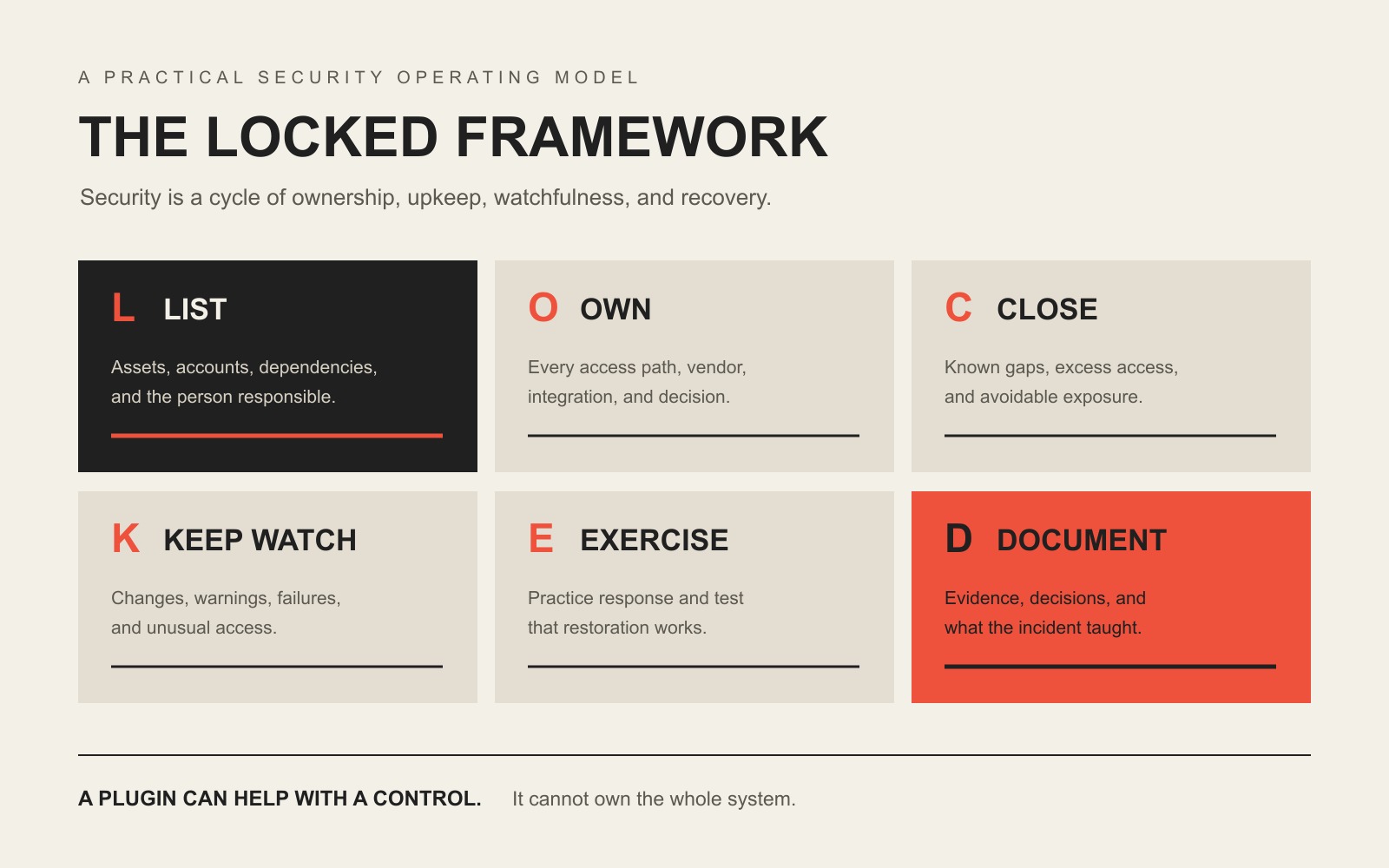
    The LOCKED website security framework: List assets and owners, Own every access path, Close known gaps, Keep watch, Exercise recovery, and Document evidence.

    L — List what matters and who owns it

    Start with the system you actually have, not the tidy diagram someone remembers from launch day.

    List the domain registrar, DNS provider, hosting account, CDN or firewall, content management system, plugins, themes, repositories, deployment tools, email service, form destinations, analytics, payment services, CRM connections, API keys, administrators, contractors, and recovery contacts. Then name an owner for each one.

    This inventory reveals the embarrassing-but-common gaps: the domain belongs to an old employee, the only backup lives inside the hosting account it is supposed to rescue, a plugin has not been supported in three years, or the contact form delivers to an inbox nobody checks.

    The point is not paperwork for its own sake. You cannot protect, monitor, or recover an asset no one knows exists.

    O — Own every access path and dependency

    Website access is broader than the WordPress Users screen. An attacker who controls the registrar, DNS, hosting dashboard, email account, source repository, deployment key, database, CDN, or connected automation may never need the WordPress login.

    Use unique credentials, a password manager, and multifactor authentication wherever the provider supports it. Give people the least access their job requires. Review administrators and service accounts on a schedule. Revoke access when roles change, not six months later when someone remembers.

    For WordPress, the platform’s current brute-force guidance recommends strong unique passwords, two-factor authentication or passkeys where appropriate, rate limiting or edge controls, current software, and monitoring authentication anomalies. Renaming a login page while leaving weak reused credentials everywhere else is security theater with a nicer URL.

    Dependencies deserve the same ownership. Every plugin, theme, library, form service, analytics script, and API is part of the site’s supply chain. Ask who maintains it, how security notices arrive, what happens if it is abandoned, and whether the business can replace it without rebuilding half the website.

    C — Close known gaps and reduce attack surface

    Patch supported software. Remove unused plugins and themes. Delete abandoned components. Restrict file and database permissions. Disable editing or interfaces the site does not need. Use trusted sources. Keep development credentials out of public code. Validate and sanitize input. Protect administrative traffic with HTTPS.

    The official WordPress guidance says the most important baseline is keeping WordPress, installed plugins, and themes current and choosing components that still receive updates. It also distinguishes host responsibility from application responsibility: a secure server does not excuse an unmaintained website sitting on top of it.

    Updates still need discipline. Scope Design’s preferred WordPress process is not “select all, click update, and discover character.” Establish a baseline, update in controlled steps, test the critical journeys, compare the before and after state, roll back the component that caused the problem, verify recovery, and continue with evidence. Our detailed WordPress plugin management guide owns that workflow.

    Application-specific risks belong in development too. The OWASP Top 10 is a useful awareness baseline for risks such as broken access control, injection, insecure design, and vulnerable components. A firewall can reduce exposure; it cannot turn unsafe custom code into safe custom code by positive thinking.

    K — Keep watch for changes, warnings, and failures

    Prevention eventually misses something. Detection determines how long the problem gets to enjoy itself.

    Monitor more than uptime. A hacked site can stay online while serving spam pages to Google, redirecting mobile visitors, creating unknown administrators, changing payment details, sending malicious email, or injecting scripts only under specific conditions. Google documents injected content, cloaking, and conditional redirects as common hacked-site behavior, and Search Console security alerts can expose problems an ordinary homepage check misses.

    A practical monitoring stack may include:

    • uptime and certificate-expiration alerts;
    • file, configuration, and administrator-account changes;
    • vulnerability and malware notifications;
    • login failures and unusual authentication activity;
    • backup success, age, size, and storage-location checks;
    • form and transactional-email delivery tests;
    • Search Console Security Issues and Safe Browsing warnings;
    • unexpected index growth, foreign-language pages, redirects, or traffic changes;
    • payment, checkout, account, and integration failures;
    • visual and functional checks after updates.

    No single scanner sees everything. The goal is overlapping signals and a human who knows which signals matter.

    E — Exercise response and restoration

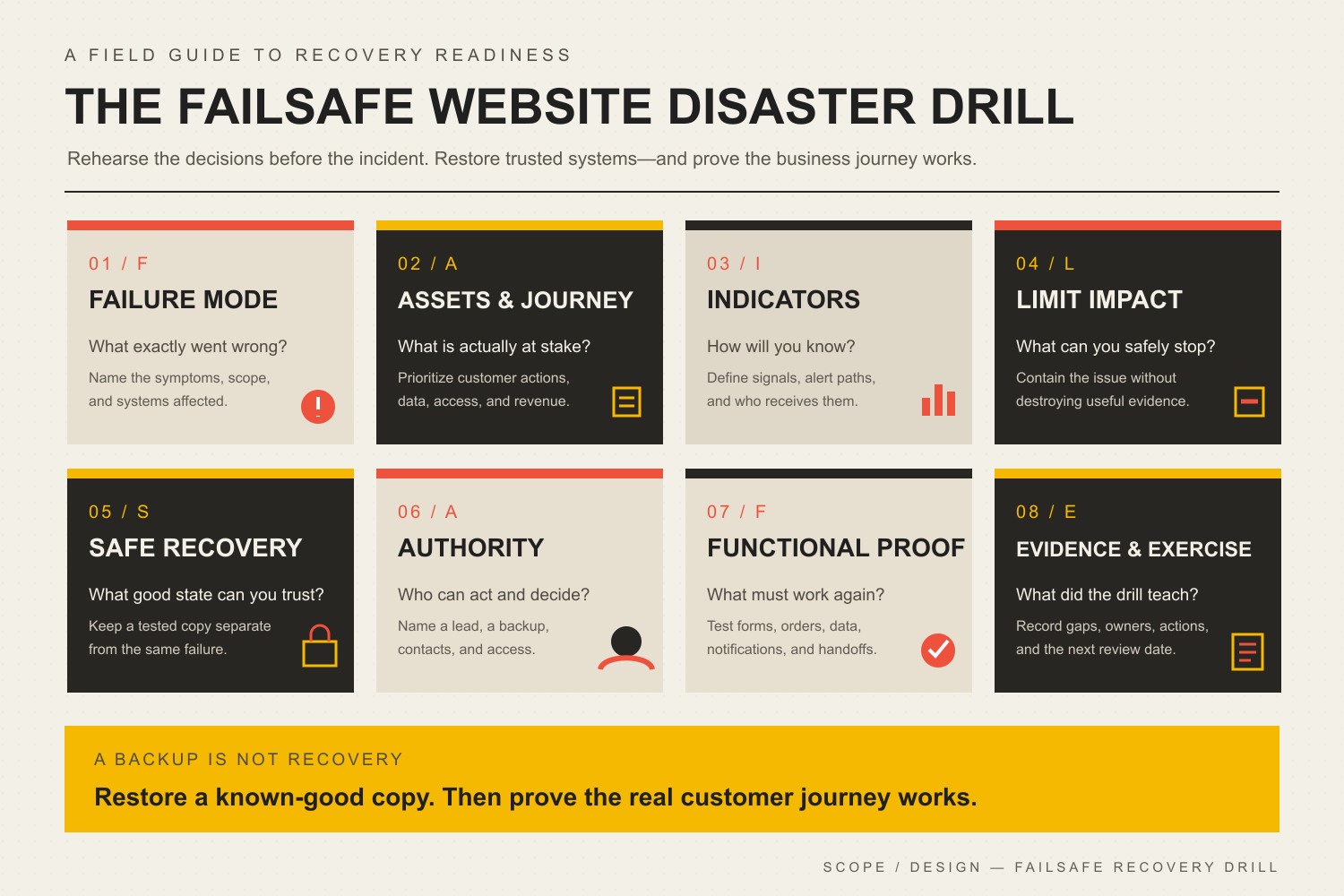
    A backup is not a recovery plan. It is raw material for one.

    A complete WordPress recovery generally needs the database and the site files. It may also need DNS access, certificates, server configuration, external media, environment variables, licenses, transactional data, and a clean place to restore. The WordPress backup guidance recommends multiple copies in different locations. That is sensible because a backup trapped inside the compromised hosting account may disappear with everything else.

    Test restoration before the emergency. Record how long it takes, what credentials are required, what data might be lost, how recent transactions are handled, and who can authorize a rollback. A backup job that sends a cheerful success email but has never produced a working site is a very polite liability.

    Then rehearse the first hour of an incident. Decide who will:

    1. confirm the symptom without destroying evidence;
    2. restrict or isolate affected access;
    3. contact the host and relevant vendors;
    4. preserve a copy of the compromised environment;
    5. rotate credentials from a known-clean device;
    6. involve legal counsel, the cyber insurer, law enforcement, or an incident-response specialist when the facts require them;
    7. communicate internally and externally;
    8. authorize cleanup, restoration, validation, and reopening.

    If personal information may have been exposed, this is no longer merely a website-maintenance ticket. The FTC’s breach-response guide recommends quickly securing operations and assembling the legal, forensic, technical, communications, and management expertise appropriate to the incident. Requirements vary by facts and jurisdiction, so call qualified counsel instead of treating a blog post as a substitute for legal advice.

    D — Document evidence, decisions, and lessons

    Write down what existed, what changed, who approved it, what was tested, what failed, what was restored, and what remains uncertain.

    Evidence improves routine maintenance because the team can identify the exact update that introduced a regression. It improves incident response because specialists can reconstruct the timeline. It improves accountability because “someone handles that” becomes a name, a process, and a record.

    After any incident or near miss, update the inventory, controls, monitoring, backup policy, response plan, and vendor decisions. Recovery without learning is just scheduling the sequel.

    Who is responsible for website security?

    Website security is shared, but shared does not mean vague. Every layer needs an explicit owner and an escalation path.

    LayerTypical ownerQuestions that must have an answer
    Business risk and dataBusiness leadershipWhat must remain available? What data is collected? What loss is unacceptable? Who can authorize shutdown or notification?
    Domain and DNSBusiness owner or designated technical managerWho owns the registrar account? Is MFA enabled? Who can restore DNS?
    Hosting and serverHosting provider plus technical managerWhat does the host secure? What remains the customer’s responsibility? How are backups, logs, isolation, and escalation handled?
    Website applicationDeveloper or management providerWho updates, tests, hardens, monitors, and documents the CMS, plugins, themes, and custom code?
    Content and usersBusiness plus website managerWho approves administrators? Who removes access? Who reviews suspicious content or accounts?
    Integrations and data flowsBusiness system owner plus implementerWhich services receive data? Where are credentials stored? What breaks if the connection fails?
    Incident and legal responseLeadership, counsel, insurer, and qualified specialistsWho preserves evidence, determines exposure, communicates, and approves recovery?

    Ask these questions before signing a hosting or maintenance agreement. “Security included” is not an answer. It is marketing copy wearing a tiny trench coat.

    A practical website security checklist by cadence

    Cadence should match the site’s change rate, risk, transaction volume, and business criticality. A brochure site and a busy ecommerce store should not have identical routines.

    WhenWhat to verify
    Continuously or automaticallyUptime, certificate health, security alerts, authentication anomalies, malware or file-change signals, backup jobs, critical form and transaction failures
    Before every release or updateCurrent backup, known baseline, change owner, rollback path, staging or controlled rollout, critical-journey test list
    After every release or updatePublic pages, forms, login, checkout or booking, email delivery, mobile behavior, visual regressions, logs, cache, monitoring status
    WeeklyAvailable security updates, failed jobs, suspicious accounts or content, error trends, form delivery, search warnings, backup age
    MonthlyAdministrator and service-account review, unused components, licenses, dependency support, restore spot-check, third-party integrations
    QuarterlyFull ownership inventory, vendor access, incident contacts, recovery assumptions, critical-journey coverage, data collection and retention
    At least annually and after material changeRestore exercise, response tabletop, hosting responsibility review, insurance/counsel contacts, business-impact priorities

    This is a starting point, not a universal compliance schedule. If the site handles regulated, financial, health, identity, or high-volume customer data, get security and legal requirements from qualified professionals who understand that specific environment.

    Common website threats and the controls that actually matter

    Threat lists are easy to write and fun to make terrifying. The useful question is which controls reduce likelihood, limit damage, improve detection, and make recovery possible.

    RiskUseful controlsWhat the control does not solve alone
    Stolen or reused credentialsPassword manager, unique credentials, MFA/passkeys, least privilege, access review, login monitoringA compromised device, malicious administrator, or exposed API key
    Vulnerable softwareSupported components, timely updates, vulnerability notices, controlled testing, removal of abandoned codeUnsafe custom code or a stolen privileged account
    Malicious or untrusted plugins/themesTrusted sources, code/vendor review, minimum component count, delete unused softwareA legitimate component that later develops a vulnerability
    Automated login and form abuseEdge rate limiting, WAF rules, 2FA, CAPTCHA or bot controls, spam filteringTargeted social engineering or stolen sessions
    Injection and unsafe application logicSecure development, validation, sanitization, parameterized queries, code review, testingBusiness-logic abuse that is technically valid
    Malicious file or content changesRestricted permissions, integrity monitoring, logs, malware scanning, deployment disciplineDetermining scope, root cause, or legal impact by itself
    Hosting or service failureRedundancy where justified, offsite backups, recovery procedures, vendor escalation, DNS accessBad application releases or compromised credentials
    Hacked search content and redirectsSearch Console monitoring, file/configuration review, clean recovery, vulnerability remediation, review requestReinfection if the entry point remains open

    The boring controls—ownership, supported software, access discipline, monitoring, backups, and tested recovery—do most of the useful work. “Boring” is underrated when the alternative is explaining a pharmacy-spam page to a customer.

    How can you check whether your website is secure?

    You cannot prove a website is perfectly secure. You can verify that important controls exist, work, and have an owner.

    Start with evidence:

    • Can you name every administrator and explain why each account exists?
    • Are domain, DNS, hosting, email, repository, CDN, and website accounts protected with unique credentials and MFA where available?
    • Are core software and dependencies supported and current?
    • Are unused components removed?
    • Does HTTPS work everywhere it should, including administration?
    • Are permissions and secrets appropriate to the environment?
    • Are monitoring alerts reaching a person who will act?
    • Does Search Console show a Security Issue?
    • Do backups include files and database, live outside the production failure domain, retain multiple recovery points, and restore successfully?
    • Can the team describe the first hour of a compromise without inventing the plan in real time?
    • Can the developer show the tests and evidence from the last material change?

    Automated scanners can identify known problems, exposed services, configuration issues, or suspicious files. They are useful inputs, not a verdict. A clean scan does not prove the domain account is owned correctly, the payment integration is safe, or the recovery process works.

    What Scope Design manages—and where the boundary is

    Scope Design’s website-management work includes controlled WordPress updates, backups, uptime and operational monitoring, performance, edits, ecommerce support, compatibility checks, rollback discipline, and the practical coordination required to keep a website working.

    That makes us the right partner for reducing ordinary website risk and keeping the operational foundation from rotting quietly.

    It does not make us your attorney, cyber insurer, law-enforcement liaison, compliance auditor, digital-forensics laboratory, or enterprise security operations center. If an incident may involve exposed personal information, regulated systems, material financial loss, insider activity, or litigation, the responsible move is to bring the appropriate specialists into the response. Anyone promising to be every one of those things in a single maintenance plan is either magnificently staffed or full of it.

    Our role is to make ownership, routine care, evidence, and escalation better before the emergency—and to work with the right people when the problem crosses that boundary.

    Frequently asked questions about website security

    How do I make my website secure?

    Assign an owner, inventory the system, secure every access path, keep supported software current, remove unused components, use appropriate hosting and application controls, monitor for change, maintain offsite restorable backups, and rehearse incident response. No single action makes a website perfectly secure; layered controls reduce likelihood and impact.

    Can I check website security myself?

    You can verify ownership, users, updates, HTTPS, backups, monitoring, Search Console warnings, and obvious configuration gaps. Automated tools can help identify known issues. Custom applications, suspected compromises, regulated data, and high-risk systems may require qualified security, legal, or forensic professionals.

    Is HTTPS enough to secure a website?

    No. HTTPS encrypts traffic between the browser and server and is essential, but it does not patch vulnerable software, stop stolen administrator credentials, clean malware, validate custom code, or prove backups work.

    Do I need a website security plugin?

    Maybe. A reputable plugin can provide useful scanning, logging, firewall, or login controls. Choose it for a defined job, configure it correctly, keep it updated, and avoid assuming it replaces secure hosting, maintenance, access management, monitoring, backups, or response planning.

    How often should a website be updated for security?

    Review security updates continuously or on a frequent managed schedule, then prioritize based on severity, exposure, exploit activity, compatibility risk, and business impact. Critical fixes may require immediate action; routine updates still need backups, controlled rollout, and post-update testing.

    How often should I back up my website?

    Back up often enough that the maximum acceptable data loss matches the business. A frequently changing ecommerce site may need far more frequent database backups than a mostly static brochure site. Keep multiple recovery points in a separate location and test restoration.

    Are hosting backups enough?

    Not by themselves. Host backups are useful, but confirm retention, frequency, what they include, how restoration works, and whether copies survive a hosting-account failure or compromise. Maintain an independent recovery option when the business impact justifies it.

    What is the difference between a malware scan and malware removal?

    A scan looks for suspicious or known malicious indicators. Removal cleans identified malicious content. A complete response also determines scope, closes the entry point, removes backdoors, rotates credentials, validates data and functionality, monitors for reinfection, and handles any legal or communication obligations.

    Can a hacked website be recovered from a backup?

    Often, but the backup must be clean enough, complete enough, and restored into a trustworthy environment. Blindly restoring can reintroduce malware or erase recent orders and content. Preserve evidence, understand the compromise, repair the vulnerability, and validate the recovered site.

    How can I tell if my website has been hacked?

    Possible signs include unknown administrators, unexpected redirects, injected pages, search-engine warnings, modified files, strange outbound email, payment or form changes, hosting suspension, unusual traffic, or security alerts. Some attacks hide from ordinary visitors. Use the dedicated hacked-website detection and recovery guide for the incident workflow.

    What should I do first if my website is hacked?

    Confirm and document the symptom, restrict further damage without destroying evidence, contact the host and responsible technical owner, preserve a copy, and escalate based on the data and business impact. Rotate credentials from a clean device when advised. Do not start randomly deleting files before you know what happened.

    Can website security guarantee that I will not be hacked?

    No honest provider can guarantee that. Good website security reduces risk, limits damage, detects problems sooner, and improves recovery. Ask providers what they own, monitor, test, document, exclude, and do when a control fails.

    Stop buying security nouns. Build a security process.

    Your website does not become secure because the invoice says “security,” the browser shows a padlock, or a plugin dashboard displays a large green circle.

    It becomes more defensible when the business knows what exists, who owns it, how access is controlled, how changes are tested, what signals are watched, where clean recovery points live, and who acts when something goes sideways.

    That is LOCKED: list, own, close, keep watch, exercise, and document. It is less dramatic than cyber-threat theater. It is also considerably more useful.

    If your current answer to “who owns website security?” is a group shrug, start with our WordPress maintenance guide or talk with Scope Design about a management plan built around evidence rather than optimism.

  • Website Maintenance for Business Continuity: Build a Recovery-Ready Site

    Website Maintenance for Business Continuity: Build a Recovery-Ready Site

    Website maintenance for business continuity means operating your website so a routine update, expired certificate, broken integration, compromised account, or hosting problem does not turn into a mystery outage. The goal is not to keep a dashboard perfectly green. The goal is to know what must keep working, detect when it stops, recover to a known-good state, and know exactly who owns the response.

    If you only need the recurring task calendar, use our website maintenance guide. This article owns a narrower question: how should maintenance protect the continuity of the business job your website performs?

    TL;DR: maintenance should reduce the failure window

    • Define the website journeys that actually matter: lead forms, checkout, bookings, logins, downloads, customer portals, email delivery, and integrations.
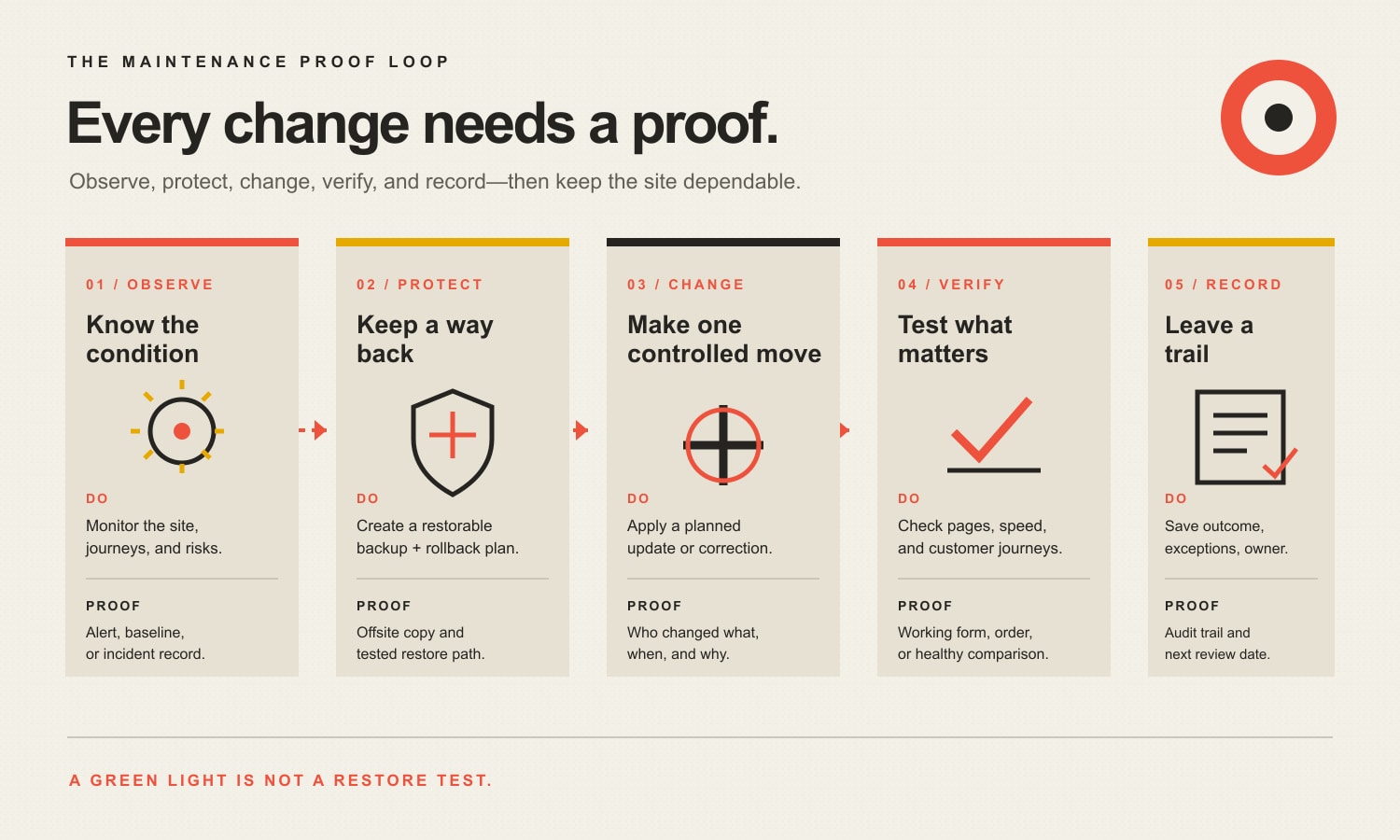
    • Capture a known-good baseline before consequential changes so you have something real to compare against.
    • Make changes in bounded steps, test the same critical journeys afterward, and roll back the smallest failed component when practical.
    • Treat backups as recovery inputs, not proof that recovery will work. A WordPress restore normally needs both the database and site files.
    • Set recovery expectations based on business impact instead of borrowing somebody else’s arbitrary “daily” or “four-hour” rule.
    • Automate observation and routine work, but keep a named person accountable for exceptions, restoration, escalation, and decisions.

    Website maintenance for business continuity protects the business handoff

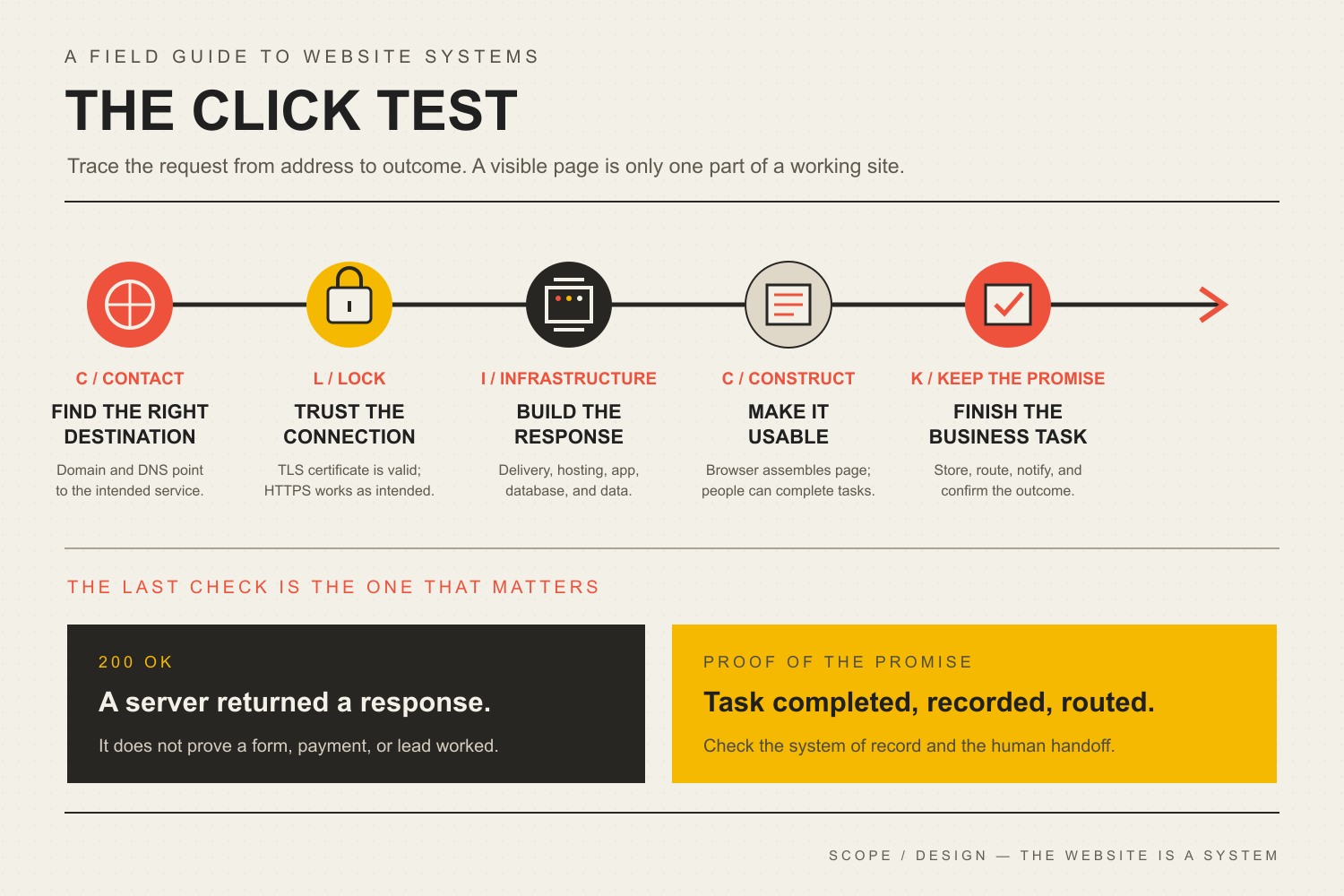
    A website is not healthy because the homepage loads. A service business can have a beautiful homepage while its quote form silently drops submissions. An ecommerce site can be “up” while checkout fails after a payment extension update. A membership site can return HTTP 200 while login is broken. An appointment site can look normal while confirmation email never leaves the server.

    That is why maintenance has to protect the handoff between the website and the business. Our business website development guide makes the same point from the build side: the technical foundation should prove the business journey works, can be changed safely, and can be recovered. Maintenance is the operating discipline that keeps proving it after launch.

    The distinction also keeps this article from becoming another giant checklist. Checklists are useful, but they can create a dangerous illusion: every box is checked, therefore the business is protected. That logic falls apart the moment an automated update succeeds technically and breaks the thing customers came to do.

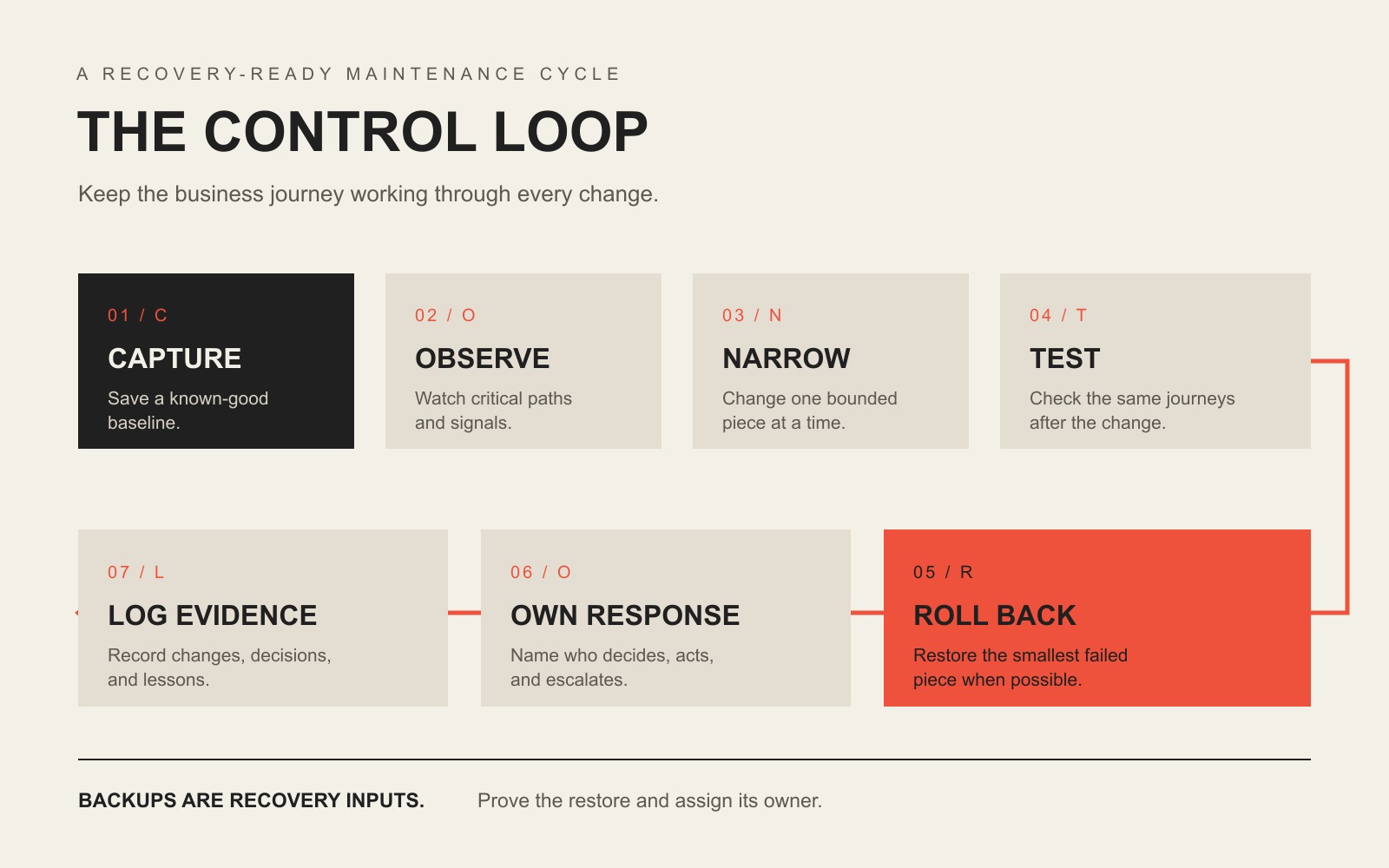
    Use the Scope Design CONTROL Loop

    Our maintenance approach comes from a simple first-party operating lesson: make a smaller change, compare it with a known-good state, verify the result, reverse the smallest failed change when necessary, and preserve the evidence. We call the buyer-facing version the CONTROL Loop.

    The CONTROL Loop: Capture a baseline, Observe critical paths, Narrow each change, Test the same journeys, Roll back precisely, Own the response, and Log evidence.

    C — Capture the baseline

    Before a meaningful change, record the state you expect to preserve. That can include representative screenshots, software versions, key page behavior, a current backup, form delivery, checkout, login, analytics events, response time, and known open issues. A baseline turns “it seems different” into something diagnosable.

    O — Observe critical paths

    Decide which user journeys deserve active observation. A five-page brochure site may have one critical path: inquiry form to delivered email or CRM record. A WooCommerce site may need product, cart, checkout, payment, confirmation email, inventory, tax, shipping, and account flows. Monitoring the server while ignoring those handoffs is like watching the electrical panel while the cash register is on fire.

    N — Narrow the change

    Reduce the blast radius. Update one component or one understood dependency group when practical. Separate content edits from infrastructure changes. Avoid stacking ten unrelated changes into one maintenance window and then asking which one broke the site. Our detailed WordPress plugin update guide owns the step-by-step update process.

    T — Test after change

    Re-run the same paths you baselined. Do not stop at “the plugin updated successfully.” Complete the form. Submit the order. Log in. Check the downstream CRM or email. Verify the browser state and the business state. Our practical website test goes deeper on proving the result beyond the browser.

    R — Roll back precisely

    If a bounded change fails, reverse the smallest responsible change when you can do so safely. Restoring yesterday’s entire site because one plugin broke can erase legitimate orders, form submissions, user changes, or content created since the backup. Full restore is sometimes correct. It should not be the only recovery idea in the building.

    O — Own the response

    Name the person who investigates, the person who can authorize a restore or rollback, and the person who communicates when the issue affects customers or staff. If the only answer is “the hosting company probably handles that,” you do not have ownership. You have a future support ticket.

    L — Log the evidence

    Record what changed, what passed, what failed, what was rolled back, what remains on hold, and what follow-up decision is required. Good maintenance evidence is not a 40-page automated report full of green icons. It is a short record that tells the next qualified person what happened and what state the site is in now.

    Start with the journeys that would hurt if they failed

    Business continuity begins with consequences. A website that publishes a restaurant menu has a different failure profile from a site that collects legal intake, sells event tickets, handles donations, or accepts hundreds of ecommerce orders per day. The technology matters, but the business job tells you where to look first.

    Website jobCritical journeyEvidence it still worksLikely response owner
    Lead generationForm → email/CRM → staff handoffTest submission appears in the real destinationWebsite owner + sales/ops owner
    EcommerceProduct → cart → checkout → payment → confirmationTest order, payment state, email, inventory/tax/shipping resultWebsite owner + store operations
    BookingAvailability → booking → payment/confirmationAppointment exists in the system of record and customer receives confirmationWebsite owner + scheduling staff
    Member or client portalLogin → authorization → protected taskTest account can complete expected task without excess accessWebsite owner + application owner
    Content/authority siteDiscovery → page load → CTA/subscriptionRepresentative pages render, forms work, tracking fires, no critical errorsWebsite owner + marketing

    Do not test only the homepage. Test the journeys where failure creates lost revenue, lost data, missed communication, customer frustration, or reputational damage. This is also where performance monitoring becomes useful: speed is a condition to diagnose in context, not a vanity score to worship.

    A backup is not the same thing as recovery

    Backups matter. They are not magic. WordPress’s own backup documentation explains that a typical WordPress site needs both the database and site files for a complete restore. If your backup contains only one side, you may have a partial recovery point rather than a recoverable website.

    A continuity-ready backup process should answer five questions without hand-waving:

    1. What is included? Files, database, uploads, configuration, and any external data or credentials required to restore service.
    2. Where is it stored? Preferably somewhere a production failure cannot destroy at the same time.
    3. How long is it retained? Enough history to recover from problems that were not noticed immediately.
    4. Who can restore it? With access that still works when the normal production account is unavailable.
    5. Has restoration been tested? Not “the job says successful.” A real, controlled restore test.

    For the deeper infrastructure distinction between storage, sync, backup, and disaster recovery, use our business continuity and backup guide. The key point here is simpler: a backup is an ingredient. Recovery is the ability to resume the website’s business job.

    Use RTO and RPO to stop arguing about arbitrary schedules

    Two disaster-recovery terms are useful even for a small website when you translate them out of enterprise-speak. Google Cloud’s disaster recovery planning guide uses both objectives when planning recovery:

    • Recovery Time Objective (RTO): how long the system or process can be unavailable before the interruption creates unacceptable business impact.
    • Recovery Point Objective (RPO): how far back in time you can afford to restore data after an outage.

    Those two questions should influence your maintenance design. If losing a day of orders is unacceptable, a once-daily backup may not match the business. If a brochure site can be offline for several hours with little consequence, engineering a five-minute recovery target may be expensive theater. The correct answer comes from business impact, not from copying another company’s maintenance plan.

    Disaster recovery is only one part of the larger continuity problem. Google Cloud describes disaster recovery as restoring IT infrastructure and data after disruption to support continuity, while our business resilience framework separates business continuity from the narrower technical job of restoring a damaged capability.

    Detection is part of recovery because time starts before the alert

    A failure you discover in five minutes and a failure you discover in five days may require completely different recovery choices. That is why monitoring belongs in a continuity-oriented maintenance plan.

    Useful monitoring can include:

    • uptime and HTTP response checks;
    • SSL/TLS certificate expiration and domain/DNS condition;
    • application errors and server logs;
    • security or vulnerability alerts;
    • visual-regression signals after changes;
    • form, email, payment, or integration health;
    • performance regressions on representative journeys.

    CISA’s small and medium business resources group practical controls such as software updates, backups, logging, encryption, and multifactor authentication. Those controls are not identical to website maintenance, but the operating lesson is the same: secure operation requires both prevention and evidence that something changed.

    Safe maintenance treats every consequential change like a small deployment

    WordPress itself recommends keeping plugins current and warns that you should have a current backup before updating because problems can happen. See WordPress’s plugin management guidance. WordPress also recommends regular backups when using automatic updates; see its plugin and theme auto-update documentation.

    The practical business version is not “never automate.” It is automate according to consequence.

    Change typeReasonable approachWhat still needs proof
    Low-risk, isolated updateAutomatic or scheduled update may be reasonableBackup, monitoring, alerting, rollback path
    Business-critical plugin or integrationScheduled, controlled update; staging when the risk justifies itCritical journey tests and downstream confirmation
    Theme/template changeBaseline representative layouts and devices firstVisual/function regression check
    Payment, account, or data-model changeExplicit test plan and recovery pathData integrity, permissions, transactions, notifications
    Infrastructure/DNS/hosting changeCoordinate ownership and rollback across providersDNS, TLS, server, application, email/integration behavior

    The goal is not ceremony. It is diagnosability. If the site changes and something goes wrong, you should be able to answer what changed, whether the business journey failed, and how to get back to a known-good state.

    Know when to roll back one thing and when to restore the site

    Precise rollback is useful when you have a clear causal change: one plugin version, one deployment, one theme edit, one configuration adjustment. A full restore makes more sense when the failure is broader, the current state is untrustworthy, data has been corrupted, or a compromise requires a clean recovery path.

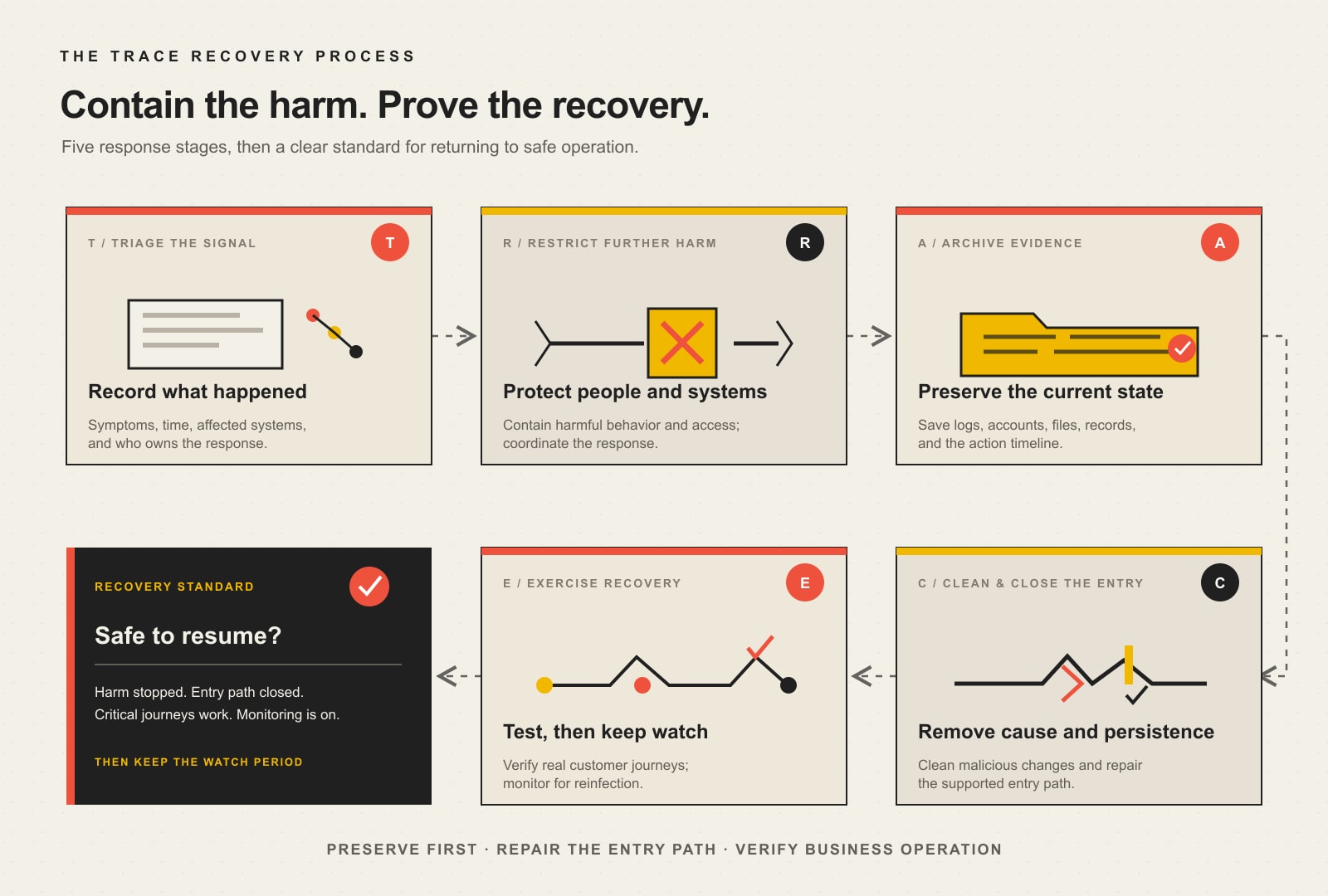
    If you suspect an actual compromise rather than a normal regression, stop treating it like routine maintenance. Our hacked website recovery guide covers triage, containment, evidence, cleanup, restoration, and the point where forensic or legal specialists may be necessary.

    The continuity question is not “Which recovery method sounds more sophisticated?” It is “Which recovery method restores the required business state with the least additional damage?” Sometimes that is a targeted rollback. Sometimes it is a complete restore. Sometimes it is a provider failover or DNS change. The recovery mechanism should fit the failure.

    Hosting is not automatically the maintenance owner

    Hosting supplies infrastructure. It may also include server backups, malware scanning, WordPress updates, CDN features, or support, depending on the plan. But infrastructure coverage does not automatically own your business-specific application journey.

    For example, a host may confirm the server is online while a form integration is failing. It may restore a snapshot without knowing whether that restore overwrites orders placed after the snapshot. It may update WordPress without testing a custom booking workflow. That does not make the host bad. It means the responsibility boundary has to be explicit.

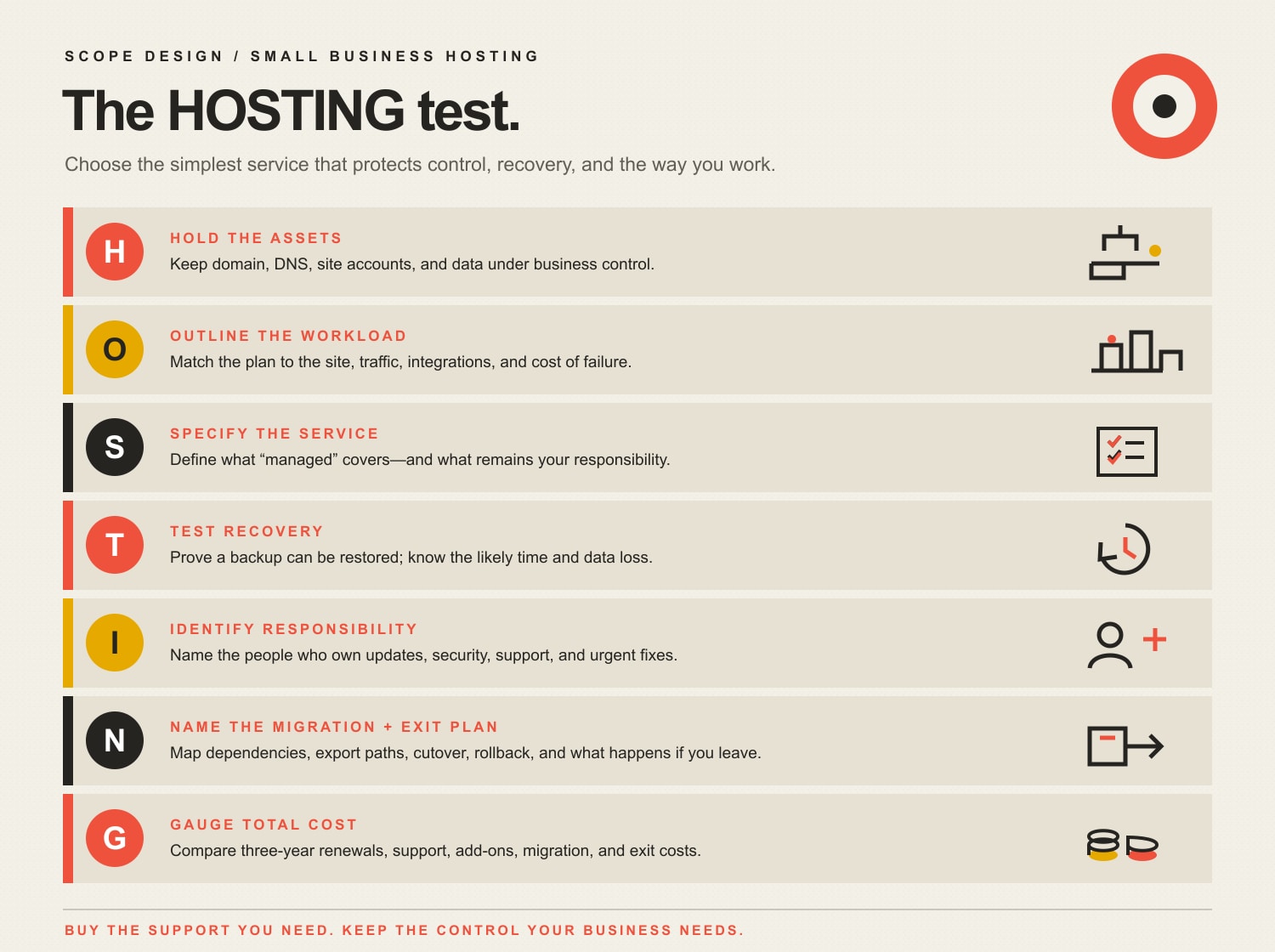
    Use our small business web hosting guide to compare infrastructure ownership. Then make sure the maintenance plan owns whatever remains: application updates, critical-journey testing, recovery decisions, monitoring, integrations, and escalation.

    Use a continuity proof scorecard instead of counting checkmarks

    A useful maintenance report should help a business answer condition, exception, action, and decision. This scorecard is intentionally evidence-based.

    ControlQuestionUseful evidenceRed flag
    BaselineDo we know the current working state?Versions, screenshots, journey checks, known issues“It looked fine last month.”
    BackupCan we recover the required site and data?Coverage, location, retention, failed-job alert, restore recordOnly “backup successful” emails
    ChangeCan we identify what changed?Update/deployment log and risk noteTwenty updates applied at once with no record
    VerificationDid the business journey still work?Form/order/login/booking result in the real destinationOnly homepage screenshots
    DetectionHow quickly will we know something failed?Monitoring interval, alert path, logsCustomer complaint is the monitoring plan
    RecoveryCan we restore the right state without causing new loss?Rollback/restore method and verified result“We can probably reinstall it.”
    OwnershipWho acts when an exception appears?Named owner, support hours, escalation pathThree vendors pointing at each other

    If you are buying care rather than running it internally, our WordPress maintenance services guide uses the CARE Proof Test to compare Coverage, Accountability, Recovery, and Evidence. That page owns plan comparison and pricing; this page owns the continuity logic behind the work.

    What maintenance automation can own, and what it cannot

    Automation is excellent at repetitive observation and bounded action. It can run backups, check uptime, scan for known vulnerabilities, watch certificate expiration, apply selected updates, compare screenshots, collect logs, and trigger alerts.

    Automation is much weaker at deciding whether a business consequence is acceptable. A system can tell you that a page changed. It may not know that the missing price table is legally required, that a form stopped routing to the salesperson covering a territory, or that restoring a snapshot will erase legitimate orders. Somebody still owns judgment.

    A useful division of labor is:

    • Automation observes: uptime, versions, errors, security signals, visual changes, backup jobs, performance signals.
    • Automation executes bounded work: selected updates, scheduled backups, cache operations, known rollback actions where the environment supports them.
    • A human owns exceptions: business impact, recovery choice, conflicting evidence, vendor coordination, customer communication, and decisions that can destroy or overwrite data.

    A practical 30-day continuity hardening plan

    Week 1: map the business job and ownership

    • List the three to five website journeys whose failure would matter most.
    • Identify the systems they hand off to: email, CRM, payment processor, booking platform, inventory, analytics, or portal.
    • Name the internal owner and technical owner for each journey.
    • Write down vendor boundaries before there is an incident.

    Week 2: prove the recovery inputs

    • Verify the backup includes the files, database, and other data required for the business journey.
    • Confirm retention, storage location, access, and failed-job alerts.
    • Define a realistic RTO and RPO based on business impact.
    • Confirm the person expected to restore the site can actually access the recovery systems.

    Week 3: baseline, change, and monitor

    • Capture representative baseline evidence for the critical journeys.
    • Review which updates can be automated and which need scheduled verification.
    • Confirm uptime, error, security, certificate, and business-journey alerts reach a real person.
    • Run one controlled maintenance change through the CONTROL Loop.

    Week 4: run a recovery exercise

    • Restore a backup in a safe environment or run the documented rollback process.
    • Verify the critical journey after recovery, not just the page load.
    • Time the exercise and compare it with the business expectation.
    • Fix access gaps, undocumented dependencies, alert failures, or ownership confusion revealed by the exercise.

    At the end of 30 days, the win is not “we did more maintenance.” The win is that the business can explain what matters, what is observed, how a change is verified, how recovery works, and who acts when normal automation reports an exception.

    Frequently asked questions about website maintenance and business continuity

    Is a website backup enough for business continuity?

    No. A backup provides a recovery point. Business continuity requires the broader ability to restore or continue the required business operation. You still need complete coverage, restore access, monitoring, a tested procedure, recovery objectives, and an owner who can act.

    How often should a business website be maintained?

    There is no universal cadence. Security alerts may need immediate review, selected updates may be automatic, business-critical changes may be scheduled, backups may run multiple times per day, and deeper reviews may be monthly or quarterly. Match cadence to change frequency, business consequence, and recovery objectives. For the full task-by-frequency model, use the website maintenance checklist and ownership guide.

    What should be tested after a website update?

    Test the critical journeys that the changed component could affect. Typical checks include representative layouts, contact forms, checkout, login, search, email delivery, integrations, analytics events, permissions, and error logs. Confirm the result in the downstream system when one exists.

    Who is responsible for website maintenance?

    A named person or provider should be accountable for the maintenance operating process, but responsibility can be shared across hosting, developers, marketing, IT, and business operations. The important part is that every critical task and escalation has a clear owner. “Somebody handles it” is not an ownership model.

    Are automatic WordPress updates safe?

    They can be appropriate for selected lower-risk components when backups, monitoring, alerting, and rollback are reliable. Business-critical or tightly coupled components deserve more controlled testing. The right decision is based on consequence, not a philosophical position for or against automation.

    What is the difference between website maintenance and disaster recovery?

    Website maintenance is the ongoing operating discipline that keeps the site current, observable, functional, recoverable, and supported. Disaster recovery is the plan and capability for restoring technology and data after a disruptive event. Good maintenance makes disaster recovery less chaotic because the site has better backups, baselines, monitoring, ownership, and documentation before the incident.

    Does managed hosting replace website maintenance?

    Not automatically. Managed hosting may cover infrastructure, server security, backups, selected WordPress updates, or support. Website maintenance also needs to own business-specific application behavior: forms, payments, integrations, accounts, content, and recovery decisions. Compare scopes so there is neither duplicate spend nor an unowned gap.

    How should a small business choose an RTO and RPO for its website?

    Start with consequence. Ask how long the website can be unavailable before the business impact becomes unacceptable, then ask how much recent data could be lost before recovery creates an unacceptable problem. Those answers should reflect the website’s real job. An ecommerce store, booking system, lead site, and static brochure site do not need identical targets.

    Make website maintenance boring enough to trust

    Good maintenance is gloriously uneventful. Changes are smaller. Failures are visible. Recovery is rehearsed. The business paths still work. Exceptions reach a person who knows what to do. Nobody needs a heroic midnight story because the operating system did its job before the crisis.

    If your team can own the CONTROL Loop internally, document it and run it consistently. If the website is too important, too integrated, or too annoying to make that somebody’s side job, compare what accountable WordPress maintenance should include, or contact Scope Design to talk through the actual risk and ownership boundaries.

  • What Affects Website Speed? 25 Performance Factors That Slow Sites Down

    What Affects Website Speed? 25 Performance Factors That Slow Sites Down

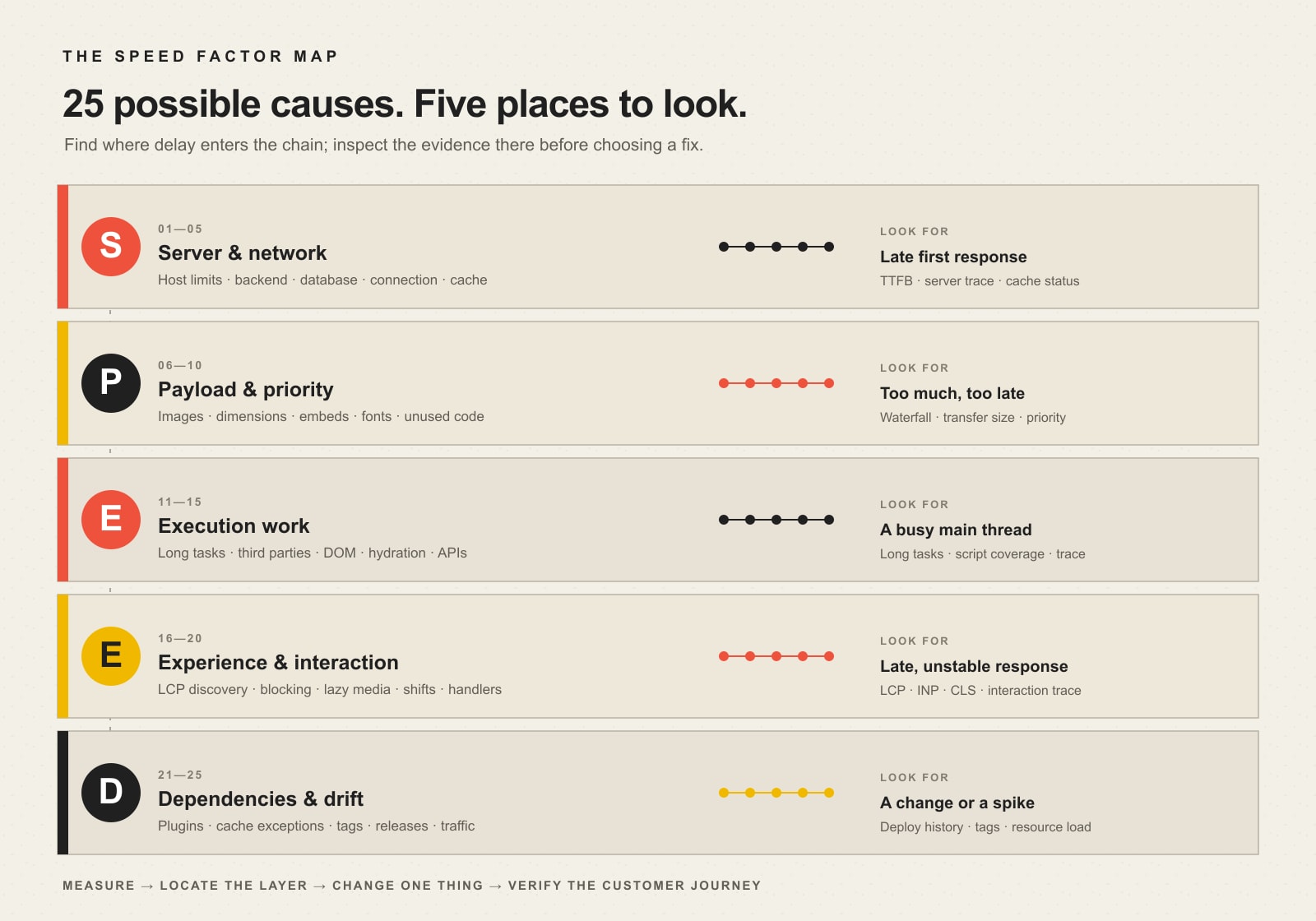
    What affects website speed? Usually not one thing. A slow business website can be held back by the server that builds the page, the amount and priority of data sent to the browser, the JavaScript and layout work the browser must perform, the way important content appears and responds, or dependencies that quietly get heavier over time.

    That is why “make the site faster” is a bad troubleshooting instruction. It invites random changes. A better approach is to identify the layer creating the delay, inspect the evidence, and fix the highest-impact constraint first. Scope Design uses a five-layer model for that job: the SPEED Factor Map.

    • S — Server & network delivery: how quickly the first useful response can reach the visitor.
    • P — Payload size & priority: how much data must move and whether the browser receives the important pieces first.
    • E — Execution work: how much code and layout work the device must perform.
    • E — Experience rendering & interaction: when useful content becomes visible, stable, and responsive.
    • D — Dependencies & drift: plugins, tags, updates, traffic patterns, and configuration changes that make a once-fast site slower.

    If you already know a page is slow and need the full testing-and-remediation process, use our guide to diagnosing and fixing a slow website. This article has a different job: showing what can make a site slow so you can narrow the search instead of optimizing everything at once.

    Website speed is a chain, not a score

    PageSpeed Insights, Lighthouse, a browser waterfall, and real-user monitoring can all tell you useful things. None of them is the business outcome by itself. Google’s PageSpeed Insights documentation distinguishes field data from real Chrome users from Lighthouse lab data generated under controlled conditions. The two can disagree because they answer different questions.

    A synthetic score can help you reproduce a problem. Field data can show what real visitors experience across devices and networks. Your analytics can show whether those visitors continue, submit forms, buy, book, or leave. A useful performance decision connects all three.

    This also means a “100” score is not the goal. A score can improve while a real sales path remains slow, an interaction still lags, or an important third-party service delays the exact page your customers use. Measure the journey that matters.

    The SPEED Factor Map: 25 website speed factors

    The map below groups 25 common website performance factors by where the delay enters the delivery chain. Use it as a triage map, not a checklist you must “fix” in order.

    The SPEED Factor Map groups 25 website performance factors into server and network, payload and priority, execution, experience and interaction, and dependencies and drift, with evidence to inspect for each layer.
    The SPEED Factor Map: locate the slow layer before choosing the fix.
    LayerTypical symptomsEvidence to inspect
    Server & networkHTML starts late; uncached pages are much slowerTTFB, server timing, cache status, database/application traces
    Payload & priorityHuge transfers; hero content arrives lateNetwork waterfall, resource sizes, priority, image/font requests
    ExecutionPage downloads but feels busy or frozenMain-thread tasks, JavaScript coverage, third-party work, layout cost
    ExperienceMain content appears late, shifts, or reacts slowlyLCP, INP, CLS, element attribution, interaction traces
    Dependencies & driftPerformance worsens after changes or under loadDeploy history, plugin/tag inventory, cache rules, resource utilization

    S — Server and network delivery factors

    1. Hosting resource limits and contention

    CPU, memory, process limits, storage latency, or noisy shared resources can slow the server before the browser has much to do. This is why front-end tricks cannot rescue every slow page. If the initial document itself consistently arrives late, start at the origin.

    2. Backend application work

    WordPress, an ecommerce platform, a membership system, or a custom application may need to run expensive PHP, template, search, personalization, or API logic before sending HTML. The right question is not “Is WordPress slow?” but “What work is this request performing before it can respond?” Our broader guide to a fast, functional web-development foundation explains why architecture and maintainability matter here.

    3. Database queries and data volume

    Slow queries, missing indexes, oversized option tables, expensive product filters, or repeated lookups can make otherwise simple pages expensive to build. Database symptoms often appear only on certain templates or under concurrency, which is why page-by-page evidence beats a blanket “upgrade hosting” answer.

    4. Distance, DNS, connection, and TLS setup

    A visitor must reach the right server before the page can arrive. Geography, DNS resolution, connection establishment, and TLS all contribute to the path. For many sites these are not the biggest bottleneck, but they matter more when critical resources live on many different origins or users are far from the origin.

    5. Redirects, cache behavior, CDN, and compression configuration

    Extra hops delay useful work. Missing page caching can force the application to rebuild the same public page repeatedly. A CDN can shorten delivery paths and absorb traffic, but only when caching rules match the content. Compression can reduce transferred text resources. These are configuration decisions, not magic switches; verify what is actually cached, compressed, and served from where.

    P — Payload size and priority factors

    6. Oversized images

    Photography and hero artwork can dominate transferred bytes. Start with the images real users download, not a generic recommendation to “compress everything.” A visually important image may deserve more bytes than a decorative image; the goal is appropriate dimensions, encoding, quality, and delivery.

    7. Wrong image dimensions and responsive delivery

    Sending a 2400-pixel image into a 420-pixel mobile slot wastes transfer. Responsive image markup lets the browser select a more appropriate source. That belongs with good responsive web design: the mobile experience is not just a narrower desktop layout; it has different bandwidth, viewport, and device constraints.

    8. Heavy video, iframes, maps, and embeds

    Embedded media can add large files, new origins, scripts, and player code. A poster image, click-to-load pattern, or delayed embed can preserve the content while keeping the initial page lighter. The best choice depends on whether the media is the reason the visitor came to the page.

    9. Web-font weight and variants

    Multiple families, weights, character sets, and externally hosted files can turn typography into a critical-path dependency. Remove variants nobody uses, subset when appropriate, and choose a loading strategy that avoids both needless transfer and jarring text changes.

    10. Unused CSS and JavaScript bytes

    A bundle can be cached and still be wasteful. Site builders, themes, component libraries, and plugin assets may ship code a specific page never uses. The opportunity is not merely minification; it is reducing work and bytes that should not be there in the first place.

    E — Execution-work factors

    11. Long JavaScript tasks

    A page may download quickly and still feel slow because the main thread is parsing, compiling, or executing JavaScript. Long tasks can delay clicks, menus, filters, and form interactions. That makes JavaScript cost a responsiveness issue, not just a file-size issue.

    12. Third-party scripts

    Analytics, advertising, chat, heatmaps, testing tools, social widgets, payment components, and consent systems all compete for network and execution time. Third parties are especially important to inventory because teams often add them one campaign at a time and rarely remove them together.

    13. Large DOM, style, and layout work

    Deep wrappers, repeated components, very large menus, complex selectors, and frequent layout changes can make style calculation and rendering expensive. More markup is not automatically slow, but a complicated document gives the browser more work when styles or dimensions change.

    14. Client-side rendering and hydration

    Modern frameworks can send a page shell that needs substantial JavaScript before it becomes useful or interactive. That architecture may be justified for an application, but it should not be treated as free. Measure what the visitor sees and can do before and after the client work finishes.

    15. Slow external APIs and data dependencies

    Search, inventory, reviews, booking availability, personalization, or CRM data may depend on another service. If page rendering waits on it, that provider becomes part of your performance budget. Timeouts, caching, graceful fallbacks, and asynchronous loading can be as important as front-end optimization.

    E — Experience rendering and interaction factors

    16. Late LCP resource discovery

    The browser cannot load an important hero image early if it does not discover it until CSS or JavaScript runs. web.dev’s LCP optimization guidance recommends making the likely Largest Contentful Paint resource discoverable early and prioritizing it appropriately.

    17. Render-blocking critical-path resources

    Critical CSS and scripts can be necessary; unnecessary blocking is the problem. The browser must know what it needs to render the first useful view and should not be forced to wait on unrelated work. Waterfall order often tells you more here than the total request count.

    18. Lazy-loading above-the-fold or LCP media

    Lazy loading is valuable for offscreen content, but applying it blindly to the main hero image can delay the very resource used to judge loading performance. web.dev explicitly advises against lazy-loading the LCP image. Performance rules need context: “lazy load images” is incomplete advice without asking which images.

    19. Layout shifts, font swaps, and late space allocation

    Images without reserved dimensions, injected banners, ads, late-loading widgets, and font changes can move content after a visitor has started reading or aiming at a control. That is why visual stability belongs in performance work rather than being dismissed as a design annoyance.

    20. Slow interaction handlers

    A click can be delayed by JavaScript, synchronous work, a costly rerender, or a round trip to a server. Interaction to Next Paint (INP) exists to capture responsiveness across interactions. A page that “loads” in two seconds but makes every filter or menu feel sticky is not a fast experience.

    D — Dependencies and performance-drift factors

    21. Plugin, theme, or module bloat and conflicts

    Plugin count alone is a poor diagnosis. One inefficient extension can be worse than ten lightweight ones. What matters is the work each dependency adds: database calls, scheduled jobs, frontend assets, remote requests, or duplicate functionality. In Scope Design’s WordPress work, we prefer a lean stack because fewer unnecessary moving parts are easier to test and maintain.

    22. Cache exceptions and personalized pages

    Logged-in users, carts, account pages, geolocation, personalization, query parameters, cookies, and custom rules can bypass full-page caching. A homepage may test beautifully while the revenue-producing account or checkout path does far more server work.

    23. Tag, chat, consent, and campaign growth

    Sites accumulate tracking. A new ad platform adds a tag; a new CRM adds a form script; a new chat tool loads everywhere; a consent manager coordinates them. Over time the combined tax can become substantial. Treat third-party inventory as an ongoing governance task, not a one-time cleanup.

    24. Update and deployment regressions

    An update can change queries, asset bundles, markup, cache compatibility, image behavior, or JavaScript timing. That is why maintenance should include verification, not merely clicking “update.” Our guide to WordPress maintenance and support treats monitoring, controlled change, and continuity as part of website ownership.

    25. Traffic spikes, bots, and resource exhaustion

    A site can be fast during a quiet test and slow under real concurrency. Marketing campaigns, crawlers, malicious traffic, inventory jobs, scheduled tasks, or legitimate seasonal demand can exhaust resources. Test and monitor the conditions your business actually creates.

    Which website speed factor should you fix first?

    Start with the symptom that costs the user time, then inspect the layer most likely to produce it. Do not begin with the easiest plugin setting just because it is available.

    If you see thisCheck this layer firstWhy
    The initial HTML starts lateServer & networkThe browser cannot render a response it has not received.
    A hero image is huge or starts latePayload & priority / ExperienceBytes and discovery order both affect the critical resource.
    The page appears, then freezes during interactionExecutionMain-thread work can block responses to input.
    Content jumps after it appearsExperienceSpace allocation, fonts, ads, or injected UI may be unstable.
    The site became slow after a releaseDependencies & driftA before/after change is stronger evidence than a generic optimization list.
    Only uncached or logged-in paths are slowServer / DependenciesThose requests may bypass page caching or perform personalized work.

    Our preferred operating loop is simple: measure a baseline → change one meaningful variable → verify the user-facing result → keep the improvement or roll back the regression. Changing five systems at once can produce a better score while teaching you nothing about what actually fixed—or broke—the site.

    Core Web Vitals: the current performance targets that matter

    Google’s current Core Web Vitals are Largest Contentful Paint (LCP) for loading, Interaction to Next Paint (INP) for responsiveness, and Cumulative Layout Shift (CLS) for visual stability. PageSpeed Insights classifies a good experience at the 75th percentile as LCP at 2.5 seconds or less, INP at 200 milliseconds or less, and CLS at 0.1 or less.

    Time to First Byte (TTFB) is also useful, especially when diagnosing server and network delay, but it is not itself a Core Web Vital. Treat it as a clue. A slow TTFB can make a good LCP difficult; a fast TTFB does not guarantee the page will render or respond well.

    Use field and lab data together. Field data tells you what real Chrome users experienced over time when sufficient data exists. Lab data gives you a repeatable environment for debugging. If a low-traffic page has no URL-level field data, do not invent certainty from a single lab run.

    Does website speed affect SEO and conversions?

    Yes—but not as a universal formula. Google says Core Web Vitals are used by its ranking systems while also warning that good Core Web Vitals or tool scores do not guarantee top rankings. Relevance and the broader quality of the page still matter.

    The conversion relationship should be handled the same way. Faster, more stable, responsive experiences remove friction, and web.dev publishes case studies where organizations measured meaningful commercial improvements. For example, Rakuten 24 reported conversion and revenue-per-visitor gains in an A/B test. That is evidence that performance can matter to business outcomes—not a promise that every site will get the same percentage lift.

    For a business website, connect technical metrics to the funnel: landing-page engagement, form starts, form completions, phone clicks, bookings, orders, qualified leads, revenue per visitor, and other actions that actually matter. A 500-millisecond improvement is interesting. A measured improvement that removes a drop-off in the path to revenue is useful.

    A safer way to improve WordPress performance

    WordPress speed work often goes wrong when every recommendation becomes another plugin. A caching plugin, image plugin, script manager, database cleaner, CDN integration, and optimization suite can create overlapping behavior that is harder to understand than the original problem.

    1. Capture a baseline. Test the important page and record the user-facing symptom, field data when available, lab trace, waterfall, and business-path behavior.
    2. Name the likely SPEED layer. Server? Payload? Execution? Experience? Drift?
    3. Choose one high-impact change. Compress the actual oversized hero, fix the slow query, remove an unused third party, or correct LCP discovery.
    4. Retest the same scenario. Use the same page, device class, and meaningful interaction.
    5. Keep evidence, not superstition. If the change helps, retain it. If it causes a regression or does not solve the constraint, undo it and move to the next hypothesis.

    This approach also exposes technical development mistakes that hurt business growth instead of hiding them beneath a higher synthetic score.

    When a website speed audit is worth paying for

    A paid audit is useful when the bottleneck crosses systems: the server is slow only on certain templates, an ecommerce path bypasses caching, third-party scripts block interactions, performance regresses after updates, or the team has already installed “speed” tools without understanding what changed.

    The deliverable should not be a generic list of red and green scores. It should tell you what is slow, where the time is going, which evidence supports the diagnosis, what to change first, what risk the change creates, and how success will be verified. That is the difference between a performance report and a performance plan.

    Website speed FAQ

    What is slowing my website down?

    The most common cause families are slow server/backend response, heavy or poorly prioritized media and code, expensive JavaScript or third parties, late or unstable rendering, and dependencies that have accumulated or regressed. Use a waterfall and performance trace to locate the slow layer before choosing a fix.

    How do I improve my website speed?

    Measure the important page first, identify the biggest constraint, make one meaningful change, and retest. Fixing a giant hero image can be right on one page; fixing backend response can be right on another. There is no responsible universal order without evidence.

    Why did my website suddenly become slow?

    Look for what changed: a deployment, plugin or theme update, new marketing tag, traffic spike, cache failure, database growth, external API degradation, expired CDN rule, or hosting resource pressure. A before/after timeline is often more valuable than a generic optimization checklist.

    Is a 100 PageSpeed score necessary?

    No. A high lab score can be useful, but it is not a business KPI and does not guarantee perfect real-user Core Web Vitals, rankings, conversions, or accessibility. Prioritize good real-user experience and the journey your customers actually take.

    What Core Web Vitals should I watch?

    Watch LCP for loading, INP for responsiveness, and CLS for visual stability. Google’s current “good” thresholds at the 75th percentile are LCP ≤2.5 seconds, INP ≤200 milliseconds, and CLS ≤0.1.

    Does hosting affect website speed?

    It can, especially when server response is the bottleneck or the site exhausts CPU, memory, processes, or database resources. But faster hosting will not fix a multi-megabyte hero image, long JavaScript tasks, or a slow external widget. Diagnose the layer first.

    Do more WordPress plugins always make a site slower?

    No. Plugin count is a weak proxy. One poorly designed plugin can add more database, network, or JavaScript work than several lightweight plugins. Remove unnecessary dependencies, but evaluate the work they perform rather than counting icons in the admin screen.

    Why is mobile website speed different from desktop?

    Mobile visitors can have slower networks, higher latency, smaller screens that select different assets, and less CPU power for JavaScript and rendering. That is why desktop-only testing can miss a real customer constraint.

    Find the slow layer before you optimize

    What affects website speed is not a mystery once the delivery chain is visible. Put the symptom into the SPEED Factor Map, inspect evidence at that layer, and make the smallest change capable of removing the real constraint. Then verify the result in the customer journey.

    If your site is slow and the evidence points in several directions at once, Scope Design can help separate server, code, media, interaction, and maintenance problems into a prioritized performance plan. The goal is not to make a dashboard greener. It is to make the website work better for the people using it.

  • Cross-Browser Testing: Prove Every Critical Website Task Works

    Cross-Browser Testing: Prove Every Critical Website Task Works

    Cross-browser testing is the process of proving that a website’s critical tasks work across the browser engines, operating systems, devices, inputs, permissions, and user states your audience actually uses. It does not mean forcing every pixel to look identical. It means a visitor can navigate, submit, buy, book, sign in, recover, and leave with the same successful outcome.

    Opening Chrome, squinting at the homepage, and declaring victory is not quality assurance. It is vibes in a lab coat.

    TL;DR: What serious cross-browser testing requires

    • Define the business tasks that absolutely must work.
    • Build a test matrix from your analytics, technical risk, and contractual requirements—not a random list of browser logos.
    • Cover the three major browser-engine families: Chromium/Blink, WebKit, and Gecko.
    • Test operating systems, real devices, keyboard and touch input, permissions, session state, and assistive-technology combinations where they matter.
    • Combine standards-based development, feature detection, automated regression tests, focused manual testing, and real-device checks.
    • Record the browser, operating system, device, state, exact steps, expected result, actual result, and evidence for every defect.
    • Treat a blocked sale, form, booking, login, or accessibility path as a release problem—not a “we’ll circle back” decoration problem.

    If you want the larger technical context, start with Scope Design’s business website development foundation. This guide owns the narrower question: how do you prove that a working website keeps working outside the browser sitting on the developer’s desk?

    What is cross-browser testing?

    Cross-browser testing verifies that a website or web application provides an acceptable experience across the browsers and environments it claims to support. That includes functionality, content, layout, interaction, accessibility, performance, and recovery when something goes wrong.

    MDN’s cross-browser testing introduction makes two useful points that marketing-grade tool lists often skip. First, your users may have different browsers, devices, hardware capabilities, input methods, and assistive technologies. Second, the experience does not need to be identical everywhere as long as the core functionality remains available.

    That distinction matters. Safari may render a native date field differently from Chrome. Firefox may draw form controls or fonts a little differently. Those differences are not automatically defects. A calendar that cannot be opened, a form that cannot be submitted, or a checkout that loses the selected product is a defect.

    The practical standard is outcome parity:

    The supported environments may present the journey differently, but they must preserve the information, controls, feedback, and successful business outcome.

    Pixel parity is a screenshot contest. Outcome parity protects the customer journey.

    Cross-browser testing is not the same as responsive testing

    The two disciplines overlap, but they are not interchangeable.

    QuestionResponsive testingCross-browser testing
    Primary concernDoes the task survive changes in available space and input context?Does the task survive different browser engines, operating systems, implementations, permissions, and states?
    Typical failureA table spills off a narrow screen or a button disappears at a breakpointA form, script, media element, payment flow, font, or interaction behaves differently in Safari, Firefox, or a branded Chromium browser
    Test dimensionsWidth, height, orientation, zoom, touch, content expansionEngine, browser version, OS, device, input, permissions, storage, extensions, and session state
    Canonical Scope Design guideResponsive web design and the REFLOW testThis cross-browser testing guide and the ENGINE release gate

    A responsive page can still fail in one browser. A cross-browser test can also miss a narrow-screen failure if it only runs at desktop dimensions. “Works on my laptop” remains a surprisingly durable way to ship nonsense.

    Why browser compatibility problems still happen

    Modern browsers follow standards far more consistently than the browser-war circus of the 1990s. They are not clones.

    Compatibility failures still appear because:

    • browser engines implement new platform features on different schedules;
    • the same feature can contain engine-specific bugs or edge cases;
    • operating systems influence fonts, native controls, media support, scrolling, permissions, and assistive technology;
    • third-party scripts, consent systems, payment providers, maps, chat widgets, and embedded media add their own compatibility layer;
    • cached assets and old service workers can leave one visitor running a different version of the site;
    • browser extensions and privacy settings can block scripts, cookies, storage, or network requests;
    • touch, keyboard, mouse, voice, and assistive technology expose different interaction assumptions;
    • developers use browser detection when they should test for the actual feature;
    • automation proves the path it was told to check, not every condition a human can accidentally create.

    This is why a generic browser-market-share chart is a weak testing strategy. It tells you what exists in aggregate. It does not tell you which environment your highest-value customer uses, which browser your client’s locked-down corporate network requires, or where your payment form quietly falls apart.

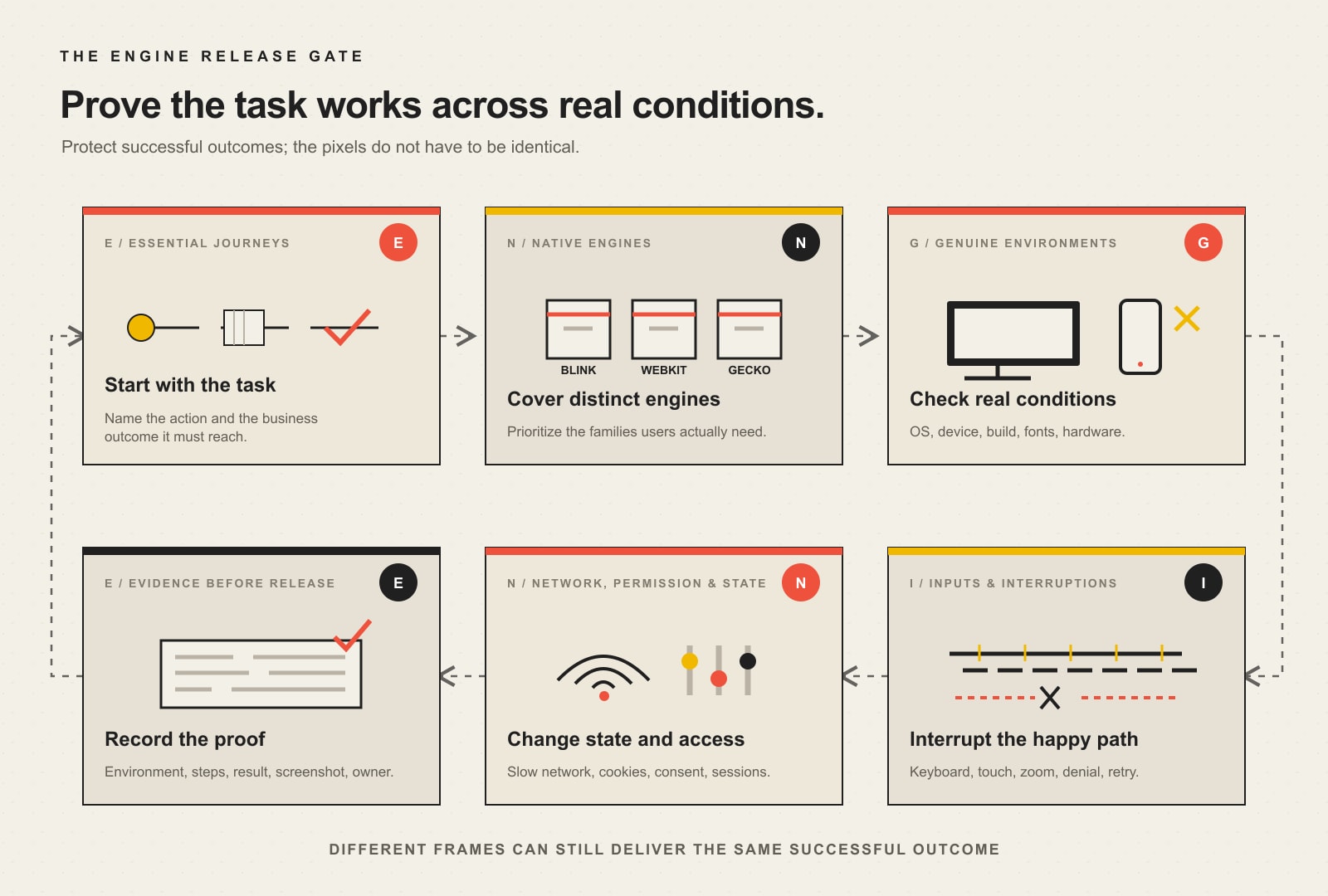
    The Scope Design ENGINE release gate

    Scope Design uses ENGINE as a practical way to turn compatibility from a browser-logo checklist into release evidence.

    Six-part ENGINE cross-browser release gate: Essential journeys, Native engines, Genuine environments, Inputs and interruptions, Network permissions and state, and Evidence before release.
    The Scope Design ENGINE release gate turns cross-browser testing into evidence across journeys, engines, genuine environments, inputs, state, and release proof.

    E: Essential journeys

    Start with the tasks closest to money, trust, access, or staff workload. A brochure page and a payment flow do not deserve equal testing depth.

    Essential journeys commonly include:

    • primary navigation and site search;
    • lead forms, file uploads, and confirmation messages;
    • booking, quoting, checkout, tax, shipping, and payment;
    • account creation, sign-in, password recovery, and logout;
    • consent choices and preference changes;
    • document, video, map, portal, or dashboard access;
    • phone, email, CRM, analytics, and fulfillment handoffs.

    Write the expected outcome before choosing a tool. If the expected result is vague, the test will also be vague.

    N: Native engines

    Cover the engine families that can expose genuinely different behavior:

    • Chromium/Blink, used by Chrome, Edge, and many downstream browsers;
    • WebKit, required for Safari and especially important on Apple devices;
    • Gecko, used by Firefox.

    Testing Chrome and Edge is not the same as testing two independent engines, even though branded features and enterprise policies can still make both worth checking. Test engines for implementation differences and branded browsers when your audience, organization, or integration creates a reason.

    G: Genuine environments

    An environment is more than a viewport preset. It includes the browser build, operating system, device hardware, display scaling, fonts, media capabilities, and—in mobile cases—the browser chrome, virtual keyboard, safe areas, and operating-system behavior.

    Emulation is excellent for quick feedback. It is not a notarized affidavit from an iPhone. Use at least a focused set of real devices for high-risk journeys.

    I: Inputs and interruptions

    Test with keyboard, mouse, touch, zoom, and assistive technology as appropriate. Then interrupt the happy path.

    Try rotating the device, opening a virtual keyboard, using the browser Back button, refreshing mid-process, switching tabs, timing out, submitting twice, and recovering from an error. A journey that only works while everyone behaves perfectly is a demo, not a system.

    N: Network, permissions, and state

    Browsers behave differently when cookies are restricted, a permission is denied, storage is full or unavailable, a connection is slow, a cached asset is stale, or a user returns with an existing session.

    Test at least the states that materially change the journey:

    • new visitor and returning visitor;
    • logged out and logged in;
    • empty and populated cart or saved state;
    • permission allowed and denied;
    • fresh cache and warmed cache;
    • normal and constrained network;
    • accepted and rejected consent choices;
    • valid, invalid, incomplete, duplicate, and expired submissions.

    E: Evidence before release

    A pass needs more than someone’s memory of clicking around. Record the supported environment, test case, expected result, actual result, tester or automation run, date, and evidence.

    A defect needs enough information to reproduce it:

    • exact browser and version;
    • operating system and version;
    • device or emulation profile;
    • account, permission, consent, and cache state;
    • minimal reproduction steps;
    • expected and actual outcomes;
    • console, network, screenshot, recording, or trace evidence;
    • business severity and owner.

    No reproduction information means the developer gets to play detective while the deadline burns. Very cinematic. Not especially efficient.

    How to choose a browser and device test matrix

    There is no universal “latest plus two” commandment carved into a server rack. Choose coverage from evidence.

    1. Start with your own analytics and real-user monitoring

    Segment actual customers by browser, browser version, operating system, device category, and conversion outcome. Do not only count visits. A low-volume environment may still represent a high-value enterprise customer or a browser-specific conversion failure.

    Useful questions include:

    • Which browsers generate qualified leads, purchases, or booked work?
    • Does one browser have traffic but an abnormally weak completion rate?
    • Which environments reach the form, checkout, or portal and then disappear?
    • Are support tickets clustered around one browser, device, or operating system?
    • Does staff or a contracted customer depend on a managed browser version?

    The Scope Design rule is simple: coverage follows user evidence, business risk, and technical difference—not popularity alone.

    2. Cover distinct engines before collecting browser logos

    Chrome, Edge, Opera, Brave, and other Chromium-based browsers share a large part of their engine foundation. They are not identical, but testing five Chromium brands while skipping WebKit or Gecko creates impressive-looking coverage with a hole in the middle.

    Use at least one appropriate configuration from each relevant engine family, then add branded browsers for audience, policy, extension, codec, or integration reasons.

    3. Add operating systems where they change behavior

    Safari is tied to Apple platforms. Font rendering, native form controls, scrolling, media, file selection, permissions, and assistive-technology pairings can vary by operating system even when the browser brand is familiar.

    If the journey uses uploads, camera, microphone, location, payments, downloads, notifications, authentication, or rich media, operating-system coverage becomes more important.

    4. Set a declared support policy

    State what you support, what you monitor, and what you do not promise. For example:

    TierPurposeTypical treatment
    Release gateEnvironments carrying material traffic, revenue, accessibility, or contractual riskCritical journeys tested before every release
    Regression rotationRelevant environments with lower risk or older supported versionsAutomated coverage plus scheduled manual checks
    Best effortRare, unsupported, or obsolete environmentsCore content should remain available where practical; advanced behavior is not guaranteed

    web.dev’s Baseline and Browserslist guidance explicitly recommends consulting analytics or real-user monitoring when choosing a target. Baseline helps establish whether platform features are newly or widely available across its core browser set; your support policy still has to reflect your users.

    5. Revisit the matrix

    Browser versions, user behavior, business processes, and third-party integrations change. Review the matrix after major releases, platform changes, conversion anomalies, support incidents, and at an agreed recurring interval.

    What should be tested across browsers?

    Start with the complete business journey, then work inward to components.

    Test areaWhat to verifyEvidence of success
    NavigationHeader, mobile menu, search, breadcrumbs, deep links, Back/Forward behaviorVisitor reaches the intended content without traps or lost state
    ContentText, images, video, embeds, downloads, print styles, long words, translated or enlarged textInformation remains readable, available, and correctly associated
    FormsLabels, field types, validation, autofill, error recovery, uploads, duplicate submission, success confirmationValid data arrives once in the correct destination; errors explain how to recover
    Commerce and bookingProduct selection, pricing, calendar, cart, tax, shipping, payment, confirmationCorrect transaction or reservation completes and downstream systems receive it
    AuthenticationRegistration, login, multifactor flow, password reset, timeout, logoutAuthorized access works; failure states do not expose or lose data
    InteractionMenus, tabs, accordions, dialogs, carousels, drag/drop, keyboard focus, touchControls expose the right state and work with supported inputs
    Permissions and privacyCookies, consent, location, camera, microphone, notifications, storageDenial is handled gracefully and consent choices are honored
    AccessibilityKeyboard, focus, names, roles, states, zoom, reflow, screen-reader/browser combinationsUsers can perceive, understand, operate, and complete the task
    PerformanceLoading, response, layout stability, script errors, constrained hardware/networkThe task becomes usable and stays responsive in the supported environment
    HandoffsEmail, CRM, analytics, payment, fulfillment, webhooks, downloadsThe visible success message matches the actual downstream result

    The last row catches a common bit of theater: the form says “Thanks!” while the lead goes nowhere. A green confirmation screen is not proof of a completed business process.

    Manual testing, automation, emulation, and real devices

    Serious coverage uses all four for different jobs.

    Manual testing

    Humans notice confusing labels, unexpected focus, awkward native controls, clipped content, misleading error messages, and “technically passed” journeys that feel broken. Manual testing is especially valuable for new features, accessibility, exploratory testing, and high-risk flows.

    Automated testing

    Automation is excellent for repeatable critical paths, browser-engine coverage, form rules, state transitions, and regression checks after code changes. Playwright projects can run the same tests across browser and device configurations and across states such as logged in and logged out.

    Automation should assert outcomes, not merely clicks. “The button was clicked” is weak. “The order exists once, shows the correct total, and produced the expected confirmation” is evidence.

    Emulation and simulation

    Emulation accelerates development and expands cheap coverage. It can model viewport, touch, user agent, network, color preferences, geolocation, and other conditions. It cannot reproduce every hardware, operating-system, browser-shell, keyboard, codec, power, memory, or assistive-technology behavior.

    Real devices and real browsers

    Use genuine environments for the journeys where simulation risk is unacceptable. That may mean a small in-house device set, a cloud device service, client hardware, or scheduled external testing. The right answer depends on the support matrix and business exposure—not which vendor wrote the loudest comparison page.

    Cross-browser testing tools: choose by job

    A useful stack usually contains categories, not one magical dashboard.

    Support and standards research

    • MDN browser-compatibility tables and MDN’s common HTML and CSS problem guide
    • Web Platform Baseline for interoperable feature status
    • Browserslist for declared build targets
    • HTML, CSS, and JavaScript validation and linting

    Manual inspection and debugging

    • browser developer tools;
    • real local devices;
    • remote browser and device clouds;
    • responsive multi-viewport tools for quick comparison;
    • console, network, accessibility-tree, storage, and performance inspection.

    Automated functional regression

    • Playwright for Chromium, WebKit, Firefox, branded-browser channels, multiple configurations, traces, and screenshots;
    • Selenium when its ecosystem and language support fit the team;
    • component or application test tools already native to the product stack.

    Visual regression

    Use screenshot baselines to detect unexpected changes, then have a human decide whether the change is a defect. Pixel diffs are sensors, not judges. Antialiasing, font rendering, dynamic content, and browser chrome can generate noise.

    Accessibility evaluation

    Automated checks find a useful subset of failures. They cannot establish complete accessibility. W3C’s WCAG conformance explanation calls for a combination of automated testing and human evaluation, and the W3C’s assistive-technology support guidance says developers should test with multiple assistive technologies.

    Use the site’s broader website accessibility and WCAG guide for the full compliance and evaluation boundary.

    A practical cross-browser testing workflow

    Step 1: Define the supported environment matrix

    Record engines, browser brands and versions where relevant, operating systems, devices, viewports, input methods, assistive-technology combinations, and exceptional client requirements.

    Step 2: Map critical journeys

    Give each journey a start condition, exact steps, expected visible result, expected downstream result, and severity if it fails.

    Step 3: Prevent obvious compatibility debt

    Use valid semantic HTML, well-scoped CSS, standards-based JavaScript, progressive enhancement, documented fallbacks, and feature-support research before testing. Prevention is cheaper than maintaining a museum of browser-specific hacks.

    When support varies, use feature detection. MDN’s feature-detection guidance recommends checking whether the capability exists and providing an acceptable alternative. It explicitly warns against browser sniffing.

    Step 4: Automate stable, repeated outcomes

    Add engine-level tests for the paths that must keep working. Run fast checks on every material change and broader matrices on a schedule appropriate to cost and risk.

    Step 5: Perform focused manual exploration

    Test the highest-risk combinations, new interactions, visual behavior, native controls, keyboard paths, touch behavior, permissions, and failure recovery.

    Step 6: Verify on genuine devices

    Run essential mobile and hardware-dependent journeys on real devices. Do not assume a resized desktop browser proves mobile behavior.

    Step 7: Report reproducible defects

    Separate symptoms from causes. “Safari is broken” is not a bug report. “On iOS Safari with location denied, tapping Find a Location leaves the submit control disabled and provides no recovery message” is actionable.

    Step 8: Retest the fix and the neighbors

    Compatibility fixes can break another engine or state. Retest the failed case, the critical journey around it, and the other supported engines.

    Step 9: Make compatibility a release gate

    Cross-browser testing belongs inside the website development process, not in a frantic hour after someone has already announced launch.

    How to classify browser compatibility defects

    Use business impact, not visual drama.

    SeverityMeaningExampleRelease decision
    BlockerEssential task cannot complete, security/privacy failure, or critical accessibility barrierCheckout cannot submit in Safari; keyboard user cannot reach the booking buttonStop release or disable the affected path safely
    HighMajor function works incorrectly or creates material data/operational riskForm says success but CRM receives nothing; file upload silently failsFix before release unless an explicit, safe contingency exists
    MediumTask completes with meaningful friction or degraded informationError recovery is confusing; layout obscures part of a comparison tableFix in the release when practical; document and schedule otherwise
    LowCosmetic difference with no meaningful task, comprehension, or brand harmSlight font or spacing variationAccept, monitor, or fix with normal prioritization

    This prevents the team from spending two hours on a three-pixel shadow while a Firefox user cannot submit the damn form.

    Common cross-browser failures and better fixes

    Browser sniffing

    Changing behavior because a user-agent string “looks like Safari” is brittle. Detect the feature or condition you actually need, then provide a fallback.

    Assuming native controls are identical

    Date fields, file inputs, selects, media controls, autofill, and validation messages may vary. Preserve label, instruction, value, error, and completion—not a fantasy of identical chrome.

    Shipping unsupported platform features without a fallback

    Research compatibility before adopting a new API or CSS feature. Use progressive enhancement, Baseline targets, feature detection, build transforms, or a simpler alternative when the business journey requires broader support.

    Testing pages instead of journeys

    A screenshot can show that the checkout page exists. It cannot prove inventory, taxes, payment, confirmation, email, analytics, and fulfillment agree.

    Ignoring third-party dependencies

    Consent managers, chat widgets, maps, CAPTCHA, payment fields, video players, and marketing tags can fail independently of the site’s core code. Test them as part of the journey and define who owns the incident.

    Confusing accessibility automation with accessibility support

    An automated scan may pass while a browser and screen-reader combination exposes the wrong role, state, focus order, or instruction. Test human interaction and the supported browser/assistive-technology combinations.

    Fixing one browser with a global hack

    A rushed override can move the defect elsewhere. Isolate the cause, prefer standards-based corrections, use narrow fallbacks, and rerun the matrix.

    Ignoring performance by browser

    Different engines, devices, and operating conditions can expose long tasks, memory pressure, media problems, or loading behavior differently. Use the website speed diagnosis guide when the compatibility problem is really a performance constraint.

    A lean test plan for a small business website

    You do not need an enterprise device lab to stop shipping obvious browser failures.

    Start with:

    1. the current Chromium-based desktop browser most used by your audience;
    2. current desktop Firefox;
    3. current Safari on macOS when Apple users matter;
    4. current iOS Safari on a real iPhone;
    5. current Chrome on a real Android device;
    6. any managed, contractual, assistive-technology, or high-value environment identified by evidence;
    7. automated essential-journey checks across Chromium, WebKit, and Firefox;
    8. manual keyboard, zoom, consent, denial, error, and recovery checks;
    9. post-release monitoring segmented by browser and device.

    Then expand based on actual traffic, conversion, feature risk, and incidents. Do not buy 3,000 theoretical combinations before you can explain which five business journeys need protection.

    If the current site has no declared support matrix, no reproducible tests, and no one responsible for release evidence, Scope Design’s website development service can help establish the foundation without turning QA into performative bureaucracy.

    How to measure whether cross-browser testing is working

    Useful measures connect the test program to reliability:

    • percentage of essential journeys covered by engine and risk tier;
    • compatibility defects found before versus after release;
    • blocker and high-severity escape rate;
    • browser-specific completion or conversion gaps;
    • repeat defects prevented by regression tests;
    • time from report to reproducible diagnosis and verified fix;
    • support tickets and staff recovery work caused by browser failures;
    • percentage of defects containing complete reproduction evidence.

    Do not optimize for the number of tests. Ten assertions that confirm one button exists are less valuable than one test proving a lead reaches the right system once.

    Frequently asked questions about cross-browser testing

    What is cross-browser testing?

    Cross-browser testing verifies that a website or application provides an acceptable functional, visual, accessible, and performance experience across the browsers and environments it claims to support.

    Why is cross-browser testing important?

    It prevents browser-specific failures from blocking sales, leads, bookings, account access, content, and accessible use. It also gives the team reproducible evidence instead of relying on “it worked for me.”

    How do I test a website in different browsers?

    Define critical journeys and a support matrix, run automated tests across the major engines, manually test high-risk interactions, verify essential paths on real devices, and record reproducible evidence for every failure.

    Does a website need to look identical in every browser?

    No. Minor rendering differences are acceptable when content, controls, feedback, accessibility, and successful outcomes remain equivalent. Outcome parity matters more than pixel parity.

    Which browsers should a website support?

    Choose from actual user analytics, conversion value, engine diversity, operating-system dependencies, contractual requirements, accessibility needs, feature support, and business risk. Publish the decision as a support policy.

    Do I need to test every browser?

    No. Testing every browser, version, device, state, and assistive-technology combination is usually impossible. Use a risk-based matrix that covers distinct engines and the environments that matter to the business.

    What is the difference between responsive and cross-browser testing?

    Responsive testing checks whether tasks survive changes in available space and input context. Cross-browser testing checks whether they survive differences in engines, browsers, operating systems, devices, permissions, storage, and state.

    What are the best cross-browser testing tools?

    The best stack depends on the job. Use compatibility data and Baseline for support decisions, browser developer tools for diagnosis, automation such as Playwright for repeatable engine coverage, real-device access for genuine environments, visual comparison for unexpected changes, and manual accessibility testing for human interaction.

    Is there a free way to test across browsers?

    Yes. Locally installed browsers, developer tools, MDN compatibility data, Baseline, open-source automation, validators, and a small set of real devices can provide strong initial coverage. Paid device clouds become useful when you need broader or repeatable environment access.

    Can automation replace manual browser testing?

    No. Automation is excellent for stable regression paths, but it does not reliably judge clarity, awkward interaction, assistive-technology behavior, visual meaning, or every unexpected state. Use automation and focused human testing together.

    Is browser emulation the same as testing a real device?

    No. Emulation reproduces selected conditions efficiently but cannot perfectly reproduce hardware, operating-system services, browser chrome, virtual keyboards, media capabilities, memory, power, and assistive technology. Use real devices for high-risk paths.

    How often should cross-browser testing be done?

    Run focused regression checks after material changes and before releases. Revisit the full support matrix after major browser, platform, integration, or business changes and on a scheduled cadence appropriate to risk.

    How do you fix cross-browser compatibility problems?

    Reproduce the failure precisely, isolate whether it comes from invalid code, unsupported features, engine bugs, third parties, state, or performance, apply the narrowest standards-based correction or fallback, and retest the failed journey across the supported matrix.

    Does cross-browser compatibility affect SEO?

    Search visibility can suffer indirectly when browser or device failures make content unavailable, create poor mobile behavior, break navigation, or damage performance. The primary reason to test is still more concrete: users must be able to complete the task.

    The release standard

    A browser list is not a testing strategy. A screenshot gallery is not a business outcome. A test suite that never verifies the downstream result is just code admiring code.

    Define the essential journeys. Cover the engines and environments that evidence says matter. Interrupt the happy path. Record the result. Stop the release when a critical customer cannot finish the job.

    That is cross-browser testing without the ceremonial bullshit.

  • Website Hacked? Signs, First Steps, and Recovery

    Website Hacked? Signs, First Steps, and Recovery

    If your website was hacked—or you have good reason to think it was—document the symptom, stop further harm, contact the host and technical owner, preserve the current state, rotate exposed access from a clean device, remove both the malicious changes and the entry point, restore only from a known-clean source, test the real business journeys, and watch for reinfection. Do not start deleting random files or blindly restore the newest backup. Panic is understandable. Panic with administrator access is how one problem becomes three.

    TL;DR: What to do when your website is hacked

    1. Record what happened. Capture screenshots, affected URLs, warnings, account changes, times, time zone, recent updates, and who noticed the problem.
    2. Protect people and operations. If the site is redirecting visitors, stealing credentials, serving malware, exposing personal information, or processing transactions unreliably, restrict public access or replace it with a clean temporary response.
    3. Call the right owners. Contact the hosting provider, website maintainer, domain and DNS owner, payment provider when relevant, and qualified security or legal help when data exposure may be involved.
    4. Preserve before you purge. Save logs, alerts, account lists, database and file copies, server details, and the compromised state before cleanup when it is safe to do so.
    5. Rotate access from a clean device. Change hosting, CMS, SFTP/SSH, database, domain, DNS, email, API, and integration credentials that may be exposed. Revoke sessions, unknown users, keys, and tokens.
    6. Find the entry point, not only the graffiti. Removing a spam page is not recovery if the stolen password, vulnerable plugin, malicious administrator, scheduled task, or backdoor still works.
    7. Restore carefully. A backup is useful only if it is complete, old enough to be clean, recent enough to be useful, and restored into an environment you can trust.
    8. Verify and monitor. Test forms, payments, logins, email, analytics, search visibility, mobile pages, permissions, updates, and security monitoring before declaring victory.

    If customer, employee, payment, health, financial, or other sensitive information may have been exposed, stop treating this as a normal website repair. Bring in qualified incident-response and legal professionals, check cyber-insurance requirements, and determine the notification obligations that apply to the actual incident and jurisdiction.

    In this recovery guide

    How can you tell whether a website was hacked?

    A hacked website does not always arrive wearing a skull-and-crossbones homepage. Sometimes it is obvious. Sometimes the public site looks perfectly normal while search engines see pharmacy spam, an attacker quietly receives form submissions, or an unauthorized administrator waits for the next opportunity.

    The useful question is not “Does this look weird?” It is “What evidence suggests an unauthorized change, access, or use of the system?” The official WordPress hacked-site guidance calls these indicators of compromise. One indicator may be a technical failure or configuration mistake. Several related indicators—or one unambiguous unauthorized change—deserve immediate investigation.

    Search engines or browsers show a security warning

    Google Search, Chrome, other browsers, hosting companies, malware scanners, and security vendors may flag the site as dangerous, deceptive, hacked, or infected. Google Search Console’s Security Issues report can show detected issue types and example URLs. Treat the alert as evidence to investigate, not as a complete diagnosis of every affected file or account.

    A warning can crush traffic because visitors are correctly being told not to trust the site. Do not request a review simply because someone deleted the most visible bad page. Clean the compromise, close the entry point, verify the site, and then request the appropriate review.

    Visitors are redirected somewhere they did not choose

    Unexpected redirects to gambling, counterfeit products, adult content, fake software updates, phishing pages, or another business are strong warning signs. Test from more than one device, browser, network, and entry source. Some malicious redirects trigger only on mobile, only for first-time visitors, only from search results, or only in certain locations so the site owner does not see the same behavior.

    Search for the domain and review indexed pages, page titles, and descriptions. Unfamiliar language, pharmaceutical terms, casino pages, doorway pages, or hundreds of URLs the business never created may indicate injected content or SEO spam. Search engines may discover those pages before the owner does.

    Do not assume every odd result is a hack. Old staging sites, abandoned imports, badly configured search pages, and legitimate but forgotten content can also create a mess. The difference is authorization and provenance: who created it, how, and whether the system was supposed to do that.

    Unknown users, administrators, keys, or integrations appear

    Review CMS users, hosting users, SFTP and SSH access, database users, domain and DNS access, API keys, application passwords, webhooks, payment integrations, email services, and deployment systems. An unfamiliar administrator or token is not “probably from an old plugin.” It is an access path until proven otherwise.

    Also look for legitimate accounts with permissions they no longer need. Attackers do not always create a new identity; they may use a contractor’s old account, a reused password, or a mailbox that controls password resets.

    Files, settings, templates, or scheduled jobs changed without authorization

    Unexpected file modifications, unfamiliar plugins or themes, altered .htaccess or server rules, injected scripts, modified templates, rogue scheduled tasks, new cron jobs, disabled security controls, and unexplained configuration changes all deserve investigation. File timestamps help, but they are not proof by themselves because deployments, cache systems, backup tools, and attackers can change them.

    Forms, email, payments, or business workflows behave differently

    A compromise may show up as contact-form messages going to an unfamiliar address, orders changing destination, payment scripts loading from a new domain, password-reset emails nobody requested, legitimate mail suddenly being rejected, or customers receiving messages the business did not send.

    These are not side effects to fix after the “website” is cleaned. They may be the business impact. Preserve records and involve the relevant providers before evidence or transaction history disappears.

    The host reports malware, abuse, spam, or unusual resource use

    Hosts may suspend a site, flag malicious files, report mass email, detect abusive outbound traffic, or show sharp CPU and storage changes. A traffic spike alone is not proof of a hack; a viral post, crawler, marketing campaign, denial-of-service attempt, or analytics bug can look similar. Correlate the host’s evidence with logs, files, users, requests, and recent changes.

    The website becomes slow, broken, or unavailable

    Slowness and downtime are symptoms, not verdicts. A bad update, exhausted hosting plan, database failure, cache problem, DNS error, expired domain, or broken integration can take down a site without an attacker touching it. Start with the incident facts. Do not diagnose a cyberattack because the spinner looked menacing.

    The TRACE hacked-website recovery process

    Scope Design uses a simple decision framework for the first response: TRACE—Triage, Restrict, Archive, Clean, Exercise. It keeps the business from confusing visible cleanup with verified recovery.

    The five-stage TRACE website recovery process: triage the signal, restrict further harm, archive evidence, clean the compromise and close the entry point, exercise recovery and monitor; return only when harm has stopped, entry is closed, critical journeys work, and monitoring is active.
    Scope Design’s TRACE process: triage the signal, restrict harm, archive evidence, clean the compromise and entry point, then exercise recovery and monitor.
    TRACE stageImmediate questionEvidence of completion
    Triage the signalWhat happened, when, where, and to whom?Incident timeline, symptoms, affected URLs and systems, named response owner
    Restrict further harmWhat must stop now to protect people, data, money, and connected systems?Safe containment decision, access restrictions, provider escalation, clean temporary service where appropriate
    Archive evidence and current stateWhat will we need to understand scope, recover, make a claim, or meet an obligation?Preserved logs, alerts, account state, file/database copy, transaction and communication records
    Clean the compromise and close the entry pointWhat changed, how did access occur, and what persistence remains?Malicious artifacts removed, access rotated, vulnerable path repaired, unauthorized accounts and tasks removed
    Exercise recovery and watch for reinfectionCan the actual business safely operate, and will we notice if the attacker returns?Tested journeys, verified monitoring, search review, clean scans, documented watch period and lessons

    T — Triage the signal

    Start an incident record before changing the system. Include:

    • the exact warning, behavior, or unauthorized change;
    • affected URLs, accounts, forms, transactions, devices, and services;
    • when it was first noticed, including time zone;
    • who noticed it and how;
    • recent plugin, theme, hosting, DNS, content, or account changes;
    • alerts from Google Search Console, browsers, the host, payment services, email providers, or security tools;
    • whether sensitive information or money may be involved;
    • who owns the response and who can authorize containment.

    This sounds bureaucratic until six people make changes in three dashboards and nobody can remember what the site looked like twenty minutes ago. WordPress makes documentation the first actionable step for good reason.

    Triage also separates a compromise from an ordinary technical failure. Confirm the domain and hosting are paid, DNS resolves correctly, certificates are valid, the server is running, and recent deployments or updates did not cause the symptom. If the evidence still points to unauthorized behavior, proceed as an incident.

    R — Restrict further harm

    Containment is a business-risk decision, not an automatic “flip the whole internet off” rule. The right response depends on what the site is doing.

    If visitors are being redirected to malware, credentials may be captured, payment pages are untrustworthy, personal information is publicly exposed, or the attacker is actively changing the system, public service may need to be restricted immediately. A clean temporary site or correctly configured 503 Service Unavailable response can be safer than leaving a compromised application online. Google’s hacked-site recovery guidance likewise recommends temporarily taking a compromised site offline while it is being fixed.

    If the suspected problem affects one isolated function, the team may be able to disable that function while preserving safe parts of the business. Coordinate with the host and incident specialist before shutting down or rebooting evidence-sensitive systems. The FTC specifically warns businesses not to destroy forensic evidence during remediation.

    Contain connected access too. Revoke suspicious sessions, disable unknown users, restrict compromised integrations, and rotate relevant credentials from a device believed to be clean. An infected laptop or compromised email account can hand the new password straight back to the attacker.

    Prioritize accounts with the power to reset or rewrite everything else:

    1. primary email and identity accounts;
    2. domain registrar and DNS;
    3. hosting and cloud control panels;
    4. CMS administrators;
    5. SFTP, SSH, deployment, and database access;
    6. payment, ecommerce, CRM, email-delivery, analytics, and API credentials.

    Use unique credentials and multifactor authentication where supported. Remove unknown accounts and revoke active sessions. Do not delete the records of those accounts before preserving what you may need to understand the incident.

    A — Archive evidence and the current state

    Before cleanup, preserve enough information to investigate and recover. That may include:

    • screenshots and exact warning text;
    • server, application, firewall, authentication, email, DNS, payment, and security logs;
    • CMS user and role lists;
    • active plugins, themes, integrations, keys, and scheduled tasks;
    • a copy of files and database in their compromised state;
    • file hashes, modification times, and detected malware paths;
    • hosting and network details;
    • orders, form submissions, exports, or other business records that may change during restoration;
    • a timeline of every action the response team takes.

    A compromised backup is not the one you restore into production, but it can still be valuable evidence and a reference for recent legitimate data. Store it safely with access limited to the response team.

    If the incident may involve regulated or personal information, litigation, law enforcement, a cyber-insurance claim, or a contractual reporting duty, do not improvise evidence handling from a blog post. Contact the appropriate insurer, counsel, and incident-response professionals early. Insurance policies sometimes require prompt notice or approved vendors before work begins.

    C — Clean the compromise and close the entry point

    Cleanup has two jobs:

    1. remove the attacker’s code, content, accounts, jobs, and persistence; and
    2. remove or control the route that allowed the compromise.

    Completing only the first job is digital whack-a-mole.

    On WordPress, investigation may include core files, plugins, themes, uploads, must-use plugins, configuration files, server rules, scheduled tasks, database content, administrator accounts, application passwords, and hosting-level access. Compare WordPress core and repository-hosted extensions with trusted originals where possible. Replace compromised software from known-good sources instead of attempting to prettify malicious code line by line.

    The entry point may be an outdated extension, abandoned component, stolen administrator credential, compromised email account, reused password, infected workstation, exposed key, vulnerable custom code, weak hosting isolation, or unauthorized vendor access. Sometimes the original evidence is incomplete and the exact route cannot be proven. Say that honestly, then close every plausible access path supported by the evidence.

    Do not treat a remote scanner as a complete cleanup certificate. A public scanner sees what an outside visitor receives. It may catch warnings, injected scripts, and known malware behavior, but it usually cannot prove the database, server, user list, private files, scheduled tasks, or connected accounts are clean.

    E — Exercise recovery and watch for reinfection

    Recovery is not “the homepage loads.” It is the return of trustworthy business operation.

    A clean backup can accelerate recovery, but answer four questions first:

    • Complete: Does it include the necessary files, database, configuration, uploads, and business data?
    • Clean: Was it created before the compromise, and has it been checked for malicious accounts, code, content, and persistence?
    • Current enough: What orders, leads, content, users, or transactions would be lost by restoring it?
    • Safe destination: Are you restoring into an environment with repaired access, updated software, and a closed entry point?

    Blindly restoring yesterday’s backup can restore yesterday’s backdoor. Restoring a month-old backup can erase a month of business. A thoughtful recovery may rebuild application files from trusted sources, import carefully reviewed business data, and reconcile transactions created after the clean recovery point.

    Before reopening, test the journeys that matter:

    • public pages and navigation on mobile and desktop;
    • administrator access and permissions;
    • contact, quote, signup, and support forms;
    • ecommerce cart, checkout, payment, tax, shipping, refunds, and transactional email;
    • login, password reset, memberships, portals, and file access;
    • analytics, advertising tags, consent controls, CRM, webhooks, and API integrations;
    • site search, redirects, canonical tags, robots rules, sitemaps, and structured data;
    • backups, monitoring, alerts, and the response contact path.

    Then maintain heightened monitoring. Watch for new files, unexpected users, recurring spam URLs, redirects, authentication anomalies, outbound email, resource spikes, Search Console warnings, and the same indicators that triggered the response. Reinfection often means the entry point or persistence was missed—not that the attacker possesses supernatural keyboard powers.

    How do you recover Google visibility after a website hack?

    Open Google Search Console and review Security Issues, Manual Actions, indexed pages, sitemaps, and performance changes. Record example hacked URLs before cleanup. Search the domain for injected titles and pages, but remember that a normal search does not show everything Google knows.

    After the site is clean and the vulnerability is closed:

    1. ensure malicious pages return the appropriate status or clean canonical content;
    2. restore legitimate pages and internal links;
    3. confirm robots rules and accidental noindex settings are not blocking recovery;
    4. submit a current sitemap when appropriate;
    5. request a review through the relevant Search Console security workflow;
    6. monitor warnings, indexed spam URLs, crawl behavior, impressions, and branded results.

    Google says its Security Issues report can provide the detected issue type and example URLs, and that site owners can request a review after cleaning the site and closing the security holes. A review request is not a substitute for cleanup, and repeatedly submitting one against a still-compromised site is not a strategy.

    Search recovery can lag technical recovery because crawlers need to revisit pages and warning systems need to re-evaluate the site. Do not promise an exact clearance date. Document the request, monitor status, and keep the site stable and clean.

    When does a hacked website become a data-breach problem?

    A hacked website and a legally reportable data breach are not identical, but they can overlap. The incident deserves legal and forensic escalation when there is credible reason to believe an unauthorized party accessed, altered, exposed, or took personal, regulated, confidential, or payment-related information.

    Examples include:

    • a malicious checkout or payment script;
    • exposed customer, employee, health, identity, or financial records;
    • stolen form submissions or account credentials;
    • unauthorized database access;
    • public posting of private information;
    • compromise of systems connected to the website;
    • contractual or insurance requirements triggered by the incident.

    The FTC’s data-breach response guide advises businesses to secure operations, stop additional data loss, preserve evidence, investigate the scope, fix vulnerabilities, develop a communication plan, and determine applicable notification requirements. The laws depend on the information, people, business, and jurisdiction. Scope Design can help coordinate website operations and technical ownership, but it does not replace breach counsel or a qualified forensic investigator.

    Do not publish confident statements before the facts are understood. Do not hide material facts that affected people need to protect themselves. And do not let the marketing department write incident law because the homepage CMS was nearby.

    What Scope Design can—and cannot—own

    Scope Design’s practical role includes managed WordPress maintenance, controlled updates, backups, uptime and operational monitoring, compatibility checks, targeted rollback, website troubleshooting, and coordination across the website’s owners and providers. That work helps reduce risk and makes recovery less chaotic.

    It is not a 24/7 security operations center, a forensic laboratory, penetration-testing practice, breach-law firm, insurer, or law-enforcement agency. Serious incidents may require several specialists. A trustworthy website partner should recognize that boundary early instead of cosplaying as the FBI because a malware plugin found a suspicious file.

    The broader website security guide explains the ongoing LOCKED program for ownership, access, updates, monitoring, backups, and rehearsed response. The WordPress plugin update guide explains controlled updates and rollback. The website maintenance guide assigns the recurring operational work, while Scope Design’s WordPress maintenance services guide explains what managed support should actually include.

    Hacked website recovery checklist

    DecisionConfirm before closing the incident
    ScopeAffected sites, accounts, data, integrations, devices, and providers have been identified as far as the evidence allows
    ContainmentHarmful public behavior and unauthorized access have been restricted without casually destroying evidence
    AccessRelevant credentials, sessions, keys, users, roles, and provider access have been reviewed and rotated
    CleanupMalicious code, content, accounts, jobs, redirects, and database changes have been removed
    Root causeThe confirmed or plausible entry path has been repaired, removed, patched, or tightly controlled
    RecoveryThe restored system comes from trusted sources and reconciles necessary current business data
    TestingForms, payments, email, logins, permissions, integrations, mobile pages, analytics, and search controls work
    SearchSecurity warnings, hacked URLs, sitemaps, indexing, and review requests have been handled
    ObligationsInsurance, legal, regulatory, contractual, law-enforcement, and communication decisions have named owners
    MonitoringReinfection indicators, access changes, file changes, uptime, backups, and business journeys are being watched
    LearningThe inventory, maintenance plan, access policy, backups, monitoring, and incident procedure have been updated

    Frequently asked questions about hacked websites

    What are the most common signs a website has been hacked?

    Common signs include browser or search-engine warnings, unfamiliar redirects, injected pages or links, unknown administrators, unauthorized file or configuration changes, unexpected password resets, altered form or payment behavior, spam email from the domain, host malware alerts, and suspicious scheduled tasks. Slowness or downtime alone is not proof; correlate symptoms with logs and unauthorized changes.

    What should I do first if my website is hacked?

    Document the exact symptom and time, name the response owner, protect visitors and connected systems from further harm, contact the host and technical owner, and preserve relevant evidence before deleting or restoring anything. If sensitive data may be involved, notify qualified legal, forensic, security, and insurance contacts immediately.

    Should I take a hacked website offline?

    Restrict public access when the site may harm visitors, capture credentials or payments, expose personal information, distribute malware, or remain under active attacker control. A clean temporary response may preserve safe business communication. Coordinate evidence-sensitive shutdown decisions with the host and incident professionals; the right containment depends on the incident.

    Can I check whether my website is hacked myself?

    You can review Google Search Console, browser warnings, host alerts, users, recent changes, public pages, indexed URLs, file changes, and reputable remote scans. Those checks are useful but cannot prove the private server, database, accounts, tasks, and integrations are clean. Escalate when the evidence, data, or business risk exceeds your expertise.

    Can a malware scanner prove my website is clean?

    No single scan proves the whole system is clean. Remote scanners inspect public behavior; application scanners have access only to what their permissions and signatures reveal. Verification may require file and database comparison, account review, log analysis, scheduled-task inspection, configuration review, root-cause repair, business-journey testing, and continued monitoring.

    Can I restore a hacked website from a backup?

    Often, but the backup must be complete, clean enough, current enough, and restored into a trustworthy environment after the entry point is closed. A blind restore can reintroduce malware or erase recent orders and leads. Preserve current business data and reconcile it deliberately.

    How do hackers get into WordPress websites?

    Common routes include stolen or reused credentials, compromised email accounts or devices, outdated or abandoned plugins and themes, vulnerable custom code, excessive permissions, exposed keys, insecure hosting or deployment access, and forgotten vendor accounts. The specific cause must come from evidence; guessing “it was WordPress” is not a root-cause analysis.

    Should I change passwords before or after cleaning the site?

    Use a clean device to rotate credentials needed for immediate containment, revoke sessions, and stop unauthorized access. After cleanup, rotate them again where the incident plan calls for it, because credentials used while the system was still compromised may have been captured. Include hosting, CMS, domain, DNS, SFTP/SSH, database, email, API, and integration access as relevant.

    How long does hacked website recovery take?

    There is no honest universal estimate. A simple injected file with a known clean backup and confirmed entry point may be resolved quickly. A compromise involving multiple accounts, ecommerce, personal data, an unknown timeline, poor logs, or persistent backdoors can take far longer. Scope and evidence determine the work.

    How do I remove Google’s hacked-site warning?

    Use Google Search Console to review the Security Issues report and example URLs. Remove the compromise, close the vulnerability, verify the site, and then request a review through the appropriate workflow. Continue monitoring indexed spam URLs and search results while Google recrawls and re-evaluates the site.

    Is a hacked website automatically a data breach?

    Not automatically. A compromise becomes a potential data-breach matter when unauthorized access, acquisition, alteration, or exposure may involve protected or sensitive information. Because definitions and duties vary, preserve evidence and consult qualified counsel and incident professionals rather than making the legal determination from a generic checklist.

    Will updating WordPress remove malware?

    No. Updating supported software can close known vulnerabilities and replacing trusted core or extension files can remove some malicious changes, but an update does not necessarily remove database injections, unknown users, stolen credentials, scheduled tasks, backdoors, compromised devices, or malicious integrations. Cleanup and root-cause repair are separate jobs.

    How do I prevent the website from being hacked again?

    Close the incident’s entry point, remove unnecessary accounts and software, use unique credentials and multifactor authentication, keep supported components current, control changes, maintain separate restorable backups, monitor access and file changes, watch critical business journeys, document ownership, and rehearse the response. Perfect safety is fiction; reducing likelihood, blast radius, and recovery time is the real job.

    The useful definition of recovered

    A hacked website is not recovered because the ugly redirect disappeared. It is recovered when the harmful behavior has stopped, the unauthorized access and persistence have been removed, the entry path has been closed, the necessary business data is intact, the important journeys work, search warnings are being resolved, obligations have owners, and monitoring can catch a return.

    That is less dramatic than “deploy AI-powered cyber defense.” It is also how grown-ups get the business safely back online.

  • Small Business Web Hosting: How to Avoid the Cheap Plan Trap

    Small Business Web Hosting: How to Avoid the Cheap Plan Trap

    Small business web hosting should be the least complicated setup that reliably supports your website, gives your business control of its essential accounts and data, can be restored when something breaks, and has a named competent person responsible for the mess. Choose by workload, ownership, recovery, support, and total cost—not by the teaser price in 72-point type.

    Hosting is infrastructure. Management is responsibility. Buying one does not automatically buy the other.

    TL;DR: How to choose web hosting for a small business

    • Make sure the business controls the domain registration, registrar, DNS, hosting billing and administration, website accounts, current backups, and a usable export path.
    • Match the environment to the website’s actual workload, integrations, data, traffic pattern, and cost of failure. A brochure site and a busy ecommerce operation are not the same damn thing.
    • Ask what “managed” includes in writing. Server patches, WordPress updates, plugin testing, form monitoring, malware cleanup, content changes, and emergency response are different responsibilities.
    • Require backups you can restore, not a soothing checkbox labeled “daily backups.” Confirm frequency, retention, storage location, recovery time, likely data loss, and who performs the restore.
    • Compare the three-year cost: renewal pricing, management, licenses, migrations, overages, support, scaling, and exit costs—not merely the introductory monthly rate.
    • Plan a migration around the whole system: website, database, domain, DNS, email records, SSL, integrations, analytics, search controls, staging, cutover, rollback, and post-launch monitoring.

    Web hosting is not the whole website

    Web hosting provides the computing environment that serves your website. Depending on the arrangement, that can include processing, memory, storage, database services, networking, certificates, caching, backups, and technical support. It does not automatically include every service your business mentally files under “the website.”

    A typical business web presence can depend on separate systems for:

    • domain registration;
    • DNS;
    • website hosting;
    • content management;
    • business email;
    • transactional email from forms or ecommerce;
    • content delivery and security filtering;
    • backups and off-site storage;
    • analytics and search tools;
    • payment, booking, CRM, or other integrations;
    • application maintenance and development.

    Those pieces may be sold by one company, but they remain different responsibilities. Bundling can be convenient. It can also make a migration spectacularly annoying when nobody knows whether changing a web server will disturb the company email, DNS, payment callbacks, or a ten-year-old integration held together by optimism.

    Scope Design encountered this while planning work for a long-established specialty auction business. The visible request concerned a new website and features. Discovery showed that the hosting environment, domains, Office 365 email, auction platform, legacy stores, historical files, and new WordPress system were related—but not interchangeable. The responsible plan separated raw infrastructure, migration work, ongoing management, and future development instead of hiding everything beneath one vague “hosting” line item.

    The lesson is reusable: before choosing the platform, know what you own, where it lives, and what still depends on it. Our broader website development process uses the same idea: a phase is not finished until the next responsible person can proceed without guessing.

    The five common small business web hosting models

    Small business web hosting labels are useful shorthand, not sacred truth. Providers package resources and management differently, so compare the actual service rather than assuming two plans with the same name are equivalent.

    Hosting modelUsually fitsMain advantageMain risk to investigate
    Hosted website builder or SaaS platformConventional brochure, service, portfolio, or simple commerce sites that fit the platformHosting, software, and platform operations are bundledPortability, feature limits, app costs, account ownership, and what can be exported
    Shared hostingSmall, lower-risk sites with modest resource needs and competent management availableLow infrastructure cost and simple administrationResource contention, plan limits, support scope, backups, noisy neighbors, and renewal pricing
    Managed WordPress hostingWordPress sites important to the business when nobody internal should operate the serverWordPress-oriented tools, support, caching, backups, staging, or updates may be included“Managed” can mean almost anything; confirm application-level responsibility and exclusions
    VPS or cloud instanceSites needing more isolation, resources, configuration control, or a custom stackGreater control and scalable resource optionsA server you control is also a server somebody must patch, secure, monitor, back up, and recover
    Dedicated or specialized infrastructureHigh, unusual, regulated, legacy, or predictable workloads that justify dedicated capacityMaximum control and isolation for the defined environmentCost, specialist administration, architecture, redundancy, recovery, and vendor dependence

    WordPress distinguishes generic hosting from WordPress-specific hosting and notes that WordPress-oriented providers may add backups, updates, or developer tools. The word may is doing useful work. Never assume a feature exists because a marketer added “managed” to a product name.

    Shared hosting is not automatically bad

    Quality shared hosting can be entirely appropriate for a modest site. Paying for a private cloud environment to serve six pages and a contact form can be the technical equivalent of buying a forklift to move a houseplant.

    The real questions are whether the environment supports the software, provides sufficient resources, isolates accounts appropriately, maintains current server technology, handles backups and recovery competently, and has support that matches the business risk.

    Shared hosting vs VPS: more control is not automatically better

    A VPS generally provides more control and resource isolation than ordinary shared hosting. It may also hand you more operational responsibility. An unmanaged VPS is not an upgrade for a business with nobody capable of securing, updating, monitoring, and recovering it. It is a new job description wearing a server invoice.

    Cloud hosting is not a performance spell

    “Cloud” describes an infrastructure and delivery model. It does not prove that a particular site will be fast, secure, resilient, or well managed. Architecture, configuration, location, caching, database behavior, application code, third parties, traffic, and operational discipline still matter.

    Managed WordPress hosting and website management are not identical

    A managed WordPress provider may operate servers, supply a control panel, create backups, provide staging, apply selected updates, monitor infrastructure, or help with WordPress-specific problems. A website management partner may additionally test forms and checkout, review visual changes, coordinate plugins and licenses, monitor business journeys, fix application problems, manage content, and make improvements.

    Compare the two scopes. The goal is neither to pay twice nor to leave a responsibility-shaped hole in the middle. Our WordPress maintenance services guide explains the application-management side in detail.

    The Scope Design HOSTING test

    Use this seven-part test to compare a platform, shared plan, managed WordPress provider, VPS arrangement, or custom environment without getting hypnotized by feature grids.

    The seven-part HOSTING test: Hold the assets under business control; Outline the site workload; Specify what the service includes; Test backup recovery; Identify who owns maintenance and urgent support; Name migration, rollback, export, and exit plans; Gauge total three-year cost.

    H — Hold the assets

    The business should retain durable control of the domain registration, registrar account, DNS, hosting billing and administration, website administrator access, analytics, search accounts, backups, data, and relevant source assets. An agency can manage those systems with delegated access. It should not become the only person capable of reaching them.

    ICANN explains that registering a domain creates a contractual relationship between the registrant and registrar. The business should normally be the registrant and control the account, renewal method, security settings, and DNS access. Losing a vendor should not mean losing the address customers use to find you.

    Ask before signing:

    • Whose legal name and email address are on the domain and hosting accounts?
    • Who controls billing, renewal, multi-factor authentication, and recovery methods?
    • Can the business add or remove administrators without vendor permission?
    • Can files, databases, content, settings, logs, and backups be exported in usable formats?
    • What happens to access and retained data when the relationship ends?

    O — Outline the workload

    Choose from the website outward, not from a hosting coupon inward. Document:

    • the platform, runtime, database, plugins, themes, and custom code;
    • expected visits, concurrent activity, seasonal spikes, and geographic audience;
    • ecommerce, memberships, logins, search, uploads, video, or downloadable files;
    • forms, email delivery, payments, CRM, inventory, booking, and API connections;
    • personal, payment, health, employee, or other sensitive information;
    • storage growth, retention, reporting, and background jobs;
    • the business impact if the site is slow, unavailable, compromised, or missing recent data.

    Traffic totals alone are weak sizing data. One million cached article views and fifty simultaneous personalized checkout sessions create very different work. A provider should be able to explain which resources matter for your workload and what occurs when a limit is reached.

    S — Specify the service

    Turn marketing phrases into testable responsibilities. Request written answers for:

    • compute, memory, storage, bandwidth, database, file-count, and process limits;
    • supported software versions and upgrade policy;
    • certificates, network protection, malware response, logging, and access controls;
    • caching, content delivery, staging, development, and deployment tools;
    • backup scope, frequency, retention, storage, restore method, and restore cost;
    • uptime commitment, measurement method, exclusions, remedies, and incident communication;
    • support hours, channels, response targets, escalation, and application boundaries;
    • prohibited plugins, applications, workloads, or configuration changes.

    WordPress currently recommends PHP 8.3 or greater, MariaDB 10.11 or MySQL 8.0 or greater, and HTTPS. Those versions will change. The durable question is whether the provider maintains a supported modern environment and gives you a safe upgrade path.

    T — Test recovery

    A backup is potential. A verified restore is evidence.

    Ask the provider to explain or demonstrate how a complete site is restored, who can authorize it, how long it takes, what recent data may be lost, and whether the business can obtain an independent copy. For an important site, test the process in an appropriate non-production environment before a real incident turns the documentation into a scavenger hunt.

    I — Identify responsibility

    Put a name or contracted role beside every critical function:

    ResponsibilityNamed owner
    Server software and infrastructure security
    WordPress core, plugins, themes, and custom code
    Backups, retention, and restore tests
    Domain, DNS, certificates, and renewals
    Forms, checkout, transactional email, and integrations
    Performance, uptime, errors, and capacity
    Security alerts and incident response
    Content accuracy, accessibility, privacy, and analytics

    If everyone assumes the host handles it, nobody handles it. The Web Development and Technical Optimization pillar treats ownership, maintainability, recovery, security, accessibility, and performance as one technical foundation because business failures rarely respect vendor departments.

    N — Name the migration and exit plan

    Before entering, understand how you leave. Confirm export formats, migration assistance, transfer fees, notice periods, cancellation timing, backup availability after termination, domain-release procedures, and whether proprietary platform features can move elsewhere.

    For the incoming migration, name the inventory, staging process, testing owner, approval gate, cutover steps, rollback conditions, DNS responsibility, monitoring period, and retirement date for the old environment.

    G — Gauge total cost

    Compare three years, not the first checkout screen. Include:

    • introductory and renewal hosting prices;
    • required add-ons, storage, bandwidth, email, backups, certificates, and security;
    • licenses, applications, content-delivery services, and transaction fees;
    • setup and migration;
    • developer, administrator, or agency management time;
    • monitoring, testing, support, incident response, and after-hours work;
    • scaling, overages, plan changes, and future migrations;
    • exit assistance and data transfer.

    Our small-business website cost guide includes hosting inside the complete ownership picture. The cheapest server can be expensive once the business becomes its unpaid support department.

    How small business web hosting affects performance and uptime

    Small business web hosting affects performance, but it is one layer. Server response, database work, caching, network distance, redirects, code, media, fonts, third-party scripts, browser work, and user devices all contribute to the experience.

    web.dev describes Time to First Byte as a foundational measure of connection setup and web-server responsiveness. Its current rough guide says most sites should strive for a TTFB of 0.8 seconds or less, while also warning that TTFB is not a Core Web Vital and must be interpreted in the context of how the site delivers content.

    That means “fast hosting” should be tested on your real templates and journeys. A cached demo page does not prove that your uncached product search, member dashboard, or checkout will behave well. Use field data and representative tests. Our website speed optimization guide shows how to identify whether hosting is actually the constraint before paying to move the problem.

    What 99.9% uptime allows

    An uptime percentage sounds reassuring until it is translated into time. Over a 30-day month, the approximate maximum unavailable time is:

    AvailabilityApproximate downtime per 30-day month
    99%7 hours, 12 minutes
    99.9%43 minutes, 12 seconds
    99.95%21 minutes, 36 seconds
    99.99%4 minutes, 19 seconds

    Read the service-level agreement. Learn how availability is measured, which maintenance or external events are excluded, and whether the remedy is a meaningful response or a tiny service credit. Also monitor the business journey. A server can be “up” while a form silently discards leads, email fails, or checkout throws errors.

    What secure business hosting should cover

    Security is shared work. WordPress’s hardening guidance states that hosts are often responsible for the infrastructure while the website owner remains responsible for the installed application. Exact boundaries vary, which is why they belong in writing.

    At minimum, evaluate:

    • supported server and application software;
    • secure administrative connections and HTTPS;
    • multi-factor authentication and role-based access;
    • separation between customers or workloads;
    • logging, monitoring, vulnerability response, and incident communication;
    • network filtering, rate limiting, firewall, or denial-of-service protections appropriate to the risk;
    • backup protection and recovery planning;
    • responsibility for WordPress, plugins, themes, dependencies, and custom code;
    • secure handling of credentials, keys, personal data, and payment integrations;
    • what malware cleanup, forensic work, notification, or recovery costs extra.

    WordPress describes security as continuous planning, monitoring, maintenance, and recovery. No host can reduce risk to zero, and a padlock does not prove that the application, account permissions, plugins, or business processes are secure.

    If a site stores, processes, or transmits cardholder data, outsourcing pieces to a hosting or payment provider does not erase the merchant’s responsibilities. The PCI Security Standards Council says PCI DSS applies regardless of whether those activities occur directly or through a third-party service provider. Obtain qualified compliance guidance for the actual payment architecture; do not accept “we have SSL” as a compliance strategy.

    Why backups are not recovery

    Backups answer “do copies exist?” Recovery answers “can the business restore the required service within an acceptable time and acceptable data-loss window?”

    Two useful terms make the conversation concrete:

    • Recovery Point Objective (RPO): how much recent data the business can afford to lose. If orders change every five minutes, one nightly database copy may not match the business requirement.
    • Recovery Time Objective (RTO): how long the service can remain unavailable before the impact becomes unacceptable.

    NIST contingency-planning guidance connects business impact, system criticality, backup frequency, redundancy, and recovery objectives. A five-page brochure and an auction or ecommerce system should not receive identical recovery plans merely because both use WordPress.

    For WordPress, a complete restoration usually requires both files and the database. The official WordPress backup guide explains that they are separate and recommends retaining multiple recent copies in different locations.

    Ask:

    1. What exactly is backed up?
    2. How often are files, databases, configuration, and related data captured?
    3. How many versions are retained, and for how long?
    4. Is at least one copy isolated from the live environment and its credentials?
    5. Can the business download or control an independent copy?
    6. Are backups encrypted and access-controlled appropriately?
    7. Who can restore, and is self-service safe for this environment?
    8. When was the last successful restore test?
    9. How long did it take?
    10. What happens to new orders, registrations, form entries, or edits made after the selected recovery point?

    “We take daily backups” is the opening sentence, not the recovery plan.

    How to evaluate small business web hosting support

    Small business web hosting support becomes visible when systems behave badly, which is an inconvenient time to discover that “24/7 support” means an intake bot can create a ticket at 3:00 a.m.

    Ask providers to distinguish:

    • availability from response time;
    • first response from resolution or meaningful escalation;
    • infrastructure problems from WordPress, plugin, code, database, DNS, email, or integration problems;
    • routine support from paid professional services;
    • standard incidents from security emergencies;
    • advice from hands-on remediation.

    Before committing an important site, submit a technically specific pre-sales question. Evaluate whether the answer addresses the actual issue, identifies limits, and explains escalation. Search documentation for restore, incident, migration, security, cancellation, export, and support policies. A company that will not explain responsibility before the sale is unlikely to become more philosophical during an outage.

    For a managed relationship, define who monitors alerts and who can act. An uptime notification sent to an abandoned inbox is performance art, not incident response.

    How to migrate without creating a business fire drill

    A hosting migration is a controlled business change. It should begin with an inventory, not a DNS change made because somebody had a free afternoon.

    1. Map the current system

    Record the website files and database, software versions, server configuration, domain registrar, DNS zone, SSL, business and transactional email, CDN or security proxy, analytics, Search Console, payment callbacks, forms, APIs, scheduled jobs, licenses, storage, redirects, and external services.

    Confirm which items are moving. A website-hosting change does not automatically require moving the domain registration, DNS provider, or company email.

    2. Define acceptance and rollback

    Decide what must work before cutover: representative pages, navigation, search, forms, notifications, logins, payments, orders, media, redirects, analytics, consent, accessibility, and performance. Define the failure conditions that trigger rollback and how long the old environment will remain available.

    3. Back up and stage

    Create current recoverable copies and build the new environment without disrupting production. Match supported software, import the data, configure services, and test with controlled DNS or local preview methods. Do not declare victory because the homepage appears.

    4. Plan the cutover

    Assign the change window, final data synchronization, DNS update, certificate validation, cache behavior, monitoring, communication, and approval. Account for transactions or edits that might occur between the last database copy and the final switch.

    5. Verify after launch

    Test the business journeys from outside the administrative session. Confirm HTTP responses, indexing controls, canonical URLs, analytics, forms, email authentication and delivery, payments, integrations, error logs, performance, and alerts. Keep the old environment protected and available until the acceptance window closes.

    If URLs change as part of a broader platform move, create a one-to-one map and permanent redirects. Google recommends testing the new site, using server-side permanent redirects, avoiding chains, updating internal links, and monitoring both old and new URLs in its site-move documentation. A pure hosting move should normally preserve the public URLs.

    How much small business web hosting costs

    There is no responsible universal monthly price because “hosting” can describe a restricted platform subscription, shared account, managed WordPress service, managed cloud environment, or dedicated system—and may include anywhere from almost no human responsibility to substantial operational care.

    The useful comparison is:

    Three-year hosting cost = infrastructure + required software + management labor + monitoring and recovery + migration and scaling + expected support + exit cost

    A low-risk brochure site may need modest infrastructure. A revenue-critical site with ecommerce, customer accounts, high concurrency, complex integrations, or sensitive data may justify greater isolation, expertise, monitoring, and recovery capacity. Spend should follow consequence and workload, not ego.

    Request two numbers from every provider:

    1. The three-year required cost at your expected usage, including renewals and mandatory add-ons.
    2. The separately priced responsibility for monitoring, updates, testing, troubleshooting, recovery, and changes.

    That makes a $10 server and a $200 managed relationship comparable without pretending they are the same product.

    Small business web hosting checklist

    Use this before requesting proposals or approving a migration.

    DecisionEvidence requiredOwner
    Business and website workload is documentedPlatform, traffic shape, transactions, data, integrations, storage, growth, failure impact
    Account and asset control is clearRegistrant, billing owner, administrators, MFA, recovery contacts, exports
    Technical fit is confirmedSupported versions, resources, limits, prohibited software, scaling path
    Performance expectations are measurableRepresentative field/lab baseline, capacity assumptions, monitoring plan
    Security responsibility is assignedInfrastructure, application, access, logging, patching, incident process
    Backup and recovery are provenScope, frequency, retention, location, RPO, RTO, restore test
    Support boundaries are writtenHours, channels, response, escalation, application limits, emergency terms
    Migration is controlledInventory, staging, test plan, approval, cutover, rollback, monitoring
    Exit is possibleData formats, migration-out process, fees, timing, post-cancellation retention
    Three-year cost is normalizedRenewal, add-ons, labor, licenses, overages, support, migration, exit

    Web hosting red flags

    • The provider or agency insists the domain and hosting must remain permanently in its own account with no client access.
    • “Managed” is prominent in the sales copy but undefined in the agreement.
    • Introductory pricing is clear while renewal pricing, limits, and required add-ons require archaeological work.
    • Backups exist, but restoration requires an unknown wait, fee, or support tier.
    • No one can say who manages WordPress, plugins, themes, custom code, forms, or integrations.
    • Support is advertised as 24/7 without response targets, escalation, or application expertise.
    • The provider cannot explain how to export the site and data or what happens after cancellation.
    • A migration plan ignores DNS, email, certificates, analytics, redirects, transactional data, or rollback.
    • The recommended solution is much more complex than the workload, but the person proposing it cannot name the business problem the complexity solves.
    • Performance is “guaranteed” from a generic demo rather than measured on representative pages and user journeys.

    Small business web hosting FAQ

    Use the least complex supported environment that reliably handles the website’s workload and has clear ownership, backup, recovery, security, and support responsibility. A hosted platform or quality shared plan can fit a simple site. Managed WordPress often fits an important WordPress site without internal technical staff. VPS, cloud, dedicated, or specialized infrastructure belongs where workload, isolation, configuration, data, or risk justifies it.

    How do I choose which web hosting is right for me?

    Document the website platform, traffic pattern, transactions, integrations, data, storage, growth, and cost of failure. Then compare account ownership, technical limits, security, backups, restore evidence, support boundaries, migration, exit, and three-year cost. Use the Scope Design HOSTING test above rather than selecting from price and storage alone.

    What are the four main types of web hosting?

    The traditional four are shared, VPS, dedicated, and cloud hosting. Small businesses should also consider hosted website platforms and managed application hosting because those models bundle software or operational responsibility differently. Labels overlap, so compare the actual service and management scope.

    Is managed WordPress hosting worth it for a small business?

    It can be when WordPress matters to the business and nobody internal should operate the hosting environment. Confirm whether the plan includes staging, backups, safe updates, security controls, monitoring, WordPress-aware support, and restoration. Do not pay a premium merely because WordPress is preinstalled and the product name says “managed.”

    Is a VPS better than shared hosting?

    A VPS usually provides more control and resource isolation. Shared hosting usually costs less and requires less server administration. A VPS is better only when the workload or configuration needs justify it and somebody competent owns patching, security, monitoring, backups, and recovery.

    Is shared hosting good for beginners?

    It can be a practical starting point for a modest site when the provider maintains a supported environment, supplies clear limits and recovery options, and the website has competent application management. Beginner-friendly should mean understandable and supported—not disposable.

    Is free website hosting suitable for a small business?

    Free hosting may suit a temporary experiment or low-risk prototype. It is usually a poor foundation for a business website that must protect its domain, reputation, data, availability, support path, and ability to move. Evaluate branding, limits, backups, security, exports, terms, and business continuity before trusting it with customer activity.

    How much does it cost to host a small business website?

    Cost depends on the platform, resources, traffic, data, transactions, backups, security, support, and management included. Compare three-year required cost rather than introductory price: infrastructure, renewals, add-ons, licenses, management, monitoring, recovery, migrations, scaling, and exit.

    Does web hosting affect SEO?

    Hosting can affect crawl availability, server errors, response time, HTTPS, and the performance experienced by users and search systems. It cannot fix weak content, a confused site structure, poor search intent, or a bad offer. Diagnose the actual constraint before migrating solely “for SEO.”

    What does 99.9% uptime mean?

    Over a 30-day month, 99.9% availability permits roughly 43 minutes and 12 seconds of downtime. The agreement may exclude maintenance or other events and may offer only service credits. Read how availability is measured, and monitor business functions that can fail even when the server responds.

    Does a web host back up my website?

    Some do, with widely different frequency, retention, storage, coverage, access, and restore terms. Confirm that both files and databases are included, at least one usable copy is independent of production, and the restoration process has been tested. Never infer recovery capability from a backup checkbox.

    Is cloud hosting better for a small business?

    Cloud hosting can provide flexible resources and architecture options, but it is not automatically faster, safer, cheaper, or easier to manage. Choose it when the workload, resilience, geography, integrations, or scaling model benefits from it and the operational responsibility is clear.

    Should my web designer or host own my domain?

    Normally, the business should be the domain registrant and retain durable administrative control of the registrar and DNS accounts. A provider can manage them using appropriate access. Any different ownership model should be explicit, understood, and include a reliable transfer process.

    Can a website be migrated without downtime?

    Many migrations can produce little or no visible downtime when the team inventories dependencies, stages and tests the new environment, plans DNS and data synchronization, preserves rollback, and monitors the cutover. Nobody should promise zero risk without understanding the application, data changes, email, DNS, integrations, and current infrastructure.

    Does website hosting include business email?

    Sometimes, but it does not need to. Website hosting, DNS, business mailboxes, and transactional website email are separate services even when one vendor sells them. Document MX, SPF, DKIM, DMARC, sending services, mailboxes, and ownership before changing hosting so a web migration does not accidentally kneecap email.

    Are website hosting and website maintenance the same thing?

    No. Hosting supplies the infrastructure and may include selected server or application services. Website maintenance manages the application and business-specific operating process: updates, testing, forms, integrations, content, accessibility, security response, performance, and recovery. Compare scopes and assign every responsibility.

    Sources and further reading

    The hosting product matters. The responsibility around it matters more. Buy a setup your business can control, understand, recover, and change—and make sure somebody qualified owns the gap between “the server is running” and “the website is actually doing its job.”

  • Website Maintenance Guide: What to Do, When, and Who Owns It

    Website Maintenance Guide: What to Do, When, and Who Owns It

    Website maintenance is the ongoing work of keeping a website secure, recoverable, functional, fast, accurate, and useful. A real maintenance plan assigns every critical task a frequency, an owner, evidence that it worked, and a recovery path when it did not.

    That last part matters. “The backup plugin says everything is fine” is not proof that anyone can restore the site. “Automatic updates are enabled” is not proof that the checkout, forms, navigation, or mobile layout survived the update. Green dashboard lights are comforting. So are night-lights. Neither one runs the business.

    TL;DR: a website maintenance plan needs four things

    For every maintenance task, document:

    1. What must be protected or checked: software, backups, uptime, forms, payments, email delivery, speed, content, accessibility, accounts, domains, and integrations.
    2. How often it happens: continuously, daily, weekly, monthly, quarterly, annually, or after a specific change.
    3. Who owns the outcome: the business, host, developer, maintenance provider, marketing team, or another named person.
    4. What proves it worked: a successful restore test, submitted form received in the correct inbox, completed test purchase, clean visual comparison, documented performance result, or resolved alert.

    The useful question is not “Do we have website maintenance?” It is “Who notices, verifies, and recovers when something changes?” Our website change monitoring guide explains how to select page risks, baselines, scan intervals, evidence, and response owners.

    What is website maintenance?

    Website maintenance is a managed cycle of monitoring, updating, testing, correcting, documenting, and improving the systems that keep a website working. It covers more than the visible pages. A business website may depend on a content management system, hosting, DNS, SSL, plugins, themes, databases, forms, transactional email, analytics, consent tools, payments, scheduling, CRM connections, search indexing, and third-party APIs.

    The maintenance job is to keep that system dependable after launch.

    For a typical business website, the work includes:

    • software and security updates;
    • backups and restoration testing;
    • uptime and security monitoring;
    • form, email, booking, payment, and other conversion testing;
    • performance checks and optimization;
    • broken-link and error monitoring;
    • content, pricing, staff, policy, and contact-information reviews;
    • accessibility regression checks;
    • domain, DNS, SSL, hosting, license, and account renewals;
    • analytics and search-health checks;
    • documentation, incident response, and change records.

    WordPress itself recommends regular maintenance, backups, updates, dead-link checks, and review of site health. Its Site Health documentation describes a healthy site as current, secure, well maintained, and running on supported software. That is a useful baseline. It is not the entire operating plan.

    The Scope Design Maintenance Proof Loop

    Scope Design uses a five-part maintenance logic: Observe, Protect, Change, Verify, Record. Every important maintenance action should pass through the loop.

    The Maintenance Proof Loop: Observe the condition, Protect a restore path, Change one controlled item, Verify pages and customer journeys, and Record the outcome, exceptions, owner, and next review.
    The Scope Design Maintenance Proof Loop turns every important change into evidence: Observe, Protect, Change, Verify, and Record.
    StepWhat happensUseful evidence
    ObserveMonitor the site and identify the actual condition or planned changeAlert, baseline scan, error log, release note, or reported problem
    ProtectCreate a recovery point and confirm access before changing productionCurrent offsite backup, restore instructions, credentials, and rollback target
    ChangeApply one controlled change or a deliberately grouped setChange record with software version, person, time, and reason
    VerifyTest the site technically, visually, and through its critical business journeysClean visual comparison, working forms, completed transaction, healthy logs, and performance check
    RecordPreserve the result, exception, rollback, and follow-up ownershipAudit trail, held version, incident note, client report, and next review date

    This is intentionally stricter than “click Update All and hope.” Automation is valuable, but automation without verification merely breaks things faster and with excellent consistency.

    Why the loop starts before the update

    A baseline tells you what “working” looked like before the change. Without it, a visual regression can be mistaken for an old problem, an old problem can be blamed on the update, and everyone gets to enjoy debugging by opinion.

    For a WordPress plugin update, the controlled version of the loop is:

    1. capture a baseline of priority pages and business functions;
    2. confirm a recent backup and known recovery path;
    3. review the update and compatibility risk;
    4. test in staging when the site or change warrants it;
    5. update one plugin or one understood dependency group;
    6. run visual and functional checks;
    7. continue if clean;
    8. roll back only the failed change if something breaks;
    9. verify recovery;
    10. hold the known-good version and document the exception.

    Our dedicated WordPress plugin update guide owns that process in detail. The larger point applies to every platform: a change is not complete when the installer finishes. It is complete when the business-critical result has been verified.

    What should a website maintenance plan include?

    A maintenance plan should cover nine operating areas. The exact depth depends on what the site does. A five-page brochure site and an ecommerce platform do not deserve identical plans just because both use WordPress.

    1. Security and software health

    Keep the CMS, extensions, themes, server software, and dependencies current. Remove abandoned or unused components. Review administrator accounts, authentication, file changes, malware alerts, firewall events, and unusual login activity.

    WordPress advises keeping plugins and themes current and notes that automatic updates can fail depending on the server, installation, or scheduled-task configuration. Its auto-update documentation also recommends regular backups that support rollback.

    The useful standard is not “updates are automatic.” It is:

    • high-risk updates are identified;
    • failed updates create an actionable alert;
    • the affected functions are tested;
    • a known-good version can be restored;
    • unresolved risks have a named owner.

    2. Backups and recovery

    Back up both the website files and the database. Store copies away from the live server, retain enough versions to recover from a problem that was not noticed immediately, protect backup access, and test restoration.

    The official WordPress backup handbook explains why files and database backups are separate requirements and recommends retaining multiple recent copies in different locations.

    A backup report is evidence that a file was created. A restore test is evidence that the business can recover.

    At minimum, the plan should answer:

    • What is backed up?
    • How often?
    • Where are copies stored?
    • How long are they retained?
    • Who receives failure alerts?
    • Who can restore the site?
    • How recently was restoration tested?
    • What data could be lost between the last backup and an incident?

    Backup frequency should reflect change frequency. An online store taking orders all day needs a much smaller recovery window than a five-page site that changes twice a year.

    3. Uptime, errors, and incident response

    Automated uptime monitoring should check the site frequently enough to match its business importance. But an alert alone is not a response plan.

    Define:

    • what is monitored;
    • how quickly an alert is generated;
    • who receives it;
    • who determines whether the problem is the site, host, DNS, certificate, integration, or monitoring service;
    • what response time the plan actually promises;
    • when the business is notified;
    • when rollback or escalation begins.

    Monitoring every five minutes is impressive only if someone can act. Otherwise it is a very punctual obituary.

    4. Forms, payments, bookings, email, and other business journeys

    Test the things that make or protect money.

    For a service business, that usually means submitting each important form and confirming the message arrives in the correct inbox or CRM. For ecommerce, test product discovery, cart, checkout, payment, tax, shipping, confirmation email, refund, and inventory behavior. For a membership site, test login, password reset, protected content, billing, and cancellation. For a booking site, test availability, scheduling, reminders, rescheduling, and cancellation.

    Do not stop at “the form displayed.” Confirm the entire journey. A beautiful thank-you screen attached to an email route that stopped working three months ago is conversion theater.

    5. Performance and mobile behavior

    Monitor important templates and business paths on representative mobile and desktop devices. Track meaningful regressions after design, plugin, content, tracking, advertising, and infrastructure changes.

    Google says its systems consider multiple aspects of page experience and cautions that strong Core Web Vitals do not guarantee top rankings. Its page-experience guidance recommends an overall useful, secure, mobile-friendly experience rather than worshipping a single score.

    Maintenance should therefore check:

    • whether priority pages became materially slower;
    • whether layout shifts or interaction delays harm use;
    • whether images, video, fonts, scripts, ads, or tags created the regression;
    • whether mobile users can complete the same critical actions;
    • whether a change improved a laboratory score while making the actual experience worse.

    Speed scores are diagnostics. A customer completing the task is the outcome.

    Review information that can expire or quietly become wrong:

    • pricing and service details;
    • staff names and biographies;
    • locations, hours, phone numbers, and email addresses;
    • products, availability, screenshots, and documentation;
    • legal and policy statements;
    • statistics and dated claims;
    • internal and external links;
    • redirects, missing pages, and indexing issues;
    • title tags, descriptions, structured data, and social previews on priority pages.

    Maintenance does not mean publishing filler every Tuesday to make the website look “fresh.” Update content when the facts, offer, audience, evidence, or search intent changes. Search engines do not award participation trophies for moving the copyright date.

    7. Accessibility and interaction regressions

    Accessibility can deteriorate as editors add content, plugins change markup, components are redesigned, and third-party widgets appear. Test new and changed templates for keyboard access, focus behavior, form labels, error handling, contrast, headings, image alternatives, zoom, reflow, and screen-reader behavior where appropriate.

    Our website accessibility monitoring guide explains why this is an ongoing governance problem rather than a one-time scan. Automated testing is useful, but it cannot prove that every user can complete every task.

    8. Domains, hosting, certificates, licenses, and account ownership

    Record owners, administrators, billing contacts, recovery methods, renewal dates, and transfer procedures for:

    • domain registration and DNS;
    • hosting and content delivery;
    • SSL/TLS certificates;
    • CMS and administrative accounts;
    • premium plugins, themes, fonts, media, and software licenses;
    • email delivery and transactional messaging;
    • analytics, tag management, search tools, advertising, and consent platforms;
    • CRM, scheduling, payments, ecommerce, and other integrations.

    The maintenance plan should not depend on a former employee’s personal email address or a developer being able to remember which card paid for the domain in 2019. That is not continuity. That is a future scavenger hunt.

    9. Reporting, decisions, and improvement

    Good reporting separates activity from outcome.

    “Updated 14 plugins” is activity. Better reporting answers:

    • Were any updates held or rolled back?
    • Did monitored pages change visually?
    • Did forms, checkout, and email delivery pass?
    • Were security or uptime incidents detected?
    • Did performance materially change?
    • Which content or integrations need a business decision?
    • What risk remains open, who owns it, and by when?

    The report should help the business decide, not merely prove that the provider has a dashboard.

    Website maintenance checklist by frequency

    Cadence should follow risk and change rate, not a universal calendar copied from somebody else’s blog. Use this as a starting operating model.

    FrequencyTypical workProof to keep
    ContinuousUptime, security, certificate, blacklist, and critical-service monitoringActionable alerts, response owner, incident history
    DailyBackups for active sites; order, payment, or integration exception reviewSuccessful backup record, exception queue, restore point
    WeeklySoftware and vulnerability review, controlled updates, critical-path checks, spam and account reviewChange log, clean visual/functional test, held-version notes
    MonthlyForm and email tests, performance check, broken links, analytics/search review, access review, content spot-checkReceived test submissions, performance comparison, issue list
    QuarterlyRestoration test, account and license audit, accessibility regression review, conversion-path walkthrough, content accuracy reviewRestore result, ownership register, completed journey tests
    AnnuallyDomain/hosting/vendor review, disaster-recovery exercise, policy review, architecture and lifecycle assessmentRenewal decisions, recovery timing, risk register, improvement plan
    After every material changeBaseline, backup, change, visual and functional verification, documentationBefore/after evidence, test result, rollback or approval record

    Daily website maintenance tasks

    Daily human work is not necessary for every site. Active stores, memberships, publications, or lead systems may need daily exception review, while simple sites can rely more heavily on automated monitoring.

    Use daily checks for conditions where waiting a week would create meaningful data loss, lost revenue, customer harm, or recovery cost.

    Weekly website maintenance tasks

    Weekly is a reasonable review cycle for many business WordPress sites because security and compatibility changes do not politely wait for a monthly calendar reminder. Review available updates and their risk, apply controlled changes, verify priority pages and functions, and document exceptions.

    Not every release requires immediate production deployment. A security fix, routine patch, major version, abandoned plugin, payment integration, and page-builder update deserve different decisions. “Up to date” and “stable” are both requirements. The maintenance process has to manage the tension rather than pretending it does not exist.

    Monthly website maintenance tasks

    Monthly review should test the business journey, not just the technology:

    1. Submit every important form.
    2. Confirm receipt in the correct inbox or system.
    3. Complete a representative booking, purchase, application, login, or download.
    4. Check priority pages on mobile and desktop.
    5. Review errors, uptime, security, performance, analytics, and search issues.
    6. Correct broken links and clearly stale business information.
    7. Review administrative users and unresolved alerts.
    8. Document what needs a business decision.

    Quarterly and annual website maintenance tasks

    Quarterly work proves recoverability and governance. Restore a recent backup to an isolated environment. Review who owns every essential account. Check that licenses, renewals, and recovery methods still work. Walk through the full customer journey with someone who did not build it.

    Annual review asks whether the system still fits the business. That can lead to smaller improvements, new content, integration work, a hosting change, or occasionally a redesign. Maintenance findings should inform that decision; fashion should not.

    How much does website maintenance cost?

    Website maintenance cost depends on the site’s risk, complexity, change rate, support expectation, and required response—not the number of pages alone.

    The main cost drivers are:

    • brochure site versus ecommerce, membership, booking, application, or custom functionality;
    • number and quality of plugins, themes, integrations, and vendors;
    • backup frequency, retention, storage, and restoration requirements;
    • monitoring frequency and supported hours;
    • update testing, staging, and visual regression coverage;
    • malware cleanup and incident response terms;
    • content edits and development time included;
    • reporting and account-management depth;
    • accessibility, privacy, or regulated-business responsibilities;
    • guaranteed response times and business continuity requirements.

    Scope Design’s public WordPress support and maintenance plans currently begin at $89 per month and increase as update frequency, backup frequency, monitoring, protection, testing, ecommerce support, and included services expand. Check the plan page for current pricing and exact terms.

    A cheaper plan can be correct for a low-risk site. It is not a bargain if the provider backs up the wrong things, never tests restoration, excludes the business-critical journey, or responds to an outage after the business has already discovered it.

    DIY maintenance versus a professional maintenance service

    DIY maintenance is reasonable when the business has the skill, access, time, documentation, and discipline to perform the work and recover from mistakes. The software may be inexpensive. The ownership is not free.

    A professional plan becomes more valuable when:

    • the website produces or protects meaningful revenue;
    • downtime or lost data would be expensive;
    • nobody internally owns the technical system;
    • updates involve interacting dependencies;
    • the site accepts payments, personal information, applications, or bookings;
    • the business needs predictable response and reporting;
    • staff time is better used elsewhere;
    • “we think backups are running” is the current disaster-recovery strategy.

    The decision is not DIY good, agency good. It is whether a competent owner can produce the required evidence at an acceptable cost and risk.

    What should a website maintenance service include?

    A useful maintenance service should state its scope in observable terms.

    Ask providers:

    1. Exactly what do you monitor, and how often?
    2. Who receives alerts, and what happens next?
    3. What is backed up: files, database, email, configuration, or something else?
    4. Where are backups stored, how long are they retained, and how often is restoration tested?
    5. How are updates reviewed, staged, grouped, verified, held, and rolled back?
    6. Which pages and business journeys are tested after changes?
    7. Is visual regression testing included?
    8. Are forms, transactional email, payments, bookings, and integrations tested?
    9. What does malware removal include, and what is excluded?
    10. What response time is promised during and outside business hours?
    11. Are content changes, development, performance work, accessibility review, and reporting included?
    12. Who owns licenses, accounts, backups, code, and documentation if the relationship ends?

    If the answers are “we keep everything updated” and a screenshot of a green dashboard, keep asking.

    When can maintenance be automated?

    Automate repetitive observation and low-risk execution. Keep human judgment around business impact, exceptions, and recovery.

    Good automation candidates include:

    • uptime checks;
    • scheduled backups;
    • vulnerability and malware scanning;
    • certificate and domain-expiration alerts;
    • broken-link detection;
    • performance baselines;
    • visual comparisons;
    • software inventory and update availability;
    • log collection and routine reports.

    Human review still matters for:

    • deciding whether and when a risky update should ship;
    • interpreting conflicting alerts;
    • testing unusual customer journeys;
    • evaluating visual or accessibility changes;
    • determining whether content is accurate;
    • communicating incidents and business choices;
    • authorizing rollback, replacement, or architecture work.

    Automation should reduce repetitive labor and shorten detection time. It should not make responsibility disappear.

    How do you know website maintenance is working?

    Maintenance is working when the site is observable, recoverable, and dependable enough for its business job.

    Use a compact scorecard:

    • uptime incidents detected and resolved;
    • time to detect and time to recover;
    • backup success and last verified restoration;
    • outstanding critical updates or known vulnerabilities;
    • failed, rolled-back, or held changes;
    • pass rate for forms, checkout, booking, login, and email delivery;
    • material performance regressions;
    • unresolved accessibility or content issues;
    • expiring domains, certificates, licenses, or vendor accounts;
    • decisions awaiting a business owner.

    Do not reward a provider for reporting more activity. Reward a system for reducing unknowns, catching failures early, preserving recovery options, and keeping the customer journey working.

    Website maintenance FAQ

    How often should a website be maintained?

    Website maintenance should combine continuous monitoring with daily, weekly, monthly, quarterly, and annual tasks based on risk. Active ecommerce or membership sites need more frequent backup and transaction checks than a simple brochure site. Every material change should trigger immediate verification.

    What is included in monthly website maintenance?

    Monthly maintenance commonly includes form and email testing, performance review, broken-link checks, analytics and search review, account review, content accuracy checks, and a documented issue report. Software and security review may need to happen more frequently than monthly.

    How long does website maintenance take?

    Routine maintenance can take minutes for a simple, healthy site or many hours for a complex site with updates, testing, content work, incidents, or custom integrations. Scope and evidence requirements determine the time; page count alone does not.

    Does website maintenance improve SEO?

    Maintenance can support search performance by preserving crawlable pages, working redirects, secure delivery, useful content, mobile usability, and reasonable performance. It does not create rankings by itself. Google explicitly says good page-experience scores do not guarantee top rankings.

    Do small business websites really need maintenance?

    Yes, if the website depends on software, accounts, domains, hosting, forms, email, tracking, or integrations—which nearly all business sites do. The plan can be modest, but someone still needs to own updates, recovery, testing, renewals, and incidents.

    Can a hosting company maintain my website?

    A host may maintain servers and provide backups, security features, or managed updates, but coverage varies. Confirm whether it tests your forms, checkout, content, accessibility, integrations, and visual behavior. Hosting maintenance and business-website maintenance overlap; they are not automatically the same service.

    Can I hire someone to manage my website?

    Yes. A website maintenance provider can manage updates, backups, security, monitoring, testing, support, and reporting. Use the Scope Design CARE Proof Test for WordPress maintenance services to compare coverage, accountability, recovery, evidence, exclusions, and response terms—not the length of a generic feature list.

    Should WordPress plugins update automatically?

    Low-risk plugins may be appropriate for automatic updates when reliable backups, alerts, and post-update verification exist. Business-critical or highly interconnected plugins often deserve controlled testing. Automatic does not mean risk-free, and WordPress notes that auto-updates can fail depending on configuration.

    Is a website backup the same as website maintenance?

    No. Backups are one part of maintenance. A complete plan also covers updates, security, uptime, business-function testing, performance, content, accessibility, accounts, and incident response. A backup becomes useful only when it contains what is needed and can be restored.

    What is the difference between website maintenance and website support?

    Maintenance is proactive work intended to prevent, detect, and recover from problems. Support is responsive help with questions, incidents, or requested changes. Many care plans combine both, but the agreement should distinguish routine maintenance, emergency response, and billable development.

    What happens if a website is not maintained?

    The risk of outdated software, broken forms, failed integrations, lost data, inaccessible content, expired services, performance regressions, and difficult recovery increases. Neglect does not guarantee catastrophe; it guarantees that the business knows less about whether the site is still doing its job.

    Should website content be updated every month?

    Not merely to appear fresh. Update content when facts, pricing, services, people, policies, evidence, customer questions, or search intent change. A scheduled accuracy review is useful. Publishing empty calories to satisfy a calendar is not.

    Turn website maintenance into an owned business system

    A website does not need constant tinkering. It needs explicit ownership, proportionate monitoring, safe change, verified business journeys, and a recovery plan that exists somewhere more reliable than somebody’s memory.

    If you want the software, backups, monitoring, security, and verification handled without turning your week into an unpaid systems-administration internship, compare Scope Design’s WordPress maintenance plans. If your site is custom, ecommerce, unusually complex, or already behaving badly, contact Scope Design so we can scope the actual risk instead of pretending every website needs the same checklist.

    Maintenance is the operating phase of a larger technical system. Use our business website development guide and Technical Foundation Test to define what the build must prove before the maintenance calendar begins.

  • How Websites Work: What Happens Between a Click and a Page Load

    How Websites Work: What Happens Between a Click and a Page Load

    A website is not a page sitting in the internet fog. It is a chain of systems that must cooperate: the domain must point to the right place, the browser must establish a trusted connection, the delivery and application infrastructure must build the response, the browser must turn it into something usable, and the form, checkout, booking, or other business task must actually finish. A 200 OK response proves a server answered. It does not prove the website did its damn job.

    TL;DR: A working page is only part of a working website

    • A visitor’s request moves through domain and DNS lookup, network routing, HTTPS, delivery infrastructure, the host and application, browser rendering, and the final business workflow.
    • Any layer can fail while the others appear healthy. That is why a website can load but a form can quietly send every lead into the void.
    • Test the chain with Scope Design’s CLICK test: Contact, Lock, Infrastructure, Construct, and Keep the promise.
    • Assign a business owner and technical owner to the domain, DNS, hosting, application, analytics, forms, email, integrations, and recovery plan.
    • Measure the last meaningful outcome the website can control. Uptime is useful. A completed, recorded, routed, and acknowledged business task is better.

    How does a website work in simple terms?

    When you enter a web address or click a link, the browser finds the website’s destination through DNS, connects to it over the internet, negotiates a secure HTTPS connection, requests a resource, receives a response from a server or intermediary, and then downloads and assembles the HTML, CSS, JavaScript, fonts, images, and data needed to display the page. That is the visible part.

    The business part continues after the page appears. A form may need to validate input, reject spam, store a submission, call a CRM, generate an email, pass authentication checks, reach an inbox, alert a staff member, and receive a human response. An online order may need to authorize payment, create the order, adjust inventory, send confirmation, and enter fulfillment. The website has not kept its promise merely because the button briefly changed color.

    MDN’s overview of how the web works explains the client, server, DNS, packet, and HTTP foundations. The Scope Design question is what those systems must accomplish together for the business.

    The internet, the web, and Wi-Fi are not the same thing

    The internet is the global network of connected networks that moves data between devices. The World Wide Web is one service that runs over that network, using URLs, HTTP, browsers, servers, and linked resources. Wi-Fi is one way a device connects to a nearby network. It is not the internet itself.

    Your laptop can have a strong Wi-Fi signal while the router has no working internet connection. A website can be reachable over the internet while its application is broken. A page can render while its sales notification fails. Those distinctions matter because “the website is down” is often a diagnosis assembled from panic and vibes.

    What happens when you type a URL into a browser?

    The exact path varies by browser, network, cache, CDN, platform, and application, but the useful business-level sequence is:

    1. The browser interprets the URL and checks relevant local information and caches.
    2. DNS resolves the hostname to the destination used for the request.
    3. The device routes packets through networks toward that destination.
    4. For HTTPS, the browser and responding system establish an encrypted, authenticated connection.
    5. The browser sends an HTTP request.
    6. A CDN, reverse proxy, cache, load balancer, web server, application, database, or third-party service may participate in producing the response.
    7. The browser receives an HTTP response and requests the additional resources the page references.
    8. It parses the HTML, applies CSS, runs JavaScript, lays out and paints the page, and enables interaction.
    9. The visitor attempts the real task—submitting, buying, booking, signing in, downloading, calling, or finding an answer.
    10. The application and connected business systems must record, route, confirm, and support that task.

    MDN’s browser-loading guide covers how browsers assemble HTML, CSS, JavaScript, and media. RFC 9110 defines HTTP semantics independently of a particular HTTP version.

    A 200 OK is not the same as a working website

    HTTP status 200 means the server successfully handled the HTTP request according to HTTP semantics. It does not certify that:

    • the correct content appeared;
    • the page works on a phone;
    • JavaScript completed without an error;
    • the form stored the submission;
    • the notification reached the right inbox;
    • analytics recorded the event once and attributed it correctly;
    • an order reached fulfillment;
    • somebody followed up with the lead;
    • the experience is accessible;
    • the page is fast enough for the people using it.

    This is why uptime monitoring is necessary and insufficient. A monitor that requests the homepage every five minutes can prove the homepage answered. It cannot prove the quote form worked, the payment provider returned correctly, or the booking calendar still had valid availability.

    The Scope Design CLICK test

    The CLICK test: Contact, Lock, Infrastructure, Construct, and Keep the promise, ending with proof that the business task was completed, recorded, and routed.
    The Scope Design CLICK test follows a visitor request through five stages and requires proof of the final business outcome.

    Use the CLICK test to follow a visitor request from the first contact to the business outcome.

    Contact: Can the visitor find and reach the correct destination?

    Contact covers the domain, registrar account, nameservers, DNS records, routing, and basic availability. DNS is the distributed naming system that helps clients locate services associated with a domain name. In plain English, it lets people use a memorable name instead of manually entering an address that may change.

    Common failures include:

    • the domain expires or renews against an obsolete card;
    • nameservers point to the wrong DNS provider;
    • an A, AAAA, CNAME, or other record points to the wrong destination;
    • one region or network receives stale or different DNS information;
    • an old service is removed before every dependent record is updated;
    • nobody knows which account actually controls the domain.

    The business should own or explicitly control the registrar account, keep recovery details current, document who can change DNS, and know where renewal notices go. Your domain is the front-door address of the business. Storing its only key in a former contractor’s personal account is not delegation. It is a future hostage negotiation.

    Lock: Can the browser establish a trusted, encrypted connection?

    HTTPS uses TLS to protect data in transit and authenticate the service the browser reached. The browser needs a valid certificate for the requested hostname and a connection it trusts. TLS 1.3 is specified in RFC 8446, but a business owner does not need to perform cryptography cosplay to understand the operating risk.

    Typical failures include:

    • an expired certificate;
    • a certificate issued for the wrong hostname;
    • a bad certificate chain;
    • the edge or CDN using HTTPS while the origin connection is misconfigured;
    • HTTP-to-HTTPS rules fighting with application redirects;
    • a redirect loop that sends the browser in circles until it gives up.

    Certificate automation has reduced routine work, not removed ownership. Someone still needs to know which system issues the certificate, which hostnames it covers, how renewal is validated, and what alert reaches a human if renewal fails.

    Infrastructure: Can the delivery and application stack produce the right response?

    Infrastructure may include a CDN, reverse proxy, cache, load balancer, host, web server, WordPress or another application, database, object storage, background jobs, APIs, plugins, and third-party services. Not every website uses every layer. More boxes do not automatically mean more sophistication. Sometimes they mean the diagram needed extra places to hide the blame.

    A CDN can serve cached resources closer to visitors and shield or accelerate the origin. A cache hit can avoid rebuilding a response. A cache miss is not automatically a failure; it often means the system must retrieve or generate the response and may then cache it. The implementation and cache rules determine whether that behavior is correct.

    Infrastructure failures include:

    • exhausted server resources;
    • a fatal application or plugin error;
    • a database connection or query failure;
    • stale cached HTML after an important update;
    • an API timeout;
    • a dependency changing its terms, credentials, endpoint, or behavior;
    • a redirect chain or loop;
    • a background job that never runs;
    • an update that succeeds technically but breaks a business workflow.

    This is where small-business web hosting matters, but faster hosting cannot repair inefficient application code, a broken integration, or an asset pile large enough to have its own postal code. Diagnose the actual constraint with a website speed optimization process before paying for random upgrades.

    Construct: Can the browser turn the response into a usable experience?

    After the browser receives a response, it still has work to do. It parses HTML, discovers and downloads supporting resources, builds internal structures, applies styles, runs scripts, calculates layout, paints pixels, and responds to interaction. MDN’s browser-performance guide describes navigation, DNS lookup, connection, response, parsing, rendering, and interactivity in more detail.

    Construction failures include:

    • CSS or fonts blocking visible content longer than necessary;
    • images or scripts that are far larger than the job requires;
    • a JavaScript exception that disables navigation or a form;
    • controls hidden below or outside the viewport;
    • layout shifts that move the button as a visitor tries to use it;
    • a browser-specific defect;
    • keyboard traps, missing labels, insufficient contrast, or other accessibility barriers;
    • a component that looks perfect with demo copy and collapses under real content.

    Responsive web design should preserve the customer’s task across screens, not merely shrink the desktop page until the words surrender. Cross-browser testing should prove critical tasks across a documented support matrix. A governed modular website design system can reduce repeated defects, but only when the modules themselves are tested, accessible, and intentionally limited.

    Keep the promise: Did the business task actually finish?

    This is the letter most technical diagrams politely forget.

    For a contact form, “finished” may mean:

    1. the browser validates and sends the request;
    2. the server validates it again;
    3. spam controls evaluate it without rejecting legitimate people;
    4. the submission is stored with a useful timestamp and context;
    5. any CRM or API handoff succeeds;
    6. a notification is generated;
    7. the sending system is authenticated and accepted for delivery;
    8. the message reaches the intended mailbox rather than spam or quarantine;
    9. the responsible person sees it;
    10. the business responds within its promised time.

    A success message on the screen proves almost none of that chain. If submissions are not stored, reconciled, monitored, and periodically tested, the business may learn about the failure from an angry prospect three months later. Delightful.

    The same principle applies to checkout, account creation, downloads, appointment booking, analytics, and any other conversion path. Test the outcome in the systems where the business actually works, not only the page where the visitor clicked.

    If you only test the first four CLICK stages, you can prove a page appeared. The fifth proves the website earned its keep.

    Who owns each website layer?

    One organization may fill several roles, but each role still needs a named owner and evidence.

    Domain, registrar, and DNS

    Business owner: an authorized business principal with current recovery access. Technical owner: the DNS or infrastructure maintainer. Proof: renewal status, registrar access, known nameservers, exported records, change history, and external resolution tests. Fallback: a second authorized contact, rollback records, and a documented transfer path.

    HTTPS, certificates, and edge delivery

    Business owner: the account owner for the CDN, edge, or host. Technical owner: the host or infrastructure maintainer. Proof: valid hostnames, certificate chain and renewal status, correct redirects, and external checks. Fallback: documented origin access and a manual recovery procedure.

    Hosting and application

    Business owner: the company-owned hosting account or explicit service contract. Technical owner: the host, developer, and maintainer according to their actual responsibilities. Proof: health checks, logs, supported versions, deployments, and monitoring. Fallback: a tested backup, rollback path, and named recovery owner.

    Database, files, and content

    Business owner: the business. Technical owner: the developer or platform operator. Proof: a recent restorable backup plus a usable export of the records and assets the business needs. Fallback: a documented migration route that has been tested before an emergency.

    Forms, checkout, and integrations

    Business owner: the operations or revenue owner. Technical owner: the developer and applicable vendors. Proof: a completed test transaction, stored record, API or application log, correct notification, and reconciliation in the system of record. Fallback: manual capture and a documented escalation procedure.

    Analytics and consent

    Business owner: the marketing or governance owner. Technical owner: the analytics implementer. Proof: debugger evidence, consent-state tests, and reconciliation against business records. Fallback: documented known gaps and an alternate source of operational truth.

    Email and notifications

    Business owner: the business mail owner. Technical owner: the mail administrator and application maintainer. Proof: authentication records, delivery logs, inbox receipt, and alerting. Fallback: stored submissions, secondary routing, and a monitored recovery address.

    Ownership does not mean one person personally fixes every layer. It means somebody is accountable for access, decisions, vendors, evidence, and escalation. “The website people handle it” is not an ownership model.

    A real project where the page was not the problem

    A long-established specialty auction business came to Scope Design asking for a new website and new features. Discovery showed that a prettier website was not the primary constraint.

    The visible site sat on top of broken forms, email-delivery problems, legacy systems, disconnected data, and operational processes that crossed far beyond the pages a visitor could see. Starting with mockups would have decorated the symptom. The responsible sequence was foundation first, features second: map the business path, identify the systems and owners, repair the critical failures, and build the website around how the company actually operated.

    That is why business website development starts with the technical and operational job. The deliverable a client requests is useful evidence about what hurts. It is not automatically the correct diagnosis.

    A practical website test for business owners

    Run this test after launches, meaningful updates, provider changes, DNS changes, plugin updates, and periodically during normal operation.

    • Open the site on a phone using cellular service and on a desktop using another network.
    • Check the main domain, important subdomains, HTTPS, and expected redirects.
    • Complete every critical task with realistic data: contact, quote, booking, checkout, login, download, or account action.
    • Confirm the result in the system of record, not only in the browser.
    • Confirm every required notification reaches the intended recipient.
    • Verify analytics and advertising events with debugging tools, then reconcile them against real business records.
    • Check keyboard navigation, zoom, labels, contrast, error handling, and mobile layouts.
    • Review server, application, payment, CRM, form, and mail logs for silent failures.
    • Confirm backups are recent and perform a controlled restore test. A backup that has never been restored is a reassuring theory.
    • Record who owns the fix and what happens if the primary provider is unavailable.

    Use website maintenance ownership to turn this into a recurring operating process. For WordPress, apply safe plugin update practices rather than clicking every update button on Friday afternoon and calling it courage. A managed WordPress maintenance service should provide evidence of testing, monitoring, backup, rollback, and response—not just a monthly invoice with the word “care” on it.

    Who should you call when something fails?

    Call the registrar or DNS owner when the domain expires, nameservers are wrong, records are missing, or the destination cannot be found.

    Call the host or infrastructure maintainer when the origin is unavailable, resources are exhausted, the certificate or edge configuration fails, or server-level logs show the fault.

    Call the developer or website maintainer when application code, plugins, the database, templates, forms, APIs, redirects, or browser behavior fail.

    Call the analytics or marketing owner when tracking, consent, attribution, tags, or reporting are wrong—but first prove the site and task are technically functioning.

    Call the operations or sales owner when the submission reached the correct system but nobody responded, inventory was not fulfilled, or the process after the website failed.

    Complex failures cross boundaries. The useful question is not “Whose fault is it?” It is “At which CLICK stage does the evidence stop?”

    Frequently asked questions

    How does a website work in simple terms?

    A browser uses DNS to find a website, connects over the internet, establishes HTTPS, sends an HTTP request, receives resources from delivery and application systems, and assembles them into an interactive page. The website’s business workflow must then complete the visitor’s intended task.

    What happens when you type a URL into a browser?

    The browser interprets the URL, resolves the hostname through DNS, establishes a network and usually TLS connection, sends an HTTP request, receives a response, downloads referenced resources, and renders the page. Redirects, caches, CDNs, applications, databases, and third parties may participate.

    What is the difference between the internet, the web, and Wi-Fi?

    The internet is the global network of networks. The web is a system of websites and resources accessed over that network using technologies such as URLs, HTTP, and browsers. Wi-Fi is a local wireless connection method that may provide access to the internet.

    What does DNS do for a website?

    DNS maps a website’s hostname to the records clients need to find its service. It lets people use a domain name while the underlying destination can be managed separately. Incorrect or inconsistent DNS records can send visitors to the wrong system or prevent access.

    What does website hosting actually do?

    Website hosting provides computing, storage, networking, and related services used to serve the site or run its application. Depending on the architecture, the host may run the web server, application, database, files, cache, background jobs, or other components.

    Does every website need a CDN?

    No. A CDN can improve delivery, resilience, caching, or security for many sites, especially geographically distributed audiences, but it adds another system to configure and own. The benefit depends on traffic, assets, origin performance, cache rules, risk, and operational needs.

    Why can a website work for some people but not others?

    Visitors may receive different DNS answers, network routes, cached versions, regional edge responses, browser behavior, device layouts, consent states, or account data. Testing another network, region, browser, and cache state helps isolate the failing layer.

    Why can a webpage load while its contact form still fails?

    Page delivery and form processing are separate workflows. The page may render normally while validation, spam filtering, storage, an API handoff, notification generation, email authentication, delivery, inbox routing, or staff follow-up fails.

    What do HTTP status codes 200, 301, 404, and 500 mean?

    200 indicates a successful request. 301 indicates a permanent redirect. 404 means the target resource was not found. 500 indicates an internal server error. Each code describes an HTTP result, not the full quality or business success of the experience.

    Who should own the domain, DNS, hosting, and website accounts?

    The business should own or have explicit contractual control and authorized access, with named technical operators and recovery contacts. Critical assets should not depend on one employee, contractor, personal email address, or undocumented password.

    How can a business owner verify that a website is really working?

    Complete every critical task using realistic devices and networks, verify the stored result in the system of record, confirm notifications and integrations, inspect logs and analytics, test accessibility and browser behavior, and periodically prove backups can be restored.

    Will faster hosting automatically fix a slow website?

    No. Hosting can be a performance constraint, but slow pages may also result from application code, database work, third-party scripts, large assets, caching, browser rendering, or network conditions. Measure the request path before replacing the host.

    Make the whole chain earn its keep

    A business website is working when the right people can reach it, trust the connection, receive the correct response, use the experience, and complete the business task—and when the business can prove what happened next.

    Scope Design maps the full path from domain ownership through the operational outcome. If your site is “up” but leads, orders, tracking, updates, or accountability keep disappearing, talk to our website development team before another cosmetic redesign puts fresh paint on the same broken plumbing.

  • Website Disaster Recovery Plan: Build the Runbook Before You Need It

    Website Disaster Recovery Plan: Build the Runbook Before You Need It

    A website disaster recovery plan is the short, tested set of decisions your business will use when a website is compromised, goes down, breaks after a change, loses access to a critical account, or can no longer complete an important customer action. Build it before the emergency. Name the owners, define what can be shut off, prove where a known-good recovery copy lives, decide what must work first, and rehearse the handoffs while everybody can still think clearly.

    TL;DR: Security controls reduce the chance and impact of a problem. A disaster recovery plan answers the uglier question: what exactly do we do when those controls are not enough? If your plan is just “call the web person” and “we have backups somewhere,” you do not have a plan. You have optimism with two bullet points.

    A Website Disaster Recovery Plan Is Not the Same Thing as Website Security

    Website security and disaster recovery overlap, but they own different jobs. Our website security guide covers the broader ongoing controls: ownership, access, updates, monitoring, backups, response, and documentation. This article starts later in the thought experiment. It assumes something important has failed and asks whether the business can contain the damage and recover without inventing the process under pressure.

    That distinction matters because a security checklist can be completely green while the recovery path is still fuzzy. You can have multifactor authentication, current software, a firewall, and automated backups and still discover during an incident that nobody knows who owns DNS, the backup cannot be restored, the payment integration is not included in the test, or the person with the registrar login is on a plane.

    The FAILSAFE disaster drill: Failure mode, Assets and business journey, Indicators, Limit impact, Safe recovery source, Authority and contacts, Functional proof, and Evidence and exercise.
    A website disaster recovery plan connects warning signals and prevention controls to ownership, containment, a known-good recovery source, and proof that the business journey works again.

    If you already suspect the site is compromised, stop treating this as a planning exercise. Use the hacked-website detection and recovery process and bring in the right technical, legal, insurance, or forensic help for the actual incident.

    What a Website Disaster Recovery Plan Must Answer

    A useful plan does not need to be a 90-page binder. It needs to answer the questions that change the response. The exact answers depend on whether the website is a brochure site, an ecommerce store, a membership platform, a booking system, or a custom application. The more revenue, data, staff workflow, and customer trust that depend on the site, the more precise the plan should become.

    • What is critical? Identify the website journeys that the business cannot casually lose: lead forms, checkout, payments, logins, booking, account access, downloads, donor flows, or another business-specific action.
    • What does the site depend on? Hosting, DNS, the domain registrar, CDN/WAF, CMS, database, plugins, themes, transactional email, payment processors, CRM, analytics, APIs, identity providers, and staff accounts can all sit in the dependency chain.
    • How will you know something is wrong? Uptime alerts, security alerts, failed forms, unexpected file changes, new administrator accounts, customer reports, payment failures, DNS changes, search warnings, or a broken deployment can all be signals.
    • Who has authority to act? Somebody must be allowed to disable an account, take a site offline, restore a backup, roll back a change, contact a vendor, communicate with customers, and approve emergency spending.
    • What is the known-good recovery source? A backup is only useful if it includes the right files and data, can be accessed during the incident, and has been restored successfully before.
    • What comes back first? Recovery order should follow business consequence, not whatever screen the technician happens to open first.
    • What proves recovery? “The homepage loads” is not enough when the actual business depends on checkout, forms, email notifications, logins, data integrity, DNS, HTTPS, or an API.

    NIST’s Cybersecurity Framework 2.0 Small Business Quick-Start Guide is a useful grounding model because it treats cybersecurity as a connected lifecycle of Govern, Identify, Protect, Detect, Respond, and Recover. The framework is intentionally flexible; it does not give every small business the same magic stack or the same recovery target.

    Use the Scope Design FAILSAFE Website Disaster Drill

    We use the FAILSAFE Website Disaster Drill to turn “we should probably have a plan” into eight concrete checks. Run one plausible failure through all eight. If the answer turns vague, you have found a readiness gap while it is still cheap to fix.

    F — Failure mode: what exactly went wrong?

    Do not exercise “cyberattack” as a giant blob. Pick a scenario that forces decisions: an administrator account was taken over, a plugin update broke checkout, DNS was changed without authorization, malware injected redirects, the host is unavailable, or the newest backup will not restore. Specific failures expose specific dependencies.

    A — Assets and business journey: what is actually at stake?

    Name the customer or staff journey that matters. A brochure site with a broken contact form has a different consequence than a store that cannot take payments or a membership site exposing account data. This is why a good business website technical foundation starts with the systems and handoffs the business actually depends on.

    I — Indicators and detection: how will you know?

    Write down the signals and who receives them. A detection path that terminates in an inbox nobody checks is theater. Include both automated signals and human reports. Security alerts, uptime monitoring, file-change detection, failed transactions, form tests, email-delivery failures, and customer reports can reveal different problems.

    L — Limit the blast radius: what can you safely stop?

    Containment may mean disabling a compromised account, revoking sessions, pausing checkout, blocking access, disabling a vulnerable component, switching DNS, or temporarily taking the site offline. The plan should say who can make that call. Waiting for six people to approve a reversible containment action is a great way to turn a small incident into a long afternoon.

    S — Safe recovery source: what known-good state can you trust?

    CISA’s #StopRansomware Guide recommends offline, encrypted backups of critical data and regular testing of backup availability and integrity. For a website, the practical question is broader than “is there a zip file?” You may need the database, uploads, configuration, code, DNS records, credentials, integration settings, license information, and a record of the last known-good application state.

    For WordPress, the official Hardening WordPress guidance likewise emphasizes regular backups, monitoring, trusted software sources, access limitation, and knowing the state of the installation. A restore test proves far more than a backup-success email.

    A — Authority and contacts: who can act when normal channels fail?

    List the primary and backup owner for the website, hosting, DNS/registrar, critical integrations, customer communication, and outside technical help. Keep an out-of-band contact method. If the company email account is part of the compromise, a recovery plan stored only in that inbox is a practical joke.

    F — Functional proof: what must work before you call it recovered?

    Define a small recovery test suite before the incident. Check the homepage, but also check the money path and the trust path: submit the lead form, place a test order when appropriate, verify transactional email, test login/logout, confirm permissions, inspect critical data, verify DNS and HTTPS, and confirm monitoring is alive again. Recovery is a business result, not a green server light.

    E — Evidence and exercise: what did the drill teach you?

    Record what worked, what was missing, who had the wrong access, which vendor instructions were stale, how long the exercise took, and what needs to change. Then run it again after a meaningful change to hosting, DNS, ecommerce, authentication, staffing, or another critical dependency. Plans rot when nobody exercises them.

    Seven Website Disasters Worth Rehearsing Before They Happen

    ScenarioQuestion to answer before it happensProof you want
    Administrator account takeoverWho can revoke sessions, disable the account, rotate credentials or keys, and inspect for unauthorized users or changes?MFA enabled, recovery access tested, account inventory current, alternate administrator path known.
    Compromised plugin, theme, or dependencyCan you disable or replace the component without guessing what else depends on it?Dependency inventory, current backup, change record, rollback or replacement path, critical journeys tested.
    Injected malware, redirects, or defacementWho contains the site, preserves useful evidence, and decides whether a clean rebuild or restore is appropriate?Logs available, known-good recovery source, escalation contact, post-recovery malware and account checks.
    Hosting, DNS, domain, or CDN failure/takeoverWho owns each account and what can the business do if one provider or login is unavailable?Registrar/DNS/host ownership documented, MFA/recovery methods tested, critical records exported, alternate contacts available.
    Broken update or deploymentCan the team identify the change and return only the failing component to a known-good state?Baseline, backup, change log, staging or controlled update process, targeted rollback and regression tests.
    Backup or restore failureWhat happens if the newest copy is corrupt, incomplete, encrypted by the same incident, or inaccessible?Independent copies, retention history, restore credentials, recent successful restoration test.
    Form, payment, login, or email integration failureHow will you detect a site that looks “up” while the business journey is broken?Synthetic or manual journey tests, alert owner, vendor contact, fallback process, confirmed downstream records.

    For recurring operational prevention, pair this drill with a business-continuity website maintenance process. The drill reveals what must be recoverable; maintenance keeps the recovery points, monitoring, tests, and ownership from quietly expiring.

    Build a One-Page Website Disaster Runbook

    The full documentation can live behind the scenes. The first page should be usable by a tired human at an inconvenient hour. Keep secrets in an appropriate password manager rather than embedding passwords in the document itself.

    Runbook fieldWhat to write down
    Incident triggerThe signal that turns a warning into an incident: confirmed account takeover, malware finding, critical outage, unauthorized DNS change, failed deployment, or another defined condition.
    Critical journeyThe customer/staff action to protect or restore first.
    Incident owner + backupTwo named people or roles with current contact methods.
    AuthorityWho can take the site offline, disable accounts/components, restore, roll back, contact customers, or approve emergency work.
    Containment actionsThe reversible first actions appropriate to this scenario.
    Recovery sourceWhere the known-good backup/configuration is, who can access it, and the date of the last successful restore test.
    Recovery priorityWhat comes back first and what can wait.
    Validation checklistThe exact pages, forms, orders, logins, data, email, DNS, HTTPS, and monitoring checks required before normal operation resumes.
    Outside contactsHost, registrar/DNS provider, website partner, ecommerce/payment vendor, insurer, legal counsel, forensic/security specialist, or others as relevant.
    Alternate communicationHow the team coordinates if normal email, website, or chat access is unavailable.
    Evidence to preserveLogs, timestamps, screenshots, account changes, alerts, affected URLs, vendor tickets, and decisions.

    This is intentionally not a universal incident-response script. A broken plugin update and a suspected theft of customer information do not deserve the same process. The runbook gives the business a stable starting point and an escalation path.

    Set Recovery Priorities From Business Consequence, Not a Template

    Two common disaster-recovery terms are useful as long as you do not turn them into fake precision. Recovery Time Objective (RTO) describes the target time to restore a service after disruption. Recovery Point Objective (RPO) describes how much recent data loss, expressed in time, the business can tolerate.

    Do not copy somebody else’s “one-hour RTO” because it sounds serious. Start with consequence. If a lead-generation site can temporarily route inquiries to a verified alternate channel, its acceptable downtime may be different from an ecommerce store losing paid orders or a portal needed for daily operations. Likewise, a site updated twice a month has a different data-loss problem from a store creating transactions every minute.

    Your plan should name the target, the reason, and the recovery design required to meet it. That conversation often changes backup frequency, hosting architecture, monitoring, staffing, and support expectations. If the business expects enterprise recovery with bargain-bin ownership, the math eventually files a complaint.

    A Backup Is Not Recovery Until You Have Restored It

    Automated backup notifications are useful. They are not proof that the complete website can be reconstructed. Test enough of the recovery path to answer:

    • Does the backup include the database and the files that matter?
    • Are integration settings, configuration, licenses, DNS information, and other non-obvious dependencies documented?
    • Can the recovery owner access the backup when the normal hosting account is unavailable or compromised?
    • Is there a recovery point old enough to predate a compromise that was discovered late?
    • Can you restore into a safe environment without overwriting the only useful evidence?
    • After restoration, do the critical customer journeys actually work?

    This is also why website maintenance ownership matters. Backups, updates, monitoring, forms, domains, SSL, hosting, and third-party integrations are recurring operational responsibilities. A disaster plan built once and ignored will age badly as those dependencies change.

    Run a Tabletop Exercise Without Turning It Into Security Theater

    A tabletop exercise is a structured conversation around a plausible incident. You are not trying to win cybersecurity trivia night. You are trying to discover where decisions, access, evidence, and recovery break down.

    1. Choose one scenario. “The main administrator account was taken over” is better than “we got hacked.”
    2. Give the team only the information they would have at first. An alert arrived, checkout is failing, or a customer reports a redirect.
    3. Ask who decides what happens next. Do not accept “IT handles it” when nobody can name the person, contact method, or authority.
    4. Introduce a complication. The primary owner is unavailable. The newest backup fails. Company email is inaccessible. The host has not replied.
    5. Walk through containment and recovery. Identify the safe stopping point, known-good source, and recovery order.
    6. Run the validation checklist. What would prove that the site, data, and business journey are actually healthy?
    7. Capture the gaps. Missing access, stale contacts, unclear authority, untested backups, forgotten dependencies, and absent monitoring become concrete follow-up work.

    CISA publishes cybersecurity scenario and tabletop resources for organizations that want a more formal exercise structure. For a small website-dependent business, the useful version can start with 30 to 60 focused minutes and one ugly scenario. The value comes from fixing the gaps afterward.

    Know When the Problem Is Bigger Than the Website Runbook

    A website partner can help with managed updates, backups, monitoring, rollback, website troubleshooting, and coordination across hosting, DNS, WordPress, and integrations. That does not automatically make the partner a forensic laboratory, breach-law firm, insurer, law-enforcement agency, or 24/7 security operations center.

    If there is reason to believe sensitive information was accessed, an attacker persists in the environment, business email or identity systems are involved, legal/contractual notification duties may apply, or the scope is uncertain, preserve evidence and involve the appropriate specialists. Do not “clean things up” so aggressively that you erase the information needed to understand what happened.

    Website Disaster Recovery Plan FAQ

    How do I create a website disaster recovery plan?

    Start with one critical website journey and one plausible failure. Map the systems it depends on, name the owner and backup owner, define the first containment decision, identify a known-good recovery source, decide what must be restored first, and write the tests that prove recovery. Then run a tabletop exercise and fix every vague answer it exposes.

    What should be in a website disaster recovery plan?

    Include critical systems and business journeys, dependencies, incident triggers, roles and authority, out-of-band contacts, containment actions, backup/recovery locations, recovery priorities, validation tests, communications, external escalation contacts, and evidence-preservation instructions. Keep credentials in a secure credential system rather than putting passwords directly in the plan.

    Is there a NIST disaster recovery plan template for a small business website?

    NIST provides the CSF 2.0 Small Business Quick-Start Guide and broader incident/recovery guidance rather than one universal website template. That is appropriate: recovery requirements depend on the business, systems, data, and acceptable disruption. Use NIST’s lifecycle as grounding, then make the runbook specific to your website dependencies and authority.

    How often should a small business test website backups?

    Use a schedule tied to consequence and change rate, not a universal calendar rule. The important point is that restoration is tested regularly enough to catch incomplete backups, expired access, broken procedures, and changed dependencies before an emergency. Test again after major hosting, ecommerce, authentication, or architecture changes.

    What is the difference between website security and disaster recovery?

    Website security reduces risk and helps prevent, detect, contain, and respond to threats. Disaster recovery focuses on restoring trusted systems, data, and business operations after a disruption. Strong security makes recovery less likely to be needed; strong recovery limits the damage when prevention fails.

    What should I do first if my website is hacked?

    Do not blindly restore or delete evidence. Triage the signal, preserve useful evidence, contain access where appropriate, identify the scope, and coordinate recovery from a known-good state. Our dedicated website hacked guide covers the active incident workflow in more detail.

    Do I need a separate backup from my web host?

    You need a recovery design that avoids one failure taking out every usable copy. Depending on the host and architecture, that may mean independent storage, offline or otherwise isolated copies, multiple retention points, and documented access outside the normal production environment. The point is separation from the same failure, not collecting backup logos.

    Who should own website disaster recovery?

    One business owner or accountable role should own the outcome even when technical work is outsourced. Providers can own tasks, but the business should know who has authority, who the backup decision-maker is, which vendors are responsible for which systems, and how escalation works. “Everybody sort of handles it” is how incidents acquire extra chapters.

    Sources and Methodology

    This article was rebuilt through Scope Design’s monitored content workflow on August 21, 2026. We reviewed the existing post and current Content Studio cluster, Scope Design’s Open Brain website-management doctrine, the literal internal-link graph, 12 months of exact-page GA4/Search Console/Bing evidence, U.S. Ubersuggest keyword and SERP data, DataForSEO Google SERP/PAA and search-volume data, and two authorized ChatGPT web-search observations. Third-party keyword volumes were treated as directional estimates, not demand guarantees.

    We deliberately removed the imported draft’s unsupported attack-frequency percentages, universal breach-cost numbers, closure claims, guaranteed recovery times, and unverified Scope Design security-performance claims. Precision without evidence is not reassurance. It is decoration.

    Make the Recovery Plan Somebody’s Job

    The best disaster plan is boring on purpose. The owner is known. The contacts work. The recovery copy has been tested. The business knows what must come back first. The validation checklist matches the real customer journey. And when the website changes, somebody keeps the plan current.

    If nobody clearly owns updates, monitoring, complete backups, restore testing, critical-function checks, and recovery, use our WordPress maintenance services guide to compare the responsibilities a managed plan should actually include. Buy accountable care, not dashboard confetti.

  • Modular Website Design: Reusable Components Without the Chaos

    Modular Website Design: Reusable Components Without the Chaos

    Modular website design builds pages from reusable, governed components instead of treating every page like a fresh art project. Done well, it lets a team publish faster, protects brand and accessibility decisions, and makes future changes less painful. Done badly, it gives you 47 nearly identical blocks, three “final” button styles, and a content editor quietly plotting your murder.

    Before that component architecture grows into a full design system, use our design-system readiness guide to test whether repetition, cross-team use, real loss, design-code equivalence, and stewardship justify the extra machinery.

    TL;DR: A modular website needs a system, not a bucket of blocks

    • A module is a reusable section or component with a defined purpose, content structure, design, and behavior.
    • Modularity pays off when the same needs recur across pages and approved variations cover real situations.
    • It does not automatically make a site faster, cheaper, more accessible, or easier to maintain.
    • Use Scope Design’s RAIL test: every module should be Reusable, Adaptable, Intentional, and Limited.
    • If every module accepts every option, you have not created flexibility. You have rebuilt the page builder, only with worse documentation.

    What is modular website design?

    Modular website design is an approach that divides a website into reusable building blocks. A block might be a hero, testimonial, service comparison, pricing table, article card, call to action, form, or another recurring interface pattern. Teams assemble approved blocks into pages rather than redesigning and redeveloping the same ideas repeatedly.

    The important word is not “block.” It is system.

    A useful module includes more than a pretty rectangle. It defines:

    • what job the component performs;
    • what content fields it accepts;
    • which layouts or states are allowed;
    • how it behaves on different screens;
    • what happens when content is missing, unusually long, or translated;
    • how keyboard, screen-reader, and touch users interact with it;
    • who can change its content, design, and behavior;
    • how it is tested and maintained.

    WordPress describes blocks as composable units for structuring content, while patterns can provide reusable arrangements of blocks. WordPress also distinguishes between synced patterns, which update everywhere they are used, and unsynced patterns, which provide a reusable starting layout that can be edited locally. That distinction matters because “reuse this layout” and “keep every instance identical forever” are very different business rules. See the official WordPress block architecture and pattern documentation.

    Components, modules, patterns, templates, and page builders are not the same thing

    The vocabulary gets sloppy because the concepts overlap. Here is the useful business distinction.

    TermWhat it controlsBest useCommon failure
    ComponentA smaller interface element or behavior, such as a button, card, accordion, or form fieldRepeated interaction and presentation rulesDozens of almost-identical variants
    Module or sectionA meaningful page section assembled from componentsReusable content and conversion jobsA block with so many options it becomes a mini page builder
    PatternA reusable arrangement of blocks or componentsStarting layouts or synchronized repeated contentEditors cannot tell what is global and what is local
    TemplateThe larger structure for a page typeConsistent service, article, product, or landing-page structureEvery exception creates another template
    Page builderThe editing tool used to assemble and style contentGiving authorized users visual controlTool freedom replaces architectural decisions

    A modular system can live inside WordPress, a custom application, a headless CMS, or a proprietary platform. The editing tool is not the architecture. Buying a page builder does not magically produce a component system any more than buying a toolbox makes the garage organized.

    The Scope Design RAIL test for useful website modules

    Before a block joins the system, it should pass four tests.

    The RAIL test for website modules: Reusable, Adaptable, Intentional, and Limited. Build the smallest component set that covers real recurring work.
    The Scope Design RAIL test: reusable, adaptable, intentional, and limited components enter the approved library.

    Reusable: Does this need actually repeat?

    A reusable module solves a recurring content, interface, or conversion problem. “We might use this someday” is not a recurring problem. It is how component libraries become retirement homes for abandoned ideas.

    Look for repetition in:

    • service and product explanations;
    • proof such as case studies, results, credentials, and testimonials;
    • common buyer questions and objections;
    • related-content displays;
    • forms and calls to action;
    • comparison, pricing, process, and team sections;
    • repeated application states such as empty, loading, error, and success.

    If a section appears once and has no credible second use, a well-built custom section may be the cleaner choice.

    Adaptable: Can approved variations handle real content?

    Reusable does not mean rigid. A useful component can adapt to the legitimate contexts in which it appears.

    A hero module might support a short or long headline, optional supporting media, a primary action, and an approved secondary action. It probably does not need 19 alignment controls, seven animation styles, independent padding sliders, and a field that lets an editor paste arbitrary JavaScript. That is not adaptability. That is a cry for help.

    Adaptation should come from known content and business needs, not speculative settings. Each variation adds design, development, testing, documentation, and maintenance work.

    Intentional: Does the module have one clear job?

    Every module should explain why it exists. “Two columns with stuff” is a layout description, not a job.

    Better module definitions sound like:

    • explain the service outcome and direct the ready buyer;
    • compare two options using the criteria buyers care about;
    • answer a high-friction question without forcing a sales call;
    • show proof beside the claim it supports;
    • help the reader choose the correct next step;
    • collect the minimum information needed to route an inquiry.

    This is where website strategy and the development process matter. Architecture should follow the business argument and user journey. Otherwise the team efficiently reuses sections that never should have existed.

    Limited: What is the component deliberately prevented from doing?

    Limits are what make a component system governable.

    A module should constrain choices that could damage:

    • reading order and heading hierarchy;
    • color contrast and legibility;
    • keyboard and screen-reader behavior;
    • responsive layout;
    • image dimensions and performance;
    • brand typography and spacing;
    • analytics and conversion tracking;
    • structured content needed by search engines and integrations.

    W3C explains that accessible experiences depend on content, code, authoring tools, developers, browsers, and assistive technologies working together. A reusable component can help encode good decisions, but only if the system limits unsafe variations and the people using it supply appropriate content. Accessibility is not a checkbox hidden in the component props. Read the W3C overview of accessibility components.

    What are the real business benefits of modular website design?

    Faster page creation after the system exists

    A content team can assemble approved sections instead of waiting for design and development to restart from zero. The important qualifier is after the system exists. Defining, designing, developing, testing, documenting, and migrating a component library is real work. The savings arrive through repeated use, not through agency PowerPoint magic.

    More consistent customer experiences

    Shared components reduce accidental differences in spacing, interaction, messaging structure, and responsive behavior. A pricing comparison should not behave one way on the services page and another way on a landing page because two developers solved it during different coffee emergencies.

    Consistency is not merely cosmetic. Familiar interaction patterns reduce guesswork, and shared content models make it easier to keep important information complete.

    Safer change at scale

    When a component is genuinely shared, a tested improvement can propagate across every appropriate use. WordPress synced patterns provide one example: editing the synced pattern updates every location where it is used.

    That power cuts both ways. A global mistake also propagates globally. Shared components need ownership, previews, revision history, testing, and a rollback plan.

    Better collaboration between content, design, and development

    A documented component library creates a shared vocabulary. Marketing can request a “comparison module with proof” instead of attaching a screenshot and saying, “Something like this, but make it pop.” Designers define intentional states. Developers implement and test those states. Editors understand the available tools and their boundaries.

    Tools such as Storybook let teams build interface components in isolation, document them, and represent multiple states and edge cases. The tool is optional; the discipline is not. See Storybook’s component documentation for the underlying approach.

    A website that can evolve without constant demolition

    Good modules let a site absorb new services, campaigns, proof, content types, and integrations without forcing a redesign every time the business learns something. They also make it easier to identify what can change centrally and what must remain specific to a page or workflow.

    That supports the larger goal described in our business website development pillar: a technical foundation should keep working as the business changes, not merely survive launch day.

    What are the disadvantages of modular website design?

    The upfront architecture costs more than improvisation

    A modular build requires discovery, content modeling, design states, component development, responsive behavior, accessibility decisions, documentation, and testing. If the site has five simple pages and changes twice a year, a sophisticated system may never repay that investment.

    Simple is allowed. Overengineering a brochure site is still overengineering, even when the component names sound impressive.

    Too many choices recreate inconsistency

    Teams often say they want flexibility, then request controls for every color, width, font size, alignment, order, animation, and spacing value. The result is technically reusable and visually ungoverned.

    Approved variations should cover credible use cases. Anything outside those cases should trigger a design decision, not another universal toggle.

    Too few choices force ugly workarounds

    The opposite failure is a rigid system that cannot represent actual content. Editors duplicate modules, paste important information into the wrong fields, insert images containing text, or ask a developer to hard-code exceptions. The system looks consistent in the component library and becomes a mess in production.

    Shared defects spread efficiently

    A repeated accessibility error, tracking bug, security flaw, or layout problem can affect many pages at once. Reuse magnifies quality; it does not create quality.

    Component changes should be tested against representative states, browsers, and screen sizes. Our responsive web design guide explains why the real standard is whether important business tasks work on every relevant screen—not whether the homepage screenshot shrinks nicely.

    The library can become a graveyard

    Without governance, nobody knows which modules are current, which are deprecated, or whether two blocks solve the same problem. Editors keep using old components because they still appear in the inserter. Developers hesitate to remove anything because usage is unclear.

    Every component needs an owner, status, documented purpose, and retirement path.

    Does modular design automatically improve website speed?

    No. Modularity can support cleaner implementation, but it can also ship unnecessary styles, scripts, dependencies, and variations to every page.

    A fast modular system loads only what the page needs, uses appropriate images, avoids duplicated libraries, limits animation, caches responsibly, and tests real templates. A slow modular system is still slow. It just has better naming conventions.

    Performance belongs in the acceptance criteria for each component and the assembled page. If speed problems already exist, use a diagnostic process such as our website speed optimization guide rather than assuming a rebuild is the first answer.

    Does modular website design reduce cost?

    It can reduce the marginal cost of repeated page creation and repeated maintenance, but there is no honest universal percentage.

    The economic case depends on:

    • how many pages and content types the business manages;
    • how often the site changes;
    • how much repetition actually exists;
    • how many teams or editors publish content;
    • how expensive inconsistency and developer queues are;
    • how long the system will remain in use;
    • how well the library is governed and documented.

    The old version of this article claimed large percentage savings. We removed that claim because a tidy number without a valid baseline is marketing confetti, not evidence.

    Can WordPress support a modular website?

    Yes. WordPress blocks, patterns, synced patterns, templates, template parts, custom fields, and custom blocks can support modular editing. The right combination depends on who edits the site, what content repeats, which elements must stay synchronized, and how much design freedom is safe.

    A clean WordPress system might use:

    • core blocks for common content;
    • unsynced patterns for repeatable starting layouts;
    • synced patterns for centrally managed repeated content;
    • custom blocks for structured business-specific components;
    • templates for consistent page types;
    • tightly controlled design settings for colors, spacing, and typography.

    It should not require a new plugin for every section somebody saw on another website. Plugin count alone is not a quality metric, but every dependency adds an owner, update path, compatibility surface, and failure mode. Our WordPress plugin update guide covers the operational side of that decision.

    When is modular website design worth it?

    Modular design is usually worth considering when several of these are true:

    • the site has many pages or several repeatable page types;
    • marketing publishes campaigns or landing pages regularly;
    • multiple people create or approve content;
    • brand inconsistency is already visible;
    • common sections require developer help every time;
    • the business expects new services, locations, audiences, or integrations;
    • accessibility and performance decisions need to remain consistent;
    • the website will be maintained for years rather than discarded after a campaign.

    It may be overkill when the site is small, rarely changes, has one capable editor, and has little repeated structure. In that case, a few strong templates and patterns may solve the problem without building a full component platform.

    How to plan a modular website without creating a block landfill

    1. Inventory real content and page jobs

    Review the current site, sales material, campaigns, FAQs, case studies, and operational workflows. Identify repeated communication jobs, not merely repeated visual layouts.

    2. Group repetition into candidate modules

    Document where each pattern appears, who uses it, what content varies, and what must remain consistent. Reject speculative modules until a credible use exists.

    3. Define content before controls

    Specify required and optional fields, length expectations, media behavior, actions, and empty states. Structured content is easier to reuse than one giant rich-text box where every editor can invent a new civilization.

    4. Run every candidate through RAIL

    Confirm that the module is Reusable, Adaptable, Intentional, and Limited. If it fails, revise it, merge it with another module, or leave it as a custom section.

    5. Design and test representative states

    Test short and long content, missing media, multiple links, mobile screens, keyboard navigation, zoom, and real browser behavior. Component demos should include awkward states, not only the pristine version approved in a presentation.

    6. Document ownership and change rules

    Record who can edit content, who can change design or code, how global changes are reviewed, where usage is tracked, and how modules are deprecated.

    7. Measure whether the system removes real friction

    Useful measures include page-production time, developer requests avoided, error rates, accessibility findings, publishing bottlenecks, component reuse, and time required to update repeated content. “We now have 63 components” is not an outcome. It is an inventory count wearing a lanyard.

    Frequently asked questions about modular website design

    What is an example of modular website design?

    A service website might use a reusable service hero, proof strip, process section, comparison table, FAQ, related case studies, and call to action. Each module has approved content fields and variations, and the team assembles them differently for each service without redesigning the underlying system.

    Is modular website design the same as a template?

    No. A template defines a larger page structure, while modules are reusable sections or components that can appear within templates or be assembled in approved combinations. A modular system can include templates, but the terms are not interchangeable.

    What is the difference between a synced and unsynced pattern in WordPress?

    A synced pattern remains connected, so editing it updates every use. An unsynced pattern is a reusable starting layout; after insertion, each copy can be edited independently. Use syncing only when the business rule genuinely requires the content or structure to remain global.

    What are the biggest disadvantages of modular design?

    The main disadvantages are upfront architecture work, overcomplicated controls, rigid components that do not fit real content, shared defects that spread across pages, and libraries that become cluttered without ownership and retirement rules.

    Does a modular website look repetitive?

    It can if the system has too few meaningful variations or every page uses the same sequence. Good modular design creates a consistent visual language while allowing the hierarchy and combination of modules to reflect each page’s specific job.

    Does modular design make a website more accessible?

    Not automatically. A tested accessible component can preserve good behavior across many pages, but inaccessible code or poor content can also repeat everywhere. Accessibility must be designed, implemented, authored, and tested as a system.

    Does modular design improve SEO?

    Not by itself. It can make it easier to maintain headings, structured content, internal-link patterns, performance standards, and complete page sections. Search visibility still depends on useful content, intent match, authority, technical health, and a site architecture that helps people and crawlers understand the material.

    How many components should a website have?

    There is no ideal number. The correct library is the smallest set that represents recurring content and interface needs without forcing constant exceptions. Count coverage and usefulness, not blocks.

    Who should own the component library?

    Ownership is usually shared but explicit: business or content leadership owns communication needs, design owns visual and interaction rules, development owns implementation quality, and an identified product or website owner approves changes and retirement. Shared responsibility without a named decision-maker is how libraries rot.

    When is modular website design overkill?

    It is overkill when the cost of defining and maintaining the system exceeds the repeated work it prevents. A small, stable site may need only a handful of good templates and patterns. Custom architecture should earn its place.

    Build the system your business will actually use

    The right modular website is not the one with the most components. It is the one that lets the business publish what customers need while protecting the decisions that should not be reinvented on every page.

    Scope Design starts with the content, workflows, ownership, and business constraints before recommending blocks, builders, or custom development. If your current site is expensive to change—or flexible enough to make a fresh mess every Tuesday—our website development team can help define the smallest maintainable system that solves the actual problem.