Blog

  • Overcoming Learning Obstacles: How to Learn a New Skill When You Don’t Know How

    Overcoming Learning Obstacles: How to Learn a New Skill When You Don’t Know How

    How to Learn a New Skill When You Don’t Know How

    If you want to know how to learn a new skill when your brain keeps saying “I don’t know how,” stop waiting for confidence. Define one small useful outcome, make a real attempt, inspect what happened, repair one specific gap, and repeat. Confidence usually becomes more useful after you have evidence that you can make progress.

    That is the core mistake behind a lot of learning frustration. We treat confidence like an admission ticket when it is often a receipt. You do not need to feel ready enough to begin. You need a next action small enough to test.

    TL;DR: Use the LEARN Loop

    • Limit the target: define the smallest useful outcome.
    • Execute early: make an attempt before collecting more information.
    • Assess evidence: identify what worked and exactly where the attempt broke.
    • Repair one gap: get feedback, instruction, an example, or a missing prerequisite.
    • Next repetition: retry later, retrieve what you learned from memory, and track what changed.

    This is Scope Design’s LEARN Loop. It turns “I don’t know how” from a verdict into a diagnosis.

    Why “I Don’t Know How” Feels Bigger Than It Is

    “I don’t know how” sounds like one problem. It usually hides several different ones. If you misdiagnose the obstacle, you can spend hours studying without getting any closer to usable skill.

    What it feels likeWhat may actually be wrongBetter next move
    “This is too complicated.”The target is too large.Shrink it to one observable outcome.
    “I keep getting stuck at the same point.”A prerequisite is missing.Identify and learn the missing building block.
    “I practice, but I’m not improving.”The feedback loop is weak.Compare the attempt with a model, coach, test, or measurable result.
    “I’m probably just bad at this.”Discomfort is being treated as a capability verdict.Judge the attempt, not your identity.

    That last distinction matters. A mistake is data about a specific attempt. “I am bad at this” is a story about the person making it. Only one of those gives you something useful to fix.

    The Scope Design LEARN Loop

    Most learning advice becomes a pile of tips: focus harder, believe in yourself, watch a course, find a mentor, practice more. Some of that is useful. The problem is that a pile of advice does not tell you what to do when you are stuck at 2:17 on a Tuesday afternoon. The LEARN Loop is a practical system for how to learn a new skill without turning the process into endless research.
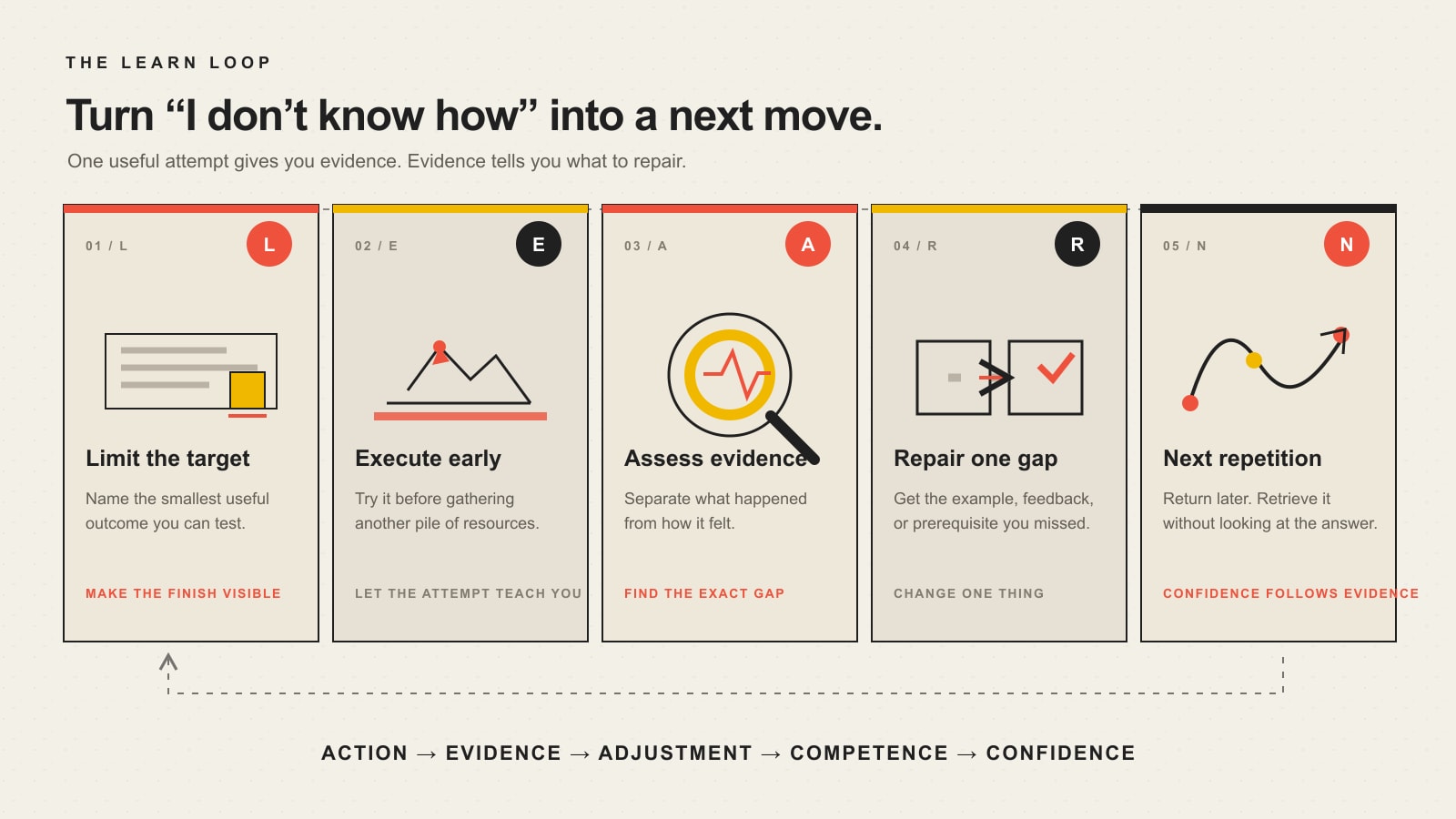
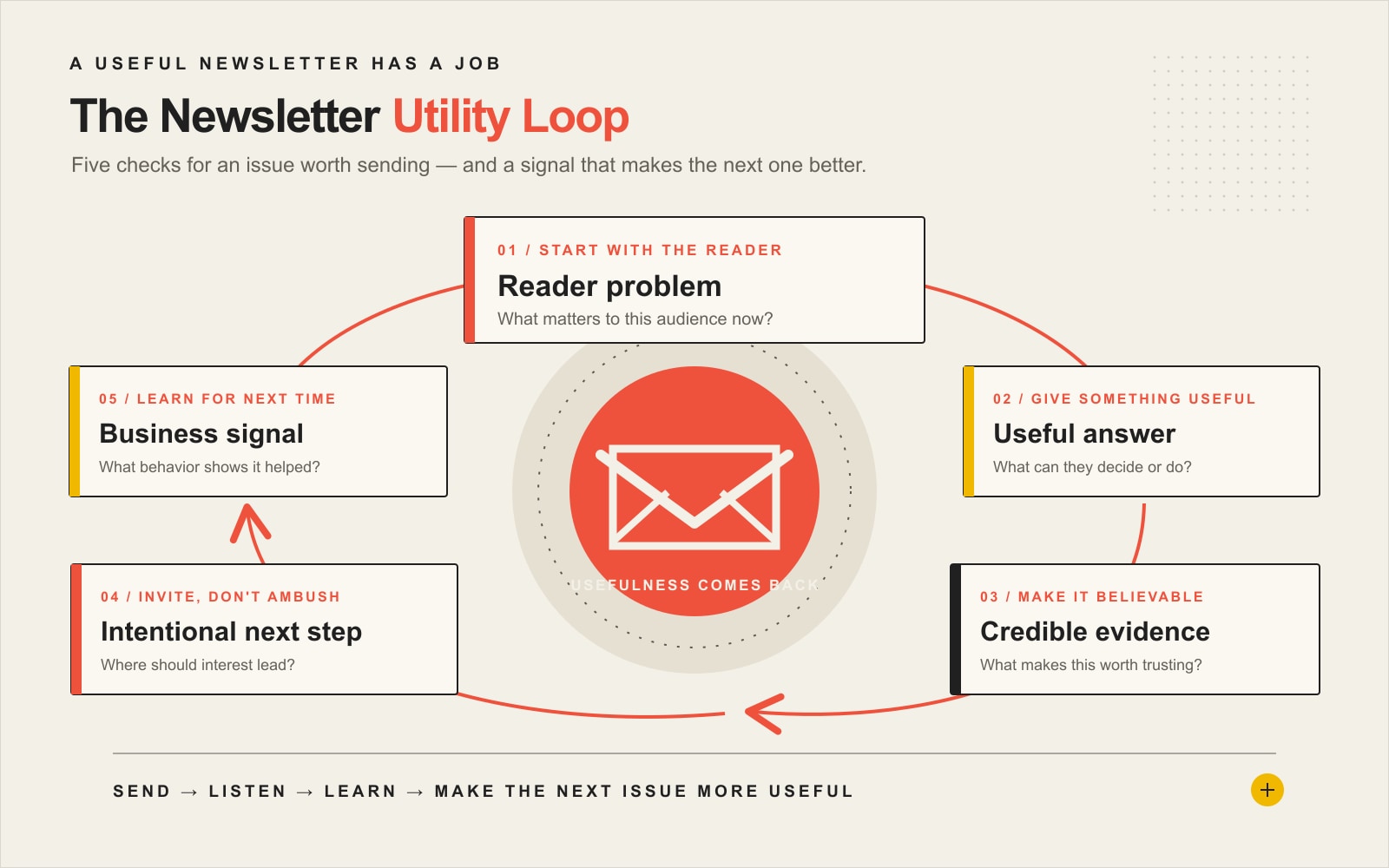
    The five-step LEARN Loop: limit the target, execute early, assess evidence, repair one gap, and take the next repetition; action and evidence lead to competence and confidence.
    The LEARN Loop turns uncertainty into a sequence of small attempts and evidence.

    L — Limit the target

    Do not start with “learn web design,” “learn AI,” “learn sales,” or “learn analytics.” Those are continents.

    Define the smallest useful result you could produce. “Build one responsive landing-page section.” “Create one automation that moves a form submission into a spreadsheet.” “Explain one analytics report well enough to make a marketing decision.”

    A useful target has an observable finish line. If you cannot tell whether you did it, you cannot learn from the attempt.

    E — Execute early

    Information gathering feels productive because nothing can go wrong while you are collecting tabs. Unfortunately, twelve tutorials and three bookmarked courses can coexist with zero skill.

    Learn enough to make the first attempt, then do the thing. The attempt creates information that passive consumption cannot: where you hesitate, what you misunderstand, what breaks, and what you can already do without help.

    Research on practice supports the basic direction here. Repeated practice can improve fluency and reduce the cognitive effort required to perform a practiced task over time. A 2018 review by researchers at Johns Hopkins describes how practice can change speed, skill, habit, and cognitive load.

    A — Assess evidence

    After the attempt, separate evidence from emotion. “That felt awful” can be true and still tell you almost nothing about whether you improved.

    • What worked without help?
    • Where did I stop knowing what to do?
    • What error repeated?
    • What would a correct result look like?
    • What changed between this attempt and the last one?

    This is where a vague learning goal becomes a feedback loop. It is also the bridge between this article and a broader goal-achievement system: outcomes matter, but leading actions and feedback tell you what to change before the final outcome arrives.

    R — Repair one gap

    Do not respond to one failed attempt by restarting the entire subject from chapter one. Repair the narrowest useful gap.

    Maybe you need an example. Maybe you need a coach to point out a bad technique. Maybe the “advanced” thing you keep failing depends on a basic concept you skipped. Maybe you simply need a second attempt with less complexity.

    The point is precision. “I need to get better at coding” is fog. “I do not understand why this function receives an object here instead of a string” is a problem you can actually investigate.

    N — Next repetition

    Learning is not complete because you understood an explanation once. Come back later and try to reproduce the skill or retrieve the knowledge without staring at the answer.

    A 2022 Nature Reviews Psychology review summarizes strong evidence for spacing learning over time and for retrieval practice: actively pulling information from memory instead of only rereading it. Those strategies are useful because they test whether the knowledge is actually available when you need it.

    If the skill matters enough for a longer push, turn the loop into a bounded plan. Scope Design’s 90-day goal framework is useful when you need milestones, leading actions, guardrails, and a review rhythm rather than another inspirational deadline.

    Confidence Is a Lagging Indicator

    The sequence most people want is:

    Confidence → action → competence.

    For a new skill, the more reliable sequence is usually:

    Action → evidence → adjustment → competence → confidence.

    That does not mean emotion is irrelevant. It means you do not give emotion veto power over the first attempt. Confidence based on evidence is sturdier than confidence produced by repeating “you’ve got this” until the phrase files a restraining order.

    What Growth Mindset Can — and Cannot — Do

    A growth-oriented belief can help you interpret difficulty as something that may respond to better strategy, effort, feedback, or instruction instead of proof that ability is fixed. The American Psychological Association’s learning principles connect beliefs about ability with challenge-taking and responses to failure.

    But “have a growth mindset” is not a complete learning system. Context matters. Instruction matters. Prior knowledge matters. Feedback matters. APA’s review of growth-mindset classroom research explicitly notes that the surrounding environment can change how well mindset interventions work.

    Mindset without a useful method is motivational wallpaper. Keep the belief that improvement is possible, then make the next attempt specific enough to produce evidence.

    Practice Matters, but Mastery Is Not a Vending Machine

    Practice matters. Deliberate, structured practice aimed at improving performance matters even more. But there is no honest universal formula where you insert a fixed number of hours and mastery falls out.

    A large meta-analysis published in Psychological Science found that deliberate practice explained meaningful but very different amounts of performance variation across domains. The useful conclusion is not that practice is overrated. It is that performance has multiple causes.

    Your learning plan may also depend on prior experience, quality of instruction, the kind of skill, feedback, available time, physical constraints, tools, and whether the practice resembles the real task. That is why the LEARN Loop keeps asking for evidence instead of worshiping a magic hour count.

    How to Use AI as a Learning Assistant Without Outsourcing Your Brain

    AI can make “I don’t know where to start” dramatically easier to work with. Use it as a tutor, simulator, question generator, explainer, or critique partner. Do not confuse a confident answer with a correct one.

    • Limit: ask AI to break a large skill into prerequisite sub-skills and one beginner outcome.
    • Execute: ask for a practice scenario, then attempt it before requesting the solution.
    • Assess: show your work and ask for a critique against explicit criteria.
    • Repair: ask for one explanation, analogy, or worked example targeted to the exact gap.
    • Next repetition: ask for a fresh problem later and solve it without looking at the previous answer.

    Verify factual or high-stakes material against authoritative sources, and keep a human owner for decisions that affect customers, money, security, privacy, or compliance. That same ownership principle sits at the center of Scope Design’s guide to AI automation for business.

    A Worked Example: Learn Enough Analytics to Make One Decision

    Imagine a business owner who keeps saying, “I need to learn analytics.” That target is too vague to be useful. They probably do not need to become an analyst. They need to answer a business question.

    Suppose the question is: “Is this landing page bringing qualified organic traffic?”

    1. Limit: learn enough to open one landing-page report and identify the traffic source and the page’s basic engagement or conversion evidence.
    2. Execute: pull the report now instead of watching another two-hour analytics course.
    3. Assess: write down what each metric appears to say and which field you cannot interpret.
    4. Repair: learn only the missing concept, such as the difference between a dimension and a metric or how channel attribution works.
    5. Next repetition: run the same review next week without using the tutorial.

    Now the person is not “learning analytics.” They are building a repeatable decision skill. That is a much better target.

    Common Learning Obstacles That Waste Time

    1. Becoming a resource collector

    You do not need the perfect course stack. You need one resource good enough to produce the next attempt. Collecting ten sources before touching the skill is often procrastination with excellent browser organization.

    2. Practicing the whole skill instead of one sub-skill

    “Get better at public speaking” is too large to diagnose. “Deliver the opening without reading,” “answer an objection in 30 seconds,” or “remove filler words from one minute of speech” gives feedback somewhere to land.

    3. Repeating errors without feedback

    Repetition is not automatically improvement. If the same error survives every attempt, you may be rehearsing the mistake. Introduce a model answer, coach, test, instrument, benchmark, or observable result.

    4. Switching methods every time learning feels hard

    Some difficulty is diagnostic. Some is simply the cost of being a beginner. Change the method when evidence says it is failing, not because the third repetition was less entertaining than the first.

    5. Confusing a prerequisite gap with lack of talent

    If the next step depends on something you never learned, brute force may not fix it. Back up one level. Learn the missing foundation. Then retry the real task.

    The 30-Minute “I Don’t Know How” Reset

    When you are stalled, you do not need a new identity. You need thirty useful minutes.

    1. 5 minutes — Limit: write the smallest useful outcome you can complete or test today.
    2. 10 minutes — Execute: attempt it with the resources you already have.
    3. 5 minutes — Assess: write what worked, where you stopped, and the error you can actually name.
    4. 5 minutes — Repair: get one answer, example, hint, or prerequisite explanation.
    5. 5 minutes — Next: retry the hardest part or schedule the next spaced repetition.

    If you finish with one clearer question than you started with, that still counts as progress. A precise question is more valuable than a vague hour of “studying.”

    Frequently Asked Questions About Learning a New Skill

    What is the best way to learn a new skill?

    The best general approach is to define a specific useful outcome, break the skill into smaller components, practice early, get feedback, and repeat over time. Use active retrieval and spaced practice when memory matters. The exact method should match the skill: learning a language, operating software, selling a service, and performing a physical task do not require identical practice.

    How do I overcome learning barriers when I feel completely stuck?

    Diagnose the point of failure before adding effort. Is the target too large? Are you missing a prerequisite? Do you lack feedback? Are you repeating the same error? Shrink the next action until you can produce evidence, then repair the specific gap the attempt reveals.

    Is growth mindset enough to overcome a learning obstacle?

    No. Believing improvement is possible can support persistence, but it does not replace instruction, practice, feedback, prior knowledge, or a workable environment. Treat mindset as support for the system, not the system itself.

    How long does it take to master a new skill?

    There is no universal hour count. The time depends on the definition of mastery, the skill, prior experience, practice quality, feedback, frequency, and the performance standard you need. Define the level you actually need before estimating the time.

    Can AI help me learn a new skill faster?

    AI can reduce the friction of getting explanations, examples, quizzes, practice scenarios, and feedback. It is most useful when you still perform the task and verify important claims. If AI does all the thinking, you may get an output without building the skill you wanted.

    What should I do if I keep making the same mistake?

    Stop repeating the full task. Isolate the exact step that fails, compare it with a correct example or expert feedback, check for a missing prerequisite, and practice the corrected sub-skill before returning to the whole task.

    When should I stop learning and hire someone instead?

    Learn the skill yourself when the knowledge will be used repeatedly, gives you strategic leverage, or helps you make better decisions. Consider hiring when the work is infrequent, high-risk, highly specialized, or more expensive to learn than to delegate. You may still need enough knowledge to define the outcome and judge the result.

    Turn “I Don’t Know How” Into the Next Decision

    The goal is not to become fearless about every unfamiliar skill. The goal is to stop treating unfamiliarity as a dead end.

    Limit the target. Execute early. Assess evidence. Repair one gap. Take the next repetition. If you keep doing that, “I don’t know how” becomes a temporary description instead of a permanent excuse.

    And if the thing blocking your business is a website, marketing system, or automation workflow, you may not need another month of tutorials. Scope Design can help you decide what you should learn, what should become a repeatable system, and what is better handed to a specialist.

  • 6 Proven Local Marketing Strategies to Boost Sales and Drive Business Growth

    6 Proven Local Marketing Strategies to Boost Sales and Drive Business Growth

    The six local marketing strategies that matter most are the ones that move a nearby prospect through a complete buying path: get found, build trust, answer the questions that delay a decision, create a permission-based follow-up path, borrow credibility from local relationships, and add paid reach only when the rest of the system is ready. The mistake is treating those as six unrelated channels. They work better as connected handoffs.

    For a small local business, that distinction matters. More posts, more ads, or more listings do not automatically create more sales. A useful local marketing system helps the right people discover you, understand why you fit, take a next step, and stay connected long enough to buy or refer someone else. If you need the broader framework for choosing channels by buying moment, start with Scope Design’s small business marketing strategy guide. This article focuses on the local handoffs.

    The Local Demand Loop: 6 strategies that work together

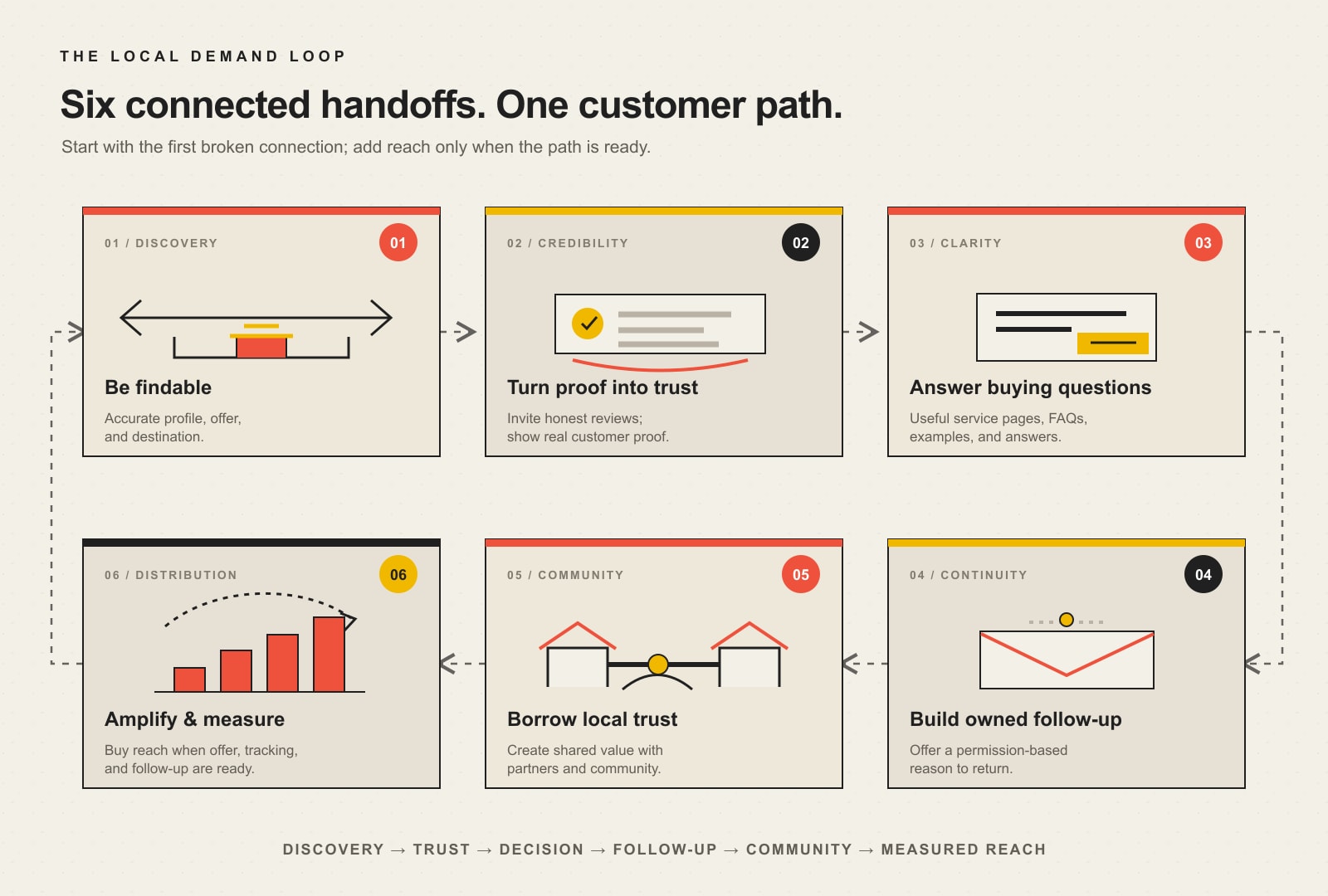
    1. Be findable where local intent starts. Keep your Google Business Profile and core business information accurate, complete, and aligned with what your website actually offers.
    2. Turn real customer proof into trust. Build a repeatable, honest review and proof system instead of waiting for testimonials to appear by chance.
    3. Answer local buying questions. Create useful service, location, FAQ, case-study, photo, and video content around real decisions—not a content treadmill.
    4. Build an owned follow-up path. Give prospects and customers a reason to opt into email or another permission-based relationship you control.
    5. Borrow local trust. Create partnerships, referrals, community participation, and cross-promotions with organizations that already have the audience’s attention.
    6. Amplify and measure. Use paid search, paid social, and other local promotion only when the offer, destination, tracking, and follow-up are strong enough to learn from the spend.

    If you want a bigger catalog of tactics, Scope Design also maintains a broader guide to 15 local marketing strategies. The job here is different: decide which part of your local demand path is broken first.

    What should you fix first?

    What you are seeingLikely broken handoffStart here
    People nearby need what you sell, but few find or contact youFindabilityBusiness Profile, service area, core facts, website alignment
    You appear in searches, but prospects still choose competitorsProof and trustReview workflow, customer evidence, photos, clear credibility signals
    Prospects keep asking the same fit, price, timing, or process questionsDecision supportService pages, FAQs, case studies, useful local content
    Traffic and inquiries disappear after one visit or conversationOwned follow-upPermission-based email, CRM, useful follow-up sequence
    You have a credible offer but weak local awarenessBorrowed trustPartnerships, referrals, local groups, events, cross-promotion
    Your offer converts, but qualified volume is too lowDistributionMeasured paid search, paid social, sponsorships, or local promotion
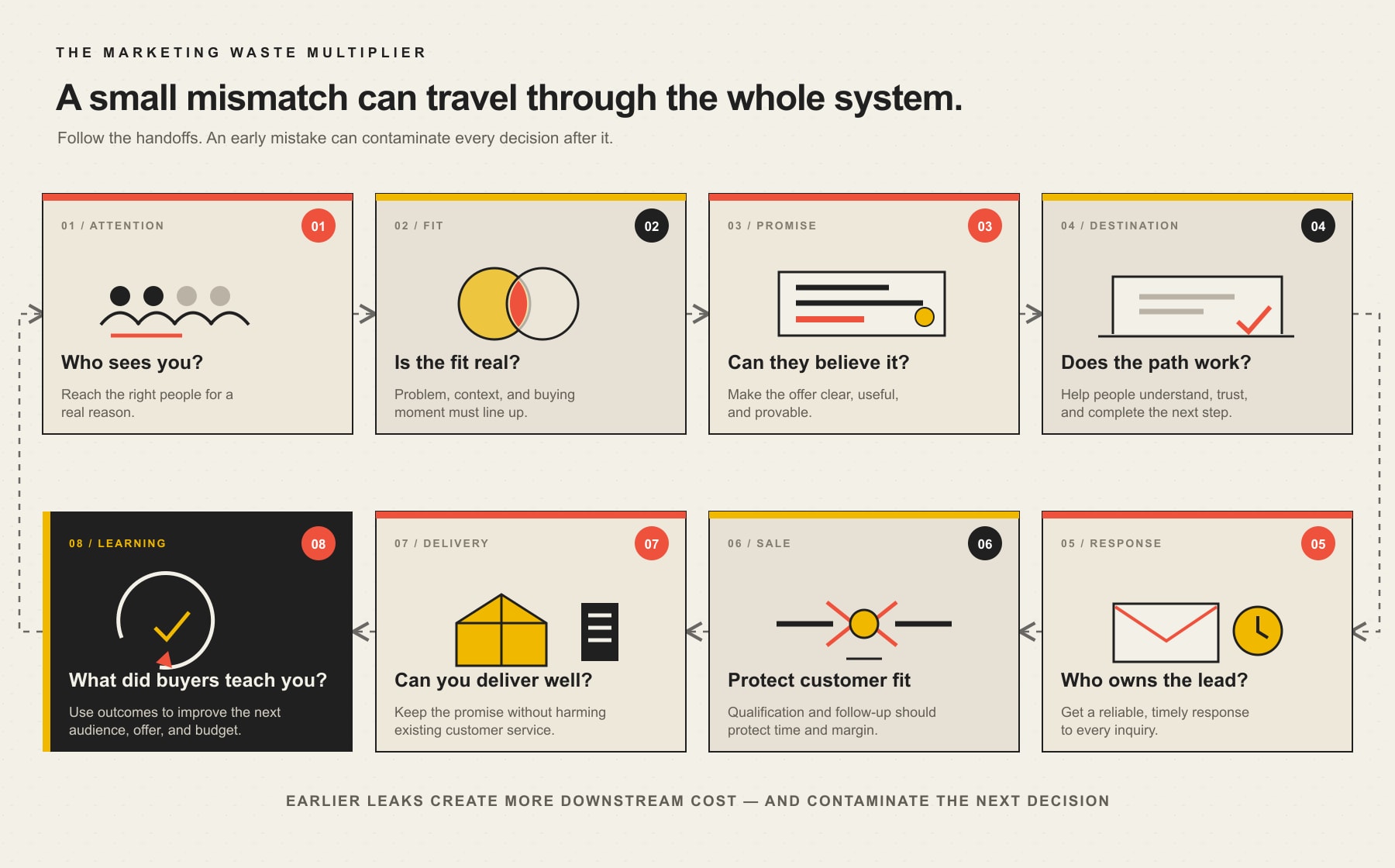
    Six connected local marketing steps: be findable, turn customer proof into trust, answer buying questions, build owned follow-up, borrow community trust, and amplify and measure after the customer path is ready.
    The Local Demand Loop works best when you fix the first broken handoff instead of adding another channel by default.

    1. Be findable where local intent starts

    For many local businesses, the first buying moment is simple: someone searches for a service, product, or place near them. Your job is not to “hack” that moment. It is to make the basic facts about your business easy for customers and platforms to understand.

    Google’s current Business Profile guidance says local results are mainly based on relevance, distance, and prominence. Google also says businesses with complete and accurate information are more likely to appear for relevant local searches. That makes a clean foundation more useful than chasing speculative ranking tricks. Review your address or service area, hours, primary category, services, contact information, photos, and the pages you send people to. Make sure the website describes the same business the profile describes. Google’s local ranking guidance is the right source for current platform-specific details.

    Do this first: search for your own business the way a new customer would, then compare the profile, website, phone number, hours, service area, and core offer. Fix contradictions before adding more content or promotion.

    Measure: calls, website visits, direction requests, bookings, quote requests, and qualified form submissions. Google now documents Business Profile interactions such as calls, website clicks, directions, messages, and bookings as performance data that can be shared with Google Analytics. Those customer actions are more useful than a promise to “rank #1.”

    2. Turn real customer proof into trust

    Findability earns attention. Proof helps a prospect feel safe choosing you. For a local business, proof can include reviews, before-and-after photos, project examples, recognizable locations, team photos, case studies, and specific answers from people who have actually used the service.

    The operational mistake is waiting until you “need more reviews” and then asking everyone at once. Build the request into a real customer moment: after a successful delivery, completed appointment, solved problem, or positive follow-up. Make the request easy, respond to feedback, and reuse genuine customer evidence where you have permission.

    Keep the system honest. The Federal Trade Commission’s Consumer Reviews and Testimonials Rule, effective October 21, 2024, addresses fake and deceptive review practices. Among other provisions, it prohibits fake or false reviews and incentives conditioned on a particular positive or negative sentiment. In practical terms: ask for honest feedback, not “five-star reviews,” and do not buy manufactured credibility.

    Do this first: choose one legitimate moment in your customer process when a review request makes sense, write a short neutral request, and assign responsibility for sending it.

    Measure: review-request completion, new legitimate reviews, response rate, and—more importantly—whether qualified prospects are moving from profile or proof pages into calls, quotes, bookings, or purchases.

    3. Answer the local buying questions that slow decisions

    Content works best when it removes uncertainty. That is especially true locally, where customers often need answers that generic national content cannot give them: Do you serve my town? Is this right for an older home? What happens after I request a quote? Can I see examples nearby? How long does this usually take? What should I prepare before the appointment?

    Turn repeated sales and service questions into durable decision-support assets. A strong service page can explain the offer and next step. A useful location section can clarify a real service area. A case study can show the problem, approach, and result without inventing performance claims. A short video can demonstrate a process. A photo set can make the experience tangible. An FAQ can answer objections before someone calls.

    This is also where many businesses waste effort by confusing a format with a strategy. Short-form video, social posts, blogs, and email are containers. Use the container that fits the question and the customer. If you publish on Facebook because your local community is genuinely active there, Scope Design’s Facebook marketing guide for local businesses goes deeper on building community without turning the platform into a content treadmill.

    Do this first: write down the five questions customers ask most often before they buy. Turn the highest-friction question into one useful page, section, video, checklist, or case study. Then reuse that answer across the places where customers already encounter you.

    Measure: qualified entrances to the content, assisted calls or forms, sales conversations that start with better-informed prospects, and fewer repeated clarification steps when that is meaningful to your process.

    4. Build an owned follow-up path

    Local marketing gets expensive when every future sale requires rediscovering the same person from scratch. An owned follow-up path gives a prospect or customer a reason to stay connected after the first visit, quote, appointment, or purchase.

    Email is usually the most practical example because it is a direct, permission-based relationship that does not depend on a social feed deciding whether to show your next post. But the value is not “having a newsletter.” The value is having a useful reason to follow up: appointment preparation, maintenance reminders, seasonal availability, relevant education, replenishment, event invitations, project planning, or a thoughtful post-purchase sequence.

    Scope Design’s email marketing for small business guide treats email as a relationship system rather than a blast calendar. That is the right mental model here: capture permission, segment when it changes relevance, make the next step obvious, and connect the email back to a real business action.

    Do this first: identify one moment where a customer would reasonably want future information from you, state what they will receive, collect permission, and create the first useful follow-up message.

    Measure: opt-ins, replies, booked appointments, quote restarts, repeat purchases, and other downstream actions you can credibly connect to follow-up. Open rates alone are not the business outcome.

    5. Borrow trust through local partnerships and community

    Some local audiences are easier to reach through relationships than through algorithms. A complementary business, neighborhood organization, trade group, school, nonprofit, venue, employer, realtor, property manager, or event organizer may already have the trust and attention you are trying to build.

    The strongest partnerships are not “please promote me” arrangements. Start with a useful overlap. A landscaper and a nursery can teach a seasonal workshop. A photographer and a wedding venue can build a planning resource. A contractor and a realtor can create a pre-sale home checklist. A restaurant can support an event its customers already care about. A professional service firm can contribute expertise to a local organization without turning every interaction into a pitch.

    Community participation also creates better raw material for your digital marketing. Real collaborations produce photos, stories, customer questions, referral paths, and context that generic “local content” cannot manufacture.

    Do this first: list five organizations that serve the same people before, after, or adjacent to your purchase. Pick one where you can create value for the shared audience without requiring an immediate sale.

    Measure: referral conversations, qualified introductions, event sign-ups, partner-sourced leads, repeat collaborations, and customers—not just logo placements or social impressions.

    6. Buy local distribution only after the path can convert

    Paid promotion can be the fastest way to increase reach, but it is also the fastest way to pay for a broken handoff. Before increasing a local ad budget, confirm that the offer is clear, the landing destination matches the ad, tracking is working, someone can follow up with leads, and the customer economics leave room for acquisition cost.

    That readiness check matters more than declaring one platform universally “best.” Paid search may fit a high-intent service people actively look for. Paid social may fit an offer that needs visual demonstration or audience targeting. Sponsorships may fit a geographic or community trust objective. Retargeting may fit a longer decision cycle. The channel follows the buying moment and the economics.

    For the deeper channel-and-math decision, use Scope Design’s online advertising strategy for small businesses. Its core rule applies locally too: choose the channel after you understand intent, signal, follow-up, creative capacity, and customer value.

    Do this first: define one offer, one audience, one destination, one conversion action, one follow-up owner, and one budget you can treat as a learning test. If you cannot define those six things yet, fix the earlier handoff before buying more reach.

    Measure: use a simple ladder. Start with visibility and interactions, then track the customer action, then qualified leads, then customers, then revenue or customer value where attribution is trustworthy. Google’s Business Profile documentation, for example, recognizes actions such as website clicks, calls, directions, messages, and bookings. Those are better intermediate signals than impressions alone.

    A practical 30-day way to use these local marketing strategies

    You do not need to launch all six at once. In fact, that usually makes learning harder. Use the system as a sequence.

    1. Week 1: baseline the handoffs. Check local profile accuracy, top customer proof, key decision pages, follow-up, referral sources, and current paid promotion. Write down the qualified actions you care about.
    2. Week 2: fix the first obvious constraint. Correct incomplete business information, create a review request, answer the highest-friction buying question, or repair the conversion path—whichever appears first in the loop.
    3. Week 3: ship one small useful improvement. Do not wait for a “complete marketing campaign.” Publish the page, send the follow-up, activate the partnership, or run the bounded test.
    4. Week 4: review business signals. Did the change create more useful calls, quotes, bookings, conversations, or customers? Did lead quality improve? What did prospects still need? Keep, revise, or stop the change based on what you learned.

    This is the same constraint-first logic we use across marketing work: fix the first broken handoff, observe what changes, then decide whether the next layer deserves time or budget. It is more disciplined than adding a channel because a platform is currently fashionable.

    Frequently asked questions about local marketing

    How do I advertise my small business locally?

    Start by making sure people nearby can find accurate information about the business, see trustworthy proof, and reach a clear next step. Then choose promotion based on the buying moment. That might be Google Search, local social media, community sponsorships, referral partnerships, events, direct outreach, or paid ads. Advertising works better when it amplifies a path that already makes sense rather than compensating for an unclear offer or weak landing page.

    Which local marketing strategy should I fix first?

    Fix the earliest broken handoff. If qualified prospects cannot find you, start with findability. If they find you but do not trust you, improve proof. If they trust you but remain confused, answer the buying questions. If they disappear after first contact, improve follow-up. If the system converts but not enough people enter it, then add partnerships or paid distribution.

    When should a local business start paid advertising?

    Start when you can define the audience, offer, landing destination, conversion action, follow-up owner, and customer economics well enough to learn from the test. Paid traffic can create volume; it cannot repair a weak offer, confusing destination, or nonexistent follow-up process.

    What should a local business measure besides clicks and impressions?

    Measure the handoff into business outcomes: calls, direction requests when relevant, quote requests, appointments, bookings, qualified leads, customers, repeat purchases, and revenue or customer value where attribution is credible. Platform metrics are useful diagnostic signals, but they are not the finish line.

    What is a safe way to ask customers for reviews?

    Ask real customers for honest feedback at a natural point in the relationship, make the process easy, and do not condition a reward on a positive or negative sentiment. Avoid fake reviews, purchased reputation, or internal reviews that hide material connections. For U.S. businesses, review the current FTC rule and platform-specific policies before using incentives or automated review programs.

    Build the local system before adding another tactic

    The strongest local marketing strategies are not isolated tricks. They connect discovery, credibility, decision support, follow-up, community trust, and measured distribution. When those handoffs reinforce one another, every channel has a clearer job—and it becomes easier to see what is actually producing qualified business.

    If you are not sure which handoff is limiting growth, talk with Scope Design. We can help map the local customer path, identify the constraint, and connect search visibility, website conversion, content, follow-up, and promotion into one measurable system.

  • Cross-Browser Testing: Prove Every Critical Website Task Works

    Cross-Browser Testing: Prove Every Critical Website Task Works

    Cross-browser testing is the process of proving that a website’s critical tasks work across the browser engines, operating systems, devices, inputs, permissions, and user states your audience actually uses. It does not mean forcing every pixel to look identical. It means a visitor can navigate, submit, buy, book, sign in, recover, and leave with the same successful outcome.

    Opening Chrome, squinting at the homepage, and declaring victory is not quality assurance. It is vibes in a lab coat.

    TL;DR: What serious cross-browser testing requires

    • Define the business tasks that absolutely must work.
    • Build a test matrix from your analytics, technical risk, and contractual requirements—not a random list of browser logos.
    • Cover the three major browser-engine families: Chromium/Blink, WebKit, and Gecko.
    • Test operating systems, real devices, keyboard and touch input, permissions, session state, and assistive-technology combinations where they matter.
    • Combine standards-based development, feature detection, automated regression tests, focused manual testing, and real-device checks.
    • Record the browser, operating system, device, state, exact steps, expected result, actual result, and evidence for every defect.
    • Treat a blocked sale, form, booking, login, or accessibility path as a release problem—not a “we’ll circle back” decoration problem.

    If you want the larger technical context, start with Scope Design’s business website development foundation. This guide owns the narrower question: how do you prove that a working website keeps working outside the browser sitting on the developer’s desk?

    What is cross-browser testing?

    Cross-browser testing verifies that a website or web application provides an acceptable experience across the browsers and environments it claims to support. That includes functionality, content, layout, interaction, accessibility, performance, and recovery when something goes wrong.

    MDN’s cross-browser testing introduction makes two useful points that marketing-grade tool lists often skip. First, your users may have different browsers, devices, hardware capabilities, input methods, and assistive technologies. Second, the experience does not need to be identical everywhere as long as the core functionality remains available.

    That distinction matters. Safari may render a native date field differently from Chrome. Firefox may draw form controls or fonts a little differently. Those differences are not automatically defects. A calendar that cannot be opened, a form that cannot be submitted, or a checkout that loses the selected product is a defect.

    The practical standard is outcome parity:

    The supported environments may present the journey differently, but they must preserve the information, controls, feedback, and successful business outcome.

    Pixel parity is a screenshot contest. Outcome parity protects the customer journey.

    Cross-browser testing is not the same as responsive testing

    The two disciplines overlap, but they are not interchangeable.

    QuestionResponsive testingCross-browser testing
    Primary concernDoes the task survive changes in available space and input context?Does the task survive different browser engines, operating systems, implementations, permissions, and states?
    Typical failureA table spills off a narrow screen or a button disappears at a breakpointA form, script, media element, payment flow, font, or interaction behaves differently in Safari, Firefox, or a branded Chromium browser
    Test dimensionsWidth, height, orientation, zoom, touch, content expansionEngine, browser version, OS, device, input, permissions, storage, extensions, and session state
    Canonical Scope Design guideResponsive web design and the REFLOW testThis cross-browser testing guide and the ENGINE release gate

    A responsive page can still fail in one browser. A cross-browser test can also miss a narrow-screen failure if it only runs at desktop dimensions. “Works on my laptop” remains a surprisingly durable way to ship nonsense.

    Why browser compatibility problems still happen

    Modern browsers follow standards far more consistently than the browser-war circus of the 1990s. They are not clones.

    Compatibility failures still appear because:

    • browser engines implement new platform features on different schedules;
    • the same feature can contain engine-specific bugs or edge cases;
    • operating systems influence fonts, native controls, media support, scrolling, permissions, and assistive technology;
    • third-party scripts, consent systems, payment providers, maps, chat widgets, and embedded media add their own compatibility layer;
    • cached assets and old service workers can leave one visitor running a different version of the site;
    • browser extensions and privacy settings can block scripts, cookies, storage, or network requests;
    • touch, keyboard, mouse, voice, and assistive technology expose different interaction assumptions;
    • developers use browser detection when they should test for the actual feature;
    • automation proves the path it was told to check, not every condition a human can accidentally create.

    This is why a generic browser-market-share chart is a weak testing strategy. It tells you what exists in aggregate. It does not tell you which environment your highest-value customer uses, which browser your client’s locked-down corporate network requires, or where your payment form quietly falls apart.

    The Scope Design ENGINE release gate

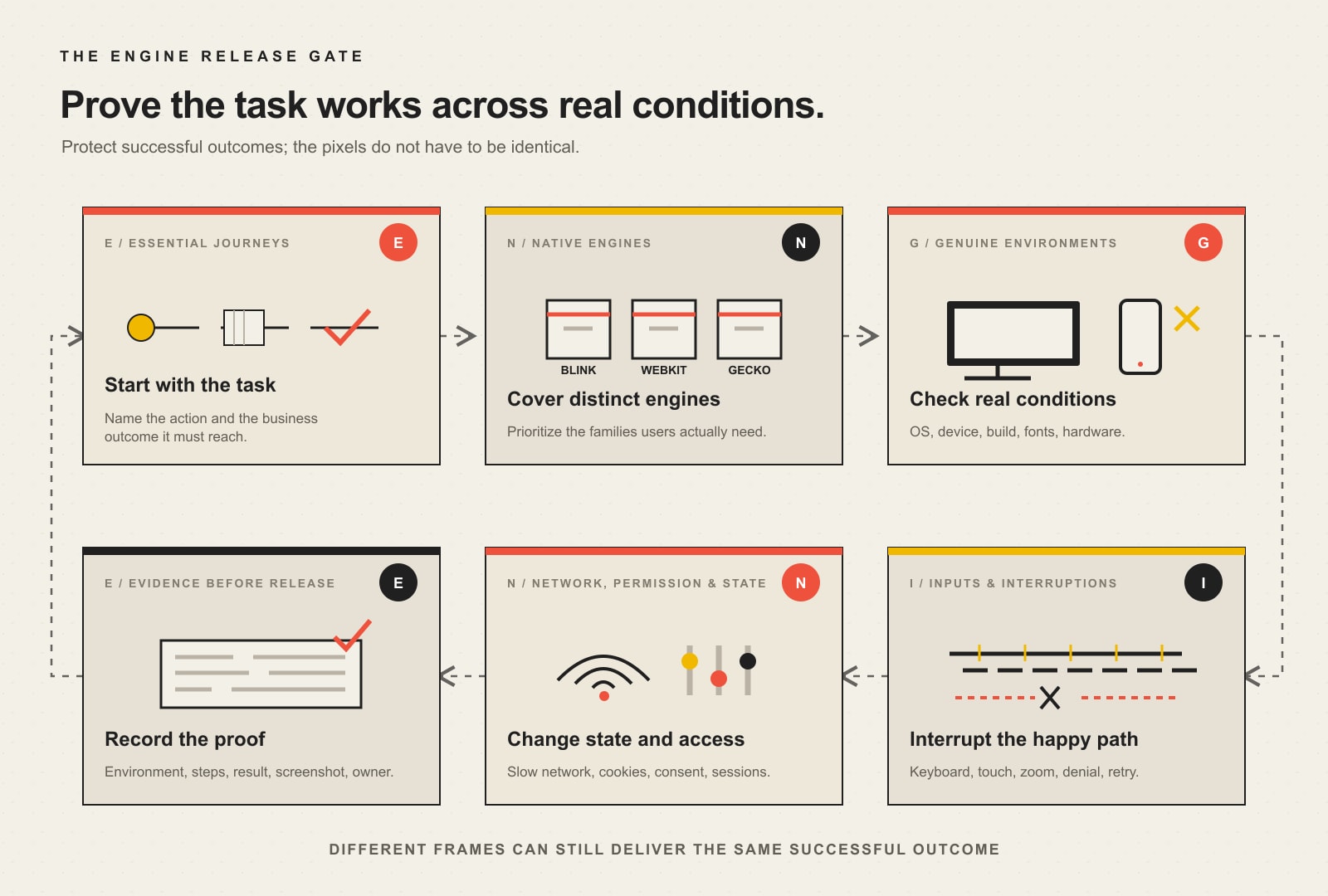
    Scope Design uses ENGINE as a practical way to turn compatibility from a browser-logo checklist into release evidence.

    Six-part ENGINE cross-browser release gate: Essential journeys, Native engines, Genuine environments, Inputs and interruptions, Network permissions and state, and Evidence before release.
    The Scope Design ENGINE release gate turns cross-browser testing into evidence across journeys, engines, genuine environments, inputs, state, and release proof.

    E: Essential journeys

    Start with the tasks closest to money, trust, access, or staff workload. A brochure page and a payment flow do not deserve equal testing depth.

    Essential journeys commonly include:

    • primary navigation and site search;
    • lead forms, file uploads, and confirmation messages;
    • booking, quoting, checkout, tax, shipping, and payment;
    • account creation, sign-in, password recovery, and logout;
    • consent choices and preference changes;
    • document, video, map, portal, or dashboard access;
    • phone, email, CRM, analytics, and fulfillment handoffs.

    Write the expected outcome before choosing a tool. If the expected result is vague, the test will also be vague.

    N: Native engines

    Cover the engine families that can expose genuinely different behavior:

    • Chromium/Blink, used by Chrome, Edge, and many downstream browsers;
    • WebKit, required for Safari and especially important on Apple devices;
    • Gecko, used by Firefox.

    Testing Chrome and Edge is not the same as testing two independent engines, even though branded features and enterprise policies can still make both worth checking. Test engines for implementation differences and branded browsers when your audience, organization, or integration creates a reason.

    G: Genuine environments

    An environment is more than a viewport preset. It includes the browser build, operating system, device hardware, display scaling, fonts, media capabilities, and—in mobile cases—the browser chrome, virtual keyboard, safe areas, and operating-system behavior.

    Emulation is excellent for quick feedback. It is not a notarized affidavit from an iPhone. Use at least a focused set of real devices for high-risk journeys.

    I: Inputs and interruptions

    Test with keyboard, mouse, touch, zoom, and assistive technology as appropriate. Then interrupt the happy path.

    Try rotating the device, opening a virtual keyboard, using the browser Back button, refreshing mid-process, switching tabs, timing out, submitting twice, and recovering from an error. A journey that only works while everyone behaves perfectly is a demo, not a system.

    N: Network, permissions, and state

    Browsers behave differently when cookies are restricted, a permission is denied, storage is full or unavailable, a connection is slow, a cached asset is stale, or a user returns with an existing session.

    Test at least the states that materially change the journey:

    • new visitor and returning visitor;
    • logged out and logged in;
    • empty and populated cart or saved state;
    • permission allowed and denied;
    • fresh cache and warmed cache;
    • normal and constrained network;
    • accepted and rejected consent choices;
    • valid, invalid, incomplete, duplicate, and expired submissions.

    E: Evidence before release

    A pass needs more than someone’s memory of clicking around. Record the supported environment, test case, expected result, actual result, tester or automation run, date, and evidence.

    A defect needs enough information to reproduce it:

    • exact browser and version;
    • operating system and version;
    • device or emulation profile;
    • account, permission, consent, and cache state;
    • minimal reproduction steps;
    • expected and actual outcomes;
    • console, network, screenshot, recording, or trace evidence;
    • business severity and owner.

    No reproduction information means the developer gets to play detective while the deadline burns. Very cinematic. Not especially efficient.

    How to choose a browser and device test matrix

    There is no universal “latest plus two” commandment carved into a server rack. Choose coverage from evidence.

    1. Start with your own analytics and real-user monitoring

    Segment actual customers by browser, browser version, operating system, device category, and conversion outcome. Do not only count visits. A low-volume environment may still represent a high-value enterprise customer or a browser-specific conversion failure.

    Useful questions include:

    • Which browsers generate qualified leads, purchases, or booked work?
    • Does one browser have traffic but an abnormally weak completion rate?
    • Which environments reach the form, checkout, or portal and then disappear?
    • Are support tickets clustered around one browser, device, or operating system?
    • Does staff or a contracted customer depend on a managed browser version?

    The Scope Design rule is simple: coverage follows user evidence, business risk, and technical difference—not popularity alone.

    2. Cover distinct engines before collecting browser logos

    Chrome, Edge, Opera, Brave, and other Chromium-based browsers share a large part of their engine foundation. They are not identical, but testing five Chromium brands while skipping WebKit or Gecko creates impressive-looking coverage with a hole in the middle.

    Use at least one appropriate configuration from each relevant engine family, then add branded browsers for audience, policy, extension, codec, or integration reasons.

    3. Add operating systems where they change behavior

    Safari is tied to Apple platforms. Font rendering, native form controls, scrolling, media, file selection, permissions, and assistive-technology pairings can vary by operating system even when the browser brand is familiar.

    If the journey uses uploads, camera, microphone, location, payments, downloads, notifications, authentication, or rich media, operating-system coverage becomes more important.

    4. Set a declared support policy

    State what you support, what you monitor, and what you do not promise. For example:

    TierPurposeTypical treatment
    Release gateEnvironments carrying material traffic, revenue, accessibility, or contractual riskCritical journeys tested before every release
    Regression rotationRelevant environments with lower risk or older supported versionsAutomated coverage plus scheduled manual checks
    Best effortRare, unsupported, or obsolete environmentsCore content should remain available where practical; advanced behavior is not guaranteed

    web.dev’s Baseline and Browserslist guidance explicitly recommends consulting analytics or real-user monitoring when choosing a target. Baseline helps establish whether platform features are newly or widely available across its core browser set; your support policy still has to reflect your users.

    5. Revisit the matrix

    Browser versions, user behavior, business processes, and third-party integrations change. Review the matrix after major releases, platform changes, conversion anomalies, support incidents, and at an agreed recurring interval.

    What should be tested across browsers?

    Start with the complete business journey, then work inward to components.

    Test areaWhat to verifyEvidence of success
    NavigationHeader, mobile menu, search, breadcrumbs, deep links, Back/Forward behaviorVisitor reaches the intended content without traps or lost state
    ContentText, images, video, embeds, downloads, print styles, long words, translated or enlarged textInformation remains readable, available, and correctly associated
    FormsLabels, field types, validation, autofill, error recovery, uploads, duplicate submission, success confirmationValid data arrives once in the correct destination; errors explain how to recover
    Commerce and bookingProduct selection, pricing, calendar, cart, tax, shipping, payment, confirmationCorrect transaction or reservation completes and downstream systems receive it
    AuthenticationRegistration, login, multifactor flow, password reset, timeout, logoutAuthorized access works; failure states do not expose or lose data
    InteractionMenus, tabs, accordions, dialogs, carousels, drag/drop, keyboard focus, touchControls expose the right state and work with supported inputs
    Permissions and privacyCookies, consent, location, camera, microphone, notifications, storageDenial is handled gracefully and consent choices are honored
    AccessibilityKeyboard, focus, names, roles, states, zoom, reflow, screen-reader/browser combinationsUsers can perceive, understand, operate, and complete the task
    PerformanceLoading, response, layout stability, script errors, constrained hardware/networkThe task becomes usable and stays responsive in the supported environment
    HandoffsEmail, CRM, analytics, payment, fulfillment, webhooks, downloadsThe visible success message matches the actual downstream result

    The last row catches a common bit of theater: the form says “Thanks!” while the lead goes nowhere. A green confirmation screen is not proof of a completed business process.

    Manual testing, automation, emulation, and real devices

    Serious coverage uses all four for different jobs.

    Manual testing

    Humans notice confusing labels, unexpected focus, awkward native controls, clipped content, misleading error messages, and “technically passed” journeys that feel broken. Manual testing is especially valuable for new features, accessibility, exploratory testing, and high-risk flows.

    Automated testing

    Automation is excellent for repeatable critical paths, browser-engine coverage, form rules, state transitions, and regression checks after code changes. Playwright projects can run the same tests across browser and device configurations and across states such as logged in and logged out.

    Automation should assert outcomes, not merely clicks. “The button was clicked” is weak. “The order exists once, shows the correct total, and produced the expected confirmation” is evidence.

    Emulation and simulation

    Emulation accelerates development and expands cheap coverage. It can model viewport, touch, user agent, network, color preferences, geolocation, and other conditions. It cannot reproduce every hardware, operating-system, browser-shell, keyboard, codec, power, memory, or assistive-technology behavior.

    Real devices and real browsers

    Use genuine environments for the journeys where simulation risk is unacceptable. That may mean a small in-house device set, a cloud device service, client hardware, or scheduled external testing. The right answer depends on the support matrix and business exposure—not which vendor wrote the loudest comparison page.

    Cross-browser testing tools: choose by job

    A useful stack usually contains categories, not one magical dashboard.

    Support and standards research

    • MDN browser-compatibility tables and MDN’s common HTML and CSS problem guide
    • Web Platform Baseline for interoperable feature status
    • Browserslist for declared build targets
    • HTML, CSS, and JavaScript validation and linting

    Manual inspection and debugging

    • browser developer tools;
    • real local devices;
    • remote browser and device clouds;
    • responsive multi-viewport tools for quick comparison;
    • console, network, accessibility-tree, storage, and performance inspection.

    Automated functional regression

    • Playwright for Chromium, WebKit, Firefox, branded-browser channels, multiple configurations, traces, and screenshots;
    • Selenium when its ecosystem and language support fit the team;
    • component or application test tools already native to the product stack.

    Visual regression

    Use screenshot baselines to detect unexpected changes, then have a human decide whether the change is a defect. Pixel diffs are sensors, not judges. Antialiasing, font rendering, dynamic content, and browser chrome can generate noise.

    Accessibility evaluation

    Automated checks find a useful subset of failures. They cannot establish complete accessibility. W3C’s WCAG conformance explanation calls for a combination of automated testing and human evaluation, and the W3C’s assistive-technology support guidance says developers should test with multiple assistive technologies.

    Use the site’s broader website accessibility and WCAG guide for the full compliance and evaluation boundary.

    A practical cross-browser testing workflow

    Step 1: Define the supported environment matrix

    Record engines, browser brands and versions where relevant, operating systems, devices, viewports, input methods, assistive-technology combinations, and exceptional client requirements.

    Step 2: Map critical journeys

    Give each journey a start condition, exact steps, expected visible result, expected downstream result, and severity if it fails.

    Step 3: Prevent obvious compatibility debt

    Use valid semantic HTML, well-scoped CSS, standards-based JavaScript, progressive enhancement, documented fallbacks, and feature-support research before testing. Prevention is cheaper than maintaining a museum of browser-specific hacks.

    When support varies, use feature detection. MDN’s feature-detection guidance recommends checking whether the capability exists and providing an acceptable alternative. It explicitly warns against browser sniffing.

    Step 4: Automate stable, repeated outcomes

    Add engine-level tests for the paths that must keep working. Run fast checks on every material change and broader matrices on a schedule appropriate to cost and risk.

    Step 5: Perform focused manual exploration

    Test the highest-risk combinations, new interactions, visual behavior, native controls, keyboard paths, touch behavior, permissions, and failure recovery.

    Step 6: Verify on genuine devices

    Run essential mobile and hardware-dependent journeys on real devices. Do not assume a resized desktop browser proves mobile behavior.

    Step 7: Report reproducible defects

    Separate symptoms from causes. “Safari is broken” is not a bug report. “On iOS Safari with location denied, tapping Find a Location leaves the submit control disabled and provides no recovery message” is actionable.

    Step 8: Retest the fix and the neighbors

    Compatibility fixes can break another engine or state. Retest the failed case, the critical journey around it, and the other supported engines.

    Step 9: Make compatibility a release gate

    Cross-browser testing belongs inside the website development process, not in a frantic hour after someone has already announced launch.

    How to classify browser compatibility defects

    Use business impact, not visual drama.

    SeverityMeaningExampleRelease decision
    BlockerEssential task cannot complete, security/privacy failure, or critical accessibility barrierCheckout cannot submit in Safari; keyboard user cannot reach the booking buttonStop release or disable the affected path safely
    HighMajor function works incorrectly or creates material data/operational riskForm says success but CRM receives nothing; file upload silently failsFix before release unless an explicit, safe contingency exists
    MediumTask completes with meaningful friction or degraded informationError recovery is confusing; layout obscures part of a comparison tableFix in the release when practical; document and schedule otherwise
    LowCosmetic difference with no meaningful task, comprehension, or brand harmSlight font or spacing variationAccept, monitor, or fix with normal prioritization

    This prevents the team from spending two hours on a three-pixel shadow while a Firefox user cannot submit the damn form.

    Common cross-browser failures and better fixes

    Browser sniffing

    Changing behavior because a user-agent string “looks like Safari” is brittle. Detect the feature or condition you actually need, then provide a fallback.

    Assuming native controls are identical

    Date fields, file inputs, selects, media controls, autofill, and validation messages may vary. Preserve label, instruction, value, error, and completion—not a fantasy of identical chrome.

    Shipping unsupported platform features without a fallback

    Research compatibility before adopting a new API or CSS feature. Use progressive enhancement, Baseline targets, feature detection, build transforms, or a simpler alternative when the business journey requires broader support.

    Testing pages instead of journeys

    A screenshot can show that the checkout page exists. It cannot prove inventory, taxes, payment, confirmation, email, analytics, and fulfillment agree.

    Ignoring third-party dependencies

    Consent managers, chat widgets, maps, CAPTCHA, payment fields, video players, and marketing tags can fail independently of the site’s core code. Test them as part of the journey and define who owns the incident.

    Confusing accessibility automation with accessibility support

    An automated scan may pass while a browser and screen-reader combination exposes the wrong role, state, focus order, or instruction. Test human interaction and the supported browser/assistive-technology combinations.

    Fixing one browser with a global hack

    A rushed override can move the defect elsewhere. Isolate the cause, prefer standards-based corrections, use narrow fallbacks, and rerun the matrix.

    Ignoring performance by browser

    Different engines, devices, and operating conditions can expose long tasks, memory pressure, media problems, or loading behavior differently. Use the website speed diagnosis guide when the compatibility problem is really a performance constraint.

    A lean test plan for a small business website

    You do not need an enterprise device lab to stop shipping obvious browser failures.

    Start with:

    1. the current Chromium-based desktop browser most used by your audience;
    2. current desktop Firefox;
    3. current Safari on macOS when Apple users matter;
    4. current iOS Safari on a real iPhone;
    5. current Chrome on a real Android device;
    6. any managed, contractual, assistive-technology, or high-value environment identified by evidence;
    7. automated essential-journey checks across Chromium, WebKit, and Firefox;
    8. manual keyboard, zoom, consent, denial, error, and recovery checks;
    9. post-release monitoring segmented by browser and device.

    Then expand based on actual traffic, conversion, feature risk, and incidents. Do not buy 3,000 theoretical combinations before you can explain which five business journeys need protection.

    If the current site has no declared support matrix, no reproducible tests, and no one responsible for release evidence, Scope Design’s website development service can help establish the foundation without turning QA into performative bureaucracy.

    How to measure whether cross-browser testing is working

    Useful measures connect the test program to reliability:

    • percentage of essential journeys covered by engine and risk tier;
    • compatibility defects found before versus after release;
    • blocker and high-severity escape rate;
    • browser-specific completion or conversion gaps;
    • repeat defects prevented by regression tests;
    • time from report to reproducible diagnosis and verified fix;
    • support tickets and staff recovery work caused by browser failures;
    • percentage of defects containing complete reproduction evidence.

    Do not optimize for the number of tests. Ten assertions that confirm one button exists are less valuable than one test proving a lead reaches the right system once.

    Frequently asked questions about cross-browser testing

    What is cross-browser testing?

    Cross-browser testing verifies that a website or application provides an acceptable functional, visual, accessible, and performance experience across the browsers and environments it claims to support.

    Why is cross-browser testing important?

    It prevents browser-specific failures from blocking sales, leads, bookings, account access, content, and accessible use. It also gives the team reproducible evidence instead of relying on “it worked for me.”

    How do I test a website in different browsers?

    Define critical journeys and a support matrix, run automated tests across the major engines, manually test high-risk interactions, verify essential paths on real devices, and record reproducible evidence for every failure.

    Does a website need to look identical in every browser?

    No. Minor rendering differences are acceptable when content, controls, feedback, accessibility, and successful outcomes remain equivalent. Outcome parity matters more than pixel parity.

    Which browsers should a website support?

    Choose from actual user analytics, conversion value, engine diversity, operating-system dependencies, contractual requirements, accessibility needs, feature support, and business risk. Publish the decision as a support policy.

    Do I need to test every browser?

    No. Testing every browser, version, device, state, and assistive-technology combination is usually impossible. Use a risk-based matrix that covers distinct engines and the environments that matter to the business.

    What is the difference between responsive and cross-browser testing?

    Responsive testing checks whether tasks survive changes in available space and input context. Cross-browser testing checks whether they survive differences in engines, browsers, operating systems, devices, permissions, storage, and state.

    What are the best cross-browser testing tools?

    The best stack depends on the job. Use compatibility data and Baseline for support decisions, browser developer tools for diagnosis, automation such as Playwright for repeatable engine coverage, real-device access for genuine environments, visual comparison for unexpected changes, and manual accessibility testing for human interaction.

    Is there a free way to test across browsers?

    Yes. Locally installed browsers, developer tools, MDN compatibility data, Baseline, open-source automation, validators, and a small set of real devices can provide strong initial coverage. Paid device clouds become useful when you need broader or repeatable environment access.

    Can automation replace manual browser testing?

    No. Automation is excellent for stable regression paths, but it does not reliably judge clarity, awkward interaction, assistive-technology behavior, visual meaning, or every unexpected state. Use automation and focused human testing together.

    Is browser emulation the same as testing a real device?

    No. Emulation reproduces selected conditions efficiently but cannot perfectly reproduce hardware, operating-system services, browser chrome, virtual keyboards, media capabilities, memory, power, and assistive technology. Use real devices for high-risk paths.

    How often should cross-browser testing be done?

    Run focused regression checks after material changes and before releases. Revisit the full support matrix after major browser, platform, integration, or business changes and on a scheduled cadence appropriate to risk.

    How do you fix cross-browser compatibility problems?

    Reproduce the failure precisely, isolate whether it comes from invalid code, unsupported features, engine bugs, third parties, state, or performance, apply the narrowest standards-based correction or fallback, and retest the failed journey across the supported matrix.

    Does cross-browser compatibility affect SEO?

    Search visibility can suffer indirectly when browser or device failures make content unavailable, create poor mobile behavior, break navigation, or damage performance. The primary reason to test is still more concrete: users must be able to complete the task.

    The release standard

    A browser list is not a testing strategy. A screenshot gallery is not a business outcome. A test suite that never verifies the downstream result is just code admiring code.

    Define the essential journeys. Cover the engines and environments that evidence says matter. Interrupt the happy path. Record the result. Stop the release when a critical customer cannot finish the job.

    That is cross-browser testing without the ceremonial bullshit.

  • Website Hacked? Signs, First Steps, and Recovery

    Website Hacked? Signs, First Steps, and Recovery

    If your website was hacked—or you have good reason to think it was—document the symptom, stop further harm, contact the host and technical owner, preserve the current state, rotate exposed access from a clean device, remove both the malicious changes and the entry point, restore only from a known-clean source, test the real business journeys, and watch for reinfection. Do not start deleting random files or blindly restore the newest backup. Panic is understandable. Panic with administrator access is how one problem becomes three.

    TL;DR: What to do when your website is hacked

    1. Record what happened. Capture screenshots, affected URLs, warnings, account changes, times, time zone, recent updates, and who noticed the problem.
    2. Protect people and operations. If the site is redirecting visitors, stealing credentials, serving malware, exposing personal information, or processing transactions unreliably, restrict public access or replace it with a clean temporary response.
    3. Call the right owners. Contact the hosting provider, website maintainer, domain and DNS owner, payment provider when relevant, and qualified security or legal help when data exposure may be involved.
    4. Preserve before you purge. Save logs, alerts, account lists, database and file copies, server details, and the compromised state before cleanup when it is safe to do so.
    5. Rotate access from a clean device. Change hosting, CMS, SFTP/SSH, database, domain, DNS, email, API, and integration credentials that may be exposed. Revoke sessions, unknown users, keys, and tokens.
    6. Find the entry point, not only the graffiti. Removing a spam page is not recovery if the stolen password, vulnerable plugin, malicious administrator, scheduled task, or backdoor still works.
    7. Restore carefully. A backup is useful only if it is complete, old enough to be clean, recent enough to be useful, and restored into an environment you can trust.
    8. Verify and monitor. Test forms, payments, logins, email, analytics, search visibility, mobile pages, permissions, updates, and security monitoring before declaring victory.

    If customer, employee, payment, health, financial, or other sensitive information may have been exposed, stop treating this as a normal website repair. Bring in qualified incident-response and legal professionals, check cyber-insurance requirements, and determine the notification obligations that apply to the actual incident and jurisdiction.

    In this recovery guide

    How can you tell whether a website was hacked?

    A hacked website does not always arrive wearing a skull-and-crossbones homepage. Sometimes it is obvious. Sometimes the public site looks perfectly normal while search engines see pharmacy spam, an attacker quietly receives form submissions, or an unauthorized administrator waits for the next opportunity.

    The useful question is not “Does this look weird?” It is “What evidence suggests an unauthorized change, access, or use of the system?” The official WordPress hacked-site guidance calls these indicators of compromise. One indicator may be a technical failure or configuration mistake. Several related indicators—or one unambiguous unauthorized change—deserve immediate investigation.

    Search engines or browsers show a security warning

    Google Search, Chrome, other browsers, hosting companies, malware scanners, and security vendors may flag the site as dangerous, deceptive, hacked, or infected. Google Search Console’s Security Issues report can show detected issue types and example URLs. Treat the alert as evidence to investigate, not as a complete diagnosis of every affected file or account.

    A warning can crush traffic because visitors are correctly being told not to trust the site. Do not request a review simply because someone deleted the most visible bad page. Clean the compromise, close the entry point, verify the site, and then request the appropriate review.

    Visitors are redirected somewhere they did not choose

    Unexpected redirects to gambling, counterfeit products, adult content, fake software updates, phishing pages, or another business are strong warning signs. Test from more than one device, browser, network, and entry source. Some malicious redirects trigger only on mobile, only for first-time visitors, only from search results, or only in certain locations so the site owner does not see the same behavior.

    Search for the domain and review indexed pages, page titles, and descriptions. Unfamiliar language, pharmaceutical terms, casino pages, doorway pages, or hundreds of URLs the business never created may indicate injected content or SEO spam. Search engines may discover those pages before the owner does.

    Do not assume every odd result is a hack. Old staging sites, abandoned imports, badly configured search pages, and legitimate but forgotten content can also create a mess. The difference is authorization and provenance: who created it, how, and whether the system was supposed to do that.

    Unknown users, administrators, keys, or integrations appear

    Review CMS users, hosting users, SFTP and SSH access, database users, domain and DNS access, API keys, application passwords, webhooks, payment integrations, email services, and deployment systems. An unfamiliar administrator or token is not “probably from an old plugin.” It is an access path until proven otherwise.

    Also look for legitimate accounts with permissions they no longer need. Attackers do not always create a new identity; they may use a contractor’s old account, a reused password, or a mailbox that controls password resets.

    Files, settings, templates, or scheduled jobs changed without authorization

    Unexpected file modifications, unfamiliar plugins or themes, altered .htaccess or server rules, injected scripts, modified templates, rogue scheduled tasks, new cron jobs, disabled security controls, and unexplained configuration changes all deserve investigation. File timestamps help, but they are not proof by themselves because deployments, cache systems, backup tools, and attackers can change them.

    Forms, email, payments, or business workflows behave differently

    A compromise may show up as contact-form messages going to an unfamiliar address, orders changing destination, payment scripts loading from a new domain, password-reset emails nobody requested, legitimate mail suddenly being rejected, or customers receiving messages the business did not send.

    These are not side effects to fix after the “website” is cleaned. They may be the business impact. Preserve records and involve the relevant providers before evidence or transaction history disappears.

    The host reports malware, abuse, spam, or unusual resource use

    Hosts may suspend a site, flag malicious files, report mass email, detect abusive outbound traffic, or show sharp CPU and storage changes. A traffic spike alone is not proof of a hack; a viral post, crawler, marketing campaign, denial-of-service attempt, or analytics bug can look similar. Correlate the host’s evidence with logs, files, users, requests, and recent changes.

    The website becomes slow, broken, or unavailable

    Slowness and downtime are symptoms, not verdicts. A bad update, exhausted hosting plan, database failure, cache problem, DNS error, expired domain, or broken integration can take down a site without an attacker touching it. Start with the incident facts. Do not diagnose a cyberattack because the spinner looked menacing.

    The TRACE hacked-website recovery process

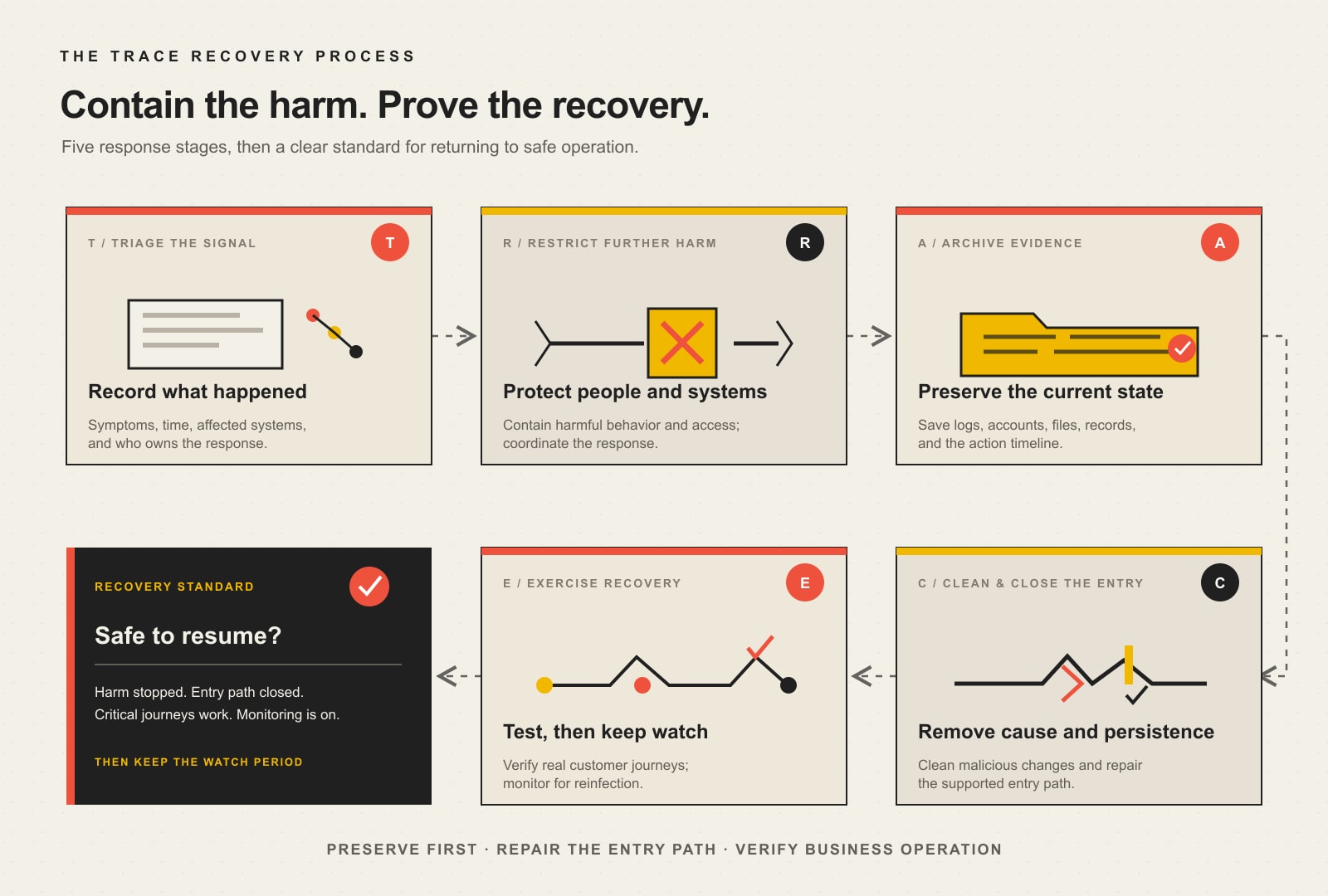
    Scope Design uses a simple decision framework for the first response: TRACE—Triage, Restrict, Archive, Clean, Exercise. It keeps the business from confusing visible cleanup with verified recovery.

    The five-stage TRACE website recovery process: triage the signal, restrict further harm, archive evidence, clean the compromise and close the entry point, exercise recovery and monitor; return only when harm has stopped, entry is closed, critical journeys work, and monitoring is active.
    Scope Design’s TRACE process: triage the signal, restrict harm, archive evidence, clean the compromise and entry point, then exercise recovery and monitor.
    TRACE stageImmediate questionEvidence of completion
    Triage the signalWhat happened, when, where, and to whom?Incident timeline, symptoms, affected URLs and systems, named response owner
    Restrict further harmWhat must stop now to protect people, data, money, and connected systems?Safe containment decision, access restrictions, provider escalation, clean temporary service where appropriate
    Archive evidence and current stateWhat will we need to understand scope, recover, make a claim, or meet an obligation?Preserved logs, alerts, account state, file/database copy, transaction and communication records
    Clean the compromise and close the entry pointWhat changed, how did access occur, and what persistence remains?Malicious artifacts removed, access rotated, vulnerable path repaired, unauthorized accounts and tasks removed
    Exercise recovery and watch for reinfectionCan the actual business safely operate, and will we notice if the attacker returns?Tested journeys, verified monitoring, search review, clean scans, documented watch period and lessons

    T — Triage the signal

    Start an incident record before changing the system. Include:

    • the exact warning, behavior, or unauthorized change;
    • affected URLs, accounts, forms, transactions, devices, and services;
    • when it was first noticed, including time zone;
    • who noticed it and how;
    • recent plugin, theme, hosting, DNS, content, or account changes;
    • alerts from Google Search Console, browsers, the host, payment services, email providers, or security tools;
    • whether sensitive information or money may be involved;
    • who owns the response and who can authorize containment.

    This sounds bureaucratic until six people make changes in three dashboards and nobody can remember what the site looked like twenty minutes ago. WordPress makes documentation the first actionable step for good reason.

    Triage also separates a compromise from an ordinary technical failure. Confirm the domain and hosting are paid, DNS resolves correctly, certificates are valid, the server is running, and recent deployments or updates did not cause the symptom. If the evidence still points to unauthorized behavior, proceed as an incident.

    R — Restrict further harm

    Containment is a business-risk decision, not an automatic “flip the whole internet off” rule. The right response depends on what the site is doing.

    If visitors are being redirected to malware, credentials may be captured, payment pages are untrustworthy, personal information is publicly exposed, or the attacker is actively changing the system, public service may need to be restricted immediately. A clean temporary site or correctly configured 503 Service Unavailable response can be safer than leaving a compromised application online. Google’s hacked-site recovery guidance likewise recommends temporarily taking a compromised site offline while it is being fixed.

    If the suspected problem affects one isolated function, the team may be able to disable that function while preserving safe parts of the business. Coordinate with the host and incident specialist before shutting down or rebooting evidence-sensitive systems. The FTC specifically warns businesses not to destroy forensic evidence during remediation.

    Contain connected access too. Revoke suspicious sessions, disable unknown users, restrict compromised integrations, and rotate relevant credentials from a device believed to be clean. An infected laptop or compromised email account can hand the new password straight back to the attacker.

    Prioritize accounts with the power to reset or rewrite everything else:

    1. primary email and identity accounts;
    2. domain registrar and DNS;
    3. hosting and cloud control panels;
    4. CMS administrators;
    5. SFTP, SSH, deployment, and database access;
    6. payment, ecommerce, CRM, email-delivery, analytics, and API credentials.

    Use unique credentials and multifactor authentication where supported. Remove unknown accounts and revoke active sessions. Do not delete the records of those accounts before preserving what you may need to understand the incident.

    A — Archive evidence and the current state

    Before cleanup, preserve enough information to investigate and recover. That may include:

    • screenshots and exact warning text;
    • server, application, firewall, authentication, email, DNS, payment, and security logs;
    • CMS user and role lists;
    • active plugins, themes, integrations, keys, and scheduled tasks;
    • a copy of files and database in their compromised state;
    • file hashes, modification times, and detected malware paths;
    • hosting and network details;
    • orders, form submissions, exports, or other business records that may change during restoration;
    • a timeline of every action the response team takes.

    A compromised backup is not the one you restore into production, but it can still be valuable evidence and a reference for recent legitimate data. Store it safely with access limited to the response team.

    If the incident may involve regulated or personal information, litigation, law enforcement, a cyber-insurance claim, or a contractual reporting duty, do not improvise evidence handling from a blog post. Contact the appropriate insurer, counsel, and incident-response professionals early. Insurance policies sometimes require prompt notice or approved vendors before work begins.

    C — Clean the compromise and close the entry point

    Cleanup has two jobs:

    1. remove the attacker’s code, content, accounts, jobs, and persistence; and
    2. remove or control the route that allowed the compromise.

    Completing only the first job is digital whack-a-mole.

    On WordPress, investigation may include core files, plugins, themes, uploads, must-use plugins, configuration files, server rules, scheduled tasks, database content, administrator accounts, application passwords, and hosting-level access. Compare WordPress core and repository-hosted extensions with trusted originals where possible. Replace compromised software from known-good sources instead of attempting to prettify malicious code line by line.

    The entry point may be an outdated extension, abandoned component, stolen administrator credential, compromised email account, reused password, infected workstation, exposed key, vulnerable custom code, weak hosting isolation, or unauthorized vendor access. Sometimes the original evidence is incomplete and the exact route cannot be proven. Say that honestly, then close every plausible access path supported by the evidence.

    Do not treat a remote scanner as a complete cleanup certificate. A public scanner sees what an outside visitor receives. It may catch warnings, injected scripts, and known malware behavior, but it usually cannot prove the database, server, user list, private files, scheduled tasks, or connected accounts are clean.

    E — Exercise recovery and watch for reinfection

    Recovery is not “the homepage loads.” It is the return of trustworthy business operation.

    A clean backup can accelerate recovery, but answer four questions first:

    • Complete: Does it include the necessary files, database, configuration, uploads, and business data?
    • Clean: Was it created before the compromise, and has it been checked for malicious accounts, code, content, and persistence?
    • Current enough: What orders, leads, content, users, or transactions would be lost by restoring it?
    • Safe destination: Are you restoring into an environment with repaired access, updated software, and a closed entry point?

    Blindly restoring yesterday’s backup can restore yesterday’s backdoor. Restoring a month-old backup can erase a month of business. A thoughtful recovery may rebuild application files from trusted sources, import carefully reviewed business data, and reconcile transactions created after the clean recovery point.

    Before reopening, test the journeys that matter:

    • public pages and navigation on mobile and desktop;
    • administrator access and permissions;
    • contact, quote, signup, and support forms;
    • ecommerce cart, checkout, payment, tax, shipping, refunds, and transactional email;
    • login, password reset, memberships, portals, and file access;
    • analytics, advertising tags, consent controls, CRM, webhooks, and API integrations;
    • site search, redirects, canonical tags, robots rules, sitemaps, and structured data;
    • backups, monitoring, alerts, and the response contact path.

    Then maintain heightened monitoring. Watch for new files, unexpected users, recurring spam URLs, redirects, authentication anomalies, outbound email, resource spikes, Search Console warnings, and the same indicators that triggered the response. Reinfection often means the entry point or persistence was missed—not that the attacker possesses supernatural keyboard powers.

    How do you recover Google visibility after a website hack?

    Open Google Search Console and review Security Issues, Manual Actions, indexed pages, sitemaps, and performance changes. Record example hacked URLs before cleanup. Search the domain for injected titles and pages, but remember that a normal search does not show everything Google knows.

    After the site is clean and the vulnerability is closed:

    1. ensure malicious pages return the appropriate status or clean canonical content;
    2. restore legitimate pages and internal links;
    3. confirm robots rules and accidental noindex settings are not blocking recovery;
    4. submit a current sitemap when appropriate;
    5. request a review through the relevant Search Console security workflow;
    6. monitor warnings, indexed spam URLs, crawl behavior, impressions, and branded results.

    Google says its Security Issues report can provide the detected issue type and example URLs, and that site owners can request a review after cleaning the site and closing the security holes. A review request is not a substitute for cleanup, and repeatedly submitting one against a still-compromised site is not a strategy.

    Search recovery can lag technical recovery because crawlers need to revisit pages and warning systems need to re-evaluate the site. Do not promise an exact clearance date. Document the request, monitor status, and keep the site stable and clean.

    When does a hacked website become a data-breach problem?

    A hacked website and a legally reportable data breach are not identical, but they can overlap. The incident deserves legal and forensic escalation when there is credible reason to believe an unauthorized party accessed, altered, exposed, or took personal, regulated, confidential, or payment-related information.

    Examples include:

    • a malicious checkout or payment script;
    • exposed customer, employee, health, identity, or financial records;
    • stolen form submissions or account credentials;
    • unauthorized database access;
    • public posting of private information;
    • compromise of systems connected to the website;
    • contractual or insurance requirements triggered by the incident.

    The FTC’s data-breach response guide advises businesses to secure operations, stop additional data loss, preserve evidence, investigate the scope, fix vulnerabilities, develop a communication plan, and determine applicable notification requirements. The laws depend on the information, people, business, and jurisdiction. Scope Design can help coordinate website operations and technical ownership, but it does not replace breach counsel or a qualified forensic investigator.

    Do not publish confident statements before the facts are understood. Do not hide material facts that affected people need to protect themselves. And do not let the marketing department write incident law because the homepage CMS was nearby.

    What Scope Design can—and cannot—own

    Scope Design’s practical role includes managed WordPress maintenance, controlled updates, backups, uptime and operational monitoring, compatibility checks, targeted rollback, website troubleshooting, and coordination across the website’s owners and providers. That work helps reduce risk and makes recovery less chaotic.

    It is not a 24/7 security operations center, a forensic laboratory, penetration-testing practice, breach-law firm, insurer, or law-enforcement agency. Serious incidents may require several specialists. A trustworthy website partner should recognize that boundary early instead of cosplaying as the FBI because a malware plugin found a suspicious file.

    The broader website security guide explains the ongoing LOCKED program for ownership, access, updates, monitoring, backups, and rehearsed response. The WordPress plugin update guide explains controlled updates and rollback. The website maintenance guide assigns the recurring operational work, while Scope Design’s WordPress maintenance services guide explains what managed support should actually include.

    Hacked website recovery checklist

    DecisionConfirm before closing the incident
    ScopeAffected sites, accounts, data, integrations, devices, and providers have been identified as far as the evidence allows
    ContainmentHarmful public behavior and unauthorized access have been restricted without casually destroying evidence
    AccessRelevant credentials, sessions, keys, users, roles, and provider access have been reviewed and rotated
    CleanupMalicious code, content, accounts, jobs, redirects, and database changes have been removed
    Root causeThe confirmed or plausible entry path has been repaired, removed, patched, or tightly controlled
    RecoveryThe restored system comes from trusted sources and reconciles necessary current business data
    TestingForms, payments, email, logins, permissions, integrations, mobile pages, analytics, and search controls work
    SearchSecurity warnings, hacked URLs, sitemaps, indexing, and review requests have been handled
    ObligationsInsurance, legal, regulatory, contractual, law-enforcement, and communication decisions have named owners
    MonitoringReinfection indicators, access changes, file changes, uptime, backups, and business journeys are being watched
    LearningThe inventory, maintenance plan, access policy, backups, monitoring, and incident procedure have been updated

    Frequently asked questions about hacked websites

    What are the most common signs a website has been hacked?

    Common signs include browser or search-engine warnings, unfamiliar redirects, injected pages or links, unknown administrators, unauthorized file or configuration changes, unexpected password resets, altered form or payment behavior, spam email from the domain, host malware alerts, and suspicious scheduled tasks. Slowness or downtime alone is not proof; correlate symptoms with logs and unauthorized changes.

    What should I do first if my website is hacked?

    Document the exact symptom and time, name the response owner, protect visitors and connected systems from further harm, contact the host and technical owner, and preserve relevant evidence before deleting or restoring anything. If sensitive data may be involved, notify qualified legal, forensic, security, and insurance contacts immediately.

    Should I take a hacked website offline?

    Restrict public access when the site may harm visitors, capture credentials or payments, expose personal information, distribute malware, or remain under active attacker control. A clean temporary response may preserve safe business communication. Coordinate evidence-sensitive shutdown decisions with the host and incident professionals; the right containment depends on the incident.

    Can I check whether my website is hacked myself?

    You can review Google Search Console, browser warnings, host alerts, users, recent changes, public pages, indexed URLs, file changes, and reputable remote scans. Those checks are useful but cannot prove the private server, database, accounts, tasks, and integrations are clean. Escalate when the evidence, data, or business risk exceeds your expertise.

    Can a malware scanner prove my website is clean?

    No single scan proves the whole system is clean. Remote scanners inspect public behavior; application scanners have access only to what their permissions and signatures reveal. Verification may require file and database comparison, account review, log analysis, scheduled-task inspection, configuration review, root-cause repair, business-journey testing, and continued monitoring.

    Can I restore a hacked website from a backup?

    Often, but the backup must be complete, clean enough, current enough, and restored into a trustworthy environment after the entry point is closed. A blind restore can reintroduce malware or erase recent orders and leads. Preserve current business data and reconcile it deliberately.

    How do hackers get into WordPress websites?

    Common routes include stolen or reused credentials, compromised email accounts or devices, outdated or abandoned plugins and themes, vulnerable custom code, excessive permissions, exposed keys, insecure hosting or deployment access, and forgotten vendor accounts. The specific cause must come from evidence; guessing “it was WordPress” is not a root-cause analysis.

    Should I change passwords before or after cleaning the site?

    Use a clean device to rotate credentials needed for immediate containment, revoke sessions, and stop unauthorized access. After cleanup, rotate them again where the incident plan calls for it, because credentials used while the system was still compromised may have been captured. Include hosting, CMS, domain, DNS, SFTP/SSH, database, email, API, and integration access as relevant.

    How long does hacked website recovery take?

    There is no honest universal estimate. A simple injected file with a known clean backup and confirmed entry point may be resolved quickly. A compromise involving multiple accounts, ecommerce, personal data, an unknown timeline, poor logs, or persistent backdoors can take far longer. Scope and evidence determine the work.

    How do I remove Google’s hacked-site warning?

    Use Google Search Console to review the Security Issues report and example URLs. Remove the compromise, close the vulnerability, verify the site, and then request a review through the appropriate workflow. Continue monitoring indexed spam URLs and search results while Google recrawls and re-evaluates the site.

    Is a hacked website automatically a data breach?

    Not automatically. A compromise becomes a potential data-breach matter when unauthorized access, acquisition, alteration, or exposure may involve protected or sensitive information. Because definitions and duties vary, preserve evidence and consult qualified counsel and incident professionals rather than making the legal determination from a generic checklist.

    Will updating WordPress remove malware?

    No. Updating supported software can close known vulnerabilities and replacing trusted core or extension files can remove some malicious changes, but an update does not necessarily remove database injections, unknown users, stolen credentials, scheduled tasks, backdoors, compromised devices, or malicious integrations. Cleanup and root-cause repair are separate jobs.

    How do I prevent the website from being hacked again?

    Close the incident’s entry point, remove unnecessary accounts and software, use unique credentials and multifactor authentication, keep supported components current, control changes, maintain separate restorable backups, monitor access and file changes, watch critical business journeys, document ownership, and rehearse the response. Perfect safety is fiction; reducing likelihood, blast radius, and recovery time is the real job.

    The useful definition of recovered

    A hacked website is not recovered because the ugly redirect disappeared. It is recovered when the harmful behavior has stopped, the unauthorized access and persistence have been removed, the entry path has been closed, the necessary business data is intact, the important journeys work, search warnings are being resolved, obligations have owners, and monitoring can catch a return.

    That is less dramatic than “deploy AI-powered cyber defense.” It is also how grown-ups get the business safely back online.

  • 10 Marketing Mistakes That Waste Money Before the Campaign Even Has a Chance

    10 Marketing Mistakes That Waste Money Before the Campaign Even Has a Chance

    The most expensive marketing mistakes happen when a business attracts the wrong people, makes a weak or dishonest promise, sends attention to a broken destination, mishandles the response, or sells work it cannot deliver profitably. A bad ad wastes media spend. A bad marketing system wastes the ad spend, the lead, the salesperson’s time, the customer’s patience, and sometimes the reputation too.

    That is why “make better content” is not the answer. The campaign may be the least broken part of the whole damn thing.

    TL;DR:

    • Define the qualified business outcome before choosing metrics or channels.
    • Decide who the offer is for—and who it should repel.
    • Make the promise, price logic, trade-offs, proof, and next step clear.
    • Fix the destination, tracking, and response process before buying more attention.
    • Optimize for qualified value, not the easiest number to inflate.
    • Give every inquiry an owner and every channel a specific job.
    • Do not automate confusion or manipulate people into short-term conversions.
    • Include sales, delivery, retention, and capacity in the marketing system.
    • Learn from closed customers and lost opportunities, not only clicks.
    • Treat rules of thumb as prompts, not commandments delivered from Marketing Mount Sinai.

    Why marketing mistakes cost more than the campaign budget

    Marketing creates consequences downstream.

    A vague audience creates irrelevant clicks. Irrelevant clicks create low-quality inquiries. Low-quality inquiries consume sales time. Poorly handled inquiries create bad attribution. Bad attribution funds another round of the wrong campaign. Eventually everyone agrees that “marketing doesn’t work,” except the platform that kept your credit card on file.

    The same compounding effect works in the other direction. A clear audience supports a useful promise. A useful promise attracts better-fit attention. A credible destination helps people make a decision. A reliable handoff protects the opportunity. Delivery creates proof, retention, and referrals. Measurement gets smarter because the business can connect activity to actual customer value.

    Marketing is not a bag of tactics. It is a chain of decisions.

    The Scope Design Marketing Waste Multiplier

    The eight-stage Marketing Waste Multiplier follows Attention, Fit, Promise, Destination, Response, Sale, Delivery, and Learning; a mismatch early in the chain creates downstream costs and can contaminate the next decision.

    Use eight stages to see how an early mistake multiplies downstream:

    1. Attention — Who sees the business and why?
    2. Fit — Are those people plausible customers in the right buying moment?
    3. Promise — Is the offer clear, credible, differentiated, and worth considering?
    4. Destination — Can people understand, trust, and complete the intended action?
    5. Response — Does the inquiry reach a responsible human or system quickly and reliably?
    6. Sale — Does qualification and follow-up protect time, margin, and customer fit?
    7. Delivery — Can the business fulfill the promise without breaking service quality?
    8. Learning — Do customer outcomes improve the next audience, offer, message, and budget decision?

    The expensive part is not simply losing one conversion. It is using contaminated evidence to make the next decision.

    A quick map of the ten mistakes

    MistakeWhat it damages firstWhat it quietly damages next
    Measuring activity instead of business valueBudget decisionsLead quality, margin, and trust in reporting
    Trying to reach everyoneRelevanceMessage clarity, media cost, qualification time
    Making a generic or unprovable promiseCredibilityConversion, sales objections, customer expectations
    Choosing channels before readinessCampaign fitDestination performance, follow-up, capacity
    Sending traffic to a weak destinationTask completionAd learning, sales volume, brand confidence
    Optimizing raw lead volumeReported conversionSales time, close rate, customer fit
    Leaving response and qualification ownerlessOpportunity handlingAttribution, revenue, internal trust
    Automating a broken processError speedCustomer frustration, data quality, staff workload
    Manipulating people for short-term conversionCustomer autonomyReputation, refunds, churn, accessibility
    Ignoring delivery, retention, and learningCustomer valueProof, referrals, future targeting, profit

    Mistake 1: measuring activity instead of qualified business value

    Impressions, reach, clicks, sessions, video views, opens, followers, and raw leads are useful only when they help explain progress toward a meaningful outcome.

    They become dangerous when they replace the outcome.

    What this mistake looks like

    • The report celebrates traffic while sales reports no useful opportunities.
    • Cost per lead improves because qualification standards quietly disappeared.
    • An agency takes credit for every form submission but never checks what became a customer.
    • The business optimizes email opens while unsubscribes, replies, booked conversations, and revenue remain disconnected.
    • A ranking increase is treated as success even when the query has no commercial relevance.

    The better decision

    Choose the last meaningful outcome marketing can influence, then trace it toward money where possible.

    For a considered service business, that may be a qualified opportunity. For a local service, it may be a tracked call or booked-and-attended appointment. Ecommerce may use profitable purchases and repeat value. A subscription business must include retention or it can acquire a beautifully measured parade of future cancellations.

    Use supporting metrics to explain the result. Do not promote the supporting cast to CEO because they were easier to graph.

    Our marketing diagnosis guide explains how to locate the constraint after performance disappoints.

    Mistake 2: trying to reach everyone who technically could buy

    “Everyone who needs our service” is not an audience. It is an abdication with a large potential reach estimate.

    Useful audience definition includes:

    • the problem or desired outcome;
    • the buying moment;
    • the context that makes the problem urgent or costly;
    • geography or operational fit;
    • budget or complexity fit where relevant;
    • who influences and approves the decision;
    • evidence needed to reduce risk;
    • reasons the person should not choose the offer.

    Demographics are not a substitute for intent

    Age, gender, job title, and income can matter, but they do not automatically explain why someone is deciding today. Two people with identical demographics can have completely different problems, constraints, knowledge, and risk tolerance.

    Start with the decision, not the stock-photo persona.

    Repelling is part of positioning

    A useful message should help wrong-fit prospects leave before they consume sales and delivery time. Honest price ranges, scope boundaries, right-fit and wrong-fit criteria, process requirements, and trade-offs can reduce raw conversion while improving the business result.

    If every person feels vaguely included, nobody feels specifically understood.

    Mistake 3: making a generic, hidden, or unprovable promise

    “Solutions that empower growth” is not positioning. It is corporate fog with a gradient background.

    A strong promise answers:

    • What changes for the customer?
    • For whom?
    • Under what conditions?
    • Why is this approach credible?
    • What trade-offs or limits apply?
    • What should the person do next?

    Hiding the useful decision information

    Businesses often avoid price, drawbacks, comparisons, implementation effort, timing, requirements, and fit because they want to “control the conversation” on a sales call.

    The buyer still has those questions. Silence does not remove the objection; it forces the visitor to answer it pessimistically or leave for a source willing to help.

    Not every service has a fixed price. Every serious service can explain the variables, likely range, what changes the investment, and when it is not a fit.

    Proof belongs beside the claim

    A page should not make the visitor visit an archaeological wing called “Testimonials” to verify every important promise. Put specific, relevant proof where doubt appears. Use real customer language, documented outcomes, demonstrations, process evidence, credentials, or transparent limitations.

    Never invent a result because the sentence looked lonely without a percentage.

    Mistake 4: choosing channels before the business is ready for attention

    Channel selection comes after the audience, offer, destination, response process, measurement, and delivery capacity.

    Yet many plans begin with:

    • “We need to be on TikTok.”
    • “Our competitor is running Google Ads.”
    • “Email has the best ROI.”
    • “The owner heard podcasts are back.”

    Those statements describe platforms or folklore, not strategy.

    Give every channel a job

    Search captures existing intent. Social can create familiarity, conversation, and discovery. Email continues a permission-based relationship. Paid media buys controlled access to a defined audience or signal. Partnerships borrow trust and distribution. Local events create proximity and human proof.

    The best channel is the one whose mechanism fits the buying moment, creative capacity, signal quality, destination, response process, and economics.

    Use our online advertising strategy guide before paying to discover that the landing page, offer, and inbox were the actual campaign.

    Mistake 5: sending expensive attention to a weak destination

    An ad can do its job perfectly and still produce a terrible business outcome if the next experience is confusing, slow, inaccessible, untrustworthy, or broken.

    Check:

    • Does the message match what brought the person there?
    • Can the visitor understand the offer without detective work?
    • Is the proof relevant to this decision?
    • Are price logic, process, trade-offs, and fit clear enough?
    • Is the next action appropriate to the visitor’s commitment?
    • Can the action be completed on a phone and with assistive technology?
    • Does the form, booking, call, purchase, or application actually reach the right system?
    • Does the visitor know what happens next?

    Real example: the destination comes before the tag

    A fleet-services company wanted measurement for job-application advertising. Before the campaign could be judged responsibly, Scope Design simplified the application by removing unnecessary sensitive and wage fields and reducing which fields were required. Then the requested Google tag was added to the intended action.

    The documented lesson is not a fabricated conversion lift. The destination became simpler and the action became measurable. That is the foundation needed before responsible optimization.

    The website strategy and optimization playbook covers the larger business system behind the page.

    Mistake 6: optimizing raw lead volume instead of customer fit

    Reducing form fields, weakening qualification, hiding price, and broadening targeting can make the conversion dashboard rise while the business result falls.

    Raw lead volume ignores:

    • service-area fit;
    • problem fit;
    • budget and scope fit;
    • urgency and timing;
    • authority to decide;
    • delivery compatibility;
    • expected margin and value;
    • staff time required to qualify and chase.

    Friction is not universally bad

    Accidental friction blocks people who want to act. Intentional friction helps people make an informed choice and protects both sides from a bad fit.

    A considered service form may reasonably ask about the problem, timeline, location, existing system, or investment expectations. The goal is not the shortest form. It is the least effort needed to create a useful next conversation.

    Count qualified conversations, held appointments, opportunities, and customers—not just contacts that made the confetti fire.

    Mistake 7: leaving response and qualification ownerless

    Businesses pay to make the phone ring and then let it ring into an unlabeled voicemail box. They build a beautiful form that emails three people, which is another way of emailing nobody.

    Every intended action needs:

    • a reliable record;
    • a named owner;
    • a response expectation;
    • a qualification definition;
    • an appropriate acknowledgment;
    • a clear next step;
    • a final disposition;
    • feedback to the source that produced it.

    “Sales says the leads are bad” is not a learning loop

    Marketing needs structured outcomes from sales:

    • qualified or not, and why;
    • contacted or not;
    • appointment booked and held;
    • opportunity created;
    • lost reason;
    • won value;
    • time to first response;
    • future follow-up status.

    Without that feedback, marketing optimizes for the only events it can see. Usually that means cheaper clicks and more forms—the exact proxies everyone later complains about.

    Mistake 8: automating a process before it deserves to scale

    Automation multiplies whatever you give it. Sometimes that is leverage. Sometimes it is a broken process moving at machine speed and sending customers personalized nonsense at 2:13 a.m.

    Before automating, define:

    • the trigger;
    • the intended outcome;
    • the required data;
    • the judgment points;
    • the exceptions;
    • the human owner;
    • the stop condition;
    • how errors are detected;
    • how a customer reaches a person.

    Keep humans at the consequential seams

    Automation is excellent for reliable acknowledgment, routing, reminders, status changes, enrichment, and repetitive transformations. It is weaker where context, empathy, liability, ambiguity, negotiation, or unusual customer circumstances matter.

    Do not automate a process the team cannot explain on paper. You are not removing work; you are hiding it inside a harder-to-debug box.

    Mistake 9: trading long-term trust for a short-term conversion bump

    Scope Design uses two tests for conversion tactics:

    1. Would the improvement survive if the visitor understood why the tactic was used?
    2. Does the improvement remain after refunds, no-shows, churn, staff time, lead quality, accessibility, and long-term trust are counted?

    That rules out:

    • countdown timers that reset;
    • fake stock or availability;
    • fabricated reviews or customer activity;
    • confirmshaming;
    • hidden fees;
    • preselected consent;
    • cancellation traps;
    • inaccessible popups and forms;
    • misleading claims;
    • pressure aimed at vulnerability;
    • attribution that takes credit the evidence cannot support.

    The FTC’s advertising guidance explains the basic requirement that advertising be truthful, not misleading, and appropriately supported. Compliance is the floor. Trust is the asset.

    If the customer feels tricked after understanding what happened, the conversion was borrowed from the future at an ugly interest rate.

    Mistake 10: stopping the marketing system at the sale

    Acquisition is one part of customer value. Delivery, onboarding, retention, repeat purchases, referrals, reviews, proof, and product learning all affect whether the acquisition was worthwhile.

    Ask:

    • Can the team deliver the promise at the volume marketing may create?
    • Does onboarding establish expectations and ownership?
    • Are customers reaching the outcome they bought?
    • Which customers stay, expand, refer, and produce healthy margins?
    • What do lost customers and failed projects teach the offer?
    • Does support see recurring confusion that marketing could prevent?
    • Are strong outcomes becoming credible proof?

    Capacity is a marketing input

    When capacity is constrained, targeting, qualification, offers, campaign timing, budgets, and promises should change. Creating demand the company cannot serve is not evidence that marketing worked. It is evidence that marketing and operations stopped speaking.

    The customer experience eventually becomes the message other customers hear.

    Rules such as 3-3-3, 40-40-20, and 70/20/10 are not diagnoses

    Marketing rules of thumb can be useful memory aids. The trouble is that the same label often describes different frameworks, and a clean ratio is seductive even when the business context is nowhere to be found.

    What to ask before applying a marketing rule

    • What mechanism is the rule supposed to improve?
    • Which business model, audience, channel, and buying cycle was it designed for?
    • What outcome does it measure?
    • What evidence supports it?
    • What constraints would make it fail here?
    • Is the allocation reversible if the assumption is wrong?

    Use a ratio to structure a test if it fits. Do not use it to avoid thinking.

    How to prevent these mistakes before launch

    Use a one-page readiness review:

    DecisionRequired answer before launch
    Business outcomeWhat qualified, observable result should change?
    Audience and momentWho is deciding what, and why now?
    Offer and proofWhat is promised, what are the limits, and why should they believe it?
    Channel jobWhy is this channel suited to this buying moment?
    DestinationWhere does attention land, and can the intended action be completed?
    ResponseWho owns the action, how quickly, and what happens next?
    QualificationWhat makes the opportunity worth pursuing?
    DeliveryCan the business fulfill the promise without harming existing customers?
    MeasurementHow will source, qualified outcome, and customer value connect?
    ReviewWhen will evidence be reviewed, by whom, and what decisions can change?

    This does not guarantee success. It removes a remarkable amount of preventable stupidity.

    The broader small-business marketing strategy pillar explains how those decisions fit together. The digital marketing strategy guide covers the governed digital operating system.

    Frequently asked questions

    What are the most common marketing mistakes?

    The most common mistakes are measuring activity instead of business value, targeting too broadly, using a generic offer, choosing channels before the destination and response process are ready, optimizing raw leads, mishandling follow-up, automating broken processes, manipulating customers, and ignoring delivery and retention.

    What is the biggest marketing mistake a small business can make?

    The biggest mistake is solving the wrong constraint. A business can spend heavily on traffic when the offer, website, qualification, follow-up, sales process, or capacity is the actual problem. Diagnose the system before prescribing the tactic.

    Why do marketing campaigns fail?

    Campaigns fail when the audience, offer, creative, channel, destination, measurement, response, economics, or delivery system does not align. Sometimes the campaign performs as designed and the failure occurs after the click.

    How can a business avoid marketing mistakes?

    Define the intended business outcome, validate audience and offer assumptions, test the destination and handoff, assign ownership, use a bounded launch, and review qualified customer outcomes—not only platform metrics.

    Is targeting everyone a marketing mistake?

    Yes, when it produces generic messaging, weak fit, and expensive qualification. A useful audience is defined by the decision, problem, context, fit, and evidence needed—not merely broad demographics.

    Are more leads always better?

    No. More unqualified leads can increase sales workload, slow response to good opportunities, damage reporting, and fill delivery capacity with poor-fit work. Qualified value matters more than raw volume.

    Is hiding prices a marketing mistake?

    It can be. Bespoke services may not have one fixed number, but they can explain likely ranges, cost variables, fit, and process. Hiding all price logic merely to force a call often creates more unqualified inquiries and less trust.

    Is using only one marketing channel a mistake?

    Not automatically. A focused channel can be rational when it reliably reaches the right audience and the business understands the concentration risk. Adding channels without capacity or distinct jobs creates a different kind of waste.

    How often should marketing be reviewed?

    Match review timing to the buying cycle, traffic volume, spend, and risk. Operational failures may need immediate alerts; campaign signals may need weekly review; qualified outcomes and strategic decisions often need a longer window. Avoid both daily panic and annual archaeology.

    What is the 3-3-3 rule in marketing?

    The phrase is used for several unrelated audience, content, and messaging rules. Treat it as a mnemonic only after identifying the exact version, mechanism, and intended outcome. It is not a universal strategy.

    What is the 40-40-20 rule in marketing?

    It commonly attributes campaign success to audience, offer, and creative in a 40/40/20 split. The idea usefully emphasizes audience and offer, but the exact allocation is not a universal law and does not account for destination, handoff, delivery, or measurement failures.

    What is the 70/20/10 rule in marketing?

    It is often used to allocate resources among proven work, adjacent tests, and experiments, though versions differ. Apply it only when the business’s evidence, risk tolerance, capacity, and budget support that portfolio.

    Stop paying to multiply preventable waste

    The job is not to eliminate uncertainty. Marketing always contains uncertainty.

    The job is to stop paying repeatedly for mistakes the business can already see: wrong audience, mushy promise, broken destination, ownerless lead, weak delivery, dishonest tactic, and useless measurement.

    Fix the chain. Give each channel a job. Make the buyer’s decision easier. Protect the handoff. Learn from customers. Then spend more when the system has earned the right.

    If your campaign problem keeps moving every time someone looks at it, talk to Scope Design. We diagnose the website, marketing, measurement, and operational handoffs together—because the leak rarely respects the org chart.

  • Email Newsletter Strategy: Publish Something Worth Opening

    Email Newsletter Strategy: Publish Something Worth Opening

    Email newsletter strategy works when every issue does a specific job for a specific reader and connects that usefulness to a measurable business outcome. If your newsletter is a monthly bucket of company news, staff birthdays, recycled promotions, and whatever somebody remembered at 4:47 p.m., that is not a strategy. It is an internal memo wearing marketing pants.

    TL;DR: Decide who the newsletter serves, what recurring problem it helps solve, what evidence makes the advice trustworthy, what next step the reader should take, and which business signal will prove the effort is useful. Build a repeatable format around that job. Send only as often as you can keep the promise. Measure replies, qualified clicks, conversions, retention, and downstream customer behavior—not just the little ego cookie called an open rate.

    Are email newsletters still worth it?

    Yes—when the newsletter gives people a recurring reason to pay attention and gives the business a useful way to continue the relationship. No—when it exists because somebody read that “email has the best ROI” and decided another content obligation sounded fun.

    Email has one durable advantage: the relationship is not trapped inside a social platform’s feed. A permissioned list gives a business a direct way to reach people who asked to hear from it. That does not make every message valuable, and it certainly does not guarantee revenue. Ownership of the channel is an opportunity, not a magical vending machine.

    A worthwhile newsletter can:

    • answer buyer questions before a sales conversation;
    • help customers use a product or service more successfully;
    • expose subscribers to useful expertise they would not search for on their own;
    • reactivate a relevant conversation when circumstances change;
    • create replies, referrals, qualified visits, bookings, purchases, or renewals;
    • reveal which problems and topics deserve deeper content.

    The newsletter earns those outcomes by being useful repeatedly. Merely arriving repeatedly is called clutter.

    A newsletter is a product, not a blast

    Treat the newsletter as a small recurring product. It has an audience, a promise, a format, a release rhythm, a quality standard, and an intended outcome.

    That mindset changes the planning question from “What can we send this month?” to “What useful job have subscribers trusted us to do?”

    The first question produces a parade of office announcements, random links, weak discounts, and last-minute filler. The second creates editorial discipline. A useful newsletter does not have to be long or fancy. It has to be recognizable, relevant, credible, and worth the interruption.

    This also prevents the newsletter from becoming the dumping ground for every department’s request. If an item does not serve the reader promise or support the issue’s job, it does not belong. The CEO’s desire to mention an award is not automatically a reader need. Harsh, perhaps. Still true.

    The Scope Design Newsletter Utility Loop

    The five-part Newsletter Utility Loop: begin with a reader problem, offer a useful answer, support it with credible evidence, suggest an intentional next step, then use business signals to improve the next issue.

    The Scope Design Newsletter Utility Loop is a five-part test for deciding whether an issue deserves to be sent:

    1. Reader problem: What situation, question, risk, or opportunity matters to this audience now?
    2. Useful answer: What can the reader understand, decide, or do after reading?
    3. Credible evidence: What experience, example, source, demonstration, or result makes the answer believable?
    4. Intentional next step: Where should an interested reader go next without being shoved into a sales ambush?
    5. Business signal: What observable behavior will tell the business whether the issue helped?

    The loop matters because the business signal should improve the next issue. Replies can expose missing explanations. Qualified clicks can show which problems deserve a full guide. Unsubscribes and complaints can reveal a broken promise, poor targeting, or reckless frequency. Sales conversations can show whether the content prepared buyers or merely entertained browsers.

    The loop is not “send, stare at dashboard, celebrate a percentage.” It is a learning system.

    Choose one primary reader and one primary job

    “Our customers and prospects” is usually too vague to guide an issue. A recent customer, an inactive subscriber, a skeptical prospect, and a long-term client do not need the same email at the same moment.

    Start with the lifecycle and choose the primary reader for the newsletter—or create distinct versions when the needs are genuinely different.

    ReaderUseful newsletter jobPossible business signal
    New subscriberDeliver the promised value and establish what the relationship will provideWelcome-series completion, replies, qualified content visits
    Evaluating prospectAnswer buying questions, tradeoffs, costs, and fitService-page visits, assessment starts, qualified inquiries
    New customerReduce uncertainty and help the customer get value fasterOnboarding completion, fewer avoidable support questions
    Active customerImprove use, expose adjacent value, and strengthen the relationshipFeature adoption, repeat purchase, renewal, referral
    Inactive customerSurface a relevant reason to return without pretending every person needs a couponReactivation, preference update, clean opt-out

    You can serve more than one group across an email program. Each issue still needs a dominant reader and job. Trying to speak equally to everyone produces generic mush—technically digestible, nutritionally pointless.

    For the larger system, use the Scope Design email marketing guide to map permission, segmentation, delivery, handoffs, and outcomes. A newsletter is one component of that system, not the whole damn thing.

    Write a reader promise

    A reader promise explains why the newsletter deserves a place in somebody’s inbox. It should be concrete enough to reject irrelevant ideas.

    Use this sentence:

    This newsletter helps [specific reader] make [specific decision or improvement] by delivering [recurring type of value] at a [sustainable rhythm].

    Weak promise:

    Stay up to date with company news and offers.

    That describes the sender’s desire, not the reader’s benefit.

    Stronger promise:

    Every other Thursday, we help small-business owners spot one expensive website problem, understand why it matters, and decide what to fix next.

    Now the editorial choices become easier. A new logo announcement probably does not qualify. A teardown of a confusing booking flow does. A useful promise is both a magnet and a filter.

    The promise also sets expectations about cadence and content. If those expectations change, say so. Permission is not just a checkbox collected years ago; it is an ongoing agreement about what will arrive and why.

    Build a repeatable issue structure

    Readers benefit from recognition. Writers benefit from not reinventing the publication every time. A repeatable structure gives both sides a fighting chance.

    A service-business issue might use:

    1. The direct answer: one useful conclusion near the top.
    2. Why it matters: the business consequence or risk.
    3. The evidence: a real example, observation, source, or short teardown.
    4. The decision: what the reader should evaluate or do next.
    5. The route: one primary link, reply prompt, tool, or next step.

    A local retailer may use a different structure: one useful product insight, one local story, one customer-specific recommendation, and one timely offer. A membership organization may lead with a decision, deadline, resource, and member action.

    The format should follow the job. Do not copy somebody else’s three-section newsletter because it looks tidy on LinkedIn. Their audience, offer, operating capacity, and sales motion are not yours.

    What should a business newsletter include?

    Include material that helps the reader make progress and helps the business build an honest relationship. Common ingredients include:

    • a direct answer to a recurring customer question;
    • a lesson from real work, with client details anonymized when necessary;
    • a useful comparison, tradeoff, or “right fit / wrong fit” distinction;
    • a short example showing how a principle works;
    • a curated resource with an explanation of why it matters;
    • a relevant change in the market, law, platform, or technology;
    • one clear next step for readers who need more depth.

    Different email assets should not all become newsletter sections. Give each intent a proper home:

    NeedBest destination
    Broad email strategy, segmentation, and lifecycle planningEmail marketing for small business
    Subject-line decisionsEmail subject-line strategy
    Automated onboarding and welcome messagesRelationship-building autoresponder series
    Delivery and bulk-sending problemsHow to send bulk email without creating a spam problem
    Subscriber exits and list-quality symptomsHow to reduce email unsubscribe problems
    Rewards and repeat-purchase mechanicsLoyalty and rewards programs for small businesses

    The newsletter can point to those resources. It does not need to swallow all of them whole.

    How often should you send it?

    Send as often as you can reliably deliver the promised value without exhausting the reader or the team responsible for producing it.

    That may be weekly, every other week, monthly, or triggered by a genuinely relevant event. There is no universal winning cadence. A daily market briefing and a monthly professional-services analysis are different products. Treating them as if one benchmark controls both is spreadsheet cosplay.

    Choose cadence using four constraints:

    • Reader need: How often does the underlying problem change or require action?
    • Value supply: Can the business produce something genuinely useful at that pace?
    • Operational capacity: Who researches, writes, approves, builds, sends, and responds?
    • Feedback: Do replies, complaints, unsubscribes, and downstream behavior suggest the rhythm is useful?

    Consistency matters because it helps readers recognize the relationship. Consistency does not mean sending garbage on schedule. If the choice is between missing a date and wasting thousands of people’s attention, miss the date and fix the production system.

    Stop worshipping arbitrary content ratios

    People Also Ask is full of rules such as 80/20, 90/10, 70/20/10, and 3-3-3. These can be prompts for thinking. They are not laws of email physics.

    The useful principle underneath most of them is simple: earn attention with relevance and value before demanding action. That does not require exactly eight educational blocks for every two promotions. A product recall may be entirely operational. A limited enrollment period may require a direct offer. A customer education issue may contain no promotion at all.

    Judge the balance against the reader promise:

    • Is the message primarily useful to the recipient or merely convenient for the sender?
    • Does the promotion naturally follow the problem and evidence?
    • Would the message still feel honest if the reader knew why it was written?
    • Does the next step help the reader make a decision, or does it manufacture pressure?

    Scope Design will use urgency when the deadline is real. We will not bolt a fake countdown timer onto a newsletter and call the resulting anxiety “optimization.”

    Connect each issue to an intentional next step

    A useful newsletter should not end in a dead alley. It also should not demand marriage on the first date.

    Match the next step to the reader’s likely readiness:

    • reply with a question or situation;
    • read a deeper article;
    • use a checklist or decision tool;
    • compare options;
    • update preferences;
    • review a relevant service;
    • schedule a conversation when the issue has created enough context.

    Use one dominant action. Secondary links can exist, but the issue should have a clear route. A newsletter with seven equally loud buttons is not generous. It is indecisive.

    For considered services, the next step often should help the reader diagnose the problem before asking for a call. Scope Design’s broader marketing strategy pillar explains why channel execution must follow the business constraint rather than replace discovery.

    Measure the business signal, not the applause

    Open and click metrics can help diagnose delivery and interest. They are not the business outcome.

    Apple’s Mail Privacy Protection can load remote email content in the background, which makes opens less reliable as a direct measure of human attention. Use open trends cautiously and pair them with stronger behavior.

    Build a measurement chain:

    LayerExamplesWhat it can tell you
    Delivery healthDelivered, bounced, spam complaintsWhether the message reached permissioned inboxes safely
    AttentionOpens, scroll behavior where availableA directional signal, not proof of value
    EngagementQualified clicks, replies, forwards, preference changesWhether the issue prompted useful interaction
    ConversionAssessment starts, bookings, purchases, renewalsWhether the next step worked
    Business outcomeQualified pipeline, repeat margin, retained revenue, reduced support burdenWhether the newsletter contributed to something the business actually values

    Add campaign identifiers to links and carry source information into analytics and the CRM. If a qualified lead becomes a customer three weeks later, the newsletter should not lose all credit simply because the sale did not happen in the first session.

    Do not optimize raw clicks by making the subject line misleading. That improves a proxy while weakening the relationship. The Scope Design Inbox Promise Test keeps the promise before and after the open aligned.

    Protect permission, accessibility, and deliverability

    A newsletter that cannot be read, trusted, or delivered is a beautifully formatted failure.

    At minimum:

    • send only to people you have a defensible reason and permission to contact;
    • identify the sender accurately;
    • avoid deceptive routing information and subject lines;
    • provide a clear unsubscribe mechanism and honor requests;
    • authenticate the sending domain using the standards required by mailbox providers;
    • keep complaint and bounce problems visible;
    • use readable type, meaningful link text, logical heading order, sufficient contrast, and useful alternative text;
    • do not build an image-only email that disappears when images are blocked;
    • test the important layouts, links, and actions on mobile and desktop.

    The FTC’s CAN-SPAM compliance guide explains the federal requirements for commercial email. Google’s sender guidelines explain current authentication, unsubscribe, and spam-rate expectations for messages sent to Gmail accounts. Apple’s Mail Privacy Protection documentation explains why open tracking needs interpretation.

    If sending and authentication are the primary problem, handle that in the bulk email and deliverability guide instead of burying it in a content-planning meeting.

    When you should not start a newsletter

    Do not start one yet if:

    • nobody can explain which reader it serves;
    • the business has no permissioned audience and intends to buy a list;
    • there is no repeatable source of useful material;
    • nobody owns production, approval, sending, or replies;
    • the website has nowhere useful to send interested readers;
    • sales and service teams will ignore responses;
    • the only goal is “stay top of mind” and nobody can define what that should lead to;
    • the team is already failing to maintain higher-priority customer communication.

    Sometimes the right move is a short onboarding sequence, a transactional update, or a targeted customer message—not an endless publication commitment. Strategy includes deciding which content machine not to build.

    A practical four-issue pilot

    Before promising a weekly newsletter until the sun burns out, design a four-issue pilot.

    1. Define the primary reader, job, promise, next step, and business signal.
    2. Choose four real questions from sales, service, analytics, or customer conversations.
    3. Outline all four issues using the same repeatable structure.
    4. Build the measurement and response handoff before sending issue one.
    5. Send at the proposed sustainable cadence.
    6. Review qualitative responses and downstream behavior after the fourth issue.

    The pilot is long enough to expose whether the team can maintain the promise and short enough to change direction without creating another abandoned marketing shrine.

    Frequently asked questions

    What are five elements of an effective newsletter?

    An effective newsletter needs a defined reader problem, a useful answer, credible evidence, an intentional next step, and a measurable business signal. Those five elements form the Scope Design Newsletter Utility Loop. Design and subject lines support the loop; they do not replace it.

    Are newsletters still relevant?

    Yes, when subscribers have given permission and the newsletter provides recurring value that supports a real customer or business outcome. A newsletter is not relevant merely because email remains widely used. Relevance must be earned issue by issue.

    What should a small-business newsletter include?

    Include a direct answer, an explanation of why it matters, credible evidence or an example, and one clear next step. Recurring sections can make production and reading easier, but each section should serve the newsletter’s promise rather than fill space.

    How often should a business send a newsletter?

    Use the fastest cadence at which the business can consistently produce useful, relevant material and responsibly handle responses. Weekly is not inherently better than monthly. Reader need, content supply, operational capacity, and feedback should determine the schedule.

    What is the 80/20 rule in email marketing?

    It is commonly used to suggest that most content should provide value while a smaller portion promotes an offer. Treat it as a reminder, not a universal formula. The right balance depends on audience expectations, the newsletter’s job, and the message’s context.

    What is the 3-3-3 rule in marketing?

    Different marketers use “3-3-3” to describe different planning shortcuts, which is precisely why it should not govern your newsletter. Define the reader, job, promise, next step, and outcome directly instead of relying on a catchy but ambiguous rule.

    How long should an email newsletter be?

    Long enough to complete the promised job and no longer. A concise answer may require 200 words; a considered analysis may require 1,500. Use headings, short sections, descriptive links, and a clear hierarchy so readers can scan without losing the argument.

    How do you get people to read a newsletter?

    Set an honest expectation when they subscribe, send relevant material to the right segment, use a subject line that accurately signals the value inside, front-load the useful answer, and maintain a recognizable format. Clickbait may win an open and lose the relationship.

    Should a newsletter contain company news?

    Only when the news changes something the reader values, needs to know, or can act on. A new capability, policy, location, deadline, or service change may matter. An award or office party usually matters much more to the company than to the customer.

    How many calls to action should a newsletter have?

    Give the issue one dominant next step. Supporting links can provide context, but multiple competing buttons dilute the decision. Match the primary action to the reader’s stage instead of forcing every subscriber into “Book a Call.”

    Which newsletter metrics matter most?

    Start with delivery health and complaints, then examine qualified clicks, replies, preference changes, conversions, and downstream business outcomes. Opens are directional because privacy features can load tracking pixels without a person actively reading the message.

    What are common newsletter mistakes?

    The big failures are unclear audience, self-centered company updates, inconsistent or reckless frequency, generic content, deceptive subject lines, too many calls to action, weak permission practices, inaccessible design, poor deliverability, and measuring vanity metrics without following the customer outcome.

    The bottom line

    An email newsletter should be a recurring act of usefulness with a business reason behind it. Define the reader. Make a promise. Answer something that matters. Show why the answer is trustworthy. Offer a sensible next step. Learn from what happens afterward.

    If all you have is a monthly pile of company updates, do not “blast the list.” Put the pile back in the meeting where it came from.

  • How to Outsource Any Project Successfully: A Practical Guide

    How to Outsource Any Project Successfully: A Practical Guide

    Project outsourcing works when you transfer execution without transferring ownership. The outside provider can own the agreed method and production work, but your business should still own the outcome, source-of-truth information, approvals, access decisions, acceptance criteria, and exit path.

    That distinction matters because most outsourcing failures are not really “vendor problems.” They start earlier: a vague brief, nobody internally accountable, quality described as a feeling, uncontrolled access, changes handled in chat, or a handoff nobody planned until the final invoice.

    If you are still deciding whether outside execution is the right operating model, start with our in-house vs. outsourcing decision framework. If you have already decided to outsource a defined project, this guide shows you how to run it without losing control.

    The seven controls of successful project outsourcing

    At Scope Design, we think about outsourced work through seven controls. You do not need a giant procurement department to use them. You need each control to have a clear answer before the project gets too far downstream.

    ControlQuestion you must be able to answerWhat “good” looks like
    1. OutcomeWhat business result are we trying to create?A specific outcome and bounded deliverables
    2. OwnershipWho inside our business remains accountable?One internal owner with decision authority
    3. EvidenceHow will we know each deliverable is acceptable?Observable tests, approvals, files, metrics, or checks
    4. ProviderWhat type of outside partner fits the coordination problem?Relevant proof, capacity, communication fit, and realistic constraints
    5. GuardrailsWhat rules control scope, access, security, payment, and changes?Written expectations and a clear change path
    6. ReviewWhen will we inspect work and make decisions?Early checkpoints tied to real deliverables
    7. TransferWhat must come back to us at the end?Accepted work, source files, documentation, owned accounts, and revoked access

    The framework is deliberately simple. Its job is to expose missing controls before they turn into expensive misunderstandings.

    Before you outsource: make sure the project is ready

    Outsourcing is not a substitute for defining the work. In our own subcontracting and delivery processes, we get better results when the task, skills required, time constraints, budget, communication expectations, and review points are explicit before someone external starts producing.

    A project is usually ready for outside execution when you can describe the desired result, identify the decisions that must stay internal, and give a provider enough context to estimate or propose a sensible approach. You do not need every implementation detail solved in advance. You do need enough definition to distinguish discovery from production.

    If the core problem is still unclear, consider outsourcing a discovery phase first rather than pretending the entire project is fixed. A good discovery engagement can produce the requirements, risks, options, and delivery plan for the next phase. That is more honest—and more governable—than asking multiple vendors to price an undefined outcome.

    If the business priority itself is still unclear, use our broader business strategy framework to clarify the objective, constraint, and evidence before you outsource the execution.

    1. Outcome: write a project brief a provider can actually use

    Your outsourcing brief should explain the business problem before it lists tasks. Providers make better decisions when they understand what the work is supposed to accomplish, not just what files they are supposed to produce.

    Minimum viable outsourcing brief

    • Business goal: What changes if this project succeeds?
    • Deliverables: What specific outputs should exist at the end?
    • Out of scope: What is explicitly not included?
    • Audience or users: Who will use, approve, or be affected by the work?
    • Source of truth: Which data, brand rules, requirements, files, systems, or people are authoritative?
    • Constraints: Deadlines, platforms, compliance needs, dependencies, brand requirements, or technical limits.
    • Milestones: Which intermediate outputs should be reviewable?
    • Acceptance evidence: What must be demonstrated, tested, delivered, or approved for each milestone?
    • Access: Which systems may be required, and what can remain unavailable until needed?
    • Change process: Who can approve a change and how will time, price, and acceptance be updated?
    • Handoff: Which source files, credentials, documentation, training, or account ownership must return to your business?

    For a website project, our website project organization guide goes deeper into gathering content, stakeholders, approvals, and dependencies before production begins.

    2. Ownership: keep one accountable person inside the business

    External execution does not eliminate internal responsibility. Someone on your side still needs to own the business result and have enough authority to answer questions, approve decisions, resolve conflicts, and accept work.

    A useful division of responsibility looks like this:

    The client should retainThe provider can own
    Business outcome and prioritiesRecommended execution method
    Source-of-truth facts and materialsProduction workflow and specialist work
    Access approvalsUse of approved tools and systems
    Decisions that change scope or riskDay-to-day implementation decisions within scope
    Acceptance or rejection against agreed evidenceTesting, correction, and delivery of the agreed work

    This is not about micromanagement. It is about keeping the decisions that only your business can legitimately make. A provider should not have to invent your priorities because nobody internally owns them.

    3. Evidence: define “done” before production starts

    “High quality,” “modern,” “fast,” and “professional” are not acceptance criteria. They are preferences until you turn them into something observable.

    Project Management Institute guidance on managing outsourced projects makes the same buyer-side point: quality becomes governable when it is defined in advance in measurable terms for the deliverables being produced.

    Acceptance evidence depends on the project. It might be a signed-off design, a working import using a provided test file, a page that passes an agreed browser/device checklist, source files in an editable format, a campaign built in the client-owned ad account, or documentation that another qualified person can follow.

    A simple acceptance formula

    For each meaningful deliverable, write:

    1. Deliverable: What is being produced?
    2. Evidence: What proves it works or is complete?
    3. Reviewer: Who can accept it?
    4. Correction path: What happens if it does not pass?

    Doing this before kickoff changes vendor selection too: providers are pricing and planning against the same definition of completion instead of interpreting “quality” differently.

    4. Provider: choose the model that fits the coordination problem

    Do not assume a freelancer is automatically cheaper, an agency is automatically better, or a managed service is automatically safer. Those are different operating models. The best fit depends on how much coordination, specialization, continuity, and internal management the project requires.

    Provider modelOften fits whenWatch for
    Freelancer / independent specialistThe work is narrow, one person can reasonably own delivery, and you can manage coordination internally.Capacity, backup coverage, documentation, and dependence on one person.
    AgencyThe project needs several disciplines, coordinated delivery, or one accountable team across phases.Who will actually do the work, handoffs between sales and delivery, and whether the process fits your project.
    Specialist firmThe project has a deep technical, regulatory, creative, or industry-specific requirement.Narrow expertise that may need coordination with other providers.
    Managed serviceYou want an ongoing outcome or operating function rather than a one-time deliverable.Service levels, account ownership, escalation, data portability, and termination terms.

    If the outsourced project is specifically a website, use our guide to choosing a web design company for the deeper provider-selection questions that do not belong in this general outsourcing guide.

    Vet relevant evidence, not presentation polish

    Ask for proof that reduces the uncertainty your project actually has. A beautiful portfolio can prove design capability but tell you nothing about migrations, documentation, project recovery, security practices, or stakeholder management.

    • Ask for work similar in complexity, constraints, or outcome—not just the same industry.
    • Ask who will do the work and who has final responsibility.
    • Ask the provider to identify assumptions and unknowns in your brief.
    • Ask how changes, delays, dependencies, and rejected deliverables are handled.
    • Ask what you will own at the end and what would make a future provider transition difficult.
    • For technology suppliers, consider formal due diligence proportionate to the access and risk involved. NIST SP 1326 describes supplier due diligence as researching pertinent supplier or product information so acquisition decisions can be informed.

    Use a paid pilot when the uncertainty is testable

    If a project is large but one risky assumption can be isolated, a paid pilot can be more informative than another sales call. Choose a small piece of real work with a clear endpoint and the same kind of constraints the larger engagement will face. Do not use free speculative work as a substitute for due diligence, and do not “pilot” high-risk security or compliance work in a way that creates avoidable exposure.

    5. Guardrails: put scope, access, security, and change rules in writing

    Your agreement does not have to turn a small project into enterprise procurement. It does need to capture the parts most likely to become disputed or risky: deliverables, responsibilities, price or billing method, schedule assumptions, acceptance, changes, confidentiality, intellectual property, termination, and handoff.

    For technology-related suppliers, NIST SP 1305 recommends defining and communicating supplier requirements as part of supply-chain risk management. The practical small-business translation is simple: if a requirement matters, do not leave it trapped in your head.

    Treat vendor access as a lifecycle

    Access is not a one-time setup task. Decide what the provider needs, when they need it, how they should authenticate, what data they may handle, and when access will be removed.

    The Federal Trade Commission’s Start with Security guidance recommends need-to-know access, choosing service providers capable of reasonable security, putting security expectations in writing, and verifying that providers follow those expectations.

    • Create provider-specific accounts where the system supports them rather than sharing a master login.
    • Grant the minimum practical permissions.
    • Keep important domains, hosting, analytics, ad accounts, repositories, payment systems, and other business assets under client-controlled ownership whenever possible.
    • Use your normal secure credential-sharing method instead of putting passwords in project chat.
    • Record what access was granted so you can revoke it deliberately during handoff.

    Security and contract requirements vary by project and jurisdiction. For sensitive data, regulated work, intellectual property, or complex contractor relationships, get qualified legal, tax, or security advice rather than treating a generic checklist as individualized advice.

    Make scope changes visible

    Scope creep is often just unpriced decision-making. A stakeholder asks, “Could we also…?” The provider says yes. Nobody updates the schedule or acceptance criteria. Weeks later, both sides remember a different project.

    PMI guidance on third-party outsourced projects recommends documenting changes and evaluating their impact before they become part of the project. Our practical version is a three-impact check:

    • Cost: Does the change affect price, hours, or another resource?
    • Timing: Does it move a milestone or create a dependency?
    • Evidence: Does it change what must be demonstrated for acceptance?

    If none of those change, the request may be a clarification. If one changes, record the decision.

    6. Review: manage by checkpoints, decisions, and working evidence

    You do not need constant status meetings. You need visibility at the points where feedback is still cheap.

    A useful kickoff confirms the brief, deliverables, client responsibilities, first actions, communication channel, review cadence, and the person on each side who can make decisions. Then schedule reviews around meaningful work: a discovery summary, wireframe, prototype, data sample, draft campaign, staging build, test result, or other inspectable output.

    A lightweight review rhythm

    • Kickoff: confirm scope, assumptions, roles, access, and first milestone.
    • Early checkpoint: inspect direction before too much work accumulates.
    • Milestone reviews: compare actual deliverables with the agreed evidence.
    • Decision log: record changes, approvals, and unresolved choices in one place.
    • Risk/escalation check: surface blocked dependencies or threats while there is still time to act.
    • Final acceptance: do not confuse “delivered” with “accepted.” Test the agreed evidence first.

    For web work, our guide to working effectively with a web design company covers the collaboration responsibilities in more depth.

    7. Transfer: design the handoff before kickoff

    A project is not truly complete if the business cannot operate, maintain, audit, or transfer what it bought. That is why handoff requirements belong in the original brief.

    Depending on the project, final transfer may include:

    • Final deliverables in the agreed formats.
    • Editable/source files where included.
    • Code repositories or exportable project files.
    • Documentation for setup, maintenance, recurring processes, or known limitations.
    • Client-owned account access and ownership confirmation.
    • Licensing information and renewal responsibilities.
    • Training or recorded walkthroughs where included.
    • An open-issues list with accepted exceptions clearly identified.
    • Revocation of provider accounts, temporary credentials, tokens, and unnecessary permissions.
    • A final reconciliation of the delivered work against scope and approved changes.

    Designing for reversibility does not mean you expect the relationship to fail. It means a successful project should leave the client more capable—not more trapped.

    How to measure whether outsourcing actually worked

    Do not reduce success to “Was the outside invoice lower than an internal salary estimate?” A project can look cheaper while creating weeks of rework, management burden, lock-in, or unusable output.

    Measure the things that mattered in your original reason for outsourcing:

    • Outcome: Did the project create the intended business capability or result?
    • Acceptance: How many deliverables passed the agreed evidence without unplanned rework?
    • Delivery: Were milestones met after accounting for approved changes and client-caused dependencies?
    • Change: How much of the final project came from approved changes versus avoidable ambiguity?
    • Internal load: How much management and specialist time did your team still spend?
    • Knowledge transfer: Can your team operate or explain the result after handoff?
    • Reversibility: Could another qualified provider take over without reconstructing your accounts, files, decisions, or process from scratch?

    These metrics do something universal cost-savings percentages cannot: they tell you whether your outsourcing decision actually delivered the value you needed.

    Common outsourcing failure modes—and the control that fixes each one

    Failure modeWhat is usually missingFix
    The provider built the wrong thing wellOutcomeExplain the business result and source-of-truth requirements before tasks.
    Questions sit unanswered for daysOwnershipName one internal owner with decision authority.
    Both sides disagree whether the work is “good enough”EvidenceDefine acceptance tests or observable proof before production.
    A great sales presentation turns into weak deliveryProviderVet the actual team, relevant proof, assumptions, capacity, and process.
    Scope grows in chat without consequencesGuardrailsUse written change decisions that address cost, timing, and evidence.
    Problems appear only at the endReviewInspect early working outputs, not percentages-complete.
    The client cannot change providersTransferPlan account ownership, source files, documentation, and access revocation from kickoff.

    Outsourcing project checklist

    • ☐ We can state the business outcome in plain language.
    • ☐ Deliverables and important exclusions are documented.
    • ☐ One person inside our business owns decisions and acceptance.
    • ☐ Every major deliverable has observable acceptance evidence.
    • ☐ The provider has shown relevant proof for the actual project risk.
    • ☐ Key assumptions and dependencies are written down.
    • ☐ Scope, payment, confidentiality/IP, change handling, and termination expectations are documented appropriately for the engagement.
    • ☐ Access will be granted on a minimum-necessary basis and can be revoked.
    • ☐ Review checkpoints happen before the final delivery.
    • ☐ Changes are evaluated for cost, timing, and acceptance impact.
    • ☐ Source files, documentation, account ownership, and training expectations are defined.
    • ☐ Final acceptance includes access cleanup and a scope reconciliation.

    Project outsourcing FAQ

    How do you outsource a project successfully?

    Define the outcome and deliverables, keep one internal owner, set acceptance evidence, choose a provider based on relevant proof, document scope/access/change guardrails, review real work at early checkpoints, and plan handoff before kickoff. The goal is to outsource execution while keeping business ownership and an exit path.

    What should be included in an outsourcing project brief?

    Include the business goal, deliverables, exclusions, audience, source-of-truth inputs, constraints, milestones, acceptance evidence, expected access, change process, client responsibilities, and handoff requirements. If the work is too uncertain to define, scope a discovery phase instead of pretending the whole project is fixed.

    How do you choose between a freelancer and an agency?

    Choose based on coordination and capability, not the label. A freelancer can be ideal for bounded specialist work when you can manage coordination. An agency can fit multi-discipline work when you want one team to coordinate several roles. In either case, vet the people doing the work, relevant proof, capacity, communication, ownership, and handoff.

    How do you prevent scope creep when outsourcing?

    Document the original scope and acceptance evidence, give change approval to a named person, and record any request that changes cost, timing, or the definition of done. This protects both sides: the provider does not absorb undefined work and the client does not discover hidden changes at the end.

    How much access should an outsourced provider receive?

    Only the access reasonably required for the work, for only as long as it is needed. Prefer provider-specific accounts and client-owned business assets, document what was granted, and revoke unnecessary permissions during handoff. Sensitive or regulated environments may require additional security controls.

    Does calling someone an independent contractor settle their status?

    No. In the United States, IRS educational guidance distinguishes employees and independent contractors based on facts including who controls how work is performed and the nature of the relationship. See the IRS explanation of employees and independent contractors, and get qualified tax or legal advice for your situation.

    Outsource the work—not your responsibility for the result

    The strongest outsourcing relationship is not the one with the most meetings, the longest contract, or the fanciest project dashboard. It is the one where both sides can answer the same basic questions: What are we creating? Who owns each decision? What proves the work is acceptable? What happens when something changes? And what does a clean handoff look like?

    If the project you need to outsource involves website strategy, design, development, marketing, content, or related digital execution, Scope Design can help you turn the business goal into a practical delivery plan and define what should stay under your control.

  • What Information Should a Business Website Include?

    What Information Should a Business Website Include?

    A business website should include enough information for a qualified buyer to understand what you do, decide whether it fits, judge the risk, compare the alternatives, and take the next sensible step. At minimum, that means a clear offer, audience and non-fit guidance, outcomes, process, pricing context, proof, tradeoffs, responsibilities, and contact details. If someone must book a call to learn the basic facts, the website is not selling. It is holding information hostage.

    TL;DR: the business website information checklist

    1. What you do: the actual service, product, or solution in language a buyer uses.
    2. Who it is for—and not for: the situations, buyers, budgets, and constraints that make someone a good or poor fit.
    3. What changes: the problem you solve and the business outcome you help create.
    4. How it works: the process, timing, client responsibilities, deliverables, and what happens after the first step.
    5. What it costs: an exact price, starting point, typical range, or honest explanation of the factors that determine price.
    6. Why anyone should believe you: relevant case evidence, examples, credentials, and truthful testimonials near the claims they support.
    7. What the catches are: limitations, dependencies, tradeoffs, ongoing costs, and reasons an alternative may be better.
    8. What to do next: a clear, proportionate action with an explanation of what happens when someone takes it.

    This is the Scope Design Buyer Decision File. It is not a mandatory page list. Pages are containers. The Decision File is the information a buyer needs, wherever that information belongs in the journey.

    A website is not complete because it has five pages

    Most advice about what a business website should include starts with Home, About, Services, Blog, and Contact. Fine. Those are familiar labels. They are also capable of containing absolutely nothing useful.

    A Services page can say “innovative solutions tailored to your unique needs.” An About page can announce that the company is passionate. A Contact page can display a form with twelve required fields and no clue what happens after submission. Technically, the pages exist. Commercially, they are decorative drywall.

    The better question is not “Which pages do we need?” It is “What does a qualified buyer need to know before the next decision feels reasonable?” That question changes the content from an internal company inventory into a buyer-facing decision system.

    If you are still deciding the website’s job, start with our Constraint-First Website Strategy. If the strategy is clear and you want to test the entire path, use the seven-link website conversion checklist. This guide concentrates on the information layer: the facts, explanations, evidence, and boundaries that make a buying decision possible.

    The Buyer Decision File: eight questions your website must answer

    Buyer questionInformation the website should provideCommon locations
    What do you actually do?Clear offer, scope, deliverables, and plain-language descriptionHomepage, service pages, product pages
    Is this for me?Ideal situations, industries, constraints, and wrong-fit conditionsHomepage, service pages, qualification page
    What changes if this works?Problem, outcome, stakes, and reasonable expectationsHomepage, service pages, case studies
    How does it work?Process, timing, responsibilities, communication, and next stagesService pages, process page, FAQs
    What will it cost?Price, range, starting point, cost drivers, and ongoing expensesPricing page, service pages, cost guides
    Why should I believe you?Relevant proof, examples, credentials, methods, and sourced claimsBeside each claim, case studies, About page
    What are the risks and alternatives?Limitations, tradeoffs, dependencies, comparisons, and non-fitService pages, comparisons, FAQs
    What happens next?Specific action, expectations, response timing, and ownershipCalls to action, forms, contact and confirmation pages

    1. What do you actually do?

    Lead with a concrete answer. A buyer should not need to decode “integrated growth solutions,” “digital transformation,” or another phrase assembled from the LinkedIn refrigerator magnets.

    • Name the service or product.
    • Describe the problem it addresses.
    • Explain what the buyer receives.
    • State important inclusions and exclusions.
    • Use the language customers use when they ask for help.

    The opening does not need to explain the entire company. It needs to give the visitor a reliable orientation. Your homepage should route people by intent; the relevant service page can carry the deeper explanation.

    2. Who is this for—and who should leave?

    “We work with businesses of all sizes” sounds inclusive. It usually means nobody made a positioning decision.

    Give buyers enough context to recognize themselves. That might include the type of business, stage, problem, geography, internal capacity, budget reality, urgency, or level of complexity. Then state the non-fit conditions with equal honesty.

    • Who gets the most value from the offer?
    • What must already be true for the work to succeed?
    • What kinds of requests are outside the scope?
    • When is a cheaper, simpler, or internal option more sensible?

    This does not shrink the funnel. It prevents the funnel from becoming a garbage chute. A website that repels a bad-fit inquiry can be doing its job perfectly.

    3. What problem changes, and what outcome is realistic?

    Features describe the thing. Outcomes explain why the thing matters. Buyers usually need both.

    Describe the starting condition, the operational or commercial problem, and the result the work is designed to support. Be precise about what you influence and what you do not control. “We redesign service-business websites around qualified lead generation” is useful. “We guarantee 10X revenue” is a flare fired from the S.S. Bullshit.

    For a serious website project, that outcome may involve better-fit inquiries, clearer sales conversations, lower administrative drag, improved self-service, or a technical foundation the business can maintain. It is rarely just “looks modern.” The difference between a basic website and a serious business website is the system of decisions and responsibilities behind the pixels.

    4. How does the work actually happen?

    Professional services are intangible before delivery. Process information makes the unknown less mysterious and gives the buyer a way to judge whether the engagement fits their capacity.

    • What happens first?
    • What are the major stages and decision points?
    • Who will the client work with?
    • What does the client need to provide, review, or approve?
    • How long does the work usually take, and what changes the timeline?
    • What is delivered, transferred, supported, or maintained afterward?

    Do not pretend the customer has no responsibilities if the project depends on access, decisions, source material, interviews, or approvals. Surprise labor is still labor; it is simply delivered with more resentment.

    5. What does it cost—or what determines the cost?

    If you can publish an exact price, publish it. If the work is genuinely variable, publish useful pricing logic: a starting price, typical range, minimum engagement, example scopes, major cost drivers, and likely ongoing expenses.

    “Every project is unique, contact us” is not pricing information. It is a refusal wearing a blazer.

    Useful cost content should answer:

    • What is the realistic entry point?
    • Which choices expand or reduce the scope?
    • What is included and excluded?
    • What third-party, licensing, hosting, maintenance, media, or implementation costs remain?
    • What would make the investment wasteful?

    Cheap work often exists because important disciplines were omitted, not because someone discovered a secret tunnel around reality. Our guide to what a $500 website leaves out breaks down the multidisciplinary scope behind a professional build.

    6. Why should a buyer believe any of this?

    Proof is not a page you send people to after making twelve unsupported claims. Put evidence beside the doubt it answers.

    • Use case studies with a recognizable starting problem, the work performed, and a measurable or observable result.
    • Use specific testimonials that discuss the issue a buyer is evaluating.
    • Show examples, artifacts, demonstrations, qualifications, or methods when those are stronger than praise.
    • Name the source and timeframe for statistics.
    • Explain whose experience or expertise produced the advice.

    The Federal Trade Commission’s endorsement guidance says endorsements must be truthful and not misleading. That is the legal floor, not an ambitious content strategy. If a logo, review, result, award, or statistic cannot survive a polite request for evidence, take it off the damn page.

    This is also what makes content more useful for search and citation. Google’s guidance asks whether content provides original information or analysis, demonstrates first-hand expertise, identifies who created it, and leaves readers feeling they learned enough to achieve their goal. See Google’s people-first content guidance. Rank Math can check whether a phrase appears in a box. It cannot manufacture experience or prove a claim.

    7. What are the tradeoffs, limitations, and alternatives?

    Every meaningful choice has a downside. Hiding it does not remove it; it simply lets the buyer discover it later when they are angrier.

    • Explain what the service does not solve.
    • State dependencies, risks, and common causes of delay.
    • Compare the offer with DIY, internal hiring, cheaper providers, software, postponement, and direct competitors where appropriate.
    • Say when another approach is the better choice.
    • Address ongoing maintenance, ownership, accessibility, privacy, security, and operational responsibilities when they affect the decision.

    Transparent drawbacks are not anti-sales. They make the positive claims more credible and help the correct customer self-select. That is a healthier conversion than strong-arming everyone into the same calendar slot.

    8. What exactly happens next?

    “Contact us” describes a mechanism, not an experience. Tell people what the action is for and what follows it.

    • Who receives the inquiry?
    • When should the person expect a response?
    • What will a call cover, how long will it take, and is it free or paid?
    • What should the buyer prepare?
    • What happens if the project is not a fit?
    • What lower-commitment resource is useful for someone who is not ready?

    Use a focused landing page when one arrival intent should lead to one decision. Use a broader site page when the visitor reasonably needs to compare, verify, or explore. Removing navigation and context everywhere because “fewer choices convert” is how you turn a professional service into a hostage funnel.

    How much information is too much?

    The problem is rarely that a serious buyer received too many useful answers. The problem is that the answers were badly organized, repetitive, irrelevant, or written like a policy manual escaped from legal.

    Use progressive detail. Give the direct answer first. Follow it with the explanation, evidence, conditions, and links a motivated buyer can inspect. Write descriptive headings so a person can scan directly to the question in their head. The W3C’s web writing guidance recommends informative titles, meaningful headings and links, clear instructions, and concise language; its WCAG guidance on headings and labels explains that descriptive structure helps people orient and find information.

    Long copy is not automatically good. Short copy is not automatically smart. The correct length is the shortest version that answers the decision honestly.

    Where should this information live?

    Put the answer where the question occurs.

    • Homepage: orientation, primary audiences, core outcomes, high-level proof, and routes to deeper answers.
    • Service or product pages: fit, scope, process, investment context, proof, tradeoffs, and the relevant next step.
    • About page: who is responsible, relevant experience, point of view, and why the business is credible—not a corporate autobiography beginning at kindergarten.
    • Pricing and cost guides: ranges, cost factors, examples, exclusions, and ongoing expenses.
    • Case studies: problem, context, intervention, evidence, limitations, and result.
    • Comparison and problem articles: alternatives, drawbacks, decision criteria, and questions a buyer is already researching.
    • Contact and booking pages: action expectations, timing, privacy context, and what happens next.

    Repeat critical information where it supports a decision, then link to the deeper source. Do not make the visitor assemble the truth from nine disconnected tabs like they are investigating a small-town conspiracy.

    Frequently asked questions

    What information should be included on a business website?

    A business website should explain the offer, audience, problem, expected outcome, process, pricing context, proof, limitations, alternatives, responsibilities, contact information, and next step. It should also provide the legal, privacy, accessibility, ownership, or support information relevant to the business and transaction.

    What pages should every business website have?

    Most business websites need a useful homepage, offer or service pages, credible About information, and a clear contact path. Many also need pricing guidance, case studies, FAQs, policies, and educational content. There is no sacred five-page package. Choose pages based on buyer questions, search intent, operational needs, and the job of the site.

    Should a service-business website show prices?

    It should provide useful pricing context whenever possible. Publish an exact price for standardized work. For custom services, provide a starting point, typical range, minimum engagement, example scopes, or the variables that determine price. The goal is not false precision; it is helping buyers judge whether a conversation makes sense.

    Should a website publish drawbacks or limitations?

    Yes, when those drawbacks materially affect fit or expectations. Explain tradeoffs, dependencies, exclusions, ongoing obligations, and situations where another option is better. Honest limitations reduce surprises and make the rest of the offer more believable.

    What makes website content trustworthy?

    Trustworthy content identifies who created it, uses relevant first-hand experience, distinguishes observation from documented fact, cites authoritative sources for factual claims, explains limitations, and uses proof that actually supports the claim beside it. Anonymous hype, unsourced statistics, fake reviews, and decorative logo walls do the opposite.

    What information belongs above the fold?

    The opening view should orient the visitor: what the offer is, who it is for, why it matters, and the most appropriate next step or route. It does not need to contain every answer. It needs to earn the next scroll without confusion.

    How often should website information be updated?

    Update it whenever the offer, price, process, team, proof, policies, technology, responsibilities, or common buyer questions change. Review critical service, pricing, contact, and legal information on a regular schedule. Do not change a date merely to cosplay freshness; make a substantive update and record what changed.

    How is this different from a website conversion checklist?

    This checklist audits the information a buyer needs. A conversion checklist audits the broader system: traffic intent, messaging, fit, proof, action paths, technical usability, and business follow-through. Great content can still fail inside a broken form or a terrible sales process; flawless mechanics cannot rescue missing answers.

    Stop making people book a call to discover the truth

    Your website does not need to say everything. It does need to say the things a reasonable buyer requires before the next decision.

    Explain the offer. Define fit. Show the outcome. Describe the process. Give pricing context. Prove the claims. Admit the tradeoffs. Make the next step clear.

    That is not “giving away too much.” It is doing the educational work a serious buyer expects before they donate thirty minutes of their life to your sales calendar.

  • Your Website Content Sucks and Here’s Why

    Your Website Content Sucks and Here’s Why

    Your website content sucks.

    Ouch.

    Before you fire the copywriter, feed every page to AI, or pay for a prettier redesign, define what “sucks” actually means.

    Bad website content is not simply old, short, long, boring, or missing enough keywords. It sucks when the right visitor lands on a page and has to work too hard to understand why the page fits their situation, what you do, why it matters, why they should believe you, why they should prefer you, or what to do next.

    That is a decision-path problem before it is a writing-style problem. Better sentences help, but polished sentences wrapped around the wrong page job are still the wrong content.

    If you want to improve website content, start by diagnosing the page before rewriting it. Scope Design uses the five-part SUCKS Test below to find the weak link and fix that first. For the broader planning system—what belongs on the site, how pages work together, and how content supports the business—see our website content strategy guide.

    What bad website content actually means

    A business website is not a school essay. A page has a job.

    A service page may need to help a buyer decide whether an offer fits. A homepage may need to orient several types of visitors and route them. A case study may need to reduce risk. An article may need to answer a question well enough that the reader can make the next decision.

    Content gets weak when the page stops doing that job. You can usually see the failure in one of five places: the page does not fit the visitor’s situation, the value is hard to understand, the claims lack proof, the business sounds interchangeable, or the next step makes no sense.

    Notice what is not on that list: “The page is 1,200 words instead of 1,800” or “The publish date is six months old.” Google’s current people-first content guidance says there is no preferred word count, and it specifically warns against changing dates or adding and removing content merely to make a site appear fresh. A page should be as long as its job requires and updated when something meaningful changes—not because the calendar made you nervous.

    Run the Scope Design SUCKS Test

    The SUCKS Test is our page-level triage framework. It is not marketing scripture handed down from a mountain. It is a practical way to turn “this content feels weak” into five questions you can actually answer.

    S — Situation fit: does the page match why the visitor arrived?

    Start with the visitor’s situation, not your company history.

    Someone searching “emergency furnace repair” arrives with a different level of urgency than someone comparing HVAC maintenance plans. A referral who already trusts you needs different context than a cold visitor who has never heard your name. A buyer trying to compare two services does not need the same opening as someone trying to understand the problem for the first time.

    Ask: What did this person come here to understand, decide, or do? Then look at the first screenful of content. Does it meet that situation, or does it launch into “Welcome to Acme Solutions, where we have proudly served…”?

    A page that tries to serve every audience, awareness level, and buying stage usually serves none of them particularly well. Define the page job and its likely arrival intent first. Everything else gets easier after that.

    U — Understandable value: can the visitor explain what you do and why it matters?

    Clear content does not require tiny sentences or kindergarten vocabulary. It requires a coherent argument.

    After a quick scan, the right visitor should be able to explain what you offer, who it is for, what problem or outcome it addresses, and why the page deserves another minute of attention. If the answer is buried under “innovative solutions,” “customer-centric excellence,” and “industry-leading service,” the content is making the visitor decode your positioning for you.

    This is where a strong brand message earns its keep. The language should sound like something a customer could repeat after leaving the page—not something a committee approved because nobody objected to it.

    A useful test: hide your logo and company name. Could a qualified visitor still tell what business this is, what it helps with, and why the offer matters? If not, you may have polished copy without a useful message.

    C — Credible proof: did you support the claims where doubt appears?

    “We deliver exceptional results” is not proof. It is a claim wearing a tie.

    Credible content shows the reader why a statement deserves belief. Depending on the page, proof might include a relevant case study, a specific example, a review, a screenshot, a process explanation, a demonstration, a credential, a comparison, a documented result, or a clear limitation that shows you understand where the offer does not fit.

    Placement matters. If a visitor is likely to doubt a claim about turnaround time, put the supporting process or evidence near that claim. If price creates risk, put the explanation, scope, guarantee, comparison, or expectation-setting near the price discussion. Do not make the reader remember a logo carousel from 14 scrolls ago and perform their own trust archaeology.

    Our brand authority framework goes deeper on building a body of proof instead of decorating pages with authority signals.

    K — Key difference: is there a meaningful reason to choose you?

    “Trusted.” “Full service.” “Results-driven.” “Personalized.” “Innovative.”

    They may all be true. They also appear on enough business websites to qualify as corporate oatmeal.

    A useful difference is meaningful to the buyer, credible for the business, and comparative enough to change a decision. It could come from who you serve, what you refuse to do, the way you diagnose a problem, the trade-offs you optimize for, your delivery model, your expertise, your process, your proof, or a combination competitors have not made easy to copy.

    Do not invent a fake “unique selling proposition” because a worksheet demanded one. Find the difference that changes the buyer’s choice and explain it plainly. Our guide to brand differentiation covers that work in detail.

    S — Sensible next step: does the action match the visitor’s readiness?

    The old version of this article said every page and every post needed a compelling call to action. That sounds tidy. It is also too crude.

    Every useful page should help the visitor know what comes next, but “next” does not always mean “book a sales call.” It might mean read a comparison, view a case study, check pricing, use a calculator, understand the process, see related services, contact support, request an estimate—or simply leave with the answer they came for.

    The action should continue the buyer’s work. A strong educational answer followed by an unrelated “SCHEDULE A DEMO NOW” button is not a conversion strategy. It is a jump scare.

    Match the commitment to the visitor’s situation and the page’s job. If the reader has enough information to take a commercial step, make that path obvious. If they need one more decision first, help them make that one.

    What not to fix first

    Once someone decides “the content is bad,” it is tempting to reach for the most visible tactic. That is how businesses spend money polishing the symptom.

    Do not start with freshness theater

    Update content when the facts, offer, proof, customer questions, competitive context, or page job have changed—or when performance evidence shows a section no longer does its job. Do not change the date, swap three adjectives, and call the page fresh.

    Do not add words because a competitor has more

    More copy can help when the reader needs more explanation, evidence, comparison, or objection handling. More copy can also make a weak page longer. Word count is not a strategy.

    Do not copy the competitor’s structure by reflex

    Competitor research is useful for understanding category language, common claims, missing proof, and buyer expectations. It is not an instruction sheet. If five competitors use the same vague headline and three-card feature row, building a sixth version does not create differentiation.

    Do not assume a redesign will fix a content problem

    Design changes hierarchy, attention, comprehension, credibility, and friction. It matters. But stronger visual treatment cannot manufacture a clear offer, evidence, or point of view that does not exist. If you are deciding where the real problem lives, our web design vs. content guide separates the two without pretending either works alone.

    How to improve website content in the right order

    You do not need to rewrite the entire site to make progress. Pick one important page and fix the decision path in order.

    1. Confirm the page can be measured. Make sure the page loads, forms and key interactions work, analytics are collecting what matters, and you are not diagnosing from a broken instrument panel.
    2. Define the page job. Write one sentence: “This page helps [specific visitor] decide/do [specific job].” If you cannot finish the sentence, do not start rewriting paragraphs.
    3. Match the arrival situation. Identify how the visitor likely found the page and what they already know. Adjust the opening so it meets that context.
    4. Clarify the argument. State the problem or desired outcome, what you offer, who it fits, and why it matters in language the buyer uses.
    5. Add proof where doubt appears. Support the claims most likely to trigger skepticism. Remove unsupported precision and empty superlatives.
    6. Sharpen the meaningful difference. Explain the part of your approach, expertise, fit, or trade-off that can actually change a buying decision.
    7. Fit the next action. Give the reader a logical path that matches their readiness instead of forcing the same sales CTA onto every page.
    8. Connect useful paths. Add internal links when another page genuinely answers the reader’s next question. Google recommends descriptive, relevant anchor text because link context helps people and search systems understand the relationship between pages.
    9. Measure the last meaningful outcome the page can control. That might be a qualified click to pricing, a completed form, a product view, a comparison-page visit, or another behavior tied to the page’s job—not whatever metric looks happiest in the dashboard.

    If the page is primarily intended to earn organic visibility, the deeper mechanics belong in our SEO content writing guide. Do the content job first; then optimize how search systems discover and understand it.

    What if content is not the constraint?

    This is the part most “fix your website copy” articles skip.

    Sometimes the content is fine enough and the real problem is somewhere else.

    In one anonymized Scope Design project for a specialty-auction business, the surface request looked like a redesign problem. Deeper discovery found broken forms, disconnected data, manual handoffs, and legacy systems creating larger constraints. A prettier homepage would have preserved those failures underneath it.

    The same logic applies to content. Before you blame the copy, check the system around it:

    • Measurement and technical integrity: Are forms, tracking, pages, and integrations working?
    • Relevant traffic volume: Is enough of the right audience reaching the page to judge it?
    • Traffic quality and acquisition fit: Are ads, search queries, referrals, social posts, and email promises sending people whose intent matches the page?
    • UX friction: Can visitors find, scan, compare, and act without fighting the interface?
    • Offer and positioning: Is the underlying offer compelling and appropriately priced, scoped, and differentiated?
    • Sales and operational follow-through: Do inquiries get qualified, routed, answered, and followed up well?

    If one of those is the real constraint, a rewrite may still improve the page. It just may not improve the business result you care about.

    A 20-minute website content audit

    Do this on one important page—not the entire site. The goal is to find the first meaningful failure, not to create a 73-tab audit spreadsheet nobody wants to open again.

    • Minute 1–3: Situation. Write the likely visitor, arrival source, awareness level, and page job in one sentence.
    • Minute 4–7: Understandable value. Read only the headline, subhead, headings, and first sentence of each section. Can you explain the offer and argument without filling gaps from your own company knowledge?
    • Minute 8–11: Credible proof. Circle every important claim. Mark which claims have evidence nearby and which are asking for faith.
    • Minute 12–14: Key difference. Highlight phrases a direct competitor could copy without changing a word. If most of the page survives the test, your differentiation is probably hiding.
    • Minute 15–17: Sensible next step. Trace what the visitor can do after each major decision point. Remove dead ends and aggressive jumps.
    • Minute 18–20: Constraint check. Ask whether traffic quality, technical problems, UX, the offer, or follow-up could explain the result better than the copy.

    When you finish, you should have a short repair list tied to actual decisions: rewrite the opening for a specific visitor; add proof beside a high-risk claim; replace generic category language; change the next step; fix a broken form; or leave the page alone because it is not the constraint.

    That is much more useful than “make the copy punchier.”

    Frequently asked questions about bad website content

    Does bad website content hurt SEO?

    Weak content can make a page less relevant, less useful, less differentiated, and less worthy of links or citations, but rankings can also be limited by technical access, competition, authority, search intent, internal linking, and other factors. Do not treat “SEO problem” as a synonym for “write more copy.” Diagnose which constraint is actually limiting the page.

    How often should website content be updated?

    Update it when something meaningful changes: the facts, offer, pricing, proof, audience, regulations, competitive context, customer questions, search intent, or decision path. Also update when performance evidence shows the page no longer does its job. Do not revise solely to make the date look newer.

    Should I rewrite my entire website at once?

    Usually not. Start with pages closest to meaningful business outcomes or pages with enough relevant traffic to produce useful evidence. Fix one decision path, learn from it, and carry the lessons into the next page. A site-wide rewrite can be appropriate when the underlying positioning or offer changed, but “everything feels a little stale” is not much of a brief.

    Is website content strategy the same as copywriting?

    No. Copywriting is the language that persuades, explains, and moves the reader. Content strategy decides what information is needed, where it belongs, which audience and decision it serves, how pages connect, what evidence supports them, and how the content is maintained and measured. Strong copy can improve a bad strategy, but it cannot quietly replace one.

    Should design or content come first?

    Neither should be designed in isolation. Content determines what must be communicated; design creates hierarchy, comprehension, credibility, and interaction around that communication. In practice, both should evolve from the page job, visitor situation, evidence, and desired action. If one is obviously broken, fix the constraint rather than defending a philosophical order of operations.

    Can AI fix bad website content?

    AI can help summarize interviews, reorganize evidence, test alternate explanations, draft sections, critique clarity, and produce variations. It cannot manufacture a defensible market position, genuine customer evidence, first-hand expertise, or a business decision you have not made. Generic inputs still produce generic output faster.

    Fix the reason the content sucks

    The useful question is not, “How do we make this page sound better?”

    It is, “What decision is this page supposed to help the right visitor make, and what is getting in the way?”

    Run the SUCKS Test. Fix the first real failure. Measure what the page can actually influence. If the content passes and the result is still weak, keep diagnosing instead of ordering another rewrite out of habit.

    If several parts of the test fail across important pages, that is usually a strategy problem wearing a copy problem’s name tag. Scope Design can help you diagnose the website, messaging, content, conversion path, and surrounding system before deciding what deserves to be rebuilt.

  • Neuromarketing & AI Personalization: What the Evidence Can Actually Prove

    Neuromarketing & AI Personalization: What the Evidence Can Actually Prove

    Neuromarketing can measure how people respond to marketing stimuli, but it cannot read a customer’s mind or guarantee what that person will buy. Eye tracking can show where someone looked. EEG can record electrical activity associated with a response. Physiological measures can show changes in arousal. AI can find patterns in behavioral data. The hard part is the step between the signal and the business claim.

    That distinction matters because marketing advice often skips directly from “we measured a response” to “we know what customers secretly want.” The evidence does not support that shortcut. A useful neuromarketing or AI-personalization program treats every signal as evidence to interpret, validate, and test against real customer behavior.

    TL;DR: neuromarketing is a research tool, not a mind-reading machine

    • Measure the signal honestly. Gaze, brain activity, physiological response, clicks, and model scores are not purchases.
    • Name the inference. If a researcher calls a signal “attention,” “arousal,” “preference,” or “readiness,” ask how that interpretation was validated.
    • Validate the outcome. A result from one sample, ad, product, or lab does not automatically generalize to your audience.
    • Test the business effect. Measure qualified leads, purchases, retention, refunds, margin, and other outcomes that matter to the business.
    • Protect consent and trust. Neuroscience and AI do not exempt marketers from privacy, substantiation, transparency, or ethical obligations.

    If you want the broader persuasion framework, our guide to ethical marketing psychology owns that topic. This article has a narrower job: deciding what neuroscience-style evidence and AI prediction can actually support.

    What is neuromarketing?

    Neuromarketing, often discussed alongside consumer neuroscience, applies neurological, neurophysiological, physiological, and behavioral measurement to questions about marketing response. Depending on the study, researchers may use EEG, fMRI, eye tracking, electrodermal activity, heart-rate measures, facial-expression analysis, reaction time, or conventional behavior data.

    The useful definition is not “science that discovers the buy button.” It is market research that adds signals people may not be able to report accurately through a survey or interview.

    The Neuromarketing Science & Business Association’s industry code describes neuromarketing research as the systematic collection and interpretation of neurological and neurophysiological insights about individuals using accepted scientific protocols. The same code tells practitioners not to exaggerate what scientifically accepted insights allow them to claim. That second part belongs in the definition too.

    The three layers marketers keep collapsing

    Most bad neuromarketing claims skip at least one layer. Keep these three separate:

    LayerExamplesWhat it tells youWhat it does not automatically tell you
    1. Measured signalGaze location, EEG activity, skin conductance, click sequence, model scoreSomething observable changed under defined conditionsWhy it changed or whether the person will buy
    2. Inferred constructAttention, arousal, preference, memory, hesitation, readinessA tested interpretation of one or more signalsThat the interpretation generalizes to every person or context
    3. Business outcomePurchase, qualified lead, retention, refund, profitWhat happened in the businessWhich psychological mechanism caused it without a valid test

    A pupil change is not a purchase. A click is not a motive. A high model score is not a hidden emotional state. Even a stated preference is not identical to future behavior. Good research builds evidence across those layers instead of pretending they are interchangeable.

    What common neuromarketing methods can actually measure

    Eye tracking: where attention went

    Eye tracking can help researchers see where people look, what they miss, how gaze moves through a page or package, and whether a critical element receives visual attention. That can be extremely useful for design and usability.

    It does not tell you, by itself, whether the person liked what they saw, understood it correctly, trusted it, or intends to buy. If a price receives a long fixation, the person may be interested, confused, skeptical, or simply trying to read small type. The signal needs context.

    EEG: electrical activity with useful timing and real limits

    EEG records electrical activity at the scalp and is widely used in consumer-neuroscience research. It can add information that self-report alone cannot provide, especially when researchers care about the timing of responses to stimuli.

    But “the EEG showed a response” is still not the same as “this campaign will sell.” A systematic review of EEG consumer-neuroscience studies found that EEG can complement traditional experimental methods while also noting that results were not always conclusive or easy to generalize to practical scenarios. A later systematic review of EEG research found some relatively consistent markers but mixed relationships between measures, preference, and purchase behavior.

    fMRI and physiological measures: different windows, different tradeoffs

    Brain imaging and physiological measures can reveal additional patterns under controlled conditions. They can be valuable in specialist research when the decision is important enough to justify the cost, expertise, and study design.

    The danger is reverse inference: seeing activity or arousal and assigning a complicated human meaning that the measurement did not directly establish. A review of neuromarketing and consumer neuroscience warned that commercial explanations of these methods are often overstated. Complex states and purchasing behavior cannot simply be read out of a brain image.

    Behavioral analytics: often the better first instrument

    For most small businesses, the first useful evidence is less glamorous: customer interviews, search behavior, sales objections, form completion, funnel drop-off, support questions, heatmaps, session recordings, and controlled tests. Our small-business market research process is usually a better starting point than renting lab equipment.

    That is not anti-science. It is matching the research method to the decision. If ordinary evidence can answer the question cheaply and directly, adding a brain measure does not automatically make the answer more useful.

    Use the Scope Design PROVE Test before believing a neuromarketing claim

    We use the PROVE Test to keep research language from getting ahead of the evidence.

    The PROVE Test checks what was measured, how the research was designed, what outcome it supports, whether it validates in the intended context, and whether the ethics and economics justify its use.

    P — Phenomenon: what was actually measured?

    Start with the instrument, the stimulus, and the raw outcome. Was the study measuring gaze, an EEG feature, physiological arousal, stated preference, click behavior, recall, or an actual purchase? “Engagement” and “emotion” are not instruments. Ask what produced the number.

    R — Research design: how trustworthy is the comparison?

    Look at the sample, controls, stimulus, comparison group, preprocessing, model selection, and whether the analysis was decided before or after the interesting pattern appeared. Ask whether the study has been replicated or corroborated. A sophisticated instrument cannot repair a weak design.

    O — Outcome: proxy, intent, behavior, or business result?

    Classify the outcome before you repeat the claim. Attention is a proxy. Purchase intent is stated intent. Clicking “learn more” is behavior. Revenue and retained customers are business outcomes. Each can be useful, but they answer different questions.

    V — Validation: does it reproduce in your context?

    This is where AI and neuromarketing claims often get shaky. A model can perform well on the data it was trained and tested on and still fail when the audience, offer, channel, season, creative, device, or competitive context changes. NIST’s AI Risk Management Framework resources explicitly call for documenting validity, reliability, and limitations on generalizability beyond development conditions.

    E — Ethics & economics: should you use it even if it works?

    Check informed consent, privacy, data handling, accessibility, claim substantiation, customer autonomy, lead quality, downstream service cost, refunds, and trust. A personalization system that produces more clicks but worse customers is not a better marketing system. That is the same constraint-first logic we use in our small-business marketing strategy: optimize the business outcome, not the most flattering intermediate metric.

    Can neuromarketing predict what customers will buy?

    Sometimes a neuromarketing study can improve prediction for a defined task and dataset. That is not the same as reliably predicting what any individual customer will buy.

    Research can combine neural, physiological, and behavioral measures with statistical or machine-learning models. In a well-designed study, those measures may add predictive information beyond a survey or a single behavioral signal. The important phrase is in a well-designed study.

    The systematic reviews above do not support a universal prediction percentage. They show a field with promising signals, methodological variation, mixed findings, and continuing questions about generalization. That is much less exciting than “we can predict buyers with 85% accuracy,” but it is also much more useful because it tells you what must be validated next.

    If a vendor advertises a fixed accuracy number, ask: accuracy at what task, against what baseline, with what class balance, on what test set, using what outcome, and validated on whose customers? An 85% classification result can mean very different things depending on the problem.

    Where AI personalization fits, and where the psychology story goes too far

    AI personalization is not neuromarketing unless it actually uses neurological or neurophysiological research. Most AI personalization systems work from ordinary data: browsing history, purchases, content interactions, product attributes, account information, campaign responses, or other behavioral features.

    Those systems can rank content, recommend products, segment audiences, predict response likelihood, choose a message variant, or allocate attention to options. None of that means the model has discovered a person’s hidden psychological state.

    If a model sees slower scrolling, repeated visits, or a certain click sequence, it may learn that those patterns correlate with an outcome in historical data. Calling the pattern “hesitation,” “confusion,” or “emotional readiness” adds a psychological interpretation that needs independent validation.

    The safest way to use AI personalization is operational: make a bounded prediction, choose a measurable action, compare it against a credible baseline, and monitor business outcomes plus harms. The model does not need to “know the customer’s mind” to be useful.

    Do the cheaper, more direct research first

    Neuromarketing is most valuable when it answers a question that simpler evidence cannot answer well enough. For many small-business decisions, you are not there yet.

    Before specialist neuroscience, ask whether you already know:

    • which customer decision you are trying to improve;
    • what qualified customers say they are uncertain about;
    • where people abandon the current path;
    • whether the offer, proof, price, and next step are understandable;
    • what outcome defines success;
    • whether you can run a clean behavioral test first.

    A pricing page is a good example. You can study attention to the price table, but the business may first need to clarify what each option includes and which buyer each option fits. Our guide to pricing psychology treats presentation as decision design, not a trick for bypassing judgment.

    The same applies to messaging. A neuroscience-sounding claim about a headline or tagline should not outrank direct comprehension, recall, brand linkage, and behavior testing. We use that evidence boundary in our guide to what psychology and neuromarketing can actually prove about messaging.

    A practical small-business neuromarketing and AI test workflow

    1. Define one decision

    Do not begin with “we want to use neuromarketing.” Begin with a decision: Which hero message is understood faster? Which package communicates the intended hierarchy? Does a personalized recommendation improve qualified purchases rather than just clicks?

    2. Build the evidence ladder

    Start with customer language and observable behavior. Add analytics. Run a simple controlled test if possible. Add a specialist measure only when it resolves uncertainty that remains important enough to justify the cost.

    3. Predefine the outcome

    Write down the metric before seeing the result. If the goal is qualified purchases, do not let an interesting attention metric become the victory condition after the fact.

    4. Compare against a baseline

    A score without a comparison is hard to interpret. Compare the new creative, model, or experience against the current version or another credible control. If the system predicts, compare it against a simple baseline model too.

    5. Validate outside the original sample

    Do not tune the solution until it wins only on the same people, data, or creative used to build it. Test again with fresh data or a later cohort. Real marketing changes over time, so validation is a continuing responsibility.

    6. Follow the result downstream

    Watch what happens after the click or conversion. Did lead quality change? Did buyers understand what they purchased? Did refunds, churn, support burden, or sales time change? A personalization engine can improve the top of the funnel while quietly damaging the economics underneath it.

    Neuromarketing ethics: consent, privacy, and claims still matter

    Neuromarketing research involves human participants and potentially sensitive data. The NMSBA Code of Ethics calls for transparency, voluntary participation, informed consent, privacy protections, accepted scientific principles, and clear separation between key findings and interpretation.

    AI personalization adds another layer. NIST’s AI risk-management guidance emphasizes validity, reliability, transparency, accountability, explainability, privacy, and context. For marketing teams, the practical rule is simple: know what data you are using, why you are using it, what the model is allowed to decide, how you test it, and how a person can be affected.

    Claims about the technology matter too. The FTC’s advertising substantiation policy requires advertisers to have a reasonable basis for objective claims. Recent FTC AI enforcement has also challenged advertised accuracy and AI-powered targeting claims that lacked adequate support. “AI-powered” and “neuroscience-backed” are not evidence exemptions.

    When specialist neuromarketing may actually be worth it

    Specialist neuromarketing can make sense when all of these are true:

    • The decision is financially important enough to justify specialist research.
    • The research question is specific, not “tell us what customers really think.”
    • Ordinary interviews, behavioral data, and experiments leave meaningful uncertainty.
    • The chosen method measures a signal relevant to that uncertainty.
    • The provider can explain the study design, interpretation, validation, and limitations.
    • You have a plan to connect the research result to an actual business test.

    If those conditions are not present, neuroscience can become expensive decoration on a question the business has not defined.

    A 30-minute PROVE audit for any “brain-based” or AI marketing claim

    1. Write the claim in one sentence. Remove adjectives like advanced, intelligent, emotional, subconscious, or predictive unless they have a measurable definition.
    2. Name the measured phenomenon. What raw signal, behavior, or outcome produced the result?
    3. Find the comparison. What baseline or control makes the result meaningful?
    4. Classify the outcome. Proxy, stated intent, observed behavior, or business result?
    5. Check validation. Was performance tested on fresh people or data? Does it generalize to your use case?
    6. Check the incentive. Is the person interpreting the study also selling the tool or tactic?
    7. Check consent, privacy, and substantiation. Can you explain the system plainly to the people affected by it?
    8. Choose the next smallest test. Do not buy a bigger research stack when a controlled marketing test can answer the decision directly.

    Frequently asked questions about neuromarketing

    What is an example of neuromarketing?

    A practical example is eye tracking two versions of a landing page to learn whether people actually see the headline, price, proof, and call to action in the intended order. The eye-tracking result can diagnose visual attention. You would still need comprehension and behavior evidence to know whether the better gaze pattern improves the decision or business outcome.

    How does neuromarketing work?

    Researchers expose participants to defined marketing stimuli and collect neurological, physiological, or behavioral signals. They then analyze those measurements and, depending on the study, relate them to constructs such as attention, arousal, memory, preference, or later behavior. The validity of the conclusion depends on the measurement, design, analysis, and validation.

    What is the purpose of neuromarketing?

    The useful purpose is to add evidence about responses that may be difficult to capture through self-report alone. It can supplement interviews, surveys, experiments, and behavioral data. It should not be treated as a replacement for those methods or as a shortcut to a hidden truth about the customer.

    What are the limitations of neuromarketing?

    Important limitations include small or specialized samples, cost, study-design sensitivity, noisy or indirect measures, interpretation risk, mixed generalizability, privacy and consent concerns, and the gap between a laboratory response and a real purchasing decision. The right limitation depends on the method and claim.

    Is neuromarketing scientifically reliable?

    Some neuromarketing methods are established scientific measurement techniques, and peer-reviewed consumer-neuroscience research can produce useful findings. Reliability is not a property of the label “neuromarketing,” however. You have to evaluate the specific method, protocol, sample, analysis, outcome, and validation. Scientific equipment does not make every commercial interpretation scientific.

    Can neuromarketing predict purchases?

    It can contribute predictive information in some defined studies and models. The evidence does not support a universal prediction rate or the idea that a brain signal can reliably tell you what any individual customer will buy. Treat prediction as a model to validate, not a fact about the buyer.

    Is AI personalization the same as neuromarketing?

    No. Most AI personalization uses behavioral, transactional, contextual, or content data rather than brain or physiological measurements. An AI system can predict response likelihood or select a variant without knowing a person’s psychological state. If a vendor describes ordinary clickstream prediction as “neural” insight, ask what neurological data was actually collected.

    Should a small business pay for neuromarketing?

    Usually not as the first research investment. Start with customer interviews, sales and support evidence, analytics, usability observation, and controlled message or experience tests. Consider specialist neuromarketing when the decision is valuable, the question is narrow, ordinary evidence leaves important uncertainty, and the result can be validated against behavior.

    Use psychology to improve the decision, not decorate the pitch

    The useful question is not whether a tactic sounds advanced. It is whether the evidence helps you make a better marketing decision. Scope Design’s work starts with the audience, offer, constraint, measurement, and next useful test. If neuroscience or AI adds real information, use it. If a simpler experiment answers the question better, use the simpler experiment.

    That discipline is what keeps neuromarketing useful. Measure the signal. Name the inference. Validate the outcome. Protect the customer. Then decide whether the result earned another round.

    Sources and methodology

    This article was rebuilt on August 21, 2026 using Scope Design’s Content Studio and Open Brain evidence, Ubersuggest and DataForSEO keyword/SERP research, Google People Also Ask and AI Overview patterns, exact-page GA4/Search Console/Bing baselines, and independent scientific and regulatory sources. Keyword volumes are directional estimates, not traffic promises. The page-history sample is too small to support behavior or conversion conclusions. A controlled ChatGPT-with-search observation timed out and was marked unavailable rather than inferred.