Author: scopedesign

  • The Most Important Business Blogging Tools: Build a Lean Stack That Works

    The Most Important Business Blogging Tools: Build a Lean Stack That Works

    The most important business blogging tools are the ones that cover the jobs your content system actually has to do: research, planning, drafting, editing, visuals, publishing and SEO, distribution, and measurement. You do not need a 40-app shopping spree. You need a small stack that removes recurring friction without creating another system your team has to babysit.

    If you are still deciding how blogging fits into your business, start with our guide to building a blogging and podcasting program. If the program already exists, this guide helps you decide which tools deserve a place in it.

    TL;DR: Build the Minimum Viable Blogging Stack First

    • Research: start with search itself plus first-party search-performance data. Add a specialist keyword suite when research volume or competitive analysis becomes a real bottleneck.
    • Plan: use one source of truth for briefs, outlines, assignments, and evidence. The tool your team already uses is often better than a fashionable replacement.
    • Draft: use a reliable editor. AI can accelerate ideation and first passes, but strategy, expertise, facts, and final judgment still need an accountable human.
    • Edit and QA: build a repeatable review checklist for accuracy, voice, links, evidence, accessibility, and conversion intent.
    • Visualize: use one design workflow for featured images, diagrams, and useful screenshots. Do not decorate weak ideas with prettier pixels.
    • Publish and optimize: use a CMS plus one SEO layer. A plugin score is a diagnostic, not an editorial director.
    • Distribute: start with the channels you already own. Add scheduling and repurposing software only when manual handoffs are consistently wasting time.
    • Measure: combine search visibility, on-site behavior, and business outcomes. Traffic alone is not the finish line.

    Before you add a paid tool, run it through Scope Design’s GEAR Test: Gap, Evidence, Added overhead, Reversibility. If you cannot name the bottleneck, define the result, explain the new complexity, and leave cleanly later, keep the company card in your wallet.

    The Most Important Blogging Tools Cover Eight Jobs

    Most “best blogging tools” articles start with products. That is backwards. A tool is useful only because it performs a job inside a larger content workflow.

    At Scope Design, the durable sequence is closer to: understand the business job, research the audience and query, build the brief, draft, verify, publish, distribute, measure, and improve. That is also why a blogging stack belongs inside a broader content marketing strategy and a coherent small business marketing system. If the strategy is fuzzy, buying more software mostly lets you execute the fuzziness faster.

    This distinction matters because products change constantly. Free tiers shrink. AI features get bundled into tools you already pay for. A standalone feature becomes native six months later. A decision framework ages much better than a 2026 shopping list.

    Use the Scope Design GEAR Test Before Adding Another Tool

    The GEAR Test is a simple way to separate a real capability gap from software FOMO.
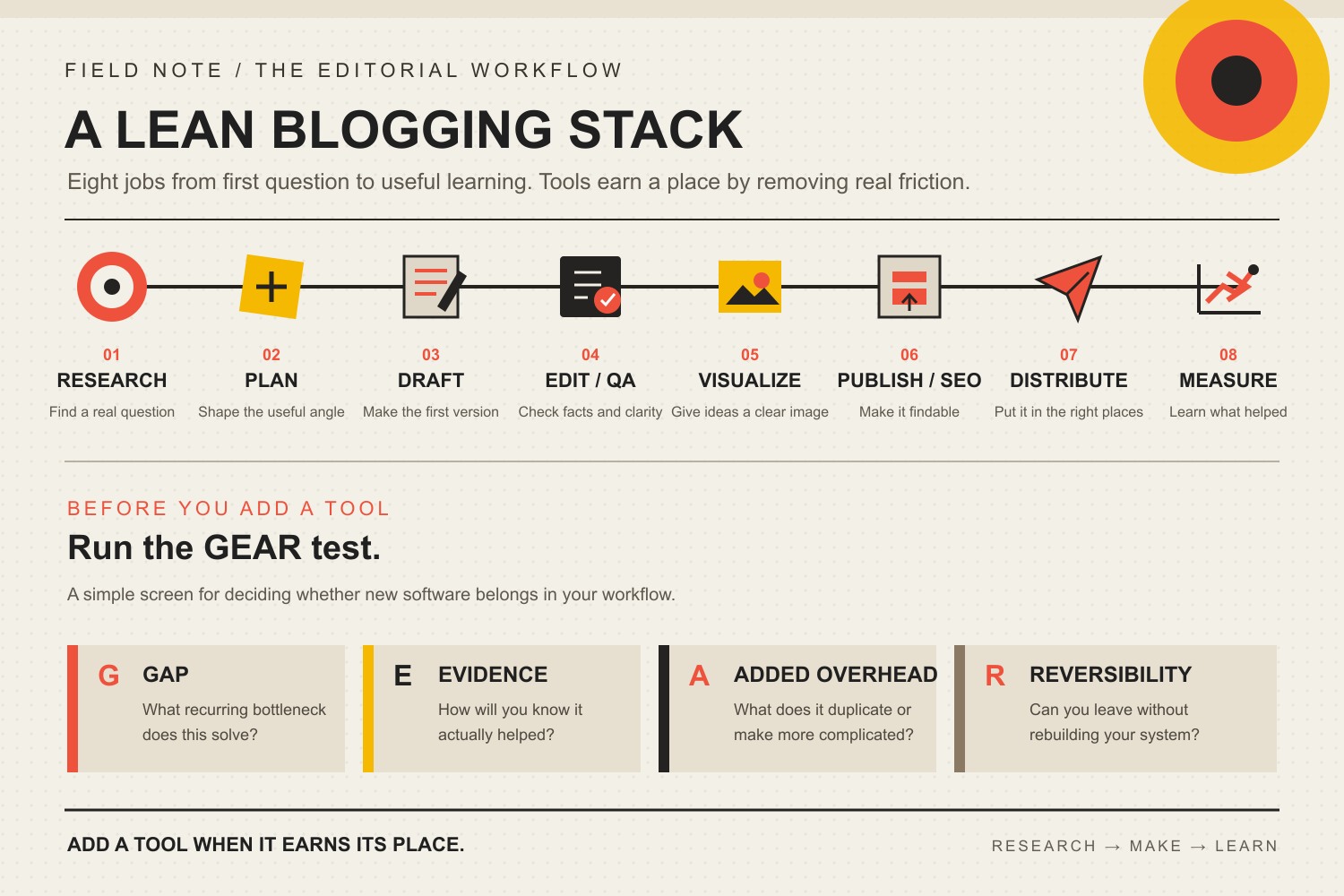
    Eight stages in a lean business blogging workflow, followed by the GEAR test: Gap, Evidence, Added overhead, and Reversibility.

    G — Gap: what recurring bottleneck does this solve?

    “It has AI” is not a gap. “Our editor spends three hours every week turning interview transcripts into structured briefs” is a gap. Name the job, the person who owns it, and the friction you are trying to remove.

    E — Evidence: how will you know it helped?

    Decide what should change before the trial starts: research time, revision cycles, publishing errors, content throughput, qualified impressions, assisted conversions, or another observable result. Hope is not an analytics strategy.

    A — Added overhead: what does it duplicate or complicate?

    Every app has a second price tag: setup, permissions, training, integrations, data cleanup, notifications, billing, and the “where the hell did we save that?” problem. If a new tool duplicates 80 percent of a system you already own, the last 20 percent needs to earn the mess.

    R — Reversibility: can you leave without rebuilding the company?

    Check exportability, content ownership, file formats, integrations, and what happens when the subscription ends. The best tool today can become an expensive hostage situation tomorrow if your data and process cannot move.

    The Eight Jobs Your Business Blogging Stack Needs to Cover

    1. Audience and keyword research tools

    Research tools should help you answer three questions: What is the customer actually asking? What page should own that intent? What evidence will make the answer useful?

    Start with Google Search, the questions and result formats you can observe directly, and Google Search Console performance data for pages you already own. Search Console is first-party evidence about how your pages and queries perform in Google Search, which makes it more useful for your own site than another generic “content score.”

    Specialist suites such as Ahrefs Keywords Explorer and Semrush keyword research tools can expand keyword discovery, competitive analysis, and prioritization. You do not automatically need both. Pay for deeper research when the volume of work, competitor analysis, or time saved makes the subscription cheaper than the bottleneck.

    Also separate topic selection from tool selection. Our business blogging practices guide covers the operating habits that make a blog useful. A keyword database cannot rescue a weak business question.

    2. Planning and source-of-truth tools

    Your planning layer needs to hold the brief, target audience, business goal, sources, outline, assignments, status, links, and next action. Google Docs, Microsoft 365, Notion, Trello, Asana, ClickUp, or a spreadsheet can all work. The brand matters less than whether the team knows where the truth lives.

    A second planning tool usually creates more drag than leverage. If sales keeps customer questions in one place, marketing keeps the calendar in another, and writers keep sources in private documents, fix the information flow before shopping for a shinier board.

    3. Drafting and AI-assisted writing tools

    A good drafting tool makes it easy to write, comment, compare revisions, preserve sources, and hand work to the next person. For many teams, the boring answer is still a collaborative document editor.

    AI tools can help with ideation, interview synthesis, outline options, first drafts, restructuring, and repurposing. They are much less trustworthy when you ask them to invent expertise, choose strategy without context, or produce factual claims without verification. If you want the deeper workflow, our ChatGPT for marketing guide focuses on defining the job, grounding the prompt, and evaluating the output instead of treating the model like a magic intern.

    The rule is simple: use AI to reduce mechanical effort, not accountability. Somebody still owns the argument, the evidence, the client voice, and the decision to publish.

    4. Editing and factual-QA tools

    Grammar and style assistants can catch friction. Commenting and version history can make collaboration less painful. Neither one proves the article is correct.

    Your real QA system should check the claim against its source, confirm dates and qualifiers, remove unsupported certainty, verify internal and external links, inspect headings and alt text, and ask whether the article does the business job defined in the brief. A polished hallucination is still a hallucination wearing a tie.

    5. Visual-content tools

    For many articles, one design tool can cover featured graphics, diagrams, social crops, and simple charts. Canva and Adobe Express are common choices. Screenshots are useful when they demonstrate a real interface or result. Custom design is worth the extra effort when the visual itself explains an original model, comparison, process, or piece of evidence.

    Do not add images because a checklist says “blog posts need images.” Add a visual when it improves comprehension. Decorative wallpaper is still wallpaper.

    6. Publishing and on-page SEO tools

    Your CMS should let you publish accessible, indexable, maintainable content without requiring a developer for every comma. If your business site already runs on WordPress, you usually do not need a second “blog platform” just because a roundup ranked one higher.

    Use one SEO layer for titles, descriptions, canonicals, robots settings, structured data, and basic content checks. Then keep the hierarchy straight. Google says its ranking systems are designed to surface helpful, reliable, people-first content. A green plugin light can expose a missed field; it cannot decide whether your explanation deserves to exist.

    7. Distribution and repurposing tools

    Publishing is not distribution. Your workflow still needs a path into email, social channels, sales conversations, customer support, and future derivative content.

    Start with the native scheduling and publishing capabilities of the channels you actually use. Add a cross-channel scheduler, transcription tool, clipping tool, or automation layer when the same handoff happens often enough to become expensive. Our RECAST content-repurposing workflow is built around adapting a strong source asset for a new audience or decision, not spraying the same paragraph everywhere and calling it omnichannel.

    8. Measurement and improvement tools

    A useful measurement stack separates three different questions: Can search engines find and understand the page? Are real people engaging with it? Does that attention contribute to a business outcome?

    Use Search Console for Google search-performance evidence, Google Analytics for event-based website behavior, and Bing Webmaster Tools as a separate first-party search signal. Then connect those systems to your actual inquiry, CRM, ecommerce, or sales process where possible.

    Do not assume analytics is a perfect lead ledger. Missing events, consent behavior, attribution rules, bot traffic, direct traffic, and handoffs into phone or email can distort the picture. Measure what the tools can support, disclose the gaps, and avoid making the dashboard sound smarter than it is.

    A Minimum Viable Business Blogging Tool Stack

    For a small business, the best blogging tool stack is often the one you can explain on a single screen. Use this as a starting architecture, not a mandatory vendor list.

    JobStart withPay for a specialist when…
    ResearchSearch + first-party search dataKeyword discovery, competitor analysis, or research volume repeatedly consumes expensive time.
    PlanningYour existing shared document/project systemHandoffs, approvals, ownership, or reporting are breaking at scale.
    DraftingCollaborative editor; AI optionalStructured production volume or specialized collaboration creates a proven gap.
    Edit + QAReview checklist + version historyEditorial volume, compliance, or multi-reviewer workflows make manual QA unreliable.
    VisualsOne design toolBrand control, complex data, custom illustration, or production volume requires more.
    Publish + SEOCMS + one SEO layerGovernance, technical SEO, integrations, or multi-site work exceed the native workflow.
    DistributionNative channelsRecurring cross-channel scheduling or repurposing is consuming measurable staff time.
    MeasurementSearch Console + GA4 + Bing Webmaster ToolsAttribution, CRM integration, dashboards, or multi-client reporting require a deeper layer.

    Notice what is missing: a requirement to buy three keyword platforms, two AI writers, four schedulers, and a productivity app whose main job is reminding you to use the productivity app.

    When Is a Paid Blogging Tool Actually Worth It?

    A paid tool earns its place when the value is concrete. Good reasons usually fall into five buckets.

    1. It saves recurring skilled time. Saving ten minutes once is not a business case. Saving four hours every month on a repeatable job might be.
    2. It gives you evidence you cannot reasonably get another way. Competitive keyword data, crawl diagnostics, brand monitoring, or specialized research can justify a paid layer.
    3. It reduces meaningful risk. Better approval, accessibility, security, backups, or compliance workflows can be worth more than raw speed.
    4. It connects systems that otherwise require manual rework. Integration is valuable when it removes a recurring handoff, not when it merely creates more synchronized clutter.
    5. It remains reversible. You can export the data, understand ownership, and leave without rebuilding the process from scratch.

    If you cannot tie the subscription to one of those outcomes, wait. Use the free or native capability until the constraint becomes obvious.

    What Our Audit of This Exact Article Taught Us

    We did not protect the old article just because it had been online for years. We audited the page the same way we would audit a client’s content before deciding what deserved to survive.

    Signal checkedObservation on August 20, 2026What it supports
    GA4, last 12 complete monthsNo Organic Search landing-page rows. Across all channels, 2 Direct sessions, 0 engaged sessions, 0 configured key events. Prior comparison returned no rows.The sample is far too small for behavior or conversion conclusions. There is no measured organic footprint forcing us to preserve unsupported copy.
    Google Search Console1 impression, 0 clicks for the exact page in the current 12-month period; no rows in the prior period. URL Inspection says the page is submitted and indexed with the established URL as canonical.Google knows the page, but demonstrated search equity is minimal. Keep the stable address and improve the page’s job instead of manufacturing a migration.
    Bing Webmaster Tools0 clicks and 0 impressions for the URL; Bing has known the page since 2024 and crawled it in July 2026. Site sitemaps report success.There is crawl history but no meaningful Bing traffic footprint to protect.
    UbersuggestNo ranking keywords or exact-URL backlinks were returned for the page.Third-party evidence also shows little page-level equity, so weak claims and a bloated tool catalog do not deserve preservation.

    That evidence does not prove blogging is worthless, that readers hated the page, or that this rewrite will rank. Scope’s analytics also has known attribution and key-event limitations. It supports a narrower editorial decision: preserve the established URL, remove claims we cannot substantiate, give the page one defensible job, and connect it to the right cluster.

    The old version included time-stamped “2025” trends, unsupported lead-generation percentages, a “most profitable niches” list, an unverified AI-adoption statistic, an arbitrary ideal word-count range, and universal “best” claims about products. Those are gone. A useful tool guide should make the decision easier, not make the copy sound certain.

    Frequently Asked Questions About Blogging Tools

    What is the best tool for blogging?

    There is no universal best tool because blogging is not one job. A CMS can publish but cannot decide the right topic. A keyword suite can research but cannot supply your expertise. An AI assistant can draft but cannot own the facts. Start by identifying the bottleneck, then choose the smallest tool that solves it.

    What blogging tools do beginners need?

    A beginner business stack can be very small: a CMS, a shared document or planning space, search and first-party search data, one design tool, one SEO layer, and basic analytics. Add specialized software after the workflow reveals a recurring constraint.

    Are free blogging tools enough for a small business?

    Often, yes, especially while the content program is small. Free and native tools can cover planning, writing, basic design, publishing, Google search reporting, Bing search reporting, and analytics. The reason to pay is not “professional bloggers pay for tools.” Pay when depth, scale, collaboration, automation, or risk reduction creates a measurable return.

    Do I need Ahrefs or Semrush for business blogging?

    No. Both are capable specialist research platforms, but neither is a prerequisite for publishing useful business content. A paid SEO suite becomes easier to justify when you perform regular keyword research, competitor analysis, backlink work, site audits, or multi-page planning and the extra data saves enough time or improves enough decisions to pay for itself.

    Should a small business use AI tools to write blog posts?

    AI can be useful for brainstorming, organizing research, drafting options, restructuring, and repetitive transformation. It should not be allowed to invent customer experience, case studies, statistics, sources, or technical certainty. Treat AI as an accelerator inside a controlled editorial workflow, not as the person accountable for the answer.

    What platform do most business bloggers use?

    The more useful question is which platform fits your existing website, ownership requirements, publishing workflow, integrations, and maintenance capacity. If your business website already has a capable CMS, splitting the blog onto another platform can create more SEO, analytics, branding, and governance work than it solves.

    How many blogging tools should a small business use?

    Use as few as possible while covering the eight jobs reliably. One product may cover several jobs. Two products may be justified for a job with different owners or requirements. The number is not the target; low friction, clear ownership, evidence, and reversibility are the target.

    How do I know whether a blogging tool is helping?

    Define the expected change before you buy it. Measure something the tool should actually influence: hours saved, errors reduced, approval cycles shortened, pages researched, qualified impressions gained, content reused, or attributable business actions. If you cannot connect the tool to a result after a reasonable trial, remove it or redefine the job.

    Your Tool Stack Should Get Smaller as the System Gets Clearer

    A mature content operation does not necessarily have more software. It has clearer ownership, cleaner evidence, better handoffs, and fewer mystery subscriptions. The best stack is boring in the right places.

    Start with the eight jobs. Run every new purchase through GEAR. Keep the systems that create evidence or remove recurring friction, and kill the ones that mostly create tabs.

    If the bottleneck is bigger than software — unclear topics, weak search ownership, inconsistent production, disconnected analytics, or no conversion path — Scope Design’s content and SEO work can help diagnose the system before you buy another tool to treat the symptom.

  • How Long Should a Blog Post Be for SEO? Depth Beats Word Count

    How Long Should a Blog Post Be for SEO? Depth Beats Word Count

    How long should a blog post be? Long enough to complete the reader’s job, and no longer. Google explicitly says it has no preferred word count, so a 3,000-word post does not earn SEO value merely by being long. Long-form content can still perform well when the topic genuinely needs depth, evidence, examples, and connected answers. The extra words are the byproduct, not the strategy.

    TL;DR: How long should a blog post be?

    • There is no magic SEO word count. Google says it does not have a preferred word count.
    • Long-form content helps only when the reader’s question actually requires depth.
    • Choose length by the decision, evidence, and subquestions the page needs, then trim anything that does not improve the answer.
    • Use internal links to connect the article to the rest of the reader’s journey instead of forcing every adjacent topic onto one page.
    • Measure visibility, engagement, and qualified outcomes separately. A bigger article is not automatically a better business asset.

    Our shorthand is simple: word count is the receipt, not the strategy. If a useful answer happens to take 700 words, publish 700 good words. If a complicated comparison needs 3,500, earn every one of them.

    Long-form content can help SEO, but not because it is long

    A lot of long-form SEO advice starts with a correlation and quietly turns it into a rule. Longer pages may cover more subtopics, attract links, answer more follow-up questions, or give a writer more room to demonstrate expertise. Those are real possibilities. None of them mean the word count itself caused the result.

    Google’s people-first content guidance is unusually clear here. It asks whether you are writing to a particular word count because you heard Google prefers one, then answers the premise directly: it does not. That should kill the idea of a universal “ideal blog length” as an SEO target.

    So what does “long-form” mean? We use it as a practical description, not a ranking threshold: a page is long-form when the reader’s problem genuinely requires multiple sections, supporting evidence, examples, comparisons, or follow-up answers. A detailed buying guide may need that. A definition of one term probably does not.

    Padding a thin idea to 2,000 words is not optimization. It is a short answer wearing a trench coat.

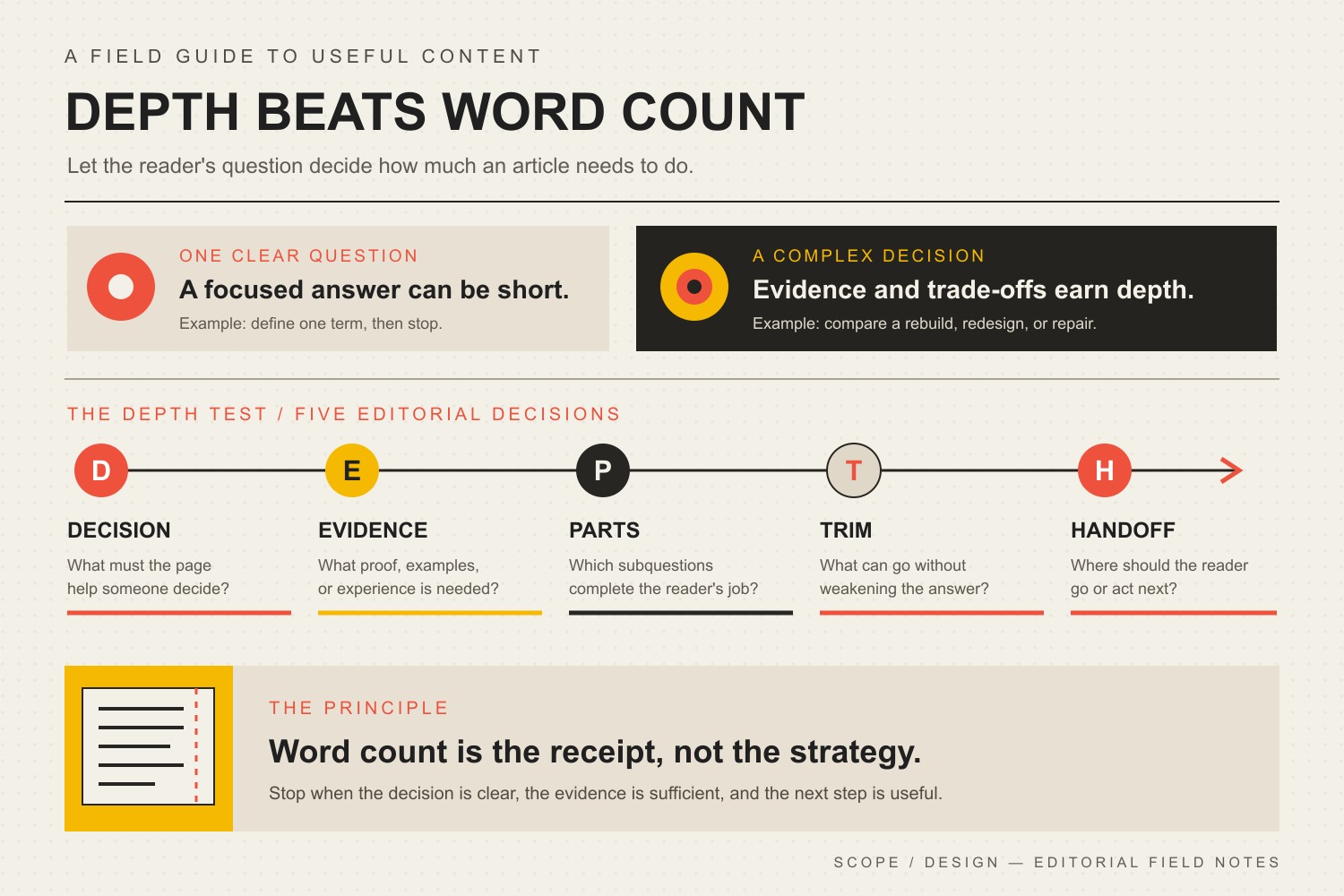
    How long should a blog post be for SEO? Use the DEPTH Test

    Before setting a target length, run the topic through Scope Design’s DEPTH Test. It forces the article to earn its depth instead of treating verbosity as a feature.

    The DEPTH test: define the Decision, gather Evidence, map necessary Parts, Trim what does not help, and plan the Handoff.
    DEPTH stepQuestion to askWhat it does to length
    D — DecisionWhat question or decision must this page resolve?Prevents a broad topic from swallowing three different articles.
    E — EvidenceWhat proof, examples, sources, or first-party experience does the answer need?Adds depth only where proof reduces uncertainty.
    P — PartsWhich subquestions are necessary to complete the reader’s job?Creates useful sections instead of keyword-shaped filler.
    T — TrimWhat can you remove without weakening the answer?Cuts repetition, tangents, and ceremonial introductions.
    H — HandoffWhat is the next useful page, action, or measurement?Lets internal links and next steps carry adjacent jobs instead of bloating this page.

    Imagine two topics. “What does a 301 redirect do?” may be answered well in a focused article under 1,000 words. “Should our company rebuild, redesign, or keep repairing a ten-year-old website?” may need technical tradeoffs, cost ranges, ownership questions, examples, and a decision model. The second answer is longer because the decision is harder, not because Google awarded bonus points at word 2,001.

    What our audit of this exact long-form article found

    We did not rewrite this page from theory alone. Before revising it, we checked the exact URL across GA4, Google Search Console, Bing Webmaster Tools, Ubersuggest, the current search results, and Scope Design’s content graph.

    Signal checkedObservation on August 20, 2026What it actually supports
    GA4, last 12 complete months15 landing sessions, all Direct; 2 engaged sessions; 0 configured key events; no Organic Search landing row.The sample is too small and attribution too uncertain for behavior conclusions. There is no measured organic footprint forcing us to preserve weak legacy copy.
    Google Search ConsoleNo exact-page query rows in the current or prior 12-month period. URL Inspection reports “Crawled – currently not indexed.” Indexing is allowed and Google selected the same canonical we declared.The page is technically crawlable, but public existence did not equal demonstrated search visibility.
    Bing Webmaster Tools0 clicks and 0 impressions for the exact URL. Bing recognizes the page and has crawl history.There is no meaningful Bing traffic footprint to protect.
    UbersuggestNo exact-page ranking keywords and no exact-URL backlinks returned.Third-party evidence also shows no strong page equity requiring the old angle or statistics to survive.
    Current query demandUbersuggest estimates 590 monthly U.S. searches for “how long should a blog post be.”The direct reader question is a clearer content job than the legacy “SEO juice” framing. The estimate is directional, not a traffic promise.

    The old article already had about 1,400 words. That word count did not magically create measurable organic visibility. This does not prove the topic is bad, that readers hated the page, or that this revision will rank. It proves something narrower and more useful: length by itself was not doing the job.

    We kept the established URL because it is a known, self-canonical address with crawl history. A weak SEO plugin warning is not a good reason to create redirect risk. We changed the page’s job instead: answer the length question directly, remove claims we cannot defend, and connect it to the right content system.

    When is longer content worth the cost?

    Longer content is worth producing when additional depth changes the reader’s ability to understand, compare, trust, or act. Four situations commonly justify the extra work.

    1. The reader is making a complex or expensive decision

    A high-stakes service comparison needs more than a definition. Readers may need costs, tradeoffs, implementation questions, ownership issues, risks, examples, and a way to evaluate fit. If leaving out one of those pieces creates a predictable sales objection, the section probably earns its place.

    2. The process has real steps, branches, or failure points

    A useful tutorial may need setup, prerequisites, screenshots, troubleshooting, edge cases, and a clear finish state. Compressing that into 500 words can make the page shorter while making the task harder.

    3. Evidence matters more than assertion

    When readers are skeptical, more evidence can be more useful than more persuasion. First-party measurements, transparent methodology, authoritative sources, examples, and limitations take space. That is productive length because it helps the claim survive inspection.

    4. The article is a durable source asset

    A deep article can become the source for a sales brief, social posts, FAQs, a presentation, an email sequence, or a short video. That only works when the source contains real knowledge worth transforming. Our content repurposing workflow treats the durable source as evidence to recast for different audience moments, not a pile of sentences to resize.

    When is short content better?

    Short content wins when the reader’s job is narrow. A single definition, a concise policy update, an event announcement, a specific support answer, or a tightly targeted landing page may become worse when you bolt on history lessons and twelve “related” questions.

    • One question, one clear answer: do not turn it into an encyclopedia.
    • Time-sensitive update: speed and accuracy may matter more than exhaustive context.
    • Transactional page: the job may be to remove friction and help someone act, not teach the whole category.
    • Existing cluster coverage: link to the article that already owns the adjacent topic instead of duplicating it.

    This is why the broader business blogging system and this article should remain separate. The broader guide owns the operating system. This page owns one decision inside it: how much depth a blog post actually needs.

    What actually gives deep content more SEO upside?

    Match the search intent completely

    The page should solve the question the searcher actually asked. That may require a direct answer, definitions, comparisons, objections, examples, and next steps. It does not require every related keyword a research tool can produce. Completeness is about the reader’s job, not semantic confetti.

    Add evidence and information another page cannot fake

    Original analysis, first-party data, implementation experience, a transparent framework, or a useful synthesis gives a long page a reason to exist. Rewriting the same ten search results with more adjectives does not.

    Make the answer easy to find

    Long does not have to mean slow. Put the direct answer near the top. Use descriptive headings that make sense out of context. Use a table when the reader is comparing a real relationship. Use an image when the visual reduces explanation. Then let people go deeper only when they need to.

    A useful cluster lets one article stay focused. This page does not need to teach the entire small business marketing strategy, the complete blogging process, organic acquisition, repurposing, and AI search optimization inside one monster page. It can explain its own decision well and link to the next useful owner.

    Make claims easy to verify in AI search too

    Google’s current guidance for AI search still emphasizes unique, valuable content for people, a good page experience, and technical accessibility. There is no special 2,000-word switch that makes a page citable. If AI visibility matters, focus on clear answers, explicit entities, original information, source-backed claims, and technical access. Our broader guide to AI search optimization and citation readiness covers that system in more depth.

    See Google’s current guidance directly: Top ways to ensure your content performs well in Google’s AI experiences on Search.

    How do you structure long-form content without turning it into sludge?

    1. Answer first. Do not make a reader survive 400 words of scene-setting before you tell them what you think.
    2. Give every section one job. A heading should answer a question, reduce uncertainty, provide evidence, expose a tradeoff, or move the decision forward.
    3. Use examples where abstraction gets slippery. One concrete example can replace three paragraphs of marketing fog.
    4. Make evidence visible. Link to original sources beside the claim and label your own measurements honestly.
    5. Use visuals to compress explanation. The DEPTH graphic above does more work than another page of prose about the framework.
    6. Trim repetition on purpose. If two sections make the same point with different keywords, merge them.
    7. Design the next step. Link to the page that owns the next question instead of expanding forever.

    That last step matters. A good article is part of a system, not a content guilt machine. If you need the complete workflow around research, publishing, distribution, refreshing, and measurement, use our small business blogging guide.

    Internal linking: depth needs a place in the content system

    Internal links are not decorations added five minutes before publishing. They are how you let pages specialize. This article can own the length-and-depth decision because other pages own adjacent jobs.

    • Use the small business marketing strategy pillar when the real question is where content fits in the larger acquisition system.
    • Use the business blogging guide when the problem is the ongoing blog workflow.
    • Keep visibility, engagement, action, and qualified outcomes as separate measurement layers so a ranking does not get mistaken for a business result.
    • Use the content repurposing guide when a strong long-form source should be transformed for another audience moment.

    That is better than stuffing all four topics into this page until “comprehensive” becomes another word for “unfocused.”

    How do you measure whether long-form content is working?

    Do not grade a long article by its length after publishing. Grade it by the job it was supposed to do.

    LayerUseful evidenceWhat it tells you
    Technical accessHTTP status, indexability, canonical, crawl/index statusWhether search systems can reasonably access and understand the page.
    VisibilityQueries, impressions, positions, citations, mentionsWhether the page is appearing for relevant questions.
    EngagementEngaged sessions, useful clicks, scroll behavior when availableWhether real visitors use the page rather than merely land on it.
    ActionRelevant CTA clicks, forms, calls, downloads, next-page visitsWhether the content moves the intended journey forward.
    Qualified outcomeQualified leads, pipeline, sales, appointments, retained customers, saved staff effortWhether the result mattered to the business.

    Traffic and rankings are useful diagnostic signals. They are not the finish line. Use qualified outcomes to decide whether the content deserves more investment.

    Frequently asked questions about blog post length and SEO

    How long should a blog post be for SEO?

    Long enough to answer the searcher’s question completely and no longer. Google says it has no preferred word count. For a simple question, that may be under 1,000 words. A complex guide or comparison may need several thousand. Use the reader’s decision and evidence needs to determine length, not a universal target.

    Is 2,000 words a lot for a blog post?

    It can be a lot for a narrow question and not nearly enough for a complicated topic. Two thousand words is a production number, not a quality diagnosis. If the page repeats itself to reach 2,000, it is too long. If readers still need critical evidence at 2,000, it may be too short.

    Is a 3,000-word blog post too long?

    No, not automatically. A 3,000-word post is appropriate when each section does useful work and the topic genuinely requires that depth. It is too long when the reader has the answer at 900 words and the remaining 2,100 exist to satisfy a template.

    Does Google prefer long-form content?

    Google does not publish a preferred word count. Its current guidance emphasizes helpful, reliable, people-first content. A longer page can be useful when it answers a more complex intent, but length itself should not be treated as a ranking factor or guarantee.

    Some industry studies have found correlations between longer pages and more links, but correlation is not a reason to pad an article. A page earns links because it contains something useful to reference: original data, a strong explanation, a tool, a framework, a source, or a distinctive example. Length may accompany those assets without causing the links.

    Can AI-generated long-form content rank?

    AI can assist research, outlining, drafting, and editing, but producing more machine-written words is not a strategy. Google’s guidance focuses on content quality and purpose rather than whether a tool helped create it. A human still needs to own the facts, experience, examples, positioning, source verification, and final judgment.

    Should every blog post be long-form?

    No. Different reader jobs require different formats. A narrow FAQ, announcement, definition, comparison, case note, checklist, or landing page can be short and excellent. Make the content as deep as the job requires, not as long as the calendar demands.

    Is blogging dead because of AI?

    No. Generic commodity articles are easier than ever to produce, which makes original evidence, experience, clear answers, and useful tools more important. Google’s AI-search guidance explicitly continues to encourage unique, valuable content that fulfills people’s needs.

    How often should long-form content be updated?

    Update it when the answer, evidence, product behavior, law, market, links, search intent, or business context has materially changed. Do not change the date just to make old content look fresh. A useful refresh should improve the page, not repaint the timestamp.

    The bottom line: depth beats word count

    Long-form blog content can translate into more SEO value when the extra depth helps a real person complete a real job. It can answer a complicated question more completely, support claims with evidence, connect related decisions, and create something worth referencing. None of that requires pretending Google hands out rankings by the pound.

    Use the DEPTH Test before you write: define the Decision, gather the Evidence, map the necessary Parts, Trim what does not help, and design the Handoff. Then stop when the reader has what they need.

    If your blog is full of old posts built around arbitrary word counts, unsupported statistics, and no clear place in the marketing system, the useful next step is not “write more.” Audit what each page is supposed to do, what evidence it can defend, and where it belongs. That is the kind of content strategy Scope Design builds into the broader small business marketing system.

  • 301 Redirects for SEO: Move URLs Without Making a Mess

    301 Redirects for SEO: Move URLs Without Making a Mess

    301 redirects tell browsers and search engines that a URL has moved permanently to a genuinely equivalent new address. A 301 redirect can preserve the relationship between the old page and its replacement, but it is not a magic hose for spraying “SEO value” at whatever page you like. If the destination does not satisfy the same user intent, the redirect is bullshit with a status code.

    TL;DR: Use a 301 or 308 when an old URL has a permanent, relevant successor. Use a 302 or 307 when the move is temporary. Consolidate overlapping pages only when one stronger page honestly replaces them. Return 404 or 410 when content is gone and no useful equivalent exists. Then update internal links, canonicals, sitemaps, and other references so the redirect is a safety net—not your site’s permanent navigation system.

    This guide is part of Scope Design’s broader SEO strategy and analytics framework. That pillar connects search visibility to qualified business outcomes. This article handles the narrower technical decision: what should happen when a URL changes or disappears?

    In this guide

    What Is a 301 Redirect?

    A 301 is an HTTP response status meaning Moved Permanently. When someone requests the old URL, the server responds with the new location, and the browser requests that destination instead.

    Google describes permanent redirects as a signal that the new target should become canonical and recommends server-side permanent redirects when a page’s URL has permanently changed. Google currently recognizes both 301 and 308 as permanent server-side redirects. Read Google’s redirect documentation.

    That definition sounds simple because the code is simple. The judgment is not.

    The real question is not, “Can we redirect this URL?” It is, “Does this destination replace what the visitor and search engine expected to find?”

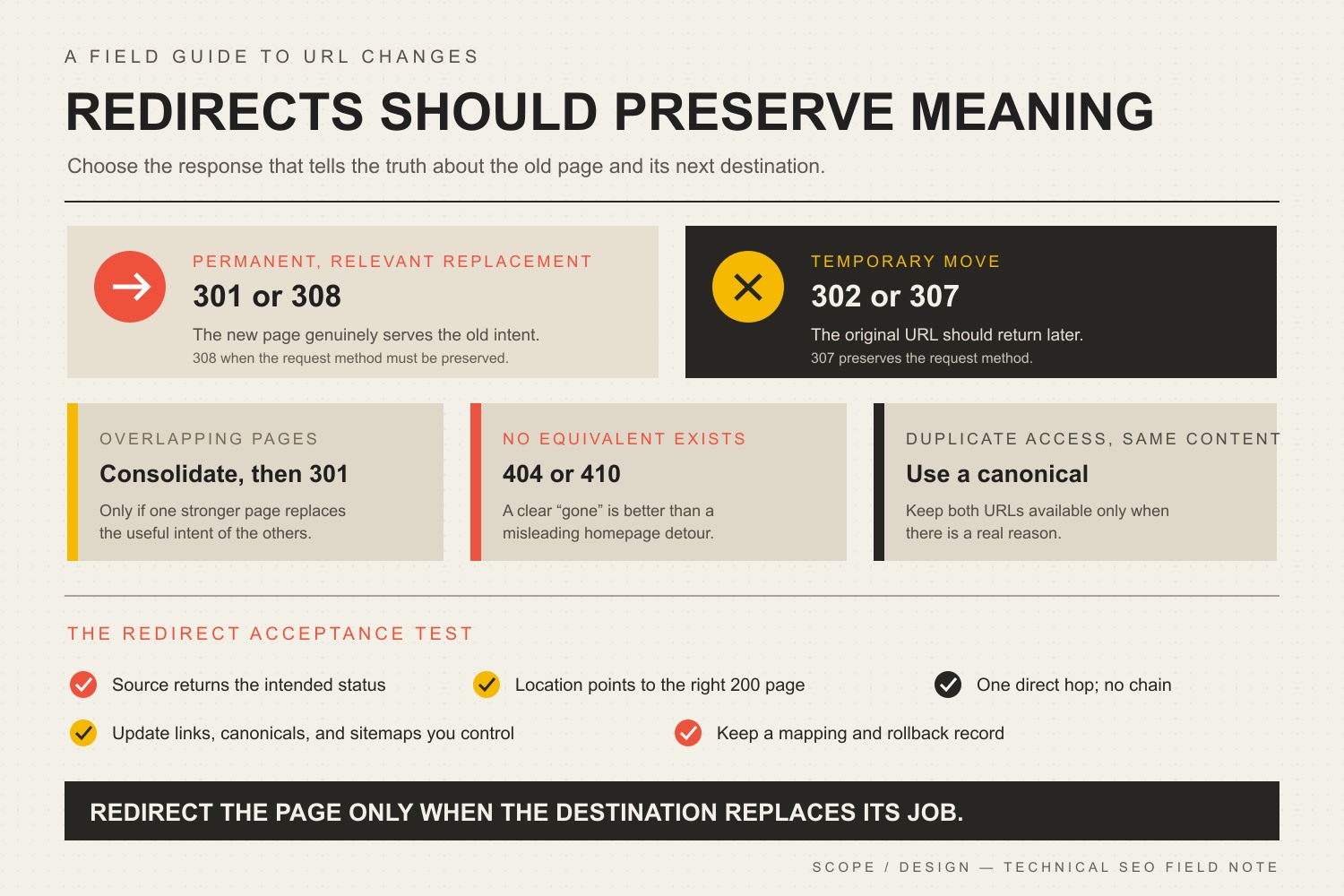
    The Scope Design Redirect Decision Map

    A redirect is a documented claim that the old URL and the new destination serve the same intent. Make that claim honestly.

    Redirect decision map: use 301 or 308 for a permanent relevant move, 302 or 307 for a temporary move, consolidate only overlapping intent, use 404 or 410 when no equivalent exists, and canonicalize duplicate access to the same content.
    SituationCorrect responseDecision rule
    The same page has a permanent new URL301 or 308The new destination replaces the old resource and should become the indexed URL.
    The move is temporary302 or 307The original URL should remain the long-term address and the change will be reversed.
    Several overlapping pages now have one stronger replacementConsolidate, then 301The destination meaningfully covers the useful intent of every retired page.
    The content is gone and has no equivalent replacement404 or 410Do not manufacture relevance by dumping the visitor onto the homepage.
    Two accessible URLs must remain but represent substantially the same contentCanonicalizeKeep both available when there is a real reason, but identify the preferred version consistently.
    The destination changed againUpdate to one direct hopPoint every old address directly to the final current URL.

    This is the difference between redirect management and a junk drawer full of old slugs.

    Does a 301 Redirect Affect SEO?

    Yes, because a permanent redirect changes how search engines understand the relationship between URLs. It also affects users, crawling, canonicalization, internal architecture, referral traffic, and the usefulness of old links.

    The good news is less dramatic than most SEO folklore. Google states that 301s and other permanent redirects do not cause a loss of PageRank during a site move. That does not mean every irrelevant redirect inherits the old page’s rankings, converts perfectly, or becomes immune to bad mapping. Google’s site-move guidance warns against sending many old URLs to one irrelevant destination, such as the homepage, because those redirects can confuse users and may be treated as soft 404s.

    So stop asking what percentage of “link juice” transfers. That framing makes a serious information-architecture decision sound like a beverage problem.

    Ask instead:

    • Does the destination answer the reason the old URL earned attention?
    • Is it accessible, indexable, self-canonical, and internally linked?
    • Does the redirect go directly to the final destination?
    • Have navigation, body links, sitemaps, ads, profiles, and important external references been updated?
    • Can we verify the response, destination, and downstream business behavior?

    Our guide to improving a page’s Google rankings explains why technical eligibility is only one constraint. A redirect can preserve a useful path. It cannot make an irrelevant or mediocre destination deserve visibility.

    301 vs. 302, 307, and 308 Redirects

    The correct status depends on permanence and, in some technical cases, whether the redirected request method must remain unchanged.

    Use 301 for a normal permanent page move

    Use a 301 when a page, article, file, category, or domain has a permanent replacement. This is the common business-website case: a slug changes, two articles are consolidated, HTTP moves to HTTPS, or an old domain moves to a new one.

    Use 308 for a permanent move that must preserve the request method

    A 308 is also permanent. The important technical difference is that the client must preserve the request method and body. That matters for redirects involving POST requests, forms, uploads, APIs, or other non-GET behavior. MDN’s 308 reference explains this method-preservation behavior.

    For an ordinary editorial page requested with GET, a 301 is usually the familiar and appropriate choice. Do not choose a status code because it sounds newer. Choose it because it describes the behavior.

    Use 302 or 307 for a temporary move

    Use a temporary redirect when the original URL should remain the long-term address. Examples include temporary maintenance, an unavailable service, a short campaign test, or a temporary regional destination.

    Google says temporary redirects generally signal that the source URL should remain the canonical one. Use 307 instead of 302 when preserving the request method and body matters. MDN’s 307 reference documents the method-preserving behavior.

    Use 404 or 410 when there is no replacement

    A 404 means the server cannot find the requested resource without asserting whether the absence is permanent. A 410 means the resource is intentionally and permanently gone. MDN’s 404 reference and 410 reference make that distinction explicit.

    Neither is inherently an SEO failure. An intentional 404 or 410 is more accurate than redirecting an obsolete page to an unrelated service, category, or homepage. A custom 404 page can help the person recover, but the HTTP response should still tell the truth.

    When Should Old Content Be Consolidated?

    Consolidate when multiple URLs compete to answer substantially the same question and one page can become the complete, maintained owner of that intent.

    Good consolidation:

    • combines complementary information instead of deleting the useful half;
    • preserves the strongest existing URL when practical;
    • maps every retired page to a destination that covers its real subject;
    • updates internal links at their source;
    • retains recoverable copies and a redirect register;
    • measures what happens after the change.

    Bad consolidation is deleting six vaguely related articles, redirecting all six to a generic pillar, and calling the resulting silence “topical authority.”

    For a redesign or larger migration, our website redesign checklist expands this into a full URL-disposition inventory: keep, improve, merge, redirect, retire with 404/410, or create a genuinely missing page. This article stays focused on the redirect decision and the verification that follows it.

    That same discipline belongs in any SEO content cluster: pillars organize broad decisions, supporting articles resolve narrower questions, and redirects protect the relationship when ownership changes.

    Why Redirect Chains Are a Maintenance Problem

    A redirect chain happens when an old URL points to another redirected URL before reaching the final page:

    Old A → Old B → Current C

    Google can follow multiple hops, but its site-move guidance recommends redirecting to the final destination directly and keeping unavoidable chains low. Every extra hop adds another request and another place for migrations, plugins, caches, crawlers, or future administrators to get confused.

    The practical distinction is simple:

    • Internal links should point directly to the current URL.
    • Redirects should remain to protect traffic you do not control.

    A working redirect is not permission to leave avoidable hops scattered through the site forever.

    How to Implement a 301 Redirect Without Breaking Things

    The tool varies by platform. The operating method should not.

    1. Inventory the old URLs

    Use more than the current sitemap. Review analytics landing pages, Google Search Console and Bing Webmaster Tools, server logs, backlink data, the CMS database or content export, internal-link crawls, campaign and profile URLs, PDFs and other files, and previous redirect records.

    An old URL with no current sitemap entry can still have links, bookmarks, search impressions, or paying humans using it.

    2. Map each old URL by intent

    Create an explicit old-to-new mapping. Do not rely on a broad wildcard unless the URL structure and destination structure genuinely correspond.

    For each source URL, record the current response, intended destination or 404/410 decision, reason for the mapping, available traffic/search/backlink evidence, redirect type, implementation layer, verification result, owner, and review date.

    3. Preserve a rollback record

    Before a bulk change, save the current rules, affected content, hashes or exports, and expected replacement counts. Redirect mistakes can be fixed quickly only when you know exactly what changed.

    4. Implement the redirect at a reliable layer

    Google recommends server-side redirects when possible. Depending on the environment, that might be the web server, CDN, hosting control panel, application, CMS, or a WordPress redirect manager.

    WordPress plugins can be perfectly appropriate when they are maintained, controlled, exported, and included in the site’s operational ownership. The problem is not “plugin versus code.” The problem is a redirect living in a mystery layer nobody remembers during the next migration.

    5. Update every signal you control

    After the redirect exists, update internal links, canonical tags, XML sitemaps, hreflang annotations when applicable, structured-data URLs, image and file references, navigation and breadcrumbs, ads, email templates, profiles, QR codes, and important external links when the publisher will change them.

    Google’s migration documentation specifically recommends updating internal links and the new page’s canonical annotations. The redirect catches leftovers; it should not become the architecture.

    6. Test the response without automatically following it

    Verify the first response before checking the final page. A browser that silently follows redirects can make a chain look like a clean success.

    • Confirm the source returns the intended 301, 302, 307, or 308.
    • Confirm the Location header is correct.
    • Confirm the destination resolves with 200.
    • Confirm there is no unnecessary intermediate hop.
    • Check HTTP/HTTPS and www/non-www behavior.
    • Keep or remove query strings intentionally.
    • Test forms, checkout, APIs, and non-GET requests when relevant.
    • Confirm the destination is indexable and self-canonical when appropriate.

    7. Monitor after launch

    Watch crawling, indexing, search impressions, landing-page traffic, server errors, conversions, and redirect hits. Significant site moves can produce temporary ranking fluctuations while search engines recrawl and process individual URLs. That is a reason to monitor calmly, not rewrite everything three days later because a chart wiggled.

    Our guide to diagnosing Google ranking changes provides a broader triage process for separating migrations, technical failures, demand changes, competition, and algorithm updates.

    The Scope Design Redirect Acceptance Test

    A redirect is not finished when the rule exists. It is finished when the intended path and the surrounding signals can be verified.

    CheckPass conditionWhat a failure usually means
    Source responseThe old URL returns the intended 301/308 or temporary status.The rule is missing, overridden, cached incorrectly, or implemented in the wrong layer.
    Location headerIt points to the exact intended current URL.The mapping is wrong or a generic rule is catching more than intended.
    Redirect hopsThe source goes directly to the final destination whenever practical.Legacy rules were stacked instead of updated.
    Final responseThe destination returns 200 and renders the expected resource.You created a redirect to another error, redirect, or unavailable page.
    Canonical/indexabilityThe final page is indexable and self-canonical when it is meant to rank.The redirect and canonical signals disagree.
    Controlled referencesInternal links, sitemap entries, navigation, structured data, and other references use the final URL.The redirect is being used as permanent internal plumbing.
    Request behaviorQuery strings, methods, bodies, forms, APIs, and checkout behavior work as intended.The chosen status or implementation changed request behavior.
    MonitoringErrors, crawl/index signals, landing traffic, and business actions are watched after launch.You can prove the rule exists but not whether the migration worked.

    This test separates implementation proof from outcome proof. A clean 301 and final 200 prove that the redirect path works. They do not prove that rankings, traffic, or conversions will remain identical. Those outcomes require subsequent data.

    How Scope Design Approaches Redirect Recovery

    Redirect work is usually boring when it succeeds. That is a compliment.

    Our operating pattern is evidence-first:

    • identify legacy URLs from analytics, search tools, crawls, logs, backlinks, or the CMS;
    • verify the source’s real public response before changing anything;
    • verify that the proposed destination exists and serves the same useful intent;
    • check existing redirect systems so a new rule does not collide with an old one;
    • preserve a recoverable record of rules and affected content;
    • implement the narrowest reliable mapping;
    • verify the source status and Location header without following the redirect;
    • follow the path and verify the final destination separately;
    • update internal references instead of forcing the redirect to handle traffic we control;
    • monitor the result without claiming an SEO lift before the data exists.

    The standard is unglamorous: find recoverable intent, map it honestly, change only what you can audit, and verify the whole path.

    Common 301 Redirect Mistakes

    Redirecting everything to the homepage

    The homepage is not the universal replacement for every dead page. Google warns that irrelevant mass redirects may be treated as soft 404s. More importantly, they annoy humans who expected a specific answer.

    Changing slugs for cosmetic reasons

    Removing a year from an evergreen title does not require changing its established URL. Preserve the slug unless the change solves a real problem. A cleaner-looking address is rarely worth creating migration work and risk.

    The redirect protects uncontrolled references. Update the links you own to point directly to the final destination.

    Creating redirect chains during every redesign

    When Page A previously moved to Page B and Page B now moves to Page C, update A to point directly to C. Keep the old source coverage, lose the unnecessary middle hop.

    Redirecting unrelated deleted content

    If no equivalent exists, return 404 or 410. Accuracy beats a fake connection.

    Forgetting files and images

    PDFs, images, videos, feeds, and downloadable resources can have search visibility and external links. Include them in migration mapping when they move.

    Testing only in a browser

    Browsers follow redirects so politely that they can hide the mess. Inspect the status and Location header directly, then verify the destination.

    Deleting redirects after a few months

    Google recommends keeping redirects for as long as possible, generally at least one year, and suggests considering indefinite retention for users. Scope Design’s default is to retain valid permanent redirects unless there is a documented operational reason not to.

    301 Redirect Checklist

    • Confirm that the move is permanent.
    • Confirm that the destination genuinely replaces the old intent.
    • Preserve the existing rules and affected content before changing anything.
    • Use a server-side 301 or 308 when practical.
    • Point directly to the final 200 destination.
    • Update internal links, canonicals, sitemaps, structured data, and other references.
    • Verify the source status and Location header without following redirects.
    • Verify the final destination with redirect following enabled.
    • Check query strings, forms, mobile behavior, files, and alternate URL versions.
    • Record the mapping, implementation layer, owner, and verification date.
    • Monitor search, traffic, errors, and business actions.
    • Keep valid permanent redirects for at least a year and preferably longer when the old reference can still reach users.

    Frequently Asked Questions About 301 Redirects and SEO

    When should I use a 301 redirect?

    Use a 301 when a URL has permanently moved and there is a relevant replacement that should become the preferred address. Common cases include slug changes, permanent domain moves, HTTP-to-HTTPS migrations, and consolidation of overlapping pages.

    Is a 301 redirect better for SEO than a 302?

    Neither is universally “better.” A 301 accurately describes a permanent move; a 302 accurately describes a temporary one. The SEO-friendly choice is the status that tells the truth about the move.

    Does a 301 redirect pass all SEO value?

    Google says permanent redirects do not cause a loss of PageRank in a site move. That does not guarantee the destination will keep every ranking, query association, conversion, or traffic level. Relevance, content, indexing, internal signals, competition, and user intent still matter.

    How long should a 301 redirect remain active?

    Google recommends keeping redirects for as long as possible and generally at least one year. For users, Google suggests considering indefinite retention. Scope Design normally keeps valid permanent redirects unless the old domain or infrastructure cannot reasonably be maintained.

    Are redirect chains bad for SEO?

    They are avoidable technical debt. Google can follow multiple hops but recommends redirecting directly to the final destination and keeping chains low. Chains add requests and create more failure points, so update old rules and internal links to use one direct hop whenever practical.

    Should every deleted page redirect somewhere?

    No. Redirect only when a relevant successor exists. If the content is gone and nothing genuinely replaces it, a proper 404 or 410 is more accurate than sending the user somewhere unrelated.

    Should I redirect old blog posts to a category or pillar page?

    Only if that category or pillar meaningfully replaces the old post’s useful intent. A broad topic relationship is not enough. If the visitor searched for a specific answer and lands on a generic index, the mapping is probably weak.

    Can I use a WordPress redirect plugin?

    Yes. A maintained WordPress redirect tool can be a sensible implementation layer, especially when rules need to be visible and manageable by the site team. Export or document the rules, avoid overlapping redirect systems, and verify the actual public HTTP response.

    Yes. Internal links should point directly to current URLs. This reduces unnecessary requests, prevents chains, clarifies site architecture, and stops a temporary implementation detail from becoming permanent clutter.

    Does changing an article title require a redirect?

    No. You can usually change the title and H1 while preserving the existing slug. Scope Design removes obsolete years from evergreen titles without changing established URLs solely for cosmetic consistency.

    How do I check whether a 301 redirect works?

    Inspect the source response with redirect following disabled, confirm the status and Location header, then follow the redirect and verify that the final page returns 200. Also check that the destination is the intended canonical page and that there are no unnecessary intermediate hops.

    Redirects Should Preserve Meaning, Not Hide a Mess

    A responsible redirect strategy preserves useful relationships between old and current content. It does not force every dead URL into a living page so the audit spreadsheet looks cleaner.

    If your site has years of migrations, overlapping articles, broken links, conflicting redirect tools, or search traffic landing on the wrong pages, Scope Design can map the system before changing it. Review our SEO services or contact Scope Design to start with the evidence instead of another plugin-shaped guess.

    Sources

  • Video Marketing Strategy: 15 Practical Moves That Drive Business Growth

    Video Marketing Strategy: 15 Practical Moves That Drive Business Growth

    A strong video marketing strategy does not start with TikTok, YouTube, a camera, or a production budget. It starts with a business problem and a customer decision. The job of the video is to help the right person understand something, trust something, or do something—and then give that person a useful next step.

    That is the difference between “making video” and using video to support growth. A clip can earn thousands of views and still do nothing for the business. A modest FAQ, demo, testimonial, or sales video can be valuable with a much smaller audience if it removes friction from a real buying decision.

    • Start with the constraint: awareness, understanding, trust, conversion, sales friction, onboarding, or retention.
    • Give each video one job: answer one meaningful buyer question and point to one relevant next step.
    • Measure two layers: one video diagnostic and one business signal.
    • Improve the chain: use what you learn to choose the next test instead of blindly producing more.

    The Video Growth Chain: How Video Earns Business Value

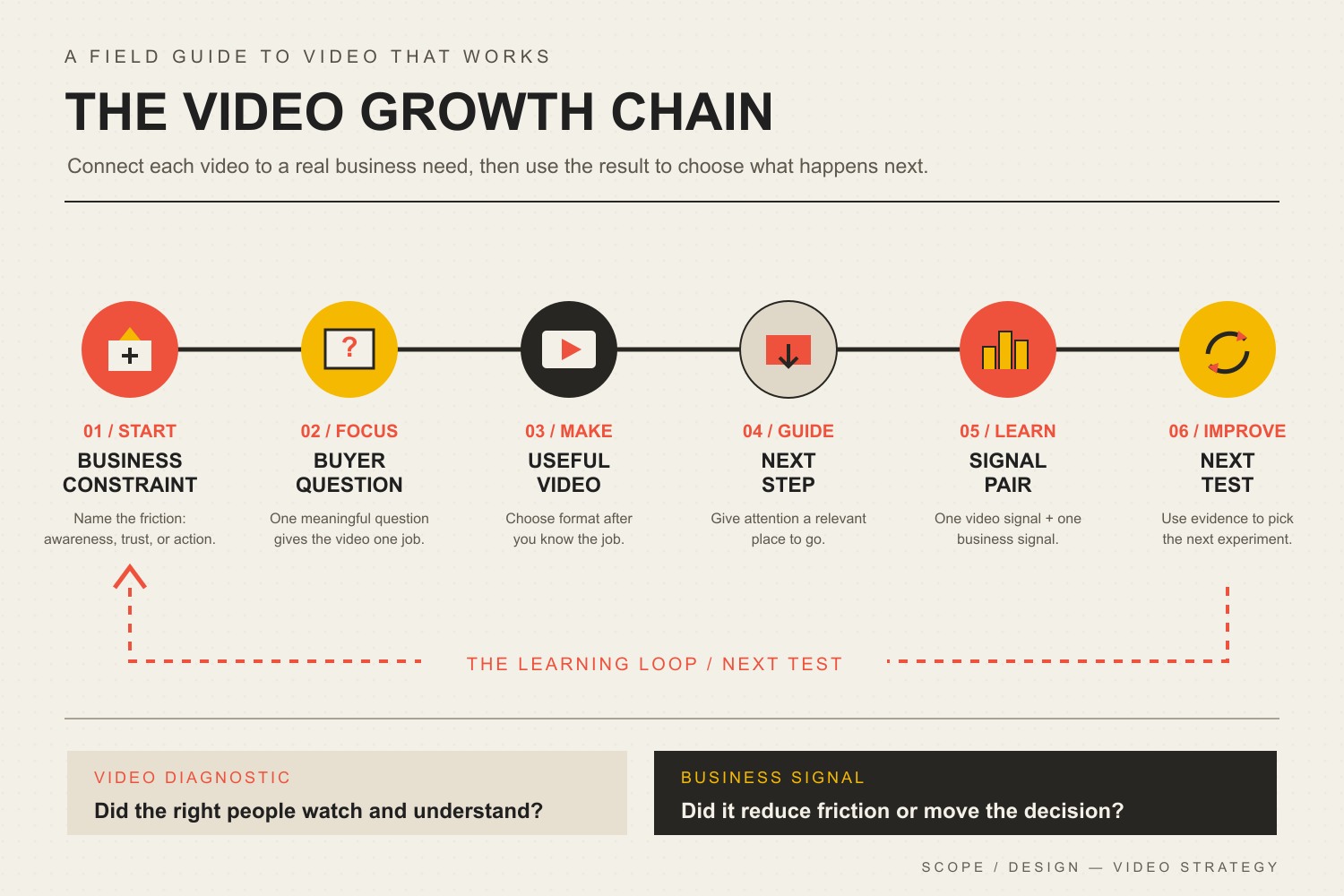
    At Scope Design, we use a simple operating idea for video: Business constraint → Buyer question → Useful video → Next step → Signal → Next test. We call it the Video Growth Chain. Every link matters. If the customer question is vague, the video becomes generic. If the next step is missing, attention has nowhere useful to go. If the signal is wrong, you learn the wrong lesson.

    The Video Growth Chain: business constraint, buyer question, useful video, next step, paired video and business signals, and a next test.
    The Video Growth Chain connects a real business constraint to a buyer question, useful video, next step, measurable signal, and informed next test.

    This framework also prevents a common planning mistake: treating format choice as the strategy. Format matters, but it comes after the job is clear. If you need help deciding between demos, explainers, testimonials, short-form clips, webinars, and other formats, use our guide to video marketing types and when to use them. This article owns the broader operating system.

    15 Video Marketing Moves That Drive Growth

    1. Start With a Business Constraint, Not a Platform

    “We should do more video” is not a strategy. Name the constraint first. Maybe qualified prospects do not know you exist. Maybe they visit the site but cannot understand the offer. Maybe sales calls stall on the same objection. Maybe new customers keep asking the same onboarding question.

    The constraint tells you what the video must change. Awareness work needs qualified attention. Understanding work needs clarity. Trust work needs believable proof. Conversion work needs a clean handoff. This is also consistent with a broader marketing strategy built around the business constraint and conversion path, not a channel chosen in isolation.

    2. Give Each Video One Buyer Question

    Useful videos usually answer a question the customer is already trying to resolve: “How does this work?” “What will this cost?” “Can I trust this company?” “What happens after I sign?” “Will this work for a business like mine?”

    One question creates editorial discipline. It keeps the opening focused, makes examples easier to choose, and helps you know when the video is finished. A five-minute answer to one expensive objection can be more valuable than a broad 20-minute “ultimate guide” that never resolves a decision.

    3. Choose the Format After You Know the Job

    A testimonial is not automatically better than a demo, and a short-form clip is not automatically better than a webinar. Format should follow the behavior you need to change. Need proof? Customer evidence may fit. Need clarity? A demo or screen recording may fit. Need discovery? Short educational clips may fit.

    Do not force one video to carry the whole funnel. A discovery clip can hand off to a deeper explainer. An explainer can hand off to a case study. A case study can hand off to a consultation. That sequence is often more useful than trying to make a single “brand video” do everything.

    4. Open With the Useful Part

    You do not need a universal “three-second rule” to know that slow openings create friction. Skip the long logo animation, biography, and throat-clearing when the viewer came for an answer. State the problem, show the result, ask the relevant question, or demonstrate the useful thing early.

    The right opening depends on the video. A search-driven tutorial can state exactly what it will teach. A product demo can show the outcome before the setup. A testimonial can begin with the customer’s original problem. Optimize for relevance, not a made-up universal timer.

    5. Use Enough Production Quality to Protect Trust

    “Authentic” does not mean careless. Viewers can forgive a phone camera more easily than muddy audio, unreadable screen recordings, confusing edits, or rambling explanations. Prioritize understandable audio, steady framing, useful lighting, legible visuals, and a clear structure before expensive cinematic polish.

    The production level should match the decision. A personalized proposal walkthrough can be intentionally simple. A flagship brand film may justify more polish. The goal is not “low production” or “high production.” The goal is the level of clarity and credibility the situation requires.

    6. Design the Next Step Before You Record

    Do not wait until the edit is finished to ask what the viewer should do next. Define the handoff first. It might be a related guide, pricing page, product page, assessment, consultation, email signup, demo request, or onboarding step.

    Then make sure the destination can finish the job. If the video creates interest but the landing page is confusing, the form is broken, or nobody owns the follow-up, more views simply deliver more people into a weak system. Our website conversion playbook covers that handoff in more depth.

    7. Build Captions and Accessibility Into Production

    Captions are not just a social-media convenience. They are part of making synchronized video understandable to people who cannot hear the audio. WCAG 2.2 requires captions for prerecorded synchronized media at Level A, subject to the standard’s stated exception for media alternatives.

    Build caption review into the workflow instead of treating auto-generated captions as automatically finished. Check names, product terms, numbers, punctuation, and timing. If important information appears only visually, consider whether the surrounding page or an appropriate description makes that information accessible too.

    8. Adapt the Message to the Channel Context

    Republishing can save time, but identical uploads are not a strategy. A prospect watching a search tutorial, scrolling a social feed, reviewing a proposal, or comparing vendors on a landing page has a different level of intent.

    Keep the core idea consistent while adapting the opening, framing, crop, captioning, CTA, and depth to the context. If social traffic is part of the plan, our guide to turning social traffic into business outcomes goes deeper on the path from attention to action.

    9. Give Important Videos a Useful Home on Your Website

    A strategically important video should not exist only as a social post that disappears into a feed. Give evergreen videos a relevant page where the surrounding text, offer, proof, and next step help the viewer act. For search visibility, technical implementation matters too.

    Google’s video SEO documentation emphasizes discoverable video on indexable watch pages, stable thumbnails, crawlable video resources, and consistent metadata/structured data. A clever filename is not a substitute for those fundamentals. For the broader search system, see our SEO and analytics growth guide.

    10. Repurpose From a Source Idea, Not From Random Clips

    Good repurposing starts with a useful source: a customer interview, webinar, demo, founder explanation, FAQ session, or in-depth tutorial. Extract the questions, objections, examples, proof, and decisions inside it. Then adapt those units for the moments where they are useful.

    That produces a coherent system instead of a folder full of disconnected snippets. Our content repurposing guide covers the mechanics of turning one source asset into useful derivative content without merely duplicating it.

    11. Batch the Repeatable Mechanics, Not the Judgment

    Batching works well for outlines, recording setup, thumbnail production, caption cleanup, exports, uploads, and clip extraction. It works poorly when it becomes an excuse to lock in 30 weak topics before you have learned anything.

    Create a repeatable production lane, but keep topic choice and next-test decisions responsive. Record several well-chosen videos in one session if that reduces friction. Then let the evidence from those videos shape the next batch.

    12. Use AI as a Production Assistant, Not a Source of Truth

    AI can accelerate transcript cleanup, rough outlines, clip identification, title variations, caption drafts, shot lists, and editing chores. It can also confidently invent facts, flatten your point of view, or turn a specific customer question into generic marketing language.

    Keep human editorial control over claims, examples, customer context, brand voice, and final decisions. Automate the repetitive work around the insight—not the responsibility for whether the insight is true. The same principle applies to broader AI-powered marketing automation.

    13. Treat Customer Video as Evidence, Not Decoration

    A vague “They were great!” testimonial adds little. Strong customer video describes the starting problem, the decision, what changed, and the result in language a future buyer can recognize. Specificity makes the proof useful.

    It also needs to be honest. FTC guidance on endorsements, influencers, and reviews requires advertising claims to be truthful and not misleading, and material connections may need disclosure. Do not script a customer into a result they did not experience. Our guide to customer testimonials and social proof goes deeper on collecting proof that is specific and credible.

    14. Measure One Video Signal and One Business Signal

    Video platforms provide useful diagnostics: impressions, click-through rate, watch time, average view duration, retention, traffic sources, completion, shares, or saves depending on the channel. Those numbers help diagnose the content. They do not automatically tell you whether the business problem improved.

    Pair one diagnostic with one downstream signal. For a demo, that may be watch engagement plus demo requests. For a testimonial, it may be page engagement plus qualified inquiries or sales feedback. For onboarding, it may be completion plus fewer repeated support questions. For a social educational clip, it may be qualified engagement plus visits to the intended resource.

    Do not force false precision when attribution is messy. Assisted influence is real, but it is not the same as causal proof. Our marketing ROI framework explains how to separate decision metrics from diagnostic metrics when comparing marketing work.

    15. Decide the Next Test Before You Declare a Winner

    A video is not “good” because it beat an arbitrary benchmark. Ask what the signal suggests. Did the right people start watching but leave before the useful proof? Did they finish but ignore the CTA? Did qualified prospects mention the video on sales calls? Did a tutorial reduce repeated questions?

    Turn that observation into one controlled next test: a clearer opening, tighter example, different proof, better destination, stronger distribution, or different buyer question. If you are paying to amplify content, set a budget and stop rule before the campaign begins. Our content promotion strategy guide covers that distribution layer.

    A 30-Day Video Marketing Strategy for a Small Business

    You do not need a studio or a 40-video calendar to start. Use one month to build and test the chain.

    1. Week 1 — Find the constraint. Review sales questions, support tickets, search queries, form friction, and customer conversations. Choose one problem worth improving. Write down the business signal you care about.
    2. Week 2 — Build three useful answers. Choose three buyer questions connected to that constraint. Select the simplest format that can answer each well. Define the next step before recording.
    3. Week 3 — Produce and distribute. Record with clear audio and structure. Add reviewed captions. Publish each video where the intended audience can encounter it, and give important evergreen videos an owned-web destination.
    4. Week 4 — Diagnose and choose the next test. Review one content diagnostic and one business signal per video. Do not average unlike jobs together. Choose the single change most worth testing in the next batch.

    After 30 days, the goal is not to prove that “video works.” The goal is to know more about which customer questions, proof, handoffs, and distribution choices help your specific business move.

    Video Marketing Strategy FAQ

    What is the best video marketing strategy?

    The best strategy is the one tied to a specific business constraint and customer decision. Start with the bottleneck, identify the buyer question, create the simplest useful video, define a relevant next step, measure a diagnostic plus a business signal, and use the result to choose the next test.

    Which video platform should a small business use first?

    Choose the audience and job before the platform. Search-driven educational video may fit YouTube or an owned resource page. Social discovery may fit a platform where your customers already spend attention. Personalized sales video may belong in email or proposals. There is no universal first platform.

    How long should a marketing video be?

    Long enough to complete its job without unnecessary friction. A quick objection answer might take 45 seconds; a technical tutorial may need 12 minutes. Use retention and downstream behavior to diagnose whether the length is serving the task rather than forcing every video into one benchmark.

    How do you measure video marketing ROI?

    Start by defining the economic outcome the video is meant to influence, then pair it with a video-level diagnostic. Compare the value of qualified actions, pipeline, sales efficiency, support reduction, activation, or other relevant outcomes against production and distribution cost. Avoid pretending that every assisted touch can be attributed with causal precision.

    Can AI create a complete video marketing strategy?

    AI can help with research organization, outlines, transcripts, clipping, caption drafts, and production speed. It should not replace first-party customer knowledge, factual verification, brand judgment, or the decision about which business constraint matters. Use AI to accelerate the workflow around the strategy, not to invent the strategy for you.

    Make Video Part of the Business System

    The most durable video marketing strategy is not a list of platform tricks. It is a repeatable way to connect a real buyer problem to a useful explanation, a believable piece of proof, a clear next step, and an outcome you can learn from.

    If your business has plenty of content ideas but no clear path from attention to action, Scope Design can help connect the video plan to the offer, website, search strategy, content system, and measurement that make the handoff work.

  • How to Write a Slogan or Tagline That People Actually Remember

    How to Write a Slogan or Tagline That People Actually Remember

    Quick answer—how to write a slogan or tagline that works: Decide what single idea you want people to associate with your business, express it in language they can understand and repeat, then test whether they remember both the line and the right brand. Short is useful. Clever can be useful. Neither rescues a vague promise your business cannot prove.

    A slogan is not a tiny homepage. It does not need to explain your origin story, list every service, flatter the founder, carry the mission statement, and close the sale before lunch.

    It needs to do one damned job.

    The difficult part is choosing that job before everyone starts throwing “bold,” “better,” “reimagined,” and “solutions” into a word blender.

    In this guide

    What makes a good slogan or tagline?

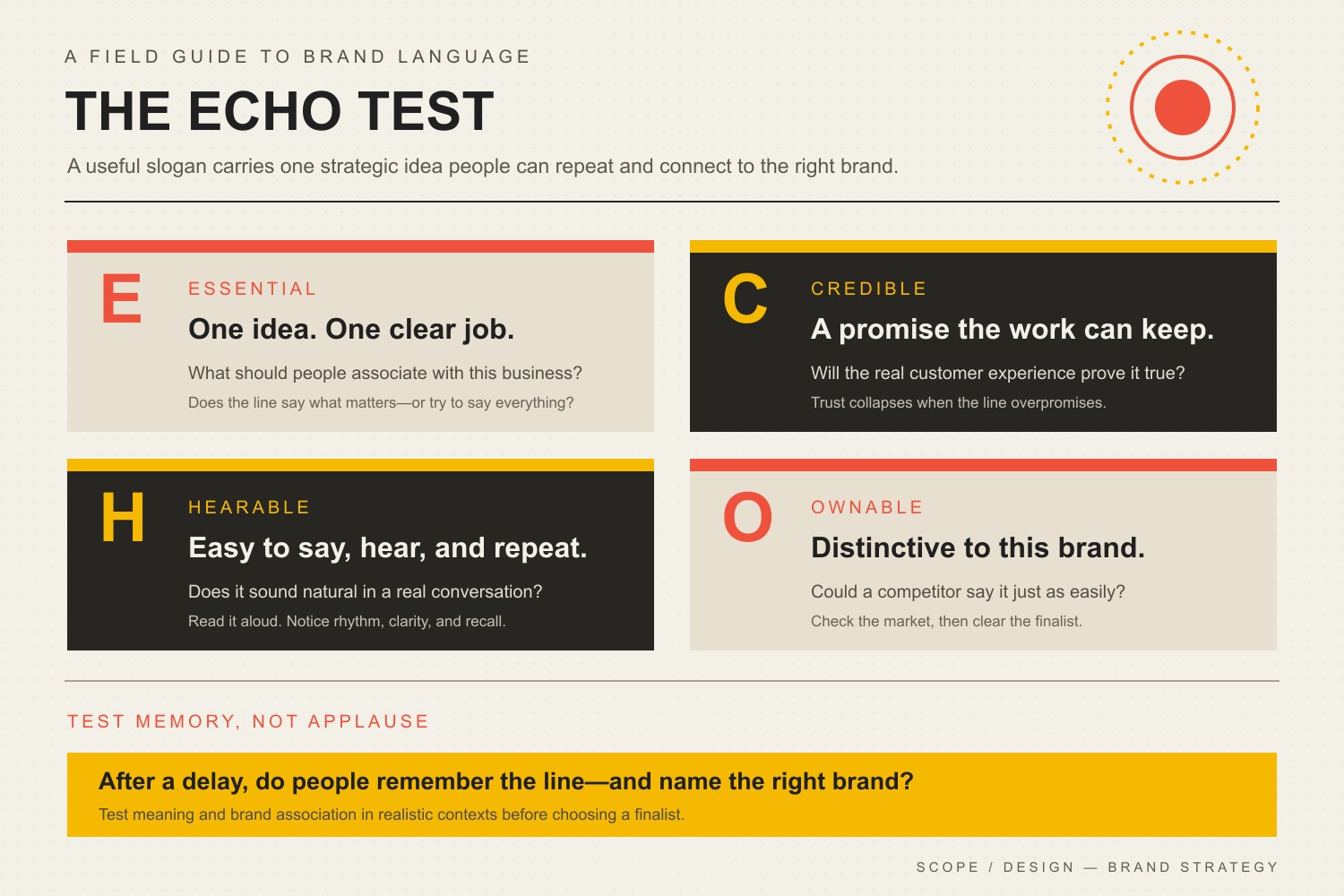
    A good slogan or tagline is:

    • built around one strategically useful idea;
    • credible enough to survive contact with the actual customer experience;
    • easy to say, hear, scan, and repeat;
    • distinctive enough that it does not sound borrowed from the nearest five competitors; and
    • tested for meaning and brand association, not merely voted “the favorite” in a conference room.

    That last point matters because likability and memorability are not the same outcome.

    A 2023 Journal of Consumer Research paper analyzed more than 800 brand slogans and combined that work with laboratory experiments, eye tracking, and a field study. The researchers found a real tradeoff: linguistic features that made slogans easier to process tended to improve liking but reduce memory, while some less-fluent features improved memory at the cost of liking. Shorter lines, familiar words, and omitted brand names were generally liked more; longer lines, concrete or less-common words, and included brand names were more likely to be remembered.

    That does not mean every slogan should be long, awkward, or stuffed with the company name. It means “make it as short as possible” is not a strategy. First decide whether the line needs to create liking, aid recall, identify the brand, clarify the offer, or support a campaign. Then write for that job.

    If you remember the slogan but credit the wrong company, congratulations: the company bought advertising for its competitors.

    Slogan vs. tagline: what is the difference?

    There is no universally enforced marketing taxonomy. People routinely use slogan and tagline interchangeably. For practical work, this distinction is useful:

    TermPractical jobTypical lifespan
    TaglineCreates a stable association with the overall brandUsually long-term
    SloganMakes a campaign, product, or specific message easier to rememberOften temporary
    MottoStates a belief or guiding principleUsually long-term; may be internal or public
    HeadlineWins attention and communicates the point of one page, ad, email, or assetChanges with the context
    Value propositionExplains why a particular customer should choose the business or offerStable until the market, customer, or offer changes

    The distinction prevents a common mess: asking a tagline to perform the job of a value proposition.

    “Just Do It” works because decades of brand investment supply the missing context. Put an equally vague line under the logo of an unknown accounting firm and nobody knows what the hell it does.

    A small business generally needs a clear brand message before it needs a poetic tagline. The message provides the strategic substance. The tagline compresses one useful part of it into a repeatable cue.

    Do you even need a slogan?

    No. A business is not legally or strategically required to fill the little space under its logo.

    Use a tagline when it helps people:

    • understand an unfamiliar name;
    • remember a distinctive promise or point of view;
    • connect several offers to one brand idea;
    • recognize the business when the visual identity appears in different contexts; or
    • carry a stable association across campaigns.

    Use a campaign slogan when a temporary initiative needs its own repeatable message.

    Skip the line when it merely repeats the business name, says nothing specific, or makes the logo lockup harder to read. White space is cheaper than strategic lint.

    This is why slogans belong inside a broader brand strategy system. The line, visual identity, color system, behavior, proof, and customer experience should reinforce one another. Otherwise, you have six departments playing six songs and calling it harmony.

    Start with the strategic idea, not a rhyming dictionary

    Before writing options, answer five questions in plain language:

    1. Who needs to remember this? “Everyone” is not an audience. It is an avoidance tactic.
    2. What should they remember? Choose one association: speed, specialization, reassurance, rebellion, precision, access, simplicity, or another defensible idea.
    3. What should they understand without extra context? An unfamiliar company may need more explanation than an established brand.
    4. What can the business consistently prove? A tagline can sharpen a promise; it cannot make an operational fantasy true.
    5. Where will the line live? A logo lockup, storefront, radio spot, sales deck, video ending, packaging panel, and search result create different constraints.

    If those answers are fuzzy, pause. You do not have a wording problem yet. You have a positioning and brand-message problem.

    Choose one association

    The best raw material usually comes from evidence already inside the business:

    • language customers use in reviews and sales calls;
    • the objection the company resolves unusually well;
    • a process competitors cannot honestly claim;
    • a specific audience the business understands deeply;
    • an operational promise the team can consistently keep; or
    • a useful tension in the category that the brand is willing to challenge.

    “Quality service you can trust” contains no evidence and no tension. It is beige wallpaper made of words.

    “Emergency bookkeeping for restaurants” is not lyrical, but it identifies an audience, a situation, and a capability. That is valuable raw material. The final line can become more expressive after the strategic idea stops wobbling.

    Use the Scope Design ECHO Test

    We use four filters because “I like it” is not a meaningful brand criterion.

    The ECHO Test: Essential, Credible, Hearable, and Ownable, followed by a memory test that checks whether people recall both the line and the right brand.

    E — Essential

    Does the line carry one essential strategic idea?

    A slogan becomes mush when it tries to communicate quality, speed, innovation, care, heritage, affordability, and world peace in seven words. Pick the association that matters most in this context.

    Ask:

    • What should a customer repeat after seeing it once?
    • Does every word help that association?
    • Could we remove a claim without changing the idea?
    • Are we smuggling an entire mission statement into the line?

    C — Credible

    Can the business support the promise?

    This is both a trust issue and, for objective advertising claims, a substantiation issue. The Federal Trade Commission says advertisers need a reasonable basis for express and implied objective claims before the advertising runs. A happy customer quote does not magically prove a measurable performance claim.

    Ask:

    • What would a reasonable customer think this line promises?
    • Can operations deliver that expectation consistently?
    • What evidence supports any objective claim?
    • Would the line still feel honest after a bad service day?

    “The fastest delivery in Philadelphia” is not harmless enthusiasm. It is a comparative performance claim. Prove it, qualify it, or write something honest.

    H — Hearable

    Does the line survive outside the design file?

    Read it aloud. Say it on the phone. Put it at the end of a 15-second video. Show it without the logo. Ask someone to repeat it later. Check whether punctuation, spelling tricks, or visual styling are doing all the work.

    Hearable does not mean childish or bland. It means the audience can receive the idea without reverse-engineering the copywriter’s ego.

    Useful checks include:

    • natural rhythm without forced rhyme;
    • words that are difficult to mishear;
    • no acronym the audience must decode;
    • no pun that collapses when spoken;
    • no culturally specific joke presented to a market that will not share the reference; and
    • enough context for an unfamiliar listener to connect the line to the right kind of business.

    O — Ownable

    Can the audience connect the line to you, or could any competitor paste it under its logo before breakfast?

    Ownability has two parts:

    1. Strategic distinctiveness: the line reflects a point of view, capability, audience, or promise that fits this business unusually well.
    2. Practical clearance: the organization checks whether similar marks already exist before investing in signs, packaging, campaigns, and merchandise.

    The U.S. Patent and Trademark Office warns that commonly used phrases may fail to identify the source of goods or services. It also notes that a proposed mark can face problems when it is confusingly similar in appearance, sound, or meaning to an existing mark used with related goods or services.

    Searches are a screening step, not a legal opinion. Check the USPTO database, domain and social use, marketplace use, and relevant jurisdictions. For a valuable long-term line, involve a qualified trademark attorney before the expensive rollout—not after the cease-and-desist letter adds some excitement to the week.

    A practical process for writing a business slogan

    1. Write the assignment in one sentence

    Use this structure:

    We need a [tagline or campaign slogan] that helps [specific audience] associate [brand or offer] with [one strategic idea] when they encounter it in [contexts].

    Example:

    We need a brand tagline that helps independent restaurant owners associate our bookkeeping firm with calm, fast financial clarity when they see the website, proposal, or event booth.

    That is a brief. “Make it pop” is a cry for help.

    2. Build a language bank from reality

    Collect customer phrases, proof points, process language, category clichés, competitor lines, objections, sensory details, and words the brand would never use.

    Separate the language into four columns:

    Customer realityBusiness proofCategory clichésProductive tension
    What customers say and fearWhat the business can demonstrateWhat everyone else repeatsWhat the brand believes differently

    The category-cliché column is especially useful. It tells you what to delete before it sneaks into the final round wearing a blazer.

    3. Generate routes, not tiny variations

    Do not write 40 versions of “Better business, better life.” Explore different strategic routes:

    • Outcome: the result the customer values;
    • Audience: a line that signals “this is for people like me”;
    • Point of view: a belief the brand is prepared to defend;
    • Operational promise: a specific experience the company can deliver;
    • Category reframe: a better way to understand the problem; or
    • Brand character: language that expresses a recognizable attitude.

    Write freely during generation. Judge later. Early editing produces five safe lines and one pun everyone regrets.

    4. Eliminate with ECHO

    Score each serious candidate from 1 to 5 on Essential, Credible, Hearable, and Ownable. Add a short note explaining every score.

    Do not average away a fatal flaw. A line with perfect rhythm and zero credibility is still a bad line. A line that is memorable but belongs to a competitor is worse.

    5. Test behavior, not applause

    Do not show ten lines simultaneously and ask, “Which do you like?” That measures preference in an artificial comparison—not performance in the real world.

    Test finalists separately with people who resemble the audience:

    1. Comprehension: What do you think this company offers or stands for?
    2. Expectation: What would you expect the experience to be?
    3. Delayed recall: What line do you remember after a distraction or time gap?
    4. Brand linkage: Which company or category did you connect it to?
    5. Misinterpretation: Could the words imply something unintended, exclusionary, or impossible?
    6. Context: Does it work on the website, spoken aloud, at small size, and beside the actual visual identity?

    Record what people say before explaining what the line was “supposed” to mean. If it requires a presentation, the presentation is doing the work.

    6. Clear and document the finalist

    Document:

    • the intended meaning;
    • approved uses and lockups;
    • capitalization and punctuation;
    • when the brand name must accompany it;
    • translations or regional versions;
    • evidence supporting objective claims;
    • trademark-search notes and legal review; and
    • conditions that should trigger reconsideration.

    This becomes part of the brand identity system, not a sentence trapped inside an old logo file no one can open.

    7. Build memory through consistent use

    A line does not become famous because it won a brainstorm. It becomes familiar through repeated, coherent use alongside a recognizable identity and a customer experience that reinforces it.

    Use it where it has a job. Do not stamp it on every paragraph like a toddler discovering stickers. Coordinate it with the visual identity, including a usable brand color system, and keep the wording stable long enough to learn whether it is building an association.

    Should a slogan be short?

    Usually, but not according to a magic number.

    Short lines are easier to place, repeat, and integrate into visual systems. That is an operational advantage, not a universal law of memory. The 2023 research described earlier found a tradeoff: shorter, more fluent slogans were generally liked more, while longer and more concrete slogans could be remembered better.

    Use the fewest words that preserve the intended idea, brand connection, credibility, and rhythm. If removing a word makes the line generic or confusing, the deletion did not improve it.

    The correct question is not “Can we get this down to three words?” It is “What stops working when we do?”

    Common slogan mistakes

    Using words every competitor owns

    Innovative. Trusted. Quality. Solutions. Excellence. Customer-first.

    These words are not forbidden. They are merely useless without specificity or proof.

    Writing the tagline before the positioning

    Wordplay cannot rescue a business that has not chosen an audience, valuable difference, or defensible promise.

    Confusing a tagline with a homepage headline

    The homepage still needs to tell an unfamiliar visitor what the company does, who it helps, and what to do next. Do not park an ambiguous tagline above the fold and expect visitors to admire the mystery. Your website strategy has commercial work to do.

    Choosing through internal consensus

    Committees tend to reward safe language because nobody hates it. Unfortunately, nobody remembers it either.

    Copying the structure of a famous line

    Famous taglines arrive with decades of media spend, product experience, and cultural repetition. Borrowing their syntax does not transfer their equity. It mostly makes the new line sound like tribute-band branding.

    Treating a generator as strategy

    AI and slogan generators can expand a language bank or produce rough routes. They cannot decide which promise the company can operationally support, what the market already owns, or which association deserves years of investment. Use the tool for divergence. Keep judgment in the building.

    Testing immediate preference only

    The easiest line to like in a list may not be the line people remember later, understand correctly, or connect to the brand. Measure the job.

    How to evaluate slogan examples without copying them

    Famous-slogan lists are entertaining and strategically dangerous. They encourage businesses to copy surface features while ignoring context.

    When studying an example, ask:

    • What job did this line perform when it launched?
    • How familiar was the brand already?
    • Was the brand name present nearby?
    • What media repetition supported recall?
    • Did the product experience prove the promise?
    • Would the words work for an unknown company with no context?
    • Is the line remembered because of language, investment, timing, culture, or all four?

    Study the mechanism, not the costume.

    The business outcome: useful memory

    A tagline should not be judged by whether it sounds clever in a brand presentation. It should help the right people retrieve a useful association when a buying situation appears.

    That can support recognition, comprehension, preference, or campaign recall—but the line is only one part of the system. Proof builds brand authority. Positioning and behavior give the words meaning. Consistent identity makes the cue recognizable. Distribution creates repetition. The customer experience decides whether the promise becomes trusted or mocked.

    The goal is not a memorable sentence floating around the internet without an owner. The goal is a memorable, credible connection to your business.

    If your team is choosing between clever lines without agreeing on the strategic idea underneath them, Scope Design’s Impact Consulting can help diagnose the positioning and messaging problem before you spend money polishing the wrong answer.

    Frequently asked questions about slogans and taglines

    How do you write a slogan?

    Choose one association you want the audience to connect to the business, collect language from customers and proof, generate several strategic routes, filter candidates with the ECHO Test, and test comprehension, delayed recall, brand linkage, and credibility with relevant people.

    What is an example of a business slogan?

    A useful invented example for a restaurant-focused bookkeeping firm could be “Calm books. Busy tables.” It expresses an outcome and audience context without claiming to explain the entire service. Examples should be evaluated in context, not copied as formulas.

    What makes a slogan memorable?

    Memorability can come from concrete or distinctive wording, rhythm, meaningful association, brand-name linkage, repeated exposure, and a consistent experience. Research suggests the wording people like most is not automatically what they remember best, so test delayed recall rather than relying on immediate preference.

    How long should a slogan be?

    There is no universal ideal word count. Use the fewest words that preserve meaning, credibility, brand connection, and rhythm. Shorter lines can be easier to place and like; longer or more concrete lines may sometimes be easier to remember.

    Are a slogan and tagline the same thing?

    People often use the terms interchangeably. A practical distinction is that a tagline usually represents the enduring brand, while a slogan often supports a particular campaign, product, or initiative. There is no universally enforced rule.

    Is a tagline the same as a value proposition?

    No. A value proposition explains why a particular customer should choose the business or offer. A tagline is a compact memory or interpretation cue. An unknown business usually needs a clear value proposition even if it also uses a tagline.

    Does every business need a tagline?

    No. Use one only when it improves understanding, recognition, or recall. A generic line that repeats the name or clutters the visual identity is worse than no tagline.

    Should a slogan include the brand name?

    It depends on the job and context. Including the brand name may strengthen brand linkage and recall, especially when the audience is unfamiliar with the company. Omitting it may produce a smoother or more likable line. Test whether people remember the correct brand, not just the words.

    Can AI write a good business slogan?

    AI can generate options and expose language patterns quickly. It cannot independently verify positioning, operational truth, customer interpretation, competitive ownership, or legal clearance. Use it to expand possibilities, then apply human strategic judgment and real testing.

    How do you test a tagline?

    Show finalists separately and in realistic contexts. Ask what the business appears to do, what the line promises, what the person remembers after a delay, and which brand they associate with it. Record answers before explaining the intended meaning.

    Can a slogan be trademarked?

    A slogan may function as a trademark, but registration depends on factors including distinctiveness, source identification, existing similar marks, and the relevant goods or services. Common phrases may be refused. Search the USPTO database and consult a qualified trademark attorney for legal advice.

    How often should a company change its tagline?

    Do not change it merely because the team is bored. Reconsider it when positioning, audience, offer, market context, legal availability, or customer interpretation materially changes—or when credible testing shows the line is failing its assigned job.

    What is the biggest slogan-writing mistake?

    Trying to sound memorable before deciding what deserves to be remembered. That produces clever language without strategic value, or generic language nobody can connect to the business.

    Sources

  • When to Hire a Copywriter: 5 Situations Where It Makes Sense

    When to Hire a Copywriter: 5 Situations Where It Makes Sense

    If your message is the thing preventing good prospects from understanding, trusting, or acting on your offer, it probably makes sense to hire a copywriter. If the real problem is weak traffic, a weak offer, or a broken user experience, better sentences will not rescue the wrong constraint.

    That distinction matters more now that AI can produce a decent first draft in seconds. The question is no longer, “Can someone write these words?” The better question is, “Does this job require research, message hierarchy, customer perspective, evidence, judgment, and someone willing to own the final message?”

    That is the line this guide is built to find. If you already know you need help and want the companion view on value and process, read our guide to the benefits of hiring a professional copywriter for your website.

    TL;DR: The Copywriter Hire Test

    • Clarity: Prospects cannot quickly explain what you sell, who it is for, why it matters, or what to do next.
    • Capacity: Writing and rewriting are delaying higher-value work that only you or your senior team can do.
    • Complexity: The message requires customer research, technical accuracy, evidence, multiple reviewers, or careful handling of claims.
    • Distance: You are too close to the business to hear your own jargon, assumptions, and feature-heavy explanations.
    • Stakes: The copy sits on a launch, rebrand, core sales page, or major offer where confusion has a meaningful cost.

    One checked box does not automatically mean “hire someone.” Severity matters. But the more boxes you check, the stronger the case for professional help.

    The Copywriter Hire Test: 5 situations where professional help makes sense

    Five signals for deciding whether to hire a copywriter: Clarity, Capacity, Complexity, Distance, and Stakes. Several severe signals strengthen the case, but a checked box alone does not mean hire.

    1. Clarity: people reach the message but still do not understand the offer

    Clarity problems often hide in plain sight. You know what the company does, so your brain automatically fills in missing context. A new prospect does not have that luxury.

    A simple test is to ask whether a good-fit prospect can answer four questions after a quick read: What is this? Is it for me? Why should I care? What should I do next? If those answers are fuzzy, the problem is not “we need more words.” It is a message-design problem.

    That is where a professional copywriter should start with research rather than adjectives. Customer questions, sales objections, support conversations, competitor language, and actual behavior on the site all provide better raw material than an internal brainstorming session. Current Digital.gov plain-language guidance makes the same audience-first point: learn what users ask and need, then focus the content on what applies to them.

    Hire when: different people on your team explain the offer differently, prospects keep asking basic questions the page should answer, or your copy lists features without creating a clear decision path.

    2. Capacity: writing has become a bottleneck for higher-value work

    Being capable of writing your own copy does not mean you should write every piece of it. The real cost of DIY is not an hourly rate pulled from a calculator. It is what important work stops while the owner, founder, subject-matter expert, or marketing lead goes through another round of “maybe this headline is better.”

    For a low-risk announcement or rough first draft, internal writing or AI may be completely reasonable. But if a website launch is waiting on copy for three weeks, five people are rewriting the same paragraph, or the person with the most valuable expertise is spending half a day fighting a blank page, capacity has become a business constraint.

    Hire when: copy repeatedly misses deadlines, senior people are trapped in revision loops, or getting the message finished is more valuable than proving you can write it yourself.

    3. Complexity: the message needs research, evidence, or careful review

    Some copy is hard because the sentence is hard. More often, it is hard because the business decision behind the sentence is hard.

    Complexity rises when you have a technical offer, several audiences, multiple stakeholders, competing priorities, or claims that need evidence. A copywriter can help translate approved facts into language people can understand, organize the message, and keep reviewers from turning the final page into a committee-written casserole.

    There is an important boundary here: a copywriter is not a substitute for legal, compliance, medical, financial, or other qualified subject-matter review. In the United States, the FTC’s advertising guidance for small businesses says advertising claims must be truthful and non-deceptive and that advertisers need evidence to support express and implied claims. The writer’s job is to make approved truth clear—not invent proof that does not exist.

    Hire when: the work requires interviews, source review, claim substantiation, technical translation, or someone who can keep a complicated review process focused on the reader.

    4. Distance: you are too close to the business to hear your own assumptions

    Business owners usually know too much, not too little. That creates a strange communication problem: you stop noticing what a first-time buyer cannot possibly know.

    Internal shorthand becomes website copy. Features feel self-explanatory. Company history gets more space than the customer’s problem. The page answers the questions your team finds interesting instead of the questions a buyer needs answered.

    A good outside copywriter is useful partly because they are allowed to ask the “obvious” questions: Who is this really for? What changes after they buy? Why should they believe you? What objection is stopping the next step? What does the customer call this problem when nobody from your company is in the room?

    Hire when: your copy sounds accurate to insiders but confusing, generic, or jargon-heavy to everyone else.

    5. Stakes: the downside of a weak message is materially bigger than the cost of getting help

    Not every paragraph deserves a strategy workshop. Your core website, a rebrand, a new offer, a high-value sales page, or a campaign sending meaningful traffic to one decision deserves more care than a routine update.

    High stakes change the economics. If the message will be seen by thousands of prospects, reused across sales materials, or become the language your whole team repeats for the next two years, a cheap first draft can become expensive through repetition. The more durable and consequential the message, the more valuable research, hierarchy, and review become.

    Hire when: the copy will define how the market understands the business, support a major investment in traffic, or sit close to an important buying decision.

    When not to hire a copywriter yet

    This is the part many copywriting pages skip because it is bad for the hard sell and good for the reader: sometimes copy is not the problem.

    What you seeLikely constraintWhat to do first
    Almost no qualified prospects reach the pageTraffic or distributionFix acquisition and targeting before rewriting everything.
    People understand the offer but do not want itOffer or market fitRevisit the product, positioning, price, proof, or audience.
    People want the offer but cannot complete the taskUX or functionalityFix navigation, forms, checkout, mobile issues, or broken flows.
    People arrive, engage, but leave confused about value or next stepMessagingNow copywriting is a credible place to intervene.

    This constraint-first approach is part of our broader small-business marketing strategy: fix the system that is actually limiting growth instead of buying the next fashionable tactic. Our related copywriting guide goes deeper on the message-friction questions to diagnose before you hire.

    AI or a professional copywriter? Split the job, not the ideology

    AI changed the economics of drafting. It did not make every part of copywriting equally automatable.

    TaskAI can helpHuman ownership matters most when…
    Brainstorming angles or headline variantsYesYou need to choose the angle that matches real customer evidence.
    Summarizing approved source materialYes, with verificationAccuracy or nuance is consequential.
    Drafting low-risk routine copyOftenThe draft will represent the brand in an important decision.
    Interviewing customers or subject-matter expertsAssist with prep and synthesisFollow-up questions and interpretation matter.
    Building message hierarchyAssistYou must decide what the reader needs to believe, in what order.
    Choosing and validating proofAssist with organizationClaims require evidence and accountable review.
    Brand-voice governance and final judgmentAssist with consistency checksThe message is durable, high-stakes, or shared across channels.

    Google’s current guidance for generative-AI search makes a useful quality distinction too: it recommends unique, non-commodity content that adds genuine point of view and usefulness, rather than material that simply recycles what a generative model could produce. In practical terms, AI is excellent at accelerating parts of the work. It is a poor excuse for skipping the thinking.

    Formulas can help structure a draft, and AI can generate variations quickly. Our guide to copywriting formulas explains where structure helps and where diagnosis still matters. Use tools. Just do not confuse the tool with the decision-maker.

    What should a professional copywriter do before writing?

    If the process starts with “send me the word count,” you are probably buying typing, not strategic copywriting.

    1. Understand the business and offer. What is being sold, to whom, and what business outcome should the page support?
    2. Learn the audience’s language. Review customer questions, objections, interviews, reviews, support tickets, search behavior, and sales conversations when available.
    3. Decide the job of the page. One page should not try to teach everything, sell everything, and satisfy every stakeholder equally.
    4. Build the message hierarchy. Decide what comes first, what needs proof, what objections need answers, and what can wait.
    5. Gather and validate proof. Testimonials, data, examples, product facts, demonstrations, guarantees, and other evidence should support the claims being made.
    6. Write the full decision path. Headlines, body copy, proof, microcopy, and calls to action should work together rather than as disconnected “clever” lines.
    7. Revise after feedback without losing the reader. Stakeholder comments matter, but the final page still needs one coherent voice and purpose.

    That process is also why project pricing varies so much. The words are the visible output; the research and decisions behind them are most of the job.

    How to hire a copywriter without buying a mystery box

    Portfolios matter, but a polished sample cannot tell you how the work was produced. Before you hire a copywriter, ask questions that expose the process.

    • What do you need from us before you start writing?
    • Will you interview customers, salespeople, founders, or subject-matter experts when the project needs it?
    • How do you identify the main audience, objection, promise, proof, and next step?
    • How do you handle technical or regulated claims and source material?
    • What exactly is included: research, strategy, page copy, SEO considerations, microcopy, revisions, handoff?
    • How many stakeholders can review, and how do you consolidate conflicting feedback?
    • How will you work with the designer, developer, SEO team, or campaign owner?
    • What will we use to judge whether the finished copy is doing its job?

    The strongest answer is usually a process, not a promise that the writer has a secret vocabulary that “converts.”

    How much does it cost to hire a copywriter?

    There is no honest universal rate that tells you what professional copywriting should cost. A five-email sequence with supplied research is a different job from repositioning a technical company, interviewing customers, and rewriting a multi-page website.

    Price usually changes with the depth of research, number and type of deliverables, interviews, strategy work, SEO requirements, evidence and source handling, number of reviewers, revision scope, and how much responsibility the writer owns. Comparing two quotes by “price per word” can make wildly different scopes look falsely equivalent.

    A better comparison is: What thinking, research, deliverables, and revision responsibility am I actually buying? If you want a deeper explanation of that value, see our guide to what a professional website copywriter should actually do.

    Frequently asked questions about hiring a copywriter

    Do people still hire copywriters?

    Yes. The valuable part of the role is shifting away from “someone who can produce words” and toward research, audience understanding, message hierarchy, evidence, brand judgment, editing, and accountability. AI reduces the cost of a first draft; it does not eliminate the need to decide what the message should say or why anyone should believe it.

    Can I use ChatGPT for copywriting?

    Yes. It is useful for brainstorming, outlines, summarizing source material, generating variants, and rough drafts. The higher the stakes, the more important it becomes to verify facts, protect confidential information, validate claims, preserve brand voice, and have a qualified person own the final judgment. Google’s broader people-first content guidance also makes the core point that usefulness, originality, expertise, and trust matter more than whether a tool happened to generate part of the text.

    What exactly does a copywriter do?

    A professional copywriter should do more than write sentences. Depending on the project, the work can include discovery, customer and competitor research, interviews, positioning, message hierarchy, page structure, headlines, body copy, proof, calls to action, microcopy, editing, and revision with stakeholders.

    Is hiring a copywriter worth it?

    It is worth serious consideration when messaging is a meaningful constraint, the project is difficult to produce internally, and the consequence of weak communication is material. If the real bottleneck is traffic, the offer, or broken UX, spend there first.

    What is the 80/20 rule in copywriting?

    People often use “80/20” as shorthand for the idea that a small number of elements—such as the offer, headline, proof, and call to action—can do a disproportionate share of the work. Treat it as a prioritization reminder, not a fixed measurement or guarantee. Which elements matter most depends on the page, audience, and decision.

    When should I not hire a copywriter?

    Do not hire one just because writing is annoying. If almost nobody qualified reaches the page, fix traffic. If buyers understand the offer and still do not want it, fix the offer. If the site is confusing or broken, fix UX. Bring in copywriting when the message itself is a credible reason the right people are not moving forward.

    The decision: hire for judgment, not just words

    The strongest reason to hire a copywriter is not that you dislike writing. It is that the business consequence of a weak message now justifies better research and better judgment.

    Run the five tests: Clarity, Capacity, Complexity, Distance, and Stakes. If several are flashing red, professional help is probably worth evaluating. If none are, keep the work in-house, use AI where it saves time, and spend the budget on the constraint that actually matters.

    If you want help figuring out which problem you have before paying someone to rewrite everything, talk with Scope Design. If copy is the constraint, we can help research, structure, and write it. If it is not, the first useful answer should be to say so.

  • 5 Benefits of Hiring A Professional Copywriter for Your Website

    5 Benefits of Hiring A Professional Copywriter for Your Website

    Hiring a professional copywriter can make your website easier to understand, easier to trust, and easier to act on. The real benefit is not “better words.” It is a clearer path between what your customer needs and what your business can do about it.

    That matters because a website has a job. It needs to explain the problem you solve, show why your approach makes sense, answer the questions standing in the way, and make the next step obvious. A good website copywriter helps turn those jobs into a message a real person can follow.

    Quick answer: a professional copywriter is most useful when the message—not traffic, the offer itself, or site functionality—is slowing a qualified visitor’s path to action. The five practical benefits are clearer positioning, more customer-centered copy, a more consistent brand voice, SEO-aware people-first writing, and clearer next steps.

    There is an important caveat: copy is not magic. If your real constraint is no traffic, a weak offer, a broken checkout, or a slow site, rewriting headlines alone will not fix the business. Professional copywriting is most valuable when unclear messaging is part of the friction.

    Is hiring a professional copywriter worth it?

    It can be—especially when your website is asking prospects to make a meaningful decision. A professional copywriter brings an outside perspective, a repeatable research process, message hierarchy, brand-voice discipline, and experience turning complicated ideas into clear next steps.

    You are not paying someone to sprinkle adjectives over a page. You are paying for the thinking behind the page: Who is this for? What are they trying to accomplish? What is getting in their way? What do they need to understand or believe before they contact you, book, subscribe, or buy?

    1. You get a clearer message before you get clever wording

    Business owners know their companies too well. That expertise is valuable, but it can also make it difficult to see where a new visitor gets lost. Internal shorthand, industry jargon, feature lists, and company history can crowd out the one thing the visitor needs first: a clear explanation of what you can help them do.

    A professional copywriter should pull the message apart before putting sentences together. That means identifying the audience, the problem, the desired outcome, the strongest proof, the objections, and the action the page needs to support. Once those decisions are clear, the writing gets much easier—and usually much shorter.

    This is where outside perspective earns its keep. A copywriter can ask the “obvious” questions your team stopped asking years ago and spot gaps that are invisible from inside the business.

    2. Your website starts with the customer, not the company

    A common website problem is making the company the main character. The page opens with how long the business has existed, how passionate the team is, how many services it offers, and how proud everyone is of the work.

    Those details can matter, but only after the visitor understands why they should care. Strong website copy keeps the customer in the hero role. Your business is the guide: you understand the problem, you have a credible way forward, and you can help the customer reach the outcome they want.

    That shift changes the questions the page answers. Instead of “What do we want to say about ourselves?” the copywriter asks “What does the customer need to know next?” That is a much better organizing principle for a home page, service page, landing page, or sales page.

    3. Your brand sounds consistent from page to page

    Brand voice is not a collection of quirky phrases. It is a consistent way of communicating—how direct you are, how technical you get, how much personality you use, which words fit the brand, and which ones do not.

    Without that discipline, websites often sound like several different companies stitched together. The home page was written by the founder, the service pages by a freelancer, the about page by an employee, and the newest landing page by an AI tool. Each page may be acceptable on its own, but the experience feels uneven.

    A professional copywriter can establish the voice and apply it consistently across the site. Just as important, a useful copy process leaves behind decisions your team can reuse in future emails, proposals, ads, social posts, and sales materials.

    4. SEO and human-readable copy can support each other

    Search optimization and good writing are not competing goals. Google’s guidance emphasizes helpful, reliable, people-first content. That is a useful standard for website copy, too.

    An SEO-aware website copywriter can use search research to understand the language customers use, the questions they ask, and the intent behind a page—then work those ideas into useful copy naturally. The goal is not to repeat a keyword until the page sounds robotic. The goal is to make the page clearer to the person who searched and easier for a search engine to understand.

    That also means knowing when SEO is not the main job. A checkout confirmation page, a short lead form, or a highly targeted campaign landing page may have different priorities than an evergreen service page. Good copy starts with the page’s role instead of forcing the same formula everywhere.

    5. Every page gives visitors a clearer next step

    A website can be informative and still fail to move anyone forward. Visitors finish reading and think, “Okay… now what?” That is often a messaging problem, not a design problem.

    A copywriter should connect the promise of the page to a logical next action. That might be booking a consultation, requesting an estimate, choosing a plan, viewing a case study, subscribing, or buying. The call to action does not have to be loud. It does have to make sense.

    Clear calls to action work best when the rest of the page has done its job: the visitor understands the offer, sees how it connects to their situation, has enough proof to continue, and knows what will happen after the click.

    What should a professional website copywriter actually do?

    A website copywriter’s process should match the stakes and scope of the project, but useful work usually includes more than drafting.

    • Learning about the business, offer, audience, and goals.
    • Reviewing customer language, common objections, competitors, analytics, or sales conversations when those inputs are available.
    • Deciding what job each page needs to do and what information belongs there.
    • Building a message hierarchy so the most important ideas appear in the right order.
    • Writing headlines, body copy, proof, microcopy, and calls to action.
    • Using natural search language when SEO is part of the page’s job.
    • Revising after stakeholder feedback without losing the customer’s perspective.

    If you want to see how Scope approaches that work, our copywriting services cover website copy, landing pages, SEO-aware content, email, product copy, and related messaging.

    When copywriting is not the first problem to fix

    It is possible to have excellent copy on a website that still underperforms. If nobody is reaching the site, traffic may be the constraint. If people understand the offer but do not want it, positioning or the offer itself may be the problem. If interested buyers hit errors, confusing forms, or painfully slow pages, functionality and UX may come first.

    Use the Message Friction Test

    Before you hire a copywriter, ask one question: What is stopping the right visitor from taking the next step? Scope’s Message Friction Test separates four common bottlenecks so copy does not get blamed for the wrong problem.

    What you observeLikely constraintFirst move to investigate
    Qualified prospects are not reaching the page.Traffic or distributionAcquisition channels, targeting, discoverability, or demand.
    Visitors arrive but cannot quickly explain the offer, why it matters, or what to do next.Message clarity or positioningCopywriting, message hierarchy, proof, and calls to action.
    Visitors understand the offer but still do not want it.Offer or market positioningValue proposition, audience fit, proof, pricing, or the offer itself.
    Visitors want to continue but errors, slow pages, forms, or checkout get in the way.UX or functionalityFix the technical path before polishing the message around it.

    This is a diagnostic starting point, not a law of marketing. More than one constraint can exist at the same time. The goal is to find the first meaningful bottleneck instead of buying another tactic because it sounds useful. If the problem is broader than wording, start with our small business marketing strategy framework for diagnosing the system before buying more attention.

    If you are specifically trying to decide whether now is the right time to bring someone in, see our companion guide on five situations where hiring a professional copywriter makes sense.

    What to look for when hiring a copywriter

    Before you hire someone, ask questions that reveal how they think—not just how polished their portfolio looks.

    • How do you research an unfamiliar business or industry?
    • How do you get up to speed on the audience, offer, objections, proof, goals, and desired action?
    • How do you adapt to an existing brand voice?
    • How much SEO work do you include, and how do you avoid writing for an algorithm instead of a person?
    • What happens if your research suggests the page or offer needs a different approach than we assumed?
    • How does the revision process work?

    The answers should help you compare process, judgment, and scope—not just samples. A beautiful portfolio can show writing skill, but it cannot tell you whether the writer will ask the right questions for your business.

    Frequently asked questions about hiring a website copywriter

    What does a website copywriter do?

    A website copywriter researches the audience and offer, decides what each page needs to communicate, organizes the message, and writes the headlines, body copy, proof, microcopy, and calls to action that help a visitor make the next decision. Depending on the project, the work may also include interviews, competitor review, search research, voice guidelines, and revisions with stakeholders.

    Can a copywriter help with SEO?

    Yes, when search is part of the page’s job. An SEO-aware copywriter can use keyword and intent research to understand how people describe a problem and what they expect from the page. That can improve relevance and clarity, but no responsible copywriter can guarantee rankings, traffic, or leads from wording alone.

    How much does website copywriting cost?

    There is no useful universal price for website copywriting. Cost changes with research depth, the number and complexity of pages, interviews, strategy, SEO scope, revision rounds, and the number of stakeholders involved. Compare what the writer will actually research, decide, draft, and revise rather than relying on a generic per-word number.

    Should I use AI for website copy or hire a professional copywriter?

    AI can be useful for brainstorming, summarizing source material, exploring variants, and speeding up low-risk drafting when the inputs are good. A professional copywriter adds interviewing, prioritization, message hierarchy, brand-voice governance, editorial judgment, and accountability for the page’s job. The useful question is not “human or AI?” in the abstract. It is which parts of the work require research, judgment, and ownership—and where automation genuinely helps.

    When should I hire a professional copywriter?

    Hire one when unclear messaging is a meaningful constraint: prospects struggle to understand the offer, the site sounds inconsistent, important objections go unanswered, or pages do not lead naturally to a next step. If the first problem is traffic, the offer itself, or a broken user experience, fix or diagnose that constraint before assuming new copy is the answer.

    The bottom line

    The best reason to hire a professional copywriter is not that you dislike writing. It is that your website’s message has business consequences. Visitors need to understand what you do, why it matters to them, why they should believe you, and what to do next.

    When messaging is the constraint, professional copywriting can bring structure to that decision. It gives your website a clearer job, gives your brand a more consistent voice, and gives the customer a better path forward.

    If your website looks fine but the message still feels muddy, Scope Design can help diagnose whether copy is actually the problem—and, if it is, turn the strategy into words that do some work.

  • How to Improve Your Website’s User Experience: The Complete 2025 Guide

    How to Improve Your Website’s User Experience: The Complete 2025 Guide

    If you are asking how to improve website user experience, do not start by redesigning the whole site. Start with one important visitor task, find the earliest point where a real person gets confused, delayed, blocked, or uneasy, fix that constraint, and then test the same task again. A faster page will not rescue a confusing offer. A prettier form will not fix a navigation path nobody can find. Good UX work improves the path people are already trying to use.

    Website UX includes what people understand, what they can find, what they can operate, how reliably the page responds, whether they trust the next step, and whether they can complete or recover from the task. Visual design matters, but it is only one part of the experience.

    This guide gives small and midsize businesses a practical way to improve an existing website without turning every usability problem into a redesign project.

    TL;DR: fix the earliest verified friction

    • Define the task. Pick one visitor outcome that matters to the customer and the business.
    • Run the PATH UX Check. Examine Purpose, Access, Task path, and Human evidence.
    • Fix the earliest failure. Do not optimize a later step while an earlier one is still blocking the task.
    • Keep useful friction. Qualification, safety, privacy, informed consent, and service quality can justify an extra step.
    • Measure the same outcome again. Judge useful leads, bookings, sales, applications, or successful task completion, not decorative engagement metrics.
    • Redesign only when the constraint is systemic. If a narrow responsible fix works, preserve the parts of the site that already do their job.

    What website user experience actually includes

    User experience is the quality of the path between a visitor’s goal and a successful outcome. On a business website, that path usually crosses several systems at once: message clarity, information architecture, navigation, responsive behavior, accessibility, performance, forms, trust signals, feedback, and content.

    That is why “the site looks dated” is a weak UX diagnosis. A dated-looking site can still help the right person finish a task. A beautiful site can still bury the service, hide the phone number, shift while loading, trap keyboard users, reject a form without explaining why, or make every button look equally important.

    If the larger problem is that visitors arrive but do not convert, our guide to diagnosing why a website is not converting owns that broader diagnosis. Here, the job is narrower: once you know there is friction, how do you improve it responsibly?

    Start with one real visitor task

    Pick one task that matters to both the visitor and the business. Examples include requesting a quote, booking an appointment, finding a service, checking whether you serve a location, buying a product, submitting an application, downloading a document, or calling the right department.

    If you cannot name that task, UX optimization is premature. First decide what real job the website is supposed to do. Otherwise you can spend weeks making individual components “better” while the page still asks the visitor to choose among several competing goals.

    Now run the task yourself on a phone and a desktop. Do not click like the person who built the site. Start from a realistic landing page and pretend you know only what a new visitor could know. Write down the first place where you hesitate, backtrack, zoom, wait, misread, wonder whether something is clickable, question whether the company is credible, or fail to understand what happens next.

    Five common places UX improvements happen

    Most business-site UX work lands in a handful of areas: understanding the user and task, simplifying navigation, improving performance, designing for real mobile behavior, and testing what actually changed. The visual below is a useful map of those areas. It is not a priority order. The right priority depends on where the task first breaks.

    The PATH UX Check covers Purpose, Access, Task path, and Human evidence, then five improvement areas: understand, navigate, perform, use on mobile, and test and learn.
    Five common website UX improvement areas. Diagnose the failing task before deciding which area deserves the next change.

    Use the Scope Design PATH UX Check

    The PATH UX Check is a simple way to stop a UX project from becoming a pile of unrelated best practices. Start at Purpose, then check Access, then the Task path, then Human evidence. When you find a verified constraint, fix the smallest responsible thing that can remove it and test again.

    PATH stepQuestionWhat to inspect
    P: PurposeWhat useful job is the visitor trying to finish?Offer clarity, page intent, qualification, primary next step, business outcome
    A: AccessCan the visitor reliably perceive and operate the experience?Performance, mobile behavior, accessibility, technical errors, input methods
    T: Task pathCan the visitor find, understand, trust, and complete each necessary step?Navigation, content, forms, controls, proof, feedback, error recovery
    H: Human evidenceWhat do real behavior and real outcomes show?Task observation, analytics, form errors, support questions, sales feedback, qualified outcomes

    PATH is not a claim that every journey is perfectly linear. Returning customers behave differently from first-time visitors, and people jump between pages. Its job is to keep the diagnosis ordered enough that you do not polish a later step while an earlier one is still failing.

    P: make the purpose and next step obvious

    Before you change colors, animations, or card layouts, read the page without the design language in your head. Can a visitor answer three questions: What is this? Is it for me? What should I do next?

    Use descriptive headlines instead of welcome copy. Name services the way customers recognize them. Make the primary call to action visually distinct from secondary actions. Put qualification details near the decision they affect instead of hiding them in an FAQ nobody has reached yet.

    Sometimes the first constraint is not “design” at all. If the page structure is sound but visitors still cannot understand the offer, compare the evidence before choosing between a layout change and a message change. Our guide to deciding whether design or content is the real conversion constraint goes deeper on that distinction.

    A: make the experience accessible, responsive, and reliable

    Test the task on a real phone

    “Responsive” is not the same as usable. A page can technically collapse to a narrow screen while still producing tiny controls, giant sticky elements, intrusive pop-ups, awkward forms, hidden comparison information, or a call to action that disappears several screens below the content that created intent.

    Use your actual phone. Try the same representative task in portrait orientation with the on-screen keyboard open. Check whether text remains readable, controls remain operable, focus is visible, the page survives zoom, errors appear near the right field, and fixed elements do not cover what you are trying to use.

    For a deeper treatment of responsive behavior, see why mobile optimization is more than shrinking the desktop layout.

    Fix performance that interrupts the task

    Speed matters because waiting, delayed responses, and unexpected movement interrupt what the visitor is trying to do. Google’s current Core Web Vitals cover Largest Contentful Paint (LCP), Interaction to Next Paint (INP), and Cumulative Layout Shift (CLS). For field data, the current “good” thresholds are LCP at 2.5 seconds or less, INP at 200 milliseconds or less, and CLS at 0.1 or less, evaluated at the 75th percentile. Those thresholds come from the official Core Web Vitals threshold guidance.

    Those metrics are useful diagnostics, not a complete definition of UX and not a ranking guarantee. Google explicitly recommends evaluating page experience holistically rather than treating it as a single signal. Its page experience guidance for Search is a useful guardrail against turning Core Web Vitals into superstition.

    • Resize and compress images instead of sending oversized files to every device.
    • Avoid loading scripts and widgets on pages that do not need them.
    • Reserve space for images, embeds, banners, and injected content so the interface does not jump.
    • Break up expensive JavaScript work that delays interaction.
    • Use field data when enough real-user data exists and lab tests to reproduce and diagnose individual problems.

    If performance is the verified constraint, use our website speed optimization guide for the implementation work instead of bloating this UX article into a performance manual.

    Treat accessibility as core usability

    Accessibility is part of UX because a task that cannot be perceived or operated is not a successful experience. The Web Content Accessibility Guidelines (WCAG) 2.2 organize accessibility around content that is perceivable, operable, understandable, and robust, with testable success criteria underneath those principles.

    Useful checks include keyboard navigation and visible focus, meaningful labels and instructions, identifiable errors, text that can resize without losing content or functionality, sufficient contrast, text alternatives where they carry meaning, and controls that do not depend on one input method. WCAG 2.2 also includes a Level AA Target Size (Minimum) criterion of 24 by 24 CSS pixels or one of its listed spacing, inline, equivalent, user-agent, or essential exceptions. The W3C’s Target Size explanation is the better reference than repeating an arbitrary “every button must be 44 or 48 pixels” rule.

    Accessibility requirements can intersect with legal obligations, but this article is not legal advice. Our detailed guide on improving website accessibility and ADA-related readiness covers the implementation problem in more depth.

    T: improve the task path, not just the interface

    Fix navigation and information architecture

    Navigation should help people predict where information lives. Clever labels create a tax on every click. “Solutions” might make sense internally, but if the customer is looking for “Commercial Roofing,” use the language that reduces interpretation.

    Audit the path, not just the menu. A visitor can have a tidy header and still get stuck because a service page has no next step, pricing context appears after the form, a location page dead-ends, or related information is scattered across pages with no useful cross-links.

    • Use labels that describe the destination.
    • Keep important routes consistent across templates.
    • Put supporting information near the decision it supports.
    • Use clear parent-child structure when the hierarchy is deep.
    • Check search, filters, account tools, or directories when they are necessary to a primary task.

    Reduce unnecessary form friction

    Forms fail for more reasons than “too many fields.” The better question is whether each step asks for information the business needs at that point, in a way the visitor can understand and recover from.

    Remove fields that exist only because somebody once thought they might be useful. Group related questions. Use persistent labels instead of placeholder-only instructions. Explain unusual requirements before the visitor triggers an error. Preserve entered information when validation fails. Make success unmistakable, including what happens next and when.

    Do not automatically shorten a form if qualification matters. A two-field lead form can create more submissions and worse leads. The UX target is not the least effort at any cost. It is the least unnecessary friction consistent with a useful outcome.

    Put trust and feedback where decisions happen

    Visitors hesitate when the cost of being wrong feels high. The useful response is not to dump a wall of testimonials at the top of every page. Put the right reassurance near the uncertainty it resolves.

    • Place relevant proof near the claim it substantiates.
    • Explain warranties, cancellation rules, returns, response times, or process steps before commitment.
    • Use real project examples or photographs when authenticity matters.
    • Show progress when a multi-step task takes time.
    • Confirm successful actions clearly.
    • Write error messages that explain what happened and how to recover.

    Feedback is UX, too. A button that looks dead after a click, a form that silently submits, or a filter that changes results without making the state clear forces the visitor to guess whether the interface heard them.

    A first-party example: ask for what the step actually needs

    On a fleet-services application flow we reviewed, the site asked people for information the business did not need at that stage. The reflexive UX answer could have been “make the form prettier” or “cut the form in half.” Instead, the useful question was what information the business needed now to move the application forward.

    Scope simplified the request to match that stage and instrumented the intended action so the business could judge what happened next. There is no honest universal conversion percentage to attach to that lesson. The information gain is the decision rule: remove unjustified friction, preserve justified friction, and measure the downstream outcome that matters.

    That distinction matters because UX can be made worse by chasing ease as the only goal. A financing application may need informed consent. A medical or safety workflow may need confirmation. A service business may need qualification details before promising a call. Good UX removes confusion and needless effort without removing safeguards the task genuinely requires.

    H: use human evidence before declaring a win

    Before changing the interface, record a baseline for the task you care about. Then compare the same task after the change. Pick measurements that reflect the actual job rather than whatever happens to be easiest to graph.

    • Task completion: Can representative users finish the task?
    • Time and effort: Where do they hesitate, backtrack, or ask for help?
    • Form or checkout completion: Where do people stop, and what errors occur?
    • Qualified outcome: Did the change improve useful leads, bookings, sales, applications, or support resolution rather than merely clicks?
    • Technical experience: Did mobile behavior, errors, accessibility failures, or Core Web Vitals improve where they were genuine constraints?
    • Qualitative evidence: What do user tests, support questions, sales conversations, and customer feedback reveal that analytics cannot explain?

    Do not declare a win because one chart moved. A shorter form that produces more junk leads may be worse. A new navigation that increases clicks because people now need two clicks instead of one is not automatically better. Connect the proxy to the outcome.

    Use symptoms to choose the first fix

    SymptomFirst questionLikely first fix to testWhat not to assume
    Visitors land but do not actDo they understand the offer and next step?Clarify message, qualification, and primary actionThat the page needs a visual redesign
    People cannot find key informationDo labels and page structure predict where it lives?Fix navigation, hierarchy, or contextual linksThat the menu simply needs fewer items
    Mobile users struggle with formsWhat breaks with a real phone and keyboard open?Fix layout, labels, controls, validation, or sticky UIThat “responsive” means usable
    Page feels slow or unstableWhich delivery problem interrupts the task?Fix the measured performance constraintThat a single score defines UX
    People start a form but abandon itIs the request justified and understood at that stage?Remove needless fields, explain requirements, improve recoveryThat shorter is always better
    Several templates fail in the same wayIs the constraint structural across the system?Evaluate a redesign or component-system changeThat local patches will stay cheaper

    How to know whether you actually need a redesign

    A redesign is justified when the constraint is structural enough that local fixes would create more complexity than they remove. That can happen when templates make essential content impossible to prioritize, the navigation model no longer matches the business, the component system cannot support accessible interaction, the mobile layout is fundamentally broken, performance problems are embedded in the architecture, or years of patchwork have made the site unsafe to change.

    “I am bored with it” is not the same thing. Neither is “a competitor changed theirs.” Preserve what works. If a narrow fix restores the task without creating another problem, take the narrow fix. If the same constraint appears across templates, journeys, devices, and content types, the evidence for redesign becomes stronger. Use the website redesign checklist when the problem has crossed that line.

    A 90-minute website user experience audit

    You can surface useful problems without commissioning a six-week research project. Use this website user experience audit as triage, not as a substitute for deeper research when the stakes are high.

    1. Choose one task. Name the visitor, starting page, intended outcome, and business value.
    2. Run the path cold. Use a phone and desktop. Record the first hesitation or failure rather than making a wish list.
    3. Check Purpose. Can the visitor understand the offer, qualification, and next step without insider knowledge?
    4. Check Access. Test mobile behavior, keyboard access, zoom, focus, performance, forms, and technical errors.
    5. Check the Task path. Can the person find, understand, trust, operate, complete, and recover?
    6. Collect Human evidence. Compare the observation with analytics, support questions, sales feedback, and form errors.
    7. Choose one constraint. Fix the earliest verified failure with the smallest responsible change.
    8. Repeat the same task. Compare behavior and outcomes to the baseline before opening a new round of work.

    Frequently asked questions about improving website UX

    What should I improve first on my website?

    Improve the earliest verified point of friction in an important visitor task. If people do not understand what the page offers, start with Purpose. If they understand it but cannot operate the experience, check Access. If the interface works but people cannot find, trust, or complete the next step, fix the Task path. Use Human evidence to decide whether the change actually helped.

    Do I need to redesign my website to improve user experience?

    Usually not. Many UX problems can be improved through content, navigation, forms, responsive behavior, performance, accessibility, trust, or feedback changes. Redesign when the underlying templates, architecture, component system, or accumulated technical debt prevent responsible local fixes.

    Are Core Web Vitals the same as user experience?

    No. LCP, INP, and CLS measure important aspects of loading, responsiveness, and visual stability. They do not tell you whether the offer is understandable, navigation is logical, a form asks the right questions, or the visitor trusts the business. Treat them as technical evidence inside a larger UX diagnosis.

    How do you measure website user experience?

    Measure the task and the outcome together. Useful evidence can include task completion, time and errors, form completion, qualified conversions, support questions, user-test observations, accessibility findings, and Core Web Vitals. Establish a baseline before the change so you can tell whether the fix improved the real job.

    What is the 3-second rule in website design?

    There is no universal UX standard saying every visitor leaves after exactly three seconds or that every page must fully load within that number. Use current performance measures such as LCP, INP, and CLS plus task evidence instead of treating a catchy timing rule as a law. More importantly, fix the specific delay or instability that interrupts the user’s task.

    What are the key factors in website user experience?

    There is no single official seven-factor list for every website. For practical business-site work, PATH covers the useful decision areas: Purpose, Access, Task path, and Human evidence. Inside those buckets you will inspect clarity, navigation, mobile behavior, accessibility, performance, forms, trust, feedback, completion, recovery, and real outcomes.

    Are the “7 C’s of a website” an official UX standard?

    No. Different articles use different “C” lists as teaching mnemonics. They can be useful if they help a team remember a real problem, but they are not a substitute for current technical standards, task observation, or business evidence. Use a mnemonic only when it improves the diagnosis rather than turning UX into a checklist contest.

    How to improve website user experience without replacing what works

    The best UX improvement is not the change with the most pixels attached to it. It is the change that removes the most important verified friction without creating a new one.

    Define the task. Run PATH. Find the earliest failure. Make the smallest responsible fix. Test the same task again. When the constraint is structural, redesign with evidence. When it is not, keep the working parts and solve the real problem.

    If your team knows the site is creating friction but cannot isolate the constraint, Scope Design’s web services team can audit the path across strategy, content, design, development, performance, accessibility, and measurement, then turn the findings into a prioritized plan instead of a cosmetic wish list.

    Sources and methodology

    This article was researched through a monitored Scope Design workflow on August 21, 2026. We reviewed Scope Design’s current UX doctrine in Open Brain, neighboring Content Studio articles and typed relationships, the literal internal-link graph, U.S. Ubersuggest keyword and SERP evidence, DataForSEO search and AI-query evidence, and current primary technical sources. Third-party search volumes were treated as directional research, not business-outcome facts.

    Primary technical references include web.dev’s Core Web Vitals threshold guidance, Google’s page experience guidance, the W3C’s WCAG 2.2 Recommendation, and the W3C’s Target Size (Minimum) explanation. We deliberately excluded legacy percentages about abandonment, UX ROI, universal conversion lifts, mobile traffic share, and navigation limits when the recovered evidence did not provide a defensible source chain.

  • Using Marketing Tactics in Tandem with A Solid Strategy

    Using Marketing Tactics in Tandem with A Solid Strategy

    Marketing strategy and tactics work together only when strategy decides what must change, for whom, and why, while tactics handle the specific actions and channels used to make it happen. Each tactic needs a defined job, a clear handoff to the next step, and measurement tied to a business outcome.

    Most small businesses do not have a shortage of marketing tactics. They have a shortage of reasons for choosing them.

    SEO, paid search, social media, email, direct mail, events, video, referral programs, and automation can all work. They can also become an expensive collection of chores when nobody can explain what business problem each tactic is supposed to solve, what should happen next, or how success will be judged.

    That is the point of using marketing tactics with strategy: fewer disconnected activities, clearer decisions, and a system that can tell you what to keep, change, or stop.

    TL;DR: Start with the business objective and the constraint blocking it. Clarify positioning and strategy before choosing tactics. Give each tactic one primary job, define its handoff, and judge the system by business outcomes before platform metrics.

    Marketing strategy vs. tactics: the practical difference

    The distinction is simple enough to memorize and easy enough to ignore.

    LayerQuestion it answersExample
    Business objectiveWhat outcome must improve?Increase qualified sales conversations from established regional manufacturers.
    StrategyHow will we create that outcome, and what will we deliberately prioritize?Win high-intent buyers by making specialized expertise easier to find and easier to trust.
    TacticsWhat specific actions will execute the strategy?Search content, paid search, case studies, a focused service page, and follow-up email.
    MeasurementHow will we know whether the system is working?Qualified conversations and pipeline, with channel and handoff metrics used to diagnose performance.

    The U.S. Chamber of Commerce’s small-business planning guidance makes a similar distinction: strategy sets direction, goals define measurable outcomes, and tactics are the actions tied to those goals and metrics. That hierarchy matters because a tactic can be executed perfectly and still be the wrong move.

    A beautiful landing page cannot rescue an offer people do not want. More traffic cannot repair a sales team that never follows up. Posting every day on social media does not solve a discoverability problem if the buyers who matter are searching elsewhere. The tactic may be fine. The diagnosis may be wrong.

    The Scope Design strategy-to-tactics sequence

    Scope Design uses a constraint-first sequence when deciding what marketing work deserves attention:

    Objective → Constraint → Positioning → Strategy → Tactics → Measurement

    1. Objective: Define the business outcome you actually need.
    2. Constraint: Identify the most important thing currently preventing that outcome.
    3. Positioning: Decide what the right buyer must understand or believe for progress to become possible.
    4. Strategy: Choose the approach that addresses the constraint and creates the required change.
    5. Tactics: Select the channels, campaigns, assets, and actions justified by the strategy.
    6. Measurement: Test whether the system moved the objective, then use supporting metrics to find where it worked or failed.

    The operating rule behind the sequence is even shorter: a requested tactic is evidence, not a diagnosis.

    When someone says, “We need Facebook ads,” “We need more SEO,” or “We need a newsletter,” that tells you what solution they currently have in mind. It does not prove that the solution matches the constraint. The broader small business marketing strategy should establish the system first. Tactics plug into it after the bottleneck is understood.

    Step 1: Diagnose the constraint before choosing a tactic

    Start with the business outcome, then ask what is preventing it. That one change in order eliminates a lot of “shiny object” marketing.

    What you observePossible constraintWhat it means for tactics
    The right prospects rarely find you.Awareness, discoverability, targeting, or distributionSEO, paid search, partnerships, local visibility, or outbound may deserve investigation.
    Relevant traffic arrives but few qualified people take the next step.Message, offer, proof, page experience, or conversion pathBuying more traffic may simply send more people into the same leak.
    Qualified leads arrive but do not become opportunities.Qualification, response time, sales handoff, or follow-upCRM routing, sales process, nurture, or booking improvements may matter more than lead generation.
    Customers buy once and disappear.Retention, lifecycle communication, service experience, or lack of a next offerEmail, account outreach, customer education, reminders, or loyalty work may be more useful than acquisition.

    More than one constraint can exist. The goal is not to pretend the business has one problem forever. It is to identify the first meaningful bottleneck well enough that your next marketing dollar has a reason behind it.

    Step 2: Give every tactic one primary job

    Once the constraint is clear, assign each tactic a primary job inside the campaign. A channel does not have one universal purpose. Its job depends on the objective and the buyer’s moment.

    • Search can capture existing intent from people already looking for an answer, product, or provider.
    • Educational content can reduce uncertainty, answer comparison questions, and give sales teams something useful to send.
    • Paid media can create controlled access to an audience, test a message, or scale a path that already works.
    • Email can nurture a lead, reactivate a customer, support onboarding, or trigger a timely next step.
    • Social media can distribute ideas, create familiarity, surface proof, or keep a brand present in a community.
    • Local and offline activity can build geographic awareness, credibility, referrals, and reasons for people to search for the brand later.

    The same email tool can support lead nurture in one campaign and customer retention in another. The tactic is not the strategy. The job you assign it is what gives it meaning.

    If you need the larger operating model for websites, search, content, email, social, paid media, analytics, sales, and lifecycle work, Scope Design’s digital marketing strategy guide goes deeper into assigning distinct channel roles without turning the stack into a tool pile.

    Step 3: Design the handoff between tactics

    Tactics begin to work in tandem when the output of one becomes a sensible input to the next.

    A handoff does not need to be complicated automation. It needs a clear next step and an owner.

    • Search ad → focused landing page → qualified booking → confirmation → sales response.
    • Problem-solving article → useful worksheet → permission-based email sequence → relevant service page → consultation.
    • Community event → QR or tagged URL → location-specific page → inquiry or email signup → follow-up.
    • Completed purchase → onboarding message → educational content → service reminder → repeat purchase or renewal.

    For each handoff, write down four things: what triggers it, where the person goes, who or what owns the response, and what evidence tells you the handoff worked.

    That is often where “channel performance” problems are hiding. The ad generated the right click, but the landing page answered the wrong question. The form worked, but the notification went to an unmonitored inbox. The newsletter earned attention, but every link dumped readers on the homepage. The tactics existed. The path did not.

    Step 4: Measure the outcome, then diagnose the signal

    Do not confuse the easiest metric to collect with the result the business needed.

    Google Ads’ conversion-measurement documentation starts from a useful principle: the advertiser chooses the actions that are valuable to the business—such as a purchase, signup, or phone call—and then measures which campaigns and keywords drive those actions. Your broader marketing measurement should follow the same logic.

    Use two levels of measurement:

    1. Business outcome: the deepest result the marketing system can reasonably influence, such as qualified conversations, pipeline value, booked-and-attended appointments, repeat purchases, renewals, or revenue.
    2. Diagnostic signals: the metrics that help explain why the outcome moved or did not move, such as impression share, click-through rate, landing-page conversion, source-to-qualified rate, response time, email engagement, booking completion, or repeat-visit behavior.

    An impression can tell you whether something was seen. A click can tell you whether the message earned a response. Neither can tell you by itself whether the business acquired a good customer.

    Measurement should also produce a decision. Before a campaign launches, decide what evidence would make you keep, change, or stop a tactic. The threshold may depend on sales cycle, traffic, budget, seasonality, and sample size. There is no honest universal schedule that says every business must make the same decision after seven days or every strategy must be rebuilt every quarter.

    Three examples of marketing tactics working in tandem

    Example 1: Increase qualified inquiries

    Objective: Increase qualified sales conversations for a specialized service.

    Constraint: High-intent prospects exist, but they do not find enough relevant evidence or a clear path to start a conversation.

    • Paid search: capture high-intent demand now.
    • Service landing page: explain fit, scope, proof, and the next step.
    • Case study or decision article: reduce uncertainty for buyers who are not ready to contact sales immediately.
    • Email or CRM follow-up: continue the conversation when the buyer needs more time.

    Handoff: Search → service page → proof/decision content → qualified form or booking → sales response.

    Outcome: Qualified conversations and pipeline. Click-through rate, landing-page conversion, response time, and source-to-qualified rate are diagnostic signals—not the finish line.

    Example 2: Improve customer retention

    Objective: Increase repeat business from customers who already received value.

    Constraint: Customers do not remember the next service, do not know what else the business can help with, or receive no timely reason to return.

    • Customer email: deliver reminders and relevant education based on lifecycle timing.
    • Knowledge-base or FAQ content: answer common post-purchase questions and reduce uncertainty.
    • Account or service-team outreach: handle high-value situations that deserve a human conversation.
    • CRM trigger: surface the right customer when a renewal, maintenance interval, or follow-up condition is reached.

    Handoff: Customer event → reminder or education → relevant next offer → human outreach when needed.

    Outcome: Repeat purchase, renewal, retention, or expansion. Open rate is useful only when it helps diagnose whether the communication is reaching and engaging the customer. For deeper execution guidance, see Scope Design’s email newsletter strategy.

    Example 3: Build local awareness that can be measured

    Objective: Generate more first-time inquiries or visits from a defined service area.

    Constraint: The offer is credible and converts when people find it, but too few local buyers know the business exists.

    • Community sponsorship or event: create real-world visibility and association.
    • Organic social: extend the event, people, proof, and story beyond the room.
    • Location-specific page: give interested people a relevant destination instead of a generic homepage.
    • Branded or local search support: capture people who search after seeing the business elsewhere.

    Handoff: Offline exposure → QR code or tagged URL → relevant page → inquiry, call, booking, or email opt-in.

    Outcome: Qualified local inquiries, bookings, or store visits where they can be measured. Google’s GA4 manual-campaign documentation confirms that UTM parameters populate manual campaign dimensions, which makes tagged campaign links useful when you need to distinguish sources and mediums in analytics.

    Should you change the strategy, channel, campaign, or tactic?

    When results disappoint, do not immediately replace the most visible tactic. Diagnose the level at which the problem exists.

    • Change the strategy when the audience, positioning, offer, business constraint, or desired outcome is wrong.
    • Change the channel mix when the mechanism does not match the buyer’s moment, the usable signal is too weak, the economics cannot work, or the team cannot realistically operate the channel.
    • Change the campaign when the channel is appropriate but the audience, message, creative, offer, destination, sequence, or measurement is wrong.
    • Change the tactic when the larger decisions are sound and one specific execution element is demonstrably limiting results.

    This distinction matters because “the ads aren’t working” can describe four completely different problems. Scope Design’s guide to diagnosing why marketing isn’t working goes deeper into finding the bottleneck before buying another tactic.

    A five-question strategy-to-tactics worksheet

    Before you add another channel, campaign, or tool, answer these five questions in plain language:

    1. What business outcome are we trying to improve? Use a result the business actually cares about, not a platform metric.
    2. What evidence tells us what is preventing that outcome right now? Separate observation from assumption.
    3. What must the right buyer understand, believe, or be able to do for that constraint to loosen?
    4. Which tactics can we realistically operate, and what single primary job will each one have? Include the next handoff.
    5. What result will make us keep, change, or stop the approach? Name both the business outcome and the diagnostic signals you will use to explain it.

    If you cannot answer question two, you are probably not ready to choose a new tactic. If you cannot answer question four, you may be collecting channels rather than designing a marketing system. If you cannot answer question five, you have activity without a learning loop.

    Frequently asked questions about marketing strategy and tactics

    What is the difference between a marketing strategy and a marketing tactic?

    A marketing strategy defines the approach, priorities, audience, positioning, and tradeoffs used to achieve a business objective. A marketing tactic is a specific action, channel, campaign, or execution choice used to carry out that strategy. Strategy explains why this approach; tactics explain what you will do.

    Do all of my marketing channels need to work together?

    No. Coordination does not mean forcing every channel into every campaign. A channel belongs when it has a useful job, a realistic owner, and a sensible handoff. Sometimes one well-matched channel and a strong follow-up path are better than an “omnichannel” plan nobody can maintain.

    How many marketing tactics should a small business use?

    There is no universal number. Use as few as necessary to cover the important jobs in the customer path and no more than the team can operate well. Capacity, audience behavior, sales cycle, budget, and the constraint should determine the mix.

    Can the same tactic support different strategies?

    Yes. Email can nurture a lead, onboard a customer, generate a repeat purchase, or support a referral program. Paid search can capture demand for a core service or test whether a new offer resonates. Define the tactic’s job within the specific campaign so its performance can be interpreted correctly.

    How often should I review my marketing strategy?

    Review tactics when enough evidence exists to make a responsible decision and review strategy when the underlying objective, constraint, audience, positioning, economics, or market conditions materially change. Operational decisions usually happen more often than strategic changes, but a fixed weekly/monthly/quarterly schedule is not a substitute for sufficient evidence.

    What is the biggest warning sign that my tactics are disconnected?

    Ask someone to explain what business outcome each tactic supports, what happens after a person responds, and which result would cause the team to change course. If the answers are mostly platform metrics, vague awareness goals, or “because we should be doing it,” the tactics are probably operating without enough strategy.

    Stop adding tactics. Start designing the system.

    A solid marketing strategy does not make tactics less important. It makes them accountable. It gives every channel a reason to exist, every campaign a place in the customer path, and every metric a decision it is supposed to inform.

    If your marketing calendar is full but the answer to “what constraint is this removing?” is fuzzy, do not solve that confusion by buying another tool or channel. Start with the system. Review Scope Design’s small business marketing strategy framework, or talk with Scope Design about a marketing audit and a clearer path from attention to business outcomes.

    Sources and further reading

  • How to Turn Business Mistakes Into Growth Opportunities That Drive Success

    How to Turn Business Mistakes Into Growth Opportunities That Drive Success

    Business mistakes do not automatically make a company stronger. A bad hire, failed launch, lost client, pricing error, or expensive assumption only becomes useful when it changes what you do next.

    That is the difference between having experience and learning from experience. The mistake is the event. The growth opportunity is the evidence you extract, the system you change, and the next bounded test you run.

    The short version: stabilize the damage, reconstruct what actually happened, identify the system or assumption that failed, make one concrete change, test that correction, and preserve the lesson so you do not pay tuition for the same mistake twice.

    Mistakes Do Not Create Growth. Feedback Loops Do.

    “Learn from your mistakes” sounds sensible, but it is incomplete advice. Plenty of businesses repeat the same problem with a slightly different customer, employee, campaign, vendor, or quarter.

    The useful question is not, “What lesson should I take from this?” It is, “What will be different in the business because this happened?”

    • If a proposal keeps getting misunderstood, change the proposal or sales process.
    • If a project became unprofitable because scope drift went unnoticed, change the checkpoints, pricing assumptions, or change-order rules.
    • If a product launch missed the mark because the team guessed at demand, change how you validate an idea before making a larger bet.
    • If one person could make an expensive error with no review, change the control—not merely the reminder to “be more careful.”

    This systems-first idea is not limited to business. Google’s SRE postmortem guidance emphasizes concrete, owned, measurable actions after incidents and warns that vague action items are easy to forget. OSHA’s incident-investigation guidance similarly recommends looking beyond immediate blame to underlying causes and corrective actions that reduce recurrence. A small business does not need an enterprise incident-management department to use the same principle: fix the conditions that made the mistake possible.

    The Five-Step Mistake-to-Growth Loop

    Use this loop after a meaningful mistake—something that cost money, trust, time, momentum, or strategic clarity. The goal is not to create paperwork. The goal is to produce three useful outputs: a defensible lesson, a system change, and a next test.

    Five steps for learning from a business mistake: stabilize damage, reconstruct what happened, change the system, run a bounded test, and preserve the learning.

    1. Stabilize the Damage Before You Analyze It

    When a mistake is still causing damage, analysis can wait. Stop the leak first.

    • Pause the campaign that is spending badly.
    • Contact the client whose expectations were missed.
    • Correct the invoice, access setting, price, schedule, or fulfillment problem.
    • Preserve records you will need to understand what happened.
    • Escalate legal, safety, security, tax, or compliance issues to the right professional instead of treating them as an experiment.

    Containment matters because an open problem distorts the review. Everyone becomes focused on defending themselves, pleasing the loudest stakeholder, or stopping the immediate pain. Stabilize first; learn second.

    2. Reconstruct What Actually Happened

    Memory becomes a storyteller very quickly. Reconstruct the mistake from observable facts before deciding what it “means.”

    Write down:

    • What did we expect to happen?
    • What actually happened?
    • What did we know when the decision was made?
    • What did we assume?
    • What signals did we miss, dismiss, or never collect?
    • Where did the outcome first diverge from the plan?
    • What made the problem larger or harder to detect?

    This is where you separate a bad outcome from a bad decision. Sometimes the decision was reasonable and the environment changed. Sometimes the outcome exposed an assumption you never tested. Sometimes execution was sloppy. Those are different failures and require different fixes.

    If the real issue is that your team struggles to make the choice in the first place, use a separate business decision-making framework. This article starts after there is an outcome to learn from.

    3. Change the System, Not Just the Story

    A lesson such as “communicate better,” “plan more,” or “do more research” is not a system change. It is a wish.

    Ask which part of the business needs to change:

    • Decision rule: What condition will make us say yes, no, stop, or escalate next time?
    • Process: What step, review, handoff, or checkpoint was missing?
    • Control: What should require approval, validation, backup, or a second set of eyes?
    • Assumption: What did we believe without enough evidence?
    • Signal: What leading indicator should we watch earlier?
    • Capability: Do we need better training, tooling, expertise, or role clarity?

    The best corrective action changes the environment in which future decisions are made. “Remember not to do that again” depends on memory. A new review step, pricing rule, alert, checklist, data field, contract clause, or validation threshold changes the system.

    4. Run a Bounded Test Instead of Swinging to the Opposite Extreme

    One painful mistake can make a business overcorrect. A bad employee leads to refusing to delegate. One weak campaign kills marketing for a year. One difficult client creates an approval process that punishes every good client.

    Do not let one data point become a permanent doctrine. Turn the correction into a bounded test:

    1. State what you changed.
    2. State what result you expect.
    3. Choose the smallest useful place to test it.
    4. Define what would count as success, failure, or “we still do not know.”
    5. Set a review date.

    This makes the lesson falsifiable. You are not trying to prove that your new idea is right; you are trying to make the next decision with better evidence.

    5. Preserve the Learning So the Company Gets Smarter

    If the insight lives only in the owner’s head, the company has not learned—one person has.

    Keep a simple mistake log or after-action note. It does not need to be a novel. Record the event, evidence, lesson, system change, owner, test, and recheck date. Link it to the process or decision it changed.

    Over time, this creates institutional memory. New team members do not have to rediscover why a rule exists. Repeated failures become visible. And when an old rule stops making sense, you can see the evidence that created it and decide whether the context has changed.

    Classify the Mistake Before You Choose the Lesson

    Not every bad outcome deserves the same response. A quick classification prevents you from solving the wrong problem.

    Type of mistakeWhat it usually meansUseful response
    Execution errorThe plan was sound, but the work broke downClarify ownership, sequence, training, checklist, or quality control
    Process/control failureThe system allowed an avoidable error to pass uncheckedAdd a review, approval, alert, backup, or handoff rule
    Assumption failureYou believed something important without enough evidenceImprove research, validation, or early signal collection
    Strategy errorThe business chose the wrong market, offer, priority, timing, or resource allocationRevisit the decision criteria and run a smaller next bet
    External shockThe environment changed in a way you could not reasonably controlImprove resilience, optionality, detection, or contingency planning

    Classification also protects you from hindsight bias. A reasonable decision that lost because the market changed is not the same as a decision that ignored obvious evidence. The lesson should fit the failure.

    Be Blameless About Causes and Accountable About Actions

    “Blameless” does not mean nobody owns anything. It means the review is designed to understand why the outcome made sense to the people involved at the time, then fix the conditions that should change.

    A productive review can say, “This action was wrong and caused damage,” without stopping at, “Jordan messed up.” Ask why the error was possible, why it was not caught, what information was missing, what pressure existed, and what safeguard failed.

    Then make the follow-up extremely accountable. Every corrective action should have an owner and a verifiable end state. “Improve onboarding” is fog. “Add a pre-launch QA checklist to every new client project and require the project lead to sign it before launch” can actually be completed.

    And if a painful mistake has made you afraid to make another move at all, solve that problem separately. Our guide to overcoming fear in business deals with the uncertainty and avoidance that can follow a setback.

    When a Business Mistake Is Not a “Growth Experiment”

    There is a limit to the “mistakes are opportunities” idea.

    Do not romanticize harm. An ethical breach, safety issue, security incident, discrimination complaint, tax problem, legal violation, or knowingly repeated negligence is not clever experimentation. The first obligations are to stop the harm, make appropriate restitution, preserve evidence, report or disclose what is required, and get qualified help where necessary.

    You can still learn from what happened. But “growth opportunity” should never become an excuse to minimize consequences or dodge accountability.

    Measure Whether the Lesson Actually Changed the Business

    There is no universal benchmark for how quickly a company should learn from a mistake. A two-person service firm, a manufacturer, and a software company have different risks and cycles. Measure improvement against your own baseline and the specific failure you are correcting.

    • Recurrence: Did the same failure happen again?
    • Time to detect: Do you notice the warning signal earlier?
    • Time to correct: Can you contain and fix the issue faster?
    • Corrective-action closeout: Did the agreed changes actually get implemented?
    • Cost of repetition: Is the financial or operational impact falling?
    • Test result: Did the changed process or assumption improve the outcome you cared about?

    Those metrics turn “we learned a lot” into something observable. They also reinforce a broader truth about sustainable business growth: progress usually comes from better decisions compounding, not one dramatic breakthrough.

    A 30-Minute After-Action Review for Small Businesses

    You do not need a retreat, facilitator, or 40-page report. For many mistakes, 30 focused minutes is enough if you leave with decisions.

    1. 5 minutes — State the event. What happened, what was the impact, and what did we expect instead?
    2. 10 minutes — Reconstruct the evidence. Timeline, assumptions, signals, contributing conditions, and what was known at each point.
    3. 5 minutes — Identify the system change. Which rule, process, control, assumption, signal, or capability should change?
    4. 5 minutes — Design the next test. Where will we try the correction, and what result will tell us whether it helped?
    5. 5 minutes — Assign follow-through. Owner, due date, documentation location, and review date.

    One rule makes this review dramatically better: do not end with a lesson that has no owner. Insight without a changed behavior or system is just a good conversation.

    Frequently Asked Questions About Business Mistakes

    How do you recover from a costly business mistake?

    Contain the immediate damage first. Then reconstruct the facts, identify the contributing system or assumption, make one concrete corrective change, test it in a bounded way, and document the result. If customers, employees, partners, or the public were harmed, accountability and appropriate remediation come before reframing the event as a learning opportunity.

    Should you blame the person who made the mistake?

    Hold people accountable for choices and responsibilities, but do not let blame replace diagnosis. Ask what information, incentives, process gaps, training, controls, or pressures made the error possible. A review that only identifies a person often leaves the same conditions in place for the next person.

    How do you stop repeating the same business mistake?

    Convert the lesson into a rule, process, control, signal, or documented standard. Give the corrective action an owner and due date, then track recurrence. If the same problem returns, the original action was incomplete, poorly implemented, or aimed at the wrong cause.

    When should you stop testing and abandon the idea?

    Define stop conditions before the next test. If the correction repeatedly fails to improve the key outcome, the economics no longer work, the risk is unacceptable, or new evidence invalidates the core assumption, continuing is not perseverance—it is refusal to update. Treat the new evidence as input to the next decision.

    What is the best metric for learning from mistakes?

    There is no single universal metric. Start with recurrence and the specific outcome the corrective action is meant to improve. Time to detect, time to correct, corrective-action completion, and cost of repetition can also show whether the business is actually getting better at responding.

    Turn the Mistake Into a Better Next Decision

    The goal is not to become a business that celebrates failure. It is to become a business that wastes less of it.

    When something goes wrong, ask for three outputs: What did the evidence teach us? What changed in the system? What will we test next? If you can answer all three, the mistake has a chance to become an asset instead of a recurring expense.

    For the larger strategic system behind those choices, see our business strategy and market intelligence playbook for a broader framework on market signals, operating constraints, and better bets.