Author: scopedesign

  • Website Content Readability: Help People Find, Understand, and Act

    Website Content Readability: Help People Find, Understand, and Act

    Content readability is how easily the intended reader can find, understand, and use the meaning on a webpage. A readability score can flag long sentences and complicated words. It cannot tell you whether a buyer understands your offer, trusts the explanation, or knows what the hell to do next.

    TL;DR: Treat a readability score like a dashboard warning light, not a certificate of clarity. Improve the page in this order: help people find the answer, decode the language, understand the meaning, make the decision, and take the next step. Then test whether real readers can complete the page’s actual job.

    That distinction matters. A page can earn a lovely green score while burying the answer under corporate throat-clearing, vague headings, undefined jargon, and a call to action that arrives wearing camouflage.

    What does content readability actually mean?

    Content readability is the ease with which a specific audience can locate, read, understand, and use written information. It includes sentence complexity, but it also includes organization, headings, terminology, examples, link text, and the relationship between the explanation and the reader’s task.

    The audience part is not optional. Plain language does not mean sanding every idea down to an eighth-grade nub. The current Digital.gov plain-language guidance explicitly frames clear writing around the knowledge and needs of the intended reader. A term can be perfectly readable to an engineer and useless to a homeowner. Context is doing real work here.

    The useful distinctions are these:

    QualityThe question it answersTypical failure
    LegibilityCan I physically perceive the text?Tiny type, weak contrast, cramped spacing, or broken reflow
    ReadabilityCan I process the words and sentences without unnecessary effort?Jargon, long constructions, vague references, or bloated prose
    ScannabilityCan I find the part that matters to me?Generic headings, walls of text, or a buried answer
    ComprehensionDo I understand the meaning, tradeoffs, and instructions?Missing context, unexplained concepts, or contradictory details
    ActionabilityDo I know what to do next?A weak CTA, unclear process, or unexplained consequence

    Scope’s website font size guide owns the typography and legibility layer. The inclusive-design guide asks whose context and limitations your assumptions exclude. This article owns the language, structure, meaning, and task handoff.

    A readability score is a warning light, not the finish line

    Common formulas such as Flesch Reading Ease and Flesch-Kincaid Grade Level estimate textual difficulty using features such as sentence length, word length, and syllables. That can be useful. It can also produce a precise-looking number that people worship far beyond its actual job description.

    A score does not know:

    • whether the reader found the correct section;
    • whether a technical term is necessary and familiar to the audience;
    • whether the page answered the question that brought them there;
    • whether examples clarified the concept;
    • whether the pricing table explains the meaningful tradeoff;
    • whether the reader chose the correct option;
    • whether the call to action makes sense.

    The W3C explanation of reading level describes formulas as methods for estimating the education level needed to read passages. It does not declare one magic score for every audience or page.

    WCAG 2.2 adds another useful correction. Its Readable guideline includes language identification, unusual words, abbreviations, reading level, and pronunciation. The reading-level criterion is Level AAA, while identifying the page language is Level A. In other words, “make everything Grade 8” is not a complete accessibility program. Our website accessibility guide explains the broader standards and testing baseline.

    Use a formula to find suspicious passages. Then use editorial judgment and real-user evidence to determine whether they are actually a problem.

    Use the Scope Design Readability Relay

    Readable content has to carry meaning through five handoffs: Find, Decode, Understand, Decide, and Act. If the baton hits the floor at any stage, polishing the sentences at another stage will not rescue the page.
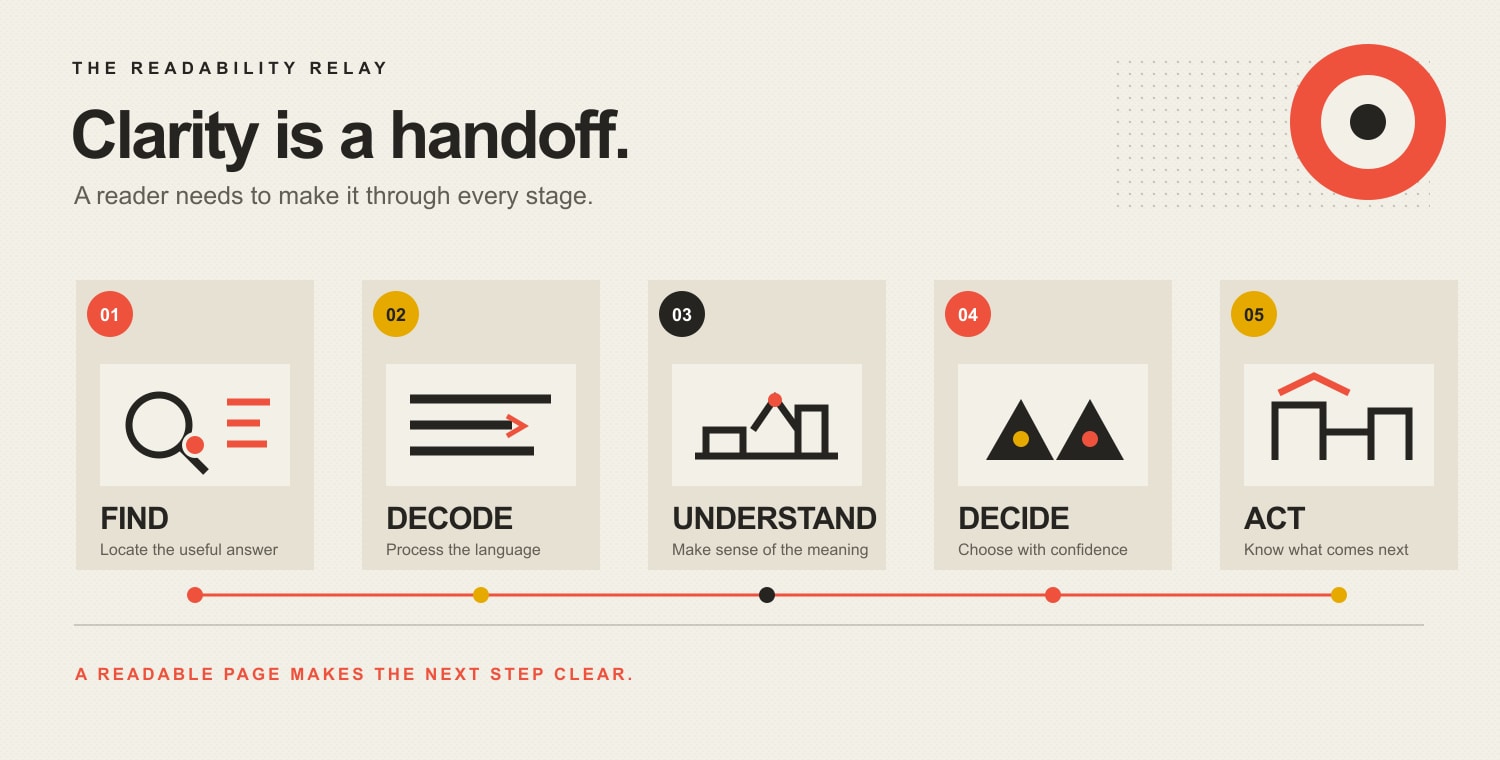
    The Readability Relay: Find the useful answer, decode the language, understand the meaning, decide with confidence, and act on a clear next step.

    1. Find: Can the reader locate the answer?

    The page title, opening, headings, table of contents, and link labels should reveal where the useful information lives. Someone scanning only the headings should understand the page’s argument and find the section that matches their question.

    Microsoft’s guidance on scannable content recommends organizing online material into discrete components and putting the most important information first. That is useful guidance without pretending every visitor follows one universal eye pattern.

    2. Decode: Can the reader process the language?

    Use familiar words where they are accurate. Shorten sentences that carry several ideas, exceptions, and qualifications at once. Expand acronyms on first use. Replace vague pronouns and passive constructions when they hide who does what.

    The goal is not baby talk. The goal is to stop charging readers an unnecessary jargon tax.

    3. Understand: Can the reader explain the meaning?

    Definitions are not enough. Readers need examples, boundaries, comparisons, and consequences. If you say a service is “strategic,” show what decisions the strategy changes. If two plans differ, explain who should choose each and why.

    Comprehension is where many polished pages quietly fall apart. The words are grammatical. The meaning is beige fog.

    4. Decide: Can the reader choose with confidence?

    Business content should reduce uncertainty around fit, price, timing, process, risk, ownership, and alternatives. A reader may understand every sentence and still be unable to decide because the page never addresses the uncomfortable question.

    That is not a reading-grade problem. It is an information problem.

    5. Act: Is the next step obvious and proportionate?

    The page should tell the reader what to do, what happens next, and what commitment the action requires. “Learn more” is rarely enough. “Compare the plans,” “Check your eligibility,” and “Schedule a website diagnosis” name the task.

    A readable page without an intentional next step is a pleasant hallway with no doors.

    How do you improve content readability?

    Start with the reader’s task, not the adjective count. Then revise the page from the outside in: purpose, order, headings, paragraphs, sentences, words, and action.

    Define one primary audience and task

    Write down who the page is for, what brought them there, what they already know, and what they need to accomplish. If one page serves several audiences, separate their paths instead of mixing instructions into a choose-your-own-confusion adventure.

    The Digital.gov guidance on writing for the reader recommends listening to real questions, talking with users, and checking web metrics to understand what people need. Search queries, sales-call objections, support requests, form errors, and on-site searches are all evidence.

    Put the answer before the background

    Lead with the conclusion, recommendation, eligibility rule, price range, or direct definition. Provide the reasoning next. Put company history and background where they support the decision, not where they block the front door.

    This answer-first approach also makes a page easier for search systems and AI tools to extract, but that is a side effect of helping the reader—not an excuse to produce robotic summary sludge. The separate guide to front-loading content for AI search covers that citation-oriented structure in depth.

    Make headings carry meaning

    Replace labels such as “Overview,” “Solutions,” and “Benefits” with headings that answer a question or state a conclusion. “Which plan fits a five-person team?” tells the reader more than “Our Plans.”

    Microsoft’s heading guidance treats headings as both structure and visual reference points. Specific headings help readers scan and help assistive-technology users navigate by heading.

    Give each paragraph one job

    A paragraph should answer one question, explain one point, provide one example, or qualify one claim. When it starts negotiating three unrelated treaties, split it.

    Do not enforce a mechanical sentence limit. A one-sentence paragraph can be useful. A five-sentence paragraph can also be clear. The test is whether the ideas belong together and remain usable on a narrow screen.

    Replace corporate fog with concrete language

    Corporate copy often uses abstract nouns to avoid saying anything falsifiable. Replace “delivery of optimized solutions that facilitate operational efficiency” with the actual action: “We connect the form to your CRM so staff stop retyping leads.”

    Prefer:

    • people and actions over abstractions;
    • specific outcomes over inflated adjectives;
    • active voice when responsibility matters;
    • concrete examples over decorative metaphors;
    • customer language over internal department labels.

    Explain necessary complexity instead of deleting it

    Some topics are genuinely technical, legal, financial, or medical. Simplicity does not give you permission to make them inaccurate.

    Use the precise term, then provide a plain-language explanation, example, or visual. For example: “A canonical URL tells search engines which version of a duplicated page you prefer them to index.” The technical entity survives; the reader does too.

    Use lists and tables only when they organize a real relationship

    A list is useful for steps, options, criteria, or grouped facts. A table is useful when readers need to compare the same attributes across several choices. Neither format is seasoning to sprinkle over an article that lacks structure.

    Keep list items parallel. Keep tables narrow enough to work on mobile, or place them inside a clearly scrollable container. Microsoft’s current responsive-content guidance recommends short sections and simple tables because content must still work on small screens and at larger text sizes.

    “Click here” forces the surrounding sentence to do the link’s job. Descriptive link text such as “review the UX diagnosis guide” helps readers decide whether the destination is useful and gives more meaning when links are encountered out of context.

    Make the next action match the reader’s readiness

    A research-stage visitor may need a checklist, comparison, or example before a sales call. A high-intent visitor may need the booking link immediately. Readability includes understanding the commitment attached to the button.

    Before-and-after readability examples

    These examples show why editing for meaning beats swapping long words for short ones.

    Vague service copy

    Before: “Our innovative team leverages a comprehensive suite of integrated solutions to facilitate transformative growth across your digital ecosystem.”

    After: “We diagnose where your website is losing qualified buyers, then fix the content, UX, tracking, or technical bottleneck that is actually causing it.”

    The revision is clearer because it names the reader, the problem, the work, and the boundary—not merely because the words are shorter.

    Buried eligibility rule

    Before: “Applications received by eligible organizations may be considered for review following the completion of all required documentation and verification procedures.”

    After: “Your organization can apply after you submit the required documents and we verify them.”

    The revision restores the actor and puts the sequence in the order it happens.

    Meaningless call to action

    Before: “Learn more.”

    After: “See what a website diagnosis examines.”

    The revision tells the reader what sits behind the click.

    How should readability be measured on a website?

    Use three layers of evidence: text diagnostics, comprehension tests, and page outcomes.

    Text diagnostics

    Check reading-ease or grade-level scores, average sentence length, long words, passive constructions, heading coverage, and paragraph density. These help locate passages worth reviewing. They do not determine whether the passage should be rewritten.

    Comprehension and usability tests

    Ask representative readers to perform a task and explain the answer in their own words. Useful prompts include:

    • “Which service would you choose for this situation, and why?”
    • “What will happen after you submit this form?”
    • “What does this term mean on this page?”
    • “Where would you look for the pricing exception?”
    • “What is the next step?”

    Watch where they hesitate, backtrack, choose incorrectly, or ask for clarification. Five real conversations can reveal more about meaning than a dashboard full of decimal places pretending to be wisdom.

    Page and business outcomes

    Choose measures that match the page’s job:

    • correct task completion;
    • CTA use by qualified visitors;
    • form completion and error rate;
    • successful plan or product selection;
    • internal-search refinements;
    • support questions caused by unclear content;
    • time to locate a specific answer;
    • abandonment at a decision point;
    • lead quality and sales objections.

    Time on page is not automatically good. A longer visit may mean engagement, confusion, or someone leaving the tab open while making lunch. Pair behavior with the task and qualitative evidence.

    Does content readability help SEO and AI citations?

    Readable, well-structured content can support a better search experience, but readability is not a magic direct ranking switch. Google recommends helpful, reliable, people-first content that serves an intended audience and helps people accomplish their goals. Google also explicitly says E-E-A-T is not one specific ranking factor.

    Clear titles, descriptive headings, direct answers, explicit entities, useful examples, and well-supported claims make a page easier for people and machines to interpret. They can also make a passage more useful to an AI system deciding what to quote or cite.

    None of that guarantees a ranking or citation. Anyone promising guaranteed AI citations has found a fresh bucket of glitter to sell.

    The durable approach is less exciting and more useful:

    1. Answer a real question better than the existing results.
    2. State the answer clearly enough to stand on its own.
    3. Add original expertise, a framework, or evidence worth referencing.
    4. Support factual claims with authoritative sources.
    5. Connect the page to a coherent expert topic cluster.
    6. Keep the content current and test whether readers succeed.

    A practical content readability audit

    Use this sequence on one important page before turning readability into a 97-tab content initiative.

    1. Name the reader and task. Write one sentence for each.
    2. Run the Readability Relay. Mark where people fail to find, decode, understand, decide, or act.
    3. Check the first screen. Confirm the page says what it offers, who it helps, and what to do next.
    4. Read only the headings. Verify that they form a useful outline.
    5. Circle jargon and abstractions. Explain necessary terms and replace ornamental ones.
    6. Split overloaded sentences and paragraphs. Keep related qualifications together without hiding the main point.
    7. Check mobile and text enlargement. A beautiful desktop paragraph can become a hostage note on a phone.
    8. Use a readability formula. Review the outliers; do not obey the score blindly.
    9. Test a realistic task with representative readers. Ask them to explain their choice.
    10. Measure the page’s outcome. Track comprehension, completion, errors, and qualified action.

    If the problem extends beyond the words—into navigation, trust, forms, performance, or the offer itself—use the broader website UX diagnosis guide. A copy edit should not be forced to cosplay as a business diagnosis.

    Frequently asked questions about content readability

    What does readability mean?

    Readability means how easily an intended reader can process and understand written text. On a website, useful readability also includes finding the relevant section and knowing how to use the information.

    How can I check the readability of content?

    Use a formula such as Flesch Reading Ease or Flesch-Kincaid Grade Level to flag complex passages, then review headings, organization, jargon, examples, and next steps. Finish by asking representative users to complete a realistic task and explain the page in their own words.

    What is a good readability score?

    There is no universal good score for every audience and purpose. Establish a reasonable range for the intended reader, investigate outliers, and verify comprehension. Technical precision can improve readability for an expert audience even when a formula penalizes the vocabulary.

    Is a Flesch Reading Ease score of 60 good?

    A score around 60 is often interpreted as reasonably accessible general prose, but the number is only a diagnostic. It does not prove that the information is accurate, well organized, understandable, or actionable for your audience.

    What does a Flesch-Kincaid grade level mean?

    It estimates the U.S. school grade associated with the text’s sentence and word characteristics. It does not measure the reader’s intelligence, subject expertise, motivation, or actual comprehension.

    Is plain language the same as dumbing content down?

    No. Plain language means using organization, wording, and design that help the intended audience understand the message. It preserves necessary complexity and explains it; it removes unnecessary complexity that mainly makes the writer sound impressed with themselves.

    What is the difference between readability and legibility?

    Legibility is whether people can visually perceive and distinguish the text. Readability is whether they can process the language and meaning. Font size, contrast, spacing, and reflow affect legibility; word choice, sentence structure, terminology, and organization affect readability. Both matter.

    What is the difference between readability and scannability?

    Readability helps people process the prose. Scannability helps them locate the prose that matters. Descriptive headings, short sections, lists, tables, and answer-first ordering improve scanning when they reflect a real information structure.

    How long should website sentences and paragraphs be?

    Keep them as short as the idea allows, not as short as a plugin demands. Aim for one main idea per sentence and one job per paragraph, vary the rhythm, and check the result on a narrow screen and at enlarged text sizes.

    How do you make technical content easier to read?

    Keep precise technical terms when they are necessary, define them at first use, show an example, explain the consequence, and layer optional detail after the direct answer. Accuracy and clarity are partners, not opponents.

    Does readability affect Google rankings?

    Google does not identify a readability score as a direct ranking factor. Clear, helpful, people-first content can support the overall experience and make the page easier to understand, but a green readability badge does not buy a ranking.

    Can AI rewrite content for readability?

    AI can flag long sentences, suggest alternatives, and produce useful drafts. It cannot independently know which nuance matters to your customer, whether a claim is true, or where the business process actually creates confusion. Use it as an editor, then apply subject expertise and test the result with people.

    Make the page easier to use, not merely easier to score

    The point of content readability is not to win a tiny green light inside a plugin. It is to help the right person find the answer, understand the tradeoff, make a confident decision, and take the right next step.

    If one important page is underperforming and you are not sure whether the failure is content, UX, the offer, traffic quality, or the technical foundation, talk with Scope Design about a website diagnosis. We will find the dropped baton before prescribing an expensive pile of prettier words.

  • Customer Service Recovery: Handle Refund Requests Without Making It Worse

    Customer Service Recovery: Handle Refund Requests Without Making It Worse

    Customer service recovery is the process of finding out what failed, making a fair and proportionate repair, communicating the decision clearly, and fixing the system that caused the failure. When a customer asks for a refund, the goal is not to perform a loyalty magic trick. It is to determine what was promised, what was delivered, what the customer is entitled to, and whether the right outcome is rework, a refund, credit, or a clean exit.

    That sounds less sexy than “turn every refund into a customer for life.” It is also substantially less full of crap.

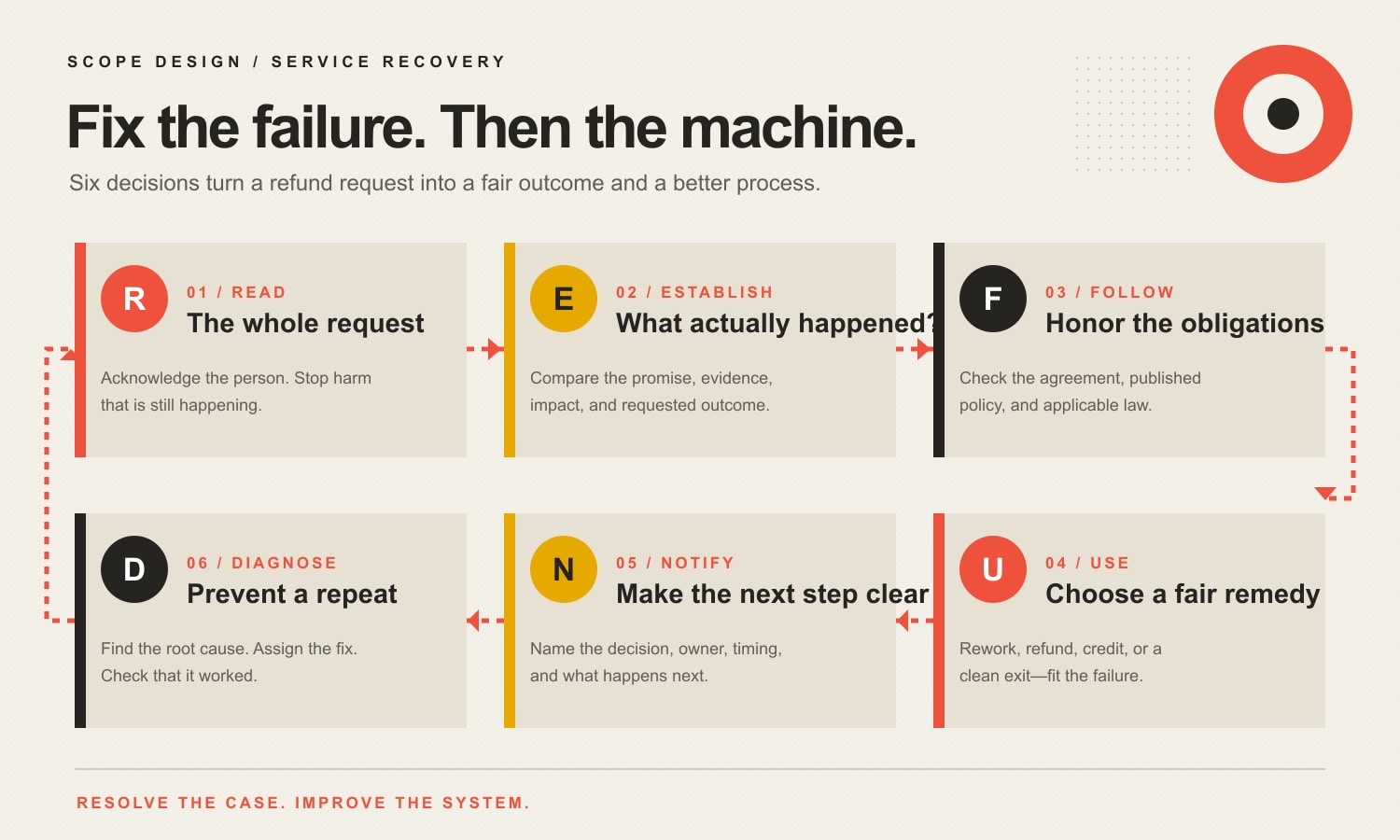
    TL;DR: Stop treating refund requests as isolated customer-service tickets. Use Scope Design’s REFUND Recovery Loop: Read the request and stop ongoing harm; Establish the facts; Follow the contract, policy, and law; Use a proportionate remedy; Notify the customer with an owner and deadline; and Diagnose the root cause so the same failure does not keep collecting victims.

    This article provides general U.S. business guidance, not legal advice. Refund, cancellation, warranty, licensing, and consumer-protection requirements vary by transaction, industry, contract, and jurisdiction.

    Table of contents

    1. What is customer service recovery?
    2. Why the “refund equals loyalty” promise is shaky
    3. The REFUND Recovery Loop
    4. Step 1: Read the request and stop ongoing harm
    5. Step 2: Establish the facts
    6. Step 3: Follow the contract, policy, and law
    7. Step 4: Use the right remedy
    8. Step 5: Notify the customer clearly
    9. Step 6: Diagnose the root cause
    10. What should a refund response say?
    11. What should you track?
    12. Which service-recovery metrics matter?
    13. What should you never do?
    14. How to build a usable recovery system
    15. Frequently asked questions

    What is customer service recovery?

    Customer service recovery is a planned response to a product, service, communication, billing, or delivery failure. It includes acknowledging the problem, investigating what happened, choosing a fair remedy, following through, and feeding the lesson back into operations.

    The important word is planned. A good recovery process does not depend on whether the customer reaches your nicest employee, catches the owner between meetings, or writes an angry enough email to win the escalation lottery.

    The current ISO 10002 complaints-handling standard treats complaint handling as an organizational process involving operation, maintenance, analysis, improvement, management commitment, accessible feedback, and review. In other words, “give Janet a coupon and hope she stops emailing” is not much of a system.

    The U.S. Agency for Healthcare Research and Quality describes service recovery as identifying and fixing a problem or making amends for a failure. Although its guidance is written for healthcare, the operating principles travel well: give frontline staff clear authority, use planned protocols, document complaints, identify failure points, and connect recovery to process improvement.

    Why the “refund equals loyalty” promise is shaky

    You will find endless articles promising that a heroic refund experience can make a customer more loyal than if nothing had gone wrong. This is usually called the service recovery paradox.

    The phenomenon is not imaginary, but the marketing version is wildly oversold. A peer-reviewed meta-analysis of service recovery paradox research found a positive cumulative effect on satisfaction, but no significant overall effect on repurchase intentions, word of mouth, or corporate image. Study design, audience, and service category also changed the result.

    So yes, a strong recovery can improve how someone feels about the response. No, that does not mean you should treat failure as a clever retention campaign.

    The better rule is this:

    Recover the customer’s position before trying to recover the customer.

    Make the situation fair. Then let continued business be an honest option—not the price of receiving the remedy they were already owed.

    This fits the larger Scope Design view of customer lifecycle management: retention is useful only when the customer is a fit, the promised outcome is still achievable, and both sides can move forward without pretending the failure never happened.

    The REFUND Recovery Loop

    Scope Design’s REFUND Recovery Loop turns an emotional, inconsistent refund conversation into six operational decisions.

    LetterDecisionWhat it prevents
    R — ReadRead the complete request, acknowledge it, and stop any ongoing harm.Defensive replies and avoidable escalation
    E — EstablishEstablish the promise, facts, impact, evidence, and desired outcome.Guessing, blame, and policy-by-vibes
    F — FollowFollow the contract, published policy, and applicable law.Improvised rules and unlawful shortcuts
    U — UseUse the remedy that matches the failure: rework, refund, credit, or clean exit.Cheap offers that prolong the damage
    N — NotifyNotify the customer of the decision, owner, timing, and next step.Vague promises and repeated chasing
    D — DiagnoseDiagnose the root cause, assign corrective action, and verify the change.Paying for the same failure repeatedly
    The six-step REFUND Recovery Loop: Read the request, Establish the facts, Follow the agreement and applicable requirements, Use a fair remedy, Notify the customer clearly, and Diagnose the root cause.

    The loop has two outputs: a resolved case and a better business. If you only produce the first one, congratulations—you have built a complaint treadmill.

    Step 1: Read the request and stop ongoing harm

    Start by reading the entire request, including the order, agreement, project history, support thread, and prior promises. Do not reply to the first angry sentence while ignoring the six useful facts beneath it.

    Then ask whether harm is still occurring. Examples include:

    • a subscription continuing to bill;
    • a broken integration corrupting data;
    • an advertisement still making the disputed claim;
    • a security or privacy exposure;
    • unfinished work blocking the customer’s operation;
    • a shipment, appointment, or automated process that can still be stopped.

    Containment comes before debate. Arguing over a $500 refund while another $2,000 of damage accumulates is not principled. It is expensive theater.

    Send a prompt acknowledgement even if the final decision requires investigation. State who owns the case and when the customer will receive the next update. “We are reviewing this and will respond soon” is not a timeline. It is fog wearing a necktie.

    Step 2: Establish the facts

    A refund request contains at least three stories: what the customer expected, what the business believes it promised, and what the evidence shows actually happened. Recovery begins by separating them.

    Collect:

    • the signed agreement, proposal, order, invoice, or warranty;
    • the sales page, advertisement, email, or conversation that shaped expectations;
    • the promised deliverable, result, timing, or service level;
    • what was delivered and when;
    • what failed and how the failure affected the customer;
    • prior attempts to correct the issue;
    • dependencies owned by the customer or a third party;
    • the remedy the customer is requesting;
    • the business’s ability to correct the problem reliably.

    The Federal Trade Commission’s consumer resolution guidance tells consumers to gather contracts, receipts, warranties, transaction details, dates, communications, and the resolution they want. A competent business should be able to review the same record without making the customer reconstruct the entire crime scene three times.

    Classify the failure before choosing a remedy:

    Failure classPractical meaningTypical next question
    No business failureThe agreed work was substantially delivered; the request is based on preference, changed circumstances, or new scope.What does the agreed cancellation or refund policy allow?
    Minor defectThe delivered value remains usable and the defect is specific and reliably correctable.Can we repair it promptly without new inconvenience?
    Material defectA meaningful part of the promised value is missing, late, or unusable.Is a reliable cure still reasonable, or is an adjustment/refund cleaner?
    Fundamental failureThe customer received little meaningful value or the core outcome cannot be delivered.What refund and exit terms make the customer whole?
    Mixed responsibilityBusiness, customer, or third parties contributed in different ways.What does the evidence and agreement assign to each party?
    High-risk issueSafety, property, privacy, regulated activity, threatened litigation, or significant damages are involved.Who must be notified and what specialist advice is required?

    Do not use this table as a legal damages formula. Use it to stop the team from treating every complaint as either “the customer is always right” or “our policy says no.” Both are slogans. Neither is analysis.

    Step 3: Follow the contract, policy, and law

    Review the commitment you actually made. That includes the contract and published policy, but it can also include material representations in sales pages, proposals, ads, and emails.

    FTC guidance says advertising must be truthful, non-deceptive, fair, and supported by evidence. A business should not promise an outcome in bold type and then discover a tiny disclaimer only after the customer complains.

    A written “no refunds” policy is not a universal force field. Different transactions can involve state consumer laws, mandatory cancellation periods, warranties, professional rules, subscription requirements, home-solicitation rules, or industry-specific obligations. If the amount or risk is meaningful, get advice for the actual jurisdiction and contract instead of borrowing legal confidence from a blog post—including this one.

    Create a clear escalation rule for cases involving:

    • possible statutory cancellation or refund rights;
    • personal injury, property damage, privacy, or security;
    • alleged fraud, deception, discrimination, or professional misconduct;
    • a disputed contract interpretation;
    • substantial consequential loss;
    • threats of litigation, regulatory reporting, or chargebacks;
    • a recurring failure that management already knew about.

    Legal review is not a customer-service failure. Waiting until everyone has written three emotional emails and admitted six unnecessary things is.

    Step 4: Use the right remedy

    Choose the remedy that matches the shortfall, not the option that costs the least this afternoon.

    SituationUsually appropriate directionWatch for
    The work is substantially correct and the customer changed their mind.Follow the agreed cancellation policy; consider a discretionary accommodation only if it makes business sense.Do not invent a failure to avoid an uncomfortable “no.”
    A small defect is identifiable and reliably fixable.Rework or correction at no additional charge.Give a real owner and completion date.
    A material defect can be cured and the customer still wants the outcome.Rework with a written recovery plan and verification step.Repeated failed cures make another attempt unreasonable.
    Only part of the promised value was delivered.Partial refund, fee adjustment, or another proportional remedy.Document how the adjustment was determined.
    The core value was not delivered or cannot be delivered.Full or substantial refund and a clean operational exit.Do not hold files, access, or cooperation hostage.
    The customer prefers future value and is legally free to choose it.Credit can be a voluntary alternative.Credit is not a substitute for a refund right.
    Trust or fit has collapsed.Clean exit with explicit financial, access, asset, and closure terms.Stop trying to save a relationship that will only fail louder.
    The issue creates legal, safety, property, privacy, or regulatory risk.Contain, escalate, document, and obtain appropriate advice.Do not let a frontline coupon become the whole response.

    When should you offer rework?

    Offer rework when the original objective remains achievable, the customer still wants it, the defect is understood, and the business can credibly prevent the same failure during the second attempt.

    Do not offer rework merely to avoid returning money. “Please let us fail one more time” is not a recovery plan.

    When should you issue a refund?

    A refund becomes more appropriate when the promised value was not delivered, the defect is material, a reliable cure is unavailable, the customer has already endured failed corrections, or the contract or law requires it.

    For partial performance, the amount may depend on the value actually delivered, the agreement, and applicable law. The internal starting question is simple: what value was promised, what value was actually delivered, and what adjustment fairly addresses the gap?

    When should you offer credit?

    Offer credit when the customer genuinely wants future service and is free to choose credit instead of another remedy. Credit can acknowledge inconvenience and preserve useful value. It should not be a trap that converts money the customer is owed into an expiring coupon.

    When is a clean exit the best outcome?

    Use a clean exit when trust is broken, the business lacks the capability to fix the problem, the customer is no longer a workable fit, or continued recovery would create more cost and frustration than value.

    A clean exit should state what will be refunded or paid, what work or assets will be transferred, which access will be removed, what obligations survive, and when the relationship is considered closed. The goal is not to “win.” The goal is to stop the mess from breeding.

    Step 5: Notify the customer clearly

    A useful recovery message contains five things:

    1. Acknowledgement: what you understand happened and how it affected the customer.
    2. Finding: what the review established, including the part the business got wrong.
    3. Remedy: what you will do and what choices the customer has.
    4. Ownership: the person responsible for completing the remedy.
    5. Timing: the date of the next update and the date the remedy should be complete.

    Do not bury the decision beneath three paragraphs about how seriously your company takes customer satisfaction. If the answer is a refund, say so. If the answer is no, explain the agreement and evidence without treating the customer like an enemy combatant.

    The response should also say what happens next: whether the customer must return something, approve rework, transfer files, stop using a service, or simply wait for the payment processor.

    Step 6: Diagnose the root cause

    The individual case is not finished until the business asks why its system allowed the failure.

    Open Brain contains a Scope Design complaint protocol built around acknowledgement, empathy, evidence, validity, a resolution plan, implementation, confirmation, and process improvement. The principle beneath it is blunt: complaints are process-improvement signals. Capture the fix and update the checklist.

    That matches ISO 10002’s emphasis on analyzing complaints to improve products and services, and AHRQ’s recommendation to maintain a complaint database, identify failure points, track trends, and stop handling recurring problems as if each one fell from space.

    Use root-cause categories that point toward an operational fix:

    • sales or expectation setting;
    • scope ambiguity or undocumented change;
    • scheduling or capacity;
    • staffing, training, or competency;
    • quality control;
    • communication or handoff;
    • equipment, software, hosting, or integration;
    • supplier or third party;
    • customer-owned input or approval;
    • billing, subscription, or payment;
    • policy or documentation;
    • an external event outside reasonable control.

    “Employee error” is often where lazy investigations go to die. Ask why the process did not prevent, detect, or contain the error.

    What should a refund response say?

    Use a response structure your team can adapt without sounding like a malfunctioning empathy bot:

    We reviewed your request, the agreement, and the project record. You expected [promised outcome], and [specific failure] prevented that from happening. We are [refunding / correcting / crediting / closing] [specific amount or work]. [Owner] is responsible for completing this by [date], and you will receive the next update by [date]. You need to [customer action, if any]. We are also changing [process or control] so this failure is less likely to repeat.

    If the business did not fail, keep the same clarity:

    We reviewed the request against [agreement/policy] and the delivery record. The agreed work was completed on [date], and the request falls outside [specific term]. We are therefore not issuing [requested remedy]. We can offer [legitimate option, if any]. If you believe we missed evidence, send [specific information] to [owner] by [date] and we will review it.

    Plain language is not an admission of weakness. It is evidence that someone competent owns the decision.

    What should you track?

    Track enough information to spot repeat failures without building a surveillance museum.

    Case and transaction

    • case, customer, order, or project ID;
    • product or service;
    • sale and delivery dates;
    • complaint date and channel;
    • case owner and escalation level.

    Promise, failure, and impact

    • promised outcome or deliverable;
    • actual outcome;
    • customer’s description;
    • objective failure classification;
    • severity and ongoing harm;
    • customer, financial, operational, safety, privacy, or legal impact.

    Remedy and closure

    • remedy requested, offered, and accepted;
    • refund, credit, rework, and direct remediation cost;
    • owner, due date, completion date, and customer confirmation;
    • final status: recovered, active with conditions, or clean exit.

    Prevention

    • root-cause category and contributing factors;
    • why the existing control did not catch the problem;
    • corrective action, owner, and due date;
    • policy, contract, sales, training, quality-control, or system change;
    • verification date and evidence that the change worked.

    The most useful field is not “Who screwed up?” It is “Why could this happen, and what now makes it harder to repeat?”

    Which service-recovery metrics matter?

    Measure the process without rewarding staff for denying legitimate remedies or buying silence with discounts.

    MetricWhat it tells youRequired action rule
    Time to acknowledgementWhether customers know someone owns the issueEscalate unacknowledged cases after your stated service window
    Time to decisionWhether investigation or approval is becoming a bottleneckReview cases exceeding the normal complexity band
    Time to completed remedyWhether promises are actually fulfilledEscalate missed remedy dates immediately
    Repeat-contact rateWhether customers must chase for the same issueAudit cases with avoidable repeat contacts
    Repeat-failure rateWhether the operational fix workedReopen root-cause work when the same failure recurs
    Remedy mix and costHow failures are being resolved and what they costReview unusual patterns by product, team, source, or failure class
    Post-resolution outcomeWhether the relationship continued, changed, or endedUse as evidence, not a quota to force retention
    Corrective-action closureWhether operational changes were completed and verifiedAssign overdue actions to a named manager

    Apply the Scope Design OWNER Metric Test to each metric: tie it to an outcome, define the measurement window, name an owner, specify the evidence, and write the response rule.

    Do not grade the recovery team solely on refund dollars avoided. That creates a predictable incentive: make legitimate customers fight until they leave. The spreadsheet may look better. The business will not.

    What should you never do?

    Do not condition a remedy on silence or praise

    Do not require a customer to remove an honest review, promise not to complain, or post a positive testimonial before receiving a remedy. The Consumer Review Fairness Act protects honest consumer opinions and prohibits certain form-contract provisions that restrict or penalize reviews.

    You may ask for feedback after resolution. You may not buy a five-star story and present it as spontaneous affection. Our guide to ethical marketing psychology applies here: if the tactic becomes embarrassing when explained plainly, it probably does not belong in the process.

    Do not hide behind policy when the business materially failed

    A clear refund policy is useful. A policy is not a substitute for delivering what was sold, and it does not automatically override contractual or statutory rights.

    Do not promise arbitrary response times you cannot staff

    “Every complaint resolved in 24 hours” sounds disciplined until a complex case requires records, vendors, legal review, or technical investigation. Promise acknowledgement and a next update quickly. Set the final timeline after classifying the case.

    Do not force retention

    The customer may not want another attempt. Your business may not be the right fit. Recovery should preserve a future relationship only when that relationship still makes sense.

    Do not automate the judgment away

    Automation can route cases, collect records, issue approved refunds, send updates, and detect repeated causes. It should not invent legal conclusions or trap a customer in chatbot hell. If you use automation, follow the same rules we recommend for business AI chatbots: define the job, the limits, the owner, and the escalation path.

    How to build a usable recovery system

    Start with the failures you actually see, not a software shopping spree.

    1. List the ten most common complaints and refund reasons. Include where they originate and how they are currently resolved.
    2. Define failure classes and escalation triggers. Staff need to know what they can decide and what requires management, legal, security, or insurance involvement.
    3. Set authority bands. Give frontline staff written authority for predictable remedies while preserving escalation for high-risk cases.
    4. Create the REFUND case record. Capture the promise, evidence, decision, owner, timing, root cause, and corrective action.
    5. Write response patterns, not robotic scripts. Standardize the information that must be communicated while allowing a human voice.
    6. Connect complaints to operations. Review repeated causes, overdue corrective actions, and process changes on a regular schedule.
    7. Verify the fix. A checked box is not evidence that the new control works.

    If this reveals a larger mess across sales promises, delivery, support, billing, and data, the problem is not “customer service tone.” It is operating design. Scope Design’s Impact Consulting is built for finding the actual bottleneck before prescribing another shiny tool.

    Frequently asked questions

    What is customer service recovery?

    Customer service recovery is the planned process of investigating a service failure, choosing and completing a fair remedy, communicating clearly, and correcting the underlying cause. It applies to refunds, complaints, billing errors, missed commitments, defective work, and other failures in the customer relationship.

    What are the five steps of service recovery?

    Many models use five steps such as acknowledge, listen, solve, follow up, and improve. Scope Design uses six because contract and legal review deserves its own decision: Read, Establish, Follow, Use, Notify, and Diagnose.

    What are the different types of service recovery?

    Common remedies include correction or rework, replacement, full or partial refund, fee adjustment, credit, apology or acknowledgement, operational assistance, and a clean exit. The correct type depends on what was promised, what failed, what value remains, what the customer wants, and what the contract or law requires.

    What should you say when a customer requests a refund?

    State what you understand happened, who owns the review, when the customer will hear back, and what information is needed. After review, explain the finding, remedy, owner, completion date, and next step in plain language.

    How do you politely decline a refund request?

    Explain the decision against the specific agreement, policy, and delivery record. Avoid blame and canned legalese. Offer a legitimate alternative only if it solves a real problem, and provide a path for the customer to submit evidence you may have missed.

    Should you always give a customer a refund?

    No. Some requests involve changed preferences, completed work, new scope, customer-controlled failures, or terms that do not provide a refund. But a “no refunds” policy should not be used to ignore material business failures or applicable legal rights.

    When is rework better than a refund?

    Rework is better when the outcome remains achievable, the defect is known, the customer still wants the result, and the business can reliably complete the correction without creating disproportionate inconvenience. Repeated failed attempts usually weaken the case for more rework.

    When is store credit appropriate?

    Credit is appropriate when the customer genuinely wants future value and can freely choose it. It should not replace a refund the customer is entitled to, expire unreasonably, or function as a way to keep the customer’s money after a fundamental failure.

    How quickly should a business respond to a refund request?

    Respond quickly enough to acknowledge ownership and stop ongoing harm, but do not invent a universal final-resolution deadline. The right decision time depends on complexity, evidence, payment systems, contract terms, and legal risk. Give the customer a specific next-update date.

    Can a business ask a customer to remove a bad review after a refund?

    You can invite a customer to update a review voluntarily after the case is resolved, but do not condition a refund or other owed remedy on silence, removal, or a positive review. Honest consumer reviews receive federal protection, and incentives or restrictions can create legal and trust problems.

    Does good service recovery always create loyalty?

    No. Research suggests service recovery can improve satisfaction, but the overall evidence does not show a reliable effect on repurchase intention, word of mouth, or corporate image. A fair recovery may preserve the relationship; it may also produce a respectful exit.

    What is the service recovery paradox?

    The service recovery paradox is the idea that a customer may become more satisfied after an excellent recovery than they would have been if no failure occurred. It can happen under some conditions, but it is not a dependable retention strategy and does not justify creating or tolerating avoidable failures.

    How should a small business track complaints?

    Track the transaction, promise, failure, evidence, severity, remedy, owner, dates, root cause, corrective action, and verification. Use the smallest system that supports consistent decisions and trend analysis; a structured spreadsheet can beat an expensive platform nobody maintains.

    Who should own service recovery?

    The individual case needs one named owner. The root-cause fix may belong to sales, delivery, finance, technology, management, or another team. Frontline staff also need written authority limits and a clear escalation path.

    How can a business prevent refund requests?

    Set accurate expectations, define scope, price, terms, dependencies, and limitations clearly, verify quality before delivery, communicate changes early, and monitor repeated failure causes. Prevention is not about making the policy harder to find. It is about reducing the gap between what was sold and what the customer actually receives.

    Fix the failure. Then fix the machine.

    A refund request is not automatically a lost customer, a difficult customer, or a retention opportunity. It is evidence that the expected exchange of value may have broken.

    Read it. Establish the facts. Follow the actual obligations. Use the right remedy. Notify the customer clearly. Diagnose why it happened.

    If the customer stays, earn the next transaction. If the relationship should end, exit cleanly. Either way, stop paying tuition for the same operational mistake.

  • Web Design vs. Content: Which Should You Fix First?

    Web Design vs. Content: Which Should You Fix First?

    Neither web design nor content matters more in every situation. Content carries the claim, proof, and instruction. Design determines whether people can notice, understand, trust, and act on it. Fix the first place that handoff fails—and make sure the actual problem is not bad traffic, a weak offer, broken technology, or sales follow-up taking a three-day nap.

    TL;DR: If visitors cannot tell what you do or why it matters, fix the content and message hierarchy first. If they understand the offer but cannot navigate, read, trust, or complete the action, fix the design and UX first. If the wrong people are arriving, the offer is weak, the form is broken, or leads disappear into an inbox crater, neither a redesign nor fresh copy is the first move.

    The “web design vs. content” debate survives because it produces tidy opinions and terrible diagnoses. Designers say people judge what they see. Copywriters say words sell. Both can be right, both can be wrong, and both can invoice you for solving a problem you do not have.

    The useful question is not, “Which discipline wins?” It is, “Where does the visitor stop moving from attention to understanding to confident action?”

    What is the difference between web design and website content?

    Website content is the information and meaning people use to make a decision: headlines, explanations, product details, comparisons, pricing context, proof, labels, instructions, images, video, data, and calls to action.

    Web design organizes and presents that information through layout, hierarchy, typography, color, spacing, navigation, interaction patterns, responsive behavior, states, and visual relationships. UX design extends beyond appearance into how the whole task works.

    That distinction is useful for assigning responsibility. It becomes nonsense when teams pretend the two can succeed independently.

    Consider a button:

    • Content tells the person what the action is and what happens next.
    • Design makes the control recognizable, locatable, legible, and usable.
    • Development makes it work.
    • Strategy determines whether it is the right action for that visitor.
    • Operations determine whether anyone does something useful after the click.

    Calling all of that “make the button pop” is how business problems become decorative projects.

    The W3C guidance on accessibility, usability, and inclusion makes a similar systems point: these concerns overlap, and addressing them together produces a more usable result. Content and interface are different disciplines, but the visitor experiences one page—not your org chart.

    Does web design affect conversions?

    Yes. Web design affects whether people can perceive the page, understand its hierarchy, navigate to the relevant information, identify controls, recover from errors, and complete the intended task. It also shapes the credibility cues people use while deciding whether the claims deserve attention.

    The design layer includes basic thresholds that copy cannot compensate for:

    • readable contrast and type;
    • obvious interactive elements;
    • clear, consistent navigation;
    • labels and instructions that stay connected to forms;
    • useful error and success feedback;
    • layouts that reflow on narrow screens;
    • stable, responsive pages that do not shift or stall;
    • a hierarchy that reveals what matters first.

    Those are not matters of taste. The W3C’s web-accessibility design tips explicitly cover contrast, identifiable controls, navigation, labels, feedback, headings, spacing, and different viewport sizes.

    Performance belongs in this conversation too. Rakuten 24 published a Core Web Vitals case study in which a visually and functionally comparable faster version produced a 33.13% conversion-rate lift in that company’s mobile A/B test. That is credible evidence that interface performance can affect business outcomes. It is not a coupon promising every slow site exactly 33.13% more money. One case study is a case study, not a universal law wearing a lab coat.

    If people cannot use the page, they never reach the brilliant paragraph your copywriter would like framed.

    Does website content affect conversions?

    Yes. Content tells the visitor what the business offers, who it is for, which problem it solves, how the options differ, why the claim is believable, what the risk is, and what to do next.

    Content failures usually look like this:

    • a vague headline that could belong to 400 competitors;
    • features without an explained business outcome;
    • claims without evidence near the moment of doubt;
    • company biography before the visitor’s actual question;
    • important price, fit, timing, or process information missing;
    • internal jargon used as navigation;
    • a call to action that says “Learn more” because apparently verbs are rationed;
    • pages that attract search traffic but never connect the answer to the offer.

    A visually polished page can make vague content look expensive. It cannot make it meaningful.

    Google’s current people-first content guidance asks whether content serves an intended audience, demonstrates first-hand expertise, provides original value, and helps someone accomplish a goal. The same guidance says Google’s systems also look for an overall good page experience. Search does not treat useful information and usable presentation as rival political parties. Neither should your website team.

    For the mechanics of making copy easier to find and understand, use Scope’s guide to website content readability. This article has a different job: deciding whether content is actually the first constraint.

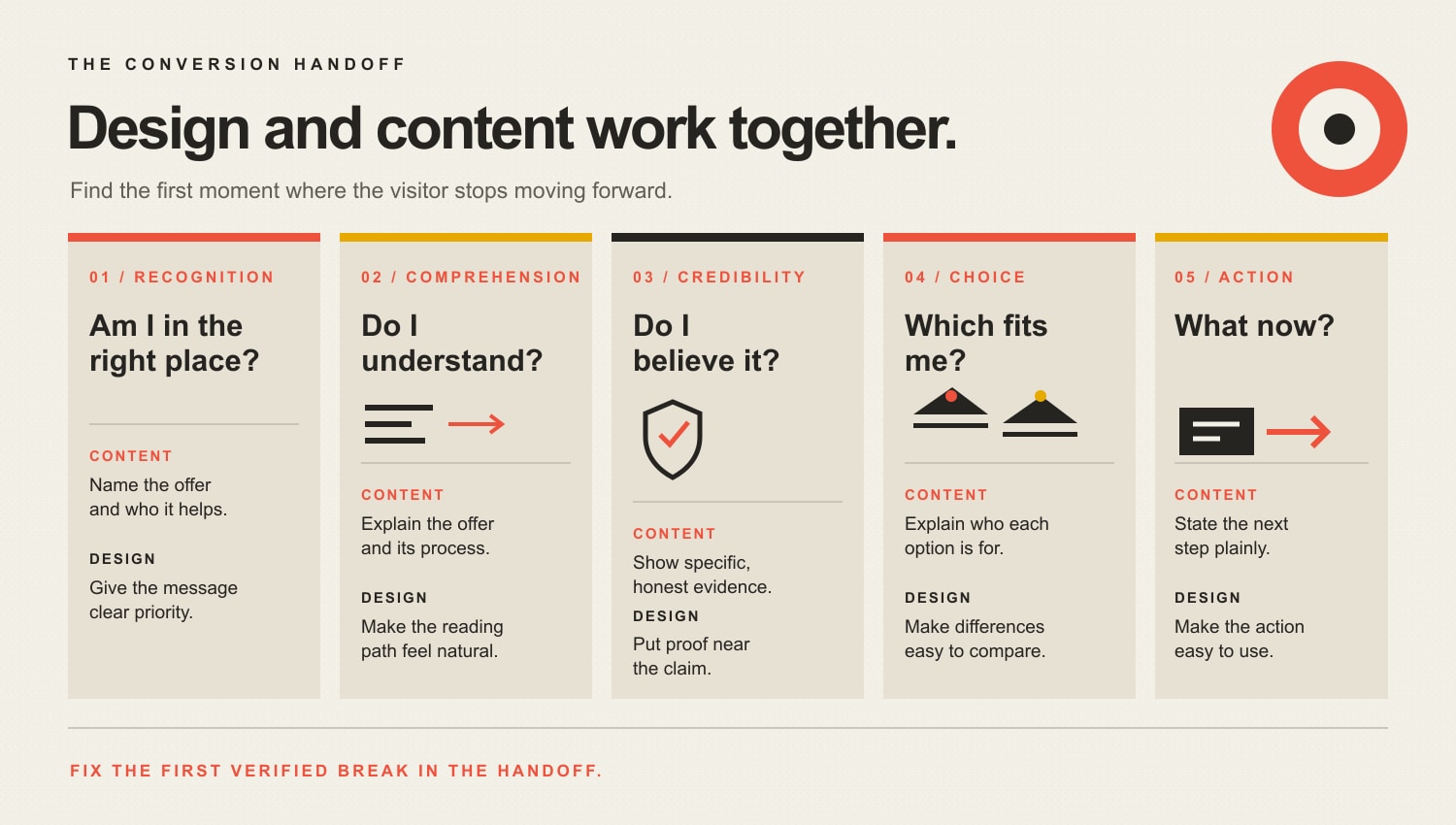
    Use the Scope Design Conversion Handoff

    A business page has to move a person through five handoffs: Recognition, Comprehension, Credibility, Choice, and Action. Design and content share every stage, but their responsibilities change.

    The Conversion Handoff: content and design work together at Recognition, Comprehension, Credibility, Choice, and Action. Content names and explains the offer, supplies evidence, explains fit, and states the next step; design prioritizes, organizes, places proof, clarifies comparisons, and makes the action usable.

    1. Recognition: “Am I in the right place?”

    Content names the problem, audience, offer, and outcome. Design gives that message priority and prevents decorative noise from mugging it in the parking lot.

    Content-first symptoms: People describe the company incorrectly, sales calls start with “So what do you actually do?”, or the headline is a generic promise such as “Transforming tomorrow through innovative solutions.”

    Design-first symptoms: The right message exists, but a hero video, rotating slider, weak contrast, cluttered header, or microscopic type keeps it from being perceived.

    2. Comprehension: “Do I understand it?”

    Content explains the offer, terms, process, and consequences. Design groups related ideas, creates a reading order, and makes the explanation work across devices and input methods.

    Content-first symptoms: Visitors read the page but misunderstand the service, confuse plans, or ask questions the page supposedly answers.

    Design-first symptoms: Information is accurate but scattered across tabs, buried under vague headings, trapped in an unreadable comparison, or rearranged nonsensically on mobile.

    3. Credibility: “Do I believe it?”

    Content supplies evidence: specific results, methods, limitations, authorship, case details, references, pricing context, and honest answers. Design places proof near the claim, distinguishes evidence from decoration, and creates a coherent professional presentation.

    Content-first symptoms: Testimonials say only “Great job,” claims have no source, case studies omit what changed, or every objection is hidden until a sales call.

    Design-first symptoms: Strong proof exists on a forgotten page, logos are unreadable, evidence appears detached from the claim, or inconsistent styling makes legitimate information look cobbled together.

    Scope’s current testimonial article is itself scheduled for a later evidence-led rebuild, so treat social-proof statistics there cautiously for now. The useful principle is simpler: proof should be specific, relevant, and close to the uncertainty it resolves.

    4. Choice: “Which option fits me?”

    Content defines options, tradeoffs, fit, exclusions, cost drivers, and decision criteria. Design makes comparison possible without forcing the visitor to keep five pages in working memory.

    Content-first symptoms: Every plan is “perfect for growing businesses,” nobody explains why prices differ, or the page refuses to say who should not buy.

    Design-first symptoms: The comparison requires horizontal gymnastics, the selected state is unclear, filters do not behave as expected, or essential details vanish behind interaction gimmicks.

    5. Action: “What do I do, and what happens next?”

    Content names the next step, commitment, required information, and follow-up. Design makes the control obvious, accessible, proportionate, and forgiving when someone makes a mistake.

    Content-first symptoms: The CTA is vague, the form asks questions without explaining why, or the booking page creates expectations the sales process does not meet.

    Design-first symptoms: The button blends into the page, the mobile form breaks, errors erase completed fields, keyboard users cannot proceed, or confirmation never appears.

    The handoff matters because a weakness upstream makes downstream metrics hard to interpret. You cannot judge CTA copy when half the audience never sees the button. You cannot judge a redesign when the offer still sounds like scented fog.

    Which should you fix first: design or content?

    Fix the earliest verified failure in the visitor’s path. Use the evidence you already have before ordering a deliverable.

    What you observeMost likely first priorityWhy
    Visitors cannot explain what you doContent and message hierarchyThe core claim is missing, vague, or visually subordinated
    Visitors understand the offer but cannot find informationInformation architecture and UX designThe content exists, but the route to it fails
    Mobile users convert far worse at the same stepTechnical and interaction designDevice-specific friction is a stronger lead than a universal copy problem
    People reach the form, start it, and abandon at one fieldUX, field content, or bothObserve the exact field, error, request, and expectation before deciding
    Traffic is relevant, engagement is strong, but buyers reject the valueOffer, proof, or pricing strategyPrettier cards and punchier verbs may not fix an unattractive trade
    The page converts qualified visitors, but volume is tinyAcquisition and distributionRewriting a working page may be lower priority than bringing the right people to it
    Leads convert on-site but go cold before a responseSales operationsThe website did its job; the follow-up did not
    Layout shifts, pages stall, or controls failTechnical performance and UXThe experience is functionally broken before persuasion can work
    The site looks dated but users complete tasks successfullyBrand/design review with outcome protectionAesthetic modernization may help positioning, but preserve the working task flow

    This is why Scope’s broader guide to diagnosing a website that is not converting starts before the design brief. A redesign request tells you the client is unhappy. It does not identify the cause.

    When should content come before design in a website project?

    Content should establish enough meaning before detailed visual design begins. The team needs to know the audiences, user tasks, message hierarchy, required evidence, content types, decision points, and approximate content shape. Otherwise designers create elegant boxes for imaginary sentences, then everybody acts surprised when the real material does not fit.

    That does not mean every comma must be legally notarized before a wireframe exists. Content and design should iterate together.

    A practical sequence is:

    1. Diagnose the business and user problem. Identify the page’s job and the last outcome it can realistically control.
    2. Inventory the required information. Claims, proof, objections, processes, comparisons, policies, media, and actions.
    3. Draft the message hierarchy. Write the direct answer, major section conclusions, and decision criteria.
    4. Prototype content and layout together. Test whether the real material works in the interface.
    5. Validate with representative users. Watch them recognize, understand, trust, choose, and act.
    6. Refine copy, design, and code from the same evidence. Do not let departments optimize different imaginary visitors.

    The GOV.UK design principles capture the underlying discipline well: start with user needs, design with data, do the hard work to make things simple, and build services rather than isolated screens.

    When should design come before a content rewrite?

    Prioritize design or technical UX when existing research shows people understand the message but cannot comfortably use the interface. Common examples include inaccessible contrast, unusable navigation, broken responsive behavior, unclear states, slow page performance, chaotic information architecture, and forms that fail at completion.

    Design may also lead when the business has changed positioning and its visual identity now creates the wrong expectation. A premium advisory service presented like a clearance-bin template may have a credibility problem before anyone reads the case study. But even then, define the intended position and evidence first. “Make it premium” is not a strategy; it is a mood board asking for adult supervision.

    The homepage design guide owns the page-level architecture. Scope’s typography guide owns physical legibility. Use those when the diagnosis points to presentation rather than message substance.

    Web design vs. content: how do you prove which problem is hurting conversions?

    Use multiple forms of evidence because each one answers a different question.

    Analytics show where behavior changes

    Segment outcomes by landing page, traffic source, device, viewport, browser, new versus returning users, and conversion step. Look for meaningful differences and enough observations to avoid writing strategy from six visits and a hunch.

    Analytics can show where people leave. They usually cannot tell you why.

    Search and campaign data show why people arrived

    Review organic queries, ad terms, referral context, and landing-page promises. A page can be clear and usable for the wrong intent. That is a traffic-message mismatch, not proof that the button needs a warmer orange.

    Usability testing shows what people understand and can do

    Give representative users realistic tasks. Ask them to explain the offer, find a detail, compare options, and complete the next step. Observe hesitation, errors, backtracking, and misinterpretation. Digital.gov describes usability testing as a way to validate design and content against user needs.

    Sales and support language exposes missing information

    Review sales-call questions, objections, lost-deal reasons, support tickets, chat logs, form responses, and follow-up time. If prospects repeatedly ask what implementation costs or who a service is for, the page has handed sales an information debt.

    Technical checks eliminate fake messaging problems

    Submit every important form. Confirm the notification arrives. Test keyboard access, mobile layouts, browser behavior, page speed, error states, analytics events, and confirmation paths. A dead inbox can make brilliant content look like a conversion failure.

    Experiments test a specific mechanism

    A/B testing is useful when traffic is sufficient, instrumentation is trustworthy, the change tests a real hypothesis, and the success metric includes quality. “Red beat blue by 18%” is not a transferable design principle. It is one result in one context—assuming the test was powered correctly and nobody peeked until the graph looked exciting.

    What should you measure after changing design or content?

    Measure the last outcome the page can influence, then connect it to business quality downstream.

    Useful measures include:

    • correct task completion;
    • qualified CTA use;
    • form completion and error rates;
    • plan or product selection accuracy;
    • booked-and-attended appointments;
    • qualified opportunities and pipeline value;
    • sales objections tied to missing page information;
    • support contacts caused by confusion;
    • conversion by device and relevant acquisition source;
    • Core Web Vitals alongside the page’s actual business outcome.

    Traffic, time on page, scroll depth, and bounce can help diagnose behavior. They are not automatically success. A visitor spending nine minutes trying to decode your pricing is not “highly engaged.” They are trapped.

    Frequently asked questions about web design vs. content

    What is more important for a website: design or content?

    Neither is universally more important. Content provides the meaning, evidence, and instruction; design makes that information perceivable, understandable, navigable, and actionable. The first verified failure in the user journey should receive priority.

    Should you write website content before designing the site?

    Define the audience, tasks, message hierarchy, required evidence, content types, and representative draft content before detailed design. Then iterate content and design together in realistic prototypes rather than finishing either discipline in isolation.

    Can good web design make up for weak content?

    No. Good design can increase attention, comprehension, and perceived coherence, but it cannot invent a differentiated offer, credible evidence, or a useful answer. It can only present the weak content more attractively.

    Can great content overcome bad web design?

    Only to a point. Strong information cannot help people who cannot read it, find it, navigate it, or complete the action. Broken mobile layouts, inaccessible controls, slow performance, and chaotic hierarchy impose hard limits.

    Does web design affect SEO?

    Design-related implementation can affect page experience, accessibility, mobile usability, crawlable structure, navigation, and performance. Google recommends considering overall page experience rather than treating one design metric as a magic ranking factor.

    Does website content affect SEO?

    Yes. Search systems need relevant, helpful, original, well-supported information that satisfies the query. Content also supplies the entities, explanations, headings, links, and evidence a search engine or AI system may use to understand and cite a page.

    What are the most important parts of a business website?

    The most important parts are a clear offer, audience relevance, useful proof, intuitive navigation, accessible and responsive interaction, trustworthy technical performance, an understandable decision path, and a next step connected to real business operations.

    What makes a good website design?

    A good design helps the intended user recognize the page, understand the information, trust appropriate evidence, compare choices, and complete the task across devices and abilities. Visual appeal supports those jobs; it does not replace them.

    What is the three-second rule in web design?

    There is no universal three-second law that determines whether every visitor stays or converts. Speed and immediate clarity matter, but the acceptable time and information depth depend on the device, task, audience, and purchase. Measure real behavior instead of designing around folklore.

    How much should a business spend on design versus content?

    There is no defensible universal percentage. Budget around the diagnosed constraint, the work required to fix it, the value of the outcome, and the evidence needed to validate the change. A 60/40 rule is tidy spreadsheet theater.

    Is AI replacing web designers or content writers?

    AI can accelerate drafts, variations, audits, prototypes, and production. It does not remove the need to diagnose the business, understand users, verify claims, make tradeoffs, test the experience, or accept responsibility for the result.

    How do you know whether a redesign worked?

    Define the baseline and success measure before changing the site. Compare qualified outcomes, task completion, errors, lead quality, device performance, and downstream business results. A launch is not evidence, and compliments from the project team are not a KPI.

    Stop choosing teams. Find the broken handoff.

    Content without design is information dumped on the floor. Design without content is a beautifully lit empty store. The business does not need a philosophical winner; it needs the earliest broken handoff fixed without damaging what already works.

    Start with Recognition, Comprehension, Credibility, Choice, and Action. Then check traffic quality, the offer, technology, and follow-up before prescribing a redesign or rewrite.

    If the evidence points in five directions and everyone has already chosen their favorite deliverable, talk with Scope Design about a website diagnosis. We will figure out whether the problem is design, content, UX, technology, the offer, or the business process before spending your money polishing the wrong damn thing.

  • The Hard Truths About Starting a Business: What Every Entrepreneur Must Know

    The Hard Truths About Starting a Business: What Every Entrepreneur Must Know

    The most important things to know before starting a business are not motivational slogans. They are the facts and decisions that keep uncertainty from becoming an expensive, irreversible problem. You do not need perfect certainty before you begin. You do need evidence that a specific customer has a real problem, enough financial runway to test the idea without threatening your essentials, and clear rules for what you will do if the evidence says “not yet.”

    That is the hard truth: entrepreneurship is a sequence of bets. Smart founders make the early bets small, measurable, and reversible. They save the big commitments—quitting income, borrowing, signing a lease, hiring full time, or building expensive systems—for the point when the evidence is strong enough to justify them.

    The hard truth: uncertainty gets expensive when it becomes fixed

    An idea can feel compelling long before it is commercially proven. Friends can love it. A survey can look positive. A logo can feel “real.” None of those things proves that enough customers will buy at a price that supports the business.

    The U.S. Small Business Administration puts market research, competitive analysis, business planning, and startup-cost calculation in the planning stage for a reason. Those activities reduce unknowns before the commitments get harder to unwind.

    This is also why we are not repeating the familiar claim that “90% of startups fail.” The Bureau of Labor Statistics publishes establishment age and survival data, and survival patterns vary by cohort, time period, industry, and economic conditions. A single universal failure percentage is not a useful decision rule for your business.

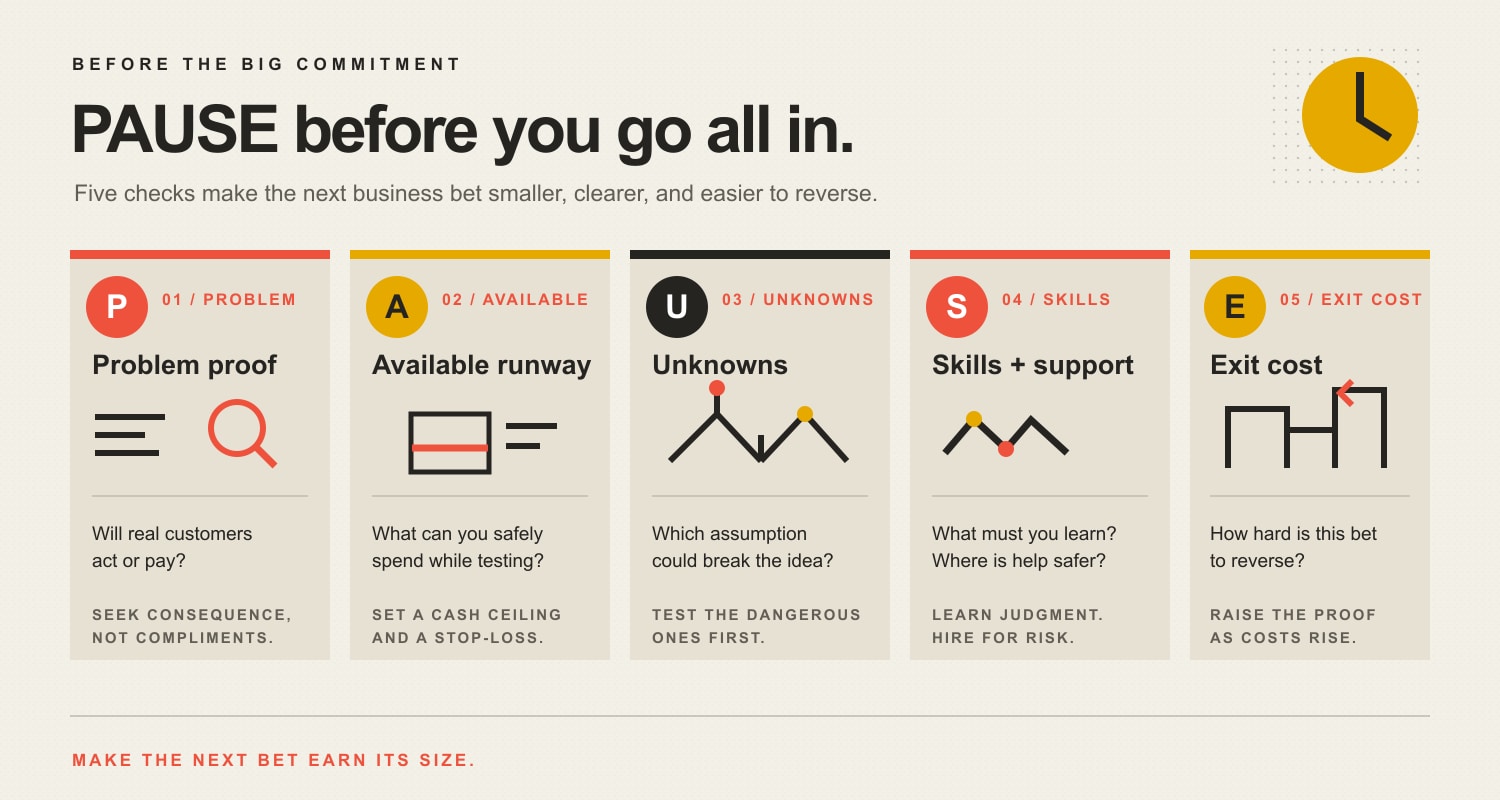
    Things to know before starting a business: the PAUSE Check

    At Scope Design, a more useful question is not “Am I brave enough to go all in?” It is “What would I need to know before this next commitment is rational?” We use a five-part decision check: PAUSE—Problem proof, Available runway, Unknowns, Skills and support, and Exit cost.

    The PAUSE Check: Problem proof asks whether real customers act or pay; Available runway sets a safe cash ceiling; Unknowns identify the assumption that could break the idea; Skills and support separate founder judgment from specialist risk; Exit cost raises the evidence threshold for hard-to-reverse decisions.
    The PAUSE Check helps separate cheap learning from expensive commitment.

    P — Problem proof

    What evidence shows a specific customer will act or pay? Start with the customer and the problem, not the business name, website, or product polish. Look for evidence with consequence: interviews that reveal an urgent problem, deposits, preorders, paid pilots, booked appointments, signed letters of intent where appropriate, or repeat requests from the same type of buyer.

    Compliments are weak evidence because they cost the customer nothing. If demand is still uncertain, use market research to learn how customers describe the problem, what they use now, what triggers a purchase, and what would make them switch. Then validate the business idea with the smallest test that can prove or disprove the riskiest assumption.

    A — Available runway

    What can the business spend without threatening your personal essentials? Startup money and personal survival money are not the same pool. Before you spend, separate one-time setup costs, recurring business costs, and the household obligations that still exist while revenue is uncertain.

    Set a hard cash ceiling and a stop-loss rule before enthusiasm moves the line. A useful startup budget prioritizes legal, safety, delivery, and revenue-enabling costs first, while delaying expensive polish until demand justifies it.

    U — Unknowns

    Which assumption could break the idea fastest? Most early businesses have unknowns around demand, price, acquisition channel, delivery time, capacity, repeat purchase, or required capital. Write them down. Rank them by how damaging they would be if wrong. Test the dangerous unknowns before the cosmetic ones.

    A fast launch is only useful when it buys learning. Speed that locks you into the wrong lease, wrong hire, wrong software stack, or wrong offer is not momentum. It is an expensive way to avoid a question.

    S — Skills and support

    What judgment must you learn, and where is specialist help safer? Founders should understand the core logic of their business: customer, offer, price, economics, sales process, and delivery. That does not mean doing every job personally.

    Our rule is learn the judgment, buy risk-sensitive expertise, delay polish. Learn enough marketing to judge a message and channel. Learn enough bookkeeping to understand cash and margins. But use qualified legal, tax, accounting, licensing, insurance, or other regulated specialists when the downside of being wrong is materially higher than the cost of expert help. Outsource execution when a specialist can do it faster without hiding the decision logic from you.

    E — Exit cost

    How hard is this decision to reverse? Early-stage uncertainty calls for reversible commitments. Month-to-month tools are safer than long contracts. A pilot is safer than a full rollout. Part-time or contract capacity can be safer than a premature full-time hire. A pop-up or sublease can test location demand before a long lease.

    The more expensive a decision is to undo, the more evidence it should require. If you are wrestling with a high-stakes choice, use a formal business decision-making framework instead of treating urgency as proof.

    What should you prove before the big commitments?

    CommitmentProve firstLower-risk testWhat to postpone
    Quit your jobRepeatable demand, credible delivery capacity, personal runway, and a written stop/go ruleSell during defined side-business hours, run paid pilots, or reduce hours if feasibleTreating one strong month as permanent demand
    Borrow moneyExactly what the money buys and how conservative cash flow could repay itStage spending by milestone; pre-sell where appropriateDebt used mainly to make the business look established
    Sign a leaseLocation-dependent demand and unit economicsPop-up, shared space, appointment model, or short-term subleaseLong fixed occupancy cost before traffic is proven
    Hire full timeRecurring workload, process clarity, and enough margin to support the roleContractor, part-time help, or a documented processHiring because the founder feels busy rather than because a stable constraint exists
    Build custom technologyA repeated workflow bottleneck and clear user demandManual service, spreadsheet, prototype, or low-code processComplex software built to automate a business model that is still changing

    Seven hard truths every entrepreneur should know

    1. Enthusiasm is not demand

    You can be deeply committed to the idea and still be wrong about the buyer, timing, price, or channel. The founder’s job is not to defend the original concept. It is to discover which version customers will actually choose.

    2. Revenue is not the same as runway

    A sale can be encouraging without making the business financially safe. Cash timing, delivery costs, taxes, refunds, inventory, payroll, debt, and owner living expenses all matter. Track the cash that remains available after obligations, not just the top-line number that feels good to report.

    3. Speed matters only when it buys learning

    “Move fast” is good advice when the action produces information. Interviewing five target customers this week can create evidence. Buying a year of software because you plan to need it someday does not. Early speed should shorten the feedback loop, not increase the exit cost.

    4. Doing everything yourself is not automatically frugal

    Founder time is a scarce resource. If you spend twenty hours avoiding a specialist fee while neglecting sales, delivery, or customer learning, the “free” option may be the expensive one. The goal is not maximum DIY. It is retaining judgment while allocating work to the person best equipped to do it.

    5. Fear does not disappear when the decision is right

    You do not need to eliminate fear before acting. Name the feared outcome, separate facts from assumptions, bound the downside, and choose the next reversible test. Our guide to dealing with fear in business goes deeper on making uncertainty actionable without pretending confidence is evidence.

    6. Irreversible decisions deserve a higher evidence threshold

    A $50 experiment and a five-year lease should not require the same confidence. Neither should a weekend test and quitting a stable income source. Raise the evidence threshold as the financial, legal, operational, or personal exit cost rises.

    7. Starting a business changes your responsibilities, not your biology

    Entrepreneurship can change how you spend time, make decisions, and think about risk. It does not make employment psychologically impossible, guarantee a permanent identity shift, or prove that your brain has been “rewired for success.” Those claims are more dramatic than useful. A better question is what operating role you actually want. If that is unclear, compare the practical differences between a business owner and an entrepreneur.

    Learn it, hire it, or postpone it?

    One of the hardest early decisions is deciding what deserves your time. Use this triage:

    If the work…Best defaultWhy
    Shapes customer, offer, price, sales, or delivery judgmentLearn enough to own the decisionYou need to recognize good evidence and make tradeoffs even if someone else executes.
    Carries material legal, tax, accounting, licensing, safety, insurance, or technical riskHire qualified expertiseThe cost of a serious mistake can exceed the cost of professional help.
    Is repeatable execution with clear inputs and outputsDelegate or automate when economics justify itYour time may be more valuable on sales, customer learning, or the current bottleneck.
    Mainly makes an unproven business look polishedPostpone itPolish should follow evidence, not substitute for it.

    A 30-day readiness sprint before you go all in

    Of all the things to know before starting a business, the most useful are the ones you can test before they become fixed costs. If the idea is still mostly assumptions, spend a month buying evidence instead of buying infrastructure. The goal is not to “finish” the business. It is to make the next decision better.

    1. Week 1: define the problem. Write the specific customer, painful situation, current workaround, and trigger that would make someone seek a solution. Interview people who actually fit that description.
    2. Week 2: test the offer. Put a real price and clear outcome in front of the right buyers. Look for consequential behavior—bookings, deposits, pilots, preorders, introductions, or clear rejection reasons—not just positive comments.
    3. Week 3: test delivery and economics. Deliver manually if possible. Record time, direct costs, rework, customer questions, acquisition effort, and what would break if demand doubled.
    4. Week 4: decide with rules you set in advance. Define the evidence that means continue, revise, postpone, or stop. Do not move the threshold after the result simply because you are emotionally attached to the idea.

    If the test exposes a weak assumption, that is useful information—not a personal verdict. Fix the assumption while the cost is still small.

    Frequently asked questions before starting a business

    How much money should I have before starting a business?

    There is no responsible universal number. A home-based service, inventory-heavy retailer, restaurant, and software company have different startup and operating needs. Calculate business setup and recurring costs, personal living obligations, and a downside scenario. Then set a cash ceiling you can afford before revenue becomes dependable. The amount should come from your business model and runway, not a generic internet average.

    Should I quit my job before starting a business?

    Usually the better question is what evidence would make quitting rational. Look for repeatable demand, a believable delivery model, defined personal runway, and a written stop/go rule. If the business can be tested without immediately giving up income, that preserves optionality while you learn.

    Do 90% of startups really fail?

    Do not use that number as a universal planning fact. Official U.S. business-survival data are measured by establishment cohorts and vary across years, industries, and economic conditions. Your decision is better served by testing demand, economics, cash requirements, and reversibility than by applying one dramatic percentage to every kind of new business.

    What should I learn before starting a business?

    Learn enough to judge the customer problem, offer, pricing, sales process, unit economics, cash position, and delivery process. You do not need to become an expert in every supporting discipline. Build the judgment required to supervise specialists and recognize when regulated or high-risk work belongs with a qualified professional.

    How do I know whether my idea has real demand?

    Look for behavior that costs the customer something: time, money, effort, a change in routine, or a commitment to proceed. Interviews can reveal the problem and buying trigger; paid pilots, deposits, preorders, or booked appointments can test willingness to act. The exact test depends on the business, but the principle is consistent: seek evidence stronger than compliments.

    What should I outsource first?

    Start with work where the downside of an error is high or where specialist execution clearly frees you to work on the current constraint. Legal, tax, accounting, licensing, insurance, and specialized technical issues often deserve qualified help. For marketing, design, and operations, retain enough understanding to judge the strategy even when you delegate execution.

    The bottom line

    The hard truths about starting a business are less cinematic than “go all in.” Customers do not owe an idea demand. Cash does not care how confident you feel. Fear can coexist with a good decision. Specialist help can be cheaper than a preventable mistake. And the evidence required should rise with the cost of reversing the decision.

    If you remember one list of things to know before starting a business, make it practical. Before the next major commitment, PAUSE: prove the Problem, protect Available runway, identify the biggest Unknowns, choose the right Skills and support, and measure the Exit cost. If the next step is cheap, reversible, and likely to teach you something important, take it. If it is expensive and hard to undo, make it earn a higher level of proof.

  • Small Business Web Hosting: How to Avoid the Cheap Plan Trap

    Small Business Web Hosting: How to Avoid the Cheap Plan Trap

    Small business web hosting should be the least complicated setup that reliably supports your website, gives your business control of its essential accounts and data, can be restored when something breaks, and has a named competent person responsible for the mess. Choose by workload, ownership, recovery, support, and total cost—not by the teaser price in 72-point type.

    Hosting is infrastructure. Management is responsibility. Buying one does not automatically buy the other.

    TL;DR: How to choose web hosting for a small business

    • Make sure the business controls the domain registration, registrar, DNS, hosting billing and administration, website accounts, current backups, and a usable export path.
    • Match the environment to the website’s actual workload, integrations, data, traffic pattern, and cost of failure. A brochure site and a busy ecommerce operation are not the same damn thing.
    • Ask what “managed” includes in writing. Server patches, WordPress updates, plugin testing, form monitoring, malware cleanup, content changes, and emergency response are different responsibilities.
    • Require backups you can restore, not a soothing checkbox labeled “daily backups.” Confirm frequency, retention, storage location, recovery time, likely data loss, and who performs the restore.
    • Compare the three-year cost: renewal pricing, management, licenses, migrations, overages, support, scaling, and exit costs—not merely the introductory monthly rate.
    • Plan a migration around the whole system: website, database, domain, DNS, email records, SSL, integrations, analytics, search controls, staging, cutover, rollback, and post-launch monitoring.

    Web hosting is not the whole website

    Web hosting provides the computing environment that serves your website. Depending on the arrangement, that can include processing, memory, storage, database services, networking, certificates, caching, backups, and technical support. It does not automatically include every service your business mentally files under “the website.”

    A typical business web presence can depend on separate systems for:

    • domain registration;
    • DNS;
    • website hosting;
    • content management;
    • business email;
    • transactional email from forms or ecommerce;
    • content delivery and security filtering;
    • backups and off-site storage;
    • analytics and search tools;
    • payment, booking, CRM, or other integrations;
    • application maintenance and development.

    Those pieces may be sold by one company, but they remain different responsibilities. Bundling can be convenient. It can also make a migration spectacularly annoying when nobody knows whether changing a web server will disturb the company email, DNS, payment callbacks, or a ten-year-old integration held together by optimism.

    Scope Design encountered this while planning work for a long-established specialty auction business. The visible request concerned a new website and features. Discovery showed that the hosting environment, domains, Office 365 email, auction platform, legacy stores, historical files, and new WordPress system were related—but not interchangeable. The responsible plan separated raw infrastructure, migration work, ongoing management, and future development instead of hiding everything beneath one vague “hosting” line item.

    The lesson is reusable: before choosing the platform, know what you own, where it lives, and what still depends on it. Our broader website development process uses the same idea: a phase is not finished until the next responsible person can proceed without guessing.

    The five common small business web hosting models

    Small business web hosting labels are useful shorthand, not sacred truth. Providers package resources and management differently, so compare the actual service rather than assuming two plans with the same name are equivalent.

    Hosting modelUsually fitsMain advantageMain risk to investigate
    Hosted website builder or SaaS platformConventional brochure, service, portfolio, or simple commerce sites that fit the platformHosting, software, and platform operations are bundledPortability, feature limits, app costs, account ownership, and what can be exported
    Shared hostingSmall, lower-risk sites with modest resource needs and competent management availableLow infrastructure cost and simple administrationResource contention, plan limits, support scope, backups, noisy neighbors, and renewal pricing
    Managed WordPress hostingWordPress sites important to the business when nobody internal should operate the serverWordPress-oriented tools, support, caching, backups, staging, or updates may be included“Managed” can mean almost anything; confirm application-level responsibility and exclusions
    VPS or cloud instanceSites needing more isolation, resources, configuration control, or a custom stackGreater control and scalable resource optionsA server you control is also a server somebody must patch, secure, monitor, back up, and recover
    Dedicated or specialized infrastructureHigh, unusual, regulated, legacy, or predictable workloads that justify dedicated capacityMaximum control and isolation for the defined environmentCost, specialist administration, architecture, redundancy, recovery, and vendor dependence

    WordPress distinguishes generic hosting from WordPress-specific hosting and notes that WordPress-oriented providers may add backups, updates, or developer tools. The word may is doing useful work. Never assume a feature exists because a marketer added “managed” to a product name.

    Shared hosting is not automatically bad

    Quality shared hosting can be entirely appropriate for a modest site. Paying for a private cloud environment to serve six pages and a contact form can be the technical equivalent of buying a forklift to move a houseplant.

    The real questions are whether the environment supports the software, provides sufficient resources, isolates accounts appropriately, maintains current server technology, handles backups and recovery competently, and has support that matches the business risk.

    Shared hosting vs VPS: more control is not automatically better

    A VPS generally provides more control and resource isolation than ordinary shared hosting. It may also hand you more operational responsibility. An unmanaged VPS is not an upgrade for a business with nobody capable of securing, updating, monitoring, and recovering it. It is a new job description wearing a server invoice.

    Cloud hosting is not a performance spell

    “Cloud” describes an infrastructure and delivery model. It does not prove that a particular site will be fast, secure, resilient, or well managed. Architecture, configuration, location, caching, database behavior, application code, third parties, traffic, and operational discipline still matter.

    Managed WordPress hosting and website management are not identical

    A managed WordPress provider may operate servers, supply a control panel, create backups, provide staging, apply selected updates, monitor infrastructure, or help with WordPress-specific problems. A website management partner may additionally test forms and checkout, review visual changes, coordinate plugins and licenses, monitor business journeys, fix application problems, manage content, and make improvements.

    Compare the two scopes. The goal is neither to pay twice nor to leave a responsibility-shaped hole in the middle. Our WordPress maintenance services guide explains the application-management side in detail.

    The Scope Design HOSTING test

    Use this seven-part test to compare a platform, shared plan, managed WordPress provider, VPS arrangement, or custom environment without getting hypnotized by feature grids.

    The seven-part HOSTING test: Hold the assets under business control; Outline the site workload; Specify what the service includes; Test backup recovery; Identify who owns maintenance and urgent support; Name migration, rollback, export, and exit plans; Gauge total three-year cost.

    H — Hold the assets

    The business should retain durable control of the domain registration, registrar account, DNS, hosting billing and administration, website administrator access, analytics, search accounts, backups, data, and relevant source assets. An agency can manage those systems with delegated access. It should not become the only person capable of reaching them.

    ICANN explains that registering a domain creates a contractual relationship between the registrant and registrar. The business should normally be the registrant and control the account, renewal method, security settings, and DNS access. Losing a vendor should not mean losing the address customers use to find you.

    Ask before signing:

    • Whose legal name and email address are on the domain and hosting accounts?
    • Who controls billing, renewal, multi-factor authentication, and recovery methods?
    • Can the business add or remove administrators without vendor permission?
    • Can files, databases, content, settings, logs, and backups be exported in usable formats?
    • What happens to access and retained data when the relationship ends?

    O — Outline the workload

    Choose from the website outward, not from a hosting coupon inward. Document:

    • the platform, runtime, database, plugins, themes, and custom code;
    • expected visits, concurrent activity, seasonal spikes, and geographic audience;
    • ecommerce, memberships, logins, search, uploads, video, or downloadable files;
    • forms, email delivery, payments, CRM, inventory, booking, and API connections;
    • personal, payment, health, employee, or other sensitive information;
    • storage growth, retention, reporting, and background jobs;
    • the business impact if the site is slow, unavailable, compromised, or missing recent data.

    Traffic totals alone are weak sizing data. One million cached article views and fifty simultaneous personalized checkout sessions create very different work. A provider should be able to explain which resources matter for your workload and what occurs when a limit is reached.

    S — Specify the service

    Turn marketing phrases into testable responsibilities. Request written answers for:

    • compute, memory, storage, bandwidth, database, file-count, and process limits;
    • supported software versions and upgrade policy;
    • certificates, network protection, malware response, logging, and access controls;
    • caching, content delivery, staging, development, and deployment tools;
    • backup scope, frequency, retention, storage, restore method, and restore cost;
    • uptime commitment, measurement method, exclusions, remedies, and incident communication;
    • support hours, channels, response targets, escalation, and application boundaries;
    • prohibited plugins, applications, workloads, or configuration changes.

    WordPress currently recommends PHP 8.3 or greater, MariaDB 10.11 or MySQL 8.0 or greater, and HTTPS. Those versions will change. The durable question is whether the provider maintains a supported modern environment and gives you a safe upgrade path.

    T — Test recovery

    A backup is potential. A verified restore is evidence.

    Ask the provider to explain or demonstrate how a complete site is restored, who can authorize it, how long it takes, what recent data may be lost, and whether the business can obtain an independent copy. For an important site, test the process in an appropriate non-production environment before a real incident turns the documentation into a scavenger hunt.

    I — Identify responsibility

    Put a name or contracted role beside every critical function:

    ResponsibilityNamed owner
    Server software and infrastructure security
    WordPress core, plugins, themes, and custom code
    Backups, retention, and restore tests
    Domain, DNS, certificates, and renewals
    Forms, checkout, transactional email, and integrations
    Performance, uptime, errors, and capacity
    Security alerts and incident response
    Content accuracy, accessibility, privacy, and analytics

    If everyone assumes the host handles it, nobody handles it. The Web Development and Technical Optimization pillar treats ownership, maintainability, recovery, security, accessibility, and performance as one technical foundation because business failures rarely respect vendor departments.

    N — Name the migration and exit plan

    Before entering, understand how you leave. Confirm export formats, migration assistance, transfer fees, notice periods, cancellation timing, backup availability after termination, domain-release procedures, and whether proprietary platform features can move elsewhere.

    For the incoming migration, name the inventory, staging process, testing owner, approval gate, cutover steps, rollback conditions, DNS responsibility, monitoring period, and retirement date for the old environment.

    G — Gauge total cost

    Compare three years, not the first checkout screen. Include:

    • introductory and renewal hosting prices;
    • required add-ons, storage, bandwidth, email, backups, certificates, and security;
    • licenses, applications, content-delivery services, and transaction fees;
    • setup and migration;
    • developer, administrator, or agency management time;
    • monitoring, testing, support, incident response, and after-hours work;
    • scaling, overages, plan changes, and future migrations;
    • exit assistance and data transfer.

    Our small-business website cost guide includes hosting inside the complete ownership picture. The cheapest server can be expensive once the business becomes its unpaid support department.

    How small business web hosting affects performance and uptime

    Small business web hosting affects performance, but it is one layer. Server response, database work, caching, network distance, redirects, code, media, fonts, third-party scripts, browser work, and user devices all contribute to the experience.

    web.dev describes Time to First Byte as a foundational measure of connection setup and web-server responsiveness. Its current rough guide says most sites should strive for a TTFB of 0.8 seconds or less, while also warning that TTFB is not a Core Web Vital and must be interpreted in the context of how the site delivers content.

    That means “fast hosting” should be tested on your real templates and journeys. A cached demo page does not prove that your uncached product search, member dashboard, or checkout will behave well. Use field data and representative tests. Our website speed optimization guide shows how to identify whether hosting is actually the constraint before paying to move the problem.

    What 99.9% uptime allows

    An uptime percentage sounds reassuring until it is translated into time. Over a 30-day month, the approximate maximum unavailable time is:

    AvailabilityApproximate downtime per 30-day month
    99%7 hours, 12 minutes
    99.9%43 minutes, 12 seconds
    99.95%21 minutes, 36 seconds
    99.99%4 minutes, 19 seconds

    Read the service-level agreement. Learn how availability is measured, which maintenance or external events are excluded, and whether the remedy is a meaningful response or a tiny service credit. Also monitor the business journey. A server can be “up” while a form silently discards leads, email fails, or checkout throws errors.

    What secure business hosting should cover

    Security is shared work. WordPress’s hardening guidance states that hosts are often responsible for the infrastructure while the website owner remains responsible for the installed application. Exact boundaries vary, which is why they belong in writing.

    At minimum, evaluate:

    • supported server and application software;
    • secure administrative connections and HTTPS;
    • multi-factor authentication and role-based access;
    • separation between customers or workloads;
    • logging, monitoring, vulnerability response, and incident communication;
    • network filtering, rate limiting, firewall, or denial-of-service protections appropriate to the risk;
    • backup protection and recovery planning;
    • responsibility for WordPress, plugins, themes, dependencies, and custom code;
    • secure handling of credentials, keys, personal data, and payment integrations;
    • what malware cleanup, forensic work, notification, or recovery costs extra.

    WordPress describes security as continuous planning, monitoring, maintenance, and recovery. No host can reduce risk to zero, and a padlock does not prove that the application, account permissions, plugins, or business processes are secure.

    If a site stores, processes, or transmits cardholder data, outsourcing pieces to a hosting or payment provider does not erase the merchant’s responsibilities. The PCI Security Standards Council says PCI DSS applies regardless of whether those activities occur directly or through a third-party service provider. Obtain qualified compliance guidance for the actual payment architecture; do not accept “we have SSL” as a compliance strategy.

    Why backups are not recovery

    Backups answer “do copies exist?” Recovery answers “can the business restore the required service within an acceptable time and acceptable data-loss window?”

    Two useful terms make the conversation concrete:

    • Recovery Point Objective (RPO): how much recent data the business can afford to lose. If orders change every five minutes, one nightly database copy may not match the business requirement.
    • Recovery Time Objective (RTO): how long the service can remain unavailable before the impact becomes unacceptable.

    NIST contingency-planning guidance connects business impact, system criticality, backup frequency, redundancy, and recovery objectives. A five-page brochure and an auction or ecommerce system should not receive identical recovery plans merely because both use WordPress.

    For WordPress, a complete restoration usually requires both files and the database. The official WordPress backup guide explains that they are separate and recommends retaining multiple recent copies in different locations.

    Ask:

    1. What exactly is backed up?
    2. How often are files, databases, configuration, and related data captured?
    3. How many versions are retained, and for how long?
    4. Is at least one copy isolated from the live environment and its credentials?
    5. Can the business download or control an independent copy?
    6. Are backups encrypted and access-controlled appropriately?
    7. Who can restore, and is self-service safe for this environment?
    8. When was the last successful restore test?
    9. How long did it take?
    10. What happens to new orders, registrations, form entries, or edits made after the selected recovery point?

    “We take daily backups” is the opening sentence, not the recovery plan.

    How to evaluate small business web hosting support

    Small business web hosting support becomes visible when systems behave badly, which is an inconvenient time to discover that “24/7 support” means an intake bot can create a ticket at 3:00 a.m.

    Ask providers to distinguish:

    • availability from response time;
    • first response from resolution or meaningful escalation;
    • infrastructure problems from WordPress, plugin, code, database, DNS, email, or integration problems;
    • routine support from paid professional services;
    • standard incidents from security emergencies;
    • advice from hands-on remediation.

    Before committing an important site, submit a technically specific pre-sales question. Evaluate whether the answer addresses the actual issue, identifies limits, and explains escalation. Search documentation for restore, incident, migration, security, cancellation, export, and support policies. A company that will not explain responsibility before the sale is unlikely to become more philosophical during an outage.

    For a managed relationship, define who monitors alerts and who can act. An uptime notification sent to an abandoned inbox is performance art, not incident response.

    How to migrate without creating a business fire drill

    A hosting migration is a controlled business change. It should begin with an inventory, not a DNS change made because somebody had a free afternoon.

    1. Map the current system

    Record the website files and database, software versions, server configuration, domain registrar, DNS zone, SSL, business and transactional email, CDN or security proxy, analytics, Search Console, payment callbacks, forms, APIs, scheduled jobs, licenses, storage, redirects, and external services.

    Confirm which items are moving. A website-hosting change does not automatically require moving the domain registration, DNS provider, or company email.

    2. Define acceptance and rollback

    Decide what must work before cutover: representative pages, navigation, search, forms, notifications, logins, payments, orders, media, redirects, analytics, consent, accessibility, and performance. Define the failure conditions that trigger rollback and how long the old environment will remain available.

    3. Back up and stage

    Create current recoverable copies and build the new environment without disrupting production. Match supported software, import the data, configure services, and test with controlled DNS or local preview methods. Do not declare victory because the homepage appears.

    4. Plan the cutover

    Assign the change window, final data synchronization, DNS update, certificate validation, cache behavior, monitoring, communication, and approval. Account for transactions or edits that might occur between the last database copy and the final switch.

    5. Verify after launch

    Test the business journeys from outside the administrative session. Confirm HTTP responses, indexing controls, canonical URLs, analytics, forms, email authentication and delivery, payments, integrations, error logs, performance, and alerts. Keep the old environment protected and available until the acceptance window closes.

    If URLs change as part of a broader platform move, create a one-to-one map and permanent redirects. Google recommends testing the new site, using server-side permanent redirects, avoiding chains, updating internal links, and monitoring both old and new URLs in its site-move documentation. A pure hosting move should normally preserve the public URLs.

    How much small business web hosting costs

    There is no responsible universal monthly price because “hosting” can describe a restricted platform subscription, shared account, managed WordPress service, managed cloud environment, or dedicated system—and may include anywhere from almost no human responsibility to substantial operational care.

    The useful comparison is:

    Three-year hosting cost = infrastructure + required software + management labor + monitoring and recovery + migration and scaling + expected support + exit cost

    A low-risk brochure site may need modest infrastructure. A revenue-critical site with ecommerce, customer accounts, high concurrency, complex integrations, or sensitive data may justify greater isolation, expertise, monitoring, and recovery capacity. Spend should follow consequence and workload, not ego.

    Request two numbers from every provider:

    1. The three-year required cost at your expected usage, including renewals and mandatory add-ons.
    2. The separately priced responsibility for monitoring, updates, testing, troubleshooting, recovery, and changes.

    That makes a $10 server and a $200 managed relationship comparable without pretending they are the same product.

    Small business web hosting checklist

    Use this before requesting proposals or approving a migration.

    DecisionEvidence requiredOwner
    Business and website workload is documentedPlatform, traffic shape, transactions, data, integrations, storage, growth, failure impact
    Account and asset control is clearRegistrant, billing owner, administrators, MFA, recovery contacts, exports
    Technical fit is confirmedSupported versions, resources, limits, prohibited software, scaling path
    Performance expectations are measurableRepresentative field/lab baseline, capacity assumptions, monitoring plan
    Security responsibility is assignedInfrastructure, application, access, logging, patching, incident process
    Backup and recovery are provenScope, frequency, retention, location, RPO, RTO, restore test
    Support boundaries are writtenHours, channels, response, escalation, application limits, emergency terms
    Migration is controlledInventory, staging, test plan, approval, cutover, rollback, monitoring
    Exit is possibleData formats, migration-out process, fees, timing, post-cancellation retention
    Three-year cost is normalizedRenewal, add-ons, labor, licenses, overages, support, migration, exit

    Web hosting red flags

    • The provider or agency insists the domain and hosting must remain permanently in its own account with no client access.
    • “Managed” is prominent in the sales copy but undefined in the agreement.
    • Introductory pricing is clear while renewal pricing, limits, and required add-ons require archaeological work.
    • Backups exist, but restoration requires an unknown wait, fee, or support tier.
    • No one can say who manages WordPress, plugins, themes, custom code, forms, or integrations.
    • Support is advertised as 24/7 without response targets, escalation, or application expertise.
    • The provider cannot explain how to export the site and data or what happens after cancellation.
    • A migration plan ignores DNS, email, certificates, analytics, redirects, transactional data, or rollback.
    • The recommended solution is much more complex than the workload, but the person proposing it cannot name the business problem the complexity solves.
    • Performance is “guaranteed” from a generic demo rather than measured on representative pages and user journeys.

    Small business web hosting FAQ

    Use the least complex supported environment that reliably handles the website’s workload and has clear ownership, backup, recovery, security, and support responsibility. A hosted platform or quality shared plan can fit a simple site. Managed WordPress often fits an important WordPress site without internal technical staff. VPS, cloud, dedicated, or specialized infrastructure belongs where workload, isolation, configuration, data, or risk justifies it.

    How do I choose which web hosting is right for me?

    Document the website platform, traffic pattern, transactions, integrations, data, storage, growth, and cost of failure. Then compare account ownership, technical limits, security, backups, restore evidence, support boundaries, migration, exit, and three-year cost. Use the Scope Design HOSTING test above rather than selecting from price and storage alone.

    What are the four main types of web hosting?

    The traditional four are shared, VPS, dedicated, and cloud hosting. Small businesses should also consider hosted website platforms and managed application hosting because those models bundle software or operational responsibility differently. Labels overlap, so compare the actual service and management scope.

    Is managed WordPress hosting worth it for a small business?

    It can be when WordPress matters to the business and nobody internal should operate the hosting environment. Confirm whether the plan includes staging, backups, safe updates, security controls, monitoring, WordPress-aware support, and restoration. Do not pay a premium merely because WordPress is preinstalled and the product name says “managed.”

    Is a VPS better than shared hosting?

    A VPS usually provides more control and resource isolation. Shared hosting usually costs less and requires less server administration. A VPS is better only when the workload or configuration needs justify it and somebody competent owns patching, security, monitoring, backups, and recovery.

    Is shared hosting good for beginners?

    It can be a practical starting point for a modest site when the provider maintains a supported environment, supplies clear limits and recovery options, and the website has competent application management. Beginner-friendly should mean understandable and supported—not disposable.

    Is free website hosting suitable for a small business?

    Free hosting may suit a temporary experiment or low-risk prototype. It is usually a poor foundation for a business website that must protect its domain, reputation, data, availability, support path, and ability to move. Evaluate branding, limits, backups, security, exports, terms, and business continuity before trusting it with customer activity.

    How much does it cost to host a small business website?

    Cost depends on the platform, resources, traffic, data, transactions, backups, security, support, and management included. Compare three-year required cost rather than introductory price: infrastructure, renewals, add-ons, licenses, management, monitoring, recovery, migrations, scaling, and exit.

    Does web hosting affect SEO?

    Hosting can affect crawl availability, server errors, response time, HTTPS, and the performance experienced by users and search systems. It cannot fix weak content, a confused site structure, poor search intent, or a bad offer. Diagnose the actual constraint before migrating solely “for SEO.”

    What does 99.9% uptime mean?

    Over a 30-day month, 99.9% availability permits roughly 43 minutes and 12 seconds of downtime. The agreement may exclude maintenance or other events and may offer only service credits. Read how availability is measured, and monitor business functions that can fail even when the server responds.

    Does a web host back up my website?

    Some do, with widely different frequency, retention, storage, coverage, access, and restore terms. Confirm that both files and databases are included, at least one usable copy is independent of production, and the restoration process has been tested. Never infer recovery capability from a backup checkbox.

    Is cloud hosting better for a small business?

    Cloud hosting can provide flexible resources and architecture options, but it is not automatically faster, safer, cheaper, or easier to manage. Choose it when the workload, resilience, geography, integrations, or scaling model benefits from it and the operational responsibility is clear.

    Should my web designer or host own my domain?

    Normally, the business should be the domain registrant and retain durable administrative control of the registrar and DNS accounts. A provider can manage them using appropriate access. Any different ownership model should be explicit, understood, and include a reliable transfer process.

    Can a website be migrated without downtime?

    Many migrations can produce little or no visible downtime when the team inventories dependencies, stages and tests the new environment, plans DNS and data synchronization, preserves rollback, and monitors the cutover. Nobody should promise zero risk without understanding the application, data changes, email, DNS, integrations, and current infrastructure.

    Does website hosting include business email?

    Sometimes, but it does not need to. Website hosting, DNS, business mailboxes, and transactional website email are separate services even when one vendor sells them. Document MX, SPF, DKIM, DMARC, sending services, mailboxes, and ownership before changing hosting so a web migration does not accidentally kneecap email.

    Are website hosting and website maintenance the same thing?

    No. Hosting supplies the infrastructure and may include selected server or application services. Website maintenance manages the application and business-specific operating process: updates, testing, forms, integrations, content, accessibility, security response, performance, and recovery. Compare scopes and assign every responsibility.

    Sources and further reading

    The hosting product matters. The responsibility around it matters more. Buy a setup your business can control, understand, recover, and change—and make sure somebody qualified owns the gap between “the server is running” and “the website is actually doing its job.”

  • How Entrepreneurs Stay Competitive: Mastering Business Adaptation in the Digital Age

    How Entrepreneurs Stay Competitive: Mastering Business Adaptation in the Digital Age

    Business adaptation is the discipline of changing how your business operates when the assumptions underneath it stop matching reality. It is not a race to adopt every new platform, AI tool, sales tactic, or design trend. The goal is simpler: notice meaningful change early, decide whether it affects a real customer or operating constraint, test the smallest useful response, and keep only what improves the business.

    That distinction matters for entrepreneurs because change creates two risks at the same time. Move too slowly and customer expectations, competitors, costs, or technology can pass you. Move too quickly and you can burn time and money modernizing things that were not actually broken. Competitive businesses learn to manage both risks.

    Business adaptation in 60 seconds

    • Adapt to evidence, not novelty. A trend matters when it changes customer behavior, economics, risk, or your ability to deliver.
    • Diagnose before you buy. Find the constraint first; choose the website change, process, automation, offer, or tool second.
    • Protect reversibility early. Small tests are easier to learn from and cheaper to undo than company-wide transformations.
    • Measure an outcome. Activity is not proof. Decide what should become faster, easier, more reliable, more profitable, or more valuable to the customer.
    • Scale selectively. A successful experiment earns a larger commitment; a weak one earns a lesson and a stop decision.

    Why business adaptation is a decision problem, not a technology shopping list

    When business owners hear “adapt,” the conversation often jumps straight to tools: install a CRM, add a chatbot, rebuild the website, automate follow-up, launch another channel, or replace a manual process with AI. Any of those could be useful. None is automatically adaptation.

    The better starting point is an operating question: What changed enough that one of our old assumptions is now costing us? Maybe prospects now expect an answer within hours instead of days. Maybe a once-reliable referral channel has slowed. Maybe staff are spending too much time re-entering the same information. Maybe customers reach the website on mobile and cannot complete the next step. Maybe margins changed enough that an old offer no longer makes sense.

    The U.S. Small Business Administration recommends combining market research and competitive analysis to understand customers and identify competitive advantage. That is useful here because adaptation starts with a signal you can explain—not with the existence of a new tool.

    Once the signal is real, use your business strategy as the filter. The question is no longer “Should we use this technology?” It becomes “Does this capability solve a problem that is important enough to change how we work?”

    The ADAPT Loop: a practical business adaptation framework

    At Scope Design, a useful way to make adaptation concrete is the ADAPT Loop: Acknowledge the signal, Diagnose the constraint, Act with a small bet, Prove with evidence, then Tune, scale, or terminate. The loop is deliberately simple. It keeps the business moving without pretending every change deserves a transformation program.

    The ADAPT Loop: Acknowledge a meaningful signal, Diagnose the real constraint, Act with a small reversible test, Prove the outcome against a baseline and guardrail, then Tune, scale, or terminate.
    The ADAPT Loop turns change into a repeatable decision cycle instead of a series of disconnected upgrades.

    A — Acknowledge the signal

    Start with something observable. A useful signal is a repeated change in customer behavior, demand, economics, regulation, competition, delivery capacity, or available technology. One complaint is a story. A pattern of the same complaint, lost opportunity, delay, workaround, or cost increase is a signal worth investigating.

    Write the signal as a sentence that separates fact from interpretation: “Qualified prospects are waiting two business days for a first response,” or “More customers are asking to book without calling,” is stronger than “We need AI” or “Our website feels old.”

    D — Diagnose the constraint

    Ask where the signal actually hurts. Is the constraint awareness, conversion, delivery, handoff, capacity, trust, margin, or retention? This step prevents a common failure mode: solving a visible symptom in the wrong system.

    For example, a lead problem may not require more marketing if inquiries are already arriving but getting lost between first contact and follow-up. In that case, the better adaptation is likely in the customer lifecycle and handoff process, not another traffic campaign.

    A — Act with the smallest reversible bet

    Make the first move small enough that you can learn without creating a new dependency. Before rebuilding an entire sales system, test a shorter intake flow. Before automating every customer message, automate one repeated handoff. Before expanding an offer, sell the narrow version manually. Before redesigning an entire site, test the page or path where the constraint is happening.

    Reversibility is a strategic advantage. A small bet gives you permission to be wrong cheaply. That is very different from being timid: you are buying information before buying scale.

    P — Prove with outcome evidence

    Decide what success means before the experiment starts. Pair one business outcome with one leading indicator. If the change is supposed to improve lead response, the leading indicator might be median first-response time and the business outcome might be qualified conversations started. If it is supposed to reduce administrative drag, measure time reclaimed and whether error or rework rates stay acceptable.

    The point is not to build a giant dashboard. It is to make the change falsifiable. If nothing meaningful improves, do not manufacture a success story from clicks, logins, generated content, or hours of “activity.”

    T — Tune, scale, or terminate

    After the test, choose one of three moves. Tune when the direction is promising but the implementation needs work. Scale when the benefit is repeatable and your team can support the larger operating load. Terminate when the evidence is weak, the hidden cost is too high, or the change solves a problem customers do not value.

    Stopping is not failure. A disciplined stop protects attention for the next signal and preserves the lesson for future decisions.

    What should entrepreneurs adapt first?

    Prioritize the change closest to a meaningful constraint, not the one with the loudest marketing around it. This table shows how to translate common signals into a testable next move.

    SignalLikely constraintSmallest useful testEvidence to watch
    Prospects repeatedly ask for faster answersLead-response handoffCreate one routed intake path with a response owner and deadlineResponse time and qualified conversations
    Staff copy the same information between toolsOperational frictionAutomate one stable, repetitive handoffTime saved, error rate, exceptions created
    Customers cannot complete an important website action reliablyDigital journey or technical foundationFix and test that path before redesigning everythingSuccessful completions and support friction
    A competitor introduces a feature customers begin requesting from youChanged customer expectationPrototype the minimum version or service equivalentAdoption, willingness to pay, retention or conversion effect
    An offer sells but creates weak margin or delivery strainBusiness-model economicsTest scope, price, packaging, or qualification on a subsetContribution margin and delivery load

    Notice what is missing from the table: “Everyone else is using it.” Competitor behavior is evidence only when it changes the market you actually serve.

    When adaptation becomes digital modernization

    Digital modernization is useful when the diagnosed constraint lives in a digital system. If leads are getting lost because there is no reliable handoff, the answer may involve CRM or automation. If staff repeat predictable work that can be safely standardized, AI automation workflows may be worth testing. If a slow, brittle, or confusing website blocks a customer from taking the next step, the problem may require stronger business website development.

    But modernization is a means, not a goal. A new stack that adds integrations, training, exceptions, security exposure, and maintenance can make the business less adaptable if it does not remove a real constraint.

    Risk belongs in the decision, too. The National Institute of Standards and Technology maintains Cybersecurity Framework 2.0 resources for small businesses to help organizations manage and reduce cybersecurity risk. When an adaptation changes how sensitive data, accounts, integrations, or critical processes work, security and recovery requirements should be part of the test—not an afterthought.

    What should you not change?

    Adaptability does not mean instability. Some parts of the business should stay boring when they are still doing their job. Keep a proven process until there is evidence that it is constraining the business. Keep a clear brand promise until customer or market evidence shows it no longer fits. Keep reliable infrastructure unless a replacement improves an outcome enough to justify migration risk.

    A useful “not now” list protects this discipline. For every adaptation you approve, write down the attractive ideas you are deliberately postponing and why. That makes strategy visible. It also stops the business from reopening the same shiny-object debate every week.

    How to measure whether business adaptation is working

    Measure at three levels so an improvement in one area does not hide damage somewhere else:

    • Customer outcome: Did the experience become easier, faster, clearer, more trustworthy, or more valuable?
    • Operating outcome: Did the change reduce delay, manual effort, rework, failure points, or dependency on one person?
    • Business outcome: Did it improve qualified demand, conversion, retention, margin, capacity, cash flow, or another result that matters to the model?

    You do not need all three to move at once. You do need to know which one the change was designed to affect and which guardrail must not get worse. If customer response becomes faster but errors double, the test is not finished. If automation saves time but creates low-quality customer interactions, the efficiency gain is incomplete.

    For customer-facing changes, define a small set of customer success metrics that someone can actually own. The best metric is not the one that looks sophisticated; it is the one that changes the next decision.

    Five business adaptation mistakes that make change more expensive

    1. Treating novelty as urgency

    A capability can be impressive without being relevant. Ask what customer behavior, economic condition, delivery constraint, or risk changed before you put it on the roadmap.

    2. Buying the system before defining the problem

    Tool selection feels like progress because it produces demos, pricing tables, and implementation tasks. But a vaguely defined constraint turns every product into a plausible answer. Diagnose first so you can reject most options quickly.

    3. Making the first experiment too large

    A company-wide rollout can hide what actually caused the result. Start with the smallest customer segment, workflow, page, or team that can give you useful evidence.

    4. Measuring activity instead of value

    More automations, more posts, more features, more dashboards, and more AI-generated output are not business outcomes. Track the constraint you intended to change.

    5. Scaling faster than the operating system can absorb

    A test can work in a controlled environment and fail at volume. Before scaling, ask what new exceptions, support needs, data dependencies, quality checks, and ownership requirements appear when usage multiplies.

    A 30-day business adaptation sprint

    You do not need a transformation committee to practice business adaptation. A focused month is enough to turn one meaningful signal into evidence.

    Week 1: Capture signals and establish a baseline

    • Collect repeated customer questions, lost-sale reasons, delays, workarounds, cost changes, and competitor moves.
    • Choose one signal tied to a meaningful constraint.
    • Record the current outcome so you have something to compare against.

    Week 2: Design the smallest reversible test

    • Define the one assumption you are testing.
    • Limit the test to one segment, workflow, offer, page, or team when possible.
    • Name the success metric, guardrail, owner, and stop condition in advance.

    Week 3: Run the test and log exceptions

    Do not “optimize” halfway through every uncomfortable result. Let the test run long enough to observe behavior, while recording exceptions, customer confusion, team friction, and edge cases that averages can hide.

    Week 4: Tune, scale, or stop

    Compare the result with the baseline and the guardrail. Then make a decision. If the test worked, document what made it work before expanding. If it did not, record the lesson and close the experiment. A finished “no” is more valuable than a zombie pilot that consumes attention indefinitely.

    When outside help is worth it

    Entrepreneurs should keep the decision close to the business, but implementation does not have to be entirely internal. Outside help is usually worth considering when the constraint crosses specialties, the change is expensive to reverse, security or data risk is material, or the team lacks the capacity to test without disrupting normal operations.

    The useful role of a partner is not to sell “modernization.” It is to help translate the diagnosed constraint into the smallest sensible implementation, identify dependencies, build the test correctly, and leave you with evidence you can act on. If your adaptation decision points to the website, customer journey, automation, analytics, or the systems connecting them, Scope Design can help turn the diagnosis into a scoped plan without treating every new tool as mandatory.

    Frequently asked questions about business adaptation

    What is business adaptation in simple terms?

    Business adaptation means changing an important part of how your company works because the environment around it changed. The change could involve an offer, process, customer experience, technology, pricing, channel, or operating model. The key is that the change responds to evidence, not fashion.

    Why is adaptation important in business?

    Because the assumptions that made a business effective do not stay true forever. Customer expectations move, costs change, competitors improve, regulations evolve, and technology creates new capabilities. Adaptation gives the business a repeatable way to respond without rebuilding everything every time conditions shift.

    What is a good example of business adaptation?

    Imagine a service business notices that qualified prospects increasingly ask to schedule online, but the company still requires a phone call. Instead of launching a full digital transformation, it tests online booking for one service, measures completed bookings and no-show rates, gathers feedback, and then decides whether to expand it. That is adaptation: a changed customer expectation produced a bounded response and a measurable decision.

    Is adopting AI automatically business adaptation?

    No. AI becomes part of business adaptation when it addresses a diagnosed customer or operating constraint and improves a defined outcome within acceptable quality, risk, and maintenance limits. Installing an AI tool because competitors mention AI is technology adoption, not proof of adaptation.

    How often should a small business adapt?

    Continuously scan for meaningful signals, but do not confuse constant observation with constant change. Review customer friction, operating bottlenecks, economics, competitive moves, and new capabilities on a regular cadence that fits your market. Make a change when the evidence shows an assumption is no longer serving the business—not because a calendar says a modernization project is due.

    Staying competitive means getting better at change—not doing more of it

    The most adaptable entrepreneur is not the one with the longest software list or the fastest reaction to every trend. It is the one who can tell the difference between noise and a meaningful signal, connect that signal to a real constraint, make a small move, learn quickly, and commit only when the evidence earns a larger bet.

    That is the practical advantage of the ADAPT Loop: acknowledge, diagnose, act, prove, tune. It turns business adaptation from an occasional panic response into a repeatable management habit—and keeps modernization subordinate to what customers and the business actually need.

  • Editorial Calendar Guide: Build a Content System That Drives Results

    Editorial Calendar Guide: Build a Content System That Drives Results

    An editorial calendar is the operating schedule that turns a content strategy into work your team can actually produce, approve, publish, distribute, and review. It should tell you more than what goes live on Tuesday. A useful calendar tells you why a piece exists, what evidence supports it, who owns it, where it will go, and when you will decide whether it deserves more investment.

    If your editorial calendar contains only dates and titles, you do not have a content operating system. You have future homework.

    This guide shows how to build an editorial calendar—or content calendar, if that is the term your team uses—that connects strategy to capacity and turns published work into a learning loop instead of a publishing treadmill.

    What Is an Editorial Calendar?

    An editorial calendar is a shared planning and workflow system for deciding what content will be created, who is responsible for it, when it will move through production, where it will be distributed, and how the team will review the result.

    That definition is intentionally broader than “a publishing schedule.” The publication date matters, but it is only one field in the system. The calendar should connect a planned asset to an audience, a business job, evidence, an owner, a workflow, a distribution path, and a later decision.

    Editorial calendar vs. content calendar: what is the difference?

    Teams and software vendors use editorial calendar and content calendar differently, and plenty of teams use the terms interchangeably. You do not need two separate systems just to satisfy vocabulary.

    For this guide, we use editorial calendar for the higher-level operating view—purpose, themes, ownership, capacity, workflow, launch path, and review—and content calendar for the detailed execution view of specific assets, channel versions, and dates. If one shared system can handle both views, that is usually simpler.

    A Calendar Is Not a Content Strategy

    A calendar answers “what is moving through the system and when?” It cannot decide why the business should create content in the first place.

    Before you fill a single date, your small business marketing strategy should give the calendar constraints: the audience you want to help, the problem or decision you want to support, the offer or next step, the channels you can maintain, and the outcome that matters.

    If the audience is still fuzzy, fix that first. Our guide to identifying your target audience is a better starting point than brainstorming 40 blog titles for people you have not defined.

    The same distinction applies to content marketing. A blog post is a format. Email is a channel. A calendar is a schedule. The broader content marketing system still has to connect useful evidence to a real buyer question, deliberate distribution, a handoff, and a learning loop.

    The Scope Design PUBLISH Loop

    We use the PUBLISH Loop as a practical test for whether an editorial calendar is ready to run. The name is convenient; the important part is that each scheduled asset passes through seven connected decisions.

    • P — Purpose: Who is this for, what decision or problem does it help with, what business job should it perform, and what should the reader do next?
    • U — Useful evidence: What customer question, subject-matter expertise, first-party observation, research, example, or source makes the asset worth publishing?
    • B — Bottleneck capacity: Which required role or dependency is most likely to limit throughput—writer, subject-matter expert, designer, reviewer, legal approval, video production, or something else?
    • L — Launch path: What is the source asset, which channel versions are worth creating, where will they point, and how will distribution be tracked?
    • I — Inspection: Who verifies the facts, checks quality and brand fit, reviews accessibility where relevant, and gives final approval?
    • S — Schedule & status: What milestones must happen before publication, what is the current workflow state, and what is the real ship date?
    • H — Harvest learning: When will you review the result, and will you refresh, expand, repurpose, consolidate, pause, or retire the asset?

    The key operating rule is simple: your calendar’s throughput is limited by its scarcest required role or dependency, not by the number of empty dates on the screen. If the owner can meaningfully review two deep pieces per month, scheduling four does not create capacity. It creates late work.

    What Should an Editorial Calendar Include?

    You do not need dozens of fields. You need enough information to make each content item executable, reviewable, and measurable. This is our minimum viable editorial-calendar record.

    FieldWhat it answers
    Audience / decisionWho is this for, and what are they trying to understand, compare, decide, or do?
    Business jobAwareness, education, proof, lead generation, sales support, retention, support, or another defined job?
    Topic / queryWhat question or subject does the asset own?
    Evidence sourceWhich SME, customer question, internal data, example, research source, or original observation supports it?
    Source asset / formatWhat is the main thing being created: article, guide, video, case study, webinar, tool, email, etc.?
    OwnerWho is accountable for moving it forward?
    Approver / dependenciesWho or what must happen before it can ship?
    Workflow statusBacklog, approved, researching, drafting, review, scheduled, published, updating, or retired?
    Milestone datesWhen are research, draft, design, review, and approval actually due?
    Publish dateWhen does the source asset go live?
    DistributionWhich email, social, sales, partner, paid, or community channels deserve a version?
    CTA / destinationWhere should the reader go next?
    Campaign trackingIf tagged links are used, which source, medium, campaign, or content values should travel with them?
    Review dateWhen will the team look at useful evidence instead of forgetting the asset exists?
    Lifecycle decisionKeep, refresh, expand, repurpose, consolidate, pause, or retire?

    If your team uses campaign-tagged links, keeping those values with the distribution plan saves reconstruction later. Google Analytics documents campaign source, medium, name, and content fields and their relationship to UTM parameters. The calendar is a sensible place to record the intended values before links start circulating.

    How to Create an Editorial Calendar in 7 Steps

    1. Start with decisions, not dates

    Pick the business job and audience problem first. “Publish every Tuesday” is not a goal. “Help operations managers understand the cost of delaying preventive maintenance before budget season” is a usable assignment.

    For each planned source asset, write a one-line purpose statement: For [audience], help them [decision/problem] so they can [useful outcome], with [business next step] available when relevant.

    2. Build an evidence queue before a topic queue

    Weak calendars begin with “we need 12 ideas.” Stronger calendars ask what the business actually knows, sees, measures, explains, fixes, demonstrates, or gets asked repeatedly.

    Customer emails, sales calls, support tickets, estimates, objections, SME interviews, project notes, search questions, analytics, and before/after examples can all become evidence sources. If you need a better method for finding material, start with content ideas worth sharing instead of a holiday list and a pile of blank caption boxes.

    3. Set cadence from bottleneck capacity

    Do not choose a publishing frequency because a benchmark told you to. List the roles every source asset actually requires, estimate what those people can reliably contribute, and find the bottleneck.

    If a subject-matter expert can support two strong interviews and reviews in a month, that may be the current ceiling for evidence-heavy articles. You can still create channel derivatives from those assets, but scheduling four source articles does not magically double SME capacity.

    Leave visible slack for revisions, client work, approvals, news, and the occasional week in which everyone suddenly remembers they have other jobs. A calendar with breathing room is not under-optimized. It is more believable.

    4. Plan source assets before channel fragments

    Choose the evidence-rich source asset first: the guide, case study, video, webinar, research note, comparison, tool, or other durable piece that carries the real information.

    Then decide which derivatives have a job. An email may introduce the main finding. A LinkedIn post may turn one argument into a useful short explanation. A sales follow-up may point directly to the relevant section. A short video may demonstrate the same evidence instead of paraphrasing the headline.

    For social channels specifically, the calendar should execute a defined social media content strategy; it should not become the strategy just because it has colored labels.

    5. Define the workflow and approval path

    “Due Friday” is not a workflow. Work backward from the ship date and name the states that matter: evidence ready, brief approved, draft ready, fact check, design, stakeholder review, final approval, scheduled, live.

    Assign one accountable owner. Contributors can be many; ownership should not be mysterious. Then name dependencies early. If an engineer must validate a technical claim or a customer must approve a quote, that dependency belongs in the calendar before the draft is “finished.”

    6. Put real work on the calendar

    Only now should dates take over. Schedule the production milestones, not just the publication date. This is where the calendar becomes useful to the people doing the work.

    Keep a separate idea horizon for future possibilities and a commitment horizon for work the team has actually agreed to produce. Your idea backlog can be ambitious. Your committed calendar should be credible.

    7. Schedule the learning decision

    Publication is the midpoint of the system, not the finish line. Add a review trigger when you schedule the asset. The right timing depends on the channel, traffic level, campaign window, sales cycle, and amount of evidence available, so avoid pretending there is one magic review interval.

    At review, ask what the asset produced at several levels: Was it discovered? Was it actually consumed? Did the intended audience take a useful next action? Did it create qualified business activity? What did the team learn? Then choose a lifecycle action instead of automatically making “more content.”

    A Worked Small-Business Content Calendar Example

    Imagine a local B2B service company wants more qualified inquiries for an annual maintenance program. The team repeatedly hears the same question: “How do I know whether maintenance is worth paying for before something breaks?”

    Instead of scheduling six disconnected posts, the team can build one evidence-rich source asset and a deliberate launch path.

    Calendar itemJobEvidence / ownerLaunch pathReview decision
    SME interviewCapture first-party expertise and common failure signalsService lead + content ownerFeeds the source guideIs the evidence specific enough to publish?
    Source guideHelp buyers understand maintenance tradeoffsWriter; service lead approves technical claimsWebsite article with relevant service CTAExpand, refresh, or consolidate based on search and qualified-use evidence
    EmailIntroduce the guide to existing contacts who may have the problemContent ownerShort explanation pointing to the guideDid the right contacts click or reply?
    LinkedIn explanationTeach one useful signal without copying the whole articleContent owner + SME voiceNative post with guide link where usefulWas the idea useful enough to develop further?
    Sales follow-up snippetAnswer the recurring objection in contextSales/service teamDirect link to the most relevant sectionDid it help move qualified conversations?

    That is a content calendar with a spine. The derivative pieces are not random “more channels.” They inherit evidence and purpose from the source asset.

    How Far Ahead Should You Plan an Editorial Calendar?

    Plan committed work only as far ahead as your inputs are reasonably stable. There is no universal rule that every company needs a 30-day, quarterly, or annual calendar.

    A useful approach is to maintain two horizons:

    • Idea horizon: a larger backlog of buyer questions, evidence sources, seasonal needs, campaigns, experiments, and future assets. These are options, not promises.
    • Commitment horizon: the work your team has enough evidence, capacity, and approval to realistically ship. These are promises.

    Then run two clocks. The production clock keeps briefs, drafts, reviews, approvals, and launches moving. The learning clock brings published assets back for evidence-based decisions. Keeping those clocks separate prevents a weekly status meeting from pretending to be a strategy review.

    Which Editorial Calendar Tool Should You Use?

    The best editorial calendar tool is the simplest shared system that supports your actual workflow and that people will keep current.

    • A spreadsheet can be enough for a solo marketer or a small team with a simple workflow.
    • A project board or database becomes more useful when you have multiple owners, dependencies, statuses, reusable views, or approval steps.
    • A dedicated marketing calendar platform earns its complexity only if integrations, scheduling, approval, or reporting remove real work.

    Whatever you choose, keep one source of truth. A calendar in a spreadsheet, a second version in a social scheduler, and a third version in a project tool is not “integrated marketing.” It is three places to be wrong.

    How AI Fits Into an Editorial Calendar

    AI can reduce mechanical content work. It can help summarize approved notes, suggest ways to structure a brief, generate derivative ideas, transform a verified source asset into channel-specific starting points, or identify gaps for a human to investigate.

    It should not become an invisible source of truth.

    If generative AI materially assists an asset, we recommend adding three simple controls to the calendar: the approved evidence/source packet, an AI-assisted flag or note, and a named human verifier/approver. That is a practical governance choice, not a legal requirement. It is consistent with the risk-management mindset in NIST’s Generative AI Profile.

    This also aligns with where search is headed. Google’s current guidance for generative search emphasizes unique, non-commodity, expert-led content rather than “AEO/GEO hacks.” A calendar that rewards evidence and expertise is a better foundation than one designed to maximize AI-generated output volume.

    Common Editorial Calendar Mistakes

    • Starting with dates. A date does not create a business reason, audience, or evidence source.
    • Confusing the calendar with strategy. Random activity does not become strategic because it is punctual.
    • Scheduling beyond bottleneck capacity. The calendar becomes an anxiety dashboard instead of an operating plan.
    • Publishing evidence-free filler. Search volume and “we need a post” are weak substitutes for something useful to say.
    • Treating every channel post as a separate idea. Start with strong source material, then adapt it where a channel has a real job.
    • Putting approval after the deadline. Dependencies belong in the production plan, not in the surprise column.
    • Stopping at publication. Without distribution and review, you cannot tell whether the calendar is improving.
    • Using fake freshness. Do not change a year in the title and call the article updated. Google’s people-first content guidance explicitly warns against changing dates just to make pages seem fresh when the content has not substantially changed.

    Editorial Calendar FAQ

    What is an editorial calendar?

    An editorial calendar is a shared planning and workflow system that connects content topics to purpose, evidence, ownership, production milestones, publication, distribution, and review. A publishing date is part of the calendar, not the whole calendar.

    What is the difference between an editorial calendar and a content calendar?

    There is no single terminology rule every team follows. In this guide, the editorial calendar is the higher-level operating view, while the content calendar is the detailed execution view. One well-designed system can handle both.

    How do you create an editorial calendar?

    Start with the audience and business job, build an evidence queue, set cadence from real capacity, choose source assets and useful derivatives, define ownership and approvals, schedule production milestones, and add a review/lifecycle decision. Dates come after those decisions, not before.

    What fields should a content calendar include?

    At minimum, track the audience or business job, topic/query, evidence source, asset/format, owner, approver or dependencies, status, milestone and publish dates, distribution, CTA or destination, campaign tracking when used, review date, and lifecycle decision.

    How often should you update an editorial calendar?

    Update production status whenever the team needs it to coordinate real work. Review published content on a separate learning clock based on the campaign window, traffic, sales cycle, and amount of evidence available. There is no useful universal review frequency for every business and channel.

    What is the best editorial calendar software?

    The best tool is the simplest one that your team reliably uses and that supports the workflow you actually have. A spreadsheet may be enough; a project board or database is useful when ownership, dependencies, approvals, and multiple views become harder to manage manually.

    Turn the Calendar Into a Working Content System

    A good editorial calendar should make strong content easier to ship. It should reduce last-minute guessing, expose capacity problems before they become missed deadlines, preserve the evidence behind each asset, and make distribution and review part of the work instead of an afterthought.

    Start smaller than your ambition. Build a calendar your current team can actually maintain. Ship the strongest evidence you have. Review what happens. Then earn the right to add more.

    If your team has plenty of ideas but no reliable system for deciding what should ship, who owns it, and what happens after publication, talk with Scope Design. We can help connect content planning, SEO, marketing strategy, and implementation into one workable process.

  • How to Enter a New Niche With Zero Experience

    How to Enter a New Niche With Zero Experience

    You do not need years of experience in a niche before you can enter it. You do need a disciplined way to learn what you do not know, test whether the market is worth entering, and earn trust without pretending to be an expert.

    That distinction matters. A beginner who is transparent, curious, and evidence-driven can become useful quickly. A beginner who copies surface-level advice and performs expertise usually creates a credibility problem before the business has a chance to create value.

    This guide shows how to enter a new niche with zero experience using a research-first process: define the objective, map the market, talk to customers, test a small entry point, build proof, and then decide whether to deepen your commitment, adjust the offer, or leave the niche alone.

    Zero Experience Is Not the Same as Zero Value

    Experience is only one source of value. You may already bring transferable skills in sales, operations, design, technology, research, writing, service delivery, project management, or problem solving. Those skills can matter in a new market—but they do not make you a domain expert overnight.

    The safest stance is to be precise about what you know. If you are entering a market to build a business, create content, develop a service, or explore an opportunity, position yourself as a serious investigator first. Learn the language. Understand the buyer. Find the real constraints. Then let useful work create the evidence that supports stronger claims later.

    That is also the better answer to the old question of whether you must already be the expert in your own niche. Expertise is valuable, but credibility can also come from rigorous research, access to experts, transparent reporting, and demonstrated results.

    Start With the Business Objective, Not the Niche Tactics

    A common mistake is to choose a niche and immediately jump to a website, social channel, content calendar, affiliate program, or product idea. Those are tactics. They are useful only after you know what problem you are trying to solve and what is currently preventing progress.

    Scope Design uses a constraint-first approach: define the business objective, identify the binding constraint, clarify the positioning, and only then choose the tactics inside a coherent small-business marketing strategy. If the objective is to build a profitable service business, for example, the first constraint might be access to buyers—not a lack of blog posts. If the objective is to build a media property, the first constraint might be a weak information advantage—not a missing logo.

    If you need a broader framework for evaluating an unfamiliar market, start with small-business market research rather than a list of marketing ideas.

    A six-step path into a new niche: define the objective and constraints, map the market, talk to customers, test a narrow offer, build honest proof, and decide whether to deepen, adjust, or exit.

    How to Enter a New Niche: A 6-Step Framework

    1. Define the objective and your constraints

    Write down what success would actually mean. Are you trying to find a consulting niche, launch a product, build an audience, expand an existing company, or create a new revenue stream? The research required for each is different.

    Then list the constraints you already know: available time, budget, geographic reach, access to customers, required credentials, technical capability, sales capacity, and how much uncertainty you can tolerate. A niche that looks attractive in the abstract can be a bad fit for your actual resources.

    2. Map the market before you try to serve it

    The U.S. Small Business Administration recommends using market research to understand factors such as demand, market size, location, saturation, and pricing, and using competitive analysis to understand competitors, barriers to entry, and your window of opportunity. Its market research and competitive analysis guidance is a practical starting point.

    Build a one-page market map. Identify the customer segments, the problem they are trying to solve, the alternatives they use now, how money moves through the market, who influences the buying decision, and what would make switching difficult. This is more useful than asking whether a niche is simply “hot.”

    If demand is still fuzzy, ask what behavior proves the problem matters, what alternatives are already being purchased, and what evidence would change your mind.

    3. Talk to customers before you write the story in your head

    Desk research tells you how a market is described. Customer conversations tell you how the problem is experienced. The SBA includes interviews, surveys, questionnaires, and focus groups among direct research methods. For a beginner, conversations are especially useful because they expose vocabulary, priorities, objections, workarounds, and assumptions you would otherwise miss.

    Do not treat these conversations like disguised sales calls. Ask about recent behavior: what happened, what they tried, why they chose it, what it cost them in time or money, what frustrated them, and what would have made the decision easier. Listen for repeated patterns rather than fishing for praise for your idea.

    The goal is to build a sharper audience definition, not a generic persona made from guesses. Once patterns become clear, translate the research into messaging and channel decisions.

    4. Test a narrow wedge instead of launching the whole business

    Your first offer should answer a question, not prove your identity. Can you help this customer with this specific problem using skills you already have plus the domain knowledge you have gathered? Keep the test small enough that failure is inexpensive and informative.

    A wedge might be a paid diagnostic, a tightly scoped service, a research report, a workshop, a prototype, a curated resource, or a small implementation project. The form depends on the market. The principle is the same: create a real exchange that produces evidence about demand, delivery difficulty, buyer trust, and willingness to pay.

    Use research to decide what to test, then judge validation by behavior. Interviews can reveal language, pain, context, alternatives, and buying roles, but they do not by themselves prove willingness to pay. Stronger evidence comes from behavior with real friction: requesting a proposal, accepting pricing, agreeing to a paid pilot, placing a deposit, switching, paying, or returning. Match the test to the riskiest assumption and set the continue, revise, or stop threshold before you run it.

    5. Build credibility from proof, not posture

    In a new niche, credibility should grow in layers. Start with transparent research. Then add useful outputs, customer feedback, documented results, partnerships, expert interviews, and case studies as you earn them. This is slower than declaring yourself an authority, but much faster than repairing a reputation built on overclaiming.

    Borrowed credibility can be legitimate when the relationship is real: interview experienced practitioners, collaborate with specialists, cite primary sources, or bring a qualified partner into work that exceeds your competence. The line is simple—do not imply that someone else’s credentials are yours.

    6. Decide whether to deepen, adjust, or exit

    A niche is not a life sentence. After the first research and test cycle, review the evidence. Is the problem urgent enough? Can you reach buyers economically? Did customers understand the offer? Can you deliver the outcome? Is the margin worth the complexity? Are there regulatory or credibility barriers that make another niche more attractive?

    If the evidence is strong, deepen the work. If the problem is real but the offer is wrong, adjust. If access, economics, regulation, or demand are fundamentally weak, exit before sunk costs turn a learning experiment into a stubborn commitment.

    Blank niche entry scorecard prompts evidence checks for demand, urgency, access to buyers, competition, credibility gaps, and risk and economics, with unmarked levels for unknown, some, or strong evidence.

    Use a Niche Entry Scorecard Before You Commit

    A promising niche is not just a topic you enjoy. Score the opportunity on six practical dimensions: demand, urgency, access to buyers, competitive alternatives, credibility requirements, and risk/economics. You do not need fake precision; the scorecard is a forcing function that makes assumptions visible.

    Demand: Are people already investing time or money to solve this problem?

    Urgency: Is the problem painful or important enough to create action?

    Access: Can you repeatedly reach the right buyers without depending on luck?

    Competition: What alternatives already win attention, trust, and budget?

    Credibility gap: What proof, experience, credential, or partner must exist before buyers should trust you?

    Risk and economics: Do regulation, delivery cost, customer acquisition cost, margin, and liability make the opportunity sensible?

    The point is not to eliminate uncertainty. The point is to locate it. That lets you design the next test around the biggest unknown instead of spending months polishing things that were never the constraint.

    How to Create Content Before You Are an Expert

    Content can be a powerful way to enter a niche, but only if you choose the right role. Do not write as though you have ten years of experience you do not have. Write as a researcher, synthesizer, interviewer, experimenter, or practitioner documenting what you are learning.

    Useful beginner content can include expert interviews, comparisons of primary-source data, annotated resource lists, summaries of customer problems, transparent experiments, decision frameworks, and case studies of your own work. Your advantage is not that you know more than everyone. It is that you can organize the learning process and make the evidence easier to use.

    This is also where a clear understanding of niche marketing matters. The goal is not merely to publish about a narrow topic; it is to understand a specific market well enough that your message, offer, and distribution fit the people you intend to serve.

    Monetization Comes After Evidence

    Avoid fixed promises such as “you should make your first revenue in three months.” Different markets have different buying cycles, startup costs, trust requirements, and regulations. A better milestone is evidence: a qualified conversation, a paid pilot, a repeat customer, a referral, or another behavior that proves the market is responding.

    If your model includes affiliate links, sponsorships, testimonials, or endorsements, the credibility rules become even more important. The Federal Trade Commission says material connections should be disclosed clearly and conspicuously, and advertising claims must be truthful and supportable. See the FTC’s endorsement guidance before turning recommendations into revenue.

    When Zero Experience Is Not Enough

    There is a difference between entering a market and performing regulated, licensed, safety-critical, or high-stakes professional work. Healthcare, legal services, financial advice, engineering, skilled trades, and other regulated activities can require licenses, credentials, supervision, insurance, or jurisdiction-specific compliance.

    In those markets, your zero-experience entry strategy may be to research the market, build software, provide non-regulated support, create media, partner with qualified professionals, or pursue the required training—not to perform work you are not qualified or permitted to do. Treat regulatory barriers as part of the market map, not as an inconvenience to work around.

    Five Mistakes That Make Beginners Look Less Credible

    Pretending expertise: inflated bios, vague claims, and recycled advice are easy trust killers.

    Starting with content volume: fifty generic posts do not compensate for weak customer understanding.

    Choosing tools before the constraint: software feels productive but may not solve the actual business problem.

    Confusing attention with demand: likes, views, and search volume are signals, not proof that the right customer will pay.

    Staying because you already invested: a disciplined exit from a weak niche is a successful research outcome.

    A Practical First 30 Days

    Do not measure the first month by how many assets you publish. Measure it by how much uncertainty you remove.

    Days 1–5: define the objective, constraints, customer hypothesis, problem hypothesis, and what evidence would make the niche more or less attractive.

    Days 6–12: map competitors, substitutes, pricing, customer language, buying process, barriers, and authoritative industry sources.

    Days 13–20: speak with people in the market. Update your assumptions from what they actually do and say.

    Days 21–26: design one narrow test—a diagnostic, pilot, prototype, research asset, or other useful wedge.

    Days 27–30: review the evidence and decide the next constraint to solve. Continue only because the signal improved, not because the calendar says you should.

    Do You Need to Choose a Niche Before Building a Website?

    Usually, you need enough clarity to know who the site is for, what problem you solve, and what action you want visitors to take. You do not need every detail settled forever. A website should express a working strategy, not force you to invent certainty you have not earned yet.

    If the niche itself is still unresolved, separate topic selection from the larger business question: who is the site for, what problem matters enough to solve, and what evidence would justify deeper investment?

    Frequently Asked Questions

    Can I really enter a niche with no experience?

    Yes, if “enter” means learn the market, identify a problem you can responsibly help solve, and build evidence over time. No, if it means pretending to hold expertise, credentials, or experience you do not have.

    How do I know whether a niche is worth entering?

    Look for evidence of real demand, meaningful urgency, reachable buyers, understandable competition, acceptable barriers, and economics that fit your resources. Then test a small offer or other real exchange before making a large commitment.

    Should I choose a niche based on passion or profit?

    Neither is enough alone. Interest can help you stay engaged; economics determine whether a business can work. Add a third factor: fit. A good niche fits your transferable skills, access, credibility path, constraints, and the customer problem you can actually help solve.

    How long does it take to become credible in a new niche?

    There is no responsible universal timeline. Credibility depends on the complexity of the field, what you are claiming to do, the evidence you produce, the trust required to buy, and whether credentials are necessary. Focus on proof milestones rather than a calendar promise.

    Turn an Unfamiliar Market Into a Testable Business Decision

    Entering a new niche is not a confidence exercise. It is a research and decision-making problem. You do not have to know everything at the beginning. You have to know what you are trying to learn, where the biggest risks are, and what evidence should determine your next move.

    If you are evaluating a market but cannot tell whether the problem is demand, positioning, offer design, customer access, or the website itself, Scope Design’s business strategy consulting can help diagnose the constraint, organize the research, and turn what you learn into a practical roadmap before you spend heavily on tactics.

  • Website Maintenance Guide: What to Do, When, and Who Owns It

    Website Maintenance Guide: What to Do, When, and Who Owns It

    Website maintenance is the ongoing work of keeping a website secure, recoverable, functional, fast, accurate, and useful. A real maintenance plan assigns every critical task a frequency, an owner, evidence that it worked, and a recovery path when it did not.

    That last part matters. “The backup plugin says everything is fine” is not proof that anyone can restore the site. “Automatic updates are enabled” is not proof that the checkout, forms, navigation, or mobile layout survived the update. Green dashboard lights are comforting. So are night-lights. Neither one runs the business.

    TL;DR: a website maintenance plan needs four things

    For every maintenance task, document:

    1. What must be protected or checked: software, backups, uptime, forms, payments, email delivery, speed, content, accessibility, accounts, domains, and integrations.
    2. How often it happens: continuously, daily, weekly, monthly, quarterly, annually, or after a specific change.
    3. Who owns the outcome: the business, host, developer, maintenance provider, marketing team, or another named person.
    4. What proves it worked: a successful restore test, submitted form received in the correct inbox, completed test purchase, clean visual comparison, documented performance result, or resolved alert.

    The useful question is not “Do we have website maintenance?” It is “Who notices, verifies, and recovers when something changes?” Our website change monitoring guide explains how to select page risks, baselines, scan intervals, evidence, and response owners.

    What is website maintenance?

    Website maintenance is a managed cycle of monitoring, updating, testing, correcting, documenting, and improving the systems that keep a website working. It covers more than the visible pages. A business website may depend on a content management system, hosting, DNS, SSL, plugins, themes, databases, forms, transactional email, analytics, consent tools, payments, scheduling, CRM connections, search indexing, and third-party APIs.

    The maintenance job is to keep that system dependable after launch.

    For a typical business website, the work includes:

    • software and security updates;
    • backups and restoration testing;
    • uptime and security monitoring;
    • form, email, booking, payment, and other conversion testing;
    • performance checks and optimization;
    • broken-link and error monitoring;
    • content, pricing, staff, policy, and contact-information reviews;
    • accessibility regression checks;
    • domain, DNS, SSL, hosting, license, and account renewals;
    • analytics and search-health checks;
    • documentation, incident response, and change records.

    WordPress itself recommends regular maintenance, backups, updates, dead-link checks, and review of site health. Its Site Health documentation describes a healthy site as current, secure, well maintained, and running on supported software. That is a useful baseline. It is not the entire operating plan.

    The Scope Design Maintenance Proof Loop

    Scope Design uses a five-part maintenance logic: Observe, Protect, Change, Verify, Record. Every important maintenance action should pass through the loop.

    The Maintenance Proof Loop: Observe the condition, Protect a restore path, Change one controlled item, Verify pages and customer journeys, and Record the outcome, exceptions, owner, and next review.
    The Scope Design Maintenance Proof Loop turns every important change into evidence: Observe, Protect, Change, Verify, and Record.
    StepWhat happensUseful evidence
    ObserveMonitor the site and identify the actual condition or planned changeAlert, baseline scan, error log, release note, or reported problem
    ProtectCreate a recovery point and confirm access before changing productionCurrent offsite backup, restore instructions, credentials, and rollback target
    ChangeApply one controlled change or a deliberately grouped setChange record with software version, person, time, and reason
    VerifyTest the site technically, visually, and through its critical business journeysClean visual comparison, working forms, completed transaction, healthy logs, and performance check
    RecordPreserve the result, exception, rollback, and follow-up ownershipAudit trail, held version, incident note, client report, and next review date

    This is intentionally stricter than “click Update All and hope.” Automation is valuable, but automation without verification merely breaks things faster and with excellent consistency.

    Why the loop starts before the update

    A baseline tells you what “working” looked like before the change. Without it, a visual regression can be mistaken for an old problem, an old problem can be blamed on the update, and everyone gets to enjoy debugging by opinion.

    For a WordPress plugin update, the controlled version of the loop is:

    1. capture a baseline of priority pages and business functions;
    2. confirm a recent backup and known recovery path;
    3. review the update and compatibility risk;
    4. test in staging when the site or change warrants it;
    5. update one plugin or one understood dependency group;
    6. run visual and functional checks;
    7. continue if clean;
    8. roll back only the failed change if something breaks;
    9. verify recovery;
    10. hold the known-good version and document the exception.

    Our dedicated WordPress plugin update guide owns that process in detail. The larger point applies to every platform: a change is not complete when the installer finishes. It is complete when the business-critical result has been verified.

    What should a website maintenance plan include?

    A maintenance plan should cover nine operating areas. The exact depth depends on what the site does. A five-page brochure site and an ecommerce platform do not deserve identical plans just because both use WordPress.

    1. Security and software health

    Keep the CMS, extensions, themes, server software, and dependencies current. Remove abandoned or unused components. Review administrator accounts, authentication, file changes, malware alerts, firewall events, and unusual login activity.

    WordPress advises keeping plugins and themes current and notes that automatic updates can fail depending on the server, installation, or scheduled-task configuration. Its auto-update documentation also recommends regular backups that support rollback.

    The useful standard is not “updates are automatic.” It is:

    • high-risk updates are identified;
    • failed updates create an actionable alert;
    • the affected functions are tested;
    • a known-good version can be restored;
    • unresolved risks have a named owner.

    2. Backups and recovery

    Back up both the website files and the database. Store copies away from the live server, retain enough versions to recover from a problem that was not noticed immediately, protect backup access, and test restoration.

    The official WordPress backup handbook explains why files and database backups are separate requirements and recommends retaining multiple recent copies in different locations.

    A backup report is evidence that a file was created. A restore test is evidence that the business can recover.

    At minimum, the plan should answer:

    • What is backed up?
    • How often?
    • Where are copies stored?
    • How long are they retained?
    • Who receives failure alerts?
    • Who can restore the site?
    • How recently was restoration tested?
    • What data could be lost between the last backup and an incident?

    Backup frequency should reflect change frequency. An online store taking orders all day needs a much smaller recovery window than a five-page site that changes twice a year.

    3. Uptime, errors, and incident response

    Automated uptime monitoring should check the site frequently enough to match its business importance. But an alert alone is not a response plan.

    Define:

    • what is monitored;
    • how quickly an alert is generated;
    • who receives it;
    • who determines whether the problem is the site, host, DNS, certificate, integration, or monitoring service;
    • what response time the plan actually promises;
    • when the business is notified;
    • when rollback or escalation begins.

    Monitoring every five minutes is impressive only if someone can act. Otherwise it is a very punctual obituary.

    4. Forms, payments, bookings, email, and other business journeys

    Test the things that make or protect money.

    For a service business, that usually means submitting each important form and confirming the message arrives in the correct inbox or CRM. For ecommerce, test product discovery, cart, checkout, payment, tax, shipping, confirmation email, refund, and inventory behavior. For a membership site, test login, password reset, protected content, billing, and cancellation. For a booking site, test availability, scheduling, reminders, rescheduling, and cancellation.

    Do not stop at “the form displayed.” Confirm the entire journey. A beautiful thank-you screen attached to an email route that stopped working three months ago is conversion theater.

    5. Performance and mobile behavior

    Monitor important templates and business paths on representative mobile and desktop devices. Track meaningful regressions after design, plugin, content, tracking, advertising, and infrastructure changes.

    Google says its systems consider multiple aspects of page experience and cautions that strong Core Web Vitals do not guarantee top rankings. Its page-experience guidance recommends an overall useful, secure, mobile-friendly experience rather than worshipping a single score.

    Maintenance should therefore check:

    • whether priority pages became materially slower;
    • whether layout shifts or interaction delays harm use;
    • whether images, video, fonts, scripts, ads, or tags created the regression;
    • whether mobile users can complete the same critical actions;
    • whether a change improved a laboratory score while making the actual experience worse.

    Speed scores are diagnostics. A customer completing the task is the outcome.

    Review information that can expire or quietly become wrong:

    • pricing and service details;
    • staff names and biographies;
    • locations, hours, phone numbers, and email addresses;
    • products, availability, screenshots, and documentation;
    • legal and policy statements;
    • statistics and dated claims;
    • internal and external links;
    • redirects, missing pages, and indexing issues;
    • title tags, descriptions, structured data, and social previews on priority pages.

    Maintenance does not mean publishing filler every Tuesday to make the website look “fresh.” Update content when the facts, offer, audience, evidence, or search intent changes. Search engines do not award participation trophies for moving the copyright date.

    7. Accessibility and interaction regressions

    Accessibility can deteriorate as editors add content, plugins change markup, components are redesigned, and third-party widgets appear. Test new and changed templates for keyboard access, focus behavior, form labels, error handling, contrast, headings, image alternatives, zoom, reflow, and screen-reader behavior where appropriate.

    Our website accessibility monitoring guide explains why this is an ongoing governance problem rather than a one-time scan. Automated testing is useful, but it cannot prove that every user can complete every task.

    8. Domains, hosting, certificates, licenses, and account ownership

    Record owners, administrators, billing contacts, recovery methods, renewal dates, and transfer procedures for:

    • domain registration and DNS;
    • hosting and content delivery;
    • SSL/TLS certificates;
    • CMS and administrative accounts;
    • premium plugins, themes, fonts, media, and software licenses;
    • email delivery and transactional messaging;
    • analytics, tag management, search tools, advertising, and consent platforms;
    • CRM, scheduling, payments, ecommerce, and other integrations.

    The maintenance plan should not depend on a former employee’s personal email address or a developer being able to remember which card paid for the domain in 2019. That is not continuity. That is a future scavenger hunt.

    9. Reporting, decisions, and improvement

    Good reporting separates activity from outcome.

    “Updated 14 plugins” is activity. Better reporting answers:

    • Were any updates held or rolled back?
    • Did monitored pages change visually?
    • Did forms, checkout, and email delivery pass?
    • Were security or uptime incidents detected?
    • Did performance materially change?
    • Which content or integrations need a business decision?
    • What risk remains open, who owns it, and by when?

    The report should help the business decide, not merely prove that the provider has a dashboard.

    Website maintenance checklist by frequency

    Cadence should follow risk and change rate, not a universal calendar copied from somebody else’s blog. Use this as a starting operating model.

    FrequencyTypical workProof to keep
    ContinuousUptime, security, certificate, blacklist, and critical-service monitoringActionable alerts, response owner, incident history
    DailyBackups for active sites; order, payment, or integration exception reviewSuccessful backup record, exception queue, restore point
    WeeklySoftware and vulnerability review, controlled updates, critical-path checks, spam and account reviewChange log, clean visual/functional test, held-version notes
    MonthlyForm and email tests, performance check, broken links, analytics/search review, access review, content spot-checkReceived test submissions, performance comparison, issue list
    QuarterlyRestoration test, account and license audit, accessibility regression review, conversion-path walkthrough, content accuracy reviewRestore result, ownership register, completed journey tests
    AnnuallyDomain/hosting/vendor review, disaster-recovery exercise, policy review, architecture and lifecycle assessmentRenewal decisions, recovery timing, risk register, improvement plan
    After every material changeBaseline, backup, change, visual and functional verification, documentationBefore/after evidence, test result, rollback or approval record

    Daily website maintenance tasks

    Daily human work is not necessary for every site. Active stores, memberships, publications, or lead systems may need daily exception review, while simple sites can rely more heavily on automated monitoring.

    Use daily checks for conditions where waiting a week would create meaningful data loss, lost revenue, customer harm, or recovery cost.

    Weekly website maintenance tasks

    Weekly is a reasonable review cycle for many business WordPress sites because security and compatibility changes do not politely wait for a monthly calendar reminder. Review available updates and their risk, apply controlled changes, verify priority pages and functions, and document exceptions.

    Not every release requires immediate production deployment. A security fix, routine patch, major version, abandoned plugin, payment integration, and page-builder update deserve different decisions. “Up to date” and “stable” are both requirements. The maintenance process has to manage the tension rather than pretending it does not exist.

    Monthly website maintenance tasks

    Monthly review should test the business journey, not just the technology:

    1. Submit every important form.
    2. Confirm receipt in the correct inbox or system.
    3. Complete a representative booking, purchase, application, login, or download.
    4. Check priority pages on mobile and desktop.
    5. Review errors, uptime, security, performance, analytics, and search issues.
    6. Correct broken links and clearly stale business information.
    7. Review administrative users and unresolved alerts.
    8. Document what needs a business decision.

    Quarterly and annual website maintenance tasks

    Quarterly work proves recoverability and governance. Restore a recent backup to an isolated environment. Review who owns every essential account. Check that licenses, renewals, and recovery methods still work. Walk through the full customer journey with someone who did not build it.

    Annual review asks whether the system still fits the business. That can lead to smaller improvements, new content, integration work, a hosting change, or occasionally a redesign. Maintenance findings should inform that decision; fashion should not.

    How much does website maintenance cost?

    Website maintenance cost depends on the site’s risk, complexity, change rate, support expectation, and required response—not the number of pages alone.

    The main cost drivers are:

    • brochure site versus ecommerce, membership, booking, application, or custom functionality;
    • number and quality of plugins, themes, integrations, and vendors;
    • backup frequency, retention, storage, and restoration requirements;
    • monitoring frequency and supported hours;
    • update testing, staging, and visual regression coverage;
    • malware cleanup and incident response terms;
    • content edits and development time included;
    • reporting and account-management depth;
    • accessibility, privacy, or regulated-business responsibilities;
    • guaranteed response times and business continuity requirements.

    Scope Design’s public WordPress support and maintenance plans currently begin at $89 per month and increase as update frequency, backup frequency, monitoring, protection, testing, ecommerce support, and included services expand. Check the plan page for current pricing and exact terms.

    A cheaper plan can be correct for a low-risk site. It is not a bargain if the provider backs up the wrong things, never tests restoration, excludes the business-critical journey, or responds to an outage after the business has already discovered it.

    DIY maintenance versus a professional maintenance service

    DIY maintenance is reasonable when the business has the skill, access, time, documentation, and discipline to perform the work and recover from mistakes. The software may be inexpensive. The ownership is not free.

    A professional plan becomes more valuable when:

    • the website produces or protects meaningful revenue;
    • downtime or lost data would be expensive;
    • nobody internally owns the technical system;
    • updates involve interacting dependencies;
    • the site accepts payments, personal information, applications, or bookings;
    • the business needs predictable response and reporting;
    • staff time is better used elsewhere;
    • “we think backups are running” is the current disaster-recovery strategy.

    The decision is not DIY good, agency good. It is whether a competent owner can produce the required evidence at an acceptable cost and risk.

    What should a website maintenance service include?

    A useful maintenance service should state its scope in observable terms.

    Ask providers:

    1. Exactly what do you monitor, and how often?
    2. Who receives alerts, and what happens next?
    3. What is backed up: files, database, email, configuration, or something else?
    4. Where are backups stored, how long are they retained, and how often is restoration tested?
    5. How are updates reviewed, staged, grouped, verified, held, and rolled back?
    6. Which pages and business journeys are tested after changes?
    7. Is visual regression testing included?
    8. Are forms, transactional email, payments, bookings, and integrations tested?
    9. What does malware removal include, and what is excluded?
    10. What response time is promised during and outside business hours?
    11. Are content changes, development, performance work, accessibility review, and reporting included?
    12. Who owns licenses, accounts, backups, code, and documentation if the relationship ends?

    If the answers are “we keep everything updated” and a screenshot of a green dashboard, keep asking.

    When can maintenance be automated?

    Automate repetitive observation and low-risk execution. Keep human judgment around business impact, exceptions, and recovery.

    Good automation candidates include:

    • uptime checks;
    • scheduled backups;
    • vulnerability and malware scanning;
    • certificate and domain-expiration alerts;
    • broken-link detection;
    • performance baselines;
    • visual comparisons;
    • software inventory and update availability;
    • log collection and routine reports.

    Human review still matters for:

    • deciding whether and when a risky update should ship;
    • interpreting conflicting alerts;
    • testing unusual customer journeys;
    • evaluating visual or accessibility changes;
    • determining whether content is accurate;
    • communicating incidents and business choices;
    • authorizing rollback, replacement, or architecture work.

    Automation should reduce repetitive labor and shorten detection time. It should not make responsibility disappear.

    How do you know website maintenance is working?

    Maintenance is working when the site is observable, recoverable, and dependable enough for its business job.

    Use a compact scorecard:

    • uptime incidents detected and resolved;
    • time to detect and time to recover;
    • backup success and last verified restoration;
    • outstanding critical updates or known vulnerabilities;
    • failed, rolled-back, or held changes;
    • pass rate for forms, checkout, booking, login, and email delivery;
    • material performance regressions;
    • unresolved accessibility or content issues;
    • expiring domains, certificates, licenses, or vendor accounts;
    • decisions awaiting a business owner.

    Do not reward a provider for reporting more activity. Reward a system for reducing unknowns, catching failures early, preserving recovery options, and keeping the customer journey working.

    Website maintenance FAQ

    How often should a website be maintained?

    Website maintenance should combine continuous monitoring with daily, weekly, monthly, quarterly, and annual tasks based on risk. Active ecommerce or membership sites need more frequent backup and transaction checks than a simple brochure site. Every material change should trigger immediate verification.

    What is included in monthly website maintenance?

    Monthly maintenance commonly includes form and email testing, performance review, broken-link checks, analytics and search review, account review, content accuracy checks, and a documented issue report. Software and security review may need to happen more frequently than monthly.

    How long does website maintenance take?

    Routine maintenance can take minutes for a simple, healthy site or many hours for a complex site with updates, testing, content work, incidents, or custom integrations. Scope and evidence requirements determine the time; page count alone does not.

    Does website maintenance improve SEO?

    Maintenance can support search performance by preserving crawlable pages, working redirects, secure delivery, useful content, mobile usability, and reasonable performance. It does not create rankings by itself. Google explicitly says good page-experience scores do not guarantee top rankings.

    Do small business websites really need maintenance?

    Yes, if the website depends on software, accounts, domains, hosting, forms, email, tracking, or integrations—which nearly all business sites do. The plan can be modest, but someone still needs to own updates, recovery, testing, renewals, and incidents.

    Can a hosting company maintain my website?

    A host may maintain servers and provide backups, security features, or managed updates, but coverage varies. Confirm whether it tests your forms, checkout, content, accessibility, integrations, and visual behavior. Hosting maintenance and business-website maintenance overlap; they are not automatically the same service.

    Can I hire someone to manage my website?

    Yes. A website maintenance provider can manage updates, backups, security, monitoring, testing, support, and reporting. Use the Scope Design CARE Proof Test for WordPress maintenance services to compare coverage, accountability, recovery, evidence, exclusions, and response terms—not the length of a generic feature list.

    Should WordPress plugins update automatically?

    Low-risk plugins may be appropriate for automatic updates when reliable backups, alerts, and post-update verification exist. Business-critical or highly interconnected plugins often deserve controlled testing. Automatic does not mean risk-free, and WordPress notes that auto-updates can fail depending on configuration.

    Is a website backup the same as website maintenance?

    No. Backups are one part of maintenance. A complete plan also covers updates, security, uptime, business-function testing, performance, content, accessibility, accounts, and incident response. A backup becomes useful only when it contains what is needed and can be restored.

    What is the difference between website maintenance and website support?

    Maintenance is proactive work intended to prevent, detect, and recover from problems. Support is responsive help with questions, incidents, or requested changes. Many care plans combine both, but the agreement should distinguish routine maintenance, emergency response, and billable development.

    What happens if a website is not maintained?

    The risk of outdated software, broken forms, failed integrations, lost data, inaccessible content, expired services, performance regressions, and difficult recovery increases. Neglect does not guarantee catastrophe; it guarantees that the business knows less about whether the site is still doing its job.

    Should website content be updated every month?

    Not merely to appear fresh. Update content when facts, pricing, services, people, policies, evidence, customer questions, or search intent change. A scheduled accuracy review is useful. Publishing empty calories to satisfy a calendar is not.

    Turn website maintenance into an owned business system

    A website does not need constant tinkering. It needs explicit ownership, proportionate monitoring, safe change, verified business journeys, and a recovery plan that exists somewhere more reliable than somebody’s memory.

    If you want the software, backups, monitoring, security, and verification handled without turning your week into an unpaid systems-administration internship, compare Scope Design’s WordPress maintenance plans. If your site is custom, ecommerce, unusually complex, or already behaving badly, contact Scope Design so we can scope the actual risk instead of pretending every website needs the same checklist.

    Maintenance is the operating phase of a larger technical system. Use our business website development guide and Technical Foundation Test to define what the build must prove before the maintenance calendar begins.

  • 4 Ways to Build Value by Investing in Your Customers

    4 Ways to Build Value by Investing in Your Customers

    Customer retention strategies work best when they help customers get more value from what they already bought. For a small business, that usually means improving onboarding and delivery, removing recurring friction, learning from customer evidence, and then creating sensible reasons to renew, reorder, refer, or stay connected. A loyalty program can help in the right business. It cannot rescue an experience people would rather escape.

    That is the point of investing in customers: not spending money on random perks, but putting time, systems, attention, and budget into the parts of the relationship that make the customer more successful and the business easier to choose again.

    TL;DR: where should a small business invest in customer retention?

    • Complete the outcome. Make sure customers actually receive the value they bought.
    • Anticipate friction. Fix repeat questions, delays, confusion, handoff problems, and avoidable effort.
    • Respond to evidence. Use feedback, support requests, repeat behavior, churn, and customer questions to decide what deserves improvement.
    • Extend the relationship. Add renewal, reorder, referral, recognition, or loyalty mechanics only when there is a real next value for the customer.

    If your marketing plan stops when somebody becomes a customer, it stops too early. Scope Design’s broader small business marketing strategy treats response and customer outcomes as part of the system, not as somebody else’s problem after the sale.

    What does “investing in your customers” actually mean?

    Investing in customers means improving the customer’s ability to get a useful result from the relationship. Sometimes that investment is money. Often it is operational discipline: a better onboarding email, clearer instructions, a faster handoff, a useful follow-up, a simpler reorder path, better staff authority, or a process for turning recurring customer questions into fixes.

    This distinction matters because “customer retention” can turn into a shopping list of tactics. Buy a CRM. Launch points. Send birthday coupons. Add a chatbot. Start a community. None of those is automatically wrong. None is automatically a retention strategy either.

    A tactic becomes useful when it solves a real relationship problem. If customers leave because delivery is confusing, a rewards platform is expensive theater. If customers love the service but forget when to reorder, a simple reminder can be more valuable than a complicated membership program.

    The Scope Design CARE Loop for customer retention strategies

    The CARE Loop is a four-part decision sequence for choosing where to invest after the sale: Complete, Anticipate, Respond, Extend. The order matters. You first protect the value the customer expected. Then you remove avoidable friction. Then you use evidence to improve the system. Only after those pieces are healthy do you add mechanisms designed to deepen or continue the relationship.

    The CARE Loop: Complete the outcome customers bought, Anticipate and remove recurring friction, Respond to customer evidence by improving operations, and Extend the relationship only when there is genuine next value.

    1. Complete the outcome customers bought

    The first retention investment is not retention software. It is delivery.

    A customer bought something because they expected an outcome: a repaired furnace, a better website, a cleaner office, an easier tax season, a product that solves a recurring problem. Your first job is to make that outcome easy to reach and easy to recognize.

    Look for the gap between “transaction completed” and “customer got the result.” That gap is where many small-business retention problems hide.

    • Set expectations before the sale so the customer knows what happens next.
    • Create a clear onboarding or first-use path.
    • Give customers the instructions, access, contacts, or training they need.
    • Define who owns the relationship when work passes from sales to delivery or support.
    • Confirm completion instead of assuming silence means satisfaction.

    For service businesses, a short check-in after delivery can be more valuable than a discount. For ecommerce, the equivalent may be setup guidance, care instructions, replenishment timing, or an easy support path. For recurring services, it may be a visible progress update that reminds the customer what is being done and why it matters.

    This is also where value and pricing connect. A customer who cannot see or realize the value of the work will eventually question the price. Our guide to strategic pricing and value creation covers that side of the equation in more depth.

    2. Anticipate friction before it becomes a complaint

    Good customer service responds well. Better customer systems prevent the same avoidable problem from happening 40 times.

    Start with recurring friction: the questions your team answers repeatedly, the step customers forget, the form they cannot find, the deadline that surprises them, the delivery status they have to chase, the invoice they do not understand, or the handoff where context disappears.

    Then decide whether the right fix is communication, process, product, training, or automation. Technology should remove repetitive work without turning the relationship into a maze of bots and portals.

    • Use reminders where timing matters. Renewal, reorder, maintenance, appointment, and milestone reminders reduce the customer’s need to remember your process.
    • Personalize for usefulness. Use known preferences or history when it helps the customer make a better decision, not to perform creepy theatrical intimacy.
    • Make support ownership obvious. The customer should know where to go and should not have to retell the same story to three people.
    • Turn repeat explanations into reusable help. A short guide, video, checklist, or email sequence can improve service while reducing staff time.

    If email is the right relationship channel, our small-business email marketing guide shows how to build onboarding, educational, reminder, and follow-up communication around a real job rather than a blast calendar.

    Useful personalization also creates a data responsibility. The Federal Trade Commission’s business data-security guidance recommends keeping only personal information you have a legitimate business need for and protecting what you retain. “Collect everything because maybe marketing will use it later” is not a customer-experience strategy.

    3. Respond to customer evidence, not anecdotes

    Retention problems get expensive when the business guesses at them. One loud complaint becomes “customers hate this.” One loyal client becomes “everyone loves our process.” Neither is a useful operating model.

    Build a lightweight evidence loop. You do not need an enterprise research department. You do need a repeatable way to notice what customers are telling you through words and behavior.

    • Ask a short post-project or post-purchase question: What worked? What was confusing? What nearly made this harder than it needed to be?
    • Tag recurring support questions and complaint themes.
    • Review cancellations, non-renewals, returns, lost repeat purchases, and dormant accounts for patterns.
    • Compare what your best-fit customers value with what your marketing emphasizes.
    • Close the loop when you change something because customers spoke up. “You asked, we fixed it” is more credible than another survey nobody acts on.

    The broader digital marketing operating system should include this post-sale evidence. Customer questions can become better FAQs. Successful implementations can become case evidence. Churn reasons can improve fit criteria. Retention is not a separate island from acquisition; it teaches acquisition what “good customer” actually means.

    Reviews can be part of that evidence and advocacy system, but incentives need care. The FTC’s Consumer Reviews and Testimonials Rule guidance says businesses cannot condition incentives on a review expressing a particular positive or negative sentiment, and material connections or incentives may require disclosure. Ask for honest feedback, not rented applause.

    4. Extend the relationship only where there is real next value

    Once the customer experience works, you can deliberately make the relationship easier to continue.

    That can mean a reorder path, a maintenance reminder, a renewal conversation, a useful account review, an upgrade that solves a new problem, a referral request, priority access, recognition, or a formal loyalty program. The right mechanism depends on how often customers can reasonably return, the margin available, what they value, and whether your team can operate the promise without staff heroics.

    That is why we treat loyalty programs as a fit decision, not a default checkbox. Our small-business loyalty program guide compares models by behavior, frequency, margin, customer value, and operational reality.

    Harvard Business Review’s analysis of loyalty-program failure makes a similar practical point: programs underperform when the economics, customer insight, or engagement are weak. Points are not fairy dust. If customers are leaving because the core experience is unreliable, rewarding another purchase is not the first fix.

    How should you measure customer-retention investments?

    Measure the behavior or outcome your investment was supposed to improve. A retention dashboard with 27 numbers can still avoid the one question that matters: did the customer relationship get healthier in a way the business can sustain?

    Customer investmentUseful signalQuestion to answer
    Onboarding or delivery improvementCompletion, activation, time-to-value, support contactsAre more customers reaching the outcome with less confusion?
    Proactive communicationFewer repeated questions, missed appointments, late renewals, or status-chasing contactsDid we remove avoidable customer effort?
    Feedback-driven fixesRecurrence of the issue, satisfaction feedback, cancellation reason trendsDid the problem actually become less common?
    Renewal or reorder systemRenewal rate, repeat purchase rate, time between purchasesAre good-fit customers continuing when the next purchase makes sense?
    Referral or advocacy effortQualified referrals, honest reviews, referred revenueAre satisfied customers comfortably introducing us to similar buyers?
    Loyalty programIncremental repeat behavior, reward cost, margin, redemption and engagementIs the program changing useful behavior rather than subsidizing purchases that would happen anyway?

    Customer lifetime value can be a useful roll-up metric, but it should not become a fog machine. If CLV rises while support cost, refunds, service strain, or customer fit gets worse, you need the underlying drivers. Track enough to make the next decision, not enough to decorate a dashboard.

    When is a loyalty program the wrong first investment?

    A loyalty program is probably not your first move when customers cannot repeat the desired behavior often enough, your margins cannot support the reward, fulfillment or service quality is the real problem, customer records are unreliable, or a simple personal follow-up would outperform the software.

    For a lower-frequency professional service, excellent onboarding, useful education, reliable communication, proactive support, and an easy referral process may create far more value than points. A business with a broken customer experience should fix the experience before rewarding people for enduring it.

    A 30-day customer investment plan for a small business

    You do not need to redesign the entire customer journey in a week. Pick one meaningful friction point and run a small operating experiment.

    1. Week 1: Map the post-sale path. From payment or signed agreement through delivery, use, support, renewal, and referral, write down what the customer must do and who owns each handoff.
    2. Week 2: Find one repeated friction point. Review customer questions, support notes, cancellations, reviews, staff complaints, and missed steps. Choose a problem that happens often enough to matter.
    3. Week 3: Make the smallest useful fix. Improve the process, message, instruction, reminder, handoff, or support ownership. Avoid buying a platform before you know the job.
    4. Week 4: Compare the evidence. Did the relevant signal improve? Ask the people who handled the work. Ask a few customers. Keep, revise, or kill the change based on what happened.

    Then run the loop again. Retention compounds through better operations, not through one heroic “customer appreciation” week every November.

    Frequently asked questions about customer retention strategies

    What are customer retention strategies?

    Customer retention strategies are deliberate ways a business improves the likelihood that good-fit customers continue the relationship when doing so creates real value. They can include better onboarding, proactive support, useful communication, feedback-driven improvements, easier renewal or reorder paths, referrals, recognition, and loyalty programs.

    What are some examples of customer retention strategies for small businesses?

    Useful examples include a service follow-up after completion, maintenance reminders, onboarding instructions, a reorder reminder based on normal usage, an account review before renewal, a simple referral process, or a loyalty benefit for a genuinely repeatable behavior. The best example is the one tied to a known customer need or friction point.

    What is the best customer retention strategy?

    There is no universal best tactic. Start by completing the outcome customers bought and fixing the most common reason a good-fit customer struggles, leaves, or fails to return. Once the experience works reliably, add the simplest mechanism that supports the next useful behavior.

    How can a small business improve retention without discounts?

    Reduce effort. Communicate clearly. Follow up. Teach customers how to get more value from the product or service. Remember useful preferences. Make repeat business easier. Give staff enough authority to solve ordinary problems. Discounts change price; these investments change the experience.

    Should customer service improve before starting a loyalty program?

    Usually, yes when service or fulfillment problems are the reason customers do not return. A loyalty program can encourage an already-healthy repeat behavior, but it should not be used to compensate for unreliable delivery, confusing support, or a weak core offer.

    How do you know whether a retention strategy is working?

    Choose the signal that matches the intervention. If you improved onboarding, measure completion and support friction. If you built renewal reminders, measure timely renewals. If you added a loyalty program, look for incremental repeat behavior after reward cost and margin, not just sign-ups. Compare the result over time and investigate the reason behind the number.

    Do customer retention strategies work for B2B companies?

    Yes. In B2B, the mechanics are often account reviews, implementation success, stakeholder communication, proactive support, documented value, renewals, expansion, referrals, and reducing risk for the buyer. The principle is the same: help the customer achieve the outcome and make the useful next step easier.

    Invest where the customer feels the difference

    The strongest customer retention strategies are not the ones with the fanciest software. They are the ones that make a good-fit customer more successful, reduce unnecessary effort, turn real evidence into better operations, and create a sensible next step.

    Start with the customer outcome. Work the CARE Loop. If your broader marketing system is generating attention but leaking value after the sale, use our small business marketing strategy framework to diagnose the whole path before you buy more attention.