Category: Website Strategy & Conversion Optimization

  • Conversion Rate Optimization: Fix the Right Constraint Before You Test

    Conversion Rate Optimization: Fix the Right Constraint Before You Test

    Conversion rate optimization (CRO) is the systematic process of increasing the share of website visitors who complete a valuable business action—and improving the quality of those actions, not merely inflating the count. It is not a bag of button-color tricks. It is how you find and remove the tightest constraint between the right visitor and a worthwhile outcome.

    If your “optimized” form produces twice as many inquiries and half as many qualified prospects, congratulations: you improved the dashboard and made the business worse.

    TL;DR: The Constraint-First CRO Process

    • Define the valuable action. Add a quality gate so a form fill, call, booking, or purchase means something to the business.
    • Verify measurement and function. Test the forms, calls, checkout, mobile experience, notifications, and analytics before diagnosing persuasion.
    • Find the binding constraint. Check traffic quality, message clarity, usability, offer value, and follow-up in that order.
    • Choose evidence that fits your volume. Repair known defects, use qualitative evidence for low-traffic decisions, and run controlled tests when the numbers can support them.
    • Follow the outcome downstream. Measure qualified opportunities, customers, revenue, retention, or operational capacity—not clicks wearing a tiny victory hat.

    The decision rule is simple: do not optimize a step until you know it is the constraint, and do not celebrate a conversion until the business values what happens next.

    What Is Conversion Rate Optimization?

    Conversion rate optimization is a continuous research and improvement process used to help more of the right visitors complete a defined action. Depending on the business, that action might be a purchase, a qualified quote request, a booked-and-attended appointment, a successful application, an account activation, or a completed self-service task.

    The basic formula is:

    Conversion rate = eligible visits that produced the defined action ÷ total eligible visits × 100

    The word eligible matters. If you mix job seekers, existing customers, bots, national information traffic, and local buyers into one denominator, the resulting rate is arithmetic, not insight. Define whether you are measuring users, sessions, leads, transactions, or another consistent unit and keep that definition stable.

    Google Analytics calls an action that is particularly important to a business a key event. That is a useful technical label. It still does not decide whether the action produces a qualified lead, a profitable customer, or a mess for the sales team. Analytics can count the hand raise. The business must judge the hand.

    Why “Double Your Conversions With the Same Traffic” Is a Bad Promise

    The old version of this article promised to double conversions, attached tidy percentages to nearly every tactic, and treated more conversions as automatically better. It sounded muscular. It was also full of claims the evidence could not defend.

    Traffic and conversion are not enemies. A business can have a traffic problem, a conversion problem, both, or neither. A site converting well from 40 qualified visits may need distribution. A site receiving 40,000 poorly targeted visits may need better acquisition. A site generating plenty of leads that nobody calls back does not need a redder button.

    A credible CRO program promises a process:

    1. Define the outcome.
    2. Verify the data and path.
    3. Diagnose the constraint.
    4. Make the highest-confidence improvement.
    5. Measure what changed.
    6. Keep, reverse, or refine the decision.

    Sometimes that process produces a large lift. Sometimes it proves the website was not the problem. Both are useful results. Only one looks exciting in a bullshit case-study headline.

    The Constraint-First CRO Loop

    The broader Constraint-First Website Strategy framework diagnoses the entire commercial system. The CRO loop applies that discipline specifically to the path from arrival to valuable action.

    Stage Question Useful evidence Likely response
    1. Outcome Which action matters, and what makes it qualified? Sales criteria, margin, capacity, close data, customer value Define the conversion and its quality gate
    2. Integrity Does the path and measurement actually work? Form tests, call tracking, checkout tests, mobile QA, notifications, analytics Repair defects before interpreting behavior
    3. Traffic fit Are the right people reaching the page for the right reason? Source, query, campaign, geography, landing page, lead quality Fix targeting or page-to-intent alignment
    4. Message Can the visitor understand the offer, relevance, proof, and next step? Customer language, sales questions, usability sessions, page comprehension Clarify positioning, evidence, and information sequence
    5. Experience Can an interested person complete the action without avoidable difficulty? Task observation, form errors, device differences, abandonment points Remove accidental friction and accessibility barriers
    6. Offer Is the exchange worth the cost, risk, time, and effort? Objections, lost-sale reasons, competitive alternatives, pricing response Improve the offer, proof, terms, or fit—not the button
    7. Follow-through What happens after the conversion? Response time, qualification, attendance, close rate, fulfillment capacity Repair ownership and operations before generating more demand

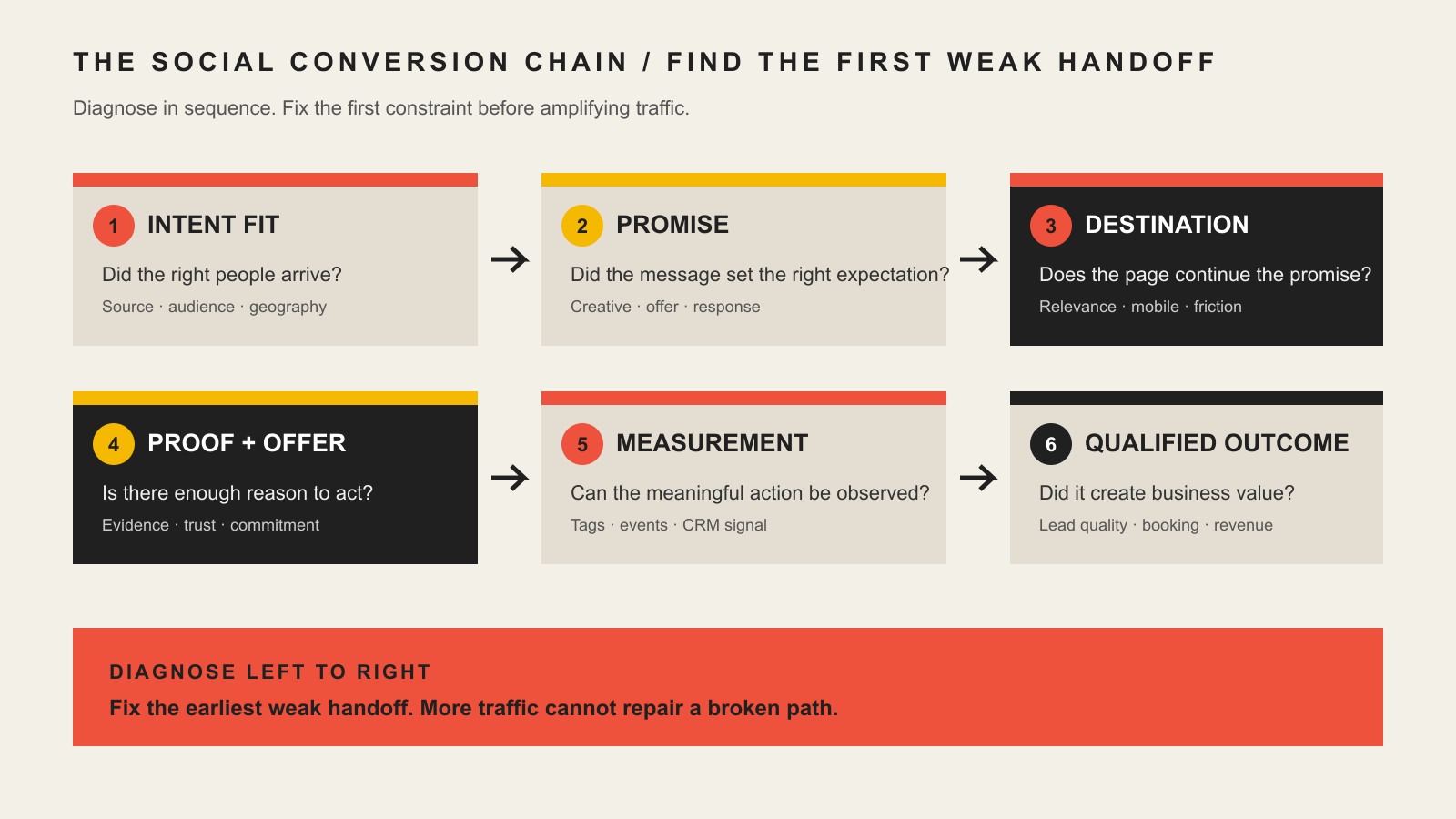
    Work down the ladder. Upstream failures contaminate downstream evidence. A broken form can impersonate weak demand. Wrong traffic can impersonate bad copy. Poor follow-up can make a good landing page appear commercially useless.

    Step 1: Define a Conversion the Business Actually Wants

    “Submit form” is not a business outcome. It is an interface event.

    A useful conversion definition includes:

    • The action: purchase, call, application, booking, quote request, activation, or completed task.
    • The audience: the location, need, company type, or customer segment the business can serve.
    • The quality gate: budget, service fit, urgency, authority, attendance, payment, or another downstream condition.
    • The ownership: who responds, how quickly, and what system receives the action.
    • The economic boundary: what the action is worth after sales time, delivery cost, refunds, churn, or no-shows.

    This is why the purpose of a business website must be decided before the optimization backlog. If the website has no primary job, every click looks equally important and the dashboard becomes a junk drawer.

    Step 2: Verify the Conversion Path Before Studying It

    Test the boring stuff first. It is not glamorous, but neither is discovering that the contact-form notification has been going to a former employee for six months.

    • Submit every important form on desktop and mobile.
    • Confirm the visitor receives the correct success or error state.
    • Confirm the business receives the submission and can identify its source.
    • Test phone links, booking tools, checkout, payment, confirmation, and account creation.
    • Check whether analytics records the intended action once—not zero times and not five.
    • Verify that consent, attribution, and cross-domain behavior match the systems in use.
    • Segment by device and browser to find functional differences hiding inside the average.

    Accessible forms are part of this foundation. The W3C advises using descriptive labels for form controls, and WCAG requires automatically detected input errors to be identified and described in text. An error state that only changes a border from gray to slightly angrier gray is not useful feedback.

    Step 3: Segment Traffic Before Blaming the Page

    Do not optimize a blended conversion rate. Segment the audience by the reason it arrived.

    At minimum, compare:

    • organic search by landing page and query intent;
    • paid campaigns by ad promise and destination;
    • referrals and direct visits;
    • new and returning visitors where the distinction is meaningful;
    • location, device, and service eligibility;
    • educational pages, comparison pages, service pages, and direct-response landing pages.

    Someone reading a definition article is not failing because they did not immediately book a five-figure project. Someone clicking an ad for an emergency service and landing on a vague homepage may be failing because the page answered the wrong question.

    SEO earns relevant discovery. CRO improves what happens after that discovery. The two disciplines overlap, but neither rescues the other from a bad intent match.

    Step 4: Diagnose Message, Experience, Offer, and Follow-Through

    Message clarity

    Can a visitor explain what you do, who it is for, why it matters, why they should believe you, and what happens next? If sales calls begin with “So what exactly do you do?” the homepage has given you qualitative evidence for free.

    User experience

    Observe whether an interested visitor can find and complete the intended action. The UX conversion-diagnosis guide owns the deeper comprehension and usability questions. CRO uses that evidence to prioritize commercial improvements.

    Offer value

    If qualified visitors understand the offer and can complete the action but still decline, the problem may be price, risk, timing, effort, differentiation, or proof. Rearranging the page cannot make an unappealing exchange attractive forever.

    Operational follow-through

    Track the path after the form: acknowledgement, qualification, scheduled conversation, attendance, proposal, sale, fulfillment, and retention. If leads wait two days for a response, producing more of them is not optimization. It is feeding the leak.

    Choose One of Three CRO Evidence Lanes

    Not every website has enough traffic for a trustworthy randomized experiment. That does not mean the business must either do nothing or pretend a before-and-after chart proved causation.

    Lane 1: Repair a known defect

    Use this when the path is objectively broken or fails a clear requirement: a form does not submit, an important button is hidden on mobile, an input has no label, the error message is invisible, tracking fires incorrectly, or the page contradicts the offer.

    Fix it, test it, and monitor the result. You do not need an A/B test to decide whether the phone number should work.

    Lane 2: Make a high-confidence change using qualitative evidence

    Use this when traffic is limited but customers, sales conversations, support questions, usability sessions, reviews, or search queries reveal a repeated problem. Rewrite the unclear offer, answer the missing objection, restructure the page, or simplify the path. Change one meaningful system at a time where practical, document the reasoning, and compare later performance with honest caveats.

    This is judgment informed by evidence. It is not weaker simply because a testing platform did not award it a green trophy.

    Lane 3: Run a controlled experiment

    Use this when the page receives enough stable, relevant traffic and conversions for the result to separate a useful effect from noise. Define the primary outcome, quality guardrails, minimum worthwhile improvement, audience, duration rules, and decision criteria before looking at the result.

    Do not stop when a dashboard briefly flashes “winner.” Do not run twenty simultaneous micro-tests on a low-volume site. And do not ship a click lift that reduces qualified leads or revenue.

    A Real CRO Example: Ask Applicants for Less

    A fleet-services company asked Scope Design to make its job application easier. The form requested a Social Security number, desired wage, and a larger set of mandatory information before the applicant had entered a hiring conversation.

    The first improvement was not an AI personalization engine or a psychological trick. Scope Design removed the Social Security number and desired-wage fields, kept only the 14 fields specifically identified as required, and made the others optional. When the company later began running Google job-application ads, Scope Design added the requested measurement tag to the application page.

    The documented lesson is narrow and useful: remove unnecessary friction and measure the intended action. We do not currently have a defensible before-and-after application rate, so we will not manufacture one to make the story sparkle.

    When Friction Helps Conversion Quality

    Accidental friction is bad. Intentional qualification can be valuable.

    A one-field form may increase submissions while burying a sales team in spam and tire-kickers. A thoughtful budget range, service selection, location question, or project-timing field may reduce raw leads and improve qualified opportunities. The correct decision depends on sales capacity, deal size, routing needs, and the cost of reviewing a bad lead.

    The test is not “Did the form get shorter?” It is “Did the business get more of the conversations it can serve profitably?”

    Conversion Tactics Scope Design Will Not Use

    Short-term metric lifts do not excuse deception. The Federal Trade Commission describes dark patterns that obscure or manipulate choice, including false countdowns, buried terms, difficult cancellation, and tricks that pressure people into sharing data.

    Scope Design will not use:

    • fake scarcity, fake activity messages, or countdown timers that reset;
    • fabricated reviews, client logos, statistics, or before-and-after results;
    • confirmshaming, preselected consent, buried fees, or intentionally difficult exits;
    • accessibility regressions in exchange for a cosmetic or click metric;
    • forms made easier solely to pad lead counts while destroying qualification;
    • AI personalization deployed before the business understands its audience, offer, data, or review responsibility.

    Our two tests are blunt: would the tactic survive if the visitor understood why it was used, and does the improvement remain after lead quality, refunds, no-shows, churn, sales time, accessibility, and trust are counted?

    Which CRO Metrics Matter?

    Business model Primary outcome Quality guardrails
    Ecommerce Completed purchase and contribution value Refunds, margin, repeat rate, acquisition cost
    Considered B2B service Qualified opportunity or pipeline value Decision-maker fit, budget, attendance, close rate, sales time
    Local service Qualified call or booked-and-attended appointment Service area, job fit, no-shows, close rate
    Subscription Activated and retained customer Churn, lifetime value, support burden
    Operational/self-service Successfully completed task Error rate, escalation, staff time, customer satisfaction

    Use rankings, sessions, engagement, scroll, clicks, and form starts as diagnostic context. They help explain movement. They are not the commercial destination.

    A Practical 30-Day CRO Plan

    Week 1: Define and verify

    Name the primary conversion and quality gate. Test the complete path. Repair forms, calls, checkout, booking, notifications, mobile defects, and measurement.

    Week 2: Gather evidence

    Review source and landing-page performance, sales questions, lost leads, customer language, reviews, support requests, and a handful of observed tasks. Identify where evidence converges.

    Week 3: Make the highest-confidence improvement

    Choose one meaningful constraint. Clarify the offer, add missing proof, repair the experience, reduce accidental friction, strengthen qualification, or fix follow-up ownership. Do not rebuild everything because one section offended your aesthetic sensibilities.

    Week 4: Measure and decide

    Check the primary outcome and guardrails. Record what changed, what else may have influenced the period, and whether to keep, reverse, refine, or test the improvement. Build the next backlog from evidence rather than a generic list of “best practices.”

    When the problem is a focused campaign destination, use the landing-page optimization guide. When the page must support exploration across several visitor intents, use the homepage design guide. They are different jobs, even if both contain buttons.

    Conversion Rate Optimization FAQ

    What is the difference between SEO and CRO?

    SEO helps the right people discover a page; CRO improves the path from that arrival to a valuable action. SEO can increase relevant visibility, while CRO can improve messaging, proof, usability, offer presentation, and follow-through. A bad traffic-to-page match will weaken both.

    Is a 2% conversion rate good?

    A 2% rate is good only if the denominator, action, lead quality, economics, and business model make it good. A lower rate from a broad educational audience can outperform a higher rate of low-value inquiries. Compare segments and your own defensible baseline before borrowing an industry benchmark.

    Is a 20% conversion rate good?

    Possibly—but a high percentage can be meaningless when the audience is tiny, prequalified, miscounted, or completing a low-value action. Check sample size, traffic source, duplicate events, and downstream quality before opening champagne.

    How do you improve a website conversion rate?

    Define the valuable action, verify the path, segment traffic, diagnose the tightest constraint, choose an evidence method, make one meaningful improvement, and measure the business outcome. Starting with a tactic before diagnosis is guessing with extra software.

    Do small businesses need A/B testing for CRO?

    No. CRO includes research, repairs, usability observation, customer interviews, message clarification, offer work, analytics, and operational improvement. A/B testing is one evidence method. Use it only when the traffic and conversion volume can support a decision.

    How long does conversion rate optimization take?

    Known defects can be repaired quickly; reliable learning takes long enough to observe the relevant business cycle. A high-volume checkout may produce evidence sooner than a five-figure service sold through a multi-month process. CRO should be an operating rhythm, not a one-time redesign sprint.

    What CRO tools are necessary?

    Start with trustworthy analytics, working conversion tracking, form or commerce records, sales outcomes, and direct customer evidence. Session recordings, heatmaps, testing platforms, surveys, and personalization tools are useful only when they answer a defined question. A dashboard nobody uses is decorative debt.

    Should every form have fewer fields?

    No. Remove fields that create unnecessary effort or request information the visitor cannot reasonably provide yet. Keep questions that route, qualify, price, protect, or prepare the next step when their operational value exceeds their completion cost.

    Can CRO fix low-quality traffic?

    CRO can clarify fit and repel poor prospects, but it cannot turn the wrong audience into the right one at scale. If source, query, geography, or campaign intent is wrong, fix acquisition and destination alignment before polishing the conversion path.

    Fix the Constraint, Not the Cosmetic Symptom

    The most useful CRO question is not “What should we test?” It is “What evidence says this step is keeping qualified people from a valuable outcome?”

    That question may lead to clearer copy, a better form, stronger proof, a repaired mobile path, a different offer, better targeting, or faster follow-up. It may also lead to the honest conclusion that the website is fine and the business needs more relevant demand.

    If you need help separating a traffic problem from a messaging, UX, offer, technical, or follow-up problem, ask Scope Design for a diagnostic conversation. We would rather identify the real constraint than sell you a prettier version of the wrong solution.


  • How to Choose a Domain Name for Your Business: The CORE Test

    How to Choose a Domain Name for Your Business: The CORE Test

    If you are wondering how to choose a domain name for your business, start with this rule: the right domain is not the one with the most keywords. It is the shortest, clearest name that your business can safely use, grow into, and control. Before you register anything, run the name through four checks: Clarity, Ownership, Reach, and Execution. We call that the CORE Domain Test.

    A domain is more than a web address. It becomes part of your brand, your email, your links, your advertising, your analytics history, and the technical path customers use to reach you. That is why a clever name can still be a bad decision if it creates trademark risk, boxes the business into one service or city, or lives in an account the business does not control.

    This guide is for U.S. small-business owners choosing a new domain or deciding whether an existing one is worth changing. It is practical business guidance, not individualized trademark or legal advice.

    What makes a good domain name?

    A good domain is easy for a person to recognize, say, type, and remember; distinct enough to support your brand; broad enough to survive reasonable growth; and registered in a way that leaves the business in control.

    There is no universal “15 characters or fewer” rule. Shorter often helps because there is less to remember and mistype, but character count is a weak substitute for clarity. NorthStarDental.com can be a better business name than a shorter string that nobody can pronounce. The useful test is human: say the domain out loud once, ask someone to type it, and see where they hesitate.

    Likewise, do not force a keyword into the domain because you expect an SEO shortcut. Google’s current SEO Starter Guide says keywords in a domain name or URL path alone have hardly any ranking effect beyond their possible appearance in breadcrumbs. Our guide to keywords and search traffic reaches the same practical conclusion: choose words for people and positioning, not because someone promised an algorithmic jackpot.

    How to choose a domain name: use the CORE Domain Test

    The CORE Domain Test separates four decisions that generic “top 10 domain tips” lists usually blend together. A candidate can be strong in one area and still fail overall.

    Four domain-name checks cover clarity, safe ownership, room to reach future markets, and business control of registration and access.

    C — Clarity: can people use the name without coaching?

    Clarity is the human-factors test. A domain should be easy to hear, read, type, and repeat. That does not mean every domain must be tiny or literal. It means the friction should be intentional.

    • Say it: Can a customer hear the domain once and type it correctly?
    • Spell it: Does it depend on an unusual spelling that you will have to explain forever?
    • Separate the words: When the words run together, do they create an unintended reading?
    • Test numbers and hyphens: Will people wonder whether you said “5” or “five,” or forget the dash?
    • Match the brand: Does the domain sound like the business you want people to remember?

    A domain is one piece of a larger identity system. If the business name itself is still unsettled, solve the positioning and naming problem before optimizing the URL. Our brand strategy guide covers that broader work.

    O — Ownership: can you safely use the name?

    Ownership is a veto check. A memorable name is not a good domain if it creates an obvious rights conflict or carries history you did not investigate.

    Start with the USPTO’s current federal trademark search, but do not treat a database search as a complete legal clearance. USPTO notes that a proper clearance search can be complex and should consider marks that look, sound, mean, or create a commercial impression similar to yours, along with related goods and services. Its trademark process guidance also makes an important distinction: registering a domain name does not give you trademark rights, and a domain can still create infringement problems.

    Then investigate the name beyond trademarks. Search the web for the exact name and close variants. Check major social platforms if handle consistency matters to your launch. If the domain was previously registered, review historical snapshots in the Wayback Machine and inspect what the old site appears to have been used for. A clean-looking registration page today does not tell you the whole history.

    If the name is strategically important or the search turns up a close competitor or existing mark, involve a qualified trademark attorney before you build the brand around it.

    R — Reach: will the name still fit the market you want?

    Reach asks whether the domain communicates enough without narrowing the business unnecessarily. A city, product, or niche word can help people understand what you do, but it can also become a constraint later.

    For example, a service business that genuinely intends to stay local may be comfortable with a city in the domain. A firm planning to expand across a region should be more cautious. The same applies to product-specific names: a domain built around one offer can become awkward after the offer changes.

    The extension belongs in this decision too. .com is often a practical choice when the natural .com is available and matches what your audience expects, but it is not an SEO requirement. Google says the top-level domain generally does not matter to Search; country-code domains can act as a usually low-impact signal when you are specifically targeting users in that country. Choose the extension because it fits the business and market, not because you think Google rewards the letters after the dot.

    E — Execution: does the business control the infrastructure?

    Execution is the second veto check. The best domain name in the world is fragile if the registrar account, DNS, recovery email, renewal method, or transfer controls are outside the business’s reach.

    ICANN defines the registrant as the individual or entity that registers the domain and manages it through the registrar. In practical terms, the business should know which account controls the registration, who can recover that account, how renewals are paid, and how the DNS can be changed if a vendor relationship ends.

    ICANN’s security guidance recommends keeping the registrar account secure and recoverable, enabling multifactor authentication when the registrar supports it, and using a registrar lock as another layer against unauthorized changes or transfers. It also warns against casually listing a web designer or hosting provider as the registrant. Scope Design takes the same position in our business website ownership guide: a vendor can manage the domain, but the business should not become a tenant in somebody else’s account.

    This is also why domain and hosting are related but not the same thing. If those pieces are still blurry, our explainer on how domains, DNS, hosting, and websites work together shows which control belongs where.

    Does putting a keyword in your domain help SEO?

    Not enough to choose the domain around it. A descriptive word can help a human understand the business, but Google says the keyword in the domain itself has hardly any ranking effect. That makes “plumber,” “lawyer,” “design,” or a city name a branding choice first—not a ranking strategy.

    If two candidate domains are equally clear and ownable, a descriptive term can be useful. But do not accept a clumsy, limiting, or legally risky name because it contains a search phrase. The stronger SEO work happens on the website: useful content, clear page topics, crawlable architecture, credible evidence, links, local relevance where appropriate, and a site that satisfies the query.

    Should you always choose a .com domain?

    No. Choose .com when it is the cleanest version of your brand, not because it gets a ranking bonus. If the exact .com is held by another active business, buying an awkward spelling just to keep .com can create more confusion than choosing a clear alternative extension.

    Evaluate the whole name and extension together. Ask whether customers will remember it, whether the extension fits the audience, whether the corresponding .com creates material confusion, and whether the extension has registration rules or renewal pricing you are comfortable with. Country-code domains deserve extra attention because eligibility and policy can vary by registry.

    The pre-registration domain checklist

    Run every serious candidate through the same checklist so you do not fall in love with the first available name.

    CheckQuestionWhat a failure means
    Say/spell testCan someone type it after hearing it once?Expect avoidable word-of-mouth and email friction.
    Brand fitDoes it sound like the company you want to build?The domain may preserve an old positioning problem.
    Trademark screenAre there confusingly similar marks in related goods/services?Veto until resolved.
    Web and social searchWho already uses the name or close variants?Potential confusion, reputation, or handle conflicts.
    Domain historyWhat did archived versions of the domain contain?Investigate reputation and legacy-link risk before buying.
    ReachDoes a city, product, or niche word unnecessarily limit growth?You may need a rebrand just when the business expands.
    TLD fitWill customers understand and remember the full address?Extension friction can erase the benefit of the shorter name.
    Price termsWhat are registration, renewal, transfer, premium, and privacy terms?A cheap first year can hide an expensive long-term choice.
    Registrant/controlIs the business the registrant and account owner?Veto until fixed.
    Recovery/securityAre MFA, registrar lock, recovery contacts, and renewal details set?Veto until the business can recover and retain control.

    ICANN’s registrant rights and responsibilities are useful when comparing registrars because they emphasize accessible information about pricing, management, transfers, renewals, restoration, privacy services, and support. That is a better basis for choosing a registrar than a permanent “best” or “worst” list that will age as products and prices change.

    What if your preferred domain is taken?

    Do not immediately add three keywords, a hyphen, and an extra letter. Treat the taken domain as a constraint and generate a better shortlist.

    1. Try a brand modifier that people already associate with the company. A service category, product family, or simple verb can work when it still sounds natural.
    2. Consider a different TLD. Compare the full address against the existing .com so you understand potential confusion.
    3. Consider acquisition only when the domain is genuinely strategic. Verify the seller, rights, transfer process, history, and total cost before money changes hands.
    4. Rename early if the clean alternatives all feel compromised. Changing a young brand before launch is usually easier than migrating an established website and email system later.

    Should you buy multiple domain names?

    Sometimes. Buy extra domains to solve a specific problem, not because every typo or TLD feels scary. Useful cases can include a genuinely confusing variant, an old domain retained during a migration, or a campaign name with a clear purpose. Point alternatives to one primary home with deliberate redirects rather than maintaining duplicate sites.

    Every extra domain also creates another renewal, security, DNS, and inventory obligation. A “protect everything” portfolio can become the thing that causes the important domain to expire unnoticed.

    Should an established business change its domain name?

    Usually not for cosmetic reasons or a keyword upgrade. Once a domain is established, the decision changes. You are no longer comparing two names in a vacuum; you are comparing the benefit of the new name with the cost of moving links, email, analytics history, customer habits, ads, profiles, DNS, and search signals.

    Google treats a domain change as a site move with URL changes. Its current guidance calls for mapping old URLs to new ones, using server-side permanent redirects, updating canonicals and internal links, submitting the appropriate Search Console Change of Address, monitoring the move, and keeping redirects generally for at least a year. Google also says temporary ranking fluctuations can happen while it recrawls and reprocesses the move.

    A domain change can still be worth it when the old name creates a real problem: a legal conflict, a merger or major rebrand, a name that materially misrepresents the business, or a history/reputation problem that cannot reasonably be separated from the domain. But “the new URL has a better keyword” is not a sufficient business case.

    A real example: why this article still has “2025” in its URL

    This article is a useful test of our own rule. Its established permalink ends in /choosing-right-domain-name-2025/, even though the guidance has now been rebuilt to be evergreen.

    We checked the evidence before touching the URL. In the most recent 12-month GA4 window, the page had 11 landing sessions, all Direct, with one engaged session and zero configured key events. Search Console returned no exact-page query rows in either of the two 12-month comparison periods and currently reports the URL as “Crawled – currently not indexed,” while also confirming a successful fetch and a matching self-canonical. Bing reports zero clicks and zero impressions, and Ubersuggest found no exact-page ranking keywords or backlinks.

    Those numbers do not show valuable search equity. We still kept the URL because removing the year would not solve a user problem, while it would create a redirect and another migration dependency. The visible title and article can become current without making every old link learn a new address. This is the larger lesson: change a domain or URL because the benefit clears the migration cost—not because a scorecard dislikes the slug.

    Frequently asked questions about choosing a domain name

    How long should a domain name be?

    There is no magic character limit. Make it as short as practical without sacrificing clarity, pronunciation, spelling, or brand fit. The voice test is more useful than chasing an arbitrary number.

    Is a keyword in the domain good for SEO?

    A keyword can help a person understand the business, but Google says the keyword in the domain alone has hardly any ranking effect. Choose it for clarity or positioning, not as a ranking hack.

    What is the best domain extension for a business?

    There is no universal winner. .com is often practical when the natural version is available and familiar to your audience. Other generic TLDs can work when the full address is clear. Country-code TLDs can make sense for a country-specific market. Google does not give .com a general ranking advantage.

    Should I put LLC in my domain name?

    Usually only if “LLC” is genuinely part of the public-facing brand. A domain is a customer-facing identifier, not a substitute for your legal entity records. If customers know the company without the suffix, adding it can create unnecessary typing and recall friction.

    Who should own the business domain?

    The domain should be registered and recoverable under business-controlled credentials and contacts, with clear internal responsibility for renewal and security. A designer, developer, or managed provider can administer it, but the business should be able to regain control without needing that vendor’s permission.

    How do I check a domain’s history before buying it?

    Review archived versions in the Wayback Machine, search the web for the exact domain and brand name, inspect obvious legacy backlinks or mentions, and look for prior uses that could create confusion or reputation problems. No single check proves a domain is “clean,” so investigate anything material before acquisition.

    Can I change my domain later?

    Yes, but an established domain change is a migration project, not a simple rename. Plan URL mappings and permanent redirects, update canonicals and internal links, verify analytics and Search Console, update campaigns and profiles, preserve the old domain, and monitor both sides of the move.

    Choose the domain as part of the website strategy

    A domain decision happens early, but its consequences last. The best choice is not “shortest wins,” “.com at any cost,” or “put the keyword in it.” It is the name that passes CORE: clear to humans, safe enough to use, broad enough for the intended market, and controlled by the business.

    That is also why domain selection belongs inside website strategy, not as a five-minute registrar task. If you are choosing a domain because a new website, rebrand, or business launch is coming next, Scope Design can help connect the naming decision to the brand, site structure, technical ownership, SEO, and conversion path before those choices become expensive to unwind.

  • Content Promotion Strategies: 40+ Ways to Turn Content Into Qualified Leads

    Content Promotion Strategies: 40+ Ways to Turn Content Into Qualified Leads

    Content promotion is the work of moving a useful content asset into the places where the right buyers can discover it, understand why it matters, and take an appropriate next step. The goal is not to post everywhere. It is to create a reliable path from evidence to qualified business action.

    That distinction matters because distribution alone can create impressive-looking numbers without creating much value. A post can collect impressions, a paid campaign can buy clicks, and a lead magnet can collect email addresses while the actual sales team sees no improvement in fit. Promotion becomes useful when the source asset, route, destination, call to action, follow-up, and measurement all support the same buyer decision.

    At Scope Design, we treat this as a handoff-design problem. Our broader content marketing system starts with the business constraint and durable source asset. This guide owns the next part: how to move that asset through deliberate distribution routes and turn some of the resulting attention into qualified leads.

    The framework below is called BRIDGE: Buyer decision, Ready destination, Intent-matched routes, Deliberate adaptation, Good next step, and Evidence of qualified outcome. Under it, you will find more than 40 practical content promotion strategies—but every tactic has a job instead of becoming another item on a giant marketing checklist.

    What is content promotion?

    Content promotion is the deliberate distribution and amplification of an existing content asset so relevant people can discover it and move toward a useful next action. The asset might be an article, guide, video, case study, webinar, calculator, research finding, checklist, comparison, or another piece of evidence that helps a buyer make a decision.

    Content promotion is related to content distribution, but the useful definition is slightly broader. Distribution answers where does this asset go? Promotion also asks why should this audience care here, what version belongs in this context, what happens after the click, and how will we know whether the route produced anything valuable?

    It is also different from content strategy. Strategy decides which audience, problems, evidence, topics, source assets, and business outcomes deserve investment. Promotion starts after there is something worth promoting. If the source asset is thin, generic, or disconnected from a buyer decision, amplification usually scales the weakness.

    DecisionPrimary questionOwner
    Content strategyWhat should we create and why?Audience, evidence, source assets, editorial system
    Content promotionHow does the right buyer discover and use the asset?Routes, adaptation, handoff, next step, measurement
    Conversion optimizationWhy do interested visitors fail to act?Offer, proof, friction, experience, qualification
    Paid acquisitionWhen should we buy additional attention?Audience, bidding, creative, economics, bounded tests

    Those boundaries are useful because they prevent one article—or one marketing person—from trying to own everything. If the page receiving promoted traffic is confusing or cannot support the buyer’s next decision, fix the destination before buying more attention. Our constraint-first website strategy guide goes deeper on diagnosing that kind of weak link.

    The Scope Design BRIDGE Promotion System

    BRIDGE is a six-part operating system for content promotion. It is not a scientific law or a platform algorithm. It is a practical sequence we use to keep promotion tied to buyer intent and business consequence.

    BRIDGE: Buyer decision → Ready destination → Intent-matched routes → Deliberate adaptation → Good next step → Evidence of qualified outcome.

    B — Buyer decision

    Start with one decision the asset helps a specific buyer make. “Learn about our company” is not a strong decision. “Decide whether this service is a fit,” “understand the trade-off between two approaches,” “prepare for a project,” “estimate a realistic budget,” or “avoid a costly implementation mistake” is much clearer.

    This choice affects everything downstream. A pricing comparison can work well in search, sales follow-up, and retargeting because the reader is already evaluating options. A broad opinion piece may work better for discovery or authority. When the buyer decision is vague, teams tend to compensate by adding more channels.

    R — Ready destination

    Before promotion begins, inspect the page or experience that receives the attention. Does it answer the promised question? Is the proof visible? Is the next step obvious? Does the form ask for more information than the value exchange justifies? If a person is not ready to contact you, is there another useful action they can take?

    This is especially important for paid promotion. Buying traffic to a weak destination gives the business a faster way to learn that the destination is weak, but it does not fix it.

    I — Intent-matched routes

    Choose routes based on the buyer’s behavior and the job each channel can perform. Search captures active demand. Email reaches an audience you already know. Social can distribute proof and ideas where buyers discover them. Partner channels borrow relevant trust. Paid media can accelerate a message once the offer, destination, follow-up, capacity, and measurement are ready.

    For most small teams, one to three primary routes are enough for a bounded test. Our small business marketing strategy guide explains the larger channel-selection decision. More channels are not automatically more strategy.

    D — Deliberate adaptation

    Do not confuse repurposing with copying the same link and caption everywhere. Preserve the evidence, but adapt the entry point to the context. A search result needs a clear answer. An email needs a reason this reader should care now. A LinkedIn post may need a useful excerpt that stands on its own. A salesperson may need a one-paragraph explanation of when to send the asset.

    The content should feel native to the route without changing the underlying claim just to chase engagement.

    G — Good next step

    Match the ask to the buyer’s current confidence. A person reading an early educational article may not be ready to “Book a demo now.” A checklist, related comparison, email update, calculator, case study, or short consultation may be more proportionate. A high-intent visitor on a pricing or implementation page may be ready for a direct conversation.

    The point is not to make every call to action smaller. It is to make the next step believable.

    E — Evidence of qualified outcome

    Measure the chain, not only the first observable event. Did the route generate attention? Did people consume enough evidence to understand the point? Did they move into an owned relationship? Did they become leads? Were those leads qualified? Did sales work them? Did any become customers, applicants, donors, members, bookings, or another real business outcome?

    This is where many promotion programs stop too early. A form fill is useful data, but it is not the same thing as a qualified opportunity or revenue.

    Before you promote: make the handoff worth the click

    The fastest way to waste a promotion budget is to amplify content before the destination, follow-up, and measurement are ready. These first seven strategies are deliberately boring because they make the later tactics more useful.

    1. Name the buyer decision. Write one sentence: “This asset helps [specific buyer] decide [specific decision].” If that sentence is mushy, promotion will be mushy too.
    2. Define the qualified outcome. Decide what would count as a meaningful downstream result: a qualified consultation, completed application, sales opportunity, booked appointment, purchase, or another business-specific outcome.
    3. Confirm the source asset earns promotion. It should contain a clear answer, evidence, examples, trade-offs, or another reason someone would save, share, cite, or act on it. Promotion cannot manufacture substance.
    4. Inspect the destination on mobile and desktop. Check clarity, loading, proof, forms, navigation, accessibility, and whether the promised information is actually easy to find.
    5. Choose one primary next step. Secondary paths can exist, but the page should not make five equally loud demands. The next step should fit the buyer decision the asset supports.
    6. Assign follow-up ownership. If someone raises a hand, decide who receives it, how quickly the team should respond, what context gets passed forward, and what happens if no one acts.
    7. Build the measurement plan before launch. Agree on route names, UTM conventions, lead-stage definitions, CRM fields, self-reported attribution questions, and the review date before the campaign creates a pile of ambiguous traffic.

    If your team cannot answer those seven items, delay the amplification—not the diagnosis.

    Owned content promotion strategies: use the attention you already have

    Owned promotion is often the cheapest place to learn because you already control the destination, customer relationships, email list, website structure, or sales process. It also exposes whether the asset is useful before you pay to reach strangers.

    1. Add contextual internal links from relevant high-value pages. Link from pages where the reader naturally needs the new asset next. Google notes that crawlable links help it discover pages and also serve as relevance signals, but the reader benefit should come first. See Google’s link best practices.
    2. Feature the asset from a service, resource, or topic hub. Do this when the article resolves a common objection or prerequisite, not just because it is the newest post.
    3. Send it to a relevant email segment. Explain why this specific group should care. A segmented message tied to a real customer problem is usually more useful than a newsletter that simply announces “new blog post.”
    4. Put it into an existing nurture sequence. A strong comparison, case study, FAQ, or preparation guide can answer the question a prospect is likely to have at a specific point in the sequence.
    5. Give it to sales as a follow-up asset. Define the trigger: after which question, objection, discovery-call moment, or proposal should the salesperson send it?
    6. Use it in customer onboarding or support. Content that reduces confusion, explains setup, or teaches best practices can improve the customer experience while creating additional evidence of expertise.
    7. Link it from high-intent FAQs. Short answers can resolve the immediate question, while the deeper article handles nuance for readers who need it.
    8. Add it to proposal, estimate, or meeting follow-up templates. If the asset helps a buyer understand scope, process, risk, or expectations, make it easy for the team to send consistently.

    Commercial email does not become exempt from email law just because the link points to educational content. The FTC’s CAN-SPAM compliance guide specifically includes commercial email that promotes content on commercial websites. Other jurisdictions can impose different or stricter requirements, so permission-first list practices remain the safer operational standard.

    Social and repurposing strategies: distribute the evidence, not just the URL

    Social promotion works best when the post itself is useful. Treat the source asset as evidence you can re-express for different contexts, not as a link that needs to be shoved into every feed. Our social media authority guide covers the broader platform strategy.

    1. Publish a native excerpt with one useful idea. Give readers enough value to understand the point without requiring the click; the link is for the people who want the deeper evidence.
    2. Turn one framework into a visual carousel or diagram. A process, comparison, checklist, or decision tree often travels better than a generic article thumbnail.
    3. Record a short video that answers one question from the article. Lead with the answer, show the trade-off, and point to the source asset for details.
    4. Turn the article into a series of objection posts. Each post should answer one real buyer concern rather than chopping the introduction into arbitrary fragments.
    5. Give employees or subject-matter experts a usable share kit. Provide an optional caption, the core insight, a visual, and the correct URL; do not turn employees into copy-and-paste bots.
    6. Re-surface durable content when the context becomes relevant again. A timeless guide can return when a customer question, seasonal trigger, industry change, or sales conversation makes it useful.
    7. Build a content family from one evidence-rich source asset. Create derivative posts, videos, checklists, sales enablement, or email material while preserving the original evidence. Our content repurposing workflow explains how to do this without producing resize-and-repost sludge.
    8. Use comments and replies as distribution. When a discussion genuinely matches the article’s subject, answer the question in the thread first and link only if the deeper asset helps.
    9. Refresh the source asset before a major re-promotion. Check screenshots, platform instructions, prices, dates, examples, citations, and broken links. Re-promotion is a bad reason to send stale advice back into circulation.

    The rule is simple: adapt the doorway, not the evidence. If every platform version changes the claim just to chase reaction, the campaign is optimizing attention at the expense of trust.

    Earned, partner, and community content promotion

    Earned and partner routes can reach buyers through people or communities that already have relevance and trust. They work best when the asset gives the other party something useful to share, teach, reference, or discuss.

    1. Notify people who materially contributed to the asset. If you quoted, interviewed, or genuinely built on someone’s work, send the finished piece with no demand to share it.
    2. Build a co-marketing asset with a complementary business. A shared webinar, checklist, benchmark, or comparison can serve both audiences when the offers are compatible and the content is not a disguised lead swap.
    3. Arrange a relevant newsletter swap or contribution. Lead with a useful insight for the partner’s audience, not a bare “please link to our blog” request.
    4. Contribute to trade associations and professional communities. Offer a guide, checklist, training, or answer that solves a recurring member problem and follow the community’s promotional rules.
    5. Turn the article into a webinar, workshop, or podcast conversation. The live format can add examples and questions; the article becomes the durable reference afterward.
    6. Pitch the original evidence, not the existence of the post. Journalists, creators, and industry writers are more likely to care about a useful finding, expert explanation, dataset, framework, or case example than “we published a blog.”
    7. Answer high-intent community questions without link spam. Give a complete answer first. Use the link only when the source asset adds necessary depth or proof.
    8. Give customers and partners a practical enablement asset. A diagnostic, checklist, buyer guide, or implementation resource can be easier for them to forward internally than a sales brochure.
    9. Syndicate carefully. If you republish substantial content elsewhere, preserve a clear relationship to the original source, follow the destination’s canonical/indexing options where available, and make sure the syndication serves a real audience rather than multiplying duplicate copies.

    If a partner, creator, or influencer has a material connection to the business, disclosure matters. The FTC’s Endorsement Guides guidance says material connections should be disclosed clearly and conspicuously when the relationship is not otherwise obvious.

    Paid content promotion without buying useless traffic

    Paid promotion is a tool for buying additional distribution. It can accelerate learning and reach, but it does not transform a weak asset, broken offer, or slow follow-up process into a good system.

    1. Promote a message that already earned useful response. Organic performance is not a perfect predictor of paid performance, but an angle that consistently attracts the right people gives you a better hypothesis than random creative.
    2. Retarget people who consumed relevant evidence. A visitor who read a comparison, watched a substantial video, or returned to a key page may need a different next step than a completely cold audience.
    3. Sponsor a niche newsletter, community, or publication. Smaller relevant audiences can be valuable when you know the buyer fit and can track the handoff.
    4. Use paid social to amplify a specific buyer problem or proof point. The ad should connect logically to the destination; do not promise one thing in the creative and land people on a generic homepage.
    5. Use paid search when the asset matches active intent. Comparisons, pricing explanations, calculators, implementation guides, and high-intent educational assets can sometimes support search campaigns when the economics and landing experience make sense.
    6. Set a test budget and stop rule before launch. Define the decision you are trying to learn, the primary outcome, the guardrails, the observation window, and what result would make you continue, revise, or stop.
    7. Judge the campaign by downstream quality, not cheap clicks. A route with a higher click cost can still be better if it produces substantially better-fit opportunities; a cheap-traffic campaign can be expensive if the sales team wastes time on junk.

    If paid acquisition is a major part of the plan, use a dedicated paid-media framework rather than treating this section as campaign setup instructions. Our online advertising strategy guide covers readiness, economics, bounded tests, and channel mechanics in more depth.

    Turn promoted attention into qualified leads

    Lead generation begins at the handoff, not at the form. A content campaign can generate many contacts that never had the problem, authority, budget, timing, or fit required for the offer. That does not make the content worthless, but it means the business should not report every submission as if it were the same outcome.

    1. Match the call to action to the buyer’s current state. Early-stage readers may need another piece of evidence; later-stage readers may be ready for pricing, availability, a consultation, trial, application, or purchase.
    2. Ask only for qualification data you can use. A form field should either help route, qualify, personalize, or follow up. If no one uses the answer, reconsider whether the friction is justified.
    3. Route and respond while context is fresh. Carry the source asset, route, campaign, and relevant page context into the CRM or lead notification so the next person does not start the conversation blind.
    4. Close the loop with sales and service feedback. Review why leads were qualified, disqualified, stalled, closed, or retained. The promotion team needs downstream evidence to learn which routes and messages attract the right people.

    Google Analytics’ recommended-event documentation includes separate events for generate_lead, qualify_lead, disqualify_lead, working_lead, and close_convert_lead. That does not mean every business must implement those exact events tomorrow. It does reinforce the operational point: a generated lead and a qualified or converted lead are different stages. See Google’s recommended events.

    How to measure content promotion beyond clicks

    A useful content promotion dashboard keeps the handoffs visible. One route may be good at attracting attention but weak at creating owned relationships. Another may deliver fewer visits but a much stronger qualified-lead rate. If those stages are collapsed into “traffic,” the team cannot see what to fix.

    We use this measurement chain as a practical diagnostic: Distribution → Evidence consumption → Owned attention → Generated lead → Qualified action → Business result. Not every campaign needs every stage, and attribution will never be perfectly knowable. The value is preserving enough of the sequence to make better decisions.

    LayerUseful signalsQuestion to answer
    DistributionImpressions, sends, placements, routeDid the intended audience have a chance to see it?
    Evidence consumptionEngaged visits, scroll/depth, video completion, repeat visitsDid people consume enough evidence to understand the point?
    Owned attentionEmail opt-in, saved resource, account, direct returnDid any of the rented attention become an owned relationship?
    Generated leadForm, call, booking, inquiryDid someone raise a hand?
    Qualified actionQualified lead, accepted opportunity, completed applicationWas the action a real fit for the business?
    Business resultSale, enrollment, donation, retained customer, other outcomeDid the activity contribute to the consequence the business values?

    For route-level tracking, keep campaign naming boring and consistent. Google Analytics supports manual UTM tagging such as utm_source, utm_medium, and utm_campaign, which populate manual source, medium, and campaign dimensions in Analytics reporting. See Google’s Analytics dimensions and metrics reference. Add self-reported attribution when it can improve context, because people often encounter a business through more than one touchpoint.

    Use failure patterns to diagnose the broken layer

    A route scorecard becomes more useful when it leads to a decision. These patterns are not mathematical certainties; they are diagnostic starting points.

    • Attention without evidence consumption: investigate audience fit, headline/creative promise, placement context, or page experience.
    • Evidence consumption without a next step: investigate the handoff, missing proof, unclear offer, weak call to action, or mismatch between the asset and the destination.
    • Generated leads without qualification: investigate targeting, message promise, form/qualification design, lead magnet fit, or whether the content attracts people who want information but not the offer.
    • Qualified leads without progress: investigate response time, ownership, sales process, pricing/offer fit, capacity, or a missing piece of decision evidence.
    • Business results without clean source attribution: do not erase the result because the path was messy. Improve tracking, preserve self-reported context, and use multiple signals instead of forcing one-source certainty.

    This is the point where content promotion becomes management rather than activity. The team is no longer asking “What should we post next?” It is asking “Which handoff is limiting the outcome?”

    A 30-day content promotion operating rhythm

    You do not need a 12-month omnichannel calendar to learn whether a strong source asset can produce qualified action. A bounded 30-day cycle creates enough structure to learn without turning the plan into a permanent commitment.

    Days 1–5: prepare the handoff

    • Choose one source asset tied to a real buyer decision.
    • Define the qualified outcome and the primary next step.
    • Fix obvious destination, form, proof, mobile, and follow-up problems.
    • Set UTM naming, analytics events, CRM fields, and a review date.
    • Select one to three routes that match the audience and the job.

    Days 6–20: run the routes

    • Adapt the entry message to each route while preserving the underlying evidence.
    • Use owned distribution first where it gives you useful learning.
    • Add social, partner, community, or paid routes only when they have a clear job.
    • Record qualitative feedback from prospects, sales, customer service, comments, replies, and partner conversations.
    • Do not change five variables every two days because one graph moved.

    Days 21–30: inspect downstream quality

    • Compare route-level attention and evidence consumption.
    • Review owned actions, generated leads, qualification, active opportunities, and any business outcomes.
    • Read the actual disqualification and loss reasons where available.
    • Choose one response for each route: continue, revise, pause, or stop.
    • Document what the team learned so the next asset starts smarter.

    The purpose of the cycle is not to prove that content marketing “works.” It is to learn which combination of buyer decision, asset, route, destination, and handoff works well enough for this business to repeat.

    Frequently asked questions about content promotion

    What is the best content promotion strategy?

    The best strategy is the smallest set of routes that can reliably reach the right buyer, provide enough context for the asset, and produce a measurable next step. For a small business, that often means starting with owned channels plus one or two acquisition routes rather than trying to maintain every platform.

    Where should you promote content?

    Promote content where the intended buyer already searches, discovers ideas, participates, receives trusted recommendations, or interacts with your business. The correct answer might be search, email, LinkedIn, Facebook, YouTube, a trade association, a partner newsletter, sales follow-up, paid media, or an internal website route. Channel fit is more important than channel count.

    How do you promote content without posting everywhere?

    Choose one buyer decision, then select one to three routes that can reach that buyer with enough context. Reuse the underlying evidence across those routes, but adapt the entry point. Measure qualified downstream outcomes and add another route only when there is a reason to believe it solves a current constraint.

    How does content marketing generate leads?

    Content helps generate leads when it answers a real buyer question, creates enough confidence or relevance to justify a next step, and hands the person into a usable conversion path. The article, video, or guide is not the lead-generation system by itself; the destination, offer, qualification, follow-up, and measurement matter too.

    Should you use paid promotion for content?

    Use paid promotion when the asset, destination, offer, follow-up, capacity, economics, and measurement are ready enough to justify buying additional attention. Set a bounded test and judge the result by downstream quality, not impressions alone.

    How often should you re-promote or repurpose content?

    Use relevance and freshness instead of a universal calendar rule. Re-promote when the buyer question becomes timely again, a new route becomes useful, the asset has been meaningfully refreshed, or customer and sales conversations show renewed demand. Repurpose when the same evidence can help a different context without being stripped of meaning.

    How do you know whether a content lead is qualified?

    Define qualification with the people who own the next stage. Criteria may include problem fit, service fit, geography, budget, authority, timing, use case, eligibility, or another business-specific condition. The important point is that qualification is a defined downstream stage, not a flattering label applied to every form submission.

    What should you measure first?

    Start with the outcome that matters, then work backward. If the goal is qualified consultations, track the route, evidence consumption, inquiry, qualification, active follow-up, and outcome. Use clicks and engagement to diagnose the path, not to replace the outcome.

    Content promotion works when the handoffs work

    The internet does not owe a useful article distribution. Publishing creates an asset; promotion creates routes. The business result depends on what happens between those routes and the next meaningful decision.

    Use BRIDGE to keep the sequence visible: define the buyer decision, make the destination ready, choose intent-matched routes, adapt the message deliberately, offer a proportionate next step, and measure evidence of qualified outcome. Then expand what survives downstream scrutiny and stop maintaining channels that exist only because someone once made a social-media checklist.

    If your team is publishing useful content but distribution, landing pages, lead qualification, analytics, and follow-up are disconnected, Scope Design can help diagnose the weak handoff and build a more coherent system. The first question is not “Which channel should we add?” It is “Where is the current path breaking?”

  • How to Spy on Your Competitors’ Facebook Ads

    How to Spy on Your Competitors’ Facebook Ads

    If you want to see competitor Facebook ads, start with the Meta Ad Library. It is Meta’s public search tool for ads running across Meta products. Search a competitor’s business or Page, choose the market you care about, and review the ads Meta makes public.

    That part is easy. The useful part is knowing what the ads can actually tell you.

    A competitor’s public ad is evidence of what they chose to put into the market. It is not proof that the ad is profitable, that you know their non-public audience settings, or that the same message will work for your customers. Competitive research is the job.

    What Is the Meta Ad Library?

    Meta’s own Help Center describes the Ad Library as a place where you can search for ads running across Meta products and get information about the ads you see. Meta also documents a Page-level transparency path for people who want to see a Facebook Page’s ads.

    For ordinary commercial ads, think of the library as a public creative and messaging window. Depending on the ad and market, you may see the advertiser/Page identity, the copy and creative, format, call to action, public timing information, destination, and notes about versions that Meta exposes.

    Meta provides additional transparency for ads about social issues, elections, or politics, including impression and spending information in its political-ad transparency surfaces. Do not assume those extra fields are available for a local roofer, accountant, restaurant, retailer, or other ordinary commercial advertiser.

    What You Can See vs. What You Cannot Know

    Public clueReasonable observationDo not turn it into this claim
    Ad copy and headlineThe promise, problem, or angle the advertiser is testing publicly“This is their best-converting message”
    Image, video, or other creativeThe visual job the advertiser chose for this ad“This creative is why the ad performs”
    Offer and CTAThe action and value exchange being presented“This offer has the highest ROI”
    Public timing or repeated variantsThe pattern is worth monitoring“A long-running or repeated ad must be profitable”
    DestinationWhere the advertiser sends the click when a destination is exposed“The landing page converts well”

    For a normal commercial competitor ad, the public creative does not give you their detailed audience settings, true budget, conversion count, cost per lead, customer quality, or ROAS. You also do not know why the campaign is still running. Maybe it is working. Maybe it is part of a test. Maybe nobody has looked at it in weeks.

    That distinction fixes one of the worst habits in competitor research: turning visibility into certainty.

    Use the Competitor Ad Evidence Loop

    We use a simple four-step rule for competitor ad research: Observe → Compare → Hypothesize → Test. Each step keeps you from jumping from “I saw this” to “therefore I should copy it.”

    A continuous visual loop turns public competitor ad observations into comparisons, a hypothesis, and an original experiment.

    1. Observe: Build a Useful Competitor Set

    Do not start by collecting every ad you can find. Start by choosing businesses that can teach you something.

    • Direct competitors: businesses selling a similar solution to a similar buyer in your market.
    • Adjacent competitors: businesses solving the same problem with a different offer, business model, or price point.
    • Aspirational operators: businesses outside your local market whose offer or sales process is mature enough to study without confusing their market with yours.

    For a local business, three to five relevant companies is usually enough to begin. If the library has enough inventory, collect roughly 15 to 30 ads in total before you start declaring patterns. A single ad is an example. Several related ads are a clue.

    If you are not sure who actually belongs in the set, step back into broader small-business market research. Competitive ad analysis is one slice of market research, not a substitute for understanding customers, alternatives, pricing, or demand.

    2. Compare: Code the Ads Instead of Admiring Them

    Scrolling through ads feels productive because the screen keeps moving. A simple coding sheet forces you to extract something useful. For each ad, record the same fields:

    1. Offer: estimate, demo, consultation, discount, trial, bundle, lead magnet, appointment, product.
    2. Hook: pain, outcome, speed, price, risk, convenience, identity, curiosity, urgency.
    3. Proof: review, years in business, customer count, certification, before/after, case example, guarantee, demonstration.
    4. Creative job: show the product, show the process, show a person, explain something, prove something, or dramatize the problem.
    5. Format: static image, video, carousel, catalog-style execution, or another format Meta exposes.
    6. CTA: learn more, call, book, shop, download, request a quote, or another next step.
    7. Destination: home page, service page, product page, lead form, dedicated landing page, Messenger/DM path, or other route.
    8. Pattern notes: repeated hook, repeated proof device, several versions, seasonal timing, or a concept that appears across multiple advertisers.

    The “creative job” column matters more than whether you personally like the picture. If several strong operators show the process instead of a generic stock photo, that gives you a testable idea about what buyers may need to understand. For the production side of that decision, see our guide to choosing images for Facebook ads.

    3. Hypothesize: Turn Repetition Into a Question

    This is where a lot of competitor-ad advice goes off the rails.

    If three competitors all lead with “same-day service,” the useful conclusion is not, “Same-day service is the winning Facebook angle.” The useful conclusion is:

    Multiple competitors are foregrounding speed. That may mean fast response is a meaningful buying criterion in this market. We should verify that with customer evidence and, if it fits our operation, test our own version of the promise.

    That sentence keeps fact and inference separate. It also protects you from copying a competitor’s bad habit.

    Use the same structure for creative, proof, offers, and CTAs: “I observed X. Across Y examples it repeated. One possible explanation is Z. Here is how I could test that explanation without copying the execution.”

    4. Test: Build Your Own Version

    Competitor research should change your testing queue, not your brand voice.

    Suppose you notice that competitors repeatedly use customer proof near a low-friction estimate offer. You might test customer proof against your current feature-led creative while keeping the offer, audience, budget logic, and measurement consistent enough to learn something. Or you might discover the ad is not the real constraint at all.

    That last point matters. A better ad that sends people into a weak page, confusing offer, broken tracking setup, or slow sales follow-up can just waste money faster. Our Facebook Ads optimization guide treats the campaign as a system instead of a pile of isolated ad tricks.

    The destination deserves the same scrutiny. Does the landing page keep the promise made in the ad? Is the next step obvious? Does it qualify the right buyer? If the click path is the constraint, use a constraint-first website strategy instead of producing more ad variants for a page that cannot close the loop.

    Five Competitor-Ad Research Mistakes to Avoid

    1. Copying the ad instead of the lesson

    Copying a competitor’s headline, image, offer, or layout gives you none of the context that made their decision sensible. Extract the pattern, then rebuild it around your own customers, proof, positioning, economics, and voice.

    2. Assuming a repeated or long-running ad is a winner

    Longevity is a reason to keep watching, not a profitability report. Treat repeated creative as a higher-priority clue, then validate it with your own data.

    3. Guessing audience settings from the creative

    You can infer who the message appears designed for. That is different from knowing the audience settings, exclusions, retargeting logic, lookalike sources, or delivery decisions behind the campaign. Label the first as a creative-audience hypothesis, not a fact about campaign setup.

    4. Studying the ad and ignoring the click

    If the destination is available, follow it. The handoff from ad to page often reveals more strategic intent than the image itself: what gets repeated, what proof appears, what the form asks, and how much friction exists before the conversion.

    5. Watching only the obvious local rival

    Your best learning may come from an adjacent category that sells to the same buyer, or a mature operator in another region that has solved a similar communication problem. Keep the set relevant, but do not make it so narrow that everyone is copying the same local conventions.

    A 20-Minute Competitor Facebook Ads Review

    1. Open the Meta Ad Library and set the country/market you care about.
    2. Search three to five relevant businesses or Pages.
    3. Save enough active examples to compare, rather than reacting to one ad.
    4. Record offer, hook, proof, creative job, format, CTA, destination, and pattern notes.
    5. Highlight patterns that repeat across several ads or advertisers.
    6. Write one hypothesis for each meaningful pattern.
    7. Choose one hypothesis that fits your customers and operational reality.
    8. Define the test and the business metric you will use to judge it.

    Do this once and you have a snapshot. Do it monthly or before a meaningful campaign refresh and you start building a market memory. The value is not knowing every ad a competitor runs. The value is noticing what changes, what persists, and what deserves a test of your own.

    Frequently Asked Questions

    Where can I see my competitors’ Facebook ads?

    Use the Meta Ad Library. Search the competitor’s business/Page in the relevant country and review the public ads Meta shows. You can also use the Page transparency flow documented by Meta to reach a Page’s ads.

    Can I see a competitor’s Facebook ad audience settings?

    Not in the way you can see your own campaign setup in Ads Manager. The public creative may suggest who the message is designed for, but that is not the same as seeing the advertiser’s detailed audience settings, exclusions, retargeting logic, or delivery decisions. Political and social-issue ads have additional transparency fields, so do not use them as the model for ordinary commercial ads.

    Does a long-running Facebook ad mean it is profitable?

    No. It makes the ad worth monitoring, but the public library does not give you the business context needed to prove profit. Treat longevity and repetition as clues that can help prioritize hypotheses.

    Should I copy a competitor’s successful-looking ad?

    No. Even if you somehow knew the ad was a winner, your offer, customers, proof, margins, brand, sales process, and landing page are different. Copy the research discipline, not the execution.

    Use Competitor Ads to Ask Better Questions

    The Meta Ad Library can show you what your market is being shown. That is valuable. The mistake is pretending it can show you non-public campaign economics and internal decision-making behind every ad.

    Observe what is public. Compare enough examples to find patterns. Turn those patterns into labeled hypotheses. Test your own execution against a business result you actually care about.

    If you want help turning competitor research into a paid-social system that connects the offer, creative, tracking, landing page, lead quality, and follow-up, talk with Scope Design. We can help you figure out what is actually constraining performance before you throw more money at the feed.

  • Marketing ROI: Which Channels Deserve More Budget?

    Marketing ROI: Which Channels Deserve More Budget?

    Marketing ROI is not a universal channel leaderboard. The highest-return marketing investment is the one that profitably moves your current business constraint. Email can be exceptional when you already have a permissioned audience. SEO can compound when real search demand exists and you can wait for it. Paid search can win when buyers are actively looking and your margins can support acquisition costs. Short-form video can be powerful when attention and proof are the bottleneck. None of those conditions is true for every business.

    That changes the budgeting question from “Which channel has the highest ROI?” to a more useful one: “Which channel deserves the next dollar based on our economics, measurement, and bottleneck?”

    This guide gives you a practical way to calculate marketing ROI, separate ROI from ROAS, compare channels without fake certainty, and decide what to fund next.

    What Marketing ROI Actually Measures

    At its core, marketing return on investment asks whether the economic value created by marketing exceeded what you spent to create it. Google Ads describes ROI in terms of net profit relative to costs and recommends measuring valuable conversions before judging return.

    A practical formula is:

    Marketing ROI = (profit attributable to marketing − marketing investment) ÷ marketing investment × 100

    The word profit matters. Revenue can make a campaign look healthier than it is. If a campaign produces $10,000 in sales but those sales carry $6,000 in product, fulfillment, discount, and service costs, the business did not create $10,000 of economic value from the campaign.

    For lead-generation businesses, the same principle applies. Do not stop at form fills. Connect leads to qualified opportunities, close rate, average contribution margin, and—when the sales cycle is long enough to matter—eventual customer value.

    ROI vs. ROAS: Similar Acronyms, Different Decisions

    ROAS (return on ad spend) is narrower. It usually compares attributed conversion value with advertising spend. A campaign that attributes $10,000 in revenue to $2,000 in ad spend shows a 5x ROAS. That can be useful for campaign optimization, but it is not automatically the same as business profit.

    The difference becomes more important when you add product margin, sales labor, agency fees, creative production, software, discounts, refunds, and the revenue that may have happened without the campaign. Google’s own Conversion Lift documentation distinguishes ordinary attributed ROAS from incremental ROAS, which asks how much additional value advertising caused compared with a control or baseline.

    A simple rule: use ROAS to diagnose advertising efficiency; use ROI to make business investment decisions.

    Why “Highest-ROI Marketing Channel” Lists Mislead

    Channel benchmarks can be useful context. They become dangerous when they are treated as instructions. A published average cannot know your margins, list quality, local competition, sales cycle, offer strength, existing demand, or measurement gaps.

    • The denominator changes. Some ROI studies count only media spend. Others include people, tools, creative, and production.
    • The time horizon changes. Paid ads may create a signal this month. SEO and content may require a longer window before the economics are visible.
    • Attribution changes the winner. Google Analytics explains that attribution models assign credit differently across touchpoints. A first-touch, last-touch, and data-driven view can tell different stories about the same customer journey.
    • Your constraint changes the value of traffic. Buying more visitors is a poor investment if the real problem is a confusing offer, weak trust, or a broken conversion path.
    • Channel saturation changes returns. The first profitable audience segment or keyword set may not scale at the same cost forever.
    • Conversion quality matters. Ten cheap leads can be worse than three expensive leads if the cheap leads never become customers.

    Measurement itself is still a real problem. Nielsen’s 2025 Annual Marketing Report says only 32% of surveyed global marketers measured media spending holistically across digital and traditional channels. Nielsen also cautions that a channel being easier to measure does not necessarily make it more effective or higher-ROI.

    This is why our broader constraint-first website strategy starts with measurement integrity and the actual business bottleneck before prescribing more traffic or more tactics.

    Marketing Channels That Can Earn Strong ROI—and the Condition Each One Needs

    Instead of ranking channels from “best” to “worst,” compare the condition each channel needs in order to work.

    ChannelStrongest whenWhat to measureCommon ROI trap
    Email / CRMYou already have permissioned prospects or customers and a reason to stay in touch.Qualified replies, repeat purchases, lead-to-sale rate, revenue or margin per recipient.Calling email “free” while ignoring list acquisition, offer quality, deliverability, and labor.
    SEO + contentBuyers search for the problem you solve, organic visibility can compound, and you can tolerate a longer feedback loop.Qualified organic leads, assisted conversions, close rate, contribution margin from search.Optimizing for traffic volume instead of buyer intent and business value.
    Paid searchActive demand exists now and customer economics can support the cost per click and cost per acquisition.Qualified conversion rate, CAC/CPA, close rate, contribution margin, ROAS as a diagnostic.Scaling platform-reported conversions that do not become profitable customers.
    Paid social + short-form videoYou need discovery, attention, repeated proof, or audience creation before buyers search for you.Qualified pipeline, customer acquisition cost, assisted conversions, lift where testable.Confusing cheap reach or engagement with incremental demand.
    Creators / partnerships / referralsTrust transfer matters and the partner has credible access to your market.Partner-sourced qualified leads, close rate, margin, retention, referral velocity.Judging follower count instead of audience fit and customer quality.
    AI + automationThe bottleneck is execution capacity, response speed, repetitive work, or analysis—not lack of demand.Hours saved, cycle time, error rate, output capacity, conversion or retention improvement enabled by the workflow.Treating AI as an acquisition channel instead of an efficiency layer.

    Email and CRM: High Leverage When You Already Own the Relationship

    Email has attractive economics because you can communicate repeatedly with an audience you have already earned permission to contact. But that advantage disappears if the list is cold, the offer is weak, or the business has no useful follow-up system. Judge email by the business outcome it moves—repeat revenue, qualified conversations, recovered opportunities, renewals—not by open rate alone.

    SEO and Content: Strong When Search Demand and Patience Exist

    SEO can become highly efficient because a useful page can keep earning discovery without paying for every click. That does not make every keyword valuable. Our SEO strategy and analytics framework separates visibility from business value: a smaller keyword with buying intent can be worth more than a larger term that produces curiosity traffic.

    Paid Search: Fast Feedback When Demand Is Already Visible

    Paid search is useful when people are already looking for a solution and you need faster evidence than an organic program can provide. The price of that speed is explicit media cost. A paid search campaign deserves more budget only when the downstream economics—qualified lead rate, close rate, margin, and capacity—survive the added spend.

    Social, Video, and Creators: Strong When Attention or Proof Is the Constraint

    Current marketer surveys do show momentum here. HubSpot’s 2026 State of Marketing, based on 1,500+ global marketers, reports that 48.6% ranked short-form video among the media formats producing their biggest ROI. That is useful trend evidence—not a promise that a local contractor, B2B manufacturer, retailer, and software company will all get the same return.

    Video is a format. Social is a distribution environment. Creator partnerships are a trust mechanism. The ROI comes from whether the combination helps a specific audience move toward a profitable outcome.

    AI and Automation: An Efficiency Layer, Not a Standalone Marketing Channel

    AI can improve marketing economics by reducing research time, speeding production, helping teams repurpose useful material, improving follow-up, or making reporting easier to act on. But an AI workflow that produces more low-value output simply scales waste. Our AI automation framework starts with the business workflow and the constraint, then asks whether automation actually earns its keep.

    The Scope Design ROI Decision Loop

    Before increasing any marketing budget, run the decision through four stages: measure, find the constraint, bound the test, then scale or stop.

    Four-step marketing investment loop: measure the business outcome, find the constraint, bound a test, and scale or stop based on qualified results and acceptable economics.
    The Scope Design ROI Decision Loop turns channel selection into a repeatable investment decision instead of a trend chase.

    1. Measure the Business Outcome

    Define the outcome before choosing the tactic. Is the business trying to create qualified leads, increase contribution margin, recover lost customers, raise repeat purchase rate, or shorten the sales cycle? Confirm the tracking is good enough to observe that result, and define the baseline you are trying to improve.

    2. Find the Constraint

    Ask what is preventing the outcome now. If not enough qualified people know you exist, attention may be the constraint. If traffic is healthy but few people act, the constraint is likely closer to the offer, trust, page experience, or conversion path. If leads arrive but do not close, buying more leads can make the economics worse.

    When traffic exists but results do not, work through the conversion constraint before buying more traffic.

    3. Bound the Test

    A useful test has edges. State the hypothesis, audience, offer, channel, budget, time window, minimum evidence you need, and the condition that will make you stop. “Try social media for a while” is not a test. “Spend a fixed amount to test two proof-led offers against one defined audience and judge qualified opportunity cost” is.

    4. Scale or Stop

    Scale only when the result you care about improves at acceptable economics. If the signal is weak, diagnose why before adding money. The goal is not to defend the tactic. The goal is to buy evidence cheaply, learn what changed, and put the next dollar where it has a better chance of producing business value.

    For the full system around channel selection, offers, conversion, retention, and measurement, see our small business marketing strategy framework.

    Where Should Your Next Marketing Dollar Go?

    You do not need a universal ranking. You need a decision rule.

    • Not enough qualified attention: test paid search when active demand already exists; invest in SEO/content when that demand is durable and you can wait; use social/video/creators when buyers need discovery and repeated proof before they search.
    • Traffic is healthy but leads are weak: fix the offer, page, trust, or conversion path before increasing acquisition spend.
    • Leads arrive but sales are weak: inspect lead quality, qualification, speed-to-lead, sales follow-up, pricing, and offer-market fit. A cheaper lead is not a win if it never closes.
    • Existing customers are underused: email, CRM, retention, referral, and reactivation work may outperform another acquisition campaign because the relationship already exists.
    • The team cannot execute consistently: improve the workflow before adding channels. Automation can create leverage when capacity—not demand—is the constraint.

    What to Measure by Channel

    Platform metrics help you troubleshoot. Business metrics tell you whether to keep spending.

    ChannelUseful diagnostic metricsBudget-decision metrics
    Email / CRMDelivery, opens, clicks, reply rateQualified replies, repeat revenue, margin, retained customers
    SEO / contentImpressions, rankings, organic clicksQualified organic leads, pipeline, closed revenue, contribution margin
    Paid searchCPC, CTR, conversion rateQualified CPA/CAC, close rate, margin, incremental revenue where measurable
    Paid social / videoReach, watch time, CPM, engagementQualified pipeline, CAC, lift, assisted revenue
    Creators / referralsReach, referral traffic, responsePartner-sourced opportunities, close rate, retention, margin
    AI / automationTasks completed, output volumeHours saved, faster cycle time, lower error rate, capacity or conversion improvement

    If a dashboard is full of clicks, views, and engagement but cannot connect them to a qualified outcome, the immediate marketing problem may be measurement—not channel selection.

    Marketing ROI FAQ

    What marketing channel has the highest ROI?

    There is no single highest-ROI channel for every business. Email tends to have favorable economics when you already own a responsive audience. SEO can compound when search demand and conversion quality are strong. Paid search can produce fast, high-intent feedback. Social and short-form video can work well when attention or proof is the bottleneck. The winner is the channel that produces the best qualified business outcome relative to its fully loaded cost in your situation.

    What is a good marketing ROI?

    A good marketing ROI is one that clears your business’s required return after material costs, remains credible after attribution uncertainty, and is strong enough to justify using the money there instead of somewhere else. A universal percentage is less useful than your margin, cash cycle, risk, capacity, and alternative uses of capital.

    What does a 20% marketing ROI mean?

    If the inputs are defined correctly, a 20% ROI means the measured investment produced net return equal to 20% of that investment. Whether 20% is attractive depends on how long it took, how confidently the result can be attributed, the risk involved, and what other investments were available.

    How do I compare SEO ROI with Google Ads ROI?

    Compare them against the same business outcome, not unlike metrics. Include the fully loaded costs of each program, use a time window appropriate to each channel, and follow leads through qualification and sales. Do not compare SEO traffic with ad revenue or compare an ad-platform ROAS number with an organic lead count.

    How long should I wait before judging marketing ROI?

    Set the evaluation window before the test. Paid channels can often produce directional evidence sooner because spend and exposure begin immediately. SEO, content, partnerships, and brand-building usually need longer windows. For long sales cycles, judge leading indicators first but do not call the program profitable until the qualified outcomes have had time to mature.

    Does AI improve marketing ROI?

    It can, when it reduces the cost or time required to produce a valuable outcome. AI does not fix weak demand, bad positioning, poor measurement, or a broken conversion path. Treat it as leverage inside a working system, then measure whether the workflow actually improved cost, speed, quality, conversion, or retention.

    Stop Funding the Channel. Fund the Constraint.

    The most useful marketing trend is not a new platform. It is a stricter standard for deciding what deserves budget.

    Measure the business outcome. Find the constraint. Run a bounded test. Scale only when qualified results justify it. That approach will not produce a tidy universal leaderboard, but it gives you something more valuable: a repeatable way to make the next marketing dollar smarter than the last one.

    If your marketing dashboard shows plenty of activity but you still cannot tell which investment is earning its keep, Scope Design can help you diagnose the measurement, conversion, and channel system before you add more spend.

  • What Information Should a Business Website Include?

    What Information Should a Business Website Include?

    A business website should include enough information for a qualified buyer to understand what you do, decide whether it fits, judge the risk, compare the alternatives, and take the next sensible step. At minimum, that means a clear offer, audience and non-fit guidance, outcomes, process, pricing context, proof, tradeoffs, responsibilities, and contact details. If someone must book a call to learn the basic facts, the website is not selling. It is holding information hostage.

    TL;DR: the business website information checklist

    1. What you do: the actual service, product, or solution in language a buyer uses.
    2. Who it is for—and not for: the situations, buyers, budgets, and constraints that make someone a good or poor fit.
    3. What changes: the problem you solve and the business outcome you help create.
    4. How it works: the process, timing, client responsibilities, deliverables, and what happens after the first step.
    5. What it costs: an exact price, starting point, typical range, or honest explanation of the factors that determine price.
    6. Why anyone should believe you: relevant case evidence, examples, credentials, and truthful testimonials near the claims they support.
    7. What the catches are: limitations, dependencies, tradeoffs, ongoing costs, and reasons an alternative may be better.
    8. What to do next: a clear, proportionate action with an explanation of what happens when someone takes it.

    This is the Scope Design Buyer Decision File. It is not a mandatory page list. Pages are containers. The Decision File is the information a buyer needs, wherever that information belongs in the journey.

    A website is not complete because it has five pages

    Most advice about what a business website should include starts with Home, About, Services, Blog, and Contact. Fine. Those are familiar labels. They are also capable of containing absolutely nothing useful.

    A Services page can say “innovative solutions tailored to your unique needs.” An About page can announce that the company is passionate. A Contact page can display a form with twelve required fields and no clue what happens after submission. Technically, the pages exist. Commercially, they are decorative drywall.

    The better question is not “Which pages do we need?” It is “What does a qualified buyer need to know before the next decision feels reasonable?” That question changes the content from an internal company inventory into a buyer-facing decision system.

    If you are still deciding the website’s job, start with our Constraint-First Website Strategy. If the strategy is clear and you want to test the entire path, use the seven-link website conversion checklist. This guide concentrates on the information layer: the facts, explanations, evidence, and boundaries that make a buying decision possible.

    The Buyer Decision File: eight questions your website must answer

    Buyer questionInformation the website should provideCommon locations
    What do you actually do?Clear offer, scope, deliverables, and plain-language descriptionHomepage, service pages, product pages
    Is this for me?Ideal situations, industries, constraints, and wrong-fit conditionsHomepage, service pages, qualification page
    What changes if this works?Problem, outcome, stakes, and reasonable expectationsHomepage, service pages, case studies
    How does it work?Process, timing, responsibilities, communication, and next stagesService pages, process page, FAQs
    What will it cost?Price, range, starting point, cost drivers, and ongoing expensesPricing page, service pages, cost guides
    Why should I believe you?Relevant proof, examples, credentials, methods, and sourced claimsBeside each claim, case studies, About page
    What are the risks and alternatives?Limitations, tradeoffs, dependencies, comparisons, and non-fitService pages, comparisons, FAQs
    What happens next?Specific action, expectations, response timing, and ownershipCalls to action, forms, contact and confirmation pages

    1. What do you actually do?

    Lead with a concrete answer. A buyer should not need to decode “integrated growth solutions,” “digital transformation,” or another phrase assembled from the LinkedIn refrigerator magnets.

    • Name the service or product.
    • Describe the problem it addresses.
    • Explain what the buyer receives.
    • State important inclusions and exclusions.
    • Use the language customers use when they ask for help.

    The opening does not need to explain the entire company. It needs to give the visitor a reliable orientation. Your homepage should route people by intent; the relevant service page can carry the deeper explanation.

    2. Who is this for—and who should leave?

    “We work with businesses of all sizes” sounds inclusive. It usually means nobody made a positioning decision.

    Give buyers enough context to recognize themselves. That might include the type of business, stage, problem, geography, internal capacity, budget reality, urgency, or level of complexity. Then state the non-fit conditions with equal honesty.

    • Who gets the most value from the offer?
    • What must already be true for the work to succeed?
    • What kinds of requests are outside the scope?
    • When is a cheaper, simpler, or internal option more sensible?

    This does not shrink the funnel. It prevents the funnel from becoming a garbage chute. A website that repels a bad-fit inquiry can be doing its job perfectly.

    3. What problem changes, and what outcome is realistic?

    Features describe the thing. Outcomes explain why the thing matters. Buyers usually need both.

    Describe the starting condition, the operational or commercial problem, and the result the work is designed to support. Be precise about what you influence and what you do not control. “We redesign service-business websites around qualified lead generation” is useful. “We guarantee 10X revenue” is a flare fired from the S.S. Bullshit.

    For a serious website project, that outcome may involve better-fit inquiries, clearer sales conversations, lower administrative drag, improved self-service, or a technical foundation the business can maintain. It is rarely just “looks modern.” The difference between a basic website and a serious business website is the system of decisions and responsibilities behind the pixels.

    4. How does the work actually happen?

    Professional services are intangible before delivery. Process information makes the unknown less mysterious and gives the buyer a way to judge whether the engagement fits their capacity.

    • What happens first?
    • What are the major stages and decision points?
    • Who will the client work with?
    • What does the client need to provide, review, or approve?
    • How long does the work usually take, and what changes the timeline?
    • What is delivered, transferred, supported, or maintained afterward?

    Do not pretend the customer has no responsibilities if the project depends on access, decisions, source material, interviews, or approvals. Surprise labor is still labor; it is simply delivered with more resentment.

    5. What does it cost—or what determines the cost?

    If you can publish an exact price, publish it. If the work is genuinely variable, publish useful pricing logic: a starting price, typical range, minimum engagement, example scopes, major cost drivers, and likely ongoing expenses.

    “Every project is unique, contact us” is not pricing information. It is a refusal wearing a blazer.

    Useful cost content should answer:

    • What is the realistic entry point?
    • Which choices expand or reduce the scope?
    • What is included and excluded?
    • What third-party, licensing, hosting, maintenance, media, or implementation costs remain?
    • What would make the investment wasteful?

    Cheap work often exists because important disciplines were omitted, not because someone discovered a secret tunnel around reality. Our guide to what a $500 website leaves out breaks down the multidisciplinary scope behind a professional build.

    6. Why should a buyer believe any of this?

    Proof is not a page you send people to after making twelve unsupported claims. Put evidence beside the doubt it answers.

    • Use case studies with a recognizable starting problem, the work performed, and a measurable or observable result.
    • Use specific testimonials that discuss the issue a buyer is evaluating.
    • Show examples, artifacts, demonstrations, qualifications, or methods when those are stronger than praise.
    • Name the source and timeframe for statistics.
    • Explain whose experience or expertise produced the advice.

    The Federal Trade Commission’s endorsement guidance says endorsements must be truthful and not misleading. That is the legal floor, not an ambitious content strategy. If a logo, review, result, award, or statistic cannot survive a polite request for evidence, take it off the damn page.

    This is also what makes content more useful for search and citation. Google’s guidance asks whether content provides original information or analysis, demonstrates first-hand expertise, identifies who created it, and leaves readers feeling they learned enough to achieve their goal. See Google’s people-first content guidance. Rank Math can check whether a phrase appears in a box. It cannot manufacture experience or prove a claim.

    7. What are the tradeoffs, limitations, and alternatives?

    Every meaningful choice has a downside. Hiding it does not remove it; it simply lets the buyer discover it later when they are angrier.

    • Explain what the service does not solve.
    • State dependencies, risks, and common causes of delay.
    • Compare the offer with DIY, internal hiring, cheaper providers, software, postponement, and direct competitors where appropriate.
    • Say when another approach is the better choice.
    • Address ongoing maintenance, ownership, accessibility, privacy, security, and operational responsibilities when they affect the decision.

    Transparent drawbacks are not anti-sales. They make the positive claims more credible and help the correct customer self-select. That is a healthier conversion than strong-arming everyone into the same calendar slot.

    8. What exactly happens next?

    “Contact us” describes a mechanism, not an experience. Tell people what the action is for and what follows it.

    • Who receives the inquiry?
    • When should the person expect a response?
    • What will a call cover, how long will it take, and is it free or paid?
    • What should the buyer prepare?
    • What happens if the project is not a fit?
    • What lower-commitment resource is useful for someone who is not ready?

    Use a focused landing page when one arrival intent should lead to one decision. Use a broader site page when the visitor reasonably needs to compare, verify, or explore. Removing navigation and context everywhere because “fewer choices convert” is how you turn a professional service into a hostage funnel.

    How much information is too much?

    The problem is rarely that a serious buyer received too many useful answers. The problem is that the answers were badly organized, repetitive, irrelevant, or written like a policy manual escaped from legal.

    Use progressive detail. Give the direct answer first. Follow it with the explanation, evidence, conditions, and links a motivated buyer can inspect. Write descriptive headings so a person can scan directly to the question in their head. The W3C’s web writing guidance recommends informative titles, meaningful headings and links, clear instructions, and concise language; its WCAG guidance on headings and labels explains that descriptive structure helps people orient and find information.

    Long copy is not automatically good. Short copy is not automatically smart. The correct length is the shortest version that answers the decision honestly.

    Where should this information live?

    Put the answer where the question occurs.

    • Homepage: orientation, primary audiences, core outcomes, high-level proof, and routes to deeper answers.
    • Service or product pages: fit, scope, process, investment context, proof, tradeoffs, and the relevant next step.
    • About page: who is responsible, relevant experience, point of view, and why the business is credible—not a corporate autobiography beginning at kindergarten.
    • Pricing and cost guides: ranges, cost factors, examples, exclusions, and ongoing expenses.
    • Case studies: problem, context, intervention, evidence, limitations, and result.
    • Comparison and problem articles: alternatives, drawbacks, decision criteria, and questions a buyer is already researching.
    • Contact and booking pages: action expectations, timing, privacy context, and what happens next.

    Repeat critical information where it supports a decision, then link to the deeper source. Do not make the visitor assemble the truth from nine disconnected tabs like they are investigating a small-town conspiracy.

    Frequently asked questions

    What information should be included on a business website?

    A business website should explain the offer, audience, problem, expected outcome, process, pricing context, proof, limitations, alternatives, responsibilities, contact information, and next step. It should also provide the legal, privacy, accessibility, ownership, or support information relevant to the business and transaction.

    What pages should every business website have?

    Most business websites need a useful homepage, offer or service pages, credible About information, and a clear contact path. Many also need pricing guidance, case studies, FAQs, policies, and educational content. There is no sacred five-page package. Choose pages based on buyer questions, search intent, operational needs, and the job of the site.

    Should a service-business website show prices?

    It should provide useful pricing context whenever possible. Publish an exact price for standardized work. For custom services, provide a starting point, typical range, minimum engagement, example scopes, or the variables that determine price. The goal is not false precision; it is helping buyers judge whether a conversation makes sense.

    Should a website publish drawbacks or limitations?

    Yes, when those drawbacks materially affect fit or expectations. Explain tradeoffs, dependencies, exclusions, ongoing obligations, and situations where another option is better. Honest limitations reduce surprises and make the rest of the offer more believable.

    What makes website content trustworthy?

    Trustworthy content identifies who created it, uses relevant first-hand experience, distinguishes observation from documented fact, cites authoritative sources for factual claims, explains limitations, and uses proof that actually supports the claim beside it. Anonymous hype, unsourced statistics, fake reviews, and decorative logo walls do the opposite.

    What information belongs above the fold?

    The opening view should orient the visitor: what the offer is, who it is for, why it matters, and the most appropriate next step or route. It does not need to contain every answer. It needs to earn the next scroll without confusion.

    How often should website information be updated?

    Update it whenever the offer, price, process, team, proof, policies, technology, responsibilities, or common buyer questions change. Review critical service, pricing, contact, and legal information on a regular schedule. Do not change a date merely to cosplay freshness; make a substantive update and record what changed.

    How is this different from a website conversion checklist?

    This checklist audits the information a buyer needs. A conversion checklist audits the broader system: traffic intent, messaging, fit, proof, action paths, technical usability, and business follow-through. Great content can still fail inside a broken form or a terrible sales process; flawless mechanics cannot rescue missing answers.

    Stop making people book a call to discover the truth

    Your website does not need to say everything. It does need to say the things a reasonable buyer requires before the next decision.

    Explain the offer. Define fit. Show the outcome. Describe the process. Give pricing context. Prove the claims. Admit the tradeoffs. Make the next step clear.

    That is not “giving away too much.” It is doing the educational work a serious buyer expects before they donate thirty minutes of their life to your sales calendar.

  • What Makes a Good Website? The Website Fitness Test

    What Makes a Good Website? The Website Fitness Test

    What makes a good website? A good website reliably does its assigned job for the right people without creating avoidable confusion, exclusion, technical failure, operational drag, or false confidence. It should be clear, trustworthy, usable, technically sound, maintainable, and connected to a business outcome you can observe. Looking expensive is not the same as working. A polished website with a broken form is still broken; it is just broken in a nicer font.

    TL;DR: what makes a good website

    1. Purpose: it has a defined job and a clear priority.
    2. Audience: it helps the right people recognize that it is for them—and lets the wrong people self-select out.
    3. Clarity: visitors can understand the offer, find the information they need, and choose a sensible next step.
    4. Trust: important claims are supported by relevant evidence, transparent limitations, and identifiable expertise.
    5. Experience: essential tasks work across devices and for people with different abilities.
    6. Technical reliability: the site loads, functions, protects data, can be found, and does not quietly drop inquiries into a digital sewer.
    7. Business fitness: the organization can operate, measure, maintain, and improve it after launch.

    That is the Scope Design Website Fitness Test. Score each dimension from 0 to 2: 0 means broken or unknown, 1 means plausible but unverified, and 2 means working with evidence. The highest possible score is 14. But this is not Olympic gymnastics: a critical failure cannot be averaged away by accumulating style points somewhere else.

    The Website Fitness Test scorecard lists purpose, audience, clarity, trust, experience, reliability, and business fit, each scored from zero to two, with a note that critical failures cannot be averaged away.

    A good website is good relative to its job

    “Good” is not a visual style. It is a relationship between a website, its users, and the business behind it.

    A referral-driven consultant may need a compact site that establishes credibility and makes contact painless. An ecommerce company needs product discovery, checkout, fulfillment, and support to behave as one system. A manufacturer may need qualified inquiries, specification documents, distributor information, and a clean handoff to sales. A school may need families to find current information quickly without staff calling a developer every time lunch schedules change.

    Those sites should not be judged by the same conversion rate or feature list. They should be judged by whether they do the job assigned to them. This is why website strategy must come before the sitemap. If nobody has decided what the website is accountable for, “make it better” is not a brief. It is an expensive mood.

    Fitness dimensionThe question to answerEvidence of a 2
    PurposeWhat job must this website do?A named priority, owner, and success condition
    AudienceWho must succeed here, and what are they trying to do?Real buyer language, intent paths, and fit criteria
    ClarityCan people understand and find what they need?Successful task checks and fewer repeated questions
    TrustWhy should anyone believe the claims?Relevant proof, transparent limits, and clear authorship
    ExperienceCan different people complete essential tasks?Mobile, keyboard, accessibility, and error-state checks
    Technical reliabilityDoes the machinery work consistently?Field performance, tested forms, monitoring, backups, and clean indexing
    Business fitnessCan the organization operate and improve it?Named ownership, maintainable systems, and outcome reporting

    1. Purpose fitness: the website has one primary job

    A good website begins with a decision: what is the most important thing this website must accomplish for the business and its users?

    It may need to generate qualified sales conversations, complete purchases, support customers, recruit employees, distribute essential information, or establish enough credibility for a referred prospect to make contact. It can support several goals, but they cannot all be the top priority. When five audiences and seven calls to action are equally important, the actual strategy is “good luck, everybody.”

    • 0: nobody can state the website’s job, or departments give conflicting answers.
    • 1: a goal exists, but it is vague—“build awareness,” “look modern,” or “get more traffic.”
    • 2: the website has a prioritized job, a responsible owner, and an observable success condition.

    If the job is still fuzzy, use our website purpose framework before discussing colors, layouts, or software.

    2. Audience fitness: it works for the people arriving

    A website is not good because the owner understands it. Owners navigate their own sites from memory. Visitors arrive from a search result, advertisement, referral, email, or sales conversation with a question already in their head.

    Audience fitness means matching that moment of arrival. The page should help a person identify whether the offer fits their situation, what information matters next, and whether they should continue. That includes honest non-fit guidance. A site that prevents a bad-fit inquiry may be performing better than one that converts every curious stranger into a sales interruption.

    • 0: the site talks to “everyone,” or the traffic arriving has little connection to what the business sells.
    • 1: personas or audience labels exist, but they were invented internally and never checked against real questions.
    • 2: pages reflect real search intent, sales questions, support issues, buyer language, and qualification criteria.

    3. Clarity fitness: the website makes an argument

    Beautiful websites often fail because they were designed to look credible rather than to make a useful argument. The visitor sees tasteful animation, a cinematic drone shot, and “transforming possibilities through innovation.” Wonderful. What the hell does the company do?

    Clarity is more than short copy. A considered purchase may require substantial detail. The test is whether the information arrives in a useful sequence: offer, fit, problem, outcome, process, investment, evidence, risks, alternatives, and next step. Our business website information checklist covers that decision file in detail.

    Clear structure helps humans and machines understand the page. The W3C explains that headings communicate content organization and support in-page navigation, while Google recommends descriptive titles, original information, clear sourcing, and content that leaves the reader able to accomplish a goal.

    • 0: visitors cannot tell what the organization does, who it serves, or where important information lives.
    • 1: the basic message is present, but generic language, internal jargon, or weak hierarchy makes people work for it.
    • 2: unfamiliar users can accurately explain the offer, find critical answers, and identify the next appropriate action.

    4. Trust fitness: evidence sits beside the claim

    Trust is not a testimonial carousel filled with “Great service!” It is the reduction of justified uncertainty.

    A trustworthy website identifies who is speaking, distinguishes documented results from professional judgment, explains meaningful limitations, answers uncomfortable questions, and places relevant evidence close to the claim it supports. A specific example with modest conclusions is stronger than an impressive percentage nobody can trace.

    • 0: claims are unsupported, outdated, deceptive, contradictory, or impossible to verify.
    • 1: proof exists, but it is generic, remote from the claim, or missing important context.
    • 2: relevant work, methods, sources, authorship, constraints, and tradeoffs make the claim proportionate and believable.

    This matters for search visibility too, but not because “E-E-A-T” is a magic switch. Google describes experience, expertise, authority, and especially trust as concepts its systems try to recognize—not a plugin field you can fill until the traffic light turns green.

    5. Experience fitness: essential tasks work for real humans

    User experience is not a decorative layer applied after the strategy. It is the discipline of helping someone comprehend and complete the task.

    Check the essential paths on a phone, with a keyboard, at high zoom, with images disabled, and with deliberately bad input. Labels should describe controls. Focus should remain visible. Errors should explain how to recover. Tap targets should not require the precision of a neurosurgeon riding a bus. Accessibility is not a special mode for somebody else; it is part of whether the interface works.

    • 0: an essential task is inaccessible or breaks on a common device or input method.
    • 1: the happy path works, but accessibility, mobile behavior, validation, or recovery states are assumed rather than checked.
    • 2: representative users can complete essential tasks across relevant devices and input methods, including error recovery.

    Be suspicious of universal UX commandments. Fewer clicks are not automatically better; three confident clicks beat one confusing one. Shorter forms are not automatically better; intentional fields can improve qualification. Removing navigation may help a focused paid landing page and damage an organic research page. Context is the whole damn job.

    6. Technical fitness: the machinery earns trust quietly

    A website cannot communicate, convert, or support anyone if it does not reliably load and function. Technical quality includes performance, responsive behavior, search accessibility, form delivery, security, privacy, integrations, backups, and recovery—not merely a perfect score from whichever scanner is shouting today.

    Google’s current Core Web Vitals define “good” field performance at the 75th percentile as Largest Contentful Paint of 2.5 seconds or less, Interaction to Next Paint of 200 milliseconds or less, and Cumulative Layout Shift of 0.1 or less. Those are useful experience thresholds, not the definition of a good business. A fast page with the wrong offer simply disappoints people efficiently.

    • 0: critical forms, checkout, search access, security, or data handling are broken or unknown.
    • 1: the site appears functional, but nobody monitors it, restores backups, tests notifications, or checks field performance.
    • 2: essential paths are tested, performance is measured with real-user data where available, ownership is clear, and recovery is practiced.

    This is also where a professional website differs from a basic website: the invisible foundation, responsibilities, and failure handling are part of the product.

    7. Business fitness: the website survives contact with the organization

    A launch is not evidence that a website is good. It is evidence that the launch happened.

    Business fitness asks what happens next. Who answers inquiries? Who owns updates? Can staff publish routine content without breaking layouts? Are the domain, hosting, code, analytics, and vendor accounts owned by the business? Can data move between the website and the systems that actually run the operation? Does anyone review the outcomes and decide what to improve?

    • 0: ownership is unclear, leads disappear, the system depends on one unavailable person, or nobody can safely maintain it.
    • 1: responsibilities exist informally, but documentation, reporting, access, or ongoing budget is incomplete.
    • 2: ownership, access, workflows, maintenance, measurement, and improvement cadence are explicit and sustainable.

    The website may generate a qualified conversation, but it cannot make the sales team return the call. Measure the last outcome the website genuinely controls, then follow it downstream to learn whether it produced business value. Our website conversion checklist maps that entire chain.

    The fail conditions: when the score no longer matters

    A total score is useful for prioritization, but it must not hide catastrophic weaknesses. Any of these conditions is an automatic failure until corrected:

    • An essential path—contact, application, checkout, booking, login, or support—does not work.
    • A required task excludes users because it cannot be completed with relevant assistive technology, keyboard input, or common mobile devices.
    • The site makes deceptive claims, uses fabricated proof, or employs manipulative patterns that visitors would resent if they understood them.
    • Sensitive data is collected or handled without appropriate security, privacy, ownership, or retention controls.
    • The business cannot access, maintain, move, or recover the site and its essential data.
    • Nobody knows what success means, whether the primary action works, or who is responsible for responding.

    A site can be gorgeous, quick, and technically valid while failing one of those tests. That is not a 12 out of 14. It is a fire alarm with excellent kerning.

    A real example: the website request that was not really a website problem

    A long-established specialty auction business approached Scope Design about a new website and a substantial list of features. A cosmetic review would have produced new page designs. Discovery produced a different diagnosis.

    The visible site sat on top of legacy technology, broken or incomplete customer-facing processes, disconnected data, manual invoicing, older operational software, infrastructure responsibilities, and several systems the new website would need to support. The feature list was only the surface. Building it responsibly required mapping where information lived, which system owned it, how it moved, and who would operate the result.

    So the work became foundation first, features second. That example does not prove a percentage increase in revenue, and we will not invent one to make the paragraph sparkle. It supports a narrower and more useful point: the thing a client asks you to build is not necessarily the problem they need you to solve.

    How to evaluate a website in 30 minutes

    1. Write down the job. Complete this sentence: “This website is working when the right visitor can ______, and the business can observe ______.”
    2. Choose three real entry pages. Use pages receiving organic, referral, paid, or direct traffic—not only the homepage everybody has polished to death.
    3. Ask an unfamiliar person to orient themselves. Can they explain what is offered, who it is for, and what they would do next?
    4. Complete the primary task. Use a phone and keyboard. Submit the form, place a test order, book the appointment, or find the support answer.
    5. Confirm the handoff. Did the notification arrive? Was the data recorded correctly? Does a named person know what to do next?
    6. Inspect the evidence. Are the important claims supported where the reader is likely to doubt them?
    7. Check the foundation. Review mobile behavior, accessibility basics, Search Console, field performance, security ownership, backups, and update responsibility.
    8. Score the seven dimensions. Record what you observed, not what the team assumes.

    Do not begin by debating button colors. If the offer is unclear, the wrong people are arriving, or leads sit unanswered for three days, micro-optimization is deck-chair arrangement with a monthly reporting fee.

    What the Website Fitness Test is—and is not

    This framework is a diagnostic, not a universal recipe. It helps identify where the website is weak and what evidence is missing. It does not prescribe the same number of pages, form fields, words, calls to action, plugins, or animations for every business.

    It also does not mean every weakness requires a redesign. Sometimes the best next move is to repair a form, clarify one offer, rewrite three entry pages, document the follow-up process, or stop buying traffic until the business can service it. If the real constraint is upstream, a new website can become a very handsome way to avoid the decision.

    Frequently asked questions

    What are the qualities of a good website?

    A good website has a clear purpose, serves the intended audience, communicates plainly, supports its claims, enables accessible and usable task completion, works reliably, and fits the business processes responsible for operating and measuring it. Visual quality matters, but it cannot compensate for failure in those areas.

    What are the seven C’s of a good website?

    Several unrelated “seven C’s” frameworks circulate online, commonly using terms such as context, content, community, customization, communication, connection, and commerce. They can be useful prompts, but they are not a universal standard. Scope Design uses seven fitness dimensions instead: purpose, audience, clarity, trust, experience, technical reliability, and business fitness.

    What are the five most important things on a business website?

    If forced to choose five, include a clear offer, explicit audience fit, credible evidence, usable paths to essential information or actions, and a specific next step. The underlying technology and operational handoff still need to work; they simply are not always visible on the page.

    Is a visually attractive website automatically a good website?

    No. Visual design can improve comprehension, distinctiveness, credibility, and emotional response. It can also conceal vague messaging, inaccessible controls, broken forms, poor performance, and weak operations. Appearance is one part of the experience, not the verdict.

    Does a good website have to convert visitors into customers?

    Not every website or page has a direct sales job. A site may need to support customers, recruit employees, publish essential information, or establish credibility for referred prospects. It should produce the outcome assigned to it. When the job is lead generation or ecommerce, qualified conversions matter more than raw traffic or indiscriminate form submissions.

    How fast should a good website load?

    For current Core Web Vitals, Google classifies “good” field performance at the 75th percentile as LCP at or below 2.5 seconds, INP at or below 200 milliseconds, and CLS at or below 0.1. Treat these as useful experience thresholds, then investigate the actual pages and users involved rather than worshipping a single lab score.

    Does a good website need to be custom-built?

    No. A template can be the right solution when the site has a simple job, stable content, no unusual integrations, and a limited maintenance budget. Custom work earns its cost when the workflow, data, integration, content scale, or brand distinction genuinely requires it. Buying complexity as a status symbol is still buying complexity.

    How often should a business evaluate its website?

    Monitor critical paths continuously and review the broader site whenever the offer, audience, business process, technology, legal obligations, or evidence changes. As an operating baseline, Scope Design recommends a substantive review at least annually for conceptual content and roughly every six months for platform, pricing, and technical material that becomes stale faster.

    The blunt definition

    A good website helps the right person make progress and helps the business fulfill its side of the bargain. It is understandable without insider knowledge, credible without manufactured hype, usable without unnecessary struggle, reliable without constant heroics, and maintainable after the launch applause dies down.

    If you cannot tell which dimension is failing—or whether the website is even the constraint—a redesign quote is premature. Talk to Scope Design about a paid website diagnostic. We will identify what is actually broken before prescribing a prettier version of the wrong solution.

    Sources and standards

  • Pricing Psychology: 15 Strategies That Make Online Prices Easier to Choose

    Pricing Psychology: 15 Strategies That Make Online Prices Easier to Choose

    Pricing psychology is the way price presentation changes how people perceive, compare, and act on an offer. On a website, that includes the reference points you show, how plans are compared, whether the full commitment is clear, where proof appears, and how much work the buyer has to do to understand the decision.

    It is not a substitute for setting a viable price. If you are still deciding what to charge, start with our guide to pricing a product or service without guessing. This article starts one step later: you have a defensible price; now the website has to make that price easier to evaluate.

    That distinction matters because a pricing page can fail in two different ways. The number itself can be wrong, or the presentation can create unnecessary friction. Changing $100 to $99 will not rescue a confusing offer, hidden fees, meaningless packages, or a page that makes buyers hunt for the terms.

    Do not make a bad price look clever. Make a defensible price easier to evaluate.

    The 15 strategies below are built around that rule. Each has a job, a fit condition, and a reason not to use it. Before reaching for any of them, run the page through the CLEAR Pricing Page Test.

    What is pricing psychology?

    Pricing psychology is the study and practical use of how price format, context, comparison, and payment framing influence buyer perception and choice. It can affect what a buyer notices first, which reference price feels relevant, how difficult alternatives are to compare, and how risky the commitment feels.

    It cannot create value that is not there. It cannot repair bad unit economics. It cannot make the wrong audience want the offer. And it should not depend on the buyer misunderstanding the transaction.

    That is why we treat pricing psychology as a branch of conversion design rather than a bag of tricks. The wider principles overlap with ethical psychological marketing, but a pricing page has a narrower job: help a qualified buyer answer What do I get? What will I pay? Which option fits me? What happens next?

    Harvard Business School research commentary on psychological pricing makes a similar point: price presentation helps customers evaluate whether a purchase feels valuable and fair, and transparency can matter as much as the tactic itself. See Harvard Business School Working Knowledge on psychological pricing.

    The ethical line is understanding

    A useful pricing tactic makes a real choice easier to understand. A manipulative one wins because the buyer misses something important. If a crossed-out price never existed, the anchor is not informative. If a “most popular” badge is invented, it is not guidance. If the annual total is hidden behind a small monthly equivalent, the page is not simplifying the decision.

    A good internal test is: Would we still use this presentation if the buyer understood exactly how it works? If the answer is no, do not ship it.

    The CLEAR Pricing Page Test

    Before changing a price ending, adding a badge, or moving a pricing card, inspect the decision itself. CLEAR is Scope Design’s five-part pricing-page diagnostic.

    CLEARQuestionWhat good looks like
    C — ContextDoes the buyer know what the price is for and what makes it meaningful?The offer, buyer, scope, outcome, or useful comparison is obvious before the number has to carry the whole sales argument.
    L — LegibilityCan the buyer understand the full financial commitment?Amount, billing unit, billing timing, meaningful limits, mandatory add-ons, renewal or term, and important price-change triggers are explicit.
    E — EvidenceIs proof placed where price creates doubt?Testimonials, examples, scope, policies, savings math, or performance evidence answer the objection created by the price.
    A — ArchitectureDo the choices map to real buyer decisions?Tiers, anchors, defaults, bundles, and comparisons reflect meaningful differences rather than arbitrary feature withholding.
    R — ReversibilityIs justified risk reduced where the business can support it?Trial, cancellation, downgrade, guarantee, phased engagement, or a clear sales process makes the next step understandable.

    CLEAR is deliberately diagnostic. It does not tell every company to use three tiers, end prices in 9, or add a free trial. It tells you where the uncertainty lives so you can choose the smallest tactic that actually addresses it.

    That follows the same constraint-first logic we use in our broader website strategy and conversion optimization framework: fix the real bottleneck before decorating the page around it.

    Complete price line = amount + billing unit + billing timing + commitment + mandatory add-ons + the condition that changes the price.

    Not every offer needs every field. A $40 one-time product does not need subscription language. A usage-based plan probably does need a unit, reset period, overage rule, and calculator. A custom service may need a starting point or range rather than a fake fixed quote.

    15 pricing psychology strategies for clearer online decisions

    1. Put value context before a naked price

    A price is easier to judge when the buyer knows what the number represents. “$2,500” alone forces the reader to invent a comparison. “Brand identity system for a new multi-location business — starting at $2,500” gives the number a job.

    Use it when: the offer is differentiated by outcome, scope, quality, risk reduction, speed, or expertise. Avoid it when: value copy becomes an excuse to hide a price that buyers are actively looking for.

    Context should precede the number by seconds, not several scrolls. The goal is not to delay price visibility; it is to help buyers understand what they are pricing.

    2. Make the complete price legible

    A visible number is not the same as transparent pricing. Buyers also need to know per what, billed when, committed for how long, and what required charges remain. “$29/month” can mean billed monthly, billed annually at $348, or an introductory rate that changes later.

    Baymard’s ongoing checkout research identifies late extra costs as a major abandonment problem and recommends showing the total or a clear estimate early. See Baymard’s cart and checkout research.

    There is also a narrow U.S. regulatory example worth understanding. The Federal Trade Commission’s Rule on Unfair or Deceptive Fees, effective May 12, 2025, requires upfront total-price presentation for covered live-event tickets and short-term lodging. It is not a universal pricing-page rule for every industry. See the FTC’s official fee-rule FAQ for the actual scope.

    Use it when: always, with the exact fields adapted to the business model. Avoid: mandatory add-ons that look optional, “from” prices that are not realistically available, and a small monthly equivalent that visually buries a larger annual charge.

    3. Use real anchors, not invented list prices

    Buyers rarely evaluate a price in isolation. They compare it with something: the previous price, a competitor, a higher plan, the cost of doing nothing, or the price they expected. That makes anchors useful—but only if the comparison is legitimate.

    Use it when: the reference point is real, relevant, and understandable. Avoid it when: the anchor exists only to manufacture a bargain impression or relies on mismatched scope.

    The best anchor is not always another price. It may be a unit, outcome, or alternative: per user, per location, per project, versus hiring internally, versus buying separate components, or versus a lower-support plan.

    4. Build tiers around different buyer jobs

    Tiered pricing works best when each plan answers a different version of “What kind of buyer is this for?” The differences should map to real usage, support, risk, capacity, or workflow needs.

    There is no scientific rule that every pricing page should have exactly three options. A 2015 meta-analysis of 99 observations (N=7,202) found that choice-overload effects depend on factors including choice-set complexity, decision difficulty, preference uncertainty, and the buyer’s goal. See Chernev, Böckenholt, and Goodman’s choice-overload meta-analysis.

    Use it when: multiple buyer types need materially different versions of the offer. Avoid it when: tiers exist only to fill a three-column layout or buyers need a spreadsheet to discover which plan is safe. The practical target is the fewest choices that cover the meaningful buying decisions.

    5. Recommend a default only when it is truly a best fit

    “Most popular” and “recommended” badges reduce comparison work because they give the buyer a starting point. That is useful if the recommendation is based on something real.

    Use it when: you can state the fit rule in one sentence. If you actually know which plan most customers choose, “Most popular” can be factual. Otherwise use defensible fit language such as “Best for teams of 5–20.” Avoid it when: the badge is simply attached to the plan with the best margin.

    6. Use decoy effects carefully

    The decoy or attraction effect has a long research history. In a classic 1982 Journal of Consumer Research study, Joel Huber, John Payne, and Christopher Puto showed that adding an asymmetrically dominated option could increase the probability of choosing the option that dominated it. See the original decoy-effect research.

    That does not mean your pricing page needs a deliberately bad plan. Use it when: each option has a real customer and the comparison clarifies tradeoffs. Avoid it when: one plan is intentionally absurd or designed solely to push buyers into a target choice.

    Our test: could you confidently sell and support every displayed plan to the right buyer? If not, the architecture needs work.

    7. Treat charm pricing as a test, not a law

    Charm pricing uses just-below numbers such as $9.99, $49, or $199. The mechanism is often explained as a left-digit effect: under certain comparison conditions, $2.99 can be encoded as meaningfully lower than $3.00 because the first digit changes.

    Thomas and Morwitz’s 2005 Journal of Consumer Research paper tested this effect across five experiments. Importantly, the effect was conditional: it was tied to leftmost-digit changes and the numerical or psychological distance between compared prices. See “Penny Wise and Pound Foolish: The Left-Digit Effect in Price Cognition”.

    Use it when: just-below pricing fits the category, brand, and comparison environment. Avoid it when: the brand competes on premium simplicity, procurement buyers expect round budget numbers, or the ending makes the price feel gimmicky.

    8. Show savings math instead of decorative discounts

    If the offer saves money, make the math inspectable. For an annual plan, show the normal monthly total, the annual charge, and the real savings. For a bundle, show the standalone baseline only if those items are actually sold separately at those prices.

    Use it when: the baseline exists and the buyer can reproduce the calculation. Avoid it when: the “regular” price is fictional or the percentage depends on an unrealistic scenario.

    9. Make billing cadence and commitment explicit

    A monthly equivalent and a monthly bill are different financial decisions. If a plan is $20 per month billed annually, the buyer may be charged $240 today. A clearer pattern is: $20/month equivalent — $240 billed annually.

    If the annual plan renews automatically, say when. If the monthly plan has no long-term contract, say that too. If usage resets each month or unused credits expire, put that information where the number is evaluated.

    Use it when: subscriptions, retainers, memberships, usage credits, financing, and any recurring or term-based offer. Avoid: making the smallest mathematical unit look like the payable amount when it is not.

    10. Bundle only when the bundle simplifies a real decision

    Bundles are most useful when buyers already see the components as one job. A website launch package that combines design, development, analytics setup, and launch support may reduce coordination work. The bundle creates value because it removes a decision or operational burden—not because the page can display a bigger crossed-out total.

    Use it when: the components are complementary, commonly bought together, and easier to evaluate as one outcome. Avoid it when: unrelated items are added to inflate perceived value or the bundle makes the core offer harder to compare.

    11. Put relevant proof close to the price

    The pricing area is where broad interest becomes financial doubt. Proof should answer that doubt. A testimonial about “great people” may build warmth but do little to justify a premium plan. A short quote about a reliable launch, fewer support escalations, or a measurable outcome can be more useful if that is what the buyer is worried about.

    Our guide to testimonials that sell goes deeper on matching proof to the claim.

    Use it when: buyers need reassurance about implementation, reliability, support, quality, risk, or the outcome behind the price. Avoid it when: logos imply endorsements you do not have or proof is so far from the price that the buyer has to remember it.

    12. Prevent price surprises at checkout

    A pricing page can be clear and still lose trust one step later. Shipping, taxes, setup charges, processing fees, required add-ons, seat minimums, or trial-to-paid transitions can change the decision after the buyer thinks the math is settled.

    This is where pricing psychology becomes checkout UX. If ecommerce checkout is the actual bottleneck, use our deeper checkout page optimization guide rather than trying to solve the whole problem with pricing-card copy.

    Use it when: there is any step between the displayed price and the final payable amount. Avoid: moving unavoidable charges downstream simply because a smaller first number improves the top-of-funnel click rate. The pricing page and checkout should tell the same financial story.

    13. Reduce justified risk with reversibility

    Sometimes the obstacle is not the amount. It is fear of being stuck. Trials, guarantees, cancellation windows, downgrade paths, pilot engagements, phased projects, or clear change-order rules can make a price easier to accept because they reduce a legitimate risk.

    Use it when: your delivery model can support the promise and the policy reflects how the offer really works. Avoid it when: a guarantee would be misleading, a trial creates expensive implementation work with no realistic recovery, or “cancel anytime” hides notice periods.

    Reversibility does not need to mean “money back.” For a complex service, it may mean a paid diagnostic before a larger project, a milestone-based scope, or an explicit decision point before the next phase.

    14. Segment offers by buyer need, not opaque manipulation

    Different buyers can legitimately need different prices. Usage, service level, geography, support burden, volume, risk, or scope may change the economics. The website should make the segmentation rule understandable enough that a buyer can see why the options differ.

    Use it when: price differences correspond to real cost, value, usage, or service differences. Avoid it when: individualized pricing is secretly based on irrelevant or exploitative signals, or the same offer changes price without an understandable rule.

    15. Test one pricing-page decision at a time

    Pricing pages are high-leverage, which makes them dangerous places to “optimize” five things at once. Start with a hypothesis tied to one friction point.

    • If buyers misunderstand annual commitment, test clearer billing language.
    • If buyers cannot tell which plan fits, test use-case labels before changing prices.
    • If premium buyers doubt implementation quality, test relevant proof near the premium plan.
    • If checkout adds surprise costs, fix cost presentation before testing button copy.

    For sites with enough traffic to experiment, our conversion optimization guide covers how to turn this into a more disciplined testing process.

    Use it when: you can define the change, primary outcome, and guardrail metrics before launch. Avoid: declaring a winner after a handful of visits, changing price and architecture simultaneously without enough traffic to separate the effects, or optimizing CTA clicks while downstream economics get worse.

    How to use pricing psychology for services when there is no fixed price

    Service businesses often use “Contact us for pricing” because every project differs. Sometimes that is unavoidable. Often it is an incomplete answer. The goal is not to invent a fixed price. It is to give the buyer the most specific truthful boundary you can support.

    Standardized service: publish the exact price

    If the deliverable, scope, and process are repeatable, an exact price reduces unnecessary sales friction. Examples include audits, consultations, maintenance plans, workshops, or fixed-scope setup services. Show what is included, the time period, major exclusions, and what triggers extra work.

    Semi-custom service: publish a starting point or range

    If most projects fall into recognizable bands, show a realistic range or “starting at” price and explain what moves the number. A range without price drivers may still leave the buyer guessing whether they are a $5,000 or $50,000 prospect.

    • Starting at $X for one location and one core workflow.
    • Typical projects range from $X–$Y depending on page count, integrations, content migration, and approval complexity.
    • Additional locations or custom integrations are scoped separately.

    Bespoke or enterprise service: publish the decision rule

    Some work genuinely cannot be priced responsibly before discovery. In that case, show the minimum engagement, the variables that affect price, and the quoting process if you can. Instead of “Contact for pricing,” explain what happens next: discovery, diagnostic, requirements review, estimate, proposal, or phased scope.

    This is pricing psychology too. Reducing uncertainty can be more valuable than making a number look smaller.

    A 30-minute pricing-page audit

    You do not need to redesign the page to find the first pricing problem. Run this short audit.

    1. Pick one buyer and one offer. Do not audit the page as a generic visitor.
    2. Trace the full financial path. Follow the price through cart, checkout, sales form, proposal, or signup.
    3. Write down every assumption. Note what the buyer must infer about scope, billing, fees, commitment, fit, support, renewal, cancellation, or next step.
    4. Score CLEAR. Mark Context, Legibility, Evidence, Architecture, and Reversibility as clear, questionable, or missing.
    5. Remove one ambiguity before adding one tactic. Fix a hidden term before adding a badge; fix plan differentiation before testing a decoy.
    6. Choose one measurable hypothesis. State what will change, for whom, and what outcome should improve.

    The audit is intentionally boring. That is a feature. Most pricing-page problems are not solved by finding a cleverer digit; they are solved by making a decision easier.

    What to measure after a pricing-page change

    The right metric depends on the business model. Use the closest downstream outcome you can measure reliably.

    Ecommerce

    Primary outcomes may include completed purchases, revenue per visitor, contribution margin, or purchase conversion rate. Guardrails can include average order value, refund rate, checkout abandonment, support contacts, and discount dependence.

    SaaS or subscriptions

    Primary outcomes may include paid starts, activation, upgrade rate, or revenue per visitor. Guardrails can include trial-to-paid quality, cancellations, downgrades, support burden, and retention.

    Services and B2B

    Primary outcomes may include qualified inquiries, booked calls that meet fit criteria, proposals, wins, or revenue per opportunity. Guardrails can include lead quality, sales-cycle length, close rate, scope mismatch, and delivery margin.

    When recurring revenue matters, connect the experiment to customer quality rather than the first transaction alone. Our guide to customer lifetime value explains why a tactic that wins the first click can still lose the longer business decision.

    If traffic is low, be careful with “winner” language. Use customer questions, sales objections, recordings, checkout behavior, and longer observation windows to find obvious friction, but do not pretend a tiny sample proves a causal lift.

    Business outcome first → buyer-quality guardrails second → page interaction metrics third.

    Clicks, scroll depth, and time on page can help diagnose behavior. They are not the business result.

    Pricing psychology FAQ

    What is pricing psychology?

    Pricing psychology is the study and use of how price format, context, comparisons, and payment framing influence how buyers perceive and choose between offers. On a website, it includes tactics such as anchoring, tiers, charm pricing, billing presentation, proof placement, and risk reduction.

    Does psychological pricing still work online?

    Some underlying effects have research support, but they are conditional. Left-digit research, for example, supports certain just-below comparisons; it does not prove that every price ending in 9 will improve sales. Online performance also depends on the offer, audience, category, page context, trust, and checkout experience. Treat tactics as hypotheses to test, not universal laws.

    Is charm pricing better than round pricing?

    Not universally. Charm pricing may fit categories where buyers expect just-below prices and compare nearby numbers. Round prices can fit premium services, high-consideration B2B purchases, or brands where simplicity matters more. Use the format that fits the decision and test when traffic allows.

    Is decoy pricing unethical?

    The decoy effect describes how choices can shift when an asymmetrically dominated option is added. Ethical use depends on implementation. If every option has a legitimate customer and the comparison clarifies tradeoffs, it can be defensible. If a plan is intentionally useless or misleading solely to push buyers into another plan, it crosses the line we use at Scope Design.

    How many pricing tiers should a page have?

    There is no universal magic number. Use the fewest tiers that cover meaningful buyer needs without forcing distinct customers into the same plan. Three or four can be easy to scan in many layouts, but choice-overload research shows that difficulty depends on context, not simply the count of options.

    Should a service business show prices on its website?

    Show as much pricing information as you can state truthfully. Standardized services can publish exact prices. Semi-custom work can use realistic starting prices or ranges plus the variables that change cost. Bespoke work can publish a minimum engagement, representative range, price drivers, or at least a transparent quoting process.

    Should annual pricing show the full annual total?

    Yes. If a smaller monthly equivalent is useful, show it, but also show the amount actually billed and the commitment. “$20/month equivalent — $240 billed annually” is clearer than a large “$20/mo” with the annual charge hidden in fine print.

    What is the first thing to test on a pricing page?

    Start with the biggest CLEAR failure. If buyers do not understand the offer, improve Context. If they cannot calculate the commitment, fix Legibility. If they doubt the value, add relevant Evidence. If tiers are confusing, fix Architecture. If risk is stopping otherwise-qualified buyers, examine Reversibility. The first test should address the strongest observed friction, not the most fashionable tactic.

    Make the price easier to evaluate before you make it look cheaper

    Pricing psychology works best as decision design. Give buyers a real reference point. Make the complete commitment legible. Let tiers map to actual needs. Put proof where price creates doubt. Reduce legitimate risk. Then test the smallest change that addresses the bottleneck.

    If the page still struggles after that, the problem may not be the pricing card at all. It may be positioning, offer design, proof, checkout UX, lead quality, analytics, or the larger website journey.

    That is the work Scope Design’s website strategy and conversion services are built to diagnose. If you want help figuring out whether pricing presentation is the constraint—or just the visible symptom—contact Scope Design and tell us what you are trying to sell, how buyers currently see the price, and where the decision breaks down.

  • Social Media Conversions: 15 Strategies to Turn Traffic Into Revenue

    Social Media Conversions: 15 Strategies to Turn Traffic Into Revenue

    Social media conversions improve when the entire path stays aligned: the right person sees a relevant promise, lands in a place that continues that promise, gets enough proof to act, completes a useful next step, and then becomes a qualified business outcome. If one handoff breaks, sending more traffic usually amplifies the waste.

    That is why this guide does not start with a universal “good conversion rate” or a list of platform tricks. A click, form fill, booked call, purchase, and qualified opportunity are different outcomes. They also come from audiences with different intent. The practical job is to find the first weak handoff between social traffic and revenue, fix it, and only then scale what is working.

    What Counts as a Social Media Conversion?

    A social media conversion is a defined action that happens after a social touchpoint and moves someone toward a business objective. Depending on the business, that could be a purchase, qualified inquiry, booked appointment, estimate request, trial signup, lead form, or another meaningful next step.

    The important distinction is that a recorded conversion is not automatically a valuable conversion. A campaign can generate cheap form submissions while sales receives people who are outside the service area, cannot afford the offer, or never respond. It can also generate fewer leads that are much more likely to buy. The dashboard alone cannot tell you which outcome is better.

    Use an outcome ladder instead: social touchpoint → visit or click → on-site action → lead → qualified lead → opportunity or booking → customer or purchase. Measure the earliest steps for diagnosis, but optimize toward the last meaningful business outcome you can reliably observe.

    The Social Conversion Chain: Find the First Broken Handoff

    Scope Design uses a constraint-first approach to conversion work. The broader website strategy and conversion framework starts with the objective, identifies the actual constraint, and only then chooses tactics. For social campaigns, that becomes a six-handoff diagnostic we call the Social Conversion Chain.

    Six social conversion handoffs from audience intent and campaign promise through the destination, proof, measurement, and qualified business outcome.
    HandoffQuestion to AskUseful Evidence
    1. Intent fitDid the right people arrive?Source, campaign, placement, geography, audience, lead quality
    2. Campaign promiseDid the creative attract the intent you wanted?Hook, offer, CTR, comments, search/DM language, audience response
    3. Destination and pathDoes the next page continue the promise and make the task easy?Landing behavior, mobile usability, form errors, abandonment, page relevance
    4. Proof and offerIs there enough reason and trust to act now?Offer clarity, objections, reviews, examples, process, pricing context
    5. Measurement signalCan the important action be observed accurately enough to manage?UTMs, key events, platform events, CRM fields, booking/order records
    6. Qualified outcomeDid the conversion create business value?Qualified leads, opportunities, booked work, customers, revenue, margin

    The order matters. If targeting is attracting the wrong people, changing a button color will not fix the campaign. If the page breaks on mobile, more retargeting just brings people back to the same broken path. If lead volume looks healthy but none of the leads qualify, reducing form friction further may make the business result worse.

    15 Strategies to Improve Social Media Conversions

    1. Define the Business Outcome Before You Pick the Tactic

    Start by naming the business outcome the campaign should influence. “Get more engagement” is not specific enough. “Generate qualified estimate requests from homeowners in our service area” is much more useful because it tells you what traffic, offer, page, fields, follow-up, and measurement actually matter.

    Then identify the last meaningful outcome the campaign and website can influence. For ecommerce, that may be a purchase. For a high-consideration service, it may be a qualified consultation or booked assessment. Revenue still matters, but blaming every upstream channel for every downstream sales variable creates bad optimization decisions.

    2. Verify Tracking Before You Optimize Performance

    If source or conversion tracking is broken, every later diagnosis gets weaker. Use a consistent naming convention for campaign URLs and verify that the important event actually fires. Google Analytics documents manual UTM tagging as a way to populate dimensions such as source, medium, campaign, term, and content. That makes campaign comparisons more useful, but it does not turn attribution into perfect truth.

    Test the full path yourself: click the tagged social link, load the correct destination, complete the conversion, confirm the event appears, and verify the source/campaign data reaches the reporting system you intend to use. For lead generation, also confirm that campaign/source data can survive into the CRM, booking tool, or sales record when that information is important to qualification.

    3. Segment Social Traffic by Source, Campaign, and Intent

    Do not blend all social traffic into one conversion rate. Paid retargeting, cold prospecting, an organic educational post, a creator mention, and a direct-message link can produce completely different intent. Combine them and you can hide both the strong segment and the broken one.

    At minimum, compare source/platform, paid versus organic, campaign, destination, and the downstream quality of the conversion. When volume allows, add audience, placement, creative, geography, or offer. The goal is not to build a beautiful dashboard; it is to discover where intent changes enough that the conversion path should change too.

    4. Match the Campaign Promise to the Destination

    A social ad or post creates a promise before the click. The destination should immediately continue it. If the creative promotes a specific service, pricing idea, checklist, product, or result, the next page should not make the visitor hunt through a generic homepage to find that context again.

    Repeat the important language, preserve the offer, and answer the next logical question. This does not mean duplicating the ad word for word. It means keeping the mental thread intact. If the destination itself needs deeper work, use our guide to landing page conversion optimization for the page-level implementation.

    5. Give Each Destination One Clear Job

    A conversion page can contain navigation, supporting information, and multiple ways to learn more, but the primary task should be obvious. A visitor should be able to answer three questions quickly: “Am I in the right place?”, “What should I do next?”, and “Why is that next step worth doing?”

    For high-intent campaign traffic, a focused service or offer page often works better than a generic destination because it can preserve the campaign context. But there is no rule that every social click needs a standalone landing page. If the homepage or product page genuinely supports the same task and intent, use it. The job determines the page—not a template.

    6. Remove Unnecessary Friction Without Removing Useful Qualification

    Friction is not automatically bad. A confusing form, broken validation, unclear CTA, forced account creation, irrelevant field, or poor mobile input is waste. A field that helps determine service area, project type, timing, budget fit, or another legitimate qualification factor may save everyone time.

    So do not shorten forms just because “fewer fields convert better.” Ask which information is necessary before the next step and which information can wait. The right form is the shortest form that still supports the business process and the visitor’s decision.

    7. Put Proof Where the Visitor Becomes Uncertain

    Proof works best when it resolves a real question. Near a service claim, show an example or result that demonstrates the capability. Near a purchase decision, show relevant reviews, guarantees you can actually honor, delivery details, or product evidence. Near a consultation CTA, explain what happens after submission so the visitor is not stepping into a mystery.

    A wall of logos or testimonials cannot rescue a weak offer by itself. Use genuine evidence, not manufactured scarcity or fake urgency. The goal is to reduce justified uncertainty, not pressure somebody into a conversion they will regret.

    8. Match the Offer to the Traffic Temperature

    Cold social traffic may recognize a problem without being ready to buy. Warm retargeting traffic may already understand the offer. Existing customers may need almost no education. Asking every audience for the same commitment can make a good campaign look broken.

    For lower-intent audiences, the best next step might be a useful comparison, diagnostic, guide, sample, calculator, or low-risk consultation. For high-intent audiences, hiding the purchase, booking, pricing, or estimate path behind unnecessary education can add friction. Match the commitment to the evidence that the visitor already has.

    9. Choose Native Lead Forms Versus Website Conversion Deliberately

    Native platform lead forms can reduce steps because the visitor does not need to leave the social app. A website destination can provide more context, qualification, proof, and control over the experience. Neither is universally better.

    Judge the choice on downstream quality, not raw cost per lead. Compare completion rate, valid contact rate, qualification rate, sales follow-up, booked opportunities, and customer value. A form that produces twice as many names is not a win if the added names never become viable prospects.

    10. Design the Conversion Path for Mobile Reality

    Social traffic frequently arrives in an in-app browser on a phone, so test the actual mobile path—not just the desktop page in a narrow browser window. Check tap targets, sticky elements, form keyboards, autofill behavior, error messages, page speed, cookie notices, payment or booking widgets, and whether the CTA remains understandable after a few swipes.

    Pay special attention to embedded tools. A booking calendar, chat widget, financing application, or form can look fine on the page while creating the real failure point on mobile. Complete the task on a real device and on the same path a social visitor would use.

    11. Measure Lead and Customer Quality After the Form

    A social conversion system becomes much more useful when marketing can see what happened after the form. For lead generation, connect campaign/source data to statuses such as valid lead, qualified lead, booked appointment, proposal, won customer, or disqualified reason. For ecommerce, connect campaign analysis to orders, revenue, returns, repeat purchase, or margin where practical.

    For Meta campaigns, Meta’s Conversions API documentation describes a direct connection between marketing data and Meta’s systems that can include website, app, offline, messaging, and CRM-related events. That can strengthen the signal available for measurement and optimization. It still does not make attribution perfect. For Meta-specific campaign implementation, see our Facebook ads optimization guide.

    If the campaign is creating healthy attention and leads but those people fail to become customers, the bottleneck may have moved downstream. That is the job of the follower-to-customer handoff, not more campaign tweaking.

    12. Judge Channel Economics Beyond CTR and CPC

    CTR and CPC are diagnostic metrics. They can tell you whether a creative is earning attention or whether a click is expensive, but neither tells you whether the campaign earns its keep. A more useful ladder is CTR → CPC → landing-page conversion → cost per lead → qualified lead rate → acquisition cost → revenue or ROAS → margin.

    Use the deepest reliable metric your business can support, and keep its limitations visible. Google Analytics defines attribution as assigning credit to touchpoints using a selected model. Google also documents that some key events may need to be modeled when they cannot be directly observed because of privacy, technical limitations, or cross-device behavior. Reporting is useful, but it is still a model of reality rather than an omniscient ledger.

    That is also why a social campaign should not be judged by one platform screenshot. Our guide to social media ROI problems goes deeper on diagnosing marketing activity that looks busy without producing enough business value.

    13. Retarget Around Unresolved Intent, Not Repetition

    Retargeting works best when the next message answers the reason a qualified visitor did not act. Someone who viewed pricing may need proof or process clarity. Someone who read an educational article may need a lower-commitment next step. Someone who abandoned a cart may need delivery, returns, stock, or payment information.

    Do not simply show the same ad more times and call it a funnel. Build audiences and messages around meaningful behavior where your privacy, consent, and platform settings allow it. Exclude people who already completed the objective when appropriate, and stop spending on repetition when the underlying offer or path is still broken.

    14. Test Bigger Hypotheses When Traffic Is Low

    Low-volume businesses often do not have enough repeated behavior to learn much from tiny page changes. If a campaign produces only a handful of meaningful conversions, a button-color test can run for a long time and still tell you almost nothing.

    Test larger hypotheses instead: a different offer, a clearer promise, a more specific audience, a dedicated destination, a different form commitment, stronger proof, or a new follow-up path. Combine quantitative evidence with sales notes, call questions, form quality, user feedback, and repeated objections. Directional learning is more valuable than fake statistical certainty.

    15. Scale Only When Quality and Economics Hold

    More budget is not the reward for a high conversion rate. Scale when the full system continues to produce the right kind of outcome at economics the business can support. Watch whether incremental spend changes audience quality, acquisition cost, sales capacity, close rate, fulfillment capacity, or margin.

    A rigid rule such as “put 60% of the budget here” ignores the business, market, platform, offer, and current constraint. Increase spend where qualified outcomes remain healthy. Reduce or redirect it when volume rises but quality, acquisition cost, or operational capacity deteriorates.

    A Practical Social Media Conversion Diagnostic

    • Outcome: What business result is this campaign supposed to influence?
    • Intent: Are the people arriving plausibly qualified for that result?
    • Promise: Does the ad or post attract the same intent the offer can satisfy?
    • Destination: Does the next page continue the promise immediately?
    • Friction: Is anything confusing, broken, slow, or needlessly difficult?
    • Proof and offer: Does the visitor have enough reason and evidence to take the next step?
    • Signal: Can you reliably see the source, key action, and downstream status?
    • Quality: Are conversions becoming qualified leads, customers, purchases, or another real business outcome?
    • Economics: Does the outcome justify the acquisition cost and operational burden?
    • Scale: Does performance remain healthy when you add spend or volume?

    Work down that list in order. The first failed handoff is usually a better place to spend your next hour than whatever metric happens to be red in the platform dashboard.

    Frequently Asked Questions About Social Media Conversions

    What is a good social media conversion rate?

    There is no universal rate that makes a social campaign good. The answer changes with the conversion definition, audience intent, platform, paid versus organic traffic, offer, price, sales cycle, and how much qualification happens before the recorded event. Compare like-for-like campaigns and then check whether the conversions become qualified business outcomes.

    How do I calculate a social media conversion rate?

    Use conversion rate = conversions ÷ the chosen eligible traffic count × 100. The denominator might be landing-page sessions, clicks, or another clearly defined audience. State the denominator every time you compare rates. A “5% conversion rate” means very little if one report uses clicks and another uses sessions.

    Why is my social media traffic not converting?

    Check the Social Conversion Chain in order: traffic intent, campaign promise, destination/path, proof and offer, measurement signal, then qualified outcome. Common failures include the wrong audience, a promise-to-page mismatch, unclear next step, avoidable mobile or form friction, weak evidence, an offer that asks for too much commitment, broken tracking, or leads that never qualify.

    How should I track social media conversions?

    Use consistent campaign tagging, configure the important analytics or platform event, test that it fires, and connect the conversion to the downstream system that records business quality. For lead generation, that is often a CRM or booking system. For ecommerce, it may be the order system and revenue data. Attribution will remain imperfect, so use multiple signals rather than pretending one dashboard observes every touchpoint.

    Should social traffic go to my homepage or a landing page?

    Send it to the page that best continues the campaign promise and supports the intended next step. A focused landing or service page is often useful for specific campaigns, but a homepage can be the right destination when it directly supports the visitor’s task. Choose by intent and message continuity, not by a blanket rule.

    When should I A/B test a social conversion page?

    Use controlled A/B testing when you have enough repeated traffic and conversions to learn from a meaningful comparison. At low volume, prioritize larger directional tests and obvious usability fixes. Changing tiny visual details without enough data often produces confidence theater rather than useful learning.

    Turn Social Activity Into a Business System You Can Diagnose

    The best social media conversion strategy is not a bag of tricks. It is a connected system: qualified intent, a credible promise, a relevant destination, useful proof, a proportionate offer, trustworthy-enough measurement, and a clear connection to business quality.

    If your social traffic is producing activity but not enough qualified business, Scope Design can help identify whether the real constraint is acquisition fit, message match, landing experience, offer, measurement, or follow-through before you spend more to amplify the problem.