Category: Website Solutions

  • Your Website Content Sucks and Here’s Why

    Your Website Content Sucks and Here’s Why

    Your website content sucks.

    Ouch.

    Before you fire the copywriter, feed every page to AI, or pay for a prettier redesign, define what “sucks” actually means.

    Bad website content is not simply old, short, long, boring, or missing enough keywords. It sucks when the right visitor lands on a page and has to work too hard to understand why the page fits their situation, what you do, why it matters, why they should believe you, why they should prefer you, or what to do next.

    That is a decision-path problem before it is a writing-style problem. Better sentences help, but polished sentences wrapped around the wrong page job are still the wrong content.

    If you want to improve website content, start by diagnosing the page before rewriting it. Scope Design uses the five-part SUCKS Test below to find the weak link and fix that first. For the broader planning system—what belongs on the site, how pages work together, and how content supports the business—see our website content strategy guide.

    What bad website content actually means

    A business website is not a school essay. A page has a job.

    A service page may need to help a buyer decide whether an offer fits. A homepage may need to orient several types of visitors and route them. A case study may need to reduce risk. An article may need to answer a question well enough that the reader can make the next decision.

    Content gets weak when the page stops doing that job. You can usually see the failure in one of five places: the page does not fit the visitor’s situation, the value is hard to understand, the claims lack proof, the business sounds interchangeable, or the next step makes no sense.

    Notice what is not on that list: “The page is 1,200 words instead of 1,800” or “The publish date is six months old.” Google’s current people-first content guidance says there is no preferred word count, and it specifically warns against changing dates or adding and removing content merely to make a site appear fresh. A page should be as long as its job requires and updated when something meaningful changes—not because the calendar made you nervous.

    Run the Scope Design SUCKS Test

    The SUCKS Test is our page-level triage framework. It is not marketing scripture handed down from a mountain. It is a practical way to turn “this content feels weak” into five questions you can actually answer.

    S — Situation fit: does the page match why the visitor arrived?

    Start with the visitor’s situation, not your company history.

    Someone searching “emergency furnace repair” arrives with a different level of urgency than someone comparing HVAC maintenance plans. A referral who already trusts you needs different context than a cold visitor who has never heard your name. A buyer trying to compare two services does not need the same opening as someone trying to understand the problem for the first time.

    Ask: What did this person come here to understand, decide, or do? Then look at the first screenful of content. Does it meet that situation, or does it launch into “Welcome to Acme Solutions, where we have proudly served…”?

    A page that tries to serve every audience, awareness level, and buying stage usually serves none of them particularly well. Define the page job and its likely arrival intent first. Everything else gets easier after that.

    U — Understandable value: can the visitor explain what you do and why it matters?

    Clear content does not require tiny sentences or kindergarten vocabulary. It requires a coherent argument.

    After a quick scan, the right visitor should be able to explain what you offer, who it is for, what problem or outcome it addresses, and why the page deserves another minute of attention. If the answer is buried under “innovative solutions,” “customer-centric excellence,” and “industry-leading service,” the content is making the visitor decode your positioning for you.

    This is where a strong brand message earns its keep. The language should sound like something a customer could repeat after leaving the page—not something a committee approved because nobody objected to it.

    A useful test: hide your logo and company name. Could a qualified visitor still tell what business this is, what it helps with, and why the offer matters? If not, you may have polished copy without a useful message.

    C — Credible proof: did you support the claims where doubt appears?

    “We deliver exceptional results” is not proof. It is a claim wearing a tie.

    Credible content shows the reader why a statement deserves belief. Depending on the page, proof might include a relevant case study, a specific example, a review, a screenshot, a process explanation, a demonstration, a credential, a comparison, a documented result, or a clear limitation that shows you understand where the offer does not fit.

    Placement matters. If a visitor is likely to doubt a claim about turnaround time, put the supporting process or evidence near that claim. If price creates risk, put the explanation, scope, guarantee, comparison, or expectation-setting near the price discussion. Do not make the reader remember a logo carousel from 14 scrolls ago and perform their own trust archaeology.

    Our brand authority framework goes deeper on building a body of proof instead of decorating pages with authority signals.

    K — Key difference: is there a meaningful reason to choose you?

    “Trusted.” “Full service.” “Results-driven.” “Personalized.” “Innovative.”

    They may all be true. They also appear on enough business websites to qualify as corporate oatmeal.

    A useful difference is meaningful to the buyer, credible for the business, and comparative enough to change a decision. It could come from who you serve, what you refuse to do, the way you diagnose a problem, the trade-offs you optimize for, your delivery model, your expertise, your process, your proof, or a combination competitors have not made easy to copy.

    Do not invent a fake “unique selling proposition” because a worksheet demanded one. Find the difference that changes the buyer’s choice and explain it plainly. Our guide to brand differentiation covers that work in detail.

    S — Sensible next step: does the action match the visitor’s readiness?

    The old version of this article said every page and every post needed a compelling call to action. That sounds tidy. It is also too crude.

    Every useful page should help the visitor know what comes next, but “next” does not always mean “book a sales call.” It might mean read a comparison, view a case study, check pricing, use a calculator, understand the process, see related services, contact support, request an estimate—or simply leave with the answer they came for.

    The action should continue the buyer’s work. A strong educational answer followed by an unrelated “SCHEDULE A DEMO NOW” button is not a conversion strategy. It is a jump scare.

    Match the commitment to the visitor’s situation and the page’s job. If the reader has enough information to take a commercial step, make that path obvious. If they need one more decision first, help them make that one.

    What not to fix first

    Once someone decides “the content is bad,” it is tempting to reach for the most visible tactic. That is how businesses spend money polishing the symptom.

    Do not start with freshness theater

    Update content when the facts, offer, proof, customer questions, competitive context, or page job have changed—or when performance evidence shows a section no longer does its job. Do not change the date, swap three adjectives, and call the page fresh.

    Do not add words because a competitor has more

    More copy can help when the reader needs more explanation, evidence, comparison, or objection handling. More copy can also make a weak page longer. Word count is not a strategy.

    Do not copy the competitor’s structure by reflex

    Competitor research is useful for understanding category language, common claims, missing proof, and buyer expectations. It is not an instruction sheet. If five competitors use the same vague headline and three-card feature row, building a sixth version does not create differentiation.

    Do not assume a redesign will fix a content problem

    Design changes hierarchy, attention, comprehension, credibility, and friction. It matters. But stronger visual treatment cannot manufacture a clear offer, evidence, or point of view that does not exist. If you are deciding where the real problem lives, our web design vs. content guide separates the two without pretending either works alone.

    How to improve website content in the right order

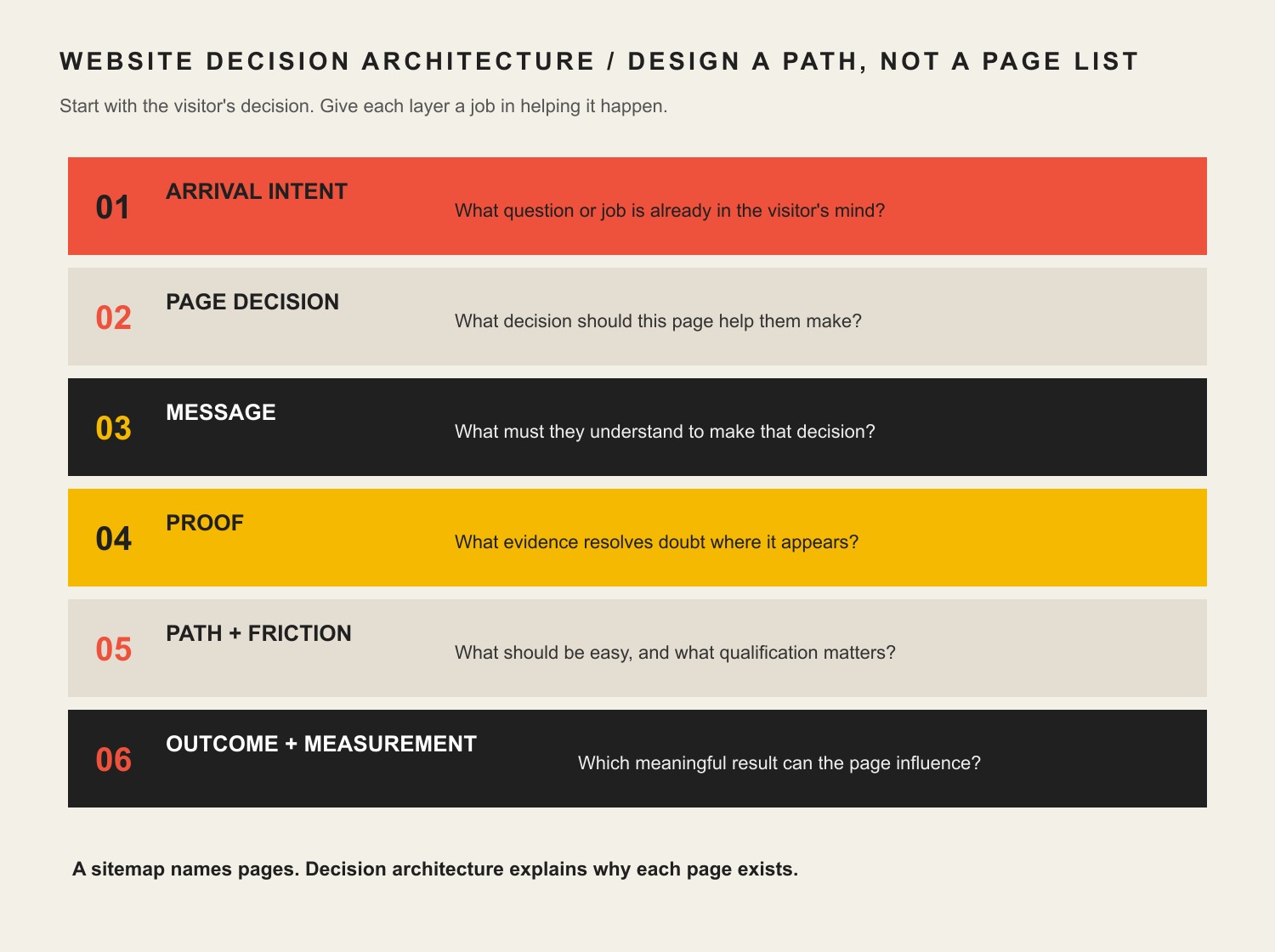
    You do not need to rewrite the entire site to make progress. Pick one important page and fix the decision path in order.

    1. Confirm the page can be measured. Make sure the page loads, forms and key interactions work, analytics are collecting what matters, and you are not diagnosing from a broken instrument panel.
    2. Define the page job. Write one sentence: “This page helps [specific visitor] decide/do [specific job].” If you cannot finish the sentence, do not start rewriting paragraphs.
    3. Match the arrival situation. Identify how the visitor likely found the page and what they already know. Adjust the opening so it meets that context.
    4. Clarify the argument. State the problem or desired outcome, what you offer, who it fits, and why it matters in language the buyer uses.
    5. Add proof where doubt appears. Support the claims most likely to trigger skepticism. Remove unsupported precision and empty superlatives.
    6. Sharpen the meaningful difference. Explain the part of your approach, expertise, fit, or trade-off that can actually change a buying decision.
    7. Fit the next action. Give the reader a logical path that matches their readiness instead of forcing the same sales CTA onto every page.
    8. Connect useful paths. Add internal links when another page genuinely answers the reader’s next question. Google recommends descriptive, relevant anchor text because link context helps people and search systems understand the relationship between pages.
    9. Measure the last meaningful outcome the page can control. That might be a qualified click to pricing, a completed form, a product view, a comparison-page visit, or another behavior tied to the page’s job—not whatever metric looks happiest in the dashboard.

    If the page is primarily intended to earn organic visibility, the deeper mechanics belong in our SEO content writing guide. Do the content job first; then optimize how search systems discover and understand it.

    What if content is not the constraint?

    This is the part most “fix your website copy” articles skip.

    Sometimes the content is fine enough and the real problem is somewhere else.

    In one anonymized Scope Design project for a specialty-auction business, the surface request looked like a redesign problem. Deeper discovery found broken forms, disconnected data, manual handoffs, and legacy systems creating larger constraints. A prettier homepage would have preserved those failures underneath it.

    The same logic applies to content. Before you blame the copy, check the system around it:

    • Measurement and technical integrity: Are forms, tracking, pages, and integrations working?
    • Relevant traffic volume: Is enough of the right audience reaching the page to judge it?
    • Traffic quality and acquisition fit: Are ads, search queries, referrals, social posts, and email promises sending people whose intent matches the page?
    • UX friction: Can visitors find, scan, compare, and act without fighting the interface?
    • Offer and positioning: Is the underlying offer compelling and appropriately priced, scoped, and differentiated?
    • Sales and operational follow-through: Do inquiries get qualified, routed, answered, and followed up well?

    If one of those is the real constraint, a rewrite may still improve the page. It just may not improve the business result you care about.

    A 20-minute website content audit

    Do this on one important page—not the entire site. The goal is to find the first meaningful failure, not to create a 73-tab audit spreadsheet nobody wants to open again.

    • Minute 1–3: Situation. Write the likely visitor, arrival source, awareness level, and page job in one sentence.
    • Minute 4–7: Understandable value. Read only the headline, subhead, headings, and first sentence of each section. Can you explain the offer and argument without filling gaps from your own company knowledge?
    • Minute 8–11: Credible proof. Circle every important claim. Mark which claims have evidence nearby and which are asking for faith.
    • Minute 12–14: Key difference. Highlight phrases a direct competitor could copy without changing a word. If most of the page survives the test, your differentiation is probably hiding.
    • Minute 15–17: Sensible next step. Trace what the visitor can do after each major decision point. Remove dead ends and aggressive jumps.
    • Minute 18–20: Constraint check. Ask whether traffic quality, technical problems, UX, the offer, or follow-up could explain the result better than the copy.

    When you finish, you should have a short repair list tied to actual decisions: rewrite the opening for a specific visitor; add proof beside a high-risk claim; replace generic category language; change the next step; fix a broken form; or leave the page alone because it is not the constraint.

    That is much more useful than “make the copy punchier.”

    Frequently asked questions about bad website content

    Does bad website content hurt SEO?

    Weak content can make a page less relevant, less useful, less differentiated, and less worthy of links or citations, but rankings can also be limited by technical access, competition, authority, search intent, internal linking, and other factors. Do not treat “SEO problem” as a synonym for “write more copy.” Diagnose which constraint is actually limiting the page.

    How often should website content be updated?

    Update it when something meaningful changes: the facts, offer, pricing, proof, audience, regulations, competitive context, customer questions, search intent, or decision path. Also update when performance evidence shows the page no longer does its job. Do not revise solely to make the date look newer.

    Should I rewrite my entire website at once?

    Usually not. Start with pages closest to meaningful business outcomes or pages with enough relevant traffic to produce useful evidence. Fix one decision path, learn from it, and carry the lessons into the next page. A site-wide rewrite can be appropriate when the underlying positioning or offer changed, but “everything feels a little stale” is not much of a brief.

    Is website content strategy the same as copywriting?

    No. Copywriting is the language that persuades, explains, and moves the reader. Content strategy decides what information is needed, where it belongs, which audience and decision it serves, how pages connect, what evidence supports them, and how the content is maintained and measured. Strong copy can improve a bad strategy, but it cannot quietly replace one.

    Should design or content come first?

    Neither should be designed in isolation. Content determines what must be communicated; design creates hierarchy, comprehension, credibility, and interaction around that communication. In practice, both should evolve from the page job, visitor situation, evidence, and desired action. If one is obviously broken, fix the constraint rather than defending a philosophical order of operations.

    Can AI fix bad website content?

    AI can help summarize interviews, reorganize evidence, test alternate explanations, draft sections, critique clarity, and produce variations. It cannot manufacture a defensible market position, genuine customer evidence, first-hand expertise, or a business decision you have not made. Generic inputs still produce generic output faster.

    Fix the reason the content sucks

    The useful question is not, “How do we make this page sound better?”

    It is, “What decision is this page supposed to help the right visitor make, and what is getting in the way?”

    Run the SUCKS Test. Fix the first real failure. Measure what the page can actually influence. If the content passes and the result is still weak, keep diagnosing instead of ordering another rewrite out of habit.

    If several parts of the test fail across important pages, that is usually a strategy problem wearing a copy problem’s name tag. Scope Design can help you diagnose the website, messaging, content, conversion path, and surrounding system before deciding what deserves to be rebuilt.

  • How Entrepreneurs Stay Competitive: Mastering Business Adaptation in the Digital Age

    How Entrepreneurs Stay Competitive: Mastering Business Adaptation in the Digital Age

    Business adaptation is the discipline of changing how your business operates when the assumptions underneath it stop matching reality. It is not a race to adopt every new platform, AI tool, sales tactic, or design trend. The goal is simpler: notice meaningful change early, decide whether it affects a real customer or operating constraint, test the smallest useful response, and keep only what improves the business.

    That distinction matters for entrepreneurs because change creates two risks at the same time. Move too slowly and customer expectations, competitors, costs, or technology can pass you. Move too quickly and you can burn time and money modernizing things that were not actually broken. Competitive businesses learn to manage both risks.

    Business adaptation in 60 seconds

    • Adapt to evidence, not novelty. A trend matters when it changes customer behavior, economics, risk, or your ability to deliver.
    • Diagnose before you buy. Find the constraint first; choose the website change, process, automation, offer, or tool second.
    • Protect reversibility early. Small tests are easier to learn from and cheaper to undo than company-wide transformations.
    • Measure an outcome. Activity is not proof. Decide what should become faster, easier, more reliable, more profitable, or more valuable to the customer.
    • Scale selectively. A successful experiment earns a larger commitment; a weak one earns a lesson and a stop decision.

    Why business adaptation is a decision problem, not a technology shopping list

    When business owners hear “adapt,” the conversation often jumps straight to tools: install a CRM, add a chatbot, rebuild the website, automate follow-up, launch another channel, or replace a manual process with AI. Any of those could be useful. None is automatically adaptation.

    The better starting point is an operating question: What changed enough that one of our old assumptions is now costing us? Maybe prospects now expect an answer within hours instead of days. Maybe a once-reliable referral channel has slowed. Maybe staff are spending too much time re-entering the same information. Maybe customers reach the website on mobile and cannot complete the next step. Maybe margins changed enough that an old offer no longer makes sense.

    The U.S. Small Business Administration recommends combining market research and competitive analysis to understand customers and identify competitive advantage. That is useful here because adaptation starts with a signal you can explain—not with the existence of a new tool.

    Once the signal is real, use your business strategy as the filter. The question is no longer “Should we use this technology?” It becomes “Does this capability solve a problem that is important enough to change how we work?”

    The ADAPT Loop: a practical business adaptation framework

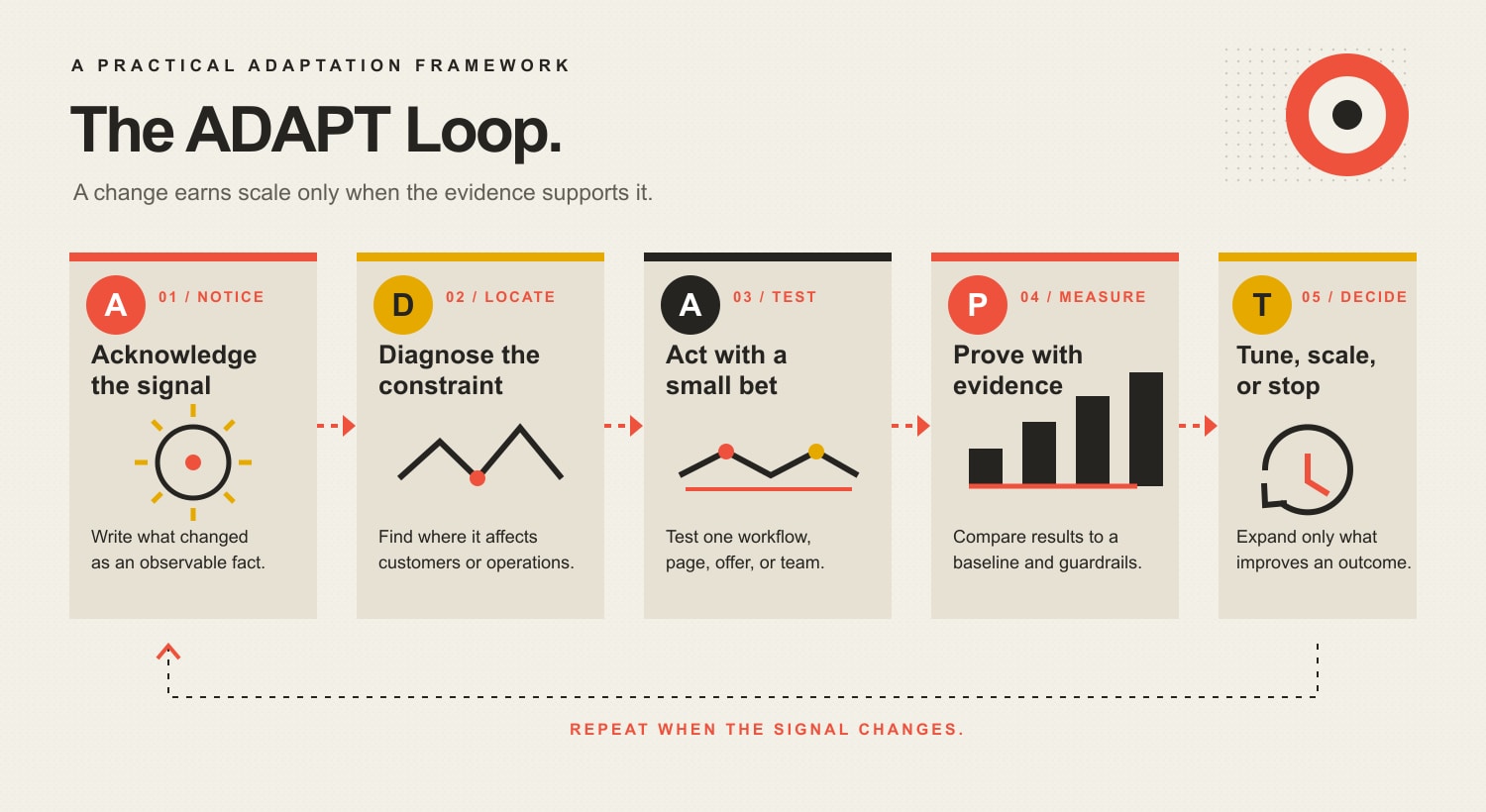
    At Scope Design, a useful way to make adaptation concrete is the ADAPT Loop: Acknowledge the signal, Diagnose the constraint, Act with a small bet, Prove with evidence, then Tune, scale, or terminate. The loop is deliberately simple. It keeps the business moving without pretending every change deserves a transformation program.

    The ADAPT Loop: Acknowledge a meaningful signal, Diagnose the real constraint, Act with a small reversible test, Prove the outcome against a baseline and guardrail, then Tune, scale, or terminate.
    The ADAPT Loop turns change into a repeatable decision cycle instead of a series of disconnected upgrades.

    A — Acknowledge the signal

    Start with something observable. A useful signal is a repeated change in customer behavior, demand, economics, regulation, competition, delivery capacity, or available technology. One complaint is a story. A pattern of the same complaint, lost opportunity, delay, workaround, or cost increase is a signal worth investigating.

    Write the signal as a sentence that separates fact from interpretation: “Qualified prospects are waiting two business days for a first response,” or “More customers are asking to book without calling,” is stronger than “We need AI” or “Our website feels old.”

    D — Diagnose the constraint

    Ask where the signal actually hurts. Is the constraint awareness, conversion, delivery, handoff, capacity, trust, margin, or retention? This step prevents a common failure mode: solving a visible symptom in the wrong system.

    For example, a lead problem may not require more marketing if inquiries are already arriving but getting lost between first contact and follow-up. In that case, the better adaptation is likely in the customer lifecycle and handoff process, not another traffic campaign.

    A — Act with the smallest reversible bet

    Make the first move small enough that you can learn without creating a new dependency. Before rebuilding an entire sales system, test a shorter intake flow. Before automating every customer message, automate one repeated handoff. Before expanding an offer, sell the narrow version manually. Before redesigning an entire site, test the page or path where the constraint is happening.

    Reversibility is a strategic advantage. A small bet gives you permission to be wrong cheaply. That is very different from being timid: you are buying information before buying scale.

    P — Prove with outcome evidence

    Decide what success means before the experiment starts. Pair one business outcome with one leading indicator. If the change is supposed to improve lead response, the leading indicator might be median first-response time and the business outcome might be qualified conversations started. If it is supposed to reduce administrative drag, measure time reclaimed and whether error or rework rates stay acceptable.

    The point is not to build a giant dashboard. It is to make the change falsifiable. If nothing meaningful improves, do not manufacture a success story from clicks, logins, generated content, or hours of “activity.”

    T — Tune, scale, or terminate

    After the test, choose one of three moves. Tune when the direction is promising but the implementation needs work. Scale when the benefit is repeatable and your team can support the larger operating load. Terminate when the evidence is weak, the hidden cost is too high, or the change solves a problem customers do not value.

    Stopping is not failure. A disciplined stop protects attention for the next signal and preserves the lesson for future decisions.

    What should entrepreneurs adapt first?

    Prioritize the change closest to a meaningful constraint, not the one with the loudest marketing around it. This table shows how to translate common signals into a testable next move.

    SignalLikely constraintSmallest useful testEvidence to watch
    Prospects repeatedly ask for faster answersLead-response handoffCreate one routed intake path with a response owner and deadlineResponse time and qualified conversations
    Staff copy the same information between toolsOperational frictionAutomate one stable, repetitive handoffTime saved, error rate, exceptions created
    Customers cannot complete an important website action reliablyDigital journey or technical foundationFix and test that path before redesigning everythingSuccessful completions and support friction
    A competitor introduces a feature customers begin requesting from youChanged customer expectationPrototype the minimum version or service equivalentAdoption, willingness to pay, retention or conversion effect
    An offer sells but creates weak margin or delivery strainBusiness-model economicsTest scope, price, packaging, or qualification on a subsetContribution margin and delivery load

    Notice what is missing from the table: “Everyone else is using it.” Competitor behavior is evidence only when it changes the market you actually serve.

    When adaptation becomes digital modernization

    Digital modernization is useful when the diagnosed constraint lives in a digital system. If leads are getting lost because there is no reliable handoff, the answer may involve CRM or automation. If staff repeat predictable work that can be safely standardized, AI automation workflows may be worth testing. If a slow, brittle, or confusing website blocks a customer from taking the next step, the problem may require stronger business website development.

    But modernization is a means, not a goal. A new stack that adds integrations, training, exceptions, security exposure, and maintenance can make the business less adaptable if it does not remove a real constraint.

    Risk belongs in the decision, too. The National Institute of Standards and Technology maintains Cybersecurity Framework 2.0 resources for small businesses to help organizations manage and reduce cybersecurity risk. When an adaptation changes how sensitive data, accounts, integrations, or critical processes work, security and recovery requirements should be part of the test—not an afterthought.

    What should you not change?

    Adaptability does not mean instability. Some parts of the business should stay boring when they are still doing their job. Keep a proven process until there is evidence that it is constraining the business. Keep a clear brand promise until customer or market evidence shows it no longer fits. Keep reliable infrastructure unless a replacement improves an outcome enough to justify migration risk.

    A useful “not now” list protects this discipline. For every adaptation you approve, write down the attractive ideas you are deliberately postponing and why. That makes strategy visible. It also stops the business from reopening the same shiny-object debate every week.

    How to measure whether business adaptation is working

    Measure at three levels so an improvement in one area does not hide damage somewhere else:

    • Customer outcome: Did the experience become easier, faster, clearer, more trustworthy, or more valuable?
    • Operating outcome: Did the change reduce delay, manual effort, rework, failure points, or dependency on one person?
    • Business outcome: Did it improve qualified demand, conversion, retention, margin, capacity, cash flow, or another result that matters to the model?

    You do not need all three to move at once. You do need to know which one the change was designed to affect and which guardrail must not get worse. If customer response becomes faster but errors double, the test is not finished. If automation saves time but creates low-quality customer interactions, the efficiency gain is incomplete.

    For customer-facing changes, define a small set of customer success metrics that someone can actually own. The best metric is not the one that looks sophisticated; it is the one that changes the next decision.

    Five business adaptation mistakes that make change more expensive

    1. Treating novelty as urgency

    A capability can be impressive without being relevant. Ask what customer behavior, economic condition, delivery constraint, or risk changed before you put it on the roadmap.

    2. Buying the system before defining the problem

    Tool selection feels like progress because it produces demos, pricing tables, and implementation tasks. But a vaguely defined constraint turns every product into a plausible answer. Diagnose first so you can reject most options quickly.

    3. Making the first experiment too large

    A company-wide rollout can hide what actually caused the result. Start with the smallest customer segment, workflow, page, or team that can give you useful evidence.

    4. Measuring activity instead of value

    More automations, more posts, more features, more dashboards, and more AI-generated output are not business outcomes. Track the constraint you intended to change.

    5. Scaling faster than the operating system can absorb

    A test can work in a controlled environment and fail at volume. Before scaling, ask what new exceptions, support needs, data dependencies, quality checks, and ownership requirements appear when usage multiplies.

    A 30-day business adaptation sprint

    You do not need a transformation committee to practice business adaptation. A focused month is enough to turn one meaningful signal into evidence.

    Week 1: Capture signals and establish a baseline

    • Collect repeated customer questions, lost-sale reasons, delays, workarounds, cost changes, and competitor moves.
    • Choose one signal tied to a meaningful constraint.
    • Record the current outcome so you have something to compare against.

    Week 2: Design the smallest reversible test

    • Define the one assumption you are testing.
    • Limit the test to one segment, workflow, offer, page, or team when possible.
    • Name the success metric, guardrail, owner, and stop condition in advance.

    Week 3: Run the test and log exceptions

    Do not “optimize” halfway through every uncomfortable result. Let the test run long enough to observe behavior, while recording exceptions, customer confusion, team friction, and edge cases that averages can hide.

    Week 4: Tune, scale, or stop

    Compare the result with the baseline and the guardrail. Then make a decision. If the test worked, document what made it work before expanding. If it did not, record the lesson and close the experiment. A finished “no” is more valuable than a zombie pilot that consumes attention indefinitely.

    When outside help is worth it

    Entrepreneurs should keep the decision close to the business, but implementation does not have to be entirely internal. Outside help is usually worth considering when the constraint crosses specialties, the change is expensive to reverse, security or data risk is material, or the team lacks the capacity to test without disrupting normal operations.

    The useful role of a partner is not to sell “modernization.” It is to help translate the diagnosed constraint into the smallest sensible implementation, identify dependencies, build the test correctly, and leave you with evidence you can act on. If your adaptation decision points to the website, customer journey, automation, analytics, or the systems connecting them, Scope Design can help turn the diagnosis into a scoped plan without treating every new tool as mandatory.

    Frequently asked questions about business adaptation

    What is business adaptation in simple terms?

    Business adaptation means changing an important part of how your company works because the environment around it changed. The change could involve an offer, process, customer experience, technology, pricing, channel, or operating model. The key is that the change responds to evidence, not fashion.

    Why is adaptation important in business?

    Because the assumptions that made a business effective do not stay true forever. Customer expectations move, costs change, competitors improve, regulations evolve, and technology creates new capabilities. Adaptation gives the business a repeatable way to respond without rebuilding everything every time conditions shift.

    What is a good example of business adaptation?

    Imagine a service business notices that qualified prospects increasingly ask to schedule online, but the company still requires a phone call. Instead of launching a full digital transformation, it tests online booking for one service, measures completed bookings and no-show rates, gathers feedback, and then decides whether to expand it. That is adaptation: a changed customer expectation produced a bounded response and a measurable decision.

    Is adopting AI automatically business adaptation?

    No. AI becomes part of business adaptation when it addresses a diagnosed customer or operating constraint and improves a defined outcome within acceptable quality, risk, and maintenance limits. Installing an AI tool because competitors mention AI is technology adoption, not proof of adaptation.

    How often should a small business adapt?

    Continuously scan for meaningful signals, but do not confuse constant observation with constant change. Review customer friction, operating bottlenecks, economics, competitive moves, and new capabilities on a regular cadence that fits your market. Make a change when the evidence shows an assumption is no longer serving the business—not because a calendar says a modernization project is due.

    Staying competitive means getting better at change—not doing more of it

    The most adaptable entrepreneur is not the one with the longest software list or the fastest reaction to every trend. It is the one who can tell the difference between noise and a meaningful signal, connect that signal to a real constraint, make a small move, learn quickly, and commit only when the evidence earns a larger bet.

    That is the practical advantage of the ADAPT Loop: acknowledge, diagnose, act, prove, tune. It turns business adaptation from an occasional panic response into a repeatable management habit—and keeps modernization subordinate to what customers and the business actually need.

  • Web Designer Lingo: Master Essential Terminology Before Hiring Your Design Team

    Web Designer Lingo: Master Essential Terminology Before Hiring Your Design Team

    Web design terminology is only useful if it helps you understand what you are buying, approving, owning, and verifying. Before you hire a web designer or agency, you do not need to memorize a hundred technical terms. You do need to understand the words that define project scope, design deliverables, technical responsibilities, quality standards, account ownership, and handoff.

    If you are still sorting out what a web designer may actually be responsible for, start with our guide to what website design includes. This article has a narrower job: translating web designer lingo into the decisions a client has to make.

    The web design terminology that matters most before you hire

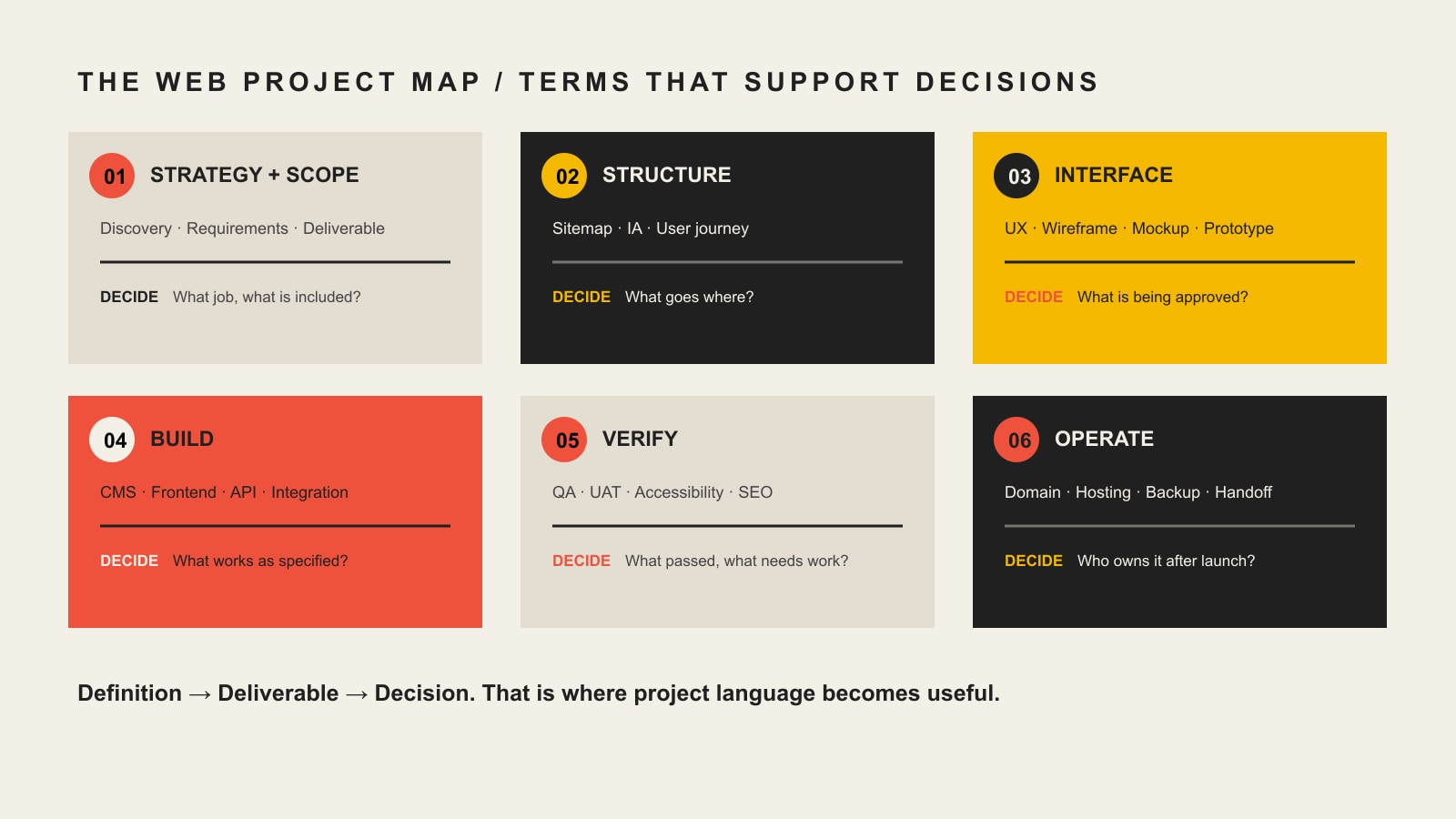
    The most important web design terms fall into six practical stages: strategy, structure, interface, build, verification, and operation. A useful term should tell you something about what the team will produce, how you will review it, what standards apply, or who owns the result.

    That is why terms such as scope, wireframe, responsive design, CMS, API, WCAG, QA, UAT, DNS, and handoff usually matter more to a buyer than the name of a fashionable JavaScript framework.

    Use the Scope Design Definition → Deliverable → Decision test

    When a proposal, designer, or developer uses jargon, run it through three questions:

    • Definition: What does the term mean in plain English?
    • Deliverable: What page, file, behavior, account, test, document, or service proves that it is included?
    • Decision: What do you need to approve, provide, own, budget for, or verify?

    For example, a proposal may say the website will be responsive. The definition is straightforward: the layout should adapt to different screen sizes. The deliverable is not the word “responsive”; it is the implemented page behavior across the agreed range of screens. The decision is what devices, breakpoints, browsers, and acceptance checks are actually in scope.

    The same rule exposes vague promises. “SEO included,” “accessible website,” “optimized performance,” and “ongoing support” sound reassuring, but each phrase is still ambiguous until the provider explains the work, evidence, boundaries, and owner.

    A web project map connects strategy and scope, structure, interface, build, verification, and operation to the client decision at each stage.

    Web design terms at a glance

    Project stageTerms you may hearWhat those terms should clarify
    StrategyDiscovery, requirements, scope, deliverable, dependency, acceptance criteriaWhat problem is being solved and what is included
    StructureSitemap, information architecture, user journey, content hierarchyWhat pages and paths people need
    InterfaceUX, UI, wireframe, mockup, prototype, component, responsive designWhat you are reviewing and approving before or during build
    BuildFrontend, backend, CMS, template, API, integration, stagingWhat system makes the approved experience work
    VerificationWCAG, QA, UAT, cross-browser testing, Core Web Vitals, redirectsHow the team will prove the implementation meets the agreed requirements
    OperationDomain, DNS, hosting, admin account, license, backup, maintenance, handoffWho controls the website and what happens after launch

    Strategy and scope terminology

    Discovery

    Discovery is the work used to understand the business problem, audience, current website, constraints, evidence, content, technology, and success criteria before important design decisions are locked in. Depending on the project, discovery might include stakeholder interviews, analytics review, content inventory, technical review, audience research, competitive context, or workshop sessions.

    Ask: What exactly happens during discovery, who participates, and what decisions or documents come out of it?

    Requirements

    Requirements describe what the website must do or support. “We need a contact page” is a page request. “Qualified prospects must be able to choose a service, submit the correct project information, and route the inquiry to the right team” is closer to a functional requirement.

    Requirements can cover content, functionality, integrations, accessibility, performance, security, reporting, legal constraints, and operational needs. They create a basis for design and acceptance instead of leaving everyone to infer the job from a page count.

    Scope

    Scope is the agreed boundary of the project. It should make the included work, exclusions, assumptions, responsibilities, schedule, and change process understandable. Scope is not the same thing as a feature list. Two “10-page websites” can represent radically different amounts of strategy, copywriting, design, development, migration, testing, training, and support.

    Deliverable

    A deliverable is a concrete output the project is supposed to produce. Examples include a sitemap, copy deck, wireframe, approved design, component library, working form, CMS template, redirect map, training session, or handoff document.

    If a proposal uses a broad term such as “SEO,” “accessibility,” or “optimization,” ask what deliverables or checks are included under that label.

    Dependency

    A dependency is something another task relies on. Final page design may depend on approved copy. A payment integration may depend on credentials from your processor. Launch may depend on DNS access. Naming dependencies early makes schedule discussions more realistic.

    Change request

    A change request is a documented change to agreed scope, requirements, deliverables, or assumptions. It should explain what changed and whether the change affects cost, schedule, testing, or other work. A good change process protects both sides from silently turning a defined project into an unlimited one.

    Acceptance criteria

    Acceptance criteria describe the conditions that must be true for a deliverable or feature to be accepted. “Build a form” is vague. “The form validates required fields, sends the submission to the agreed destination, displays a confirmation, records the event in analytics, and works in the supported browsers” is testable.

    Structure and user-flow terminology

    Sitemap

    A sitemap in the planning sense is a map of the website’s pages and hierarchy. It helps the team decide what content exists, how pages relate, and what belongs in navigation. Do not confuse this planning artifact with an XML sitemap used by search engines.

    Information architecture (IA)

    Information architecture is the way information is organized, labeled, grouped, and connected so people can find and understand it. IA affects navigation, page hierarchy, labels, content relationships, and the paths users take through the site.

    User journey

    A user journey describes the steps a person may take while trying to accomplish a goal. For a service business, one journey might be: understand the service, verify fit, review proof, compare options, ask a question, and submit an inquiry. The point is not to draw a pretty diagram. It is to reveal what a visitor needs at each decision.

    Design and approval terminology

    UX and UI

    UX means user experience. It deals with how understandable, usable, efficient, and appropriate the experience is for the person trying to accomplish a task. UI means user interface. It covers the interface people see and interact with, including controls, visual hierarchy, states, components, spacing, typography, and presentation.

    They overlap, but they are not interchangeable. A beautiful interface can still produce a poor experience if users cannot find the right information or complete an important task. If you need to diagnose those problems, our UX diagnosis guide goes deeper.

    Wireframe

    A wireframe is a simplified representation of page structure and priority. It usually focuses on layout, content hierarchy, and interaction rather than final typography, color, imagery, and polish. Its job is to make structural decisions cheaper to discuss before visual detail distracts everyone.

    Mockup

    A mockup is a more visually complete representation of the intended interface. It may show real typography, colors, imagery, components, spacing, and brand treatment, but it is not necessarily interactive or implemented.

    Prototype

    A prototype simulates some part of the experience so flows and interactions can be evaluated before the full system exists. A prototype can be simple or high fidelity. It is still a model. Approving a prototype or mockup is not the same as accepting a functioning website.

    Design system and component

    A component is a reusable interface element or pattern, such as a button, card, form field, testimonial block, or navigation item. A design system organizes reusable components together with rules, tokens, patterns, and guidance so the interface can stay coherent as it grows.

    Responsive design, mobile-first, and breakpoint

    Responsive web design is an approach that allows layouts and content to adapt across different screen sizes and device conditions. Mobile-first is a way of designing or coding from a smaller-screen baseline and progressively adapting for larger screens. A breakpoint is a condition, commonly based on viewport width, where layout behavior changes.

    MDN’s responsive design guidance treats responsive design as an approach rather than a single device checklist. For a client, the important question is what responsive behavior will be tested and accepted, not whether the proposal contains the phrase “mobile-friendly.”

    Development and technology terminology

    Frontend and backend

    The frontend is the part of the website delivered to and interacted with by the user, including the rendered interface and browser-side behavior. The backend is the server-side or administrative layer that may handle data, business logic, authentication, content, integrations, or other services behind the interface.

    On many business websites, the boundary is less important to a client than the responsibility: who owns the interface, who owns data and integrations, and who fixes a problem when the two do not work together?

    CMS

    A content management system (CMS) is software used to manage website content. WordPress is a CMS. A CMS can make editing easier, but “CMS included” does not tell you how much control you will have, which content types are editable, whether custom fields exist, or how portable the site is.

    Ask: What can our team edit safely? Which roles will we have? Who holds the administrator account? What training and documentation are included?

    Template, theme, and component

    A template controls the structure for a type of page or content. A theme usually refers to a larger presentation layer or package of templates, styles, and behavior, especially in systems such as WordPress. A site can use a theme and still include original design; a theme can also impose real constraints. The useful question is what is custom, what is reusable, and what the licensing or maintenance implications are.

    API and integration

    An API, or application programming interface, is an interface that lets software interact with another system. An integration is the implemented connection that uses an API, webhook, feed, plugin, file exchange, or another method to move data or trigger behavior between systems. MDN describes an API as the interface or contract that exposes features for software interaction.

    An “API integration” line item should identify the systems involved, data or actions exchanged, authentication responsibilities, failure behavior, testing, and who maintains the connection when one platform changes.

    Staging and production

    Staging is a non-public or controlled environment used to review and test work before it affects the live website. Production is the live environment serving real users. Ask how changes move from staging to production, what gets backed up, and what the rollback plan is if a launch causes a problem.

    Domain, DNS, and hosting

    Your domain name is the human-readable address people use to reach the site. DNS is the system of records that directs that domain to services such as the website and email. Hosting is the infrastructure where the website application, files, or services run.

    These are related but separate. A provider can host your website without owning your domain. Your business should know who controls the registrar account, DNS records, hosting account, billing, recovery email, and multi-factor authentication.

    SSL certificate, HTTPS, and TLS

    You will still hear people say SSL certificate, but modern HTTPS uses TLS. HTTPS is HTTP carried over a secure TLS connection, and TLS is used to provide encryption, integrity, and server authentication. For a client, the practical concern is that HTTPS is correctly configured, renewed, monitored, and not broken by mixed content or bad redirects.

    Quality, accessibility, and measurement terminology

    Accessibility and WCAG

    Web accessibility means designing and building digital experiences so people with disabilities can perceive, understand, navigate, and interact with them. WCAG is the Web Content Accessibility Guidelines published by W3C. WCAG 2.2 is a W3C Recommendation and provides testable success criteria.

    If a proposal says “ADA compliant” or “WCAG compliant,” ask what standard and conformance target are being used, what pages or templates will be evaluated, what testing methods are included, who remediates failures, and what remains the client’s responsibility for future content.

    QA and UAT

    Quality assurance (QA) is the team’s process for checking whether the implementation works as intended and meets the agreed requirements. User acceptance testing (UAT) is the client or business-side verification that the system is acceptable for the intended real-world use before final acceptance or launch.

    They should not be treated as synonyms. QA asks whether the team built the thing correctly. UAT asks whether the delivered thing satisfies the agreed business use and acceptance criteria.

    Cross-browser and device testing

    Cross-browser testing checks behavior in the agreed browsers and versions. Device testing checks the experience across the screen sizes, input methods, and device conditions that matter to the project. “Works everywhere” is not a responsible test plan. A scope should state the supported range and how important exceptions are handled.

    Core Web Vitals

    Core Web Vitals are Google’s user-experience metrics for loading performance, responsiveness, and visual stability. The current metrics are Largest Contentful Paint (LCP), Interaction to Next Paint (INP), and Cumulative Layout Shift (CLS), as documented by web.dev.

    If performance is included in a project, ask what will be measured, under what conditions, and whether the promise concerns lab testing, real-user data, or a specific threshold. A score without context can be as misleading as a buzzword.

    SEO foundations

    SEO foundations usually refers to the technical and content setup that helps search engines discover, interpret, and present the site correctly. It can include crawl/index controls, titles and descriptions, canonical URLs, redirects, internal links, structured data, XML sitemaps, and migration checks. It is not the same as an indefinite promise to rank for competitive queries.

    Redirect

    A redirect sends an old URL to another URL. Redirect planning matters during redesigns and migrations because changing paths without a plan can break links, bookmarks, referrals, and search signals. If URLs will change, the proposal should say who inventories old URLs, creates the redirect map, implements it, and verifies the result.

    Analytics, event, and conversion

    Analytics is the measurement system used to understand activity on the website. An event is a recorded interaction or occurrence, such as a form submission, download, purchase, or qualified button click. A conversion is an action the business has decided represents meaningful progress or value.

    “Analytics installed” is not a measurement strategy. Ask which outcomes are being tracked, who owns the account, how consent requirements are handled, and what the team will verify before handoff.

    Ownership and handoff terminology

    This is where apparently small words can turn into expensive surprises. Our guide to working with a web design company covers the broader client-agency responsibility model. At minimum, understand the terms below before the final invoice or launch week.

    Administrator account

    An administrator account has elevated control over a system. Your business should know which systems require administrative access and whether a company-controlled account will exist for the domain registrar, DNS, hosting, CMS, analytics, search tools, payment services, email delivery, and other critical integrations.

    License

    A license grants permission to use software, fonts, images, plugins, themes, code, or other intellectual property under specific terms. “Included” does not always mean “owned forever.” Ask which licenses are recurring, transferable, agency-owned, client-owned, or replaced if the relationship ends.

    Source files and repository

    Source files are the editable originals used to create the delivered work. A repository is a system, commonly Git-based for code, that stores and tracks source changes. Not every simple website needs a client-managed code repository, but every client should understand what files and source materials exist, where they live, and what is transferred at handoff.

    Backup and restore

    A backup is a recoverable copy of website data or files. A restore is the tested process of returning the system to a usable state from that backup. Ask what is backed up, how often, how long copies are retained, where they are stored, and who is responsible for restoration.

    Maintenance and support

    Maintenance is planned work that keeps the website healthy over time, such as updates, backups, security work, compatibility checks, performance monitoring, and content-system care. Support usually refers to help when questions, incidents, or change requests occur. The scope should define what is included, what is billable, response expectations, and who owns urgent issues.

    Handoff

    Handoff is the transfer of the website, accounts, credentials, documentation, training, files, licenses, and operational responsibility at the end of a project or relationship. A good handoff is not “here is the login.” It is a controlled transfer that makes clear what the client now owns and what the provider still manages.

    Five web design terms people commonly confuse

    TermsPlain-English difference
    Wireframe vs. mockup vs. prototypeA wireframe emphasizes structure, a mockup emphasizes visual design, and a prototype simulates interaction or flow.
    Domain vs. DNS vs. hostingThe domain is the address, DNS directs the address to services, and hosting runs the website system.
    Responsive vs. mobile-firstResponsive is the broader adaptive approach; mobile-first starts design or implementation from smaller screens and expands upward.
    UX vs. UIUX concerns the quality of the experience and task flow; UI concerns the interface people see and operate.
    QA vs. UATQA is the delivery team’s quality verification; UAT is business-side acceptance of the delivered system for its intended use.

    Terms that should be defined in the written scope

    Some terminology is too important to leave as sales-call shorthand. When you compare proposals, require the important promises to become written responsibilities. Our full guide to choosing a web design company covers vendor evaluation in detail. For terminology, focus on whether the scope defines these items clearly:

    • Deliverables and exclusions: what is included and what is not.
    • Dependencies: what the client or a third party must provide and by when.
    • Revisions and change requests: how feedback works and when added work changes cost or schedule.
    • Acceptance criteria and UAT: how completion is judged.
    • Browser and device support: what environments are tested.
    • Accessibility target: what standard, conformance level, templates, and testing are included.
    • Performance target: what metrics are measured and under what conditions.
    • SEO and redirects: what migration or technical search work is actually included.
    • Ownership and licensing: who controls accounts, source, content, software licenses, and third-party services.
    • Handoff and training: what is transferred and how your team learns to operate it.
    • Recurring costs and support: what continues after the project and what happens if the relationship ends.

    A proposal does not become sophisticated because it uses sophisticated words. It becomes useful when important terms have enough definition that both sides can tell what will happen next.

    Questions to ask when a designer uses jargon

    • What does that term mean on this project?
    • What deliverable, behavior, account, or test proves it is included?
    • What do you need us to approve or provide?
    • Who owns this after the project ends?
    • How will we verify it before acceptance?
    • What is specifically excluded?
    • If a third-party tool changes or breaks, who is responsible?
    • Does this create a recurring license, hosting, maintenance, or support cost?

    Those questions are more useful than trying to impress a designer by repeating technical vocabulary. Good web professionals should be able to explain a decision without hiding behind terminology.

    Frequently asked questions about web design terminology

    What does web design terminology mean?

    Web design terminology is the vocabulary used to describe website strategy, structure, user experience, interface design, development, performance, testing, hosting, ownership, and maintenance. For a business owner, the useful terms are the ones that clarify what is being purchased, approved, tested, or handed over.

    What web design terms should I know before hiring a designer?

    Start with scope, deliverable, dependency, acceptance criteria, sitemap, information architecture, UX, UI, wireframe, mockup, prototype, responsive design, CMS, API, staging, domain, DNS, hosting, WCAG, QA, UAT, Core Web Vitals, administrator account, license, maintenance, and handoff. You can learn tool-specific vocabulary later if your project actually needs it.

    What is the difference between UX and UI?

    UX focuses on the quality of the user’s experience, including comprehension, navigation, task flow, and usability. UI focuses on the interface people see and interact with, such as controls, typography, spacing, visual hierarchy, and component states. Strong website work usually requires the two to support each other.

    What is the difference between a wireframe, mockup, and prototype?

    A wireframe is mainly about structure and hierarchy. A mockup is a more complete visual representation. A prototype simulates some interaction or flow. None of those automatically proves the final built website works correctly.

    Is a CMS the same thing as hosting?

    No. A CMS is software used to manage content. Hosting is the infrastructure that runs or serves the website. A WordPress website, for example, uses WordPress as its CMS while running on a hosting environment.

    Do I need to know how to code before hiring a web designer?

    No. A client does not need to become a frontend or backend developer. You should understand enough terminology to ask what is included, what is custom, what can be edited, how the work will be tested, what you will own, and what responsibilities continue after launch.

    Does “SSL certificate” still mean the same thing?

    People commonly still say “SSL certificate,” but modern secure web connections use TLS. The practical requirement is a correctly configured HTTPS connection, a valid certificate, reliable renewal, and monitoring for security or redirect problems.

    What is the difference between QA and UAT?

    QA is the delivery team’s process for finding defects and checking the implementation against requirements. UAT is the client or business-side process for confirming that the delivered website is acceptable for its intended use. Both matter, and neither should be replaced by a quick visual review.

    Know enough lingo to make better decisions, not to play designer

    The goal of learning web designer lingo is not to micromanage the people you hire. It is to recognize when an important promise is specific enough to approve and when it still needs a definition.

    Use the Definition → Deliverable → Decision test whenever a proposal or project conversation becomes fuzzy. If a term cannot be connected to a concrete output, behavior, account, test, responsibility, or owner, keep asking questions.

    If you want a web team that explains the work in business language and makes responsibilities explicit, talk with Scope Design about your website project.

  • How to Work With a Web Design Company Without Derailing the Project

    How to Work With a Web Design Company Without Derailing the Project

    Working with a web design company goes well when the client owns the business truth, timely decisions, factual approval, and control of critical accounts while the agency owns discovery, professional recommendations, project leadership, design, development, testing, and a usable handoff. Shared decisions—priorities, tradeoffs, scope changes, and launch readiness—need one named final owner. If “everyone” owns an approval, congratulations: nobody does.

    TL;DR: Do not arrive with a homemade sitemap, a preselected tech stack, and pixel instructions for a problem nobody has diagnosed. Bring the business facts, customer evidence, proof, access, constraints, and a decision-maker. Require the agency to lead the professional method, document responsibilities, explain tradeoffs, and prove what it delivered. Every dependency needs an owner, an input, a due point, and a stated consequence if it moves.

    This guide begins after provider selection. If you are still comparing agencies, use our guide to choosing a web design company without getting trapped. If you are trying to understand the full buying journey, start with how to create a business website without buying the wrong thing.

    Reviewed: August 2026. Conceptual review cadence: annually, or sooner if Scope Design changes its delivery process or standard project documents.

    “Good collaboration” is too vague to run a website project

    Nearly every agency promises collaboration. So do group projects where one person does all the work and four people change the font at the end.

    The problem is not whether people are friendly, responsive, or invited to meetings. The problem is whether the next consequential item has a clear owner. Website projects stall when content is “being worked on,” access is “with IT,” approval is “circulating,” and a new feature is “probably included.” Those phrases are project purgatory wearing business casual.

    A functioning relationship answers more useful questions:

    • Who owns the business decision?
    • Who owns the professional recommendation?
    • What evidence or access is required?
    • Who can approve the answer?
    • When is that decision needed?
    • What changes if it arrives late?
    • How will the team know the work is accepted?

    This is not bureaucracy for its own sake. It is how both parties avoid paying for confusion twice.

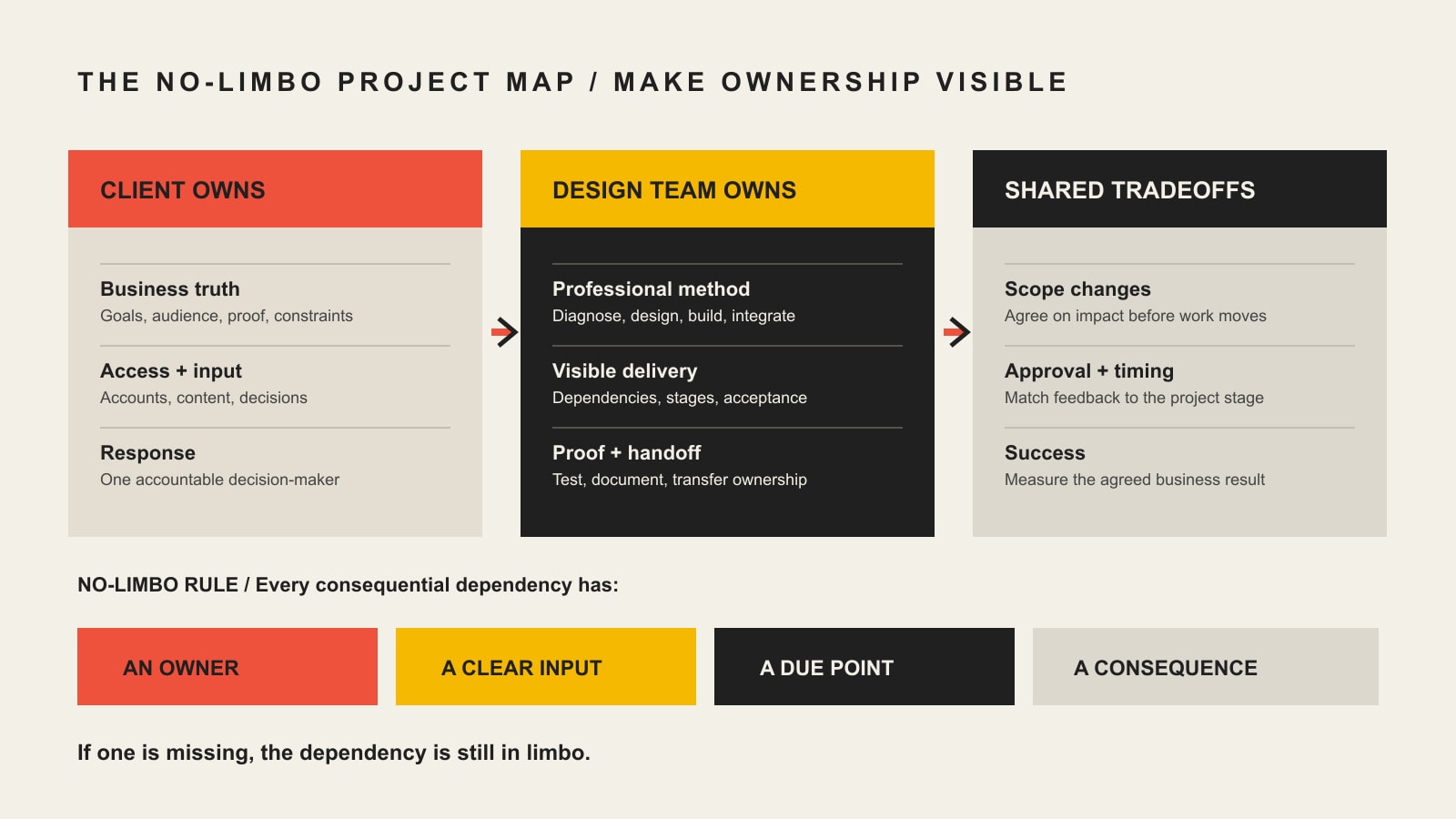
    Use the Scope Design No-Limbo Project Map

    The Scope Design No-Limbo Project Map gives every important dependency four fields:

    1. Owner: one primary person accountable for moving it.
    2. Input: the evidence, access, content, or decision required.
    3. Due point: when it must arrive relative to the next dependent task.
    4. Consequence: what changes in scope, schedule, cost, or acceptance if it moves.
    A project map showing what the client owns, what the design team owns, shared tradeoffs, and the owner, input, due point, and consequence needed for each dependency.
    Every consequential dependency needs an owner, an input, a due point, and a consequence.

    The key word is primary. Several people may contribute. One person still needs authority to move the item. W3C’s draft Accessibility Roles and Responsibilities Mapping decision tree uses a similar distinction: one primary owner is accountable while secondary owners and contributors support the task. The guidance is specific to accessibility, but the ownership principle travels well.

    Responsibility lanePrimary ownerSupporting roleAcceptance question
    Business truthClientAgency investigates and challenges assumptionsIs this accurate, authorized, and commercially meaningful?
    Professional methodAgencyClient supplies constraints and contextIs the recommendation defensible and inside the agreed scope?
    Content truth and rightsClient unless production is scopedAgency structures, edits, or produces as contractedIs every claim accurate and every asset permitted for use?
    UX, design, and technical executionAgencyClient provides business and user evidenceDoes the work solve the approved problem and meet the acceptance criteria?
    Accounts and accessClient owns; agency accessesBoth follow security and handoff rulesCan the business operate the asset and replace the provider?
    Tradeoffs and scope changesShared, with one named business approverAgency explains effect on solution, cost, and timingWas the changed decision documented before work continued?
    Launch and handoffAgency proves delivery; client accepts business readinessBoth resolve defects and assign operationsAre ownership, training, documentation, support, and ongoing care explicit?

    The map is deliberately not “client owns the what; agency owns the how” in every situation. That shorthand is useful, but reality has seams. A client owns its pricing and legal claims. An agency should still challenge whether the information is clear. The agency owns the interaction design. The client should still flag that a proposed workflow contradicts how customers actually buy. Shared context does not require shared ambiguity.

    What should the client prepare before kickoff?

    You do not need to do the agency’s job before the agency begins. If you could correctly diagnose the problem, map the experience, write the content, design the interface, select the technology, and test the result alone, hiring the agency would be an oddly expensive social event.

    You do need to bring the things only the business can supply.

    A business result, not merely a page request

    Explain what needs to change in the business and why it matters now. “We need a new homepage” describes a deliverable. “Qualified prospects cannot tell which service fits them, and sales keeps re-explaining the same distinctions” describes a useful problem.

    Bring whatever baseline is available:

    • current inquiries, sales stages, or booked appointments;
    • important entry pages and traffic sources;
    • common customer questions and objections;
    • services or products the business wants to prioritize;
    • operational steps after a visitor acts;
    • known technical, legal, timing, or staffing constraints;
    • what has already been tried and what happened.

    Do not invent precision because the analytics are thin. Five useful sales-call observations can be more honest than a dashboard nobody trusts.

    Our constraint-first website strategy guide explains why the requested deliverable is not automatically the real constraint.

    Business facts and proof

    The agency cannot manufacture the truth of your business. Prepare source material for:

    • services, products, pricing context, and geographic availability;
    • process, timing, limitations, and right-fit or wrong-fit conditions;
    • qualifications, licenses, awards, and affiliations that can be verified;
    • case studies, testimonials, outcomes, and permission to use them;
    • team, location, contact, support, and policy information;
    • existing photography, video, diagrams, documents, and brand assets;
    • legal or compliance requirements identified by qualified advisors.

    The material does not need to be pretty. It needs to be real. A chaotic folder of source documents can be organized. A beautiful claim with no evidence is just well-dressed bullshit.

    An honest inventory of systems and access

    List the systems the website touches: domain registrar, DNS, hosting, CMS, email, forms, CRM, scheduling, payments, analytics, search tools, advertising platforms, product data, inventory, customer portals, or legacy databases.

    For each system, identify:

    • the business owner;
    • the current administrator;
    • whether access still works;
    • what data enters and leaves;
    • whether the system must remain, migrate, or retire;
    • known vendors, renewals, licenses, and dependencies.

    Do not paste a password spreadsheet into ordinary email. Use controlled access, delegated roles, or a secure credential-sharing method appropriate to the system. The client should generally keep ownership of critical accounts while granting the agency the access required to do the work.

    One accountable decision-maker

    Stakeholders can contribute expertise. They do not all need veto power over every heading, color, and form label.

    Choose one person who can:

    • consolidate internal feedback;
    • distinguish mandatory requirements from preferences;
    • resolve contradictory stakeholder requests;
    • approve scope, content, direction, and launch;
    • understand the effect of a late decision.

    The executive who appears for the first time at final review and overturns three months of approved work is not adding strategic oversight. They are becoming an undocumented project dependency with excellent timing.

    Real internal capacity

    Name the people who will attend discovery, locate records, review content, answer specialist questions, test workflows, and approve milestones. Put that work on their calendars.

    The business does not need to be available every hour. It does need to be available when the project reaches a decision only the business can make. A deadline agreed by someone with no internal time is decorative.

    What should the web design company own?

    Client preparation does not excuse agency passivity. “Send us everything and tell us what you want” is not a professional process. It is order-taking with a mood board.

    Diagnose before prescribing

    The agency should turn the business problem into a testable project definition. That means examining the audience, offer, evidence, workflows, content, current performance, technical environment, constraints, and post-launch ownership before locking in the solution.

    It should be willing to say that the requested feature is not the first thing to build. Our strongest real projects have become clearer when discovery exposed operational dependencies beneath the visible website request. That is not scope inflation. Done responsibly, it is the difference between solving the system and decorating the symptom.

    Define deliverables, dependencies, and acceptance

    The agency should state:

    • what is included and excluded;
    • what each phase produces;
    • what the client must supply;
    • which assumptions affect the estimate;
    • how review and approval work;
    • what counts as a revision or scope change;
    • how delays affect the schedule;
    • how the work will be tested;
    • what “accepted” means;
    • what the client receives at handoff;
    • what happens after launch.

    The AIGA Standard Form of Agreement for Design Services is useful professional context because it separates proposal-specific terms, client responsibilities, deliverables, reusable designer tools, intellectual-property options, and discipline-specific terms. It is a starting point, not personalized legal advice. Significant agreements deserve review by qualified counsel.

    Lead the professional method

    The agency should recommend the information structure, user journeys, content approach, visual system, technology, accessibility practices, performance requirements, test plan, and release method appropriate to the approved problem.

    It should explain tradeoffs in business language. “We chose this because users need X and the system must support Y” is useful. “This is the trend now” is not a reason; it is a weather report from Dribbble.

    Run a visible project

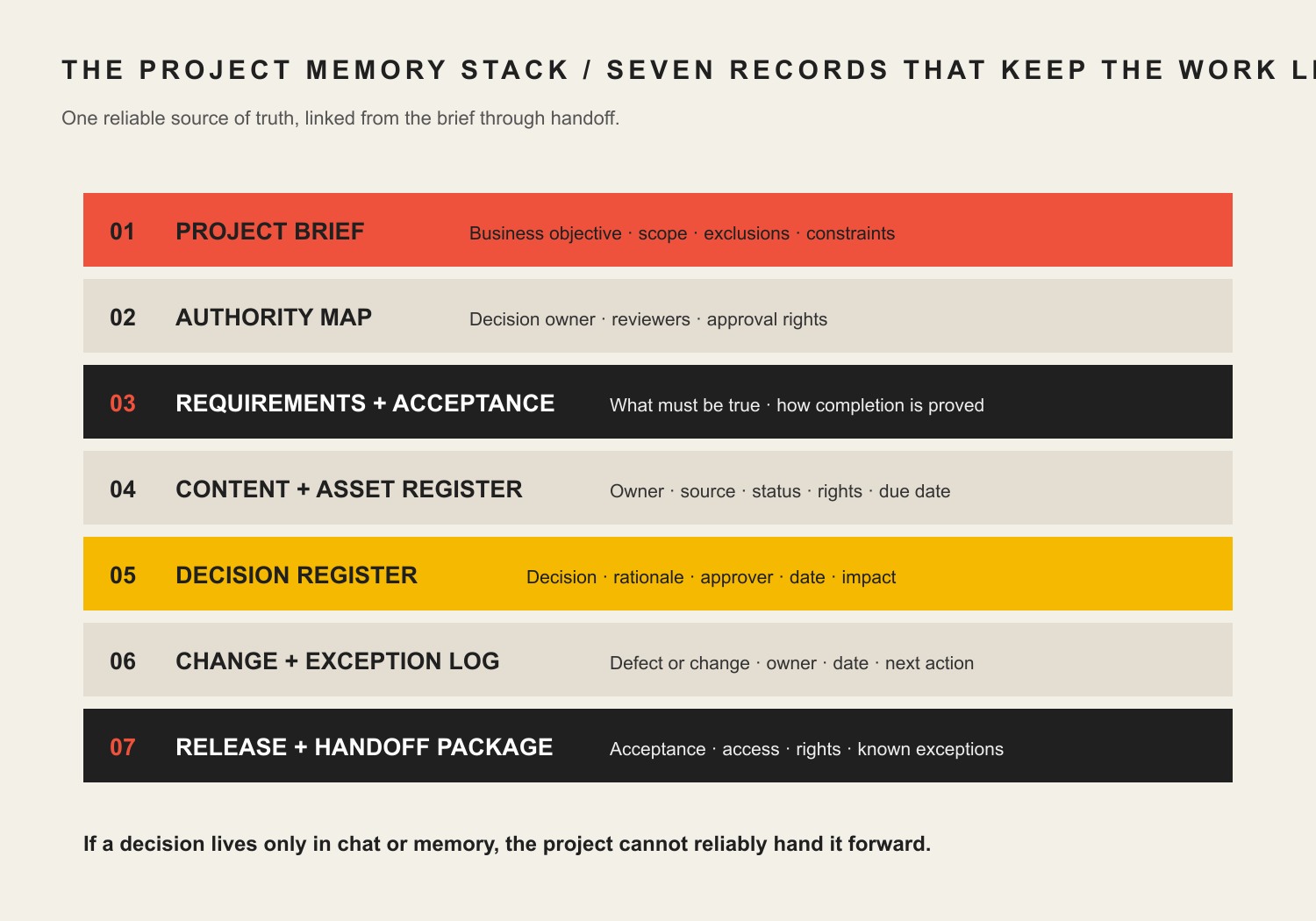
    The agency should make the current stage, next decision, open dependencies, and schedule effect understandable. That does not require twenty-seven dashboards. It requires one reliable source of truth and communication people will actually use.

    A reasonable process includes:

    • a kickoff tied to the signed scope;
    • named contacts and decision rights;
    • a shared place for approved files and feedback;
    • milestone presentations with specific review questions;
    • written decisions and changes;
    • early warnings when an input threatens the schedule;
    • a clear route for urgent issues;
    • launch and handoff criteria.

    Prove the work before calling it done

    The agency should test what it built. The exact plan depends on the site, but it commonly includes responsive layouts, key browsers, navigation, forms, email delivery, integrations, accessibility, search controls, analytics, redirects, content accuracy, performance risks, permissions, backups, and rollback readiness.

    W3C’s planning guidance for web accessibility recommends documenting goals, scope, responsibilities, resources, acceptance testing, milestones, and ongoing monitoring. Accessibility is not one line the client can assume the developer “handled.” Its design, content, development, testing, procurement, and ongoing publishing responsibilities need owners.

    How should client and agency decisions work together?

    Some decisions cannot be thrown over the wall in either direction.

    DecisionClient contributionAgency contributionFinal authority
    Business priorityRevenue, operational, customer, and organizational contextDiagnosis, feasibility, dependency, and risk analysisNamed client decision-maker
    Messaging claimFactual truth, proof, permission, and business commitmentClarity, hierarchy, positioning, and user interpretationClient approves truth; agency owns execution if scoped
    UX directionReal customer behavior, exceptions, and operational realityResearch, architecture, interaction design, and validationAgency within scope; client approves material business tradeoffs
    Visual directionBrand truth, audience context, and constraintsVisual system, accessibility, responsive behavior, and craftAgency within approved direction
    TechnologyExisting systems, internal capacity, ownership needs, and budgetArchitecture, integration, security, maintainability, and portability analysisShared business decision after agency recommendation
    Scope changeNew need, changed priority, or newly discovered constraintImpact on solution, cost, schedule, risk, and existing workClient approves change before work proceeds
    LaunchBusiness readiness, staffing, policies, and final factual approvalQA evidence, migration plan, rollback plan, and technical readinessNamed launch owner using agreed criteria

    The agency is not entitled to make unapproved business commitments. The client is not entitled to overrule professional decisions without understanding the consequence. Either party can say no. Both should be able to explain why.

    How to give design feedback without becoming the designer

    Open Brain contains a simple design feedback loop adapted from progressive-design material:

    1. Present the work.
    2. Gather directed feedback.
    3. Interpret what the feedback means.
    4. Decide what to change.
    5. Iterate.

    The crucial distinction is that the client gives business and user feedback. The designer translates that feedback into design decisions.

    Describe the problem you see

    Useful feedback sounds like:

    • “Our highest-margin service feels secondary, but it is the main reason we are investing.”
    • “Customers use these two terms interchangeably, so this label may confuse them.”
    • “The people approving a purchase need the certification before they will contact us.”
    • “Most customers call from the job site; this action needs to work without completing a long form.”

    Less useful feedback sounds like:

    • “Make it pop.”
    • “Can we make the logo bigger?”
    • “I don’t like that blue.”
    • “Move this three pixels left.”
    • “My spouse prefers the competitor’s homepage.”

    Preferences are allowed. Just label them as preferences. A personal reaction should not impersonate user research or a business requirement.

    Match feedback to the stage

    Early concept review should ask whether the team is solving the right problem and exploring the right direction. Wireframe review should focus on hierarchy, content, tasks, and flow. Visual review should evaluate brand fit, clarity, consistency, responsive implications, and accessibility. Functional review should test real tasks and edge cases.

    Reopening the entire strategy during final visual polish is expensive. Arguing about button radius during discovery is merely adorable.

    Consolidate before sending

    The client should resolve internal contradictions before handing feedback to the agency. If sales wants prominent pricing and leadership refuses to discuss price, the designer cannot fix the organizational disagreement with typography.

    Send one review containing:

    • mandatory factual or legal corrections;
    • unmet requirements;
    • user or operational evidence;
    • business-priority concerns;
    • clearly labeled preferences;
    • the final decision where stakeholders disagreed.

    Explain why

    “Change the headline” is an instruction. “The headline implies this is only for enterprise buyers, but most qualified customers are regional owner-led firms” gives the agency a problem it can solve.

    The why protects the project from blindly implementing a symptom.

    Does all website content need to be finished before design starts?

    No. It does need an owner, a production plan, and enough real substance to shape the experience.

    Early discovery and structural work can begin before every sentence is polished. The team still needs to understand:

    • the main claims and offers;
    • the audiences and decisions;
    • the content types and approximate volume;
    • available proof;
    • key actions and workflows;
    • required legal or policy material;
    • who writes, reviews, and approves each item.

    Designing an entire site around lorem ipsum and pouring real content into it at the end is how teams discover that the actual business has inconvenient things such as explanations, tables, exceptions, and customers.

    Content responsibility should be explicit:

    Content taskPossible ownerMust be settled
    Business facts and claimsClientAccuracy, evidence, authorization
    Content strategy and hierarchyAgency if scopedAudience, intent, page job, narrative order
    CopywritingClient, agency, or specialistDeliverables, interviews, revision rounds, approvals
    Photography and videoClient, agency, or specialistShot list, rights, formats, accessibility alternatives
    Product or service dataClientSource of truth, completeness, update method
    Policies and regulated languageClient with qualified advisorRequired language and final approval
    CMS entry and migrationAgency or client as scopedVolume, formatting, cleanup, redirects, QA
    Final proofreadingClient and agency roles defined in scopeFactual, editorial, visual, and functional checks

    The business remains accountable for the truth and rights behind what it publishes even when the agency writes or edits the material.

    Who should own the domain, hosting, CMS, and source files?

    The business should generally control the domain registration and have appropriate ownership or administrative control of hosting, CMS, analytics, search, email, and other critical business accounts. The agency should receive the access needed to perform its work, not become the only human who can reach the fuse box.

    Ownership is more specific than “we paid for the website.” Separate:

    1. Client materials: the client’s existing brand, copy, photographs, data, trademarks, and supplied assets.
    2. Final deliverables: the specific designs, code, content, or configured system the agreement says the client receives.
    3. Reusable agency tools: frameworks, libraries, processes, utilities, and pre-existing components that may remain the agency’s intellectual property.
    4. Third-party materials: fonts, stock media, plugins, themes, software services, and other items governed by separate licenses.
    5. Working or source files: design files, drafts, repositories, raw production assets, and intermediate work that should be named explicitly rather than assumed.

    An AIGA Los Angeles source-file explainer makes the practical point: finished work and source files are not automatically the same deliverable, so expectations should be discussed early and written clearly. Again, this is general business context, not a substitute for legal advice.

    Our small-business website cost guide explains why ownership and exit terms belong in the cost comparison, not in a surprised email three years later.

    What happens when feedback is late or the scope changes?

    First: changes happen. Discovery can uncover a requirement nobody knew existed. The business can change priorities. A vendor can alter an integration. A regulator can ruin everyone’s afternoon. The goal is not to pretend change is a moral failure.

    The goal is to stop pretending change has no effect.

    A late dependency moves dependent work

    If approved content is required before page production, a content delay affects page production. If access is required to investigate an integration, the estimate may remain conditional until access exists. If the only decision-maker disappears for three weeks, the project cannot magically preserve the same delivery sequence by glaring at the calendar.

    The agency should identify the effect promptly. The client should not expect the agency to hide the delay by compressing QA or displacing other committed work.

    A scope change deserves a written decision

    A request may be small to say and large to implement. “Can customers just log in?” can introduce account security, password recovery, permissions, privacy, data, email, support, testing, and maintenance. The number of words in the request is not the unit of scope.

    For a proposed change, document:

    • the new or changed requirement;
    • why it is needed;
    • effect on current work;
    • cost and schedule effect;
    • new dependencies or risks;
    • what is removed, deferred, or added;
    • who approved the change.

    No agency should quietly perform substantial unplanned work and unveil the invoice later. No client should expect consequential added work to materialize from the phrase “while you’re in there.”

    What should you expect during the website project?

    The exact phases vary, but a responsible project usually makes these jobs visible.

    Discovery and definition

    The team defines the business problem, audiences, evidence, current environment, requirements, constraints, ownership, measurement, and acceptance boundary. The output should be a clearer decision—not just meeting notes and a strangely confident sitemap.

    Content and information planning

    The team inventories current material, identifies missing proof, maps user questions and tasks, defines content ownership, and creates an information structure based on the real material.

    UX and visual direction

    The agency develops journeys, wireframes, components, interaction patterns, and a visual system. Reviews use stage-appropriate questions. Approvals are documented before dependent work proceeds.

    Development and integration

    The agency implements the approved system, migrates or enters scoped content, configures integrations, and tests assumptions against real data and workflows. Newly discovered requirements enter change control rather than sneaking into the build under a trench coat.

    Quality assurance and acceptance

    The team tests agreed requirements and critical tasks. The agency resolves implementation defects. The client verifies business facts, permissions, operational fit, and acceptance conditions. Testing is not a final scavenger hunt performed the night before launch.

    Launch and handoff

    The team confirms backups, migration, redirects, forms, notifications, analytics, search controls, accounts, documentation, training, support, and rollback readiness. The client knows who owns post-launch monitoring and maintenance.

    To understand all the disciplines a complete build may include, use our guide to what website design actually includes.

    Website project kickoff checklist

    Use this before work begins. It is a conversation tool, not a substitute for a project-specific scope.

    Business and audience

    • ☐ The business outcome and current constraint are stated in plain language.
    • ☐ Primary audiences, buying context, and critical user tasks are identified.
    • ☐ Existing evidence, analytics, sales feedback, and known limitations are available.
    • ☐ Success and acceptance are defined without invented precision.

    People and decisions

    • ☐ One client decision-maker has final approval authority.
    • ☐ Specialist reviewers and their review stages are named.
    • ☐ Feedback will be consolidated before it reaches the agency.
    • ☐ Review windows and delay consequences are understood.

    Content and proof

    • ☐ Every content type has a writer, source, reviewer, and due point.
    • ☐ Claims, testimonials, case studies, and assets have evidence and permission.
    • ☐ Content volume and migration assumptions are visible.
    • ☐ Legal and regulated material has an appropriate qualified owner.

    Technology and access

    • ☐ Domains, hosting, CMS, email, analytics, integrations, and data sources are inventoried.
    • ☐ The business knows which accounts it owns.
    • ☐ Access can be granted securely and removed after the project.
    • ☐ Existing data, exports, and representative samples are available where needed.

    Scope and delivery

    • ☐ Deliverables, exclusions, assumptions, and dependencies are written.
    • ☐ Revision rounds and change control are defined.
    • ☐ Testing and acceptance responsibilities are clear.
    • ☐ Handoff, training, warranty, support, maintenance, and recurring costs are named.

    If half this list produces blank stares, pause. A kickoff meeting is not holy water. It will not bless missing ownership into existence.

    Frequently asked questions about working with a web design company

    What should I prepare before starting with a web design company?

    Prepare the business outcome, audience context, customer questions, current evidence, services and pricing facts, proof, brand assets, content sources, system inventory, required access, internal stakeholders, one decision-maker, and realistic availability. Do not predesign the solution unless the agency specifically asks for a bounded input.

    Do I need all website copy finished before design starts?

    No. Discovery, content strategy, and structural design can begin before every sentence is final. The team still needs the main claims, proof, content types, approximate volume, required functionality, and a clear writing and approval plan. Detailed page design should not proceed indefinitely against imaginary content.

    Who should write the website content?

    The client, agency, or a specialist can write it. The scope should name who owns strategy, interviews, drafting, editing, SEO research, approvals, CMS entry, and final proofreading. Regardless of who writes, the business must approve factual claims and confirm rights to supplied material.

    How involved should a client be in website design?

    The client should be deeply involved in business truth, customer context, constraints, evidence, tradeoffs, and approvals. The agency should lead UX, visual, content, and technical methods within its scope. Involvement is valuable; directing every pixel is not the same thing.

    How should I give feedback to a web designer?

    Describe the business or user problem, provide evidence or context, distinguish requirements from preferences, explain why the issue matters, and consolidate stakeholder input. Let the designer translate the problem into design changes. Match feedback to the stage instead of reopening strategy during final polish.

    How many people should approve a website design?

    One person should hold final approval authority, even when several specialists contribute. Legal, sales, operations, marketing, accessibility, or executive reviewers may be necessary, but their roles and review stages should be defined. Multiple uncoordinated final approvers create contradictory direction and rework.

    What happens if the client misses a feedback deadline?

    The dependent work and delivery sequence may move. The scope should explain review windows, hold or rescheduling rules, cost consequences, and how work restarts. The agency should communicate the effect promptly rather than silently compressing testing or other obligations.

    What counts as a website scope change?

    A scope change alters agreed deliverables, requirements, content volume, pages or templates, functionality, integrations, revision rounds, acceptance criteria, schedule, or responsibilities. The agency should explain the effect and receive written approval before performing consequential added work.

    Who should own the domain, hosting, CMS, and analytics accounts?

    The business should generally retain ownership or appropriate administrative control of critical accounts. The agency should receive necessary access with sensible security and return or remove that access at handoff. Ownership, billing, renewals, and exit procedures should be documented.

    Does paying for a website mean I own every source file and tool?

    Not automatically. Client materials, final deliverables, reusable agency tools, third-party licensed components, and working/source files can have different ownership or license terms. The agreement should identify what transfers, what is licensed, what remains with the agency, and what third-party rules apply. Obtain legal advice for consequential agreements.

    How many website design revisions are reasonable?

    The right number depends on the project’s complexity, review stages, and how clearly decisions are made. Defined rounds with directed, consolidated feedback are usually more useful than “unlimited revisions,” which often leaves the acceptance boundary undefined. The scope should say what a revision includes and what reopens approved work.

    What should be included in a website handoff?

    Include the deliverables promised in the agreement, account and access status, administrator roles, documentation, training, licenses, third-party dependencies, backups, analytics and search access, source or working files if contracted, known issues, warranty terms, maintenance responsibilities, and a process for removing unnecessary agency access.

    How long does a website project take?

    It depends on the number of unique decisions, content readiness, stakeholders, integrations, data migration, accessibility and compliance requirements, review cycles, testing, and launch risk. Page count alone is a poor schedule model. The useful timeline identifies dependencies and decision points instead of promising a universal number.

    A good web design company should make the relationship clearer

    The client should not outsource accountability for its business, claims, decisions, or accounts. The agency should not outsource professional leadership back to the client.

    The healthy middle is not mushy “collaboration.” It is explicit ownership with useful communication: the client brings truth, evidence, access, and decisions; the agency brings diagnosis, method, execution, testing, and handoff; both document the tradeoffs that change the project.

    That is how you avoid project limbo, committee-designed oatmeal, and the final-week discovery that nobody knows who owns the domain.

    If your website project is still a vague pile of pages, features, and stakeholder opinions, talk with Scope Design. We can help diagnose the actual job, define responsibilities, and turn the work into a project someone can responsibly approve and operate.

  • How to Manage a Website Project Without Losing the Plot

    How to Manage a Website Project Without Losing the Plot

    Website project management is the system that keeps scope, decisions, content, approvals, access, testing, and ownership from dissolving into a swamp of meetings and “I thought they had that” emails. A project is organized when someone who missed every meeting can still reconstruct what the business authorized, what the team agreed to build, who approved it, what changed, what remains unresolved, and who owns the result.

    TL;DR: You do not need seventeen dashboards and a ceremonial daily stand-up. You need one reliable source of truth and seven durable records: a project brief, authority map, requirements and acceptance ledger, content and asset register, decision register, change and exception log, and release and handoff package. If an important decision exists only in somebody’s memory or a thumbs-up buried in chat, it is not controlled. It is future archaeology.

    This guide is for business owners, marketing leads, internal project owners, and agency teams managing a serious website build or redesign. If you are still deciding how to choose a provider, start with our web design company selection guide. If you already selected one and need to define how client and agency should work together, read how to work with a web design company without derailing the project. This page handles the next problem: preserving the project’s institutional memory.

    Reviewed August 2026. We revisit this guide annually and whenever the cited standards or Scope Design project process materially changes.

    What is website project management?

    Website project management turns a business requirement into a launched, accepted, and supportable website through controlled scope, accountable ownership, documented decisions, measurable acceptance criteria, planned testing, and a complete handoff.

    That definition is intentionally less sexy than “unlocking agile collaboration.” Sexy language is how ordinary responsibilities disappear into a fog bank.

    A task board tells you what people are doing. Website project governance tells you who had authority to approve the work, what “done” meant, which risks were accepted, and what the business actually received. You need both on a meaningful project, but they are not the same thing.

    The project manager’s job is not to make everyone look busy. It is to keep the decision system legible while the work changes shape.

    A website project is more than page production

    A serious website may involve positioning, information architecture, copy, structured content, design systems, development, integrations, accessibility, analytics, privacy, migration, search, quality assurance, hosting, DNS, training, and ongoing management. That is why website design is a business system rather than a coat of digital paint.

    The project plan must connect those disciplines to business outcomes and acceptance evidence. Otherwise the team can complete every ticket while the business still receives the wrong thing.

    A project-management tool is not a project-management system

    Asana, ClickUp, Notion, Basecamp, Jira, Monday, Trello, spreadsheets, shared drives, client portals, email, and chat can all support a project. None of them can decide what deserves to be recorded.

    Buying software before defining the operating rules usually produces a shinier junk drawer. Now the missing approval is in a card instead of an email. Tremendous progress.

    Choose tools after answering these questions:

    • Where is the approved project baseline?
    • Who can approve business, content, design, technical, legal, and launch decisions?
    • How does a draft become approved?
    • Where are changes assessed and authorized?
    • Which records must survive the project?
    • Who controls the accounts and final assets?
    • What proves the site is accepted and ready to operate?

    One small project might answer those questions with a shared document, a task board, and a password manager. A custom operational platform may need requirements management, code repositories, environment controls, test evidence, release records, and formal risk review. Complexity should follow risk, not somebody’s software subscription.

    Use the Scope Design Project Memory Stack

    The Scope Design Project Memory Stack is a practical website project plan made of seven connected records:

    RecordQuestion it answersMinimum useful evidence
    Project briefWhy are we doing this?job, audience, outcomes, constraints, exclusions
    Authority mapWho may decide?decision area, named approver, delegate, response window
    Requirements and acceptance ledgerWhat are we building, and what proves it works?requirement, owner, acceptance method, status
    Content and asset registerWhat must exist, where did it come from, and may we use it?item, owner, source, rights, status, destination
    Decision registerWhat did we decide and why?decision, rationale, approver, date, affected work
    Change and exception logWhat moved outside the baseline?request or defect, impact, disposition, new baseline or accepted risk
    Release and handoff packageWhat launched, what remains, and who owns operation?test results, authorization, access, assets, training, support path

    The records do not have to be seven separate documents. They can be views in one project hub. Their jobs must remain distinct, though, because “meeting notes” are not an acceptance ledger and a task marked complete is not proof of approval.

    Seven project records: brief, authority map, requirements and acceptance, content and asset register, decision register, change and exception log, and release and handoff package.
    The Scope Design Project Memory Stack: enough project memory to reconstruct the work without preserving every stray conversation.

    The Scope Design Project Memory Stack: enough project memory to reconstruct the work without preserving every stray conversation.

    The reconstruction test is simple:

    Can an independent person trace authority -> requirement -> decision -> approval -> exception -> acceptance -> ownership without interrogating the entire team?

    If not, the project is not organized. It is temporarily remembered.

    1. Write a project brief that controls the job

    A project brief is the commercial and operational baseline. It explains the problem, desired result, audience, scope boundary, constraints, and measurement plan before page production starts.

    At minimum, record:

    • the website’s primary business job;
    • the audiences and important arrival intents;
    • the result the website can reasonably influence;
    • the current constraint or failure being addressed;
    • included deliverables and explicit exclusions;
    • known integrations, data sources, and operational dependencies;
    • legal, accessibility, privacy, security, or procurement requirements that apply;
    • budget and schedule constraints;
    • the post-launch owner and maintenance assumption;
    • the evidence that will count as success.

    The brief should not pretend certainty where discovery is incomplete. Label assumptions and open questions. A false answer in a polished brief is more dangerous than an honest blank.

    Start with the business constraint, not the requested artifact

    A client may request a redesign, landing page, calculator, portal, or ecommerce feature. The request proves dissatisfaction. It does not prove the requested artifact solves the actual problem.

    Our Website Solutions pillar explains how to choose the least complex responsible route. The project brief should preserve that diagnosis so the team does not quietly revert to “make pages until the budget runs out.”

    2. Map authority before the first disagreement

    The authority map identifies who can approve each kind of consequential decision. A stakeholder list is not enough. Fifteen names copied on an email do not create governance; they create an audience.

    Map at least:

    Decision areaTypical business authorityTypical professional lead
    Business priority and budgetsponsor or product owneragency advises on implications
    Factual claims and content truthdesignated client approverstrategist or copy lead shapes expression
    Brand directionbrand ownerdesign lead translates into the system
    UX and interaction methodproduct owner approves material tradeoffsUX/design lead recommends method
    Technical architecturebusiness approves cost, risk, and constraintstechnical lead owns implementation recommendation
    Privacy, security, accessibility, or legal acceptanceauthorized internal owner or qualified adviseragency supplies evidence and flags limits
    Launchnamed launch authorityagency reports readiness and exceptions

    For each area, name one final approver, a delegate, and a response window. “Marketing” cannot approve anything. A department has no inbox anxiety, vacation, or accountability.

    W3C’s current accessibility planning guidance makes the broader principle concrete: assign responsibilities, budget the work, define milestones, monitor findings, and use acceptance testing for agency-delivered websites or components. Accessibility is shared across business, content, design, development, QA, and procurement roles; it is not a magical final scan owned by whoever remembers it at launch. W3C’s planning guidance is accessibility-specific, but the ownership discipline travels well.

    3. Pair every requirement with acceptance evidence

    A requirement says what the system must do. Acceptance criteria say how the parties will know it does that well enough to approve.

    Bad requirement:

    Add a flexible events section.

    Useful requirement:

    An authorized editor can create, update, schedule, and archive events without developer assistance. Each event includes date, time, location, registration link, status, and an accessible public detail page. The client will complete user acceptance testing with two designated editors before launch.

    The second version reveals fields, roles, workflow, access, and the acceptance method. It gives design, development, content, training, and QA something testable.

    For each material requirement, record:

    • unique name or identifier;
    • business reason;
    • owner;
    • priority;
    • dependencies;
    • acceptance criteria;
    • verification method;
    • current status;
    • evidence or link;
    • accepted exceptions.

    Acceptance should match the risk. A brochure-page heading may need content and visual approval. A payment, account, application, search, or data-import workflow needs functional testing with realistic conditions and named acceptance responsibility.

    “Looks good” is not universal acceptance

    Design approval confirms the approved design direction. It does not prove the form delivers email, the data maps correctly, the checkout calculates properly, the page meets agreed accessibility criteria, or the analytics event fires.

    One approval cannot silently swallow five disciplines. Record what the approval covers and what it does not.

    4. Control content and assets like real dependencies

    Content is routinely treated as a decorative substance that will arrive “later.” Then later arrives wearing a launch-day nametag.

    The content and asset register should track:

    • page, component, product, document, image, video, logo, testimonial, or data item;
    • source and current location;
    • content owner;
    • person authorized to approve factual accuracy;
    • rights, license, consent, or attribution status;
    • draft, review, approved, scheduled, migrated, or blocked status;
    • target page or system destination;
    • transformation needed, such as editing, cropping, transcription, migration, or structured import;
    • accessibility needs, such as alternative text, captions, transcripts, or document remediation.

    Do not accept files named homepage-final-v7-USE-THIS-ONE-really.docx as a version-control philosophy. Use a stable item name and explicit status. The system should show which version is approved without interpreting panic punctuation.

    Record ownership and license terms before handoff

    Paying for a website does not automatically answer who owns every piece of source material, working file, licensed font, stock image, plugin, third-party service, code library, or agency tool.

    The U.S. Copyright Office explains that copyright initially belongs to the author unless an applicable work-made-for-hire rule or transfer changes that result, and a transfer of copyright ownership generally requires a signed writing. Its website-registration guidance specifically notes that a hiring party may need a signed agreement to acquire exclusive rights from an independent contractor. Review the Copyright Office’s ownership and transfer rules and website copyright guidance, then have qualified counsel handle the actual agreement when the stakes justify it.

    This is general project-planning information, not legal advice. The useful management move is simple: list the asset categories and write the ownership, license, access, and delivery terms before people start making assumptions.

    5. Maintain a decision register, not a transcript landfill

    Meeting notes record conversation. A decision register records the durable result.

    Each consequential decision should include:

    • the decision;
    • the problem or tradeoff it resolves;
    • options considered when useful;
    • rationale;
    • named approver;
    • date;
    • affected requirements, designs, pages, systems, cost, or schedule;
    • next action;
    • whether it supersedes an earlier decision.

    The register prevents three common failures:

    1. The same debate restarts because nobody remembers the rationale.
    2. A late stakeholder treats an approved direction as an unopened question.
    3. The team implements a decision but forgets which other artifacts must change.

    You do not need to record whether the hero image moved six pixels during exploration. Record decisions that affect meaning, scope, risk, ownership, cost, acceptance, or downstream work.

    Good feedback identifies the audience, business concern, evidence, or failure condition. “I don’t like blue” is a reaction. “This color is too close to the competitor we are trying to differentiate from” is usable context.

    Article 58 covers how to give feedback without trying to become the designer. The decision register preserves the approved outcome after that conversation ends.

    6. Separate changes, defects, and exceptions

    Not every unexpected item is scope creep. Some are defects. Some are clarified requirements. Some are new requests. Some are risks the business knowingly accepts.

    Use four buckets:

    ItemMeaningTypical response
    Defectagreed behavior does not meet the approved requirementcorrect within the applicable responsibility
    Clarificationexisting requirement needs detail without materially changing the obligationupdate the ledger and affected work
    Changenew or altered requirement affects scope, cost, timing, or riskassess impact and obtain authorization before work
    Exceptionknown requirement, risk, or defect will not be resolved before acceptancedocument owner, rationale, consequence, and follow-up

    A change record should state the request, reason, affected work, cost and timing impact, risks, decision, approver, and revised baseline. A chat message saying “can we also” is a request. It is not authorization.

    The same discipline applies to risks. NIST Cybersecurity Framework 2.0 introduced a Govern function that emphasizes roles, responsibilities, authorities, policies, and alignment between cybersecurity risk and organizational obligations. NIST describes the framework as adaptable guidance rather than a prescribed checklist. Use its governance model where relevant; do not claim that every small website must implement the entire framework.

    “We’ll fix it later” needs an owner and a date

    An exception without an owner is not a plan. It is a defect wearing sunglasses.

    For any accepted material exception, record:

    • what remains unresolved;
    • who may accept the risk;
    • why launch may proceed;
    • business or user consequence;
    • mitigation;
    • owner;
    • target date or review trigger;
    • whether customers, staff, or support need to know.

    7. Build a release and handoff package before launch day

    Launch is a controlled transition, not the moment someone gets brave near the Publish button.

    The release and handoff package should include what is proportionate to the project:

    • approved release scope and version;
    • final requirements status;
    • QA and user acceptance results;
    • known defects and accepted exceptions;
    • redirect and migration verification;
    • analytics and conversion-event verification;
    • privacy, security, and accessibility evidence where applicable;
    • backup and rollback plan;
    • launch authorization;
    • domain, DNS, hosting, CMS, analytics, tag manager, search, repository, and vendor account ownership;
    • administrator list and least-privilege access plan;
    • delivered files, documentation, licenses, and credentials;
    • training completed and recordings or guides delivered;
    • warranty, support, maintenance, escalation, and emergency paths;
    • post-launch review date.

    The package does not have to be a 200-page binder nobody opens. It must let the operator run the system without keeping the original agency on psychic retainer.

    Keep sensitive records deliberately, not forever

    Do not turn the project archive into a permanent credential graveyard. Separate durable governance records from secrets and unnecessary personal information.

    FTC guidance recommends inventorying sensitive information, keeping only what the business needs, limiting access, and using a written retention policy that states what is retained, how it is secured, how long it is kept, and how it is disposed of. See the FTC’s Protecting Personal Information guide. The correct retention period depends on legal, contractual, regulatory, operational, and litigation-hold requirements; there is no universal “keep website files for seven years” rule.

    Organize the project around gates, not arbitrary weeks

    The website development process often moves through discovery, strategy, content, design, development, testing, launch, handoff, and ongoing improvement. Scope Design was mapping that full sequence into a visible project system years before every software vendor discovered the word “workflow.”

    The phases can overlap. The gates should remain explicit:

    GateQuestion that must be answered
    Brief approvedDo we agree on the business job, boundary, and success evidence?
    Structure approvedDo the information model, navigation, templates, and user paths support the job?
    Content ready for buildIs enough real, approved content available to validate design and implementation?
    Design direction approvedAre the representative system and material tradeoffs approved for build?
    Build ready for acceptanceDo requirements have testable implementations in the intended environment?
    Launch authorizedAre results, exceptions, ownership, rollback, and support acceptable?
    Handoff acceptedCan the designated operator access, understand, and maintain the delivered system?

    Do not force every website into two-week sprints because a methodology diagram looked authoritative. Agile, iterative, sequential, and hybrid delivery can all work. The useful question is whether dependencies and approvals are visible enough to make the next commitment responsibly.

    A real project taught the difference between pages and a system

    A long-established specialty business approached Scope Design for a new website and new features. Discovery showed that the visible website sat in the middle of legacy software, disconnected data, manual processes, external services, account-access dependencies, content migration, customer-facing failures, and future operational plans.

    The project could not be governed as “design eight pages.” It required a prioritized requirements baseline, data and access inputs from the client, explicit content responsibility, phased deliverables, milestone approvals, functional testing, training, and written handling for unplanned work.

    The lesson is not that every website needs enterprise bureaucracy. It is that the project record must describe the system being changed. A task board full of page names would have hidden the actual work.

    We use this example only in anonymized form. It supports the project-management method, not a performance claim.

    How to measure whether the project is healthy

    Do not measure project health by task volume or meeting attendance. Useful signals include:

    • percentage of material requirements with an owner and acceptance method;
    • decisions waiting beyond their agreed response window;
    • content dependencies blocked by missing source, owner, rights, or approval;
    • unresolved changes without impact decisions;
    • rework caused by superseded or undocumented decisions;
    • defects by requirement and severity;
    • accepted exceptions without owners or review dates;
    • launch requirements without evidence;
    • accounts or assets without confirmed business ownership;
    • handoff items not accepted by the operator.

    These are diagnostic measures, not universal benchmarks. A five-page site and an operational platform should not have identical governance overhead. The useful metric exposes the current constraint instead of generating a handsome dashboard for the meeting.

    Website project management checklist

    Before approving a project plan, confirm that:

    • the website’s primary business job is stated;
    • scope, exclusions, assumptions, and dependencies are visible;
    • one authorized approver exists for each consequential decision area;
    • requirements have owners and acceptance methods;
    • content, data, and assets have sources, rights, statuses, and destinations;
    • important decisions have rationale, approver, date, and affected work;
    • changes cannot quietly enter production without an impact decision;
    • defects, changes, clarifications, and accepted exceptions are distinguished;
    • project phases have meaningful gates rather than decorative dates;
    • testing reflects the actual risk of the feature;
    • launch authorization includes known exceptions and rollback readiness;
    • the business controls critical accounts and receives agreed assets;
    • training, support, maintenance, and escalation are defined;
    • records containing sensitive information follow a retention and access policy;
    • the post-launch operator has accepted the handoff.

    If half of those answers live in somebody’s head, do not buy another tool. Fix the project memory.

    Frequently asked questions about website project management

    What should a website project plan include?

    A useful website project plan includes the business objective, scope and exclusions, audiences, requirements, roles and approval authority, content and data dependencies, milestones, acceptance criteria, testing, change control, launch conditions, account ownership, handoff, maintenance, risks, and measurement. The schedule is one part of the plan, not the whole plan.

    What are the major stages of a website project?

    Most projects move through discovery, structure or information architecture, content, design, development, testing, launch, handoff, and ongoing improvement. The phases may overlap, but each major commitment should have an explicit approval or readiness gate.

    Who should own a website project inside the business?

    One named product or business owner should be accountable for the result and able to resolve internal priorities. Specialists can approve content, brand, legal, privacy, security, accessibility, or technical matters, but a committee should not become the default final authority for every decision.

    What is the difference between a project manager and a product owner?

    The product owner represents the business result and prioritizes what the system must achieve. The project manager keeps scope, dependencies, decisions, timing, records, and delivery moving. One person may perform both jobs on a small project, but the responsibilities should not disappear.

    What are website acceptance criteria?

    Acceptance criteria are observable conditions that prove a requirement is complete enough to approve. They may cover content, user behavior, data, performance, accessibility, integration results, permissions, or operational workflow. “Looks good” is valid only for the visual decision it actually evaluates.

    How many people should approve a website?

    Use one final approver per decision area and consolidate stakeholder input before it reaches the delivery team. More subject-matter reviewers may be necessary, but several people with equal and undefined veto power produce contradictory feedback and delayed decisions.

    What belongs in a website decision log?

    Record consequential decisions affecting scope, meaning, risk, ownership, cost, schedule, acceptance, or downstream work. Include the decision, rationale, approver, date, affected artifacts, next action, and any superseded decision.

    How should website project files be organized?

    Organize files by stable function and status, not by panic-driven filenames. Separate approved baselines from working drafts, use consistent item names, preserve version history, restrict sensitive material, and link files to the requirements or decisions they support. The exact folder structure matters less than making the approved version unmistakable.

    What is a website change request?

    A change request proposes an alteration outside or materially different from the approved baseline. It becomes authorized work only after the team assesses its effect on scope, cost, timing, dependencies, risk, and acceptance, and an authorized person approves the revised baseline.

    What is the difference between a defect and a scope change?

    A defect means the delivered behavior fails an approved requirement. A scope change adds or alters the approved requirement. Calling every defect a change unfairly moves delivery responsibility; calling every new idea a defect quietly expands the project.

    Should a website project use Agile or Waterfall?

    Use the delivery approach that matches uncertainty, dependencies, team capacity, and risk. Iterative design and development often benefit from short feedback loops, while migrations, compliance gates, and launch dependencies may require more sequential control. Most serious website projects are hybrids. Methodology loyalty is not a substitute for clear acceptance and ownership.

    What records should the business keep after launch?

    Keep the executed agreement and changes, approved requirements, material decisions, rights and licenses, release and acceptance record, known exceptions, delivered assets, account ownership, training and operating documentation, and applicable security, privacy, accessibility, or testing evidence. Apply a written retention policy; do not retain unnecessary secrets or personal information forever.

    What should happen when a website project stalls?

    Identify the blocked requirement or decision, its owner, the missing input, the date it became blocked, and the consequence. Escalate through the agreed authority map. If the baseline is no longer realistic, formally replan scope, cost, timing, or priority instead of leaving the project in indefinite “almost there” purgatory.

    Make the project understandable enough to survive the project

    Website project management is not performance art for organized people. It is how a business protects decisions, budget, rights, risk, and operational continuity while a complicated idea becomes a real system.

    The best project record is not the one with the most fields. It is the smallest reliable system that lets the next responsible person understand what happened without summoning the original team for a séance.

    If your website project is a pile of tabs, unowned approvals, mystery files, and launch anxiety, talk with Scope Design. We can diagnose the actual job, establish the project baseline, and build a delivery system that leaves you with a website you can approve, operate, and own.

  • UX Web Design and Content Strategy to Boost Website Value

    UX Web Design and Content Strategy to Boost Website Value

    UX content strategy is the practice of planning what a website needs to say, how people will find and understand it, and what should happen next as one connected system. For a business website, the most useful unit is not the page. It is the decision the visitor is trying to make on that page.

    That changes the job of web design. Instead of creating a polished layout and filling it with copy later, you start with the visitor’s intent, the business objective, the evidence needed to resolve doubt, and the path to an appropriate next action. UX shapes how that path works. Content strategy determines what information belongs in it, why it exists, who owns it, and how it stays useful.

    Scope Design’s rule: A requested tactic is evidence, not a diagnosis. Before redesigning pages or rewriting copy, define the objective, identify the binding constraint, clarify the positioning, choose the strategy, then select tactics and measurement.

    What does UX content strategy actually mean?

    UX design, content strategy, and copywriting overlap, but they are not interchangeable.

    • UX design shapes the experience of completing a task: navigation, hierarchy, interaction, forms, feedback, accessibility, and the sequence of steps.
    • Content strategy decides what information should exist, what purpose it serves, how it is structured and governed, who maintains it, and how success is measured.
    • Copywriting and UX writing turn that strategy into the actual words people read and act on.

    Nielsen Norman Group’s Content Strategy 101 describes content strategy as an ongoing practice for planning the creation, delivery, governance, maintenance, and eventual retirement of useful content. Its more recent comparison of content strategy and UX writing makes the same distinction: strategy establishes goals, systems, standards, research, and measurement; writing executes within that system.

    For a marketing website, those disciplines meet everywhere. A navigation label is content and UX. A service-page heading is content and information hierarchy. A form field is both a business qualification choice and a usability choice. A case study is content, but where it appears in the decision path determines whether a visitor sees the proof when doubt actually occurs.

    If the underlying problem is simply weak, generic, company-centered writing, our guide to why website content fails goes deeper on content quality. This article is about the larger system: making content and UX work together.

    Before integrating UX and content, diagnose the real constraint

    A prettier website can still fail. Better copy can still fail. Faster pages can still fail. Each is valuable only when it addresses the constraint currently preventing the business outcome.

    Scope Design diagnoses website problems upstream to downstream:

    1. Measurement and technical integrity: Do analytics, forms, notifications, mobile behavior, speed, and tracking actually work?
    2. Sufficient relevant volume: Is there enough intent-bearing traffic to evaluate conversion behavior?
    3. Traffic quality and acquisition fit: Are the right people landing on pages that match the promise that brought them there?
    4. Messaging clarity: Can visitors understand what you do, who it is for, why it matters, and what to do next?
    5. UX friction: Are interested visitors getting lost, blocked, surprised, or forced to work too hard?
    6. Offer and positioning: Do qualified visitors understand the offer but still believe the trade is not worthwhile?
    7. Sales and operational follow-through: Does the business respond, qualify, route, and close the opportunities the site creates?

    That order matters. If your tracking is broken, a conversion-rate diagnosis is weak. If almost nobody relevant reaches the page, changing button copy is unlikely to be the highest-value move. If good-fit prospects arrive and understand the offer but do not believe it, navigation tweaks may be treating the symptom.

    If you are specifically deciding which discipline to fix first, see Web Design vs. Content: Which Should You Fix First? If the broader question is why qualified visitors are not converting, use our UX diagnosis guide. Here, we will assume the website genuinely needs UX and content to be planned together.

    Use a Website Decision Architecture instead of decorating a sitemap

    A sitemap tells you which pages exist. It does not tell you whether those pages deserve to exist, what decision each page supports, what evidence belongs there, or how the visitor moves from uncertainty to action.

    Six layers of website decision architecture: arrival intent, page decision, message, proof, path and friction, and outcome measurement.

    For every important page, answer six questions before polishing the visual design:

    Decision layerQuestion to answerWhat it changes
    Arrival intentWhat question or job is in the visitor’s head when they land?Page promise, search/acquisition fit, opening message
    Page decisionWhat decision should this page help them make?Scope, hierarchy, what to include or remove
    MessageWhat must they understand before they can decide?Headings, explanations, comparisons, objections
    ProofWhat evidence resolves doubt at the moment it appears?Case studies, examples, credentials, reviews, process proof
    Path + frictionWhat should be easy, and what qualification friction is intentional?Navigation, CTAs, forms, progressive disclosure
    Outcome + measurementWhat is the last meaningful outcome this page can influence?Analytics events, CRM handoff, success criteria

    The key is sequencing. Content should not merely describe what the business wants to say. UX should not merely make that content attractive. Both should help the visitor make the next reasonable decision with enough context and confidence.

    How to integrate UX design and content strategy in a website project

    1. Define the business objective and the website’s job

    Start with the outcome, not the deliverable. “Redesign the website” is a tactic. “Generate more qualified opportunities from referral and organic traffic” is an objective that can guide strategy.

    Then decide what the website can realistically control. A considered B2B site may be responsible for generating qualified conversations, not closing the sale by itself. A local service page may be responsible for booked-and-attended appointments. An ecommerce product page can be held much closer to purchase.

    2. Research arrival intent, not just demographics

    “Small-business owner, age 35–55” rarely tells a designer what to build. The useful question is what the person is trying to figure out right now.

    • A search visitor may need a direct answer before they trust the company.
    • A referral may already trust the brand but need proof of fit.
    • A paid-ad visitor needs the landing page to continue the exact promise in the ad.
    • A prospect sent by a salesperson may need pricing, process, proof, or implementation detail to reduce uncertainty.

    Design the experience for that arrival state. The same person can need different content on different visits.

    3. Give every important page a job

    Before wireframes, define the decision each page supports. A service page might help someone decide, “Is this company a fit for my problem?” A case study may answer, “Have they solved something like this before?” A pricing page may answer, “Is this option financially realistic?”

    This is where information architecture becomes strategic. Navigation, internal links, page hierarchy, and content structure should mirror the questions people need answered—not the departments on your org chart.

    4. Draft content structure and proof before polished visual design

    This does not mean every final sentence must be approved before design begins. It means the designer should know the real content requirements: the message hierarchy, likely content length, proof assets, objections, comparisons, CTAs, data, forms, media, and edge cases.

    NN/g explicitly recommends bringing content into the design process early and planning structure, information architecture, metadata, accessibility, standards, and governance before last-minute content insertion. That matches our experience: lorem ipsum can hide the very constraints the finished page must solve.

    5. Put proof where doubt occurs

    Do not dump every testimonial into one carousel and call it trust. Match the proof to the claim. If you claim a complicated migration is safe, show how you handled one. If you claim industry expertise, show relevant work or insight. If you claim a process reduces risk, explain the checkpoints.

    This is also where UX, content, and brand authority intersect. Authority is more useful as a body of evidence than as a visual costume. Good UX makes the right proof easy to encounter; good content strategy makes sure the proof exists and stays current.

    6. Design actions and forms around fit, not raw conversion volume

    Many conversion checklists say to remove fields and eliminate friction. Sometimes that is right. Sometimes it is exactly wrong.

    If a considered-service business cannot serve a certain geography, project size, or timeline, asking about that constraint may reduce total form submissions while improving the percentage that become real opportunities. The goal is not to maximize button clicks. The goal is to improve the business outcome after lead quality, staff time, no-shows, churn, and trust are counted.

    We use two ethical tests for conversion tactics: would the improvement survive if the visitor understood why the tactic was used, and does the improvement remain after downstream costs and trust are included? That rules out fake urgency, hidden costs, inaccessible design, and other mechanics that make the metric look better by making the experience worse.

    7. Test the combined experience

    Do not test content and interface as if they live in separate universes. Give people realistic tasks and watch where meaning or interaction breaks down. A participant who understands the service but cannot find the next step has a UX problem. A participant who can navigate perfectly but cannot explain the offer has a messaging problem. A participant who completes the form but is a terrible fit may expose a qualification or acquisition problem.

    Performance and accessibility are part of UX content strategy

    Content is not useful if the experience prevents people from reaching, reading, understanding, or operating it.

    Google’s current Core Web Vitals guidance measures loading performance, responsiveness, and visual stability. Google recommends aiming for Largest Contentful Paint within 2.5 seconds, Interaction to Next Paint under 200 milliseconds, and Cumulative Layout Shift under 0.1 for a good experience. Those metrics matter, but Google also makes clear that page experience is broader than any single metric.

    Accessibility has the same integrated character. WCAG 2.2 organizes accessibility around content and interfaces being perceivable, operable, understandable, and robust. At Level AA, for example, headings and labels must describe their topic or purpose. That is simultaneously a writing, hierarchy, design, and implementation responsibility.

    A fast page can deliver the wrong answer very efficiently. A beautiful page can be inaccessible. A technically compliant page can still be confusing. Treat performance, accessibility, structure, and meaning as one experience.

    Example: the requested redesign was not the real problem

    A long-established specialty auction business came to Scope Design asking for a new website and new features. Discovery showed that a prettier website was not the real constraint.

    The public site sat on top of broken or incomplete customer-facing functions, disconnected data, manual processes, legacy software, and systems that could not support where the business needed to go. Starting with visual page design would have made the surface look newer while leaving the underlying customer and operational experience fragile.

    So we mapped the business processes and rebuilt the foundation around them before treating requested features as isolated page components. The strategic lesson is bigger than that project: the requested deliverable was a symptom; discovery exposed the constraint.

    Measure the last meaningful outcome the website can influence

    Sessions, impressions, rankings, scroll depth, time on page, and button clicks are diagnostic signals. They are not automatically business success.

    Choose a primary outcome based on the website’s actual job:

    • Ecommerce: purchases, repeat purchase behavior, and average order value.
    • Considered B2B: qualified opportunities and pipeline value.
    • Local services: booked-and-attended appointments and correctly tracked calls.
    • Subscription businesses: activation, retention, and lifetime value.
    • Operational/self-service sites: staff time saved, errors reduced, or issues resolved without manual intervention.

    Then use supporting metrics to locate the bottleneck. Search visibility can diagnose acquisition. Engaged sessions can help diagnose landing-page fit. Form completion can reveal friction. Qualified-opportunity rate can reveal whether the content and form are attracting and filtering appropriately. Follow the chain far enough that optimizing one metric does not quietly damage the next one.

    What revising this exact page taught us

    We applied the same diagnosis to this article before rewriting it. The old version was about 1,300 words and contained broad UX/content advice, unsupported conversion statistics, and essentially one context-free internal CTA.

    In the latest complete 12-month analytics window ending August 19, 2026, it recorded only one organic-search session and no tracked key event. Search Console returned no page/query performance rows for either of the two 12-month comparison periods, and URL Inspection reported the live page as Discovered – currently not indexed. Bing showed zero clicks and zero impressions. Ubersuggest found zero ranking page keywords, backlinks, and referring domains.

    That does not prove the topic has no demand. Ubersuggest estimates about 170 U.S. monthly searches for “ux content strategy,” and the current Google results include an AI Overview plus high-authority articles from Nielsen Norman Group, HubSpot, and specialist UX publications. The more useful conclusion is that the old article did not earn a distinct enough job in that result set.

    This revision therefore changes the value proposition instead of merely adding words: it removes unverified statistics, makes the Constraint-First diagnosis explicit, introduces a reusable Website Decision Architecture, adds first-hand project evidence, connects the article to relevant Scope resources, and gives both search engines and readers a clearer reason this page should exist.

    UX content strategy FAQ

    What does “UX content” mean?

    UX content is the information people encounter while using a digital experience: headings, navigation labels, service explanations, buttons, instructions, forms, error messages, help content, proof, and more. The important point is not the label. The content helps people understand where they are, what something means, what choice they are making, and what happens next.

    How do UX design and content strategy work together?

    Content strategy defines the purpose, information, structure, ownership, and measurement. UX design turns those requirements into an experience people can navigate and operate. They should iterate together: real content changes layout and hierarchy, while prototypes and user testing expose missing, confusing, or badly timed content.

    Should content come before web design?

    The strategy and real content requirements should come before polished visual design, but the work should not be a rigid waterfall. Designers need enough real content to understand hierarchy, length, proof, edge cases, and interactions. Writers and strategists need prototypes to see whether the information works in context. Plan early, then iterate together.

    What are the seven pillars of UX design?

    There is no single universally accepted set of seven UX-design pillars. Different authors use different frameworks. For a business website, a more useful question is whether the experience is useful for the intended visitor, understandable, findable, operable, accessible, credible, and connected to a measurable business outcome. Do not force a numbered framework onto the project unless it improves the diagnosis.

    What is an example of a UX content strategy?

    For a B2B service page, the strategy might define the visitor as a comparison-stage buyer, the page decision as “Is this firm a fit?”, the core message as the problem and outcome, the proof as a relevant case study, the intentional friction as project-size and timeline qualification, and the primary outcome as a qualified consultation request. UX then determines how those elements are ordered, revealed, labeled, navigated, and completed on desktop and mobile.

    How do you measure whether UX content strategy is working?

    Measure the last meaningful outcome the website or page can directly influence, then use diagnostic metrics to locate problems. For a service company that may be qualified opportunities rather than raw form submissions. For ecommerce it is much closer to purchase. Tie page and traffic data to CRM or revenue data where possible so you can distinguish activity from value.

    Build the website around the decision you need to improve

    The strongest UX content strategy does not begin with “How should this page look?” or “How many words should we write?” It begins with the business objective, the visitor’s intent, and the constraint preventing the desired outcome.

    From there, design the argument, proof, navigation, interactions, qualification, and measurement as one system. That is how a website becomes more than a collection of attractive pages—it becomes an asset that helps the right people make good decisions.

    If your website looks fine but you are not sure whether the real problem is traffic, messaging, UX, content, the offer, or follow-through, contact Scope Design. We can help diagnose the constraint before you invest in the wrong fix.

  • Online Presence for Small Business: 6 Steps to Win and Retain Customers

    Online Presence for Small Business: 6 Steps to Win and Retain Customers

    A strong online presence for small business growth is not a website, a Google Business Profile, a few social accounts, and an email list sitting beside one another. It is a connected system that helps the right people find you, understand you, take the next step, receive a competent response, and have a reason to come back.

    Most advice about an online presence for small business owners stops at the channel list. That distinction matters because customer retention is rarely won by one page or one channel. A site can generate a perfectly good lead and still fail if the form goes nowhere. Search can bring qualified visitors to a confusing offer. Social media can create attention that never reaches an owned audience. A polished redesign can hide the fact that slow follow-up—not design—is the real bottleneck.

    Scope Design’s approach is to treat the web presence as an acquisition-to-retention system and fix the earliest constraint in that system before adding more tactics downstream. We call the model the Presence-to-Repeat Loop: Home Base → Findability → Trust → Handoff → Follow-through → Feedback.

    If you remember one idea from this guide, make it this: build the loop, then improve the first stage that is actually failing. More channels are not automatically more presence, and more traffic is not automatically more business.

    TL;DR: Build the Smallest Complete Online Presence for Small Business Growth

    • Own the home base: keep the website clear, usable, accessible, measurable, and connected to the systems that receive customer actions.
    • Earn relevant discovery: use search, local listings, social, referrals, ads, and other channels only where they reach the right people.
    • Protect the handoff: test what happens after a form, call, booking, order, or signup so customer intent reaches a real owner and receives a useful response.
    • Improve the first constraint: use feedback and business outcomes to fix the earliest failing stage instead of stacking more tactics downstream.

    In This Guide

    Online Presence for Small Business: What It Should Actually Do

    Your online presence is every meaningful digital touchpoint where a prospect or customer can discover, evaluate, contact, buy from, or return to your business. That can include your website, search results, Google Business Profile, social profiles, review sites, marketplace listings, email, booking or ecommerce systems, and customer portals.

    The phrase online presence for small business can sound like a channel checklist. In practice, it is a customer-path problem: discovery only matters when it reaches a useful handoff and a customer experience worth repeating.

    Those touchpoints do not deserve equal strategic weight. Your website is normally the owned hub: the place where you control the message, structure, offers, calls to action, measurement, and integrations. Search, maps, social, directories, ads, and referrals are discovery or distribution surfaces that should send the right people toward that hub—or toward another intentional next step.

    That is why “being everywhere” is a poor goal. The better question is: what job should each channel perform, and what happens after it performs that job? Our broader SEO strategy and analytics framework applies the same logic to search: visibility matters only when it connects to a qualified business outcome.

    A useful web presence should do six jobs in sequence: provide an owned destination, earn relevant discovery, reduce uncertainty, make the next action easy, route that action into a real business process, and feed what you learn back into the system. That sequence is the Presence-to-Repeat Loop.

    The Presence-to-Repeat Loop

    The loop is not a funnel that ends when somebody submits a form. It continues through the operational handoff and customer experience, then brings evidence back to marketing and the website. That is what makes retention part of web strategy instead of an unrelated task owned by somebody else.

    1. Home Base: Own the Destination

    Your home base is the digital property where the business can explain what it does, for whom, why it is credible, and what should happen next. For most small businesses, that is the website. It should be stable enough to trust, easy enough to use, and structured around real customer decisions rather than around whatever pages came with the theme.

    Ownership also means maintainability. Forms need to work. Contact information needs to be current. Important pages need clear owners. Analytics should be installed correctly. Critical third-party dependencies should be understood. Accessibility belongs in this foundation, too: WCAG 2.2 is the current W3C Recommendation with testable, technology-neutral criteria for making web content more accessible, and W3C notes that following the guidance often improves usability more broadly.

    A redesign can help when the home base itself is the constraint, but redesign is not the default diagnosis. Before rebuilding, use a website redesign checklist that proves the need before the rebuild. If the real failure is lead routing, offer clarity, or follow-up, a prettier interface can leave the business problem untouched.

    2. Findability: Help the Right People Discover You

    Findability is not the same as traffic. The goal is relevant discovery from people who have a reasonable chance of becoming customers. Depending on the business, that can come from organic search, local search, paid media, referrals, social content, partnerships, directories, or direct demand created offline.

    Google’s SEO Starter Guide describes SEO as helping search engines understand content and helping users find a site. Google also says it primarily discovers new pages through links from pages it already crawled. In practical terms, useful content, logical internal links, clear page ownership, and crawlable navigation are part of being findable; publishing isolated pages and hoping search figures it out is not a strategy.

    For a local business, your website and your Google Business Profile should reinforce one another. Google says an eligible, verified Business Profile lets a business manage how it appears in Search and Maps, maintain key information, and interact through features such as photos and reviews. Our local SEO guide for small businesses goes deeper on being found and chosen in local search.

    3. Trust: Answer the Questions That Block Action

    Once the right person arrives, the site has to make a clear argument. What problem do you solve? Who is the offer for? What is included? What does the process look like? What proof supports the claim? What happens if the visitor is not ready to buy today?

    Trust is not a pile of badges. It is the reduction of relevant uncertainty. A service business may need strong examples, process clarity, scope boundaries, and credible reviews. A local retailer may need hours, inventory expectations, directions, policies, and real photos. A consultant may need a point of view that shows how decisions are made. Put proof near the doubt it resolves rather than hiding all credibility on a testimonial page.

    Social media can support this stage by showing activity, expertise, community participation, and evidence of work, but it should have a defined role. If social is one of your authority channels, our guide to building a social media presence that actually builds authority covers that specialist job without turning this article into a social-media checklist.

    4. Handoff: Make the Next Step Reach a Real Person or System

    This is the stage most “online presence” guides skip. A conversion is not complete because a form says “Thank you.” The business has to receive the inquiry, know what it means, assign responsibility, and act on it.

    Test the whole path. Submit the form. Call the tracked number. Make a test booking. Use a different email address. Check what reaches the CRM or inbox. Confirm who owns the response. Check mobile notifications. Verify that the customer receives the promised confirmation. If a lead can disappear into a generic mailbox or an integration can fail silently, the web presence has a business-process problem, not merely a page-design problem.

    The best handoff is usually boring: the visitor knows what will happen, the business knows who owns it, the data lands where staff can use it, and exceptions are visible instead of silently falling through the floor.

    5. Follow-through: Continue the Relationship After the Click

    Retention starts with delivering what the web presence promised. That can include prompt lead response, clear onboarding, appointment reminders, order updates, support information, replenishment or rebooking prompts, useful education, customer-only resources, and intentional requests for feedback or reviews.

    Email is useful here because it gives the business a direct channel it can operate intentionally rather than depending entirely on a social algorithm. But the job is not “send more email.” Each message should have a reason to exist and a useful next step. Our email newsletter strategy guide covers how to publish something worth opening.

    For U.S. commercial email, follow the rules as well as the strategy. The FTC’s CAN-SPAM compliance guide requires accurate sender information and subject lines, a valid postal address, a working opt-out method, and prompt honoring of opt-out requests. Retention does not mean trapping customers in a list they cannot leave.

    6. Feedback: Use Customer Evidence to Improve the Loop

    The final stage sends evidence back to the beginning. Search Console can show which queries and pages earn visibility. Analytics can show which landing pages and actions people use. CRM or booking data can show which leads become qualified opportunities. Support notes can expose confusion the website should prevent. Repeat purchases, renewals, referrals, cancellations, and reviews can show where the experience is helping or hurting the relationship.

    The important rule is to measure the last meaningful outcome the web system can control. A website cannot close every sale for a consultative service, but it can influence qualified inquiries, completed bookings, usable lead data, and clear handoffs. Measure those outcomes, then connect them to what happens next without pretending every downstream business result belongs to marketing.

    Find the Earliest Constraint Before Buying Another Tactic

    When performance is weak, small businesses often jump to the visible tactic: redesign the site, post more, run ads, add chat, buy a CRM, install another plugin, or publish more content. Scope Design uses a constraint-first diagnostic order instead. Start at the top and do not move down until the earlier stage is reasonably healthy.

    That makes online presence for small business planning a prioritization problem, not a shopping list. The first failed stage should determine the next investment.

    1. Measurement and technical integrity: Can the important pages load, forms submit, tracking record useful events, and systems pass data reliably?
    2. Sufficient relevant volume: Is there enough qualified discovery to judge what happens after arrival?
    3. Acquisition fit: Are the right people arriving for the right reasons, or are you attracting curiosity that will never become demand?
    4. Messaging clarity: Can a qualified visitor understand the offer, audience, difference, proof, and next step?
    5. UX friction: Is the site making a clear decision unnecessarily difficult through confusing navigation, unreadable layouts, broken mobile behavior, slow interactions, or forms that ask for the wrong things?
    6. Offer and positioning: Is the underlying offer compelling and appropriate for the market, or are you trying to optimize the interface around a weak proposition?
    7. Sales and operational follow-through: Once the site does its job, does the business respond, qualify, onboard, deliver, and follow up consistently?

    This ordering prevents expensive misdiagnoses. If tracking is broken, you cannot confidently diagnose conversion. If qualified traffic is tiny, a conversion-rate argument may be noise. If the right leads arrive but nobody responds for three days, another SEO campaign cannot fix the handoff. The constraint—not the trendiest tactic—should determine the next investment.

    What Should You Measure From First Visit to Repeat Customer?

    For an online presence for small business owners, measurement should follow the same customer path as the strategy. There is no universal dashboard that proves a web presence is working. The useful metric depends on the stage and the business model. A local service company, ecommerce store, professional practice, membership organization, and B2B consultant do not share one conversion definition.

    StagePrimary business signalUseful diagnosticsQuestion if weak
    FindabilityQualified discoveryRelevant impressions, visits, local actions, source/mediumAre enough of the right people finding us?
    TrustQualified next actionsService-page paths, calls to action, proof engagement, assisted pathsDo qualified visitors understand and believe the offer?
    HandoffUsable inquiries, calls, bookings, or ordersForm success, call routing, booking completion, integration errorsCan intent move into a real business process without getting lost?
    Follow-throughQualified opportunities and delivered customer actionsResponse time, appointment completion, onboarding completion, abandoned stepsDoes the business keep the promise made by the website?
    RetentionRepeat purchases, renewals, rebookings, referrals, or expansionCohorts, customer source, cancellation reasons, review themesWhat makes good customers return—or disappear?
    FeedbackBetter next decisionsSearch queries, support questions, lost-lead reasons, review languageWhat evidence should change the next website or marketing decision?

    Traffic still matters as a diagnostic. It simply does not deserve to be mistaken for the outcome. The same is true of rankings, followers, email opens, time on page, and any other intermediate signal. Use them to explain the system, not to replace the business result you actually care about.

    A First-Hand Example: The Website Was Not the First Constraint

    One Scope Design project involved a long-established specialty auction business that understandably wanted website and feature improvements. A superficial response would have started with layouts and a feature list.

    But the discovery work exposed a broader constraint. Important forms were unreliable, business data lived in disconnected places, staff depended on manual processes, and legacy systems shaped what could safely change. A new interface alone would have covered some of that complexity without fixing the operational handoff underneath it.

    So the first job was to map what happened from customer action through the internal process, identify fragile dependencies, repair foundation problems, and decide which changes would genuinely reduce friction. Design still mattered. It simply had to follow the constraint instead of pretending to be the diagnosis.

    That lesson generalizes: a requested deliverable is evidence of dissatisfaction, not proof of the binding problem. If somebody asks for a redesign, SEO, social media, automation, or a CRM, first trace the customer and data path far enough to see where value is actually leaking.

    Common Online-Presence Mistakes That Weaken Retention

    Treating Social Profiles as the Whole Business Presence

    Social networks can be excellent discovery and trust channels, but they are rented distribution. Account rules, reach, formats, and platform priorities can change. Use social where your audience actually participates, then give important prospects and customers an owned place to learn, act, subscribe, book, buy, or return.

    Adding Channels Without Giving Them Jobs

    A neglected TikTok account, a monthly newsletter with no purpose, an unused chat widget, and six directories do not become a strategy because they appear in the marketing plan. Every channel should have a job, an owner, a next step, and a reason to remain in the system.

    Collecting Leads Into a Dead End

    If form submissions land in an inbox nobody owns, booking exceptions are invisible, or sales staff cannot tell where an inquiry came from, the problem is not “conversion optimization.” Test handoffs as carefully as pages.

    Automating a Process You Have Not Defined

    Automation can make a good process faster, but it can also make a bad process fail at scale. Define ownership, required data, exceptions, response expectations, and escalation first. Then automate the repetitive parts that are actually stable.

    Promising an Experience Operations Cannot Deliver

    Marketing and retention separate when the website promises speed, customization, availability, or service quality that the operational system cannot consistently provide. The fix may be a better workflow, a narrower promise, clearer expectations, or more capacity—not a new headline.

    Measuring Activity Instead of Progress

    A rise in followers, traffic, impressions, or email sends can be useful, but those numbers do not tell you whether more suitable prospects became customers or whether good customers returned. Keep intermediate metrics attached to the customer path they are supposed to explain.

    Run a 90-Minute Online Presence for Small Business Audit

    A useful online presence for small business audit follows the customer path, not the marketing org chart. You do not need a three-month consulting engagement to find obvious breaks. In 90 minutes, a business owner or small team can walk the same loop and create a short constraint list. The goal is not to “audit everything.” It is to identify the first plausible failure that deserves deeper investigation.

    1. Minutes 0–15 — Home Base: Open the site on desktop and mobile. Check the main offer, contact details, key pages, primary calls to action, important forms, booking or checkout, security warnings, analytics presence, and obvious accessibility barriers. Write down anything that can stop a qualified visitor from using the site.
    2. Minutes 15–30 — Findability: Search your business name, core services, and local terms that real customers use. Check how your website, Business Profile, reviews, social profiles, directories, and ads represent the same business. Look for missing, stale, contradictory, or irrelevant discovery paths.
    3. Minutes 30–45 — Trust: Pretend you are a careful first-time buyer. Can you understand the audience, offer, process, proof, boundaries, and next step without calling to ask basic questions? Note every uncertainty that could reasonably delay action.
    4. Minutes 45–60 — Handoff: Submit a form, make a test call, or complete a booking. Follow the data. Who gets it? How quickly? What confirmation does the customer receive? What happens if the normal owner is absent? Record every place the inquiry can disappear.
    5. Minutes 60–75 — Follow-through: Map what happens from inquiry to onboarding, delivery, support, rebooking, renewal, review request, or next purchase. Look for promises that rely on memory instead of a defined process.
    6. Minutes 75–90 — Feedback: Pull only the evidence needed to judge the loop: search visibility, qualified actions, lead quality, response or completion data, repeat behavior, cancellations, reviews, and support themes. Choose the earliest stage with credible evidence of failure.

    Finish with one sentence: “The next constraint we need to prove or disprove is ______.” That sentence is more useful than a 40-item tactic list because it tells you what evidence to gather and what not to buy yet.

    Frequently Asked Questions About Online Presence for Small Business Owners

    How do I build my online presence?

    Start with an owned home base that clearly explains what you do and what visitors should do next. Then build the discovery channels your customers actually use, add proof that resolves buying doubts, connect every important action to a real internal owner or system, create intentional follow-up, and measure what happens through the first repeat-customer outcome. Do not launch every channel at once. Build the smallest complete loop first.

    Do small businesses need a website if they already use social media?

    Most established small businesses benefit from an owned website even when social media is important. Social platforms are useful discovery and authority channels, but the platform controls the account environment, reach, formats, and rules. A website gives the business more control over its message, customer paths, integrations, content organization, measurement, and owned conversion points. There are exceptions—especially very small or temporary businesses—but “we have social” is not the same as owning a durable digital hub.

    What should a small business website do after it generates a lead?

    It should hand the lead into a defined process. The inquiry needs to reach the right owner or system with enough context to respond, the prospect should receive a clear confirmation, and the business should have a response expectation plus a way to see failures. The website’s job is not finished at the form submission.

    Can a website redesign improve customer retention?

    Yes, when website friction is part of the retention problem—for example, customers cannot find support information, rebook easily, manage an account, understand next steps, or use the site reliably. But a redesign will not repair weak service delivery, an unclear offer, bad lead routing, or inconsistent follow-up. Diagnose the constraint first.

    Which online channels matter most for a small business?

    The channels that reach your real customers and perform a defined job in the Presence-to-Repeat Loop. A local service business may depend heavily on Google Search, Maps, reviews, its website, and direct follow-up. A B2B specialist may rely more on referrals, search, LinkedIn, email, and strong proof content. A retailer may need local discovery, ecommerce, social, and post-purchase communication. Start with customer behavior and the business model, not a generic platform list.

    How often should I review my online presence?

    Scope Design recommends lightweight monthly health checks for obvious technical, tracking, listing, and handoff problems, plus a deeper quarterly review of the customer journey. Revisit the loop sooner after a major offer change, site launch, system migration, staffing change, or repeated customer complaint. The cadence is a management recommendation, not a universal industry rule.

    Build the Loop, Not the Pile

    The strongest online presence for small business success is not the one with the most accounts, automations, pages, or dashboards. It is the one where discovery, trust, action, handoff, service, and feedback support one another.

    If your business is getting traffic but not good leads, generating leads but losing them after the form, or redesigning the site without knowing what problem the redesign is supposed to solve, start with the constraint. Map the Presence-to-Repeat Loop, identify the first failing stage, and make the next investment answer that evidence.

    That is also how Scope Design approaches website and digital strategy: diagnose the business job first, then choose the site, SEO, content, automation, or operational work that actually addresses it. If you need help mapping the system, Scope Design can start with the evidence instead of another pile of tactics.

  • Why You Need a Mobile-Optimized Website: A Practical Guide

    Why You Need a Mobile-Optimized Website: A Practical Guide

    A mobile-optimized website is a site where someone can find what they need, understand it, take the next step, and finish the task on a phone without fighting the interface. Responsive layout is part of that job, but it is not the whole job. Mobile optimization also includes content priority, readable type, touch behavior, form usability, performance, and the complete customer path.

    If your site merely squeezes a desktop page onto a smaller screen, it may technically “fit” while still failing the person using it. A button can be visible but hard to tap. A form can be responsive but miserable to complete. A page can look fine in a browser preview but break when a real customer opens the menu, accepts a cookie notice, tries to call, books an appointment, or checks out.

    This guide gives you a practical way to judge the difference—and a short list of fixes to make first.

    What does “mobile-optimized website” actually mean?

    Three terms get mixed together:

    • Responsive website: the layout adapts to available screen space using flexible grids, images, typography, and breakpoints. If you want the implementation details, see our guide to responsive web design.
    • Mobile-friendly website: a broad description for a site that is reasonably usable on phones. It tells you the result, not how the site achieved it.
    • Mobile-optimized website: a site deliberately tuned so the important customer task works well on a phone—from arrival to completion.

    That distinction matters. A responsive layout can still have a 12-field form, a giant hero video, tiny tap targets, a sticky banner covering the main button, a navigation menu that traps the user, or a checkout flow that becomes unusable when the keyboard opens.

    So the useful question is not, “Does the page resize?” It is, “Can a real customer finish the job on a phone?”

    Why mobile optimization matters

    Google evaluates the mobile version of your content

    Google’s mobile-first indexing guidance says Google uses the mobile version of a site’s content for indexing and ranking. Google also recommends responsive web design as the easiest mobile pattern to implement and maintain, and says the primary content on mobile should be equivalent to the desktop version.

    That is a more useful rule than “hide half the page on phones.” Mobile optimization should prioritize and reorganize information, not quietly remove the content that makes the page useful.

    A small screen exposes weak priorities

    Desktop layouts can hide indecision because there is room for everything: several navigation choices, multiple calls to action, long supporting copy, sidebars, comparison tables, and decorative elements. A phone forces choices. What does the visitor need first? What action matters? What can wait?

    That constraint is healthy. If the page cannot explain the offer and next step in a narrow viewport, the underlying information hierarchy may be weak on every device.

    Performance is part of the interaction

    Mobile usability is not only visual. A page can be beautifully responsive and still feel broken if the main content arrives late, the interface ignores a tap, or elements jump while the visitor is trying to use them.

    The current Core Web Vitals give three useful field-performance thresholds: good Largest Contentful Paint (LCP) is 2.5 seconds or less, good Interaction to Next Paint (INP) is 200 milliseconds or less, and good Cumulative Layout Shift (CLS) is 0.1 or less, evaluated at the 75th percentile. Those are diagnostics—not a promise that hitting three numbers automatically creates a good mobile experience.

    If performance is the main problem, use our deeper website speed optimization guide instead of treating this article as a full performance-remediation manual.

    Touch and typing change the interface

    A mouse pointer is precise. A thumb is not. Mobile users also have an on-screen keyboard consuming space, autofill behavior, browser chrome, orientation changes, and interruptions that do not exist in a tidy desktop mockup.

    WCAG 2.2’s Target Size (Minimum) criterion uses 24 by 24 CSS pixels or qualifying spacing/exceptions at Level AA. That is a compliance floor with exceptions, not a design goal that says every button should be exactly 24 pixels. Comfortable controls need enough size and spacing to avoid accidental taps.

    The Scope Design Mobile Task Test: Find → Understand → Act → Finish

    Instead of judging a mobile page by a screenshot, test the customer’s task in four stages. A page is only as mobile-optimized as the weakest stage.

    Four mobile experience stages: find the right information, understand the page, act through touch-friendly controls, and finish the task.

    1. Find: Can the visitor locate what they came for?

    Start with the likely reason someone opened the page. A local-service customer may want to know whether you handle their problem, whether you serve their area, and how to call. A shopper may need price, options, shipping information, and the add-to-cart button. A prospective client may need proof, scope, and a way to start a conversation.

    • Is the page’s main promise visible without hunting?
    • Is the primary action obvious and reachable?
    • Does the navigation expose the important destinations without becoming a puzzle?
    • Do sticky banners, chat widgets, or consent notices cover critical controls?

    If a visitor cannot find the next step, shrinking the font or moving a breakpoint will not solve the real problem.

    2. Understand: Can they read and grasp the page without zooming?

    Mobile copy does not need to be dumbed down. It needs a stronger hierarchy. Put the answer before the backstory, use descriptive headings, break dense paragraphs, and keep proof close to the claim it supports.

    • Can body text be read comfortably at the default zoom?
    • Are headings distinct enough to scan quickly?
    • Are lines, cards, tables, and labels understandable without horizontal scrolling?
    • Is essential content present on mobile instead of hidden only to make the page shorter?

    Typography is one of the most common hidden mobile problems. Our website font-size guide goes deeper into readable, responsive type systems.

    3. Act: Can they tap, type, call, choose, and navigate easily?

    Now use the controls. Do not just look at them.

    • Tap the menu, accordions, tabs, sliders, filters, and close buttons.
    • Try the primary call to action with one thumb.
    • Open every form field and check the keyboard type, labels, validation, and autofill behavior.
    • Tap the phone number and email address if those are intended actions.
    • Rotate the device and make sure controls do not disappear or overlap.

    This is where many “responsive” sites fail. The layout changed, but the interaction was never designed for touch.

    4. Finish: Can the customer complete the task without a dead end?

    The last stage is the one screenshots miss. Complete the form. Book the appointment. Add the item to the cart. Select the variation. Use the payment field. Open the confirmation message. If the business goal is a phone call, tap through to the dialer and confirm the number.

    • Does the form submit successfully?
    • Does validation explain exactly what needs to change?
    • Can checkout or booking be completed with the on-screen keyboard open?
    • Does the user get a clear confirmation and next step?
    • If something fails, is there a recovery path?

    A mobile experience that looks polished but fails at “Finish” is not optimized for the business outcome.

    What auditing this exact article taught us

    We applied the same evidence rule to this revision before protecting any of the old copy. On August 21, 2026, Scope Design’s current GA4 property returned no landing-page rows for this exact path across the reviewed 2025–2026 window. Google Search Console returned no exact-page query rows and reported the URL as “Discovered – currently not indexed.” Bing recognized the exact URL but reported 0 clicks and 0 impressions. Ubersuggest returned no current page-keyword data.

    That does not prove the topic is unimportant, that nobody has ever used the page, or that mobile optimization has no business value. The sample is too weak for those conclusions, and analytics attribution is never perfect.

    It supports a narrower editorial decision: there was no demonstrated search or conversion footprint strong enough to justify preserving unsupported legacy statistics. So we kept the established URL, removed percentage-heavy claims we could not substantiate, and rebuilt the article around a diagnostic model a business owner can actually use.

    The technical baseline for a mobile-optimized site

    Use one responsive content system unless you have a strong reason not to

    For most business websites, one responsive site is simpler to maintain than separate desktop and mobile versions. Google explicitly recommends responsive design as the easiest configuration to implement and maintain. It also reduces the chance that one version gets stale, loses structured data, or serves different primary content.

    Keep primary content equivalent

    You can change presentation on mobile. You can collapse supporting detail into accordions, reorder modules, shorten labels, or replace a multi-column layout with a single column. But do not make the mobile version materially less useful by omitting the main text, links, images, or data that people and search systems need.

    Measure field performance, not just a lab score

    PageSpeed Insights is useful because it can show both lab diagnostics and, when available, Chrome user-experience field data. Use it to find problems; do not optimize the site for a vanity score while the customer task remains awkward.

    For ongoing search and performance measurement, connect technical observations to actual visibility and business outcomes. Our SEO strategy and analytics guide explains that broader measurement layer.

    Make forms phone-native

    Keep fields only when the information is genuinely needed. Use persistent labels, sensible input types, autofill-friendly fields, clear error states, and a submit button that remains reachable when the keyboard opens. If a lead form requires a long explanation, consider whether the website is asking for information the sales conversation could collect later.

    Treat overlays and sticky elements as part of the viewport budget

    A desktop popup that covers 30% of a large screen can cover most of a phone. Cookie notices, chat launchers, sticky headers, bottom bars, accessibility widgets, and promotional overlays can stack on top of one another. Test them together, not one at a time.

    What should you fix first?

    Do not start with cosmetic polish. Fix mobile problems in this order:

    1. Task blockers: broken navigation, hidden actions, unusable forms, failed checkout/booking, overlays covering controls, or device-specific errors.
    2. Performance and stability: oversized media, unnecessary third-party scripts, slow server response, render-blocking assets, interaction delay, and layout shifts.
    3. Clarity and hierarchy: vague headlines, desktop-first content order, hard-to-scan sections, tiny text, confusing tables, and competing calls to action.
    4. Touch and input friction: cramped controls, poor spacing, the wrong keyboard type, weak validation, and fields that fight autofill.
    5. Polish: animation, decorative effects, micro-interactions, and other improvements that matter only after the core task works.

    That order protects you from an expensive trap: making a broken path prettier.

    A 20-minute mobile website audit

    You do not need a full redesign meeting to find obvious mobile friction. Pick the single most valuable customer task on one important page and run this audit.

    Minutes 0–5: Find

    • Open the page from a real phone, not only a desktop browser preview.
    • Start at the same entry point a customer would use: search result, ad, email, social post, or direct URL.
    • Time how long it takes to identify the offer, essential proof, and main next step.
    • Capture anything that blocks the viewport.

    Minutes 5–10: Understand

    • Read the page at default zoom.
    • Scan every heading and ask whether the outline makes sense by itself.
    • Check whether important content disappeared on mobile.
    • Look for sideways scrolling, clipped text, broken tables, or oversized media.

    Minutes 10–15: Act

    • Use the menu and all interactive components.
    • Tap the main CTA and secondary actions.
    • Start the form, search, booking, or checkout flow.
    • Watch what happens when the keyboard opens and closes.

    Minutes 15–20: Finish

    • Complete the task using realistic test information.
    • Confirm validation, error recovery, and success messages.
    • Run the page through PageSpeed Insights and note LCP, INP, CLS, and the biggest diagnostics.
    • Write down the first three problems that directly blocked or slowed the task. Those are your first fixes.

    If you can, repeat the test on both iOS and Android and on more than one viewport size. Browser emulation is excellent for development, but it cannot reproduce every real-device keyboard, browser, network, and touch behavior.

    Mobile optimization FAQ

    Is a responsive website the same as a mobile-optimized website?

    No. Responsive design describes how the layout adapts across screen sizes. Mobile optimization is broader: the content, controls, performance, forms, and end-to-end task also need to work well on a phone. A responsive site can still provide a poor mobile experience.

    How can I tell if my website is optimized for mobile?

    Choose the most important customer task and complete it on a real phone using the Find → Understand → Act → Finish test. Then check field performance in PageSpeed Insights. If you only resize the homepage and declare victory, you are testing appearance, not the customer path.

    What screen sizes should I design for?

    Do not build around a short list of device models. Use fluid layouts and set breakpoints where the content or interaction actually stops working. Test narrow and wide phones, tablets, desktop widths, portrait and landscape, and unusually long translated or user-generated content when relevant.

    Should the mobile version have less content?

    It can have a different presentation, but Google recommends equivalent primary content across mobile and desktop. Prioritize, reorder, group, and progressively disclose supporting detail instead of deleting the information that makes the page complete.

    Do I need a separate mobile site?

    Usually not. For most business websites, responsive design gives you one URL and one content system to maintain. Google recommends responsive web design as the easiest mobile configuration to implement and maintain.

    What are good Core Web Vitals targets for mobile?

    For current Core Web Vitals, “good” means LCP at 2.5 seconds or less, INP at 200 milliseconds or less, and CLS at 0.1 or less at the 75th percentile. Treat those thresholds as a technical baseline, then test whether the actual task feels clear and responsive.

    Does WCAG require 44-by-44-pixel buttons?

    Not as a blanket WCAG 2.2 Level AA rule. Success Criterion 2.5.8 sets a 24-by-24 CSS-pixel minimum target-size rule with spacing and other exceptions. Larger controls can still be the better usability choice. The right design goal is comfortable, distinguishable controls that do not create accidental taps—not blindly shrinking every target to the minimum.

    Does mobile optimization help SEO?

    It can remove problems that affect crawling, indexing, page experience, performance, and usability, but it is not a ranking guarantee. Google uses the mobile version of content for indexing and ranking, so missing mobile content or broken mobile rendering can create real search problems. Relevance, quality, authority, technical health, and competition still matter too.

    Make the phone path work before you add more traffic

    A mobile-optimized website does not need gimmicks. It needs a clear path that survives the real constraints of a phone. If a customer can find the answer, understand the offer, act without fighting the interface, and finish the task, you have a useful foundation. If one of those stages fails, our UX and conversion diagnosis guide can help you identify whether the problem is clarity, interaction, trust, or the path itself.

    If your mobile experience is creating friction and you want help diagnosing the real constraint, Scope Design’s web design and development team can audit the path, prioritize the fixes, and build the solution without turning the project into a checklist of cosmetic tweaks.

    Sources and further reading