Tag: website planning

  • Website Strategy Is Not a Sitemap: A Constraint-First Blueprint

    Website Strategy Is Not a Sitemap: A Constraint-First Blueprint

    A website strategy is the set of business, audience, messaging, evidence, technology, and conversion decisions that determines what a website should do and how it should do it. A sitemap only tells you where the pages live. Strategy determines why those pages exist, who they need to persuade, what proof they require, what systems they must connect to, and how success will be measured.

    Put less politely: a sitemap is an output. Website strategy is the thinking that makes the sitemap inevitable.

    TL;DR: Diagnose the constraint before prescribing the website

    • Do not begin with “How many pages do we need?” Begin with “What business problem is the website responsible for helping solve?”
    • Check technical and measurement integrity before interpreting behavior. A broken form is not a messaging insight.
    • Separate traffic volume from traffic quality. More of the wrong visitor is just a larger analytics bill.
    • Fix unclear messaging before polishing interface details.
    • Treat friction as either accidental or intentional. Some friction hurts conversion; some protects lead quality.
    • Measure the last meaningful outcome the website can reasonably influence, then track it through to revenue.
    • Build features only after the business process underneath them is understood. Otherwise, custom functionality is expensive theater.

    What is a website strategy?

    A website strategy is a commercial and operational blueprint for using a website to create a specific business result. It aligns the audience’s intent with the company’s positioning, proof, website content strategy, conversion paths, technology, measurement, and ability to maintain what gets built.

    That definition matters because plenty of documents get called “strategy” when they are really inventories wearing a blazer.

    A page list is useful. A sitemap is useful. A mood board can be useful. None of them explains:

    • which business constraint the website must address;
    • which audience and buying moment take priority;
    • what the site needs to make believable;
    • how visitors should move from question to evidence to action;
    • which systems and teams own what happens after the click;
    • what success looks like numerically;
    • what the business can realistically maintain after launch.

    Without those decisions, the project may still produce a beautiful website. It just cannot explain what the beauty is supposed to accomplish.

    Website strategy vs. sitemap: what is the difference?

    A sitemap answers A website strategy answers
    What pages will exist? Why does the website exist?
    How are pages grouped? Which audience and intent deserve priority?
    What sits in the navigation? What argument should the site make?
    Where does content live? What proof reduces doubt at each decision point?
    What links to what? Which conversion paths fit each stage of readiness?
    How is the information organized? How does the site connect to marketing, sales, service, and operations?
    What needs to be designed? What should be measured, maintained, improved, or deliberately left out?

    The sitemap is the skeleton. Strategy decides whether you are building a house, a warehouse, or a very expensive place to store decorative pillows.

    The project the client requests is not always the problem they need solved

    A long-established specialty auction business came to Scope Design asking for a new website and new features. Discovery showed that a prettier website was not the real problem.

    The site sat on top of years of broken customer-facing functions, disconnected data, manual processes, legacy software, and systems that could not support where the business needed to go. Treating the engagement as a page-design exercise would have put fresh paint over an operational foundation that was already cracking.

    So we did not begin with mockups. We mapped the business processes, identified the systems involved, clarified how information moved between them, and rebuilt the foundation before piling on more features.

    That is website strategy in the real world: not refusing to design, but earning the right to design the correct thing.

    The Scope Design Constraint-First Website Strategy framework

    A single coral channel passes through a narrowing diagnostic mesh, filtering noise before opening into a clear business handoff.

    When a website is “not working,” diagnose the system in order. Upstream failures distort everything below them, so skipping ahead produces confident nonsense.

    1. Verify measurement and technical integrity

    Before interpreting a bounce, drop-off, or failed conversion, make sure the thing actually works.

    Check forms, notification delivery, phone links, checkout, analytics, consent configuration, mobile layouts, browser behavior, tracking events, redirects, and the pages receiving important traffic. Submit the form yourself and confirm the lead arrives where a human can act on it. This catches an embarrassing number of “marketing” problems.

    Performance belongs here too. Google’s current Core Web Vitals guidance defines good thresholds as LCP of 2.5 seconds or less, INP of 200 milliseconds or less, and CLS of 0.1 or less, evaluated at the 75th percentile. These are useful technical health signals, not a complete business diagnosis. web.dev explains how the thresholds are defined and evaluated.

    Decision: If the path is broken or the measurement is untrustworthy, repair it before drawing strategic conclusions from the data.

    2. Confirm there is enough relevant traffic to diagnose

    A conversion rate built from a handful of visits is trivia, not a trend. Start by isolating intent-bearing traffic: people arriving from relevant searches, referrals, campaigns, sales conversations, or direct navigation with a plausible reason to buy.

    Low traffic with a promising conversion rate points toward an acquisition or distribution problem. High traffic with weak outcomes gives you enough signal to keep diagnosing the site. Low traffic and no conversion data means you need evidence, not a button-color séance.

    Decision: Determine whether you have a website problem or simply too little relevant attention to judge.

    3. Separate traffic quality from traffic quantity

    Segment visitors by source, query, campaign, landing page, geography, and device. Ask whether the people arriving have the problem you solve, the authority to act, and an expectation the page can satisfy.

    If organic visitors want free instructions while the business sells implementation, or an ad promises one thing and the landing page delivers another, rewriting the CTA will not repair the mismatch.

    Decision: Fix targeting and acquisition fit before optimizing a page for visitors who should never have been sent there.

    4. Test messaging clarity

    A visitor should quickly understand what the business does, who it helps, why the offer matters, and what to do next. This is not permission to flatten a complex service into a cute six-word slogan. It means the first screen should orient the reader instead of making them decode agency poetry.

    Good messaging also explains the customer’s problem accurately, states a defensible point of view, and gives the rest of the page a narrative job. A homepage should orient and route mixed-intent visitors, not serve as a storage unit for every sentence the company has ever approved.

    Decision: If qualified visitors arrive and leave before meaningfully engaging, clarify the argument before redesigning the furniture around it.

    5. Find user-experience friction

    Messaging problems usually happen early: people do not understand, so they leave. UX problems often happen later: people understand and engage, but cannot complete the action.

    Look for abandoned forms, mobile-only failures, confusing navigation, inaccessible interactions, unexpected steps, unclear errors, weak information hierarchy, and repeated attempts to click non-interactive elements.

    Accessibility is part of functional quality, not a decorative compliance sticker. WCAG 2.2 organizes accessibility around content and interfaces being perceivable, operable, understandable, and robust. The W3C publishes the complete WCAG 2.2 standard. In the United States, the Department of Justice also explains that businesses open to the public must ensure the goods and services they provide online are accessible, while noting that legal obligations depend on the applicable law and circumstances. Read the DOJ’s website accessibility guidance.

    Decision: Remove accidental effort while preserving the information and qualification steps a serious buyer needs.

    6. Evaluate the offer and positioning

    If the right people arrive, understand the page, find the path usable, and still decline to act, the page may not be the constraint.

    The offer may feel too risky, too generic, too expensive for the perceived outcome, too difficult to implement, or too similar to an easier alternative. The proof may be weak. The business may be attracting buyers it cannot credibly serve. No amount of whitespace can rescue an exchange the market does not want.

    Decision: Strengthen the value, evidence, positioning, terms, or delivery model before buying another aesthetic reset.

    7. Inspect sales and operational follow-through

    The website’s job does not end at the form, but its influence eventually does. What happens after a conversion matters: response time, routing, qualification, scheduling, sales conversations, proposal process, onboarding, delivery capacity, and retention.

    A website that creates qualified inquiries is doing its job even if leads sit unanswered for three days. A high-converting form can also make the business worse if it floods an overloaded team with junk.

    Decision: Assign accountability to the stage that actually failed. Do not redesign the website to hide a sales or operations problem.

    The nine decisions every website strategy should make

    Once the constraint is understood, a serious website strategy should resolve nine connected decisions.

    Purpose and priority

    What is the website’s primary job: create qualified conversations, support purchases, establish credibility, reduce service workload, help sales, or something else? A site can support multiple goals, but one should win when priorities conflict.

    Audience and arrival intent

    Who is arriving, what question is already in their head, how did they get here, and what do they need next? This is more useful than a fictional persona whose defining trait is drinking artisanal coffee.

    Positioning and narrative

    What does the business claim, why should anyone believe it, and why are the alternatives less suitable? Pages become chapters in that argument.

    Evidence strategy

    Which claims require case studies, demonstrations, testimonials, credentials, original research, comparisons, or transparent explanations? Put proof near the doubt it resolves instead of exiling every testimonial to a page nobody visits.

    Conversion architecture

    What action fits each level of readiness? A high-intent visitor may be ready to book. A cautious buyer may need pricing context, a comparison, a diagnostic, or an example first. The site should provide a coherent next step without turning every page into a carnival of buttons.

    Acquisition fit

    How will people arrive—organic search, AI answers, paid campaigns, referrals, social content, email, or a salesperson sending a link? Our landing page optimization guide explains why a page written for a cold ad click has a different job from one used to support a six-month B2B decision.

    Technology and operational integration

    Which systems must exchange data? Who receives the inquiry? What happens if an integration fails? What must connect to the CRM, email platform, payment system, scheduling tool, inventory, support process, or reporting stack?

    Measurement and feedback

    Define one primary outcome tied to the business, plus a small set of diagnostic metrics that explain movement. Traffic, rankings, engagement, and button clicks can be useful signals, but they are not interchangeable with business success.

    Governance and lifecycle

    Who owns the content, integrations, security, updates, testing, and future decisions? Strategy that ignores maintenance capacity produces a beautiful launch followed by slow digital composting.

    Why professionally designed websites still fail to convert

    Visual design can make information easier to understand, increase perceived credibility, reinforce a position, and guide action. It cannot invent a compelling offer, qualify the wrong traffic, repair a broken sales process, or create proof the business does not have.

    Common failures include:

    • The site talks about the company instead of the customer’s decision. Visitors cannot recognize whether their situation fits.
    • The value proposition is vague. “Transforming possibilities through innovation” may sound expensive, but it does not explain a damn thing.
    • The page has no point of view. It looks polished and interchangeable with three competitors.
    • Evidence appears too late or in the wrong place. The claim and the proof are separated when they need to work together.
    • The page asks for too much commitment too soon. Every visitor gets “Book a call,” including people who still need to understand the basics.
    • The design fights comprehension. Low contrast, ornamental motion, clever labels, and oversized images make the answer harder to find.
    • The traffic and page intent do not match. The wrong visitor cannot be converted into the right customer by force of typography.
    • The offer is the problem. The page communicates clearly; the market simply does not consider the exchange worthwhile.

    This is why our UX and conversion guide owns the deeper question of why individual experiences fail to convert, while this strategy pillar focuses on diagnosing which business constraint deserves attention first.

    Friction is not automatically bad

    “Remove friction” is useful advice until it becomes a religion.

    Accidental friction wastes effort: broken forms, unclear labels, surprise requirements, inaccessible controls, irrelevant fields, redundant steps, and errors that do not explain how to recover.

    Intentional friction improves fit: asking about budget before a complex consultation, requiring essential project information, explaining who a service is not for, or making a consequential action deliberately reviewable.

    For a high-ticket service, reducing a form to name and email may increase submissions while destroying lead quality and staff time. The goal is not the largest number above the funnel. The goal is the best business result after quality, workload, no-shows, and close behavior are counted.

    The useful question is not “How do we remove friction?” It is “Which effort is unnecessary, and which effort improves the decision?”

    Ethical conversion optimization: two tests Scope Design uses

    We use two tests before recommending a conversion tactic:

    1. Would the lift survive if the visitor understood why we used the tactic?
    2. Does the lift remain after lead quality, refunds, no-shows, churn, staff time, accessibility, and long-term trust are counted?

    That eliminates manufactured countdown timers, fake scarcity, invented proof, confirmshaming, hidden fees, obstructive cancellation, consent mazes, and proxy metrics that make the report look better while making the business worse.

    The Federal Trade Commission describes dark patterns as design practices that can trick or manipulate people into choices involving money or personal data, including hidden disclosures and difficult cancellation paths. Its staff report documents common patterns and enforcement concerns.

    Persuasion is part of good communication. Deception is not a growth strategy; it is a liability with a temporary conversion bump.

    What outcome should a website strategy optimize?

    Choose the outcome closest to money that the website can meaningfully influence.

    Business model Useful primary website outcome Quality or business check
    E-commerce Completed purchases Margin, refunds, repeat purchases, average order value
    Consultative B2B Qualified opportunities Pipeline value, held meetings, close rate, sales cycle
    Local service Booked and attended appointments Job quality, close rate, source, service area
    Subscription Qualified starts or paid accounts Activation, retention, lifetime value, support burden
    Operational or service-heavy business Successful self-service or automated process completion Staff time saved, error reduction, customer satisfaction
    Content-led business Qualified subscriber or inquiry Downstream engagement, opportunity creation, revenue contribution

    The website cannot close every sale, control service quality, or force the team to follow up. Hold it accountable for the last meaningful outcome it can produce, then track that outcome through the rest of the business so you learn what creates customers rather than merely contacts.

    Sessions, rankings, impressions, scroll depth, and time on page are diagnostic metrics. They can explain a result. They should not be allowed to impersonate one.

    What should a website strategy deliver?

    A strategy does not need to become a 180-page deck that requires its own forklift. It needs to create enough clarity to build, prioritize, and measure responsibly.

    A useful deliverable should include:

    • the primary business problem and desired outcome;
    • the prioritized audiences and arrival intents;
    • the diagnosis of the current constraint;
    • the positioning and core narrative;
    • the evidence available and the proof still needed;
    • the conversion paths for different readiness levels;
    • the acquisition channels each major page must support;
    • the content model, sitemap, and page responsibilities;
    • the required integrations and operational handoffs;
    • accessibility, privacy, security, and technical requirements;
    • the measurement plan and current baseline;
    • ownership, governance, and maintenance expectations;
    • a phased roadmap that separates foundation work from optional features.

    This is also what separates a professional business website from a collection of pages. Our guide to basic websites versus serious business websites explains the broader distinction, while the $500 website and one-hammer contractor analogy shows why strategy, copy, design, development, accessibility, security, and maintenance cannot be collapsed into one mystery task.

    When should you redesign a website?

    Redesign when the evidence shows that the current structure, interface, technology, positioning, or content cannot support the business’s priority outcome without disproportionate repair.

    Do not redesign merely because the site feels old, a competitor launched something shiny, or a stakeholder is bored. Those may begin a useful investigation, but they are not diagnoses.

    Sometimes the correct answer is a new foundation. Sometimes it is three repaired mobile templates, clearer positioning, better proof, faster sales follow-up, or a form that finally sends email to the right inbox. Discovery should be allowed to save the client from buying the project they originally requested.

    If a redesign is justified, Scope Design’s website design and development service begins with the business and conversion requirements instead of treating strategy as the paragraph before the mood board.

    Website strategy FAQ

    What is the main purpose of a website strategy?

    The main purpose of a website strategy is to align the website with a prioritized business outcome and the decisions required to produce it. It gives design, content, development, marketing, sales, and measurement a shared reason for what gets built.

    What is the difference between website strategy and web design?

    Website strategy determines the problem, audience, argument, evidence, conversion paths, requirements, measurement, and priorities. Web design turns those decisions into a usable visual and interactive experience. Design is essential, but it should not be asked to diagnose the business by accident.

    Is a sitemap part of website strategy?

    Yes. A sitemap is one output of website strategy. It organizes pages and relationships after the audience, intent, narrative, evidence, acquisition, and conversion decisions are understood.

    What are the steps in creating a website strategy?

    Start by defining the business outcome, auditing the current evidence, and diagnosing the tightest constraint. Then map audience intent, positioning, proof, conversion paths, acquisition channels, technical integrations, measurement, governance, and the sitemap. Prioritize foundation work before optional features.

    Why am I getting website traffic but no conversions?

    The traffic may be poorly matched, the message may be unclear, the experience may contain friction, the proof may be insufficient, or the offer may not be compelling. Segment traffic by source and landing-page intent, then diagnose messaging, UX, evidence, and offer in that order instead of assuming every visitor has the same problem.

    What is a healthy website conversion rate?

    There is no universal healthy conversion rate. The right baseline depends on the action, traffic source, buying stage, price, business model, and definition of a qualified conversion. Compare like with like, protect lead quality, and measure downstream outcomes rather than chasing a borrowed industry average.

    What is the difference between SEO and conversion rate optimization?

    SEO helps qualified people discover the right page through search. Conversion rate optimization improves how effectively the page helps suitable visitors take a useful action. SEO without conversion creates traffic without enough business value; CRO applied to irrelevant traffic optimizes the wrong audience.

    Does every business need a custom website?

    No. A template or simpler platform can be the correct choice when the needs are standard, the budget is limited, and the operational requirements are straightforward. Custom design or development should earn its cost by solving a real constraint, supporting differentiation, connecting systems, reducing work, or enabling an experience a standard solution cannot provide.

    For local and home-service companies, use the service business website strategy guide to decide whether a template can handle the job or whether the handoffs, integrations, service areas, and operating workflow justify custom work.

    How much does website strategy cost?

    The cost depends on the number of audiences, stakeholders, systems, research requirements, content complexity, legal or technical constraints, and depth of validation. A small service business may need a focused diagnostic; a multi-system organization may need process mapping, analytics work, user research, technical architecture, and a phased implementation plan. The useful comparison is not strategy versus no strategy—it is the cost of diagnosis versus the cost of building the wrong thing.

    Can a website strategy improve AI-search visibility?

    Yes, indirectly. A strong strategy creates clear topic ownership, direct answers, original frameworks, first-hand evidence, useful internal relationships, explicit entities, and authoritative sourcing. Those qualities make the content easier for search engines and AI systems to interpret and potentially cite. No structure or schema can guarantee a citation, despite what the glitter merchants are selling.

    Stop prescribing pages before you understand the problem

    If your website is underperforming, the next step may be a redesign. It may also be clearer positioning, better traffic, repaired infrastructure, stronger proof, a sharper offer, or a sales process that answers the damn phone.

    Put the strategy into practice

    Once the website has a defined job, run the Website Fitness Test to evaluate its purpose, audience, clarity, trust, experience, technical reliability, and business fit. Then use the Buyer Decision File to identify the information a qualified buyer needs and audit the complete path with the seven-link website conversion checklist. Together they test whether the site is fit for its job, contains the truth buyers need, and can turn that truth into a useful business outcome.

    Scope Design can help diagnose the constraint, map the business process, and build the right solution in the right order. Tell us what is not working, and we will start with the problem instead of arriving with a prewritten shopping list.


  • The Complete Web Redesign Strategy Guide: Essential Planning for 2025 Success

    The Complete Web Redesign Strategy Guide: Essential Planning for 2025 Success

    A website redesign strategy is the plan for changing your site without accidentally deleting the parts that already do their jobs. Before anyone opens Figma, picks a theme, or starts arguing about button colors, define the business outcome, diagnose the constraint, capture a baseline, inventory what must survive, map the systems the website touches, and decide how the finished redesign will be accepted and measured.

    At Scope Design, we use a simple rule: a requested redesign is evidence of dissatisfaction, not a diagnosis. Sometimes the site really is the constraint. Sometimes the actual problem is weak traffic, unclear positioning, a bad offer, broken tracking, slow lead follow-up, or one ugly piece of UX hiding inside an otherwise useful site. A redesign can be an expensive way to solve the wrong damn problem.

    This guide owns the strategy layer: what you need to decide before and around a redesign so the project improves the business without trashing search visibility, conversion paths, analytics continuity, useful content, or operational systems. If you are still trying to determine what is actually failing, start with our guide to diagnosing website UX before redesigning it.

    What a website redesign strategy actually is

    A website redesign strategy is not a mood board, a sitemap, or a list of trendy features. Those can be outputs. Strategy is the set of decisions that makes those outputs make sense.

    A useful redesign strategy answers five questions:

    1. Outcome: What meaningful business result should the website influence?
    2. Constraint: What is currently preventing that result?
    3. Preserve: Which URLs, content, proof, data, accounts, workflows, and integrations already work and must survive?
    4. Change: What exactly will change, and what evidence will prove the change is acceptable?
    5. Operate: Who owns measurement, maintenance, content, accessibility, and improvement after launch?

    That sequence matters. If you jump straight from “the site feels old” to “let’s redesign it,” you have skipped the two decisions most likely to prevent wasted work: what outcome matters and what is actually blocking it.

    First question: do you actually need a redesign?

    Do not let the requested deliverable smuggle in the diagnosis. “We need a new website” may be true, but it is still a hypothesis.

    We normally work through the constraint in roughly this order: measurement and technical integrity, sufficient relevant traffic, traffic quality, messaging clarity, UX friction, offer and positioning, then sales or operational follow-through. The order keeps a company from polishing the interface when the real failure happens before or after the interface.

    One long-established specialty auction business came to us asking for a new website and features. Discovery showed that the visual site was only part of the problem. Legacy web infrastructure and disconnected operational systems were creating the deeper constraint. The responsible plan became foundation first, features second: map how the business actually works, rebuild the system foundation, then decide which interface changes deserve to exist.

    That is why “redesign” should be a conclusion, not the opening assumption. When redesign is the right intervention, the next step is not random inspiration hunting. Use a structured readiness process. Our website redesign checklist covers the detailed operational gates; this article focuses on the strategy that tells those gates what they are protecting.

    The Scope Design Redesign Control Map

    The Redesign Control Map is our compact way to keep a website redesign strategy from turning into an uncontrolled pile of pages, preferences, and late discoveries. Every major decision should attach to one of five controls: Outcome, Constraint, Preserve, Change, or Operate.

    A renovation team diagnoses a building, preserves valuable original work, rebuilds a focused section, and prepares its ongoing care.
    Control Question Required artifact
    Outcome What business result must the site influence? One primary outcome plus a small set of diagnostic metrics
    Constraint What is actually blocking that outcome? Evidence-backed problem statement
    Preserve What already works or carries risk if lost? Preserve Register
    Change What will change, and how will we know it works? Scope map plus acceptance criteria
    Operate Who owns the site after launch? Owners, measurement cadence, maintenance plan

    1. Outcome: define success before the deliverables

    Pick the last meaningful outcome the website can reasonably control. For a service business, that may be a qualified inquiry or booked consultation. For ecommerce, it may be a completed order. For a membership organization, it may be an application or renewal. Sessions, rankings, scroll depth, and speed are useful diagnostics, but they are not automatically the business outcome.

    2. Constraint: prove what is blocking the outcome

    Write the constraint as an evidence-backed statement, not a vibe. “The homepage looks dated” is a preference. “Qualified prospects reach the service page but cannot understand the difference between our two offers” is a problem you can test.

    3. Preserve: identify the equity you refuse to lose by accident

    Preservation is not fear of change. It is change control. If a URL ranks, a form routes correctly, a product page answers the right objections, or an old integration quietly keeps the business moving, it deserves an explicit keep/change decision rather than accidental deletion.

    4. Change: turn redesign goals into testable decisions

    “Make it modern” is not acceptance criteria. “A buyer can identify the right service, understand the proof, complete the inquiry, and trigger the correct CRM/email workflow on mobile and desktop” is much closer.

    5. Operate: design the ownership model before launch

    A website that launches with no owner is already decaying. Decide who handles content, forms, analytics, updates, backups, accessibility checks, performance, search issues, and integrations. Launch is a milestone, not a retirement party.

    Build the baseline before you touch the site

    You cannot prove a redesign improved anything if you never captured what “before” looked like. The baseline also tells you what is worth preserving.

    Capture four kinds of evidence:

    • Business: qualified inquiries, bookings, orders, applications, revenue-connected outcomes, and the current sales/fulfillment process.
    • Acquisition and search: organic landing pages, paid campaign destinations, rankings that matter, indexed URLs, backlinks, branded search patterns, and traffic sources.
    • User behavior and conversion: critical paths, form completion, drop-off points, navigation failures, support questions, and known objections.
    • Technical and operational: performance, errors, accessibility findings, CMS/hosting, DNS/CDN, analytics, consent, email, CRM, payments, scheduling, search, APIs, webhooks, and ownership.

    Verify the instrumentation before trusting the numbers. Google’s current Analytics troubleshooting guidance recommends DebugView and other immediate verification methods for confirming that events and parameters are being sent correctly. Analytics that never fired correctly is not a baseline; it is a misleading spreadsheet.

    Save the baseline with a date and an owner. Screenshots are fine for context, but exports and documented definitions are better. “Conversion” should mean the same thing before and after launch.

    Create a Preserve Register: what must survive the redesign

    The Preserve Register is one of the highest-leverage redesign artifacts because it forces the team to distinguish intentional change from collateral damage. Make it before designs are approved, not the night before launch.

    • URLs and search equity: current URLs, top landing pages, inbound links, canonicals, titles, structured data, and any content with meaningful search demand.
    • Content and proof: useful copy, testimonials, case evidence, product/service details, FAQs, documentation, policies, downloads, media, and evergreen resources.
    • Conversion paths: forms, phone links, chat where it genuinely helps, booking flows, cart/checkout, payment confirmation, thank-you pages, and lead-routing logic.
    • Measurement: GA4 property/data stream, Google Tag Manager container, ad pixels, Search Console/Bing ownership, consent settings, event names, key events, and campaign conventions.
    • Operations: CRM, email delivery, automations, webhooks, scheduling, search, customer portals, inventory, subscriptions, APIs, DNS/CDN, backups, and deployment routines.
    • Control: registrar, hosting, CMS, analytics, ad accounts, payment accounts, API credentials, recovery methods, and the person responsible for each one.

    If a URL still accurately represents the content and is not creating a real technical or usability problem, changing it simply because a cleaner slug looks nicer usually creates work without creating value. When URLs do change, Google recommends an old-to-new URL mapping and server-side permanent redirects such as 301 or 308 where possible, with redirects pointing as directly as possible to the final destination. Its current site-move guidance also warns that significant moves can produce temporary ranking fluctuations while changed URLs are recrawled and reindexed.

    The redesign strategy should therefore say which URLs stay, which change, why they change, where they map, and who verifies the map. “We’ll handle redirects later” is not a strategy.

    Map redesign scope as a system, not a page list

    A sitemap tells you what pages exist. It does not tell you why those pages exist, what systems they depend on, or what breaks when they change. A redesign strategy needs a wider map.

    Layer Decisions to make Failure if ignored
    Positioning and message Audience, arrival intent, promise, differentiation, proof New design presents the same unclear argument more beautifully
    Information architecture and content Page roles, navigation, findability, content ownership, migration Useful content disappears or buyers cannot find it
    UX and conversion Tasks, decision paths, forms, qualification, checkout/booking More clicks, dead ends, or lower-quality leads
    Visual system Brand expression, hierarchy, responsive behavior, reusable components One-off pages and inconsistent experiences
    Technology CMS, hosting, performance, security, accessibility, integrations, deployment A pretty site that is fragile or impossible to maintain
    Operations CRM, email, fulfillment, ownership, analytics, content process The website succeeds technically while the business drops the handoff

    This is where project management matters. Requirements, responsibilities, approvals, content dependencies, acceptance tests, and launch decisions need named owners. Our guide to organizing a website design project goes deeper on keeping those moving parts from turning into chaos.

    Turn vague redesign goals into acceptance criteria

    Acceptance criteria answer a brutally useful question: what must be true before we call this redesign ready? They prevent “looks good to me” from becoming the only quality standard.

    Search and URL migration

    • Every changed URL has an intentional destination.
    • Permanent moves use appropriate server-side redirects where technically possible.
    • Internal links point to final destinations rather than relying on redirect chains.
    • Canonical tags, indexability, robots directives, XML sitemaps, titles, and key structured data are checked.
    • Important pre-redesign landing pages are compared against the Preserve Register.

    Google’s redirect documentation treats permanent redirects as a canonicalization signal, which is another reason redirect behavior belongs in the specification instead of the cleanup list.

    Performance

    Define measurable targets, not “fast.” Google’s current Core Web Vitals are LCP, INP, and CLS. Its published “good” thresholds are LCP at or below 2.5 seconds, INP at or below 200 milliseconds, and CLS at or below 0.1, evaluated at the 75th percentile. Those are useful web-performance targets; your project may also need page-weight, server-response, or business-specific performance budgets.

    Accessibility

    Name the accessibility target and how it will be tested. WCAG 2.2 is a W3C Recommendation with testable, technology-neutral success criteria. Use the standard as a technical target; do not turn “we ran an automated scanner” into a blanket promise of legal compliance. Automated checks are useful, but critical journeys also deserve human keyboard, focus, content, form, and assistive-technology review where appropriate. Our website accessibility monitoring guide covers the ongoing side of that work.

    Measurement

    • Analytics loads on the intended templates.
    • Critical events fire with the expected names and parameters.
    • Key events reflect the business outcomes defined in the strategy.
    • Consent behavior is tested.
    • Realtime/DebugView or equivalent verification proves the implementation is collecting what the team expects.

    Conversion and operations

    • Forms, calls, bookings, carts, checkout, account flows, and confirmations work on representative devices.
    • Leads and orders reach the correct CRM, inbox, automation, fulfillment, or payment system.
    • Error states are understandable and recoverable.
    • Every critical handoff has an owner.
    • The team knows how to update the site without rebuilding the whole damn thing six months later.

    Acceptance criteria should be written while scope is being decided. If you wait until QA, you are discovering what “done” means after most of the money has already been spent.

    Plan launch as a migration, not a reveal party

    A redesign launch is a controlled systems change. Treat it like one.

    • Freeze the moving target. Decide when content, configuration, and URL changes stop being casual edits and start going through launch control.
    • Keep a rollback path. Know what will be backed up, how restoration works, and who has authority to use it.
    • Run the redirect map. Check old URLs against their final destinations, not just the ones someone remembers.
    • Test critical journeys. Inquiry, checkout, booking, account access, search, email, CRM, analytics, consent, and payment flows deserve end-to-end tests.
    • Launch when the business can observe it. If timing is flexible, choose a lower-risk traffic/operational window and make sure the people who can fix problems are available.
    • Monitor after the change. Watch 404s, forms, integrations, analytics, performance, crawl/index behavior, and the primary business outcome against the baseline.

    Do not confuse migration volatility with failure, and do not dismiss real failures as “Google just needs time.” The baseline, Preserve Register, and acceptance criteria give you a way to tell the difference. For the operational sequence around launch, use the redesign checklist rather than improvising from a Slack thread.

    Measure the redesign against a business outcome

    Do not declare victory because the new site has better Lighthouse scores, longer sessions, more animation, or a stakeholder who finally likes the font. Those may be useful signals. They are not automatically the reason the business paid for the redesign.

    Choose one primary money-connected outcome the site can materially influence, then two or three diagnostics that help explain movement. Examples:

    • Service business: qualified inquiries as the outcome; organic landing-page quality, form completion, and lead-routing success as diagnostics.
    • Ecommerce: completed orders or contribution margin as the outcome; product discovery, checkout completion, performance, and error rate as diagnostics.
    • Membership or nonprofit: completed applications, registrations, or donations as the outcome; task completion and content findability as diagnostics.

    Compare the new site with a trustworthy baseline over enough business cycles to mean something. A one-day spike or dip is not a strategy review. The point is to learn whether the redesign relieved the diagnosed constraint, not to manufacture a “before and after” victory chart.

    Decide who owns the site after launch

    Website strategy does not end at launch because the website does not stop changing. Plugins and platforms update. Content ages. Staff changes. Integrations break. Offers evolve. Accessibility regressions appear. Analytics tags drift. Search behavior moves.

    Assign ownership for forms and integrations, uptime/security, backups, software updates, accessibility, performance, search monitoring, analytics, content, and improvement. The cadence should reflect risk and change rate, not a ritual calendar. Our website maintenance guide explains how to turn that into an operating cycle instead of emergency work.

    If your redesign partner disappears the moment the launch checklist is green, make sure the handoff leaves your team with administrative access, documentation, data ownership, and a clear path for maintenance. If you are still comparing providers, our guide to choosing a web design company includes the questions that expose those ownership gaps early.

    Website redesign strategy FAQ

    How often should a website be redesigned?

    There is no responsible universal redesign schedule. Redesign when evidence shows the current system cannot support the business objective without structural change. If the real problem is content, an offer, traffic quality, one broken flow, or maintenance debt, fix that problem instead of rebuilding on a calendar.

    How do you redesign a website without losing SEO?

    Inventory current URLs and valuable landing pages, preserve useful content and metadata where appropriate, map every intentional URL change, use proper permanent redirects, update internal links to final destinations, verify canonicals/indexability/sitemaps, and monitor Search Console and analytics after launch. SEO preservation is migration work, not a plugin setting.

    What should a website redesign plan include?

    At minimum: the business outcome, diagnosed constraint, baseline, Preserve Register, scope/change map, acceptance criteria, URL/content migration rules, launch/rollback plan, measurement plan, and post-launch owners. Budget and timeline should be built around that scope rather than guessed first.

    Should you keep the same URLs during a redesign?

    Keep a URL when it is still accurate, understandable, and not causing a real technical or information-architecture problem. Change it when the long-term benefit is worth the migration risk, then map and redirect it deliberately. Do not churn established URLs just to squeeze an exact keyword into the slug.

    How much does a website redesign cost?

    Cost is driven by uncertainty and scope: number of templates, content migration, integrations, functionality, SEO migration, accessibility/performance requirements, creative work, stakeholder complexity, training, and post-launch ownership. For the pricing decision itself, see our guide to website redesign costs and project-vs-retainer planning.

    Is there really a 3-second rule for website design?

    Not as a universal law that says every visitor decides your fate at exactly three seconds. Treat that kind of rule as a prompt to investigate, not a design standard. Performance is measurable with real metrics such as Core Web Vitals, and comprehension should be tested against the actual user, task, message, and context.

    Control the change before you decorate it

    A strong website redesign strategy does not make change slower. It makes change intentional. You know what outcome matters, what constraint you are solving, what cannot be lost by accident, what the new system must prove, and who owns it after launch.

    That gives designers and developers better constraints, gives stakeholders fewer subjective arguments, and gives the business a way to judge the investment without pretending every metric moved because the homepage got prettier.

    If you want help diagnosing the constraint and turning it into a redesign plan your team can actually build and operate, talk with Scope Design. We will start with the problem the website needs to solve—not with a pile of mockups.

  • Web Designer Lingo: Master Essential Terminology Before Hiring Your Design Team

    Web Designer Lingo: Master Essential Terminology Before Hiring Your Design Team

    Web design terminology is only useful if it helps you understand what you are buying, approving, owning, and verifying. Before you hire a web designer or agency, you do not need to memorize a hundred technical terms. You do need to understand the words that define project scope, design deliverables, technical responsibilities, quality standards, account ownership, and handoff.

    If you are still sorting out what a web designer may actually be responsible for, start with our guide to what website design includes. This article has a narrower job: translating web designer lingo into the decisions a client has to make.

    The web design terminology that matters most before you hire

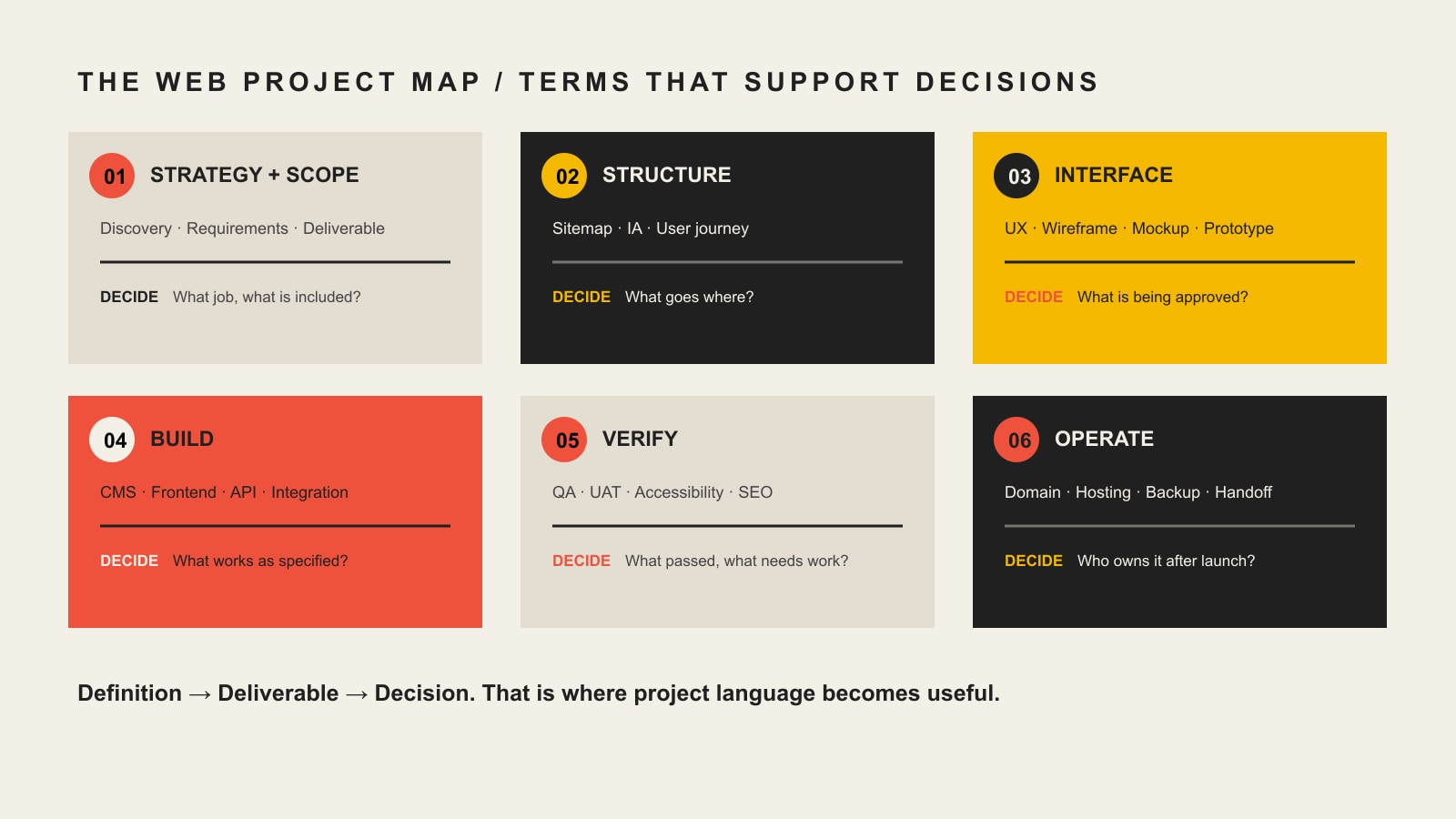
    The most important web design terms fall into six practical stages: strategy, structure, interface, build, verification, and operation. A useful term should tell you something about what the team will produce, how you will review it, what standards apply, or who owns the result.

    That is why terms such as scope, wireframe, responsive design, CMS, API, WCAG, QA, UAT, DNS, and handoff usually matter more to a buyer than the name of a fashionable JavaScript framework.

    Use the Scope Design Definition → Deliverable → Decision test

    When a proposal, designer, or developer uses jargon, run it through three questions:

    • Definition: What does the term mean in plain English?
    • Deliverable: What page, file, behavior, account, test, document, or service proves that it is included?
    • Decision: What do you need to approve, provide, own, budget for, or verify?

    For example, a proposal may say the website will be responsive. The definition is straightforward: the layout should adapt to different screen sizes. The deliverable is not the word “responsive”; it is the implemented page behavior across the agreed range of screens. The decision is what devices, breakpoints, browsers, and acceptance checks are actually in scope.

    The same rule exposes vague promises. “SEO included,” “accessible website,” “optimized performance,” and “ongoing support” sound reassuring, but each phrase is still ambiguous until the provider explains the work, evidence, boundaries, and owner.

    A web project map connects strategy and scope, structure, interface, build, verification, and operation to the client decision at each stage.

    Web design terms at a glance

    Project stageTerms you may hearWhat those terms should clarify
    StrategyDiscovery, requirements, scope, deliverable, dependency, acceptance criteriaWhat problem is being solved and what is included
    StructureSitemap, information architecture, user journey, content hierarchyWhat pages and paths people need
    InterfaceUX, UI, wireframe, mockup, prototype, component, responsive designWhat you are reviewing and approving before or during build
    BuildFrontend, backend, CMS, template, API, integration, stagingWhat system makes the approved experience work
    VerificationWCAG, QA, UAT, cross-browser testing, Core Web Vitals, redirectsHow the team will prove the implementation meets the agreed requirements
    OperationDomain, DNS, hosting, admin account, license, backup, maintenance, handoffWho controls the website and what happens after launch

    Strategy and scope terminology

    Discovery

    Discovery is the work used to understand the business problem, audience, current website, constraints, evidence, content, technology, and success criteria before important design decisions are locked in. Depending on the project, discovery might include stakeholder interviews, analytics review, content inventory, technical review, audience research, competitive context, or workshop sessions.

    Ask: What exactly happens during discovery, who participates, and what decisions or documents come out of it?

    Requirements

    Requirements describe what the website must do or support. “We need a contact page” is a page request. “Qualified prospects must be able to choose a service, submit the correct project information, and route the inquiry to the right team” is closer to a functional requirement.

    Requirements can cover content, functionality, integrations, accessibility, performance, security, reporting, legal constraints, and operational needs. They create a basis for design and acceptance instead of leaving everyone to infer the job from a page count.

    Scope

    Scope is the agreed boundary of the project. It should make the included work, exclusions, assumptions, responsibilities, schedule, and change process understandable. Scope is not the same thing as a feature list. Two “10-page websites” can represent radically different amounts of strategy, copywriting, design, development, migration, testing, training, and support.

    Deliverable

    A deliverable is a concrete output the project is supposed to produce. Examples include a sitemap, copy deck, wireframe, approved design, component library, working form, CMS template, redirect map, training session, or handoff document.

    If a proposal uses a broad term such as “SEO,” “accessibility,” or “optimization,” ask what deliverables or checks are included under that label.

    Dependency

    A dependency is something another task relies on. Final page design may depend on approved copy. A payment integration may depend on credentials from your processor. Launch may depend on DNS access. Naming dependencies early makes schedule discussions more realistic.

    Change request

    A change request is a documented change to agreed scope, requirements, deliverables, or assumptions. It should explain what changed and whether the change affects cost, schedule, testing, or other work. A good change process protects both sides from silently turning a defined project into an unlimited one.

    Acceptance criteria

    Acceptance criteria describe the conditions that must be true for a deliverable or feature to be accepted. “Build a form” is vague. “The form validates required fields, sends the submission to the agreed destination, displays a confirmation, records the event in analytics, and works in the supported browsers” is testable.

    Structure and user-flow terminology

    Sitemap

    A sitemap in the planning sense is a map of the website’s pages and hierarchy. It helps the team decide what content exists, how pages relate, and what belongs in navigation. Do not confuse this planning artifact with an XML sitemap used by search engines.

    Information architecture (IA)

    Information architecture is the way information is organized, labeled, grouped, and connected so people can find and understand it. IA affects navigation, page hierarchy, labels, content relationships, and the paths users take through the site.

    User journey

    A user journey describes the steps a person may take while trying to accomplish a goal. For a service business, one journey might be: understand the service, verify fit, review proof, compare options, ask a question, and submit an inquiry. The point is not to draw a pretty diagram. It is to reveal what a visitor needs at each decision.

    Design and approval terminology

    UX and UI

    UX means user experience. It deals with how understandable, usable, efficient, and appropriate the experience is for the person trying to accomplish a task. UI means user interface. It covers the interface people see and interact with, including controls, visual hierarchy, states, components, spacing, typography, and presentation.

    They overlap, but they are not interchangeable. A beautiful interface can still produce a poor experience if users cannot find the right information or complete an important task. If you need to diagnose those problems, our UX diagnosis guide goes deeper.

    Wireframe

    A wireframe is a simplified representation of page structure and priority. It usually focuses on layout, content hierarchy, and interaction rather than final typography, color, imagery, and polish. Its job is to make structural decisions cheaper to discuss before visual detail distracts everyone.

    Mockup

    A mockup is a more visually complete representation of the intended interface. It may show real typography, colors, imagery, components, spacing, and brand treatment, but it is not necessarily interactive or implemented.

    Prototype

    A prototype simulates some part of the experience so flows and interactions can be evaluated before the full system exists. A prototype can be simple or high fidelity. It is still a model. Approving a prototype or mockup is not the same as accepting a functioning website.

    Design system and component

    A component is a reusable interface element or pattern, such as a button, card, form field, testimonial block, or navigation item. A design system organizes reusable components together with rules, tokens, patterns, and guidance so the interface can stay coherent as it grows.

    Responsive design, mobile-first, and breakpoint

    Responsive web design is an approach that allows layouts and content to adapt across different screen sizes and device conditions. Mobile-first is a way of designing or coding from a smaller-screen baseline and progressively adapting for larger screens. A breakpoint is a condition, commonly based on viewport width, where layout behavior changes.

    MDN’s responsive design guidance treats responsive design as an approach rather than a single device checklist. For a client, the important question is what responsive behavior will be tested and accepted, not whether the proposal contains the phrase “mobile-friendly.”

    Development and technology terminology

    Frontend and backend

    The frontend is the part of the website delivered to and interacted with by the user, including the rendered interface and browser-side behavior. The backend is the server-side or administrative layer that may handle data, business logic, authentication, content, integrations, or other services behind the interface.

    On many business websites, the boundary is less important to a client than the responsibility: who owns the interface, who owns data and integrations, and who fixes a problem when the two do not work together?

    CMS

    A content management system (CMS) is software used to manage website content. WordPress is a CMS. A CMS can make editing easier, but “CMS included” does not tell you how much control you will have, which content types are editable, whether custom fields exist, or how portable the site is.

    Ask: What can our team edit safely? Which roles will we have? Who holds the administrator account? What training and documentation are included?

    Template, theme, and component

    A template controls the structure for a type of page or content. A theme usually refers to a larger presentation layer or package of templates, styles, and behavior, especially in systems such as WordPress. A site can use a theme and still include original design; a theme can also impose real constraints. The useful question is what is custom, what is reusable, and what the licensing or maintenance implications are.

    API and integration

    An API, or application programming interface, is an interface that lets software interact with another system. An integration is the implemented connection that uses an API, webhook, feed, plugin, file exchange, or another method to move data or trigger behavior between systems. MDN describes an API as the interface or contract that exposes features for software interaction.

    An “API integration” line item should identify the systems involved, data or actions exchanged, authentication responsibilities, failure behavior, testing, and who maintains the connection when one platform changes.

    Staging and production

    Staging is a non-public or controlled environment used to review and test work before it affects the live website. Production is the live environment serving real users. Ask how changes move from staging to production, what gets backed up, and what the rollback plan is if a launch causes a problem.

    Domain, DNS, and hosting

    Your domain name is the human-readable address people use to reach the site. DNS is the system of records that directs that domain to services such as the website and email. Hosting is the infrastructure where the website application, files, or services run.

    These are related but separate. A provider can host your website without owning your domain. Your business should know who controls the registrar account, DNS records, hosting account, billing, recovery email, and multi-factor authentication.

    SSL certificate, HTTPS, and TLS

    You will still hear people say SSL certificate, but modern HTTPS uses TLS. HTTPS is HTTP carried over a secure TLS connection, and TLS is used to provide encryption, integrity, and server authentication. For a client, the practical concern is that HTTPS is correctly configured, renewed, monitored, and not broken by mixed content or bad redirects.

    Quality, accessibility, and measurement terminology

    Accessibility and WCAG

    Web accessibility means designing and building digital experiences so people with disabilities can perceive, understand, navigate, and interact with them. WCAG is the Web Content Accessibility Guidelines published by W3C. WCAG 2.2 is a W3C Recommendation and provides testable success criteria.

    If a proposal says “ADA compliant” or “WCAG compliant,” ask what standard and conformance target are being used, what pages or templates will be evaluated, what testing methods are included, who remediates failures, and what remains the client’s responsibility for future content.

    QA and UAT

    Quality assurance (QA) is the team’s process for checking whether the implementation works as intended and meets the agreed requirements. User acceptance testing (UAT) is the client or business-side verification that the system is acceptable for the intended real-world use before final acceptance or launch.

    They should not be treated as synonyms. QA asks whether the team built the thing correctly. UAT asks whether the delivered thing satisfies the agreed business use and acceptance criteria.

    Cross-browser and device testing

    Cross-browser testing checks behavior in the agreed browsers and versions. Device testing checks the experience across the screen sizes, input methods, and device conditions that matter to the project. “Works everywhere” is not a responsible test plan. A scope should state the supported range and how important exceptions are handled.

    Core Web Vitals

    Core Web Vitals are Google’s user-experience metrics for loading performance, responsiveness, and visual stability. The current metrics are Largest Contentful Paint (LCP), Interaction to Next Paint (INP), and Cumulative Layout Shift (CLS), as documented by web.dev.

    If performance is included in a project, ask what will be measured, under what conditions, and whether the promise concerns lab testing, real-user data, or a specific threshold. A score without context can be as misleading as a buzzword.

    SEO foundations

    SEO foundations usually refers to the technical and content setup that helps search engines discover, interpret, and present the site correctly. It can include crawl/index controls, titles and descriptions, canonical URLs, redirects, internal links, structured data, XML sitemaps, and migration checks. It is not the same as an indefinite promise to rank for competitive queries.

    Redirect

    A redirect sends an old URL to another URL. Redirect planning matters during redesigns and migrations because changing paths without a plan can break links, bookmarks, referrals, and search signals. If URLs will change, the proposal should say who inventories old URLs, creates the redirect map, implements it, and verifies the result.

    Analytics, event, and conversion

    Analytics is the measurement system used to understand activity on the website. An event is a recorded interaction or occurrence, such as a form submission, download, purchase, or qualified button click. A conversion is an action the business has decided represents meaningful progress or value.

    “Analytics installed” is not a measurement strategy. Ask which outcomes are being tracked, who owns the account, how consent requirements are handled, and what the team will verify before handoff.

    Ownership and handoff terminology

    This is where apparently small words can turn into expensive surprises. Our guide to working with a web design company covers the broader client-agency responsibility model. At minimum, understand the terms below before the final invoice or launch week.

    Administrator account

    An administrator account has elevated control over a system. Your business should know which systems require administrative access and whether a company-controlled account will exist for the domain registrar, DNS, hosting, CMS, analytics, search tools, payment services, email delivery, and other critical integrations.

    License

    A license grants permission to use software, fonts, images, plugins, themes, code, or other intellectual property under specific terms. “Included” does not always mean “owned forever.” Ask which licenses are recurring, transferable, agency-owned, client-owned, or replaced if the relationship ends.

    Source files and repository

    Source files are the editable originals used to create the delivered work. A repository is a system, commonly Git-based for code, that stores and tracks source changes. Not every simple website needs a client-managed code repository, but every client should understand what files and source materials exist, where they live, and what is transferred at handoff.

    Backup and restore

    A backup is a recoverable copy of website data or files. A restore is the tested process of returning the system to a usable state from that backup. Ask what is backed up, how often, how long copies are retained, where they are stored, and who is responsible for restoration.

    Maintenance and support

    Maintenance is planned work that keeps the website healthy over time, such as updates, backups, security work, compatibility checks, performance monitoring, and content-system care. Support usually refers to help when questions, incidents, or change requests occur. The scope should define what is included, what is billable, response expectations, and who owns urgent issues.

    Handoff

    Handoff is the transfer of the website, accounts, credentials, documentation, training, files, licenses, and operational responsibility at the end of a project or relationship. A good handoff is not “here is the login.” It is a controlled transfer that makes clear what the client now owns and what the provider still manages.

    Five web design terms people commonly confuse

    TermsPlain-English difference
    Wireframe vs. mockup vs. prototypeA wireframe emphasizes structure, a mockup emphasizes visual design, and a prototype simulates interaction or flow.
    Domain vs. DNS vs. hostingThe domain is the address, DNS directs the address to services, and hosting runs the website system.
    Responsive vs. mobile-firstResponsive is the broader adaptive approach; mobile-first starts design or implementation from smaller screens and expands upward.
    UX vs. UIUX concerns the quality of the experience and task flow; UI concerns the interface people see and operate.
    QA vs. UATQA is the delivery team’s quality verification; UAT is business-side acceptance of the delivered system for its intended use.

    Terms that should be defined in the written scope

    Some terminology is too important to leave as sales-call shorthand. When you compare proposals, require the important promises to become written responsibilities. Our full guide to choosing a web design company covers vendor evaluation in detail. For terminology, focus on whether the scope defines these items clearly:

    • Deliverables and exclusions: what is included and what is not.
    • Dependencies: what the client or a third party must provide and by when.
    • Revisions and change requests: how feedback works and when added work changes cost or schedule.
    • Acceptance criteria and UAT: how completion is judged.
    • Browser and device support: what environments are tested.
    • Accessibility target: what standard, conformance level, templates, and testing are included.
    • Performance target: what metrics are measured and under what conditions.
    • SEO and redirects: what migration or technical search work is actually included.
    • Ownership and licensing: who controls accounts, source, content, software licenses, and third-party services.
    • Handoff and training: what is transferred and how your team learns to operate it.
    • Recurring costs and support: what continues after the project and what happens if the relationship ends.

    A proposal does not become sophisticated because it uses sophisticated words. It becomes useful when important terms have enough definition that both sides can tell what will happen next.

    Questions to ask when a designer uses jargon

    • What does that term mean on this project?
    • What deliverable, behavior, account, or test proves it is included?
    • What do you need us to approve or provide?
    • Who owns this after the project ends?
    • How will we verify it before acceptance?
    • What is specifically excluded?
    • If a third-party tool changes or breaks, who is responsible?
    • Does this create a recurring license, hosting, maintenance, or support cost?

    Those questions are more useful than trying to impress a designer by repeating technical vocabulary. Good web professionals should be able to explain a decision without hiding behind terminology.

    Frequently asked questions about web design terminology

    What does web design terminology mean?

    Web design terminology is the vocabulary used to describe website strategy, structure, user experience, interface design, development, performance, testing, hosting, ownership, and maintenance. For a business owner, the useful terms are the ones that clarify what is being purchased, approved, tested, or handed over.

    What web design terms should I know before hiring a designer?

    Start with scope, deliverable, dependency, acceptance criteria, sitemap, information architecture, UX, UI, wireframe, mockup, prototype, responsive design, CMS, API, staging, domain, DNS, hosting, WCAG, QA, UAT, Core Web Vitals, administrator account, license, maintenance, and handoff. You can learn tool-specific vocabulary later if your project actually needs it.

    What is the difference between UX and UI?

    UX focuses on the quality of the user’s experience, including comprehension, navigation, task flow, and usability. UI focuses on the interface people see and interact with, such as controls, typography, spacing, visual hierarchy, and component states. Strong website work usually requires the two to support each other.

    What is the difference between a wireframe, mockup, and prototype?

    A wireframe is mainly about structure and hierarchy. A mockup is a more complete visual representation. A prototype simulates some interaction or flow. None of those automatically proves the final built website works correctly.

    Is a CMS the same thing as hosting?

    No. A CMS is software used to manage content. Hosting is the infrastructure that runs or serves the website. A WordPress website, for example, uses WordPress as its CMS while running on a hosting environment.

    Do I need to know how to code before hiring a web designer?

    No. A client does not need to become a frontend or backend developer. You should understand enough terminology to ask what is included, what is custom, what can be edited, how the work will be tested, what you will own, and what responsibilities continue after launch.

    Does “SSL certificate” still mean the same thing?

    People commonly still say “SSL certificate,” but modern secure web connections use TLS. The practical requirement is a correctly configured HTTPS connection, a valid certificate, reliable renewal, and monitoring for security or redirect problems.

    What is the difference between QA and UAT?

    QA is the delivery team’s process for finding defects and checking the implementation against requirements. UAT is the client or business-side process for confirming that the delivered website is acceptable for its intended use. Both matter, and neither should be replaced by a quick visual review.

    Know enough lingo to make better decisions, not to play designer

    The goal of learning web designer lingo is not to micromanage the people you hire. It is to recognize when an important promise is specific enough to approve and when it still needs a definition.

    Use the Definition → Deliverable → Decision test whenever a proposal or project conversation becomes fuzzy. If a term cannot be connected to a concrete output, behavior, account, test, responsibility, or owner, keep asking questions.

    If you want a web team that explains the work in business language and makes responsibilities explicit, talk with Scope Design about your website project.