Tag: website maintenance

  • How to Mass Disable Comments on Old WordPress Posts (5 Proven Methods)

    How to Mass Disable Comments on Old WordPress Posts (5 Proven Methods)

    If you want to disable comments on old WordPress posts without deleting the discussion that is already there, start with WordPress’s built-in age rule. Go to Settings → Discussion, enable Automatically close comments on articles older than X days, choose the cutoff, and save. WordPress stops accepting new comments on posts older than that threshold while leaving previously approved comments visible.

    That distinction matters: disabling comments is a state change; deleting comments is content destruction. If the job is “stop new comments on our archive,” there is normally no reason to empty wp_comments, truncate tables, or erase legitimate conversation.

    The quick answer: five ways to disable comments on old WordPress posts

    SituationBest methodPlugin?Existing comments preserved?
    Automatically close discussion after posts age1. Native age ruleNoYes
    Close selected existing posts or pages2. Bulk EditNoYes
    Close large or repeatable batches with shell access3. WP-CLINoYes
    Enforce an ongoing no-comments policy4. Disable Comments pluginYesUsually
    Close everything before an exact date at database scale5. Direct SQLNoYes, if you only change post state

    The native methods come first on purpose. Adding a permanent plugin for a one-time checkbox job creates another dependency to maintain. Direct SQL sits last because it is powerful and precise, but it bypasses the normal WordPress application path. Powerful does not automatically mean better. Sometimes it just means the mistake happens faster.

    Close, hide, and delete are three different jobs

    The Scope Design Comment Shutdown Ladder keeps the operations separate:

    • Close: stop new comment submissions while approved history can remain visible. This is the default recommendation.
    • Hide: change what visitors see. The data can still exist, and hiding a form is not the same as changing whether WordPress accepts comments.
    • Delete: remove comment data. This is a separate cleanup or retention decision and deserves its own backup and approval.

    Before any large WP-CLI or database change, protect a recovery point and preview what will be affected. That is the same controlled-change discipline in our safe WordPress plugin update guide: know the scope, have a way back, make the smallest necessary change, then prove the result.

    Method 1: automatically close comments after X days

    Best for: sites that want discussion on fresh articles but want old content to close automatically.

    In Settings → Discussion → Other comment settings, enable Automatically close comments on articles older than X days. Enter the age threshold that fits your publishing model—30, 60, 90, 180, or another number—and save. WordPress’s Discussion settings documentation explicitly says the setting prevents new comments after the period while leaving previously approved comments visible.

    This is different from unchecking Allow people to post comments on new articles. That option controls the default for new content going forward. The age rule is the built-in answer when you specifically need to disable comments on old WordPress posts.

    Custom post types need a separate check

    WordPress core’s old-post closure logic defaults to the standard post post type. The core reference for _close_comments_for_old_posts() shows the default and the close_comments_for_post_types filter developers can use to extend it. Do not assume the dashboard age rule automatically covers products, events, portfolios, or every custom post type.

    That matters because features can use comments under the hood. WooCommerce product reviews are an obvious example. Inventory the content types before applying a broad rule.

    Method 2: Bulk Edit selected existing posts

    Best for: a one-time batch where you know which existing posts or pages should stop accepting comments.

    1. Go to Posts → All Posts.
    2. Use date, category, author, or search filters to narrow the list.
    3. Select the posts and choose Bulk actions → Edit.
    4. Set Comments to Do not allow.
    5. Click Update and verify representative posts on the front end.

    WordPress’s Posts screen documentation confirms that Bulk Edit can change Comments Allowed for selected posts. The same general approach is available for Pages.

    Some tutorials call 20 posts a hard Bulk Edit limit. It is not. Twenty is a common default number of rows shown in the admin list. You can display more rows and work in sensible batches. On large sites, smaller batches are often smarter because they make failures easier to isolate.

    Method 3: WP-CLI for large or repeatable batches

    Best for: developers and administrators with shell access who need a repeatable, reviewable change across many posts.

    The official wp post list command can preview IDs, dates, titles, and comment status. The official wp post update command supports --comment_status=open|closed for one or more IDs.

    Preview first:

    wp post list --post_type=post --post_status=publish --fields=ID,post_date,post_title,comment_status --format=table

    Then close a known batch:

    wp post update 123 456 789 --comment_status=closed

    For a whole publication year, wp post list can pass the WordPress year query argument:

    wp post update $(wp post list --post_type=post --post_status=publish --year=2024 --format=ids) --comment_status=closed

    Use batches on very large sites. Giant all-at-once shell commands can hit argument-length limits and are harder to inspect. Years, categories, or known ID groups create safer checkpoints.

    Method 4: a Disable Comments plugin for an ongoing policy

    Best for: organizations that do not want comments at all, or want a persistent no-comments policy on particular post types or a multisite network.

    The official WordPress.org listing for Disable Comments by WPDeveloper can disable comments across posts, pages, media, or the network and remove much of the comments-related admin interface. Its documentation also says not to use it merely for selectively disabling individual posts because WordPress already supports that.

    That matches our normal WordPress rule: do not add a permanent dependency to solve a temporary checkbox problem. If “comments are not a feature here” is truly an ongoing policy, a plugin can centralize that decision. Before activation, check whether comments power product reviews, memberships, support threads, or custom workflows.

    If you add the plugin, own it like any other production dependency: updates, monitoring, rollback, and compatibility. Our website maintenance guide explains why “installed” is not the same as “owned.”

    Method 5: direct SQL for an exact cutoff

    Best for: experienced administrators who need an exact date cutoff across a very large site and have a verified database backup plus direct database access.

    Direct SQL should change the post’s comment state, not delete the comments. If the goal is to close intake, update comment_status on the matching posts. Do not truncate wp_comments or wp_commentmeta. Those operations destroy data and solve a different problem.

    Back up first, then preview. Replace wp_ if your site uses a different table prefix and replace the sample date with the real cutoff:

    SELECT ID, post_title, post_date, comment_status
    FROM wp_posts
    WHERE post_type = 'post'
      AND post_status = 'publish'
      AND post_date < '2025-01-01 00:00:00'
    ORDER BY post_date DESC
    LIMIT 50;

    Only after the preview is correct, run the narrow state change:

    UPDATE wp_posts
    SET comment_status = 'closed'
    WHERE post_type = 'post'
      AND post_status = 'publish'
      AND post_date < '2025-01-01 00:00:00';

    If pingbacks and trackbacks also need to close, handle ping_status as a separate explicit decision. A direct database change should be as narrow as the requirement. Because SQL bypasses the normal WordPress application path, verify representative posts immediately afterward and clear the normal persistent cache if the site uses one.

    If the database workflow feels opaque, use Method 1, 2, or 3 instead. The database is a lousy place to learn by vibes.

    How to verify the shutdown

    1. Open an old post that should now be closed in a private browser window.
    2. Confirm the comment form is unavailable.
    3. Confirm approved historical comments still display when preservation was part of the plan.
    4. Open a recent post that should remain open and confirm it still accepts comments.
    5. If you changed pages or custom post types, test at least one representative item from each type.
    6. If you used SQL or changed a production plugin policy, record what changed, when, and how to reverse it.

    This is the same principle behind our Web Development & Technical Optimization framework: a change is not complete when it is typed. It is complete when the intended behavior is proven.

    Frequently asked questions

    Does disabling comments delete existing comments?

    No. Closing comments prevents new submissions; it does not inherently delete approved comments already stored on the post. WordPress’s built-in age setting explicitly leaves previously approved comments visible.

    How do I disable comments on all existing posts without a plugin?

    Use Posts → All Posts → select the target posts → Bulk actions → Edit → Comments → Do not allow. For large sites with shell access, WP-CLI can set comment_status to closed for controlled batches.

    Can I disable comments on pages too?

    Yes. Pages also have a comment permission state, and the Pages screen supports bulk editing Comments Allowed. Whether a theme displays a page comment form is a separate presentation question.

    Can I reopen comments later?

    Yes. Bulk Edit and WP-CLI can set comment status back to open, and the age rule can be disabled or changed. That reversibility is another reason to prefer a state change over deletion.

    Close the door; do not burn the guestbook

    For most sites, the right way to disable comments on old WordPress posts is a native setting followed by a quick verification. Use Bulk Edit when the set is selective, WP-CLI when the work is large or repeatable, a plugin when the policy is persistent, and SQL only when the scale and precision justify bypassing the normal application path.

    If comment cleanup is one symptom of a WordPress site nobody clearly owns—updates are ad hoc, backups are theoretical, and every change feels risky—review what real WordPress maintenance support should include. Good maintenance is intentionally uneventful: scoped, recoverable, tested, and documented.

    Sources and further reading

  • How to Build a Future-Proof Website: 7 Durable Upgrades That Age Well

    How to Build a Future-Proof Website: 7 Durable Upgrades That Age Well

    A future-proof website is not a website that never changes. It is a website that can change without turning every update into a redesign, migration, emergency, or expensive dependency.

    If you want to future proof your website, do not start by collecting whatever features are fashionable this year. Start by making the site easier to use, faster on real devices, more accessible, safer to operate, easier to maintain, clearer to search systems, and easier to measure. Then add new technology only when it solves a defined customer or business problem.

    That distinction matters. Progressive Web Apps, AI chat, browser APIs, headless architecture, and the next wave of design tools can all be useful. None of them is a universal requirement for a small-business website. Future-proofing is about reducing the cost and risk of change, not predicting every change before it happens.

    Start With a Baseline Before You Modernize Anything

    Before changing the site, capture what is already working. Record the pages that bring useful traffic, the forms and calls that produce real inquiries, the URLs that have links, the search queries that already earn visibility, the customer-service information people rely on, and the technical problems that are actually getting in the way.

    This is the same principle we use in our website redesign readiness process: you cannot prove an improvement without a baseline, and you cannot protect value you never inventoried. A visual refresh is not automatically an improvement. A lower maintenance burden, fewer broken customer journeys, faster important pages, better qualified inquiries, or a measurable reduction in support friction is.

    What we found before revising this exact page

    We checked this article before rewriting it rather than assuming the old copy had earned protection. Google Search Console reported the established URL as submitted and indexed, successfully fetched on mobile, and self-canonical. But our exact-page Search Console queries returned no performance rows in the current or prior 12-month windows we checked. GA4 showed only nine Direct landing-page sessions in the current 12-month window and no Organic Search row. Bing reported zero clicks and zero impressions for the exact URL.

    That evidence does not prove the topic lacks value. It tells us something narrower: there was little measurable performance in the old copy worth defending, while the indexed URL itself was worth preserving. Google URL Inspection also reported a breadcrumb structured-data error—either name or item.name is missing—which is a useful reminder that content work and template-level technical QA are separate jobs.

    The 7-Part Future-Proof Website Stack

    For most small businesses, a durable modernization plan can be organized into seven layers. They reinforce one another: clearer customer tasks make measurement more meaningful; accessibility improves component quality; a leaner stack helps performance and security; and better structure helps both people and search systems understand the site.

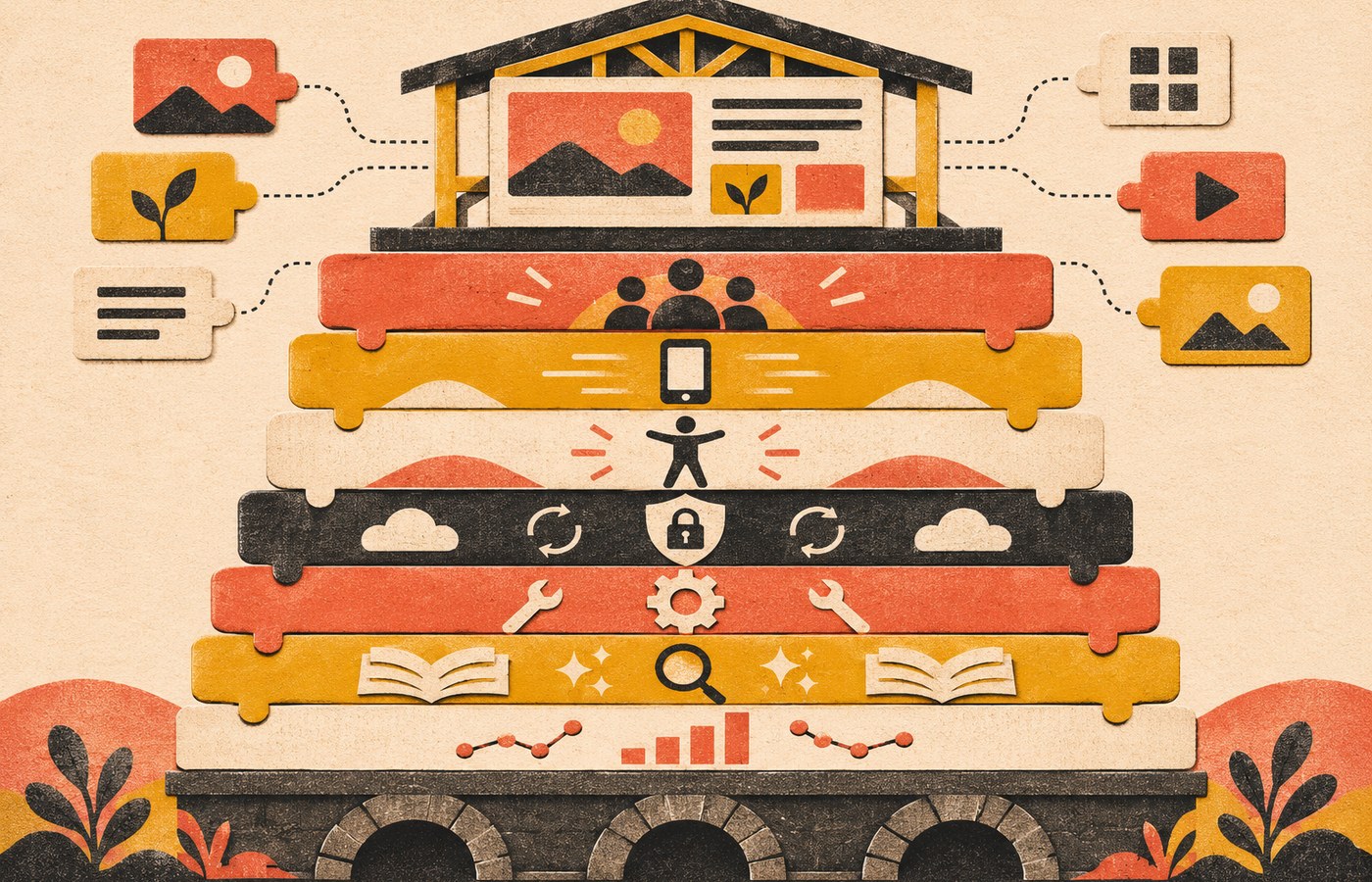
    Seven connected website layers support durable change: customer tasks, mobile performance, accessibility, security and recovery, ownership, useful content, and measurement.
    Future-proofing is a system: customer tasks, performance, accessibility, security, ownership, useful content, and measurement.

    1. Design Around Customer Tasks, Not Visual Trends

    A website can look current and still be difficult to use. It can also look visually conservative and work extremely well. The durable question is not, “Does this look like the newest design gallery?” It is, “Can the right person understand what we do, trust the answer, and complete the next important task?”

    List the handful of jobs your website must support: request a quote, call the business, book an appointment, buy a product, find a location, compare a service, download a form, get support, or understand what happens next. Then review those paths on a phone with fresh eyes.

    • Can a new visitor identify the business and offer quickly?
    • Does navigation reflect how customers think, not the company org chart?
    • Are important calls to action specific and easy to find?
    • Do forms ask only for information the business can actually use?
    • Can someone complete the task without guessing what a label means?

    Design systems, components, and brand styling should support those jobs. They should not become the job. When a visual trend makes the next step harder to understand, the trend loses.

    2. Make Mobile Performance a Release Criterion

    Performance is not a one-time optimization project you complete at launch. Content changes, third-party scripts, new fonts, larger images, tracking tools, plugins, embeds, and hosting changes can all move a site backward. Treat speed and responsiveness as release criteria for ongoing work.

    Google’s current Core Web Vitals are Largest Contentful Paint (LCP), Interaction to Next Paint (INP), and Cumulative Layout Shift (CLS). Google’s published “good” targets are LCP within 2.5 seconds, INP under 200 milliseconds, and CLS under 0.1. Web.dev recommends evaluating these at the 75th percentile so you are looking at real-user experience for most visits, not one lucky laboratory run.

    If an old checklist still tells you to optimize First Input Delay (FID) as a current Core Web Vital, update the checklist. INP replaced FID in the current stable set.

    Then work from evidence. Oversized hero media may be the problem. It may be a slow server, a third-party widget, a page builder loading unused code, an analytics pileup, or JavaScript doing too much work on interaction. Test representative page types on mobile and desktop, use field data when available, and use lab tools to reproduce problems during development.

    Do not turn a performance score into the only business goal. A perfectly fast page with a confusing offer is still a bad page. The point is to remove avoidable friction from the customer journey and keep performance from quietly degrading as the site evolves.

    3. Build Accessibility Into Components and Content

    Accessibility is much easier to maintain when it is part of the way the site is built, not a cleanup sprint after every redesign. Use semantic HTML, real labels, visible focus states, useful alt text, sufficient contrast, keyboard-operable controls, understandable errors, and layouts that remain usable when text is enlarged or the viewport changes.

    The W3C encourages use of the latest WCAG version. WCAG 2.2 is the current Recommendation and adds criteria while remaining backward compatible with the earlier 2.1 and 2.0 requirements it carries forward. For many organizations, Level AA is a practical engineering target, but the legal requirements that apply to a specific business depend on jurisdiction and context. A standards checklist is not a substitute for legal advice.

    Automated scans are useful for finding certain classes of problem, but they cannot prove that a site is fully accessible. Pair them with keyboard testing, form testing, zoom/reflow checks, and manual review of important customer journeys. If an accessibility tool promises to “fix” the whole site by adding a widget, treat that as a claim to verify, not a solved requirement.

    4. Make Security, Privacy, and Recovery Routine

    A site is not future-proof if a routine update can break it with no rollback path, an old account can still access production, or a backup exists only in theory. Security and recovery need owners, schedules, and verification.

    At minimum, keep the CMS, extensions, server software, and dependencies maintained; remove what is no longer needed; use strong account controls; limit administrative access; monitor for failures; and keep recoverable backups outside the live site. CISA’s baseline guidance also emphasizes multifactor authentication and prompt software updates as basic security hygiene.

    Backups deserve a verb stronger than “have.” Test restores. A backup system that has never been restored is an assumption. For meaningful changes, establish a baseline, stage when appropriate, make the change, verify the important paths, and know how to reverse it.

    Privacy belongs in the same operating layer. Know which forms, analytics tools, ad platforms, chat tools, embeds, and integrations collect data. Remove collection you do not need, keep policies accurate, and review consent or disclosure requirements for the places where you operate. Do not bolt on more tracking simply because another dashboard offers it.

    5. Own a Lean, Maintainable Stack

    One of the easiest ways to make a website fragile is to create dependencies nobody owns. The business should know who controls the domain, DNS, hosting, CMS administrator accounts, analytics, search tools, email delivery, paid licenses, source assets, integrations, and backups.

    Maintainability does not mean “never use plugins” or “never write custom code.” It means every dependency should earn its place. A well-supported tool that clearly solves a problem can be safer than custom work. Custom work can be the right choice when it removes a real constraint. The warning sign is a stack that no one can explain, update, export, or recover without calling the one person who built it.

    • Keep account ownership in a business-controlled password manager.
    • Document critical integrations and who is responsible for them.
    • Retire unused themes, plugins, scripts, pixels, and services.
    • Know how to export important content and customer data.
    • Record a rollback path for risky changes.

    Boring infrastructure is often a feature. A stack that is well understood, supported, observable, and recoverable is easier to adapt when something genuinely new becomes valuable.

    6. Structure Useful Content for Search and AI Systems

    Search is changing, but the future-proof response is not to invent a second website “for AI.” Publish useful information in a form that people and machines can both understand: clear headings, descriptive links, important facts in text, deliberate internal linking, accurate business information, crawlable pages, and structured data that matches what the visitor can actually see.

    Google’s current guidance for AI Overviews and AI Mode is unusually helpful here: normal SEO fundamentals remain relevant, eligible supporting pages need to be indexed and able to appear with a snippet, and there are no additional technical requirements. Google also says you do not need a special AI text file or special schema.org markup just to appear in those features.

    That does not mean “do nothing.” It means do the durable work first. Answer real customer questions directly. Publish specific service, product, policy, pricing, process, compatibility, or location facts when they help someone make a decision. Show where information came from. Keep facts current. Use structured data when it accurately describes visible content. Build sensible internal links so important pages are not isolated.

    For deeper work on earning citations in generative answers without chasing made-up hacks, see our guide to AI search optimization and citation readiness.

    7. Measure Outcomes and Improve Incrementally

    Future-proofing is an operating habit. Measure the outcomes the website can reasonably influence, diagnose what is getting in the way, make the smallest responsible improvement, and verify what happened.

    Your measurement stack does not need hundreds of reports. For many small businesses, a useful monthly review can fit on one page:

    • Business outcomes: qualified forms, calls, bookings, purchases, applications, or other meaningful conversions.
    • Discovery: important landing pages, useful search queries, clicks, impressions, and referral sources.
    • Customer journey: form failures, device problems, confusing exits, support questions, and pages that assist decisions.
    • Technical health: indexation, crawl problems, Core Web Vitals, uptime, broken links, accessibility findings, and security/maintenance issues.

    Our broader SEO strategy and analytics framework uses the same idea: visibility is only one layer. The point is to connect technical health and search discovery to useful business outcomes instead of optimizing whatever number happens to be easiest to screenshot.

    When Is a Full Website Redesign Actually the Future-Proof Move?

    A redesign becomes credible when the current system materially prevents the business or its customers from doing something important and a smaller change cannot responsibly solve the problem.

    Examples include a structure that no longer matches the business, a platform that cannot support required operations, pervasive mobile or accessibility failures, a content model that makes useful publishing impractical, brittle integrations, conversion paths that need architectural change, or a brand and offer that have fundamentally changed.

    By contrast, one slow template, weak copy, a broken form, missing proof, neglected maintenance, a confusing service page, or a dated color palette does not automatically justify replacing the entire system. Fix the isolated constraint first. Custom work should earn its place.

    If a rebuild is the right intervention, protect what already works: inventory URLs and content, preserve valuable destinations where practical, map real migrations, update internal links, test forms and tracking, verify accessibility and performance, and plan rollback and monitoring before launch. The full website redesign checklist covers that process in depth.

    A Practical 90-Day Website Modernization Plan

    Days 1–30: Inventory and protect

    Confirm ownership of the domain, hosting, CMS, analytics, search tools, licenses, backups, and critical integrations. Record current business outcomes, important landing pages, crawl/index status, form delivery, mobile behavior, Core Web Vitals, accessibility issues, and obvious security or maintenance debt. Do not start with a redesign mockup.

    Days 31–60: Fix the highest-risk friction

    Repair broken forms and contact paths. Address critical update or backup gaps. Improve the slowest or most important page types. Fix recurring keyboard, focus, label, contrast, and mobile usability problems in reusable components. Remove scripts, plugins, and services that no longer earn their maintenance cost.

    Days 61–90: Improve information and measurement

    Update the pages that help customers make real decisions. Clarify services, products, policies, processes, pricing or pricing logic, proof, and next steps where appropriate. Improve internal links and structured data where they accurately support the visible content. Then verify analytics, search visibility, form delivery, technical health, and the business outcome you intended to improve.

    At the end of 90 days, decide what is still structurally blocked. That is a far stronger basis for a redesign budget than “the website feels old.”

    Frequently Asked Questions About Future-Proofing a Website

    How often should a business redesign its website?

    There is no responsible universal redesign schedule. Redesign when the existing system materially blocks important customer or business work and smaller changes cannot solve the underlying constraint. A site that is maintainable, accessible, fast enough, measurable, and aligned with the business can often be improved incrementally for years.

    What should I update first on an aging website?

    Start with anything that can cause real loss or blind decision-making: broken conversion paths, security/update risk, unreliable backups, missing analytics or form delivery, severe mobile problems, and high-impact accessibility failures. Then work through performance, maintainability, content clarity, search structure, and measurement based on evidence.

    Do I need a Progressive Web App to have a modern website?

    No. A PWA can be valuable when installability, offline behavior, push notifications, or app-like workflows solve a real user need. It is not a universal future-proofing requirement. If customers simply need to understand a service, call, book, buy, or submit a form, solve those jobs first.

    Do I need AI chat or an AI assistant on my website?

    Only if it improves a defined task enough to justify the added complexity, cost, privacy considerations, maintenance, and failure modes. A clear FAQ, good site search, better navigation, or better product/service information may solve the same problem more reliably. Treat AI as a tool, not a badge that proves the website is current.

    Does AI search require a special website redesign?

    Not by default. Google’s guidance says its AI search features rely on the same foundational Search requirements and do not require special AI files or special schema solely for AI Overviews or AI Mode. Make important content indexable, useful, textual, internally linked, accurate, and well structured before inventing an AI-only optimization layer.

    Is an old-looking website automatically outdated?

    No. Visual design affects trust and usability, but age is not a diagnosis. Judge the site by whether people can complete important tasks, whether the business can maintain it safely, whether it performs well on real devices, whether it is accessible, whether the information is current, and whether you can measure what matters.

    Future-Proof for Change, Not for Prediction

    The strongest website modernization strategy is deliberately unglamorous. Make important customer tasks clear. Keep mobile performance healthy. Build accessibility into the system. Treat security, privacy, backups, and recovery as ongoing operations. Own a maintainable stack. Publish useful, structured information. Measure outcomes and improve the real constraint.

    Then, when a genuinely valuable new capability arrives, you are not starting from a fragile pile of old decisions. You have a website that can absorb change without forcing the business to start over.

  • Website Maintenance for Business Continuity: Build a Recovery-Ready Site

    Website Maintenance for Business Continuity: Build a Recovery-Ready Site

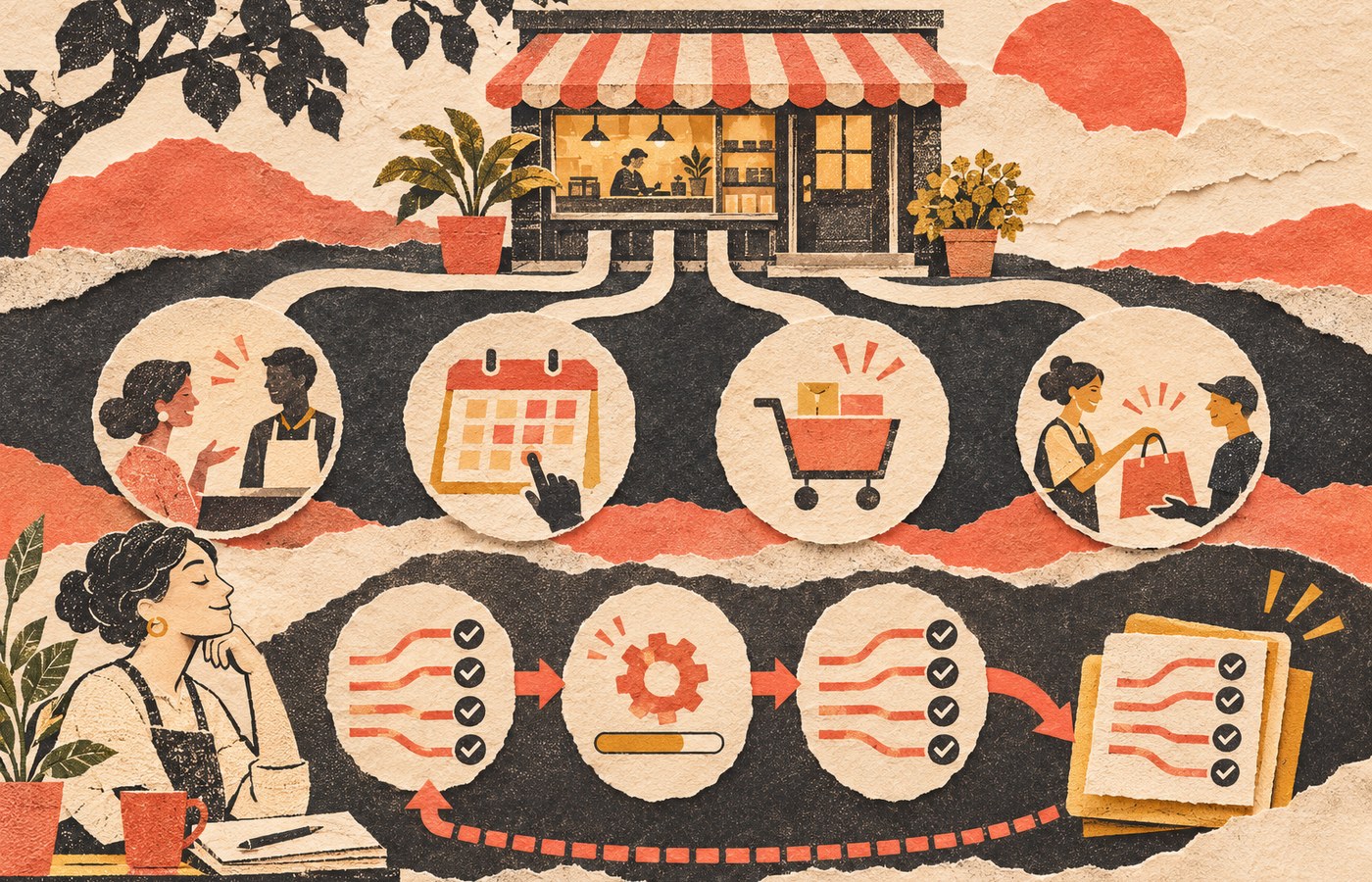
    Website maintenance for business continuity means operating your website so a routine update, expired certificate, broken integration, compromised account, or hosting problem does not turn into a mystery outage. The goal is not to keep a dashboard perfectly green. The goal is to know what must keep working, detect when it stops, recover to a known-good state, and know exactly who owns the response.

    If you only need the recurring task calendar, use our website maintenance guide. This article owns a narrower question: how should maintenance protect the continuity of the business job your website performs?

    TL;DR: maintenance should reduce the failure window

    • Define the website journeys that actually matter: lead forms, checkout, bookings, logins, downloads, customer portals, email delivery, and integrations.
    • Capture a known-good baseline before consequential changes so you have something real to compare against.
    • Make changes in bounded steps, test the same critical journeys afterward, and roll back the smallest failed component when practical.
    • Treat backups as recovery inputs, not proof that recovery will work. A WordPress restore normally needs both the database and site files.
    • Set recovery expectations based on business impact instead of borrowing somebody else’s arbitrary “daily” or “four-hour” rule.
    • Automate observation and routine work, but keep a named person accountable for exceptions, restoration, escalation, and decisions.

    Website maintenance for business continuity protects the business handoff

    A website is not healthy because the homepage loads. A service business can have a beautiful homepage while its quote form silently drops submissions. An ecommerce site can be “up” while checkout fails after a payment extension update. A membership site can return HTTP 200 while login is broken. An appointment site can look normal while confirmation email never leaves the server.

    That is why maintenance has to protect the handoff between the website and the business. Our business website development guide makes the same point from the build side: the technical foundation should prove the business journey works, can be changed safely, and can be recovered. Maintenance is the operating discipline that keeps proving it after launch.

    The distinction also keeps this article from becoming another giant checklist. Checklists are useful, but they can create a dangerous illusion: every box is checked, therefore the business is protected. That logic falls apart the moment an automated update succeeds technically and breaks the thing customers came to do.

    Use the Scope Design CONTROL Loop

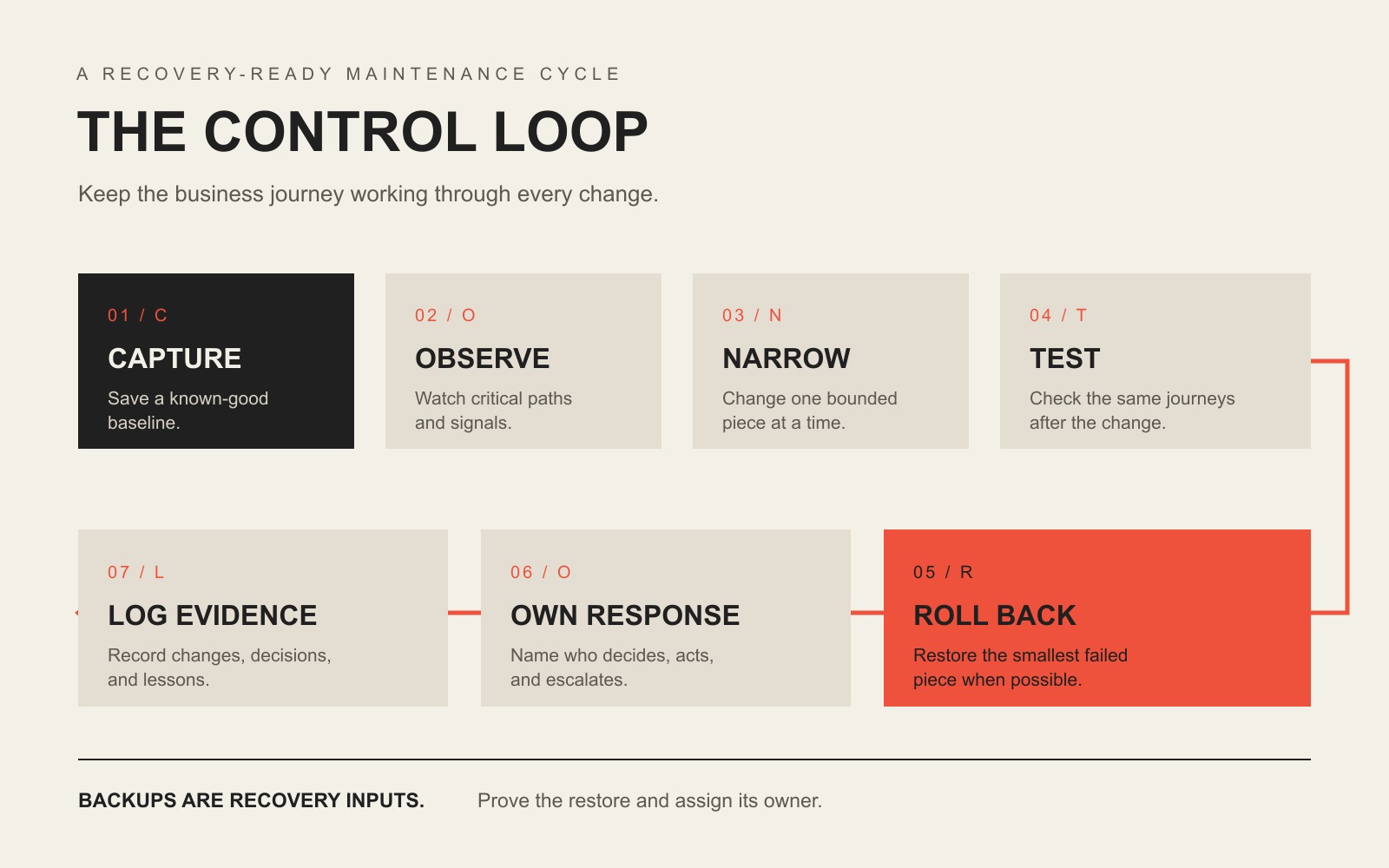
    Our maintenance approach comes from a simple first-party operating lesson: make a smaller change, compare it with a known-good state, verify the result, reverse the smallest failed change when necessary, and preserve the evidence. We call the buyer-facing version the CONTROL Loop.

    The CONTROL Loop: Capture a baseline, Observe critical paths, Narrow each change, Test the same journeys, Roll back precisely, Own the response, and Log evidence.

    C — Capture the baseline

    Before a meaningful change, record the state you expect to preserve. That can include representative screenshots, software versions, key page behavior, a current backup, form delivery, checkout, login, analytics events, response time, and known open issues. A baseline turns “it seems different” into something diagnosable.

    O — Observe critical paths

    Decide which user journeys deserve active observation. A five-page brochure site may have one critical path: inquiry form to delivered email or CRM record. A WooCommerce site may need product, cart, checkout, payment, confirmation email, inventory, tax, shipping, and account flows. Monitoring the server while ignoring those handoffs is like watching the electrical panel while the cash register is on fire.

    N — Narrow the change

    Reduce the blast radius. Update one component or one understood dependency group when practical. Separate content edits from infrastructure changes. Avoid stacking ten unrelated changes into one maintenance window and then asking which one broke the site. Our detailed WordPress plugin update guide owns the step-by-step update process.

    T — Test after change

    Re-run the same paths you baselined. Do not stop at “the plugin updated successfully.” Complete the form. Submit the order. Log in. Check the downstream CRM or email. Verify the browser state and the business state. Our practical website test goes deeper on proving the result beyond the browser.

    R — Roll back precisely

    If a bounded change fails, reverse the smallest responsible change when you can do so safely. Restoring yesterday’s entire site because one plugin broke can erase legitimate orders, form submissions, user changes, or content created since the backup. Full restore is sometimes correct. It should not be the only recovery idea in the building.

    O — Own the response

    Name the person who investigates, the person who can authorize a restore or rollback, and the person who communicates when the issue affects customers or staff. If the only answer is “the hosting company probably handles that,” you do not have ownership. You have a future support ticket.

    L — Log the evidence

    Record what changed, what passed, what failed, what was rolled back, what remains on hold, and what follow-up decision is required. Good maintenance evidence is not a 40-page automated report full of green icons. It is a short record that tells the next qualified person what happened and what state the site is in now.

    Start with the journeys that would hurt if they failed

    Business continuity begins with consequences. A website that publishes a restaurant menu has a different failure profile from a site that collects legal intake, sells event tickets, handles donations, or accepts hundreds of ecommerce orders per day. The technology matters, but the business job tells you where to look first.

    Website jobCritical journeyEvidence it still worksLikely response owner
    Lead generationForm → email/CRM → staff handoffTest submission appears in the real destinationWebsite owner + sales/ops owner
    EcommerceProduct → cart → checkout → payment → confirmationTest order, payment state, email, inventory/tax/shipping resultWebsite owner + store operations
    BookingAvailability → booking → payment/confirmationAppointment exists in the system of record and customer receives confirmationWebsite owner + scheduling staff
    Member or client portalLogin → authorization → protected taskTest account can complete expected task without excess accessWebsite owner + application owner
    Content/authority siteDiscovery → page load → CTA/subscriptionRepresentative pages render, forms work, tracking fires, no critical errorsWebsite owner + marketing

    Do not test only the homepage. Test the journeys where failure creates lost revenue, lost data, missed communication, customer frustration, or reputational damage. This is also where performance monitoring becomes useful: speed is a condition to diagnose in context, not a vanity score to worship.

    A backup is not the same thing as recovery

    Backups matter. They are not magic. WordPress’s own backup documentation explains that a typical WordPress site needs both the database and site files for a complete restore. If your backup contains only one side, you may have a partial recovery point rather than a recoverable website.

    A continuity-ready backup process should answer five questions without hand-waving:

    1. What is included? Files, database, uploads, configuration, and any external data or credentials required to restore service.
    2. Where is it stored? Preferably somewhere a production failure cannot destroy at the same time.
    3. How long is it retained? Enough history to recover from problems that were not noticed immediately.
    4. Who can restore it? With access that still works when the normal production account is unavailable.
    5. Has restoration been tested? Not “the job says successful.” A real, controlled restore test.

    For the deeper infrastructure distinction between storage, sync, backup, and disaster recovery, use our business continuity and backup guide. The key point here is simpler: a backup is an ingredient. Recovery is the ability to resume the website’s business job.

    Use RTO and RPO to stop arguing about arbitrary schedules

    Two disaster-recovery terms are useful even for a small website when you translate them out of enterprise-speak. Google Cloud’s disaster recovery planning guide uses both objectives when planning recovery:

    • Recovery Time Objective (RTO): how long the system or process can be unavailable before the interruption creates unacceptable business impact.
    • Recovery Point Objective (RPO): how far back in time you can afford to restore data after an outage.

    Those two questions should influence your maintenance design. If losing a day of orders is unacceptable, a once-daily backup may not match the business. If a brochure site can be offline for several hours with little consequence, engineering a five-minute recovery target may be expensive theater. The correct answer comes from business impact, not from copying another company’s maintenance plan.

    Disaster recovery is only one part of the larger continuity problem. Google Cloud describes disaster recovery as restoring IT infrastructure and data after disruption to support continuity, while our business resilience framework separates business continuity from the narrower technical job of restoring a damaged capability.

    Detection is part of recovery because time starts before the alert

    A failure you discover in five minutes and a failure you discover in five days may require completely different recovery choices. That is why monitoring belongs in a continuity-oriented maintenance plan.

    Useful monitoring can include:

    • uptime and HTTP response checks;
    • SSL/TLS certificate expiration and domain/DNS condition;
    • application errors and server logs;
    • security or vulnerability alerts;
    • visual-regression signals after changes;
    • form, email, payment, or integration health;
    • performance regressions on representative journeys.

    CISA’s small and medium business resources group practical controls such as software updates, backups, logging, encryption, and multifactor authentication. Those controls are not identical to website maintenance, but the operating lesson is the same: secure operation requires both prevention and evidence that something changed.

    Safe maintenance treats every consequential change like a small deployment

    WordPress itself recommends keeping plugins current and warns that you should have a current backup before updating because problems can happen. See WordPress’s plugin management guidance. WordPress also recommends regular backups when using automatic updates; see its plugin and theme auto-update documentation.

    The practical business version is not “never automate.” It is automate according to consequence.

    Change typeReasonable approachWhat still needs proof
    Low-risk, isolated updateAutomatic or scheduled update may be reasonableBackup, monitoring, alerting, rollback path
    Business-critical plugin or integrationScheduled, controlled update; staging when the risk justifies itCritical journey tests and downstream confirmation
    Theme/template changeBaseline representative layouts and devices firstVisual/function regression check
    Payment, account, or data-model changeExplicit test plan and recovery pathData integrity, permissions, transactions, notifications
    Infrastructure/DNS/hosting changeCoordinate ownership and rollback across providersDNS, TLS, server, application, email/integration behavior

    The goal is not ceremony. It is diagnosability. If the site changes and something goes wrong, you should be able to answer what changed, whether the business journey failed, and how to get back to a known-good state.

    Know when to roll back one thing and when to restore the site

    Precise rollback is useful when you have a clear causal change: one plugin version, one deployment, one theme edit, one configuration adjustment. A full restore makes more sense when the failure is broader, the current state is untrustworthy, data has been corrupted, or a compromise requires a clean recovery path.

    If you suspect an actual compromise rather than a normal regression, stop treating it like routine maintenance. Our hacked website recovery guide covers triage, containment, evidence, cleanup, restoration, and the point where forensic or legal specialists may be necessary.

    The continuity question is not “Which recovery method sounds more sophisticated?” It is “Which recovery method restores the required business state with the least additional damage?” Sometimes that is a targeted rollback. Sometimes it is a complete restore. Sometimes it is a provider failover or DNS change. The recovery mechanism should fit the failure.

    Hosting is not automatically the maintenance owner

    Hosting supplies infrastructure. It may also include server backups, malware scanning, WordPress updates, CDN features, or support, depending on the plan. But infrastructure coverage does not automatically own your business-specific application journey.

    For example, a host may confirm the server is online while a form integration is failing. It may restore a snapshot without knowing whether that restore overwrites orders placed after the snapshot. It may update WordPress without testing a custom booking workflow. That does not make the host bad. It means the responsibility boundary has to be explicit.

    Use our small business web hosting guide to compare infrastructure ownership. Then make sure the maintenance plan owns whatever remains: application updates, critical-journey testing, recovery decisions, monitoring, integrations, and escalation.

    Use a continuity proof scorecard instead of counting checkmarks

    A useful maintenance report should help a business answer condition, exception, action, and decision. This scorecard is intentionally evidence-based.

    ControlQuestionUseful evidenceRed flag
    BaselineDo we know the current working state?Versions, screenshots, journey checks, known issues“It looked fine last month.”
    BackupCan we recover the required site and data?Coverage, location, retention, failed-job alert, restore recordOnly “backup successful” emails
    ChangeCan we identify what changed?Update/deployment log and risk noteTwenty updates applied at once with no record
    VerificationDid the business journey still work?Form/order/login/booking result in the real destinationOnly homepage screenshots
    DetectionHow quickly will we know something failed?Monitoring interval, alert path, logsCustomer complaint is the monitoring plan
    RecoveryCan we restore the right state without causing new loss?Rollback/restore method and verified result“We can probably reinstall it.”
    OwnershipWho acts when an exception appears?Named owner, support hours, escalation pathThree vendors pointing at each other

    If you are buying care rather than running it internally, our WordPress maintenance services guide uses the CARE Proof Test to compare Coverage, Accountability, Recovery, and Evidence. That page owns plan comparison and pricing; this page owns the continuity logic behind the work.

    What maintenance automation can own, and what it cannot

    Automation is excellent at repetitive observation and bounded action. It can run backups, check uptime, scan for known vulnerabilities, watch certificate expiration, apply selected updates, compare screenshots, collect logs, and trigger alerts.

    Automation is much weaker at deciding whether a business consequence is acceptable. A system can tell you that a page changed. It may not know that the missing price table is legally required, that a form stopped routing to the salesperson covering a territory, or that restoring a snapshot will erase legitimate orders. Somebody still owns judgment.

    A useful division of labor is:

    • Automation observes: uptime, versions, errors, security signals, visual changes, backup jobs, performance signals.
    • Automation executes bounded work: selected updates, scheduled backups, cache operations, known rollback actions where the environment supports them.
    • A human owns exceptions: business impact, recovery choice, conflicting evidence, vendor coordination, customer communication, and decisions that can destroy or overwrite data.

    A practical 30-day continuity hardening plan

    Week 1: map the business job and ownership

    • List the three to five website journeys whose failure would matter most.
    • Identify the systems they hand off to: email, CRM, payment processor, booking platform, inventory, analytics, or portal.
    • Name the internal owner and technical owner for each journey.
    • Write down vendor boundaries before there is an incident.

    Week 2: prove the recovery inputs

    • Verify the backup includes the files, database, and other data required for the business journey.
    • Confirm retention, storage location, access, and failed-job alerts.
    • Define a realistic RTO and RPO based on business impact.
    • Confirm the person expected to restore the site can actually access the recovery systems.

    Week 3: baseline, change, and monitor

    • Capture representative baseline evidence for the critical journeys.
    • Review which updates can be automated and which need scheduled verification.
    • Confirm uptime, error, security, certificate, and business-journey alerts reach a real person.
    • Run one controlled maintenance change through the CONTROL Loop.

    Week 4: run a recovery exercise

    • Restore a backup in a safe environment or run the documented rollback process.
    • Verify the critical journey after recovery, not just the page load.
    • Time the exercise and compare it with the business expectation.
    • Fix access gaps, undocumented dependencies, alert failures, or ownership confusion revealed by the exercise.

    At the end of 30 days, the win is not “we did more maintenance.” The win is that the business can explain what matters, what is observed, how a change is verified, how recovery works, and who acts when normal automation reports an exception.

    Frequently asked questions about website maintenance and business continuity

    Is a website backup enough for business continuity?

    No. A backup provides a recovery point. Business continuity requires the broader ability to restore or continue the required business operation. You still need complete coverage, restore access, monitoring, a tested procedure, recovery objectives, and an owner who can act.

    How often should a business website be maintained?

    There is no universal cadence. Security alerts may need immediate review, selected updates may be automatic, business-critical changes may be scheduled, backups may run multiple times per day, and deeper reviews may be monthly or quarterly. Match cadence to change frequency, business consequence, and recovery objectives. For the full task-by-frequency model, use the website maintenance checklist and ownership guide.

    What should be tested after a website update?

    Test the critical journeys that the changed component could affect. Typical checks include representative layouts, contact forms, checkout, login, search, email delivery, integrations, analytics events, permissions, and error logs. Confirm the result in the downstream system when one exists.

    Who is responsible for website maintenance?

    A named person or provider should be accountable for the maintenance operating process, but responsibility can be shared across hosting, developers, marketing, IT, and business operations. The important part is that every critical task and escalation has a clear owner. “Somebody handles it” is not an ownership model.

    Are automatic WordPress updates safe?

    They can be appropriate for selected lower-risk components when backups, monitoring, alerting, and rollback are reliable. Business-critical or tightly coupled components deserve more controlled testing. The right decision is based on consequence, not a philosophical position for or against automation.

    What is the difference between website maintenance and disaster recovery?

    Website maintenance is the ongoing operating discipline that keeps the site current, observable, functional, recoverable, and supported. Disaster recovery is the plan and capability for restoring technology and data after a disruptive event. Good maintenance makes disaster recovery less chaotic because the site has better backups, baselines, monitoring, ownership, and documentation before the incident.

    Does managed hosting replace website maintenance?

    Not automatically. Managed hosting may cover infrastructure, server security, backups, selected WordPress updates, or support. Website maintenance also needs to own business-specific application behavior: forms, payments, integrations, accounts, content, and recovery decisions. Compare scopes so there is neither duplicate spend nor an unowned gap.

    How should a small business choose an RTO and RPO for its website?

    Start with consequence. Ask how long the website can be unavailable before the business impact becomes unacceptable, then ask how much recent data could be lost before recovery creates an unacceptable problem. Those answers should reflect the website’s real job. An ecommerce store, booking system, lead site, and static brochure site do not need identical targets.

    Make website maintenance boring enough to trust

    Good maintenance is gloriously uneventful. Changes are smaller. Failures are visible. Recovery is rehearsed. The business paths still work. Exceptions reach a person who knows what to do. Nobody needs a heroic midnight story because the operating system did its job before the crisis.

    If your team can own the CONTROL Loop internally, document it and run it consistently. If the website is too important, too integrated, or too annoying to make that somebody’s side job, compare what accountable WordPress maintenance should include, or contact Scope Design to talk through the actual risk and ownership boundaries.

  • Website Disaster Recovery Plan: Build the Runbook Before You Need It

    Website Disaster Recovery Plan: Build the Runbook Before You Need It

    A website disaster recovery plan is the short, tested set of decisions your business will use when a website is compromised, goes down, breaks after a change, loses access to a critical account, or can no longer complete an important customer action. Build it before the emergency. Name the owners, define what can be shut off, prove where a known-good recovery copy lives, decide what must work first, and rehearse the handoffs while everybody can still think clearly.

    TL;DR: Security controls reduce the chance and impact of a problem. A disaster recovery plan answers the uglier question: what exactly do we do when those controls are not enough? If your plan is just “call the web person” and “we have backups somewhere,” you do not have a plan. You have optimism with two bullet points.

    A Website Disaster Recovery Plan Is Not the Same Thing as Website Security

    Website security and disaster recovery overlap, but they own different jobs. Our website security guide covers the broader ongoing controls: ownership, access, updates, monitoring, backups, response, and documentation. This article starts later in the thought experiment. It assumes something important has failed and asks whether the business can contain the damage and recover without inventing the process under pressure.

    That distinction matters because a security checklist can be completely green while the recovery path is still fuzzy. You can have multifactor authentication, current software, a firewall, and automated backups and still discover during an incident that nobody knows who owns DNS, the backup cannot be restored, the payment integration is not included in the test, or the person with the registrar login is on a plane.

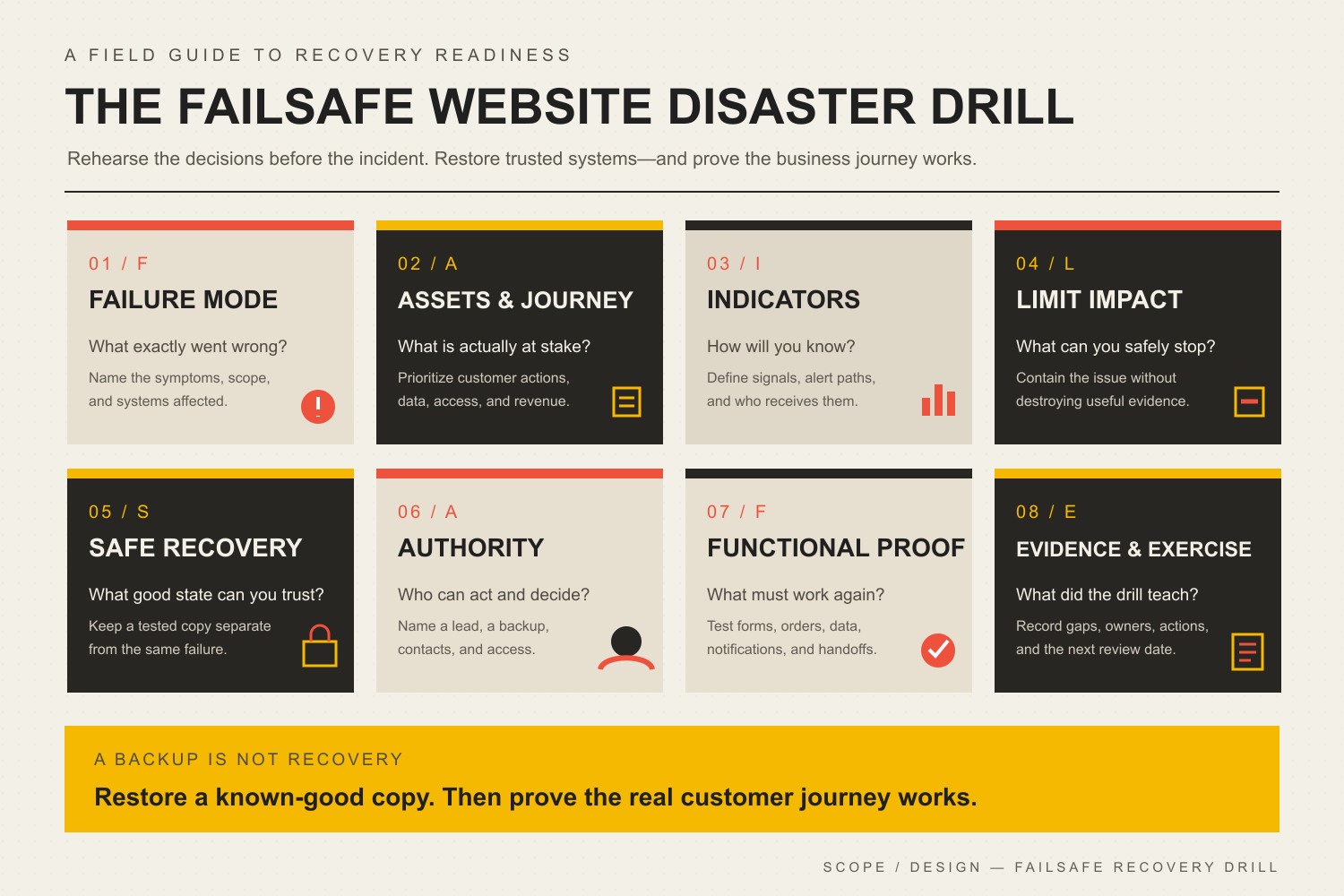
    The FAILSAFE disaster drill: Failure mode, Assets and business journey, Indicators, Limit impact, Safe recovery source, Authority and contacts, Functional proof, and Evidence and exercise.
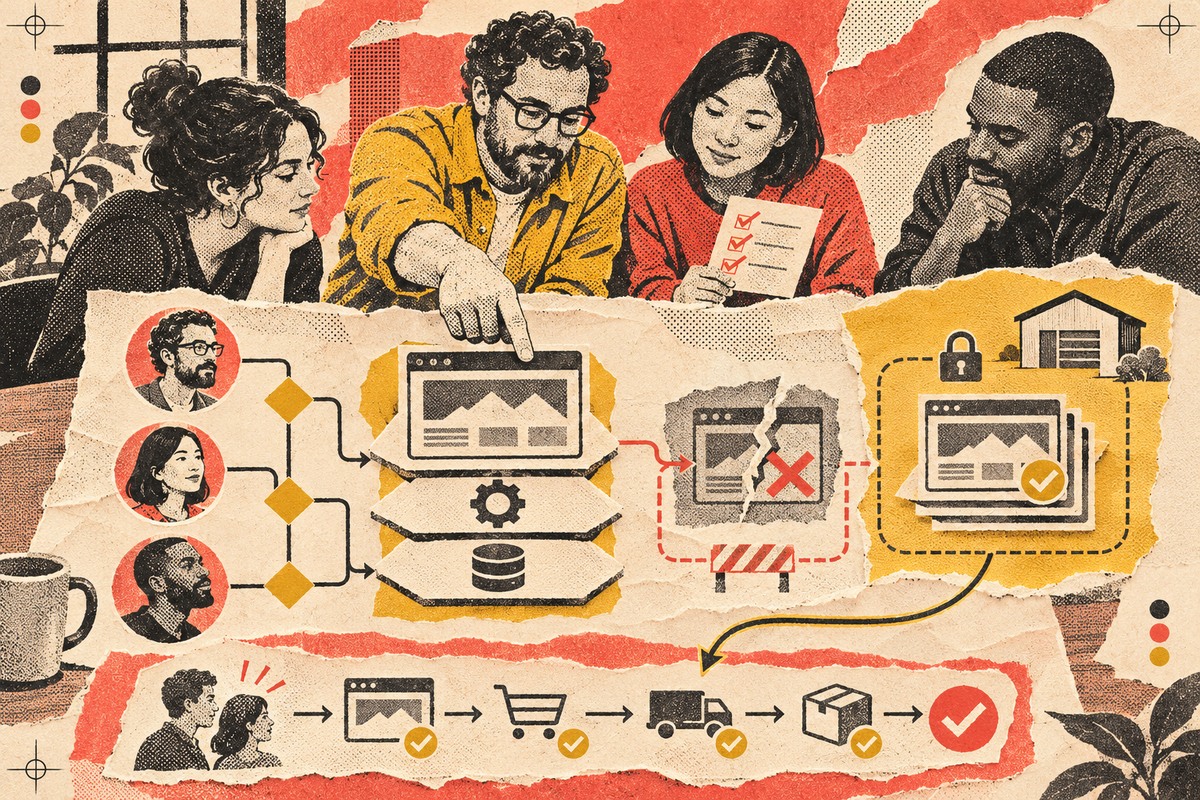
    A website disaster recovery plan connects warning signals and prevention controls to ownership, containment, a known-good recovery source, and proof that the business journey works again.

    If you already suspect the site is compromised, stop treating this as a planning exercise. Use the hacked-website detection and recovery process and bring in the right technical, legal, insurance, or forensic help for the actual incident.

    What a Website Disaster Recovery Plan Must Answer

    A useful plan does not need to be a 90-page binder. It needs to answer the questions that change the response. The exact answers depend on whether the website is a brochure site, an ecommerce store, a membership platform, a booking system, or a custom application. The more revenue, data, staff workflow, and customer trust that depend on the site, the more precise the plan should become.

    • What is critical? Identify the website journeys that the business cannot casually lose: lead forms, checkout, payments, logins, booking, account access, downloads, donor flows, or another business-specific action.
    • What does the site depend on? Hosting, DNS, the domain registrar, CDN/WAF, CMS, database, plugins, themes, transactional email, payment processors, CRM, analytics, APIs, identity providers, and staff accounts can all sit in the dependency chain.
    • How will you know something is wrong? Uptime alerts, security alerts, failed forms, unexpected file changes, new administrator accounts, customer reports, payment failures, DNS changes, search warnings, or a broken deployment can all be signals.
    • Who has authority to act? Somebody must be allowed to disable an account, take a site offline, restore a backup, roll back a change, contact a vendor, communicate with customers, and approve emergency spending.
    • What is the known-good recovery source? A backup is only useful if it includes the right files and data, can be accessed during the incident, and has been restored successfully before.
    • What comes back first? Recovery order should follow business consequence, not whatever screen the technician happens to open first.
    • What proves recovery? “The homepage loads” is not enough when the actual business depends on checkout, forms, email notifications, logins, data integrity, DNS, HTTPS, or an API.

    NIST’s Cybersecurity Framework 2.0 Small Business Quick-Start Guide is a useful grounding model because it treats cybersecurity as a connected lifecycle of Govern, Identify, Protect, Detect, Respond, and Recover. The framework is intentionally flexible; it does not give every small business the same magic stack or the same recovery target.

    Use the Scope Design FAILSAFE Website Disaster Drill

    We use the FAILSAFE Website Disaster Drill to turn “we should probably have a plan” into eight concrete checks. Run one plausible failure through all eight. If the answer turns vague, you have found a readiness gap while it is still cheap to fix.

    F — Failure mode: what exactly went wrong?

    Do not exercise “cyberattack” as a giant blob. Pick a scenario that forces decisions: an administrator account was taken over, a plugin update broke checkout, DNS was changed without authorization, malware injected redirects, the host is unavailable, or the newest backup will not restore. Specific failures expose specific dependencies.

    A — Assets and business journey: what is actually at stake?

    Name the customer or staff journey that matters. A brochure site with a broken contact form has a different consequence than a store that cannot take payments or a membership site exposing account data. This is why a good business website technical foundation starts with the systems and handoffs the business actually depends on.

    I — Indicators and detection: how will you know?

    Write down the signals and who receives them. A detection path that terminates in an inbox nobody checks is theater. Include both automated signals and human reports. Security alerts, uptime monitoring, file-change detection, failed transactions, form tests, email-delivery failures, and customer reports can reveal different problems.

    L — Limit the blast radius: what can you safely stop?

    Containment may mean disabling a compromised account, revoking sessions, pausing checkout, blocking access, disabling a vulnerable component, switching DNS, or temporarily taking the site offline. The plan should say who can make that call. Waiting for six people to approve a reversible containment action is a great way to turn a small incident into a long afternoon.

    S — Safe recovery source: what known-good state can you trust?

    CISA’s #StopRansomware Guide recommends offline, encrypted backups of critical data and regular testing of backup availability and integrity. For a website, the practical question is broader than “is there a zip file?” You may need the database, uploads, configuration, code, DNS records, credentials, integration settings, license information, and a record of the last known-good application state.

    For WordPress, the official Hardening WordPress guidance likewise emphasizes regular backups, monitoring, trusted software sources, access limitation, and knowing the state of the installation. A restore test proves far more than a backup-success email.

    A — Authority and contacts: who can act when normal channels fail?

    List the primary and backup owner for the website, hosting, DNS/registrar, critical integrations, customer communication, and outside technical help. Keep an out-of-band contact method. If the company email account is part of the compromise, a recovery plan stored only in that inbox is a practical joke.

    F — Functional proof: what must work before you call it recovered?

    Define a small recovery test suite before the incident. Check the homepage, but also check the money path and the trust path: submit the lead form, place a test order when appropriate, verify transactional email, test login/logout, confirm permissions, inspect critical data, verify DNS and HTTPS, and confirm monitoring is alive again. Recovery is a business result, not a green server light.

    E — Evidence and exercise: what did the drill teach you?

    Record what worked, what was missing, who had the wrong access, which vendor instructions were stale, how long the exercise took, and what needs to change. Then run it again after a meaningful change to hosting, DNS, ecommerce, authentication, staffing, or another critical dependency. Plans rot when nobody exercises them.

    Seven Website Disasters Worth Rehearsing Before They Happen

    ScenarioQuestion to answer before it happensProof you want
    Administrator account takeoverWho can revoke sessions, disable the account, rotate credentials or keys, and inspect for unauthorized users or changes?MFA enabled, recovery access tested, account inventory current, alternate administrator path known.
    Compromised plugin, theme, or dependencyCan you disable or replace the component without guessing what else depends on it?Dependency inventory, current backup, change record, rollback or replacement path, critical journeys tested.
    Injected malware, redirects, or defacementWho contains the site, preserves useful evidence, and decides whether a clean rebuild or restore is appropriate?Logs available, known-good recovery source, escalation contact, post-recovery malware and account checks.
    Hosting, DNS, domain, or CDN failure/takeoverWho owns each account and what can the business do if one provider or login is unavailable?Registrar/DNS/host ownership documented, MFA/recovery methods tested, critical records exported, alternate contacts available.
    Broken update or deploymentCan the team identify the change and return only the failing component to a known-good state?Baseline, backup, change log, staging or controlled update process, targeted rollback and regression tests.
    Backup or restore failureWhat happens if the newest copy is corrupt, incomplete, encrypted by the same incident, or inaccessible?Independent copies, retention history, restore credentials, recent successful restoration test.
    Form, payment, login, or email integration failureHow will you detect a site that looks “up” while the business journey is broken?Synthetic or manual journey tests, alert owner, vendor contact, fallback process, confirmed downstream records.

    For recurring operational prevention, pair this drill with a business-continuity website maintenance process. The drill reveals what must be recoverable; maintenance keeps the recovery points, monitoring, tests, and ownership from quietly expiring.

    Build a One-Page Website Disaster Runbook

    The full documentation can live behind the scenes. The first page should be usable by a tired human at an inconvenient hour. Keep secrets in an appropriate password manager rather than embedding passwords in the document itself.

    Runbook fieldWhat to write down
    Incident triggerThe signal that turns a warning into an incident: confirmed account takeover, malware finding, critical outage, unauthorized DNS change, failed deployment, or another defined condition.
    Critical journeyThe customer/staff action to protect or restore first.
    Incident owner + backupTwo named people or roles with current contact methods.
    AuthorityWho can take the site offline, disable accounts/components, restore, roll back, contact customers, or approve emergency work.
    Containment actionsThe reversible first actions appropriate to this scenario.
    Recovery sourceWhere the known-good backup/configuration is, who can access it, and the date of the last successful restore test.
    Recovery priorityWhat comes back first and what can wait.
    Validation checklistThe exact pages, forms, orders, logins, data, email, DNS, HTTPS, and monitoring checks required before normal operation resumes.
    Outside contactsHost, registrar/DNS provider, website partner, ecommerce/payment vendor, insurer, legal counsel, forensic/security specialist, or others as relevant.
    Alternate communicationHow the team coordinates if normal email, website, or chat access is unavailable.
    Evidence to preserveLogs, timestamps, screenshots, account changes, alerts, affected URLs, vendor tickets, and decisions.

    This is intentionally not a universal incident-response script. A broken plugin update and a suspected theft of customer information do not deserve the same process. The runbook gives the business a stable starting point and an escalation path.

    Set Recovery Priorities From Business Consequence, Not a Template

    Two common disaster-recovery terms are useful as long as you do not turn them into fake precision. Recovery Time Objective (RTO) describes the target time to restore a service after disruption. Recovery Point Objective (RPO) describes how much recent data loss, expressed in time, the business can tolerate.

    Do not copy somebody else’s “one-hour RTO” because it sounds serious. Start with consequence. If a lead-generation site can temporarily route inquiries to a verified alternate channel, its acceptable downtime may be different from an ecommerce store losing paid orders or a portal needed for daily operations. Likewise, a site updated twice a month has a different data-loss problem from a store creating transactions every minute.

    Your plan should name the target, the reason, and the recovery design required to meet it. That conversation often changes backup frequency, hosting architecture, monitoring, staffing, and support expectations. If the business expects enterprise recovery with bargain-bin ownership, the math eventually files a complaint.

    A Backup Is Not Recovery Until You Have Restored It

    Automated backup notifications are useful. They are not proof that the complete website can be reconstructed. Test enough of the recovery path to answer:

    • Does the backup include the database and the files that matter?
    • Are integration settings, configuration, licenses, DNS information, and other non-obvious dependencies documented?
    • Can the recovery owner access the backup when the normal hosting account is unavailable or compromised?
    • Is there a recovery point old enough to predate a compromise that was discovered late?
    • Can you restore into a safe environment without overwriting the only useful evidence?
    • After restoration, do the critical customer journeys actually work?

    This is also why website maintenance ownership matters. Backups, updates, monitoring, forms, domains, SSL, hosting, and third-party integrations are recurring operational responsibilities. A disaster plan built once and ignored will age badly as those dependencies change.

    Run a Tabletop Exercise Without Turning It Into Security Theater

    A tabletop exercise is a structured conversation around a plausible incident. You are not trying to win cybersecurity trivia night. You are trying to discover where decisions, access, evidence, and recovery break down.

    1. Choose one scenario. “The main administrator account was taken over” is better than “we got hacked.”
    2. Give the team only the information they would have at first. An alert arrived, checkout is failing, or a customer reports a redirect.
    3. Ask who decides what happens next. Do not accept “IT handles it” when nobody can name the person, contact method, or authority.
    4. Introduce a complication. The primary owner is unavailable. The newest backup fails. Company email is inaccessible. The host has not replied.
    5. Walk through containment and recovery. Identify the safe stopping point, known-good source, and recovery order.
    6. Run the validation checklist. What would prove that the site, data, and business journey are actually healthy?
    7. Capture the gaps. Missing access, stale contacts, unclear authority, untested backups, forgotten dependencies, and absent monitoring become concrete follow-up work.

    CISA publishes cybersecurity scenario and tabletop resources for organizations that want a more formal exercise structure. For a small website-dependent business, the useful version can start with 30 to 60 focused minutes and one ugly scenario. The value comes from fixing the gaps afterward.

    Know When the Problem Is Bigger Than the Website Runbook

    A website partner can help with managed updates, backups, monitoring, rollback, website troubleshooting, and coordination across hosting, DNS, WordPress, and integrations. That does not automatically make the partner a forensic laboratory, breach-law firm, insurer, law-enforcement agency, or 24/7 security operations center.

    If there is reason to believe sensitive information was accessed, an attacker persists in the environment, business email or identity systems are involved, legal/contractual notification duties may apply, or the scope is uncertain, preserve evidence and involve the appropriate specialists. Do not “clean things up” so aggressively that you erase the information needed to understand what happened.

    Website Disaster Recovery Plan FAQ

    How do I create a website disaster recovery plan?

    Start with one critical website journey and one plausible failure. Map the systems it depends on, name the owner and backup owner, define the first containment decision, identify a known-good recovery source, decide what must be restored first, and write the tests that prove recovery. Then run a tabletop exercise and fix every vague answer it exposes.

    What should be in a website disaster recovery plan?

    Include critical systems and business journeys, dependencies, incident triggers, roles and authority, out-of-band contacts, containment actions, backup/recovery locations, recovery priorities, validation tests, communications, external escalation contacts, and evidence-preservation instructions. Keep credentials in a secure credential system rather than putting passwords directly in the plan.

    Is there a NIST disaster recovery plan template for a small business website?

    NIST provides the CSF 2.0 Small Business Quick-Start Guide and broader incident/recovery guidance rather than one universal website template. That is appropriate: recovery requirements depend on the business, systems, data, and acceptable disruption. Use NIST’s lifecycle as grounding, then make the runbook specific to your website dependencies and authority.

    How often should a small business test website backups?

    Use a schedule tied to consequence and change rate, not a universal calendar rule. The important point is that restoration is tested regularly enough to catch incomplete backups, expired access, broken procedures, and changed dependencies before an emergency. Test again after major hosting, ecommerce, authentication, or architecture changes.

    What is the difference between website security and disaster recovery?

    Website security reduces risk and helps prevent, detect, contain, and respond to threats. Disaster recovery focuses on restoring trusted systems, data, and business operations after a disruption. Strong security makes recovery less likely to be needed; strong recovery limits the damage when prevention fails.

    What should I do first if my website is hacked?

    Do not blindly restore or delete evidence. Triage the signal, preserve useful evidence, contain access where appropriate, identify the scope, and coordinate recovery from a known-good state. Our dedicated website hacked guide covers the active incident workflow in more detail.

    Do I need a separate backup from my web host?

    You need a recovery design that avoids one failure taking out every usable copy. Depending on the host and architecture, that may mean independent storage, offline or otherwise isolated copies, multiple retention points, and documented access outside the normal production environment. The point is separation from the same failure, not collecting backup logos.

    Who should own website disaster recovery?

    One business owner or accountable role should own the outcome even when technical work is outsourced. Providers can own tasks, but the business should know who has authority, who the backup decision-maker is, which vendors are responsible for which systems, and how escalation works. “Everybody sort of handles it” is how incidents acquire extra chapters.

    Sources and Methodology

    This article was rebuilt through Scope Design’s monitored content workflow on August 21, 2026. We reviewed the existing post and current Content Studio cluster, Scope Design’s Open Brain website-management doctrine, the literal internal-link graph, 12 months of exact-page GA4/Search Console/Bing evidence, U.S. Ubersuggest keyword and SERP data, DataForSEO Google SERP/PAA and search-volume data, and two authorized ChatGPT web-search observations. Third-party keyword volumes were treated as directional estimates, not demand guarantees.

    We deliberately removed the imported draft’s unsupported attack-frequency percentages, universal breach-cost numbers, closure claims, guaranteed recovery times, and unverified Scope Design security-performance claims. Precision without evidence is not reassurance. It is decoration.

    Make the Recovery Plan Somebody’s Job

    The best disaster plan is boring on purpose. The owner is known. The contacts work. The recovery copy has been tested. The business knows what must come back first. The validation checklist matches the real customer journey. And when the website changes, somebody keeps the plan current.

    If nobody clearly owns updates, monitoring, complete backups, restore testing, critical-function checks, and recovery, use our WordPress maintenance services guide to compare the responsibilities a managed plan should actually include. Buy accountable care, not dashboard confetti.