Tag: Video Marketing

  • Video Marketing Types for Business: 10 Formats and When to Use Them

    Video Marketing Types for Business: 10 Formats and When to Use Them

    Video marketing types are not a shopping list. The useful format is the one that helps a specific customer understand, trust, decide, act, or succeed. A product demo can be more valuable than a polished brand film when buyers do not understand what you sell. An onboarding video can be more valuable than a viral short when the real problem is customers getting stuck after the sale.

    For most businesses, the smartest video marketing strategy is to choose a few formats around the bottleneck in the customer journey, give each video one job, connect it to one useful next step, and measure the outcome that job is supposed to improve. That is the difference between a video program and a folder full of expensive MP4 files.

    TL;DR: Choose the Job Before the Video Type

    • Start with the customer problem, not the platform. “We need Reels” is not a business diagnosis.
    • Use one video for one primary job. Explain, demonstrate, prove, compare, qualify, convert, onboard, support, or distribute.
    • Give the video a next step. A useful handoff might be a deeper guide, a service page, a demo request, a reply, a purchase, an onboarding task, or a support resource.
    • Measure the right outcome. Watch time and retention are useful diagnostics. They are not interchangeable with qualified leads, sales progression, activation, support reduction, or retention.
    • Choose the channel after the job. YouTube, LinkedIn, TikTok, Instagram, email, your website, and sales outreach solve different distribution problems. Platform popularity does not decide what your customer needs.

    If your team already maps marketing and sales around handoffs, this fits naturally with our guide to customer lifecycle management. Video is one tool inside that system, not a separate universe.

    Use the VIEW Video Job Test

    Scope Design uses a simple four-question filter before choosing a video format. We call it the VIEW Video Job Test. The point is not to make an acronym feel important. The point is to stop production from starting before anyone can explain why the video should exist.

    1. V — Viewer: Who is this for, and what are they trying to understand, compare, decide, or do?
    2. I — Information: What do they need to see, hear, or understand? Does motion, voice, a screen, a face, or a demonstration communicate that evidence better than text or a static image?
    3. E — Exit: What useful action should happen next if the video works?
    4. W — Win: What business or customer outcome would prove the video earned its cost?

    Four video planning questions move from a specific viewer to useful information, a next step, and a positive outcome.
    The VIEW Video Job Test keeps format decisions tied to a real viewer, useful evidence, a next step, and an owned outcome.

    A format fails this test when the answer to “Why video?” is basically “because everyone is doing video.” That is trend anxiety wearing a production budget.

    10 Video Marketing Types at a Glance

    These ten video marketing types cover the most common business jobs without pretending every company needs every format. The stage column is a useful starting hypothesis, not a law. Real customers bounce around the journey, and the same video can assist more than one step.

    Video typePrimary jobTypical stageUseful next stepWhat to measure
    Demo / walkthroughShow how the thing worksConsideration / decisionDemo, trial, consultation, product pageQualified action after viewing; use-case engagement
    Educational / how-to / FAQAnswer a real questionAwareness / consideration / supportGuide, subscription, service page, next tutorialQualified traffic, assisted action, problem resolution
    Testimonial / case studyReduce perceived risk with real customer evidenceConsideration / decisionCase study, consultation, proposalConversion or sales progression when exposed
    Comparison / objection handlingHelp a buyer evaluate a choiceConsideration / decisionComparison page, conversation, estimateQualified CTA, objection resolution, cycle movement
    Brand / founder / expert storyShow judgment, values, and the people behind the offerAwareness / trustAbout page, expert content, conversationQualified engagement, return visits, assisted inquiries
    Short-form socialEarn attention and test messagesAwareness / distributionProfile, article, longer video, site visitQualified reach, saves, shares, profile/site visits
    Webinar / live Q&A / eventTeach a complex subject with depth or interactionConsideration / decision / educationReplay, meeting, resource, next sessionQualified attendance, questions, meetings, pipeline influence
    Personalized sales videoMove one account or prospect forwardDecision / sales follow-upReply, meeting, proposal actionReply, meeting, opportunity progression
    Onboarding / training / supportHelp customers succeed after the saleOnboarding / retention / supportNext setup step, help article, escalationTime to value, completion, tickets, adoption
    Offer / launch / direct responseAsk for one measurable actionDecision / promotionBuy, book, call, register, visitConversion rate, qualified leads, revenue or booked work

    1. Demo and Walkthrough Videos: Show the Mechanism

    A demo is the right format when the buyer needs to see how a product, service, workflow, or experience works. Software teams can record a real use case. A contractor can show the difference between a patch and a proper repair. A professional service firm can walk through what discovery, review, or delivery actually looks like without exposing confidential client material.

    The strongest demos are organized around the customer task, not the feature menu. Start with the situation, show the relevant part of the process, explain what the viewer should notice, and end at the next useful decision.

    • Use it when: buyers repeatedly ask “How does this work?” or misunderstand what they receive.
    • Do not use it as: a narrated tour of every button, deliverable, or capability simply because the footage exists.
    • Measure: the action after the demo, use-case-specific engagement, demo requests, trials, consultations, or movement in the sales process.

    A demo may live on a service page, in a proposal, in a sales email, on YouTube, or inside onboarding. That is why “YouTube video” is not a business type. YouTube is one possible distribution environment.

    2. Educational, How-To, and FAQ Videos: Answer the Question

    Educational video is useful when the customer needs understanding before they need a pitch. Turn the questions your team already answers into durable explanations: what a process involves, how to compare options, what a common failure looks like, what the customer must prepare, or how to complete a task safely and correctly.

    This is especially strong when the answer benefits from movement, screen recording, tone of voice, or visual sequence. If a two-paragraph answer is clearer and faster, write the two paragraphs. Video does not get bonus points for making information harder to consume.

    • Use it when: the same meaningful question appears in sales calls, search, support, onboarding, or customer conversations.
    • Do not use it as: a generic “tips” treadmill built only to fill a calendar.
    • Measure: qualified discovery, watch/retention diagnostics, clicks to the next resource, assisted inquiries, or successful task completion.

    If the goal is specifically more qualified discovery on YouTube, use our separate guide to getting more YouTube views. This article owns the format decision; that one owns the YouTube growth problem.

    3. Testimonial and Case-Study Videos: Prove It With a Real Customer

    Testimonials work when the buyer understands the offer but still wonders whether to trust the claim, the process, or the provider. The useful version is not a customer staring into a camera saying, “They were amazing.” Ask about the situation before the work, the decision, what happened during the process, what changed, what was difficult, and who the solution is actually a fit for.

    Keep the customer’s experience honest. The FTC’s endorsement and review guidance applies to advertising that uses testimonials and endorsements: claims must be truthful and not misleading, and material connections can require clear disclosure. Do not script a customer into making a claim you could not substantiate yourself.

    For the deeper mechanics of collecting, structuring, and placing proof, use our dedicated guide to customer testimonials that sell without making things up.

    • Use it when: trust, fit, risk, or proof is the bottleneck.
    • Do not use it as: a polished substitute for actual evidence.
    • Measure: the behavior of qualified buyers who encounter the proof, including CTA actions, proposal progression, or conversion where your data can support the comparison.

    4. Comparison and Objection-Handling Videos: Help the Buyer Evaluate

    Some buyers are not asking “What do you do?” They are asking “Which option fits me?” That is a different job. Comparison and objection-handling videos can explain tradeoffs between approaches, packages, product tiers, implementation paths, timelines, or common alternatives.

    The key is to make the comparison useful even when your option does not win every row. If the video only works by hiding the tradeoff, it is an ad wearing a lab coat.

    • Use it when: sales repeatedly stalls around the same choice, concern, misconception, or fit question.
    • Do not use it as: a fake neutral comparison where your option mysteriously scores ten out of ten on everything.
    • Measure: qualified CTA actions, objection resolution, fewer repetitive explanations, and movement from evaluation to the next decision.

    This format is particularly useful for higher-consideration services because a buyer can review it asynchronously and return to the conversation with better questions.

    5. Brand, Founder, and Expert-Story Videos: Show the Judgment Behind the Work

    A brand story is useful when the people, point of view, process philosophy, or operating values materially affect the buying decision. This is common in expert services, founder-led companies, creative work, complex consulting, and businesses where customers are evaluating the team as much as the deliverable.

    The mistake is turning the video into a corporate autobiography. “We were founded in…” matters far less than how your experience changes what you notice, what you refuse to do, how you make decisions, and what customers can expect.

    • Use it when: expertise, philosophy, team fit, or trust is part of the purchase.
    • Do not use it as: a cinematic mission statement with no connection to customer evidence.
    • Measure: qualified engagement with expert content, return visits, assisted inquiries, referrals, and sales conversations where the point of view becomes part of the decision.

    6. Short-Form Social Videos: Use Them for Discovery and Message Testing

    Short-form video is a useful container for one idea: one question, one mistake, one demonstration, one objection, one insight, one before-and-after, or one useful fragment from a stronger source asset. Its business job is often discovery and distribution, not closing the sale on the spot.

    That distinction matters. A short clip can be successful because it sends the right 50 people to a deeper resource. Another can generate 50,000 views and accomplish nothing. The feed does not know your margin, sales cycle, service area, qualification rules, or operational capacity.

    Choose the social channel after you understand the audience behavior. Our guide to the types of social media for business separates platform behaviors so you do not treat every network as the same feed with a different logo.

    • Use it when: you need low-friction discovery, message testing, distribution, or a reusable entry point to deeper evidence.
    • Do not use it as: proof that your business needs to chase every trend, sound, or platform.
    • Measure: qualified reach, saves, shares, profile visits, website visits, follow-on content consumption, and downstream actions.

    7. Webinar, Live Q&A, and Event Videos: Go Deeper When the Decision Deserves It

    Live and long-form sessions make sense when the subject benefits from depth, interaction, demonstration, expert discussion, or audience questions. They can work for complex education, product launches, training, panel discussions, implementation guidance, or a topic where the questions are as useful as the presentation.

    A webinar should not be a 45-minute hostage situation created because somebody already booked the calendar slot. Build it around a decision or skill the right attendee actually cares about.

    The recording can also become a durable source asset. If it contains multiple useful ideas, our content repurposing guide explains how to adapt those ideas to other formats without photocopying the same asset everywhere.

    • Use it when: depth, dialogue, or live interaction improves understanding.
    • Do not use it as: a lead-count stunt full of unqualified registrations.
    • Measure: qualified registrations and attendance, questions, meetings, replay use, next-step actions, and influenced opportunities where measurable.

    8. Personalized Sales and Outreach Videos: Make the Message Specific

    Personalized video is a sales-support format, not a mass-content strategy. The audience may be one prospect, one account, or one small buying group. A short screen recording that references the prospect’s actual situation can be more useful than a highly produced generic pitch.

    Use personalization when you have something specific and legitimate to say. “I looked at the page you sent and here are the two issues I would investigate first” is useful. Dropping a first name into an AI avatar and calling it relationship building is not.

    • Use it when: a specific prospect needs clarification, a proposal walkthrough, an objection response, or a thoughtful follow-up.
    • Do not use it as: creepy pseudo-personalization at scale.
    • Measure: view rate as a delivery diagnostic, then replies, meetings, opportunity progression, proposal actions, and sales-cycle movement.

    9. Onboarding, Training, and Support Videos: Create Value After the Sale

    Some of the most economically useful videos will never go viral because they are not supposed to. Onboarding, training, and support videos help customers complete setup, understand responsibilities, use a product or service correctly, solve recurring problems, and know when to escalate to a human.

    This is where marketing, sales, service, and customer success stop being separate departments in a funnel diagram and become one actual customer experience. If customers keep hearing the same explanation from staff, a good reusable video may reduce friction for both sides.

    Measure these videos with the customer-success outcomes that matter. Our guide to customer success metrics explains why every metric needs an owner, a decision, and a consequence.

    • Use it when: customers repeat the same setup mistakes, questions, or training needs.
    • Do not use it as: an excuse to remove human support where judgment or empathy is required.
    • Measure: onboarding completion, time to first value, support demand, task success, adoption, and retention signals appropriate to the business.

    10. Offer, Launch, and Direct-Response Videos: Ask for One Measurable Action

    Direct-response video exists to move a defined action: buy, book, call, register, request a quote, visit, start a trial, or choose an offer. It can be a product launch, a service offer, an ad creative, a sales-page video, or a commerce video with a purchase path.

    This is where the old category “shoppable video” belongs. Shoppability is a delivery capability, not a universal video strategy. A service firm may need a booking action; an ecommerce business may need a product action; an event may need registration.

    • Use it when: the viewer has enough context to act and the offer has a clear next step.
    • Do not use it as: the first thing every cold viewer sees when they still do not understand the problem or trust the business.
    • Measure: the defined conversion, qualified lead, booked work, revenue, cost per desired action, and downstream quality.

    AI-Generated Video Is a Production Method, Not a Marketing Type

    The old version of this article treated AI-generated and avatar video as one of the ten marketing types. That mixes up how a video is made with what business job the video performs. An AI-assisted video can be an explainer, a training asset, a sales follow-up, a short social clip, or a direct-response ad. The customer job still comes first.

    Use AI when it improves a real production constraint: transcription, caption drafts, rough cuts, cleanup, translation workflows, versioning, storyboarding, or repetitive editing. Keep a human responsible for factual accuracy, rights, customer claims, voice, and whether the result is actually worth publishing.

    Once the format is chosen, our broader guide to video marketing tactics and production workflow covers the wider execution problem. That is intentionally separate from this format-selection guide.

    Choose the Platform After the Business Job

    Platform is a distribution decision. Video type is a communication decision. Conflating them is how a team ends up “needing TikTok” before it can explain what the video is supposed to accomplish.

    EnvironmentUseful whenPrimary question to answer
    Website / landing pageThe video supports an owned buying, proof, or support experienceWhat page decision does the video improve?
    YouTubeThe content benefits from durable discovery, search/browse behavior, or deeper viewingWhat viewer problem deserves a standalone video and a useful next destination?
    LinkedIn / professional networksExpertise, professional proof, referrals, recruiting, or B2B conversation mattersWhich professional audience needs this evidence?
    Short-form feedsFast discovery, message testing, or distribution is usefulWhat single idea deserves a low-friction entry point?
    Email / sales outreachThe audience relationship already existsWhat specific question or next action can video make easier?
    Customer portal / help centerThe viewer is already a customer or userWhat task, setup step, or recurring problem can this solve?

    On YouTube specifically, YouTube Analytics provides reach diagnostics such as impressions, click-through rate, traffic sources, watch time, views, and Shorts “stayed to watch.” Its audience-retention reports can show where viewers keep watching, rewatch, skip, or leave. Those are useful clues about the content. They still need to be connected to the job the video was meant to do.

    Build Accessibility, Honest Proof, and Discoverability Into the Video

    Caption the content people need to understand

    Captions are not decoration. WCAG 2.2 requires captions for prerecorded audio content in synchronized media at Level A, subject to the standard’s exception, and requires captions for live synchronized audio content at Level AA. Even when compliance is not the only reason, captions help make spoken information available to people who cannot hear the audio or are in environments where audio is impractical.

    Do not manufacture testimonial proof

    A customer story should reflect the customer’s real experience. If there is a material relationship or incentive, handle disclosure correctly. If the result is unusual, do not edit the video so the exception looks like the normal outcome. Trust is slow to build and remarkably efficient to destroy.

    If video search matters, build an indexable video experience

    For videos hosted or embedded on your site, Google’s video SEO guidance focuses on discoverability and indexing conditions: an indexable watch page, an embedded and accessible video, a valid stable thumbnail, consistent metadata, and crawlable video resources where required. A keyword in the filename is not a strategy. Neither is stuffing a transcript with phrases the speaker never needed to say.

    Measure the Job, Not One Universal Video Metric

    The same number can mean different things for different videos. Ten thousand views may be excellent for an awareness clip and irrelevant to whether an onboarding video reduced setup friction. A personalized sales video may only need one view if it helps the right person make the next decision.

    Video jobBusiness outcome to ownUseful diagnostics
    Explain / educateQualified next-step action or successful understanding/taskWatch time, retention, resource clicks, questions
    DemonstrateDemo/trial/consultation or use-case progressionPlay rate, key-section retention, CTA clicks
    Prove / testimonialBuyer progression, conversion, proposal movementExposure, completion, CTA clicks
    Discover / short-formQualified discovery into deeper owned assetsQualified reach, saves, shares, profile/site visits
    Webinar / liveQualified attendance, meetings, pipeline influence, education outcomeRegistrations, attendance, questions, replay views
    Personalized salesReply, meeting, opportunity progressionView rate, watch time, response timing
    Onboard / supportTime to value, task success, lower avoidable support demand, adoptionCompletion, repeat views, help-center next steps
    Direct responseQualified lead, booking, purchase, registration, revenueCTR, conversion rate, cost per desired action

    Views tell you that a video was viewed. They do not tell you whether the video did its job.

    That is why the VIEW test ends with Win. Decide the business outcome before production, and you have a chance of learning something after launch instead of reverse-engineering a success story from whatever metric looks nicest.

    A Practical First Three-Video Mix for a Small Business

    There is no universal “best three,” but most businesses can prioritize quickly by asking where customers are getting stuck.

    1. If people do not understand the offer: make a demo or explainer around the most common use case.
    2. If people understand it but do not trust it: create a specific customer case study or testimonial using real evidence.
    3. If people repeatedly ask the same meaningful question: create an educational or FAQ video and connect it to the relevant service, product, or support path.

    Then break the rule when the evidence says to. If existing customers are failing onboarding, your first video may need to be post-sale. If prospects already understand and trust you but deals stall at one objection, make the objection-handling video. If your main issue is qualified discovery, build an educational source asset and selectively distribute short versions.

    The goal is not to “do video.” The goal is to improve a real decision without creating a content treadmill your team cannot maintain.

    Frequently Asked Questions About Video Marketing Types

    What are the main types of video marketing?

    Useful business categories include demos, educational/how-to videos, testimonials and case studies, comparison and objection-handling videos, brand/expert stories, short-form social videos, webinars/live sessions, personalized sales videos, onboarding/support videos, and direct-response or offer videos. The exact count is less important than the job each format performs.

    Which video type is best for a small business?

    The best first video targets the biggest customer or sales bottleneck you can actually measure. If customers do not understand the offer, start with a demo or explainer. If trust is the issue, use customer proof. If the same question keeps appearing, make an educational answer. If customers struggle after buying, onboarding video may deserve priority over acquisition content.

    What is the most popular video marketing format?

    Popularity is not a useful selection rule by itself. Short-form video may dominate attention on some platforms, while demos, testimonials, webinars, and educational videos can sit much closer to a purchase or customer-success decision. Choose by audience behavior, evidence, capacity, next step, and business outcome.

    Is AI-generated video a type of video marketing?

    Not in this framework. AI generation is a production method. The resulting asset still needs a job: explain, demonstrate, teach, prove, sell, onboard, support, or distribute. Treating “AI video” as a strategy skips the customer decision entirely.

    How long should a marketing video be?

    Long enough to complete the job and short enough to avoid wasting the viewer’s time. A personalized sales follow-up may need one minute; a complex webinar may earn much longer; a product demonstration may need only the steps required to prove the use case. Platform limits and audience behavior matter, but there is no honest universal duration that maximizes results for every business and format.

    Do marketing videos need captions?

    If you are working toward WCAG 2.2 conformance, captions are required for prerecorded synchronized audio at Level A and for live synchronized audio at Level AA, subject to the standard’s stated exceptions. Captions are also a practical way to make speech and meaningful audio information available when viewers cannot hear the audio.

    Can video help SEO?

    Video can appear in Google search surfaces when the page and video meet Google’s discovery and indexing requirements. That does not mean adding a video automatically improves a page’s ranking. Treat video SEO as a technical/discoverability job: indexable page, accessible video, stable thumbnail, consistent metadata, and useful content worth finding.

    How should a business calculate video marketing ROI?

    Start with the business outcome the video is meant to influence, then compare that value with the real production and distribution cost while acknowledging attribution limits. For a direct-response video that may be qualified conversions or revenue. For onboarding it may be faster activation or less avoidable support demand. For personalized sales it may be meetings or opportunity progression. Do not force every format into a single “views equals ROI” formula.

    Should every business use TikTok, Reels, or YouTube Shorts?

    No. Short-form feeds are useful when the audience is there, the evidence fits the format, the team can maintain credible participation, and there is a measurable handoff to something the business owns. There is no prize for being inconsistently mediocre on every platform.

    Pick the Video That Solves the Actual Problem

    If your video plan currently starts with a platform, camera, AI tool, or “we should post more,” move the decision upstream. Identify the viewer, the uncertainty, the evidence, the next step, and the outcome. Then choose the cheapest credible format that can do that job well.

    If you have a pile of video ideas and no clear priority, talk to Scope Design. We can help map content to the customer journey, separate useful proof from content busywork, and build a measurement plan before production starts.

  • 7 Proven Ways to Get More Views on Your YouTube Videos in 2026

    7 Proven Ways to Get More Views on Your YouTube Videos in 2026

    Yes, you can get more YouTube views without buying views or gaming the algorithm. The practical path is to choose topics the right viewers care about, make a clear title-and-thumbnail promise, deliver on that promise, help YouTube understand the topic, connect each video to a useful next step, and use Analytics to find the weakest part of the system.

    For a small business, that last part matters. A million random views can make a screenshot look impressive and still produce nothing useful. The goal is qualified viewing: the right person discovers the video, chooses it, gets enough value to keep watching, and has a sensible reason to continue.

    TL;DR

    • Start with a real audience question, not a keyword spreadsheet.
    • Treat the title and thumbnail as one honest promise.
    • Use retention to find where the video stops delivering.
    • Use YouTube SEO for relevance, not keyword stuffing.
    • Connect related videos, but do not assume Shorts will automatically feed long-form.
    • Distribute to people who are actually likely to care.
    • Measure the bottleneck before changing everything at once.

    First, diagnose the problem with the Scope Design VIEW Test

    Most “how do I get more YouTube views?” advice skips diagnosis and jumps straight to tactics. That is how you end up changing the thumbnail, rewriting the description, posting three Shorts, adding 40 tags, and learning absolutely nothing.

    We use a simpler diagnostic: the VIEW Test. It separates the problem into four stages you can actually observe.

    VIEW stageQuestionUseful evidenceLikely next move
    V — Viewer FitIs the topic attractive to the right audience?Topic interest, audience questions, search terms, competitionChoose a better problem or angle
    I — InvitationDoes the title + thumbnail earn an honest click?Impressions, CTR, A/B test resultsImprove packaging
    E — ExperienceDoes the video deliver the promise and hold attention?Intro retention, dips, spikes, average view durationFix the opening, pacing, structure, or payoff
    W — Way ForwardDoes the view lead somewhere useful?End-screen clicks, related-video viewing, site visits, inquiriesBuild a clearer next step

    This framework lines up with YouTube’s own current creator guidance, which separates content performance into Appeal, Engagement, and Satisfaction. That is much more useful than pretending there is one magic ranking factor.

    It also fits Scope Design’s broader SEO and analytics strategy: traffic is evidence of attention. It becomes valuable when it helps the right person make progress.

    1. Choose topics real viewers already care about

    The first way to get more YouTube views is also the least glamorous: make videos about problems your intended audience actually wants solved.

    Before filming, ask three questions: Who is this for? What are they trying to do? Why would this video be worth choosing now? If the answers are “everyone,” “learn stuff,” and “because we need to post,” the topic is not ready.

    YouTube says external factors such as topic interest and competition can affect how many people see a video. Your own Audience and Trends data can also reveal what viewers are watching and searching for. For a business, sales calls, support questions, proposal objections, product comparisons, and recurring customer mistakes are often better topic sources than generic trend lists.

    That is the same principle we use when choosing durable content assets: begin with a real decision or problem, then choose the format.

    • Good topic: “How to choose the right commercial mower deck for uneven ground” — specific audience, problem, and decision.
    • Weak topic: “Our company talks about landscaping equipment” — technically a topic, functionally a hostage situation.
    • Useful check: Search YouTube for the problem, review autocomplete and current results, then compare that with questions your real customers ask.

    2. Make the title and thumbnail earn an honest click

    If a video gets impressions but very few views, the problem may be the Invitation: viewers are seeing the option and choosing something else.

    The title and thumbnail work together. Their job is not to scream louder than every other video. Their job is to make the right promise clear enough that the intended viewer can say, “That looks like the answer I need.”

    YouTube’s current guidance treats titles and thumbnails as major parts of appeal. Better yet, eligible creators can now A/B test up to three title and/or thumbnail variations in YouTube Studio. YouTube selects the winner using watch-time share, not CTR alone.

    That last detail matters. A thumbnail can win the click and lose the viewer. Clickbait is not clever packaging; it is a promise with a chargeback.

    • Make the benefit or question obvious at a glance.
    • Create visual contrast, but do not rely on a universal “bright colors + shocked face” formula.
    • Avoid duplicating the title word-for-word in thumbnail text.
    • Show the object, result, person, or situation when that helps the viewer understand the promise.
    • If impressions are healthy but CTR is weak, test packaging before re-recording the entire video.

    3. Deliver the promise quickly and use retention to find the leaks

    A click is the start of the job, not the finish.

    YouTube’s retention report breaks out the intro, top moments, spikes, and dips. Its current retention guidance specifically looks at how many viewers are still watching after the first 30 seconds and recommends making sure the opening matches the title and thumbnail promise.

    You do not need a fake “pattern interrupt every 37 seconds.” You need to remove the parts that make the viewer regret clicking.

    • Open with the answer or destination. Do not spend 45 seconds introducing the channel when the viewer came for a fix.
    • Show proof early. If the video promises a result, preview the result or explain what the viewer will be able to do.
    • Watch the dips. A sharp drop often points to confusion, repetition, a long tangent, or a mismatch between promise and delivery.
    • Study spikes. Rewatches can reveal the parts people found especially useful, surprising, or difficult.
    • Let length follow the job. YouTube says there is no universal ideal video length. Make it as long as needed to deliver value, then stop.

    The useful question is not “How long should YouTube videos be?” It is “At what point does this video stop earning the next minute?”

    4. Use YouTube SEO for relevance, not keyword stuffing

    YouTube SEO still matters because search is one of the ways viewers discover videos. But “SEO” does not mean repeating a target phrase four times in the description and whispering it into the microphone until the algorithm gives up.

    YouTube says Search evaluates relevance, engagement, and quality. Relevance can include the title, tags, description, and the video content itself. At the same time, YouTube’s separate tag guidance says tags play a minimal role for most videos and are especially useful for common misspellings.

    So use the words your audience uses, but use them to make the topic unambiguous. Our broader guide to SEO keywords and word choice makes the same distinction: keywords identify language; they do not supply knowledge.

    • Use a clear, query-aligned title when search intent is part of the strategy.
    • Write a description that explains what the video covers and gives the viewer useful context.
    • Use chapters for longer videos when navigation helps; YouTube says chapters make sections easier to revisit.
    • Add accurate captions/transcripts for accessibility and usability.
    • Use tags for genuine spelling/variation help, not as a bag of ranking confetti.
    • Review “Traffic source: YouTube Search” and the actual search terms that led viewers to the video.

    If your video does not answer the query, metadata cannot negotiate a different reality.

    5. Build connected viewing, but do not force a Shorts funnel

    One good video should make the next useful video easier to find.

    Use playlists, series, cards when relevant, pinned comments, and end screens to direct viewers toward a closely related next step. YouTube allows end screens in the final 5–20 seconds of eligible videos, where you can promote another video, playlist, subscription, or other supported element.

    But do not assume every Short is a magical top-of-funnel machine for long-form. YouTube explicitly notes that viewers often have different format preferences and that cross-format behavior is not automatic. If people enjoy your 20-second Short, that does not guarantee they want a 22-minute tutorial from the same channel.

    Use Shorts when the idea works as a Short. Use long-form when the problem deserves depth. Connect them when the audience behavior supports the connection.

    A practical approach is to create topic neighborhoods: one main video solves the central problem, and two or three related videos answer the next questions. That creates useful continuity without turning the channel into an autoplay maze.

    6. Distribute the video to qualified audiences outside YouTube

    YouTube discovery matters, but you do not have to sit quietly and wait for the recommendation system to discover your masterpiece.

    YouTube’s own promotion guidance recommends cross-promoting videos on websites, newsletters, forums, social platforms, and other relevant channels, as well as allowing embedding when appropriate.

    For a business, distribution should be specific. Put a tutorial inside the related product page. Send a comparison video to prospects who keep asking the comparison question. Embed an onboarding walkthrough in the help center. Turn a strong segment into a short social clip that points back to the source when that handoff makes sense.

    This is also where content repurposing can help. Start with something worth repurposing, then adapt the evidence to each channel instead of spraying the same caption everywhere.

    Paid promotion can also be legitimate when you need targeted reach. Just keep the measurement honest: paid views prove you bought distribution. They do not prove the video would have earned the same audience organically.

    7. Use YouTube Analytics to fix the constraint, not everything

    If you only remember one section, make it this one: diagnose before you optimize.

    YouTube’s Reach analytics shows impressions, CTR, views, watch time, traffic sources, search terms, suggested videos, and external discovery. Retention shows where attention changes. Put those reports together and the problem usually becomes less mysterious.

    What you seeMost likely VIEW problemWhat to test next
    Low impressionsViewer Fit / discoveryTopic demand, audience match, competition, search relevance, distribution
    Healthy impressions, weak CTRInvitationTitle/thumbnail promise and A/B test
    Good CTR, sharp early dropExperienceOpening, promise fulfillment, pacing
    Good watch behavior, little continued viewingWay ForwardRelated video, playlist, end screen, CTA
    Views rise, business result stays flatAudience/outcome mismatchQualified audience, offer relevance, next-step tracking

    Do not compare every video to an imaginary universal benchmark. Compare similar videos on your own channel, look for changes over time, and ask what the data can actually support.

    And do not confuse subscribers with active audience. YouTube itself recommends using Unique Viewers when you need a better picture of the people actually watching.

    A 30-day YouTube view-growth plan that actually teaches you something

    The point of a 30-day plan is not to “optimize the channel” in one heroic weekend. It is to create evidence.

    1. Days 1–3: pick one representative video. Choose a video that matters to the business and has enough impressions or viewing data to diagnose.
    2. Days 4–7: run the VIEW Test. Identify the weakest stage. Do not start with the tactic you personally enjoy doing.
    3. Week 2: change one meaningful variable. Test packaging, revise the opening on a future video, improve search relevance, or add a better next-view path. One hypothesis at a time.
    4. Week 3: distribute intentionally. Put the video in the places where the intended audience already has the problem.
    5. Week 4: review the evidence. Check Reach, retention, traffic sources, related viewing, and the business next step. Keep, revert, or form the next hypothesis.

    If the only conclusion after 30 days is “views went up,” keep digging. Which viewers? From where? What did they watch? What changed? What business action, if any, became more likely?

    Frequently asked questions about getting more YouTube views

    How can I get more YouTube views organically?

    Start with a topic your intended viewers care about, package it clearly, deliver the promise, make the topic easy for YouTube Search to understand, and distribute it to relevant audiences. Then use Analytics to diagnose whether the constraint is impressions, CTR, retention, or the next-view path. “Organic” does not mean passive; it means the view was not purchased.

    Does YouTube SEO still work in 2026?

    Yes, search relevance still matters. YouTube says Search considers relevance, engagement, and quality. Use accurate titles, descriptions, video content, and useful supporting metadata. Do not confuse YouTube SEO with keyword repetition or tag stuffing.

    Do tags help a YouTube video get more views?

    Usually not much. YouTube says tags can help when a topic is commonly misspelled, but otherwise play a minimal role in discovery. Spend your effort on the topic, title, thumbnail, video itself, description, and viewer response first.

    Should I change the title or thumbnail if a video is underperforming?

    If the video is getting meaningful impressions but people are not choosing it, packaging is a reasonable thing to test. YouTube now provides native title/thumbnail A/B testing for eligible videos. If a video is already performing well with its audience, do not change it just because an internet checklist told you to.

    Do YouTube Shorts help long-form videos get more views?

    Sometimes, but not automatically. YouTube says viewers often have different preferences across formats. A Short can introduce a topic or creator, but measure whether those viewers actually continue to long-form instead of assuming the funnel exists.

    How long should a YouTube video be?

    Long enough to do the job and no longer. YouTube says there is no universal ideal length. Use retention and viewer response to see where the content earns attention and where it starts wasting it.

    What is the best time to post a YouTube video?

    Post when your workflow and audience make sense, especially if you want early community interaction. But YouTube says publish time is not known to affect a video’s long-term viewership. Do not sacrifice quality or consistency to hit a mythical universal hour.

    Is it worth paying to promote a YouTube video?

    It can be, when you have a defined audience, objective, and measurement plan. Paid promotion buys reach; it does not prove organic demand. Treat paid and organic performance as different evidence and judge both against the business outcome you actually care about.

    More views are useful only when they move the right audience

    You do not need to outsmart YouTube. You need to make it easy for the right person to discover a relevant video, choose it, get what they were promised, and continue in a useful direction.

    That is the VIEW Test in one sentence: right Viewer, clear Invitation, satisfying Experience, useful Way Forward.

    If your channel is getting views but you cannot connect them to useful customer behavior, or if your videos are not earning enough qualified discovery to learn from, start with the broader Scope Design SEO and analytics system. We would rather diagnose the constraint than sell you more content to feed it.

  • Video Marketing Strategy: 15 Practical Moves That Drive Business Growth

    Video Marketing Strategy: 15 Practical Moves That Drive Business Growth

    A strong video marketing strategy does not start with TikTok, YouTube, a camera, or a production budget. It starts with a business problem and a customer decision. The job of the video is to help the right person understand something, trust something, or do something—and then give that person a useful next step.

    That is the difference between “making video” and using video to support growth. A clip can earn thousands of views and still do nothing for the business. A modest FAQ, demo, testimonial, or sales video can be valuable with a much smaller audience if it removes friction from a real buying decision.

    • Start with the constraint: awareness, understanding, trust, conversion, sales friction, onboarding, or retention.
    • Give each video one job: answer one meaningful buyer question and point to one relevant next step.
    • Measure two layers: one video diagnostic and one business signal.
    • Improve the chain: use what you learn to choose the next test instead of blindly producing more.

    The Video Growth Chain: How Video Earns Business Value

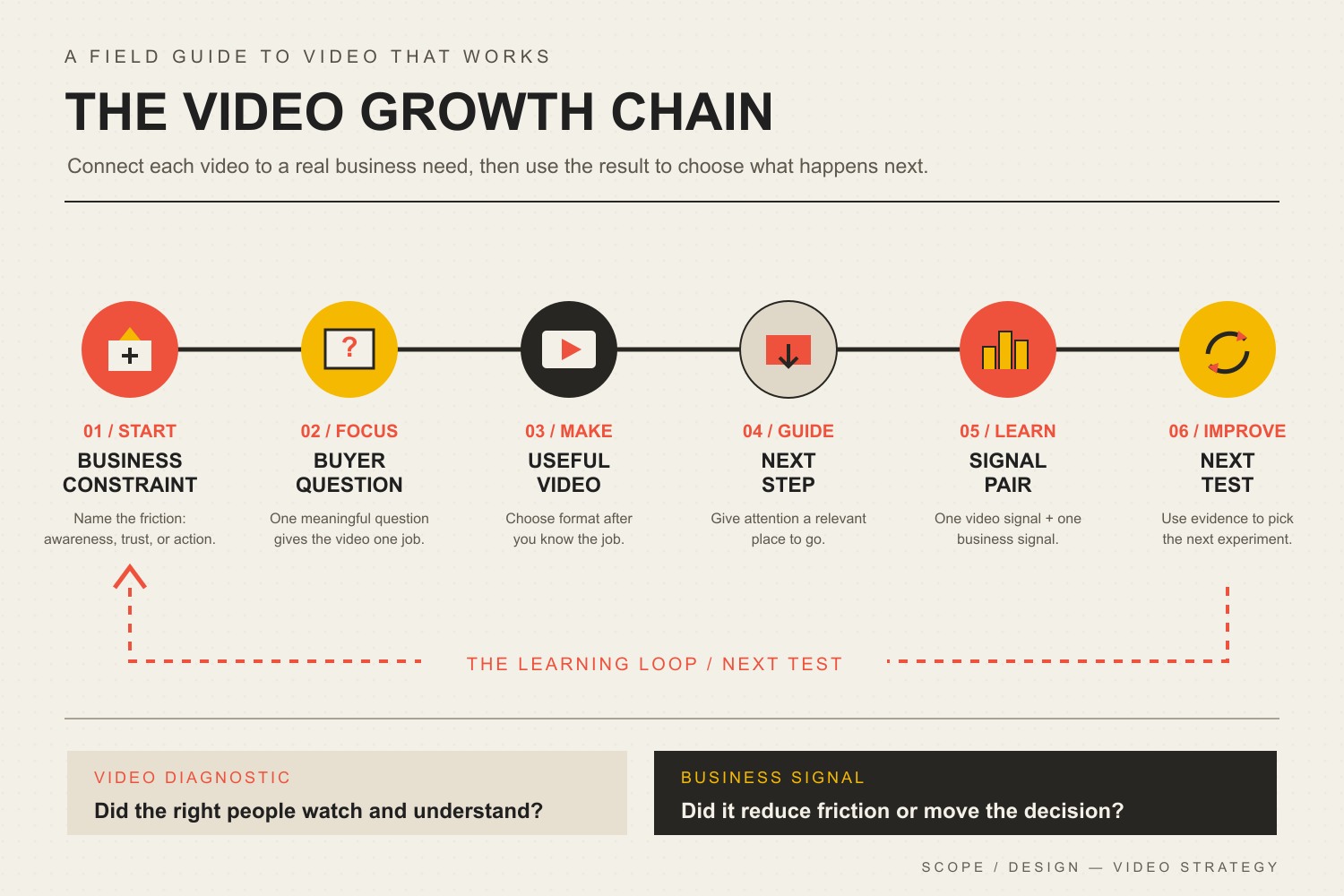
    At Scope Design, we use a simple operating idea for video: Business constraint → Buyer question → Useful video → Next step → Signal → Next test. We call it the Video Growth Chain. Every link matters. If the customer question is vague, the video becomes generic. If the next step is missing, attention has nowhere useful to go. If the signal is wrong, you learn the wrong lesson.

    The Video Growth Chain: business constraint, buyer question, useful video, next step, paired video and business signals, and a next test.
    The Video Growth Chain connects a real business constraint to a buyer question, useful video, next step, measurable signal, and informed next test.

    This framework also prevents a common planning mistake: treating format choice as the strategy. Format matters, but it comes after the job is clear. If you need help deciding between demos, explainers, testimonials, short-form clips, webinars, and other formats, use our guide to video marketing types and when to use them. This article owns the broader operating system.

    15 Video Marketing Moves That Drive Growth

    1. Start With a Business Constraint, Not a Platform

    “We should do more video” is not a strategy. Name the constraint first. Maybe qualified prospects do not know you exist. Maybe they visit the site but cannot understand the offer. Maybe sales calls stall on the same objection. Maybe new customers keep asking the same onboarding question.

    The constraint tells you what the video must change. Awareness work needs qualified attention. Understanding work needs clarity. Trust work needs believable proof. Conversion work needs a clean handoff. This is also consistent with a broader marketing strategy built around the business constraint and conversion path, not a channel chosen in isolation.

    2. Give Each Video One Buyer Question

    Useful videos usually answer a question the customer is already trying to resolve: “How does this work?” “What will this cost?” “Can I trust this company?” “What happens after I sign?” “Will this work for a business like mine?”

    One question creates editorial discipline. It keeps the opening focused, makes examples easier to choose, and helps you know when the video is finished. A five-minute answer to one expensive objection can be more valuable than a broad 20-minute “ultimate guide” that never resolves a decision.

    3. Choose the Format After You Know the Job

    A testimonial is not automatically better than a demo, and a short-form clip is not automatically better than a webinar. Format should follow the behavior you need to change. Need proof? Customer evidence may fit. Need clarity? A demo or screen recording may fit. Need discovery? Short educational clips may fit.

    Do not force one video to carry the whole funnel. A discovery clip can hand off to a deeper explainer. An explainer can hand off to a case study. A case study can hand off to a consultation. That sequence is often more useful than trying to make a single “brand video” do everything.

    4. Open With the Useful Part

    You do not need a universal “three-second rule” to know that slow openings create friction. Skip the long logo animation, biography, and throat-clearing when the viewer came for an answer. State the problem, show the result, ask the relevant question, or demonstrate the useful thing early.

    The right opening depends on the video. A search-driven tutorial can state exactly what it will teach. A product demo can show the outcome before the setup. A testimonial can begin with the customer’s original problem. Optimize for relevance, not a made-up universal timer.

    5. Use Enough Production Quality to Protect Trust

    “Authentic” does not mean careless. Viewers can forgive a phone camera more easily than muddy audio, unreadable screen recordings, confusing edits, or rambling explanations. Prioritize understandable audio, steady framing, useful lighting, legible visuals, and a clear structure before expensive cinematic polish.

    The production level should match the decision. A personalized proposal walkthrough can be intentionally simple. A flagship brand film may justify more polish. The goal is not “low production” or “high production.” The goal is the level of clarity and credibility the situation requires.

    6. Design the Next Step Before You Record

    Do not wait until the edit is finished to ask what the viewer should do next. Define the handoff first. It might be a related guide, pricing page, product page, assessment, consultation, email signup, demo request, or onboarding step.

    Then make sure the destination can finish the job. If the video creates interest but the landing page is confusing, the form is broken, or nobody owns the follow-up, more views simply deliver more people into a weak system. Our website conversion playbook covers that handoff in more depth.

    7. Build Captions and Accessibility Into Production

    Captions are not just a social-media convenience. They are part of making synchronized video understandable to people who cannot hear the audio. WCAG 2.2 requires captions for prerecorded synchronized media at Level A, subject to the standard’s stated exception for media alternatives.

    Build caption review into the workflow instead of treating auto-generated captions as automatically finished. Check names, product terms, numbers, punctuation, and timing. If important information appears only visually, consider whether the surrounding page or an appropriate description makes that information accessible too.

    8. Adapt the Message to the Channel Context

    Republishing can save time, but identical uploads are not a strategy. A prospect watching a search tutorial, scrolling a social feed, reviewing a proposal, or comparing vendors on a landing page has a different level of intent.

    Keep the core idea consistent while adapting the opening, framing, crop, captioning, CTA, and depth to the context. If social traffic is part of the plan, our guide to turning social traffic into business outcomes goes deeper on the path from attention to action.

    9. Give Important Videos a Useful Home on Your Website

    A strategically important video should not exist only as a social post that disappears into a feed. Give evergreen videos a relevant page where the surrounding text, offer, proof, and next step help the viewer act. For search visibility, technical implementation matters too.

    Google’s video SEO documentation emphasizes discoverable video on indexable watch pages, stable thumbnails, crawlable video resources, and consistent metadata/structured data. A clever filename is not a substitute for those fundamentals. For the broader search system, see our SEO and analytics growth guide.

    10. Repurpose From a Source Idea, Not From Random Clips

    Good repurposing starts with a useful source: a customer interview, webinar, demo, founder explanation, FAQ session, or in-depth tutorial. Extract the questions, objections, examples, proof, and decisions inside it. Then adapt those units for the moments where they are useful.

    That produces a coherent system instead of a folder full of disconnected snippets. Our content repurposing guide covers the mechanics of turning one source asset into useful derivative content without merely duplicating it.

    11. Batch the Repeatable Mechanics, Not the Judgment

    Batching works well for outlines, recording setup, thumbnail production, caption cleanup, exports, uploads, and clip extraction. It works poorly when it becomes an excuse to lock in 30 weak topics before you have learned anything.

    Create a repeatable production lane, but keep topic choice and next-test decisions responsive. Record several well-chosen videos in one session if that reduces friction. Then let the evidence from those videos shape the next batch.

    12. Use AI as a Production Assistant, Not a Source of Truth

    AI can accelerate transcript cleanup, rough outlines, clip identification, title variations, caption drafts, shot lists, and editing chores. It can also confidently invent facts, flatten your point of view, or turn a specific customer question into generic marketing language.

    Keep human editorial control over claims, examples, customer context, brand voice, and final decisions. Automate the repetitive work around the insight—not the responsibility for whether the insight is true. The same principle applies to broader AI-powered marketing automation.

    13. Treat Customer Video as Evidence, Not Decoration

    A vague “They were great!” testimonial adds little. Strong customer video describes the starting problem, the decision, what changed, and the result in language a future buyer can recognize. Specificity makes the proof useful.

    It also needs to be honest. FTC guidance on endorsements, influencers, and reviews requires advertising claims to be truthful and not misleading, and material connections may need disclosure. Do not script a customer into a result they did not experience. Our guide to customer testimonials and social proof goes deeper on collecting proof that is specific and credible.

    14. Measure One Video Signal and One Business Signal

    Video platforms provide useful diagnostics: impressions, click-through rate, watch time, average view duration, retention, traffic sources, completion, shares, or saves depending on the channel. Those numbers help diagnose the content. They do not automatically tell you whether the business problem improved.

    Pair one diagnostic with one downstream signal. For a demo, that may be watch engagement plus demo requests. For a testimonial, it may be page engagement plus qualified inquiries or sales feedback. For onboarding, it may be completion plus fewer repeated support questions. For a social educational clip, it may be qualified engagement plus visits to the intended resource.

    Do not force false precision when attribution is messy. Assisted influence is real, but it is not the same as causal proof. Our marketing ROI framework explains how to separate decision metrics from diagnostic metrics when comparing marketing work.

    15. Decide the Next Test Before You Declare a Winner

    A video is not “good” because it beat an arbitrary benchmark. Ask what the signal suggests. Did the right people start watching but leave before the useful proof? Did they finish but ignore the CTA? Did qualified prospects mention the video on sales calls? Did a tutorial reduce repeated questions?

    Turn that observation into one controlled next test: a clearer opening, tighter example, different proof, better destination, stronger distribution, or different buyer question. If you are paying to amplify content, set a budget and stop rule before the campaign begins. Our content promotion strategy guide covers that distribution layer.

    A 30-Day Video Marketing Strategy for a Small Business

    You do not need a studio or a 40-video calendar to start. Use one month to build and test the chain.

    1. Week 1 — Find the constraint. Review sales questions, support tickets, search queries, form friction, and customer conversations. Choose one problem worth improving. Write down the business signal you care about.
    2. Week 2 — Build three useful answers. Choose three buyer questions connected to that constraint. Select the simplest format that can answer each well. Define the next step before recording.
    3. Week 3 — Produce and distribute. Record with clear audio and structure. Add reviewed captions. Publish each video where the intended audience can encounter it, and give important evergreen videos an owned-web destination.
    4. Week 4 — Diagnose and choose the next test. Review one content diagnostic and one business signal per video. Do not average unlike jobs together. Choose the single change most worth testing in the next batch.

    After 30 days, the goal is not to prove that “video works.” The goal is to know more about which customer questions, proof, handoffs, and distribution choices help your specific business move.

    Video Marketing Strategy FAQ

    What is the best video marketing strategy?

    The best strategy is the one tied to a specific business constraint and customer decision. Start with the bottleneck, identify the buyer question, create the simplest useful video, define a relevant next step, measure a diagnostic plus a business signal, and use the result to choose the next test.

    Which video platform should a small business use first?

    Choose the audience and job before the platform. Search-driven educational video may fit YouTube or an owned resource page. Social discovery may fit a platform where your customers already spend attention. Personalized sales video may belong in email or proposals. There is no universal first platform.

    How long should a marketing video be?

    Long enough to complete its job without unnecessary friction. A quick objection answer might take 45 seconds; a technical tutorial may need 12 minutes. Use retention and downstream behavior to diagnose whether the length is serving the task rather than forcing every video into one benchmark.

    How do you measure video marketing ROI?

    Start by defining the economic outcome the video is meant to influence, then pair it with a video-level diagnostic. Compare the value of qualified actions, pipeline, sales efficiency, support reduction, activation, or other relevant outcomes against production and distribution cost. Avoid pretending that every assisted touch can be attributed with causal precision.

    Can AI create a complete video marketing strategy?

    AI can help with research organization, outlines, transcripts, clipping, caption drafts, and production speed. It should not replace first-party customer knowledge, factual verification, brand judgment, or the decision about which business constraint matters. Use AI to accelerate the workflow around the strategy, not to invent the strategy for you.

    Make Video Part of the Business System

    The most durable video marketing strategy is not a list of platform tricks. It is a repeatable way to connect a real buyer problem to a useful explanation, a believable piece of proof, a clear next step, and an outcome you can learn from.

    If your business has plenty of content ideas but no clear path from attention to action, Scope Design can help connect the video plan to the offer, website, search strategy, content system, and measurement that make the handoff work.

  • 18 Essential YouTube Tools for Better Content and Smarter Growth

    18 Essential YouTube Tools for Better Content and Smarter Growth

    The best YouTube tool stack is usually smaller than the list of tools you could buy. For most small businesses and creators, the right starting point is YouTube Studio, one thumbnail tool, one editor, and a reliable audio source. Add a specialist only when a repeated bottleneck proves you need it.

    That is the difference between a useful production system and a folder full of subscriptions. A keyword tool cannot rescue a weak topic. A video editor cannot fix an unclear promise. A scheduler cannot create demand. And an AI clipping tool cannot decide which moment actually matters to your customer.

    This guide compares 18 current YouTube tools by the job they perform: research, packaging, recording, editing, audio, captions, publishing, repurposing, and measurement. For each one, the important question is not “Is this popular?” It is “What problem would this remove from my workflow?”

    Which YouTube tools do you actually need?

    If you are starting from scratch, build a minimum viable stack before you shop for advanced features:

    • Plan and measure: YouTube Studio first; Google Trends for directional topic research.
    • Package: Canva or Adobe Express for thumbnails. Pick one unless your team already has a reason to use both.
    • Record: OBS Studio for screen/solo recording, Riverside for remote interviews, or StreamYard for live production.
    • Edit: choose one primary editor—DaVinci Resolve, Premiere Pro, CapCut, or Descript—based on the work you actually do.
    • Audio and captions: start with YouTube Audio Library and YouTube’s native captions; add a paid library or caption service when quality, licensing, or workflow demands it.
    • Distribute and repurpose: use YouTube’s native scheduling unless you truly need cross-platform coordination; add Buffer or OpusClip only for that proven gap.

    If your real problem is getting more qualified views rather than producing videos efficiently, use our dedicated guide on how to get more YouTube views. This article owns the tool decision; that one owns the growth diagnosis.

    Use the Scope Design GEAR Test before adding another tool

    Software decisions get easier when you start with the constraint instead of the feature list. We use a simple four-part test for YouTube tools:

    • G — Gap: What recurring bottleneck does this tool fix?
    • E — Evidence: What metric or workflow result will show that it helped?
    • A — Added overhead: What does it duplicate, cost, or complicate?
    • R — Reversibility: Can you export your media, data, and process and leave cleanly?

    A tool that cannot pass GEAR probably belongs on the “interesting” list, not the company card. This follows the same lean-stack principle we use in our broader small business marketing strategy: fix the system before buying more attention or more software.

    18 YouTube tools worth knowing

    1. YouTube Studio — the native command center

    YouTube Studio should be the first tool in almost every stack because it is the source closest to the platform itself. Current Studio analytics covers reach, engagement, audience, content performance, revenue for eligible channels, and a Trends area for idea discovery. At the video level, Reach helps you inspect impressions and click-through rate while Engagement helps you inspect watch time and retention.

    YouTube also now offers native title and thumbnail A/B testing for eligible content, testing up to three variants and selecting the result using watch-time share. That matters when evaluating third-party “optimization” tools: some jobs you once needed a plugin for may now exist natively.

    Use it when: always. Skip another tool when: Studio already answers the question you are trying to solve.

    2. Google Trends — directional topic research

    Google Trends is useful for comparing topic momentum, seasonality, and related interest before you commit time to production. It is especially useful when you are deciding between two ways of framing the same business problem.

    Do not treat Trends as exact YouTube search volume. Use it as directional evidence, then pair it with what your own audience watches, the questions customers ask, and the search terms visible in YouTube Analytics.

    Use it when: you need a free signal about topic direction. Skip it when: you are looking for channel-specific performance evidence—Studio is better for that.

    3. vidIQ — YouTube-specific research when research is the bottleneck

    vidIQ layers YouTube-specific keyword, trend, competitor, ideation, and optimization tools around the creator workflow. Its current keyword research can surface related terms, questions, rising keywords, and estimated search/competition signals.

    The important limitation is conceptual: an estimated keyword score is not a promise that a video will rank or satisfy viewers. YouTube itself describes search and recommendation as multi-signal systems. Use vidIQ to improve research speed, not to outsource editorial judgment.

    Use it when: topic and search research is repeatedly slow or inconsistent. Skip it when: Studio, customer questions, and a simple research process already give you enough evidence.

    4. TubeBuddy — a browser layer for YouTube workflows

    TubeBuddy is a browser extension that adds tools directly on top of YouTube. It remains useful for creators who want an integrated extension-based workflow around channel management and optimization.

    But compare every paid feature against current YouTube Studio before subscribing. Native Studio now handles more packaging, analytics, scheduling, and experimentation than it once did. If your only reason for buying a third-party tool is title or thumbnail testing, check whether your channel already has YouTube’s native A/B test first.

    Use it when: its extension workflow saves recurring channel-management time. Skip it when: it mostly duplicates Studio or another research tool you already pay for.

    Thumbnail and packaging tools

    5. Canva — fast, repeatable thumbnail production

    Canva is a practical choice when the bottleneck is producing consistent thumbnails without a full design workflow. Templates, reusable brand elements, and simple collaboration make it approachable for a small team.

    The risk is template sameness. A thumbnail is packaging, not decoration. Start from the video promise, then design the image. If the visual looks polished but says nothing specific, the tool did its job and the strategy did not.

    Use it when: speed and consistency matter more than advanced image compositing. Skip it when: your existing design stack already makes thumbnails efficiently.

    6. Adobe Express — a strong alternative for Adobe-oriented teams

    Adobe Express offers a fast template-driven route to YouTube thumbnails and branded social graphics. It is most compelling when your team already lives in Adobe’s ecosystem or prefers its asset workflow.

    You probably do not need both Express and Canva for the same job. Pick the one your team can use quickly, keep the source files organized, and create recognizable packaging with.

    Use it when: it fits your existing Adobe workflow. Skip it when: another design tool already owns thumbnail production.

    Recording and live-production tools

    7. OBS Studio — free screen recording and live production

    OBS Studio is free, open-source software for video recording and live streaming on Windows, macOS, and Linux. It is especially useful for tutorials, demonstrations, screen recordings, webinars, and more technical live setups where you want scene control without a subscription.

    Its strength is also its tradeoff: OBS gives you control, but that means setup. If your only requirement is a simple talking-head recording, a lighter tool may remove more friction.

    Use it when: screen capture, scenes, or live control are recurring needs. Skip it when: setup complexity is larger than the production problem.

    8. Riverside — remote interviews with separate source tracks

    Riverside is built around remote recording for interviews, podcasts, webinars, and video content. Its workflow can capture separate local tracks for participants, which gives an editor more control than relying on a compressed meeting recording.

    That makes it useful when guests are part of the content format. It is unnecessary overhead for a solo creator whose main job is recording a screen or camera locally.

    Use it when: remote guest quality and separate tracks matter. Skip it when: you rarely interview people.

    9. StreamYard — browser-based live shows and interviews

    StreamYard focuses on browser-based live streaming, guest interviews, podcasts, and webinars. It reduces some of the technical setup that comes with a more configurable broadcasting tool.

    Use it when: live or guest-based programming is a recurring format and ease of operation matters. Skip it when: you do not publish live content or already have a reliable OBS workflow.

    Video editing tools

    Editing is where tool overlap gets expensive quickly. Pick one primary editor based on the kind of videos you make. If you routinely export a project from one editor just to perform one minor task in another, that may be a real gap. If you bounce among four editors because each one has an interesting AI button, that is tool sprawl.

    10. DaVinci Resolve — powerful editing with a capable free tier

    DaVinci Resolve combines editing, color, visual effects, motion graphics, and audio post-production in one application. The current free version is substantial enough for many YouTube workflows, while Studio adds advanced capabilities.

    Use it when: you want a serious editor without automatically committing to a recurring editing subscription. Skip it when: your editing needs are simple enough that the learning curve becomes the bottleneck.

    11. Adobe Premiere Pro — mature post-production for Adobe teams

    Adobe Premiere Pro remains a strong choice for teams that already depend on Adobe workflows, hand projects between editors, or need a traditional timeline-based editing environment with a broad professional ecosystem.

    Use it when: the Adobe ecosystem, team compatibility, or advanced post-production work justifies it. Skip it when: you are paying for professional complexity but producing simple cuts that another tool handles faster.

    12. CapCut — fast editing for Shorts and social derivatives

    CapCut is useful when speed matters, particularly for vertical clips, captions, and social-first edits. Current CapCut documentation confirms auto-caption workflows across web, desktop, and mobile, with platform-specific differences.

    Use it when: short-form editing and caption styling are recurring production tasks. Skip it when: your long-form post-production already works cleanly in a primary editor and adding another timeline creates more handoffs than it removes.

    13. Descript — edit spoken video through the transcript

    Descript turns transcription into an editing interface: change the text and the underlying spoken video follows. That can be dramatically faster for interviews, tutorials, podcasts, and talking-head content where the edit is mostly about words, pacing, and cleanup.

    Use it when: transcript-first editing removes time from spoken-content production. Skip it when: your work depends heavily on visual timing, complex motion, or a timeline workflow your editor already knows well.

    Audio, music, and caption tools

    14. YouTube Audio Library — start here for music and sound effects

    The YouTube Audio Library is built into YouTube Studio and provides production music and sound effects that YouTube identifies as copyright-safe for use on the platform. Some Creative Commons tracks require attribution, so check the license details instead of assuming every track has identical terms.

    Use it when: you need a native, low-friction audio source. Skip a paid library when: the Audio Library already covers the sound and licensing job.

    15. Epidemic Sound — a broader paid music and SFX library

    Epidemic Sound is useful when a broader licensed music and sound-effects catalog materially improves production or saves licensing research time. The important part is choosing a plan that actually matches how you publish—including business or client work where applicable—not simply downloading tracks under the assumption that every subscription grants every use.

    Use it when: music selection and licensing are recurring production constraints. Skip it when: native/free audio already meets the job.

    16. Rev — transcription and captions when accuracy is the real requirement

    Rev can fill the gap when you need a dedicated transcription/caption workflow rather than accepting platform-generated text as-is. That may matter for accessibility, customer-facing transcripts, regulated or technical vocabulary, or content you plan to reuse elsewhere.

    Automatic captions are a starting point, not a reason to stop reviewing text. Names, jargon, numbers, and ambiguous audio still deserve human QA regardless of which tool created the first pass.

    Use it when: caption/transcript quality or downstream reuse justifies a specialist workflow. Skip it when: native captions plus a careful manual review already meet the requirement.

    Scheduling and repurposing tools

    17. Buffer — useful when YouTube is part of a multi-platform calendar

    Buffer currently supports planning and scheduling YouTube Shorts alongside other social channels. That can make sense for a team coordinating Shorts, Reels, TikTok, and other derivatives from one content calendar.

    But YouTube Studio can schedule YouTube uploads natively. Do not add a social scheduler just to recreate a button the platform already gives you. Add it when cross-channel coordination is the actual gap.

    Use it when: one team manages multiple social destinations and needs one queue. Skip it when: YouTube is the only destination or native scheduling is sufficient.

    18. OpusClip — turn long recordings into short-form candidates

    OpusClip can identify and reformat portions of a longer video into short-form clips, with automated captioning and reframing. It is useful when the bottleneck is the mechanical work of finding and formatting clip candidates.

    Do not confuse automated clipping with editorial judgment. The most quotable 30 seconds are not automatically the best 30 seconds for your customer, brand, or conversion path. Review every derivative against the promise of the destination channel. Our content repurposing guide explains why strong derivatives should preserve the source idea rather than turn it into generic fragments.

    Use it when: clip extraction/reformatting is a repeated time sink. Skip it when: your clips require enough editorial reconstruction that automation adds another review layer without saving time.

    Four practical YouTube tool stacks

    A lean small-business starter stack

    • YouTube Studio
    • Google Trends
    • Canva or Adobe Express
    • DaVinci Resolve, CapCut, or Descript—pick one primary editor
    • YouTube Audio Library

    This is enough to plan, package, edit, publish, and measure without buying a dozen subscriptions. Add a recording platform only if interviews/live content become part of the format.

    A search-led educational channel

    • YouTube Studio
    • Google Trends
    • vidIQ or TubeBuddy if deeper research is a proven need
    • one thumbnail tool
    • one primary editor

    Do not buy both YouTube SEO tools on day one. Trial one against a real research problem and compare the output to Studio, search terms, customer questions, and your own results.

    An interview or podcast-to-YouTube stack

    • Riverside for remote recording
    • Descript or DaVinci Resolve for post-production
    • Canva or Adobe Express for thumbnails
    • YouTube Audio Library or Epidemic Sound
    • YouTube Studio for publishing and measurement

    A multi-platform content team

    • YouTube Studio as the channel source of truth
    • your established editor
    • Buffer if cross-platform scheduling is genuinely centralized
    • OpusClip if derivative clipping is a high-volume bottleneck
    • a durable source-asset workflow so social clips still point back to useful complete content

    For the last point, our guide to content marketing for small business explains why one complete source asset should come before a publishing treadmill of fragments.

    Measure the bottleneck, not the size of the tool stack

    “Greater exposure” is too vague to manage. A useful YouTube workflow separates at least four questions:

    • Discovery: are the right people seeing the video? Review impressions, traffic sources, search terms, and the topics that actually bring viewers.
    • Packaging: do the right people choose the video? Review title/thumbnail performance in context, not CTR alone.
    • Experience: does the video deliver the promise? Review retention, watch time, and where viewers leave or rewatch.
    • Business continuation: does the viewer have a useful next step? Track the relevant page visit, inquiry, signup, sales conversation, or other outcome your business actually values.

    That last layer is easy to miss. A business channel can get more views and still fail to create business value. Scope Design’s internal YouTube strategy treats video as a client-attraction and trust system: answer a real problem, package it clearly, deliver the answer, and connect the right viewer to a useful next step.

    If you are deciding what role video should play in a larger marketing system, start with our guide to video marketing types and strategy before you choose production software.

    Frequently asked questions about YouTube tools

    What are the best YouTube tools for beginners?

    Start with YouTube Studio, a thumbnail tool such as Canva or Adobe Express, one editor, and YouTube Audio Library. Add a research tool, remote recorder, scheduler, or repurposing app only after you can name a recurring bottleneck it will solve.

    What are the best free YouTube tools?

    YouTube Studio, YouTube Audio Library, Google Trends, OBS Studio, and the free version of DaVinci Resolve can cover a surprising amount of a small-business workflow. Canva, Adobe Express, vidIQ, and other products also offer free entry points, but plan limits change; verify current terms before building a workflow around them.

    Do I need vidIQ or TubeBuddy for YouTube SEO?

    No. They can make research and channel workflows faster, but they are optional. YouTube Studio already provides first-party performance evidence, and YouTube Search is not a simple keyword-density game. Use an SEO tool when research is a real constraint, not because a score promises rankings.

    What is the best video editor for YouTube?

    There is no universal best editor. DaVinci Resolve is strong for a capable all-in-one post-production workflow, Premiere Pro fits Adobe-oriented professional teams, CapCut is fast for social/Shorts work, and Descript is unusually efficient for transcript-heavy spoken content. The best editor is the one that removes the largest editing constraint without creating a larger learning or handoff problem.

    Can YouTube Studio replace third-party tools?

    Sometimes. Studio already covers publishing, scheduling, analytics, research/trend signals, captions, audio resources, and—in eligible cases—title/thumbnail A/B testing. Check the native feature first, then pay for a specialist only when you can identify the missing capability or time savings.

    Should a small business measure YouTube success by views?

    Views are useful, but they are not the whole business result. Measure whether the right audience discovers the video, chooses it, stays long enough to receive the promised value, and has a sensible next step. Then connect YouTube performance to inquiries, leads, sales conversations, or another outcome the business actually values.

    The bottom line

    You do not need 18 YouTube subscriptions. You need a dependable production system and a small set of tools that remove real constraints.

    Start native. Pick one tool per job. Make every addition pass the GEAR Test. Measure the constraint it was supposed to fix. And remember that the software is supporting the content—not substituting for a clear audience, a useful promise, and a reason for the right viewer to continue.