Tag: small business technology

  • Does Your AI Agent Need a Server? A Small-Business Guide to AI Agent Hosting

    Does Your AI Agent Need a Server? A Small-Business Guide to AI Agent Hosting

    No—an AI agent does not inherently need a dedicated server. It needs somewhere to run its agent logic, call tools, keep the state the workflow requires, and receive work. That runtime might be an employee’s computer, an office server, a VPS or container host, a serverless/job platform, or a managed agent service.

    The right AI agent hosting choice comes after the workflow is clear. Ask whether the agent must stay available while someone’s laptop is off, whether it needs to accept inbound events, what data and tools it must reach, how long work can run, where durable state lives, and who will patch, monitor, back up, and recover the runtime.

    TL;DR: Choose the smallest runtime that reliably supports the job

    • Local computer: good for prototypes, employee-triggered tools, and workflows that need direct access to local files or applications.
    • Office/on-prem server: useful when work must continue without one person’s computer and needs reliable access to local resources.
    • VPS or container host: a straightforward always-on option for APIs, background workers, queues, scheduled jobs, and modest production workloads.
    • Serverless or job platform: strong for event-driven or bursty work that starts, does a bounded job, stores the result, and stops.
    • Managed agent platform: useful when governance, identity, monitoring, scaling, and operating the agent matter more than controlling every infrastructure detail.
    • The model itself may still be hosted somewhere else. A locally running agent can call a cloud model, and a cloud-hosted agent can call a local/private service.
    • Keep durable workflow state outside one process or model session so work can resume after a restart, outage, or provider change.

    AI agent hosting is not the same thing as hosting the AI model

    This distinction clears up a lot of confusion.

    An agent is usually a software process that combines instructions, model calls, tools, permissions, and state. The model may be a hosted API. The agent process might run on a Windows PC in the office, while the reasoning call goes to a cloud model. Or the agent might run in a cloud container while one of its tools reaches a database or service you control.

    So “Does the AI need a server?” is really two questions:

    • Where does the agent runtime live?
    • Where does the model inference happen?

    Those do not have to be the same place. The broader local-versus-cloud question belongs to a different architecture decision. For AI agent hosting, focus first on the runtime that executes the workflow.

    Start with seven runtime questions

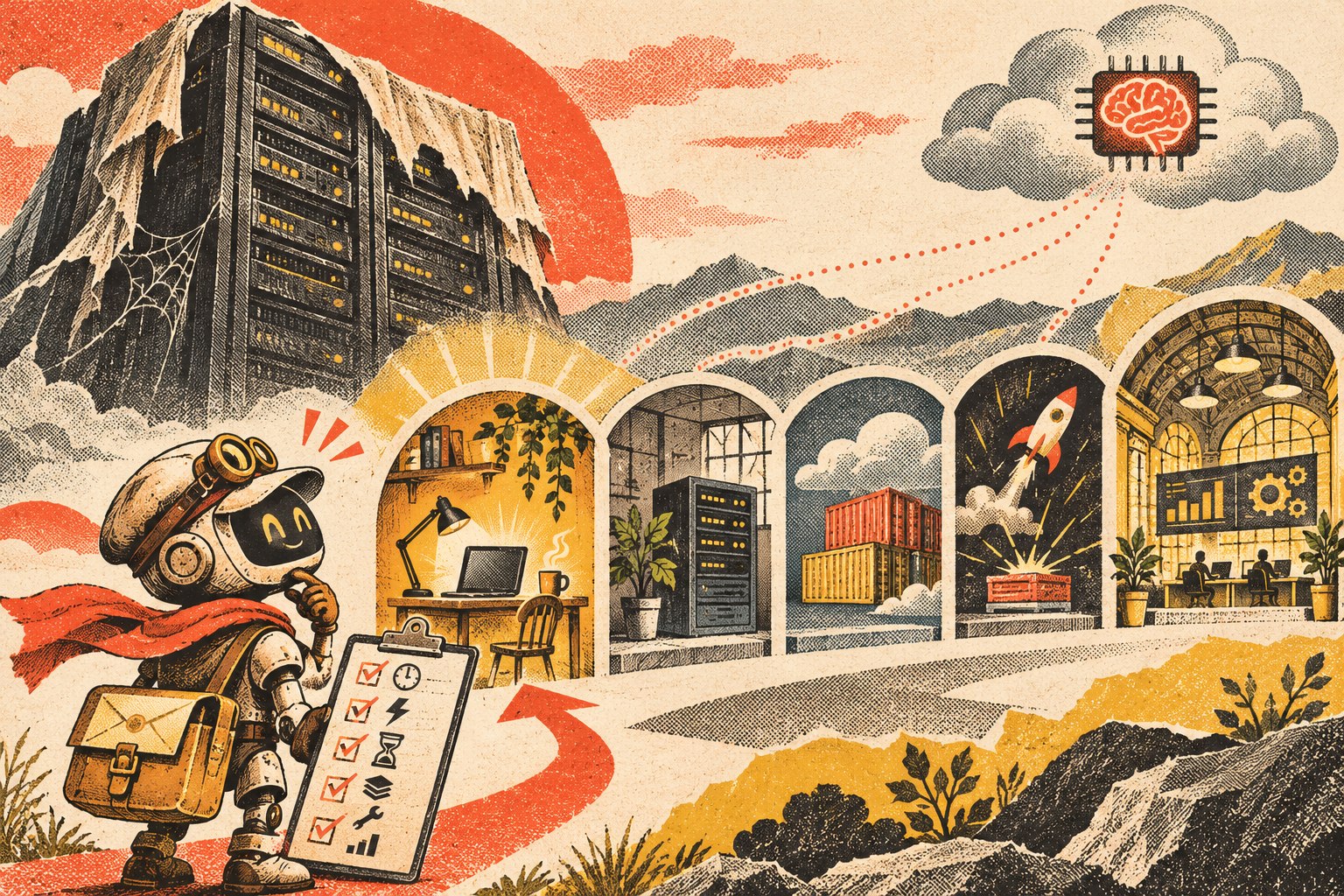
    Cutaway illustration of an AI agent moving between a local workstation, office server, container platform, and managed workspace, with the durable workflow layer beneath them.
    Choose the runtime from the workflow’s availability, access, state, and operating requirements—not from a generic “AI needs a server” assumption.

    1. Must the agent work while the user’s computer is off?

    If the agent only runs when an employee launches it, a local computer may be enough. If it must process work overnight, respond to a webhook at 2 a.m., or run on a schedule while everyone is away, it needs an always-available runtime somewhere.

    2. Does it need to accept inbound events?

    A workflow that starts from “employee clicks Run” is different from one that must receive a website form, payment event, email notification, CRM webhook, or external API request. Inbound events usually need a reliable endpoint or queue that remains reachable.

    3. What data and tools must it reach?

    Some agents primarily use cloud APIs. Others need files on an office network, a locally installed application, a device, a database behind a firewall, or a browser session tied to a particular machine. Put the runtime where access can be governed without creating unnecessary tunnels and credentials.

    4. How long can one job run?

    A short event-driven task fits different infrastructure than a workflow that may wait for a human approval, resume tomorrow, run browser automation for an hour, or maintain a long-lived connection. Long-running work usually needs durable orchestration rather than assuming one process will stay alive forever.

    5. What state has to survive a restart?

    Ask what happens if the process crashes halfway through a task. Pending work, approvals, job status, outputs, retries, and execution history should live in durable storage when they matter. Do not make a model conversation or one process’s memory the only record of what the business is waiting on.

    6. Who owns maintenance and recovery?

    Self-hosting gives you more infrastructure control and more infrastructure responsibility. Someone has to handle operating-system or container updates, secrets, backups, monitoring, logs, certificates, deployment, storage, and recovery. Managed hosting trades some control for less operating work.

    7. What happens when usage changes?

    A workflow that runs ten times a day has different scaling needs from a customer-facing agent that receives bursts of thousands of events. Choose for the workload you can reasonably expect, but avoid building enterprise infrastructure for a workflow that is still proving whether anyone needs it.

    Option 1: Run the agent on a local computer

    Local execution is often the right place to start. It is especially useful when the agent is an internal tool, is manually triggered, needs direct access to local files or desktop software, or is still being developed.

    • Good fit: prototypes, employee assistants, batch analysis, local file workflows, coding or browser tools used by one person.
    • Advantage: minimal infrastructure and easy access to the user’s local environment.
    • Limit: the workflow may stop when the machine sleeps, disconnects, restarts, leaves the office, or the user logs out.

    Do not move off a local computer merely because someone labels the software an “agent.” Move when the operating requirement changes.

    Option 2: Use an office or on-prem server

    An always-on office machine can be useful when the agent needs local network resources but should not depend on one employee’s workstation. That can include internal file shares, local databases, printers/devices, legacy applications, or workflows that should remain available during normal internet-service changes.

    The tradeoff is straightforward: the business now owns power, hardware, patching, backups, network security, monitoring, and physical failure recovery. “It runs in our office” does not automatically make the architecture safer or more resilient.

    Option 3: Use a VPS, application service, or container host

    For many small production agents, an ordinary always-on application runtime is enough. It can host an API, background worker, queue consumer, scheduler, connector service, or orchestration process without requiring a complex cloud architecture.

    Microsoft’s current Agent Framework hosting guidance explicitly separates managed hosting from self-hosted approaches. In self-hosted scenarios, the agent can live inside the application’s own runtime while the application takes responsibility for identity, authorization, storage, routing, deployment, and scaling.

    This option is attractive when you need a predictable always-on process and want control of the deployment without adopting a full managed agent platform. It also means someone must own the operations.

    Option 4: Use serverless functions or a job platform

    Serverless/job infrastructure is a strong fit when the workflow looks like:

    Event arrives → run bounded work → store the result → stop.

    Examples include classifying a new form submission, extracting data from a document, enriching a CRM record, or running a scheduled report.

    The catch is state and duration. If the agent must wait for a person, resume later, hold a long browser session, or coordinate many steps over time, store the workflow state externally and use durable orchestration. The runtime should be disposable; the business state should not be.

    Option 5: Use a managed agent platform

    A managed platform becomes attractive when running the infrastructure is no longer the interesting problem. Features such as authentication, policy enforcement, tracing, evaluations, retries, scaling, human escalation, and monitoring can be more valuable than controlling every process yourself.

    AWS’s agent hosting guidance describes provider-hosted, customer-hosted, and mixed deployment approaches, with security, compliance, scale, agility, and operating responsibilities affecting the choice. There is no single maturity ladder in which every “serious” business eventually moves to one model.

    The tradeoff is additional platform dependency. That is acceptable when it buys enough operating value—provided your durable knowledge, workflow state, and important business records remain portable.

    A practical AI agent hosting decision table

    Runtime Best when Watch for
    Local computer Manual/internal use, prototype, local files/apps Sleep/offline state, single-user dependency
    Office/on-prem server Always-on local-resource access Hardware, patching, network, backup responsibility
    VPS/container/app host Persistent API, worker, queue, scheduler Operations, secrets, deployments, monitoring
    Serverless/job platform Event-driven, bounded, bursty work Durable state, time limits, orchestration complexity
    Managed agent platform Governance/observability/scale are bigger problems than hosting Cost shape, platform dependency, export/replacement path

    Keep durable state outside the model session

    Whichever runtime you choose, preserve important state in a system designed to survive process restarts and model changes. That includes pending jobs, approvals, customer/project state, execution records, retries, and the authoritative knowledge the agent uses.

    This is the same ownership principle behind our OWNER Test for business technology: know what the system does, who supports it, how you recover it, and how you leave it.

    Do not overbuild the infrastructure before the workflow earns it

    A common mistake is designing for hypothetical scale before the business has proven that the agent deserves to exist. Multi-region infrastructure, complex queues, dedicated GPUs, elaborate failover, and several managed services may all be appropriate later. They can also bury a simple workflow under operating cost and complexity.

    Start with the smallest deployment that can test the real requirement. If the local tool has to become always-on, move it. If the persistent service becomes bursty, split event-driven work out. If governance and observability consume more engineering time than the agent itself, evaluate a managed platform. Architecture should follow evidence.

    AI agent hosting FAQ

    Does an AI agent need a server?

    No. It needs a runtime for its logic, tools, and state. That runtime can be a local computer, server, application/container host, serverless/job platform, or managed agent service.

    Can I run an AI agent on my PC?

    Yes. A local PC is often a good fit for prototypes, employee-triggered tools, and workflows that need local files or applications. It becomes a poor fit when the workflow must continue while the machine is asleep or offline.

    Does the model have to run on the same server as the agent?

    No. The agent runtime can call a cloud model API, local model service, or another provider. Runtime location and model-inference location are separate architecture choices.

    When should I move an AI agent to an always-on host?

    Move when the workflow needs reliable schedules, inbound events, shared access, background processing, persistent connections, or availability independent of one user’s device.

    Is serverless good for AI agents?

    It can be excellent for bounded, event-driven jobs. Long-running or human-in-the-loop workflows may still use serverless components, but they need durable state and orchestration rather than relying on one function invocation to remain alive.

    Host the workflow you actually have

    The infrastructure should disappear behind the business requirement. If a laptop is enough, use a laptop. If the workflow must run all night, give it an always-on runtime. If it is event-driven, use an execution model that fits. If operating the stack becomes the bottleneck, buy managed capability deliberately.

    If you are trying to decide where an AI workflow should run, Scope Design can help map the runtime, access, state, security, and operating requirements before you build infrastructure the workflow does not need.
  • How to Prioritize AI Automation Opportunities Before You Build Them

    How to Prioritize AI Automation Opportunities Before You Build Them

    AI automation prioritization should happen before you choose a tool, agent, or integration. Build a backlog of repeated work, then rank each candidate by whether the process is stable, easy to check, frequent enough to matter, painful enough to justify change, and easy to undo if the automation is wrong. At Scope Design, we call that the SCOPE Test: Stable, Checkable, Often repeated, Painful, Easy to undo.

    SCOPE does not tell you how to build an automation. It tells you which ideas deserve deeper investigation. Once a candidate survives SCOPE, use our existing OWNED Automation Test to decide whether the workflow is actually ready to implement, govern, measure, and maintain.

    TL;DR: Choose the boring automation before the impressive one

    • Start with a backlog of repeated operational friction, not an AI wish list.
    • Use AI automation prioritization to compare candidates before implementation work begins.
    • Stable: the process behaves consistently enough to describe.
    • Checkable: a competent person can tell whether the result is correct.
    • Often repeated: the workflow happens frequently enough to repay setup and maintenance.
    • Painful: the current process consumes meaningful time, attention, delay, rework, or opportunity.
    • Easy to undo: an incorrect result can be corrected before consequences spread.
    • After SCOPE, use OWNED to test outcome, workflow, ownership, exceptions, evidence, and durability.

    Why AI automation prioritization comes before automation design

    Small businesses usually have more possible automations than they have time to build well. Lead follow-up. Proposal assembly. Meeting notes. Scheduling. Customer questions. Reporting. Website checks. Invoice preparation. CRM cleanup. Content research. Onboarding. The list grows quickly because modern AI can interact with language and documents that older rule-based automation struggled to handle.

    That does not mean every repeated task deserves an agent.

    The first decision is portfolio management: which workflow deserves scarce implementation attention? That decision is different from asking whether a particular workflow can technically be automated. A developer can often make a demo work. The business still has to decide whether the workflow is worth owning after the demo.

    This is consistent with the broader way we evaluate small business technology systems. Start with the business job, real workflow, non-negotiables, exit path, and operating responsibility. Software comes after the requirement.

    NIST’s AI Risk Management Framework similarly treats intended purpose, business value, roles, human oversight, measurement, monitoring, and lifecycle management as part of the system decision. The practical lesson for a small company is simple: do not spend governance effort on an AI workflow until the underlying job has earned a place in the queue.

    Build an automation backlog before you score anything

    Good AI automation prioritization starts with observation. Ask the people doing the work where attention disappears every week. Do not ask only, “What should we automate?” That question encourages people to nominate whatever sounds most futuristic.

    Ask instead:

    • What do you copy, retype, reformat, or summarize repeatedly?
    • What waits because one person has to assemble information from several places?
    • What gets forgotten when the week becomes busy?
    • What work follows the same general pattern but still needs some interpretation?
    • What report takes longer to assemble than to understand?
    • What information do customers or staff ask for repeatedly?
    • What process creates avoidable rework because inputs arrive inconsistently?
    • What task would you gladly stop doing if the result stayed reliable?

    Scope’s own candidate list includes things such as generating a proposal skeleton from discovery notes, preparing a call brief from a prospect’s public information, turning call notes into a follow-up draft, producing an onboarding checklist from the project type, assembling a weekly status draft from project records, and running a repeatable pre-launch QA prompt. These are useful examples because the AI assists with assembly and interpretation while a person can still inspect the result.

    Do not rank the ideas while collecting them. First build the backlog. Then compare them using the same filter.

    The SCOPE Test for AI automation prioritization

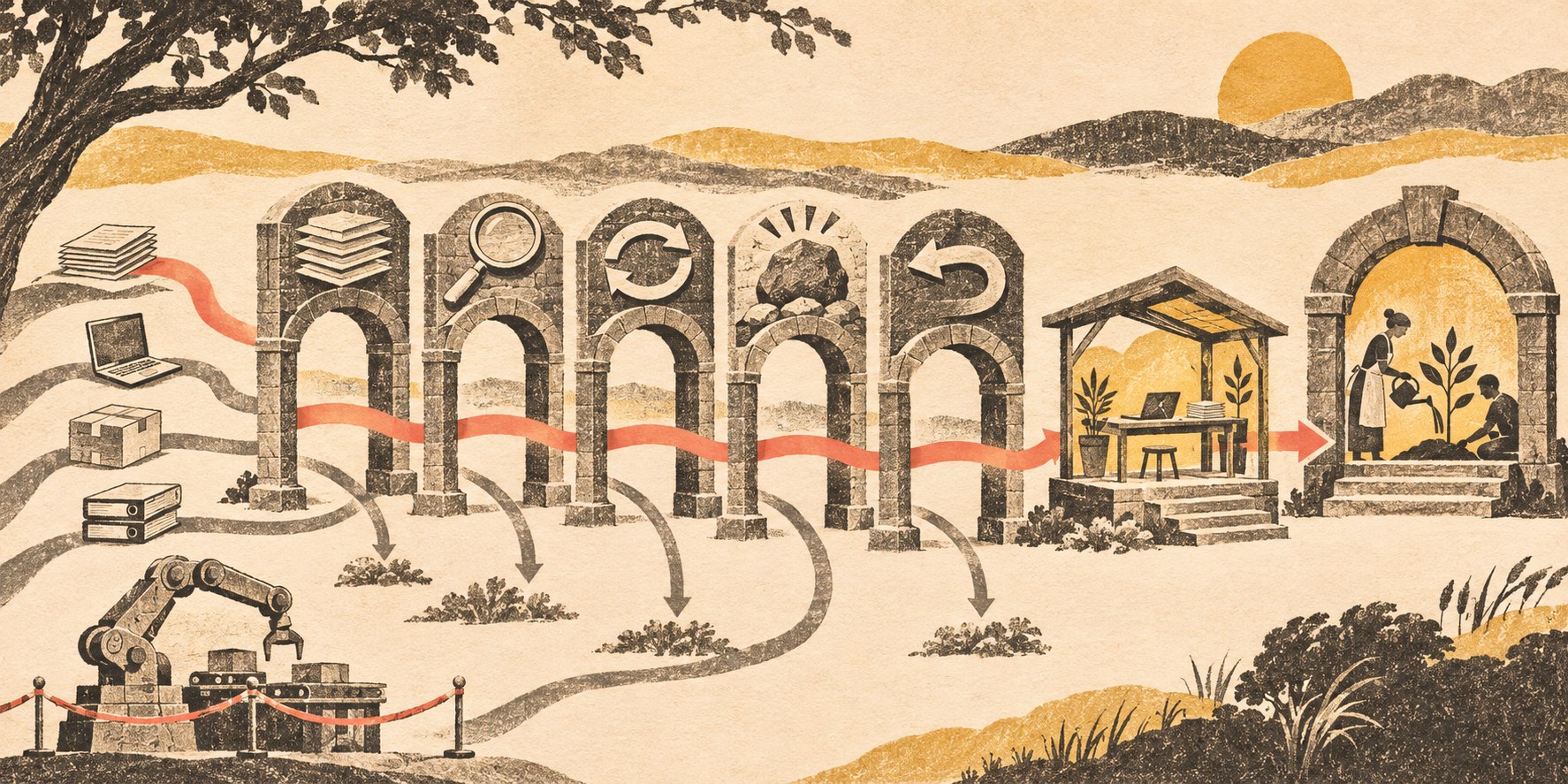
    Several automation candidates pass through stability, checkability, frequency, pain, and reversibility gates; one contained workflow reaches a maintained pilot.
    SCOPE ranks the candidate. OWNED determines whether the surviving workflow is ready to become a maintained system.

    S — Stable: does the process behave consistently enough to describe?

    A stable workflow does not need to be perfectly deterministic. It does need a recognizable shape. You should be able to identify the trigger, typical inputs, expected output, owner, common exceptions, and what happens next.

    A proposal skeleton can be stable even though every proposal is different. The stable part may be: discovery notes arrive, approved service language is selected, known project facts are organized, open questions are flagged, and a person reviews scope and pricing. That is much easier to automate safely than “write whatever proposal will win this client.”

    If three employees perform the process three completely different ways because nobody agrees on the policy, automation is premature. Fix the process before encoding the disagreement.

    C — Checkable: can a competent person tell whether the result is right?

    AI is easier to use where quality can be inspected. A meeting summary is checkable against the transcript. Extracted invoice fields are checkable against the invoice. A draft follow-up is checkable against the notes and approved business rules.

    “Recommend the perfect strategic direction for the company” is much harder to verify. A fluent answer can sound plausible without giving the reviewer a clean test of correctness.

    For AI automation prioritization, checkability matters because it makes a pilot informative. You can compare output with known cases, measure corrections, and learn where the workflow should escalate to a person.

    O — Often repeated: does the workflow happen enough to earn maintenance?

    Every automation becomes a small software dependency. Credentials expire. APIs change. Staff need training. Exceptions accumulate. Someone has to notice when the workflow stops behaving as expected.

    A task that happens once a year may be annoying without being a good automation candidate. A ten-minute task performed thirty times a week may be far more attractive even if nobody would put it in an AI keynote.

    Frequency is not only volume. Regularity matters too. A weekly process with the same trigger and owner can be easier to support than a bursty process nobody remembers until a crisis.

    P — Painful: does the current workflow create a business problem worth solving?

    Pain can mean labor, but it can also mean waiting, dropped handoffs, rework, inconsistency, attention switching, slow response, poor visibility, or dependence on one overloaded person.

    Be specific. “Email is annoying” is weak. “Every new inquiry is manually copied into the CRM, summarized for the project team, and assigned by one person, so leads can wait until that person checks the inbox” is a useful problem statement.

    The pain should be observable enough that you can later tell whether the workflow improved. That does not require a dramatic ROI spreadsheet. It may be as simple as fewer manual touches, shorter queue time, fewer missing fields, or fewer exceptions requiring cleanup.

    E — Easy to undo: how far can a mistake spread before a person can correct it?

    Reversibility is the most underrated part of AI automation prioritization.

    A bad internal draft can be discarded. A wrong CRM classification can usually be corrected. A public price change, deleted database, signed agreement, sent payment, terminated employee account, or mass customer message has a very different consequence profile.

    That does not mean consequential work can never use AI. It means it is a poor place to learn your first lessons about autonomous execution. Start where mistakes are visible and recoverable.

    Score the backlog without pretending the numbers are science

    You can score each SCOPE dimension from 0 to 2:

    Dimension 0 1 2
    Stable Process changes constantly or is disputed Mostly consistent with important exceptions Clear recurring workflow
    Checkable Quality is subjective or hard to verify Some outputs can be tested Correctness is easy to inspect
    Often repeated Rare Regular but modest volume Frequent or continuous
    Painful Minor inconvenience Noticeable time or friction Material delay, rework, attention, or bottleneck
    Easy to undo Consequences are difficult to reverse Some correction path exists Error is cheap and contained

    A ten is not automatically better than an eight. The score is a forcing function for a useful conversation. It reveals why one idea feels safer or more valuable than another.

    For example, “draft weekly project updates” may score high across all five dimensions. “Let an AI negotiate custom contracts and send them without review” may be frequent and painful but score poorly on checkability and reversibility. The second idea may have more theoretical upside and still be a worse first project.

    What should you reject or postpone?

    Push a candidate down the backlog when:

    • the team cannot agree how the current process works;
    • the authoritative data lives in scattered or unreliable places;
    • success cannot be inspected without expert guesswork;
    • the workflow happens too rarely to justify support;
    • the real pain is unclear;
    • mistakes create public, financial, legal, security, personnel, or relationship consequences before review;
    • the idea requires a large new platform before a small version can be tested;
    • the proposed automation is mostly a solution looking for a business problem.

    Sometimes the correct result of AI automation prioritization is “do not automate this.” Sometimes it is “standardize the intake first,” “fix the source of truth,” or “use the native feature we already pay for.” That is progress. Scope has removed working custom automation after discovering the platform could solve the underlying problem more simply. A working automation can still be the wrong system.

    SCOPE chooses the candidate; OWNED decides whether it is ready

    This distinction keeps the cluster clean.

    SCOPE is a prioritization test. It helps a small business compare possible automation opportunities before investing implementation effort.

    OWNED is an implementation-readiness test. It asks whether the selected automation has a defined outcome, mapped workflow, named owner, exception/evidence model, and durability plan. The full method, including ROI, failure handling, autonomy levels, rollout, and retirement, belongs in our AI automation for business guide.

    If the selected workflow needs custom integrations or a system shaped around how the business actually works, the next question may be whether to buy, configure, integrate, or build custom business software. Do not make that architecture decision until the job is clear.

    Pilot one bounded workflow and learn cheaply

    A good first pilot uses real inputs, includes ugly cases, and keeps the action boundary narrow. Let the system draft before it sends. Let it recommend before it commits. Let it write to staging before production. Let it create a proposed record before it can delete one.

    Define the evidence before you run the pilot:

    • What manual baseline are we comparing against?
    • What types of errors matter?
    • How often does a human correct or override the output?
    • What exceptions appear that the original process map missed?
    • How much review time remains?
    • What maintenance or new dependency did the pilot create?
    • What would make us expand, constrain, replace, or stop the workflow?

    The purpose of a pilot is not to prove that AI is exciting. It is to reduce uncertainty about a real business workflow.

    AI automation prioritization FAQ

    What is AI automation prioritization?

    AI automation prioritization is the process of ranking possible AI-assisted workflows before deciding what to build. A useful ranking considers process stability, verifiability, frequency, business pain, reversibility, implementation readiness, and consequence.

    What makes a good first AI automation?

    A strong first candidate is repeated, reasonably stable, easy to inspect, painful enough to matter, and cheap to correct when wrong. Drafting, extraction, classification, routing, summarization, and report assembly are often easier learning environments than irreversible autonomous decisions.

    Should I prioritize by hours saved?

    Hours are one input, not the whole decision. Also consider delay, rework, error risk, attention switching, customer impact, review burden, maintenance cost, and reversibility. An automation that saves labor but creates hidden exception work may not improve the process.

    Should the highest SCOPE score be automated automatically?

    No. SCOPE only ranks candidates for deeper investigation. A high-scoring idea still needs implementation-readiness analysis, ownership, data and permission decisions, exception handling, measurement, and a maintenance plan.

    Can a low-frequency workflow still be worth automating?

    Yes, if the consequence or effort is large enough. The SCOPE score is a conversation tool, not a formula that replaces judgment. A quarterly process that takes days and is highly structured may still justify automation.

    When should an AI automation require human approval?

    Approval should increase with consequence, ambiguity, privilege, and reversibility. Drafts and internal summaries can often run with less friction. Public communications, production changes, money, contracts, access controls, deletion, personnel decisions, and other consequential actions need much stronger boundaries.

    Pick the workflow that will teach you something useful

    The best first AI project is not necessarily the one with the largest theoretical upside. It is the one that creates useful evidence while keeping mistakes affordable.

    Build the backlog. Apply SCOPE. Take the strongest candidate into OWNED. Then run the smallest pilot that can prove whether the workflow deserves to become part of the business.

    If your team has a dozen possible AI ideas and no clear way to decide which one deserves attention, Scope Design can help map and prioritize the workflows before you buy another platform or wire an agent into production. The goal is not more automation. It is a business that is easier to operate and easier to change.

  • Business Technology for Small Companies: Choose Systems You Can Own, Support, and Replace

    Business Technology for Small Companies: Choose Systems You Can Own, Support, and Replace

    Small business technology should make the company easier to run, not harder to leave. The best system is not automatically the one with the longest feature list, the slickest demo, or the lowest monthly price. It is the one that improves a real business outcome, fits the way work actually moves, meets your non-negotiable requirements, can be replaced without a crisis, and has a named person responsible for keeping it healthy.

    That sounds less exciting than a list of “must-have apps.” It is also much more useful. Most technology pain in a small company does not begin with a bad product. It begins when a reasonable product becomes a critical dependency without anyone deciding who owns it, how its data moves, what happens when an integration breaks, or how the company would get out.

    What small business technology do you actually need?

    A small company needs enough technology to support its critical workflows reliably: communication, customer records, sales, delivery, finance, files, access, reporting, and whatever is specific to the business. It does not need every category of software another company uses.

    Start with the work. If the business problem is “three people answer the same inbox and nobody knows who owns the reply,” the requirement is not “buy a collaboration platform.” The requirement is a shared communication workflow with clear ownership, visibility, permissions, and handoffs. Sometimes that leads to a purpose-built tool. Sometimes a simpler architecture—such as a well-designed shared business email setup—solves the problem with less machinery.

    The question to ask before shopping is: what job does the business need the system to do, under what conditions, and who will own it after launch?

    Use the OWNER Test before you shortlist vendors

    We use a simple five-part filter for business systems: Outcome, Workflow, Non-negotiables, Exit, Responsibility. Together, they spell OWNER.

    The OWNER Test connects a business outcome, a real workflow, non-negotiable boundaries, an open exit, and a named system owner.
    The OWNER Test keeps the decision centered on the business: what must improve, how work moves, what cannot be compromised, how you can leave, and who owns the system.

    A system does not need to be perfect on every dimension. It does need a defensible answer on all five. If one answer is “we will figure that out later,” treat that as part of the cost and risk of the decision.

    O — Outcome: define the business result first

    Write the outcome in business language before you look at products. “We need a CRM” is a category. “Every qualified lead should have one owner, one current status, and a visible next action” is an outcome.

    A useful outcome statement includes three things: the problem you are changing, the behavior you expect after the change, and the evidence that will tell you the system is helping. Evidence can be operational rather than dramatic: fewer duplicate entries, faster handoffs, fewer missed renewals, fewer manual reconciliations, cleaner reporting, or less time spent asking where the current information lives.

    This is important because a product demo is designed to show what the software can do. Your outcome statement keeps the evaluation focused on what the business needs it to do.

    W — Workflow: map the real work, including exceptions

    Technology sits inside a workflow. Map that workflow before you automate it. Who starts the work? Who approves it? Where does information come from? What system is the source of truth? What happens when the normal path fails? Who needs read-only access? Who can change a record? What happens when someone leaves?

    The exceptions matter because they are where “simple” software often turns into manual patches. A sales tool may handle the happy path beautifully but require a spreadsheet for renewals. A scheduling tool may work until a job needs two crews. A form may collect data cleanly until a customer changes something after submission. Those edge cases are not reasons to reject a tool automatically; they are reasons to understand what the full operating workflow will become.

    Do not automate ambiguity. If two people disagree about the process before the software exists, the software will usually make the disagreement faster, not disappear.

    N — Non-negotiables: decide the guardrails before the demo

    Non-negotiables are the conditions the system must meet even if the feature set is attractive. The exact list depends on the workflow, but common areas include access control, multi-factor authentication, data export, integrations, reporting, performance, mobile use, audit history, vendor support, recovery, and any legal or contractual requirements that apply to the business.

    This is where security and continuity become part of the buying decision instead of an afterthought. NIST’s Cybersecurity Framework resources for small businesses treat cybersecurity as business risk and organize work across governance, identification, protection, detection, response, and recovery. CISA’s small-business resources likewise emphasize practical controls such as multi-factor authentication, software updates, logging, backups, encryption, and password hygiene.

    You do not need to turn every software purchase into a security audit. You do need to know what would be unacceptable. For a system with sensitive access, that may mean credentials are stored and governed through a business password manager rather than shared informally. For a system holding critical files, it may mean understanding the difference between day-to-day cloud storage and an actual recovery plan.

    E — Exit: prove you can leave before you commit

    Replaceability is a design requirement, not a breakup plan. You are not predicting that the vendor will fail. You are making sure the company can respond if pricing changes, support declines, the workflow outgrows the product, ownership changes, a better option appears, or the product itself changes direction.

    Ask for the exit path while everyone still likes the product. What data can you export? In what format? Does the export include attachments, relationships, histories, permissions, custom fields, and metadata—or only a flat table? Can an administrator export without vendor assistance? Are there cancellation windows or data-retention deadlines? Which integrations would have to be rebuilt? What knowledge exists only in the configuration?

    Ownership does not require open source, self-hosting, or avoiding SaaS. It requires knowing where control lives. Our open-source versus proprietary CMS comparison applies that same exit question to content platforms: control is valuable when it materially improves portability, support options, and long-term fit—not simply because “open” sounds better.

    R — Responsibility: name the owner and the support path

    A business system should have a named owner even when an outside vendor administers it. “IT handles it” is not ownership unless everyone knows who “IT” means and what that person or provider is responsible for.

    At minimum, identify the business owner for the workflow, the administrative owner for accounts and configuration, the billing/contract owner, and the support path when something breaks. Critical systems may also need a data owner, technical integration owner, recovery owner, or compliance owner. In a five-person company, one person may hold several of those roles. That is fine. The point is that the roles are explicit.

    Backups deserve the same clarity. “It is in the cloud” does not answer who can restore it, what is backed up, how long copies are retained, or what the business does if the primary account is inaccessible. For systems where downtime or data loss matters, use a real backup and recovery plan rather than assuming the application vendor’s availability equals your recovery strategy.

    Buy, configure, integrate, or build?

    Once the OWNER Test is clear, the next decision is not “which app?” It is how much of the solution should be purchased versus shaped around the business.

    ApproachBest whenMain risk to watch
    BuyThe workflow is common and the product already solves it well.Changing the business to fit the software when the fit is actually poor.
    ConfigureA standard product fits the core job but needs fields, permissions, automations, templates, or reporting.Over-customizing until every update or handoff becomes fragile.
    IntegrateTwo or more strong systems need to share data or trigger work across a boundary.Creating invisible dependencies with unclear ownership and failure handling.
    BuildThe workflow is genuinely differentiated, existing products create persistent compromise, or the custom capability has strategic value.Underestimating maintenance, documentation, security, testing, and replacement responsibility.

    Small businesses often jump from “buy” directly to “build” because a SaaS product annoys them. Usually there is a middle path. Better configuration, a small integration, or a narrower process change may solve the real constraint without creating a custom software product the company now has to maintain forever.

    Calculate lifecycle ownership cost, not just subscription price

    A cheap subscription can become expensive duct tape. A more expensive platform can be the better choice if it removes manual work and simplifies support. Compare the lifecycle ownership cost rather than the sticker price:

    Lifecycle ownership cost = license + implementation + integration + administration + training + support + risk controls + change cost + exit/migration reserve.

    The point is not to create fake precision. You may not know the exact future migration cost. Estimating the categories forces you to notice where the cost is hiding.

    • Implementation: setup, cleanup, migration, configuration, testing, and launch work.
    • Integration: connectors, API work, automation platforms, monitoring, and maintenance when either side changes.
    • Administration: user provisioning, permissions, templates, rules, reporting, and routine changes.
    • Training: initial onboarding plus what happens when a new employee starts six months later.
    • Support: internal troubleshooting time, vendor support tiers, consultants, or managed services.
    • Risk controls: backups, security, logging, recovery, compliance, and access governance where appropriate.
    • Change and exit: contract timing, exports, migration, retraining, rebuilt integrations, and parallel operation during a transition.

    Run a bounded pilot before a full rollout

    A pilot should reduce uncertainty, not become an indefinite half-implementation. Define the question the pilot is testing, who participates, what real workflow it includes, what evidence counts as success, what would make you stop, and when the decision will be made.

    This matters especially with emerging technology, where novelty can overpower the business case. We use the same principle when evaluating design technology trends worth piloting and in our PILOT framework for VR business applications: test a bounded use case before you scale the dependency.

    • Test with real data and real users where practical.
    • Include at least one exception or failure case, not only the happy path.
    • Test permissions and handoffs, not just features.
    • Perform an export before the pilot ends.
    • Document what required manual work outside the system.
    • Decide: adopt, revise, pause, or reject. Do not let “pilot” become permanent limbo.

    Document ownership before the system becomes critical

    The best time to document a system is while the implementation is still fresh. The minimum useful record is not a hundred-page manual. It is enough information for a competent person to understand what the system does, how to get administrative access, what depends on it, where to get help, how to recover, and how to leave.

    • Business purpose and workflow owner
    • Administrative owner and backup administrator
    • Billing owner, contract term, renewal date, and cancellation window
    • Credential location and MFA/recovery ownership
    • Primary data stored and source-of-truth rules
    • Integrations, automations, APIs, and downstream dependencies
    • Support contact and escalation path
    • Backup/recovery method where required
    • Export method, formats, and any known limitations
    • Key configuration decisions and customizations
    • Training/runbook location
    • Date for the next fit, cost, access, and exit review

    This record is what lets a company survive staff turnover and vendor turnover without rediscovering its own technology stack from scratch.

    Review the stack before tools become permanent

    Software tends to become permanent by inertia. A team adopts a tool for one urgent need, adds an integration, changes a process around it, and two years later nobody remembers why it was chosen.

    Review critical systems on a regular cadence and when something meaningful changes: a renewal, major price increase, acquisition, staffing change, workflow redesign, new compliance requirement, recurring incident, vendor product shift, or integration failure. The review does not need to become a procurement project. Re-run the OWNER Test.

    • Outcome: Is the system still improving the job it was selected to improve?
    • Workflow: Does the real process still match the configured one?
    • Non-negotiables: Have the business requirements or risks changed?
    • Exit: Is the export and replacement path still credible?
    • Responsibility: Do the named owners still exist, and can they still administer and support the system?

    A small-business technology scorecard

    Before a meaningful commitment, score each statement as yes, partly, or no. A “partly” is not automatically a blocker. It is a decision that needs an owner and a mitigation plan.

    TestDecision question
    OutcomeCan we name the business result this system must improve and how we will recognize improvement?
    WorkflowHave we mapped real users, handoffs, permissions, exceptions, and the source of truth?
    Non-negotiablesHave we defined security, data, integration, reporting, performance, support, and compliance requirements before choosing?
    ExitCan we explain how we would export data, unwind dependencies, and replace the system?
    ResponsibilityIs there a named owner for administration, support, access, training, recovery, and review as applicable?
    Lifecycle costHave we considered implementation, integration, administration, training, support, controls, change, and exit—not only subscription price?
    PilotCan we test the riskiest assumptions with a bounded trial and a decision date?
    DocumentationCould another competent person understand and operate this system if the current owner disappeared tomorrow?

    Small business technology FAQ

    What technology does a small business need?

    A small business needs technology that reliably supports its critical workflows: communication, customer and sales information, service or product delivery, finance, files, access, reporting, and industry-specific operations. Start with the workflows and risks, then choose the smallest set of systems that supports them well.

    What should a small business evaluate before buying new software?

    Evaluate the business outcome, real workflow fit, non-negotiable requirements, exit path, and operating responsibility. Then compare lifecycle cost and test the riskiest assumptions with a bounded pilot. A feature checklist is useful only after those questions are clear.

    How can a small company avoid vendor lock-in?

    Do not try to eliminate every dependency; that is usually unrealistic. Make dependencies visible. Confirm data export, contract terms, administrative control, integration boundaries, documentation, backup/recovery where necessary, and the work required to migrate. Test an export before the system becomes critical.

    Is open-source software always easier to own?

    No. Open-source software can increase portability and provider choice, but it can also shift more responsibility for hosting, updates, security, and support onto the business or its technical partner. Ownership is not a licensing label; it is the practical ability to administer, support, recover, and replace the system.

    How often should a small business review its technology stack?

    Use a regular review cadence for critical systems and re-evaluate when a major trigger occurs: renewal, price change, staffing change, repeated failure, workflow change, vendor shift, acquisition, or new business requirement. The goal is not constant migration; it is preventing inertia from becoming architecture.

    Build a stack you can still explain in two years

    Good small business technology creates leverage without creating mystery. You should be able to explain what each critical system does, why it exists, what it depends on, who owns it, what it costs to operate, and what happens if you have to change it.

    If your current stack was assembled one urgent subscription at a time, Scope Design can help map the workflows, ownership, integrations, support burden, and exit risks before you buy, replace, integrate, or build. Start with the business problem. The technology decision should come second.