Tag: email automation

  • Email Marketing Best Practices: 15 Checks That Actually Matter

    Email Marketing Best Practices: 15 Checks That Actually Matter

    If you are looking for email marketing best practices, do not start with a magic send time, a clever subject-line formula, or another automation. Start by checking whether the email program itself is sound. A useful program earns permission, reaches the inbox through trustworthy infrastructure, matches a real recipient need, makes the next step easy, and measures what happened after the click.

    That is the point of the Scope Design VALID Email Check: Voluntary permission, Authenticated route, Lifecycle fit, Interaction quality, and Downstream evidence. If one of those controls fails, adding more segmentation, personalization, or automation can simply scale the failure faster.

    Scope Design TL;DR

    • Permission comes first. Know why a person is on the list, what they were told to expect, and how they can leave.
    • Deliverability is infrastructure, not copywriting. Authentication, sender identity, list quality, volume, complaints, and reputation deserve operational ownership.
    • Relevance beats complexity. Segment around a real lifecycle state or need before building elaborate personalization.
    • An email should have one primary job. The subject, content, button, landing page, and human handoff should agree on that job.
    • Do not worship opens. Use opens as a limited diagnostic signal and judge the program by downstream actions, customer outcomes, complaints, unsubscribes, and business consequences.
    • Requirements are not experiments. Authentication, honest headers, unsubscribe handling, and accessibility basics are guardrails. Cadence, length, creative, and offers are things you test.

    If you need the broader system around audience, offer, conversion, follow-up, capacity, measurement, and channels, start with our small business marketing strategy. For a deeper email-only operating model, see our guide to email marketing for small business. This page has a narrower job: quality control.

    First: separate standards from experiments

    A lot of email advice becomes nonsense because it mixes hard requirements with preferences. “Authenticate your sending domain” is not the same kind of advice as “send on Tuesday morning.” One is an infrastructure requirement or best practice with a current source. The other is a hypothesis that may or may not fit your list.

    Type Examples How to treat it
    Requirement or guardrail Authentication, accurate headers, opt-out handling, visible unsubscribe, accessibility basics Implement and verify. Do not A/B test whether to comply.
    Diagnostic signal Bounces, complaints, unsubscribes, clicks, delivery problems, opens Use to find problems. Do not confuse the signal with the business outcome.
    Experiment Cadence, send time, subject style, length, offer, layout, personalization depth Test against a defined audience and downstream outcome.

    Use the VALID Email Check

    Permission, authenticated delivery, lifecycle fit, interaction quality, and downstream evidence form a five-stage quality path

    VALID gives you an order of operations. The five layers are not five independent scores. They are a chain. A beautifully designed email cannot compensate for a list people did not knowingly join. Great segmentation cannot repair broken authentication. A high click rate is not a win if the landing page or sales handoff fails.

    The 15 email marketing best practices

    V: Voluntary permission

    1. Earn permission instead of acquiring addresses

    A healthy list begins with people who knowingly asked to hear from you. Purchased, scraped, inherited, or vaguely collected addresses create both relevance and deliverability problems. The practical question is simple: Could you explain to this recipient, in one sentence, when and why they joined?

    Google’s sender guidance recommends sending subscription messages to people who want them and confirming addresses before subscribing them. That is a useful operating standard even when a specific law does not require confirmed opt-in in every circumstance.

    2. Set expectations at the moment of signup

    Tell people what they are signing up for. “Get updates” is weak if the actual program sends promotions three times a week. A better signup promise names the kind of email and gives a realistic sense of frequency or trigger: monthly field notes, product updates, event reminders, new inventory alerts, or post-purchase help.

    This also gives you a better answer to the endless “How often should I email?” question. Start with the promise you made and the value you can sustain. Then use evidence from your audience. Frequency is not a universal number.

    3. Make leaving easy, and honor the signal

    An unsubscribe is not a design failure. It is a preference signal. For U.S. commercial email, the FTC’s CAN-SPAM guidance requires an opt-out method that remains available for at least 30 days after sending and says opt-out requests must be honored within 10 business days. Google’s bulk-sender requirements also include one-click unsubscribe for qualifying marketing and subscribed messages.

    Do not make people log in, answer a survey, or hunt through tiny text just to leave. If unsubscribe behavior is rising, diagnose the promise, relevance, or frequency rather than hiding the exit. Our guide to email unsubscribe rate goes deeper on that diagnosis.

    A: Authenticated route

    4. Authenticate the sender before optimizing the creative

    For personal Gmail accounts, Google’s current sender guidelines require all senders to use SPF or DKIM, valid forward and reverse DNS, TLS, and standards-compliant message formatting. Senders above 5,000 messages per day to Gmail accounts have stricter requirements, including SPF and DKIM, a DMARC record, sender-domain alignment, and one-click unsubscribe for marketing and subscribed messages.

    If those terms are unfamiliar, that is a sign the work needs an owner, not a reason to ignore it. Our deeper guide on how to send bulk email without becoming the spam problem covers the infrastructure side in more detail.

    5. Keep sender identity and message streams understandable

    A receipt, password reset, lead-nurture message, newsletter, and promotion do different jobs. Do not let them become one undifferentiated stream just because the software can send them all. Use recognizable From names and addresses, keep transactional and promotional purposes clear, and make sure replies go somewhere useful when a human response is appropriate.

    Google specifically recommends consistent sending identities for message categories. Operationally, this also makes troubleshooting easier. You can tell which stream is creating complaints, bounces, or reputation problems instead of treating “email” as one giant black box.

    6. Monitor complaints, bounces, reputation, and volume changes

    Inbox placement is not a one-time setup task. Watch hard bounces, user spam complaints, sending errors, and domain or IP reputation where your providers expose it. Google recommends keeping Postmaster Tools spam rates below 0.1% and avoiding 0.3% or higher. It also recommends increasing sending volume gradually rather than creating sudden bursts.

    Those thresholds are sender-health guardrails, not campaign-success targets. A low complaint rate does not mean the email is commercially effective. It means you have avoided one class of failure.

    L: Lifecycle fit

    7. Segment around a real recipient state or need

    Segmentation is useful when it changes what you should say or ask. Prospect versus customer, new customer versus repeat customer, service interest, recent activity, location, and lifecycle stage can be useful distinctions. Twenty-five micro-segments are not automatically better than four meaningful ones.

    Before adding a segment, ask: What decision would we make differently because this group exists? If the answer is “none,” the segment is probably database decoration.

    8. Give each email one primary job

    An email can inform and persuade, but it should still have a primary job. Confirm a purchase. Get a quote request. Teach the next step. Bring someone back to a product. Collect a registration. Prompt a reply. Publish a useful newsletter.

    If you are trying to make the same email announce six products, educate three audiences, promote an event, gather reviews, and close a sale, the problem is not the button color. The message has no decision hierarchy. For a recurring editorial email, our email newsletter strategy explains how to build a clear reader promise and repeatable structure.

    9. Automate a proven journey, not a messy process

    Automation is useful after you can describe the trigger, recipient state, message job, next step, ownership, and measurement. If those are fuzzy, branching logic gives you a more complicated version of the same uncertainty.

    Start with journeys that already make sense when handled manually: welcome and onboarding, lead follow-up, post-purchase help, renewal or replenishment, retention intervention, and re-engagement. For later lifecycle work, see our guide to email customer retention strategy.

    I: Interaction quality

    10. Make the sender and subject an honest promise

    The From name and subject line should help a recipient decide whether the message deserves attention. The FTC requires commercial-email subject lines to accurately reflect the content. Beyond compliance, accuracy is simply good expectation management. A clever subject that earns the wrong click is not a win.

    Write the subject after you know the email’s job. Then make sure the body pays off the promise. Our guide to email subject lines goes deeper on relevance, clarity, truth, and mobile readability without resorting to fake urgency.

    11. Design for reading, tapping, and missing images

    Email is a hostile rendering environment. Clients vary, images may not load, dark mode can alter presentation, and people use different screen sizes and assistive technologies. Keep the hierarchy simple, use real text for important content, and test the actual message in the clients that matter to your audience.

    For accessibility, W3C guidance provides a defensible baseline: informative images need meaningful alternative text; decorative images should use empty alt text; WCAG 2.2 AA sets minimum contrast at 4.5:1 for normal text and 3:1 for large text. WCAG’s Target Size (Minimum) criterion uses 24×24 CSS pixels with exceptions and spacing alternatives. Treat these as accessibility guardrails, not a claim that every email client implements web standards identically.

    12. Make one primary action work all the way through

    The call to action is not finished when the button looks good. Click it. Check the destination on a phone. Confirm the page matches the promise, preserves campaign tracking, loads correctly, and gives the recipient an obvious next step. If the action creates a lead or service request, verify who receives it and what happens next.

    This is where email becomes part of the larger marketing system rather than an isolated channel. A click that lands in a broken form, a dead inbox, or an unowned sales queue is not an email win.

    D: Downstream evidence

    13. Use opens as a limited diagnostic, not the finish line

    Open rate is easy to see and easy to overvalue. Apple Mail Privacy Protection can download remote email content in the background regardless of whether a person engaged. Google also says it does not track open rates and cannot verify the accuracy of third-party open-rate reporting.

    That does not make opens useless. A sharp change may help you spot a technical or subject-line problem. But the more important question is what happened after delivery: clicks, replies, form completions, purchases, qualified leads, renewals, registrations, service outcomes, or whatever meaningful job the message was supposed to advance.

    14. Test one uncertainty at a time

    A/B testing is useful when the test has a decision attached to it. “Which subject gets more opens?” is weaker than “Which promise produces more qualified visits or registrations without increasing complaints?” Define the audience, variable, success measure, and minimum practical difference before the send.

    Do not test requirements. Test uncertainty. Cadence, offer framing, creative, message length, subject style, call-to-action wording, and landing-page handoff are reasonable candidates when you have enough volume to learn something.

    15. Fix the weakest VALID layer before adding complexity

    This is the operating rule that keeps the checklist from becoming busywork. If permission is weak, stop adding contacts. If authentication is weak, fix infrastructure. If lifecycle fit is weak, reduce irrelevant sending. If interaction is weak, simplify the message and path. If evidence is weak, repair tracking and handoffs before buying another automation feature.

    More sophisticated email is not automatically better email. The goal is a system you can explain, operate, measure, and improve.

    A practical email marketing checklist by symptom

    Symptom VALID layer to inspect first First check
    Complaints or unsubscribes rise V / L Did people knowingly join, and does the message still match the signup promise?
    Messages land in spam or bounce A Authentication, sender identity, DNS, volume changes, list quality, provider reputation
    Clicks are weak across many sends L / I Is the message relevant to this lifecycle state, with one clear job and next step?
    Clicks are healthy but leads or sales are weak I / D Landing page, offer continuity, form, tracking, sales/service handoff
    Open rate changes suddenly A / I Check delivery and sender issues first, then subject/sender changes. Do not assume opens equal human attention.
    Automation keeps growing but performance is unclear D Map every flow to one trigger, one recipient state, one intended action, one owner, and one downstream measure.

    What we deliberately removed from this guide

    The earlier draft of this article was full of exact percentages: conversion benchmarks, segmentation lifts, mobile-use shares, personalization lifts, AI-effectiveness claims, testing lifts, fixed cleaning cadences, and universal send-frequency advice. During the 2026 research pass, we removed the numbers that did not preserve a strong enough source and context chain.

    That is not a loss. It is the same evidence discipline we are recommending for your email program. A number that cannot survive a source check should not control your budget, cadence, automation, or creative. Current primary-source requirements stay. Directional search-demand estimates stay labeled as directional. Audience-specific tactics remain experiments.

    Email marketing best practices FAQ

    What are the 5 T’s of email marketing?

    There is no single official five-T standard that governs email marketing. Different marketers use different mnemonic frameworks. For an operating audit, Scope Design uses VALID because it maps directly to five controllable layers: Voluntary permission, Authenticated route, Lifecycle fit, Interaction quality, and Downstream evidence.

    What is the 80/20 rule in email marketing?

    Treat 80/20 content-versus-promotion advice as a heuristic, not a law. The right mix depends on why people subscribed and what value the program promised. A sale-alert list and a research newsletter can both be healthy with very different content mixes.

    How often should a small business send marketing emails?

    There is no universal weekly or monthly number. Start with the frequency implied by the signup promise, the amount of useful material you can sustain, and recipient behavior. Change cadence when evidence shows the current promise or value exchange is breaking, not because a generic benchmark told you Tuesday is optimal.

    What is the best time to send a marketing email?

    The best time is audience-specific. Time zone, business type, lifecycle trigger, urgency, and the recipient’s normal routine all matter. Triggered emails often should follow the event that made them useful. Broadcast timing should be tested against downstream outcomes, not copied from a universal chart.

    Is open rate still a useful email metric?

    It is a limited diagnostic. Apple Mail Privacy Protection can preload remote content, and Google says it cannot verify third-party open-rate accuracy. Use opens to notice unusual changes, but prioritize clicks, replies, conversions, qualified actions, complaints, unsubscribes, delivery health, and the actual business outcome the email was meant to influence.

    Do I need SPF, DKIM, and DMARC?

    At minimum, Gmail requires all senders to personal Gmail accounts to use SPF or DKIM. Senders above 5,000 messages per day to Gmail accounts have stricter requirements including SPF and DKIM plus a DMARC record and alignment requirements. Even smaller programs benefit from treating authentication as owned infrastructure instead of waiting for a deliverability problem.

    Should I use double opt-in?

    Confirmed or double opt-in is a strong way to verify that an address belongs to someone who intended to subscribe, and Google recommends confirming addresses before subscribing recipients. Whether it is legally required depends on jurisdiction and context. This guide is operational guidance, not individualized legal advice.

    When should I add more email automation?

    Add automation when the manual journey is already understandable. You should be able to name the trigger, recipient state, message job, next step, owner, and downstream measure. If you cannot, fix the failed VALID layer before adding branches and triggers.

    Fix the email system before adding another tactic

    If your email program is getting harder to explain as it gets more sophisticated, that is a useful warning. Scope Design can help audit the permission model, sender setup, lifecycle logic, message path, tracking, and handoffs, then separate the changes that matter from the features that merely make the dashboard busier. Contact Scope Design if you want a second set of eyes on the system.

    Sources and methodology

    This guide was rebuilt through Scope Design’s monitored Content Studio workflow on August 21, 2026. Query demand and SERP structure were checked with DataForSEO and Ubersuggest; those volume estimates are directional rather than promises. Sender and compliance claims were checked against current Google Gmail sender guidelines, Google’s sender-guidelines FAQ, the FTC CAN-SPAM compliance guide, Apple’s Mail Privacy Protection documentation, and WCAG 2.2 plus the W3C WAI image guidance. Unsupported percentages and universal formulas from the imported draft were removed rather than repeated.


  • Welcome Email Series: Deliver the Promise Before You Start Selling

    Welcome Email Series: Deliver the Promise Before You Start Selling

    Direct answer: A welcome email series should immediately deliver whatever the subscriber requested, identify the sender, explain what will arrive next, provide one useful step at a time, route replies to a real destination, and move the person into the appropriate newsletter, sales, service, customer, or suppression path. It is not five excuses to delay the download while “warming up” somebody who already trusted you with an email address.

    TL;DR

    • Send the first email as soon as the system can reliably deliver the promised resource, confirmation, discount, access, or next step.
    • Make the sender recognizable. State why the person is receiving the email and what they should expect next.
    • Give each email one job. Do not stuff your origin story, entire service menu, fourteen links, and a surprise sales ambush into the same message.
    • Let the sequence length follow the promise, buying process, and operational handoff. Three, five, or seven emails are not laws of physics.
    • Route replies and form responses to somebody who can act on them. A friendly robot that forwards interest into a dead inbox is still a dead end.
    • Segment only when the distinction changes the message, offer, timing, ownership, or next step.
    • Measure delivery, clicks, replies, conversions, complaints, unsubscribes, qualified outcomes, and handoff failures—not opens alone.
    • When the welcome job is complete, explicitly move the subscriber into the correct ongoing relationship instead of leaving them trapped in automation purgatory.

    What Is a Welcome Email Series?

    A welcome email series is an automated sequence triggered when someone subscribes, requests a resource, creates an account, starts a trial, makes a purchase, registers for an event, or otherwise begins a permissioned relationship with a business.

    The series has a narrow job: complete the promise made at signup and make the next relationship legible. That usually means delivering something, confirming what happened, identifying the sender, reducing uncertainty, helping the person take a useful next step, and routing them into the correct ongoing communication.

    An autoresponder is the automation mechanism. A welcome series is one use of that mechanism. Calling the whole strategy an “autoresponder series” is technically accurate but commercially vague. Nobody wakes up wanting an autoresponder. They want the guide, appointment, access, answer, discount, receipt, orientation, or result they were promised.

    That distinction matters because it changes the design question from “How many emails should we automate?” to “What must happen for this person to receive what we promised and know what to do next?” One question produces a relationship system. The other produces a drip campaign because the software had a drip-campaign button.

    For the broader system surrounding acquisition, permissions, deliverability, newsletters, lifecycle communication, and measurement, start with our small-business email marketing strategy guide.

    A Welcome Series Is Not a Newsletter, Nurture Sequence, or Sales Funnel

    These email programs can connect, but they do not own the same moment.

    ProgramPrimary jobTypical triggerWhen it should end or hand off
    Welcome seriesFulfill the signup promise and orient the new contactSignup, registration, purchase, account creation, requestWhen the promise is complete and the next relationship is clear
    NewsletterMaintain a recurring editorial or commercial relationshipOngoing subscription and publishing cadenceWhen the subscriber leaves, changes preferences, or the publication ends
    Nurture sequenceHelp a known audience understand a problem, solution, or decisionDemonstrated interest, lifecycle stage, or qualification signalWhen the question is resolved or the contact moves to another stage
    Sales follow-upAdvance a real buying conversationInquiry, reply, application, meeting, proposal, or sales signalWhen ownership transfers, the deal closes, or the opportunity is disqualified
    Customer onboardingHelp a buyer activate, implement, or succeedPurchase, contract, account activation, project startWhen the customer reaches the defined success or service milestone
    Transactional emailConfirm a requested action or account eventPurchase, reset, receipt, security event, shipmentWhen the transaction or notification is complete

    A welcome series may introduce the newsletter. It may branch into nurture. It may create a sales conversation. It may initiate customer onboarding. But it should not pretend those are all the same sequence.

    If a subscriber requested a weekly newsletter, the welcome job may be short: confirm the subscription, explain the editorial promise, point to one strong starting resource, and tell them when the next issue arrives. If someone requested a consultation, the welcome job must also confirm the request, set response expectations, collect missing information if necessary, and ensure a human owns the follow-up.

    The label matters less than the handoff. If your automation has no defined destination, it is not a journey. It is a hallway with inspirational posters.

    The Scope Design Welcome Handoff

    We use seven checks to design or audit a welcome series: Promise, Identity, Expectations, Value, Response, Route, and Outcome. The sequence can contain three emails or twelve. Every stage still needs an owner.

    Seven connected stages of a welcome handoff: promise, identity, expectations, value, response, route, and outcome
    The Scope Design Welcome Handoff: Promise, Identity, Expectations, Value, Response, Route, and Outcome.

    1. Promise

    What exactly did the form, checkout, advertisement, QR code, salesperson, event, or landing page say would happen?

    Deliver that first. If someone requested a guide, provide the guide. If they booked a call, confirm the call. If they created an account, explain how to enter it. If they bought something, confirm the order and separate necessary transaction information from optional marketing.

    Do not withhold the promised item until email three because a funnel template told you anticipation builds desire. That is not anticipation. It is making a new contact wonder whether your system is broken.

    2. Identity

    The recipient should immediately recognize who sent the message and why. Use a stable, honest from-name, a sending domain associated with the business, and an opening that reconnects the email to the action the person took.

    This is not the moment for a mysterious subject line from “Greg” when the person subscribed to Scope Design and has never met Greg. Human senders can work, but recognition comes before cleverness. Confusion is a lousy introduction.

    3. Expectations

    Explain what happens next. What type of messages will arrive? From whom? About what? Roughly how often? Can the person choose topics or frequency? When should they expect a human response?

    Expectations reduce uncertainty and complaints. They also force the business to admit whether it has a real publishing or follow-up system. “We will send useful things sometimes” is not a cadence. It is a confession.

    4. Value

    Give the subscriber something useful in every message. Value may be the promised resource, an implementation step, a decision guide, an answer to a common question, access to support, a relevant case example, or a clean route to the next action.

    Value does not mean burying the offer. A relevant offer can be useful. It means the email earns its place by helping the recipient progress—not merely by reminding them the company exists.

    5. Response

    Decide what happens if the person replies, clicks, asks a question, chooses an option, reports a problem, or shows buying intent. Use a monitored reply-to address or clearly state the correct response path. Test it yourself.

    An email that says “We would love to hear from you” and then sends replies to an unmonitored mailbox is relationship theater. It performs warmth while operationally hanging up the phone.

    6. Route

    At the end of the welcome job, route the contact deliberately. The destination might be:

    • the recurring newsletter;
    • a topic-specific nurture path;
    • a salesperson with context;
    • customer onboarding or support;
    • an event reminder sequence;
    • a location or service-area list;
    • a preference center;
    • a suppression or unsubscribe state.

    Define entry and exit rules so contacts do not receive contradictory sequences. A new customer should not continue receiving “Why you should buy” messages about the thing they bought yesterday.

    7. Outcome

    Name the result the series is expected to influence and the last result email can reasonably control. That may be resource access, first account activation, a completed profile, a qualified reply, a booked-and-held appointment, a first purchase, an informed newsletter subscriber, or successful transition into onboarding.

    Track downstream business outcomes where possible, but do not hold the email responsible for a salesperson who never called, a broken booking form, unavailable inventory, or an offer nobody wants. Measure the chain so you can see where the failure actually occurred.

    What Should the First Welcome Email Include?

    The first welcome email should be boringly dependable. It does not need to perform a tiny Broadway show in the inbox. It needs to do the job.

    Include:

    1. A recognizable sender and straightforward subject line.
    2. A clear connection to the signup, purchase, request, or registration.
    3. Immediate access to the promised item or confirmation.
    4. One primary next step.
    5. A short explanation of what happens next.
    6. A monitored reply path or correct support route.
    7. Accurate business identification and required unsubscribe controls when the message is commercial.

    For example:

    You requested the Website Strategy Planning Checklist. Download it here. Over the next week, we will send three short notes showing how to identify the business constraint, gather evidence, and avoid buying a redesign for a problem the website did not cause. Reply to this email if the download fails; the reply reaches our team.

    That message fulfills the promise, establishes identity, sets expectations, and creates a real response path. It does not need a fake personal tragedy, a countdown timer, or a photograph of somebody pointing at a laptop.

    The first email can also invite a preference or ask one useful question, but the answer must change something. Do not collect industry, company size, birthday, favorite color, and childhood dream because your email platform lets you create fields.

    How Many Emails Should a Welcome Series Have?

    Use as many emails as necessary to complete the welcome job, and no more.

    Three emails can be enough for a simple newsletter: confirmation and promise, best starting material, then a clear handoff into the normal cadence. A complex software product may need more messages because activation involves several real milestones. A high-consideration service may need education and qualification, but that does not give the business permission to delay a human response while the lead marinates in automation.

    Use these questions instead of a magic number:

    • What was promised at signup?
    • How many distinct actions must the person complete?
    • What uncertainty or risk prevents the next action?
    • Does another team or system need to take ownership?
    • What changes by business model, intent, or lifecycle stage?
    • At what point does another program become the correct owner?
    • Can any email be removed without breaking the promise or handoff?
    SituationSensible welcome structureMain risk
    Newsletter signupConfirm, orient, recommend a starting resource, hand off to regular issuesTurning the welcome into an unrelated sales sequence
    Lead-magnet downloadDeliver immediately, help apply it, connect the problem to an appropriate next stepHolding the asset hostage or pitching before delivery
    Service inquiryConfirm receipt, explain response timing, collect only necessary context, transfer to a humanLetting automation delay or duplicate sales follow-up
    Ecommerce signupDeliver the promised incentive, explain use and limits, show relevant categories or proof, branch by purchaseSending discount pressure after the person already purchased
    Trial or software accountConfirm access, guide activation milestones, surface support, route by progressMeasuring email clicks instead of successful activation
    Event registrationConfirm date and access, prepare attendance, send relevant reminders, provide post-event routeMixing operational reminders with unrelated promotion
    New customerConfirm the purchase or engagement, explain ownership and next steps, begin onboardingContinuing prospect nurture after conversion

    If the sequence has fifteen emails because each one resolves a real question in a long buying process, fine. If it has fifteen because a guru sold you fifteen templates, delete the decorative bureaucracy.

    When Should Welcome Emails Be Sent?

    The first message should arrive as soon as the system can reliably fulfill the action that triggered it. A promised download, account confirmation, purchase receipt, registration detail, or appointment acknowledgment loses value when delayed.

    Later timing should follow the recipient’s task and the business process. Send the next message when it is useful—not merely because forty-eight hours passed.

    Examples:

    • An account-activation reminder should depend on whether activation occurred.
    • A booking follow-up should stop when the booking is complete.
    • An event reminder should follow the event date and attendance needs.
    • A service inquiry should trigger immediate acknowledgment and human ownership, not wait until email four.
    • A newsletter orientation can pause until the person has had a reasonable opportunity to use the first resource.

    Time-based automation is simple, but behavior and operational state are often more relevant. Use them carefully. A click is not automatically intent, an open is not reliable proof of attention, and Apple’s Mail Privacy Protection can prevent senders from using remote-content loading as a dependable measure of whether an individual opened a message.

    Build safety rules: stop-on-purchase, stop-on-booking, stop-on-reply where appropriate, do-not-send windows for sensitive communications, and suppression for opt-outs or complaints. The correct cadence is the one that remains useful when real people behave differently from your diagram.

    What Should Each Email in the Sequence Do?

    A reusable welcome sequence might look like this, but treat it as a decision map rather than a universal template.

    Email jobQuestion it answersPossible actionExit or branch signal
    Fulfill“Did I get what I requested?”Access, confirm, download, log inSuccessful delivery or transaction completion
    Orient“Who is this, and what happens next?”Save preferences, view schedule, meet the teamPreference selected or expectation confirmed
    Help“How do I use this or get a useful result?”Complete one implementation stepActivation, resource use, or support need
    Prove“Why should I trust this approach?”Review relevant evidence or exampleQualified interest or objection identified
    Invite“What is the next appropriate step?”Reply, book, buy, activate, attend, or chooseConversion, reply, disqualification, or no action
    Hand off“What relationship am I entering now?”Join newsletter, enter onboarding, talk to sales, manage preferencesCorrect destination confirmed

    Not every series needs every email. The seven Welcome Handoff checks must be covered, but several can live in one message.

    Keep calls to action focused. Multiple links are acceptable when they serve one job—for example, choosing among three content preferences. A pile of unrelated actions is not generosity. It transfers the company’s prioritization problem to the subscriber.

    How Should Welcome Emails Change by Business Model?

    Professional and High-Ticket Services

    The series should confirm the request, set response expectations, explain the diagnostic or qualification process, answer major fit questions, and transfer context to a person. Automation should support the sales conversation, not postpone it.

    If the buyer needs pricing context, implementation requirements, right-fit criteria, or proof, provide it. If the service requires discovery, explain why. Do not hide behind “Book a call to learn anything.” Educated prospects make better conversations.

    Ecommerce

    Deliver any promised discount with accurate conditions. Help the subscriber choose or use products, explain shipping or returns where relevant, and stop prospect messages when a purchase changes the relationship. Product recommendations should follow meaningful context, not surveillance cosplay.

    When a welcome sequence supports a seasonal promotion, the holiday marketing strategy guide owns campaign timing, offer economics, fulfillment readiness, truthful urgency, and post-purchase follow-up.

    SaaS and Membership Products

    Organize messages around activation and success milestones: account access, setup, first useful action, integration, collaboration, or support. A trial user who never reaches value does not need more brand-story email. They need the obstacle removed.

    Local and Appointment-Based Businesses

    Confirm service area, location, hours, appointment details, preparation requirements, and response ownership. Connect email activity to calls, bookings, visits, attendance, and completed service. Our local email marketing guide explains how to use location context without becoming creepy.

    Publishers, Associations, and Newsletters

    Explain the editorial promise, cadence, sender identity, topics, and preference options. Recommend one or two strong starting pieces, then hand the reader into the normal publication rhythm. Our newsletter strategy guide covers the ongoing relationship after the welcome phase.

    Segment Only When the Difference Changes Something

    Useful segmentation changes the content, timing, route, offer, owner, or measurement. Decorative segmentation merely creates more automation to maintain.

    Good welcome-series inputs include:

    • the resource or form that triggered signup;
    • stated topic or service interest;
    • customer versus prospect status;
    • product, plan, or account state;
    • service area or location when it changes availability;
    • role or business model when it changes the guidance;
    • completed versus incomplete activation;
    • reply, booking, purchase, attendance, or support status.

    Be careful with inferred intent. A person clicking a case study may be researching, comparing, helping a colleague, or checking whether the link works. Use behavior as evidence, not mind reading.

    Collect the least data needed to improve the experience. Tell people what they are choosing. Maintain the rules. If nobody can explain why a branch exists or who owns it, collapse it.

    Make Replies and Handoffs Operationally Real

    The most “relationship-building” sentence in an email means nothing if the company cannot receive or act on the response.

    Before launch, test the sequence end to end:

    1. Submit each signup source.
    2. Confirm the contact enters the correct list and sequence.
    3. Verify the first message arrives and every promised link works.
    4. Reply from a real outside address.
    5. Confirm the reply reaches the correct monitored inbox or CRM record.
    6. Click each meaningful option and verify the intended branch.
    7. Complete the conversion and confirm prospect messages stop.
    8. Unsubscribe and confirm suppression works.
    9. Check what sales, service, and support can actually see.
    10. Assign an owner for failures, content updates, and periodic review.

    This is where attractive automation diagrams meet the mildly inconvenient reality that humans, inboxes, CRMs, and websites must cooperate.

    A welcome series is not exempt from email rules because the first subject line says “Welcome.” Match the messages to the permission the person gave and the relationship they initiated.

    For commercial email in the United States, the FTC’s CAN-SPAM guidance requires accurate header information, non-deceptive subject lines, a valid physical postal address, a clear opt-out mechanism, and honoring opt-out requests within the required period. Other jurisdictions and message types can impose additional requirements; get appropriate legal advice for your audience and use case.

    Google’s sender guidance emphasizes authentication, valid forward and reverse DNS, TLS, low spam rates, and correct message formatting. Higher-volume senders face additional requirements, including stronger authentication and easy unsubscribe support. Gmail’s subscription guidance also describes one-click unsubscribe and visible unsubscribe controls for qualifying marketing and promotional messages.

    The practical version:

    • use SPF, DKIM, and DMARC appropriately;
    • send from a recognizable domain and identity;
    • keep consent records and signup provenance;
    • provide clear unsubscribe and preference controls;
    • suppress complaints and opt-outs across connected systems;
    • do not mix essential transactional information with avoidable marketing pressure;
    • remove broken, abandoned, and duplicate automations;
    • monitor delivery and complaint signals.

    Our guide to sending bulk email without becoming the spam problem covers the infrastructure and list-governance layer. Our unsubscribe-rate guide explains why the goal is not to trap people—it is to make the relationship clear enough that the right people stay.

    What Metrics Should a Welcome Series Track?

    Measure the chain from trigger to business outcome.

    Delivery and trust signals

    • accepted, delivered, bounced, deferred, or blocked messages;
    • spam complaints;
    • unsubscribes and preference changes;
    • authentication or domain-reputation problems.

    Engagement and response signals

    • clicks on the promised resource or next step;
    • direct replies and correctly routed conversations;
    • completed preferences;
    • support requests or failed-access reports.

    Progress signals

    • account activation;
    • completed profile or setup milestone;
    • booking or attendance;
    • first purchase;
    • qualified inquiry;
    • transition into the newsletter or correct lifecycle path.

    Business and operational outcomes

    • qualified pipeline or revenue influenced;
    • purchase quality, returns, and repeat behavior;
    • lead-to-held-call and lead-to-close rates;
    • time to first useful result;
    • staff response time;
    • duplicate, missed, or misrouted follow-up;
    • customer success or retention where the welcome program genuinely contributes.

    Treat opens cautiously. Apple Mail Privacy Protection prevents senders from learning certain Mail activity and can load remote content without providing a dependable person-level open signal. Opens can remain a rough diagnostic in aggregate, but they should not be the business objective or the sole trigger for important decisions.

    A message can have a lovely open rate and still fail to deliver the file, route the reply, create a qualified conversation, activate the account, or stop after purchase. Congratulations on the open. The plumbing is still leaking.

    Common Welcome Email Mistakes

    Delaying the promised item

    Deliver the thing. The welcome sequence is not a hostage negotiation.

    Making the company the hero

    Your origin story matters only when it helps the recipient understand the problem, approach, proof, or reason to trust you. A three-email autobiography is not onboarding.

    Using arbitrary sequence formulas

    “Seven emails over fourteen days” can be a starting hypothesis. It is not a strategy until the jobs, triggers, exits, and outcomes are defined.

    Pitching without context

    Selling is not inherently rude. Irrelevant selling is. Make the offer fit the promise and the person’s stage.

    Inviting replies nobody monitors

    Either monitor the reply path or state the correct support route. Warm copy cannot compensate for operational dishonesty.

    Failing to stop or branch

    Customers, booked prospects, unsubscribers, and resolved support requests should not keep receiving messages written for their previous state.

    Overbuilding personalization

    First-name tokens and elaborate branches do not create relevance by themselves. Use data only when it improves the recipient’s next step.

    Measuring the email instead of the outcome

    Clicks matter when they lead somewhere useful. The booking, activation, qualified conversation, purchase, attendance, or successful handoff matters more.

    Welcome Email Series Implementation Checklist

    Before publishing the automation, confirm:

    • The signup promise is written down exactly.
    • The first email fulfills that promise.
    • The sender is recognizable and authenticated.
    • The subject line is accurate.
    • Expectations and cadence are clear.
    • Every email has one defined job.
    • Every branch has a reason and an owner.
    • Replies reach a monitored destination.
    • Sales, service, and support can see the necessary context.
    • Purchase, booking, reply, activation, and opt-out states stop or change the sequence correctly.
    • Unsubscribe and preference controls work.
    • The sequence works on mobile and with images disabled.
    • Links, downloads, forms, calendars, and account access are tested.
    • Measurement connects email activity to the appropriate business outcome.
    • A person owns periodic review and removal of stale automation.

    If you cannot identify the owner, the handoff, or the outcome, the automation is not ready. It is merely scheduled.

    Frequently Asked Questions About Welcome Email Series

    What is a welcome email series?

    A welcome email series is an automated sequence triggered by a new subscription, request, account, registration, or purchase. Its job is to fulfill the initial promise, orient the contact, provide useful next steps, and hand the person into the correct ongoing relationship.

    What should a welcome email include?

    It should identify the sender, reconnect the message to the action the recipient took, deliver the promised item or confirmation, explain what happens next, provide one clear action, and offer a functioning reply, support, preference, or unsubscribe path as appropriate.

    How do you write an email welcome sequence?

    Start with the signup promise and desired outcome. Map the questions the person must answer, the actions they must complete, the proof they need, the systems or people that take ownership, and the conditions that stop or branch the automation. Then give each email one job.

    How many emails should be in a welcome series?

    There is no universal number. Use enough messages to fulfill the promise and complete the handoff without unnecessary repetition. A simple newsletter may need only a few; complex activation or onboarding may require more.

    What is the three-email rule?

    It is a popular template, not a rule. A three-email structure might fulfill, orient, and invite, but it is only appropriate when those three messages complete the real job. Do not force a complex customer process into three emails or stretch a simple confirmation into three because the formula sounds tidy.

    When should the first welcome email be sent?

    Send it as soon as the system can reliably fulfill the trigger. Downloads, account access, purchase confirmation, registration information, and inquiry acknowledgment are most useful when they arrive immediately after the action.

    How far apart should welcome emails be?

    Time later messages around the recipient’s task, behavior, event date, buying process, and operational response—not a universal interval. Give people enough time to complete the prior action and use stop or branch conditions when their state changes.

    Is a welcome email the same as an autoresponder?

    An autoresponder is the automation that sends a message after a trigger. A welcome email or series is one strategic use of autoresponder technology. Other autoresponders include receipts, reminders, onboarding, support confirmations, and lifecycle messages.

    What is the difference between a welcome series and a newsletter?

    A welcome series is temporary and triggered by the start of a relationship. A newsletter is an ongoing recurring publication. The welcome series should explain the newsletter promise and deliberately hand the subscriber into its normal cadence.

    Should a welcome series sell something?

    It can when the offer is relevant to the signup promise and lifecycle stage. Fulfill the original promise first, provide enough context to make the offer understandable, and stop promotional prospect messages when purchase or another state change makes them inappropriate.

    What is a good welcome email subject line?

    Use a clear subject that helps the recipient recognize the sender and understand the message’s value, such as “Your website strategy checklist is ready” or “You’re registered: event details inside.” Cleverness is optional; accurate recognition is not. See our email subject-line strategy guide for the broader testing and honesty framework.

    How do you measure whether a welcome series works?

    Track delivery, complaints, unsubscribes, clicks, replies, successful access, activation, booking, attendance, first purchase, qualified conversations, correct lifecycle routing, and downstream business outcomes. Use opens only as a limited diagnostic, not as proof that the series created value.

    Deliver the Damn Promise, Then Build the Relationship

    A welcome series is the first operational proof that the business means what it says.

    If the company promises a resource and delivers it, invites a reply and answers it, explains the next step and follows it, recognizes when the relationship changes, and stops when the person opts out, trust begins to accumulate.

    If it delays the resource, disguises the sender, sends seven generic stories, forwards replies into oblivion, keeps pitching after purchase, and celebrates an open-rate chart, the automation has also revealed something useful. Just not what the company hoped.

    Scope Design helps businesses connect websites, email platforms, CRM records, sales follow-up, customer onboarding, and measurement into systems that can keep a promise after somebody clicks Submit. If your welcome sequence currently ends with “and then someone probably follows up,” start with a Scope Design diagnostic.

    Primary Sources

  • Email Marketing Roadmap for Local Business: Build the System in the Right Order

    Email Marketing Roadmap for Local Business: Build the System in the Right Order

    An effective email marketing roadmap for a local business is not “send a newsletter every Tuesday.” Build the relationship in order: earn permission, deliver the promise that caused the signup, install one useful lifecycle flow, connect replies and clicks to a real owner, measure what changes in the business, then add segmentation, re-engagement, and more automation only when the earlier layers work.

    That order matters because email software makes it very easy to automate a mess. A beautifully designed six-email sequence is still a mess if nobody knows why it exists, where a reply goes, when a customer should stop receiving it, or whether it helped produce a booking, sale, renewal, visit, referral, or useful conversation.

    The email marketing roadmap in one sentence

    Permission → promise delivery → one stable lifecycle flow → recurring useful communication → justified segmentation → re-engagement → evidence-based refinement.

    If you need the broader strategy behind audience, lifecycle, list ownership, and message jobs, start with Scope Design’s small-business email marketing strategy. This page owns a narrower question: what should you build first, and what should wait?

    • Start with one customer relationship. “Everyone on our list” is not a relationship.
    • Make permission legible. Know where the address came from and what the person expected.
    • Deliver before you nurture. If the signup promised a guide, discount, appointment confirmation, event update, quote, or account access, complete that job first.
    • Automate repeated friction, not imagination. Build around moments that happen often enough to deserve a system.
    • Measure downstream consequences. Opens are a diagnostic. They are not revenue wearing a tiny hat.

    The Scope Design MAILER Roadmap

    We use six build-order checks to keep an email program from turning into a pile of disconnected campaigns. The sequence is called MAILER: Map, Acquire, Install, Link, Evaluate, Retire.

    Six connected steps for an email program: map the relationship, acquire permission, install one useful flow, link replies to an owner, evaluate outcomes, and retire or refine from evidence.

    M — Map one relationship and outcome

    Start with a real moment in the customer journey. A local contractor might need to acknowledge quote requests and prepare people for an estimate. A dental office might need appointment preparation and follow-up. A retailer might need first-purchase onboarding and useful product updates. A local event might need registration confirmation, reminders, and post-event follow-up.

    Write the outcome before you write the sequence: “The person receives what we promised, knows the next step, and the right staff member can see or act on the response.” That sentence is more useful than “build a five-email nurture flow.”

    A — Acquire permission and source provenance

    Know where the address came from: website form, checkout, appointment request, event registration, in-store signup, existing customer relationship, or another documented source. Then match the message to the permission and expectation created there.

    For a deeper local treatment, Scope Design’s local email marketing guide covers how to use location and customer context without turning personalization into surveillance theater.

    I — Install the smallest useful lifecycle path

    Build the smallest automation that completes a repeated job. For many businesses, that is a welcome or promised-resource flow. For others, it is inquiry acknowledgement, appointment preparation, onboarding, post-purchase education, renewal reminders, or service follow-up.

    If the first automated relationship is a welcome flow, our welcome email series guide goes deeper on what each message should accomplish. The important part here is order: prove one lifecycle path before building six more because your platform has six more templates.

    L — Link responses to a real owner

    What happens when someone replies, clicks “book,” requests a quote, changes a preference, complains, buys, or does nothing? If the answer is “the marketing platform tracks it,” you have described storage, not ownership.

    Decide which system becomes the source of truth and who owns the next action. That might be a CRM, appointment platform, help desk, ecommerce system, shared inbox, or a very boring spreadsheet that the team actually uses. Boring and reliable beats sophisticated and abandoned.

    E — Evaluate business outcomes, not just opens

    Track delivery and engagement, but connect them to a business consequence: qualified replies, booked appointments, completed registrations, first purchases, repeat purchases, renewals, referrals, support deflection, reduced no-shows, or another outcome that matches the job.

    Open data deserves special caution. Apple Mail Privacy Protection can prevent senders from learning whether protected recipients opened a message. Opens can still help diagnose patterns inside your own program, but they are a weak foundation for claiming business value.

    R — Retire, refine, or expand from evidence

    An automation should earn the right to stay. Fix stale copy, broken links, duplicate flows, bad routing, weak triggers, irrelevant segments, and messages that outlived the business process they were built around. Expand only when the current layer has a measurable job and a responsible owner.

    Build email in this order, not all at once

    The roadmap below is intentionally boring. That is a feature. Most local businesses do not need an eleven-branch automation diagram on day one. They need a reliable path from permission to useful communication to a real business outcome.

    Build layerJobReady whenDo not add yet if…
    1. Permission foundationCollect addresses with a clear promise and source recordYou know why each person is on the list and what they reasonably expectYou are importing mystery lists or mixing unrelated audiences
    2. Promise / welcomeDeliver the signup outcome and set expectationsThe promised asset, confirmation, access, or next step works reliablyReplies vanish or delivery is inconsistent
    3. Core lifecycle flowSolve one repeated customer momentTrigger, owner, stop conditions, and outcome are documentedThe underlying business process is still changing weekly
    4. Recurring communicationKeep useful continuity through newsletters or campaignsYou have something worth saying and a realistic production rhythmYou are sending only because the calendar says Tuesday
    5. SegmentationChange the message when context materially changes the decisionDifferent groups genuinely need different content, timing, or offersThe segments exist only because the software can create them
    6. Re-engagementClarify whether a dormant relationship should continueYou can define inactivity using the buying cycle and meaningful behaviorYou are labeling people “inactive” from open data alone
    7. OptimizationImprove the system from evidenceYou can compare the outcome before and after a specific changeYou are testing subject-line punctuation while routing is still broken

    What each email layer is actually for

    Different email assets have different jobs. Shoving every goal into one newsletter is how useful communication turns into a company bulletin nobody requested.

    Welcome emails complete a promise

    A welcome series should deliver what started the relationship, identify the sender, reduce uncertainty, and make the next step clear. It is not required to be three emails, five emails, or seven emails. The right length is the number of messages needed to complete the job without manufacturing filler.

    Newsletters create useful continuity

    A newsletter works when the business repeatedly has useful material worth sending: answers to customer questions, lessons from real work, relevant local updates, useful comparisons, new resources, project evidence, or a clear offer that fits the relationship. Our email newsletter strategy owns that deeper editorial question.

    Campaigns ask for a specific action

    A campaign can promote an event, seasonal service, product launch, appointment opening, deadline, maintenance window, or another real reason to act. The action should be proportionate to the relationship. A useful email can ask for a sale. It does not need to pretend every promotion is education.

    Re-engagement clarifies a fading relationship

    Do not define a dormant subscriber from one arbitrary timer. A weekly retailer and a company that replaces roofs every twenty years have different buying cycles. If inactivity is a real issue, use Scope Design’s re-engagement email framework to decide what evidence should trigger a win-back attempt, preference update, or suppression decision.

    Make local email useful without making it creepy

    “Local” is not a merge tag. A city name jammed into a subject line does not create relevance. Local context earns its place when it changes the message: a service area, store location, event, weather-driven need, appointment availability, local regulation, regional season, pickup option, community partnership, or other real difference.

    Use information the customer knowingly provided or would reasonably expect you to have. A person who selected the Corning store can reasonably receive Corning-specific hours. A person who bought a mower does not need an email announcing that your database knows where they sleep. Personalization should reduce friction, not demonstrate database ownership.

    For multi-location businesses, segment only when location changes availability, service, staffing, event details, inventory, timing, or another meaningful decision. Otherwise you are maintaining extra segments for sport.

    Deliverability and compliance are part of the product

    An email strategy fails if wanted mail cannot reach the inbox or if the business treats compliance like boilerplate added after the campaign is finished.

    For U.S. commercial email, the FTC’s CAN-SPAM guidance requires accurate sender information, non-deceptive subject lines, a valid physical postal address, a clear way to opt out, and honoring opt-out requests within 10 business days. Other countries and use cases can impose stricter requirements, so this article is not individualized legal advice. Scope Design’s email marketing laws guide goes deeper on jurisdiction and message type.

    Mailbox-provider rules matter too. Gmail’s current sender guidance requires authentication and sets additional requirements for senders who reach its bulk-sender threshold, including DMARC and one-click unsubscribe for qualifying marketing and promotional traffic. The practical small-business lesson is simpler than the protocol alphabet soup: authenticate the sending domain, send mail people actually asked for, make leaving easy, watch complaints and bounces, and do not assume your platform vendor owns the responsibility.

    If you are moving beyond ordinary customer campaigns into higher-volume sending, read our guide to sending bulk email without becoming the spam problem.

    Measure what changed in the business

    Hope is not a measurement plan, and an open-rate screenshot is not a sales report. Start with the job of the email, then choose the closest evidence that proves the job happened.

    Email jobUseful operational evidenceBusiness outcome to connect
    Deliver a promised resourceDelivery success, clicks, access completion, repliesCorrect onboarding or next-step completion
    Prepare an appointmentClicks, confirmations, replies, completed formsAttendance, fewer no-shows, staff time saved
    Promote an offerQualified clicks, coupon/code use, repliesOrders, booked work, margin, qualified leads
    Support repeat purchaseClicks, product/service interest, timing responseRepeat revenue, reorder interval, customer retention
    Re-engageClicks, preference changes, replies, unsubscribesRecovered active relationships or a cleaner sending audience

    Campaign metrics still matter. Delivery, bounce, complaint, unsubscribe, click, and reply behavior can expose problems. Use them as diagnostic layers around the business outcome. Do not promote a diagnostic to CEO because it is easier to export.

    Choose software after you know the workflow

    The “best” email marketing platform for a small business is the least complicated system that can reliably support the jobs you actually have. Start with requirements, not logos.

    • Permission and source tracking: Can you preserve how and why a person joined?
    • Authentication and deliverability controls: Can the platform support your domain setup and suppression rules?
    • Automation: Can it trigger the few lifecycle flows you genuinely need?
    • Segmentation: Can it use the customer fields that materially change a message?
    • Integrations: Does it connect cleanly to your CRM, ecommerce, POS, appointment, event, or support system?
    • Replies and handoff: Can a real person see and act on customer intent?
    • Measurement: Can you connect campaign activity to the business event you care about?
    • Portability: Can you export the audience and important history if the platform stops fitting?

    A drag-and-drop editor is convenient. It is not a strategy. If two platforms can do the job, choose the one your team can maintain without needing a part-time archaeologist six months from now.

    What auditing this exact page taught us

    We used the same evidence rule on this revision instead of protecting old copy because it had already survived on the site for a while. The previous version leaned on a long list of tidy percentages: ROI claims, open-rate benchmarks, mobile-open shares, subject-line lifts, universal send times, and revenue projections. Most were not attached to a current claim ledger.

    The page also had almost no demonstrated search or business-performance footprint to protect. For the 12 complete months ending August 19, 2026, GA4 returned no Organic Search landing rows for the exact page. Search Console returned no exact-page performance rows and currently reports Crawled – currently not indexed. Bing reports zero clicks and zero impressions. Ubersuggest returned no exact-page ranking keywords or backlink rows.

    That does not prove the topic is bad, readers disliked the page, or this revision will rank. Scope Design’s current analytics setup also has known attribution and key-event limitations. It supports a narrower decision: keep the established URL, remove numbers we cannot defend, give the article one clear job, connect it to the correct marketing cluster, and make the content more useful than the old benchmark pile.

    The larger channel context belongs in Scope Design’s small-business marketing strategy. Email is an owned relationship channel inside that system, not a magic growth machine operating in a vacuum.

    Frequently asked questions about small-business email marketing

    What is the best email marketing for a small business?

    The best setup is the simplest system that supports your permission model, one or two important lifecycle flows, the integrations your staff actually uses, reliable sending, and measurement tied to a business outcome. Do not choose a platform because a roundup put it at number one. Choose it because it fits the workflow you can maintain.

    Is email marketing still worth it in 2026?

    Yes when your business has a permissioned audience, something useful to communicate, a clear next step, and a way to connect responses to sales or service outcomes. No channel is automatically “worth it.” If the list is poor, the offer is irrelevant, follow-up is broken, or nobody can measure the result, sending more email will mostly scale the problem.

    How often should a local business send marketing email?

    Use the frequency your audience, buying cycle, and content supply can support without manufacturing messages. A restaurant with weekly specials and an annual-service contractor do not need the same cadence. Start with a sustainable rhythm, watch complaints, unsubscribes, clicks, replies, and business outcomes, then adjust.

    What is the 80/20 rule in email marketing?

    It is a rule of thumb, not a law. Depending on who is using the phrase, it may mean “mostly value, occasionally promotion” or a Pareto-style observation about customers and results. Neither interpretation should dictate your calendar. Give each email one honest job. Sometimes the useful job is education. Sometimes it is asking the right customer to buy.

    What is the 3-email rule?

    There is no universal three-email formula that fits every local business. Three messages can be perfect for a short event reminder and inadequate for a complex onboarding process. Sequence length should come from the job, the amount of uncertainty, and the customer’s next steps—not a number that photographs well in a template.

    How much is a 1,000-person email list worth?

    There is no responsible flat-dollar answer. The value depends on how the addresses were acquired, whether people still want the messages, purchase frequency, margin, retention, list concentration, deliverability, and how well email assists real customer outcomes. One thousand relevant customers can be useful. One thousand mystery addresses can be a liability with a CSV extension.

    When should a small business add segmentation?

    Add a segment when the difference changes the message, timing, offer, route, or decision. Examples include location, service type, lifecycle stage, purchase category, appointment status, or a declared preference. Do not create twelve segments to prove your software subscription has features.

    Build the next useful layer, not the biggest stack

    A strong email marketing roadmap is an operating sequence. Map the relationship. Acquire permission. Install one useful path. Link response to ownership. Evaluate the business outcome. Retire what does not earn its keep. Then build the next layer.

    If your local business already has a list but the pieces are scattered across forms, a CRM, an email platform, a booking tool, and somebody’s memory, Scope Design can help turn that pile into a maintainable system. We can audit the current path, clarify the message jobs, write the copy, connect the tools, and build only the automation the business is actually ready to own.

  • AI-Powered Re-Engagement Email: Turn Dormant Subscribers Into Revenue

    AI-Powered Re-Engagement Email: Turn Dormant Subscribers Into Revenue

    A re-engagement email is a targeted message or short sequence for people who previously had a legitimate relationship with your email program but have stopped taking the actions you reasonably expect. The useful goal is not to force an open. It is to get one meaningful signal that tells you whether to restore the relationship, change the message, or stop sending.

    AI can make that process faster, but only when it works inside clear rules. Use it to segment, prioritize, generate controlled variations, and analyze results. Do not let it invent why somebody disappeared, manufacture consent, or keep hammering a cold list because the automation has nowhere else to go.

    TL;DR:

    • Define “inactive” from your real buying cycle and meaningful behavior, not a universal 30-, 60-, or 90-day rule.
    • Do not rely on opens alone. Clicks, replies, purchases, logins, preference changes, and other first-party actions are usually more useful signals.
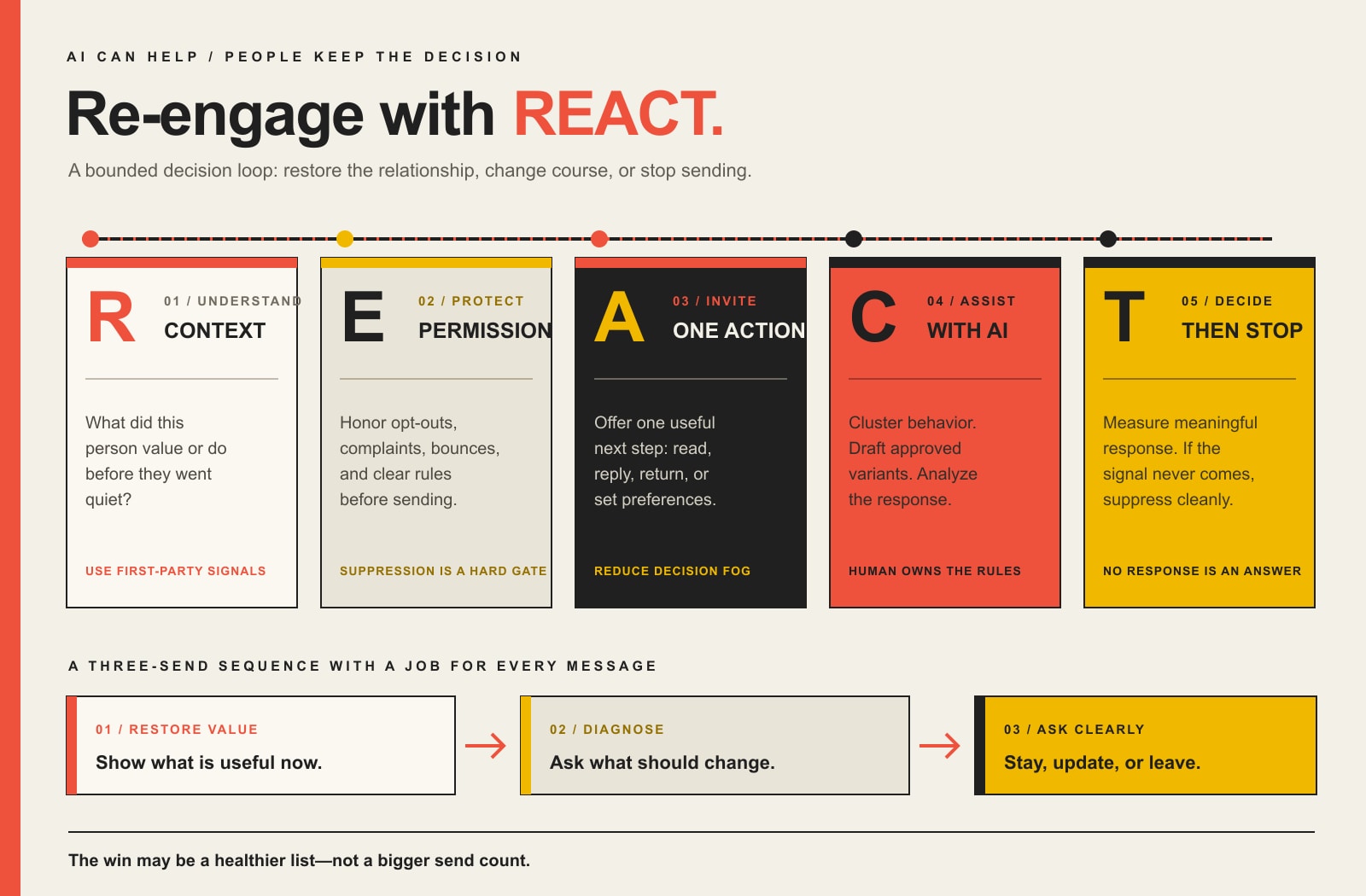
    • Run a bounded re-engagement sequence with a job for each email: restore value, diagnose the mismatch, then ask for a clear stay-or-go decision.
    • Use AI for classification, prioritization, variants, and analysis. Keep permission, legal rules, suppression, and acceptable risk human-owned.
    • Measure reactivation and business outcomes. If nobody responds, suppression can be a successful result because you learned who no longer belongs in the active send pool.

    What Is a Re-Engagement Email?

    A re-engagement email is sent to a subscriber, lead, or customer whose expected interaction has gone quiet. Depending on the business, that may mean they stopped clicking useful content, replying to sales follow-ups, logging in, booking, renewing, buying, or visiting a resource they once used.

    That is different from a normal newsletter, which speaks to the active audience, and it is narrower than a full email customer retention strategy, which can include onboarding, adoption, service recovery, renewal, and customer win-back. This article owns one specific job: deciding what to do with people who have gone quiet and using AI without turning that decision into automated guesswork.

    The “previous relationship” part matters. HubSpot’s current re-engagement guidance is explicit that a re-engagement campaign should confirm or restore a relationship with contacts who previously gave verifiable permission, not create permission where it never existed. If the address came from a purchased list, scraped directory, mystery spreadsheet, or some other source you cannot defend, “AI-powered re-engagement” is just a shinier label for a bad idea.

    Define Inactive Before You Automate Anything

    The biggest mistake is treating inactivity as a timer. A coffee subscription, seasonal landscaping service, annual insurance renewal, B2B equipment purchase, and one-time website project do not share the same healthy purchase cycle. “No purchase in 60 days” could mean churn in one business and completely normal behavior in another.

    Start with the behavior that would reasonably indicate the relationship is still alive. Then define how long that behavior can disappear before the contact deserves a different message.

    Signal typeExamplesHow much should it influence inactivity?
    Strong positive signalPurchase, qualified reply, booking, login, preference update, meaningful link clickHigh. These usually show real intent or continued use.
    Weak or noisy signalEmail open by itself, passive page view, old demographic fieldLow. Use supporting context before making a decision.
    Negative signalHard bounce, spam complaint, unsubscribe, explicit “stop” requestVery high. These can require immediate suppression or other handling.
    Business-cycle contextSeasonality, renewal date, product life, completed project, expected reorder intervalHigh. This keeps a normal customer from being mislabeled as dormant.

    Open data deserves special skepticism. Apple Mail Privacy Protection prevents senders from seeing whether protected users opened a message. That does not make every open-rate trend useless, but it does make “has not opened in 60 days” a weak definition of a dead relationship. Mailchimp makes a similar practical distinction between inactive contacts and stale addresses and warns that people who look inactive in email may still be interacting with a brand elsewhere.

    The Scope Design REACT Framework for Email Re-Engagement

    Scope Design’s REACT framework treats re-engagement as a decision loop instead of a canned autoresponder. It keeps the useful parts of automation while making the exit condition explicit.

    The REACT email re-engagement loop: read the relationship, establish permission and risk boundaries, assign one next action, calibrate with AI, and track outcomes with a clear stop rule.

    R – Read the relationship

    Do not start with copy. Start with what this person used to do and what changed. Separate at least four states when your data allows it: people who subscribed but never really activated, formerly engaged subscribers, past customers whose normal buying cycle has lapsed, and high-value relationships that may deserve a human check-in instead of another automated email.

    This is where first-party data matters. A click on a pricing page, a completed purchase, a support interaction, a product category, or a previous service can give the next message a legitimate reason to exist. “AI says this person has an 83% chance of returning” means nothing if the model is scoring bad inputs and nobody can explain what success looks like.

    E – Establish permission and risk

    Before you send a win-back message, remove the people who should not receive it. Hard bounces, unsubscribes, complaints, legal suppressions, and contacts without a defensible permission history do not belong in a “maybe AI can save them” segment.

    If you send significant volume to Gmail, review Google’s current email sender guidelines. Google recommends keeping user-reported spam below 0.1% and preventing it from reaching 0.3% or higher for bulk-sender traffic, and covered marketing messages need one-click unsubscribe. In the U.S., the FTC’s CAN-SPAM guidance requires commercial-email opt-out requests to be honored within 10 business days. Platform rules can be stricter than the legal floor, so “technically allowed” is not the same thing as “smart to send.”

    A – Assign one useful next action

    Each email needs one job. Ask the subscriber to read one useful update, choose a preference, reply with what changed, return to a product, book a conversation, or confirm that they still want the emails. Five buttons, three offers, a survey, a coupon, and a social follow all crammed into one message is not generosity. It is decision fog.

    The lowest-friction action is often best first. A click to a genuinely useful resource may be enough to prove the relationship is alive. A preference update can tell you that the problem was frequency or topic, not the subscriber. A reply can reveal context no predictive score would have guessed.

    C – Calibrate with AI

    Now AI earns its keep. It can rank contacts by observable behavior, cluster likely reasons for inactivity, generate subject-line and body variants from approved facts, recommend which content or product category to show, and summarize experiment results. Those are useful jobs because they reduce repetitive analysis without changing the rules of the relationship.

    Keep the automation governed. Scope Design’s broader AI automation framework uses the same principle: an automation that touches customer data or public communication needs ownership, monitoring, override, and a safe way to stop. Do not let an LLM invent a customer problem, imply it knows why somebody left, create fake scarcity, or override a suppression rule because the predicted conversion score looks tempting.

    T – Track the outcome and terminate when appropriate

    Define “reactivated” before you launch. It might mean a qualified reply, a preference confirmation, a product return, a booking, a purchase, or a meaningful click followed by renewed behavior. An open alone is rarely strong enough to carry the decision.

    Then define the exit. If a bounded re-engagement effort produces no meaningful signal, suppressing that contact can be the right outcome. You are not “losing the list.” You are reducing the active pool to people who still have a reason to hear from you.

    A Three-Email Re-Engagement Sequence That Earns Each Send

    You do not need a universal six-email marathon. For many businesses, three messages are enough to learn what you need without turning a cold segment into an inbox endurance test. Timing should follow your normal send cadence and buying cycle, not somebody else’s template.

    Email 1: Restore value

    Remind the subscriber why the relationship existed without shaming them for going quiet. Lead with something useful that has changed: a new guide, solved problem, improved service, product update, relevant resource, or timely reason to return.

    Possible subject: “Still useful? Here’s what changed.”
    Primary action: View the update, resource, product, or service that matches prior interest.

    Email 2: Diagnose the mismatch

    If the first message produces no meaningful action, ask for a preference rather than shouting louder. Frequency, topic, timing, role changes, finished projects, budget, or a different need may explain the silence. Give the person a simple way to tell you.

    Possible subject: “Want fewer emails instead?”
    Primary action: Update frequency/topics or answer one short question.

    Email 3: Ask for the decision

    The final message should make staying and leaving equally clear. Do not hide the unsubscribe link in six-point gray type and call that retention. Tell the subscriber what they will continue receiving, give them one obvious way to stay, and make the exit easy.

    Possible subject: “Still want these emails?”
    Primary action: Confirm continued interest, change preferences, or unsubscribe.

    If someone re-engages, route them back into the appropriate active journey. If the relationship is actually a customer-retention problem, move them into the right customer win-back path. If they stay silent, honor the exit rule you decided before the campaign started.

    Re-Engagement Email Examples by Job

    The best re-engagement email example is not the cleverest “we miss you” joke. It is the message that matches why the contact might reasonably come back.

    Message jobExample subject lineUseful next actionBest fit
    Restore valueStill useful? Here’s what changed.Read one relevant updateSubscribers who once clicked or consumed content
    Reset preferencesWant fewer emails instead?Choose topics or frequencyNewsletter subscribers with declining engagement
    Replenishment or returnReady for your next [product/service]?Reorder, book, or review optionsBusinesses with a defensible repeat cycle
    Resolved problemWe fixed the thing that used to be annoying.See the changeFormer users affected by a known product/service issue
    Human check-inHas your need changed?ReplyHigh-value B2B leads or past clients
    Final choiceStill want these emails?Confirm, change preferences, or unsubscribeContacts who ignored the bounded sequence

    Discounts are optional. They make sense when price is a legitimate barrier and margin can support the offer. They are a lousy default when the real problem is irrelevant content, a completed buying cycle, poor service, or no current need. Train every dormant contact to expect a coupon and you may reactivate bargain hunting rather than a healthy relationship.

    What AI Should Automate – and What It Should Not

    AI is most useful when it compresses analysis and production work while leaving policy decisions explicit.

    Good AI jobWhy it helpsHuman-owned boundary
    Score or cluster contacts from approved first-party behaviorFinds patterns across more records than a human will review manuallyDefine which data is allowed and what the score may trigger
    Generate controlled subject/body variantsSpeeds testing and reduces repetitive draftingApprove facts, tone, offers, claims, and prohibited language
    Recommend content or product categories from known historyMakes the message more relevantDo not infer sensitive facts or pretend to know why the person disappeared
    Analyze replies and experiment resultsSurfaces recurring objections and useful segmentsReview edge cases and anything that changes customer status
    Suggest send timing from observed behaviorReduces manual scheduling workRespect frequency caps, quiet periods, suppression, and campaign limits

    If you already use a welcome email series, the same principle applies at the other end of the lifecycle: automation should deliver a clear promise and respond to behavior. The difference is that re-engagement also needs a clean stop condition.

    Protect Deliverability While You Wake Up a Cold Segment

    A dormant list is not free inventory. It is a deliverability risk if you wake everybody at once, especially when some addresses are stale, permission is unclear, or recipients barely remember the brand.

    • Start with permission and list quality. Exclude hard bounces, complaints, unsubscribes, and contacts you cannot legitimately defend.
    • Segment before sending. Formerly engaged subscribers deserve a different treatment from stale addresses that have not heard from you in years.
    • Use meaningful engagement signals. Apple privacy protections make open-only logic weak; clicks, replies, purchases, logins, and preference updates are stronger evidence.
    • Make leaving easy. A hidden unsubscribe does not save the relationship. It increases the chance that a frustrated recipient uses the spam button instead.
    • Watch complaints and bounces during the test. Stop or narrow the campaign when the risk signal is rising. “The workflow was scheduled” is not a defense.

    This is also why an email unsubscribe rate is not automatically a failure metric. A re-engagement campaign that helps uninterested people leave cleanly can improve the quality of the active audience. Mailchimp’s guidance similarly recommends re-engaging inactive contacts and then archiving or unsubscribing the people who remain inactive.

    Measure Re-Engagement Like a Business Outcome

    Do not end the report at open rate. Measure the chain from eligible inactive contact to meaningful action and, when the business has the data, to revenue or retained value.

    • Eligible inactive contacts: the people who passed your permission, data-quality, and lifecycle rules.
    • Delivered messages: the actual denominator after bounces and send exclusions.
    • Meaningful response rate: clicks, replies, preference changes, logins, bookings, purchases, or another pre-defined reactivation signal.
    • Reactivated contacts: people who resume the behavior that matters after the campaign.
    • Incremental revenue or gross margin: revenue attributable to reactivated contacts when your tracking supports that conclusion.
    • List-health outcome: unsubscribes, suppressions, complaints, and bounces that reduce future waste or risk.

    When your list is large enough, keep a small holdout group so you can compare what happened without the re-engagement sequence. That is much stronger evidence than claiming every purchase after an email was “recovered revenue.” If you use customer lifetime value in the business case, use a defensible model rather than multiplying one reactivated purchase by a fantasy retention number.

    Mailchimp says its most successful re-engagement emails typically reactivate about 10% of inactive subscribers. Treat that as a platform benchmark, not a promise. Your definition of inactive, audience source, buying cycle, brand recognition, offer, deliverability, and measurement window can move the result dramatically.

    Re-Engagement Campaign Implementation Checklist

    1. Define the business behavior that means a relationship is active.
    2. Choose an inactivity threshold that matches the real buying or engagement cycle.
    3. Exclude bounces, complaints, unsubscribes, unsupported permission, and other suppression states.
    4. Separate never-activated contacts from formerly engaged subscribers and lapsed customers.
    5. Choose one meaningful reactivation action for each segment.
    6. Build a bounded sequence, usually two or three messages before the decision point.
    7. Give AI only approved data and explicit instructions about what it may personalize.
    8. Review every generated claim, offer, subject line, and inferred reason before launch.
    9. Verify authentication, unsubscribe handling, frequency caps, and deliverability monitoring.
    10. Track meaningful reactivation, revenue where defensible, and list-health outcomes.
    11. Suppress or reroute nonresponders according to the rule you set before the campaign started.
    12. Save what you learned so the next re-engagement campaign starts smarter instead of from another template.

    Frequently Asked Questions About Re-Engagement Email Campaigns

    How long should a subscriber be inactive before a re-engagement email?

    There is no universal number. Match the threshold to normal send frequency, buying cycle, seasonality, renewal timing, and meaningful customer behavior. A weekly newsletter may need a different threshold from an annual service or seasonal product.

    How many re-engagement emails should I send?

    Use the smallest sequence that can answer the decision. Two or three messages are often enough for value reminder, preference/diagnosis, and final confirmation. High-value B2B relationships may deserve a human follow-up instead of more automation.

    What is a good re-engagement rate?

    A universal “good” rate is misleading because the denominator and definition of reactivated vary. Mailchimp says its most successful re-engagement emails typically re-engage about 10% of inactive subscribers. Use your own baseline and a consistent definition of meaningful reactivation, then compare segments and, when possible, a holdout group.

    Should a re-engagement email include a discount?

    Only when price is a plausible barrier and the economics make sense. A relevant update, resolved problem, preference choice, useful resource, replenishment reminder, or direct human check-in may be stronger. Discounting every dormant contact can train people to wait for a coupon.

    Can AI write re-engagement email subject lines?

    Yes. AI is useful for generating variants from a clearly defined message job and approved facts. It should not invent urgency, claim to know why a subscriber disappeared, or personalize from data you would not be comfortable explaining to the recipient.

    When should I remove or suppress inactive subscribers?

    Immediately honor bounces, complaints, opt-outs, and other mandatory suppression states. For valid but inactive subscribers, run a bounded re-engagement or preference-confirmation effort when the relationship still has a legitimate reason to continue. If there is still no meaningful signal, suppression is often the cleanest decision.

    Does CAN-SPAM require an unsubscribe option in re-engagement emails?

    In the United States, commercial email is subject to CAN-SPAM requirements, including a clear opt-out mechanism and honoring opt-out requests within 10 business days. Platform sender rules may be stricter. This article is general marketing guidance, not individualized legal advice.

    Turn a Dormant List Into a Decision, Not a Guess

    A dormant email list is not automatically hidden revenue. It is unresolved information. Some people still want what you send. Some need a different message. Some finished the relationship successfully. Some forgot who you are. Some should never receive another marketing email.

    The job of a good re-engagement system is to tell those states apart with as little friction and risk as possible. AI can help you do that at scale, but the value comes from the rules, evidence, and decisions around the model.

    If your list is large enough to matter but messy enough that nobody trusts the segments, triggers, attribution, or suppression rules, talk to Scope Design. We can help audit the email and automation system, decide what should be automated, and build a workflow that knows when to send, when to change course, and when to stop.