
Yes, GDPR can apply to a US small business—but an EU resident simply visiting your website does not automatically trigger it. The first question is whether your processing falls within the GDPR’s territorial scope: for a US business without an EU establishment, that usually means intentionally offering goods or services to people in the Union or monitoring their behavior there. GDPR Article 3 sets the rule, and the European Data Protection Board’s territorial-scope guidance makes an important point that many summaries miss: mere website accessibility in Europe is not enough by itself.
That distinction matters because a lot of small-business GDPR advice starts with the wrong question. It jumps straight to cookie banners, privacy-policy generators, or scary fine numbers before asking whether the activity is actually in scope. That’s backwards. Compliance theater is still theater, even when the button says “Accept All.”
This guide is general information for US small businesses, not individualized legal advice. Scope Design can help implement website, tracking, security, form, consent, and vendor-control changes. A qualified privacy attorney should decide material legal questions about applicability, lawful basis, representative or DPO obligations, sensitive processing, international-transfer mechanisms, or regulator response.
GDPR compliance for US small businesses: the short version
- EU traffic alone is not the test. A random visitor from France does not, by itself, prove that you are targeting the EU.
- Intentional EU sales or marketing can be the test. EU-directed advertising, EU delivery, Member-State references, EU-focused languages or currencies tied to ordering, and similar signals can show an intention to offer goods or services to people in the Union.
- Behavior monitoring can also bring a US business into scope. Tracking or profiling people in the Union to analyze or predict behavior can matter under Article 3(2).
- Small does not mean exempt. Some obligations have narrow exceptions, but there is no blanket “small business exemption” from GDPR.
- Cookies are not just a GDPR question. GDPR governs personal-data processing, while the ePrivacy rules contain more specific requirements for storing or accessing information on a user’s device.
- Operational readiness matters more than a badge. You need to know what data you collect, why you collect it, who receives it, how long you keep it, how you secure it, and how you will respond when someone exercises a right or something goes wrong.
Does GDPR apply to your US company? Use this scenario test
The GDPR can reach organizations outside Europe. But it does not do so because of citizenship alone, and it does not automatically attach to every US website that can be opened in Europe. The practical starting point is Article 3.
| Scenario | Practical read | What to inspect |
|---|---|---|
| A person in France lands on your US-only website | Not enough by itself. | Whether you actually target people in the Union or monitor their behavior there. |
| You run ads aimed at EU countries, ship there, or build EU-specific offers | GDPR may apply. | Targeting signals, customer journey, order flow, payment, delivery, and marketing data. |
| You profile or track people in the EU for behavioral advertising or prediction | GDPR may apply under the monitoring test. | Tracker purpose, profiling logic, audience location, vendors, identifiers, and downstream use. |
| You have an EU office, branch, or sufficiently stable establishment involved in the processing | Article 3(1) may apply. | The relationship between the EU establishment’s activities and the processing. |
| You process personal data for an EU client as its vendor | Processor duties and contract terms may apply. | Your role, Article 28 terms, instructions, subprocessors, security, transfers, and breach workflow. |
| Your customers are only in the UK | Do not treat EU GDPR and UK GDPR as identical jurisdictions. | UK GDPR and UK-specific guidance rather than assuming the EU analysis answers the UK question. |
The EDPB says that simply making a website accessible in the Union is not enough to demonstrate an intention to offer goods or services there. It looks for evidence of targeting. Its examples include EU-directed marketing, references to Member States or EU customers, delivery to EU countries, and language or currency choices that make sense as part of an EU-facing commercial offer. Context matters, which is exactly why “someone from Germany visited my site” is a lousy compliance test.
Monitoring is also more specific than “we have analytics installed.” The EDPB discusses tracking people on the internet, including potential profiling used to analyze or predict personal preferences, behaviors, or attitudes. The purpose and actual processing matter. If your marketing stack includes analytics, ad pixels, audience building, retargeting, CRM enrichment, session recording, or personalization, inventory those tools before making a conclusion.
The TRACE self-audit: make GDPR an operating system, not a banner
Scope Design uses a five-part way to organize the implementation conversation: TRACE—Targeting, Records, Authority, Controls, Execution. TRACE is our operating framework, not language from the regulation. Its job is to stop a small business from buying one privacy plugin and pretending the rest of the data system disappeared.
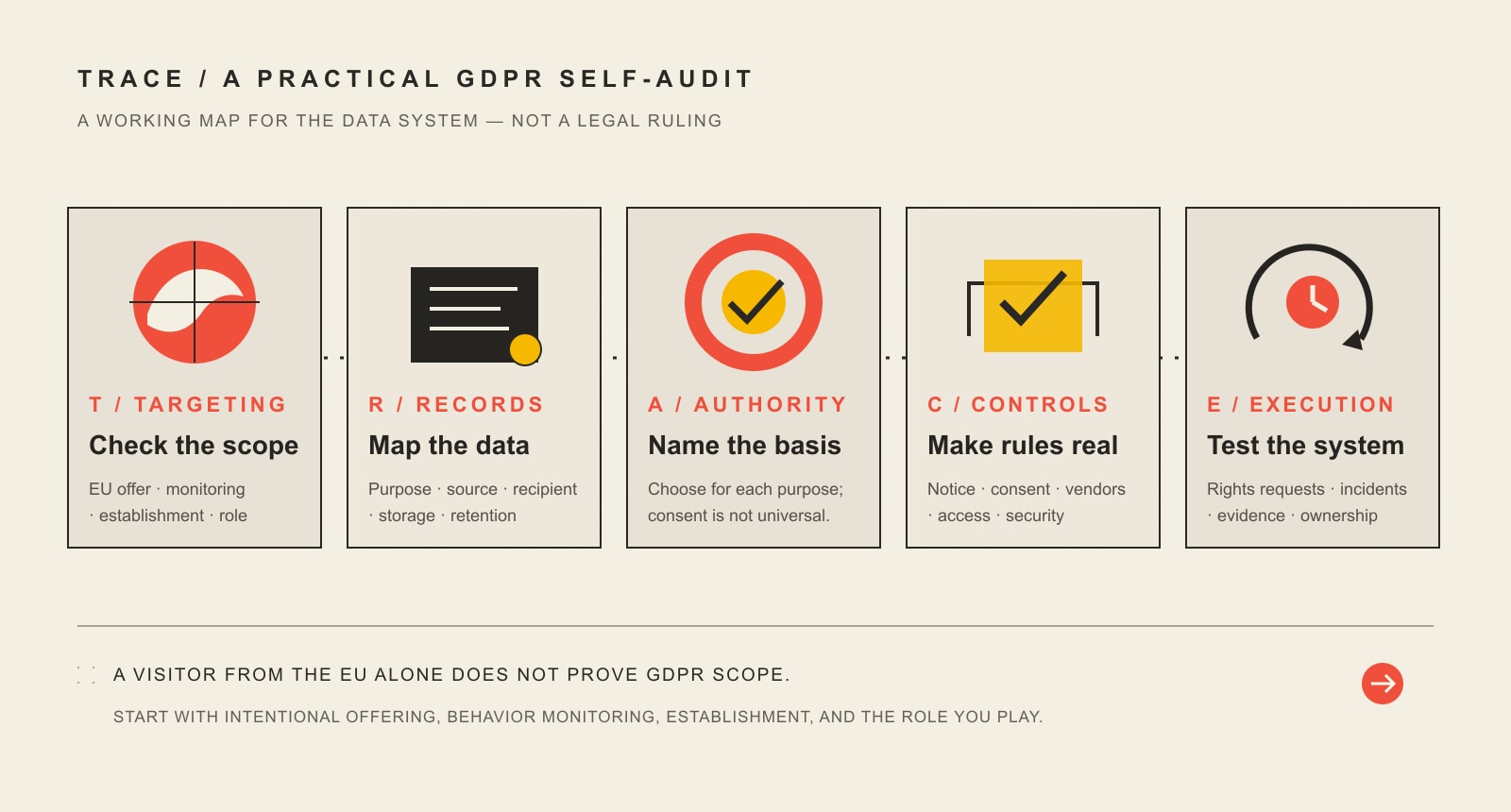
T — Targeting
First, establish why GDPR may apply. Are you intentionally selling or marketing to people in the Union? Are you monitoring behavior there? Do you have an EU establishment? Are you acting as a processor for a client whose instructions bring the processing within GDPR? Write the reason down. If nobody can explain why the regulation applies, everything after this step is guesswork.
R — Records
Map the data system you actually have. Include contact forms, newsletter signups, ecommerce, analytics, advertising pixels, CRM, payment providers, scheduling tools, help desks, cloud storage, employee systems, backups, embedded video, chat widgets, security logs, and anything else that receives personal data. Record purpose, data type, source, recipient, storage location, retention, deletion method, and international transfers.
A — Authority
For each purpose, identify the lawful basis that actually supports the processing. Article 6 includes consent, contract, legal obligation, vital interests, public task, and legitimate interests. Consent is important in the right places, but it is not the universal answer for every data flow. If you rely on consent, the way you collect and withdraw it matters. If you rely on legitimate interests, that is not a magic phrase you paste into a privacy policy; the balancing and context matter.
C — Controls
Now make the rules real: privacy notices, cookie behavior, collection fields, retention, access controls, processor agreements, subprocessor visibility, transfer mechanisms, security, backups, and governance. This is where design and development decisions become compliance decisions. A beautiful privacy page cannot fix a Meta Pixel firing before consent, an old CRM export sitting in a shared folder, or five ex-employees who still have admin access.
E — Execution
Finally, prove that the system can function under pressure. Who receives a data-rights request? How is identity checked? Who searches the CRM, inboxes, help desk, backups, and vendor systems? Who assesses a breach? Who can contact counsel and the relevant supervisory authority? What evidence do you retain? When is the next vendor and tracker review? A policy that nobody can execute is just formatted optimism.
What GDPR requirements should a US small business implement when it is in scope?
1. Minimize the data you collect and document why you need it
Article 5 includes principles such as purpose limitation, data minimization, accuracy, storage limitation, integrity/confidentiality, and accountability. For a small business, the operational version is simple: stop collecting data because a form template happened to include the field.
For every collection point, ask: What business purpose does this field serve? What lawful basis supports that purpose? Who needs access? How long do we need it? Can we accomplish the same goal with less data? Removing unnecessary fields reduces privacy risk, breach impact, staff confusion, and future cleanup.
2. Make the privacy notice match the real system
Your privacy notice should explain the actual categories of data, purposes, legal bases where required, recipients, transfers, retention logic, rights, and relevant contact information. Do not copy a competitor’s policy and swap the company name. Their stack is not your stack.
Start from the data map, then write the notice. That order sounds obvious because it is. Somehow, the internet managed to turn it into a downloadable-template industry.
3. Treat cookies, analytics, and advertising tags as a separate implementation project
Cookie compliance is commonly explained badly. The EDPB’s cookie guidance notes that GDPR applies when cookies involve personal-data processing, while the ePrivacy Directive supplies more specific rules about storing information or accessing information on a user’s device. Non-essential storage/access generally needs prior consent; technically necessary uses can fall within an exception.
That means a consent banner should be connected to an inventory of what actually loads. Test analytics, ad pixels, embedded media, chat, session recording, personalization, and third-party scripts before and after each consent choice. The European Commission’s current privacy guidance also emphasizes that rejecting cookies should be as easy as accepting them and warns against manipulative consent interfaces. A dark-pattern banner is not improved because it has rounded corners.
If email is part of the same funnel, GDPR is only one piece of the compliance picture. Our email marketing laws guide separates GDPR from CAN-SPAM, CASL, UK/EU rules, unsubscribe duties, and the evidence you should retain for your list.
4. Build a data-subject-rights workflow before the first request arrives
GDPR gives individuals rights that can include access, rectification, erasure, restriction, portability, objection, and protections around certain automated decisions, depending on the circumstances. Article 12 generally requires action without undue delay and within one month. For complex or numerous requests, that period can be extended by two further months, but the person must be told within the first month and given the reason.
Create one intake path, one owner, a verification process, a system-search checklist, a decision/escalation step, and response records. Include vendors. If your CRM can delete a person but your email platform, support desk, form database, and cloud exports cannot, you do not yet have an executable process.
5. Review vendors and Article 28 data-processing terms
Most small businesses do not process data alone. Hosting providers, email platforms, analytics vendors, CRMs, payment processors, scheduling apps, support desks, cloud storage, and marketing tools may all touch personal data. Article 28 requires a controller to use processors providing sufficient guarantees and to govern processing through a contract or other binding legal act with required terms.
Maintain a vendor list with purpose, data, role, subprocessor information, security commitments, retention/deletion terms, breach obligations, and transfer mechanism. “We use a famous SaaS company” is not a vendor-risk assessment.
6. Check international transfers instead of assuming every US vendor is covered
Moving EU personal data to a recipient in the United States can trigger GDPR Chapter V transfer rules. The European Commission’s current adequacy page lists the United States for commercial organizations participating in the EU-US Data Privacy Framework. That does not mean every US organization or vendor is automatically covered.
For each relevant transfer, verify the receiving organization and the mechanism being relied on. Depending on the relationship and facts, another recognized safeguard—such as standard contractual clauses—may be part of the analysis. This is one of the places where legal review earns its keep, especially when multiple vendors, subprocessors, sensitive data, or non-adequate destinations are involved.
7. Make security proportional to the risk—and make response readiness part of security
Article 32 calls for technical and organizational measures appropriate to the risk. It does not say “install one security plugin and relax.” Access control, supported software, multifactor authentication, encryption where appropriate, logging, monitoring, backups, recovery, vendor security, staff procedures, and evidence all matter in context.
For the website side, our website security guide uses the LOCKED framework to turn security into owned operations rather than a pile of tools. Credential hygiene is part of that system too; a business password manager can help eliminate shared passwords and unmanaged access, which is why we maintain a separate business password-management guide.
Breach response also needs nuance. Under Article 33, a controller generally notifies the competent supervisory authority without undue delay and, where feasible, within 72 hours after becoming aware of a personal-data breach unless the breach is unlikely to result in a risk to individuals’ rights and freedoms. Article 34 separately addresses communication to affected people when high risk is likely, subject to specified exceptions. So the real requirement is fast assessment and escalation—not the simplistic slogan “every incident must be reported in 72 hours.”
8. Do not assume small size removes records, representative, or governance questions
Three recurring myths deserve their own correction.
- “We’re under 250 employees, so Article 30 records do not apply.” Not necessarily. Article 30(5) has a narrow carve-out, but it does not remove recordkeeping when processing is not occasional, is likely to risk people’s rights and freedoms, or includes specified special-category or criminal-conviction data.
- “Every US company under GDPR needs a DPO.” No. Article 37 requires a data protection officer in defined situations, including certain large-scale monitoring or large-scale special-category/criminal-data processing. The criteria matter.
- “We’re small, so we cannot need an EU representative.” Article 27 is more specific. A non-EU controller or processor subject to Article 3(2) generally must designate a representative in the Union unless a limited exception applies, including requirements around occasional and low-risk processing. See Article 27 and get counsel involved if this question is live for your business.
A 30-day GDPR implementation plan for a small US business
If GDPR likely applies, do not try to “finish GDPR” in an afternoon. Use a short implementation cycle that produces evidence and leaves an operating rhythm behind.
Week 1: prove scope and map the data
- Document the Article 3 reason the business may be in scope.
- List every public collection point and major internal system.
- Inventory trackers, embedded tools, CRM, email, payment, support, storage, HR, and backups.
- Record vendors, purposes, data categories, recipients, locations, retention, and transfers.
- Flag sensitive data, children, profiling, large-scale monitoring, or other higher-risk activity for legal review.
Week 2: match authority, notice, and consent to reality
- Map each processing purpose to its proposed lawful basis.
- Update privacy notices from the data map, not from a template.
- Test cookie/tracker behavior before consent, after accept, after reject, and after preference changes.
- Fix forms so they collect only what is necessary and use accurate permission language.
- Review email and marketing consent separately from general website data collection.
Week 3: fix vendor, transfer, access, and retention controls
- Collect and review processor agreements for relevant vendors.
- Verify subprocessor and transfer information.
- Check Data Privacy Framework participation or other transfer mechanisms where relevant.
- Remove stale accounts, reduce unnecessary admin access, enable stronger authentication, and document ownership.
- Set realistic retention and deletion rules instead of keeping data forever because storage is cheap.
Week 4: test rights and incident response
- Run a mock access or deletion request across your real systems.
- Time how long it takes to locate the data and identify gaps.
- Run a tabletop breach scenario: who is called, what gets preserved, who assesses risk, and who can contact counsel or a regulator?
- Document the process and evidence.
- Schedule recurring tracker, vendor, access, retention, and privacy-notice reviews.
This is the same systems-first thinking we use in broader small-business marketing strategy: channels and tools only work when the underlying audience, conversion, follow-up, capacity, measurement, and ownership system is coherent. Privacy compliance belongs inside that system, not bolted to the footer after launch.
What are the GDPR penalties for a US small business?
The maximum numbers are real, but they should not be used as clickbait. Article 83 sets case-specific factors for administrative fines and different maximum tiers. Specified infringements can carry maximums of €10 million or 2% of total worldwide annual turnover, while specified higher-tier infringements can reach €20 million or 4%, with the regulation applying the relevant “whichever is higher” structure for undertakings.
That does not mean a small business automatically receives a maximum fine for a first mistake. Regulators consider factors such as nature, gravity, duration, intent or negligence, mitigation, responsibility, prior infringements, cooperation, data categories, and how the issue became known. The better business lesson is not “panic about €20 million.” It is “build a system that can show what you knew, what you controlled, what you fixed, and how you responded.”
Frequently asked questions about GDPR and US small businesses
Does GDPR apply to US companies?
It can. A US company may fall within GDPR because of an EU establishment or, for certain non-EU processing, because it intentionally offers goods or services to people in the Union or monitors their behavior there. The company’s US location does not automatically put it outside GDPR.
Does GDPR apply just because someone in Europe visits my website?
No—not by that fact alone. EDPB territorial-scope guidance says mere website accessibility in the Union is not enough to demonstrate an intention to offer goods or services there. Look for intentional targeting or relevant behavior monitoring instead.
Can Google Analytics or advertising pixels make GDPR apply to a US business?
Potentially, depending on what the processing is doing and where the people are. Article 3(2) includes monitoring behavior in the Union, and EDPB guidance discusses internet tracking and profiling used to analyze or predict behavior. Do not decide based only on the tool’s brand name; inspect purpose, configuration, audience, identifiers, and downstream use.
Do businesses with fewer than 250 employees need GDPR records?
They may. Article 30’s under-250 provision is not a blanket exemption. Records can still be required when processing is not occasional, is likely to risk rights and freedoms, or includes specified special-category or criminal-conviction data.
Does every US business subject to GDPR need a DPO?
No. Article 37 defines specific circumstances in which a DPO is mandatory. Many small private businesses will not meet those tests, but the decision should be based on the statutory criteria rather than company size alone.
Does a US business need an EU representative?
A non-EU controller or processor subject to Article 3(2) generally faces the Article 27 representative requirement unless a limited exception applies. Because the exception is fact-specific, this is a sensible legal-review checkpoint when a US company intentionally serves or monitors people in the EU.
Do all cookies require GDPR consent?
No single sentence like that is accurate. GDPR governs personal-data processing, while ePrivacy has more specific storage/access rules. Non-essential cookies and similar technologies generally require prior consent under those rules, while technically necessary uses can be exempt. Inventory the technology and classify purpose before configuring the banner.
Does every data breach have to be reported within 72 hours?
No. Article 33 says supervisory-authority notification is required without undue delay and, where feasible, within 72 hours unless the breach is unlikely to result in a risk to rights and freedoms. Notification to affected individuals has its own high-risk test under Article 34. Get legal and incident-response help quickly because the clock and the risk assessment can matter.
Does the EU-US Data Privacy Framework make every transfer to the United States compliant?
No. The European Commission’s adequacy finding applies to participating US commercial organizations. Verify participation or another valid transfer mechanism for the receiving organization and relevant processing.
Is UK GDPR the same thing as EU GDPR for a US company?
No. They are closely related frameworks, but the UK operates its own post-Brexit data-protection regime and regulator. If your business targets or monitors people in the UK, perform the UK analysis separately instead of assuming an EU conclusion automatically answers it.
What to do next
If your US business may fall within GDPR, start with TRACE: document the targeting or monitoring reason, map the data, identify the authority for each purpose, fix the controls, and test execution. That will give your lawyer, developer, marketing team, and vendors something concrete to work from instead of a vague instruction to “make the website GDPR compliant.”
Scope Design can help with the implementation layer—data-flow and tracker inventory, consent behavior, forms, marketing integrations, privacy-aware UX, access/security controls, and the technical cleanup that turns decisions into a working website. For legal conclusions, use qualified privacy counsel. The useful outcome is not a compliance badge. It is a system you understand, can explain, and can operate when a real request or incident lands on your desk.