
Tag: cybersecurity

  • Business Password Manager Guide: 5 Strong Options and the ACCESS Test

    Business Password Manager Guide: 5 Strong Options and the ACCESS Test

    A business password manager should do more than remember logins. For a company, the real job is to give the right people access, keep credentials out of chat threads and spreadsheets, make stronger authentication easier to use, and let an administrator remove access cleanly when someone leaves. If a tool cannot make that lifecycle boring and repeatable, its encryption-page vocabulary will not rescue the rollout.

    There is no single best business password manager for every team. Based on current documented capabilities, our strongest shortlist is 1Password for polished workforce administration and identity integrations, Bitwarden for open-source flexibility and value, Keeper for high-control enterprise administration and a path toward privileged access management, NordPass for straightforward small-business administration, and Dashlane Omnix Password Management for password/passkey management tied to broader credential-risk controls. The better choice depends on how well each option fits your actual access lifecycle.

    Pricing and product names below were checked on August 21, 2026. Password-manager plans change frequently, so verify the current vendor page before buying. Scope Design did not perform a penetration test or laboratory security audit of these products; this guide compares current documented capabilities against an operational decision framework.

    Quick comparison: five strong business password managers

    OptionStrong fit whenUseful business differentiatorPublished pricing note
    1PasswordYou want a polished cross-platform experience plus identity-provider administrationGroups, provisioning, SSO options, activity controls, and mature workforce administrationBusiness: $8.99/user/month billed annually; Teams Starter: $24.95/month for up to 10 members
    BitwardenYou value open-source software, price transparency, or self-hosting optionsSCIM, directory sync, event logs, SSO options, account recovery, and an Enterprise self-host pathTeams: $4/user/month annually; Enterprise: $6/user/month annually
    KeeperYou need deeper policy, reporting, offboarding, or a future path toward PAMAdministrative policies, reporting, vault transfer, SSO/SCIM on Enterprise, and adjacent PAM toolingEnterprise packaging is configuration and quote dependent
    NordPassYou want an approachable team vault with a clear path from SMB controls to enterprise provisioningShared folders, groups, activity monitoring, password-health/breach tools, and Enterprise SSO/provisioningPricing varies by plan term and package; check the current quote or checkout page
    Dashlane Omnix Password ManagementYou want managed passwords/passkeys plus SSO/SCIM and Dashlane’s wider credential-protection ecosystemAdmin policies, sharing, SSO, SCIM, password/passkey management, and adjacent credential-protection options$8/user/month for Omnix Password Management
    Current first-party plan information checked August 21, 2026. Published prices can change and may exclude taxes, add-ons, minimums, or negotiated enterprise terms.

    If you are choosing between those five, do not start by arguing about which vendor has the fanciest cryptography paragraph. Start with the work your company needs the system to perform.

    Use the Scope Design ACCESS Test before you choose

    We use the ACCESS Test to evaluate a business password manager across the whole credential lifecycle. Each letter is a practical question that can expose a poor fit before you migrate hundreds of logins.
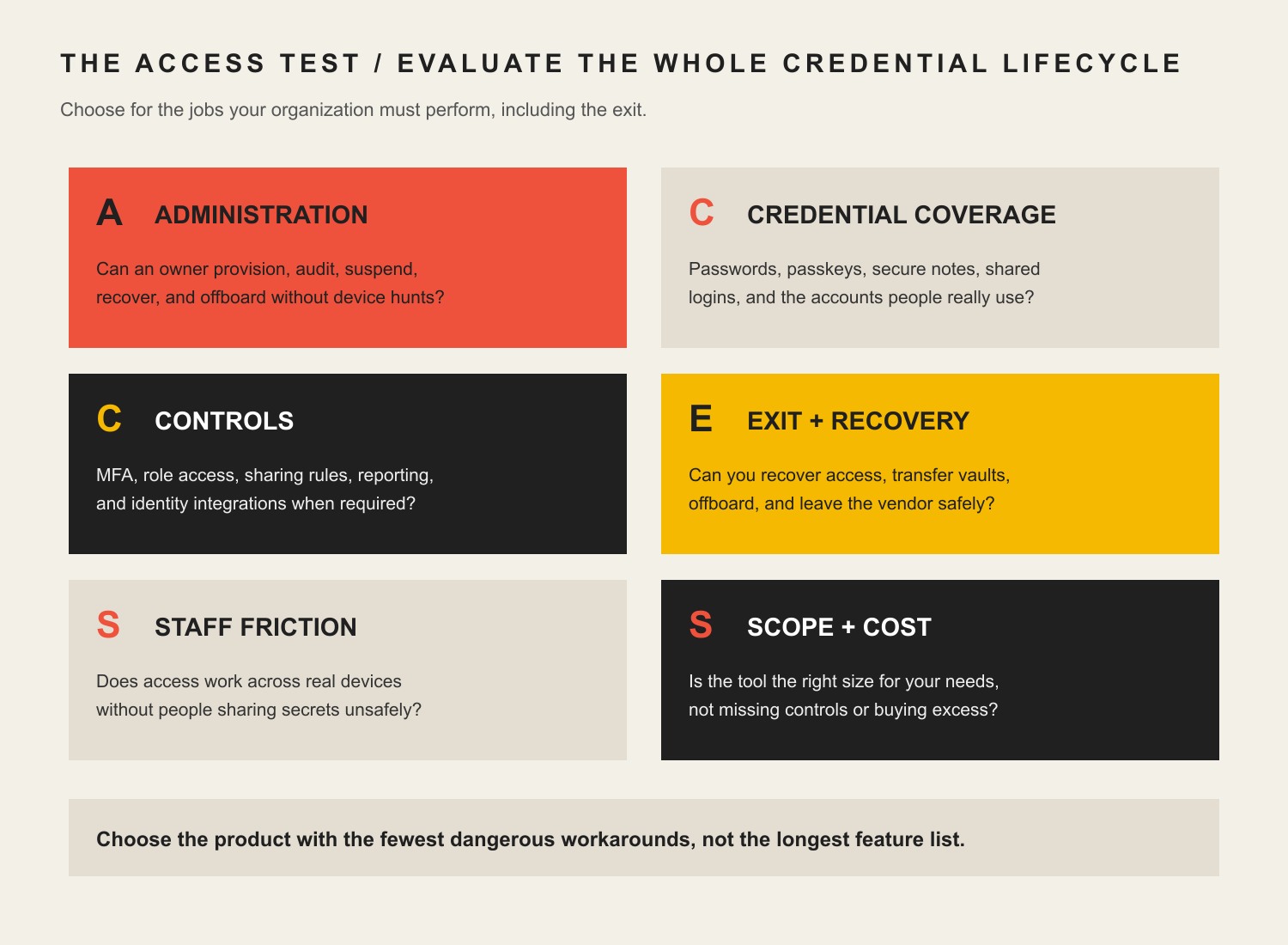
    The ACCESS Test checks administration, credential coverage, controls, exit and recovery, staff friction, and scope and cost.
    The ACCESS Test evaluates the complete business credential lifecycle, not just password storage.
    • A — Administration: Can an owner or administrator provision people, group access by role, audit activity, suspend accounts, and complete offboarding without hunting through individual devices?
    • C — Credential coverage: Does the system handle the passwords, passkeys, secure notes, shared logins, and account types your team actually uses?
    • C — Controls: Can you enforce MFA, role-based access, sharing rules, reporting, SSO, SCIM, or other identity controls required by your environment?
    • E — Exit and recovery: What happens when an employee leaves, an administrator is unavailable, a device is lost, or you decide to leave the vendor? Test recovery, vault transfer, and export before you need them.
    • S — Staff friction: Does autofill work on the browsers, operating systems, and mobile devices your staff uses? Can people share access without copying secrets into Slack, email, or a spreadsheet?
    • S — Scope and cost: Are you buying the right class of tool? A workforce password manager may not be enough for developer secrets or privileged infrastructure access, and an enterprise PAM platform may be overkill for a 12-person office.

    The best score is not the product with the most boxes checked. It is the product that covers your required jobs with the least dangerous workaround. A feature you never use has little value; a missing offboarding control can become an operational liability.

    Set the security baseline before comparing vendors

    A password manager is only one layer of authentication security. The current NIST SP 800-63B-4 authentication guideline, finalized in July 2025, explicitly notes that passwords are not phishing-resistant and identifies WebAuthn/FIDO2 as an example of phishing-resistant authentication. NIST’s document is a federal digital-identity standard, not a private-business law, but it is a useful benchmark for understanding why a password vault should coexist with stronger authentication rather than become an excuse to stop at passwords.

    CISA’s guidance for small and midsize businesses makes the same operational point: strong passwords alone are not enough, and businesses should use MFA, moving toward phishing-resistant methods where practical. For a password-manager deployment, that means protecting administrator and vault accounts with the strongest practical MFA or passkey option and treating recovery methods as security-sensitive assets too.

    1Password: strong workforce administration and identity integration

    1Password is a strong fit when employee usability and identity-provider administration both matter. Its Business product documents group-based access management, account suspension, identity-provider provisioning, and Unlock with SSO. Those capabilities are useful when your password manager needs to fit an existing employee onboarding and offboarding process instead of operating as a separate island.

    As of August 21, 2026, 1Password publishes Business at $8.99 per user per month billed annually. It also publishes Teams Starter at $24.95 per month for up to 10 members, billed annually. That is materially different from the old $2.99 figure previously carried by this article, which is why we now date volatile plan data instead of treating it as evergreen.

    1Password deserves a closer look if you need clean employee-facing apps plus serious administrative plumbing. The tradeoff is cost: a team that only needs a basic shared vault may be paying for capabilities it does not use. During a pilot, test provisioning, suspension, account recovery, shared-vault ownership, and the real browser/device mix rather than evaluating the demo vault alone. See 1Password’s Business administration documentation for current feature boundaries.

    Bitwarden: strong value, open-source transparency, and self-hosting options

    Bitwarden is compelling for organizations that value price transparency, open-source software, or a self-hosting path. Its current business plans separate Teams from Enterprise in a way that makes the upgrade decision relatively easy to inspect.

    Bitwarden currently publishes Teams at $4 per user per month annually and Enterprise at $6. Teams includes secure sharing, event logs, directory integration, and SCIM. Enterprise adds capabilities including SSO options, account recovery, more granular controls, and self-hosting. Confirm the exact plan matrix before purchase because plan packaging can change.

    Self-hosting can preserve control and fit organizations with specific infrastructure requirements, but it should not be marketed as automatically safer. Self-hosting transfers more patching, availability, backup, monitoring, and recovery responsibility to your team. If you choose it, score that operational burden honestly under the second S in ACCESS: scope and cost.

    Keeper: deeper policy and offboarding control with a path toward PAM

    Keeper becomes more interesting as administrative control and privileged-access requirements grow. Keeper’s current Business and Enterprise materials emphasize centralized policies, reporting, organizational records, and vault transfer for offboarding. Enterprise materials also document SSO and SCIM integrations, and Keeper offers privileged access management as an adjacent product family.

    That matters because some organizations eventually outgrow the simple question “Where do employees store passwords?” and start asking “Who may use a privileged credential, under what approval, for how long, and with what audit trail?” A normal workforce password manager and a PAM system are related, but they are not interchangeable.

    Keeper’s enterprise package is best treated as quote and configuration dependent rather than reduced to one evergreen number. Review Keeper Enterprise’s current feature set, then make the vendor demonstrate your exact offboarding, role, reporting, and recovery requirements during the trial.

    NordPass: approachable SMB controls with an enterprise upgrade path

    NordPass is worth shortlisting when a small or midsize team wants straightforward administration without giving up an upgrade path. Current business documentation describes Teams, Business, and Enterprise tiers. Depending on the tier, features include activity monitoring, shared folders, groups, password-health and breach-monitoring tools, and Enterprise SSO/provisioning options with identity providers such as Microsoft Entra ID and Okta.

    NordPass pricing is presented differently depending on term and package, so this guide intentionally does not freeze a promotional checkout number into an evergreen comparison. Review the current NordPass business plans and the vendor’s plan documentation on the day you compare finalists.

    The important question is not whether NordPass, or any competitor, uses a particular cipher name that sounds more modern. The operational question is whether the plan you are buying includes the administration, recovery, identity integration, and sharing controls your team actually needs.

    Dashlane Omnix Password Management: password and passkey management inside a wider credential-security portfolio

    Dashlane changed the product name, not the job. In July 2026, Dashlane announced that Dashlane Business was renamed Omnix Password Management. The company says the plan’s features, settings, pricing, and access remained unchanged through the rename. As checked August 21, 2026, Omnix Password Management is published at $8 per user per month. Dashlane’s current business password-management page describes the plan’s password/passkey, sharing, policy, SSO, and SCIM capabilities.

    The product documentation covers managed passwords and passkeys, secure sharing, administrative policies, SSO, and SCIM. Dashlane also sells broader credential-protection capabilities, which may appeal to organizations that want to address credential exposure beyond the vault itself. Treat those adjacent Omnix capabilities as separate plan decisions unless the current package explicitly includes them.

    Why a business password manager is different from a personal or browser password manager

    A personal password manager answers “How do I store my logins safely?” A business password manager also has to answer “Who owns this credential, who should receive it, how do we prove or review access, and what happens when a person leaves?”

    • Organization-owned sharing: access should belong to a role, team, or business collection instead of living in one employee’s personal vault.
    • Administration: the company needs a supported way to provision, suspend, recover, and deprovision users.
    • Audit and policy: the organization may need activity visibility, sharing rules, MFA policies, or identity-provider controls.
    • Recovery and continuity: one unavailable employee should not become the only route to a critical business account.
    • Exit: you should be able to transfer organizational records, export what you are entitled to export, and leave the vendor without rebuilding account ownership from memory.

    Google Password Manager, Microsoft browser/identity tools, and Apple Passwords can be useful for individual credential storage inside their ecosystems. That does not make them “unsafe,” and a dedicated business password manager is not automatically better. The question is whether your company needs cross-platform shared vaults, independent administrative ownership, richer audit controls, standardized offboarding, or an export/recovery process that your current ecosystem does not provide.

    Do passkeys and SSO make password managers obsolete?

    No. They reduce different parts of the password problem. Passkeys can replace passwords for services that support them and can provide phishing-resistant authentication when implemented with WebAuthn/FIDO2. SSO can centralize authentication for applications integrated with your identity provider. A password manager still has a job wherever passwords remain, shared or legacy accounts exist, secure notes must be controlled, or passkeys themselves need organized cross-device management.

    A healthy direction is fewer memorized passwords and fewer unmanaged shared secrets. That may mean combining an identity provider, passkeys, MFA, and a password manager rather than demanding that one product do everything.

    When a password manager is not the right tool

    Password managers are designed primarily for human-access credentials. Some secrets belong elsewhere.

    • Developer and machine secrets: API keys, service credentials, CI/CD tokens, and application secrets may need a secrets-management platform with automated injection, rotation, and machine identity controls.
    • Privileged infrastructure access: root, database-admin, network-admin, or other high-impact credentials may need PAM with approvals, time-limited access, session controls, or stronger audit requirements.
    • Compliance evidence: buying a password manager does not make a company compliant with SOC 2, GDPR, HIPAA, or another framework. It can support specific controls, but applicability, policy, evidence, contracts, and operating practice still matter. Our GDPR guide for U.S. small businesses explains that broader compliance boundary in more detail.

    A practical rollout and offboarding plan

    The fastest way to ruin a password-manager project is to buy licenses and send everyone a welcome email. Treat deployment as an access-governance change.

    1. Name an accountable owner. Someone must own policies, provisioning, recovery, support, and vendor renewals.
    2. Inventory account categories, not raw passwords. Identify finance, domain/DNS, website, analytics, social, SaaS, banking, vendor, infrastructure, and emergency accounts without creating a new spreadsheet full of secrets.
    3. Write the nonnegotiable requirements. Browser/OS support, mobile access, passkeys, MFA, SSO/SCIM, audit logs, recovery, shared collections, data region, contractual requirements, and export all belong on the list before demos.
    4. Pilot with a representative group. Include an administrator, a normal office user, a mobile-heavy user, and someone who regularly shares team credentials. Use real workflows, not toy records.
    5. Move shared credentials into organization-owned collections. Give access by role or function where possible. Stop using personal vaults as the business continuity plan.
    6. Protect the vault itself. Require MFA or phishing-resistant authentication where available, especially for administrators. Document recovery methods and keep them out of the same single point of failure.
    7. Run an offboarding drill. Suspend or remove a test user, transfer organization-owned records, rotate credentials that still require rotation, revoke sessions where appropriate, check linked recovery factors, and confirm the former user cannot regain access.
    8. Test recovery and export before renewal. A vendor exit plan is not pessimism. It is basic ownership hygiene.

    Emergency access should also fit your wider business-continuity process. A handoff document should not become a password dump. Our guide to keeping work moving when a decision-maker is away covers the ownership side of that problem.

    Measure adoption and control, not made-up ROI

    The previous version of this article claimed precise reductions in helpdesk time, onboarding time, audit findings, and password-related incidents without saved evidence. We removed those numbers. A better measurement plan starts with outcomes your own company can actually observe.

    • Percentage of employees enrolled and actively using the approved system
    • Percentage of known shared business credentials moved under organizational ownership
    • Weak, reused, or exposed credentials remaining where the selected platform reports them
    • Stale user access or failed offboarding checks found during periodic reviews
    • Whether recovery, emergency access, and export drills pass
    • Support friction: where users still copy credentials into chat, email, notes, or personal browsers because the approved workflow is too difficult

    If you want a more formal way to compare two finalists, use a weighted decision with reversible testing instead of a beauty contest. Our business decision-making framework explains how to match the decision method to the stakes and uncertainty.

    What auditing this exact article changed

    This revision was not a calendar update. We checked the page’s current search footprint, crawl status, links, competitive query shape, and source quality before deciding what deserved to survive.

    Signal checkedObservation on August 21, 2026What it changed
    GA4No exact landing-page rows in either the latest or previous 12-month period checkedNo behavior, conversion, or ROI claims can be inferred from this page’s analytics.
    Google Search ConsoleNo exact-page query rows; URL Inspection says “Crawled – currently not indexed,” while fetch, indexing permission, sitemap discovery, and self-canonical are correctImprove usefulness and internal support while preserving the established URL.
    Bing Webmaster ToolsURL recognized with 0 clicks and 0 impressions; site sitemaps report SuccessNo Bing equity requires preserving weak legacy copy.
    UbersuggestNo ranking-keyword data or backlinks returned for the exact page; “business password manager” shows stronger current commercial demand than the old year-stamped phraseRemove the stale year from the visible title and focus the article on the current buyer decision without changing the URL.

    Those observations do not prove nobody has ever read the page, and they do not guarantee this revision will rank. They support a narrower editorial decision: keep the established address, remove claims we cannot substantiate, answer the commercial comparison intent directly, and add something competitors cannot get by copying the same vendor list.

    Frequently asked questions about business password managers

    What is the best business password manager?

    There is no universal winner. For many teams, 1Password is a strong balanced choice for usability plus workforce administration; Bitwarden stands out for open-source flexibility, transparent pricing, and self-hosting options; Keeper fits higher-control environments and teams moving toward PAM; NordPass can fit small and midsize teams that want simpler administration; and Dashlane Omnix Password Management fits organizations that want password/passkey management inside Dashlane’s broader credential-security portfolio. Score finalists against your own ACCESS requirements and pilot the workflows that could fail.

    Is there a free business password manager?

    Free personal tiers exist, but “free” becomes less meaningful once a business needs centralized administration, organizational ownership, event logs, recovery, SCIM, SSO, or predictable offboarding. A very small team may start simply, but compare the cost of the required business controls rather than assuming a consumer plan is equivalent to a managed business deployment.

    Does Microsoft offer a password manager for business?

    Microsoft provides password and authentication capabilities across Edge, Microsoft accounts, and Entra, but that does not make every Microsoft deployment a direct substitute for a dedicated shared business vault. If you need cross-platform team collections, granular credential sharing, independent vault administration, or a particular offboarding/export workflow, test those requirements explicitly rather than choosing by ecosystem name.

    Is Google Password Manager good enough for business?

    It can be useful for individual credential storage in the Google/Chrome ecosystem. A business that needs organization-owned shared credentials, richer audit and policy controls, standardized recovery, or cross-platform offboarding may need a dedicated team product. The correct answer depends on which ACCESS jobs your organization actually has, not on a blanket claim that browser managers are unsafe.

    Do passkeys make business password managers obsolete?

    No. Passkeys can eliminate passwords for supported services and can provide phishing-resistant authentication, but companies still have legacy passwords, shared accounts, secure notes, recovery processes, and mixed platforms. Several business password managers now manage passkeys alongside passwords, so the systems are converging rather than simply replacing one another.

    Which password manager has never been hacked?

    “Never hacked” is a poor buying criterion because public incident history is incomplete and the absence of a known incident cannot guarantee future safety. Evaluate architecture, MFA/passkey support, administrative controls, recovery design, incident-response transparency, independent assurance where relevant, and your own configuration. A system also fails when employees bypass it because the approved workflow is unusable.

    How much does a business password manager cost?

    Current published examples range from Bitwarden Teams at $4 per user per month annually to Dashlane Omnix Password Management at $8 and 1Password Business at $8.99, while NordPass pricing varies by term and some enterprise packages are quote based. Prices change, and add-ons or minimums can matter. Compare the plan that includes your required administration, recovery, SSO/SCIM, support, and reporting features, not the cheapest headline tier.

    Sources and methodology

    This guide uses NIST SP 800-63B-4 and CISA’s small-business MFA guidance for authentication-security context. Vendor-specific features, names, and pricing come from current first-party 1Password, Bitwarden, Keeper, NordPass, and Dashlane documentation and are dated because they can change.

    Scope Design’s GA4, Google Search Console, Bing Webmaster Tools, Ubersuggest, and DataForSEO observations were used to audit this exact URL and the current search-question shape before revision. Content Studio and the internal link graph were used to keep this page focused on password-manager selection and operations instead of absorbing broader compliance, business-continuity, or decision-methodology topics.

    We did not preserve old statistics simply because they sounded precise, and we did not claim hands-on security testing that did not happen. The article’s original contribution is the ACCESS Test and the lifecycle-first way it connects product selection to administration, staff behavior, recovery, and exit.

    The next step: run a real offboarding drill

    Choose two finalists, configure a representative identity, sharing, recovery, and offboarding workflow in each trial, then remove a test user. The winner should make the boring administrative work easier without creating new single points of failure. That is a stronger signal than a vendor’s feature count or a review site’s universal “best” badge.

    If credential sprawl is part of a wider technology-management problem, Scope Design can help you make account ownership, website operations, maintenance, and access less fragile. Start with the system your team can actually operate consistently, then improve the surrounding controls one deliberate step at a time.

  • Small Business Digital Transformation: 15 Priorities That Earn Their Keep

    Small Business Digital Transformation: 15 Priorities That Earn Their Keep

    Small business digital transformation works best when you start with a business constraint, not a software catalog. Pick one costly delay, failure, handoff, customer friction point, or repetitive workload. Map the people and data involved. Secure the foundation. Then test the smallest digital change that can improve the outcome without creating a bigger operating mess.

    That is the difference between transformation and tool collecting. Buying a CRM does not transform sales if nobody owns the pipeline. Adding AI does not transform service if the answers are unreliable. Moving files to the cloud does not transform collaboration if five versions of the truth still circulate by email. Technology earns its place when the work becomes measurably better and the business can still operate it after the launch meeting.

    This guide gives small-business owners a practical 15-priority roadmap plus the Scope Design SHIFT Test for deciding what deserves implementation, what should wait, and what should never be automated without stronger controls.

    TL;DR: transform the work, not the tool pile

    • Start with the constraint. Define the business problem and baseline before choosing a platform.
    • Map the real workflow. Include handoffs, exceptions, approvals, duplicate entry, and the places people quietly work around the official process.
    • Secure the foundation. Identity, updates, backups, recovery, access, and data ownership are part of transformation, not cleanup work for later.
    • Automate stable work before judgment. Repetitive, well-defined, reversible tasks are better candidates than rare or high-stakes decisions.
    • Run bounded pilots. Decide in advance what result would make you scale, revise, or stop.
    • Assign an owner after launch. A system without maintenance, review, and retirement responsibility is future tool debt.

    What small business digital transformation actually means

    For this guide, small business digital transformation means changing how the business creates, moves, protects, and uses information so customers and employees can complete important work with less friction, waste, risk, or delay. The technology matters, but the business process is the unit of change.

    That definition is intentionally less dramatic than the usual “reinvent your company with AI” pitch. A 2024 Small Business Majority study used six surveys and five focus groups over 18 months and found wide variation in how small businesses adopt digital tools. Time, capacity, money, and perceived need all shaped adoption. The useful lesson is not that every owner is behind. It is that the right digital stack depends on the business you actually have.

    The same study reported that 66% of participants used financial accounting software, 57% used electronic point-of-sale systems, 63% had a cybersecurity plan, and 69% used some form of AI technology. Roughly one-third had no website. Those numbers describe that study, not a universal maturity score. They are a reminder that “digital transformation” can mean very different things to a ten-person contractor, a professional-services firm, a retailer, and a manufacturer.

    The goal is not maximum digitization. The goal is a better operating system for the business.

    Use the Scope Design SHIFT Test before buying anything

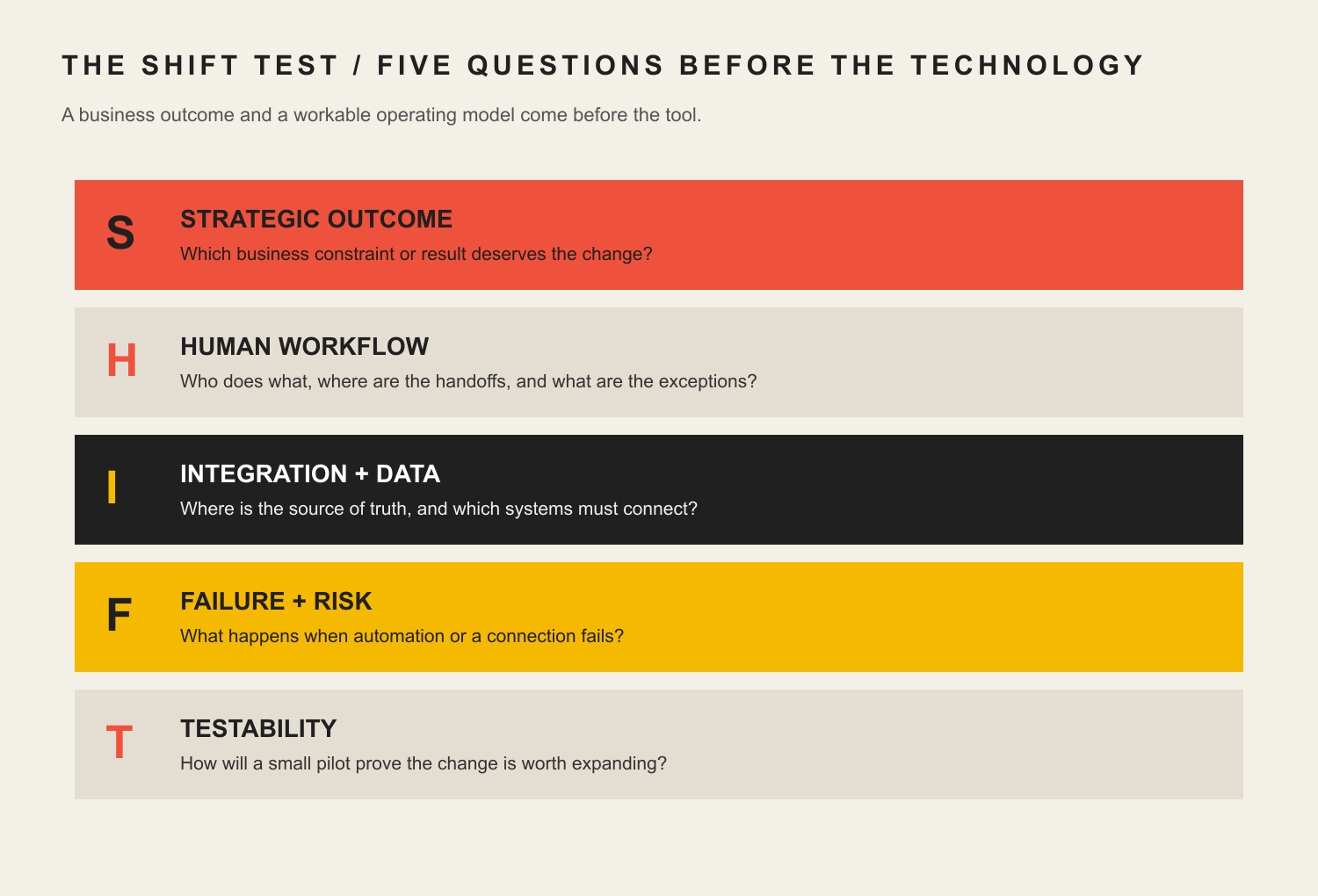
    Before a proposed platform, integration, automation, or AI workflow earns implementation, make it answer five questions. If one answer is vague, the project needs more diagnosis before more software.

    Five SHIFT questions: strategic outcome, human workflow, integration and data, failure and risk, and testability.
    The Scope Design SHIFT Test turns a technology idea into five operating questions before implementation.
    SHIFT questionWhat to askWhy it matters
    S — Strategic outcomeWhat business result or constraint changes?Prevents “implement a tool” from impersonating a business objective.
    H — Human workflowWho owns the input, exception, approval, and handoff?Exposes hidden labor and the places automation still needs judgment.
    I — Integration & dataWhere is the source of truth, and what must connect?Prevents duplicate records, brittle copy-and-paste work, and conflicting answers.
    F — Failure & riskWhat happens if it is wrong, down, compromised, or abandoned?Forces recovery, security, privacy, vendor, and reputation risk into the design.
    T — TestabilityWhat bounded pilot and metric can prove or reject the investment?Creates a decision instead of an endless rollout.

    Example: “We need AI for customer service” fails the test. “We spend 12 staff-hours a week answering five repetitive pre-sale questions, the approved answers already exist, a person can take over uncertain conversations, and we can compare response time plus qualified handoffs for 30 days” is a project you can evaluate.

    Scope Design rule: a transformation project should make the business easier to operate, not merely more impressive to describe.

    Layer 1: decide what deserves transformation

    1. Name the business constraint before choosing technology

    Start with the most expensive or consequential friction you can describe in plain language. Maybe estimates take three days because information lives in three places. Maybe leads disappear between a website form and the salesperson. Maybe customers call for order status because nobody can see it. Maybe the owner is still the only person who knows how to assemble a quote.

    Write the current baseline before the solution: time, error rate, queue length, response time, rework, missed handoffs, cost, or another decision-relevant measure. Then describe the desired change. “Faster” is weak. “Reduce average quote turnaround from two business days to same-day for standard jobs without increasing pricing errors” gives the project something to prove.

    This is also where digital transformation connects to broader business strategy. If the business has not decided which customer, process, constraint, or capability matters, a technology roadmap will simply automate indecision.

    2. Map the workflow, handoffs, delays, and exceptions

    The official process is rarely the real process. Sit with the people doing the work and map what happens from trigger to finish. Where does information arrive? Who retypes it? Who checks it? Which spreadsheet exists because the main system cannot answer a practical question? Which approval happens in a text message? What happens when the normal case breaks?

    Exceptions matter because automation is easiest when everything follows one clean path, while real businesses are full of partial payments, reschedules, returns, rush jobs, special pricing, missing information, warranty questions, and customers who reply to the wrong email. A workflow is ready for automation when the normal path is understood and the exceptions have named owners.

    Do not optimize a step in isolation if the delay simply moves downstream. A faster lead form that creates twice as much manual cleanup is not an improvement. It is a handoff problem with a nicer interface.

    3. Assign one source of truth and one owner for important data

    Customer records, pricing, inventory, project status, documents, schedules, product information, and financial data need an authoritative home. That does not mean every business needs one giant all-in-one platform. It means people must know which system wins when two copies disagree.

    For each important data set, name the source of truth, owner, who may edit it, which systems receive copies, and how changes synchronize. If a CRM owns the customer record but the accounting system owns invoices, define the boundary. If the website displays product information from another system, decide what happens when the connection fails.

    This is where “cloud-first” advice often becomes lazy. Cloud software can make collaboration and access much easier, but the decision still depends on security, connectivity, workflow, integration, export, cost, and ownership. Choose an architecture because it fits the work, not because a slide deck said modern businesses live in the cloud.

    Layer 2: make the foundation safe and usable

    4. Secure identities, updates, backups, and recovery

    A digital transformation increases the number of systems that can help the business. It can also increase the number of systems that can fail or be abused. Security belongs in the foundation.

    NIST SP 1300 gives small and medium-sized businesses a quick-start path for using Cybersecurity Framework 2.0, while CISA’s small and medium business resources emphasize practical controls such as multi-factor authentication, software updates, backups, phishing awareness, encryption, and logging. You do not need an enterprise security theater production. You do need to know who has access, what gets backed up, how recovery works, and who responds when something goes wrong.

    Make multi-factor authentication the default wherever the service supports it, especially for email, finance, administration, hosting, cloud storage, and customer-data systems. Keep software supported and patched. Test restores instead of assuming “backup enabled” means recoverable. Remove old accounts. Separate normal work from privileged administration where practical. Security is an operating practice, not a checkbox a vendor can permanently complete for you.

    5. Fix the customer-facing home base only where it is a real constraint

    The legacy version of this article treated a sophisticated website as transformation step one for everybody. That is too broad. Your customer-facing home base matters when it is actually part of the problem: customers cannot understand the offer, find reliable information, book, buy, request service, upload what you need, or move into the next step without manual rescue.

    For many small businesses, the website is the durable place to explain the offer, establish credibility, route customers, and connect forms or scheduling to the rest of the operation. Our guide to building an online presence for a small business covers that narrower job in more detail.

    But do not rebuild a perfectly adequate website because “digital transformation” sounds like it should begin with a redesign. If the real constraint is inventory accuracy, quote turnaround, dispatch, collections, or internal approvals, fix that instead. Custom functionality should earn its place. Otherwise it is expensive theater.

    6. Connect the customer, service, finance, and fulfillment handoffs that matter

    The biggest improvements often happen between systems rather than inside one system. A qualified website inquiry should not require manual copying into a CRM. An approved quote should not need to be recreated as an invoice if the data is already structured. A completed service call should update the customer record and trigger the next appropriate step without relying on somebody remembering at 4:55 p.m.

    Start with the handoffs that create duplicated work or customer uncertainty. Define the event, data that moves, destination, owner, failure behavior, and whether the action needs approval. Use APIs, native integrations, middleware, or custom code according to the stakes and complexity. The integration method matters less than whether the business can see when it fails.

    Avoid integrations that silently create two masters. If both systems can overwrite the same field without a rule, you do not have synchronization. You have a future argument between databases.

    Layer 3: digitize and automate work carefully

    7. Digitize repetitive financial and administrative work where it reduces friction

    Standard estimates, invoices, payment reminders, expense capture, appointment confirmations, document assembly, recurring reports, and onboarding checklists are common places to remove repetitive work. The best candidates are frequent, rule-based, and easy to verify.

    Do not turn “paper is bad” into a religion. A paper checklist beside a machine may be safer and faster than making a technician sign into three apps. A digital form is useful when the data needs to be shared, searched, validated, routed, reported, or reused. Digitize because the information becomes more useful, not because paper offended the software budget.

    When replacing a spreadsheet, ask what job the spreadsheet is secretly doing. It may contain approval logic, comments, historical memory, and exception handling that nobody documented. Replacing the file without capturing those jobs is how a shiny new platform becomes an expensive second spreadsheet.

    8. Automate stable, low-judgment work before automating decisions

    Automation should usually begin with boring work: moving approved data, generating first-pass documents from structured inputs, routing notifications, creating tasks, checking for missing fields, scheduling routine follow-ups, and assembling repeatable reports. These tasks can often be tested against clear expected results and handed to a person when something unusual happens.

    Use our deeper guide to AI and business automation when the question shifts from “where does automation belong?” to workflow architecture, governance, custom integrations, and durability.

    Do not automate a process nobody agrees on. The machine will not resolve the disagreement. It will execute one version of it faster. Also avoid automating around a broken data model. If the same customer has four records and three naming conventions, the first transformation may be data cleanup and ownership rather than automation.

    9. Use AI as a bounded copilot with human accountability

    AI can be useful for summarizing notes, drafting variations, extracting structured information, classifying routine inputs, finding repeated questions, assisting with research, preparing first-pass documents, and helping employees work through approved knowledge. The U.S. Small Business Administration describes AI as a tool that can improve efficiency and help save time and costs in appropriate use cases. That is an opportunity, not a guaranteed ROI.

    NIST’s Generative AI Profile provides voluntary risk-management guidance for generative AI. The small-business translation is straightforward: define what the system may do, what data it may use, what must be verified, what requires human approval, what happens when confidence is low, and who owns a bad outcome.

    Keep humans in charge of pricing, contractual commitments, sensitive personnel decisions, legal or compliance judgments, safety-critical actions, and customer situations where context or reputation matters. “Human in the loop” is not a magic phrase. Name the person, trigger, evidence they see, and authority they have.

    Layer 4: turn tools into an operating system

    10. Document procedures, exceptions, approvals, and access

    A transformation that only one employee understands is not resilient. Write the minimum documentation needed to operate the workflow: what starts it, normal path, exception path, source systems, approval rules, access requirements, expected outputs, troubleshooting, support contact, and recovery path.

    Documentation does not need to become a 200-page manual nobody reads. A short operating note, diagram, checklist, and decision table can be enough if they reflect reality. Keep the documentation close to the work and update it when the workflow changes.

    This is particularly important when AI or automation uses business knowledge. An assistant cannot reliably distinguish current policy from an old campaign page unless the business itself knows which source is authoritative. Retrieval makes approved knowledge available. It does not make contradictory documentation good.

    11. Measure the decision, not dashboard decoration

    Before launch, define the measure that tells you whether the constraint improved. Useful metrics might include turnaround time, first-time-right rate, duplicate entry, support contacts per order, invoice age, conversion from a qualified inquiry, manual touches per job, backlog size, rework, missed appointments, or employee time spent on a repeatable task.

    Measure the baseline using the same definition you will use afterward. If the metric changes halfway through the pilot, write down why. Track guardrails too. An automation that saves two staff hours but doubles customer complaints did not earn a victory lap.

    Dashboard activity is not an outcome. Number of automations run, AI messages generated, CRM records created, or app logins can help troubleshoot adoption, but they do not prove the business is better. Measure the work that justified the project.

    12. Train the team on the real workflow, not just the buttons

    The old article was right about one thing: digital transformation succeeds or fails in the hands of the people who must use it. Training should cover more than where to click. Explain why the workflow changed, which system is authoritative, what good input looks like, what must never be entered, how exceptions work, when to escalate, and how people report problems.

    Use real examples, including the ugly ones. Give staff a safe place to practice. Train managers on how to interpret the new data and how not to punish people for surfacing defects in the process. A “digital culture” is not enthusiasm for tools. It is the habit of making the system visible, improving it with evidence, and keeping judgment where judgment belongs.

    If adoption requires constant private workarounds, investigate the design. Employees can resist change, but they can also be the first people to notice that the new workflow is slower, duplicative, or missing a real exception. Do not label useful feedback as resistance because the implementation plan needs better news.

    Layer 5: keep transformation from becoming tool debt

    13. Design for interoperability, export, and an exit path

    Before committing to a platform, ask how you get your data out, which formats are available, whether APIs cover the records you need, how users and permissions are managed, what happens to automations if you leave, and how long you can operate during a migration. Vendor lock-in is not automatically bad; sometimes a tightly integrated platform is worth it. Lock-in you did not understand is the problem.

    Prefer boring, documented interfaces over clever dependencies that only one contractor understands. Record integration credentials, owners, renewal dates, vendor contacts, and custom code. Separate business rules from one vendor’s marketing language so the process can survive a platform change.

    Transformation should reduce trapped knowledge, not relocate it from a spreadsheet to a black box.

    14. Pilot one high-value change before scaling

    A useful pilot is small enough to control and large enough to answer the business question. Choose one workflow, one audience or team, a defined window, a baseline, success threshold, guardrails, and a decision date. Test the exception path, not only the happy path.

    Do not call every trial a “pilot” after launch. Write the decision rule first. What evidence means scale? What evidence means revise? What evidence means stop? If there is no stopping condition, you have already made the purchasing decision and the pilot is theater.

    Stopping a weak pilot is not failure. It is one of the cheapest successful outcomes available. The business learned before multiplying licenses, integrations, training, support, and sunk-cost politics.

    15. Assign maintenance, review, and retirement ownership

    Every important digital system needs an owner after implementation. Who reviews access? Who watches failed integrations? Who tests backups or recovery? Who updates business rules? Who checks vendor changes? Who measures whether the process is still worth operating? Who retires old tools and accounts?

    The maintenance load is part of the buying decision. A $50 monthly tool that needs three hours of senior staff attention every week is not a $50 tool. Include subscriptions, internal labor, support, training, audits, integration upkeep, custom development, and switching costs when comparing options.

    For one common subsystem, our website maintenance and ownership guide shows how updates, backups, security, performance, testing, and responsibility continue after launch. The same principle applies across CRMs, automations, analytics, AI workflows, and internal applications.

    A practical 90-day small business digital transformation roadmap

    You cannot “finish digital transformation” in 90 days, and anyone promising that is selling a calendar trick. You can make one important part of the business materially clearer in 90 days and leave with enough evidence to choose the next move.

    WindowMain jobConcrete outputs
    Days 1-30: Diagnose and baselineChoose the constraint, map the workflow, identify data owners, and close obvious security gaps.Current-state map; baseline metric; SHIFT assessment; access inventory; MFA/update/backup actions; one pilot brief.
    Days 31-60: Implement one bounded changeConfigure or build the smallest workflow that can test the hypothesis.Integration or system configuration; exception path; documentation; staff training; instrumentation; rollback plan.
    Days 61-90: Measure and decideCompare the result with baseline and guardrails.Outcome review; defects and adoption evidence; scale/revise/stop decision; maintenance owner; next constraint if the first change earned expansion.

    This sequence is deliberately boring. Boring is good. It gives the business time to discover that a field is missing, an approval is ambiguous, a vendor API behaves differently than the sales demo, or an employee needs a safer exception path before those problems spread across the whole company.

    What should a small business NOT automate yet?

    Do not automate a task merely because an AI demo or integration can perform it. Delay automation when any of these conditions are true:

    • The process is unstable. People disagree on the normal path or the rules change every week.
    • The data is unreliable. Duplicates, missing fields, conflicting sources, or poor permissions make automated action unsafe.
    • No one owns the exception. When the workflow breaks, the answer is “somebody will notice.”
    • The decision is rare and high-stakes. Legal, safety, employment, pricing exceptions, major refunds, or reputation-critical choices may need qualified human judgment even if AI assists.
    • The output cannot be verified cheaply. If checking every result costs more than doing the task, redesign the workflow before scaling automation.
    • The customer needs empathy or negotiation. Escalations, complaints, grief, unusual hardship, or complex sales conversations may be damaged by a system that optimizes only speed.
    • The business cannot recover from failure. If a vendor outage, bad rule, compromised account, or model error can stop operations, design fallback and recovery first.

    Automation should make a clear process cheaper, faster, more reliable, or easier to scale. It should not make an unclear process harder to see.

    What our audit of this exact article taught us

    We applied the same rule to this revision that we recommend to clients: inspect the system before changing it. The legacy article had a live, self-canonical, index/follow URL and several durable ideas, but it also had unsupported performance percentages, a long technology shopping list, no outgoing internal links, and a UX category assignment that Scope’s own silo map described as the wrong job.

    Signal checkedObservation on August 20, 2026What it actually supports
    GA4, last 12 complete months10 landing sessions total: 9 Direct, 1 Referral; 3 engaged sessions; 0 key events; no Organic Search landing row.The sample is too small for behavior conclusions. There is no measured organic or conversion footprint forcing us to protect unsupported legacy copy.
    Google Search ConsoleNo exact-URL query rows in the current or prior 12-month period; URL Inspection says “Discovered – currently not indexed.”Public accessibility did not equal confirmed Google indexing. The revision needs clearer ownership and usefulness, not a URL migration.
    Bing Webmaster ToolsThe page is recognized and crawled, with 0 clicks and 0 impressions in the URL traffic response.Bing knows the page, but there is no meaningful Bing traffic signal to protect.
    UbersuggestNo ranking-keyword data returned for the exact page and no exact-URL backlink rows.Third-party evidence also showed no strong page equity requiring content preservation.

    Scope’s GA4 attribution and key-event setup has known limitations, so zero key events is not proof of zero business impact. The point is narrower: the old article did not have a demonstrated search or conversion asset strong enough to justify keeping claims we could not support. We preserved the established URL because it already matches the primary query and creates no need for redirect risk. We changed the article’s job instead.

    Frequently asked questions about small business digital transformation

    What should a small business modernize first?

    Modernize the constraint that creates the most meaningful cost, delay, risk, customer friction, or owner dependence and that can be measured. Map the workflow and data first, then choose the technology. If the current problem cannot be described without naming a product, the diagnosis is probably not finished.

    What are the main areas of digital transformation?

    For a small business, five practical areas cover most of the work: strategic priorities, secure digital foundations, workflow digitization and automation, operational adoption and measurement, and lifecycle ownership. Different frameworks use four, five, or seven “pillars.” The count matters less than whether your roadmap covers people, process, data, technology, risk, and outcomes.

    How much should digital transformation cost?

    There is no responsible universal percentage. Cost depends on the business constraint, number of users, data cleanup, integrations, custom functionality, security requirements, migration, training, support, and ongoing ownership. Compare lifecycle cost with the value of the improved process, not with a vendor’s license price alone.

    Should every small business use AI?

    No. AI is useful when it fits a real workflow and the business can manage data, verification, risk, and human accountability. A ten-person company may get more value from fixing its quote process or customer records than from launching a chatbot. Use AI where it earns its keep.

    How long does digital transformation take?

    Transformation is ongoing because processes, customers, staff, vendors, threats, and technology change. A 30- to 90-day pilot can test one meaningful improvement. That is different from claiming the whole business will be “transformed” on a fixed calendar.

    Why do digital transformation projects fail?

    Common failure modes include choosing tools before defining the problem, automating an unstable process, poor data ownership, too many simultaneous changes, weak security or recovery planning, unclear accountability, inadequate training, no baseline, and no decision rule for scaling or stopping.

    Do I need a new website for digital transformation?

    Only if the website is part of the constraint. If customers cannot find, trust, book, buy, or provide the information your operation needs, the site may deserve work. If the site is fine and the real problem is scheduling, inventory, quoting, or internal handoffs, fix the real problem instead.

    What should a small business automate first?

    Start with frequent, repetitive, well-defined, low-risk work whose results are easy to verify: routing information, structured document assembly, reminders, task creation, data validation, and routine reporting are common examples. Keep high-stakes judgment and uncertain exceptions human-owned until the workflow and controls are stronger.

    Build a digital operating system your business can actually run

    Small business digital transformation is not a race to install the most advanced stack. It is the discipline of choosing where digital tools remove real friction, designing the human and data handoffs around them, protecting the business when they fail, and measuring whether the change earned the right to stay.

    Use SHIFT before the purchase. Start with one constraint. Build the smallest useful change. Make ownership explicit. Then scale only what survives contact with reality.

    If you need help diagnosing the constraint, mapping the workflow, connecting the website and business systems, designing an automation, or deciding what should stay human, contact Scope Design. We can help turn a pile of disconnected digital work into a system your team can understand, operate, and improve.

    Sources and further reading