Tag: content strategy

  • How to Stand Out in a Saturated Blogging World: 7 Proven Differentiation Strategies

    How to Stand Out in a Saturated Blogging World: 7 Proven Differentiation Strategies

    How to make your blog stand out in a saturated market: stop trying to win by publishing more versions of the same advice. Build each important article around a specific reader decision, add evidence or experience competitors cannot access, take a useful position, show how you reached it, answer the next questions a serious buyer will have, distribute the asset where that buyer actually pays attention, and measure qualified outcomes instead of raw traffic alone.

    That sounds simple, but it is a different job from “write a good blog post.” In August 2026, our live search review for this topic found that Google could already summarize the standard advice—pick a niche, improve headlines, tell personal stories, use media, and promote the post—before a searcher ever needed to click a result. Repeating those basics more elegantly does not create much of an information advantage.

    Google’s current AI optimization guidance makes the same strategic point in plainer terms: create unique, non-commodity content and add a point of view instead of recycling material that other sites or generative AI can easily reproduce. That does not mean every post needs a groundbreaking study. It means the article needs something true and useful that did not come free with the topic.

    How to Make Your Blog Stand Out: Start With the Non-Commodity Test

    Before you add words, images, keywords, or another publishing day, ask one question:

    Could a generic AI system write this article correctly without access to our business?

    If the answer is yes, the draft probably does not contain enough business-specific evidence or judgment yet. “Access to the business” can mean access to customer questions, sales objections, tests, screenshots, internal data, subject-matter experts, implementation experience, failed attempts, constraints, or a recommendation your team can defend.

    This is a diagnostic, not an anti-AI slogan. A model can help organize material, compare sources, find gaps, or tighten a draft. The differentiating input still has to come from somewhere. If the only inputs are the same public pages everyone else can summarize, the output is easy to substitute.

    A worked example: we ran the test on this exact article

    Before rewriting this page, we audited its actual performance and technical state instead of assuming the old copy deserved to be protected because it already existed. For the 12 months ending August 19, 2026, the page had one Organic Search landing session in GA4 and zero key events. Google Search Console returned no page or query performance rows for the URL and currently reports that the URL is unknown to Google. Bing Webmaster Tools reports zero clicks and zero impressions.

    One organic session is far too small a sample to tell us how real readers behave. We are not going to turn it into a story about engagement, intent, or conversion. It is enough to support a narrower conclusion: the old article did not have a meaningful search or business-performance footprint that forced us to preserve weak copy.

    What we checkedPre-rewrite observationWhat we did with it
    GA4 organic landing traffic1 session; 0 key events in the last 12 monthsDid not infer behavior from a one-session sample. Treated the page as having no demonstrated business outcome to protect.
    Google Search ConsoleNo page/query rows; URL Inspection says the URL is unknown to GoogleRebuilt usefulness and internal ownership rather than preserving keywords that were not producing visibility.
    Bing Webmaster Tools0 clicks; 0 impressionsConfirmed there was no Bing performance footprint to protect.
    Live URLHTTP 200, index/follow, self-canonicalKept the established URL. A weak plugin score is not a reason to create migration and redirect risk.

    That audit became part of the new article. This is the kind of first-party evidence a competing generic post cannot truthfully copy.

    The Scope Design Content Differentiation Stack

    We use seven layers to move a business article from “competent summary” toward “useful source.” You do not need every layer to be dramatic. You need each layer to have a job.

    LayerQuestionWhat makes it harder to copy
    1. Own the decisionExactly who is deciding what?Audience and decision specificity
    2. Bring unique evidenceWhat can we show that a public summary cannot?Data, examples, customer language, tests, expert input
    3. Take a useful positionWhat do we recommend, reject, or qualify?Judgment and tradeoffs
    4. Show the workWhy should the reader trust the conclusion?Method, thresholds, failures, exceptions
    5. Cover the full decisionWhat does the reader need next?Decision completeness instead of filler
    6. Match format + distributionWhat form best proves the point, and where will the buyer encounter it?Evidence-fit presentation and channel strategy
    7. Measure qualified outcomesDid the article improve a useful business behavior?Feedback loops that make the asset better over time

    The order matters. A new chart cannot rescue a vague audience. A strong opinion cannot rescue a claim with no evidence. More distribution cannot rescue an article that gives a qualified reader no reason to trust it.

    1. Own a Narrower Audience Decision

    “Small-business owners interested in marketing” is an audience description. It is not yet an article job.

    A better starting point is a decision: “A local service business has ten older blog posts, limited time, and no meaningful organic conversions. Should it publish four new posts this month, update the strongest existing page, or stop blogging until the offer is clearer?” Now the article has constraints, alternatives, and an outcome.

    This is also why content differentiation belongs inside a broader small business marketing strategy. A blog is not an isolated publishing machine. Its job changes depending on the bottleneck. If the real problem is weak positioning, low demand, bad conversion, or the wrong audience, “publish more” may simply create more inventory around the wrong problem.

    Before outlining a post, write one sentence: This article helps [specific reader] decide [specific choice] under [important constraint]. If that sentence stays vague, the draft will usually stay vague too.

    2. Bring Evidence Competitors Cannot Access

    Originality is easier when you stop treating “research” as a synonym for “find three articles that already rank.” Start with the evidence your business touches every week.

    • Questions prospects ask before they buy.
    • Objections that repeatedly appear in sales calls or email.
    • Before-and-after examples from real work.
    • Tests that failed and what changed afterward.
    • Thresholds an experienced practitioner uses to choose one option over another.
    • Screenshots, process artifacts, checklists, calculations, or diagrams created for the work.
    • Small first-party datasets, clearly labeled with their limitations.
    • Interviews with the people who actually do the work.

    Google’s people-first content guidance explicitly asks creators to evaluate whether a page provides original information, reporting, research, or analysis; whether it adds substantial value beyond other results; whether sourcing is clear; and whether it demonstrates first-hand expertise. Those are useful editorial questions even if you ignore SEO entirely.

    Industry survey data provides some context for why this matters, but it should not be oversold. Orbit Media’s 2025 blogger survey included 808 respondents and reported that 49% published original research. Orbit also says its sample is heavily drawn from its author’s network and skews toward LinkedIn, B2B, and US marketers. That makes it useful directional evidence, not proof that original research causes better results for every business.

    The stronger reason to create original evidence is simpler: it gives the reader—and other writers, journalists, researchers, search systems, and AI tools—something concrete to attribute to you.

    3. Take a Useful Position and Name the Tradeoffs

    A post can contain accurate facts and still feel interchangeable because it never makes a decision. It says “it depends,” lists six options, and disappears before the reader has to choose.

    Expert content earns its keep by explaining what the choice depends on. A useful position has four parts:

    • Recommendation: what you would do in the described situation.
    • Reason: the evidence or constraint that makes that recommendation sensible.
    • Tradeoff: what the reader gives up by choosing it.
    • Exception: what would change your recommendation.

    For example, “publish consistently” is generic. “If you have ten weak pages and no proof that your offer converts, pause net-new blog production for a month, repair the pages closest to a buyer decision, and restart only when you can name the evidence each new post will contribute” is a position. Another expert may disagree, which is fine. The reader can inspect the reasoning.

    Do not manufacture controversy for attention. A contrarian headline without evidence is just another commodity format. The goal is not to sound different. The goal is to make your judgment legible.

    4. Show the Work, Not Just the Conclusion

    “We tested it” is a claim. Showing what you tested is evidence.

    When the method matters, include enough detail for a careful reader to understand how you arrived at the result. That may mean the date range, sample size, query, device, platform, measurement rule, decision threshold, screenshots, before/after state, or the assumptions you excluded.

    Notice how the pre-rewrite audit above is written. We did not say, “The old article failed because it only got one session.” We said one session is too small for behavior inference. Then we used the performance systems for the narrower conclusion they can support: there is no demonstrated search or conversion footprint forcing us to preserve the old copy unchanged.

    That restraint is part of differentiation. Anyone can turn a tiny number into a dramatic story. Showing what the evidence cannot prove tells the reader where your confidence ends.

    5. Cover the Complete Decision, Not a Word-Count Target

    There is no magic length that makes a blog post authoritative. A 900-word answer can be complete. A 4,000-word article can be mostly throat-clearing.

    Use depth when the decision requires depth. After the first useful answer, ask what a qualified reader will need next:

    • What conditions make this advice apply?
    • What should the reader do first?
    • What evidence should they collect?
    • What alternatives should they compare?
    • What can go wrong?
    • What would change the recommendation?
    • How should they measure whether it worked?

    That is different from padding a draft until a plugin turns green. If you want the broader mechanics of headlines, readability, calls to action, visuals, and other blogging fundamentals, we cover those separately. This article’s job is narrower: give those fundamentals something worth presenting.

    Google’s people-first guidance asks whether a reader leaves feeling they learned enough to achieve their goal. That is a better editorial stopping rule than “our competitor wrote 2,300 words.”

    6. Match the Format and Distribution to the Evidence

    Differentiation does not have to live in prose. Sometimes the strongest proof is a diagram, a calculator, a decision table, a screenshot, a teardown, a short video, a downloadable template, or a side-by-side comparison.

    Choose the format after you know what you are trying to prove. A long narrative is a poor container for a three-variable decision. A tiny infographic is a poor container for a nuanced implementation. The evidence should choose the format, not the content calendar.

    Distribution works the same way. Do not automatically cross-post the same summary everywhere. Ask where the intended reader is likely to encounter the problem, what context they have in that channel, and what next action is realistic there.

    Once the source asset is strong, then repurpose the content into channel-native pieces. A customer-data table may become a LinkedIn chart. A process walkthrough may become a short video. A sales-objection section may become an email. Repurposing should distribute a differentiated source; it should not multiply a weak one.

    7. Measure Qualified Outcomes and Improve the Source Asset

    Traffic is useful diagnostic information. It is not the final verdict on a business article.

    A page written for a narrow, expensive decision may be valuable with modest traffic if it creates qualified inquiries, assists sales conversations, earns relevant links, gets cited, reduces repeated support questions, or helps the right visitor reach the next step with less friction. A high-traffic page can be a poor business asset if none of those things happen.

    Google’s guidance on succeeding in AI search similarly recommends looking beyond clicks to the value of visits and conversions. That is good marketing discipline regardless of where the visit came from.

    Define the useful behavior before you publish. Then use performance evidence to decide what to improve. If the page gets impressions but no clicks, inspect the promise and intent match. If it gets the right visits but no next action, inspect the offer and conversion path. If sales keeps sending the page because it answers a difficult objection, that is useful evidence even if search volume is small.

    The point of measurement is not to award a grade. It is to give the next revision better evidence than the first one had.

    How to Use AI Without Making Your Blog Sound Like Everyone Else

    AI is not the differentiation problem. Undifferentiated inputs are.

    Google’s guidance on generative AI content says generative tools can be useful for research and adding structure to original content. It also warns that generating many pages without adding value for users can run into its scaled-content-abuse policy.

    A practical division of labor looks like this:

    Use AI forKeep human/business ownership of
    Finding questions and gapsWhat matters to your actual customer
    Organizing interviews and notesThe experience inside those notes
    Comparing source claimsWhich sources you trust and why
    Generating structural optionsThe recommendation and tradeoffs
    Editing for clarityVoice, examples, caveats, and accountability
    Turning a strong source into derivative formatsThe source asset’s original evidence

    If the AI draft arrives before the evidence inventory, it tends to become the evidence inventory. Reverse the order. Gather the business-specific material first; then use the model to help make that material easier to understand.

    A 30-Minute Blog Differentiation Audit

    You do not need a month-long strategy project to find the first weakness. Pick one article that matters and run this audit.

    1. Write the reader decision. Who is deciding what, under which constraint?
    2. Search the topic. Note what the SERP, AI summaries, PAA, and leading pages already answer without your contribution.
    3. Highlight commodity sentences. Mark claims that could appear unchanged on ten competitor sites.
    4. Inventory inaccessible evidence. List customer questions, data, examples, screenshots, methods, expert input, failures, and constraints you can add.
    5. State the recommendation. Write what you would actually tell a qualified client in this situation.
    6. Name the tradeoff and exception. Say what the recommendation costs and what would make you change it.
    7. Check decision completeness. Add the next questions a serious reader must answer; delete filler that does not help the decision.
    8. Define one qualified outcome. Decide what useful action or signal you will inspect after the article is live.

    If you cannot complete steps four through six, do not solve the problem with a longer introduction. You have a research or positioning gap, not a writing gap.

    Blog Differentiation FAQ

    Is blogging too saturated in 2026?

    Blogging is saturated with substitutable explanations of common topics. That does not mean there is no room for useful business content. The opportunity is narrower: publish material with a specific audience job, first-hand evidence, clear judgment, and enough implementation detail that the reader gains something they could not get from a generic summary.

    Should I publish more often to make my blog more popular?

    Not automatically. More publishing helps when you already know which audience, decisions, evidence, and distribution channels deserve more coverage. If your existing pages are generic or disconnected from a business outcome, increasing cadence usually increases the amount of weak inventory you have to maintain.

    How long should a blog post be to stand out?

    Long enough to complete the reader’s decision and no longer. Use the topic’s complexity, evidence, alternatives, implementation needs, and risk to determine depth. Do not add sections only to match a competitor’s word count.

    What is the 80/20 rule for blogging?

    There is no single universal 80/20 blogging rule. Different marketers use “80/20” to describe different heuristics, such as spending more effort on promotion than creation or focusing on the minority of pages that drive most results. Treat it as a prompt to inspect concentration in your own data, not as a fixed publishing law.

    What is the fastest way to make a business blog less generic?

    Interview the person closest to the real work and ask for a recent example: What happened? What did you notice? What did you try? What failed? What threshold changed the decision? What would make you recommend something different next time? Those answers usually produce more differentiation than another hour of generic keyword expansion.

    Stand Out by Becoming More Useful, Not More Performative

    The saturated part of blogging is not the existence of millions of pages. It is the abundance of content that can be swapped for another result without changing the reader’s decision.

    If you want to make your blog stand out, narrow the job, add evidence that belongs to your business, state a recommendation, show your reasoning, answer the whole decision, choose formats and channels that fit the proof, and measure what qualified readers do next. Those seven layers make the article more useful to humans and more attributable to the source.

    If your company has real expertise but your content still reads like everyone else’s, Scope Design can help turn that expertise into a clearer content and marketing system. Start with the broader small business marketing strategy framework and diagnose the bottleneck before you buy or publish more attention.

  • 103 Blog Post Ideas & Brainstorming Prompts: The SPARK Ideation System

    103 Blog Post Ideas & Brainstorming Prompts: The SPARK Ideation System

    Good blog post ideas do not start with a blank document and a demand to “be creative.” They start with a real signal: a customer question, a sales objection, a search query, a repeated support problem, a useful piece of evidence, or something your team keeps explaining. Then you multiply that signal into angles and throw away the weak ones.

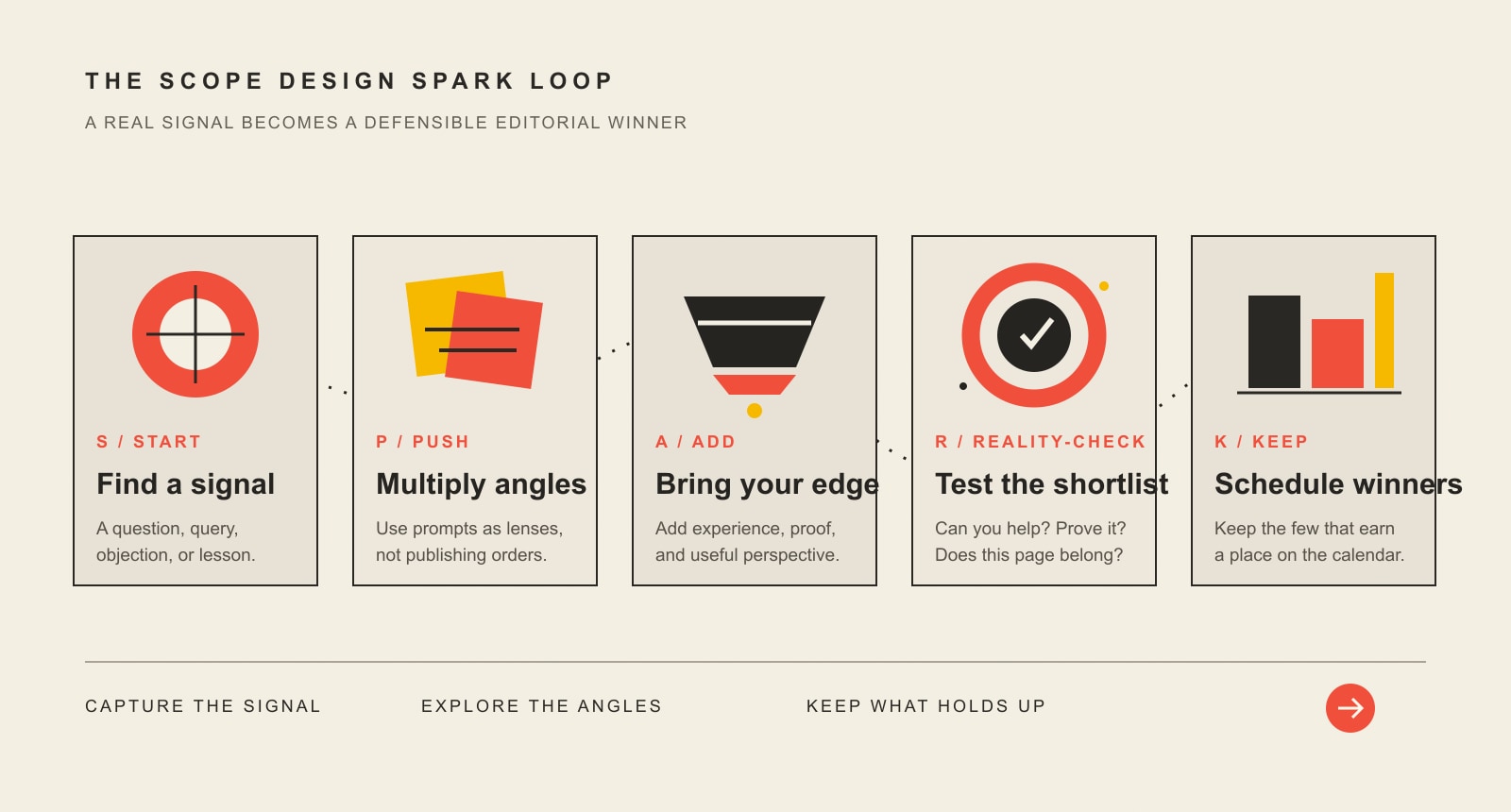
    This guide gives you 103 reusable brainstorming prompts, but the list is only half the job. Scope Design’s SPARK Loop turns those prompts into a repeatable ideation system: Start with a signal, Push it through prompts, Add useful angles, Reality-check the shortlist, and Keep the winners.

    TL;DR: generate more ideas without publishing more junk

    • Start with evidence of a real question. Do not ask a prompt generator to invent demand from thin air.
    • Use templates to multiply angles. One useful signal can produce many possible posts.
    • Let AI expand and regroup ideas. Do not let it invent customer research, expertise, statistics, or proof.
    • Reality-check the shortlist. Ask whether the idea helps a real reader, whether you can support the answer, and whether another page already owns the intent.
    • Schedule only the winners. A content calendar should contain decisions, not every thought that survived a brainstorming meeting.

    103 blog post ideas are useful when you start with a real signal

    Search results already have plenty of giant idea lists. In our U.S. research on August 20, 2026, Ubersuggest estimated roughly 390 monthly searches for “blog post ideas” and 260 for “blog topic ideas.” DataForSEO’s live Google results showed an AI Overview followed by pages offering 101, 52, 100, 82, and 75 ideas. People Also Ask immediately surfaced questions such as “What are some good topics for a blog post?” and “What should I write my blog post about?”

    Those numbers are third-party estimates and a search snapshot, not a forecast. The useful conclusion is simpler: people still want help getting unstuck, and the internet is not suffering from a shortage of raw lists. The better job is helping someone use the list without turning a content calendar into random-topic roulette.

    That distinction also keeps this page from duplicating our deeper guide to choosing business blog topics that attract buyers. This article owns brainstorming and angle expansion. That one owns the harder strategic question: which business topics deserve the investment.

    The Scope Design SPARK Loop for generating blog post ideas

    The SPARK Loop is deliberately simple. It separates idea generation from the decision to publish. That matters because brainstorming should be generous; editing should be ruthless.

    The five-stage SPARK loop: find a real signal, multiply it into angles, add expertise, reality-check the shortlist, and schedule only the winners.
    The Scope Design SPARK Loop turns a real signal into multiple angles, then forces a reality-check before anything earns a place on the calendar.

    S — Start with a signal

    A signal is evidence that a topic deserves attention. It can be qualitative or quantitative. The point is that it came from somewhere more useful than “we have not posted this week.”

    • A question prospects ask on sales calls
    • A support issue your team explains repeatedly
    • A confusing comparison buyers keep making
    • A Search Console query or People Also Ask question
    • A sales objection that stalls a good-fit buyer
    • A mistake you see before, during, or after a project
    • An internal process that would genuinely help the audience understand a decision
    • Original data, project evidence, or a strong expert observation you can actually support

    P — Push it through prompts

    Now use the 103 patterns below as angle multipliers. Do not treat every template as a command. A prompt containing “7 secrets” does not authorize you to invent seven secrets. A template promising a result in 14 days does not make that timeline true. The blank is a creative variable; the factual burden is still yours.

    A — Add useful angles

    Change one dimension at a time. The same core question can become content for a beginner, a buyer comparing options, an existing customer, a skeptical stakeholder, or an expert looking for implementation detail.

    AngleQuestion to askExample transformation
    AudienceWho needs the answer?“Website maintenance” → “Website maintenance for a two-person service business”
    StageWhat does the reader already know?Beginner guide → vendor-comparison checklist
    RiskWhat could go wrong?How-to → mistakes, warning signs, rollback plan
    EvidenceWhat can we show?Opinion → audit findings, examples, screenshots, first-party data
    DecisionWhat choice is the reader making?Definition → A vs. B comparison
    FormatWhat makes the answer easiest to use?Essay → checklist, table, FAQ, teardown, calculator, case example

    R — Reality-check the shortlist

    Before an idea becomes a brief, ask four questions: Is there a real audience signal? Can we support the answer with expertise or evidence? Does another page already own the same intent? Is there a useful next step after the reader gets the answer? If an idea fails two or three of those, it probably belongs in the parking lot rather than the publishing queue.

    This is where brainstorming hands off to strategy. If you are choosing among several business-focused candidates, use our business blog topic selection guide for the deeper buyer, demand, evidence, and business-value decision.

    K — Keep the winners

    For each winner, save the signal that created it, the intended reader, the question or query it owns, the evidence you expect to use, the next useful page or action, and the person responsible for the draft. That record is far more useful six weeks later than a spreadsheet cell that says “blog about SEO.”

    Where to find better starting signals

    If you only brainstorm from keywords, your content starts sounding like search results talking to themselves. If you only brainstorm from customer conversations, you can miss demand that has not reached your inbox yet. Use both.

    • Sales conversations: questions, objections, “why is this so expensive?” moments, and comparisons buyers keep making.
    • Support and service work: recurring problems, setup confusion, maintenance issues, and preventable mistakes.
    • Search evidence: Search Console queries, autocomplete, People Also Ask, related searches, and current SERP formats.
    • Internal expertise: what your team notices after doing the work dozens or hundreds of times.
    • Customer language: reviews, survey answers, interview notes, emails, and the exact phrasing people use when describing the problem.
    • Competitor gaps: not “what can we rewrite,” but “what important question, tradeoff, example, or limitation did everybody skip?”
    • Existing content: outdated sections, unanswered comments, thin FAQs, internal-search terms, and articles that deserve a deeper supporting page.

    Google’s current people-first content guidance is useful here because it asks whether content serves an intended audience, demonstrates first-hand expertise, adds original value, and leaves the reader feeling they learned enough to achieve a goal. That is a better publishing test than “the keyword tool had a number beside it.”

    103 blog brainstorming prompts you can reuse

    Pick one real signal and run it through ten prompts before you switch topics. You will usually get more useful variety by exploring one grounded question deeply than by generating 100 unrelated nouns.

    1. How doing ___ might make ___ better or worse
    2. 5 things you need to know before ___
    3. The most annoying ___ and what to do about it
    4. How to avoid 7 costly mistakes when ___
    5. Why ___ might be a bad idea
    6. 7 secrets of ___
    7. 3 simple ways to ___
    8. 2 lessons learned from ___
    9. The overlooked power of ___
    10. ___: 5 mistakes and how to avoid them
    11. My new favorite ___ and why
    12. The truth about ___
    13. 4½ lessons from a ___
    14. How to ___ like a pro
    15. The secret to ___ that actually ___
    16. ___ of the week
    17. The quick and easy way to ___
    18. 3 tips on ___ that ___
    19. ___ vs. ___: which is better?
    20. Why your ___ hates ___ and what to do about it
    21. 12 surprising ___ that cause ___
    22. What do ___ and ___ have in common?
    23. How to bring ___ to ___
    24. 8 things I would do differently when ___
    25. Why ___ makes ___
    26. 10 things I wish I had known about ___
    27. What is wrong with your ___?
    28. How to ___ faster without ___
    29. My 5 top tips for ___
    30. 7 things you can learn about ___ from ___
    31. Surprising ___ that actually work
    32. The surprising reason you may need ___
    33. 3 best ___ for ___
    34. How to avoid ___
    35. 7 ___ resources worth reading
    36. Unusual ways to ___
    37. How to get the most out of ___
    38. 5 ___ that will not drive you crazy
    39. How I ___
    40. What to do the next time ___ happens
    41. How to make ___
    42. 4 stupid mistakes I will never make again
    43. Should you get ___ or ___?
    44. The 3 best ___ and how to choose the right one
    45. How not to ___ ever again
    46. The rebel’s guide to ___
    47. 10 extreme ideas to ___
    48. Why I disagree with ___
    49. The worst ___ I ever experienced
    50. 7 lessons learned from the worst ___ ever
    51. An unexpected way to ___
    52. How I use ___ to ___
    53. Do this before you ___
    54. 4 ___ that actually work
    55. The ultimate guide to ___
    56. How to be a better ___
    57. 5 things I learned from ___
    58. ___: everything you need to know about ___
    59. Do you make these 10 mistakes when you ___?
    60. How to get more ___
    61. 6 ways to ___ in 14 days
    62. The ___ trap that can hurt your business
    63. 12 books on ___ worth reading
    64. The bootstrapper’s guide to ___
    65. What to look for when buying your next ___
    66. From ___ to ___ in 8 steps
    67. 10 uses for ___ you may not have considered
    68. Do you know how to ___? Take our quiz
    69. 4 ways to do ___ with only ___
    70. When it comes to ___, do this first
    71. Let’s talk about ___
    72. 7 habits that can improve ___
    73. New trends shaping ___ in [year]
    74. From ___ experts: 33 practical tips
    75. Create your own ___. No ___ required
    76. 5 strategies for ___
    77. What the best ___ know about ___ that you do not
    78. How ___ causes ___
    79. All ___ is not created equal: what to know
    80. 7 reasons to never ___
    81. The best ___ I have seen and why
    82. The ugly truth about ___
    83. Why ___ get ___ wrong
    84. 3 ways to finally stop ___
    85. How to prepare for ___
    86. 5 lies we tell ourselves about ___
    87. The ___ nobody wants to talk about
    88. Why I do not do ___ anymore
    89. 22 ___ experts or trends to watch in [year]
    90. 10 things experts do not tell you about ___
    91. The most surprising lesson from ___
    92. So you want to ___? 7 things to know first
    93. The ultimate ___ test
    94. 7 keys to ___
    95. How to build a killer ___
    96. The rise of ___ and what it means for you
    97. 33 ___ tips from 33 ___ experts
    98. The top 11 resources about ___
    99. How to learn ___
    100. What ___ taught me about ___
    101. 8 myths about ___ that are wrong
    102. The unexpected dangers of ___
    103. What to do after ___: your next-step checklist

    A few of those templates are intentionally aggressive because they force a different angle. Do not let the headline pattern outrun the evidence. If you do not have seven defensible reasons, use three. If there is no “secret,” call it a lesson. If you cannot support the timeline, delete the timeline. Headline theater is not information gain.

    How to use AI for blog post ideas without generating generic sludge

    AI is excellent at expansion. Give it one grounded signal plus context and it can produce alternative framings, group overlapping ideas, identify obvious missing comparisons, or apply the 103 patterns faster than you would manually. It is much worse at knowing which questions occur in your actual sales process, which evidence your company can defend, or which page already owns an intent unless you provide that context.

    A useful prompt sounds more like this: “Here is the customer question, the audience, the offer, the evidence we have, and the pages we already own. Generate 20 distinct angles using comparison, risk, beginner, objection, checklist, and case-example patterns. Flag any angle that would require evidence I have not supplied.”

    If you want the deeper prompting system, use our guide to writing ChatGPT prompts without getting generic slop. The important division of labor is the same: AI can expand the option set; a human still owns the reality.

    Reality-check your shortlist before you publish

    Once you have 20 or 50 candidates, stop generating. More options are no longer the bottleneck. Use a short pass/fail screen before you spend time on keyword research, interviews, graphics, or a draft.

    CheckPass when…Fail when…
    SignalYou can point to a real question, behavior, search surface, or business observation.The only reason is “we need something to post.”
    EvidenceYou have expertise, examples, data, documentation, or a credible research path.The headline requires invented certainty.
    OwnershipThe idea has a distinct job or clearly improves an existing owner.Another page already answers the same intent better.
    UsefulnessThe reader can make a clearer decision or take a sensible next step.The post exists mainly to target a phrase.
    FitThe topic belongs to the company’s real expertise, audience, or offer.The idea wandered in from a trend list with no strategic connection.

    For business content, take the survivors into the more rigorous topic-worthiness and qualified-demand process. Brainstorming should give that process better raw material, not replace it.

    Worked example: turn one customer question into a month of angles

    Suppose a prospect asks a web company, “Do we need a new website, or can we fix the one we have?” That single signal is already more valuable than “write something about websites.” Run it through different prompt types:

    1. Comparison: Website redesign vs. targeted repairs: which problem are you actually solving?
    2. Warning signs: 7 signs your website needs more than another patch.
    3. Cost: What makes repairing an old site more expensive than rebuilding it?
    4. Checklist: What to audit before approving a website redesign.
    5. Contrarian: Why a full redesign might be a bad idea right now.
    6. Experience: 5 things we check before telling a client to rebuild.
    7. Risk: The migration problems a redesign can create if nobody plans the handoff.
    8. Buyer question: What should be included in a website redesign proposal?
    9. Timeline: What actually determines how long a redesign takes?
    10. Next step: Fix, redesign, or maintain: a simple decision checklist.

    You probably should not publish all ten. A page-ownership review may reveal that three belong inside one strong guide, two already exist, one is better as a sales handout, and four deserve separate pages. That is success. The brainstorming session produced options; the editorial system prevented a small content farm from forming in the conference room.

    Move the winners into clusters and a content calendar

    A content calendar should answer “what is moving through the system and when?” It should not be asked to invent the strategy. Once the shortlist survives the reality-check, group related ideas around the page that owns the main decision, connect each article to the next useful context, and assign a realistic production cadence.

    Our editorial calendar guide goes deeper on turning approved ideas into a manageable pipeline. For the larger operating system around audience questions, evidence, distribution, and qualified outcomes, use our small-business content marketing system. And if content is only one part of a wider acquisition problem, step up another level to the small-business marketing strategy framework.

    Frequently asked questions about blog post ideas

    How do I come up with blog post ideas?

    Start with a real signal such as a customer question, search query, support issue, objection, project lesson, or piece of evidence. Then use prompt patterns to create multiple angles. Do not start by asking for 100 random topics with no audience, context, or business problem attached.

    What should I write my blog post about?

    Write about a question your intended reader genuinely needs answered and that you are qualified to answer well. The strongest candidates usually combine audience usefulness, evidence or experience, distinct page ownership, and a sensible next step.

    What are good topics for a blog?

    Good topics can include how-to explanations, comparisons, mistakes, checklists, buyer questions, myths, case examples, process breakdowns, trends, research, and expert commentary. The format is secondary. A good topic solves a real information problem for a specific audience.

    Can ChatGPT generate blog post ideas?

    Yes. ChatGPT and similar tools are useful for expanding, regrouping, and challenging ideas when you supply real context. They cannot independently know your customer conversations, unpublished evidence, business priorities, or existing content ownership. Use AI as an angle generator, not as proof that a topic matters.

    Are AI-generated blog ideas good for SEO?

    They can be, but the fact that AI suggested an idea has no special SEO value. What matters is whether the resulting page is useful, original, accessible, relevant to the query, and supported by credible evidence. Google’s guidance focuses on helpful, reliable, people-first content rather than granting a special exemption or penalty based on whether AI helped brainstorm it.

    Is blogging outdated in 2026?

    No, but “publish posts because blogs are good for SEO” is outdated thinking. A useful article can answer search questions, support sales, give AI and search systems clear source material, help customers self-educate, and become a durable asset for email, social, proposals, or support. A random publishing treadmill is much harder to defend.

    What is the 80/20 rule for blogging?

    There is no single official 80/20 law for blogging. People use the phrase for different ideas, including balancing helpful content and promotion or focusing effort on the minority of content that produces most results. Treat it as a heuristic, not a rule. Measure what your audience and business actually use.

    How many blog ideas should I brainstorm at once?

    Enough to create meaningful choice, but not so many that you spend the afternoon admiring a backlog. Ten to twenty angles around one grounded signal is often more useful than 100 unrelated ideas. Stop generating once the bottleneck becomes evaluation rather than creativity.

    How do I choose between several blog topic ideas?

    First eliminate ideas without a real audience signal, credible evidence path, distinct ownership, or useful outcome. Then compare the survivors by audience relevance, demand and intent, business usefulness, competition, production effort, and the strength of what you can uniquely add. That is the point where brainstorming becomes content strategy.

    Turn brainstorming into a content system

    If your team keeps running out of ideas, the problem may not be creativity. It may be that customer questions, search evidence, project knowledge, and editorial decisions live in separate places and never become a usable backlog.

    Start small: capture signals, run SPARK, keep only the defensible winners, and connect each winner to the right cluster and next step. If the broader marketing system is still fuzzy, use Scope Design’s small-business marketing strategy framework to decide what content is supposed to accomplish before you ask the calendar to manufacture more of it.

  • 7 Things People Don’t Tell You About Social Media Marketing

    7 Things People Don’t Tell You About Social Media Marketing

    Social media marketing for small business is not a posting habit. It is a small operating system. The visible part is the post. The hidden part is choosing a business outcome, producing useful material, responding to people, routing qualified interest, measuring what happened, and deciding what to change next.

    That is why a business can be busy on Facebook, Instagram, LinkedIn, TikTok, or another platform and still have no idea whether the effort is helping. The problem is not always “bad content.” Often, one of the hidden jobs has no owner or no connection to a business result.

    The short version: 7 things people don’t tell you about social media marketing

    1. Followers are an audience state, not a business outcome.
    2. Consistency has an operating cost. Someone must research, create, review, publish, and respond.
    3. Measurement needs an evidence chain. Likes, clicks, inquiries, bookings, and sales are different signals.
    4. Engagement creates work. Comments and DMs need response rules and a handoff owner.
    5. Virality is upside, not a plan. You can design a test; you cannot responsibly promise distribution.
    6. Social needs somewhere useful to send qualified interest. A feed should connect to a website, inbox, booking path, sales conversation, or customer record when the journey calls for it.
    7. Platforms change. Your learning loop and customer relationships should be more durable than one feed, format, or algorithm.

    These seven realities fit inside a larger principle we use in our small business marketing strategy framework: attention is useful only when the business has a clear path from attention to an outcome.

    What social media marketing for small business really requires

    Social media can help a business become easier to discover, give prospects useful evidence, start conversations, support existing customers, recruit employees, or create demand. But not every business needs every platform, and not every social account needs the same job.

    Before worrying about reach or posting frequency, answer one question: What decision or behavior should social media help influence? That might be a qualified inquiry, an appointment, an event registration, a product purchase, a store visit, a repeat purchase, a referral, or simply a useful conversation that teaches you something about the market.

    Once the result is clear, the channel becomes easier to judge. You can choose a message, a cadence, a call to action, and a measurement method that fit the job instead of copying somebody else’s content calendar.

    1. Followers are an audience, not an outcome

    A larger follower count can increase the number of people who might see your work. It does not tell you whether those people are the right people, whether they remember you, or whether they ever take a useful next step.

    That distinction matters because follower growth is easy to celebrate. Business outcomes are harder. A local service company might care more about qualified estimate requests. A professional firm might care about introductions or booked calls. A retailer might care about purchases, repeat customers, or store visits. A school or nonprofit might care about applications, registrations, volunteers, or donors.

    A smaller audience that reliably produces the right conversations can be more valuable than a much larger passive audience. Treat follower count as an attention signal, then look for stronger evidence of intent and business effect.

    2. Consistency has a real operating cost

    People often call organic social media “free.” The account may be free. The operation is not.

    Someone has to find ideas, capture photos or video, write, design, review, obtain approvals or rights when needed, publish, monitor comments, answer DMs, route leads, report results, and follow up. Sometimes one owner does all of that. Sometimes a coordinator, agency, freelancer, salesperson, or subject-matter expert shares the work.

    The important question is not whether you have a large creative team. It is whether the work has an owner and a cadence that the real organization can sustain. A useful weekly rhythm with thoughtful responses can beat an ambitious daily schedule that collapses after three weeks.

    If the production system is the weak link, our deeper guide to building a social media content strategy covers the content workflow in more detail.

    3. Measurement is an evidence chain, not one dashboard

    Platform analytics are useful, but a single dashboard rarely answers the whole business question. Reach and video views describe attention. Saves, replies, profile visits, link clicks, and DMs can indicate stronger intent. Form submissions, bookings, purchases, calls, qualified opportunities, and repeat business live closer to the business result.

    When a social post is supposed to send someone to your website, consistent campaign tagging can make the handoff easier to inspect. Google’s Campaign URL Builder can help create tagged destination URLs; source, medium, and campaign values then give your analytics a clearer way to separate campaign traffic.

    But tagged links do not solve every attribution problem. A customer may see several posts, search for the company later, call from a different device, walk into a store, or ask a friend before buying. That is why practical measurement can also include “How did you hear about us?” fields, sales notes, promo codes where appropriate, call tracking, and the quality of inbound conversations.

    The goal is not perfect attribution. The goal is enough evidence to make the next decision. If your social program is active but you still cannot tell what is working, the social media ROI troubleshooting guide goes deeper into diagnosing the broken link.

    4. Engagement creates response and routing work

    “Get more engagement” sounds like a content goal. In practice, engagement also creates an operations question: what happens when somebody responds?

    A comment may need a simple thank-you. A product question may need a link. A complaint may need support. A pricing question may belong with sales. A DM that says “Can you do this for my business?” may be far more valuable than hundreds of lightweight reactions—but only if someone notices it and knows what to do next.

    Define response ownership before you chase engagement. Decide who monitors the account, what deserves a public reply, what moves to a private conversation, how quickly high-intent inquiries should be routed, and where useful customer feedback is recorded.

    This is the hidden “social” part of social media marketing. Broadcasting is publishing. Social marketing requires listening and response.

    5. Virality is upside, not a plan

    You can plan a clear message, a relevant hook, a useful format, a distribution schedule, and a response path. You cannot responsibly plan the exact amount of reach a platform will give you.

    That is why “go viral” is a poor operating objective for most small businesses. A viral post can be wonderful if the audience is relevant and the business can capture the opportunity. It can also create a pile of low-value attention that produces no qualified demand.

    A better approach is a bounded test. Choose one audience problem, one message, one format, one call to action, and one measurement window. Publish enough to learn something. Then ask what the test taught you about the buyer, the message, the handoff, and the channel. Scale what earns qualified evidence. Revise the weak link. Stop what cannot justify the workload.

    6. Social media needs a handoff beyond the feed

    Not every post needs to push people off-platform. Sometimes the best next action is a comment, share, save, or DM. But when somebody becomes genuinely interested, the business needs a durable next step.

    That might be a service page that answers buying questions, an email signup, a booking calendar, a phone call, a store visit, a sales conversation, or a customer record that supports follow-up. The exact handoff depends on what you sell and how people buy.

    This is also why follower growth should not be the finish line. If your immediate problem is turning an existing audience into customers, see our guide on converting social media followers into paying customers.

    The principle is simple: do not let qualified attention die inside the feed. Decide the next useful step while you are planning the content, not after a promising message arrives.

    7. Platforms change, so your learning loop has to survive

    Social platforms change formats, features, policies, ad products, and distribution systems. That is normal platform risk. The dangerous version is when a business builds a marketing process that only works if one feed behaves exactly as expected.

    You do need to pay attention to platform changes. You do not need to rebuild your strategy around every rumor or “algorithm hack.” Protect the parts of the system that should remain useful: what you know about the customer, the problems you can explain, the evidence you can show, the relationships you have earned, the destination you control, and the measurement process that helps you learn.

    If a format stops working, the question becomes “What did we learn, and where else can we express the same useful idea?” That is a much stronger position than depending on a single trick.

    The Social Media Reality Ledger

    Use this seven-row ledger before you add another platform, raise posting frequency, hire a creator, or increase ad spend. Each row exposes a hidden job that can quietly break the system.

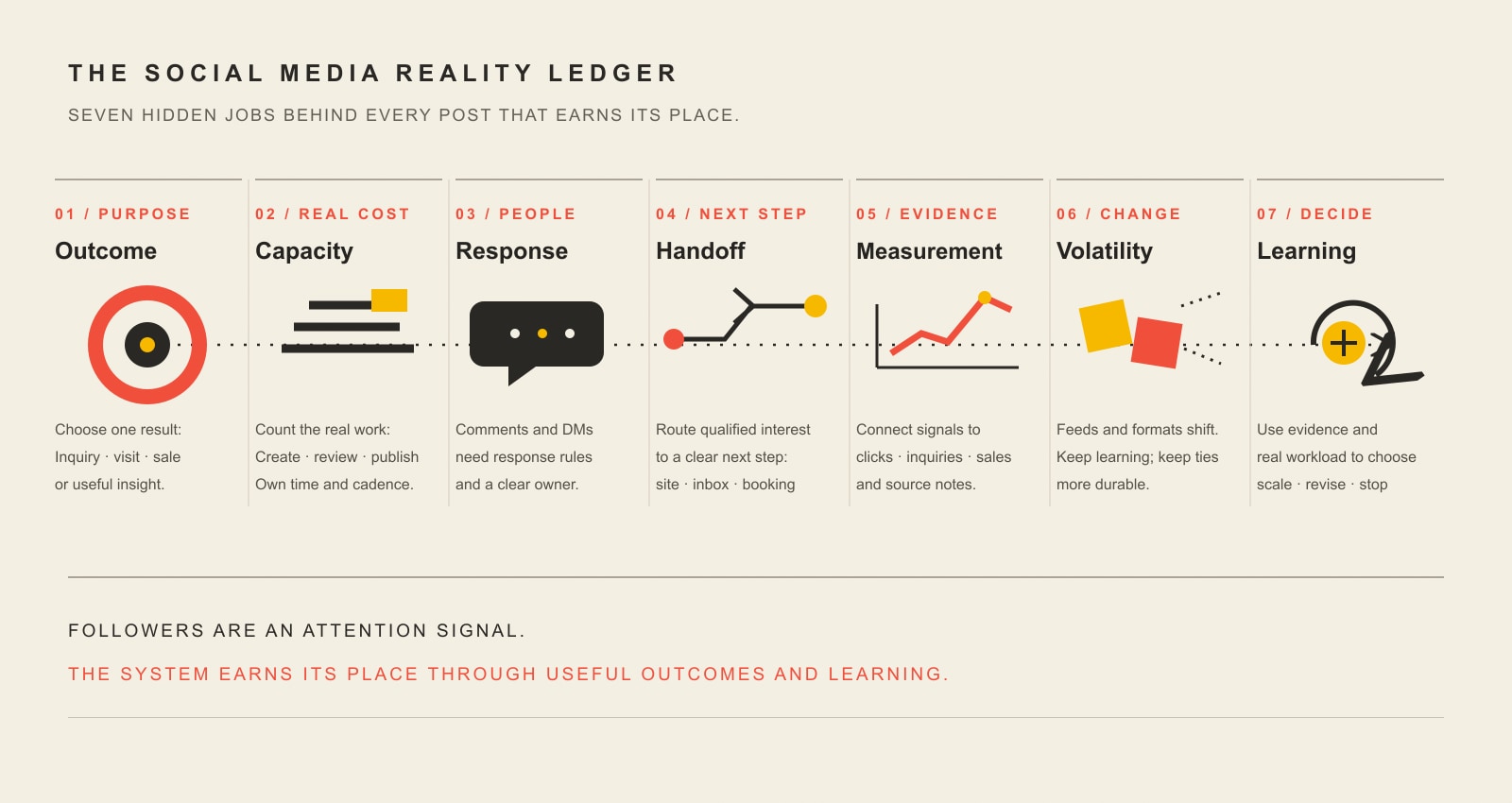
    Seven hidden jobs behind a social post: define the outcome, budget real capacity, respond to people, route qualified interest, measure evidence, account for platform volatility, and learn what to do next.
    RealityQuestion to answerEvidence to collect
    OutcomeWhat business result should social influence?Qualified inquiries, bookings, purchases, visits, referrals, registrations, or another defined result
    CapacityWho creates, reviews, and publishes?Hours, outside cost, content completed, missed work, approval bottlenecks
    ResponseWho handles comments, DMs, and questions?Response time, unresolved questions, qualified conversations, recurring customer issues
    HandoffWhere does qualified interest go next?Website actions, calls, bookings, email signups, sales conversations, store visits
    MeasurementWhat links activity to outcomes?Platform signals, tagged links, CRM or sales notes, “How did you hear about us?” evidence
    VolatilityWhat changes when the platform changes?Dependence on one format, one feed, one source of audience, or one paid tactic
    LearningWhat test decides the next investment?A clear scale, revise, or stop decision based on qualified evidence and workload

    Decision rule: if social produces qualified evidence at a cost and workload you can sustain, keep improving it. If it does not, change the message, handoff, cadence, or channel. Measure the system, not the follower count.

    A practical 30-day social media decision test

    Thirty days is not a magic success deadline. It is simply a useful way to bound a small experiment so it ends with a decision instead of becoming permanent background work.

    1. Name one job for the channel. Example: generate qualified estimate requests, support an event, create product discovery, or reactivate dormant customers.
    2. Pick one audience and one message. Do not test five audiences, six offers, and three new platforms at once.
    3. Set a sustainable production and response rhythm. Track the real hours and outside costs required to keep it running.
    4. Instrument the handoff. Use tagged links when appropriate, define the next action, and record useful customer-source evidence.
    5. Make a decision at the end. Scale, revise, or stop. Write down what you learned so the next test starts smarter.

    If the test succeeds only when the owner works nights, ignores DMs, or skips measurement, the channel has not proven that it scales. It has proven that the workload can be hidden for a month.

    Social media marketing FAQs for small businesses

    How do beginners start social media marketing?

    Start with the customer and the business outcome, not the platform. Choose the one or two places where the people you need to reach actually discover, evaluate, or interact with businesses like yours. Pick one job for the channel, build a sustainable content-and-response routine, and define the next action you want an interested person to take.

    Do small businesses need to post every day?

    No universal cadence is strategically correct for every business. Frequency should match audience behavior, content quality, response capacity, and what you need to learn. A schedule you can sustain and measure is more useful than a daily streak that produces weak posts or unanswered conversations.

    How do I know whether social media marketing is working?

    Define the outcome first, then use a ladder of evidence. Track attention signals such as reach, stronger intent signals such as saves, DMs or link clicks, and business signals such as inquiries, bookings, purchases, visits, referrals, or repeat customers. Add the time and money required to operate the channel so you can compare the value with other marketing options.

    Are social media followers important for a small business?

    They can be useful because they represent potential attention and an audience you may be able to reach again. But follower count is not the same as qualified demand or revenue. Judge the audience by who it contains, how people respond, and whether the account contributes useful business evidence or outcomes.

    Should a small business use paid social advertising?

    Paid social can be useful when the audience and offer are clear, the destination works, someone owns follow-up, conversion measurement exists, and the business can run a bounded learning budget. Paid reach can buy attention and evidence. It cannot repair a confusing offer, broken landing path, or missing follow-up process.

    What does social media marketing for small business cost?

    The platform account may cost nothing, but the operation still consumes labor or budget. Count research, creation, approvals, publishing, response time, lead routing, software, outside help, paid promotion, reporting, and follow-up. Compare that real operating cost with the qualified evidence and outcomes the channel produces.

    The part that matters most

    The hardest part of social media marketing for small business is rarely pressing Publish. It is building the system around the post: knowing why the channel exists, producing work you can sustain, responding when people engage, giving qualified interest somewhere useful to go, and learning enough to make a better next decision.

    If your social channels are active but disconnected from the rest of your marketing, Scope Design can help audit the path from attention to outcome, identify the weak handoff, and build a leaner plan around the capacity you actually have.

  • Blogging and Podcasting: Build One Sustainable Content System

    Blogging and Podcasting: Build One Sustainable Content System

    Blogging and podcasting can work together extremely well—but starting both at once is not automatically a better strategy. The right choice is the smallest content system that helps a specific audience solve a real problem, gives your business a useful way to earn trust, and can be maintained without turning every week into a production emergency.

    For many small businesses, consultants, and experts, that means starting with one durable source of truth and then adapting it into a blog post, podcast episode, email, video, or social post only when the second format adds something useful. The goal is not “more content.” The goal is more value from the same expertise.

    TL;DR: Start with the content job, not the channel

    • Start with a blog when the answer needs to be searchable, scannable, linked, cited, updated, or used as a durable reference.
    • Start with a podcast when conversation, interviews, voice, nuance, guest relationships, or listen-while-doing-something-else behavior are central to the value.
    • Use both when one research and evidence layer can support both formats and the second format improves the audience experience instead of merely multiplying production work.
    • Own the source. Keep the durable answer, calls to action, analytics, and audience-capture path on channels you control, then use platforms for discovery and distribution.
    • Measure the business system. Track production cost, discovery, attention, subscriber or inquiry growth, and qualified business outcomes—not traffic or downloads in isolation.

    Blogging and podcasting: should you start one or both?

    The practical answer is: start with the format that best serves the first audience decision you need to own. Add the second format when it has a distinct job and can share the same research, evidence, and editorial source.

    Start hereStrong fit when…Watch out for…
    BlogPeople search for the problem; the answer benefits from examples, links, screenshots, comparisons, updates, or reference value.Publishing pages without a distribution plan, evidence, internal links, or a clear next action.
    PodcastInterviews, conversation, personality, nuance, or access to guests is part of the value; your audience can consume audio naturally.Launching because podcasts feel prestigious, then discovering that editing, booking, show notes, promotion, and quality control exceed your capacity.
    BothThe same source question and evidence can create a useful written answer and a useful audio conversation without duplicating the whole production process.Turning every episode into a transcript dump or every article into a read-aloud recording and calling that repurposing.

    If you are mainly trying to improve your blog, use our small-business blogging guide. If the strategic decision is already made and your problem is the tool stack, our guide to business blogging tools owns that job. This page stays at the program level: how the formats fit together and when they should not.

    What auditing this exact article changed

    We did not preserve the old version merely because it had been online for years. Before revising it, we checked the exact URL across Scope Design’s analytics, Google Search Console, Bing Webmaster Tools, Ubersuggest, current search results, internal-link ownership, and technical crawl evidence.

    Signal checkedObservation before this revisionWhat it actually supports
    GA4, last 12 complete monthsNo Organic Search landing-page rows; only 2 Direct sessions across all channels, 0 engaged sessions, and 0 configured key events.The sample is far too small for behavior or conversion conclusions. There is no measured organic footprint forcing unsupported legacy claims to survive.
    Google Search ConsoleNo exact-page query/page rows in the current or prior 12-month period. URL Inspection reported “Crawled – currently not indexed,” while fetching, crawling, and indexing were allowed and Google/user canonicals matched.The page needs stronger ownership and usefulness, not a speculative URL migration.
    Bing Webmaster Tools0 clicks and 0 impressions for the exact URL.There is crawl history but no Bing traffic signal that justifies protecting weak claims.
    Ubersuggest0 page-ranking keywords, 0 backlinks, and 0 referring domains returned for the URL.Third-party evidence also shows little page-level equity requiring the old monetization promises or formulas to remain.

    That evidence does not prove blogging is dead, podcasting is ineffective, readers disliked the page, or this rewrite will rank. It supports a narrower editorial decision: preserve the established URL, remove claims we cannot defend, give the page one distinct job, and connect it to the right content cluster.

    Start with one audience problem and one business job

    A channel is not a strategy. Before choosing microphones, themes, podcast hosts, recording software, or publishing calendars, finish this sentence:

    For [specific audience] trying to [make a decision or solve a problem], this content should help them [useful outcome], and the business should be able to observe [meaningful signal].

    Good starting signals include sales questions, support problems, recurring objections, project lessons, customer language, Search Console queries, People Also Ask questions, and topics where your team has real experience. If you need a repeatable way to expand those signals into angles, use the SPARK blog-ideation process rather than starting from a random “100 profitable niches” list.

    This also prevents a common content failure: assigning a separate strategy to every channel. A topic can have one source of truth and several expressions. Your website may hold the durable answer. A podcast can add an interview, disagreement, story, or expert nuance. Email can carry the practical takeaway to people who asked to hear from you. Social can distribute a useful fragment and point back to the deeper source.

    Use the One-Source Content Loop

    The One-Source Content Loop is a simple operating model for deciding what deserves to become multiple formats. It is not a rule that every source must become a blog, podcast, video, and social campaign. The operating rule is the opposite: if a second format cannot reuse the source while adding a distinct audience benefit, do not add it yet.

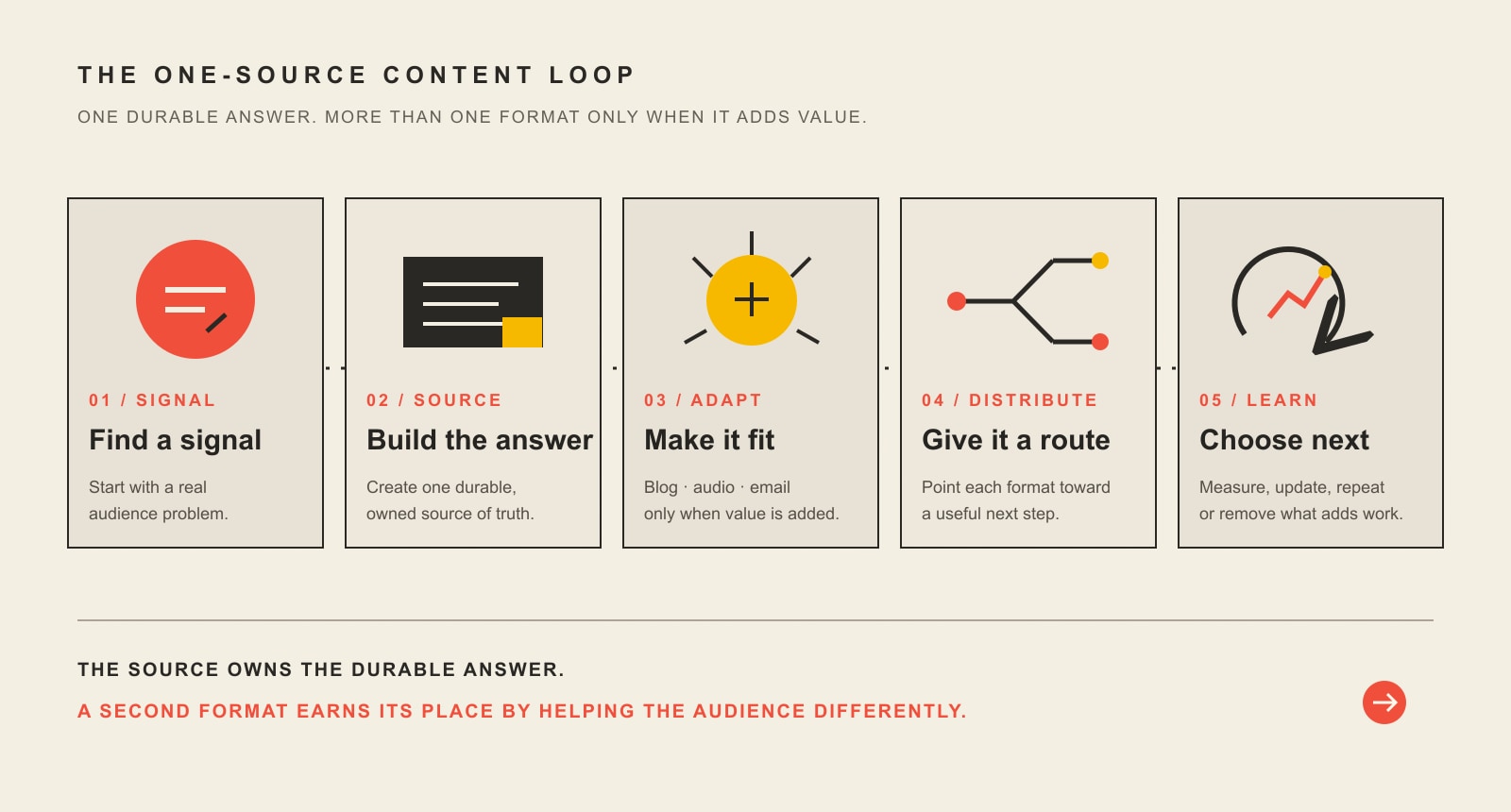
    The five-stage One-Source Content Loop: find a real audience signal, build a durable source, adapt it only when another format adds value, distribute each version, and learn what deserves the next cycle.

    1. Signal: find a question worth owning

    Start with evidence that the question matters. Search demand can help, but so can a repeated sales objection, a support issue, a customer interview, a project mistake, or a pattern your team notices after doing the work repeatedly. The source should exist because somebody needs the answer—not because the calendar has an empty Tuesday.

    2. Source: build the durable answer

    Gather the evidence, examples, caveats, point of view, and next step in one place. For a business with a strong website, the source often belongs on the site because it can be linked, updated, cited, measured, and connected to the rest of the customer journey. Google’s current guidance similarly emphasizes helpful, reliable, people-first content that contributes original information or analysis rather than merely rewriting what already ranks. Google also explicitly says it does not have a preferred word count.

    3. Adapt: rebuild the idea for the format

    A good adaptation preserves the truth but changes the experience. The article may need the definitive checklist. The podcast may need a guest who can challenge assumptions. The email may need one sharp decision and a link to the source. The short video may need a visual demonstration. Our content repurposing workflow goes deeper on extracting knowledge units and rebuilding them for different audience moments.

    4. Distribute: give every format a route

    Publishing is a production event; distribution is how the work reaches people. Decide before production is finished which routes make sense: search, an email list, podcast directories, a guest’s audience, partners, social platforms, internal links, or a relevant YouTube channel. If YouTube is part of the plan, use it because video or YouTube discovery adds value—not because every audio file must automatically become a video. Our YouTube tools guide covers the native and paid layers separately.

    5. Learn: decide what deserves another cycle

    Look at the result in layers. Did the workflow consume more staff time than expected? Did search impressions, email subscribers, listeners, or qualified inquiries move? Did the source answer appear in sales conversations? Did one format attract attention but no useful next action? Use that information to update the source, improve distribution, keep the second format, or remove a step that is not earning its place.

    Build the minimum viable setup

    You do not need an enormous software stack to begin blogging and podcasting. You need the minimum set of systems that lets you create, publish, distribute, measure, and retain access to your work.

    1. An owned web destination. Use a site you control for durable articles, episode pages, show notes, calls to action, analytics, and the source material you expect to update over time.
    2. A permission-based audience path. Email is useful because a subscriber relationship is not dependent on a platform deciding to show your next post. This is one part of a broader small-business marketing system, not a reason to gate every article behind an email form.
    3. A lean writing and publishing stack. Research, drafting, editing, visuals, publishing, SEO, distribution, and measurement are the jobs. Buy tools only when they remove a proven bottleneck.
    4. Recording and editing you can sustain. A microphone, quiet-enough recording environment, recording software, and an editing process are enough to test the format. Production quality should be understandable and professional; it does not need to imitate a major studio on day one.
    5. A podcast host or feed you can manage. Apple Podcasts documents that RSS-submitted shows can use a third-party-hosted feed or a self-generated feed. Its RSS requirements include required tags, at least one episode, and artwork. Apple also explains the submission and validation process. Treat directories as destinations that must be configured and managed, not as a magical automatic distribution layer.
    6. Measurement from the beginning. Set up analytics, Search Console where relevant, email metrics, and the platform analytics your podcast host or directory provides. Establish the baseline before you interpret movement.

    Run one source through multiple useful formats

    Imagine a web-design firm keeps hearing the question: “Should I redesign my website before investing in more marketing?” That is the signal.

    1. Source article: build the durable decision guide with diagnostic questions, examples, tradeoffs, internal links, and a clear next step.
    2. Podcast episode: invite a strategist or client-side operator to discuss cases where the answer was “redesign first” and cases where the real constraint was traffic, offer, follow-up, or measurement.
    3. Email: send the simplest diagnostic: “Before buying more traffic, identify the first broken handoff in the customer journey,” then link to the full source.
    4. Social: turn one counterintuitive finding or diagram into a native post, not a chopped-up paragraph with “link in bio” attached.
    5. Sales reuse: give the source to prospects asking the same question, then note which follow-up questions repeatedly appear.
    6. Learn: update the source with the best recurring question and decide whether the podcast format added enough useful nuance to repeat.

    That is much more efficient than inventing one blog topic, one unrelated podcast topic, five disconnected social posts, and an email newsletter from scratch every week. The same expertise creates multiple useful entry points while one source remains responsible for the durable answer.

    Make podcast content accessible and reusable

    A transcript is not automatically a good blog post, but equivalent text is important. W3C’s WCAG 2.2 guidance for prerecorded audio-only content calls for an alternative for time-based media that presents equivalent information. A reviewed transcript or equivalent text gives people who cannot fully hear the audio access to the information.

    Text also makes the episode easier to scan, quote internally, turn into show notes, identify follow-up questions from, and adapt into other formats. But do not mistake raw transcription for editorial work. Remove transcription errors, identify speakers, make links understandable, preserve important context, and build headings or summaries that help a reader navigate.

    If a transcript contains a strong original explanation, that explanation can feed the next source article. If it is merely a record of casual conversation, it may belong on the episode page as an accessibility resource without becoming a separate “SEO post.”

    Plan distribution before production is finished

    A strong content system separates source ownership from distribution reach. Your website and permission-based audience give you durable control. Search engines, podcast directories, YouTube, social platforms, guests, and partners can introduce the work to people who do not know you yet.

    That does not mean every source belongs on every platform. Choose distribution based on the audience and the job. A technical article may earn search traffic and backlinks over time. An interview can reach the guest’s network. An email can move a known reader back to the most useful source. A social post can test whether a framing resonates. The broader content marketing strategy should connect these routes instead of treating them as independent calendars.

    Measure the system, not just traffic and downloads

    Downloads can matter. Search traffic can matter. Neither one is the whole business case. Measure the program in layers so a healthy top-of-funnel number does not hide an expensive or unproductive system.

    LayerExamplesQuestion it answers
    WorkflowResearch hours, editing time, correction rate, turnaround time, episodes or articles actually completedCan we sustain this without hidden rework?
    DiscoverySearch impressions/clicks, directory discovery, referral traffic, email list growth, partner or guest referralsAre more relevant people finding the source?
    AttentionEngaged sessions, return visits, email replies/clicks, listening or viewing signals available from the platformAre people consuming enough to get value?
    Business effectQualified inquiries, booked calls, sales-assisted use, attributable purchases where measurement is credible, retained customers, useful subscriber growthDid the content contribute to a valuable relationship or decision?

    Do not declare success after one strong episode or one ranking jump. Establish a baseline, run enough cycles to expose workflow problems, and look for patterns. If the podcast creates useful sales conversations but modest downloads, it may still be doing a valuable job. If an article gets impressions but attracts the wrong inquiries, the traffic chart is not a victory by itself.

    Monetize after fit—not before it

    A blog or podcast can eventually support services, products, memberships, sponsorships, affiliate relationships, events, or paid content. But “monetize immediately” is a poor universal rule. First prove that the audience problem is real, the content is useful, the production system is sustainable, and the next business step makes sense.

    If you recommend products through affiliate relationships or accept sponsorships, treat disclosure as part of the publishing workflow. The Federal Trade Commission says material connections between endorsers and sellers must be disclosed, and advertising claims must be truthful and supportable. A disclosure is not a conversion obstacle to hide; it is part of maintaining the reader’s ability to judge the recommendation.

    There is no responsible universal answer to “How much will 10,000 podcast listeners earn?” or “How long until a blog makes $500 per month?” Those outcomes depend on the audience, offer, niche, geography, sponsorship or affiliate economics, pricing, conversion, costs, and what “make” means. Treat any single audience-to-income formula as a scenario, not a promise.

    A realistic first 90 days

    Days 1–30: prove the source workflow

    • Choose one audience and one recurring problem worth owning.
    • Decide whether blog or podcast is the better first expression.
    • Build the minimum publishing, measurement, and distribution setup.
    • Create one complete source asset with real evidence and a clear next action.
    • Record the production time and friction honestly.

    Days 31–60: repeat before expanding

    • Run two or more additional source cycles using the same workflow.
    • Improve the recurring bottleneck instead of buying tools at random.
    • Distribute each source through the routes that fit the audience.
    • If the second format has a clear job and the source can support it, pilot it on one piece.
    • Compare the second-format value with its actual production cost.

    Days 61–90: keep, change, or stop

    • Review workflow, discovery, attention, and qualified-outcome signals together.
    • Update the strongest source with questions you learned after release.
    • Keep the second format if it adds meaningful value; simplify or remove it if it mainly adds work.
    • Connect the most useful sources more deliberately through internal links, email, sales follow-up, and relevant platform distribution.
    • Choose the next 90-day constraint to improve. Do not add a new channel just because the calendar has room.

    Frequently asked questions about blogging and podcasting

    What is the difference between blogging and podcasting?

    Blogging is primarily a written, web-based format that is easy to scan, search, link, update, and reference. Podcasting is primarily an audio format that is well suited to conversation, interviews, voice, and listening while doing other activities. The best format depends on the problem, audience behavior, and what the content needs to communicate.

    Should a small business start a blog or a podcast first?

    Start with the format that best serves the first customer question you need to own and that your team can sustain. A blog is often the stronger first source when searchability, reference value, examples, or updates matter. A podcast can be the stronger first format when interviews, voice, relationships, or conversation are central to the value.

    Do I need both a blog and a podcast?

    No. Use both when one source of research and expertise can support two genuinely useful experiences without doubling the whole workflow. If the second format does not add a clear audience benefit, keep the system smaller.

    Is blogging dead?

    No. Written web content still performs useful jobs: answering search questions, explaining complex decisions, documenting expertise, supporting internal links, giving sales teams reference material, and creating an owned source that can be updated. Publishing generic articles without evidence, distribution, ownership, or a business job is the part worth retiring.

    How often should I publish?

    Use a cadence your real production bottleneck can support. One useful, well-researched source every two weeks can be better for a small expert team than promising three weekly pieces and shipping shallow work. Measure the process, then increase frequency only when quality control and distribution can keep up.

    Does a podcast transcript count as a blog post?

    Not automatically. A reviewed transcript can be an important accessibility resource and useful source material. A blog post should be structured for a reader’s job: clear answer, useful headings, examples, links, context, and a next step. Adapt the transcript when that creates a better written experience instead of publishing raw speech as an article.

    How long does it take for a blog or podcast to make money?

    There is no reliable universal timeline. Revenue depends on audience fit, what you sell, the buying cycle, traffic or listener quality, pricing, conversion, distribution, sponsorship or affiliate economics, and costs. Use early months to prove the audience problem and operating system before treating a revenue date as a commitment.

    Do I need expensive blogging or podcasting tools?

    No. Start with the native or low-cost tools that complete the actual jobs. Pay for a specialist tool when it saves recurring skilled time, provides evidence you cannot reasonably obtain another way, reduces meaningful risk, removes a proven handoff, or otherwise solves a bottleneck you have actually observed.

    Build the smallest system that can learn

    The best blogging and podcasting program is not the one with the most channels. It is the one that turns real customer questions and real expertise into durable answers, adapts those answers only where the format adds value, reaches people through deliberate distribution, and learns from outcomes that matter to the business.

    If your content operation is currently a collection of disconnected tools and calendars, Scope Design can help you map the website, content, search, email, and measurement pieces into a system your team can actually run.

  • Your Website Content Sucks and Here’s Why

    Your Website Content Sucks and Here’s Why

    Your website content sucks.

    Ouch.

    Before you fire the copywriter, feed every page to AI, or pay for a prettier redesign, define what “sucks” actually means.

    Bad website content is not simply old, short, long, boring, or missing enough keywords. It sucks when the right visitor lands on a page and has to work too hard to understand why the page fits their situation, what you do, why it matters, why they should believe you, why they should prefer you, or what to do next.

    That is a decision-path problem before it is a writing-style problem. Better sentences help, but polished sentences wrapped around the wrong page job are still the wrong content.

    If you want to improve website content, start by diagnosing the page before rewriting it. Scope Design uses the five-part SUCKS Test below to find the weak link and fix that first. For the broader planning system—what belongs on the site, how pages work together, and how content supports the business—see our website content strategy guide.

    What bad website content actually means

    A business website is not a school essay. A page has a job.

    A service page may need to help a buyer decide whether an offer fits. A homepage may need to orient several types of visitors and route them. A case study may need to reduce risk. An article may need to answer a question well enough that the reader can make the next decision.

    Content gets weak when the page stops doing that job. You can usually see the failure in one of five places: the page does not fit the visitor’s situation, the value is hard to understand, the claims lack proof, the business sounds interchangeable, or the next step makes no sense.

    Notice what is not on that list: “The page is 1,200 words instead of 1,800” or “The publish date is six months old.” Google’s current people-first content guidance says there is no preferred word count, and it specifically warns against changing dates or adding and removing content merely to make a site appear fresh. A page should be as long as its job requires and updated when something meaningful changes—not because the calendar made you nervous.

    Run the Scope Design SUCKS Test

    The SUCKS Test is our page-level triage framework. It is not marketing scripture handed down from a mountain. It is a practical way to turn “this content feels weak” into five questions you can actually answer.

    S — Situation fit: does the page match why the visitor arrived?

    Start with the visitor’s situation, not your company history.

    Someone searching “emergency furnace repair” arrives with a different level of urgency than someone comparing HVAC maintenance plans. A referral who already trusts you needs different context than a cold visitor who has never heard your name. A buyer trying to compare two services does not need the same opening as someone trying to understand the problem for the first time.

    Ask: What did this person come here to understand, decide, or do? Then look at the first screenful of content. Does it meet that situation, or does it launch into “Welcome to Acme Solutions, where we have proudly served…”?

    A page that tries to serve every audience, awareness level, and buying stage usually serves none of them particularly well. Define the page job and its likely arrival intent first. Everything else gets easier after that.

    U — Understandable value: can the visitor explain what you do and why it matters?

    Clear content does not require tiny sentences or kindergarten vocabulary. It requires a coherent argument.

    After a quick scan, the right visitor should be able to explain what you offer, who it is for, what problem or outcome it addresses, and why the page deserves another minute of attention. If the answer is buried under “innovative solutions,” “customer-centric excellence,” and “industry-leading service,” the content is making the visitor decode your positioning for you.

    This is where a strong brand message earns its keep. The language should sound like something a customer could repeat after leaving the page—not something a committee approved because nobody objected to it.

    A useful test: hide your logo and company name. Could a qualified visitor still tell what business this is, what it helps with, and why the offer matters? If not, you may have polished copy without a useful message.

    C — Credible proof: did you support the claims where doubt appears?

    “We deliver exceptional results” is not proof. It is a claim wearing a tie.

    Credible content shows the reader why a statement deserves belief. Depending on the page, proof might include a relevant case study, a specific example, a review, a screenshot, a process explanation, a demonstration, a credential, a comparison, a documented result, or a clear limitation that shows you understand where the offer does not fit.

    Placement matters. If a visitor is likely to doubt a claim about turnaround time, put the supporting process or evidence near that claim. If price creates risk, put the explanation, scope, guarantee, comparison, or expectation-setting near the price discussion. Do not make the reader remember a logo carousel from 14 scrolls ago and perform their own trust archaeology.

    Our brand authority framework goes deeper on building a body of proof instead of decorating pages with authority signals.

    K — Key difference: is there a meaningful reason to choose you?

    “Trusted.” “Full service.” “Results-driven.” “Personalized.” “Innovative.”

    They may all be true. They also appear on enough business websites to qualify as corporate oatmeal.

    A useful difference is meaningful to the buyer, credible for the business, and comparative enough to change a decision. It could come from who you serve, what you refuse to do, the way you diagnose a problem, the trade-offs you optimize for, your delivery model, your expertise, your process, your proof, or a combination competitors have not made easy to copy.

    Do not invent a fake “unique selling proposition” because a worksheet demanded one. Find the difference that changes the buyer’s choice and explain it plainly. Our guide to brand differentiation covers that work in detail.

    S — Sensible next step: does the action match the visitor’s readiness?

    The old version of this article said every page and every post needed a compelling call to action. That sounds tidy. It is also too crude.

    Every useful page should help the visitor know what comes next, but “next” does not always mean “book a sales call.” It might mean read a comparison, view a case study, check pricing, use a calculator, understand the process, see related services, contact support, request an estimate—or simply leave with the answer they came for.

    The action should continue the buyer’s work. A strong educational answer followed by an unrelated “SCHEDULE A DEMO NOW” button is not a conversion strategy. It is a jump scare.

    Match the commitment to the visitor’s situation and the page’s job. If the reader has enough information to take a commercial step, make that path obvious. If they need one more decision first, help them make that one.

    What not to fix first

    Once someone decides “the content is bad,” it is tempting to reach for the most visible tactic. That is how businesses spend money polishing the symptom.

    Do not start with freshness theater

    Update content when the facts, offer, proof, customer questions, competitive context, or page job have changed—or when performance evidence shows a section no longer does its job. Do not change the date, swap three adjectives, and call the page fresh.

    Do not add words because a competitor has more

    More copy can help when the reader needs more explanation, evidence, comparison, or objection handling. More copy can also make a weak page longer. Word count is not a strategy.

    Do not copy the competitor’s structure by reflex

    Competitor research is useful for understanding category language, common claims, missing proof, and buyer expectations. It is not an instruction sheet. If five competitors use the same vague headline and three-card feature row, building a sixth version does not create differentiation.

    Do not assume a redesign will fix a content problem

    Design changes hierarchy, attention, comprehension, credibility, and friction. It matters. But stronger visual treatment cannot manufacture a clear offer, evidence, or point of view that does not exist. If you are deciding where the real problem lives, our web design vs. content guide separates the two without pretending either works alone.

    How to improve website content in the right order

    You do not need to rewrite the entire site to make progress. Pick one important page and fix the decision path in order.

    1. Confirm the page can be measured. Make sure the page loads, forms and key interactions work, analytics are collecting what matters, and you are not diagnosing from a broken instrument panel.
    2. Define the page job. Write one sentence: “This page helps [specific visitor] decide/do [specific job].” If you cannot finish the sentence, do not start rewriting paragraphs.
    3. Match the arrival situation. Identify how the visitor likely found the page and what they already know. Adjust the opening so it meets that context.
    4. Clarify the argument. State the problem or desired outcome, what you offer, who it fits, and why it matters in language the buyer uses.
    5. Add proof where doubt appears. Support the claims most likely to trigger skepticism. Remove unsupported precision and empty superlatives.
    6. Sharpen the meaningful difference. Explain the part of your approach, expertise, fit, or trade-off that can actually change a buying decision.
    7. Fit the next action. Give the reader a logical path that matches their readiness instead of forcing the same sales CTA onto every page.
    8. Connect useful paths. Add internal links when another page genuinely answers the reader’s next question. Google recommends descriptive, relevant anchor text because link context helps people and search systems understand the relationship between pages.
    9. Measure the last meaningful outcome the page can control. That might be a qualified click to pricing, a completed form, a product view, a comparison-page visit, or another behavior tied to the page’s job—not whatever metric looks happiest in the dashboard.

    If the page is primarily intended to earn organic visibility, the deeper mechanics belong in our SEO content writing guide. Do the content job first; then optimize how search systems discover and understand it.

    What if content is not the constraint?

    This is the part most “fix your website copy” articles skip.

    Sometimes the content is fine enough and the real problem is somewhere else.

    In one anonymized Scope Design project for a specialty-auction business, the surface request looked like a redesign problem. Deeper discovery found broken forms, disconnected data, manual handoffs, and legacy systems creating larger constraints. A prettier homepage would have preserved those failures underneath it.

    The same logic applies to content. Before you blame the copy, check the system around it:

    • Measurement and technical integrity: Are forms, tracking, pages, and integrations working?
    • Relevant traffic volume: Is enough of the right audience reaching the page to judge it?
    • Traffic quality and acquisition fit: Are ads, search queries, referrals, social posts, and email promises sending people whose intent matches the page?
    • UX friction: Can visitors find, scan, compare, and act without fighting the interface?
    • Offer and positioning: Is the underlying offer compelling and appropriately priced, scoped, and differentiated?
    • Sales and operational follow-through: Do inquiries get qualified, routed, answered, and followed up well?

    If one of those is the real constraint, a rewrite may still improve the page. It just may not improve the business result you care about.

    A 20-minute website content audit

    Do this on one important page—not the entire site. The goal is to find the first meaningful failure, not to create a 73-tab audit spreadsheet nobody wants to open again.

    • Minute 1–3: Situation. Write the likely visitor, arrival source, awareness level, and page job in one sentence.
    • Minute 4–7: Understandable value. Read only the headline, subhead, headings, and first sentence of each section. Can you explain the offer and argument without filling gaps from your own company knowledge?
    • Minute 8–11: Credible proof. Circle every important claim. Mark which claims have evidence nearby and which are asking for faith.
    • Minute 12–14: Key difference. Highlight phrases a direct competitor could copy without changing a word. If most of the page survives the test, your differentiation is probably hiding.
    • Minute 15–17: Sensible next step. Trace what the visitor can do after each major decision point. Remove dead ends and aggressive jumps.
    • Minute 18–20: Constraint check. Ask whether traffic quality, technical problems, UX, the offer, or follow-up could explain the result better than the copy.

    When you finish, you should have a short repair list tied to actual decisions: rewrite the opening for a specific visitor; add proof beside a high-risk claim; replace generic category language; change the next step; fix a broken form; or leave the page alone because it is not the constraint.

    That is much more useful than “make the copy punchier.”

    Frequently asked questions about bad website content

    Does bad website content hurt SEO?

    Weak content can make a page less relevant, less useful, less differentiated, and less worthy of links or citations, but rankings can also be limited by technical access, competition, authority, search intent, internal linking, and other factors. Do not treat “SEO problem” as a synonym for “write more copy.” Diagnose which constraint is actually limiting the page.

    How often should website content be updated?

    Update it when something meaningful changes: the facts, offer, pricing, proof, audience, regulations, competitive context, customer questions, search intent, or decision path. Also update when performance evidence shows the page no longer does its job. Do not revise solely to make the date look newer.

    Should I rewrite my entire website at once?

    Usually not. Start with pages closest to meaningful business outcomes or pages with enough relevant traffic to produce useful evidence. Fix one decision path, learn from it, and carry the lessons into the next page. A site-wide rewrite can be appropriate when the underlying positioning or offer changed, but “everything feels a little stale” is not much of a brief.

    Is website content strategy the same as copywriting?

    No. Copywriting is the language that persuades, explains, and moves the reader. Content strategy decides what information is needed, where it belongs, which audience and decision it serves, how pages connect, what evidence supports them, and how the content is maintained and measured. Strong copy can improve a bad strategy, but it cannot quietly replace one.

    Should design or content come first?

    Neither should be designed in isolation. Content determines what must be communicated; design creates hierarchy, comprehension, credibility, and interaction around that communication. In practice, both should evolve from the page job, visitor situation, evidence, and desired action. If one is obviously broken, fix the constraint rather than defending a philosophical order of operations.

    Can AI fix bad website content?

    AI can help summarize interviews, reorganize evidence, test alternate explanations, draft sections, critique clarity, and produce variations. It cannot manufacture a defensible market position, genuine customer evidence, first-hand expertise, or a business decision you have not made. Generic inputs still produce generic output faster.

    Fix the reason the content sucks

    The useful question is not, “How do we make this page sound better?”

    It is, “What decision is this page supposed to help the right visitor make, and what is getting in the way?”

    Run the SUCKS Test. Fix the first real failure. Measure what the page can actually influence. If the content passes and the result is still weak, keep diagnosing instead of ordering another rewrite out of habit.

    If several parts of the test fail across important pages, that is usually a strategy problem wearing a copy problem’s name tag. Scope Design can help you diagnose the website, messaging, content, conversion path, and surrounding system before deciding what deserves to be rebuilt.

  • 15 Blogging Tips for Small Businesses That Drive Real Results

    15 Blogging Tips for Small Businesses That Drive Real Results

    The best blogging tips for a small business are not really about blogging tricks. They are about giving every post a clear business job, answering a real customer question better than the alternatives, adding evidence only your business can provide, giving the answer a route to readers, and learning from what happens next.

    That is the difference between maintaining a blog and building a useful content asset. A post can be beautifully written and still do absolutely nothing if it targets the wrong question, has no distribution, connects to no next step, or teaches you nothing after it goes live.

    TL;DR: the blogging tips that matter most

    • Give every post one specific reader decision and one business job.
    • Research the question before you write the answer.
    • Lead with a useful answer instead of a ceremonial introduction.
    • Add first-hand evidence, examples, judgment, or analysis that a generic AI summary cannot supply.
    • Use AI to accelerate research and production, not to own accuracy or strategy.
    • Connect the post to related pages, a sensible next action, and an actual distribution plan.
    • Measure discovery, attention, and business effect separately, then update the content based on evidence.

    If blogging is one part of a larger acquisition problem, put it inside a coherent small business marketing strategy. A blog is a channel and a knowledge asset. It is not the entire marketing department wearing glasses.

    What this blogging page taught us before we rewrote it

    We audited this exact article before revising it. During the 12 complete months from August 20, 2025 through August 19, 2026, GA4 recorded zero Organic Search landing-page sessions for this URL. Search Console returned no page or query rows for the same URL, and Ubersuggest estimated zero ranking page keywords, zero backlinks, and zero referring domains. At the same time, the page itself returned HTTP 200, used a self-referencing canonical, and was set to index/follow.

    That does not prove blogging does not work. The sample is tiny, Search Console currently reports the URL as unknown to Google, and our analytics setup has known attribution and key-event limitations. It does prove something more modest and useful: publishing is not a distribution plan, and traffic is not a business outcome. The old version had plenty of tactics. What it lacked was a system.

    The BLOG Loop behind these blogging tips

    We use the BLOG Loop to organize the work: Business job, Listen, Own, Give it a route, Learn. The point is not the acronym. The point is the sequence. Each stage prevents a different kind of waste.

    StageQuestionUseful output
    Business jobWhat reader decision and business outcome should this post support?A narrow page job and next action
    ListenWhat are customers and searchers actually asking?Question map, intent, SERP and PAA evidence
    OwnWhat can we add that is more useful than a generic summary?Direct answer, evidence, examples and judgment
    Give it a routeHow will people find the answer and where should they go next?Internal links, distribution, repurposing and CTA
    LearnWhat did the page teach us after it went live?Measurement, refresh, consolidation or stop decision
    The five-stage BLOG Loop for business publishing: choose a Business job, Listen to real questions, Own a useful answer, Give it a route through links and distribution, and Learn from outcomes.

    B — Business job: decide why the post should exist

    1. Give every post one business job

    Before choosing a title, decide what the post is supposed to help the business do. It might attract a problem-aware buyer, answer an objection before a sales call, explain a service, reduce repetitive support questions, earn links to an original resource, or help an existing customer make a better decision.

    “Get traffic” is too vague. Traffic from whom, for what question, leading toward what useful action? A page that brings 5,000 students researching a class project may be less valuable to a local service business than a page that brings 50 buyers comparing real options.

    Write the job in one sentence: This post helps [specific reader] decide [specific thing] so they can [useful outcome]. If that sentence is mush, the article usually becomes mush too.

    2. Define one specific reader decision

    Audience labels are not enough. “Small business owners” describes millions of people. A decision gives the article a shape.

    Compare “blogging ideas for small businesses” with “I run a local service company, have ten old posts, and can only invest four hours a month. Should I publish something new, update an existing page, or stop blogging until the offer is clearer?” The second version has constraints, alternatives, and a real consequence.

    If your problem is figuring out what deserves its own article, our guide to business blog topics that attract buyers owns that narrower question. If the topic is good but sounds like everybody else, the next problem is how to differentiate the article.

    3. Choose the next action before you write

    The next action should match the reader’s stage. Someone learning a concept may need another article, a calculator, a checklist, or an example. Someone comparing vendors may need pricing context, proof, scope, or a way to start a conversation.

    Do not bolt a giant “BUY NOW” button onto an informational article and call that conversion strategy. The content should earn the next step. If there is no useful next step, that is a strategy problem worth noticing before you spend six hours polishing the draft.

    L — Listen: research the question before writing the answer

    4. Start with questions customers actually ask

    Your best blog ideas are often hiding in sales calls, estimate requests, onboarding meetings, support tickets, proposals, customer emails, search queries, and the questions staff answer for the fifth time this week.

    Start there because those questions already carry context. You know who asked, why it mattered, what they misunderstood, and what happened after they got the answer. Search-volume tools can expand the opportunity, but they should not erase the business reality that made the question valuable in the first place.

    5. Choose keywords by intent and buyer fit, not volume alone

    For this revision, “blogging tips” had the strongest broad search demand in our research. “Small business blogging tips” was dramatically smaller. We still wrote for small businesses because audience fit matters more than winning the largest possible crowd.

    Use keyword volume as evidence of demand, not as a command. A keyword deserves the page when its intent matches the reader, the business has something credible to add, and the resulting page supports a useful customer journey. Chasing a high-volume phrase with the wrong audience is how you end up proudly reporting traffic that nobody in sales has ever heard of.

    6. Check Google, Bing, PAA, and AI answers before outlining

    Search results are a live description of what the query currently means. For “blogging tips,” Google showed general advice lists, an AI Overview, People Also Ask questions, video, and related searches. Bing leaned more heavily toward blogging platforms, definitions, starting a blog, and monetization. Same words, different emphasis.

    Look for the repeated questions, expected formats, dominant assumptions, and missing nuance. Then build something better. Do not trace the top three articles and swap synonyms. That produces a perfectly optimized photocopy.

    Google’s current guidance for its AI search experiences still comes back to unique, useful content for people plus a technically accessible page. There is no secret “AI citation” font size.

    O — Own: make the answer worth finding

    7. Lead with the answer

    Readers should not have to survive 400 words of throat-clearing before learning what you think. Put the answer near the top, then earn the deeper explanation.

    This helps humans scan, gives search systems a clear statement to understand, and makes the page more useful when someone lands on it with a specific question. Answer-first does not mean shallow. It means the reader gets orientation before nuance.

    8. Add evidence, examples, and judgment only your business can provide

    Generic information is cheap. Your advantage is what happened when you did the work.

    • Show the decision you made and why.
    • Explain a tradeoff that a beginner guide skips.
    • Use anonymized client patterns when confidentiality matters.
    • Publish a useful checklist, framework, calculation, screenshot, comparison, or failure analysis.
    • State what you would not recommend and under what conditions your advice changes.

    Google’s people-first content guidance asks whether a page offers original information, analysis, first-hand expertise, and substantial value beyond obvious summaries. That is a better editorial test than asking whether you used the keyword seven times.

    This is also where content marketing becomes an asset instead of a publishing treadmill: useful knowledge accumulates, connects, and becomes reusable across sales, search, email, social, and customer support.

    9. Use AI as an assistant, not the accountable author

    AI is useful for outlining, organizing research, finding gaps, generating questions, transforming formats, and helping a writer get from a blank page to something editable. It is terrible at being accountable for whether a statistic is real, whether the recommendation fits your customer, whether confidential information belongs in the prompt, or whether the final copy sounds like you.

    Google says generative AI can be useful for research and structure, while scaled generation that adds little value can run into its spam policies on scaled content abuse. Our rule is simpler: AI can accelerate the work; a human still owns strategy, evidence, accuracy, positioning, risk, and approval.

    If you want the deeper workflow, see our guide to using ChatGPT for marketing as an assistant rather than the department.

    10. Make the page easy to scan, crawl, and quote

    Good structure is not a gimmick. Use descriptive headings, short paragraphs where the idea allows it, useful lists, tables for real comparisons, and images that explain something the prose handles badly. Keep links crawlable and anchors descriptive. Google specifically recommends ordinary <a href> links and meaningful anchor text in its link best practices.

    Do not pad a post because somebody told you Google wants 2,000 words. Google explicitly says it has no preferred word count. Write enough to complete the reader’s job, then stop. If the page is technically discoverable but still struggles, our page-one readiness framework separates demand, eligibility, intent, evidence, experience, authority, and outcome so you can diagnose the right problem.

    G — Give it a route: links, distribution, and the next useful step

    11. Link to the next useful answer

    Internal links should behave like helpful directions, not SEO confetti. If a sentence naturally raises a question that another page answers better, link it. If the destination does not help the reader, leave it alone.

    A healthy content cluster has distinct page owners connected by contextual links. The broad page explains the big decision. Supporting pages answer narrower questions. Links clarify the relationship. That helps humans navigate and gives search systems a coherent set of crawlable relationships without turning the site into a keyword filing cabinet.

    12. Distribute where the audience already pays attention

    “We published it” describes where the file lives. It does not describe how a reader will find it.

    Choose distribution based on the audience and the post’s job. That may mean an email to existing customers, a salesperson using the article after a call, a useful answer in a relevant community, a social post built around one idea, paid promotion for a commercially important asset, a partner newsletter, or search discovery that compounds over time.

    The same rule applies to organic traffic: publication is not distribution, and more of the wrong visitor is just more server logs.

    13. Repurpose the idea for the channel instead of copy-pasting the post

    A useful article can become an email, a short video, a sales handout, a FAQ answer, a presentation slide, a social thread, a checklist, or a client conversation. But repurposing is not “paste the first paragraph into six apps.”

    Keep the core evidence and idea. Change the opening, length, format, context, and call to action for the channel. The reader on LinkedIn did not volunteer to read a 2,800-word blog post with the line breaks removed.

    Loop — Learn: measure what happened and decide what deserves another round

    14. Measure discovery, attention, and business effect separately

    Do not compress every signal into “traffic.” A practical blogging scorecard has at least three layers:

    LayerWhat it asksExamples
    DiscoveryCan the right people find the page?Indexing, impressions, rankings, referral exposure, email reach
    AttentionDid they actually use it?Engaged sessions, scroll/read behavior, return visits, replies, saves, sales-team use
    Business effectDid it help a useful customer action?Qualified inquiries, assisted journeys, purchases, booked calls, reduced support friction, better close conversations

    A page can be valuable before it ranks if the sales team uses it constantly. A page can rank and still be useless if it attracts the wrong intent. Measurement should tell you what kind of problem you have, not merely provide a prettier chart for the monthly meeting.

    15. Refresh, consolidate, or stop based on evidence and capacity

    Consistency matters only if the business can consistently produce something worth publishing. One strong article a month can be a better system than four rushed articles that repeat what already exists and never get distributed.

    Review older posts by job, accuracy, traffic, impressions, links, sales usefulness, overlap, and maintenance cost. Update an owner that still deserves to exist. Consolidate pages competing for the same intent. Preserve URLs with useful history. Remove content only when it has no meaningful role or equity. Calendar guilt is not a content strategy.

    A practical 30-day blogging reset

    If your blog has become a drawer full of old posts, do not begin by promising yourself three articles a week. Run one BLOG Loop.

    1. Week 1 — Business job and listening: collect ten real customer questions, review existing pages, and choose one decision worth owning.
    2. Week 2 — Own the answer: research search intent, current results, PAA and AI answer patterns; gather first-party examples and authoritative sources; draft the best answer you can actually defend.
    3. Week 3 — Give it a route: add the right internal links, a sensible CTA, an explanatory visual, and a distribution plan for the audiences that already know or need you.
    4. Week 4 — Learn: verify indexing and links, establish the baseline metrics, note sales or customer use, and decide when you will review the page again.

    Then repeat with the next question. That is slower than filling a calendar with titles. It is also much closer to how useful small-business content marketing compounds into a real knowledge asset.

    Frequently asked questions about business blogging

    Is blogging still worth it for small businesses?

    It can be, when customers need education, comparison, evidence, or answers before they buy. Blogging is a poor fit when the business has no useful questions to answer, no one will maintain or distribute the content, or a more immediate bottleneck such as a weak offer or broken conversion path deserves attention first.

    How often should a small business publish blog posts?

    Use the highest cadence you can sustain without sacrificing usefulness, evidence, distribution, or maintenance. For some businesses that is weekly. For others it is monthly or even less often. There is no prize for feeding the CMS more frequently than your audience needs.

    How long should a blog post be for SEO?

    Long enough to complete the reader’s job and no longer. Google explicitly says it does not have a preferred word count. A 900-word answer can beat a 3,000-word article when it matches the intent better; a complex comparison may genuinely need much more space. Depth should come from the problem, not a target number in a plugin.

    Can ChatGPT write business blog posts?

    It can help research, outline, draft, reorganize, critique, and repurpose content. A human should still own the source material, customer context, factual verification, examples, privacy boundaries, positioning, tone, and final approval. If the only thing your article adds is that an AI can summarize the same search results faster, you have not built much of an asset.

    What are the most common blogging mistakes?

    Common mistakes include choosing topics with no business job, writing before researching the question, targeting volume instead of intent, inventing or recycling statistics, burying the answer, publishing generic AI summaries, skipping internal links, having no distribution plan, forcing an irrelevant CTA, and never reviewing the page after publication.

    What is the 80/20 rule for blogging?

    There are several “80/20” blogging heuristics on the web, usually suggesting that a minority of effort or content drives most results, or that more time should be spent promoting than writing. Treat those as planning prompts, not laws or ranking factors. Your actual ratio should come from your audience, distribution channels, content quality, and business constraints.

    Should old blog posts be deleted?

    Not automatically. Review the page’s accuracy, intent, rankings, impressions, links, customer value, overlap, and maintenance cost. Update useful owners, consolidate competing pages, preserve valuable URLs, and remove only when the page has no meaningful purpose or equity. Our business blog topic guide goes deeper on deciding what deserves to exist.

    Build a blogging system, not a content guilt machine

    The useful version of blogging is not “publish because the calendar says Tuesday.” It is a repeatable way to turn real customer questions into owned answers, connect those answers into a coherent body of expertise, distribute them deliberately, and learn which ones create value.

    Start with one post and run the BLOG Loop all the way through. If the bottleneck is bigger than the article itself, Scope Design can help diagnose the broader marketing and content system so you know whether the next dollar belongs in content, search, distribution, conversion, or somewhere else entirely.

  • SEO Content Writing: Rank Without Producing Generic Crap

    SEO Content Writing: Rank Without Producing Generic Crap

    Short answer: SEO content writing means creating a page that answers a real searcher’s question, helps them make a decision, demonstrates knowledge worth trusting, and supports a measurable business job. Research the intent, gather evidence before drafting, answer directly, structure the explanation clearly, optimize the page without stuffing it, connect it to the rest of the website, and measure what happens after the click.

    It is not regular writing with a keyword shoved into every available crevice. It is also not feeding a prompt to ChatGPT, asking Rank Math whether the light turned green, and declaring yourself an authority before lunch.

    TL;DR: How do you write SEO content that actually works?

    Use this sequence:

    1. Define the business outcome the page should support.
    2. Identify the reader’s actual question and stage of decision-making.
    3. Gather first-hand expertise, examples, proof, and primary sources.
    4. Research the language people use and inspect the live search results.
    5. Build one coherent page around one primary search job.
    6. Draft the direct answer first, then add useful depth and honest limitations.
    7. Optimize titles, headings, links, media, metadata, and schema truthfully.
    8. Publish, measure qualified outcomes, and improve the weak section instead of rewriting the whole damn thing on instinct.

    That is the Scope Design Search-to-Outcome Content System. Keywords matter. The customer matters more. The business outcome is why the article exists at all.

    What is SEO content writing?

    SEO content writing is the process of planning, researching, writing, and maintaining web content so people and search systems can find it, understand it, trust it, and use it. Effective SEO writing combines audience research, search intent, subject-matter expertise, clear communication, on-page optimization, internal linking, and measurement.

    The definition matters because “SEO content” is often treated as a cheap production category: select a keyword, fill 1,500 words, add a stock photo of someone pointing at a graph, and wait for Google to become overwhelmed by your commitment.

    That is content-shaped inventory. It is not a strategy.

    Google says its systems are designed to prioritize helpful, reliable information created to benefit people rather than manipulate rankings. Bing says content that is discoverable, accurate, well structured, and made for users supports eligibility across search and AI-grounding experiences. Neither platform publishes a recipe where a certain word count, keyword density, plugin score, or schema type forces a ranking.

    Our SEO basics guide explains the larger visibility system. This guide focuses on the editorial work: turning a business problem and real expertise into a page worth finding.

    SEO content writing versus SEO copywriting

    The terms overlap, but the jobs are not identical.

    DisciplinePrimary jobTypical pagesSuccess evidence
    SEO content writingEarn discovery, educate, explain, and build topical understandingGuides, articles, FAQs, comparisons, resource pagesRelevant visibility, qualified visits, assisted actions, citations, links
    SEO copywritingPersuade the right visitor to take a commercial actionService pages, product pages, landing pages, offer pagesQualified inquiries, purchases, bookings, pipeline, revenue

    A strong article still needs persuasive clarity. A strong service page still needs search relevance. The difference is emphasis, not a concrete wall.

    Problems begin when the wrong measurement is attached to the page. An educational guide should not be judged only by immediate form submissions. A commercial service page should not receive a standing ovation because people spent six minutes reading and then left.

    Why most SEO content fails before anyone writes it

    The failure usually starts with the brief.

    “Write a 2,000-word article about website strategy and use the keyword twelve times” is not a useful brief. It specifies production without establishing the reader, decision, evidence, business purpose, or distinct point of view.

    Common pre-writing failures include:

    • choosing a topic only because a tool reports volume;
    • targeting several different intents with one muddled page;
    • commissioning content before interviewing the expert;
    • assuming the writer can invent the missing business position;
    • copying the headings from the top-ranking pages and calling that research;
    • creating another article when an existing URL should be updated;
    • planning traffic without deciding what a qualified visitor should do next.

    Scope Design’s Analytics & SEO position is blunt: traffic is evidence of attention, not evidence of value. A thousand irrelevant visits can create more reporting and no business. The page must connect search demand to a decision the business is qualified to help with.

    The Scope Design Search-to-Outcome Content System

    Eight steps in the Search-to-Outcome Content System: define the business job, understand decision intent, inventory evidence, research search language, structure the content, draft with expertise, optimize truthfully, and measure outcomes.

    The eight layers below turn SEO writing from a word-production task into a controlled business process.

    1. Business job: decide why the page exists

    Start with the outcome closest to money that the page can reasonably influence.

    Possible jobs include:

    • attract a qualified buyer researching a service;
    • answer an objection before a sales conversation;
    • explain pricing or process transparently;
    • support a central service or pillar page;
    • earn relevant links or citations;
    • reduce repetitive support questions;
    • help an existing customer complete a task;
    • qualify or repel prospects before they contact the business.

    Choose one primary job. A page may support secondary outcomes, but five co-equal goals usually produce one incoherent article.

    Then define the next step. It might be another guide, a comparison, a service page, a calculator, a consultation, or no immediate sale at all. The CTA should match the reader’s stage rather than mugging every visitor with “BOOK A CALL” before they know what you do.

    2. Decision intent: identify what the reader is trying to resolve

    Search intent is more useful when described as a decision rather than a generic label.

    “Informational” tells us very little. These are all informational searches with different jobs:

    • What is SEO content writing?
    • How do I write an SEO article?
    • Can AI write SEO content?
    • How much should SEO content cost?
    • Should I update an old post or write a new one?
    • Why is my content indexed but not ranking?

    For each page, write down:

    • who is searching;
    • what happened immediately before the search;
    • what they already understand;
    • what they are comparing;
    • what would make the answer believable;
    • what they need to know next.

    Then inspect the live Google and Bing results. Look at page types, result features, videos, forums, People Also Ask questions, and the dominant interpretation of the query. You are not copying the winners. You are checking whether the page you plan to write belongs in that result at all.

    Our Google ranking diagnostic explains why intent and evidence must be diagnosed before rewriting a page that does not rank.

    3. Evidence inventory: gather what the internet cannot make up for you

    Do not ask a writer or AI model to “add expertise” after the draft. Expertise is an input.

    Create an evidence inventory before outlining:

    • subject-matter expert answers;
    • first-hand processes and decision rules;
    • client examples you have permission to use;
    • original data and calculations;
    • screenshots, demonstrations, or artifacts;
    • common sales and support questions;
    • known trade-offs, exceptions, and failure modes;
    • primary sources for factual claims;
    • claims the business cannot substantiate and should not make.

    This is where Scope Design’s process deliberately keeps Greg in the loop. Research can identify what people ask. It cannot manufacture Greg’s experience, thresholds, objections, or opinion. The expert interview is what turns a technically competent summary into Scope Design content.

    The test is simple:

    If a generic AI model could produce the entire article without access to the business, the article probably does not contain enough of the business.

    4. Search language: research demand without handing it the steering wheel

    Keyword research helps identify how people describe a problem, how much observable demand exists, and which related questions belong together.

    Research should include:

    • a primary topic phrase;
    • close variants and synonyms;
    • problem, cost, comparison, and implementation questions;
    • modifiers showing audience, industry, location, or constraint;
    • People Also Ask and related searches;
    • Search Console queries for pages that already exist;
    • sales-call language and customer emails;
    • AI-query testing to expose follow-up questions and unsupported assumptions.

    Volume is not the deciding vote. A low-volume question can be commercially valuable when it signals a serious buyer. A high-volume term can be a useless crowd.

    In our August 2026 Ubersuggest check, estimated monthly US search volume was about 1,300 for “SEO content writing,” 4,400 for “content writing for SEO,” 1,300 for “SEO writing,” 1,000 for “SEO copywriting,” and 210 for “how to write SEO content.” Those figures help size the language. They do not tell Scope Design what to believe or guarantee this page will rank.

    If the hard part is deciding which phrases deserve their own page, our SEO keywords guide goes deeper on query intent, page ownership, and choosing language without chasing volume alone.

    5. Content architecture: give every section a job

    Build the outline after intent and evidence are clear.

    A practical structure may include:

    1. a direct answer;
    2. a definition and boundaries;
    3. why the problem occurs;
    4. the original process or framework;
    5. examples and evidence;
    6. trade-offs and myths;
    7. implementation steps;
    8. measurement;
    9. relevant FAQs;
    10. the next useful action.

    Each section should answer a question or move the decision forward. If a heading exists only because every competing article has it, delete it or make it earn its place.

    Use paragraphs for explanation. Lists are useful for sequences, options, and checklists; they are not a substitute for thinking. Open Brain’s Content Engine SOP specifically calls for paragraph-first drafting because a wall of bullets can look organized while saying almost nothing.

    Internal links belong in the blueprint, not sprinkled in during a final panic. Link to the pages that explain prerequisites, evidence, related decisions, and commercial next steps. Our SEO strategy and analytics pillar is the hub for this entire topic cluster.

    6. Expert draft: answer first, then earn the depth

    Open with the answer the reader came for. Do not make them survive six throat-clearing paragraphs about how “in today’s rapidly evolving digital landscape, content is king.” The king has been overthrown. He was mostly filler.

    Then add the depth that makes the answer useful:

    • explain why;
    • define conditions and exceptions;
    • show a real example;
    • distinguish similar concepts;
    • state what is unknown;
    • tell the reader what to do next.

    Write in the language of a competent human helping another human. Use industry terminology when it improves precision, not because jargon feels expensive.

    AI can help assemble research, organize notes, challenge an outline, generate alternatives, and produce a first draft. Scope Design’s rule is that a competent human must be able to inspect the sources, recognize errors, and remain accountable for publication. Fluency is not verification.

    7. Truthful optimization: make the page clear without performing SEO theater

    Once the draft is useful, optimize the page so people and search systems can interpret it.

    Check:

    • one descriptive visible H1;
    • a concise, accurate SEO title;
    • a useful meta description;
    • logical H2 and H3 headings;
    • natural use of the main topic and related language;
    • descriptive internal-link anchors;
    • credible external sources where claims require them;
    • high-quality original media near relevant text;
    • descriptive alternative text;
    • a canonical URL;
    • accurate author and review information;
    • supported schema that matches visible content;
    • mobile readability and accessibility;
    • no arbitrary line breaks or formatting debris.

    Schema is machine-readable truth. It is not a bottle of ranking cologne. Google also says no special structured data is required for its AI features.

    Rank Math and similar tools are useful lint. They can catch a missing description, absent keyword, or formatting problem. Their score is not a Google or Bing score. Protect pages that perform even when a plugin dislikes them, and do not damage natural writing to satisfy a checklist.

    8. Outcome loop: publish, observe, and improve the actual constraint

    Measure the page in layers:

    1. Eligibility: Is it crawlable, indexed, and canonicalized correctly?
    2. Visibility: What relevant queries produce impressions, rankings, citations, and mentions?
    3. Engagement: Do visitors reach the useful sections and follow relevant paths?
    4. Action: Do they call, submit, purchase, subscribe, or use the intended resource?
    5. Quality: Are those actions from the right people?
    6. Outcome: Can the business connect the page to pipeline, revenue, retention, or saved staff effort?

    Google Search Console, Bing Webmaster Tools, analytics, call tracking, and CRM data answer different pieces of that chain. No single dashboard owns the truth.

    Review the evidence before rewriting. If the page earns impressions but few clicks, the title or result fit may be weak. If visitors arrive and leave immediately, intent or clarity may be wrong. If qualified people read but never act, the offer or next step may be the constraint. Our SEO metrics guide explains the hierarchy in detail.

    Update the weak section. Do not burn down a useful URL because a calendar reminder says “refresh content.”

    The SEO writing myths that waste the most time

    Myth 1: Google prefers a specific word count

    Google explicitly says it does not have a preferred word count. The right length is the amount required to satisfy the page’s job without padding it like a high-school essay due tomorrow.

    A 600-word answer can be complete. A 4,000-word guide can be thin if it repeats itself for 3,400 words.

    Myth 2: Keyword density should hit a fixed percentage

    Google publishes no target keyword-density percentage. It warns against keyword stuffing. Use the language required to make the topic clear, then edit for humans with functioning ears.

    Myth 3: E-E-A-T is a score you can optimize

    Google describes experience, expertise, authoritativeness, and trustworthiness as concepts its systems seek to recognize through many signals. It explicitly says E-E-A-T itself is not a specific ranking factor. There is no public E-E-A-T score sitting beside your page waiting to turn green.

    Make the author, evidence, process, purpose, and accountability legible because they help people assess trust—not because you are feeding a mythical meter.

    Myth 4: Google automatically penalizes AI-written content

    Google’s concern is quality and purpose, not whether a particular tool helped create the prose. Automation used primarily to manipulate rankings can violate spam policies. AI-assisted content that is accurate, useful, reviewed, and accountable is not automatically penalized.

    The practical problem is not that AI touched the draft. It is that many AI drafts are commodity summaries with fabricated details and nobody qualified to catch them.

    Myth 5: Bounce rate and time on page directly control rankings

    Search engines do not publish a simple universal formula where a particular bounce rate or dwell time moves a page up three positions. Treat engagement metrics as diagnostic evidence about the visitor experience, not a disclosed ranking dial.

    Sometimes a short visit means the page answered the question immediately. Sometimes a long visit means the reader is hopelessly lost. Context is inconvenient like that.

    Myth 6: FAQ schema creates a ranking boost

    Visible FAQs can help readers and answer relevant follow-up questions. Accurate FAQPage markup can describe that content, but it does not create a ranking boost. Google stopped showing FAQ rich results in Search in May 2026 and removed its FAQ rich-result documentation the following month.

    Use an FAQ because the questions matter. Add schema only when it accurately represents the visible page.

    Myth 7: A green plugin score means the article is ready

    A plugin checks rules chosen by the plugin company. Search engines do not receive the score. A green light cannot verify the source, judge the business strategy, confirm the expert’s claim, or tell whether the visitor became a customer.

    Use the lint. Do not worship the dashboard.

    A transparent example: what we changed in this article

    This URL previously carried a year-dependent title and a short article containing claims we could not responsibly support.

    The old version said content with three or more citations ranked 67% higher. It presented time on page, bounce rate, and similar behavior metrics as direct ranking inputs. It treated E-E-A-T more like a checklist than a trust framework. Its Rank Math focus field contained a sprawling pile of loosely related terms.

    We did not preserve those claims just because they sounded precise.

    The replacement process was:

    1. inspect the live post, revisions, internal links, categories, and metadata;
    2. check GA4, Search Console, Bing, Ubersuggest, and backlink evidence;
    3. compare overlapping Scope Design articles before choosing the page’s job;
    4. research current keyword demand, SERP features, and People Also Ask questions;
    5. ground the position in Greg’s expert interview and two Open Brain process notes;
    6. verify disputed claims against current Google and Microsoft documentation;
    7. build an original framework and graphic;
    8. preserve the established URL while removing the year from the visible title;
    9. preserve a recoverable Gutenberg revision before handoff;
    10. measure the new version without promising a result we do not control.

    That is what evidence-led content maintenance looks like. It is less glamorous than changing the publication date and more useful than pretending an old article became fresh through calendar cosplay.

    How to use AI without publishing beige sludge

    AI is strongest when the work can be reviewed:

    • extracting questions from interview notes;
    • clustering related queries;
    • comparing outlines;
    • identifying unsupported claims;
    • transforming source material into a first draft;
    • checking consistency, gaps, and repetition;
    • creating alternative explanations;
    • preparing metadata and formatting.

    Keep human judgment for:

    • the business position;
    • expert claims;
    • evidence permissions;
    • regulated or high-consequence advice;
    • editorial taste and voice;
    • final fact-checking;
    • publication approval.

    The winning AI workflow is not “one prompt, one post.” It is source gathering, expert input, structured drafting, skeptical review, and accountable publication.

    Our AI search optimization guide explains the difference between making a page crawlable and making it worth citing.

    SEO content writing checklist

    Before writing

    • Define one primary business job.
    • Name the audience and decision.
    • Check whether an existing URL already owns the intent.
    • Interview the expert.
    • Build an evidence and permissions ledger.
    • Research keywords, live SERPs, PAA questions, and customer language.
    • Decide the page’s next useful action.

    During writing

    • Put the direct answer near the top.
    • Give every section a purpose.
    • Use paragraphs for reasoning and lists for true lists.
    • Add first-hand detail, examples, trade-offs, and limitations.
    • Cite primary sources for changing or consequential facts.
    • Keep the Scope Design voice without obscuring the answer.
    • Remove arbitrary line breaks and formatting debris.

    Before publishing

    • Verify every factual claim.
    • Confirm the title, H1, description, canonical, robots, and schema.
    • Add relevant internal and external links.
    • Check media, alt text, mobile layout, and accessibility.
    • Test every CTA and form.
    • Preserve a recoverable revision or backup.
    • Record the review date and evidence source.

    After publishing

    • Confirm live rendering and structured data.
    • Submit or notify search systems when appropriate.
    • Monitor indexation, relevant queries, citations, and referrals.
    • Connect actions to qualified outcomes.
    • Refresh facts that moved.
    • Improve diagnosed weak sections rather than rewriting blindly.

    Frequently asked questions about SEO content writing

    What is SEO in content writing?

    SEO in content writing means researching how people look for an answer, matching the page to that intent, making the topic and relationships clear, demonstrating trustworthy expertise, and optimizing titles, headings, links, media, and metadata so search systems can understand the page.

    How do I start SEO content writing?

    Start with the business outcome and reader’s decision. Research the live search results and customer language, interview the subject-matter expert, gather evidence, create an outline with one job per section, and only then draft the answer.

    Can I do SEO content writing myself?

    Yes, when you understand the subject, can research the search intent, and have time to verify and maintain the page. Get specialist help when the topic is unfamiliar, regulated, technically complex, strategically important, or when nobody internally owns research and quality control.

    Can ChatGPT write SEO content?

    ChatGPT can help research, organize, transform, and draft source material. It cannot supply missing first-hand expertise or accept accountability for false claims. A qualified human should provide the position, verify evidence, edit the voice, and approve publication.

    How long should SEO content be?

    Long enough to satisfy the reader’s decision and no longer. Google says it does not have a preferred word count. Match depth to the problem, evidence, and competitive context rather than an arbitrary quota.

    What keyword density is best for SEO writing?

    There is no documented ideal percentage. Use the primary topic and related language naturally where they help people understand the page. Repetition that makes the writing awkward is not optimization; it is keyword stuffing with paperwork.

    Is E-E-A-T a Google ranking score?

    No. Google says E-E-A-T itself is not a specific ranking factor. It is a framework for thinking about experience, expertise, authoritativeness, and trust, which ranking systems may recognize through many signals.

    Does Google penalize AI-generated content?

    Not automatically. Google focuses on quality, usefulness, and purpose. Scaled or automated content created primarily to manipulate rankings can violate spam policies regardless of the tool used.

    Does FAQ schema help SEO content rank?

    No. FAQ schema can describe visible FAQs, but it does not create a ranking boost. Google stopped showing FAQ rich results in Search in May 2026, so use FAQs for readers and structured data only when it truthfully describes the page.

    How often should SEO content be updated?

    Update it when facts, products, prices, sources, search intent, or business positioning change, or when performance evidence identifies a fixable weakness. Do not change dates merely to manufacture freshness.

    Can SEO content guarantee rankings or AI citations?

    No. Good research, technical eligibility, original evidence, and authority improve the opportunity. The final ranking and citation systems belong to Google, Microsoft, OpenAI, and other platforms—not the writer or agency.

    Write something worth finding

    SEO content writing is not about pleasing a crawler at the expense of the reader. It is the discipline of making a useful business answer discoverable, understandable, trustworthy, connected, and measurable.

    Start with the job. Interview the expert. Research the decision. Gather the proof. Write the answer. Optimize the truth. Measure what happens next.

    If your current content is thin, overlapping, unsupported, invisible, or attracting the wrong crowd, explore Scope Design’s SEO services or contact us. We will diagnose the content system before prescribing another monthly pile of words.

    Primary sources

  • Editorial Calendar Guide: Build a Content System That Drives Results

    Editorial Calendar Guide: Build a Content System That Drives Results

    An editorial calendar is the operating schedule that turns a content strategy into work your team can actually produce, approve, publish, distribute, and review. It should tell you more than what goes live on Tuesday. A useful calendar tells you why a piece exists, what evidence supports it, who owns it, where it will go, and when you will decide whether it deserves more investment.

    If your editorial calendar contains only dates and titles, you do not have a content operating system. You have future homework.

    This guide shows how to build an editorial calendar—or content calendar, if that is the term your team uses—that connects strategy to capacity and turns published work into a learning loop instead of a publishing treadmill.

    What Is an Editorial Calendar?

    An editorial calendar is a shared planning and workflow system for deciding what content will be created, who is responsible for it, when it will move through production, where it will be distributed, and how the team will review the result.

    That definition is intentionally broader than “a publishing schedule.” The publication date matters, but it is only one field in the system. The calendar should connect a planned asset to an audience, a business job, evidence, an owner, a workflow, a distribution path, and a later decision.

    Editorial calendar vs. content calendar: what is the difference?

    Teams and software vendors use editorial calendar and content calendar differently, and plenty of teams use the terms interchangeably. You do not need two separate systems just to satisfy vocabulary.

    For this guide, we use editorial calendar for the higher-level operating view—purpose, themes, ownership, capacity, workflow, launch path, and review—and content calendar for the detailed execution view of specific assets, channel versions, and dates. If one shared system can handle both views, that is usually simpler.

    A Calendar Is Not a Content Strategy

    A calendar answers “what is moving through the system and when?” It cannot decide why the business should create content in the first place.

    Before you fill a single date, your small business marketing strategy should give the calendar constraints: the audience you want to help, the problem or decision you want to support, the offer or next step, the channels you can maintain, and the outcome that matters.

    If the audience is still fuzzy, fix that first. Our guide to identifying your target audience is a better starting point than brainstorming 40 blog titles for people you have not defined.

    The same distinction applies to content marketing. A blog post is a format. Email is a channel. A calendar is a schedule. The broader content marketing system still has to connect useful evidence to a real buyer question, deliberate distribution, a handoff, and a learning loop.

    The Scope Design PUBLISH Loop

    We use the PUBLISH Loop as a practical test for whether an editorial calendar is ready to run. The name is convenient; the important part is that each scheduled asset passes through seven connected decisions.

    • P — Purpose: Who is this for, what decision or problem does it help with, what business job should it perform, and what should the reader do next?
    • U — Useful evidence: What customer question, subject-matter expertise, first-party observation, research, example, or source makes the asset worth publishing?
    • B — Bottleneck capacity: Which required role or dependency is most likely to limit throughput—writer, subject-matter expert, designer, reviewer, legal approval, video production, or something else?
    • L — Launch path: What is the source asset, which channel versions are worth creating, where will they point, and how will distribution be tracked?
    • I — Inspection: Who verifies the facts, checks quality and brand fit, reviews accessibility where relevant, and gives final approval?
    • S — Schedule & status: What milestones must happen before publication, what is the current workflow state, and what is the real ship date?
    • H — Harvest learning: When will you review the result, and will you refresh, expand, repurpose, consolidate, pause, or retire the asset?

    The key operating rule is simple: your calendar’s throughput is limited by its scarcest required role or dependency, not by the number of empty dates on the screen. If the owner can meaningfully review two deep pieces per month, scheduling four does not create capacity. It creates late work.

    What Should an Editorial Calendar Include?

    You do not need dozens of fields. You need enough information to make each content item executable, reviewable, and measurable. This is our minimum viable editorial-calendar record.

    FieldWhat it answers
    Audience / decisionWho is this for, and what are they trying to understand, compare, decide, or do?
    Business jobAwareness, education, proof, lead generation, sales support, retention, support, or another defined job?
    Topic / queryWhat question or subject does the asset own?
    Evidence sourceWhich SME, customer question, internal data, example, research source, or original observation supports it?
    Source asset / formatWhat is the main thing being created: article, guide, video, case study, webinar, tool, email, etc.?
    OwnerWho is accountable for moving it forward?
    Approver / dependenciesWho or what must happen before it can ship?
    Workflow statusBacklog, approved, researching, drafting, review, scheduled, published, updating, or retired?
    Milestone datesWhen are research, draft, design, review, and approval actually due?
    Publish dateWhen does the source asset go live?
    DistributionWhich email, social, sales, partner, paid, or community channels deserve a version?
    CTA / destinationWhere should the reader go next?
    Campaign trackingIf tagged links are used, which source, medium, campaign, or content values should travel with them?
    Review dateWhen will the team look at useful evidence instead of forgetting the asset exists?
    Lifecycle decisionKeep, refresh, expand, repurpose, consolidate, pause, or retire?

    If your team uses campaign-tagged links, keeping those values with the distribution plan saves reconstruction later. Google Analytics documents campaign source, medium, name, and content fields and their relationship to UTM parameters. The calendar is a sensible place to record the intended values before links start circulating.

    How to Create an Editorial Calendar in 7 Steps

    1. Start with decisions, not dates

    Pick the business job and audience problem first. “Publish every Tuesday” is not a goal. “Help operations managers understand the cost of delaying preventive maintenance before budget season” is a usable assignment.

    For each planned source asset, write a one-line purpose statement: For [audience], help them [decision/problem] so they can [useful outcome], with [business next step] available when relevant.

    2. Build an evidence queue before a topic queue

    Weak calendars begin with “we need 12 ideas.” Stronger calendars ask what the business actually knows, sees, measures, explains, fixes, demonstrates, or gets asked repeatedly.

    Customer emails, sales calls, support tickets, estimates, objections, SME interviews, project notes, search questions, analytics, and before/after examples can all become evidence sources. If you need a better method for finding material, start with content ideas worth sharing instead of a holiday list and a pile of blank caption boxes.

    3. Set cadence from bottleneck capacity

    Do not choose a publishing frequency because a benchmark told you to. List the roles every source asset actually requires, estimate what those people can reliably contribute, and find the bottleneck.

    If a subject-matter expert can support two strong interviews and reviews in a month, that may be the current ceiling for evidence-heavy articles. You can still create channel derivatives from those assets, but scheduling four source articles does not magically double SME capacity.

    Leave visible slack for revisions, client work, approvals, news, and the occasional week in which everyone suddenly remembers they have other jobs. A calendar with breathing room is not under-optimized. It is more believable.

    4. Plan source assets before channel fragments

    Choose the evidence-rich source asset first: the guide, case study, video, webinar, research note, comparison, tool, or other durable piece that carries the real information.

    Then decide which derivatives have a job. An email may introduce the main finding. A LinkedIn post may turn one argument into a useful short explanation. A sales follow-up may point directly to the relevant section. A short video may demonstrate the same evidence instead of paraphrasing the headline.

    For social channels specifically, the calendar should execute a defined social media content strategy; it should not become the strategy just because it has colored labels.

    5. Define the workflow and approval path

    “Due Friday” is not a workflow. Work backward from the ship date and name the states that matter: evidence ready, brief approved, draft ready, fact check, design, stakeholder review, final approval, scheduled, live.

    Assign one accountable owner. Contributors can be many; ownership should not be mysterious. Then name dependencies early. If an engineer must validate a technical claim or a customer must approve a quote, that dependency belongs in the calendar before the draft is “finished.”

    6. Put real work on the calendar

    Only now should dates take over. Schedule the production milestones, not just the publication date. This is where the calendar becomes useful to the people doing the work.

    Keep a separate idea horizon for future possibilities and a commitment horizon for work the team has actually agreed to produce. Your idea backlog can be ambitious. Your committed calendar should be credible.

    7. Schedule the learning decision

    Publication is the midpoint of the system, not the finish line. Add a review trigger when you schedule the asset. The right timing depends on the channel, traffic level, campaign window, sales cycle, and amount of evidence available, so avoid pretending there is one magic review interval.

    At review, ask what the asset produced at several levels: Was it discovered? Was it actually consumed? Did the intended audience take a useful next action? Did it create qualified business activity? What did the team learn? Then choose a lifecycle action instead of automatically making “more content.”

    A Worked Small-Business Content Calendar Example

    Imagine a local B2B service company wants more qualified inquiries for an annual maintenance program. The team repeatedly hears the same question: “How do I know whether maintenance is worth paying for before something breaks?”

    Instead of scheduling six disconnected posts, the team can build one evidence-rich source asset and a deliberate launch path.

    Calendar itemJobEvidence / ownerLaunch pathReview decision
    SME interviewCapture first-party expertise and common failure signalsService lead + content ownerFeeds the source guideIs the evidence specific enough to publish?
    Source guideHelp buyers understand maintenance tradeoffsWriter; service lead approves technical claimsWebsite article with relevant service CTAExpand, refresh, or consolidate based on search and qualified-use evidence
    EmailIntroduce the guide to existing contacts who may have the problemContent ownerShort explanation pointing to the guideDid the right contacts click or reply?
    LinkedIn explanationTeach one useful signal without copying the whole articleContent owner + SME voiceNative post with guide link where usefulWas the idea useful enough to develop further?
    Sales follow-up snippetAnswer the recurring objection in contextSales/service teamDirect link to the most relevant sectionDid it help move qualified conversations?

    That is a content calendar with a spine. The derivative pieces are not random “more channels.” They inherit evidence and purpose from the source asset.

    How Far Ahead Should You Plan an Editorial Calendar?

    Plan committed work only as far ahead as your inputs are reasonably stable. There is no universal rule that every company needs a 30-day, quarterly, or annual calendar.

    A useful approach is to maintain two horizons:

    • Idea horizon: a larger backlog of buyer questions, evidence sources, seasonal needs, campaigns, experiments, and future assets. These are options, not promises.
    • Commitment horizon: the work your team has enough evidence, capacity, and approval to realistically ship. These are promises.

    Then run two clocks. The production clock keeps briefs, drafts, reviews, approvals, and launches moving. The learning clock brings published assets back for evidence-based decisions. Keeping those clocks separate prevents a weekly status meeting from pretending to be a strategy review.

    Which Editorial Calendar Tool Should You Use?

    The best editorial calendar tool is the simplest shared system that supports your actual workflow and that people will keep current.

    • A spreadsheet can be enough for a solo marketer or a small team with a simple workflow.
    • A project board or database becomes more useful when you have multiple owners, dependencies, statuses, reusable views, or approval steps.
    • A dedicated marketing calendar platform earns its complexity only if integrations, scheduling, approval, or reporting remove real work.

    Whatever you choose, keep one source of truth. A calendar in a spreadsheet, a second version in a social scheduler, and a third version in a project tool is not “integrated marketing.” It is three places to be wrong.

    How AI Fits Into an Editorial Calendar

    AI can reduce mechanical content work. It can help summarize approved notes, suggest ways to structure a brief, generate derivative ideas, transform a verified source asset into channel-specific starting points, or identify gaps for a human to investigate.

    It should not become an invisible source of truth.

    If generative AI materially assists an asset, we recommend adding three simple controls to the calendar: the approved evidence/source packet, an AI-assisted flag or note, and a named human verifier/approver. That is a practical governance choice, not a legal requirement. It is consistent with the risk-management mindset in NIST’s Generative AI Profile.

    This also aligns with where search is headed. Google’s current guidance for generative search emphasizes unique, non-commodity, expert-led content rather than “AEO/GEO hacks.” A calendar that rewards evidence and expertise is a better foundation than one designed to maximize AI-generated output volume.

    Common Editorial Calendar Mistakes

    • Starting with dates. A date does not create a business reason, audience, or evidence source.
    • Confusing the calendar with strategy. Random activity does not become strategic because it is punctual.
    • Scheduling beyond bottleneck capacity. The calendar becomes an anxiety dashboard instead of an operating plan.
    • Publishing evidence-free filler. Search volume and “we need a post” are weak substitutes for something useful to say.
    • Treating every channel post as a separate idea. Start with strong source material, then adapt it where a channel has a real job.
    • Putting approval after the deadline. Dependencies belong in the production plan, not in the surprise column.
    • Stopping at publication. Without distribution and review, you cannot tell whether the calendar is improving.
    • Using fake freshness. Do not change a year in the title and call the article updated. Google’s people-first content guidance explicitly warns against changing dates just to make pages seem fresh when the content has not substantially changed.

    Editorial Calendar FAQ

    What is an editorial calendar?

    An editorial calendar is a shared planning and workflow system that connects content topics to purpose, evidence, ownership, production milestones, publication, distribution, and review. A publishing date is part of the calendar, not the whole calendar.

    What is the difference between an editorial calendar and a content calendar?

    There is no single terminology rule every team follows. In this guide, the editorial calendar is the higher-level operating view, while the content calendar is the detailed execution view. One well-designed system can handle both.

    How do you create an editorial calendar?

    Start with the audience and business job, build an evidence queue, set cadence from real capacity, choose source assets and useful derivatives, define ownership and approvals, schedule production milestones, and add a review/lifecycle decision. Dates come after those decisions, not before.

    What fields should a content calendar include?

    At minimum, track the audience or business job, topic/query, evidence source, asset/format, owner, approver or dependencies, status, milestone and publish dates, distribution, CTA or destination, campaign tracking when used, review date, and lifecycle decision.

    How often should you update an editorial calendar?

    Update production status whenever the team needs it to coordinate real work. Review published content on a separate learning clock based on the campaign window, traffic, sales cycle, and amount of evidence available. There is no useful universal review frequency for every business and channel.

    What is the best editorial calendar software?

    The best tool is the simplest one that your team reliably uses and that supports the workflow you actually have. A spreadsheet may be enough; a project board or database is useful when ownership, dependencies, approvals, and multiple views become harder to manage manually.

    Turn the Calendar Into a Working Content System

    A good editorial calendar should make strong content easier to ship. It should reduce last-minute guessing, expose capacity problems before they become missed deadlines, preserve the evidence behind each asset, and make distribution and review part of the work instead of an afterthought.

    Start smaller than your ambition. Build a calendar your current team can actually maintain. Ship the strongest evidence you have. Review what happens. Then earn the right to add more.

    If your team has plenty of ideas but no reliable system for deciding what should ship, who owns it, and what happens after publication, talk with Scope Design. We can help connect content planning, SEO, marketing strategy, and implementation into one workable process.

  • How Long Should a Blog Post Be for SEO? Depth Beats Word Count

    How Long Should a Blog Post Be for SEO? Depth Beats Word Count

    How long should a blog post be? Long enough to complete the reader’s job, and no longer. Google explicitly says it has no preferred word count, so a 3,000-word post does not earn SEO value merely by being long. Long-form content can still perform well when the topic genuinely needs depth, evidence, examples, and connected answers. The extra words are the byproduct, not the strategy.

    TL;DR: How long should a blog post be?

    • There is no magic SEO word count. Google says it does not have a preferred word count.
    • Long-form content helps only when the reader’s question actually requires depth.
    • Choose length by the decision, evidence, and subquestions the page needs, then trim anything that does not improve the answer.
    • Use internal links to connect the article to the rest of the reader’s journey instead of forcing every adjacent topic onto one page.
    • Measure visibility, engagement, and qualified outcomes separately. A bigger article is not automatically a better business asset.

    Our shorthand is simple: word count is the receipt, not the strategy. If a useful answer happens to take 700 words, publish 700 good words. If a complicated comparison needs 3,500, earn every one of them.

    Long-form content can help SEO, but not because it is long

    A lot of long-form SEO advice starts with a correlation and quietly turns it into a rule. Longer pages may cover more subtopics, attract links, answer more follow-up questions, or give a writer more room to demonstrate expertise. Those are real possibilities. None of them mean the word count itself caused the result.

    Google’s people-first content guidance is unusually clear here. It asks whether you are writing to a particular word count because you heard Google prefers one, then answers the premise directly: it does not. That should kill the idea of a universal “ideal blog length” as an SEO target.

    So what does “long-form” mean? We use it as a practical description, not a ranking threshold: a page is long-form when the reader’s problem genuinely requires multiple sections, supporting evidence, examples, comparisons, or follow-up answers. A detailed buying guide may need that. A definition of one term probably does not.

    Padding a thin idea to 2,000 words is not optimization. It is a short answer wearing a trench coat.

    How long should a blog post be for SEO? Use the DEPTH Test

    Before setting a target length, run the topic through Scope Design’s DEPTH Test. It forces the article to earn its depth instead of treating verbosity as a feature.

    The DEPTH test: define the Decision, gather Evidence, map necessary Parts, Trim what does not help, and plan the Handoff.
    DEPTH stepQuestion to askWhat it does to length
    D — DecisionWhat question or decision must this page resolve?Prevents a broad topic from swallowing three different articles.
    E — EvidenceWhat proof, examples, sources, or first-party experience does the answer need?Adds depth only where proof reduces uncertainty.
    P — PartsWhich subquestions are necessary to complete the reader’s job?Creates useful sections instead of keyword-shaped filler.
    T — TrimWhat can you remove without weakening the answer?Cuts repetition, tangents, and ceremonial introductions.
    H — HandoffWhat is the next useful page, action, or measurement?Lets internal links and next steps carry adjacent jobs instead of bloating this page.

    Imagine two topics. “What does a 301 redirect do?” may be answered well in a focused article under 1,000 words. “Should our company rebuild, redesign, or keep repairing a ten-year-old website?” may need technical tradeoffs, cost ranges, ownership questions, examples, and a decision model. The second answer is longer because the decision is harder, not because Google awarded bonus points at word 2,001.

    What our audit of this exact long-form article found

    We did not rewrite this page from theory alone. Before revising it, we checked the exact URL across GA4, Google Search Console, Bing Webmaster Tools, Ubersuggest, the current search results, and Scope Design’s content graph.

    Signal checkedObservation on August 20, 2026What it actually supports
    GA4, last 12 complete months15 landing sessions, all Direct; 2 engaged sessions; 0 configured key events; no Organic Search landing row.The sample is too small and attribution too uncertain for behavior conclusions. There is no measured organic footprint forcing us to preserve weak legacy copy.
    Google Search ConsoleNo exact-page query rows in the current or prior 12-month period. URL Inspection reports “Crawled – currently not indexed.” Indexing is allowed and Google selected the same canonical we declared.The page is technically crawlable, but public existence did not equal demonstrated search visibility.
    Bing Webmaster Tools0 clicks and 0 impressions for the exact URL. Bing recognizes the page and has crawl history.There is no meaningful Bing traffic footprint to protect.
    UbersuggestNo exact-page ranking keywords and no exact-URL backlinks returned.Third-party evidence also shows no strong page equity requiring the old angle or statistics to survive.
    Current query demandUbersuggest estimates 590 monthly U.S. searches for “how long should a blog post be.”The direct reader question is a clearer content job than the legacy “SEO juice” framing. The estimate is directional, not a traffic promise.

    The old article already had about 1,400 words. That word count did not magically create measurable organic visibility. This does not prove the topic is bad, that readers hated the page, or that this revision will rank. It proves something narrower and more useful: length by itself was not doing the job.

    We kept the established URL because it is a known, self-canonical address with crawl history. A weak SEO plugin warning is not a good reason to create redirect risk. We changed the page’s job instead: answer the length question directly, remove claims we cannot defend, and connect it to the right content system.

    When is longer content worth the cost?

    Longer content is worth producing when additional depth changes the reader’s ability to understand, compare, trust, or act. Four situations commonly justify the extra work.

    1. The reader is making a complex or expensive decision

    A high-stakes service comparison needs more than a definition. Readers may need costs, tradeoffs, implementation questions, ownership issues, risks, examples, and a way to evaluate fit. If leaving out one of those pieces creates a predictable sales objection, the section probably earns its place.

    2. The process has real steps, branches, or failure points

    A useful tutorial may need setup, prerequisites, screenshots, troubleshooting, edge cases, and a clear finish state. Compressing that into 500 words can make the page shorter while making the task harder.

    3. Evidence matters more than assertion

    When readers are skeptical, more evidence can be more useful than more persuasion. First-party measurements, transparent methodology, authoritative sources, examples, and limitations take space. That is productive length because it helps the claim survive inspection.

    4. The article is a durable source asset

    A deep article can become the source for a sales brief, social posts, FAQs, a presentation, an email sequence, or a short video. That only works when the source contains real knowledge worth transforming. Our content repurposing workflow treats the durable source as evidence to recast for different audience moments, not a pile of sentences to resize.

    When is short content better?

    Short content wins when the reader’s job is narrow. A single definition, a concise policy update, an event announcement, a specific support answer, or a tightly targeted landing page may become worse when you bolt on history lessons and twelve “related” questions.

    • One question, one clear answer: do not turn it into an encyclopedia.
    • Time-sensitive update: speed and accuracy may matter more than exhaustive context.
    • Transactional page: the job may be to remove friction and help someone act, not teach the whole category.
    • Existing cluster coverage: link to the article that already owns the adjacent topic instead of duplicating it.

    This is why the broader business blogging system and this article should remain separate. The broader guide owns the operating system. This page owns one decision inside it: how much depth a blog post actually needs.

    What actually gives deep content more SEO upside?

    Match the search intent completely

    The page should solve the question the searcher actually asked. That may require a direct answer, definitions, comparisons, objections, examples, and next steps. It does not require every related keyword a research tool can produce. Completeness is about the reader’s job, not semantic confetti.

    Add evidence and information another page cannot fake

    Original analysis, first-party data, implementation experience, a transparent framework, or a useful synthesis gives a long page a reason to exist. Rewriting the same ten search results with more adjectives does not.

    Make the answer easy to find

    Long does not have to mean slow. Put the direct answer near the top. Use descriptive headings that make sense out of context. Use a table when the reader is comparing a real relationship. Use an image when the visual reduces explanation. Then let people go deeper only when they need to.

    A useful cluster lets one article stay focused. This page does not need to teach the entire small business marketing strategy, the complete blogging process, organic acquisition, repurposing, and AI search optimization inside one monster page. It can explain its own decision well and link to the next useful owner.

    Make claims easy to verify in AI search too

    Google’s current guidance for AI search still emphasizes unique, valuable content for people, a good page experience, and technical accessibility. There is no special 2,000-word switch that makes a page citable. If AI visibility matters, focus on clear answers, explicit entities, original information, source-backed claims, and technical access. Our broader guide to AI search optimization and citation readiness covers that system in more depth.

    See Google’s current guidance directly: Top ways to ensure your content performs well in Google’s AI experiences on Search.

    How do you structure long-form content without turning it into sludge?

    1. Answer first. Do not make a reader survive 400 words of scene-setting before you tell them what you think.
    2. Give every section one job. A heading should answer a question, reduce uncertainty, provide evidence, expose a tradeoff, or move the decision forward.
    3. Use examples where abstraction gets slippery. One concrete example can replace three paragraphs of marketing fog.
    4. Make evidence visible. Link to original sources beside the claim and label your own measurements honestly.
    5. Use visuals to compress explanation. The DEPTH graphic above does more work than another page of prose about the framework.
    6. Trim repetition on purpose. If two sections make the same point with different keywords, merge them.
    7. Design the next step. Link to the page that owns the next question instead of expanding forever.

    That last step matters. A good article is part of a system, not a content guilt machine. If you need the complete workflow around research, publishing, distribution, refreshing, and measurement, use our small business blogging guide.

    Internal linking: depth needs a place in the content system

    Internal links are not decorations added five minutes before publishing. They are how you let pages specialize. This article can own the length-and-depth decision because other pages own adjacent jobs.

    • Use the small business marketing strategy pillar when the real question is where content fits in the larger acquisition system.
    • Use the business blogging guide when the problem is the ongoing blog workflow.
    • Keep visibility, engagement, action, and qualified outcomes as separate measurement layers so a ranking does not get mistaken for a business result.
    • Use the content repurposing guide when a strong long-form source should be transformed for another audience moment.

    That is better than stuffing all four topics into this page until “comprehensive” becomes another word for “unfocused.”

    How do you measure whether long-form content is working?

    Do not grade a long article by its length after publishing. Grade it by the job it was supposed to do.

    LayerUseful evidenceWhat it tells you
    Technical accessHTTP status, indexability, canonical, crawl/index statusWhether search systems can reasonably access and understand the page.
    VisibilityQueries, impressions, positions, citations, mentionsWhether the page is appearing for relevant questions.
    EngagementEngaged sessions, useful clicks, scroll behavior when availableWhether real visitors use the page rather than merely land on it.
    ActionRelevant CTA clicks, forms, calls, downloads, next-page visitsWhether the content moves the intended journey forward.
    Qualified outcomeQualified leads, pipeline, sales, appointments, retained customers, saved staff effortWhether the result mattered to the business.

    Traffic and rankings are useful diagnostic signals. They are not the finish line. Use qualified outcomes to decide whether the content deserves more investment.

    Frequently asked questions about blog post length and SEO

    How long should a blog post be for SEO?

    Long enough to answer the searcher’s question completely and no longer. Google says it has no preferred word count. For a simple question, that may be under 1,000 words. A complex guide or comparison may need several thousand. Use the reader’s decision and evidence needs to determine length, not a universal target.

    Is 2,000 words a lot for a blog post?

    It can be a lot for a narrow question and not nearly enough for a complicated topic. Two thousand words is a production number, not a quality diagnosis. If the page repeats itself to reach 2,000, it is too long. If readers still need critical evidence at 2,000, it may be too short.

    Is a 3,000-word blog post too long?

    No, not automatically. A 3,000-word post is appropriate when each section does useful work and the topic genuinely requires that depth. It is too long when the reader has the answer at 900 words and the remaining 2,100 exist to satisfy a template.

    Does Google prefer long-form content?

    Google does not publish a preferred word count. Its current guidance emphasizes helpful, reliable, people-first content. A longer page can be useful when it answers a more complex intent, but length itself should not be treated as a ranking factor or guarantee.

    Some industry studies have found correlations between longer pages and more links, but correlation is not a reason to pad an article. A page earns links because it contains something useful to reference: original data, a strong explanation, a tool, a framework, a source, or a distinctive example. Length may accompany those assets without causing the links.

    Can AI-generated long-form content rank?

    AI can assist research, outlining, drafting, and editing, but producing more machine-written words is not a strategy. Google’s guidance focuses on content quality and purpose rather than whether a tool helped create it. A human still needs to own the facts, experience, examples, positioning, source verification, and final judgment.

    Should every blog post be long-form?

    No. Different reader jobs require different formats. A narrow FAQ, announcement, definition, comparison, case note, checklist, or landing page can be short and excellent. Make the content as deep as the job requires, not as long as the calendar demands.

    Is blogging dead because of AI?

    No. Generic commodity articles are easier than ever to produce, which makes original evidence, experience, clear answers, and useful tools more important. Google’s AI-search guidance explicitly continues to encourage unique, valuable content that fulfills people’s needs.

    How often should long-form content be updated?

    Update it when the answer, evidence, product behavior, law, market, links, search intent, or business context has materially changed. Do not change the date just to make old content look fresh. A useful refresh should improve the page, not repaint the timestamp.

    The bottom line: depth beats word count

    Long-form blog content can translate into more SEO value when the extra depth helps a real person complete a real job. It can answer a complicated question more completely, support claims with evidence, connect related decisions, and create something worth referencing. None of that requires pretending Google hands out rankings by the pound.

    Use the DEPTH Test before you write: define the Decision, gather the Evidence, map the necessary Parts, Trim what does not help, and design the Handoff. Then stop when the reader has what they need.

    If your blog is full of old posts built around arbitrary word counts, unsupported statistics, and no clear place in the marketing system, the useful next step is not “write more.” Audit what each page is supposed to do, what evidence it can defend, and where it belongs. That is the kind of content strategy Scope Design builds into the broader small business marketing system.

  • UX Web Design and Content Strategy to Boost Website Value

    UX Web Design and Content Strategy to Boost Website Value

    UX content strategy is the practice of planning what a website needs to say, how people will find and understand it, and what should happen next as one connected system. For a business website, the most useful unit is not the page. It is the decision the visitor is trying to make on that page.

    That changes the job of web design. Instead of creating a polished layout and filling it with copy later, you start with the visitor’s intent, the business objective, the evidence needed to resolve doubt, and the path to an appropriate next action. UX shapes how that path works. Content strategy determines what information belongs in it, why it exists, who owns it, and how it stays useful.

    Scope Design’s rule: A requested tactic is evidence, not a diagnosis. Before redesigning pages or rewriting copy, define the objective, identify the binding constraint, clarify the positioning, choose the strategy, then select tactics and measurement.

    What does UX content strategy actually mean?

    UX design, content strategy, and copywriting overlap, but they are not interchangeable.

    • UX design shapes the experience of completing a task: navigation, hierarchy, interaction, forms, feedback, accessibility, and the sequence of steps.
    • Content strategy decides what information should exist, what purpose it serves, how it is structured and governed, who maintains it, and how success is measured.
    • Copywriting and UX writing turn that strategy into the actual words people read and act on.

    Nielsen Norman Group’s Content Strategy 101 describes content strategy as an ongoing practice for planning the creation, delivery, governance, maintenance, and eventual retirement of useful content. Its more recent comparison of content strategy and UX writing makes the same distinction: strategy establishes goals, systems, standards, research, and measurement; writing executes within that system.

    For a marketing website, those disciplines meet everywhere. A navigation label is content and UX. A service-page heading is content and information hierarchy. A form field is both a business qualification choice and a usability choice. A case study is content, but where it appears in the decision path determines whether a visitor sees the proof when doubt actually occurs.

    If the underlying problem is simply weak, generic, company-centered writing, our guide to why website content fails goes deeper on content quality. This article is about the larger system: making content and UX work together.

    Before integrating UX and content, diagnose the real constraint

    A prettier website can still fail. Better copy can still fail. Faster pages can still fail. Each is valuable only when it addresses the constraint currently preventing the business outcome.

    Scope Design diagnoses website problems upstream to downstream:

    1. Measurement and technical integrity: Do analytics, forms, notifications, mobile behavior, speed, and tracking actually work?
    2. Sufficient relevant volume: Is there enough intent-bearing traffic to evaluate conversion behavior?
    3. Traffic quality and acquisition fit: Are the right people landing on pages that match the promise that brought them there?
    4. Messaging clarity: Can visitors understand what you do, who it is for, why it matters, and what to do next?
    5. UX friction: Are interested visitors getting lost, blocked, surprised, or forced to work too hard?
    6. Offer and positioning: Do qualified visitors understand the offer but still believe the trade is not worthwhile?
    7. Sales and operational follow-through: Does the business respond, qualify, route, and close the opportunities the site creates?

    That order matters. If your tracking is broken, a conversion-rate diagnosis is weak. If almost nobody relevant reaches the page, changing button copy is unlikely to be the highest-value move. If good-fit prospects arrive and understand the offer but do not believe it, navigation tweaks may be treating the symptom.

    If you are specifically deciding which discipline to fix first, see Web Design vs. Content: Which Should You Fix First? If the broader question is why qualified visitors are not converting, use our UX diagnosis guide. Here, we will assume the website genuinely needs UX and content to be planned together.

    Use a Website Decision Architecture instead of decorating a sitemap

    A sitemap tells you which pages exist. It does not tell you whether those pages deserve to exist, what decision each page supports, what evidence belongs there, or how the visitor moves from uncertainty to action.

    Six layers of website decision architecture: arrival intent, page decision, message, proof, path and friction, and outcome measurement.

    For every important page, answer six questions before polishing the visual design:

    Decision layerQuestion to answerWhat it changes
    Arrival intentWhat question or job is in the visitor’s head when they land?Page promise, search/acquisition fit, opening message
    Page decisionWhat decision should this page help them make?Scope, hierarchy, what to include or remove
    MessageWhat must they understand before they can decide?Headings, explanations, comparisons, objections
    ProofWhat evidence resolves doubt at the moment it appears?Case studies, examples, credentials, reviews, process proof
    Path + frictionWhat should be easy, and what qualification friction is intentional?Navigation, CTAs, forms, progressive disclosure
    Outcome + measurementWhat is the last meaningful outcome this page can influence?Analytics events, CRM handoff, success criteria

    The key is sequencing. Content should not merely describe what the business wants to say. UX should not merely make that content attractive. Both should help the visitor make the next reasonable decision with enough context and confidence.

    How to integrate UX design and content strategy in a website project

    1. Define the business objective and the website’s job

    Start with the outcome, not the deliverable. “Redesign the website” is a tactic. “Generate more qualified opportunities from referral and organic traffic” is an objective that can guide strategy.

    Then decide what the website can realistically control. A considered B2B site may be responsible for generating qualified conversations, not closing the sale by itself. A local service page may be responsible for booked-and-attended appointments. An ecommerce product page can be held much closer to purchase.

    2. Research arrival intent, not just demographics

    “Small-business owner, age 35–55” rarely tells a designer what to build. The useful question is what the person is trying to figure out right now.

    • A search visitor may need a direct answer before they trust the company.
    • A referral may already trust the brand but need proof of fit.
    • A paid-ad visitor needs the landing page to continue the exact promise in the ad.
    • A prospect sent by a salesperson may need pricing, process, proof, or implementation detail to reduce uncertainty.

    Design the experience for that arrival state. The same person can need different content on different visits.

    3. Give every important page a job

    Before wireframes, define the decision each page supports. A service page might help someone decide, “Is this company a fit for my problem?” A case study may answer, “Have they solved something like this before?” A pricing page may answer, “Is this option financially realistic?”

    This is where information architecture becomes strategic. Navigation, internal links, page hierarchy, and content structure should mirror the questions people need answered—not the departments on your org chart.

    4. Draft content structure and proof before polished visual design

    This does not mean every final sentence must be approved before design begins. It means the designer should know the real content requirements: the message hierarchy, likely content length, proof assets, objections, comparisons, CTAs, data, forms, media, and edge cases.

    NN/g explicitly recommends bringing content into the design process early and planning structure, information architecture, metadata, accessibility, standards, and governance before last-minute content insertion. That matches our experience: lorem ipsum can hide the very constraints the finished page must solve.

    5. Put proof where doubt occurs

    Do not dump every testimonial into one carousel and call it trust. Match the proof to the claim. If you claim a complicated migration is safe, show how you handled one. If you claim industry expertise, show relevant work or insight. If you claim a process reduces risk, explain the checkpoints.

    This is also where UX, content, and brand authority intersect. Authority is more useful as a body of evidence than as a visual costume. Good UX makes the right proof easy to encounter; good content strategy makes sure the proof exists and stays current.

    6. Design actions and forms around fit, not raw conversion volume

    Many conversion checklists say to remove fields and eliminate friction. Sometimes that is right. Sometimes it is exactly wrong.

    If a considered-service business cannot serve a certain geography, project size, or timeline, asking about that constraint may reduce total form submissions while improving the percentage that become real opportunities. The goal is not to maximize button clicks. The goal is to improve the business outcome after lead quality, staff time, no-shows, churn, and trust are counted.

    We use two ethical tests for conversion tactics: would the improvement survive if the visitor understood why the tactic was used, and does the improvement remain after downstream costs and trust are included? That rules out fake urgency, hidden costs, inaccessible design, and other mechanics that make the metric look better by making the experience worse.

    7. Test the combined experience

    Do not test content and interface as if they live in separate universes. Give people realistic tasks and watch where meaning or interaction breaks down. A participant who understands the service but cannot find the next step has a UX problem. A participant who can navigate perfectly but cannot explain the offer has a messaging problem. A participant who completes the form but is a terrible fit may expose a qualification or acquisition problem.

    Performance and accessibility are part of UX content strategy

    Content is not useful if the experience prevents people from reaching, reading, understanding, or operating it.

    Google’s current Core Web Vitals guidance measures loading performance, responsiveness, and visual stability. Google recommends aiming for Largest Contentful Paint within 2.5 seconds, Interaction to Next Paint under 200 milliseconds, and Cumulative Layout Shift under 0.1 for a good experience. Those metrics matter, but Google also makes clear that page experience is broader than any single metric.

    Accessibility has the same integrated character. WCAG 2.2 organizes accessibility around content and interfaces being perceivable, operable, understandable, and robust. At Level AA, for example, headings and labels must describe their topic or purpose. That is simultaneously a writing, hierarchy, design, and implementation responsibility.

    A fast page can deliver the wrong answer very efficiently. A beautiful page can be inaccessible. A technically compliant page can still be confusing. Treat performance, accessibility, structure, and meaning as one experience.

    Example: the requested redesign was not the real problem

    A long-established specialty auction business came to Scope Design asking for a new website and new features. Discovery showed that a prettier website was not the real constraint.

    The public site sat on top of broken or incomplete customer-facing functions, disconnected data, manual processes, legacy software, and systems that could not support where the business needed to go. Starting with visual page design would have made the surface look newer while leaving the underlying customer and operational experience fragile.

    So we mapped the business processes and rebuilt the foundation around them before treating requested features as isolated page components. The strategic lesson is bigger than that project: the requested deliverable was a symptom; discovery exposed the constraint.

    Measure the last meaningful outcome the website can influence

    Sessions, impressions, rankings, scroll depth, time on page, and button clicks are diagnostic signals. They are not automatically business success.

    Choose a primary outcome based on the website’s actual job:

    • Ecommerce: purchases, repeat purchase behavior, and average order value.
    • Considered B2B: qualified opportunities and pipeline value.
    • Local services: booked-and-attended appointments and correctly tracked calls.
    • Subscription businesses: activation, retention, and lifetime value.
    • Operational/self-service sites: staff time saved, errors reduced, or issues resolved without manual intervention.

    Then use supporting metrics to locate the bottleneck. Search visibility can diagnose acquisition. Engaged sessions can help diagnose landing-page fit. Form completion can reveal friction. Qualified-opportunity rate can reveal whether the content and form are attracting and filtering appropriately. Follow the chain far enough that optimizing one metric does not quietly damage the next one.

    What revising this exact page taught us

    We applied the same diagnosis to this article before rewriting it. The old version was about 1,300 words and contained broad UX/content advice, unsupported conversion statistics, and essentially one context-free internal CTA.

    In the latest complete 12-month analytics window ending August 19, 2026, it recorded only one organic-search session and no tracked key event. Search Console returned no page/query performance rows for either of the two 12-month comparison periods, and URL Inspection reported the live page as Discovered – currently not indexed. Bing showed zero clicks and zero impressions. Ubersuggest found zero ranking page keywords, backlinks, and referring domains.

    That does not prove the topic has no demand. Ubersuggest estimates about 170 U.S. monthly searches for “ux content strategy,” and the current Google results include an AI Overview plus high-authority articles from Nielsen Norman Group, HubSpot, and specialist UX publications. The more useful conclusion is that the old article did not earn a distinct enough job in that result set.

    This revision therefore changes the value proposition instead of merely adding words: it removes unverified statistics, makes the Constraint-First diagnosis explicit, introduces a reusable Website Decision Architecture, adds first-hand project evidence, connects the article to relevant Scope resources, and gives both search engines and readers a clearer reason this page should exist.

    UX content strategy FAQ

    What does “UX content” mean?

    UX content is the information people encounter while using a digital experience: headings, navigation labels, service explanations, buttons, instructions, forms, error messages, help content, proof, and more. The important point is not the label. The content helps people understand where they are, what something means, what choice they are making, and what happens next.

    How do UX design and content strategy work together?

    Content strategy defines the purpose, information, structure, ownership, and measurement. UX design turns those requirements into an experience people can navigate and operate. They should iterate together: real content changes layout and hierarchy, while prototypes and user testing expose missing, confusing, or badly timed content.

    Should content come before web design?

    The strategy and real content requirements should come before polished visual design, but the work should not be a rigid waterfall. Designers need enough real content to understand hierarchy, length, proof, edge cases, and interactions. Writers and strategists need prototypes to see whether the information works in context. Plan early, then iterate together.

    What are the seven pillars of UX design?

    There is no single universally accepted set of seven UX-design pillars. Different authors use different frameworks. For a business website, a more useful question is whether the experience is useful for the intended visitor, understandable, findable, operable, accessible, credible, and connected to a measurable business outcome. Do not force a numbered framework onto the project unless it improves the diagnosis.

    What is an example of a UX content strategy?

    For a B2B service page, the strategy might define the visitor as a comparison-stage buyer, the page decision as “Is this firm a fit?”, the core message as the problem and outcome, the proof as a relevant case study, the intentional friction as project-size and timeline qualification, and the primary outcome as a qualified consultation request. UX then determines how those elements are ordered, revealed, labeled, navigated, and completed on desktop and mobile.

    How do you measure whether UX content strategy is working?

    Measure the last meaningful outcome the website or page can directly influence, then use diagnostic metrics to locate problems. For a service company that may be qualified opportunities rather than raw form submissions. For ecommerce it is much closer to purchase. Tie page and traffic data to CRM or revenue data where possible so you can distinguish activity from value.

    Build the website around the decision you need to improve

    The strongest UX content strategy does not begin with “How should this page look?” or “How many words should we write?” It begins with the business objective, the visitor’s intent, and the constraint preventing the desired outcome.

    From there, design the argument, proof, navigation, interactions, qualification, and measurement as one system. That is how a website becomes more than a collection of attractive pages—it becomes an asset that helps the right people make good decisions.

    If your website looks fine but you are not sure whether the real problem is traffic, messaging, UX, content, the offer, or follow-through, contact Scope Design. We can help diagnose the constraint before you invest in the wrong fix.