
Tag: Business Technology

  • Local AI vs Cloud AI: What Should a Small Business Actually Own?

    Local AI vs Cloud AI: What Should a Small Business Actually Own?

    Local AI vs cloud AI is not really a choice between “owning AI” and “renting AI.” It is a choice about where a particular inference workload should run. A small business can use cloud models and still own its durable knowledge, workflow state, prompts, relationships, approvals, and export path. It can also run models locally and still create a fragile, proprietary system it cannot recover or move.

    The better rule is: own the durable business layer, then choose local, cloud, or hybrid AI by workload. That extends the same principle we use for business technology systems: understand what the system does, who controls it, how it is supported, how it recovers, and how you leave it.

    TL;DR: Local AI vs cloud AI is a workload decision, not an ownership test

    • Local AI can reduce data movement, work without an internet connection, lower network latency, and give you more direct control over the inference environment.
    • Cloud AI can provide larger model choices, managed infrastructure, elastic capacity, easier collaboration, and less model-operations work.
    • Local does not automatically mean secure. You become responsible for the device, network, model files, updates, backups, access control, and other parts of the data path.
    • Cloud does not automatically mean you have surrendered your business knowledge. Ownership depends on what you can administer, export, recover, and replace.
    • Hybrid AI is useful when some workloads benefit from local processing while others benefit from cloud capability or scale.
    • Your business should keep durable control of canonical knowledge, structured records, relationships and provenance, prompts/instructions, workflow state, permissions, evaluations, and an export/reconstruction path.
    • You do not have to own every model server or GPU if the provider is replaceable and the business layer remains portable.

    Ownership is not the same thing as where the model runs

    A locally running model may feel more “owned” because the software and model weights are on hardware you control. That can be valuable. But physical location is only one part of operational ownership.

    Imagine two systems. Company A runs an open-weight model on a workstation but stores its only useful prompts, workflow logic, relationships, corrections, and project state inside one proprietary application. Company B calls a cloud model through an API, while its approved documents, structured knowledge, prompts, relationships, evaluations, and workflow records live in systems it can export and rebuild.

    Company B may have the more portable architecture even though the inference happens in the cloud. That is why our AI knowledge-base architecture separates canonical business knowledge from replaceable indexes and models.

    Local AI vs cloud AI: the practical comparison
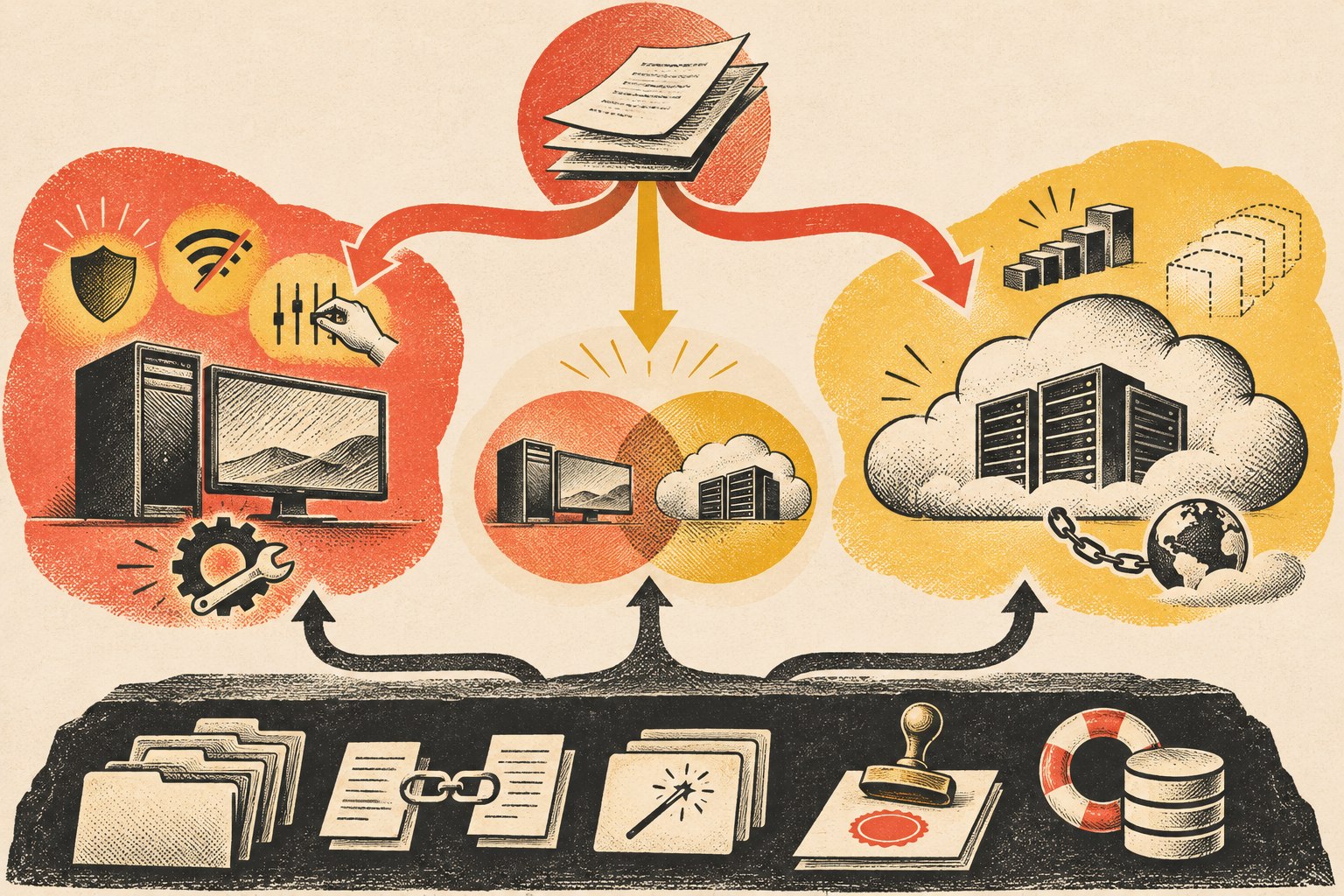
    Workloads route to local, cloud, or hybrid AI while a separate business-owned layer preserves knowledge, prompts, permissions, workflow state, and recovery.
    Compare local AI vs cloud AI across the workload dimensions that actually change the architecture—not on a generic “own versus rent” slogan.
    Decision area Local AI Cloud AI
    Data movement Processing can stay on the device or private environment Authorized context is sent to a remote service
    Model capability Limited by hardware and locally available models Easy access to large and frequently updated hosted models
    Latency No internet round trip; performance depends on local hardware Network latency exists; provider infrastructure can offer substantial compute
    Offline use Possible when the model and required data are local Normally depends on connectivity to the provider
    Scale You provision and operate capacity Provider infrastructure can scale more elastically
    Maintenance You own model/runtime updates, security, monitoring, and hardware Provider handles more infrastructure/model operations
    Cost shape Hardware and operating costs are more fixed Usage or subscription costs are more variable
    Control Greater direct control over inference environment Greater dependency on provider APIs, policies, and availability

    Microsoft’s current local-versus-cloud AI guidance uses essentially these same decision dimensions: privacy and security, available resources, maintenance, latency, scalability, connectivity, model complexity, tooling, customization, and control. The point is not that one column wins. The workload determines which tradeoffs matter.

    When local AI is the better fit

    Local AI becomes attractive when the value of keeping inference close to the data or user is greater than the operating burden you take on.

    • Sensitive local data: the workflow can avoid sending some inputs to a remote inference provider.
    • Offline operation: the job must continue in places with weak or unavailable internet access.
    • Latency-sensitive work: local processing avoids a network round trip.
    • Predictable repetitive workloads: owned hardware may make sense when a stable job runs often enough to justify it.
    • Specialized narrow tasks: a smaller local model may be entirely adequate for classification, extraction, search, or another bounded job.
    • Direct environmental control: the organization has a reason to control model versions, runtime changes, or inference availability itself.

    But “local” is not a security certification. If the local machine is poorly patched, credentials are shared, logs leak sensitive data, backups are unmanaged, or anyone can reach the model endpoint, you have simply moved the risk into infrastructure you now operate.

    When cloud AI is the better fit

    Cloud AI is often the practical default when the business wants access to strong models without becoming an AI infrastructure operator.

    • Complex or changing workloads: the business benefits from access to more capable models and frequent provider improvements.
    • Bursty demand: capacity can expand without buying hardware for the peak.
    • Fast experimentation: teams can try different models and workflows without deploying each one locally.
    • Distributed teams: remote applications and employees can reach the service without depending on one office machine.
    • Lower operating burden: the provider handles much of the model-serving infrastructure, updates, and scaling.

    The tradeoff is dependency. An API can change. A model can be retired. Usage pricing can change. The internet can fail. A provider can have an outage. That does not make cloud AI a bad choice; it means the rest of your architecture should make those dependencies visible and replaceable.

    Hybrid AI is a routing decision, not “buy everything”

    Hybrid architecture is useful when different jobs have different requirements. Microsoft’s Windows AI documentation explicitly describes applications that combine local and cloud AI rather than treating them as mutually exclusive choices.

    A hybrid small-business workflow might use a local model to classify documents, redact or extract sensitive fields, or answer from a bounded private corpus. It could then use a cloud model for a complex reasoning step after the allowed context has been prepared. Or it could use a local model as a degraded fallback when a cloud service is unavailable.

    The architectural rule is simple: route the job to the environment that fits the job. Do not build two complete AI stacks merely because “hybrid” sounds sophisticated.

    What a small business should actually own

    The most important assets are usually not the model weights. They are the business context and operating system built around the model.

    Canonical business knowledge

    Policies, service knowledge, pricing rules, approved documentation, project decisions, expert process, customer-facing guidance, and other institutional memory should have an authoritative home outside one model’s memory.

    Structured records, relationships, and provenance

    Preserve fields, owners, dates, statuses, sources, relationships, and authority. Those are what let another retrieval system or model reconstruct the meaning rather than receiving a pile of flattened text.

    Prompts, instructions, evaluations, and workflow logic

    If a prompt encodes a business rule, version it. If an agent follows an approval workflow, store that logic. If you have test questions or expected outcomes, preserve them so a replacement model can be evaluated against the same job.

    Durable workflow state

    Pending jobs, approvals, retries, execution history, and important results should survive a model or runtime change. Our AI agent hosting guide treats this as a separate runtime concern because where the agent process runs is not the same thing as where inference happens.

    Administrative, export, and recovery control

    Know who can administer the system, how credentials are revoked, how data is exported, how a failed component is recovered, and what must be rebuilt if you change vendors. Ownership is operational, not rhetorical.

    What you do not necessarily need to own

    A small business does not automatically need to own GPUs, train a foundation model, operate a model-serving cluster, or self-host every dependency. Commodity infrastructure can be rented when renting it creates leverage.

    The key is whether the rented component can be replaced without rebuilding the business’s institutional memory. A cloud model is a manageable dependency when your data boundaries are clear, your business knowledge is portable, your workflow is not hard-coded to one provider everywhere, and you know what degraded operation looks like if the provider changes or disappears.

    Use the replacement test

    Before arguing about local AI vs cloud AI, ask a more revealing question:

    If this model or provider stopped fitting next quarter, what would we have to rebuild?

    • Could you point the workflow at another model without re-entering the company’s knowledge?
    • Could you export the records and relationships in usable form?
    • Do prompts, instructions, policies, and evaluation cases exist outside a hidden vendor UI?
    • Would approvals and pending jobs survive the change?
    • Do you know which capabilities truly require the current provider and which are generic?
    • Could the business operate in a degraded mode while migration happens?

    If those answers are strong, you can make pragmatic use of both local and cloud AI without confusing infrastructure ownership with business ownership.

    Local AI vs cloud AI FAQ

    Is it better to run AI locally?

    It is better when the workload benefits enough from local data processing, offline operation, direct control, or low network latency to justify the hardware and operating responsibility. It is not universally better.

    Is local AI more private than cloud AI?

    Local inference can reduce the need to send input to a remote model provider, which can be a meaningful privacy benefit. The entire system still matters: files, logs, backups, integrations, credentials, network access, and endpoint security can expose data regardless of model location.

    Can a business own its AI system while using cloud models?

    Yes. Keep durable business knowledge, records, prompts, workflows, evaluations, permissions, and export/recovery paths under your control, then treat the cloud model as a replaceable service where practical.

    What is hybrid AI?

    Hybrid AI uses local and cloud inference in the same broader system. A workflow might keep a sensitive or low-latency step local and route a more complex reasoning task to a cloud model. Hybrid should be driven by workload differences, not by a need to operate duplicate infrastructure.

    Does local AI eliminate vendor lock-in?

    No. You can still become dependent on a local runtime, model format, management tool, hardware platform, or proprietary application. Portability comes from separating the durable business layer from replaceable implementation components.

    Own the business layer; place inference where it fits

    The local-versus-cloud debate becomes much easier when you stop asking which infrastructure feels more like ownership. Keep the knowledge, rules, relationships, state, controls, and recovery path durable. Then use local AI where locality earns its operating cost, cloud AI where managed capability earns the dependency, and hybrid where the workloads genuinely differ.

    If you are deciding how much of an AI system should live locally, in the cloud, or across both, Scope Design can help map the durable business layer and the replaceable AI architecture around it.
  • Virtual Reality Business Applications: How to Choose, Pilot, and Scale Enterprise VR

    Virtual Reality Business Applications: How to Choose, Pilot, and Scale Enterprise VR

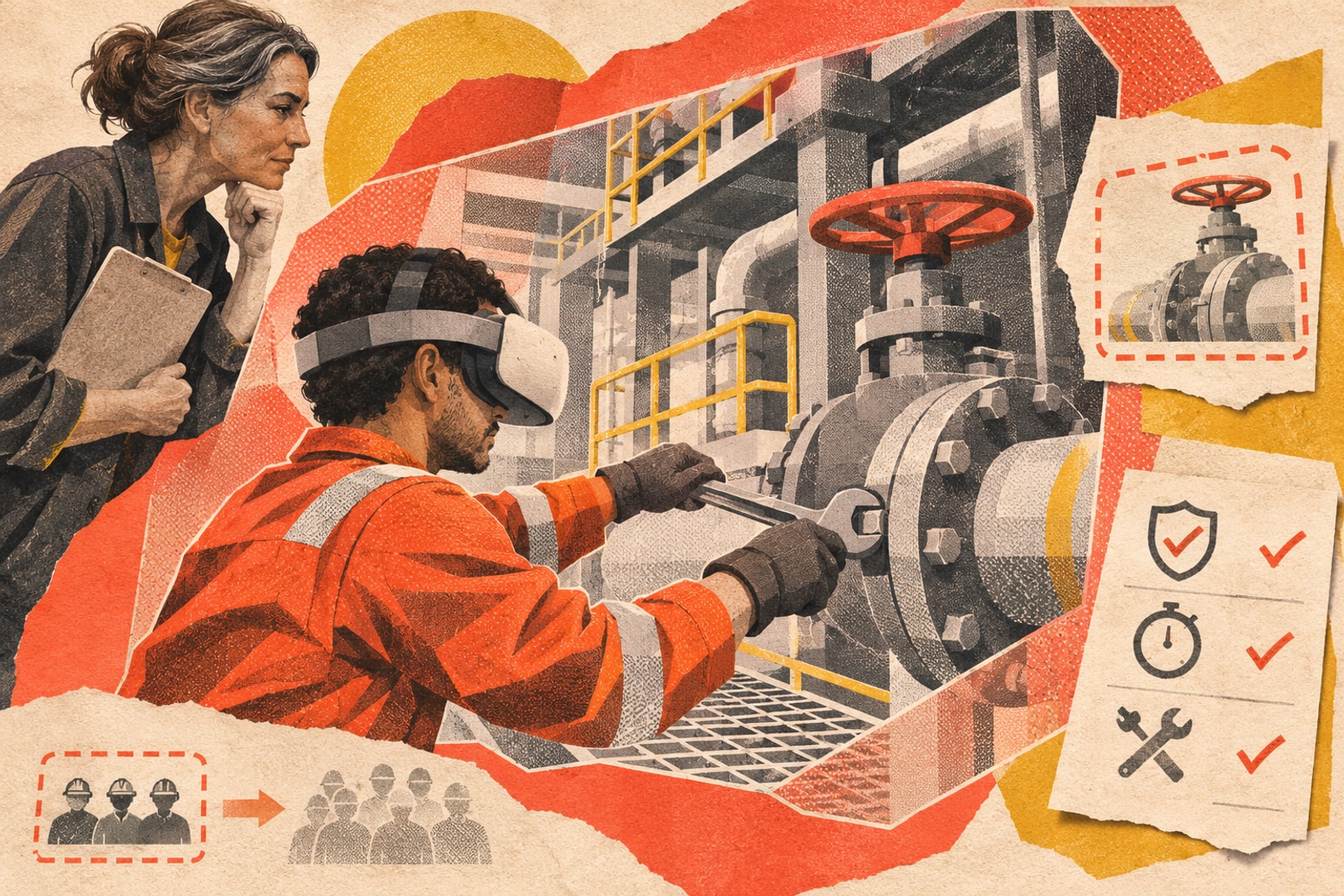
    Virtual reality business applications are worth piloting when immersion changes the task enough to beat a simpler option. The strongest candidates usually involve practicing a risky, rare, expensive, spatial, or difficult-to-reproduce situation; reviewing a three-dimensional design at meaningful scale; or helping people understand a product or environment that is hard to experience otherwise. If a video, browser-based simulator, ordinary 3D viewer, augmented-reality overlay, or hands-on session can achieve the same business outcome with less friction, use the simpler medium.

    That sounds less exciting than “VR will transform every business.” It is also a much better way to spend money. Enterprise VR is not a headset purchase. It is a system involving content, software, identity, devices, support, accessibility, privacy, integrations, measurement, and an owner who still cares about it after the demo.

    This guide shows how to choose a worthwhile use case, test whether VR is actually the right medium, design a controlled pilot, and decide whether to scale, revise, or stop.

    Which virtual reality business applications are worth piloting?

    The best enterprise VR use cases share one trait: being inside the experience changes what a person can learn, inspect, understand, or decide. That makes VR especially useful where space, embodiment, repetition, or consequence matters.

    Use caseWhen VR has a real advantageWhat to compare it against
    Training and simulationPeople need repeated practice in a situation that is dangerous, rare, expensive, disruptive, or hard to stage consistently.Instructor-led practice, video, desktop simulation, supervised hands-on training.
    3D design and reviewScale, spatial relationships, reach, visibility, ergonomics, or collaborative inspection are difficult to judge on a flat screen.CAD on monitors, physical mockups, rendered walkthroughs.
    Guided work and digital-twin reviewWorkers need spatial context around equipment, facilities, or complex procedures.AR/MR overlays, tablets, checklists, remote-assist video. In many live-work settings, mixed reality may fit better than full VR because users still need the physical world.
    Product and customer experiencesThe real product, environment, configuration, or destination is unavailable, too large, too expensive, or not yet built.Interactive 3D on the web, video, samples, configurators, in-person demos.
    CollaborationA team must manipulate or inspect the same 3D object or spatial environment together.Video meetings, shared whiteboards, desktop 3D review.
    Generic meetings and presentationsUsually weak. Wearing a headset adds little when the real job is talking, reading slides, or making a normal decision.Video conferencing and ordinary collaboration tools.

    If you are exploring the broader category rather than a VR-specific implementation, our overview of immersive technologies and spatial computing covers the larger VR/AR/XR landscape. This article stays narrower: whether a specific business task deserves VR and how to prove it.

    First decide whether VR is the right medium

    VR, AR, MR, and XR are related, but they are not interchangeable procurement labels.

    • Virtual reality (VR) places the user primarily inside a computer-generated environment.
    • Augmented reality (AR) adds digital information to a view of the physical world.
    • Mixed reality (MR) blends digital content with the physical environment and can anchor or interact with that environment.
    • Extended reality (XR) is an umbrella term for these immersive technologies.

    The business question is not “Which acronym is newest?” It is “How much of the real world does this task require?” A maintenance technician who must see a real machine may need MR. A trainee practicing an emergency that would be unsafe to reproduce may benefit from VR. A buyer who only needs to rotate a product model may be better served by interactive 3D in a normal browser.

    This is the same discipline we use in broader business strategy: define the decision and constraint first, then choose the tool. Technology that creates more operational burden than business advantage is not innovation. It is overhead with better lighting.

    What does the evidence say about VR training?

    Training is one of the strongest reasons to investigate enterprise VR, but the evidence does not support a universal “VR improves retention by X percent” promise.

    A 2025 systematic review and meta-analysis of 53 mixed-reality vocational-training studies, covering 3,113 participants, found positive average effects compared with control conditions. The pooled standardized effects were positive for behavioral outcomes (d=0.40), cognitive outcomes (d=0.84), and affective outcomes (d=0.65). But the studies also showed substantial to very large heterogeneity, and the prediction intervals made outcomes in future individual studies uncertain. Follow-up findings were more mixed as well.

    That is a useful result precisely because it is not magical. Immersive training can work well, but task design, population, comparison method, implementation quality, and what happens after the headset comes off all matter.

    One well-known enterprise example is PwC’s 2020 U.S. soft-skills study. Employees and new managers took the same inclusive-leadership course in classroom, e-learning, or VR formats. In that specific experiment, VR learners completed the course up to four times faster than classroom learners and reported higher confidence and focus. That is evidence that a particular VR course performed well—not permission to paste “4x faster” onto every safety, onboarding, or technical-training proposal.

    The right question is therefore: can your team demonstrate better learning or job performance for this task, with this content, for these users, at an acceptable total cost?

    Use the Scope Design PILOT framework before buying headsets

    We use a simple five-part test to keep an enterprise VR project tied to a business decision.

    P — Problem

    Define the task before the technology. Who is doing what? Where does the current method fail? What baseline can you measure now? “We want a VR training program” is not a problem statement. “New technicians need six supervised sessions before they can complete procedure X within our quality threshold” is.

    I — Immersion advantage

    Explain why presence, scale, embodied movement, spatial memory, or safe repetition should improve the task. If the proposed benefit is merely “more engaging,” test a cheaper interactive format first. Novelty is not a durable business case.

    L — Logistics

    Map the operational reality: number of users and devices, seated or room-scale use, shared-headset cleaning, charging, network access, accounts, storage, physical supervision, accessibility, remote support, app updates, device loss, and replacement. A pilot that only works while the developer is standing beside it is a demo, not an implementation.

    O — Outcomes & ownership

    Name the business metric, data owner, application owner, device owner, content owner, and support path. Decide what data must flow into an LMS, identity provider, analytics system, CRM, digital twin, or other business application. Scope’s broader view of durable web and application development applies here: integrations, permissions, measurement, maintenance, and ownership are part of the product, not work to think about after launch.

    T — Test smaller than the pitch

    Choose one task, one audience, a controlled device set, and a short list of predefined success criteria. Compare the result with the current method or another realistic alternative. Then make a three-way decision: scale, revise, or stop.

    Scope Design rule: if immersion does not materially improve the task, use the simpler medium.

    Choose the technical architecture after the task

    Hardware matters, but a device comparison is usually too early. Start with the experience and operational requirements, then decide how to deliver it.

    Standalone vs. PC-connected VR

    Standalone headsets can reduce setup friction because computing happens on the device. PC-connected systems can provide more rendering headroom and access to workstation-class applications, but they add computers, cables or streaming infrastructure, graphics requirements, and support complexity. Neither is “enterprise” by itself. The correct choice follows the application’s graphics, latency, mobility, management, and deployment needs.

    Native app vs. WebXR

    A native application can provide deep access to the target platform’s capabilities and predictable packaging for a managed device fleet. A browser-delivered experience can reduce installation friction and connect naturally to web identity, content, and analytics. But MDN still marks the WebXR Device API as limited availability and experimental in 2026. WebXR must be tested against the exact browsers, devices, input methods, and features your users need.

    Where OpenXR fits

    OpenXR 1.1 is a cross-platform XR API standard from Khronos. It can reduce application fragmentation by giving compatible applications and runtimes a common interface. It is not the same thing as WebXR, and it does not make every headset identical. You still need device-specific QA, interaction design, deployment, commercial licensing, and lifecycle planning.

    Device management and identity are part of architecture

    A scalable fleet needs a plan for enrollment, Wi-Fi, accounts, app distribution, kiosk or shared-device behavior where relevant, updates, remote support, resets, asset tracking, and decommissioning. Current Apple Vision Pro enterprise documentation, for example, treats device management, identity, managed apps, deployment, security, and integration as business requirements. The vendor can change; the operational questions do not.

    Budget total lifecycle cost, not the headset price

    There is no responsible universal answer to “How much does enterprise VR cost?” A headset price is visible; most of the ownership cost is not.

    Build the budget from the full lifecycle:

    • Discovery and baseline measurement: workflow mapping, user research, task analysis, success criteria.
    • Content and 3D assets: modeling, environments, instructional design, scripts, audio, interaction, localization.
    • Software and integration: application development, authentication, APIs, LMS/CRM/analytics connections, data storage.
    • Hardware and accessories: headsets, controllers, computers where required, charging, cases, replacement parts.
    • Provisioning and device management: enrollment, policies, app distribution, fleet administration, account strategy.
    • Operations: staff training, support, cleaning, physical space, scheduling, supervision, connectivity.
    • Accessibility and risk work: alternative interactions, user testing, privacy/security review, documentation.
    • Maintenance and refresh: application updates, OS/runtime changes, content changes, hardware replacement, vendor transitions.
    • Measurement and governance: instrumentation, reporting, follow-up testing, ownership and review.

    Then compare that lifecycle cost with the alternative that solves the same problem. A VR program does not win because its headset is affordable. It wins if the measurable value of the improved task justifies the additional system you now have to operate.

    Accessibility, privacy, and physical safety belong in the pilot

    Immersive technology changes how people move, perceive information, interact with controls, and share sensor data. Those differences need acceptance criteria, not a disclaimer added the night before launch.

    The W3C XR Accessibility User Requirements identifies needs such as multimodal presentation, motion-agnostic interaction, alternative input and output, personalization, orientation and navigation support, and the ability to handle time limits or reach a safe state. A good pilot includes people who can expose these interaction barriers and provides a non-immersive alternative where the business process requires one.

    This is also why user experience is broader than interface design. In VR, the experience includes body movement, comfort, physical surroundings, controls, support, device setup, accessibility, and what happens when the user cannot complete the intended path.

    Privacy and cybersecurity require the same early treatment. NIST IR 8557 treats immersive technology as an active cybersecurity and privacy field. Depending on the hardware and application, an immersive system may process head and hand movement, spatial mapping, cameras or passthrough, voice, eye tracking, identity, location or usage telemetry in addition to ordinary application data. Inventory what your specific stack collects, minimize what you do not need, and define access, retention, support, integration, and deletion rules.

    For physical operation, define seated or standing use, clear boundaries, supervision where needed, breaks, cleaning procedures, and a way to exit or pause safely. The point is not to create a giant policy binder. It is to learn during the pilot whether the real workflow can be operated safely and inclusively at the scale you are considering.

    Measure the business outcome before you measure the headset

    “Users liked it” is useful product feedback. It is not a business result. Pick the metric that belongs to the original problem and measure the same thing before the pilot.

    VR use caseUseful pilot metricsWeak substitute metrics
    TrainingTime to proficiency, assessment performance, job-task errors, instructor time, transfer to real work, follow-up retention.Minutes in headset, novelty ratings alone.
    Design reviewReview-cycle time, defects found before production, rework, prototype iterations, decision latency.Number of people who opened the model.
    Guided workTask duration, first-time-right rate, error rate, support calls, escalation rate.Session count without task outcome.
    Customer experienceQualified next actions, configuration completion, sales-cycle movement, conversion where attribution is credible.Time spent in the experience as an automatic proxy for purchase intent.
    3D collaborationDecision time, revision cycles, problems found earlier, actual travel replaced when the comparison is legitimate.Avatar attendance or meeting duration.

    Set the threshold before the team sees the demo. Otherwise the standard quietly becomes “that was cool” and every ambiguous result gets interpreted as evidence to buy more hardware.

    When should you scale, revise, or stop?

    Scale

    Scale when the pilot meets the business threshold, the improvement persists beyond first-use novelty, users can complete the experience inclusively, the support workload is manageable, integrations behave correctly, and named owners have budget for the content and device lifecycle.

    Revise

    Revise when the task outcome improves but operational friction is too high, an interaction excludes part of the target audience, support demand is excessive, the content is unclear, or the technical stack is creating avoidable lock-in. A promising result with a broken delivery model is not yet ready to scale.

    Stop

    Stop when the simpler comparison performs just as well, the improvement does not transfer to the real task, adoption depends on constant hand-holding, accessibility or physical-operation requirements cannot be met reasonably, or lifecycle cost overwhelms the value. Stopping a weak pilot is evidence that the pilot worked. It prevented a larger mistake.

    Frequently asked questions about enterprise VR

    What are the best virtual reality applications for business?

    The best candidates are usually training and simulation, spatial design/review, selected guided-work or digital-twin workflows, and product experiences where presence or scale provides information a normal screen cannot. Generic meetings and presentation viewing are usually weaker candidates.

    Does VR training work better than classroom or e-learning?

    It can, but not automatically. Current research shows positive average training effects with substantial variation between studies. Treat VR as a delivery method whose effectiveness depends on the task, instructional design, users, implementation, and follow-through. Compare it with the method you would actually use otherwise.

    Should an enterprise VR app use WebXR or a native application?

    Use the target device fleet, interaction requirements, graphics/performance needs, deployment model, integration needs, and browser support to decide. WebXR can lower installation friction but still has uneven support; native apps can offer deeper platform access but add packaging and deployment responsibilities. OpenXR may reduce runtime fragmentation for compatible native XR stacks.

    How much does an enterprise VR implementation cost?

    There is no useful universal price. Calculate lifecycle cost: discovery, content, software, integration, hardware, device management, support, accessibility/risk work, updates, replacement, and measurement. A low headset price can still sit inside an expensive program; a higher-cost system can still be justified if it produces enough measurable task value.

    When should a business use AR or mixed reality instead of VR?

    Use AR or MR when the user needs digital guidance while remaining aware of and interacting with the real environment. Use VR when replacing or simulating the environment itself is the advantage. If neither form of immersion changes the task meaningfully, use a normal screen.

    Build the smallest VR pilot that can answer the business question

    The enterprise VR market will keep changing. Headsets, runtimes, browsers, management products, and vendor roadmaps will move faster than a long-lived implementation guide can sensibly rank them. Your decision framework should survive those changes.

    Start with one measurable problem. Prove that immersion has an advantage. Plan the operational burden. Define the owner and outcome. Run the smallest test that can tell you whether to scale, revise, or stop.

    If the immersive experience must connect to a website, custom application, identity system, analytics stack, content workflow, or other digital infrastructure, Scope Design can help you frame the requirements and build or integrate the digital pieces around the experience. We are not going to tell you to buy a fleet of headsets just because the demo looked impressive. The first job is proving that VR is the right tool.

    Sources and further reading