Tag: business continuity

  • Business Resilience Framework: Crisis Management Strategies That Future-Proof Your Company

    Business Resilience Framework: Crisis Management Strategies That Future-Proof Your Company

    Business resilience is the practiced ability to keep your most important business outcomes moving when a supplier, system, person, location, or assumption fails. A useful business resilience framework therefore does five things: it ranks what must keep working, exposes dependencies, assigns triggers and decision rights, establishes fallback paths, and tests whether those fallbacks actually work.

    That is a broader job than keeping a disaster-recovery document on a shared drive. Backups matter. Insurance matters. Cash matters. Vendor relationships matter. But none of those is resilience by itself. A folder full of plans nobody has exercised is paperwork with excellent posture.

    TL;DR: Build resilience around outcomes, not around scary scenarios

    • Start with the outcome. Identify the handful of customer, operational, financial, and safety outcomes the business cannot afford to lose.
    • Map the dependency chain. People, vendors, systems, data, locations, credentials, utilities, and approvals can all become single points of failure.
    • Decide before the crisis. Define the trigger that activates a fallback, the person allowed to make the call, and the backup owner if that person is unavailable.
    • Design a minimum viable operation. Your fallback does not need to recreate normal operations immediately. It needs to protect the critical outcome safely enough to buy recovery time.
    • Exercise the plan. A recovery procedure that has never been tested is a hypothesis.
    • Keep continuity, crisis management, and recovery connected. They are related jobs, not interchangeable labels.

    If you already use a broader business strategy framework, resilience belongs inside it. Disruption changes the assumptions behind a strategy; it should not force the company to invent an operating model from scratch while everyone is tired and the phones are ringing.

    What is a business resilience framework?

    A business resilience framework is a repeatable system for anticipating disruption, protecting critical outcomes, responding when normal operations fail, recovering within acceptable limits, and improving the system afterward. It connects strategy, business continuity, incident response, people, technology, vendors, finance, and communication around one practical question: what must still be true for this business to function?

    The U.S. Small Business Administration’s current Business Resilience Guide takes a similar operational starting point. It asks businesses to document essential operations and dependencies, understand key partners, protect vital resources, prepare financially, and reduce known risks. That is useful because it starts with how the business actually works instead of starting with a giant list of disasters.

    Resilience also is not the same thing as refusing to change. A business that preserves yesterday’s operating model at all costs is not resilient; it is stubborn with a backup battery. Sometimes the resilient move is to switch suppliers, change a process, narrow an offer, or redesign how work is delivered. Our guide to business adaptation owns that longer-term adjustment problem.

    Business resilience vs. business continuity vs. crisis management

    These terms overlap enough that vendors often blur them together. Separating the jobs makes planning easier.

    DisciplinePrimary questionTypical outputWhen it matters most
    Business resilienceCan the business preserve critical outcomes and adapt when assumptions fail?Priorities, dependencies, governance, fallbacks, exercises, learning loopBefore, during, and after disruption
    Business continuityHow will essential operations continue or recover within acceptable limits?Business impact analysis, recovery strategies, RTO/RPO targets, proceduresBefore and during operational interruption
    Crisis managementWho decides and coordinates when the event has high stakes, uncertainty, or expanding harm?Activation thresholds, command roles, decision log, escalation pathsDuring an acute event
    Disaster recoveryHow do we restore technology, data, facilities, or another damaged capability?Technical recovery runbooks, backups, alternate infrastructure, restoration testsDuring and after a specific failure
    Crisis communicationWhat do affected people need to know, do, and expect next?Stakeholder map, message approvals, update channels, spokesperson planDuring and after a visible incident

    A continuity plan can be excellent and the company can still be fragile if nobody can activate it, a critical vendor has no substitute, or the one employee who knows the recovery credentials is on a plane. Conversely, a sharp crisis team cannot improvise its way around missing backups or a supplier monopoly. Resilience is the connective tissue.

    Use the Scope Design RESET Resilience Framework

    We use RESET as a practical operating loop for small and midsize businesses: Rank, Expose, Set, Establish, Test. The acronym is ours; the underlying disciplines are not. They come from established continuity, emergency-preparedness, risk-management, and incident-response practice. The value is putting those disciplines into an order a working business can actually use.

    RESET starts with a critical business outcome at the center. Tools, vendors, people, data, and procedures sit around that outcome as dependencies. That distinction matters. Buying another tool may reduce a dependency risk, but the tool is not the resilience strategy.

    R — Rank what must keep working

    Do not begin by writing a plan for every meteor, outage, ransomware crew, ice storm, employee departure, recession, or vendor meltdown you can imagine. Begin by ranking the outcomes whose loss would hurt customers, safety, cash flow, compliance, or the company’s ability to recover.

    For a local service company, critical outcomes might include answering urgent customer requests, accessing the schedule, dispatching crews safely, taking payment, and communicating service changes. For an ecommerce company, the list could be order acceptance, payment processing, inventory truth, fulfillment instructions, customer support, and refund authority.

    The point is not to declare everything “critical.” If every process is Priority One, you have not prioritized anything. Rank the work by business impact and by how long the company can tolerate interruption.

    This is where a business impact analysis becomes useful. The Ready.gov business continuity plan template explicitly connects continuity planning to business-impact-analysis results and recovery objectives. You do not need enterprise bureaucracy to ask the core question: what breaks if this outcome is unavailable for an hour, a day, three days, or a week?

    E — Expose dependencies and single points of failure

    Once an outcome is ranked, map what it depends on. Most resilience failures hide in the handoffs between things the business assumed would always be there.

    • People: Who has the skill, authority, password, relationship, or institutional knowledge required?
    • Vendors: Which supplier, payment processor, hosting company, logistics provider, telecom carrier, or SaaS platform can stop the outcome?
    • Systems and data: Which application, device, database, backup, integration, or authentication method is required?
    • Facilities and utilities: Does the work depend on a building, vehicle, power, internet, water, refrigeration, or specialized equipment?
    • Money and authority: Who can release emergency funds, approve a substitute vendor, refund a customer, or change a delivery promise?
    • Communication: How will employees, customers, vendors, and partners receive an update if the normal channel is unavailable?

    A dependency map should expose concentration. One backup stored in the same account as the production system is not much of a fallback. Two vendors that rely on the same upstream provider may look diversified on a spreadsheet while sharing the same failure mode. Three trained employees who all need one manager’s approval can still create a single point of failure.

    This is why resilience work often feels less glamorous than “digital transformation.” It is deliberately nosy about boring details. Boring details are where businesses discover that the emergency phone tree contains a former employee and the backup login requires a phone sitting in the building that is currently unavailable.

    S — Set triggers, owners, and decision rights

    A fallback is useless if everyone waits for someone else to activate it. For each critical outcome, define three things: the trigger, the decision owner, and the backup owner.

    A trigger is a condition that changes the operating mode. Examples: the scheduling system has been unavailable for 30 minutes during business hours; the primary supplier confirms it cannot fill an order by the required date; a security incident affects administrative access; a facility becomes unavailable; cash on hand crosses a pre-agreed threshold.

    The owner is the person who can activate the response without convening a six-person committee. The owner should know what authority comes with the role: switch vendors, move work, pause campaigns, notify customers, contact counsel or an insurer, isolate a system, or spend up to an approved amount.

    The backup owner matters because crises are rude enough to happen while the primary owner is sick, traveling, or personally affected by the same event.

    This governance step is consistent with current cybersecurity practice too. NIST Cybersecurity Framework 2.0 added explicit emphasis on governance and organizes cyber-risk outcomes around Govern, Identify, Protect, Detect, Respond, and Recover. Cybersecurity is only one part of business resilience, but the lesson carries: response authority should be designed before the incident.

    E — Establish fallback paths and minimum viable operations

    The goal of a fallback is not to make the disruption invisible. It is to keep the critical outcome inside an acceptable boundary while the normal system is restored or replaced.

    For each critical outcome, document a primary path and at least one realistic fallback. A fallback may be manual, slower, more expensive, limited to priority customers, or dependent on a temporary process. That is fine if everyone understands the tradeoff. Resilience is not pretending nothing happened. It is controlling the damage while preserving the business outcome that matters.

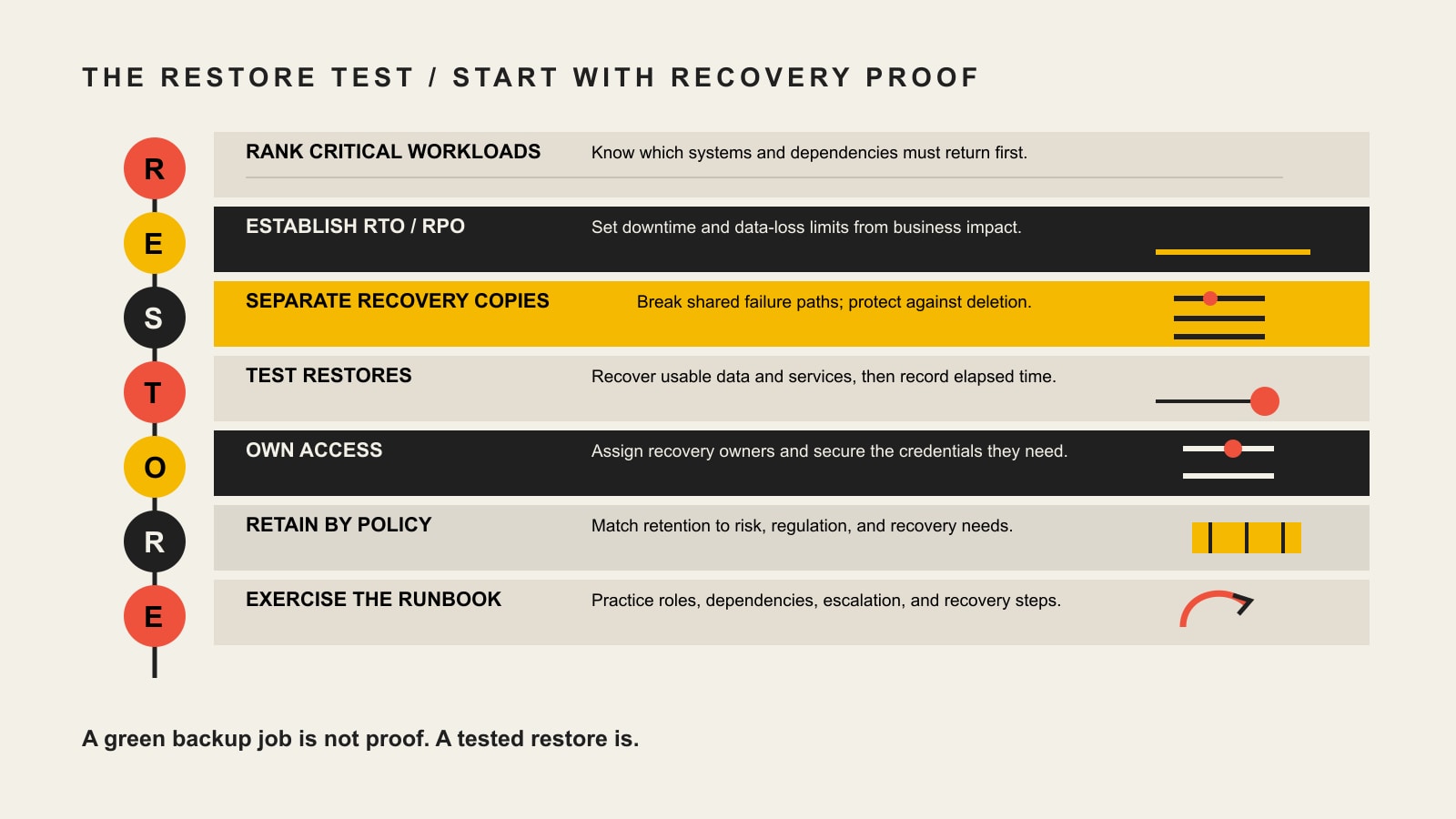
    Define recovery targets in business language. Ready.gov’s continuity template uses recovery time objectives (RTOs) for how quickly processes and systems need to be restored and recovery point objectives (RPOs) for how much data loss is acceptable when restoring from backup. Those terms sound technical, but the underlying questions are plain: How long can this be down? How much recent data can we afford to lose?

    A minimum viable operation should also state what the business will temporarily stop doing. If the fallback requires the same people, budget, and attention as normal operations, it is not a fallback. It is a second full business hiding in the closet.

    T — Test, learn, and revise

    A plan becomes evidence only after someone tries to execute it. Ready.gov treats training, testing, and exercises as essential parts of preparedness, and CISA guidance for business leaders recommends identifying systems that support critical functions and participating in tabletop tests of response plans.

    Start small. Pick one critical outcome, invent a plausible disruption, and walk the team through it. Remove one dependency at a time: the vendor is unreachable; the SaaS platform is down; the office cannot be entered; the owner is unavailable; the backup restore fails; the customer list cannot be accessed.

    During the exercise, capture facts rather than grades. How long did activation take? Which contact was stale? Which decision had no owner? Which fallback depended on the failed system? Which instruction made sense on paper but not under time pressure? Then update the plan and test again.

    A recovery procedure that has never been exercised is not a capability. It is a hypothesis with formatting.

    A worked small-business resilience map

    Here is a deliberately simple example for a 12-person service company. The company’s normal scheduling platform is cloud-based and connects customer requests, staff calendars, job details, and automated reminders.

    RESET fieldExample decision
    Critical outcomeCustomers with scheduled work can be served or proactively rescheduled.
    DependenciesScheduling SaaS, internet access, customer contact data, staff availability, dispatch phone, account credentials.
    TriggerScheduling platform unavailable for 30 minutes during service hours, or vendor confirms a longer incident.
    Primary ownerOperations manager. Backup: office manager.
    FallbackRead-only daily schedule exported each morning; shared emergency contact list; phone/SMS dispatch; new non-urgent bookings paused.
    Recovery targetPriority jobs continue the same day; customers affected by delay receive a verified update; changes are reconciled back into the system after restoration.
    TestQuarterly tabletop plus one live test of the export/contact process without disrupting customers.

    Notice what the example does not require: predicting why the scheduling system failed. The same fallback can help with a vendor outage, local internet failure, accidental account lockout, or a security incident that forces temporary isolation. Scenario planning is useful, but outcome-centered planning avoids writing five nearly identical binders for five causes of the same operational failure.

    Technology can support resilience, but it can also create new dependencies

    Cloud platforms, automation, AI, redundant internet, off-site backups, multi-factor authentication, failover hosting, monitoring, and collaboration tools can all reduce specific risks. They can also create new failure modes, credentials, integrations, vendors, and skills requirements.

    That is why “move it to the cloud” is not a resilience strategy. The useful question is what business outcome the technology protects, which dependency it removes, which new dependency it introduces, and how the business operates if the technology itself becomes unavailable.

    For cyber incidents, use a security-specific response model inside the broader resilience system. Current NIST SP 800-61 Rev. 3 integrates incident response across cybersecurity risk management instead of treating response as something that begins after an attack is discovered. If the disruption is a suspected website compromise, our website hacked response guide covers containment, evidence preservation, cleanup, recovery, and when the problem may need broader escalation.

    The business-resilience layer sits above that technical runbook. It asks what customer or operating outcome the compromised system supported, who can switch to a safe fallback, and how the rest of the business continues while specialists investigate.

    What should you measure in a resilience program?

    Do not turn resilience into a dashboard with 47 green circles. Measure the parts that tell you whether the business can actually respond. Useful measures include:

    • Critical-outcome coverage: how many truly critical outcomes have an owner, dependency map, trigger, fallback, and recovery target.
    • Activation time: how long the team takes to recognize a trigger, assign the incident owner, and move into the fallback mode.
    • Recovery performance: actual restoration time and actual data loss compared with the recovery targets that mattered.
    • Fallback success rate: whether the alternate process worked during exercises or real incidents, including partial failures.
    • Dependency concentration: critical outcomes still relying on one person, vendor, system, location, credential, or upstream provider.
    • Communication readiness: whether current stakeholder lists, channel access, approval roles, and update paths worked when tested.
    • Corrective-action closure: whether lessons from exercises and incidents became assigned fixes instead of becoming meeting notes.

    The numbers should drive a decision. If a metric can become red for six months and nobody owns a response, it is dashboard confetti.

    Build a practical resilience framework in 30 days

    A small business does not need to finish enterprise risk management before it can become less fragile. Use one month to build the first working loop.

    Week 1: Rank the outcomes

    • List the customer, operational, safety, financial, and compliance outcomes the company depends on.
    • Choose the few whose interruption creates the highest business impact or shortest tolerance window.
    • Write a plain-language consequence for one hour, one day, and several days of interruption.

    Week 2: Expose the dependencies

    • Map people, systems, vendors, data, facilities, utilities, money, authority, and communication channels for each priority outcome.
    • Mark single points of failure and hidden shared dependencies.
    • Verify that contact information, credentials, backups, contracts, and access methods are current.

    Week 3: Set owners and establish fallbacks

    • Define an activation trigger for each priority outcome.
    • Name one primary owner and one backup owner.
    • Document the minimum viable operation, the fallback resources it needs, and what normal work will be paused.
    • Set recovery-time and data-loss targets where they are meaningful.

    Week 4: Test one ugly scenario

    • Run a tabletop that removes a critical dependency and makes the primary owner unavailable.
    • Time activation and ask the team to follow the real contacts, documents, credentials, and procedures.
    • Capture failures without blaming the people who found them.
    • Assign corrective actions, deadlines, and owners, then schedule the next exercise.

    After the first month, expand one critical outcome at a time. The system should grow because the business learns, not because somebody discovered a 96-page template and felt guilty.

    When a disruption is already underway

    If the incident is active, planning and response overlap. Protect people and contain immediate harm first. Then activate the accountable owner, establish a fact-and-decision log, move critical operations to the safest available fallback, and create a predictable update rhythm.

    If customers, employees, regulators, partners, or the public need information, move the messaging work into a real crisis communication process. That guide covers activation thresholds, response owners, stakeholder maps, holding statements, spokesperson decisions, first-hour/day/week actions, and post-crisis review.

    If the event exposes a deeper structural problem—cash, staffing, offer economics, delivery model, or a dependency the company cannot reasonably mitigate—the next job may be crisis recovery and restructuring. Resilience planning should make that decision clearer; it should not trap the business into preserving a model that no longer works.

    Business resilience framework FAQ

    What are the main components of a business resilience framework?

    A practical framework needs critical-outcome priorities, dependency mapping, risk and impact assessment, activation triggers, clear owners and decision rights, continuity and recovery strategies, communication paths, exercises, and a learning loop. The exact labels vary by framework. What matters is whether those components work together around real business outcomes.

    What is the difference between business resilience and a business continuity plan?

    Business continuity focuses on how essential operations continue or recover during disruption. Business resilience is broader: it includes continuity but also strategy, governance, dependencies, financial and people considerations, crisis response, adaptation, and learning after disruption. A continuity plan is one important mechanism inside a resilience capability.

    What is the difference between business continuity and disaster recovery?

    Business continuity protects the continuation or timely recovery of essential business processes. Disaster recovery usually focuses more narrowly on restoring a damaged capability such as IT systems, data, infrastructure, or facilities. A company can restore a server perfectly and still fail to continue the customer outcome that server supported.

    Who should own business resilience in a small business?

    Executive leadership should own the business-level priorities and authority, but individual critical outcomes need named operational owners and backups. The owner should be close enough to the work to understand the dependencies and senior enough—or explicitly authorized enough—to activate the fallback without waiting for a committee.

    How often should a business resilience or continuity plan be tested?

    There is no useful universal cadence for every organization and every risk. Test often enough that contacts, access, assumptions, and procedures stay current, and retest when the business materially changes. A small business can rotate through focused tabletop exercises during the year instead of attempting one giant annual simulation. Higher-risk or rapidly changing dependencies deserve more frequent attention.

    What are signs of weak business resilience?

    Warning signs include critical knowledge living with one person, backups that have never been restored, no alternate supplier, unclear emergency spending authority, customer data accessible through only one system, stale contact lists, plans with no activation threshold, and exercises that repeatedly create corrective actions nobody closes.

    Does a small business need business continuity software?

    Not necessarily. Software can help maintain dependency maps, plans, contacts, evidence, tasks, and exercise records. But a spreadsheet, shared documentation system, calendar, and disciplined ownership can be enough for a small operation. Buy software when it reduces a real coordination or evidence problem, not because the word “resilience” appears on the pricing page.

    Can AI improve business resilience?

    AI can help summarize signals, simulate scenarios, draft exercise injects, analyze incident notes, or automate specific workflows. It should not be treated as an autonomous crisis commander. The business still needs verified data, human authority, security controls, tested fallbacks, and a clear way to operate when an AI service or integration is unavailable.

    What should a business do first if it has no resilience plan?

    Pick one outcome the business truly cannot afford to lose, map every dependency required to deliver it, and run one tabletop where the most obvious dependency fails. That exercise will usually reveal the next three things worth fixing faster than a generic risk register will.

    Make resilience an operating habit, not a binder

    The strongest resilience work is boring in the right places. Contacts are current. Backups restore. Owners know their authority. Vendors have alternatives where the economics justify them. Customers can be reached. Recovery targets mean something. Exercises expose weak assumptions before a real event does.

    Start with one critical outcome and run the RESET loop: Rank it. Expose the dependencies. Set the trigger and owner. Establish the fallback. Test it. Then fix what the test teaches you and move to the next outcome.

    If your current “plan” is scattered across vendor dashboards, old documents, one employee’s memory, and a vague belief that somebody will figure it out, contact Scope Design. We can help turn the digital, operational, and decision dependencies around your website and marketing systems into a resilience plan your team can actually use.

  • Website Maintenance for Business Continuity: Build a Recovery-Ready Site

    Website Maintenance for Business Continuity: Build a Recovery-Ready Site

    Website maintenance for business continuity means operating your website so a routine update, expired certificate, broken integration, compromised account, or hosting problem does not turn into a mystery outage. The goal is not to keep a dashboard perfectly green. The goal is to know what must keep working, detect when it stops, recover to a known-good state, and know exactly who owns the response.

    If you only need the recurring task calendar, use our website maintenance guide. This article owns a narrower question: how should maintenance protect the continuity of the business job your website performs?

    TL;DR: maintenance should reduce the failure window

    • Define the website journeys that actually matter: lead forms, checkout, bookings, logins, downloads, customer portals, email delivery, and integrations.
    • Capture a known-good baseline before consequential changes so you have something real to compare against.
    • Make changes in bounded steps, test the same critical journeys afterward, and roll back the smallest failed component when practical.
    • Treat backups as recovery inputs, not proof that recovery will work. A WordPress restore normally needs both the database and site files.
    • Set recovery expectations based on business impact instead of borrowing somebody else’s arbitrary “daily” or “four-hour” rule.
    • Automate observation and routine work, but keep a named person accountable for exceptions, restoration, escalation, and decisions.

    Website maintenance for business continuity protects the business handoff

    A website is not healthy because the homepage loads. A service business can have a beautiful homepage while its quote form silently drops submissions. An ecommerce site can be “up” while checkout fails after a payment extension update. A membership site can return HTTP 200 while login is broken. An appointment site can look normal while confirmation email never leaves the server.

    That is why maintenance has to protect the handoff between the website and the business. Our business website development guide makes the same point from the build side: the technical foundation should prove the business journey works, can be changed safely, and can be recovered. Maintenance is the operating discipline that keeps proving it after launch.

    The distinction also keeps this article from becoming another giant checklist. Checklists are useful, but they can create a dangerous illusion: every box is checked, therefore the business is protected. That logic falls apart the moment an automated update succeeds technically and breaks the thing customers came to do.

    Use the Scope Design CONTROL Loop

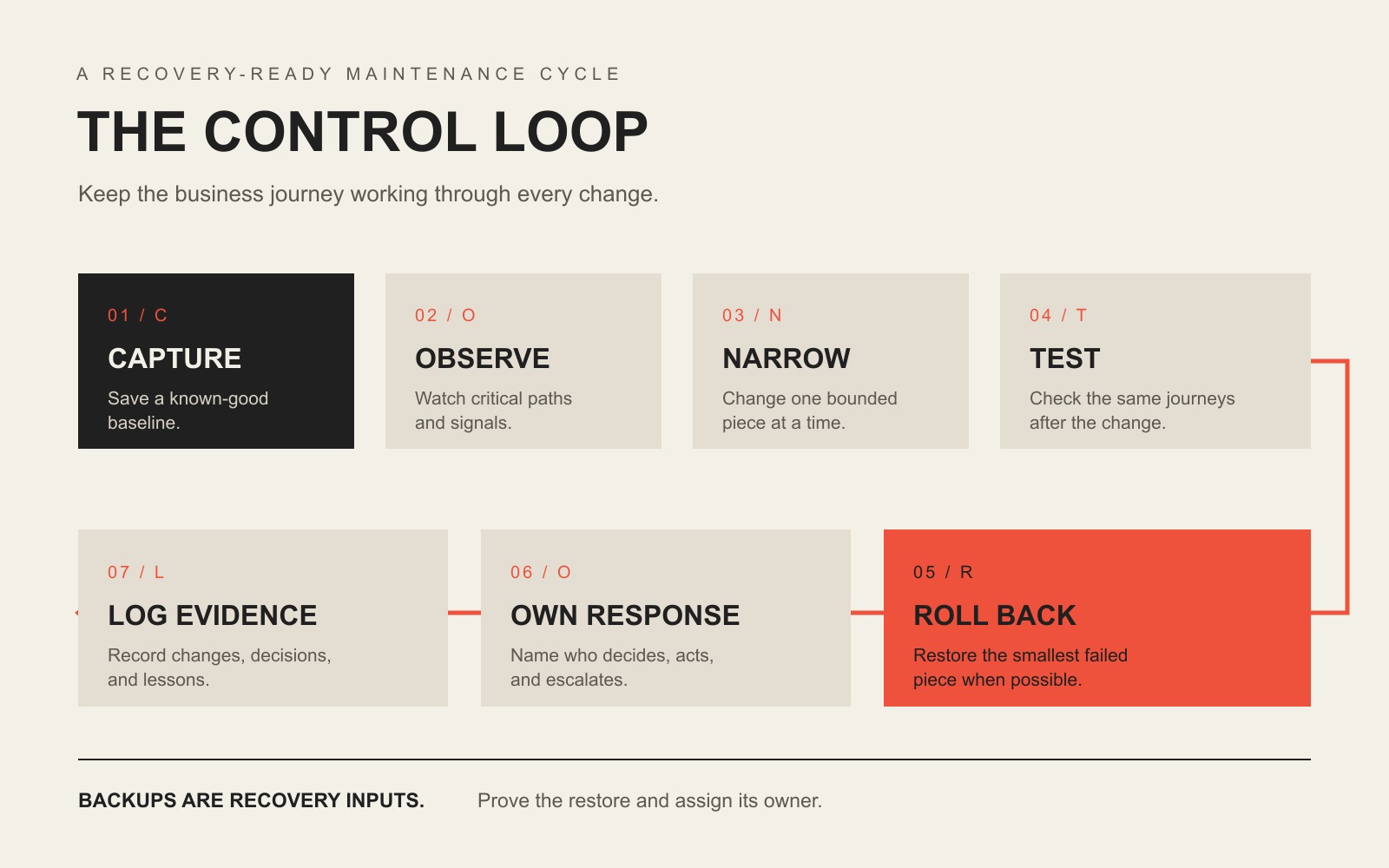
    Our maintenance approach comes from a simple first-party operating lesson: make a smaller change, compare it with a known-good state, verify the result, reverse the smallest failed change when necessary, and preserve the evidence. We call the buyer-facing version the CONTROL Loop.

    The CONTROL Loop: Capture a baseline, Observe critical paths, Narrow each change, Test the same journeys, Roll back precisely, Own the response, and Log evidence.

    C — Capture the baseline

    Before a meaningful change, record the state you expect to preserve. That can include representative screenshots, software versions, key page behavior, a current backup, form delivery, checkout, login, analytics events, response time, and known open issues. A baseline turns “it seems different” into something diagnosable.

    O — Observe critical paths

    Decide which user journeys deserve active observation. A five-page brochure site may have one critical path: inquiry form to delivered email or CRM record. A WooCommerce site may need product, cart, checkout, payment, confirmation email, inventory, tax, shipping, and account flows. Monitoring the server while ignoring those handoffs is like watching the electrical panel while the cash register is on fire.

    N — Narrow the change

    Reduce the blast radius. Update one component or one understood dependency group when practical. Separate content edits from infrastructure changes. Avoid stacking ten unrelated changes into one maintenance window and then asking which one broke the site. Our detailed WordPress plugin update guide owns the step-by-step update process.

    T — Test after change

    Re-run the same paths you baselined. Do not stop at “the plugin updated successfully.” Complete the form. Submit the order. Log in. Check the downstream CRM or email. Verify the browser state and the business state. Our practical website test goes deeper on proving the result beyond the browser.

    R — Roll back precisely

    If a bounded change fails, reverse the smallest responsible change when you can do so safely. Restoring yesterday’s entire site because one plugin broke can erase legitimate orders, form submissions, user changes, or content created since the backup. Full restore is sometimes correct. It should not be the only recovery idea in the building.

    O — Own the response

    Name the person who investigates, the person who can authorize a restore or rollback, and the person who communicates when the issue affects customers or staff. If the only answer is “the hosting company probably handles that,” you do not have ownership. You have a future support ticket.

    L — Log the evidence

    Record what changed, what passed, what failed, what was rolled back, what remains on hold, and what follow-up decision is required. Good maintenance evidence is not a 40-page automated report full of green icons. It is a short record that tells the next qualified person what happened and what state the site is in now.

    Start with the journeys that would hurt if they failed

    Business continuity begins with consequences. A website that publishes a restaurant menu has a different failure profile from a site that collects legal intake, sells event tickets, handles donations, or accepts hundreds of ecommerce orders per day. The technology matters, but the business job tells you where to look first.

    Website jobCritical journeyEvidence it still worksLikely response owner
    Lead generationForm → email/CRM → staff handoffTest submission appears in the real destinationWebsite owner + sales/ops owner
    EcommerceProduct → cart → checkout → payment → confirmationTest order, payment state, email, inventory/tax/shipping resultWebsite owner + store operations
    BookingAvailability → booking → payment/confirmationAppointment exists in the system of record and customer receives confirmationWebsite owner + scheduling staff
    Member or client portalLogin → authorization → protected taskTest account can complete expected task without excess accessWebsite owner + application owner
    Content/authority siteDiscovery → page load → CTA/subscriptionRepresentative pages render, forms work, tracking fires, no critical errorsWebsite owner + marketing

    Do not test only the homepage. Test the journeys where failure creates lost revenue, lost data, missed communication, customer frustration, or reputational damage. This is also where performance monitoring becomes useful: speed is a condition to diagnose in context, not a vanity score to worship.

    A backup is not the same thing as recovery

    Backups matter. They are not magic. WordPress’s own backup documentation explains that a typical WordPress site needs both the database and site files for a complete restore. If your backup contains only one side, you may have a partial recovery point rather than a recoverable website.

    A continuity-ready backup process should answer five questions without hand-waving:

    1. What is included? Files, database, uploads, configuration, and any external data or credentials required to restore service.
    2. Where is it stored? Preferably somewhere a production failure cannot destroy at the same time.
    3. How long is it retained? Enough history to recover from problems that were not noticed immediately.
    4. Who can restore it? With access that still works when the normal production account is unavailable.
    5. Has restoration been tested? Not “the job says successful.” A real, controlled restore test.

    For the deeper infrastructure distinction between storage, sync, backup, and disaster recovery, use our business continuity and backup guide. The key point here is simpler: a backup is an ingredient. Recovery is the ability to resume the website’s business job.

    Use RTO and RPO to stop arguing about arbitrary schedules

    Two disaster-recovery terms are useful even for a small website when you translate them out of enterprise-speak. Google Cloud’s disaster recovery planning guide uses both objectives when planning recovery:

    • Recovery Time Objective (RTO): how long the system or process can be unavailable before the interruption creates unacceptable business impact.
    • Recovery Point Objective (RPO): how far back in time you can afford to restore data after an outage.

    Those two questions should influence your maintenance design. If losing a day of orders is unacceptable, a once-daily backup may not match the business. If a brochure site can be offline for several hours with little consequence, engineering a five-minute recovery target may be expensive theater. The correct answer comes from business impact, not from copying another company’s maintenance plan.

    Disaster recovery is only one part of the larger continuity problem. Google Cloud describes disaster recovery as restoring IT infrastructure and data after disruption to support continuity, while our business resilience framework separates business continuity from the narrower technical job of restoring a damaged capability.

    Detection is part of recovery because time starts before the alert

    A failure you discover in five minutes and a failure you discover in five days may require completely different recovery choices. That is why monitoring belongs in a continuity-oriented maintenance plan.

    Useful monitoring can include:

    • uptime and HTTP response checks;
    • SSL/TLS certificate expiration and domain/DNS condition;
    • application errors and server logs;
    • security or vulnerability alerts;
    • visual-regression signals after changes;
    • form, email, payment, or integration health;
    • performance regressions on representative journeys.

    CISA’s small and medium business resources group practical controls such as software updates, backups, logging, encryption, and multifactor authentication. Those controls are not identical to website maintenance, but the operating lesson is the same: secure operation requires both prevention and evidence that something changed.

    Safe maintenance treats every consequential change like a small deployment

    WordPress itself recommends keeping plugins current and warns that you should have a current backup before updating because problems can happen. See WordPress’s plugin management guidance. WordPress also recommends regular backups when using automatic updates; see its plugin and theme auto-update documentation.

    The practical business version is not “never automate.” It is automate according to consequence.

    Change typeReasonable approachWhat still needs proof
    Low-risk, isolated updateAutomatic or scheduled update may be reasonableBackup, monitoring, alerting, rollback path
    Business-critical plugin or integrationScheduled, controlled update; staging when the risk justifies itCritical journey tests and downstream confirmation
    Theme/template changeBaseline representative layouts and devices firstVisual/function regression check
    Payment, account, or data-model changeExplicit test plan and recovery pathData integrity, permissions, transactions, notifications
    Infrastructure/DNS/hosting changeCoordinate ownership and rollback across providersDNS, TLS, server, application, email/integration behavior

    The goal is not ceremony. It is diagnosability. If the site changes and something goes wrong, you should be able to answer what changed, whether the business journey failed, and how to get back to a known-good state.

    Know when to roll back one thing and when to restore the site

    Precise rollback is useful when you have a clear causal change: one plugin version, one deployment, one theme edit, one configuration adjustment. A full restore makes more sense when the failure is broader, the current state is untrustworthy, data has been corrupted, or a compromise requires a clean recovery path.

    If you suspect an actual compromise rather than a normal regression, stop treating it like routine maintenance. Our hacked website recovery guide covers triage, containment, evidence, cleanup, restoration, and the point where forensic or legal specialists may be necessary.

    The continuity question is not “Which recovery method sounds more sophisticated?” It is “Which recovery method restores the required business state with the least additional damage?” Sometimes that is a targeted rollback. Sometimes it is a complete restore. Sometimes it is a provider failover or DNS change. The recovery mechanism should fit the failure.

    Hosting is not automatically the maintenance owner

    Hosting supplies infrastructure. It may also include server backups, malware scanning, WordPress updates, CDN features, or support, depending on the plan. But infrastructure coverage does not automatically own your business-specific application journey.

    For example, a host may confirm the server is online while a form integration is failing. It may restore a snapshot without knowing whether that restore overwrites orders placed after the snapshot. It may update WordPress without testing a custom booking workflow. That does not make the host bad. It means the responsibility boundary has to be explicit.

    Use our small business web hosting guide to compare infrastructure ownership. Then make sure the maintenance plan owns whatever remains: application updates, critical-journey testing, recovery decisions, monitoring, integrations, and escalation.

    Use a continuity proof scorecard instead of counting checkmarks

    A useful maintenance report should help a business answer condition, exception, action, and decision. This scorecard is intentionally evidence-based.

    ControlQuestionUseful evidenceRed flag
    BaselineDo we know the current working state?Versions, screenshots, journey checks, known issues“It looked fine last month.”
    BackupCan we recover the required site and data?Coverage, location, retention, failed-job alert, restore recordOnly “backup successful” emails
    ChangeCan we identify what changed?Update/deployment log and risk noteTwenty updates applied at once with no record
    VerificationDid the business journey still work?Form/order/login/booking result in the real destinationOnly homepage screenshots
    DetectionHow quickly will we know something failed?Monitoring interval, alert path, logsCustomer complaint is the monitoring plan
    RecoveryCan we restore the right state without causing new loss?Rollback/restore method and verified result“We can probably reinstall it.”
    OwnershipWho acts when an exception appears?Named owner, support hours, escalation pathThree vendors pointing at each other

    If you are buying care rather than running it internally, our WordPress maintenance services guide uses the CARE Proof Test to compare Coverage, Accountability, Recovery, and Evidence. That page owns plan comparison and pricing; this page owns the continuity logic behind the work.

    What maintenance automation can own, and what it cannot

    Automation is excellent at repetitive observation and bounded action. It can run backups, check uptime, scan for known vulnerabilities, watch certificate expiration, apply selected updates, compare screenshots, collect logs, and trigger alerts.

    Automation is much weaker at deciding whether a business consequence is acceptable. A system can tell you that a page changed. It may not know that the missing price table is legally required, that a form stopped routing to the salesperson covering a territory, or that restoring a snapshot will erase legitimate orders. Somebody still owns judgment.

    A useful division of labor is:

    • Automation observes: uptime, versions, errors, security signals, visual changes, backup jobs, performance signals.
    • Automation executes bounded work: selected updates, scheduled backups, cache operations, known rollback actions where the environment supports them.
    • A human owns exceptions: business impact, recovery choice, conflicting evidence, vendor coordination, customer communication, and decisions that can destroy or overwrite data.

    A practical 30-day continuity hardening plan

    Week 1: map the business job and ownership

    • List the three to five website journeys whose failure would matter most.
    • Identify the systems they hand off to: email, CRM, payment processor, booking platform, inventory, analytics, or portal.
    • Name the internal owner and technical owner for each journey.
    • Write down vendor boundaries before there is an incident.

    Week 2: prove the recovery inputs

    • Verify the backup includes the files, database, and other data required for the business journey.
    • Confirm retention, storage location, access, and failed-job alerts.
    • Define a realistic RTO and RPO based on business impact.
    • Confirm the person expected to restore the site can actually access the recovery systems.

    Week 3: baseline, change, and monitor

    • Capture representative baseline evidence for the critical journeys.
    • Review which updates can be automated and which need scheduled verification.
    • Confirm uptime, error, security, certificate, and business-journey alerts reach a real person.
    • Run one controlled maintenance change through the CONTROL Loop.

    Week 4: run a recovery exercise

    • Restore a backup in a safe environment or run the documented rollback process.
    • Verify the critical journey after recovery, not just the page load.
    • Time the exercise and compare it with the business expectation.
    • Fix access gaps, undocumented dependencies, alert failures, or ownership confusion revealed by the exercise.

    At the end of 30 days, the win is not “we did more maintenance.” The win is that the business can explain what matters, what is observed, how a change is verified, how recovery works, and who acts when normal automation reports an exception.

    Frequently asked questions about website maintenance and business continuity

    Is a website backup enough for business continuity?

    No. A backup provides a recovery point. Business continuity requires the broader ability to restore or continue the required business operation. You still need complete coverage, restore access, monitoring, a tested procedure, recovery objectives, and an owner who can act.

    How often should a business website be maintained?

    There is no universal cadence. Security alerts may need immediate review, selected updates may be automatic, business-critical changes may be scheduled, backups may run multiple times per day, and deeper reviews may be monthly or quarterly. Match cadence to change frequency, business consequence, and recovery objectives. For the full task-by-frequency model, use the website maintenance checklist and ownership guide.

    What should be tested after a website update?

    Test the critical journeys that the changed component could affect. Typical checks include representative layouts, contact forms, checkout, login, search, email delivery, integrations, analytics events, permissions, and error logs. Confirm the result in the downstream system when one exists.

    Who is responsible for website maintenance?

    A named person or provider should be accountable for the maintenance operating process, but responsibility can be shared across hosting, developers, marketing, IT, and business operations. The important part is that every critical task and escalation has a clear owner. “Somebody handles it” is not an ownership model.

    Are automatic WordPress updates safe?

    They can be appropriate for selected lower-risk components when backups, monitoring, alerting, and rollback are reliable. Business-critical or tightly coupled components deserve more controlled testing. The right decision is based on consequence, not a philosophical position for or against automation.

    What is the difference between website maintenance and disaster recovery?

    Website maintenance is the ongoing operating discipline that keeps the site current, observable, functional, recoverable, and supported. Disaster recovery is the plan and capability for restoring technology and data after a disruptive event. Good maintenance makes disaster recovery less chaotic because the site has better backups, baselines, monitoring, ownership, and documentation before the incident.

    Does managed hosting replace website maintenance?

    Not automatically. Managed hosting may cover infrastructure, server security, backups, selected WordPress updates, or support. Website maintenance also needs to own business-specific application behavior: forms, payments, integrations, accounts, content, and recovery decisions. Compare scopes so there is neither duplicate spend nor an unowned gap.

    How should a small business choose an RTO and RPO for its website?

    Start with consequence. Ask how long the website can be unavailable before the business impact becomes unacceptable, then ask how much recent data could be lost before recovery creates an unacceptable problem. Those answers should reflect the website’s real job. An ecommerce store, booking system, lead site, and static brochure site do not need identical targets.

    Make website maintenance boring enough to trust

    Good maintenance is gloriously uneventful. Changes are smaller. Failures are visible. Recovery is rehearsed. The business paths still work. Exceptions reach a person who knows what to do. Nobody needs a heroic midnight story because the operating system did its job before the crisis.

    If your team can own the CONTROL Loop internally, document it and run it consistently. If the website is too important, too integrated, or too annoying to make that somebody’s side job, compare what accountable WordPress maintenance should include, or contact Scope Design to talk through the actual risk and ownership boundaries.

  • AI-Powered Business Resilience: How to Thrive When Everything Goes Wrong

    AI-Powered Business Resilience: How to Thrive When Everything Goes Wrong

    AI-powered business resilience is not about automating every response. It is about using AI to notice trouble sooner, organize evidence faster, preserve useful operating knowledge, and rehearse difficult scenarios—while keeping people, permissions, backups, and manual fallbacks strong enough to take over when the AI is wrong or unavailable.

    That last part matters. An AI system can reduce friction in a disruption, but it can also become a new dependency. If a critical workflow stops because a model hallucinates, an API goes down, a connector loses access, or an automated action fires at the wrong time, the “resilience” tool has become part of the incident.

    TL;DR: Use AI as a resilience assistant, not the resilience system

    • Use AI for monitoring, anomaly detection, evidence compression, documentation, and scenario rehearsal.
    • Do not let an AI system become the only place that critical knowledge, credentials, decisions, or recovery steps live.
    • Define stop conditions before you automate high-impact actions.
    • Give every critical AI workflow a human owner, backup owner, manual fallback, and recoverable state.
    • Test failure on purpose. A workflow you have never rehearsed is a theory, not a resilience plan.

    What AI-powered business resilience actually means

    Business resilience is broader than AI. It includes the ability to keep important outcomes moving when a supplier, system, person, location, or assumption fails. Scope Design’s broader business resilience framework covers that full operating model—priorities, dependencies, triggers, decision rights, fallbacks, and testing.

    This article owns the narrower AI layer: how artificial intelligence can strengthen detection and response without quietly introducing another single point of failure.

    The distinction is important because “use AI” is not a continuity strategy. A resilient company can use AI heavily and still keep critical work moving when that AI is unavailable. A fragile company may look technologically sophisticated right up until the automation fails and nobody knows how to complete the task manually.

    Four resilience jobs AI can do well

    1. Detect unusual conditions earlier

    AI can help teams scan operational data, support queues, transaction patterns, logs, inventory levels, site behavior, or other business signals for conditions that deserve attention. The useful output is not “AI predicts the future.” It is a practical alert: something changed, here is the evidence, and this threshold was crossed.

    This lines up with CISA’s small-business logging guidance, which emphasizes logging normal activity, monitoring for changes, and creating alerts for high-risk events. AI can help prioritize those signals, but the logging and alerting foundation still has to exist.

    2. Compress evidence for faster triage

    During a disruption, teams often lose time collecting context: what failed, what changed, which customer is affected, what the last successful state was, and who owns the next decision. An AI assistant can summarize logs, tickets, alerts, notes, and status updates into a briefing that a human can verify.

    The key word is verify. AI should shorten the distance between evidence and a decision, not replace the evidence. For high-impact work, preserve links back to source systems, timestamps, owners, and the underlying records.

    3. Keep operating knowledge usable

    Critical procedures are often scattered across inboxes, chat threads, old documents, and one person’s memory. AI can make approved runbooks, vendor details, escalation paths, recovery procedures, and decision criteria easier to retrieve—provided the underlying knowledge is current and governed.

    We think of this as a truth vault: the AI may help retrieve and explain the operating knowledge, but the source of truth remains a controlled, human-maintained system that can be accessed without the model. That design principle is also useful when building AI automation for business: the workflow should earn its keep without becoming impossible to operate around.

    4. Rehearse scenarios before they are real

    AI is useful for tabletop exercises because it can generate realistic variations: the payment processor is down during a promotion, a key employee is unavailable, an AI agent sends a wrong customer message, a supplier misses a deadline, or the website starts returning errors after an update. The value comes from forcing the team to answer concrete questions before stress makes those questions harder.

    Scenario generation is not the same as approving the response. People still decide what counts as safe, which action is authorized, when communication is required, and when the business should switch to a fallback path.

    How AI can make a resilient business more fragile

    The failure modes are predictable enough that they should be designed for up front.

    • Vendor or API outage: the model, automation platform, connector, or authentication layer becomes unavailable.
    • Confidently wrong output: the AI invents a fact, misreads context, or summarizes the wrong record.
    • Over-privileged action: an AI agent can send, edit, delete, publish, purchase, refund, or change a system without adequate approval.
    • Stale knowledge: the AI retrieves an old procedure, obsolete price, wrong policy, or superseded vendor contact.
    • Automation loop: one trigger creates another event, which retriggers the same workflow and amplifies the error.
    • Data exposure: sensitive information is sent to a tool, model, or destination that was never approved for it.

    NIST’s AI Risk Management Framework exists to help organizations manage risks created by AI systems, not just the risks AI might help detect. Its Generative AI Profile goes further on operational controls, including incident-response ownership, rehearsal, continuous monitoring, data redundancy, and testing rollover or fallback technologies—including manual processing.

    That is the right mental model for business-critical automation: every useful AI capability should come with a defined boundary. Our guide to AI chatbots for business applies the same principle at the interaction layer—know the job, know the limits, and require verification before a system takes consequential action.

    The Scope Design AI Fire Drill

    Before trusting an AI workflow with a critical business process, run one controlled failure. The goal is not to prove that the automation works. The goal is to prove that the business can recover when it does not.

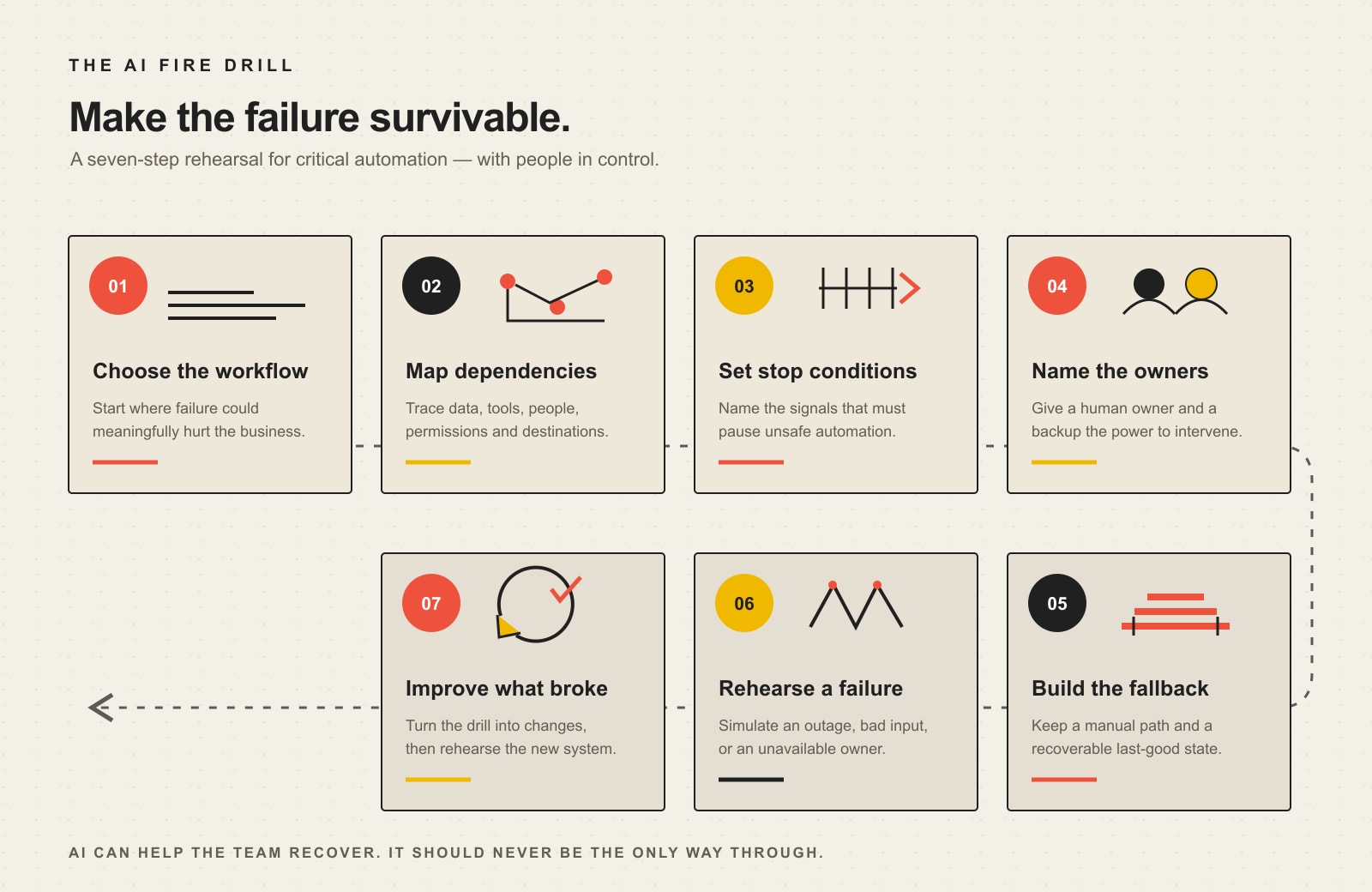
    Seven-step AI resilience fire drill: choose a critical workflow, map its dependencies, set stop conditions, name owners, build a manual fallback, rehearse failure, and improve what broke.

    1. Choose one critical workflow

    Pick something where failure would affect revenue, customer service, safety, compliance, reputation, or the ability to operate. Do not start with your most complicated workflow; start with the one whose failure would teach you the most.

    2. Map inputs, outputs, and dependencies

    List the data sources, APIs, SaaS platforms, credentials, people, permissions, destinations, and timing dependencies. If any one of those fails, note whether the workflow stops cleanly, retries, degrades, or keeps acting with incomplete information.

    3. Define harmful failures and stop conditions

    Write down the conditions that should halt automation: missing source data, stale records, inconsistent totals, unverified customer identity, unusually large transactions, an unapproved destination, repeated errors, or a model response that cannot cite its source. A stop condition is valuable because it turns “be careful” into an observable rule.

    4. Assign a human owner and backup

    Someone must be able to pause the automation, inspect evidence, authorize exceptions, communicate with affected people, and start recovery. Name the backup too. A resilience plan that depends on one person answering a phone is still a single-point failure.

    5. Create a manual fallback and restore point

    Document the non-AI path for the critical outcome. Preserve the last known good state where practical. Keep essential account, vendor, customer, and recovery information outside the AI layer. The point is not to recreate every convenience manually; it is to keep the important outcome moving long enough to recover.

    6. Run a tabletop failure

    Disable a connector in a test environment, feed the system a stale record, simulate a model outage, present a misleading input, or pretend the primary owner is unavailable. Watch what the team notices, where information is missing, and how long it takes to switch paths.

    7. Update the system from what broke

    Turn the findings into changes: narrower permissions, clearer thresholds, better alerts, a shorter runbook, a second owner, a tested backup, a new restore step, or a decision that the workflow should not be fully automated at all. Then rehearse again.

    Scope Design rule of thumb: if the business cannot keep a critical outcome moving when AI is wrong, unavailable, or disconnected, the automation is not resilient yet.

    A practical AI resilience failure-mode table

    Failure modeUseful stop conditionFallback
    AI or vendor outageNo response, timeout, authentication failure, or failed health checkManual runbook, alternate provider if approved, or queue work for human handling
    Wrong or unsupported answerSource cannot be verified, required fields disagree, or confidence rule failsEscalate to human review and show source records
    Over-privileged actionAction exceeds amount, destination, permission, or risk thresholdRequire explicit human approval or remove write access
    Stale knowledgeSource document exceeds review date or conflicts with current policyUse the controlled truth vault and block autonomous action
    Automation loopRepeated identical events or retry count exceeds limitKill switch, idempotency key, queue review, and restore last good state
    Data exposure riskSensitive field, unapproved tool, or unapproved destination is detectedRedact, route to an approved environment, or stop the workflow

    Build the continuity layer before the AI layer

    Business continuity planning already gives us useful language for this work. Ready.gov’s business continuity guidance uses a Business Impact Analysis to identify critical processes and dependencies, then recovery-time and recovery-point objectives to define how quickly work must resume and how much data loss is tolerable.

    You do not need enterprise jargon to use the idea. For each AI-supported critical process, answer four questions:

    1. What outcome must continue?
    2. How long can this process be unavailable before the damage becomes material?
    3. What information or state must be recoverable?
    4. What non-AI path can keep the outcome moving while recovery happens?

    Then make the truth vault boring and accessible: current contacts, approved procedures, known dependencies, credential-recovery instructions, vendor escalation routes, communication templates, last-good configurations, and decision thresholds. AI can make that information easier to use. It should not be the only way to reach it.

    A 30-day rollout for a small business

    Week 1: Pick the outcome and map the dependency chain

    Choose one AI-supported workflow with real business impact. Map its data, tools, people, permissions, vendors, and destinations. Identify the human owner and backup.

    Week 2: Add monitoring and stop conditions

    Decide what “normal” looks like, what deserves an alert, and what should stop automation completely. Log enough evidence to reconstruct what happened. CISA’s small-business cybersecurity resources are a useful baseline for backups, MFA, incident-response preparation, and other controls that should exist around any important automated workflow.

    Week 3: Build the manual fallback and truth vault

    Write the shortest viable procedure that lets a capable person continue the critical outcome without the AI. Verify access to backups, source records, credentials, and recovery contacts.

    Week 4: Run the fire drill

    Simulate one failure, record the weak points, fix them, and schedule the next test. Do not wait for a dramatic annual exercise. Test when the workflow changes, a vendor changes, permissions change, an incident exposes a gap, or the consequences of failure increase.

    When the disruption is already happening

    Once an incident is active, the goal shifts from design to control: verify the scope, stop harmful automation, protect evidence, keep critical outcomes moving, and communicate facts consistently. If the event affects customers or the public, use a dedicated crisis communication plan rather than letting an AI draft outrun operational reality.

    If the failure involves a compromised website, malware, unauthorized changes, credential theft, or a broken web property, follow a security-specific recovery process. Our website security disaster guide covers that incident-response layer in more detail.

    What our audit of this exact page taught us

    We applied the same resilience principle to this revision: inspect the system before changing it. On August 20, 2026, GA4 returned no matching landing-page rows for this URL over the reviewed twelve-month period. Google Search Console returned no exact-page performance rows, but URL Inspection reported the page as submitted and indexed, with a successful fetch and matching Google-selected and user-declared canonicals. Bing recognized and crawled the page but reported zero URL-level clicks and impressions. Ubersuggest returned no ranking-keyword data and no exact-page backlinks.

    That does not prove the topic is worthless. It supports a narrower editorial decision: there was no measured search or backlink signal strong enough to justify preserving unsupported statistics, while the established URL already had crawl history and a correct canonical. So we kept the URL, removed invented performance claims, clarified the page’s AI-specific job, and strengthened its connection to the broader resilience and AI-automation clusters.

    Frequently asked questions about AI-powered business resilience

    What is AI-powered business resilience?

    It is the use of AI to strengthen a business’s ability to detect, understand, respond to, and learn from disruptions. The AI layer should support monitoring, triage, documentation, scenario testing, and recovery—not replace ownership, source evidence, continuity planning, or manual fallbacks.

    Can AI improve business continuity?

    Yes, when it shortens detection and triage, makes runbooks easier to use, and helps teams rehearse realistic failures. It can hurt continuity when the AI becomes an opaque dependency, has too much authority, or is the only path to critical knowledge or action.

    What controls make an AI automation safer for a critical process?

    Useful controls include narrow permissions, explicit approval thresholds, source verification, logging, monitoring, retry limits, stop conditions, a kill switch, human ownership, recoverable state, and a tested non-AI fallback. The exact controls should match the harm the workflow could cause.

    How do you test an AI-enabled business continuity plan?

    Run a tabletop or controlled simulation in which the model is unavailable, returns a wrong answer, loses a connector, acts on stale data, or cannot reach its normal destination. Measure whether the team notices, stops harmful action, reaches source evidence, switches to the fallback, and restores normal operation.

    How often should an AI resilience plan be tested?

    Use a risk-based cadence rather than a magic number. Re-test after meaningful workflow, vendor, permission, model, data-source, or policy changes; after a real incident; and whenever the consequences of failure increase. A simple critical workflow may need a lightweight tabletop, while a high-impact automated action deserves more frequent and more controlled testing.

    The goal is not more automation. It is more recoverable operations.

    The strongest AI resilience strategy is not the one with the most models, agents, dashboards, or automatic responses. It is the one that makes trouble easier to see, decisions easier to support, knowledge easier to retrieve, and recovery easier to execute without surrendering control.

    Start with one critical workflow. Give it an owner. Define when the automation must stop. Build a manual fallback. Preserve a restore point. Then break the workflow on purpose and learn from what happens.

  • Website Disaster Recovery Plan: Build the Runbook Before You Need It

    Website Disaster Recovery Plan: Build the Runbook Before You Need It

    A website disaster recovery plan is the short, tested set of decisions your business will use when a website is compromised, goes down, breaks after a change, loses access to a critical account, or can no longer complete an important customer action. Build it before the emergency. Name the owners, define what can be shut off, prove where a known-good recovery copy lives, decide what must work first, and rehearse the handoffs while everybody can still think clearly.

    TL;DR: Security controls reduce the chance and impact of a problem. A disaster recovery plan answers the uglier question: what exactly do we do when those controls are not enough? If your plan is just “call the web person” and “we have backups somewhere,” you do not have a plan. You have optimism with two bullet points.

    A Website Disaster Recovery Plan Is Not the Same Thing as Website Security

    Website security and disaster recovery overlap, but they own different jobs. Our website security guide covers the broader ongoing controls: ownership, access, updates, monitoring, backups, response, and documentation. This article starts later in the thought experiment. It assumes something important has failed and asks whether the business can contain the damage and recover without inventing the process under pressure.

    That distinction matters because a security checklist can be completely green while the recovery path is still fuzzy. You can have multifactor authentication, current software, a firewall, and automated backups and still discover during an incident that nobody knows who owns DNS, the backup cannot be restored, the payment integration is not included in the test, or the person with the registrar login is on a plane.

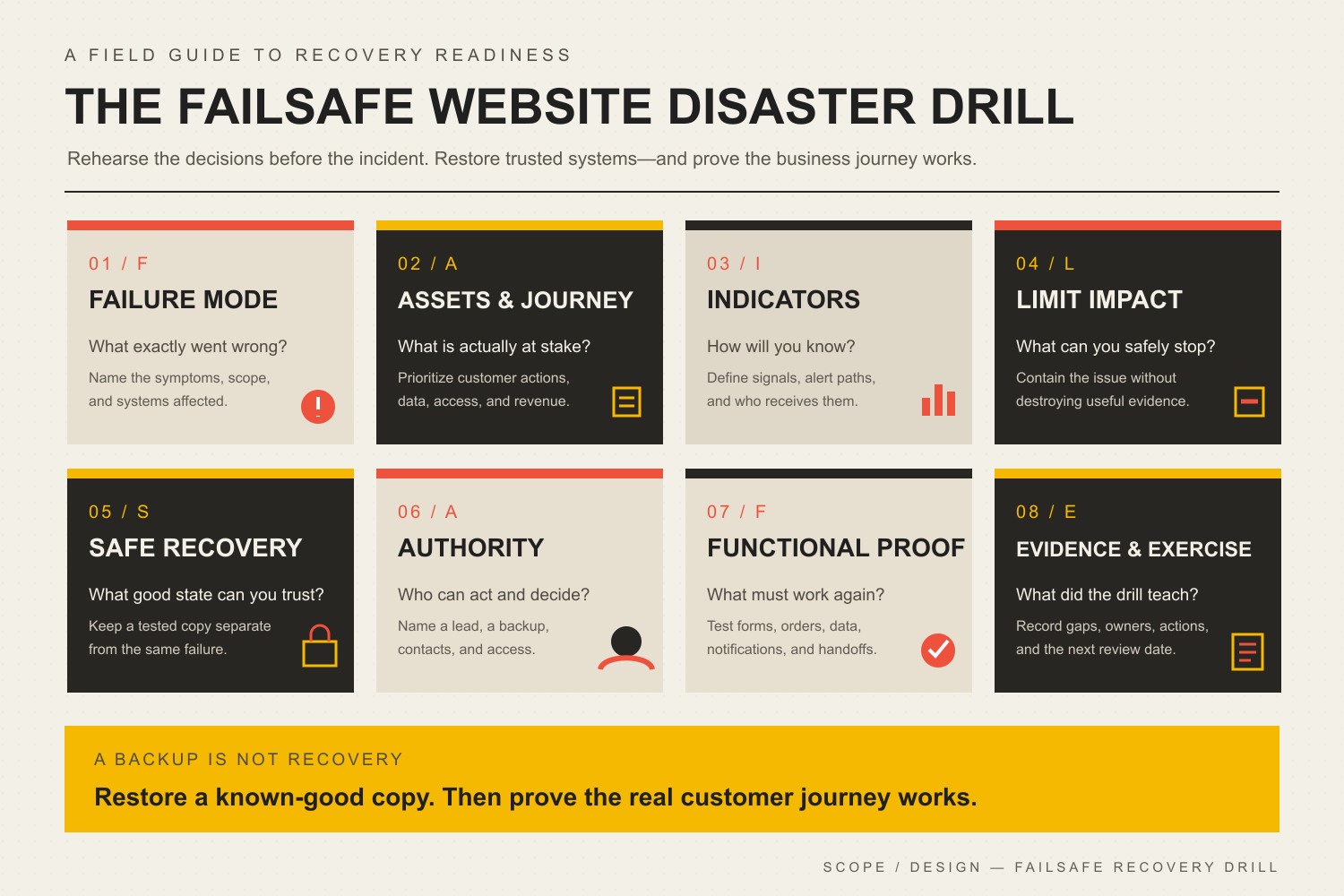
    The FAILSAFE disaster drill: Failure mode, Assets and business journey, Indicators, Limit impact, Safe recovery source, Authority and contacts, Functional proof, and Evidence and exercise.
    A website disaster recovery plan connects warning signals and prevention controls to ownership, containment, a known-good recovery source, and proof that the business journey works again.

    If you already suspect the site is compromised, stop treating this as a planning exercise. Use the hacked-website detection and recovery process and bring in the right technical, legal, insurance, or forensic help for the actual incident.

    What a Website Disaster Recovery Plan Must Answer

    A useful plan does not need to be a 90-page binder. It needs to answer the questions that change the response. The exact answers depend on whether the website is a brochure site, an ecommerce store, a membership platform, a booking system, or a custom application. The more revenue, data, staff workflow, and customer trust that depend on the site, the more precise the plan should become.

    • What is critical? Identify the website journeys that the business cannot casually lose: lead forms, checkout, payments, logins, booking, account access, downloads, donor flows, or another business-specific action.
    • What does the site depend on? Hosting, DNS, the domain registrar, CDN/WAF, CMS, database, plugins, themes, transactional email, payment processors, CRM, analytics, APIs, identity providers, and staff accounts can all sit in the dependency chain.
    • How will you know something is wrong? Uptime alerts, security alerts, failed forms, unexpected file changes, new administrator accounts, customer reports, payment failures, DNS changes, search warnings, or a broken deployment can all be signals.
    • Who has authority to act? Somebody must be allowed to disable an account, take a site offline, restore a backup, roll back a change, contact a vendor, communicate with customers, and approve emergency spending.
    • What is the known-good recovery source? A backup is only useful if it includes the right files and data, can be accessed during the incident, and has been restored successfully before.
    • What comes back first? Recovery order should follow business consequence, not whatever screen the technician happens to open first.
    • What proves recovery? “The homepage loads” is not enough when the actual business depends on checkout, forms, email notifications, logins, data integrity, DNS, HTTPS, or an API.

    NIST’s Cybersecurity Framework 2.0 Small Business Quick-Start Guide is a useful grounding model because it treats cybersecurity as a connected lifecycle of Govern, Identify, Protect, Detect, Respond, and Recover. The framework is intentionally flexible; it does not give every small business the same magic stack or the same recovery target.

    Use the Scope Design FAILSAFE Website Disaster Drill

    We use the FAILSAFE Website Disaster Drill to turn “we should probably have a plan” into eight concrete checks. Run one plausible failure through all eight. If the answer turns vague, you have found a readiness gap while it is still cheap to fix.

    F — Failure mode: what exactly went wrong?

    Do not exercise “cyberattack” as a giant blob. Pick a scenario that forces decisions: an administrator account was taken over, a plugin update broke checkout, DNS was changed without authorization, malware injected redirects, the host is unavailable, or the newest backup will not restore. Specific failures expose specific dependencies.

    A — Assets and business journey: what is actually at stake?

    Name the customer or staff journey that matters. A brochure site with a broken contact form has a different consequence than a store that cannot take payments or a membership site exposing account data. This is why a good business website technical foundation starts with the systems and handoffs the business actually depends on.

    I — Indicators and detection: how will you know?

    Write down the signals and who receives them. A detection path that terminates in an inbox nobody checks is theater. Include both automated signals and human reports. Security alerts, uptime monitoring, file-change detection, failed transactions, form tests, email-delivery failures, and customer reports can reveal different problems.

    L — Limit the blast radius: what can you safely stop?

    Containment may mean disabling a compromised account, revoking sessions, pausing checkout, blocking access, disabling a vulnerable component, switching DNS, or temporarily taking the site offline. The plan should say who can make that call. Waiting for six people to approve a reversible containment action is a great way to turn a small incident into a long afternoon.

    S — Safe recovery source: what known-good state can you trust?

    CISA’s #StopRansomware Guide recommends offline, encrypted backups of critical data and regular testing of backup availability and integrity. For a website, the practical question is broader than “is there a zip file?” You may need the database, uploads, configuration, code, DNS records, credentials, integration settings, license information, and a record of the last known-good application state.

    For WordPress, the official Hardening WordPress guidance likewise emphasizes regular backups, monitoring, trusted software sources, access limitation, and knowing the state of the installation. A restore test proves far more than a backup-success email.

    A — Authority and contacts: who can act when normal channels fail?

    List the primary and backup owner for the website, hosting, DNS/registrar, critical integrations, customer communication, and outside technical help. Keep an out-of-band contact method. If the company email account is part of the compromise, a recovery plan stored only in that inbox is a practical joke.

    F — Functional proof: what must work before you call it recovered?

    Define a small recovery test suite before the incident. Check the homepage, but also check the money path and the trust path: submit the lead form, place a test order when appropriate, verify transactional email, test login/logout, confirm permissions, inspect critical data, verify DNS and HTTPS, and confirm monitoring is alive again. Recovery is a business result, not a green server light.

    E — Evidence and exercise: what did the drill teach you?

    Record what worked, what was missing, who had the wrong access, which vendor instructions were stale, how long the exercise took, and what needs to change. Then run it again after a meaningful change to hosting, DNS, ecommerce, authentication, staffing, or another critical dependency. Plans rot when nobody exercises them.

    Seven Website Disasters Worth Rehearsing Before They Happen

    ScenarioQuestion to answer before it happensProof you want
    Administrator account takeoverWho can revoke sessions, disable the account, rotate credentials or keys, and inspect for unauthorized users or changes?MFA enabled, recovery access tested, account inventory current, alternate administrator path known.
    Compromised plugin, theme, or dependencyCan you disable or replace the component without guessing what else depends on it?Dependency inventory, current backup, change record, rollback or replacement path, critical journeys tested.
    Injected malware, redirects, or defacementWho contains the site, preserves useful evidence, and decides whether a clean rebuild or restore is appropriate?Logs available, known-good recovery source, escalation contact, post-recovery malware and account checks.
    Hosting, DNS, domain, or CDN failure/takeoverWho owns each account and what can the business do if one provider or login is unavailable?Registrar/DNS/host ownership documented, MFA/recovery methods tested, critical records exported, alternate contacts available.
    Broken update or deploymentCan the team identify the change and return only the failing component to a known-good state?Baseline, backup, change log, staging or controlled update process, targeted rollback and regression tests.
    Backup or restore failureWhat happens if the newest copy is corrupt, incomplete, encrypted by the same incident, or inaccessible?Independent copies, retention history, restore credentials, recent successful restoration test.
    Form, payment, login, or email integration failureHow will you detect a site that looks “up” while the business journey is broken?Synthetic or manual journey tests, alert owner, vendor contact, fallback process, confirmed downstream records.

    For recurring operational prevention, pair this drill with a business-continuity website maintenance process. The drill reveals what must be recoverable; maintenance keeps the recovery points, monitoring, tests, and ownership from quietly expiring.

    Build a One-Page Website Disaster Runbook

    The full documentation can live behind the scenes. The first page should be usable by a tired human at an inconvenient hour. Keep secrets in an appropriate password manager rather than embedding passwords in the document itself.

    Runbook fieldWhat to write down
    Incident triggerThe signal that turns a warning into an incident: confirmed account takeover, malware finding, critical outage, unauthorized DNS change, failed deployment, or another defined condition.
    Critical journeyThe customer/staff action to protect or restore first.
    Incident owner + backupTwo named people or roles with current contact methods.
    AuthorityWho can take the site offline, disable accounts/components, restore, roll back, contact customers, or approve emergency work.
    Containment actionsThe reversible first actions appropriate to this scenario.
    Recovery sourceWhere the known-good backup/configuration is, who can access it, and the date of the last successful restore test.
    Recovery priorityWhat comes back first and what can wait.
    Validation checklistThe exact pages, forms, orders, logins, data, email, DNS, HTTPS, and monitoring checks required before normal operation resumes.
    Outside contactsHost, registrar/DNS provider, website partner, ecommerce/payment vendor, insurer, legal counsel, forensic/security specialist, or others as relevant.
    Alternate communicationHow the team coordinates if normal email, website, or chat access is unavailable.
    Evidence to preserveLogs, timestamps, screenshots, account changes, alerts, affected URLs, vendor tickets, and decisions.

    This is intentionally not a universal incident-response script. A broken plugin update and a suspected theft of customer information do not deserve the same process. The runbook gives the business a stable starting point and an escalation path.

    Set Recovery Priorities From Business Consequence, Not a Template

    Two common disaster-recovery terms are useful as long as you do not turn them into fake precision. Recovery Time Objective (RTO) describes the target time to restore a service after disruption. Recovery Point Objective (RPO) describes how much recent data loss, expressed in time, the business can tolerate.

    Do not copy somebody else’s “one-hour RTO” because it sounds serious. Start with consequence. If a lead-generation site can temporarily route inquiries to a verified alternate channel, its acceptable downtime may be different from an ecommerce store losing paid orders or a portal needed for daily operations. Likewise, a site updated twice a month has a different data-loss problem from a store creating transactions every minute.

    Your plan should name the target, the reason, and the recovery design required to meet it. That conversation often changes backup frequency, hosting architecture, monitoring, staffing, and support expectations. If the business expects enterprise recovery with bargain-bin ownership, the math eventually files a complaint.

    A Backup Is Not Recovery Until You Have Restored It

    Automated backup notifications are useful. They are not proof that the complete website can be reconstructed. Test enough of the recovery path to answer:

    • Does the backup include the database and the files that matter?
    • Are integration settings, configuration, licenses, DNS information, and other non-obvious dependencies documented?
    • Can the recovery owner access the backup when the normal hosting account is unavailable or compromised?
    • Is there a recovery point old enough to predate a compromise that was discovered late?
    • Can you restore into a safe environment without overwriting the only useful evidence?
    • After restoration, do the critical customer journeys actually work?

    This is also why website maintenance ownership matters. Backups, updates, monitoring, forms, domains, SSL, hosting, and third-party integrations are recurring operational responsibilities. A disaster plan built once and ignored will age badly as those dependencies change.

    Run a Tabletop Exercise Without Turning It Into Security Theater

    A tabletop exercise is a structured conversation around a plausible incident. You are not trying to win cybersecurity trivia night. You are trying to discover where decisions, access, evidence, and recovery break down.

    1. Choose one scenario. “The main administrator account was taken over” is better than “we got hacked.”
    2. Give the team only the information they would have at first. An alert arrived, checkout is failing, or a customer reports a redirect.
    3. Ask who decides what happens next. Do not accept “IT handles it” when nobody can name the person, contact method, or authority.
    4. Introduce a complication. The primary owner is unavailable. The newest backup fails. Company email is inaccessible. The host has not replied.
    5. Walk through containment and recovery. Identify the safe stopping point, known-good source, and recovery order.
    6. Run the validation checklist. What would prove that the site, data, and business journey are actually healthy?
    7. Capture the gaps. Missing access, stale contacts, unclear authority, untested backups, forgotten dependencies, and absent monitoring become concrete follow-up work.

    CISA publishes cybersecurity scenario and tabletop resources for organizations that want a more formal exercise structure. For a small website-dependent business, the useful version can start with 30 to 60 focused minutes and one ugly scenario. The value comes from fixing the gaps afterward.

    Know When the Problem Is Bigger Than the Website Runbook

    A website partner can help with managed updates, backups, monitoring, rollback, website troubleshooting, and coordination across hosting, DNS, WordPress, and integrations. That does not automatically make the partner a forensic laboratory, breach-law firm, insurer, law-enforcement agency, or 24/7 security operations center.

    If there is reason to believe sensitive information was accessed, an attacker persists in the environment, business email or identity systems are involved, legal/contractual notification duties may apply, or the scope is uncertain, preserve evidence and involve the appropriate specialists. Do not “clean things up” so aggressively that you erase the information needed to understand what happened.

    Website Disaster Recovery Plan FAQ

    How do I create a website disaster recovery plan?

    Start with one critical website journey and one plausible failure. Map the systems it depends on, name the owner and backup owner, define the first containment decision, identify a known-good recovery source, decide what must be restored first, and write the tests that prove recovery. Then run a tabletop exercise and fix every vague answer it exposes.

    What should be in a website disaster recovery plan?

    Include critical systems and business journeys, dependencies, incident triggers, roles and authority, out-of-band contacts, containment actions, backup/recovery locations, recovery priorities, validation tests, communications, external escalation contacts, and evidence-preservation instructions. Keep credentials in a secure credential system rather than putting passwords directly in the plan.

    Is there a NIST disaster recovery plan template for a small business website?

    NIST provides the CSF 2.0 Small Business Quick-Start Guide and broader incident/recovery guidance rather than one universal website template. That is appropriate: recovery requirements depend on the business, systems, data, and acceptable disruption. Use NIST’s lifecycle as grounding, then make the runbook specific to your website dependencies and authority.

    How often should a small business test website backups?

    Use a schedule tied to consequence and change rate, not a universal calendar rule. The important point is that restoration is tested regularly enough to catch incomplete backups, expired access, broken procedures, and changed dependencies before an emergency. Test again after major hosting, ecommerce, authentication, or architecture changes.

    What is the difference between website security and disaster recovery?

    Website security reduces risk and helps prevent, detect, contain, and respond to threats. Disaster recovery focuses on restoring trusted systems, data, and business operations after a disruption. Strong security makes recovery less likely to be needed; strong recovery limits the damage when prevention fails.

    What should I do first if my website is hacked?

    Do not blindly restore or delete evidence. Triage the signal, preserve useful evidence, contain access where appropriate, identify the scope, and coordinate recovery from a known-good state. Our dedicated website hacked guide covers the active incident workflow in more detail.

    Do I need a separate backup from my web host?

    You need a recovery design that avoids one failure taking out every usable copy. Depending on the host and architecture, that may mean independent storage, offline or otherwise isolated copies, multiple retention points, and documented access outside the normal production environment. The point is separation from the same failure, not collecting backup logos.

    Who should own website disaster recovery?

    One business owner or accountable role should own the outcome even when technical work is outsourced. Providers can own tasks, but the business should know who has authority, who the backup decision-maker is, which vendors are responsible for which systems, and how escalation works. “Everybody sort of handles it” is how incidents acquire extra chapters.

    Sources and Methodology

    This article was rebuilt through Scope Design’s monitored content workflow on August 21, 2026. We reviewed the existing post and current Content Studio cluster, Scope Design’s Open Brain website-management doctrine, the literal internal-link graph, 12 months of exact-page GA4/Search Console/Bing evidence, U.S. Ubersuggest keyword and SERP data, DataForSEO Google SERP/PAA and search-volume data, and two authorized ChatGPT web-search observations. Third-party keyword volumes were treated as directional estimates, not demand guarantees.

    We deliberately removed the imported draft’s unsupported attack-frequency percentages, universal breach-cost numbers, closure claims, guaranteed recovery times, and unverified Scope Design security-performance claims. Precision without evidence is not reassurance. It is decoration.

    Make the Recovery Plan Somebody’s Job

    The best disaster plan is boring on purpose. The owner is known. The contacts work. The recovery copy has been tested. The business knows what must come back first. The validation checklist matches the real customer journey. And when the website changes, somebody keeps the plan current.

    If nobody clearly owns updates, monitoring, complete backups, restore testing, critical-function checks, and recovery, use our WordPress maintenance services guide to compare the responsibilities a managed plan should actually include. Buy accountable care, not dashboard confetti.

  • Enterprise Cloud Backup Solutions: A Practical Guide to Business Continuity & Data Protection

    Enterprise Cloud Backup Solutions: A Practical Guide to Business Continuity & Data Protection

    Enterprise cloud backup solutions should be judged by what happens on restore day—not by whether last night’s backup job showed a green checkmark. The right system is the one that can recover the business’s critical workloads within agreed tolerances after deletion, ransomware, administrator error, provider failure, or site loss. That makes cloud backup part technology, part business-continuity planning, and part operational ownership.

    For most organizations, the hard questions are not “Which vendor has the longest feature list?” They are: What must come back first? How much data can we afford to lose? Who controls the backup account and encryption keys? Can an attacker or compromised administrator delete the recovery copies? How long does a real restore take? And has anyone actually tested the full recovery path?

    The short version: choose for recoverability

    • Separate backup from storage and sync. Redundancy keeps systems available; backup gives you a recoverable earlier state.
    • Set RTO and RPO from business impact. Do not borrow arbitrary “mission-critical” numbers from a vendor page.
    • Protect recovery copies from the same failure domain. Identity isolation, deletion protection, immutability, and offline copies can all play a role.
    • Test restores, not just backup jobs. A copy is useful only if applications, permissions, dependencies, and data can be restored when the business needs them.
    • Price the whole recovery system. Storage is only one line item; retention, egress, restore compute, isolated copies, licensing, testing, monitoring, and operator time matter too.
    • Treat compliance as a set of responsibilities. Backup controls can support HIPAA, GDPR, and other obligations, but no backup product makes an organization compliant by itself.

    Cloud backup is not the same as cloud storage, sync, or disaster recovery

    These terms are often sold together, but they solve different problems. Before evaluating enterprise cloud backup solutions, make sure your team agrees on the job each layer is supposed to do. Our primer on cloud storage, sync, and backup fundamentals goes deeper into the storage side of the distinction.

    LayerPrimary jobCommon failure of assumptionsRecovery question
    Cloud storageKeep current data accessible remotelyRedundancy may preserve the same corrupted or unwanted current stateCan I retrieve the version I need?
    SyncPropagate changes across locations and devicesA deletion or encryption event may also propagateCan I roll back before the bad change?
    BackupCreate recoverable copies or recovery pointsA successful copy can still be unusable, inaccessible, or too slow to restoreCan I restore the right data and dependencies within my objective?
    Disaster recoveryRestore service or shift operations after an outageData may exist without an executable plan to restore the full serviceHow does the business resume operations?

    That distinction is why “we already use Microsoft 365,” “the database is replicated,” or “our host snapshots the server” is not a complete backup strategy. Those controls may be useful pieces, but the business still needs point-in-time recovery, ownership, retention, and tested restoration appropriate to its risks.

    Use the RESTORE Test before you compare vendors

    We use a simple framework for turning backup features into recovery evidence. The RESTORE Test forces the architecture conversation to begin with the business outcome rather than a product name.

    The RESTORE Test: Rank critical workloads, Establish RTO and RPO, Separate recovery copies, Test restores, Own access, Retain by policy, and Exercise the runbook.
    StepWhat to decideEvidence you should be able to show
    R — Rank critical workloadsWhich systems, data sets, and dependencies matter most?A business-impact inventory with owners and recovery priority
    E — Establish RTO/RPOHow long can each workload be down, and how much recent data can be lost?Approved recovery objectives tied to business consequences
    S — Separate recovery copiesWhat protects backups from the same account, credential, region, device, or ransomware event?Documented copy locations, identity boundaries, and deletion protections
    T — Test restoresCan you recover usable data and applications—not just download an archive?Restore-test results with elapsed time, gaps, and remediation
    O — Own access and exit pathsWho controls accounts, MFA, keys, billing, support escalation, and exports?Named owners plus break-glass and provider-exit procedures
    R — Retain by policyHow many recovery points and how much history are actually required?Retention rules mapped to operational, legal, and contractual needs
    E — Exercise the runbookCan people execute the recovery under pressure?A practiced runbook covering dependencies, communications, and decisions

    The most important shift is the “T”: a successful backup job is evidence that a copy was created; a successful restore test is evidence that recovery may work. Those are not the same thing.

    Set RTO and RPO from business impact, not internet benchmarks

    Recovery Time Objective (RTO) is the maximum target time for restoring a service after disruption. Recovery Point Objective (RPO) describes how much recent data loss the business can tolerate, expressed as time between the incident and the most recent usable recovery point.

    Neither number should be universal. An order-processing database, a public marketing site, a file archive, and a development environment can have completely different tolerances. Setting every workload to “five minutes” may sound safe, but it can dramatically increase cost and complexity without reflecting what the business actually needs.

    Start with consequences. If losing more than 15 minutes of new orders creates unacceptable reconciliation work, that suggests an RPO of 15 minutes or better for that workload. If the customer portal can be unavailable for two hours before the impact becomes unacceptable, a two-hour RTO may be the planning target. Those are examples of the reasoning process, not universal recommendations.

    Then test the complete path. A database might restore in 20 minutes while DNS, application secrets, identity, certificates, queues, object storage, or third-party integrations add another 90. The measured recovery time should include the dependencies required for the service to function, not just the fastest component.

    Design for ransomware recovery, not just ransomware detection

    Ransomware changes the backup question because the attacker may deliberately target recovery infrastructure. CISA’s ransomware guidance recommends maintaining offline, encrypted backups and regularly testing them. The practical goal is to make it difficult for one compromised credential, account, device, or administrative action to destroy both production data and every usable recovery copy.

    Separate the failure domains

    Separation can be physical, logical, geographic, administrative, or a combination. Depending on the workload, that can mean offline media, a different cloud account or subscription, cross-region copies, separate privileged identities, or a backup service whose deletion controls are not governed by the same credentials used for production.

    Use deletion protection and immutability deliberately

    Major cloud platforms now expose strong controls for making recovery points harder to delete or shorten. AWS Backup Vault Lock can prevent recovery-point deletion and retention changes; its compliance mode becomes immutable after the configured grace period. Azure Backup documents immutable vaults and soft-delete protections, with locked immutability designed to be irreversible. Google Cloud Backup and DR backup vaults use isolated storage and enforced retention, with a retention lock that prevents later shortening.

    Those controls are valuable precisely because they can be hard to undo. That is also the risk: an accidental retention policy can become an operational and storage-cost commitment. Define retention before applying irreversible locks, test the lifecycle in a noncritical scope, and document who is authorized to make retention changes.

    Protect identities and recovery credentials

    Use MFA, least-privilege roles, separate administrative identities where appropriate, and monitored break-glass access. Backups should be encrypted in transit and at rest, but encryption alone is not enough: the organization also needs a recoverable key-management process and a plan for what happens if the normal identity provider is unavailable during the incident.

    How to compare enterprise cloud backup approaches

    There is no single “best” enterprise cloud backup solution for every organization. The strongest fit depends on workload coverage, recovery modes, administrative model, existing skills, and how much operational responsibility the business wants to own.

    ApproachOften fits whenWatch carefully
    Cloud-platform nativeMost critical workloads live in one cloud and the team already operates that platformCoverage outside that platform, cross-account design, SaaS/endpoints, provider concentration, and restore orchestration
    Cross-platform data-protection platformThe environment spans multiple clouds, virtual machines, on-premises systems, databases, or SaaS workloadsLicensing model, architecture complexity, workload-specific recovery depth, and operator skills
    Managed backup serviceThe internal team wants another party to operate monitoring, failures, retention, and recovery proceduresWho owns the account, data, keys, escalation path, exports, and transition if the provider relationship ends

    Products such as AWS Backup, Azure Backup, Google Cloud Backup and DR, Veeam, Cohesity, Rubrik, Druva, and Commvault can all appear in enterprise evaluations, but a useful comparison starts with requirements. Ask each candidate to demonstrate the recovery behavior your workloads need rather than accepting a feature checkbox.

    Questions to put in the evaluation worksheet

    • Which workloads are protected: virtual machines, physical servers, databases, containers, endpoints, SaaS, object storage, file shares, and cloud-native services?
    • What recovery granularity is available: full system, application, database, file, item, point-in-time, or alternate-location recovery?
    • Can copies be kept in a separate account, subscription, region, tenant, or offline medium?
    • What prevents a compromised production administrator from deleting or shortening backup retention?
    • How are MFA, privileged roles, service accounts, API keys, and encryption keys handled?
    • What does a clean-room or isolated restore test require?
    • What telemetry shows failed jobs, unusual deletions, retention changes, or unexpected backup-volume changes?
    • How long do representative restores actually take at your data size and network conditions?
    • Which fees appear during normal protection and during a large-scale restore?
    • How do you export data and metadata if the product or provider changes?

    Calculate total recovery cost, not just storage price

    Published per-gigabyte prices age quickly and can hide the expensive parts of a recovery design. A better comparison is a total-cost model for the recovery objective:

    Total backup and recovery cost = retained storage + workload/licensing fees + isolated/cross-region copies + retrieval/egress + restore compute/network + monitoring + recovery testing + operator time.

    Retention has an especially large effect because immutable or locked policies can prevent early deletion by design. A low storage rate paired with unnecessarily long locked retention may cost more than a higher-rate service with a better-matched policy. Likewise, a cheap archive tier may be a poor fit for a short RTO if retrieval takes too long or creates significant restore charges.

    Cost decisions should therefore follow workload classification. Recent recovery points for high-impact systems may justify faster storage and more frequent copies; long-term records may fit colder tiers when retrieval time does not threaten the business objective.

    Compliance: backup supports controls, but it is not compliance in a box

    Regulated organizations need to map backup design to their actual obligations, contracts, risk analysis, and documented procedures. The safest statement is also the most useful: a backup product can support compliance controls; it does not certify the organization as compliant.

    For healthcare organizations, the contingency-plan provisions in 45 CFR § 164.308 require procedures for retrievable exact copies of electronic protected health information, restoration of lost data, continuation of critical business processes in emergency mode, and periodic testing and revision of contingency plans. That means a HIPAA-oriented evaluation needs more than an “encrypted backup” checkbox: roles, procedures, testing, access, applicable business-associate arrangements, and organizational safeguards still matter.

    For organizations subject to the GDPR, Article 32 includes the ability to restore availability and access to personal data in a timely manner after an incident and a process for regularly testing security measures. The official EUR-Lex text addressing Article 32 reinforces why recoverability and testing are operational controls. Retention, deletion, data location, processing agreements, and other GDPR duties still require separate analysis.

    For any regulated environment, involve the organization’s security, legal, privacy, and compliance owners. Backup architecture is part of the evidence trail, not a substitute for it.

    Implementation roadmap: prove one recovery path at a time

    A backup migration is safer when it is treated as a series of tested recovery paths instead of a large “turn it on everywhere” project.

    1. Inventory workloads and dependencies. Include databases, object stores, SaaS data, DNS, identity, secrets, certificates, external integrations, and configuration—not only server disks.
    2. Rank business impact. Identify owners, recovery order, and what happens financially or operationally when each system is unavailable.
    3. Approve RTO/RPO and retention. Make the tradeoffs explicit before selecting expensive frequency, replication, or retention controls.
    4. Design separation and access. Decide account boundaries, privileged roles, MFA, encryption/key ownership, deletion protection, and emergency access.
    5. Pilot representative restores. Restore into an isolated environment where possible and validate data integrity, permissions, application behavior, and dependencies.
    6. Document the runbook and escalation path. A recovery plan should name the people, credentials, providers, communications, decision points, and fallback options needed during the incident.
    7. Monitor and exercise. Alert on backup failures and destructive changes, retest after major system changes, and run recovery exercises on a schedule appropriate to the workload’s risk.

    NIST’s 2026 OT Backup Quick Start Guide describes effective backup management as including regular backup creation and testing, integration with change management, and review during recovery exercises. Although its audience includes operational technology, the operating principle translates well: recovery readiness decays when systems change but tests do not.

    Ownership is part of the backup architecture

    One of the most common continuity gaps is not technical—it is administrative. A backup can exist while the person who knows the account has left, the billing owner is unclear, MFA goes to the wrong phone, the encryption key is not recoverable, or the hosting provider’s responsibility stops earlier than the business assumed.

    This is why hosting ownership and provider responsibility belong in the same conversation. For every protected workload, document who owns the production account, backup account, domain/DNS access, identity administrator role, billing relationship, encryption material, support contract, export path, and recovery decision.

    At Scope Design, our day-to-day Management work includes website backups, security, uptime, maintenance, hosting, and account operations. That gives us a practical perspective on continuity for websites and managed web infrastructure: the useful backup is the one a responsible person can actually locate, access, restore, and verify. We are not positioning a website-management practice as a substitute for an enterprise data-protection team, security program, or compliance auditor. When specialized enterprise storage, regulated systems, or multi-cloud platforms are involved, those responsibilities should be coordinated with the organization’s IT, security, compliance, and platform teams.

    Frequently asked questions about enterprise cloud backup solutions

    What is an enterprise cloud backup solution?

    An enterprise cloud backup solution is a system for creating, retaining, managing, and restoring recovery copies of business data and workloads using cloud infrastructure or a cloud-delivered service. “Enterprise” usually implies broader workload coverage, centralized policy, stronger identity and audit controls, scalable retention, and recovery features suitable for business operations.

    What is the best cloud backup solution for a business?

    The best choice is the one that covers the required workloads and proves it can meet the organization’s recovery objectives under realistic failure conditions. Compare demonstrated restore behavior, isolation/deletion protection, identity model, retention, observability, total recovery cost, and exit path—not only feature count or storage price.

    What are the main cloud backup methods?

    Common designs include direct-to-cloud backup, cloud-native service backup, backup to a separate cloud account or region, cloud-to-cloud/SaaS backup, and hybrid models that keep both local and cloud recovery copies. The right method depends on the workload, connectivity, recovery time, risk of shared credentials, retention needs, and whether a local fast-recovery copy is valuable.

    Is cloud backup safe from ransomware?

    Cloud backup can materially improve ransomware recovery, but it is not automatically ransomware-proof. If an attacker can use the same identity to delete production and backups, if bad data is backed up for too long, or if nobody can restore the dependencies, the organization can still be stuck. Use separation, strong identity controls, deletion protection or immutability where appropriate, monitoring, and tested clean restores.

    How often should backup restores be tested?

    There is no universal interval. Test frequency should reflect workload criticality, rate of change, regulatory or contractual requirements, and the cost of an unproven recovery path. At minimum, retest after material architecture, identity, application, or provider changes, and schedule periodic exercises so the process does not exist only on paper.

    Are immutable backups enough for compliance?

    No. Immutability can be an important security and retention control, but compliance also depends on governance, access, risk analysis, documentation, contracts, testing, privacy duties, incident procedures, and other controls specific to the applicable framework.

    What is the difference between backup and disaster recovery?

    Backup focuses on creating and restoring data or workload copies. Disaster recovery is the broader process of restoring service and business operation after disruption. A DR plan may use backups, replication, standby infrastructure, DNS changes, identity recovery, communications, and manual or automated runbooks.

    Start with the recovery proof

    If you are evaluating enterprise cloud backup solutions, do not begin with a vendor shortlist. Pick one important workload and answer the RESTORE Test: rank it, set its RTO/RPO, separate the recovery copies, test a real restore, document ownership, set retention intentionally, and exercise the runbook. Once that recovery path is proven, product comparisons become much easier—and much less dependent on marketing claims.

    For websites and managed web infrastructure, Scope Design can help you map the backup, hosting, access, DNS, and recovery responsibilities that are easy to discover only after something breaks. The goal is simple: know who owns recovery and prove the path before you need it.

  • How to Seamlessly Return to Business After Vacation: 5 Expert Strategies

    How to Seamlessly Return to Business After Vacation: 5 Expert Strategies

    Going back to work after vacation is easier when you treat the return as an operating-continuity problem, not an inbox problem. For a business owner, the real question is whether work had clear owners, decisions had clear boundaries, and important context survived while you were away.

    There is a good reason to protect the value of time off. A 2009 meta-analysis of seven vacation studies found a small positive effect on health and well-being, but also found that those effects can fade soon after work resumes. That does not mean every owner needs a perfect, stress-free first day. It means a return process that immediately recreates avoidable chaos is working against the break you just took.

    At Scope Design, we think of a planned absence as a practical stress test for the business. The goal is not to prove that nobody needs you. The goal is to learn what truly requires your judgment, what can move without you, and what broke because ownership or information was fuzzy.

    How to get back to work after vacation: the five strategies at a glance

    StrategyWhat it preventsWhat good looks like
    1. Build a usable handoffPeople waiting for context or approvalOne owner, clear outcome, decision rights, deadline, and exception path
    2. Protect continuity with ownership and selective automationRoutine work stopping because you are unavailableRepeatable tasks keep moving; exceptions reach the right human
    3. Protect a re-entry bufferYour first hours becoming a wall of meetings and reactionsTime to learn what changed before committing to new work
    4. Use a three-pass catch-up systemYour inbox becoming your priority systemScan, decide owner-only items, then schedule or delegate the rest
    5. Run the Owner-Absence Stress TestRepeating the same vacation scramble next timeFix one exposed dependency before the next planned absence

    1. Build a vacation handoff the next person can actually use

    A weak handoff says, “Keep an eye on the Acme project while I’m gone.” A usable handoff makes the work executable without requiring the backup person to reverse-engineer your brain.

    For each active item that could matter during your absence, capture:

    • Outcome: What result is the work supposed to produce?
    • Owner: Who is accountable while you are away?
    • Context: Where are the current files, history, client notes, or source data?
    • Already decided: What should not be reopened?
    • Decision rights: What can the backup owner approve, change, spend, or promise without you?
    • Exception path: What genuinely deserves escalation, and how should it reach you or another leader?
    • Deadline and dependency: What happens next, and who is waiting on it?
    • Definition of done: What must be checked before the item is considered complete?

    This mirrors the same discipline we use in our guide to remote-team handoffs and decision rights: vague ownership creates more communication, not more control.

    There is also a useful continuity-planning analogy here. FEMA’s overview of the Continuity Guidance Circular describes continuity capabilities as a way to keep essential functions moving when normal operations are disrupted. A vacation is not an emergency, but the operating principle transfers well: decide in advance who may act, within what boundaries, and when an exception needs escalation. Do not make people guess what they are allowed to decide when the normal decision-maker is unavailable.

    One security note: do not turn the handoff document into a password dump. Use your existing password-management system or account-access process and give the backup person only the access the role actually requires.

    2. Keep critical work moving with ownership and selective automation

    The old version of this article had a long shopping list of apps. That ages quickly and misses the point. Before vacation, start with the work, not the software.

    Sort recurring work into three buckets:

    • Can run automatically: routine reminders, scheduled reports, appointment confirmations, content already approved, recurring data movement, and other low-judgment tasks.
    • Can be delegated: work a trained teammate can own with clear inputs, boundaries, and a quality check.
    • Needs a human exception path: unusual client issues, material spending, legal or security concerns, high-impact changes, or decisions with consequences that are hard to reverse.

    Automation should remove repetitive handling, not automate ambiguity. Our guide to AI automation for business goes deeper on simplifying a workflow and clarifying ownership before automating it.

    For a solo owner, continuity can still be designed. A minimum viable absence might include an out-of-office message with a real emergency path, a temporary booking freeze, scheduled billing or reminders, a short vendor/contact list, and written instructions for the few events that cannot wait. You do not need a large team to stop every routine from depending on your real-time attention.

    3. Protect a re-entry buffer before you fill the calendar

    You do not need a magical weekday for returning to work after vacation. The legacy advice that owners should always return on a Thursday or Friday is too absolute. What matters is creating decision space before external commitments start consuming the day.

    If your schedule allows it, keep the first half-day or first few hours clear of nonessential client calls, sales meetings, presentations, and new-project commitments. If that is unrealistic, protect a smaller block. Even 60–90 minutes of structured review is more useful than opening Slack, email, voicemail, and a calendar meeting at the same time.

    Use that buffer to answer four questions:

    • What materially changed while I was away?
    • What is blocked right now?
    • What deadline or commitment is closest?
    • What decision genuinely requires me rather than simply being addressed to me?

    The distinction matters. A crowded inbox is evidence that messages arrived. It is not evidence that every message deserves equal priority.

    4. Use the three-pass catch-up system: Scan, Decide, Schedule

    Trying to “get caught up” is too vague. Give the return a sequence instead.

    Pass 1: Scan for changes, deadlines, and risk

    Do not start by reading every message from oldest to newest. Scan the systems that reveal consequences: project status, client escalations, financial or operational alerts, deadlines, security issues, team blockers, and anything that changed the plan while you were away.

    A workable default is a short, time-boxed scan. The purpose is orientation, not completion.

    Pass 2: Decide the owner-only items

    Pull out the small set of decisions that truly need your authority, expertise, relationship, or risk tolerance. If the decision is important enough to change direction, use a deliberate business decision-making framework instead of making it while you are still reconstructing context.

    Pass 3: Schedule, delegate, or drop everything else

    Convert the rest into a trusted work system. Give tasks owners and dates. Defer work that is real but not urgent. Decline or drop work that no longer matters. The inbox can remain the communication record without becoming the operating plan.

    Also resist the urge to “pay back” a vacation with sustained extreme hours. WHO and ILO estimates associate working 55 or more hours per week with higher risk of stroke and ischemic heart disease than working 35–40 hours. That finding is about sustained long hours, not one unusually busy afternoon, but it is a good reminder that chronic overwork is not a sound continuity system.

    5. Run the Owner-Absence Stress Test

    Your vacation created a small experiment. Instead of asking only, “How quickly can I catch up?”, ask, “What did my absence reveal about the business?”

    Five return-to-work strategies: create a useful handoff, keep routine work moving, protect re-entry time, scan then decide and schedule, and repair one exposed dependency.

    Five signals are especially useful:

    • Decisions waited for you: decision rights were never explicit.
    • The same questions kept returning: important knowledge still lives in a person instead of a durable home.
    • Client or project work stalled: ownership, context, dependencies, or “done” were fuzzy.
    • Your inbox became the task system: work is invisible until the owner reads it.
    • You returned to an impossible backlog: priorities and capacity were not bounded before the absence.

    The rule is simple: fix one exposed dependency before the next planned absence. Do not create a 40-page operations manual because one vacation was messy. Choose the failure with the highest business consequence and make the smallest durable improvement: define a decision threshold, create a checklist, assign a backup owner, move requests into the project system, or stop a low-value recurring task.

    This is also a useful test of owner capacity. As we explain in our guide to strategic business growth, adding more people to unclear ownership does not automatically create capacity. Sometimes the constraint is the owner still handling every exception.

    When a normal return is actually a business-recovery problem

    Most post-vacation issues are ordinary re-entry problems: messages piled up, priorities changed, a teammate needs a decision, or a handoff was incomplete. Those belong in the process above.

    If you return to a material cash-flow emergency, serious client loss, security incident, legal problem, broken delivery model, or a failure that threatens the business itself, that is different. Use a real business crisis-recovery process rather than labeling a structural problem “vacation catch-up.”

    Frequently asked questions about going back to work after vacation

    Why is it hard to go back to work after vacation?

    You are re-entering a system that kept changing while you were away, so there is an information gap before there is a workload problem. Vacation research also suggests that some health and well-being benefits can fade after work resumes. Operationally, the best response is to reduce uncertainty: learn what changed, identify what is blocked, and avoid treating every message as equally urgent.

    Should I go back to work the day after vacation?

    There is no universal rule. If travel, family logistics, or jet lag make an extra personal day useful and your schedule allows it, take one. If you return directly to work, protect a re-entry block with as few external commitments as possible. The key operational variable is not the weekday; it is whether you have enough space to rebuild context before making consequential decisions.

    How should I handle email on my first day back?

    Do not make “inbox zero” the first objective. Scan for time-sensitive clients, team blockers, deadlines, money, security, and changed commitments. Turn real work into tasks with owners and dates. Archive informational threads once the current decision or status is clear.

    What belongs in a vacation handover?

    At minimum: the desired outcome, accountable backup owner, source files/context, what has already been decided, what still requires a decision, decision limits, escalation rules, deadline/dependencies, and the acceptance check or definition of done.

    What should a business owner automate before vacation?

    Automate repeatable, low-judgment work with clear inputs and safe failure modes. Examples include routine reminders, approved scheduling, recurring reports, and simple data movement. Keep unusual, expensive, irreversible, legal, security, or relationship-sensitive decisions on a human exception path.

    What if I am a solo business owner?

    You can still design for absence. Decide what can pause, what can run automatically, which outside partners can handle true emergencies, what customers need to know, and what information you will need when you return. A solo business may not be able to operate normally without its owner, but it can still avoid preventable confusion.

    Make the next vacation easier before you need it

    The best post-vacation improvement is not answering email faster. It is making one part of the business less dependent on memory, constant availability, or owner-only approval.

    If your time away exposed a decision bottleneck, unclear ownership, or a workflow that only works when you are watching it, start there. Our business strategy approach focuses on finding the real constraint before adding more tools, meetings, or busywork.

    Return with a sequence: learn what changed, decide what only you can decide, put the rest back into the system, then repair one dependency before the next break. That is how going back to work after vacation becomes part of building a more durable business instead of a recurring recovery drill.