Tag: Analytics

  • Top 10 Marketing Tools We’re Grateful to Have in 2026

    Top 10 Marketing Tools We’re Grateful to Have in 2026

    The best marketing stack in 2026 is not the one with the most software. It is the one where every tool has a clear job, the team knows who owns it, and the output moves cleanly into the next step. That is the standard behind this list of the top marketing tools we are grateful to have available right now.

    This is deliberately different from our broader checklist of essential marketing tools. That article helps businesses think through the categories a complete stack may need. This one is a more opinionated shortlist: ten specific products that solve ten different marketing jobs well enough to deserve attention.

    If you only want the quick answer, our 2026 list is: ChatGPT for thinking and drafting, Google Analytics 4 for measurement, Gumloop for connected automation, Surfer SEO for search-content guidance, Canva for visual production, HubSpot for CRM-centered marketing, Klaviyo for lifecycle messaging, Metricool for social scheduling and reporting, Notion AI for marketing operations, and Crayo for short-form video production.

    How to choose the top marketing tools for your business

    We use a simple test before treating any app as part of the stack. A useful tool should answer four questions without hand-waving:

    • What job does it own? If two tools do the same job, decide which one is primary.
    • Who owns the output? A dashboard nobody reviews or an automation nobody maintains is not a system.
    • Where does the work go next? Good tools reduce handoff friction instead of creating another data island.
    • How will we know it is helping? Measure the business process it supports, not logins, AI credits, or feature count.

    That job-first approach matters more as AI gets embedded into almost every category of marketing software. AI can speed up research, drafting, analysis, classification, and routine execution. It does not remove the need for a strategy, clean source data, human judgment, or a definition of what success means.

    A person owns a tools output, hands work to the next process, and measures its useful business result

    1. ChatGPT for thinking, drafting, and analysis

    ChatGPT earns a place because it can work across several early-stage marketing tasks without forcing every task into a separate application. It is useful for brainstorming campaign angles, turning rough notes into a first draft, summarizing source material, analyzing uploaded data, building outlines, comparing alternatives, and helping a marketer get from a blank page to something worth reviewing.

    Best fit: teams that already have real subject-matter knowledge, customer information, research, or performance data and want a faster way to reason through it and turn it into usable drafts.

    Watch-out: speed can make weak inputs look polished. Treat generated copy as a draft, verify factual claims against sources, and keep a human responsible for the final position, promise, and tone.

    2. Google Analytics 4 for measurement

    Google Analytics 4 is still valuable because it gives website and app teams a common measurement layer for traffic, acquisition, user activity, and events. It is the place to answer basic questions such as which channels are bringing people in, what landing pages they reach, what actions are being recorded, and where further investigation is needed.

    Google also offers predictive metrics for properties that meet its eligibility and modeling requirements. That is useful when available, but it should not distract from the fundamentals. Most businesses get more value by first making sure the right events are tracked, campaigns are tagged consistently, and reports connect to decisions. Our broader guide to SEO strategy and analytics explains how measurement should connect search visibility to business value.

    Best fit: virtually any organization with a website that needs a shared view of acquisition and on-site behavior.

    Watch-out: analytics is evidence, not an answer generator. A traffic spike can be good, bad, or irrelevant depending on who arrived and what they did. That is why we also distinguish traffic from actual business growth.

    3. Gumloop for connected AI workflows

    Gumloop is interesting because it treats AI as part of a workflow instead of a separate chat window. Its marketing use cases center on connected agents and automations that can move information among research, content, CRM, analytics, search, and collaboration tools.

    The useful question is not “what can we automate?” It is “which repeated handoff is specific enough to automate safely?” Good candidates are narrow, frequent tasks with clear inputs and a predictable review step: sorting research, assembling a brief, routing a lead, enriching a record, preparing a report, or moving approved information between systems.

    Best fit: teams that already understand their process and want to remove repetitive connective work between tools.

    Watch-out: automation scales mistakes too. Keep permissions narrow, make important actions reviewable, and do not automate a broken process just because a connector exists.

    4. Surfer SEO for search-content guidance

    Surfer SEO earns its place as a research and optimization aid. Its Content Editor analyzes search-result patterns and gives real-time guidance about content structure, relevant terms, and optimization coverage while a writer works.

    That can be useful for spotting obvious gaps, but the score is not the strategy. A page still needs a reason to exist, a clear search intent, original experience or evidence, accurate claims, useful internal links, and copy that sounds like the business rather than an average of competing pages.

    Best fit: content teams that already have a real editorial process and want a structured search-informed quality check.

    Watch-out: do not flatten distinctive expertise just to satisfy an optimization score. Search guidance is one input to editorial judgment.

    5. Canva for faster visual production

    Canva helps marketing teams turn repeatable visual work into a system. Templates, brand assets, resizing tools, image editing, presentations, social formats, and newer AI-assisted creation features make it easier to produce variations without rebuilding every asset from scratch.

    That is especially useful when a designer has already established the brand system and the marketing team needs to create recurring, lower-risk assets within it. A template library can remove production bottlenecks while still protecting fonts, colors, logo treatment, spacing, and common layouts.

    Best fit: teams producing recurring social graphics, simple campaign assets, presentations, handouts, or resized versions of approved creative.

    Watch-out: easy production is not the same as good design. Templates need governance, and important brand or campaign work still benefits from design judgment rather than endless variations.

    6. HubSpot for CRM-centered marketing operations

    HubSpot is useful when the marketing system needs to stay close to the customer record. Its marketing tools sit alongside CRM data and support campaigns, forms, email, lead management, workflows, and reporting in the same broader platform.

    The advantage is less about having every possible feature and more about reducing the distance between a campaign and what happens to the contact afterward. When sales and marketing share the same record, it is easier to define lifecycle stages, route leads, see follow-up, and build automations around real customer status instead of separate spreadsheets.

    Best fit: businesses that need marketing and sales to work from a shared contact system and are ready to maintain the data and process that make a CRM useful.

    Watch-out: a broad platform can become expensive or overbuilt if the business only needs a few simple jobs. Define the workflow before buying the feature set.

    7. Klaviyo for lifecycle email and segmentation

    Klaviyo is strongest when customer behavior and purchase data should shape lifecycle messaging. Its email platform supports detailed segmentation, behavior-triggered flows, product recommendations, and cross-channel messaging tied to customer profiles.

    That makes it particularly relevant to ecommerce and other businesses with enough customer activity to justify richer segmentation. Instead of sending every subscriber the same newsletter, the system can support different messages for prospects, first-time buyers, repeat customers, inactive customers, or people who took a specific action.

    Best fit: commerce and lifecycle-heavy businesses with meaningful customer-event or purchase data.

    Watch-out: sophisticated segmentation is only useful when the data is trustworthy and the message is worth receiving. More flows do not automatically create a better customer experience.

    8. Metricool for social scheduling and reporting

    Metricool concentrates several everyday social-media jobs in one place: planning, scheduling, publishing, measuring, and reporting across channels. That makes it useful for marketers who are tired of bouncing among native platform interfaces just to maintain a publishing calendar and compare performance.

    The bigger benefit is operational consistency. A shared calendar makes it easier to see what is going out, keep campaign timing aligned, and review results across channels using one reporting routine.

    Best fit: small teams or agencies managing multiple active social channels and needing a repeatable planning/reporting workflow.

    Watch-out: scheduling software can help you publish consistently; it cannot decide whether a post deserves to exist. Channel choice, message quality, community response, and creative judgment still matter.

    9. Notion AI for the operating layer

    Notion AI is less a campaign channel than an operating layer. Notion combines documents, databases, projects, tasks, and team knowledge; its AI features can work inside that context to help summarize, draft, search, organize, and automate parts of the work.

    For a marketing team, that can mean one home for campaign briefs, content calendars, research, meeting notes, SOPs, launch checklists, decisions, and post-campaign learnings. The more important benefit is continuity: the work does not have to disappear into chat history or one person’s memory after the campaign ends.

    Best fit: teams that need a shared source of truth for marketing operations and are willing to maintain a simple information structure.

    Watch-out: no knowledge tool can rescue a workspace where nobody agrees what is authoritative. Decide where final briefs, decisions, and current status live before adding AI on top.

    10. Crayo for short-form video production

    Crayo focuses on clipping and editing short-form video. Its current toolkit includes video cutting, subtitles, AI voiceovers, background and speech tools, and workflows for turning source material into formats used by short-video channels.

    That is useful when the bottleneck is production mechanics rather than the idea itself. A marketer can spend less time on repetitive captioning, clipping, and formatting and more time deciding which source material is worth turning into a short video.

    Best fit: teams that already have a repeatable source of video, interviews, demos, podcasts, or talking-head content and need a faster clipping/editing workflow.

    Watch-out: no editor can promise reach or virality. Short-form content still needs a useful idea, a strong opening, appropriate rights to source material, and a reason for the audience to care.

    How to build a lean marketing stack without tool sprawl

    You do not need all ten tools. Most small businesses should build from the bottleneck outward, not from a list inward.

    1. Choose the business outcome first. More qualified leads, better follow-up, faster content production, clearer attribution, more consistent publishing, or something else.
    2. Give each job one primary home. Pick the system of record for contacts, analytics, content status, assets, and campaign decisions.
    3. Define the handoff. Be explicit about what enters the tool, what leaves it, who reviews the output, and what happens next.
    4. Measure the process around the tool. Look for less manual rework, better data quality, faster cycle time, stronger follow-up, or improved business outcomes—not whether the team opened the app more often.
    5. Add complexity only after the current process is used consistently. Automation and AI compound good systems. They also compound confusion.

    A useful starting point for many teams is measurement first, then the production bottleneck. If you cannot tell where leads and customers are coming from, fix analytics before buying another creation tool. If you can measure demand but cannot publish consistently, address content operations. If good leads are being lost between inquiry and follow-up, the CRM and lifecycle layer probably matters more than another social platform.

    A practical starting stack by business need

    Business need Tool to evaluate first Add the next layer when…
    Understand website acquisition and behavior Google Analytics 4 Tracking is trustworthy and you need deeper strategy or channel analysis.
    Turn expertise into drafts and analysis faster ChatGPT You have a repeatable review process and reliable source material.
    Create repeatable visual assets Canva Your brand system and templates are defined.
    Connect sales and marketing follow-up HubSpot Your lifecycle stages and CRM ownership are clear.
    Run behavior-driven lifecycle messaging Klaviyo You have enough customer data and events to segment meaningfully.
    Manage multiple social channels Metricool Your channel strategy and publishing cadence already exist.
    Automate repeated cross-tool handoffs Gumloop The manual workflow is stable enough to describe and review.
    Add search-informed content checks Surfer SEO You already have real expertise, evidence, and an editorial owner.
    Centralize briefs, SOPs, and campaign knowledge Notion AI Your team agrees what information is authoritative.
    Produce more short-form clips Crayo You already have worthwhile source footage and a distribution plan.

    The tool is not the strategy

    The biggest change since this article first appeared is not that marketers suddenly have access to more apps. It is that many tools can now draft, analyze, classify, generate, and automate parts of the work. That makes system design more important, not less.

    Pick fewer tools. Give each one a job. Decide what information is authoritative. Keep important decisions reviewable. Measure what happens before and after the tool touches the process. When a product clearly removes a real bottleneck, keep it. When it becomes another place to check, another subscription to justify, or another source of conflicting data, simplify.

    If you want help deciding which marketing technology actually belongs in your business—and how the website, analytics, content, automation, and follow-up should fit together—contact Scope Design. We can help you design the system around the outcome instead of buying software first and figuring out the process later.


  • Content Promotion Strategies: 40+ Ways to Turn Content Into Qualified Leads

    Content Promotion Strategies: 40+ Ways to Turn Content Into Qualified Leads

    Content promotion is the work of moving a useful content asset into the places where the right buyers can discover it, understand why it matters, and take an appropriate next step. The goal is not to post everywhere. It is to create a reliable path from evidence to qualified business action.

    That distinction matters because distribution alone can create impressive-looking numbers without creating much value. A post can collect impressions, a paid campaign can buy clicks, and a lead magnet can collect email addresses while the actual sales team sees no improvement in fit. Promotion becomes useful when the source asset, route, destination, call to action, follow-up, and measurement all support the same buyer decision.

    At Scope Design, we treat this as a handoff-design problem. Our broader content marketing system starts with the business constraint and durable source asset. This guide owns the next part: how to move that asset through deliberate distribution routes and turn some of the resulting attention into qualified leads.

    The framework below is called BRIDGE: Buyer decision, Ready destination, Intent-matched routes, Deliberate adaptation, Good next step, and Evidence of qualified outcome. Under it, you will find more than 40 practical content promotion strategies—but every tactic has a job instead of becoming another item on a giant marketing checklist.

    What is content promotion?

    Content promotion is the deliberate distribution and amplification of an existing content asset so relevant people can discover it and move toward a useful next action. The asset might be an article, guide, video, case study, webinar, calculator, research finding, checklist, comparison, or another piece of evidence that helps a buyer make a decision.

    Content promotion is related to content distribution, but the useful definition is slightly broader. Distribution answers where does this asset go? Promotion also asks why should this audience care here, what version belongs in this context, what happens after the click, and how will we know whether the route produced anything valuable?

    It is also different from content strategy. Strategy decides which audience, problems, evidence, topics, source assets, and business outcomes deserve investment. Promotion starts after there is something worth promoting. If the source asset is thin, generic, or disconnected from a buyer decision, amplification usually scales the weakness.

    DecisionPrimary questionOwner
    Content strategyWhat should we create and why?Audience, evidence, source assets, editorial system
    Content promotionHow does the right buyer discover and use the asset?Routes, adaptation, handoff, next step, measurement
    Conversion optimizationWhy do interested visitors fail to act?Offer, proof, friction, experience, qualification
    Paid acquisitionWhen should we buy additional attention?Audience, bidding, creative, economics, bounded tests

    Those boundaries are useful because they prevent one article—or one marketing person—from trying to own everything. If the page receiving promoted traffic is confusing or cannot support the buyer’s next decision, fix the destination before buying more attention. Our constraint-first website strategy guide goes deeper on diagnosing that kind of weak link.

    The Scope Design BRIDGE Promotion System

    BRIDGE is a six-part operating system for content promotion. It is not a scientific law or a platform algorithm. It is a practical sequence we use to keep promotion tied to buyer intent and business consequence.

    BRIDGE: Buyer decision → Ready destination → Intent-matched routes → Deliberate adaptation → Good next step → Evidence of qualified outcome.

    B — Buyer decision

    Start with one decision the asset helps a specific buyer make. “Learn about our company” is not a strong decision. “Decide whether this service is a fit,” “understand the trade-off between two approaches,” “prepare for a project,” “estimate a realistic budget,” or “avoid a costly implementation mistake” is much clearer.

    This choice affects everything downstream. A pricing comparison can work well in search, sales follow-up, and retargeting because the reader is already evaluating options. A broad opinion piece may work better for discovery or authority. When the buyer decision is vague, teams tend to compensate by adding more channels.

    R — Ready destination

    Before promotion begins, inspect the page or experience that receives the attention. Does it answer the promised question? Is the proof visible? Is the next step obvious? Does the form ask for more information than the value exchange justifies? If a person is not ready to contact you, is there another useful action they can take?

    This is especially important for paid promotion. Buying traffic to a weak destination gives the business a faster way to learn that the destination is weak, but it does not fix it.

    I — Intent-matched routes

    Choose routes based on the buyer’s behavior and the job each channel can perform. Search captures active demand. Email reaches an audience you already know. Social can distribute proof and ideas where buyers discover them. Partner channels borrow relevant trust. Paid media can accelerate a message once the offer, destination, follow-up, capacity, and measurement are ready.

    For most small teams, one to three primary routes are enough for a bounded test. Our small business marketing strategy guide explains the larger channel-selection decision. More channels are not automatically more strategy.

    D — Deliberate adaptation

    Do not confuse repurposing with copying the same link and caption everywhere. Preserve the evidence, but adapt the entry point to the context. A search result needs a clear answer. An email needs a reason this reader should care now. A LinkedIn post may need a useful excerpt that stands on its own. A salesperson may need a one-paragraph explanation of when to send the asset.

    The content should feel native to the route without changing the underlying claim just to chase engagement.

    G — Good next step

    Match the ask to the buyer’s current confidence. A person reading an early educational article may not be ready to “Book a demo now.” A checklist, related comparison, email update, calculator, case study, or short consultation may be more proportionate. A high-intent visitor on a pricing or implementation page may be ready for a direct conversation.

    The point is not to make every call to action smaller. It is to make the next step believable.

    E — Evidence of qualified outcome

    Measure the chain, not only the first observable event. Did the route generate attention? Did people consume enough evidence to understand the point? Did they move into an owned relationship? Did they become leads? Were those leads qualified? Did sales work them? Did any become customers, applicants, donors, members, bookings, or another real business outcome?

    This is where many promotion programs stop too early. A form fill is useful data, but it is not the same thing as a qualified opportunity or revenue.

    Before you promote: make the handoff worth the click

    The fastest way to waste a promotion budget is to amplify content before the destination, follow-up, and measurement are ready. These first seven strategies are deliberately boring because they make the later tactics more useful.

    1. Name the buyer decision. Write one sentence: “This asset helps [specific buyer] decide [specific decision].” If that sentence is mushy, promotion will be mushy too.
    2. Define the qualified outcome. Decide what would count as a meaningful downstream result: a qualified consultation, completed application, sales opportunity, booked appointment, purchase, or another business-specific outcome.
    3. Confirm the source asset earns promotion. It should contain a clear answer, evidence, examples, trade-offs, or another reason someone would save, share, cite, or act on it. Promotion cannot manufacture substance.
    4. Inspect the destination on mobile and desktop. Check clarity, loading, proof, forms, navigation, accessibility, and whether the promised information is actually easy to find.
    5. Choose one primary next step. Secondary paths can exist, but the page should not make five equally loud demands. The next step should fit the buyer decision the asset supports.
    6. Assign follow-up ownership. If someone raises a hand, decide who receives it, how quickly the team should respond, what context gets passed forward, and what happens if no one acts.
    7. Build the measurement plan before launch. Agree on route names, UTM conventions, lead-stage definitions, CRM fields, self-reported attribution questions, and the review date before the campaign creates a pile of ambiguous traffic.

    If your team cannot answer those seven items, delay the amplification—not the diagnosis.

    Owned content promotion strategies: use the attention you already have

    Owned promotion is often the cheapest place to learn because you already control the destination, customer relationships, email list, website structure, or sales process. It also exposes whether the asset is useful before you pay to reach strangers.

    1. Add contextual internal links from relevant high-value pages. Link from pages where the reader naturally needs the new asset next. Google notes that crawlable links help it discover pages and also serve as relevance signals, but the reader benefit should come first. See Google’s link best practices.
    2. Feature the asset from a service, resource, or topic hub. Do this when the article resolves a common objection or prerequisite, not just because it is the newest post.
    3. Send it to a relevant email segment. Explain why this specific group should care. A segmented message tied to a real customer problem is usually more useful than a newsletter that simply announces “new blog post.”
    4. Put it into an existing nurture sequence. A strong comparison, case study, FAQ, or preparation guide can answer the question a prospect is likely to have at a specific point in the sequence.
    5. Give it to sales as a follow-up asset. Define the trigger: after which question, objection, discovery-call moment, or proposal should the salesperson send it?
    6. Use it in customer onboarding or support. Content that reduces confusion, explains setup, or teaches best practices can improve the customer experience while creating additional evidence of expertise.
    7. Link it from high-intent FAQs. Short answers can resolve the immediate question, while the deeper article handles nuance for readers who need it.
    8. Add it to proposal, estimate, or meeting follow-up templates. If the asset helps a buyer understand scope, process, risk, or expectations, make it easy for the team to send consistently.

    Commercial email does not become exempt from email law just because the link points to educational content. The FTC’s CAN-SPAM compliance guide specifically includes commercial email that promotes content on commercial websites. Other jurisdictions can impose different or stricter requirements, so permission-first list practices remain the safer operational standard.

    Social and repurposing strategies: distribute the evidence, not just the URL

    Social promotion works best when the post itself is useful. Treat the source asset as evidence you can re-express for different contexts, not as a link that needs to be shoved into every feed. Our social media authority guide covers the broader platform strategy.

    1. Publish a native excerpt with one useful idea. Give readers enough value to understand the point without requiring the click; the link is for the people who want the deeper evidence.
    2. Turn one framework into a visual carousel or diagram. A process, comparison, checklist, or decision tree often travels better than a generic article thumbnail.
    3. Record a short video that answers one question from the article. Lead with the answer, show the trade-off, and point to the source asset for details.
    4. Turn the article into a series of objection posts. Each post should answer one real buyer concern rather than chopping the introduction into arbitrary fragments.
    5. Give employees or subject-matter experts a usable share kit. Provide an optional caption, the core insight, a visual, and the correct URL; do not turn employees into copy-and-paste bots.
    6. Re-surface durable content when the context becomes relevant again. A timeless guide can return when a customer question, seasonal trigger, industry change, or sales conversation makes it useful.
    7. Build a content family from one evidence-rich source asset. Create derivative posts, videos, checklists, sales enablement, or email material while preserving the original evidence. Our content repurposing workflow explains how to do this without producing resize-and-repost sludge.
    8. Use comments and replies as distribution. When a discussion genuinely matches the article’s subject, answer the question in the thread first and link only if the deeper asset helps.
    9. Refresh the source asset before a major re-promotion. Check screenshots, platform instructions, prices, dates, examples, citations, and broken links. Re-promotion is a bad reason to send stale advice back into circulation.

    The rule is simple: adapt the doorway, not the evidence. If every platform version changes the claim just to chase reaction, the campaign is optimizing attention at the expense of trust.

    Earned, partner, and community content promotion

    Earned and partner routes can reach buyers through people or communities that already have relevance and trust. They work best when the asset gives the other party something useful to share, teach, reference, or discuss.

    1. Notify people who materially contributed to the asset. If you quoted, interviewed, or genuinely built on someone’s work, send the finished piece with no demand to share it.
    2. Build a co-marketing asset with a complementary business. A shared webinar, checklist, benchmark, or comparison can serve both audiences when the offers are compatible and the content is not a disguised lead swap.
    3. Arrange a relevant newsletter swap or contribution. Lead with a useful insight for the partner’s audience, not a bare “please link to our blog” request.
    4. Contribute to trade associations and professional communities. Offer a guide, checklist, training, or answer that solves a recurring member problem and follow the community’s promotional rules.
    5. Turn the article into a webinar, workshop, or podcast conversation. The live format can add examples and questions; the article becomes the durable reference afterward.
    6. Pitch the original evidence, not the existence of the post. Journalists, creators, and industry writers are more likely to care about a useful finding, expert explanation, dataset, framework, or case example than “we published a blog.”
    7. Answer high-intent community questions without link spam. Give a complete answer first. Use the link only when the source asset adds necessary depth or proof.
    8. Give customers and partners a practical enablement asset. A diagnostic, checklist, buyer guide, or implementation resource can be easier for them to forward internally than a sales brochure.
    9. Syndicate carefully. If you republish substantial content elsewhere, preserve a clear relationship to the original source, follow the destination’s canonical/indexing options where available, and make sure the syndication serves a real audience rather than multiplying duplicate copies.

    If a partner, creator, or influencer has a material connection to the business, disclosure matters. The FTC’s Endorsement Guides guidance says material connections should be disclosed clearly and conspicuously when the relationship is not otherwise obvious.

    Paid content promotion without buying useless traffic

    Paid promotion is a tool for buying additional distribution. It can accelerate learning and reach, but it does not transform a weak asset, broken offer, or slow follow-up process into a good system.

    1. Promote a message that already earned useful response. Organic performance is not a perfect predictor of paid performance, but an angle that consistently attracts the right people gives you a better hypothesis than random creative.
    2. Retarget people who consumed relevant evidence. A visitor who read a comparison, watched a substantial video, or returned to a key page may need a different next step than a completely cold audience.
    3. Sponsor a niche newsletter, community, or publication. Smaller relevant audiences can be valuable when you know the buyer fit and can track the handoff.
    4. Use paid social to amplify a specific buyer problem or proof point. The ad should connect logically to the destination; do not promise one thing in the creative and land people on a generic homepage.
    5. Use paid search when the asset matches active intent. Comparisons, pricing explanations, calculators, implementation guides, and high-intent educational assets can sometimes support search campaigns when the economics and landing experience make sense.
    6. Set a test budget and stop rule before launch. Define the decision you are trying to learn, the primary outcome, the guardrails, the observation window, and what result would make you continue, revise, or stop.
    7. Judge the campaign by downstream quality, not cheap clicks. A route with a higher click cost can still be better if it produces substantially better-fit opportunities; a cheap-traffic campaign can be expensive if the sales team wastes time on junk.

    If paid acquisition is a major part of the plan, use a dedicated paid-media framework rather than treating this section as campaign setup instructions. Our online advertising strategy guide covers readiness, economics, bounded tests, and channel mechanics in more depth.

    Turn promoted attention into qualified leads

    Lead generation begins at the handoff, not at the form. A content campaign can generate many contacts that never had the problem, authority, budget, timing, or fit required for the offer. That does not make the content worthless, but it means the business should not report every submission as if it were the same outcome.

    1. Match the call to action to the buyer’s current state. Early-stage readers may need another piece of evidence; later-stage readers may be ready for pricing, availability, a consultation, trial, application, or purchase.
    2. Ask only for qualification data you can use. A form field should either help route, qualify, personalize, or follow up. If no one uses the answer, reconsider whether the friction is justified.
    3. Route and respond while context is fresh. Carry the source asset, route, campaign, and relevant page context into the CRM or lead notification so the next person does not start the conversation blind.
    4. Close the loop with sales and service feedback. Review why leads were qualified, disqualified, stalled, closed, or retained. The promotion team needs downstream evidence to learn which routes and messages attract the right people.

    Google Analytics’ recommended-event documentation includes separate events for generate_lead, qualify_lead, disqualify_lead, working_lead, and close_convert_lead. That does not mean every business must implement those exact events tomorrow. It does reinforce the operational point: a generated lead and a qualified or converted lead are different stages. See Google’s recommended events.

    How to measure content promotion beyond clicks

    A useful content promotion dashboard keeps the handoffs visible. One route may be good at attracting attention but weak at creating owned relationships. Another may deliver fewer visits but a much stronger qualified-lead rate. If those stages are collapsed into “traffic,” the team cannot see what to fix.

    We use this measurement chain as a practical diagnostic: Distribution → Evidence consumption → Owned attention → Generated lead → Qualified action → Business result. Not every campaign needs every stage, and attribution will never be perfectly knowable. The value is preserving enough of the sequence to make better decisions.

    LayerUseful signalsQuestion to answer
    DistributionImpressions, sends, placements, routeDid the intended audience have a chance to see it?
    Evidence consumptionEngaged visits, scroll/depth, video completion, repeat visitsDid people consume enough evidence to understand the point?
    Owned attentionEmail opt-in, saved resource, account, direct returnDid any of the rented attention become an owned relationship?
    Generated leadForm, call, booking, inquiryDid someone raise a hand?
    Qualified actionQualified lead, accepted opportunity, completed applicationWas the action a real fit for the business?
    Business resultSale, enrollment, donation, retained customer, other outcomeDid the activity contribute to the consequence the business values?

    For route-level tracking, keep campaign naming boring and consistent. Google Analytics supports manual UTM tagging such as utm_source, utm_medium, and utm_campaign, which populate manual source, medium, and campaign dimensions in Analytics reporting. See Google’s Analytics dimensions and metrics reference. Add self-reported attribution when it can improve context, because people often encounter a business through more than one touchpoint.

    Use failure patterns to diagnose the broken layer

    A route scorecard becomes more useful when it leads to a decision. These patterns are not mathematical certainties; they are diagnostic starting points.

    • Attention without evidence consumption: investigate audience fit, headline/creative promise, placement context, or page experience.
    • Evidence consumption without a next step: investigate the handoff, missing proof, unclear offer, weak call to action, or mismatch between the asset and the destination.
    • Generated leads without qualification: investigate targeting, message promise, form/qualification design, lead magnet fit, or whether the content attracts people who want information but not the offer.
    • Qualified leads without progress: investigate response time, ownership, sales process, pricing/offer fit, capacity, or a missing piece of decision evidence.
    • Business results without clean source attribution: do not erase the result because the path was messy. Improve tracking, preserve self-reported context, and use multiple signals instead of forcing one-source certainty.

    This is the point where content promotion becomes management rather than activity. The team is no longer asking “What should we post next?” It is asking “Which handoff is limiting the outcome?”

    A 30-day content promotion operating rhythm

    You do not need a 12-month omnichannel calendar to learn whether a strong source asset can produce qualified action. A bounded 30-day cycle creates enough structure to learn without turning the plan into a permanent commitment.

    Days 1–5: prepare the handoff

    • Choose one source asset tied to a real buyer decision.
    • Define the qualified outcome and the primary next step.
    • Fix obvious destination, form, proof, mobile, and follow-up problems.
    • Set UTM naming, analytics events, CRM fields, and a review date.
    • Select one to three routes that match the audience and the job.

    Days 6–20: run the routes

    • Adapt the entry message to each route while preserving the underlying evidence.
    • Use owned distribution first where it gives you useful learning.
    • Add social, partner, community, or paid routes only when they have a clear job.
    • Record qualitative feedback from prospects, sales, customer service, comments, replies, and partner conversations.
    • Do not change five variables every two days because one graph moved.

    Days 21–30: inspect downstream quality

    • Compare route-level attention and evidence consumption.
    • Review owned actions, generated leads, qualification, active opportunities, and any business outcomes.
    • Read the actual disqualification and loss reasons where available.
    • Choose one response for each route: continue, revise, pause, or stop.
    • Document what the team learned so the next asset starts smarter.

    The purpose of the cycle is not to prove that content marketing “works.” It is to learn which combination of buyer decision, asset, route, destination, and handoff works well enough for this business to repeat.

    Frequently asked questions about content promotion

    What is the best content promotion strategy?

    The best strategy is the smallest set of routes that can reliably reach the right buyer, provide enough context for the asset, and produce a measurable next step. For a small business, that often means starting with owned channels plus one or two acquisition routes rather than trying to maintain every platform.

    Where should you promote content?

    Promote content where the intended buyer already searches, discovers ideas, participates, receives trusted recommendations, or interacts with your business. The correct answer might be search, email, LinkedIn, Facebook, YouTube, a trade association, a partner newsletter, sales follow-up, paid media, or an internal website route. Channel fit is more important than channel count.

    How do you promote content without posting everywhere?

    Choose one buyer decision, then select one to three routes that can reach that buyer with enough context. Reuse the underlying evidence across those routes, but adapt the entry point. Measure qualified downstream outcomes and add another route only when there is a reason to believe it solves a current constraint.

    How does content marketing generate leads?

    Content helps generate leads when it answers a real buyer question, creates enough confidence or relevance to justify a next step, and hands the person into a usable conversion path. The article, video, or guide is not the lead-generation system by itself; the destination, offer, qualification, follow-up, and measurement matter too.

    Should you use paid promotion for content?

    Use paid promotion when the asset, destination, offer, follow-up, capacity, economics, and measurement are ready enough to justify buying additional attention. Set a bounded test and judge the result by downstream quality, not impressions alone.

    How often should you re-promote or repurpose content?

    Use relevance and freshness instead of a universal calendar rule. Re-promote when the buyer question becomes timely again, a new route becomes useful, the asset has been meaningfully refreshed, or customer and sales conversations show renewed demand. Repurpose when the same evidence can help a different context without being stripped of meaning.

    How do you know whether a content lead is qualified?

    Define qualification with the people who own the next stage. Criteria may include problem fit, service fit, geography, budget, authority, timing, use case, eligibility, or another business-specific condition. The important point is that qualification is a defined downstream stage, not a flattering label applied to every form submission.

    What should you measure first?

    Start with the outcome that matters, then work backward. If the goal is qualified consultations, track the route, evidence consumption, inquiry, qualification, active follow-up, and outcome. Use clicks and engagement to diagnose the path, not to replace the outcome.

    Content promotion works when the handoffs work

    The internet does not owe a useful article distribution. Publishing creates an asset; promotion creates routes. The business result depends on what happens between those routes and the next meaningful decision.

    Use BRIDGE to keep the sequence visible: define the buyer decision, make the destination ready, choose intent-matched routes, adapt the message deliberately, offer a proportionate next step, and measure evidence of qualified outcome. Then expand what survives downstream scrutiny and stop maintaining channels that exist only because someone once made a social-media checklist.

    If your team is publishing useful content but distribution, landing pages, lead qualification, analytics, and follow-up are disconnected, Scope Design can help diagnose the weak handoff and build a more coherent system. The first question is not “Which channel should we add?” It is “Where is the current path breaking?”

  • Essential Marketing Tools Every Business Needs Right Now

    Essential Marketing Tools Every Business Needs Right Now

    The essential marketing tools for small business are not a fixed list of apps. A useful stack is the smallest set of tools that helps you find the right people, keep track of them, communicate with them, create and distribute useful material, measure what happens, and improve the process without scattering your data across twelve subscriptions.

    If you are choosing software because a roundup said it was “must-have,” you are shopping before you know the job. That is how a $19 subscription becomes six $49 subscriptions, three abandoned logins, and a spreadsheet named final-final-marketing-list-2.xlsx.

    TL;DR: Build the stack around jobs, not logos

    • Start with the business outcome. A tool should solve a recurring constraint or make a measurable job easier.
    • Cover the foundations first: a customer record, search and website measurement, an owned audience such as email, content/creative production, and the channels you actually use.
    • Use native and first-party tools before buying another dashboard. Add specialists when they solve a specific gap or save enough recurring time to justify their cost.
    • Automate last. A bad manual process does not become a good process because a robot can repeat it faster.
    • Run every addition through the Scope Design RIGHT Stack Test: Result, Integration, Gap/overlap, Human ownership, and Total cost/transition.

    Which marketing tools for small business do you actually need?

    Most small businesses need capabilities in five core areas: customer records, measurement, owned communication, content production, and distribution. Search research, paid advertising, social listening, advanced automation, video production, and other specialist tools are useful only when your strategy actually requires them.

    That distinction matters. “Email marketing” is a job. “Mailchimp” is one possible product. “Measure search visibility” is a job. Google Search Console is one first-party tool for that job. Product names change, pricing changes, features merge, and vendors get acquired. The business job is the durable part.

    A good stack therefore starts with a capability map, not a top-10 list. When you are ready to compare named products, our current shortlist of ten marketing tools shows which distinct job each product earns and the watch-out that keeps it from becoming another duplicate subscription. The graphic below shows common marketing-tool categories. It is a map, not a mandate. A lean business may combine several boxes in one platform, use native platform tools for others, and skip paid advertising or automation entirely.

    A connected visual map of core marketing jobs around a customer record, with specialist capabilities branching off only when needed.

    Why the best marketing stack is usually smaller than the shopping list

    Tool sprawl creates costs that never appear on the pricing page. Someone has to configure the account, manage access, learn the interface, connect data, repair integrations, keep fields consistent, train coworkers, review output, handle renewals, and eventually get the data out again.

    That is why we like a capability map and ownership check when evaluating software stacks. Two tools that each look cheap can be expensive together if they duplicate 80 percent of the same job while creating two customer records nobody trusts.

    The opposite problem happens too. An “all-in-one” platform can look efficient until the one function your team depends on is clumsy enough that everyone exports data to a spreadsheet and works around it. Consolidation is good when it removes friction. Consolidation for its own sake is just a tidier flavor of friction.

    Use the Scope Design RIGHT Stack Test before adding a tool

    We use the RIGHT Stack Test as a practical filter. A tool does not have to be perfect. It does have to earn its place.

    R: Result

    What business result or recurring constraint should this tool improve? Good answers sound like “reduce the time required to qualify inbound leads,” “see which search queries create qualified visits,” or “stop manually rebuilding the same weekly report.” “We should do more AI” is not a result.

    I: Integration

    Which systems genuinely need to exchange data? Name the fields and direction. If a form creates a lead, where does that record go? If the lead becomes a customer, which system becomes authoritative? If campaign data is needed for reporting, does it need a live integration or would a monthly export be simpler and safer?

    G: Gap or overlap

    Does the product fill a missing capability, or are you buying the same capability again because the new interface is shiny? Compare the proposed tool with what you already pay for, including features buried inside your CRM, website, email platform, ad platform, accounting system, or office suite.

    H: Human ownership

    Every important tool needs a person who owns the business decision and a person who can administer access, billing, configuration, documentation, and offboarding. In a small company those may be the same person. What matters is that “somebody probably has the password” is not your governance plan.

    T: Total cost and transition

    Count more than the subscription. Include implementation, training, migration, integration work, administration, add-ons, usage fees, duplicate subscriptions during transition, and the cost of leaving later. A cheaper product can be the expensive choice if it creates more manual work or traps the only clean copy of your data.

    The core jobs a lean small-business marketing stack should cover

    You can cover these jobs with one platform, eight platforms, or a mixture of free and paid tools. The right number is the number that keeps the system understandable and useful.

    Marketing jobStart withAdd a specialist whenCommon mistake
    Customer record and lead ownershipYour CRM, commerce, booking, or other system of recordLead volume, lifecycle stages, handoffs, or reporting become hard to manageKeeping different “master” customer lists in several tools
    Search and website measurementGoogle Search Console, GA4, plus first-party platform reportingYou repeatedly need deeper competitive, keyword, backlink, attribution, or behavioral analysisBuying dashboards before tracking is configured correctly
    Local visibilityGoogle Business Profile for eligible local businessesYou manage many locations, listings, reviews, or complex local workflowsPaying for local software before maintaining the free first-party profile
    Owned communicationAn email platform tied to a clean subscriber/customer recordSegmentation, lifecycle automation, deliverability, testing, or team workflows justify itChoosing templates first and data/consent operations second
    Content and creative productionShared docs, a design tool, and an AI assistant when usefulA repeated production bottleneck needs specialist video, design, research, or approval toolingBuying five creation tools while distribution remains the real constraint
    Distribution and communityNative platform publishing and analytics on the channels you actually useMulti-channel scheduling, approvals, listening, or team collaboration saves meaningful timeManaging every social network because the scheduler makes it possible
    Paid acquisitionThe ad platform’s native campaign manager and measurementCross-channel scale or complexity makes specialist reporting/creative/automation worthwhileAdding paid media because “everyone advertises” without an offer or conversion path
    AutomationA documented manual processThe process is stable, repetitive, and expensive enough to automateAutomating an unclear process and multiplying the mess

    Search and analytics: use different tools for different questions

    Google Search Console is a free Google service for monitoring and troubleshooting how a site appears in Google Search, including crawl, indexing, query, impression, and click data. Google Analytics measures interactions and events on your website or app. Those are related jobs, not interchangeable dashboards.

    That is also why our SEO strategy and analytics framework separates eligibility, visibility, engagement, action, quality, and business outcome. No single marketing tool can honestly answer every layer.

    Local businesses: claim the first-party foundation first

    For an eligible local business, Google says a Business Profile can be created and managed at no charge and controls how the business appears on Search and Maps. Get the basics right there before paying for a specialist platform to manage a problem you may not actually have.

    Email and CRM: the relationship record matters more than the template

    Your email platform should help you maintain a clean audience, segment appropriately, send reliably, and preserve the relationship between a person and the business. In the United States, the FTC’s CAN-SPAM guidance also makes clear that commercial email has operational requirements, including accurate sender information, a valid postal address, and a working opt-out mechanism. A pretty newsletter builder that makes those basics painful is not a good fit.

    Content and AI: buy leverage, not novelty

    An AI assistant can be useful for research, drafting, analysis, repurposing, or repetitive workflow support. OpenAI currently positions its business tools around writing, research, analysis, content generation, and workflows. That does not make an AI subscription mandatory, and it definitely does not remove the need for subject-matter judgment, source checking, brand voice, or approval.

    If AI is part of your production stack, use it where it changes the economics of a real job. Our guide to prompting ChatGPT without producing generic slop goes deeper on context, evidence, constraints, and review.

    Start native, then add specialists only when the gap is real

    Native tools have one boring advantage that matters: they are close to the system creating the data. Search Console knows Google’s search reporting. Your ad platform knows its own campaigns. Your CRM knows the customer records you actually put into it. Your website or commerce system knows the transactions it records.

    Specialist tools become valuable when they combine sources, expose a capability the native platform does not offer, reduce recurring labor, improve governance, or make a complex workflow manageable. That is a business case. “It has a cool AI button” is a demo.

    Before buying a specialist, write down the missing job and the expected improvement. If you cannot describe what gets faster, clearer, safer, or more profitable, keep the credit card in its holster.

    How to audit your current marketing tools for overlap and hidden cost

    Start by tracing the real customer and data path. We use the same principle when evaluating a business’s wider online presence: if somebody asks for a redesign, SEO, social media, automation, or a CRM, first find where value is actually leaking.

    1. Inventory every paid and free tool. Include browser extensions, platform-native tools, old accounts, agency-owned accounts, and “temporary” trials that became permanent.
    2. Name the job each tool performs. If three tools all say “social scheduling,” that is a clue, not proof. Compare the actual workflow.
    3. Mark the system of record. Decide where customer, subscriber, campaign, asset, and reporting data are authoritative.
    4. Map required integrations. Record what data moves, why it moves, who owns the connection, and what breaks if it fails.
    5. Calculate total cost. Add subscriptions, usage, implementation, training, maintenance, duplicate work, and migration risk.
    6. Check access and exit. Confirm business-owned accounts, admin roles, recovery methods, exports, documentation, and offboarding.
    7. Keep, consolidate, replace, or retire. Make one decision per tool and assign an owner and date.

    Do not cancel five systems on Friday afternoon and call it transformation. A clean transition protects customer data, automations, tracking, templates, permissions, and staff sanity.

    A 30-day plan to clean up or build your marketing stack

    Week 1: Map the jobs and the customer path

    Document how a stranger becomes a lead, customer, repeat customer, or referral. Mark the moments where marketing creates, reads, or updates data. Then list the tools touching each step.

    Week 2: Run the RIGHT Stack Test

    Score every existing and proposed tool against Result, Integration, Gap/overlap, Human ownership, and Total cost/transition. You do not need a fake 100-point procurement matrix. Red, yellow, and green is enough if the evidence is explicit.

    Week 3: Fix foundations before adding features

    Clean account ownership, permissions, naming, conversion events, CRM fields, email lists, Search Console access, Business Profile access, and reporting definitions. This work is less exciting than testing another AI app. It is also the part that keeps the next app from inheriting garbage.

    Week 4: Make one controlled change

    Consolidate one duplicated job, add one justified specialist, or automate one stable process. Define the before-and-after measure. Review it after a realistic period instead of buying three more tools while the first change is still learning to walk.

    Measure the stack from visibility to business outcome

    A dashboard full of green arrows can still describe a business going nowhere. Give each metric a job.

    • Eligibility: Can the page, profile, campaign, or message actually be found and delivered?
    • Visibility: Are the right people seeing it in search, social, email, ads, or referrals?
    • Engagement: Do qualified people read, click, watch, reply, or continue?
    • Action: Do they submit, call, book, purchase, subscribe, or complete the intended step?
    • Quality: Are those actions coming from people the business can actually help?
    • Outcome: Can you connect the activity to pipeline, revenue, retention, margin, or saved staff time?

    Our deeper guide to SEO metrics that matter uses the same basic discipline: a metric is useful when it helps you decide what to do next. Search Console, GA4, ad reporting, a CRM, and accounting data may each explain one part of the chain. Hope is not an analytics strategy, and neither is forcing one dashboard to pretend it owns the whole truth.

    Frequently asked questions about marketing tools for small business

    What are the top marketing tools for a small business?

    The useful answer is a set of capabilities, not a universal top-10 list. Start with a trustworthy customer record, search and website measurement, an owned communication channel such as email, tools for producing the content or creative your strategy requires, and native tools for the channels where you distribute it. Add specialist SEO, paid-ad, social-management, video, research, or automation software only when a specific recurring need justifies it.

    How many marketing tools should a small business use?

    As few as practical, but not fewer than the work requires. One integrated platform can be efficient if its important functions are good enough. Several specialists can be better when the business has real complexity. The number matters less than clear ownership, minimal overlap, reliable data flow, and total cost.

    Are free marketing tools enough?

    Often for the foundation. Search Console and Google Business Profile are free first-party tools, and many platforms include useful native analytics and publishing functions. Free stops being cheap when limitations create manual work, weak governance, missing exports, or a capability gap that materially affects results.

    Is an all-in-one marketing platform better than separate tools?

    Not automatically. All-in-one platforms reduce integrations and can simplify ownership. Specialists can provide deeper capability. Use the RIGHT Stack Test: define the result, necessary integrations, real gap or overlap, human owner, and total transition cost. Choose the simpler system that meets the actual job.

    Which marketing tool should I buy first?

    Buy the tool that fixes the most important proven constraint after you have checked what your existing systems already do. For many businesses, the first improvement is not another subscription. It is cleaning tracking, customer records, account ownership, or the offer and conversion path.

    Should a small business use AI marketing tools?

    Use AI when it improves a defined job such as research, drafting, analysis, asset production, or workflow support. Keep human responsibility for evidence, brand judgment, customer context, permissions, and approval. AI is leverage. It is not a substitute for knowing what the work is supposed to accomplish.

    When should I add marketing automation?

    After the underlying process is understood and repeated often enough to justify automation. Document the trigger, inputs, decision rules, output, owner, exception handling, and success measure first. Automating a confused process simply creates confused results at machine speed.

    Your next marketing tool should have to earn its login

    The best marketing tools for small business are the ones that make a coherent system easier to run. They do not have to be trendy. They do not all need AI. They do not need to live in one vendor. They need a clear job, clean ownership, sensible data flow, an acceptable total cost, and a result worth measuring.

    If your current stack feels like digital duct tape, Scope Design can help you audit the customer path, marketing systems, analytics, SEO, content, automation, and handoffs before you buy another subscription. See our advertising and marketing services or bring us the mess and we will help you figure out which pieces deserve to stay.

  • The Essential Content Marketing Tools Every Business Needs to Dominate

    The Essential Content Marketing Tools Every Business Needs to Dominate

    The best content marketing tools are not the ones with the longest feature lists. They are the smallest set of tools that reliably covers five jobs: finding demand, creating and reviewing content, managing the workflow, distributing the work, and measuring what happens next.

    For most small and midsize businesses, that means starting with the software you already use, adding first-party measurement, and buying a specialist tool only when it solves a named bottleneck. A good stack should make your marketing system easier to run—not create another system you have to manage.

    TL;DR: The Five Content Marketing Tool Jobs You Actually Need

    • Research and demand: find the questions, topics, and search opportunities worth answering.
    • Creation and review: draft, edit, verify, and package useful content in the formats your audience needs.
    • Workflow: know what is planned, who owns it, what is blocked, and what is ready to publish.
    • Distribution and audience: move each useful asset into the channels where customers can discover or receive it.
    • Measurement: connect content to search visibility, on-site behavior, meaningful actions, and business outcomes.

    You may cover all five jobs with five products, eight products, or three products plus native platform features. The number is not the goal. Coverage, adoption, and evidence are.

    (more…)
  • The Most Important Business Blogging Tools: Build a Lean Stack That Works

    The Most Important Business Blogging Tools: Build a Lean Stack That Works

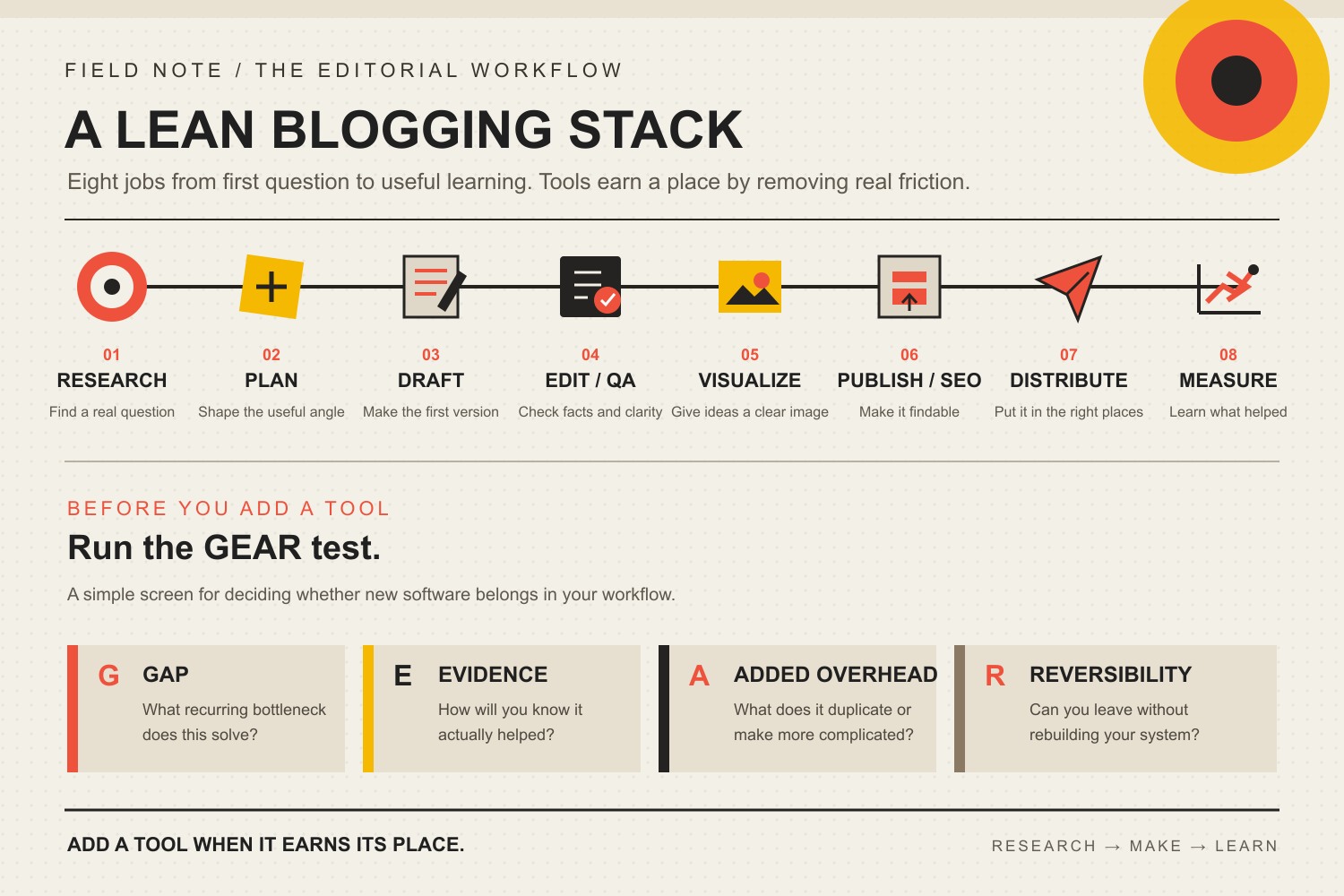
    The most important business blogging tools are the ones that cover the jobs your content system actually has to do: research, planning, drafting, editing, visuals, publishing and SEO, distribution, and measurement. You do not need a 40-app shopping spree. You need a small stack that removes recurring friction without creating another system your team has to babysit.

    If you are still deciding how blogging fits into your business, start with our guide to building a blogging and podcasting program. If the program already exists, this guide helps you decide which tools deserve a place in it.

    TL;DR: Build the Minimum Viable Blogging Stack First

    • Research: start with search itself plus first-party search-performance data. Add a specialist keyword suite when research volume or competitive analysis becomes a real bottleneck.
    • Plan: use one source of truth for briefs, outlines, assignments, and evidence. The tool your team already uses is often better than a fashionable replacement.
    • Draft: use a reliable editor. AI can accelerate ideation and first passes, but strategy, expertise, facts, and final judgment still need an accountable human.
    • Edit and QA: build a repeatable review checklist for accuracy, voice, links, evidence, accessibility, and conversion intent.
    • Visualize: use one design workflow for featured images, diagrams, and useful screenshots. Do not decorate weak ideas with prettier pixels.
    • Publish and optimize: use a CMS plus one SEO layer. A plugin score is a diagnostic, not an editorial director.
    • Distribute: start with the channels you already own. Add scheduling and repurposing software only when manual handoffs are consistently wasting time.
    • Measure: combine search visibility, on-site behavior, and business outcomes. Traffic alone is not the finish line.

    Before you add a paid tool, run it through Scope Design’s GEAR Test: Gap, Evidence, Added overhead, Reversibility. If you cannot name the bottleneck, define the result, explain the new complexity, and leave cleanly later, keep the company card in your wallet.

    The Most Important Blogging Tools Cover Eight Jobs

    Most “best blogging tools” articles start with products. That is backwards. A tool is useful only because it performs a job inside a larger content workflow.

    At Scope Design, the durable sequence is closer to: understand the business job, research the audience and query, build the brief, draft, verify, publish, distribute, measure, and improve. That is also why a blogging stack belongs inside a broader content marketing strategy and a coherent small business marketing system. If the strategy is fuzzy, buying more software mostly lets you execute the fuzziness faster.

    This distinction matters because products change constantly. Free tiers shrink. AI features get bundled into tools you already pay for. A standalone feature becomes native six months later. A decision framework ages much better than a 2026 shopping list.

    Use the Scope Design GEAR Test Before Adding Another Tool

    The GEAR Test is a simple way to separate a real capability gap from software FOMO.

    Eight stages in a lean business blogging workflow, followed by the GEAR test: Gap, Evidence, Added overhead, and Reversibility.

    G — Gap: what recurring bottleneck does this solve?

    “It has AI” is not a gap. “Our editor spends three hours every week turning interview transcripts into structured briefs” is a gap. Name the job, the person who owns it, and the friction you are trying to remove.

    E — Evidence: how will you know it helped?

    Decide what should change before the trial starts: research time, revision cycles, publishing errors, content throughput, qualified impressions, assisted conversions, or another observable result. Hope is not an analytics strategy.

    A — Added overhead: what does it duplicate or complicate?

    Every app has a second price tag: setup, permissions, training, integrations, data cleanup, notifications, billing, and the “where the hell did we save that?” problem. If a new tool duplicates 80 percent of a system you already own, the last 20 percent needs to earn the mess.

    R — Reversibility: can you leave without rebuilding the company?

    Check exportability, content ownership, file formats, integrations, and what happens when the subscription ends. The best tool today can become an expensive hostage situation tomorrow if your data and process cannot move.

    The Eight Jobs Your Business Blogging Stack Needs to Cover

    1. Audience and keyword research tools

    Research tools should help you answer three questions: What is the customer actually asking? What page should own that intent? What evidence will make the answer useful?

    Start with Google Search, the questions and result formats you can observe directly, and Google Search Console performance data for pages you already own. Search Console is first-party evidence about how your pages and queries perform in Google Search, which makes it more useful for your own site than another generic “content score.”

    Specialist suites such as Ahrefs Keywords Explorer and Semrush keyword research tools can expand keyword discovery, competitive analysis, and prioritization. You do not automatically need both. Pay for deeper research when the volume of work, competitor analysis, or time saved makes the subscription cheaper than the bottleneck.

    Also separate topic selection from tool selection. Our business blogging practices guide covers the operating habits that make a blog useful. A keyword database cannot rescue a weak business question.

    2. Planning and source-of-truth tools

    Your planning layer needs to hold the brief, target audience, business goal, sources, outline, assignments, status, links, and next action. Google Docs, Microsoft 365, Notion, Trello, Asana, ClickUp, or a spreadsheet can all work. The brand matters less than whether the team knows where the truth lives.

    A second planning tool usually creates more drag than leverage. If sales keeps customer questions in one place, marketing keeps the calendar in another, and writers keep sources in private documents, fix the information flow before shopping for a shinier board.

    3. Drafting and AI-assisted writing tools

    A good drafting tool makes it easy to write, comment, compare revisions, preserve sources, and hand work to the next person. For many teams, the boring answer is still a collaborative document editor.

    AI tools can help with ideation, interview synthesis, outline options, first drafts, restructuring, and repurposing. They are much less trustworthy when you ask them to invent expertise, choose strategy without context, or produce factual claims without verification. If you want the deeper workflow, our ChatGPT for marketing guide focuses on defining the job, grounding the prompt, and evaluating the output instead of treating the model like a magic intern.

    The rule is simple: use AI to reduce mechanical effort, not accountability. Somebody still owns the argument, the evidence, the client voice, and the decision to publish.

    4. Editing and factual-QA tools

    Grammar and style assistants can catch friction. Commenting and version history can make collaboration less painful. Neither one proves the article is correct.

    Your real QA system should check the claim against its source, confirm dates and qualifiers, remove unsupported certainty, verify internal and external links, inspect headings and alt text, and ask whether the article does the business job defined in the brief. A polished hallucination is still a hallucination wearing a tie.

    5. Visual-content tools

    For many articles, one design tool can cover featured graphics, diagrams, social crops, and simple charts. Canva and Adobe Express are common choices. Screenshots are useful when they demonstrate a real interface or result. Custom design is worth the extra effort when the visual itself explains an original model, comparison, process, or piece of evidence.

    Do not add images because a checklist says “blog posts need images.” Add a visual when it improves comprehension. Decorative wallpaper is still wallpaper.

    6. Publishing and on-page SEO tools

    Your CMS should let you publish accessible, indexable, maintainable content without requiring a developer for every comma. If your business site already runs on WordPress, you usually do not need a second “blog platform” just because a roundup ranked one higher.

    Use one SEO layer for titles, descriptions, canonicals, robots settings, structured data, and basic content checks. Then keep the hierarchy straight. Google says its ranking systems are designed to surface helpful, reliable, people-first content. A green plugin light can expose a missed field; it cannot decide whether your explanation deserves to exist.

    7. Distribution and repurposing tools

    Publishing is not distribution. Your workflow still needs a path into email, social channels, sales conversations, customer support, and future derivative content.

    Start with the native scheduling and publishing capabilities of the channels you actually use. Add a cross-channel scheduler, transcription tool, clipping tool, or automation layer when the same handoff happens often enough to become expensive. Our RECAST content-repurposing workflow is built around adapting a strong source asset for a new audience or decision, not spraying the same paragraph everywhere and calling it omnichannel.

    8. Measurement and improvement tools

    A useful measurement stack separates three different questions: Can search engines find and understand the page? Are real people engaging with it? Does that attention contribute to a business outcome?

    Use Search Console for Google search-performance evidence, Google Analytics for event-based website behavior, and Bing Webmaster Tools as a separate first-party search signal. Then connect those systems to your actual inquiry, CRM, ecommerce, or sales process where possible.

    Do not assume analytics is a perfect lead ledger. Missing events, consent behavior, attribution rules, bot traffic, direct traffic, and handoffs into phone or email can distort the picture. Measure what the tools can support, disclose the gaps, and avoid making the dashboard sound smarter than it is.

    A Minimum Viable Business Blogging Tool Stack

    For a small business, the best blogging tool stack is often the one you can explain on a single screen. Use this as a starting architecture, not a mandatory vendor list.

    JobStart withPay for a specialist when…
    ResearchSearch + first-party search dataKeyword discovery, competitor analysis, or research volume repeatedly consumes expensive time.
    PlanningYour existing shared document/project systemHandoffs, approvals, ownership, or reporting are breaking at scale.
    DraftingCollaborative editor; AI optionalStructured production volume or specialized collaboration creates a proven gap.
    Edit + QAReview checklist + version historyEditorial volume, compliance, or multi-reviewer workflows make manual QA unreliable.
    VisualsOne design toolBrand control, complex data, custom illustration, or production volume requires more.
    Publish + SEOCMS + one SEO layerGovernance, technical SEO, integrations, or multi-site work exceed the native workflow.
    DistributionNative channelsRecurring cross-channel scheduling or repurposing is consuming measurable staff time.
    MeasurementSearch Console + GA4 + Bing Webmaster ToolsAttribution, CRM integration, dashboards, or multi-client reporting require a deeper layer.

    Notice what is missing: a requirement to buy three keyword platforms, two AI writers, four schedulers, and a productivity app whose main job is reminding you to use the productivity app.

    When Is a Paid Blogging Tool Actually Worth It?

    A paid tool earns its place when the value is concrete. Good reasons usually fall into five buckets.

    1. It saves recurring skilled time. Saving ten minutes once is not a business case. Saving four hours every month on a repeatable job might be.
    2. It gives you evidence you cannot reasonably get another way. Competitive keyword data, crawl diagnostics, brand monitoring, or specialized research can justify a paid layer.
    3. It reduces meaningful risk. Better approval, accessibility, security, backups, or compliance workflows can be worth more than raw speed.
    4. It connects systems that otherwise require manual rework. Integration is valuable when it removes a recurring handoff, not when it merely creates more synchronized clutter.
    5. It remains reversible. You can export the data, understand ownership, and leave without rebuilding the process from scratch.

    If you cannot tie the subscription to one of those outcomes, wait. Use the free or native capability until the constraint becomes obvious.

    What Our Audit of This Exact Article Taught Us

    We did not protect the old article just because it had been online for years. We audited the page the same way we would audit a client’s content before deciding what deserved to survive.

    Signal checkedObservation on August 20, 2026What it supports
    GA4, last 12 complete monthsNo Organic Search landing-page rows. Across all channels, 2 Direct sessions, 0 engaged sessions, 0 configured key events. Prior comparison returned no rows.The sample is far too small for behavior or conversion conclusions. There is no measured organic footprint forcing us to preserve unsupported copy.
    Google Search Console1 impression, 0 clicks for the exact page in the current 12-month period; no rows in the prior period. URL Inspection says the page is submitted and indexed with the established URL as canonical.Google knows the page, but demonstrated search equity is minimal. Keep the stable address and improve the page’s job instead of manufacturing a migration.
    Bing Webmaster Tools0 clicks and 0 impressions for the URL; Bing has known the page since 2024 and crawled it in July 2026. Site sitemaps report success.There is crawl history but no meaningful Bing traffic footprint to protect.
    UbersuggestNo ranking keywords or exact-URL backlinks were returned for the page.Third-party evidence also shows little page-level equity, so weak claims and a bloated tool catalog do not deserve preservation.

    That evidence does not prove blogging is worthless, that readers hated the page, or that this rewrite will rank. Scope’s analytics also has known attribution and key-event limitations. It supports a narrower editorial decision: preserve the established URL, remove claims we cannot substantiate, give the page one defensible job, and connect it to the right cluster.

    The old version included time-stamped “2025” trends, unsupported lead-generation percentages, a “most profitable niches” list, an unverified AI-adoption statistic, an arbitrary ideal word-count range, and universal “best” claims about products. Those are gone. A useful tool guide should make the decision easier, not make the copy sound certain.

    Frequently Asked Questions About Blogging Tools

    What is the best tool for blogging?

    There is no universal best tool because blogging is not one job. A CMS can publish but cannot decide the right topic. A keyword suite can research but cannot supply your expertise. An AI assistant can draft but cannot own the facts. Start by identifying the bottleneck, then choose the smallest tool that solves it.

    What blogging tools do beginners need?

    A beginner business stack can be very small: a CMS, a shared document or planning space, search and first-party search data, one design tool, one SEO layer, and basic analytics. Add specialized software after the workflow reveals a recurring constraint.

    Are free blogging tools enough for a small business?

    Often, yes, especially while the content program is small. Free and native tools can cover planning, writing, basic design, publishing, Google search reporting, Bing search reporting, and analytics. The reason to pay is not “professional bloggers pay for tools.” Pay when depth, scale, collaboration, automation, or risk reduction creates a measurable return.

    Do I need Ahrefs or Semrush for business blogging?

    No. Both are capable specialist research platforms, but neither is a prerequisite for publishing useful business content. A paid SEO suite becomes easier to justify when you perform regular keyword research, competitor analysis, backlink work, site audits, or multi-page planning and the extra data saves enough time or improves enough decisions to pay for itself.

    Should a small business use AI tools to write blog posts?

    AI can be useful for brainstorming, organizing research, drafting options, restructuring, and repetitive transformation. It should not be allowed to invent customer experience, case studies, statistics, sources, or technical certainty. Treat AI as an accelerator inside a controlled editorial workflow, not as the person accountable for the answer.

    What platform do most business bloggers use?

    The more useful question is which platform fits your existing website, ownership requirements, publishing workflow, integrations, and maintenance capacity. If your business website already has a capable CMS, splitting the blog onto another platform can create more SEO, analytics, branding, and governance work than it solves.

    How many blogging tools should a small business use?

    Use as few as possible while covering the eight jobs reliably. One product may cover several jobs. Two products may be justified for a job with different owners or requirements. The number is not the target; low friction, clear ownership, evidence, and reversibility are the target.

    How do I know whether a blogging tool is helping?

    Define the expected change before you buy it. Measure something the tool should actually influence: hours saved, errors reduced, approval cycles shortened, pages researched, qualified impressions gained, content reused, or attributable business actions. If you cannot connect the tool to a result after a reasonable trial, remove it or redefine the job.

    Your Tool Stack Should Get Smaller as the System Gets Clearer

    A mature content operation does not necessarily have more software. It has clearer ownership, cleaner evidence, better handoffs, and fewer mystery subscriptions. The best stack is boring in the right places.

    Start with the eight jobs. Run every new purchase through GEAR. Keep the systems that create evidence or remove recurring friction, and kill the ones that mostly create tabs.

    If the bottleneck is bigger than software — unclear topics, weak search ownership, inconsistent production, disconnected analytics, or no conversion path — Scope Design’s content and SEO work can help diagnose the system before you buy another tool to treat the symptom.