Tag: AI infrastructure

  • Local AI vs Cloud AI: What Should a Small Business Actually Own?

    Local AI vs Cloud AI: What Should a Small Business Actually Own?

    Local AI vs cloud AI is not really a choice between “owning AI” and “renting AI.” It is a choice about where a particular inference workload should run. A small business can use cloud models and still own its durable knowledge, workflow state, prompts, relationships, approvals, and export path. It can also run models locally and still create a fragile, proprietary system it cannot recover or move.

    The better rule is: own the durable business layer, then choose local, cloud, or hybrid AI by workload. That extends the same principle we use for business technology systems: understand what the system does, who controls it, how it is supported, how it recovers, and how you leave it.

    TL;DR: Local AI vs cloud AI is a workload decision, not an ownership test

    • Local AI can reduce data movement, work without an internet connection, lower network latency, and give you more direct control over the inference environment.
    • Cloud AI can provide larger model choices, managed infrastructure, elastic capacity, easier collaboration, and less model-operations work.
    • Local does not automatically mean secure. You become responsible for the device, network, model files, updates, backups, access control, and other parts of the data path.
    • Cloud does not automatically mean you have surrendered your business knowledge. Ownership depends on what you can administer, export, recover, and replace.
    • Hybrid AI is useful when some workloads benefit from local processing while others benefit from cloud capability or scale.
    • Your business should keep durable control of canonical knowledge, structured records, relationships and provenance, prompts/instructions, workflow state, permissions, evaluations, and an export/reconstruction path.
    • You do not have to own every model server or GPU if the provider is replaceable and the business layer remains portable.

    Ownership is not the same thing as where the model runs

    A locally running model may feel more “owned” because the software and model weights are on hardware you control. That can be valuable. But physical location is only one part of operational ownership.

    Imagine two systems. Company A runs an open-weight model on a workstation but stores its only useful prompts, workflow logic, relationships, corrections, and project state inside one proprietary application. Company B calls a cloud model through an API, while its approved documents, structured knowledge, prompts, relationships, evaluations, and workflow records live in systems it can export and rebuild.

    Company B may have the more portable architecture even though the inference happens in the cloud. That is why our AI knowledge-base architecture separates canonical business knowledge from replaceable indexes and models.

    Local AI vs cloud AI: the practical comparison
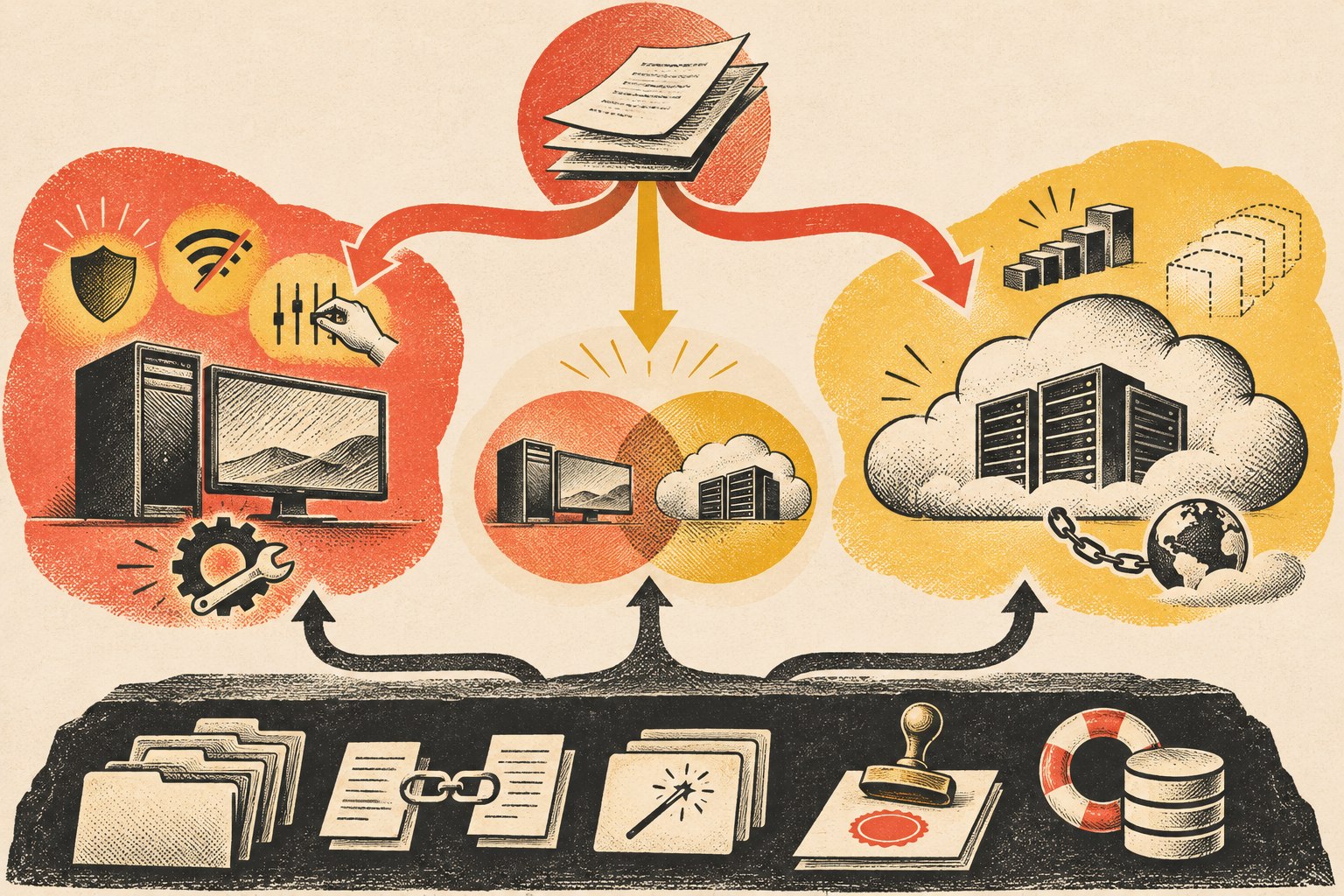
    Workloads route to local, cloud, or hybrid AI while a separate business-owned layer preserves knowledge, prompts, permissions, workflow state, and recovery.
    Compare local AI vs cloud AI across the workload dimensions that actually change the architecture—not on a generic “own versus rent” slogan.
    Decision area Local AI Cloud AI
    Data movement Processing can stay on the device or private environment Authorized context is sent to a remote service
    Model capability Limited by hardware and locally available models Easy access to large and frequently updated hosted models
    Latency No internet round trip; performance depends on local hardware Network latency exists; provider infrastructure can offer substantial compute
    Offline use Possible when the model and required data are local Normally depends on connectivity to the provider
    Scale You provision and operate capacity Provider infrastructure can scale more elastically
    Maintenance You own model/runtime updates, security, monitoring, and hardware Provider handles more infrastructure/model operations
    Cost shape Hardware and operating costs are more fixed Usage or subscription costs are more variable
    Control Greater direct control over inference environment Greater dependency on provider APIs, policies, and availability

    Microsoft’s current local-versus-cloud AI guidance uses essentially these same decision dimensions: privacy and security, available resources, maintenance, latency, scalability, connectivity, model complexity, tooling, customization, and control. The point is not that one column wins. The workload determines which tradeoffs matter.

    When local AI is the better fit

    Local AI becomes attractive when the value of keeping inference close to the data or user is greater than the operating burden you take on.

    • Sensitive local data: the workflow can avoid sending some inputs to a remote inference provider.
    • Offline operation: the job must continue in places with weak or unavailable internet access.
    • Latency-sensitive work: local processing avoids a network round trip.
    • Predictable repetitive workloads: owned hardware may make sense when a stable job runs often enough to justify it.
    • Specialized narrow tasks: a smaller local model may be entirely adequate for classification, extraction, search, or another bounded job.
    • Direct environmental control: the organization has a reason to control model versions, runtime changes, or inference availability itself.

    But “local” is not a security certification. If the local machine is poorly patched, credentials are shared, logs leak sensitive data, backups are unmanaged, or anyone can reach the model endpoint, you have simply moved the risk into infrastructure you now operate.

    When cloud AI is the better fit

    Cloud AI is often the practical default when the business wants access to strong models without becoming an AI infrastructure operator.

    • Complex or changing workloads: the business benefits from access to more capable models and frequent provider improvements.
    • Bursty demand: capacity can expand without buying hardware for the peak.
    • Fast experimentation: teams can try different models and workflows without deploying each one locally.
    • Distributed teams: remote applications and employees can reach the service without depending on one office machine.
    • Lower operating burden: the provider handles much of the model-serving infrastructure, updates, and scaling.

    The tradeoff is dependency. An API can change. A model can be retired. Usage pricing can change. The internet can fail. A provider can have an outage. That does not make cloud AI a bad choice; it means the rest of your architecture should make those dependencies visible and replaceable.

    Hybrid AI is a routing decision, not “buy everything”

    Hybrid architecture is useful when different jobs have different requirements. Microsoft’s Windows AI documentation explicitly describes applications that combine local and cloud AI rather than treating them as mutually exclusive choices.

    A hybrid small-business workflow might use a local model to classify documents, redact or extract sensitive fields, or answer from a bounded private corpus. It could then use a cloud model for a complex reasoning step after the allowed context has been prepared. Or it could use a local model as a degraded fallback when a cloud service is unavailable.

    The architectural rule is simple: route the job to the environment that fits the job. Do not build two complete AI stacks merely because “hybrid” sounds sophisticated.

    What a small business should actually own

    The most important assets are usually not the model weights. They are the business context and operating system built around the model.

    Canonical business knowledge

    Policies, service knowledge, pricing rules, approved documentation, project decisions, expert process, customer-facing guidance, and other institutional memory should have an authoritative home outside one model’s memory.

    Structured records, relationships, and provenance

    Preserve fields, owners, dates, statuses, sources, relationships, and authority. Those are what let another retrieval system or model reconstruct the meaning rather than receiving a pile of flattened text.

    Prompts, instructions, evaluations, and workflow logic

    If a prompt encodes a business rule, version it. If an agent follows an approval workflow, store that logic. If you have test questions or expected outcomes, preserve them so a replacement model can be evaluated against the same job.

    Durable workflow state

    Pending jobs, approvals, retries, execution history, and important results should survive a model or runtime change. Our AI agent hosting guide treats this as a separate runtime concern because where the agent process runs is not the same thing as where inference happens.

    Administrative, export, and recovery control

    Know who can administer the system, how credentials are revoked, how data is exported, how a failed component is recovered, and what must be rebuilt if you change vendors. Ownership is operational, not rhetorical.

    What you do not necessarily need to own

    A small business does not automatically need to own GPUs, train a foundation model, operate a model-serving cluster, or self-host every dependency. Commodity infrastructure can be rented when renting it creates leverage.

    The key is whether the rented component can be replaced without rebuilding the business’s institutional memory. A cloud model is a manageable dependency when your data boundaries are clear, your business knowledge is portable, your workflow is not hard-coded to one provider everywhere, and you know what degraded operation looks like if the provider changes or disappears.

    Use the replacement test

    Before arguing about local AI vs cloud AI, ask a more revealing question:

    If this model or provider stopped fitting next quarter, what would we have to rebuild?

    • Could you point the workflow at another model without re-entering the company’s knowledge?
    • Could you export the records and relationships in usable form?
    • Do prompts, instructions, policies, and evaluation cases exist outside a hidden vendor UI?
    • Would approvals and pending jobs survive the change?
    • Do you know which capabilities truly require the current provider and which are generic?
    • Could the business operate in a degraded mode while migration happens?

    If those answers are strong, you can make pragmatic use of both local and cloud AI without confusing infrastructure ownership with business ownership.

    Local AI vs cloud AI FAQ

    Is it better to run AI locally?

    It is better when the workload benefits enough from local data processing, offline operation, direct control, or low network latency to justify the hardware and operating responsibility. It is not universally better.

    Is local AI more private than cloud AI?

    Local inference can reduce the need to send input to a remote model provider, which can be a meaningful privacy benefit. The entire system still matters: files, logs, backups, integrations, credentials, network access, and endpoint security can expose data regardless of model location.

    Can a business own its AI system while using cloud models?

    Yes. Keep durable business knowledge, records, prompts, workflows, evaluations, permissions, and export/recovery paths under your control, then treat the cloud model as a replaceable service where practical.

    What is hybrid AI?

    Hybrid AI uses local and cloud inference in the same broader system. A workflow might keep a sensitive or low-latency step local and route a more complex reasoning task to a cloud model. Hybrid should be driven by workload differences, not by a need to operate duplicate infrastructure.

    Does local AI eliminate vendor lock-in?

    No. You can still become dependent on a local runtime, model format, management tool, hardware platform, or proprietary application. Portability comes from separating the durable business layer from replaceable implementation components.

    Own the business layer; place inference where it fits

    The local-versus-cloud debate becomes much easier when you stop asking which infrastructure feels more like ownership. Keep the knowledge, rules, relationships, state, controls, and recovery path durable. Then use local AI where locality earns its operating cost, cloud AI where managed capability earns the dependency, and hybrid where the workloads genuinely differ.

    If you are deciding how much of an AI system should live locally, in the cloud, or across both, Scope Design can help map the durable business layer and the replaceable AI architecture around it.

  • Does Your AI Agent Need a Server? A Small-Business Guide to AI Agent Hosting

    Does Your AI Agent Need a Server? A Small-Business Guide to AI Agent Hosting

    No—an AI agent does not inherently need a dedicated server. It needs somewhere to run its agent logic, call tools, keep the state the workflow requires, and receive work. That runtime might be an employee’s computer, an office server, a VPS or container host, a serverless/job platform, or a managed agent service.

    The right AI agent hosting choice comes after the workflow is clear. Ask whether the agent must stay available while someone’s laptop is off, whether it needs to accept inbound events, what data and tools it must reach, how long work can run, where durable state lives, and who will patch, monitor, back up, and recover the runtime.

    TL;DR: Choose the smallest runtime that reliably supports the job

    • Local computer: good for prototypes, employee-triggered tools, and workflows that need direct access to local files or applications.
    • Office/on-prem server: useful when work must continue without one person’s computer and needs reliable access to local resources.
    • VPS or container host: a straightforward always-on option for APIs, background workers, queues, scheduled jobs, and modest production workloads.
    • Serverless or job platform: strong for event-driven or bursty work that starts, does a bounded job, stores the result, and stops.
    • Managed agent platform: useful when governance, identity, monitoring, scaling, and operating the agent matter more than controlling every infrastructure detail.
    • The model itself may still be hosted somewhere else. A locally running agent can call a cloud model, and a cloud-hosted agent can call a local/private service.
    • Keep durable workflow state outside one process or model session so work can resume after a restart, outage, or provider change.

    AI agent hosting is not the same thing as hosting the AI model

    This distinction clears up a lot of confusion.

    An agent is usually a software process that combines instructions, model calls, tools, permissions, and state. The model may be a hosted API. The agent process might run on a Windows PC in the office, while the reasoning call goes to a cloud model. Or the agent might run in a cloud container while one of its tools reaches a database or service you control.

    So “Does the AI need a server?” is really two questions:

    • Where does the agent runtime live?
    • Where does the model inference happen?

    Those do not have to be the same place. The broader local-versus-cloud question belongs to a different architecture decision. For AI agent hosting, focus first on the runtime that executes the workflow.

    Start with seven runtime questions

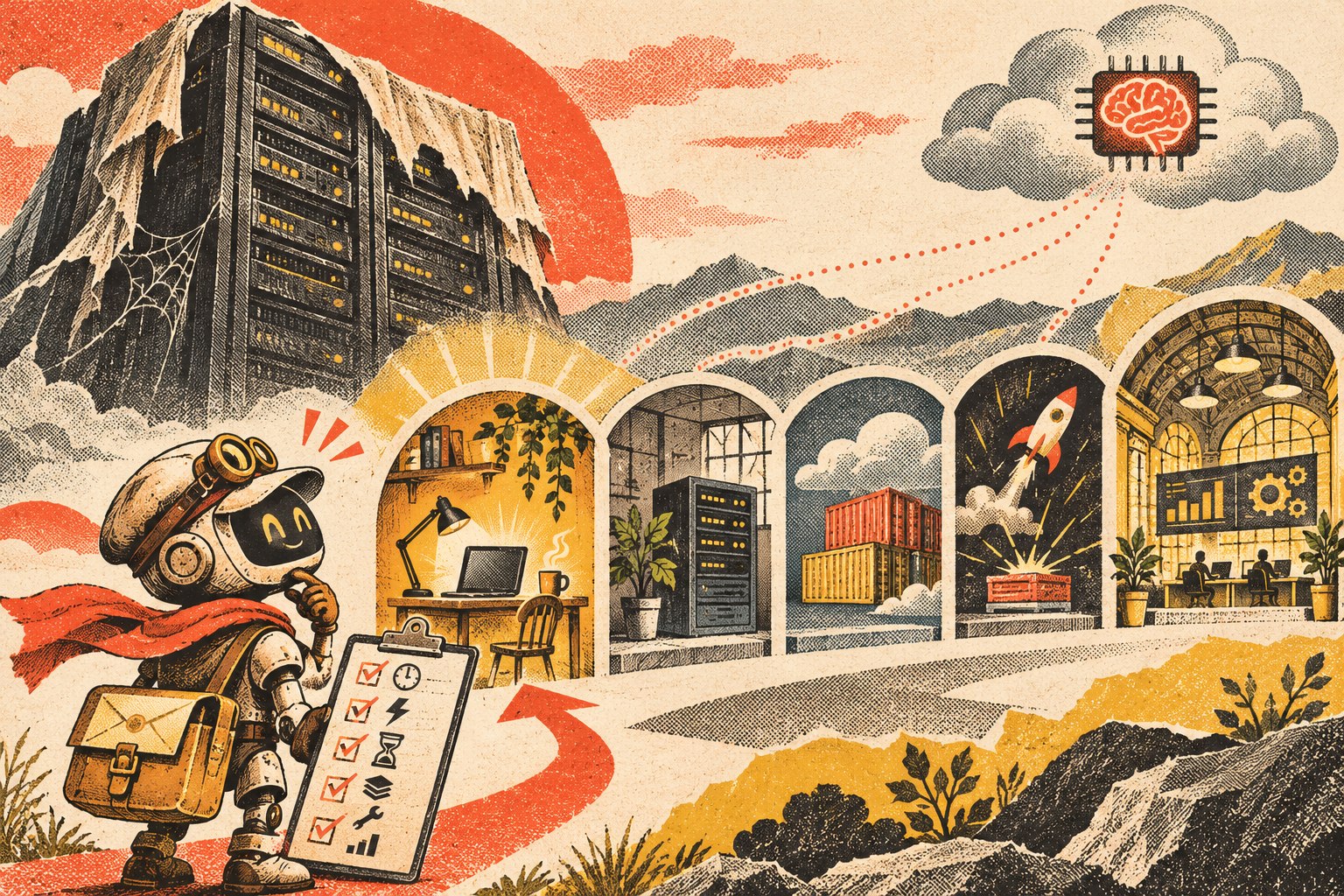
    Cutaway illustration of an AI agent moving between a local workstation, office server, container platform, and managed workspace, with the durable workflow layer beneath them.
    Choose the runtime from the workflow’s availability, access, state, and operating requirements—not from a generic “AI needs a server” assumption.

    1. Must the agent work while the user’s computer is off?

    If the agent only runs when an employee launches it, a local computer may be enough. If it must process work overnight, respond to a webhook at 2 a.m., or run on a schedule while everyone is away, it needs an always-available runtime somewhere.

    2. Does it need to accept inbound events?

    A workflow that starts from “employee clicks Run” is different from one that must receive a website form, payment event, email notification, CRM webhook, or external API request. Inbound events usually need a reliable endpoint or queue that remains reachable.

    3. What data and tools must it reach?

    Some agents primarily use cloud APIs. Others need files on an office network, a locally installed application, a device, a database behind a firewall, or a browser session tied to a particular machine. Put the runtime where access can be governed without creating unnecessary tunnels and credentials.

    4. How long can one job run?

    A short event-driven task fits different infrastructure than a workflow that may wait for a human approval, resume tomorrow, run browser automation for an hour, or maintain a long-lived connection. Long-running work usually needs durable orchestration rather than assuming one process will stay alive forever.

    5. What state has to survive a restart?

    Ask what happens if the process crashes halfway through a task. Pending work, approvals, job status, outputs, retries, and execution history should live in durable storage when they matter. Do not make a model conversation or one process’s memory the only record of what the business is waiting on.

    6. Who owns maintenance and recovery?

    Self-hosting gives you more infrastructure control and more infrastructure responsibility. Someone has to handle operating-system or container updates, secrets, backups, monitoring, logs, certificates, deployment, storage, and recovery. Managed hosting trades some control for less operating work.

    7. What happens when usage changes?

    A workflow that runs ten times a day has different scaling needs from a customer-facing agent that receives bursts of thousands of events. Choose for the workload you can reasonably expect, but avoid building enterprise infrastructure for a workflow that is still proving whether anyone needs it.

    Option 1: Run the agent on a local computer

    Local execution is often the right place to start. It is especially useful when the agent is an internal tool, is manually triggered, needs direct access to local files or desktop software, or is still being developed.

    • Good fit: prototypes, employee assistants, batch analysis, local file workflows, coding or browser tools used by one person.
    • Advantage: minimal infrastructure and easy access to the user’s local environment.
    • Limit: the workflow may stop when the machine sleeps, disconnects, restarts, leaves the office, or the user logs out.

    Do not move off a local computer merely because someone labels the software an “agent.” Move when the operating requirement changes.

    Option 2: Use an office or on-prem server

    An always-on office machine can be useful when the agent needs local network resources but should not depend on one employee’s workstation. That can include internal file shares, local databases, printers/devices, legacy applications, or workflows that should remain available during normal internet-service changes.

    The tradeoff is straightforward: the business now owns power, hardware, patching, backups, network security, monitoring, and physical failure recovery. “It runs in our office” does not automatically make the architecture safer or more resilient.

    Option 3: Use a VPS, application service, or container host

    For many small production agents, an ordinary always-on application runtime is enough. It can host an API, background worker, queue consumer, scheduler, connector service, or orchestration process without requiring a complex cloud architecture.

    Microsoft’s current Agent Framework hosting guidance explicitly separates managed hosting from self-hosted approaches. In self-hosted scenarios, the agent can live inside the application’s own runtime while the application takes responsibility for identity, authorization, storage, routing, deployment, and scaling.

    This option is attractive when you need a predictable always-on process and want control of the deployment without adopting a full managed agent platform. It also means someone must own the operations.

    Option 4: Use serverless functions or a job platform

    Serverless/job infrastructure is a strong fit when the workflow looks like:

    Event arrives → run bounded work → store the result → stop.

    Examples include classifying a new form submission, extracting data from a document, enriching a CRM record, or running a scheduled report.

    The catch is state and duration. If the agent must wait for a person, resume later, hold a long browser session, or coordinate many steps over time, store the workflow state externally and use durable orchestration. The runtime should be disposable; the business state should not be.

    Option 5: Use a managed agent platform

    A managed platform becomes attractive when running the infrastructure is no longer the interesting problem. Features such as authentication, policy enforcement, tracing, evaluations, retries, scaling, human escalation, and monitoring can be more valuable than controlling every process yourself.

    AWS’s agent hosting guidance describes provider-hosted, customer-hosted, and mixed deployment approaches, with security, compliance, scale, agility, and operating responsibilities affecting the choice. There is no single maturity ladder in which every “serious” business eventually moves to one model.

    The tradeoff is additional platform dependency. That is acceptable when it buys enough operating value—provided your durable knowledge, workflow state, and important business records remain portable.

    A practical AI agent hosting decision table

    Runtime Best when Watch for
    Local computer Manual/internal use, prototype, local files/apps Sleep/offline state, single-user dependency
    Office/on-prem server Always-on local-resource access Hardware, patching, network, backup responsibility
    VPS/container/app host Persistent API, worker, queue, scheduler Operations, secrets, deployments, monitoring
    Serverless/job platform Event-driven, bounded, bursty work Durable state, time limits, orchestration complexity
    Managed agent platform Governance/observability/scale are bigger problems than hosting Cost shape, platform dependency, export/replacement path

    Keep durable state outside the model session

    Whichever runtime you choose, preserve important state in a system designed to survive process restarts and model changes. That includes pending jobs, approvals, customer/project state, execution records, retries, and the authoritative knowledge the agent uses.

    This is the same ownership principle behind our OWNER Test for business technology: know what the system does, who supports it, how you recover it, and how you leave it.

    Do not overbuild the infrastructure before the workflow earns it

    A common mistake is designing for hypothetical scale before the business has proven that the agent deserves to exist. Multi-region infrastructure, complex queues, dedicated GPUs, elaborate failover, and several managed services may all be appropriate later. They can also bury a simple workflow under operating cost and complexity.

    Start with the smallest deployment that can test the real requirement. If the local tool has to become always-on, move it. If the persistent service becomes bursty, split event-driven work out. If governance and observability consume more engineering time than the agent itself, evaluate a managed platform. Architecture should follow evidence.

    AI agent hosting FAQ

    Does an AI agent need a server?

    No. It needs a runtime for its logic, tools, and state. That runtime can be a local computer, server, application/container host, serverless/job platform, or managed agent service.

    Can I run an AI agent on my PC?

    Yes. A local PC is often a good fit for prototypes, employee-triggered tools, and workflows that need local files or applications. It becomes a poor fit when the workflow must continue while the machine is asleep or offline.

    Does the model have to run on the same server as the agent?

    No. The agent runtime can call a cloud model API, local model service, or another provider. Runtime location and model-inference location are separate architecture choices.

    When should I move an AI agent to an always-on host?

    Move when the workflow needs reliable schedules, inbound events, shared access, background processing, persistent connections, or availability independent of one user’s device.

    Is serverless good for AI agents?

    It can be excellent for bounded, event-driven jobs. Long-running or human-in-the-loop workflows may still use serverless components, but they need durable state and orchestration rather than relying on one function invocation to remain alive.

    Host the workflow you actually have

    The infrastructure should disappear behind the business requirement. If a laptop is enough, use a laptop. If the workflow must run all night, give it an always-on runtime. If it is event-driven, use an execution model that fits. If operating the stack becomes the bottleneck, buy managed capability deliberately.

    If you are trying to decide where an AI workflow should run, Scope Design can help map the runtime, access, state, security, and operating requirements before you build infrastructure the workflow does not need.