Category: Business Technology & Systems

  • Design Technology Trends: What’s Worth Piloting—and What Can Wait

    Design Technology Trends: What’s Worth Piloting—and What Can Wait

    Design technology trends matter when they improve a real task enough to justify the new complexity. The most useful trends for businesses right now are AI-assisted design and prototyping, task-specific conversational interfaces, clearer data-rich experiences, selective spatial and 3D interaction, connected experiences across devices, and stronger performance and sustainability discipline. The mistake is treating every new capability as a feature your customers must experience.

    At Scope Design, we use a simpler rule: technology has to earn its interface cost. If a normal page, form, search box, dashboard, video, or human conversation can solve the problem with less friction, that simpler option is often the better design.

    Which Design Technology Trends Matter Now?

    Instead of ranking technologies by hype, separate them by how ready they are for a measurable business pilot.

    Decision Design technology Best reason to use it What to compare it against
    Pilot now AI-assisted exploration and prototyping Reduce the cost of exploring, summarizing, drafting, classifying, or generating variants while a human still owns the decision Current manual workflow and ordinary design tools
    Pilot now Task-specific conversational interfaces Help a user retrieve, explain, route, or complete a narrow job through natural language Search, navigation, forms, filters, FAQs, or live support
    Pilot now Data visualization and useful micro-interactions Make state, change, priority, progress, or consequence easier to understand Static tables, text, or generic animation
    Pilot selectively Spatial computing, VR/AR, and progressive 3D Presence, scale, spatial relationships, embodied practice, or configuration changes the task Video, 2D interfaces, web 3D, physical mockups, or hands-on practice
    Pilot selectively Voice-first and multimodal experiences Hands or eyes are occupied, speech is a genuine convenience, or multimodality improves access Touch, keyboard, text, search, or a mixed input model
    Pilot selectively Connected and cross-device experiences Context must follow the user across a real workflow One well-designed primary interface with notifications or handoffs
    Watch Web3 without a decentralization requirement, 6G-dependent concepts, quantum UI promises, emotion-reading AI Only when a specific constraint makes the technology necessary The proven system you can operate today

    This classification is deliberately conservative. A trend can be technically impressive and still be the wrong interface for your customer, team, budget, or operating environment.

    Why a Trend List Is the Wrong Business Question

    Most trend roundups ask, “What is new?” A business has to ask something harder: what changes the outcome?

    Every new interaction model adds some combination of design work, code, content, training, governance, testing, analytics, accessibility requirements, privacy/security exposure, vendor dependence, and maintenance. That is the interface cost. The cost may be worth paying. But “people will think this is cool” is not a durable business case.

    The same principle appears elsewhere in Scope Design’s work. Our small business digital transformation framework starts by inspecting the system before buying more technology. Our deeper AI automation for business guide starts with the workflow, owner, exceptions, and evidence before granting software more autonomy. Emerging design technology deserves the same discipline.

    Use the Scope Design EARN Test Before You Build

    We use the EARN Test to decide whether a design technology deserves a pilot. It is designed to stop teams from jumping from an interesting demo to an expensive implementation without proving the middle.

    E — Existing friction

    Name the expensive, slow, confusing, inaccessible, risky, or error-prone task first. “We should add AI” is not a problem statement. “Our service team spends hours finding the same approved answer across five systems” is.

    A — Advantage over the simpler option

    Explain why the new interaction materially improves the task. Does spatial scale reveal something a flat screen hides? Does conversational input reduce a complex retrieval problem? Does AI reduce repetitive exploration while preserving human approval? If the answer is only “it feels more modern,” the advantage is not established.

    R — Real-world constraints

    Test the experience under the conditions that will actually exist: slower devices, assistive technology, poor connectivity, authentication, privacy requirements, support staffing, integrations, content updates, and a user who does not want to learn your clever interface. A concept that works only in the demo room is still a concept.

    N — Numbers before novelty

    Define the baseline, pilot metric, success threshold, and stop condition before implementation expands. Measure the job the technology was hired to do: completion time, error/rework rate, successful self-service, qualified inquiries, training performance, task success, support burden, or another outcome the business actually owns.

    Decision rule: If a technology cannot clear all four EARN tests, shrink the pilot—or use the simpler option.

    1. AI-Assisted Design Is Most Useful Before It Becomes Autonomous

    AI-assisted design earns its place fastest in exploration: summarizing research, generating alternatives, drafting interface copy, classifying feedback, prototyping flows, producing rough visual directions, checking patterns across data, or preparing variants for human review. Those uses reduce iteration cost without pretending the model owns the business decision.

    As the workflow becomes more autonomous or customer-facing, the design problem changes. Now permissions, source quality, error handling, human escalation, logs, privacy, maintenance, and shutdown paths matter as much as the prompt. NIST’s Generative AI Profile is useful here because it treats generative AI as a lifecycle risk-management problem across design, development, use, and evaluation—not as a magic productivity layer.

    For complete workflow architecture, governance, and ownership, use our AI automation framework. This article stays focused on the interface decision: where AI changes the user or design task enough to deserve a test.

    2. Conversational Interfaces Work Best When the Job Is Narrow

    A chat or voice interface can be excellent when users have many possible questions but the approved knowledge and actions are bounded. Examples include finding a policy, explaining a product difference, routing an inquiry, preparing a recommendation from known inputs, or helping a user navigate a complex catalog.

    The bad version replaces a perfectly good form, menu, or search box with a slow conversation. If users already know what they need and the input is structured, structure is a feature. Conversation is most useful when natural language reduces cognitive work—not when it adds turns to a task that used to take one click.

    Design the fallback before the personality. Users need a visible way to search, browse, correct the system, reach a person, or complete the task without conversation. Multimodal design is stronger than voice-only theater because it lets people choose the input and output mode that fits the moment.

    3. Spatial Computing and Immersive Design Need an Immersion Advantage

    Spatial computing, VR, AR, and 3D experiences become useful when space, scale, presence, movement, or safe repetition adds information that a normal screen cannot provide as well. That makes training and simulation, 3D design review, selected guided-work scenarios, and complex product/configuration experiences more credible than generic “put the website in VR” concepts.

    A 2025 systematic review and meta-analysis of 53 mixed-reality vocational-training studies found positive average effects across behavioral, cognitive, and affective outcomes, but also substantial heterogeneity. That is exactly why “VR improves learning by X%” is the wrong takeaway. The evidence supports promising and task-dependent, not guaranteed. See the peer-reviewed review for the underlying analysis.

    Immersive design also carries unusual constraints. W3C’s XR Accessibility User Requirements describes needs such as multimodal access, motion-agnostic interaction, personalization, orientation, and safe ways to pause or exit. NIST’s immersive-technology cybersecurity and privacy report documents the field’s privacy, cybersecurity, and usable-security challenges. On the web, MDN still marks the WebXR Device API as limited availability and experimental, so browser/device support must be tested rather than assumed.

    If immersive technology clears the EARN Test, our enterprise VR implementation guide goes deeper on use-case fit, platforms, lifecycle cost, accessibility, security, pilot metrics, and scale/no-scale decisions.

    4. Data Visualization and Micro-Interactions Should Explain State, Not Decorate It

    Data-rich interfaces have become easier to build, which makes it easier to build bad ones too. A useful visualization answers a decision: what changed, what matters, what is abnormal, what should happen next, or how two choices differ. More charts are not automatically more insight.

    The same is true for micro-interactions. Small motion and feedback can confirm a save, reveal progress, explain a transition, prevent an error, show that a filter changed, or make a complex control easier to understand. Animation that exists only to make the interface feel expensive often increases distraction and implementation cost without improving the task.

    This is one reason to define the success metric before designing the effect. If the goal is fewer errors, measure errors. If the goal is faster comparison, measure task time or successful choice. Do not use “engagement” as a universal substitute for usefulness.

    5. Connected and Cross-Device Experiences Need a Real Handoff

    Connected experiences are valuable when context genuinely needs to move with the user: a field technician moving between equipment and a tablet, a customer configuring a product on the web and continuing in a showroom, or a team moving from monitoring to an assigned action in another system.

    The failure mode is ambient noise: every device, dashboard, notification, wearable, and assistant demanding attention because the technology makes it possible. Good connected design is a handoff system. It should preserve useful state, reduce duplicate entry, make ownership visible, and fail safely when one connection disappears.

    Performance, Accessibility, Privacy, and Sustainability Travel With Every Trend

    These are not “cleanup” categories after the innovative part. They are part of the design technology decision.

    • Performance: Google’s current Core Web Vitals measure loading, responsiveness, and visual stability through LCP, INP, and CLS. The current “good” thresholds are LCP at 2.5 seconds or less, INP at 200 milliseconds or less, and CLS at 0.1 or less at the 75th percentile. See web.dev’s Web Vitals guidance.
    • Accessibility: New input modes need alternatives, clear focus/feedback, reduced-motion consideration, keyboard and assistive-technology paths, and usable fallbacks. Novelty does not suspend user diversity.
    • Privacy and security: AI, sensors, spatial interfaces, personalization, and connected-device experiences can collect or infer more context. Data minimization, permission boundaries, logs, retention, and human ownership belong in the design.
    • Sustainability: W3C’s 2026 Web Sustainability Guidelines are still a Draft Note, not a finalized W3C Recommendation. They are nevertheless useful as a working framework because they connect user-centered design, efficient development, infrastructure, business strategy, and measurable goals instead of reducing sustainability to one carbon badge.

    A durable web and application technical foundation gives teams more room to experiment without turning every pilot into performance debt or a maintenance trap.

    Design Technologies Most Businesses Should Watch Instead of Build Around

    Some technologies are real but do not yet create a strong default business case for most digital experiences. Watching is not the same thing as dismissing.

    • Blockchain/Web3 without a decentralization requirement: if the user does not need shared trust without a central operator, the architecture may add more burden than value.
    • 6G-dependent experience concepts: design for the networks users actually have. Better progressive loading, compression, caching, and graceful degradation usually create value sooner.
    • Quantum-computing interface promises: quantum research may transform particular computational problems, but “quantum-powered UX” is not an actionable interface strategy for an ordinary business today.
    • Emotion-reading AI as a default personalization layer: inferring emotion from faces, voices, or behavior raises accuracy, context, consent, and privacy questions. Do not build a customer experience around a confidence score the user never asked for.

    The useful question is not whether these technologies will ever matter. It is whether they solve a problem you can define, test, operate, and measure now.

    Run a Four-Week Design Technology Pilot

    You do not need a transformation program to learn whether a trend earns its place. Use a small pilot that produces a decision.

    Week 1: Baseline the problem

    Choose one task and record the current result. Who does it? How long does it take? Where do users fail or abandon? What errors, handoffs, support requests, or accessibility barriers exist? What would meaningfully improve?

    Week 2: Prototype the cheapest credible alternative

    Build only enough to test the supposed advantage. Compare the new technology with the simpler option, not with a deliberately bad baseline. A clickable prototype, bounded AI assistant, browser-based 3D proof, or instrumented workflow may be enough.

    Week 3: Test with real constraints

    Use representative people, devices, network conditions, accessibility needs, data rules, and handoffs. Capture where the system requires explanation or rescue. Those moments are part of the product, not user error.

    Week 4: Compare and decide

    Compare the pilot with the baseline. Scale when the advantage is meaningful and operational ownership is clear. Revise when the idea works but a constraint is blocking it. Stop when the simpler option produces the same outcome with less burden. A stopped pilot can be a successful decision.

    What Auditing This Exact Article Changed

    We applied the same evidence standard to this revision. The old article contained a large number of exact performance percentages and adoption claims with no saved evidence supporting them. We removed them rather than laundering old specificity into new copy.

    Signal checked Observation on August 21, 2026 What it supports
    GA4 No exact-path rows in the Scope properties checked over the available review window Traffic is too small for behavior or conversion conclusions.
    Google Search Console No exact-page query rows; URL Inspection reports “Discovered – currently not indexed” The page needs clearer usefulness and internal support; this is not evidence for changing the URL.
    Bing Webmaster Tools URL recognized; 0 current clicks and 0 impressions No Bing performance equity requires the old copy.
    Ubersuggest No ranking-keyword data for the exact page Do not preserve unsupported claims for an SEO footprint we cannot demonstrate.

    Those observations do not prove the subject is unimportant, that nobody read the page, or that this revision will rank. They support a narrower editorial decision: preserve the established address, remove claims we cannot substantiate, give the page one defensible job, and connect readers to the deeper articles that own implementation detail.

    Frequently Asked Questions About Design Technology Trends

    What design technology trends matter most right now?

    For most businesses, the most actionable design technology trends are AI-assisted exploration and prototyping, narrow conversational interfaces, better data visualization, useful micro-interactions, selective spatial/3D experiences, connected cross-device workflows, and performance/accessibility/sustainability discipline. The best choice depends on the task, not the trend’s popularity.

    How should a small business choose which design technology to test?

    Start with one costly or frustrating task and run the EARN Test: identify Existing friction, prove an Advantage over the simpler option, test Real-world constraints, and set Numbers before novelty. A small business usually gains more from one measured pilot than from adopting five technologies at once.

    Does every business need AI-assisted design?

    No. AI is useful when it reduces repetitive exploration, retrieval, drafting, classification, or variation while keeping the important decision owned. If an existing tool or process already solves the problem cheaply and reliably, adding AI may create more governance and maintenance than value.

    When is VR or spatial computing worth a pilot?

    It is strongest when presence, three-dimensional scale, embodied practice, spatial context, or safe repetition changes what a person can learn, inspect, understand, or decide. If video, ordinary web 3D, AR, or hands-on practice provides the same outcome with less friction, use the simpler medium.

    Which emerging design technologies should most businesses wait on?

    Most businesses should be cautious about architecting around Web3 without a decentralization need, experiences that depend on future 6G availability, “quantum UI” promises, or emotion-reading AI used as a default personalization layer. Watch the capability, but wait for a business problem that genuinely requires it.

    Turn the Trend Into a Testable Decision

    Design technology can create a real advantage, but the advantage rarely comes from being first to add the feature. It comes from choosing a problem where the technology changes the task, building the smallest credible test, operating it responsibly, and measuring whether it earned the extra complexity.

    If you are deciding whether AI, an interactive web experience, a custom app, a connected workflow, or an immersive interface belongs in your next project, Scope Design can help you define the use case, prototype the right level of technology, connect it to the systems you already own, and build around a measurable outcome instead of a demo.

    Sources and Further Reading

  • Gmail Aliases vs Google Groups: The 2026 Business Guide to Shared Email

    Gmail Aliases vs Google Groups: The 2026 Business Guide to Shared Email

    If your business uses addresses like info@, sales@, billing@, or support@, the important question is not what to name them. It is who needs to own the conversation and how the work should move after an email arrives.

    For most Google Workspace businesses, the choice is straightforward:

    • Use a Gmail/Google Workspace alias when one person owns the address and simply needs another professional address that lands in the same inbox.
    • Use a Google Group when one address should distribute messages to multiple people.
    • Use a Collaborative Inbox when a team needs to assign, track, and resolve conversations together.
    • Use Google Workspace’s new Shared Inbox feature when you need a true shared Gmail mailbox and the feature is available in your Admin console.
    • Use Gmail delegation when you need shared mailbox access but the native Shared Inbox feature has not reached your account yet.

    The wrong choice usually creates one of two problems: messages get lost because nobody clearly owns them, or teams start sharing passwords because the email setup was never designed for multiple people.

    Gmail aliases, Google Groups, and shared inboxes at a glance

    Option Best for Who receives the mail? Separate login? Team assignment?
    Google Workspace alias One person wearing multiple hats One user’s inbox No No
    Google Group Distribution to several people Group members No mailbox login required No, unless Collaborative Inbox is enabled
    Collaborative Inbox Shared team triage Group members plus Groups interface No standalone Gmail mailbox Yes
    Native Shared Inbox A true shared Gmail mailbox Delegated users Accessed by delegates Shared Gmail workflow
    Delegated Gmail account Shared Gmail fallback or legacy setup Delegates Account exists; delegates use their own accounts Shared Gmail workflow

    Google’s product terminology can be confusing because several features solve similar problems. The easiest way to choose is to start with the workflow rather than the feature name.

    First, what does “Gmail alias” actually mean?

    People use the phrase Gmail alias for several different things:

    1. A Google Workspace email alias added by an administrator, such as [email protected] routing to [email protected].
    2. Gmail’s Send mail as feature, which lets a user send from another verified address.
    3. Plus addressing, such as [email protected], which can help with filtering but is not a separate business identity.
    4. Variations of personal gmail.com addresses that Gmail treats as equivalent in certain situations.

    For a business, the first definition is usually the one that matters. This guide focuses primarily on Google Workspace aliases and shared business addresses.

    Google says a Workspace administrator can add up to 30 aliases per user at no additional cost. An alias routes mail to the user’s primary inbox, but it is not a separate Google Account. You cannot sign into Google Drive, Gmail, or other Google services using the alias itself.

    That limitation is useful because it tells you exactly when an alias is the right tool.

    The Scope Design OWN test: choose the email setup before you configure it

    Before creating info@, sales@, or support@, answer three questions.

    O: Who is the owner?

    Is one person clearly responsible for every message that reaches the address?

    If yes, an alias may be all you need. A solo business owner can receive info@, sales@, and billing@ in one inbox without creating three separate Workspace users.

    If multiple people may need to respond, keep going.

    W: What workflow happens after the message arrives?

    Does the team only need a copy of the message, or does someone need to claim it, assign it, track it, and mark it complete?

    A basic Google Group is excellent for distribution. A Collaborative Inbox is designed for shared triage because team members can take or assign conversations and mark them complete, duplicate, or as needing no action.

    N: Does the address need its own identity or mailbox?

    Does the address need a real Gmail mailbox with its own history, filters, contacts, and delegated access?

    If yes, use Google’s native Shared Inbox when it is available for your Workspace edition, or use a delegated Gmail account as the fallback.

    This is the distinction that prevents most messy email setups: an alias is another address for one person; a shared inbox is an operational workspace for multiple people.

    When a Google Workspace alias is the best choice

    An alias is ideal when one person has several public-facing roles.

    Imagine a small consulting business where Maya handles sales, billing, and general inquiries. Instead of paying for and managing separate users for sales@, billing@, and info@, those addresses can all be aliases of [email protected].

    Messages still arrive in Maya’s normal Gmail inbox. She can then configure Gmail to send from the alias so customers see the role address rather than her primary address.

    Use an alias when:

    • One person owns the messages.
    • The address does not need its own Google login.
    • You want a role-based address without another mailbox.
    • The address is temporary or tied to a project handled by one person.
    • You are preserving an old employee address by routing new mail to a current user during a transition.

    Do not use an alias when:

    • Multiple people need independent access to the same mailbox.
    • You need conversation assignment or shared status tracking.
    • The address needs its own Google identity.
    • You plan to share a username and password among staff.

    Google explicitly notes that an alias can belong to only one user. If several users need the same address, use Groups, delegation, or Shared Inbox instead.

    How to add a Google Workspace alias

    A Workspace administrator can add an alias in the Admin console under the user’s alternate email settings. Google’s current instructions are in its email alias documentation.

    After the alias is active, the user can configure Gmail’s Send mail as settings if they want replies to come from that address.

    When a Google Group is the better choice

    A Google Group gives multiple people a single group email address. Send one message to the Group, and the message can be delivered to its members according to the Group’s configuration.

    That makes Groups useful for addresses such as [email protected], [email protected], [email protected], and [email protected].

    The important distinction is that a basic Group is primarily a distribution and discussion tool, not a traditional Gmail mailbox.

    Use a basic Google Group when:

    • Several people should receive the same message.
    • You need a stable address even as team membership changes.
    • The team does not need a full shared-mailbox workflow.
    • You want permissions and membership controlled centrally rather than by manually maintaining forwarding rules.

    Google Groups can also be used for access control across Workspace, which makes a well-managed Group more useful than simply forwarding one address to several people.

    If you need a refresher on how cloud services and shared online resources fit together, Scope Design’s guide to how cloud storage works provides useful background.

    When to turn a Google Group into a Collaborative Inbox

    A Collaborative Inbox is a Google Group with additional workflow features enabled.

    Members with the right permissions can:

    • Take responsibility for a conversation.
    • Assign a conversation to another member.
    • Search by assignee or assignment status.
    • Mark a conversation complete.
    • Mark it as a duplicate or as requiring no action.

    That makes Collaborative Inbox a reasonable lightweight option for addresses such as support@ or requests@ where multiple people need visibility and accountability.

    Google’s current instructions explain how to make a Group a Collaborative Inbox.

    Collaborative Inbox works well when:

    • You want team ownership without buying another help-desk platform.
    • Conversation assignment matters.
    • The team is comfortable working partly in Google Groups rather than entirely in Gmail.
    • You need a clearer workflow than “everyone received a copy, so hopefully someone replied.”

    It is not the same as a normal Gmail inbox

    This matters because many businesses expect support@ to behave exactly like an employee’s Gmail mailbox. A Collaborative Inbox is still built on Google Groups. If your team strongly prefers a conventional Gmail mailbox, Google’s native Shared Inbox or a delegated Gmail account may be the better fit.

    Google Workspace now has a native Shared Inbox, but rollout is still phased

    This is the most important change to older advice about Google Workspace shared email.

    As of August 2026, Google documents a native Shared Inbox admin feature for Business Starter, Business Standard, and Business Plus. An administrator can create a mailbox and grant users access as delegates. Those delegates can read, send, and delete messages and work from a shared Gmail mailbox.

    However, Google also says the feature is being released in phases. If you do not see Set up a shared email address in your Admin console yet, Google currently recommends using delegated Gmail accounts instead. Existing delegated accounts can later be converted to a Shared Inbox when the feature reaches your account.

    Google’s current rollout instructions are in its Create a shared inbox documentation.

    Use native Shared Inbox when:

    • The option appears in your Admin console.
    • Several people need one shared Gmail mailbox.
    • You want a durable address such as sales@, office@, or support@ with its own message history.
    • You prefer delegated Gmail access over a Groups-based workflow.

    Because this feature is new and still rolling out, do not assume a tutorial written for somebody else’s Workspace account will match the controls you see today.

    Gmail delegation: the fallback when Shared Inbox is not available

    Email delegation allows users to access another Gmail mailbox from their own accounts. Delegates can read, send, and delete mail, but they do not need the mailbox owner’s password and cannot change that password.

    Google says work and school accounts can support up to 1,000 delegates, although it recommends much lower concurrent usage for normal performance.

    Delegation is useful when you need a true mailbox now but do not yet have Google’s native Shared Inbox option.

    A common pattern is:

    1. Create a dedicated Workspace account such as [email protected].
    2. Enable Gmail delegation for the organization.
    3. Grant the appropriate staff members delegate access.
    4. Staff open the delegated mailbox from their own Google accounts rather than sharing credentials.

    Google provides current instructions for delegating a user’s email address.

    Do not solve a shared-email problem by sharing a password

    A surprising number of “shared inboxes” are really just one user account whose password is known by several employees.

    Google specifically advises organizations to avoid this. Shared credentials can trigger account challenges or lockouts, make offboarding harder, and blur accountability over who actually sent or changed something.

    The better principle is simple: people should authenticate as themselves, then receive access to the resources they need.

    That same principle matters across the rest of your business technology stack. Scope Design’s website security guide covers the broader idea of reducing unnecessary access and treating credentials as individual rather than communal.

    What should you use for info@, sales@, billing@, and support@?

    There is no universal answer because the same address can represent very different workflows.

    [email protected]

    If one office manager handles every inquiry, make it an alias. If several people only need copies, use a Group. If the team needs to claim and track inquiries, use a Collaborative Inbox or Shared Inbox.

    [email protected]

    A basic Group works when leads only need distribution. A Shared Inbox or Collaborative Inbox is better when you need clear ownership so two salespeople do not both respond, or neither does.

    [email protected]

    If one bookkeeper owns billing, an alias is usually enough. If multiple accounting staff need the full correspondence history, use a shared mailbox model.

    [email protected]

    Support almost always needs a workflow, not just delivery. For a small team, Collaborative Inbox can provide assignments and status. Native Shared Inbox gives a more conventional Gmail experience. A dedicated help-desk platform becomes more appropriate once you need service levels, automation, reporting, collision detection, or deeper customer history.

    A practical setup checklist

    Before changing a live business address, document the current workflow first.

    1. List every role address your business uses.
    2. Name the owner of each address today.
    3. Identify which addresses require multiple people to read or respond.
    4. Separate distribution from workflow. Receiving the same email is not the same as managing a shared queue.
    5. Decide whether the address needs its own Gmail mailbox.
    6. Check whether native Shared Inbox is available in your Google Workspace Admin console.
    7. Move away from shared passwords before adding more users.
    8. Set external-sender permissions carefully for Groups and Collaborative Inboxes.
    9. Test sending and replying so the correct From address appears to customers.
    10. Document the setup so staff changes do not require rediscovering why the system works the way it does.

    The technical setup is usually the easy part. The valuable work is deciding what each address is supposed to accomplish.

    Frequently asked questions

    Does Gmail still allow aliases?

    Yes. Google Workspace administrators can add alternate email addresses to users. Google currently allows up to 30 aliases per user at no extra cost. The alias routes to the user’s primary inbox and is not a separate Google Account.

    Can two people use the same Google Workspace alias?

    No. Google states that only one user can use an email alias. If multiple people need the same address, use a Google Group, Collaborative Inbox, native Shared Inbox, or delegated Gmail account depending on the workflow.

    Do Google Groups have email addresses?

    Yes. A Google Group can have its own email address, and messages sent to that address can be distributed to members. Group permissions control who can post, view conversations, and manage membership.

    What is the difference between a Google Group and a Collaborative Inbox?

    A Google Group can distribute and organize messages for multiple members. A Collaborative Inbox adds team workflow features such as taking, assigning, and resolving conversations.

    What is a Google Workspace Shared Inbox?

    Google’s native Shared Inbox is a mailbox that an administrator creates and grants to delegates. It provides a shared Gmail mailbox rather than a Groups-based interface. As of August 2026, Google says the feature is rolling out in phases for Business Starter, Business Standard, and Business Plus.

    Is a shared inbox the same as sharing a Gmail password?

    No. Proper shared inbox and delegation setups let each user authenticate with their own account. Google advises against multiple people sharing the same account credentials.

    Should a small business use a Group or a Shared Inbox for support@?

    Use a Group if the main need is distribution. Use Collaborative Inbox if the team needs lightweight assignment and resolution tracking. Use Shared Inbox if you want a conventional shared Gmail mailbox. If support volume becomes operationally important, a dedicated help desk may eventually be a better tool.

    Build the communication workflow first, then choose the Google feature

    Aliases, Groups, Collaborative Inboxes, Shared Inboxes, and delegation are not competing versions of the same feature. They represent different levels of ownership and collaboration.

    Start with the OWN test:

    • Owner: Who is accountable for the address?
    • Workflow: What must happen after a message arrives?
    • Needs an identity: Does the address require its own Gmail mailbox or Google identity?

    Once those answers are clear, the Google Workspace configuration usually becomes obvious.

    If your business has accumulated forwarding rules, shared passwords, duplicate inboxes, or role addresses nobody fully understands, Scope Design can help untangle the workflow and build a cleaner system around the way your team actually works.

  • Virtual Reality Business Applications: How to Choose, Pilot, and Scale Enterprise VR

    Virtual Reality Business Applications: How to Choose, Pilot, and Scale Enterprise VR

    Virtual reality business applications are worth piloting when immersion changes the task enough to beat a simpler option. The strongest candidates usually involve practicing a risky, rare, expensive, spatial, or difficult-to-reproduce situation; reviewing a three-dimensional design at meaningful scale; or helping people understand a product or environment that is hard to experience otherwise. If a video, browser-based simulator, ordinary 3D viewer, augmented-reality overlay, or hands-on session can achieve the same business outcome with less friction, use the simpler medium.

    That sounds less exciting than “VR will transform every business.” It is also a much better way to spend money. Enterprise VR is not a headset purchase. It is a system involving content, software, identity, devices, support, accessibility, privacy, integrations, measurement, and an owner who still cares about it after the demo.

    This guide shows how to choose a worthwhile use case, test whether VR is actually the right medium, design a controlled pilot, and decide whether to scale, revise, or stop.

    Which virtual reality business applications are worth piloting?

    The best enterprise VR use cases share one trait: being inside the experience changes what a person can learn, inspect, understand, or decide. That makes VR especially useful where space, embodiment, repetition, or consequence matters.

    Use caseWhen VR has a real advantageWhat to compare it against
    Training and simulationPeople need repeated practice in a situation that is dangerous, rare, expensive, disruptive, or hard to stage consistently.Instructor-led practice, video, desktop simulation, supervised hands-on training.
    3D design and reviewScale, spatial relationships, reach, visibility, ergonomics, or collaborative inspection are difficult to judge on a flat screen.CAD on monitors, physical mockups, rendered walkthroughs.
    Guided work and digital-twin reviewWorkers need spatial context around equipment, facilities, or complex procedures.AR/MR overlays, tablets, checklists, remote-assist video. In many live-work settings, mixed reality may fit better than full VR because users still need the physical world.
    Product and customer experiencesThe real product, environment, configuration, or destination is unavailable, too large, too expensive, or not yet built.Interactive 3D on the web, video, samples, configurators, in-person demos.
    CollaborationA team must manipulate or inspect the same 3D object or spatial environment together.Video meetings, shared whiteboards, desktop 3D review.
    Generic meetings and presentationsUsually weak. Wearing a headset adds little when the real job is talking, reading slides, or making a normal decision.Video conferencing and ordinary collaboration tools.

    If you are exploring the broader category rather than a VR-specific implementation, our overview of immersive technologies and spatial computing covers the larger VR/AR/XR landscape. This article stays narrower: whether a specific business task deserves VR and how to prove it.

    First decide whether VR is the right medium

    VR, AR, MR, and XR are related, but they are not interchangeable procurement labels.

    • Virtual reality (VR) places the user primarily inside a computer-generated environment.
    • Augmented reality (AR) adds digital information to a view of the physical world.
    • Mixed reality (MR) blends digital content with the physical environment and can anchor or interact with that environment.
    • Extended reality (XR) is an umbrella term for these immersive technologies.

    The business question is not “Which acronym is newest?” It is “How much of the real world does this task require?” A maintenance technician who must see a real machine may need MR. A trainee practicing an emergency that would be unsafe to reproduce may benefit from VR. A buyer who only needs to rotate a product model may be better served by interactive 3D in a normal browser.

    This is the same discipline we use in broader business strategy: define the decision and constraint first, then choose the tool. Technology that creates more operational burden than business advantage is not innovation. It is overhead with better lighting.

    What does the evidence say about VR training?

    Training is one of the strongest reasons to investigate enterprise VR, but the evidence does not support a universal “VR improves retention by X percent” promise.

    A 2025 systematic review and meta-analysis of 53 mixed-reality vocational-training studies, covering 3,113 participants, found positive average effects compared with control conditions. The pooled standardized effects were positive for behavioral outcomes (d=0.40), cognitive outcomes (d=0.84), and affective outcomes (d=0.65). But the studies also showed substantial to very large heterogeneity, and the prediction intervals made outcomes in future individual studies uncertain. Follow-up findings were more mixed as well.

    That is a useful result precisely because it is not magical. Immersive training can work well, but task design, population, comparison method, implementation quality, and what happens after the headset comes off all matter.

    One well-known enterprise example is PwC’s 2020 U.S. soft-skills study. Employees and new managers took the same inclusive-leadership course in classroom, e-learning, or VR formats. In that specific experiment, VR learners completed the course up to four times faster than classroom learners and reported higher confidence and focus. That is evidence that a particular VR course performed well—not permission to paste “4x faster” onto every safety, onboarding, or technical-training proposal.

    The right question is therefore: can your team demonstrate better learning or job performance for this task, with this content, for these users, at an acceptable total cost?

    Use the Scope Design PILOT framework before buying headsets

    We use a simple five-part test to keep an enterprise VR project tied to a business decision.

    P — Problem

    Define the task before the technology. Who is doing what? Where does the current method fail? What baseline can you measure now? “We want a VR training program” is not a problem statement. “New technicians need six supervised sessions before they can complete procedure X within our quality threshold” is.

    I — Immersion advantage

    Explain why presence, scale, embodied movement, spatial memory, or safe repetition should improve the task. If the proposed benefit is merely “more engaging,” test a cheaper interactive format first. Novelty is not a durable business case.

    L — Logistics

    Map the operational reality: number of users and devices, seated or room-scale use, shared-headset cleaning, charging, network access, accounts, storage, physical supervision, accessibility, remote support, app updates, device loss, and replacement. A pilot that only works while the developer is standing beside it is a demo, not an implementation.

    O — Outcomes & ownership

    Name the business metric, data owner, application owner, device owner, content owner, and support path. Decide what data must flow into an LMS, identity provider, analytics system, CRM, digital twin, or other business application. Scope’s broader view of durable web and application development applies here: integrations, permissions, measurement, maintenance, and ownership are part of the product, not work to think about after launch.

    T — Test smaller than the pitch

    Choose one task, one audience, a controlled device set, and a short list of predefined success criteria. Compare the result with the current method or another realistic alternative. Then make a three-way decision: scale, revise, or stop.

    Scope Design rule: if immersion does not materially improve the task, use the simpler medium.

    Choose the technical architecture after the task

    Hardware matters, but a device comparison is usually too early. Start with the experience and operational requirements, then decide how to deliver it.

    Standalone vs. PC-connected VR

    Standalone headsets can reduce setup friction because computing happens on the device. PC-connected systems can provide more rendering headroom and access to workstation-class applications, but they add computers, cables or streaming infrastructure, graphics requirements, and support complexity. Neither is “enterprise” by itself. The correct choice follows the application’s graphics, latency, mobility, management, and deployment needs.

    Native app vs. WebXR

    A native application can provide deep access to the target platform’s capabilities and predictable packaging for a managed device fleet. A browser-delivered experience can reduce installation friction and connect naturally to web identity, content, and analytics. But MDN still marks the WebXR Device API as limited availability and experimental in 2026. WebXR must be tested against the exact browsers, devices, input methods, and features your users need.

    Where OpenXR fits

    OpenXR 1.1 is a cross-platform XR API standard from Khronos. It can reduce application fragmentation by giving compatible applications and runtimes a common interface. It is not the same thing as WebXR, and it does not make every headset identical. You still need device-specific QA, interaction design, deployment, commercial licensing, and lifecycle planning.

    Device management and identity are part of architecture

    A scalable fleet needs a plan for enrollment, Wi-Fi, accounts, app distribution, kiosk or shared-device behavior where relevant, updates, remote support, resets, asset tracking, and decommissioning. Current Apple Vision Pro enterprise documentation, for example, treats device management, identity, managed apps, deployment, security, and integration as business requirements. The vendor can change; the operational questions do not.

    Budget total lifecycle cost, not the headset price

    There is no responsible universal answer to “How much does enterprise VR cost?” A headset price is visible; most of the ownership cost is not.

    Build the budget from the full lifecycle:

    • Discovery and baseline measurement: workflow mapping, user research, task analysis, success criteria.
    • Content and 3D assets: modeling, environments, instructional design, scripts, audio, interaction, localization.
    • Software and integration: application development, authentication, APIs, LMS/CRM/analytics connections, data storage.
    • Hardware and accessories: headsets, controllers, computers where required, charging, cases, replacement parts.
    • Provisioning and device management: enrollment, policies, app distribution, fleet administration, account strategy.
    • Operations: staff training, support, cleaning, physical space, scheduling, supervision, connectivity.
    • Accessibility and risk work: alternative interactions, user testing, privacy/security review, documentation.
    • Maintenance and refresh: application updates, OS/runtime changes, content changes, hardware replacement, vendor transitions.
    • Measurement and governance: instrumentation, reporting, follow-up testing, ownership and review.

    Then compare that lifecycle cost with the alternative that solves the same problem. A VR program does not win because its headset is affordable. It wins if the measurable value of the improved task justifies the additional system you now have to operate.

    Accessibility, privacy, and physical safety belong in the pilot

    Immersive technology changes how people move, perceive information, interact with controls, and share sensor data. Those differences need acceptance criteria, not a disclaimer added the night before launch.

    The W3C XR Accessibility User Requirements identifies needs such as multimodal presentation, motion-agnostic interaction, alternative input and output, personalization, orientation and navigation support, and the ability to handle time limits or reach a safe state. A good pilot includes people who can expose these interaction barriers and provides a non-immersive alternative where the business process requires one.

    This is also why user experience is broader than interface design. In VR, the experience includes body movement, comfort, physical surroundings, controls, support, device setup, accessibility, and what happens when the user cannot complete the intended path.

    Privacy and cybersecurity require the same early treatment. NIST IR 8557 treats immersive technology as an active cybersecurity and privacy field. Depending on the hardware and application, an immersive system may process head and hand movement, spatial mapping, cameras or passthrough, voice, eye tracking, identity, location or usage telemetry in addition to ordinary application data. Inventory what your specific stack collects, minimize what you do not need, and define access, retention, support, integration, and deletion rules.

    For physical operation, define seated or standing use, clear boundaries, supervision where needed, breaks, cleaning procedures, and a way to exit or pause safely. The point is not to create a giant policy binder. It is to learn during the pilot whether the real workflow can be operated safely and inclusively at the scale you are considering.

    Measure the business outcome before you measure the headset

    “Users liked it” is useful product feedback. It is not a business result. Pick the metric that belongs to the original problem and measure the same thing before the pilot.

    VR use caseUseful pilot metricsWeak substitute metrics
    TrainingTime to proficiency, assessment performance, job-task errors, instructor time, transfer to real work, follow-up retention.Minutes in headset, novelty ratings alone.
    Design reviewReview-cycle time, defects found before production, rework, prototype iterations, decision latency.Number of people who opened the model.
    Guided workTask duration, first-time-right rate, error rate, support calls, escalation rate.Session count without task outcome.
    Customer experienceQualified next actions, configuration completion, sales-cycle movement, conversion where attribution is credible.Time spent in the experience as an automatic proxy for purchase intent.
    3D collaborationDecision time, revision cycles, problems found earlier, actual travel replaced when the comparison is legitimate.Avatar attendance or meeting duration.

    Set the threshold before the team sees the demo. Otherwise the standard quietly becomes “that was cool” and every ambiguous result gets interpreted as evidence to buy more hardware.

    When should you scale, revise, or stop?

    Scale

    Scale when the pilot meets the business threshold, the improvement persists beyond first-use novelty, users can complete the experience inclusively, the support workload is manageable, integrations behave correctly, and named owners have budget for the content and device lifecycle.

    Revise

    Revise when the task outcome improves but operational friction is too high, an interaction excludes part of the target audience, support demand is excessive, the content is unclear, or the technical stack is creating avoidable lock-in. A promising result with a broken delivery model is not yet ready to scale.

    Stop

    Stop when the simpler comparison performs just as well, the improvement does not transfer to the real task, adoption depends on constant hand-holding, accessibility or physical-operation requirements cannot be met reasonably, or lifecycle cost overwhelms the value. Stopping a weak pilot is evidence that the pilot worked. It prevented a larger mistake.

    Frequently asked questions about enterprise VR

    What are the best virtual reality applications for business?

    The best candidates are usually training and simulation, spatial design/review, selected guided-work or digital-twin workflows, and product experiences where presence or scale provides information a normal screen cannot. Generic meetings and presentation viewing are usually weaker candidates.

    Does VR training work better than classroom or e-learning?

    It can, but not automatically. Current research shows positive average training effects with substantial variation between studies. Treat VR as a delivery method whose effectiveness depends on the task, instructional design, users, implementation, and follow-through. Compare it with the method you would actually use otherwise.

    Should an enterprise VR app use WebXR or a native application?

    Use the target device fleet, interaction requirements, graphics/performance needs, deployment model, integration needs, and browser support to decide. WebXR can lower installation friction but still has uneven support; native apps can offer deeper platform access but add packaging and deployment responsibilities. OpenXR may reduce runtime fragmentation for compatible native XR stacks.

    How much does an enterprise VR implementation cost?

    There is no useful universal price. Calculate lifecycle cost: discovery, content, software, integration, hardware, device management, support, accessibility/risk work, updates, replacement, and measurement. A low headset price can still sit inside an expensive program; a higher-cost system can still be justified if it produces enough measurable task value.

    When should a business use AR or mixed reality instead of VR?

    Use AR or MR when the user needs digital guidance while remaining aware of and interacting with the real environment. Use VR when replacing or simulating the environment itself is the advantage. If neither form of immersion changes the task meaningfully, use a normal screen.

    Build the smallest VR pilot that can answer the business question

    The enterprise VR market will keep changing. Headsets, runtimes, browsers, management products, and vendor roadmaps will move faster than a long-lived implementation guide can sensibly rank them. Your decision framework should survive those changes.

    Start with one measurable problem. Prove that immersion has an advantage. Plan the operational burden. Define the owner and outcome. Run the smallest test that can tell you whether to scale, revise, or stop.

    If the immersive experience must connect to a website, custom application, identity system, analytics stack, content workflow, or other digital infrastructure, Scope Design can help you frame the requirements and build or integrate the digital pieces around the experience. We are not going to tell you to buy a fleet of headsets just because the demo looked impressive. The first job is proving that VR is the right tool.

    Sources and further reading

  • What Is A ‘Cloud’ And How Does It Work?

    What Is A ‘Cloud’ And How Does It Work?

    Cloud storage is a service that keeps your data on provider-managed computing infrastructure and lets you reach it over a network, usually the internet. The important part is that the “cloud” is not a mysterious place. Underneath the friendly app or folder are real servers, storage systems, networks, software, and data centers.

    That simple definition fixes a lot of confusion. Your files are not floating somewhere in cyberspace, and opening a cloud account does not generally mean a provider creates one dedicated virtual machine just for you. You are using a managed service that hides most of the infrastructure so you can focus on the files or application instead of the hardware.

    For a business, there is an even more useful way to think about it: the cloud is an operating model, not a place. Instead of asking only, “Is our data in the cloud?” ask, “What happens when a device, internet connection, account, employee, or provider fails—and who is responsible for recovery?”

    What is cloud storage?

    The National Institute of Standards and Technology defines cloud computing around on-demand network access to a shared pool of configurable resources such as networks, servers, storage, applications, and services. Cloud storage is the part of that model focused on keeping and retrieving data.

    In everyday use, that may look like saving a document to OneDrive, putting photos in iCloud, sharing a folder in Google Drive, storing a website backup with a remote provider, or an application writing files to an object-storage service. The interface changes, but the basic idea is the same: the provider operates the infrastructure and you access the service through an account, app, browser, API, or synced folder.

    • Local storage keeps the primary copy on hardware you directly control, such as a laptop, workstation, NAS, or server.
    • Cloud storage keeps data on infrastructure operated as a remote service.
    • Cloud sync keeps selected working files consistent across locations or devices.
    • Cloud backup is intended to preserve recoverable copies according to a retention and recovery policy.

    Those last two are easy to confuse, but the difference matters. We will come back to it.

    How does cloud storage work?

    From the user’s point of view, cloud storage can feel almost too simple: save a file here, open it somewhere else. Behind the scenes, several things have to happen.

    1. You choose or create data

    A phone, computer, website, or application has a file or other data that needs to be stored.

    2. The service authenticates the request

    The provider checks who or what is making the request and whether that account, device, or application is allowed to access the destination.

    3. The data crosses a network

    The data travels from your device or application to the provider. For consumer and small-business cloud services, that normally means crossing the internet.

    4. The managed service places the data

    The provider’s software maps the data to its underlying storage infrastructure. You usually do not need to know which exact disk or server holds a particular file. That abstraction is part of the value of the service.

    5. The provider applies its storage design

    Depending on the service you bought, the provider may store data redundantly across hardware, availability zones, or regions. The exact design is not universal. For example, Google Cloud Storage documents different redundancy behavior depending on bucket location and configuration.

    6. Your other devices or applications request it later

    Another device can download the file, an app can read it, or a sync client can update a local working copy. If a file has been intentionally downloaded or cached, some services can keep it available offline until the device reconnects.

    That is the practical flow: device or application → network → cloud service → underlying infrastructure → later access or synchronization.

    What is actually happening behind the scenes?

    Cloud providers use layers of software and infrastructure to turn physical computing resources into services customers can consume on demand. Virtualization is one important enabling technology, but it is not accurate to explain cloud storage as “every customer gets a virtual machine with their own slice of a giant drive.”

    Managed storage can be more abstract than that. In AWS’s shared-responsibility guidance, for example, highly abstracted services such as Amazon S3 are described as services where AWS operates the infrastructure, operating system, and platform while customers use endpoints to store and retrieve data. You interact with the service; the provider decides how to operate the machinery underneath it.

    This distinction matters because it changes the questions a business should ask. You do not need a tour of every disk in the data center. You do need to know what the service promises about access, durability, location, retention, security, export, and recovery.

    Cloud storage vs. sync vs. backup vs. local storage

    ApproachMain jobWhat happens to changes?Important limitation
    Local storageKeep files on hardware you controlChanges stay on that local system unless something else copies themA device failure, theft, fire, or ransomware can affect the only copy
    Cloud storageKeep data in a remotely managed serviceDepends on the service and how you access itRemote storage alone does not define your backup or recovery policy
    Cloud syncKeep working files consistent across devices/locationsAdditions, edits, moves, and deletions may propagateA bad change can be synchronized too
    BackupCreate recoverable copiesCopies should follow defined retention and recovery rulesA backup is only useful if it is protected and you can actually restore it

    Microsoft makes the sync behavior especially clear in its OneDrive documentation: adding, changing, or deleting a file in a synced OneDrive folder is reflected in OneDrive and vice versa. Apple documents similar behavior for iCloud Drive.

    That does not make sync bad. Sync is extremely useful. It simply means sync and backup solve different problems. If your business needs reliable recovery from accidental deletion, ransomware, compromised credentials, or a bad administrative change, verify the service’s retention, versioning, deletion protection, separation, and restore process instead of assuming “it is in the cloud” is enough.

    Does cloud redundancy mean your data is backed up?

    Not necessarily. Redundancy and backup overlap in ordinary conversation, but they are not the same control.

    Redundancy is usually about keeping a service available and data durable when some underlying hardware or location fails. Backup is about being able to recover an earlier or separate copy when the working data is lost, damaged, encrypted, deleted, or otherwise unusable.

    A provider may keep multiple copies for its own durability design, but those copies may all reflect the same current state. If an authorized deletion is synchronized everywhere, redundancy has done exactly what it was designed to do—and you may still need a backup to recover the old state.

    This is why the CISA ransomware guidance emphasizes recoverable backups, separation, deletion protection where appropriate, and restoration planning. For higher-stakes systems, our deeper guide to enterprise cloud backup and business continuity covers that recovery problem separately.

    Is cloud storage secure?

    Cloud storage can be part of a strong security design, but “the provider handles security” is an incomplete answer.

    The shared-responsibility model used by major cloud platforms is a useful way to think about the boundary. The provider protects the infrastructure it operates; customer responsibilities vary by service and can include data, users, permissions, configuration, applications, devices, and compliance decisions.

    • Use business-owned accounts instead of a former employee’s personal login.
    • Require strong authentication and multi-factor authentication where available.
    • Give people only the access they actually need.
    • Remove access promptly when roles change or someone leaves.
    • Know who controls billing, domain ownership, admin accounts, recovery methods, and encryption keys when applicable.
    • Know how to export your data and how long deleted versions remain recoverable.
    • Test recovery before an emergency, not during one.

    The same ownership principle applies to a business website. A secure host does not eliminate the need to maintain the application, accounts, backups, updates, and recovery process. Our website security guide uses that ongoing-ownership approach in a web-specific context.

    What happens when the internet or cloud provider is unavailable?

    Cloud access depends on networks. If your internet connection fails, a file that exists only online may be temporarily unavailable. A file that was downloaded or marked for offline use may still work locally, but it cannot synchronize new changes until connectivity returns.

    Provider outages are another dependency. Good services design for hardware and location failures, but no service should be treated as magically failure-proof. The right question is whether your work can tolerate the outage and what fallback you need.

    • If employees must keep working during an internet outage, decide which files need offline copies.
    • If a system is business-critical, understand the provider’s availability commitments and your own recovery-time needs.
    • If losing access to one account would stop the company, make sure admin ownership and recovery methods do not depend on one person.
    • If changing vendors would be painful, test export before you are forced to migrate.

    The Scope Design CLOUD Check

    Before relying on a cloud service for business data, run through five questions. This is our CLOUD Check—a practical decision framework, not an industry standard.

    C — Copy

    What are you actually buying: remote storage, synchronization, or an independent backup? If the working copy is deleted or encrypted, what separate state can you restore?

    L — Location

    Where can the provider store the data, and does that matter for latency, availability, customer contracts, insurance, or regulatory obligations? Not every small business needs a complex residency strategy, but the answer should be knowable when it matters.

    O — Ownership

    Who owns the account, admin access, billing relationship, recovery methods, permissions, and export path? Can the company regain control if an employee or vendor disappears?

    U — Uptime

    What happens when your ISP is down, the provider is down, or a critical file is online-only? Decide what must remain available offline and what level of interruption the business can tolerate.

    D — Delete & restore

    How long are deleted or previous versions retained? Can administrators accidentally purge them? Is there a separate backup? How long does a restore take? Most importantly: has anyone tested it?

    If you cannot answer one of those questions, that does not automatically mean the service is wrong. It means you found an assumption worth resolving before the assumption becomes an outage.

    When does cloud storage make sense for a small business?

    Cloud storage is often a strong fit when a business needs files across multiple devices, remote access, collaboration, centralized permissions, simpler sharing, or infrastructure it does not want to operate itself. It can also make capacity easier to expand because the provider is responsible for the underlying storage platform.

    But “cloud first” should not mean “cloud without questions.” Local copies can still be valuable for offline work, fast access to large files, recovery, or specialized workflows. Some businesses use a hybrid approach: cloud services for collaboration and managed applications, local storage for selected workloads, and a separate backup strategy for recovery.

    The best setup is the one that matches the actual failure modes, work patterns, security requirements, and recovery expectations of the business—not the one with the trendiest label.

    How cloud storage connects to websites and hosting

    Websites are another place where “the cloud” gets used loosely. A website may run on a single physical server, a virtual machine, managed hosting, a distributed cloud platform, or a mixture of services. Storage may be local to the server, attached over a network, or provided by an object-storage service.

    If you want to see the whole request path—from DNS and HTTPS through hosting, application code, browser rendering, forms, and analytics—read how websites work from click to business outcome. The cloud is one possible part of that architecture; it is not the entire internet.

    Cloud storage FAQ

    Where is cloud data physically stored?

    On real storage hardware in data centers operated by, or for, the provider. A service may keep data in one region or replicate it across multiple hardware locations. The exact geography and redundancy model depend on the service and configuration.

    Is cloud storage the same as cloud computing?

    No. Cloud computing is the broader model for delivering computing resources and services over a network. Cloud storage is one category within that model. Cloud computing can also provide applications, processing, databases, networking, development platforms, and more.

    Is cloud storage the same as backup?

    No. Cloud storage tells you where/how data is stored as a service. Backup tells you how recoverable copies are preserved. A cloud service can be used as part of a backup system, but a synced cloud folder is not automatically an independent backup.

    Can cloud storage work without the internet?

    You need connectivity to exchange new data with the cloud service. However, many services let you keep selected files downloaded or cached for offline use. Those local copies can be opened without internet access and synchronized again after reconnecting.

    Can cloud storage fail?

    Yes. Hardware, networks, software, providers, accounts, and users can all fail in different ways. Cloud architecture can reduce some risks through redundancy and managed operations, but a business should still plan for outages, account loss, deletion, and recovery.

    Do I need cloud storage?

    Not every workload has to be in the cloud. Cloud storage is most useful when remote access, collaboration, centralized control, managed infrastructure, or scalable capacity solve a real problem. Use the CLOUD Check to decide whether a specific service fits the way your business works and recovers.

    The simple version

    The cloud is someone else’s computing infrastructure delivered to you as a service. That can be convenient, scalable, and resilient—but the label alone tells you almost nothing about backup, security, ownership, offline access, or recovery.

    Know what is being stored, what is being synchronized, what is independently recoverable, who controls the account, and what happens when something fails. Once those answers are clear, “the cloud” stops being mysterious and becomes what it should be: a tool you can evaluate.

  • Enterprise Cloud Backup Solutions: A Practical Guide to Business Continuity & Data Protection

    Enterprise Cloud Backup Solutions: A Practical Guide to Business Continuity & Data Protection

    Enterprise cloud backup solutions should be judged by what happens on restore day—not by whether last night’s backup job showed a green checkmark. The right system is the one that can recover the business’s critical workloads within agreed tolerances after deletion, ransomware, administrator error, provider failure, or site loss. That makes cloud backup part technology, part business-continuity planning, and part operational ownership.

    For most organizations, the hard questions are not “Which vendor has the longest feature list?” They are: What must come back first? How much data can we afford to lose? Who controls the backup account and encryption keys? Can an attacker or compromised administrator delete the recovery copies? How long does a real restore take? And has anyone actually tested the full recovery path?

    The short version: choose for recoverability

    • Separate backup from storage and sync. Redundancy keeps systems available; backup gives you a recoverable earlier state.
    • Set RTO and RPO from business impact. Do not borrow arbitrary “mission-critical” numbers from a vendor page.
    • Protect recovery copies from the same failure domain. Identity isolation, deletion protection, immutability, and offline copies can all play a role.
    • Test restores, not just backup jobs. A copy is useful only if applications, permissions, dependencies, and data can be restored when the business needs them.
    • Price the whole recovery system. Storage is only one line item; retention, egress, restore compute, isolated copies, licensing, testing, monitoring, and operator time matter too.
    • Treat compliance as a set of responsibilities. Backup controls can support HIPAA, GDPR, and other obligations, but no backup product makes an organization compliant by itself.

    Cloud backup is not the same as cloud storage, sync, or disaster recovery

    These terms are often sold together, but they solve different problems. Before evaluating enterprise cloud backup solutions, make sure your team agrees on the job each layer is supposed to do. Our primer on cloud storage, sync, and backup fundamentals goes deeper into the storage side of the distinction.

    LayerPrimary jobCommon failure of assumptionsRecovery question
    Cloud storageKeep current data accessible remotelyRedundancy may preserve the same corrupted or unwanted current stateCan I retrieve the version I need?
    SyncPropagate changes across locations and devicesA deletion or encryption event may also propagateCan I roll back before the bad change?
    BackupCreate recoverable copies or recovery pointsA successful copy can still be unusable, inaccessible, or too slow to restoreCan I restore the right data and dependencies within my objective?
    Disaster recoveryRestore service or shift operations after an outageData may exist without an executable plan to restore the full serviceHow does the business resume operations?

    That distinction is why “we already use Microsoft 365,” “the database is replicated,” or “our host snapshots the server” is not a complete backup strategy. Those controls may be useful pieces, but the business still needs point-in-time recovery, ownership, retention, and tested restoration appropriate to its risks.

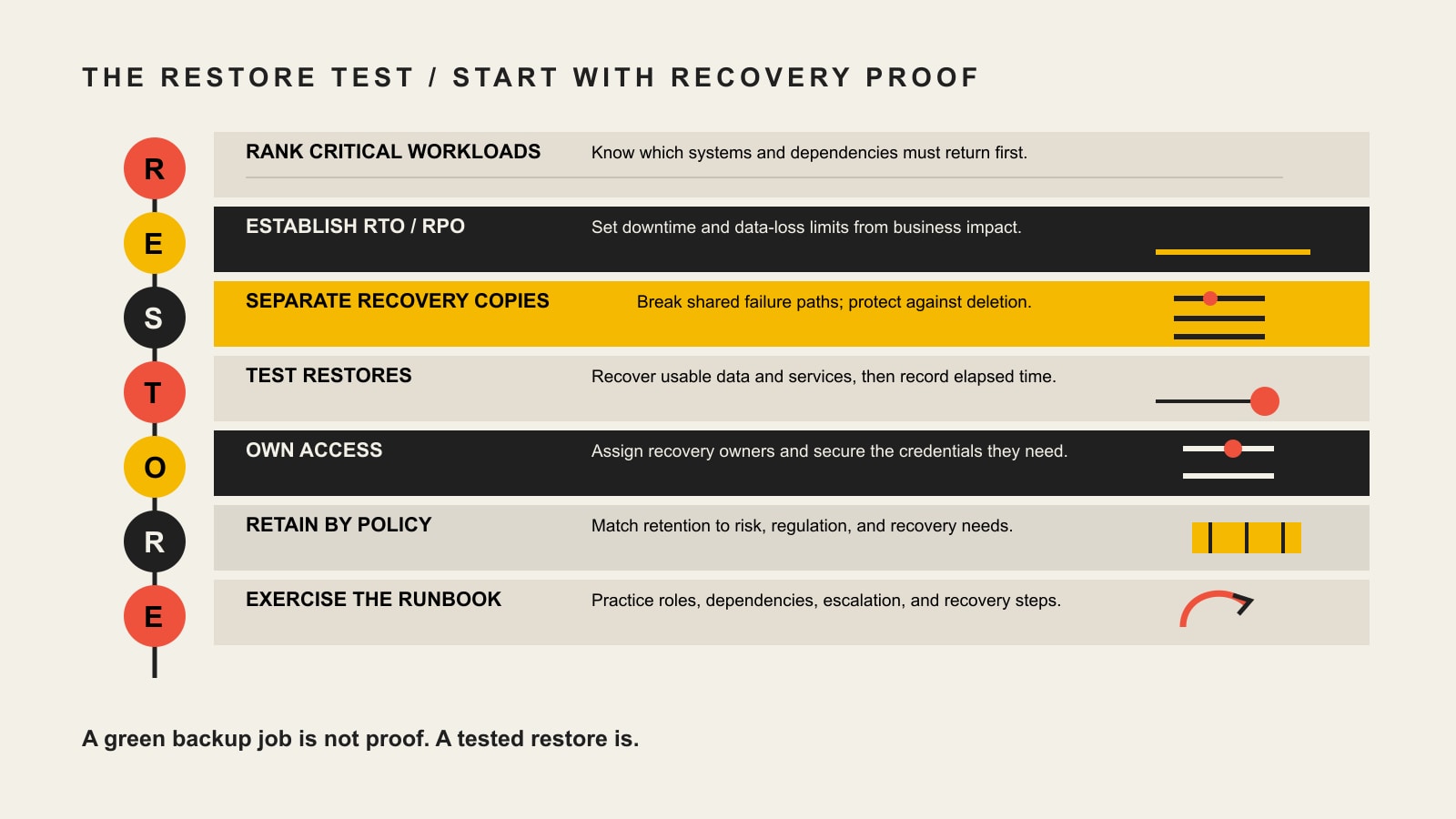
    Use the RESTORE Test before you compare vendors

    We use a simple framework for turning backup features into recovery evidence. The RESTORE Test forces the architecture conversation to begin with the business outcome rather than a product name.

    The RESTORE Test: Rank critical workloads, Establish RTO and RPO, Separate recovery copies, Test restores, Own access, Retain by policy, and Exercise the runbook.
    StepWhat to decideEvidence you should be able to show
    R — Rank critical workloadsWhich systems, data sets, and dependencies matter most?A business-impact inventory with owners and recovery priority
    E — Establish RTO/RPOHow long can each workload be down, and how much recent data can be lost?Approved recovery objectives tied to business consequences
    S — Separate recovery copiesWhat protects backups from the same account, credential, region, device, or ransomware event?Documented copy locations, identity boundaries, and deletion protections
    T — Test restoresCan you recover usable data and applications—not just download an archive?Restore-test results with elapsed time, gaps, and remediation
    O — Own access and exit pathsWho controls accounts, MFA, keys, billing, support escalation, and exports?Named owners plus break-glass and provider-exit procedures
    R — Retain by policyHow many recovery points and how much history are actually required?Retention rules mapped to operational, legal, and contractual needs
    E — Exercise the runbookCan people execute the recovery under pressure?A practiced runbook covering dependencies, communications, and decisions

    The most important shift is the “T”: a successful backup job is evidence that a copy was created; a successful restore test is evidence that recovery may work. Those are not the same thing.

    Set RTO and RPO from business impact, not internet benchmarks

    Recovery Time Objective (RTO) is the maximum target time for restoring a service after disruption. Recovery Point Objective (RPO) describes how much recent data loss the business can tolerate, expressed as time between the incident and the most recent usable recovery point.

    Neither number should be universal. An order-processing database, a public marketing site, a file archive, and a development environment can have completely different tolerances. Setting every workload to “five minutes” may sound safe, but it can dramatically increase cost and complexity without reflecting what the business actually needs.

    Start with consequences. If losing more than 15 minutes of new orders creates unacceptable reconciliation work, that suggests an RPO of 15 minutes or better for that workload. If the customer portal can be unavailable for two hours before the impact becomes unacceptable, a two-hour RTO may be the planning target. Those are examples of the reasoning process, not universal recommendations.

    Then test the complete path. A database might restore in 20 minutes while DNS, application secrets, identity, certificates, queues, object storage, or third-party integrations add another 90. The measured recovery time should include the dependencies required for the service to function, not just the fastest component.

    Design for ransomware recovery, not just ransomware detection

    Ransomware changes the backup question because the attacker may deliberately target recovery infrastructure. CISA’s ransomware guidance recommends maintaining offline, encrypted backups and regularly testing them. The practical goal is to make it difficult for one compromised credential, account, device, or administrative action to destroy both production data and every usable recovery copy.

    Separate the failure domains

    Separation can be physical, logical, geographic, administrative, or a combination. Depending on the workload, that can mean offline media, a different cloud account or subscription, cross-region copies, separate privileged identities, or a backup service whose deletion controls are not governed by the same credentials used for production.

    Use deletion protection and immutability deliberately

    Major cloud platforms now expose strong controls for making recovery points harder to delete or shorten. AWS Backup Vault Lock can prevent recovery-point deletion and retention changes; its compliance mode becomes immutable after the configured grace period. Azure Backup documents immutable vaults and soft-delete protections, with locked immutability designed to be irreversible. Google Cloud Backup and DR backup vaults use isolated storage and enforced retention, with a retention lock that prevents later shortening.

    Those controls are valuable precisely because they can be hard to undo. That is also the risk: an accidental retention policy can become an operational and storage-cost commitment. Define retention before applying irreversible locks, test the lifecycle in a noncritical scope, and document who is authorized to make retention changes.

    Protect identities and recovery credentials

    Use MFA, least-privilege roles, separate administrative identities where appropriate, and monitored break-glass access. Backups should be encrypted in transit and at rest, but encryption alone is not enough: the organization also needs a recoverable key-management process and a plan for what happens if the normal identity provider is unavailable during the incident.

    How to compare enterprise cloud backup approaches

    There is no single “best” enterprise cloud backup solution for every organization. The strongest fit depends on workload coverage, recovery modes, administrative model, existing skills, and how much operational responsibility the business wants to own.

    ApproachOften fits whenWatch carefully
    Cloud-platform nativeMost critical workloads live in one cloud and the team already operates that platformCoverage outside that platform, cross-account design, SaaS/endpoints, provider concentration, and restore orchestration
    Cross-platform data-protection platformThe environment spans multiple clouds, virtual machines, on-premises systems, databases, or SaaS workloadsLicensing model, architecture complexity, workload-specific recovery depth, and operator skills
    Managed backup serviceThe internal team wants another party to operate monitoring, failures, retention, and recovery proceduresWho owns the account, data, keys, escalation path, exports, and transition if the provider relationship ends

    Products such as AWS Backup, Azure Backup, Google Cloud Backup and DR, Veeam, Cohesity, Rubrik, Druva, and Commvault can all appear in enterprise evaluations, but a useful comparison starts with requirements. Ask each candidate to demonstrate the recovery behavior your workloads need rather than accepting a feature checkbox.

    Questions to put in the evaluation worksheet

    • Which workloads are protected: virtual machines, physical servers, databases, containers, endpoints, SaaS, object storage, file shares, and cloud-native services?
    • What recovery granularity is available: full system, application, database, file, item, point-in-time, or alternate-location recovery?
    • Can copies be kept in a separate account, subscription, region, tenant, or offline medium?
    • What prevents a compromised production administrator from deleting or shortening backup retention?
    • How are MFA, privileged roles, service accounts, API keys, and encryption keys handled?
    • What does a clean-room or isolated restore test require?
    • What telemetry shows failed jobs, unusual deletions, retention changes, or unexpected backup-volume changes?
    • How long do representative restores actually take at your data size and network conditions?
    • Which fees appear during normal protection and during a large-scale restore?
    • How do you export data and metadata if the product or provider changes?

    Calculate total recovery cost, not just storage price

    Published per-gigabyte prices age quickly and can hide the expensive parts of a recovery design. A better comparison is a total-cost model for the recovery objective:

    Total backup and recovery cost = retained storage + workload/licensing fees + isolated/cross-region copies + retrieval/egress + restore compute/network + monitoring + recovery testing + operator time.

    Retention has an especially large effect because immutable or locked policies can prevent early deletion by design. A low storage rate paired with unnecessarily long locked retention may cost more than a higher-rate service with a better-matched policy. Likewise, a cheap archive tier may be a poor fit for a short RTO if retrieval takes too long or creates significant restore charges.

    Cost decisions should therefore follow workload classification. Recent recovery points for high-impact systems may justify faster storage and more frequent copies; long-term records may fit colder tiers when retrieval time does not threaten the business objective.

    Compliance: backup supports controls, but it is not compliance in a box

    Regulated organizations need to map backup design to their actual obligations, contracts, risk analysis, and documented procedures. The safest statement is also the most useful: a backup product can support compliance controls; it does not certify the organization as compliant.

    For healthcare organizations, the contingency-plan provisions in 45 CFR § 164.308 require procedures for retrievable exact copies of electronic protected health information, restoration of lost data, continuation of critical business processes in emergency mode, and periodic testing and revision of contingency plans. That means a HIPAA-oriented evaluation needs more than an “encrypted backup” checkbox: roles, procedures, testing, access, applicable business-associate arrangements, and organizational safeguards still matter.

    For organizations subject to the GDPR, Article 32 includes the ability to restore availability and access to personal data in a timely manner after an incident and a process for regularly testing security measures. The official EUR-Lex text addressing Article 32 reinforces why recoverability and testing are operational controls. Retention, deletion, data location, processing agreements, and other GDPR duties still require separate analysis.

    For any regulated environment, involve the organization’s security, legal, privacy, and compliance owners. Backup architecture is part of the evidence trail, not a substitute for it.

    Implementation roadmap: prove one recovery path at a time

    A backup migration is safer when it is treated as a series of tested recovery paths instead of a large “turn it on everywhere” project.

    1. Inventory workloads and dependencies. Include databases, object stores, SaaS data, DNS, identity, secrets, certificates, external integrations, and configuration—not only server disks.
    2. Rank business impact. Identify owners, recovery order, and what happens financially or operationally when each system is unavailable.
    3. Approve RTO/RPO and retention. Make the tradeoffs explicit before selecting expensive frequency, replication, or retention controls.
    4. Design separation and access. Decide account boundaries, privileged roles, MFA, encryption/key ownership, deletion protection, and emergency access.
    5. Pilot representative restores. Restore into an isolated environment where possible and validate data integrity, permissions, application behavior, and dependencies.
    6. Document the runbook and escalation path. A recovery plan should name the people, credentials, providers, communications, decision points, and fallback options needed during the incident.
    7. Monitor and exercise. Alert on backup failures and destructive changes, retest after major system changes, and run recovery exercises on a schedule appropriate to the workload’s risk.

    NIST’s 2026 OT Backup Quick Start Guide describes effective backup management as including regular backup creation and testing, integration with change management, and review during recovery exercises. Although its audience includes operational technology, the operating principle translates well: recovery readiness decays when systems change but tests do not.

    Ownership is part of the backup architecture

    One of the most common continuity gaps is not technical—it is administrative. A backup can exist while the person who knows the account has left, the billing owner is unclear, MFA goes to the wrong phone, the encryption key is not recoverable, or the hosting provider’s responsibility stops earlier than the business assumed.

    This is why hosting ownership and provider responsibility belong in the same conversation. For every protected workload, document who owns the production account, backup account, domain/DNS access, identity administrator role, billing relationship, encryption material, support contract, export path, and recovery decision.

    At Scope Design, our day-to-day Management work includes website backups, security, uptime, maintenance, hosting, and account operations. That gives us a practical perspective on continuity for websites and managed web infrastructure: the useful backup is the one a responsible person can actually locate, access, restore, and verify. We are not positioning a website-management practice as a substitute for an enterprise data-protection team, security program, or compliance auditor. When specialized enterprise storage, regulated systems, or multi-cloud platforms are involved, those responsibilities should be coordinated with the organization’s IT, security, compliance, and platform teams.

    Frequently asked questions about enterprise cloud backup solutions

    What is an enterprise cloud backup solution?

    An enterprise cloud backup solution is a system for creating, retaining, managing, and restoring recovery copies of business data and workloads using cloud infrastructure or a cloud-delivered service. “Enterprise” usually implies broader workload coverage, centralized policy, stronger identity and audit controls, scalable retention, and recovery features suitable for business operations.

    What is the best cloud backup solution for a business?

    The best choice is the one that covers the required workloads and proves it can meet the organization’s recovery objectives under realistic failure conditions. Compare demonstrated restore behavior, isolation/deletion protection, identity model, retention, observability, total recovery cost, and exit path—not only feature count or storage price.

    What are the main cloud backup methods?

    Common designs include direct-to-cloud backup, cloud-native service backup, backup to a separate cloud account or region, cloud-to-cloud/SaaS backup, and hybrid models that keep both local and cloud recovery copies. The right method depends on the workload, connectivity, recovery time, risk of shared credentials, retention needs, and whether a local fast-recovery copy is valuable.

    Is cloud backup safe from ransomware?

    Cloud backup can materially improve ransomware recovery, but it is not automatically ransomware-proof. If an attacker can use the same identity to delete production and backups, if bad data is backed up for too long, or if nobody can restore the dependencies, the organization can still be stuck. Use separation, strong identity controls, deletion protection or immutability where appropriate, monitoring, and tested clean restores.

    How often should backup restores be tested?

    There is no universal interval. Test frequency should reflect workload criticality, rate of change, regulatory or contractual requirements, and the cost of an unproven recovery path. At minimum, retest after material architecture, identity, application, or provider changes, and schedule periodic exercises so the process does not exist only on paper.

    Are immutable backups enough for compliance?

    No. Immutability can be an important security and retention control, but compliance also depends on governance, access, risk analysis, documentation, contracts, testing, privacy duties, incident procedures, and other controls specific to the applicable framework.

    What is the difference between backup and disaster recovery?

    Backup focuses on creating and restoring data or workload copies. Disaster recovery is the broader process of restoring service and business operation after disruption. A DR plan may use backups, replication, standby infrastructure, DNS changes, identity recovery, communications, and manual or automated runbooks.

    Start with the recovery proof

    If you are evaluating enterprise cloud backup solutions, do not begin with a vendor shortlist. Pick one important workload and answer the RESTORE Test: rank it, set its RTO/RPO, separate the recovery copies, test a real restore, document ownership, set retention intentionally, and exercise the runbook. Once that recovery path is proven, product comparisons become much easier—and much less dependent on marketing claims.

    For websites and managed web infrastructure, Scope Design can help you map the backup, hosting, access, DNS, and recovery responsibilities that are easy to discover only after something breaks. The goal is simple: know who owns recovery and prove the path before you need it.

  • Business Password Manager Guide: 5 Strong Options and the ACCESS Test

    Business Password Manager Guide: 5 Strong Options and the ACCESS Test

    A business password manager should do more than remember logins. For a company, the real job is to give the right people access, keep credentials out of chat threads and spreadsheets, make stronger authentication easier to use, and let an administrator remove access cleanly when someone leaves. If a tool cannot make that lifecycle boring and repeatable, its encryption-page vocabulary will not rescue the rollout.

    There is no single best business password manager for every team. Based on current documented capabilities, our strongest shortlist is 1Password for polished workforce administration and identity integrations, Bitwarden for open-source flexibility and value, Keeper for high-control enterprise administration and a path toward privileged access management, NordPass for straightforward small-business administration, and Dashlane Omnix Password Management for password/passkey management tied to broader credential-risk controls. The better choice depends on how well each option fits your actual access lifecycle.

    Pricing and product names below were checked on August 21, 2026. Password-manager plans change frequently, so verify the current vendor page before buying. Scope Design did not perform a penetration test or laboratory security audit of these products; this guide compares current documented capabilities against an operational decision framework.

    Quick comparison: five strong business password managers

    OptionStrong fit whenUseful business differentiatorPublished pricing note
    1PasswordYou want a polished cross-platform experience plus identity-provider administrationGroups, provisioning, SSO options, activity controls, and mature workforce administrationBusiness: $8.99/user/month billed annually; Teams Starter: $24.95/month for up to 10 members
    BitwardenYou value open-source software, price transparency, or self-hosting optionsSCIM, directory sync, event logs, SSO options, account recovery, and an Enterprise self-host pathTeams: $4/user/month annually; Enterprise: $6/user/month annually
    KeeperYou need deeper policy, reporting, offboarding, or a future path toward PAMAdministrative policies, reporting, vault transfer, SSO/SCIM on Enterprise, and adjacent PAM toolingEnterprise packaging is configuration and quote dependent
    NordPassYou want an approachable team vault with a clear path from SMB controls to enterprise provisioningShared folders, groups, activity monitoring, password-health/breach tools, and Enterprise SSO/provisioningPricing varies by plan term and package; check the current quote or checkout page
    Dashlane Omnix Password ManagementYou want managed passwords/passkeys plus SSO/SCIM and Dashlane’s wider credential-protection ecosystemAdmin policies, sharing, SSO, SCIM, password/passkey management, and adjacent credential-protection options$8/user/month for Omnix Password Management
    Current first-party plan information checked August 21, 2026. Published prices can change and may exclude taxes, add-ons, minimums, or negotiated enterprise terms.

    If you are choosing between those five, do not start by arguing about which vendor has the fanciest cryptography paragraph. Start with the work your company needs the system to perform.

    Use the Scope Design ACCESS Test before you choose

    We use the ACCESS Test to evaluate a business password manager across the whole credential lifecycle. Each letter is a practical question that can expose a poor fit before you migrate hundreds of logins.

    The ACCESS Test checks administration, credential coverage, controls, exit and recovery, staff friction, and scope and cost.
    The ACCESS Test evaluates the complete business credential lifecycle, not just password storage.
    • A — Administration: Can an owner or administrator provision people, group access by role, audit activity, suspend accounts, and complete offboarding without hunting through individual devices?
    • C — Credential coverage: Does the system handle the passwords, passkeys, secure notes, shared logins, and account types your team actually uses?
    • C — Controls: Can you enforce MFA, role-based access, sharing rules, reporting, SSO, SCIM, or other identity controls required by your environment?
    • E — Exit and recovery: What happens when an employee leaves, an administrator is unavailable, a device is lost, or you decide to leave the vendor? Test recovery, vault transfer, and export before you need them.
    • S — Staff friction: Does autofill work on the browsers, operating systems, and mobile devices your staff uses? Can people share access without copying secrets into Slack, email, or a spreadsheet?
    • S — Scope and cost: Are you buying the right class of tool? A workforce password manager may not be enough for developer secrets or privileged infrastructure access, and an enterprise PAM platform may be overkill for a 12-person office.

    The best score is not the product with the most boxes checked. It is the product that covers your required jobs with the least dangerous workaround. A feature you never use has little value; a missing offboarding control can become an operational liability.

    Set the security baseline before comparing vendors

    A password manager is only one layer of authentication security. The current NIST SP 800-63B-4 authentication guideline, finalized in July 2025, explicitly notes that passwords are not phishing-resistant and identifies WebAuthn/FIDO2 as an example of phishing-resistant authentication. NIST’s document is a federal digital-identity standard, not a private-business law, but it is a useful benchmark for understanding why a password vault should coexist with stronger authentication rather than become an excuse to stop at passwords.

    CISA’s guidance for small and midsize businesses makes the same operational point: strong passwords alone are not enough, and businesses should use MFA, moving toward phishing-resistant methods where practical. For a password-manager deployment, that means protecting administrator and vault accounts with the strongest practical MFA or passkey option and treating recovery methods as security-sensitive assets too.

    1Password: strong workforce administration and identity integration

    1Password is a strong fit when employee usability and identity-provider administration both matter. Its Business product documents group-based access management, account suspension, identity-provider provisioning, and Unlock with SSO. Those capabilities are useful when your password manager needs to fit an existing employee onboarding and offboarding process instead of operating as a separate island.

    As of August 21, 2026, 1Password publishes Business at $8.99 per user per month billed annually. It also publishes Teams Starter at $24.95 per month for up to 10 members, billed annually. That is materially different from the old $2.99 figure previously carried by this article, which is why we now date volatile plan data instead of treating it as evergreen.

    1Password deserves a closer look if you need clean employee-facing apps plus serious administrative plumbing. The tradeoff is cost: a team that only needs a basic shared vault may be paying for capabilities it does not use. During a pilot, test provisioning, suspension, account recovery, shared-vault ownership, and the real browser/device mix rather than evaluating the demo vault alone. See 1Password’s Business administration documentation for current feature boundaries.

    Bitwarden: strong value, open-source transparency, and self-hosting options

    Bitwarden is compelling for organizations that value price transparency, open-source software, or a self-hosting path. Its current business plans separate Teams from Enterprise in a way that makes the upgrade decision relatively easy to inspect.

    Bitwarden currently publishes Teams at $4 per user per month annually and Enterprise at $6. Teams includes secure sharing, event logs, directory integration, and SCIM. Enterprise adds capabilities including SSO options, account recovery, more granular controls, and self-hosting. Confirm the exact plan matrix before purchase because plan packaging can change.

    Self-hosting can preserve control and fit organizations with specific infrastructure requirements, but it should not be marketed as automatically safer. Self-hosting transfers more patching, availability, backup, monitoring, and recovery responsibility to your team. If you choose it, score that operational burden honestly under the second S in ACCESS: scope and cost.

    Keeper: deeper policy and offboarding control with a path toward PAM

    Keeper becomes more interesting as administrative control and privileged-access requirements grow. Keeper’s current Business and Enterprise materials emphasize centralized policies, reporting, organizational records, and vault transfer for offboarding. Enterprise materials also document SSO and SCIM integrations, and Keeper offers privileged access management as an adjacent product family.

    That matters because some organizations eventually outgrow the simple question “Where do employees store passwords?” and start asking “Who may use a privileged credential, under what approval, for how long, and with what audit trail?” A normal workforce password manager and a PAM system are related, but they are not interchangeable.

    Keeper’s enterprise package is best treated as quote and configuration dependent rather than reduced to one evergreen number. Review Keeper Enterprise’s current feature set, then make the vendor demonstrate your exact offboarding, role, reporting, and recovery requirements during the trial.

    NordPass: approachable SMB controls with an enterprise upgrade path

    NordPass is worth shortlisting when a small or midsize team wants straightforward administration without giving up an upgrade path. Current business documentation describes Teams, Business, and Enterprise tiers. Depending on the tier, features include activity monitoring, shared folders, groups, password-health and breach-monitoring tools, and Enterprise SSO/provisioning options with identity providers such as Microsoft Entra ID and Okta.

    NordPass pricing is presented differently depending on term and package, so this guide intentionally does not freeze a promotional checkout number into an evergreen comparison. Review the current NordPass business plans and the vendor’s plan documentation on the day you compare finalists.

    The important question is not whether NordPass, or any competitor, uses a particular cipher name that sounds more modern. The operational question is whether the plan you are buying includes the administration, recovery, identity integration, and sharing controls your team actually needs.

    Dashlane Omnix Password Management: password and passkey management inside a wider credential-security portfolio

    Dashlane changed the product name, not the job. In July 2026, Dashlane announced that Dashlane Business was renamed Omnix Password Management. The company says the plan’s features, settings, pricing, and access remained unchanged through the rename. As checked August 21, 2026, Omnix Password Management is published at $8 per user per month. Dashlane’s current business password-management page describes the plan’s password/passkey, sharing, policy, SSO, and SCIM capabilities.

    The product documentation covers managed passwords and passkeys, secure sharing, administrative policies, SSO, and SCIM. Dashlane also sells broader credential-protection capabilities, which may appeal to organizations that want to address credential exposure beyond the vault itself. Treat those adjacent Omnix capabilities as separate plan decisions unless the current package explicitly includes them.

    Why a business password manager is different from a personal or browser password manager

    A personal password manager answers “How do I store my logins safely?” A business password manager also has to answer “Who owns this credential, who should receive it, how do we prove or review access, and what happens when a person leaves?”

    • Organization-owned sharing: access should belong to a role, team, or business collection instead of living in one employee’s personal vault.
    • Administration: the company needs a supported way to provision, suspend, recover, and deprovision users.
    • Audit and policy: the organization may need activity visibility, sharing rules, MFA policies, or identity-provider controls.
    • Recovery and continuity: one unavailable employee should not become the only route to a critical business account.
    • Exit: you should be able to transfer organizational records, export what you are entitled to export, and leave the vendor without rebuilding account ownership from memory.

    Google Password Manager, Microsoft browser/identity tools, and Apple Passwords can be useful for individual credential storage inside their ecosystems. That does not make them “unsafe,” and a dedicated business password manager is not automatically better. The question is whether your company needs cross-platform shared vaults, independent administrative ownership, richer audit controls, standardized offboarding, or an export/recovery process that your current ecosystem does not provide.

    Do passkeys and SSO make password managers obsolete?

    No. They reduce different parts of the password problem. Passkeys can replace passwords for services that support them and can provide phishing-resistant authentication when implemented with WebAuthn/FIDO2. SSO can centralize authentication for applications integrated with your identity provider. A password manager still has a job wherever passwords remain, shared or legacy accounts exist, secure notes must be controlled, or passkeys themselves need organized cross-device management.

    A healthy direction is fewer memorized passwords and fewer unmanaged shared secrets. That may mean combining an identity provider, passkeys, MFA, and a password manager rather than demanding that one product do everything.

    When a password manager is not the right tool

    Password managers are designed primarily for human-access credentials. Some secrets belong elsewhere.

    • Developer and machine secrets: API keys, service credentials, CI/CD tokens, and application secrets may need a secrets-management platform with automated injection, rotation, and machine identity controls.
    • Privileged infrastructure access: root, database-admin, network-admin, or other high-impact credentials may need PAM with approvals, time-limited access, session controls, or stronger audit requirements.
    • Compliance evidence: buying a password manager does not make a company compliant with SOC 2, GDPR, HIPAA, or another framework. It can support specific controls, but applicability, policy, evidence, contracts, and operating practice still matter. Our GDPR guide for U.S. small businesses explains that broader compliance boundary in more detail.

    A practical rollout and offboarding plan

    The fastest way to ruin a password-manager project is to buy licenses and send everyone a welcome email. Treat deployment as an access-governance change.

    1. Name an accountable owner. Someone must own policies, provisioning, recovery, support, and vendor renewals.
    2. Inventory account categories, not raw passwords. Identify finance, domain/DNS, website, analytics, social, SaaS, banking, vendor, infrastructure, and emergency accounts without creating a new spreadsheet full of secrets.
    3. Write the nonnegotiable requirements. Browser/OS support, mobile access, passkeys, MFA, SSO/SCIM, audit logs, recovery, shared collections, data region, contractual requirements, and export all belong on the list before demos.
    4. Pilot with a representative group. Include an administrator, a normal office user, a mobile-heavy user, and someone who regularly shares team credentials. Use real workflows, not toy records.
    5. Move shared credentials into organization-owned collections. Give access by role or function where possible. Stop using personal vaults as the business continuity plan.
    6. Protect the vault itself. Require MFA or phishing-resistant authentication where available, especially for administrators. Document recovery methods and keep them out of the same single point of failure.
    7. Run an offboarding drill. Suspend or remove a test user, transfer organization-owned records, rotate credentials that still require rotation, revoke sessions where appropriate, check linked recovery factors, and confirm the former user cannot regain access.
    8. Test recovery and export before renewal. A vendor exit plan is not pessimism. It is basic ownership hygiene.

    Emergency access should also fit your wider business-continuity process. A handoff document should not become a password dump. Our guide to keeping work moving when a decision-maker is away covers the ownership side of that problem.

    Measure adoption and control, not made-up ROI

    The previous version of this article claimed precise reductions in helpdesk time, onboarding time, audit findings, and password-related incidents without saved evidence. We removed those numbers. A better measurement plan starts with outcomes your own company can actually observe.

    • Percentage of employees enrolled and actively using the approved system
    • Percentage of known shared business credentials moved under organizational ownership
    • Weak, reused, or exposed credentials remaining where the selected platform reports them
    • Stale user access or failed offboarding checks found during periodic reviews
    • Whether recovery, emergency access, and export drills pass
    • Support friction: where users still copy credentials into chat, email, notes, or personal browsers because the approved workflow is too difficult

    If you want a more formal way to compare two finalists, use a weighted decision with reversible testing instead of a beauty contest. Our business decision-making framework explains how to match the decision method to the stakes and uncertainty.

    What auditing this exact article changed

    This revision was not a calendar update. We checked the page’s current search footprint, crawl status, links, competitive query shape, and source quality before deciding what deserved to survive.

    Signal checkedObservation on August 21, 2026What it changed
    GA4No exact landing-page rows in either the latest or previous 12-month period checkedNo behavior, conversion, or ROI claims can be inferred from this page’s analytics.
    Google Search ConsoleNo exact-page query rows; URL Inspection says “Crawled – currently not indexed,” while fetch, indexing permission, sitemap discovery, and self-canonical are correctImprove usefulness and internal support while preserving the established URL.
    Bing Webmaster ToolsURL recognized with 0 clicks and 0 impressions; site sitemaps report SuccessNo Bing equity requires preserving weak legacy copy.
    UbersuggestNo ranking-keyword data or backlinks returned for the exact page; “business password manager” shows stronger current commercial demand than the old year-stamped phraseRemove the stale year from the visible title and focus the article on the current buyer decision without changing the URL.

    Those observations do not prove nobody has ever read the page, and they do not guarantee this revision will rank. They support a narrower editorial decision: keep the established address, remove claims we cannot substantiate, answer the commercial comparison intent directly, and add something competitors cannot get by copying the same vendor list.

    Frequently asked questions about business password managers

    What is the best business password manager?

    There is no universal winner. For many teams, 1Password is a strong balanced choice for usability plus workforce administration; Bitwarden stands out for open-source flexibility, transparent pricing, and self-hosting options; Keeper fits higher-control environments and teams moving toward PAM; NordPass can fit small and midsize teams that want simpler administration; and Dashlane Omnix Password Management fits organizations that want password/passkey management inside Dashlane’s broader credential-security portfolio. Score finalists against your own ACCESS requirements and pilot the workflows that could fail.

    Is there a free business password manager?

    Free personal tiers exist, but “free” becomes less meaningful once a business needs centralized administration, organizational ownership, event logs, recovery, SCIM, SSO, or predictable offboarding. A very small team may start simply, but compare the cost of the required business controls rather than assuming a consumer plan is equivalent to a managed business deployment.

    Does Microsoft offer a password manager for business?

    Microsoft provides password and authentication capabilities across Edge, Microsoft accounts, and Entra, but that does not make every Microsoft deployment a direct substitute for a dedicated shared business vault. If you need cross-platform team collections, granular credential sharing, independent vault administration, or a particular offboarding/export workflow, test those requirements explicitly rather than choosing by ecosystem name.

    Is Google Password Manager good enough for business?

    It can be useful for individual credential storage in the Google/Chrome ecosystem. A business that needs organization-owned shared credentials, richer audit and policy controls, standardized recovery, or cross-platform offboarding may need a dedicated team product. The correct answer depends on which ACCESS jobs your organization actually has, not on a blanket claim that browser managers are unsafe.

    Do passkeys make business password managers obsolete?

    No. Passkeys can eliminate passwords for supported services and can provide phishing-resistant authentication, but companies still have legacy passwords, shared accounts, secure notes, recovery processes, and mixed platforms. Several business password managers now manage passkeys alongside passwords, so the systems are converging rather than simply replacing one another.

    Which password manager has never been hacked?

    “Never hacked” is a poor buying criterion because public incident history is incomplete and the absence of a known incident cannot guarantee future safety. Evaluate architecture, MFA/passkey support, administrative controls, recovery design, incident-response transparency, independent assurance where relevant, and your own configuration. A system also fails when employees bypass it because the approved workflow is unusable.

    How much does a business password manager cost?

    Current published examples range from Bitwarden Teams at $4 per user per month annually to Dashlane Omnix Password Management at $8 and 1Password Business at $8.99, while NordPass pricing varies by term and some enterprise packages are quote based. Prices change, and add-ons or minimums can matter. Compare the plan that includes your required administration, recovery, SSO/SCIM, support, and reporting features, not the cheapest headline tier.

    Sources and methodology

    This guide uses NIST SP 800-63B-4 and CISA’s small-business MFA guidance for authentication-security context. Vendor-specific features, names, and pricing come from current first-party 1Password, Bitwarden, Keeper, NordPass, and Dashlane documentation and are dated because they can change.

    Scope Design’s GA4, Google Search Console, Bing Webmaster Tools, Ubersuggest, and DataForSEO observations were used to audit this exact URL and the current search-question shape before revision. Content Studio and the internal link graph were used to keep this page focused on password-manager selection and operations instead of absorbing broader compliance, business-continuity, or decision-methodology topics.

    We did not preserve old statistics simply because they sounded precise, and we did not claim hands-on security testing that did not happen. The article’s original contribution is the ACCESS Test and the lifecycle-first way it connects product selection to administration, staff behavior, recovery, and exit.

    The next step: run a real offboarding drill

    Choose two finalists, configure a representative identity, sharing, recovery, and offboarding workflow in each trial, then remove a test user. The winner should make the boring administrative work easier without creating new single points of failure. That is a stronger signal than a vendor’s feature count or a review site’s universal “best” badge.

    If credential sprawl is part of a wider technology-management problem, Scope Design can help you make account ownership, website operations, maintenance, and access less fragile. Start with the system your team can actually operate consistently, then improve the surrounding controls one deliberate step at a time.