Category: Analytics & SEO Strategy

Evidence-led SEO strategy, analytics, content optimization, technical search visibility, local SEO, and measurement tied to qualified business outcomes.

  • 5 Critical Google Developments Every Business Must Master Now

    5 Critical Google Developments Every Business Must Master Now

    Google search changes in 2026 are not just another algorithm update. Google is changing the search product people use to discover information: AI Overviews and AI Mode can synthesize answers and explore related subquestions, the search box can accept more than text, users can influence which sources they see, results can use more context, and Search Console is adding dedicated generative-AI visibility reporting.

    For a business, the response is not to bolt a pile of “GEO hacks” onto an old SEO checklist. Google’s own guidance says the familiar fundamentals still matter. Your job is to make your information eligible, understandable, useful, verifiable, and measurable across a search experience that now has more ways to answer, explore, and act.

    TL;DR: The five Google Search changes that matter to businesses

    • Answers: AI Overviews and AI Mode can assemble answers from multiple searches and sources, so shallow keyword matching is a weak strategy.
    • Inputs: Search is becoming conversational and multimodal, with text, images, files, video, and other context feeding the experience.
    • Sources: Preferred Sources and new treatments for original or highly cited material give users and Google more ways to surface sources worth returning to.
    • Context: Location, language, device, activity, and opt-in personalization can shape parts of the experience, making clear business facts and real expertise more important.
    • Measurement: Technical eligibility remains familiar while Google adds more specific reporting for generative-AI search visibility.
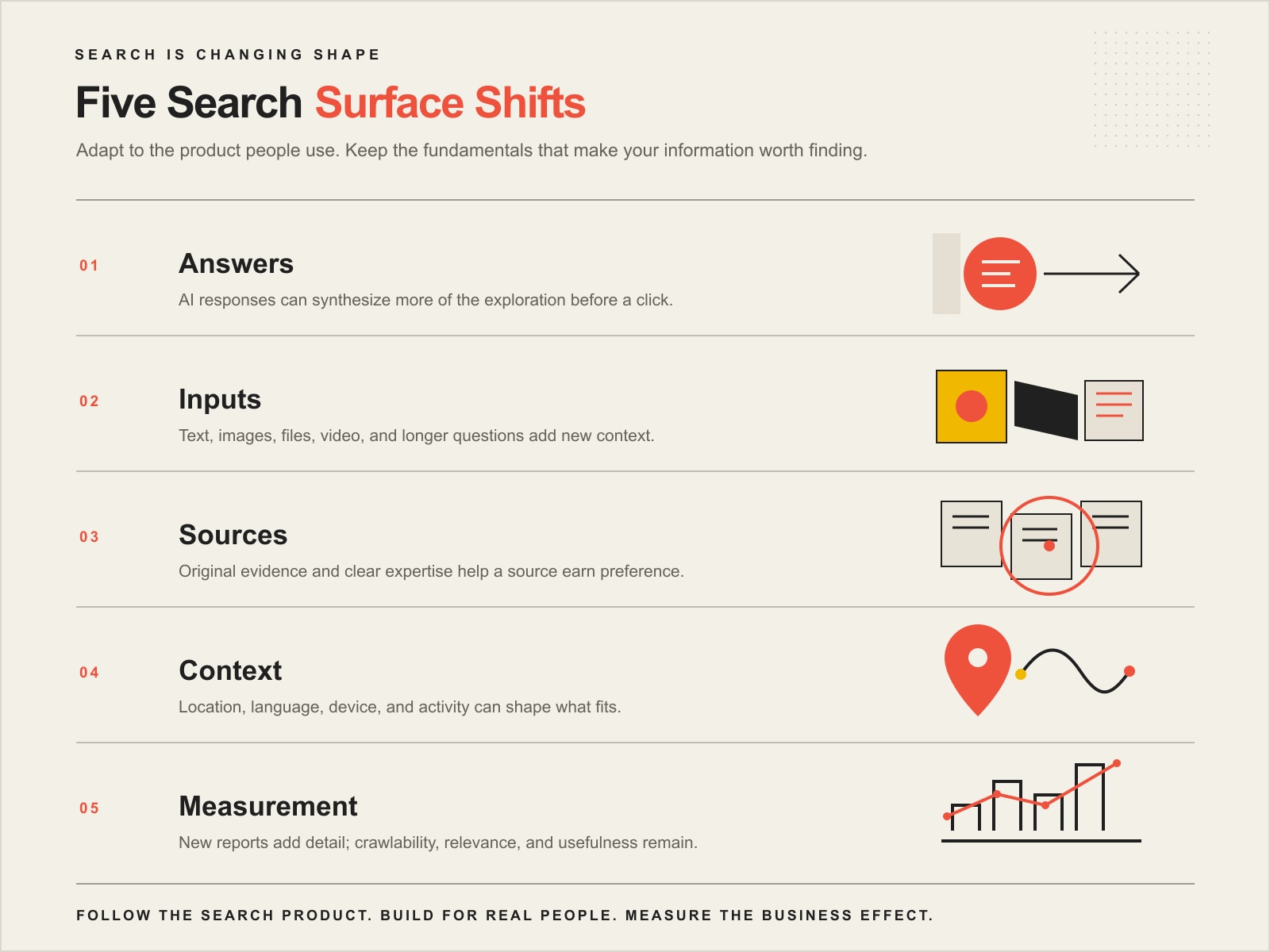
    Five changes in search: Answers synthesized by AI, richer Inputs such as images and files, trusted Sources with original evidence, personalized Context, and more specific Measurement.

    We call this the Scope Design Five Search Surface Shifts: Answers, Inputs, Sources, Context, and Measurement. It is a more useful way to respond than chasing every headline as if somebody at Google secretly moved a magic ranking dial.

    This is different from a Google algorithm update

    A product change changes how people search and what the interface can do. An algorithm update changes how Google evaluates, selects, or ranks results. Those problems can overlap, but they are not the same job.

    If your rankings or organic traffic dropped after a confirmed update, use our Google algorithm update diagnostic instead. That guide owns the ranking-change, diagnosis, and recovery problem. This article is about adapting your business to the search experience customers are increasingly using.

    1. AI Overviews and AI Mode change the answer surface

    Traditional search often looked like a simple exchange: type a query, scan links, choose a result. AI Overviews and AI Mode can do more of the exploration inside Google before a person decides whether to visit a website.

    Google’s current AI features guidance for website owners says AI Overviews and AI Mode may use query fan-out. Google can break a complicated question into related searches, explore multiple subtopics and data sources, and assemble a response with supporting links.

    That changes the content opportunity. A page does not need to repeat one exact keyword twelve different ways. It needs to solve a real question well enough to remain useful when the search expands into follow-ups.

    What should a business do?

    • Answer the main question early.
    • Cover the conditions, exceptions, comparisons, risks, and next questions a serious buyer will reasonably ask.
    • Use first-party examples, original analysis, photographs, process details, or evidence a generic summary cannot manufacture.
    • Keep important facts in readable page text even when video, images, or interactive elements add context.
    • Use descriptive headings and internal links so the subject and its relationships are easy to understand.

    There is no guaranteed formula for earning an AI citation. Our deeper AI search optimization guide explains how crawlability, relevance, evidence, authority, and measurement fit together without pretending a schema switch can force Google to quote you.

    2. Search is becoming conversational and multimodal

    The search box is becoming less like a blank field for ten blue links and more like an input layer for a research assistant. In its May 2026 “A new era for AI Search” announcement, Google described Search handling longer conversational questions plus images, files, video, and other context. Google also reported that AI Mode had passed one billion monthly users globally at that time. That is a Google-reported product metric, not a promise about traffic to any particular website.

    The same product direction includes agentic tasks. Depending on the experience and availability, Search can help gather information, compare options, shop, book, or contact businesses. Search is increasingly trying to help the user finish a task, not merely locate a document.

    What does multimodal search mean for your content?

    It does not mean every local plumber needs to become a film studio. Custom work should earn its cost. The practical question is whether the formats you already publish make the decision easier.

    • Text: State services, products, policies, prices or pricing logic, service areas, requirements, and next steps clearly.
    • Images: Use original, useful images where the visual itself answers something, with honest alt text and nearby context.
    • Video: Demonstrate processes, comparisons, installations, repairs, products, or expertise when motion genuinely clarifies the subject.
    • Documents: Keep PDFs and downloadable resources structured, current, and understandable.
    • Business data: Keep Business Profile, product feeds, hours, contact information, and other factual surfaces current where they apply.

    Imagine an appliance-repair company. A customer may type a model number, upload a photo of an error code, or ask a conversational question about whether a repair is worth the cost. A useful website can support that journey with readable troubleshooting context, original photos, clear service boundaries, and a sensible next step. The goal is not “optimize for cameras.” The goal is to provide evidence that remains useful when the input is no longer just a keyword.

    3. Preferred Sources and original evidence change source selection

    Google is giving people more influence over which publishers they want to see. In May 2026, Google announced that Preferred Sources would extend into AI Overviews and AI Mode, alongside additional ways to surface original and highly cited reporting.

    For a business, the important lesson is not “beg customers to favorite your domain.” Preferred Sources is one visible example of a broader shift: source identity matters. Search can show an answer, but people still need reasons to recognize, trust, choose, and return to a source.

    Build something worth preferring

    • Publish material rooted in real experience rather than paraphrasing the same five tips already everywhere.
    • Name the author or organization responsible for the advice when that context matters.
    • Cite primary evidence next to factual claims.
    • Maintain important evergreen pages so facts stay current and URLs remain stable.
    • Create useful recurring reasons to return, such as research, analysis, local expertise, a tool, a newsletter, a guide, or a strong body of related content.

    This is where brand authority stops being a vague branding exercise and becomes a body of proof. The cheapest content in the AI era is generic content. That does not make content useless. It makes interchangeable content easier to ignore.

    4. Personalization and entity clarity change the context

    Search results have never been perfectly identical for everyone. Current Google Search Help documentation explains that personalized recommendations can use account activity, while location, language, device type, and current search context can still affect relevance even when personalized recommendations are off. Google also makes clear that not all search results are personalized.

    Google is extending that contextual direction. Its 2026 AI Search announcements describe optional Personal Intelligence connections that can use information from selected Google services when a user chooses to connect them. The business implication is not that you need to reverse-engineer somebody’s inbox. It is that vague, context-free information may be a weaker fit when Search has a better understanding of what the user actually needs.

    Make your business easier to understand correctly

    • Keep business name, locations, service areas, hours, contact information, and core offerings consistent.
    • Explain relationships between services, products, industries, locations, and the people providing the expertise.
    • Use structured data only when it accurately matches visible page content.
    • Show first-hand experience with examples, case evidence, original images, process details, or named expertise where appropriate.
    • Fix stale bios, conflicting descriptions, abandoned location pages, and old claims that make the business harder to interpret.

    This is less glamorous than inventing a new acronym, which is exactly why it is useful. A search system cannot reliably connect facts you have never published, and a prospective customer cannot verify expertise you only imply.

    5. Measurement is changing while technical eligibility stays familiar

    One of the most important Google search changes is also one of the least dramatic: Google says you do not need special AI schema, a new AI text file, or a separate technical trick to become eligible for AI Overviews or AI Mode.

    Google’s Search Central guidance says a supporting page needs to be indexed and eligible to show a snippet. Crawlability, internal linking, readable text, useful page experience, accurate structured data, good images or video, and current business or product information remain the foundation. If the page cannot make it into normal Search, polishing an “AI optimization” checklist is expensive theater.

    The reporting surface is getting more specific

    In June 2026, Google announced dedicated Search Generative AI performance reports in Search Console. Google described Search and Discover views for visibility associated with AI Overviews and AI Mode, with availability rolling out rather than appearing identically for every property at once.

    Measure in layers: eligibility → visibility → referral and engagement → action → lead quality → business outcome. Our SEO metrics guide goes deeper on that hierarchy. Visibility is useful evidence. It is not the business outcome wearing a tiny hat.

    What auditing this exact article taught us

    Before rebuilding this article, we checked the established URL across the evidence sources available to Scope Design. Over the last 12 complete months, the exact page produced no Organic Search landing-page rows in our GA4 report. Google Search Console returned no page-query performance rows and its URL Inspection API reported the URL as unknown to Google. Bing Webmaster Tools reported zero clicks and zero impressions. Ubersuggest returned no ranking-keyword data and no exact-URL backlinks.

    That did not prove the topic was worthless. It proved the old page had no measurable search equity demanding protection. The more important discovery was editorial: another Scope Design article already owned Google algorithm-update diagnosis and recovery. Reactivating this page only made sense after giving it a materially different job: current Search product changes and business adaptation.

    We still preserved the established URL. There was no business benefit in changing it merely because the new primary query, google search changes, is not an exact phrase in the slug. Plugin warnings are lint. Migration risk is real.

    What should your business do first?

    Do not launch five disconnected projects because Google announced five features. Start with the constraint most likely to block useful visibility.

    Search surface shiftWhat changedBest first business actionWhat to measure
    AnswersAI Overviews and AI Mode can explore related questions and synthesize answers.Rewrite important pages around the real decision, follow-up questions, and original evidence.Relevant visibility, citations, qualified visits.
    InputsSearch can use conversational and multimodal information.Make core facts clear in text and add useful original images/video where they improve the decision.Discovery and engagement.
    SourcesPreferred Sources and original/highly cited treatments make source identity more visible.Build repeatable first-party expertise instead of commodity summaries.Returning audience, branded demand, legitimate references.
    ContextSearch can use more location, activity, device, and opt-in personal context.Clean up business facts, authorship, service relationships, and structured data.Correct discovery across relevant situations.
    MeasurementGenerative-AI reporting is becoming more explicit while basic eligibility remains familiar.Fix crawl/index/canonical issues first, then connect visibility to qualified outcomes.Eligibility → visibility → action → quality → outcome.

    If you need a broader system for deciding where SEO time belongs, start with our SEO strategy and analytics framework. Invest where the evidence says the bottleneck lives, not where the latest conference slide looks exciting.

    Frequently asked questions about Google search changes

    Is Google actually changing its search engine?

    Yes. Google’s 2026 Search announcements describe substantial product changes, including expanded AI Mode, a more conversational and multimodal search box, agentic capabilities, additional personalization options, source controls, and new reporting. That is different from saying traditional web results disappear or every query becomes fully personalized.

    What is the difference between AI Overviews and AI Mode?

    AI Overviews are generated summaries that can appear within Search results. AI Mode is a more conversational experience for longer, more complex exploration and follow-up questions. Both can surface supporting links, and Google says both can use query fan-out.

    Do I need GEO or AEO instead of SEO?

    No label changes the basic job. Google says existing SEO best practices remain relevant to its AI features and no special AI optimization is required. “GEO” or “AEO” can describe additional discovery surfaces, but the useful work is still eligibility, relevance, evidence, authority, and measurement.

    How can my website show up in Google AI search?

    Start by being eligible for normal Search. Google says a page needs to be indexed and eligible to show a snippet before it can be used as a supporting link in AI Overviews or AI Mode. Then make the page useful for the question, provide verifiable evidence, keep important facts readable, and earn legitimate authority. None of that guarantees a citation.

    Do I need special schema or an llms.txt file for Google AI results?

    No. Google says no special schema or new AI text file is required for its Search AI features. Use structured data when it accurately describes visible content and is supported for the page.

    Do Preferred Sources matter to a normal business?

    Potentially, but the broader lesson matters more than the feature. Search is creating more ways for people to express source preference and for original work to stand out. Focus on becoming a source worth recognizing and returning to: accurate information, real experience, useful evidence, and consistent publishing where the audience benefits.

    Does personalization mean everyone sees completely different Google results?

    No. Google can use location, language, device, current context, activity, and personalization settings to shape parts of the experience, but not every result is personalized. A single manual ranking check is therefore incomplete evidence about visibility.

    How should I measure AI search visibility?

    Confirm technical eligibility first. Then examine relevant impressions, generative-AI visibility where Search Console makes it available, citations or mentions, referral behavior, meaningful actions, lead quality, and the business outcome. A mention without a qualified next step may be interesting. It is not automatically valuable.

    Sources and methodology

    This article was researched and rebuilt through Scope Design’s monitored Content Studio workflow on August 21, 2026. We reviewed the existing article and cluster ownership; relevant Scope Design doctrine in Open Brain; the literal internal-link graph; U.S. Ubersuggest keyword and SERP evidence; DataForSEO Google/Bing SERPs, two-depth People Also Ask, AI keyword volume, and a bounded ChatGPT search-citation observation; exact-page GA4, Google Search Console, and Bing Webmaster Tools evidence; and current first-party Google documentation. Third-party search volumes are directional estimates, not promises of traffic. Google’s adoption metrics are identified as Google-reported product figures. We removed legacy percentages and causal claims when current evidence did not support them.

    Adapt to the search product, not the hype cycle

    The winning response to Google search changes is not to rename every SEO task and invoice it as magic. Make the site eligible. Make the answer useful. Make the evidence real. Make the business understandable. Then measure whether the visibility produces something worth having.

    If you are not sure which of the five shifts is actually constraining your visibility, Scope Design can help audit the search, content, technical, and measurement layers and prioritize the work by business impact. Hope is not an analytics strategy, and neither is doing all the things because somebody posted a scary screenshot on LinkedIn.

  • SEO Content Writing: Rank Without Producing Generic Crap

    SEO Content Writing: Rank Without Producing Generic Crap

    Short answer: SEO content writing means creating a page that answers a real searcher’s question, helps them make a decision, demonstrates knowledge worth trusting, and supports a measurable business job. Research the intent, gather evidence before drafting, answer directly, structure the explanation clearly, optimize the page without stuffing it, connect it to the rest of the website, and measure what happens after the click.

    It is not regular writing with a keyword shoved into every available crevice. It is also not feeding a prompt to ChatGPT, asking Rank Math whether the light turned green, and declaring yourself an authority before lunch.

    TL;DR: How do you write SEO content that actually works?

    Use this sequence:

    1. Define the business outcome the page should support.
    2. Identify the reader’s actual question and stage of decision-making.
    3. Gather first-hand expertise, examples, proof, and primary sources.
    4. Research the language people use and inspect the live search results.
    5. Build one coherent page around one primary search job.
    6. Draft the direct answer first, then add useful depth and honest limitations.
    7. Optimize titles, headings, links, media, metadata, and schema truthfully.
    8. Publish, measure qualified outcomes, and improve the weak section instead of rewriting the whole damn thing on instinct.

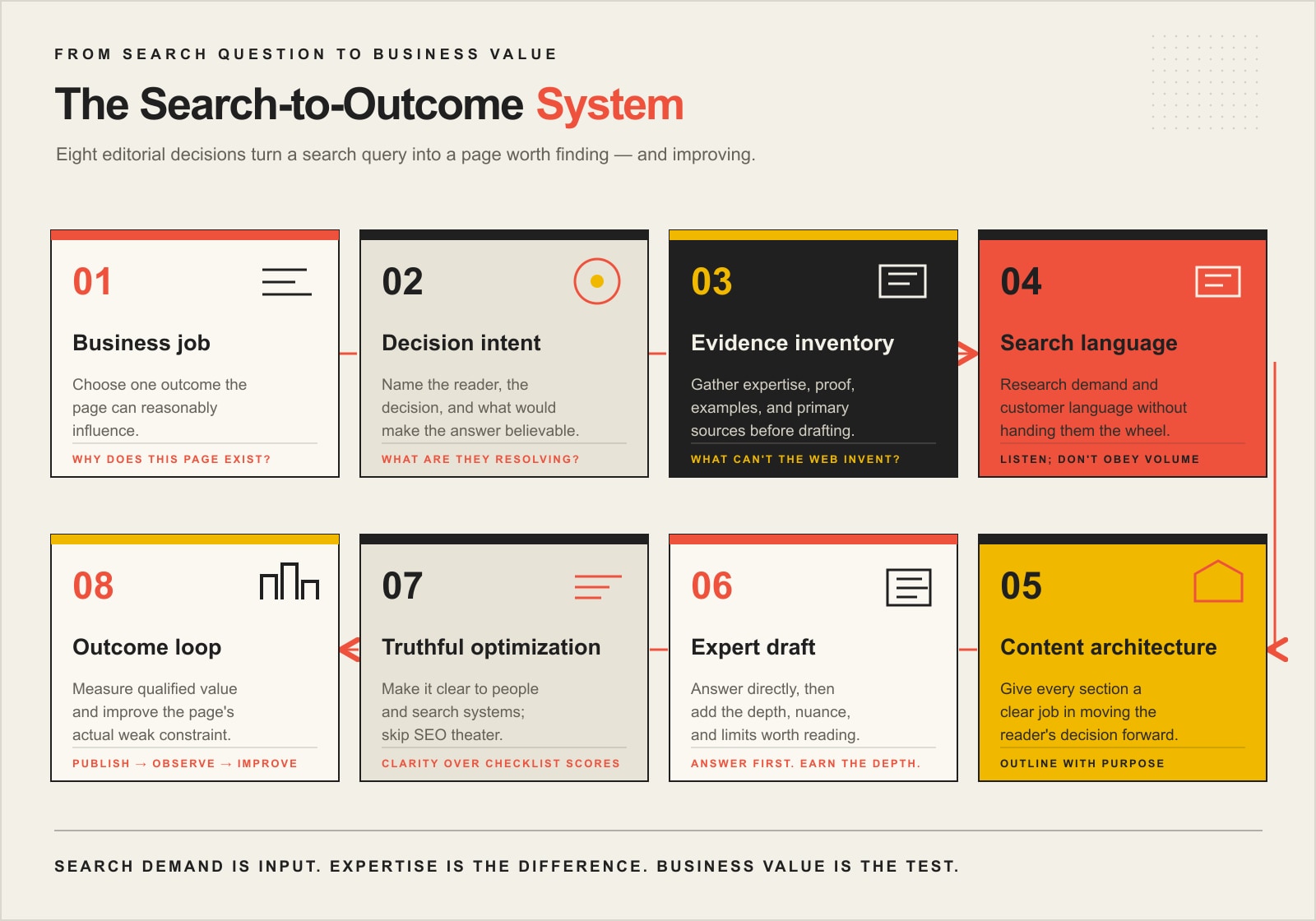
    That is the Scope Design Search-to-Outcome Content System. Keywords matter. The customer matters more. The business outcome is why the article exists at all.

    What is SEO content writing?

    SEO content writing is the process of planning, researching, writing, and maintaining web content so people and search systems can find it, understand it, trust it, and use it. Effective SEO writing combines audience research, search intent, subject-matter expertise, clear communication, on-page optimization, internal linking, and measurement.

    The definition matters because “SEO content” is often treated as a cheap production category: select a keyword, fill 1,500 words, add a stock photo of someone pointing at a graph, and wait for Google to become overwhelmed by your commitment.

    That is content-shaped inventory. It is not a strategy.

    Google says its systems are designed to prioritize helpful, reliable information created to benefit people rather than manipulate rankings. Bing says content that is discoverable, accurate, well structured, and made for users supports eligibility across search and AI-grounding experiences. Neither platform publishes a recipe where a certain word count, keyword density, plugin score, or schema type forces a ranking.

    Our SEO basics guide explains the larger visibility system. This guide focuses on the editorial work: turning a business problem and real expertise into a page worth finding.

    SEO content writing versus SEO copywriting

    The terms overlap, but the jobs are not identical.

    DisciplinePrimary jobTypical pagesSuccess evidence
    SEO content writingEarn discovery, educate, explain, and build topical understandingGuides, articles, FAQs, comparisons, resource pagesRelevant visibility, qualified visits, assisted actions, citations, links
    SEO copywritingPersuade the right visitor to take a commercial actionService pages, product pages, landing pages, offer pagesQualified inquiries, purchases, bookings, pipeline, revenue

    A strong article still needs persuasive clarity. A strong service page still needs search relevance. The difference is emphasis, not a concrete wall.

    Problems begin when the wrong measurement is attached to the page. An educational guide should not be judged only by immediate form submissions. A commercial service page should not receive a standing ovation because people spent six minutes reading and then left.

    Why most SEO content fails before anyone writes it

    The failure usually starts with the brief.

    “Write a 2,000-word article about website strategy and use the keyword twelve times” is not a useful brief. It specifies production without establishing the reader, decision, evidence, business purpose, or distinct point of view.

    Common pre-writing failures include:

    • choosing a topic only because a tool reports volume;
    • targeting several different intents with one muddled page;
    • commissioning content before interviewing the expert;
    • assuming the writer can invent the missing business position;
    • copying the headings from the top-ranking pages and calling that research;
    • creating another article when an existing URL should be updated;
    • planning traffic without deciding what a qualified visitor should do next.

    Scope Design’s Analytics & SEO position is blunt: traffic is evidence of attention, not evidence of value. A thousand irrelevant visits can create more reporting and no business. The page must connect search demand to a decision the business is qualified to help with.

    The Scope Design Search-to-Outcome Content System

    Eight steps in the Search-to-Outcome Content System: define the business job, understand decision intent, inventory evidence, research search language, structure the content, draft with expertise, optimize truthfully, and measure outcomes.

    The eight layers below turn SEO writing from a word-production task into a controlled business process.

    1. Business job: decide why the page exists

    Start with the outcome closest to money that the page can reasonably influence.

    Possible jobs include:

    • attract a qualified buyer researching a service;
    • answer an objection before a sales conversation;
    • explain pricing or process transparently;
    • support a central service or pillar page;
    • earn relevant links or citations;
    • reduce repetitive support questions;
    • help an existing customer complete a task;
    • qualify or repel prospects before they contact the business.

    Choose one primary job. A page may support secondary outcomes, but five co-equal goals usually produce one incoherent article.

    Then define the next step. It might be another guide, a comparison, a service page, a calculator, a consultation, or no immediate sale at all. The CTA should match the reader’s stage rather than mugging every visitor with “BOOK A CALL” before they know what you do.

    2. Decision intent: identify what the reader is trying to resolve

    Search intent is more useful when described as a decision rather than a generic label.

    “Informational” tells us very little. These are all informational searches with different jobs:

    • What is SEO content writing?
    • How do I write an SEO article?
    • Can AI write SEO content?
    • How much should SEO content cost?
    • Should I update an old post or write a new one?
    • Why is my content indexed but not ranking?

    For each page, write down:

    • who is searching;
    • what happened immediately before the search;
    • what they already understand;
    • what they are comparing;
    • what would make the answer believable;
    • what they need to know next.

    Then inspect the live Google and Bing results. Look at page types, result features, videos, forums, People Also Ask questions, and the dominant interpretation of the query. You are not copying the winners. You are checking whether the page you plan to write belongs in that result at all.

    Our Google ranking diagnostic explains why intent and evidence must be diagnosed before rewriting a page that does not rank.

    3. Evidence inventory: gather what the internet cannot make up for you

    Do not ask a writer or AI model to “add expertise” after the draft. Expertise is an input.

    Create an evidence inventory before outlining:

    • subject-matter expert answers;
    • first-hand processes and decision rules;
    • client examples you have permission to use;
    • original data and calculations;
    • screenshots, demonstrations, or artifacts;
    • common sales and support questions;
    • known trade-offs, exceptions, and failure modes;
    • primary sources for factual claims;
    • claims the business cannot substantiate and should not make.

    This is where Scope Design’s process deliberately keeps Greg in the loop. Research can identify what people ask. It cannot manufacture Greg’s experience, thresholds, objections, or opinion. The expert interview is what turns a technically competent summary into Scope Design content.

    The test is simple:

    If a generic AI model could produce the entire article without access to the business, the article probably does not contain enough of the business.

    4. Search language: research demand without handing it the steering wheel

    Keyword research helps identify how people describe a problem, how much observable demand exists, and which related questions belong together.

    Research should include:

    • a primary topic phrase;
    • close variants and synonyms;
    • problem, cost, comparison, and implementation questions;
    • modifiers showing audience, industry, location, or constraint;
    • People Also Ask and related searches;
    • Search Console queries for pages that already exist;
    • sales-call language and customer emails;
    • AI-query testing to expose follow-up questions and unsupported assumptions.

    Volume is not the deciding vote. A low-volume question can be commercially valuable when it signals a serious buyer. A high-volume term can be a useless crowd.

    In our August 2026 Ubersuggest check, estimated monthly US search volume was about 1,300 for “SEO content writing,” 4,400 for “content writing for SEO,” 1,300 for “SEO writing,” 1,000 for “SEO copywriting,” and 210 for “how to write SEO content.” Those figures help size the language. They do not tell Scope Design what to believe or guarantee this page will rank.

    If the hard part is deciding which phrases deserve their own page, our SEO keywords guide goes deeper on query intent, page ownership, and choosing language without chasing volume alone.

    5. Content architecture: give every section a job

    Build the outline after intent and evidence are clear.

    A practical structure may include:

    1. a direct answer;
    2. a definition and boundaries;
    3. why the problem occurs;
    4. the original process or framework;
    5. examples and evidence;
    6. trade-offs and myths;
    7. implementation steps;
    8. measurement;
    9. relevant FAQs;
    10. the next useful action.

    Each section should answer a question or move the decision forward. If a heading exists only because every competing article has it, delete it or make it earn its place.

    Use paragraphs for explanation. Lists are useful for sequences, options, and checklists; they are not a substitute for thinking. Open Brain’s Content Engine SOP specifically calls for paragraph-first drafting because a wall of bullets can look organized while saying almost nothing.

    Internal links belong in the blueprint, not sprinkled in during a final panic. Link to the pages that explain prerequisites, evidence, related decisions, and commercial next steps. Our SEO strategy and analytics pillar is the hub for this entire topic cluster.

    6. Expert draft: answer first, then earn the depth

    Open with the answer the reader came for. Do not make them survive six throat-clearing paragraphs about how “in today’s rapidly evolving digital landscape, content is king.” The king has been overthrown. He was mostly filler.

    Then add the depth that makes the answer useful:

    • explain why;
    • define conditions and exceptions;
    • show a real example;
    • distinguish similar concepts;
    • state what is unknown;
    • tell the reader what to do next.

    Write in the language of a competent human helping another human. Use industry terminology when it improves precision, not because jargon feels expensive.

    AI can help assemble research, organize notes, challenge an outline, generate alternatives, and produce a first draft. Scope Design’s rule is that a competent human must be able to inspect the sources, recognize errors, and remain accountable for publication. Fluency is not verification.

    7. Truthful optimization: make the page clear without performing SEO theater

    Once the draft is useful, optimize the page so people and search systems can interpret it.

    Check:

    • one descriptive visible H1;
    • a concise, accurate SEO title;
    • a useful meta description;
    • logical H2 and H3 headings;
    • natural use of the main topic and related language;
    • descriptive internal-link anchors;
    • credible external sources where claims require them;
    • high-quality original media near relevant text;
    • descriptive alternative text;
    • a canonical URL;
    • accurate author and review information;
    • supported schema that matches visible content;
    • mobile readability and accessibility;
    • no arbitrary line breaks or formatting debris.

    Schema is machine-readable truth. It is not a bottle of ranking cologne. Google also says no special structured data is required for its AI features.

    Rank Math and similar tools are useful lint. They can catch a missing description, absent keyword, or formatting problem. Their score is not a Google or Bing score. Protect pages that perform even when a plugin dislikes them, and do not damage natural writing to satisfy a checklist.

    8. Outcome loop: publish, observe, and improve the actual constraint

    Measure the page in layers:

    1. Eligibility: Is it crawlable, indexed, and canonicalized correctly?
    2. Visibility: What relevant queries produce impressions, rankings, citations, and mentions?
    3. Engagement: Do visitors reach the useful sections and follow relevant paths?
    4. Action: Do they call, submit, purchase, subscribe, or use the intended resource?
    5. Quality: Are those actions from the right people?
    6. Outcome: Can the business connect the page to pipeline, revenue, retention, or saved staff effort?

    Google Search Console, Bing Webmaster Tools, analytics, call tracking, and CRM data answer different pieces of that chain. No single dashboard owns the truth.

    Review the evidence before rewriting. If the page earns impressions but few clicks, the title or result fit may be weak. If visitors arrive and leave immediately, intent or clarity may be wrong. If qualified people read but never act, the offer or next step may be the constraint. Our SEO metrics guide explains the hierarchy in detail.

    Update the weak section. Do not burn down a useful URL because a calendar reminder says “refresh content.”

    The SEO writing myths that waste the most time

    Myth 1: Google prefers a specific word count

    Google explicitly says it does not have a preferred word count. The right length is the amount required to satisfy the page’s job without padding it like a high-school essay due tomorrow.

    A 600-word answer can be complete. A 4,000-word guide can be thin if it repeats itself for 3,400 words.

    Myth 2: Keyword density should hit a fixed percentage

    Google publishes no target keyword-density percentage. It warns against keyword stuffing. Use the language required to make the topic clear, then edit for humans with functioning ears.

    Myth 3: E-E-A-T is a score you can optimize

    Google describes experience, expertise, authoritativeness, and trustworthiness as concepts its systems seek to recognize through many signals. It explicitly says E-E-A-T itself is not a specific ranking factor. There is no public E-E-A-T score sitting beside your page waiting to turn green.

    Make the author, evidence, process, purpose, and accountability legible because they help people assess trust—not because you are feeding a mythical meter.

    Myth 4: Google automatically penalizes AI-written content

    Google’s concern is quality and purpose, not whether a particular tool helped create the prose. Automation used primarily to manipulate rankings can violate spam policies. AI-assisted content that is accurate, useful, reviewed, and accountable is not automatically penalized.

    The practical problem is not that AI touched the draft. It is that many AI drafts are commodity summaries with fabricated details and nobody qualified to catch them.

    Myth 5: Bounce rate and time on page directly control rankings

    Search engines do not publish a simple universal formula where a particular bounce rate or dwell time moves a page up three positions. Treat engagement metrics as diagnostic evidence about the visitor experience, not a disclosed ranking dial.

    Sometimes a short visit means the page answered the question immediately. Sometimes a long visit means the reader is hopelessly lost. Context is inconvenient like that.

    Myth 6: FAQ schema creates a ranking boost

    Visible FAQs can help readers and answer relevant follow-up questions. Accurate FAQPage markup can describe that content, but it does not create a ranking boost. Google stopped showing FAQ rich results in Search in May 2026 and removed its FAQ rich-result documentation the following month.

    Use an FAQ because the questions matter. Add schema only when it accurately represents the visible page.

    Myth 7: A green plugin score means the article is ready

    A plugin checks rules chosen by the plugin company. Search engines do not receive the score. A green light cannot verify the source, judge the business strategy, confirm the expert’s claim, or tell whether the visitor became a customer.

    Use the lint. Do not worship the dashboard.

    A transparent example: what we changed in this article

    This URL previously carried a year-dependent title and a short article containing claims we could not responsibly support.

    The old version said content with three or more citations ranked 67% higher. It presented time on page, bounce rate, and similar behavior metrics as direct ranking inputs. It treated E-E-A-T more like a checklist than a trust framework. Its Rank Math focus field contained a sprawling pile of loosely related terms.

    We did not preserve those claims just because they sounded precise.

    The replacement process was:

    1. inspect the live post, revisions, internal links, categories, and metadata;
    2. check GA4, Search Console, Bing, Ubersuggest, and backlink evidence;
    3. compare overlapping Scope Design articles before choosing the page’s job;
    4. research current keyword demand, SERP features, and People Also Ask questions;
    5. ground the position in Greg’s expert interview and two Open Brain process notes;
    6. verify disputed claims against current Google and Microsoft documentation;
    7. build an original framework and graphic;
    8. preserve the established URL while removing the year from the visible title;
    9. preserve a recoverable Gutenberg revision before handoff;
    10. measure the new version without promising a result we do not control.

    That is what evidence-led content maintenance looks like. It is less glamorous than changing the publication date and more useful than pretending an old article became fresh through calendar cosplay.

    How to use AI without publishing beige sludge

    AI is strongest when the work can be reviewed:

    • extracting questions from interview notes;
    • clustering related queries;
    • comparing outlines;
    • identifying unsupported claims;
    • transforming source material into a first draft;
    • checking consistency, gaps, and repetition;
    • creating alternative explanations;
    • preparing metadata and formatting.

    Keep human judgment for:

    • the business position;
    • expert claims;
    • evidence permissions;
    • regulated or high-consequence advice;
    • editorial taste and voice;
    • final fact-checking;
    • publication approval.

    The winning AI workflow is not “one prompt, one post.” It is source gathering, expert input, structured drafting, skeptical review, and accountable publication.

    Our AI search optimization guide explains the difference between making a page crawlable and making it worth citing.

    SEO content writing checklist

    Before writing

    • Define one primary business job.
    • Name the audience and decision.
    • Check whether an existing URL already owns the intent.
    • Interview the expert.
    • Build an evidence and permissions ledger.
    • Research keywords, live SERPs, PAA questions, and customer language.
    • Decide the page’s next useful action.

    During writing

    • Put the direct answer near the top.
    • Give every section a purpose.
    • Use paragraphs for reasoning and lists for true lists.
    • Add first-hand detail, examples, trade-offs, and limitations.
    • Cite primary sources for changing or consequential facts.
    • Keep the Scope Design voice without obscuring the answer.
    • Remove arbitrary line breaks and formatting debris.

    Before publishing

    • Verify every factual claim.
    • Confirm the title, H1, description, canonical, robots, and schema.
    • Add relevant internal and external links.
    • Check media, alt text, mobile layout, and accessibility.
    • Test every CTA and form.
    • Preserve a recoverable revision or backup.
    • Record the review date and evidence source.

    After publishing

    • Confirm live rendering and structured data.
    • Submit or notify search systems when appropriate.
    • Monitor indexation, relevant queries, citations, and referrals.
    • Connect actions to qualified outcomes.
    • Refresh facts that moved.
    • Improve diagnosed weak sections rather than rewriting blindly.

    Frequently asked questions about SEO content writing

    What is SEO in content writing?

    SEO in content writing means researching how people look for an answer, matching the page to that intent, making the topic and relationships clear, demonstrating trustworthy expertise, and optimizing titles, headings, links, media, and metadata so search systems can understand the page.

    How do I start SEO content writing?

    Start with the business outcome and reader’s decision. Research the live search results and customer language, interview the subject-matter expert, gather evidence, create an outline with one job per section, and only then draft the answer.

    Can I do SEO content writing myself?

    Yes, when you understand the subject, can research the search intent, and have time to verify and maintain the page. Get specialist help when the topic is unfamiliar, regulated, technically complex, strategically important, or when nobody internally owns research and quality control.

    Can ChatGPT write SEO content?

    ChatGPT can help research, organize, transform, and draft source material. It cannot supply missing first-hand expertise or accept accountability for false claims. A qualified human should provide the position, verify evidence, edit the voice, and approve publication.

    How long should SEO content be?

    Long enough to satisfy the reader’s decision and no longer. Google says it does not have a preferred word count. Match depth to the problem, evidence, and competitive context rather than an arbitrary quota.

    What keyword density is best for SEO writing?

    There is no documented ideal percentage. Use the primary topic and related language naturally where they help people understand the page. Repetition that makes the writing awkward is not optimization; it is keyword stuffing with paperwork.

    Is E-E-A-T a Google ranking score?

    No. Google says E-E-A-T itself is not a specific ranking factor. It is a framework for thinking about experience, expertise, authoritativeness, and trust, which ranking systems may recognize through many signals.

    Does Google penalize AI-generated content?

    Not automatically. Google focuses on quality, usefulness, and purpose. Scaled or automated content created primarily to manipulate rankings can violate spam policies regardless of the tool used.

    Does FAQ schema help SEO content rank?

    No. FAQ schema can describe visible FAQs, but it does not create a ranking boost. Google stopped showing FAQ rich results in Search in May 2026, so use FAQs for readers and structured data only when it truthfully describes the page.

    How often should SEO content be updated?

    Update it when facts, products, prices, sources, search intent, or business positioning change, or when performance evidence identifies a fixable weakness. Do not change dates merely to manufacture freshness.

    Can SEO content guarantee rankings or AI citations?

    No. Good research, technical eligibility, original evidence, and authority improve the opportunity. The final ranking and citation systems belong to Google, Microsoft, OpenAI, and other platforms—not the writer or agency.

    Write something worth finding

    SEO content writing is not about pleasing a crawler at the expense of the reader. It is the discipline of making a useful business answer discoverable, understandable, trustworthy, connected, and measurable.

    Start with the job. Interview the expert. Research the decision. Gather the proof. Write the answer. Optimize the truth. Measure what happens next.

    If your current content is thin, overlapping, unsupported, invisible, or attracting the wrong crowd, explore Scope Design’s SEO services or contact us. We will diagnose the content system before prescribing another monthly pile of words.

    Primary sources

  • Negative Email Subject Lines: Psychology, Trust, and Legal Risk

    Negative Email Subject Lines: Psychology, Trust, and Legal Risk

    Negative email subject lines can earn attention when they point to a real problem, risk, mistake, or constraint. They become dangerous when the negative emotion is manufactured. The useful distinction is not “positive versus negative.” It is honest warning versus invented alarm.

    That distinction matters for three reasons. Psychology research gives us a credible reason negative information can command attention, but it does not prove a universal lift in email open rates. Trust can be damaged even when a subject line technically earns the open. And U.S. commercial-email rules put a legal boundary around deceptive subject lines.

    If you need the broader writing process—clarity, sender recognition, preview text, length, curiosity, urgency, and testing—start with our complete guide to email subject lines. This article has a narrower job: deciding whether negative framing is truthful, useful, and worth the trust risk.

    Do Negative Email Subject Lines Work?

    Sometimes—but “work” has to mean more than “got opened.” A negative subject line can make a legitimate problem easier to notice. It can also increase anxiety, disappointment, complaints, unsubscribes, or distrust if the message does not earn the alarm it created.

    There is no defensible universal claim that negative subject lines increase open rates by 15%, 25%, or any other fixed amount. The old version of this article made that mistake. The current evidence supports a psychological mechanism, not a guaranteed email-performance number.

    • Good negative framing: surfaces a real issue the recipient needs to understand or act on.
    • Weak negative framing: dramatizes an ordinary point just to create curiosity.
    • Deceptive negative framing: implies a problem, deadline, consequence, or condition that is false or misleading.

    The business question is therefore not “Will negativity get more opens?” It is: Does this warning deserve the attention it is asking for?

    Why Negative Information Gets Attention

    Psychologists have long studied what is often called negativity bias: in many contexts, negative events or information can receive greater weight or produce stronger effects than comparable positive information. Reviews by Rozin and Royzman (2001, DOI 10.1207/S15327957PSPR0504_2) and Baumeister and colleagues (2001, DOI 10.1037/1089-2680.5.4.323) describe this broader pattern.

    That gives marketers a plausible reason a warning, mistake, loss, threat, or contradiction can interrupt attention. But the leap from “negative information can carry more psychological weight” to “negative subject lines always improve email performance” is not justified.

    Email adds context the psychology studies do not control: sender reputation, audience expectations, relationship history, offer quality, list permission, timing, inbox competition, message relevance, and what happens after the open. A subject line is part of a system, not a laboratory switch.

    When Negative Framing Becomes Manipulation

    Negative framing is not inherently manipulative. In fact, sometimes the responsible message is negative: a payment failed, a security setting changed, a deadline is approaching, a form is broken, an application is incomplete, or a customer is about to lose access to something they legitimately use.

    The problem starts when the subject line creates an emotional condition the facts do not support. That usually happens in one of five ways:

    1. Invented problem: “There’s a problem with your account” when there is not.
    2. Invented consequence: “You’re about to lose everything” when the actual downside is trivial or hypothetical.
    3. Invented urgency: “Final notice” or “Today only” when the opportunity continues.
    4. Invented social pressure: implying that “everyone” is abandoning a tactic, product, or behavior without evidence.
    5. Bait-and-switch negativity: declaring that something “doesn’t work” only to sell the same thing under a different label inside the email.

    A useful test is simple: Would a reasonable recipient feel that the email resolved or substantiated the concern created by the subject line? If the open produces relief only because the recipient discovers the alarm was fake, that open was purchased with trust.

    The Scope Design ALARM Test

    We use the ALARM Test to decide whether a negative subject line is doing legitimate communication work or merely manufacturing anxiety. The more a subject behaves like an alarm, the more evidence it needs.

    The ALARM Test checks for an Actual problem, Literal and supportable language, Audience relevance, Real urgency, and downstream Measures of trust.

    A — Actual problem

    Is there a real problem, risk, mistake, constraint, or downside? If the negative premise disappears when you remove the copywriting, you probably do not have an alarm—you have a hook.

    L — Literal and supportable language

    Can you defend the words as written? “Three checkout errors are blocking orders” is specific and testable. “Your website is destroying your business” is usually theater unless you have extraordinary evidence.

    A — Audience relevance

    Does this issue actually matter to the recipient receiving the message? A real problem sent to the wrong segment still creates noise. Relevance is part of honesty because context changes what a warning implies.

    R — Real urgency

    If the subject line implies time pressure, what creates the deadline? A contract date, expiration, capacity limit, security window, scheduled change, or true inventory constraint can be legitimate. “Act now” because the copywriter wants a higher open rate is not a deadline.

    M — Measure downstream trust

    Do not declare victory at the open. Compare clicks, replies, conversions, spam complaints, unsubscribes, and the quality of the resulting action. If the negative version wins opens but loses qualified response, the subject line did not outperform—it moved the loss farther down the funnel.

    The ALARM rule: the stronger the emotional warning, the stronger the burden of truth. A mild “Three mistakes to check before launch” needs less proof than “Your launch is about to fail.”

    What the Law Actually Requires

    This section is general business information, not individualized legal advice. Email rules can vary by jurisdiction, industry, recipient, and message type, so businesses with meaningful exposure should get qualified legal guidance.

    CAN-SPAM: the federal baseline

    The Federal Trade Commission’s CAN-SPAM compliance guide says commercial email must not use deceptive subject lines: the subject line must accurately reflect the content of the message. CAN-SPAM also includes requirements involving header information, identification of advertising in applicable circumstances, a valid physical postal address, and a functioning opt-out process.

    For a broader operational overview, see our 2026 email marketing laws and compliance guide. The important point here is narrower: clever framing does not create an exception for deception.

    Washington’s commercial-email law

    Washington provides a useful example of why old penalty figures should not be recycled forever. The current RCW 19.190.020 addresses specified commercial email whose subject line contains false or misleading information based on actual knowledge or knowledge fairly implied by objective circumstances. Its coverage includes messages sent from a computer located in Washington or sent to an address the sender knows or has reason to know belongs to a Washington resident.

    The current RCW 19.190.040 sets statutory damages for a recipient at $100 per message or actual damages, whichever is greater. The $1,000-per-message statutory figure applies to an interactive computer service, not an ordinary recipient. Washington’s 2026 amendment applies to causes of action commenced on or after June 11, 2026.

    That distinction corrects a major error in the old version of this article, which presented $1,000 per email as a flat recipient penalty. The better operational lesson is not memorizing a dramatic number. It is building a review process that prevents false subject-line claims in the first place.

    Examples: Honest Warning vs. Manufactured Alarm

    SituationStronger, supportable subjectRisky versionWhy
    Checkout failure confirmed3 checkout errors are blocking ordersYour store is losing thousands right nowThe first states the verified condition; the second invents a dollar consequence unless you can prove it.
    Real deadline FridayEnrollment closes Friday at 5 PMFINAL WARNING: act immediatelyThe concrete deadline communicates urgency without theatrical escalation.
    Security setting changedYour admin login settings changedYour account has been hackedA setting change is evidence; a breach is a separate claim.
    Common campaign mistakeCheck these 4 campaign errors before launchYour campaign is doomedThe first invites inspection; the second predicts failure.
    Promotion ending as stated20% offer ends tonightLast chance everUse the real constraint, not a larger one invented for pressure.

    Notice what the better versions have in common: they are more concrete. Specificity often makes negative framing less manipulative because it replaces atmospheric fear with a checkable condition.

    How to Test Negative Subject Lines Without Fooling Yourself

    A/B testing can help, but only if the experiment reflects the business outcome you care about. Testing a negative line against a positive line and selecting the winner solely by opens is a weak design.

    1. Hold the message constant. Change the framing, not the offer, send time, audience, and email body at the same time.
    2. Keep both versions truthful. The test is not permission to see whether deception performs better.
    3. Choose a downstream success metric first. Depending on the email, that may be a click, reply, completed form, purchase, appointment, renewal, or another qualified action.
    4. Watch the negative signals. Unsubscribes, complaints, low-quality clicks, confused replies, and post-open abandonment are part of the result.
    5. Treat small samples as clues. A tiny list can produce large percentage swings from a handful of people. Do not turn noise into a universal rule.

    If you see a higher open rate but a lower conversion rate, calculate the result per delivered email, not per open. If the negative subject attracts people who feel tricked or discover the message is irrelevant, the “winning” subject may simply have increased the top of a leaky funnel.

    Also remember that opens themselves are an imperfect metric. Privacy features and image-loading behavior can make open-rate data less literal than it appears. The safest approach is to use opens diagnostically and give more weight to observable actions deeper in the sequence.

    Do Negative Words Send Email to Spam?

    There is no universal list of “negative words” that automatically sends an email to spam. Inbox placement depends on a larger pattern that includes sender authentication, reputation, permission, list quality, complaint behavior, sending patterns, and message content.

    That does not mean wording is irrelevant. Overheated claims, fake urgency, excessive shouting, or misleading promotion can frustrate recipients and increase negative engagement. The useful mental model is not “avoid these seven magic spam words.” It is “send recognizable, expected, accurate messages that recipients want.”

    When subject-line experiments produce more opens but also more unsubscribes, our guide to reducing email unsubscribe rates can help diagnose whether the problem is expectation, relevance, frequency, or the underlying offer.

    Negative Subject Line Checklist

    Before sending a negative email subject line, run this short review:

    • Actual: Is the problem or downside real?
    • Supportable: Can we prove the words as written?
    • Relevant: Does this recipient actually face the issue?
    • Urgent: If time pressure is implied, what creates it?
    • Matched: Does the body immediately explain and substantiate the subject?
    • Proportionate: Is the emotional intensity appropriate to the actual consequence?
    • Measurable: What downstream action will determine whether the subject helped?
    • Compliant: Have we checked the rules that apply to this message, audience, jurisdiction, and industry?

    If the line fails the first five questions, rewrite it before you worry about whether it is “catchy.”

    Frequently Asked Questions

    Are negative email subject lines effective?

    They can be effective when they surface a real, relevant problem the email actually helps the recipient understand or solve. There is no credible universal percentage lift. Measure downstream behavior, not only opens.

    Are misleading email subject lines illegal?

    U.S. commercial email is subject to CAN-SPAM, and the FTC states that subject lines must accurately reflect message content. State laws can add requirements or remedies. Washington, for example, separately addresses false or misleading commercial-email subject lines. Get qualified legal advice for your specific exposure.

    Can I use “last chance” in a subject line?

    Use it only when it is actually the recipient’s last chance under the terms being communicated. A concrete deadline such as “Registration closes Friday at 5 PM” is usually clearer and easier to substantiate.

    What should I avoid putting in an email subject line?

    Avoid false account problems, fake deadlines, invented consequences, unsupported superlatives, fabricated social pressure, and any wording that makes the email body feel like a bait-and-switch. Vague hype is usually weaker than a specific, supportable statement.

    What is a good negative email subject line?

    A good negative subject line is a truthful warning with a clear payload. “Three checkout errors are blocking orders” is stronger than “Your website is killing your sales” when you have actually found those errors and explain them in the email.

    Should I test a negative subject against a positive one?

    Yes, if both versions are accurate and you choose the success metric before testing. Compare qualified clicks, replies, conversions, unsubscribes, and complaints in addition to opens.

    The Bottom Line: An Alarm Has to Be Earned

    Negative framing is not a loophole, a guaranteed open-rate hack, or something businesses need to avoid entirely. It is a communication tool with a higher burden of proof because it deliberately asks the recipient to notice a problem.

    Use the Scope Design ALARM Test: confirm the Actual problem, use Literal and supportable language, confirm Audience relevance, state only Real urgency, and Measure downstream trust. If the subject line still works after those checks, the attention is probably earned rather than borrowed.

    If your broader email program is underperforming, do not solve a list, offer, deliverability, or follow-up problem with increasingly aggressive subject lines. Diagnose the actual constraint first—then write the subject line the message deserves.

    Primary Sources and Evidence

  • 301 Redirects for SEO: Move URLs Without Making a Mess

    301 Redirects for SEO: Move URLs Without Making a Mess

    301 redirects tell browsers and search engines that a URL has moved permanently to a genuinely equivalent new address. A 301 redirect can preserve the relationship between the old page and its replacement, but it is not a magic hose for spraying “SEO value” at whatever page you like. If the destination does not satisfy the same user intent, the redirect is bullshit with a status code.

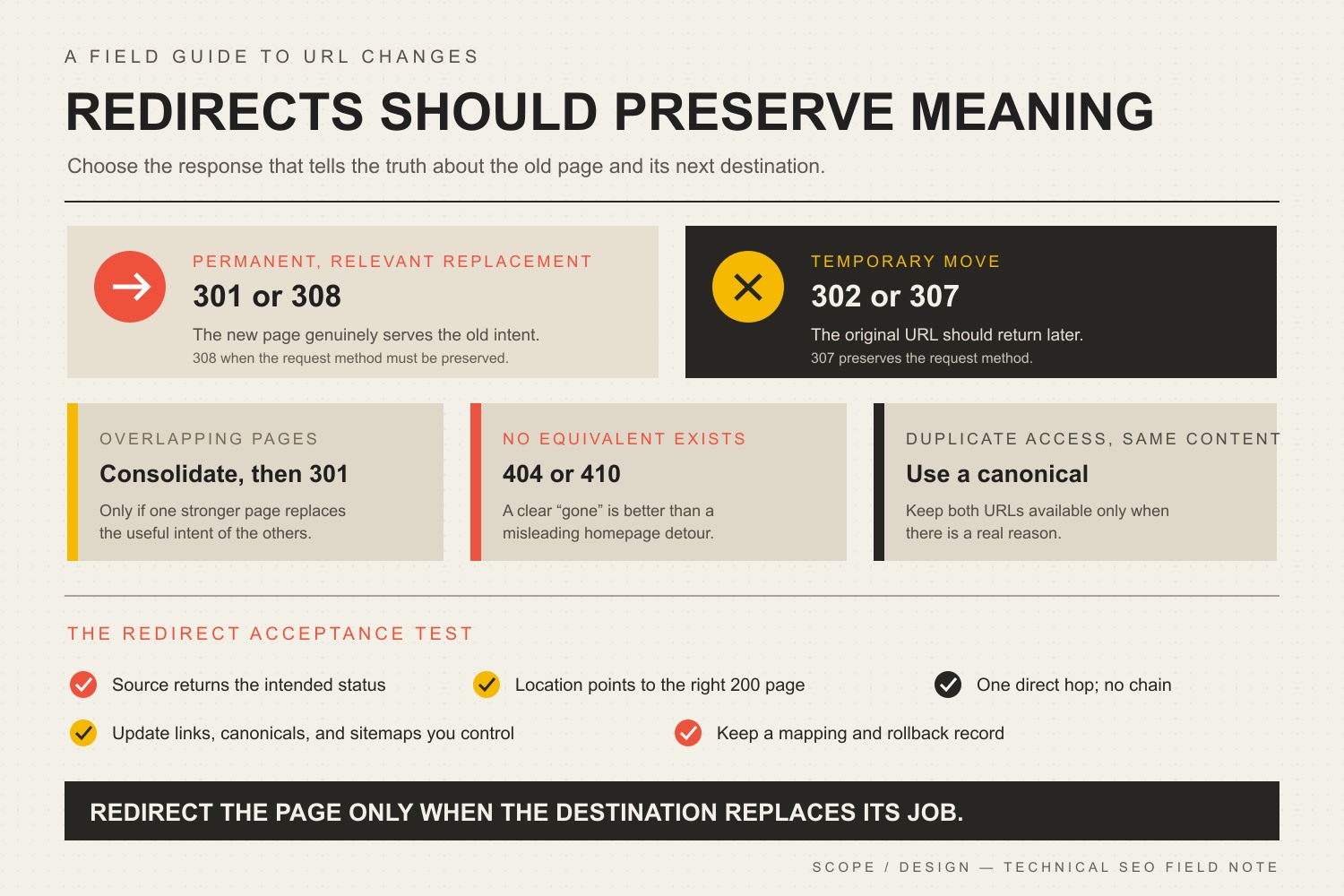
    TL;DR: Use a 301 or 308 when an old URL has a permanent, relevant successor. Use a 302 or 307 when the move is temporary. Consolidate overlapping pages only when one stronger page honestly replaces them. Return 404 or 410 when content is gone and no useful equivalent exists. Then update internal links, canonicals, sitemaps, and other references so the redirect is a safety net—not your site’s permanent navigation system.

    This guide is part of Scope Design’s broader SEO strategy and analytics framework. That pillar connects search visibility to qualified business outcomes. This article handles the narrower technical decision: what should happen when a URL changes or disappears?

    In this guide

    What Is a 301 Redirect?

    A 301 is an HTTP response status meaning Moved Permanently. When someone requests the old URL, the server responds with the new location, and the browser requests that destination instead.

    Google describes permanent redirects as a signal that the new target should become canonical and recommends server-side permanent redirects when a page’s URL has permanently changed. Google currently recognizes both 301 and 308 as permanent server-side redirects. Read Google’s redirect documentation.

    That definition sounds simple because the code is simple. The judgment is not.

    The real question is not, “Can we redirect this URL?” It is, “Does this destination replace what the visitor and search engine expected to find?”

    The Scope Design Redirect Decision Map

    A redirect is a documented claim that the old URL and the new destination serve the same intent. Make that claim honestly.

    Redirect decision map: use 301 or 308 for a permanent relevant move, 302 or 307 for a temporary move, consolidate only overlapping intent, use 404 or 410 when no equivalent exists, and canonicalize duplicate access to the same content.
    SituationCorrect responseDecision rule
    The same page has a permanent new URL301 or 308The new destination replaces the old resource and should become the indexed URL.
    The move is temporary302 or 307The original URL should remain the long-term address and the change will be reversed.
    Several overlapping pages now have one stronger replacementConsolidate, then 301The destination meaningfully covers the useful intent of every retired page.
    The content is gone and has no equivalent replacement404 or 410Do not manufacture relevance by dumping the visitor onto the homepage.
    Two accessible URLs must remain but represent substantially the same contentCanonicalizeKeep both available when there is a real reason, but identify the preferred version consistently.
    The destination changed againUpdate to one direct hopPoint every old address directly to the final current URL.

    This is the difference between redirect management and a junk drawer full of old slugs.

    Does a 301 Redirect Affect SEO?

    Yes, because a permanent redirect changes how search engines understand the relationship between URLs. It also affects users, crawling, canonicalization, internal architecture, referral traffic, and the usefulness of old links.

    The good news is less dramatic than most SEO folklore. Google states that 301s and other permanent redirects do not cause a loss of PageRank during a site move. That does not mean every irrelevant redirect inherits the old page’s rankings, converts perfectly, or becomes immune to bad mapping. Google’s site-move guidance warns against sending many old URLs to one irrelevant destination, such as the homepage, because those redirects can confuse users and may be treated as soft 404s.

    So stop asking what percentage of “link juice” transfers. That framing makes a serious information-architecture decision sound like a beverage problem.

    Ask instead:

    • Does the destination answer the reason the old URL earned attention?
    • Is it accessible, indexable, self-canonical, and internally linked?
    • Does the redirect go directly to the final destination?
    • Have navigation, body links, sitemaps, ads, profiles, and important external references been updated?
    • Can we verify the response, destination, and downstream business behavior?

    Our guide to improving a page’s Google rankings explains why technical eligibility is only one constraint. A redirect can preserve a useful path. It cannot make an irrelevant or mediocre destination deserve visibility.

    301 vs. 302, 307, and 308 Redirects

    The correct status depends on permanence and, in some technical cases, whether the redirected request method must remain unchanged.

    Use 301 for a normal permanent page move

    Use a 301 when a page, article, file, category, or domain has a permanent replacement. This is the common business-website case: a slug changes, two articles are consolidated, HTTP moves to HTTPS, or an old domain moves to a new one.

    Use 308 for a permanent move that must preserve the request method

    A 308 is also permanent. The important technical difference is that the client must preserve the request method and body. That matters for redirects involving POST requests, forms, uploads, APIs, or other non-GET behavior. MDN’s 308 reference explains this method-preservation behavior.

    For an ordinary editorial page requested with GET, a 301 is usually the familiar and appropriate choice. Do not choose a status code because it sounds newer. Choose it because it describes the behavior.

    Use 302 or 307 for a temporary move

    Use a temporary redirect when the original URL should remain the long-term address. Examples include temporary maintenance, an unavailable service, a short campaign test, or a temporary regional destination.

    Google says temporary redirects generally signal that the source URL should remain the canonical one. Use 307 instead of 302 when preserving the request method and body matters. MDN’s 307 reference documents the method-preserving behavior.

    Use 404 or 410 when there is no replacement

    A 404 means the server cannot find the requested resource without asserting whether the absence is permanent. A 410 means the resource is intentionally and permanently gone. MDN’s 404 reference and 410 reference make that distinction explicit.

    Neither is inherently an SEO failure. An intentional 404 or 410 is more accurate than redirecting an obsolete page to an unrelated service, category, or homepage. A custom 404 page can help the person recover, but the HTTP response should still tell the truth.

    When Should Old Content Be Consolidated?

    Consolidate when multiple URLs compete to answer substantially the same question and one page can become the complete, maintained owner of that intent.

    Good consolidation:

    • combines complementary information instead of deleting the useful half;
    • preserves the strongest existing URL when practical;
    • maps every retired page to a destination that covers its real subject;
    • updates internal links at their source;
    • retains recoverable copies and a redirect register;
    • measures what happens after the change.

    Bad consolidation is deleting six vaguely related articles, redirecting all six to a generic pillar, and calling the resulting silence “topical authority.”

    For a redesign or larger migration, our website redesign checklist expands this into a full URL-disposition inventory: keep, improve, merge, redirect, retire with 404/410, or create a genuinely missing page. This article stays focused on the redirect decision and the verification that follows it.

    That same discipline belongs in any SEO content cluster: pillars organize broad decisions, supporting articles resolve narrower questions, and redirects protect the relationship when ownership changes.

    Why Redirect Chains Are a Maintenance Problem

    A redirect chain happens when an old URL points to another redirected URL before reaching the final page:

    Old A → Old B → Current C

    Google can follow multiple hops, but its site-move guidance recommends redirecting to the final destination directly and keeping unavoidable chains low. Every extra hop adds another request and another place for migrations, plugins, caches, crawlers, or future administrators to get confused.

    The practical distinction is simple:

    • Internal links should point directly to the current URL.
    • Redirects should remain to protect traffic you do not control.

    A working redirect is not permission to leave avoidable hops scattered through the site forever.

    How to Implement a 301 Redirect Without Breaking Things

    The tool varies by platform. The operating method should not.

    1. Inventory the old URLs

    Use more than the current sitemap. Review analytics landing pages, Google Search Console and Bing Webmaster Tools, server logs, backlink data, the CMS database or content export, internal-link crawls, campaign and profile URLs, PDFs and other files, and previous redirect records.

    An old URL with no current sitemap entry can still have links, bookmarks, search impressions, or paying humans using it.

    2. Map each old URL by intent

    Create an explicit old-to-new mapping. Do not rely on a broad wildcard unless the URL structure and destination structure genuinely correspond.

    For each source URL, record the current response, intended destination or 404/410 decision, reason for the mapping, available traffic/search/backlink evidence, redirect type, implementation layer, verification result, owner, and review date.

    3. Preserve a rollback record

    Before a bulk change, save the current rules, affected content, hashes or exports, and expected replacement counts. Redirect mistakes can be fixed quickly only when you know exactly what changed.

    4. Implement the redirect at a reliable layer

    Google recommends server-side redirects when possible. Depending on the environment, that might be the web server, CDN, hosting control panel, application, CMS, or a WordPress redirect manager.

    WordPress plugins can be perfectly appropriate when they are maintained, controlled, exported, and included in the site’s operational ownership. The problem is not “plugin versus code.” The problem is a redirect living in a mystery layer nobody remembers during the next migration.

    5. Update every signal you control

    After the redirect exists, update internal links, canonical tags, XML sitemaps, hreflang annotations when applicable, structured-data URLs, image and file references, navigation and breadcrumbs, ads, email templates, profiles, QR codes, and important external links when the publisher will change them.

    Google’s migration documentation specifically recommends updating internal links and the new page’s canonical annotations. The redirect catches leftovers; it should not become the architecture.

    6. Test the response without automatically following it

    Verify the first response before checking the final page. A browser that silently follows redirects can make a chain look like a clean success.

    • Confirm the source returns the intended 301, 302, 307, or 308.
    • Confirm the Location header is correct.
    • Confirm the destination resolves with 200.
    • Confirm there is no unnecessary intermediate hop.
    • Check HTTP/HTTPS and www/non-www behavior.
    • Keep or remove query strings intentionally.
    • Test forms, checkout, APIs, and non-GET requests when relevant.
    • Confirm the destination is indexable and self-canonical when appropriate.

    7. Monitor after launch

    Watch crawling, indexing, search impressions, landing-page traffic, server errors, conversions, and redirect hits. Significant site moves can produce temporary ranking fluctuations while search engines recrawl and process individual URLs. That is a reason to monitor calmly, not rewrite everything three days later because a chart wiggled.

    Our guide to diagnosing Google ranking changes provides a broader triage process for separating migrations, technical failures, demand changes, competition, and algorithm updates.

    The Scope Design Redirect Acceptance Test

    A redirect is not finished when the rule exists. It is finished when the intended path and the surrounding signals can be verified.

    CheckPass conditionWhat a failure usually means
    Source responseThe old URL returns the intended 301/308 or temporary status.The rule is missing, overridden, cached incorrectly, or implemented in the wrong layer.
    Location headerIt points to the exact intended current URL.The mapping is wrong or a generic rule is catching more than intended.
    Redirect hopsThe source goes directly to the final destination whenever practical.Legacy rules were stacked instead of updated.
    Final responseThe destination returns 200 and renders the expected resource.You created a redirect to another error, redirect, or unavailable page.
    Canonical/indexabilityThe final page is indexable and self-canonical when it is meant to rank.The redirect and canonical signals disagree.
    Controlled referencesInternal links, sitemap entries, navigation, structured data, and other references use the final URL.The redirect is being used as permanent internal plumbing.
    Request behaviorQuery strings, methods, bodies, forms, APIs, and checkout behavior work as intended.The chosen status or implementation changed request behavior.
    MonitoringErrors, crawl/index signals, landing traffic, and business actions are watched after launch.You can prove the rule exists but not whether the migration worked.

    This test separates implementation proof from outcome proof. A clean 301 and final 200 prove that the redirect path works. They do not prove that rankings, traffic, or conversions will remain identical. Those outcomes require subsequent data.

    How Scope Design Approaches Redirect Recovery

    Redirect work is usually boring when it succeeds. That is a compliment.

    Our operating pattern is evidence-first:

    • identify legacy URLs from analytics, search tools, crawls, logs, backlinks, or the CMS;
    • verify the source’s real public response before changing anything;
    • verify that the proposed destination exists and serves the same useful intent;
    • check existing redirect systems so a new rule does not collide with an old one;
    • preserve a recoverable record of rules and affected content;
    • implement the narrowest reliable mapping;
    • verify the source status and Location header without following the redirect;
    • follow the path and verify the final destination separately;
    • update internal references instead of forcing the redirect to handle traffic we control;
    • monitor the result without claiming an SEO lift before the data exists.

    The standard is unglamorous: find recoverable intent, map it honestly, change only what you can audit, and verify the whole path.

    Common 301 Redirect Mistakes

    Redirecting everything to the homepage

    The homepage is not the universal replacement for every dead page. Google warns that irrelevant mass redirects may be treated as soft 404s. More importantly, they annoy humans who expected a specific answer.

    Changing slugs for cosmetic reasons

    Removing a year from an evergreen title does not require changing its established URL. Preserve the slug unless the change solves a real problem. A cleaner-looking address is rarely worth creating migration work and risk.

    The redirect protects uncontrolled references. Update the links you own to point directly to the final destination.

    Creating redirect chains during every redesign

    When Page A previously moved to Page B and Page B now moves to Page C, update A to point directly to C. Keep the old source coverage, lose the unnecessary middle hop.

    Redirecting unrelated deleted content

    If no equivalent exists, return 404 or 410. Accuracy beats a fake connection.

    Forgetting files and images

    PDFs, images, videos, feeds, and downloadable resources can have search visibility and external links. Include them in migration mapping when they move.

    Testing only in a browser

    Browsers follow redirects so politely that they can hide the mess. Inspect the status and Location header directly, then verify the destination.

    Deleting redirects after a few months

    Google recommends keeping redirects for as long as possible, generally at least one year, and suggests considering indefinite retention for users. Scope Design’s default is to retain valid permanent redirects unless there is a documented operational reason not to.

    301 Redirect Checklist

    • Confirm that the move is permanent.
    • Confirm that the destination genuinely replaces the old intent.
    • Preserve the existing rules and affected content before changing anything.
    • Use a server-side 301 or 308 when practical.
    • Point directly to the final 200 destination.
    • Update internal links, canonicals, sitemaps, structured data, and other references.
    • Verify the source status and Location header without following redirects.
    • Verify the final destination with redirect following enabled.
    • Check query strings, forms, mobile behavior, files, and alternate URL versions.
    • Record the mapping, implementation layer, owner, and verification date.
    • Monitor search, traffic, errors, and business actions.
    • Keep valid permanent redirects for at least a year and preferably longer when the old reference can still reach users.

    Frequently Asked Questions About 301 Redirects and SEO

    When should I use a 301 redirect?

    Use a 301 when a URL has permanently moved and there is a relevant replacement that should become the preferred address. Common cases include slug changes, permanent domain moves, HTTP-to-HTTPS migrations, and consolidation of overlapping pages.

    Is a 301 redirect better for SEO than a 302?

    Neither is universally “better.” A 301 accurately describes a permanent move; a 302 accurately describes a temporary one. The SEO-friendly choice is the status that tells the truth about the move.

    Does a 301 redirect pass all SEO value?

    Google says permanent redirects do not cause a loss of PageRank in a site move. That does not guarantee the destination will keep every ranking, query association, conversion, or traffic level. Relevance, content, indexing, internal signals, competition, and user intent still matter.

    How long should a 301 redirect remain active?

    Google recommends keeping redirects for as long as possible and generally at least one year. For users, Google suggests considering indefinite retention. Scope Design normally keeps valid permanent redirects unless the old domain or infrastructure cannot reasonably be maintained.

    Are redirect chains bad for SEO?

    They are avoidable technical debt. Google can follow multiple hops but recommends redirecting directly to the final destination and keeping chains low. Chains add requests and create more failure points, so update old rules and internal links to use one direct hop whenever practical.

    Should every deleted page redirect somewhere?

    No. Redirect only when a relevant successor exists. If the content is gone and nothing genuinely replaces it, a proper 404 or 410 is more accurate than sending the user somewhere unrelated.

    Should I redirect old blog posts to a category or pillar page?

    Only if that category or pillar meaningfully replaces the old post’s useful intent. A broad topic relationship is not enough. If the visitor searched for a specific answer and lands on a generic index, the mapping is probably weak.

    Can I use a WordPress redirect plugin?

    Yes. A maintained WordPress redirect tool can be a sensible implementation layer, especially when rules need to be visible and manageable by the site team. Export or document the rules, avoid overlapping redirect systems, and verify the actual public HTTP response.

    Yes. Internal links should point directly to current URLs. This reduces unnecessary requests, prevents chains, clarifies site architecture, and stops a temporary implementation detail from becoming permanent clutter.

    Does changing an article title require a redirect?

    No. You can usually change the title and H1 while preserving the existing slug. Scope Design removes obsolete years from evergreen titles without changing established URLs solely for cosmetic consistency.

    How do I check whether a 301 redirect works?

    Inspect the source response with redirect following disabled, confirm the status and Location header, then follow the redirect and verify that the final page returns 200. Also check that the destination is the intended canonical page and that there are no unnecessary intermediate hops.

    Redirects Should Preserve Meaning, Not Hide a Mess

    A responsible redirect strategy preserves useful relationships between old and current content. It does not force every dead URL into a living page so the audit spreadsheet looks cleaner.

    If your site has years of migrations, overlapping articles, broken links, conflicting redirect tools, or search traffic landing on the wrong pages, Scope Design can map the system before changing it. Review our SEO services or contact Scope Design to start with the evidence instead of another plugin-shaped guess.

    Sources

  • Online Presence for Small Business: 6 Steps to Win and Retain Customers

    Online Presence for Small Business: 6 Steps to Win and Retain Customers

    A strong online presence for small business growth is not a website, a Google Business Profile, a few social accounts, and an email list sitting beside one another. It is a connected system that helps the right people find you, understand you, take the next step, receive a competent response, and have a reason to come back.

    Most advice about an online presence for small business owners stops at the channel list. That distinction matters because customer retention is rarely won by one page or one channel. A site can generate a perfectly good lead and still fail if the form goes nowhere. Search can bring qualified visitors to a confusing offer. Social media can create attention that never reaches an owned audience. A polished redesign can hide the fact that slow follow-up—not design—is the real bottleneck.

    Scope Design’s approach is to treat the web presence as an acquisition-to-retention system and fix the earliest constraint in that system before adding more tactics downstream. We call the model the Presence-to-Repeat Loop: Home Base → Findability → Trust → Handoff → Follow-through → Feedback.

    If you remember one idea from this guide, make it this: build the loop, then improve the first stage that is actually failing. More channels are not automatically more presence, and more traffic is not automatically more business.

    TL;DR: Build the Smallest Complete Online Presence for Small Business Growth

    • Own the home base: keep the website clear, usable, accessible, measurable, and connected to the systems that receive customer actions.
    • Earn relevant discovery: use search, local listings, social, referrals, ads, and other channels only where they reach the right people.
    • Protect the handoff: test what happens after a form, call, booking, order, or signup so customer intent reaches a real owner and receives a useful response.
    • Improve the first constraint: use feedback and business outcomes to fix the earliest failing stage instead of stacking more tactics downstream.

    In This Guide

    Online Presence for Small Business: What It Should Actually Do

    Your online presence is every meaningful digital touchpoint where a prospect or customer can discover, evaluate, contact, buy from, or return to your business. That can include your website, search results, Google Business Profile, social profiles, review sites, marketplace listings, email, booking or ecommerce systems, and customer portals.

    The phrase online presence for small business can sound like a channel checklist. In practice, it is a customer-path problem: discovery only matters when it reaches a useful handoff and a customer experience worth repeating.

    Those touchpoints do not deserve equal strategic weight. Your website is normally the owned hub: the place where you control the message, structure, offers, calls to action, measurement, and integrations. Search, maps, social, directories, ads, and referrals are discovery or distribution surfaces that should send the right people toward that hub—or toward another intentional next step.

    That is why “being everywhere” is a poor goal. The better question is: what job should each channel perform, and what happens after it performs that job? Our broader SEO strategy and analytics framework applies the same logic to search: visibility matters only when it connects to a qualified business outcome.

    A useful web presence should do six jobs in sequence: provide an owned destination, earn relevant discovery, reduce uncertainty, make the next action easy, route that action into a real business process, and feed what you learn back into the system. That sequence is the Presence-to-Repeat Loop.

    The Presence-to-Repeat Loop

    The loop is not a funnel that ends when somebody submits a form. It continues through the operational handoff and customer experience, then brings evidence back to marketing and the website. That is what makes retention part of web strategy instead of an unrelated task owned by somebody else.

    1. Home Base: Own the Destination

    Your home base is the digital property where the business can explain what it does, for whom, why it is credible, and what should happen next. For most small businesses, that is the website. It should be stable enough to trust, easy enough to use, and structured around real customer decisions rather than around whatever pages came with the theme.

    Ownership also means maintainability. Forms need to work. Contact information needs to be current. Important pages need clear owners. Analytics should be installed correctly. Critical third-party dependencies should be understood. Accessibility belongs in this foundation, too: WCAG 2.2 is the current W3C Recommendation with testable, technology-neutral criteria for making web content more accessible, and W3C notes that following the guidance often improves usability more broadly.

    A redesign can help when the home base itself is the constraint, but redesign is not the default diagnosis. Before rebuilding, use a website redesign checklist that proves the need before the rebuild. If the real failure is lead routing, offer clarity, or follow-up, a prettier interface can leave the business problem untouched.

    2. Findability: Help the Right People Discover You

    Findability is not the same as traffic. The goal is relevant discovery from people who have a reasonable chance of becoming customers. Depending on the business, that can come from organic search, local search, paid media, referrals, social content, partnerships, directories, or direct demand created offline.

    Google’s SEO Starter Guide describes SEO as helping search engines understand content and helping users find a site. Google also says it primarily discovers new pages through links from pages it already crawled. In practical terms, useful content, logical internal links, clear page ownership, and crawlable navigation are part of being findable; publishing isolated pages and hoping search figures it out is not a strategy.

    For a local business, your website and your Google Business Profile should reinforce one another. Google says an eligible, verified Business Profile lets a business manage how it appears in Search and Maps, maintain key information, and interact through features such as photos and reviews. Our local SEO guide for small businesses goes deeper on being found and chosen in local search.

    3. Trust: Answer the Questions That Block Action

    Once the right person arrives, the site has to make a clear argument. What problem do you solve? Who is the offer for? What is included? What does the process look like? What proof supports the claim? What happens if the visitor is not ready to buy today?

    Trust is not a pile of badges. It is the reduction of relevant uncertainty. A service business may need strong examples, process clarity, scope boundaries, and credible reviews. A local retailer may need hours, inventory expectations, directions, policies, and real photos. A consultant may need a point of view that shows how decisions are made. Put proof near the doubt it resolves rather than hiding all credibility on a testimonial page.

    Social media can support this stage by showing activity, expertise, community participation, and evidence of work, but it should have a defined role. If social is one of your authority channels, our guide to building a social media presence that actually builds authority covers that specialist job without turning this article into a social-media checklist.

    4. Handoff: Make the Next Step Reach a Real Person or System

    This is the stage most “online presence” guides skip. A conversion is not complete because a form says “Thank you.” The business has to receive the inquiry, know what it means, assign responsibility, and act on it.

    Test the whole path. Submit the form. Call the tracked number. Make a test booking. Use a different email address. Check what reaches the CRM or inbox. Confirm who owns the response. Check mobile notifications. Verify that the customer receives the promised confirmation. If a lead can disappear into a generic mailbox or an integration can fail silently, the web presence has a business-process problem, not merely a page-design problem.

    The best handoff is usually boring: the visitor knows what will happen, the business knows who owns it, the data lands where staff can use it, and exceptions are visible instead of silently falling through the floor.

    5. Follow-through: Continue the Relationship After the Click

    Retention starts with delivering what the web presence promised. That can include prompt lead response, clear onboarding, appointment reminders, order updates, support information, replenishment or rebooking prompts, useful education, customer-only resources, and intentional requests for feedback or reviews.

    Email is useful here because it gives the business a direct channel it can operate intentionally rather than depending entirely on a social algorithm. But the job is not “send more email.” Each message should have a reason to exist and a useful next step. Our email newsletter strategy guide covers how to publish something worth opening.

    For U.S. commercial email, follow the rules as well as the strategy. The FTC’s CAN-SPAM compliance guide requires accurate sender information and subject lines, a valid postal address, a working opt-out method, and prompt honoring of opt-out requests. Retention does not mean trapping customers in a list they cannot leave.

    6. Feedback: Use Customer Evidence to Improve the Loop

    The final stage sends evidence back to the beginning. Search Console can show which queries and pages earn visibility. Analytics can show which landing pages and actions people use. CRM or booking data can show which leads become qualified opportunities. Support notes can expose confusion the website should prevent. Repeat purchases, renewals, referrals, cancellations, and reviews can show where the experience is helping or hurting the relationship.

    The important rule is to measure the last meaningful outcome the web system can control. A website cannot close every sale for a consultative service, but it can influence qualified inquiries, completed bookings, usable lead data, and clear handoffs. Measure those outcomes, then connect them to what happens next without pretending every downstream business result belongs to marketing.

    Find the Earliest Constraint Before Buying Another Tactic

    When performance is weak, small businesses often jump to the visible tactic: redesign the site, post more, run ads, add chat, buy a CRM, install another plugin, or publish more content. Scope Design uses a constraint-first diagnostic order instead. Start at the top and do not move down until the earlier stage is reasonably healthy.

    That makes online presence for small business planning a prioritization problem, not a shopping list. The first failed stage should determine the next investment.

    1. Measurement and technical integrity: Can the important pages load, forms submit, tracking record useful events, and systems pass data reliably?
    2. Sufficient relevant volume: Is there enough qualified discovery to judge what happens after arrival?
    3. Acquisition fit: Are the right people arriving for the right reasons, or are you attracting curiosity that will never become demand?
    4. Messaging clarity: Can a qualified visitor understand the offer, audience, difference, proof, and next step?
    5. UX friction: Is the site making a clear decision unnecessarily difficult through confusing navigation, unreadable layouts, broken mobile behavior, slow interactions, or forms that ask for the wrong things?
    6. Offer and positioning: Is the underlying offer compelling and appropriate for the market, or are you trying to optimize the interface around a weak proposition?
    7. Sales and operational follow-through: Once the site does its job, does the business respond, qualify, onboard, deliver, and follow up consistently?

    This ordering prevents expensive misdiagnoses. If tracking is broken, you cannot confidently diagnose conversion. If qualified traffic is tiny, a conversion-rate argument may be noise. If the right leads arrive but nobody responds for three days, another SEO campaign cannot fix the handoff. The constraint—not the trendiest tactic—should determine the next investment.

    What Should You Measure From First Visit to Repeat Customer?

    For an online presence for small business owners, measurement should follow the same customer path as the strategy. There is no universal dashboard that proves a web presence is working. The useful metric depends on the stage and the business model. A local service company, ecommerce store, professional practice, membership organization, and B2B consultant do not share one conversion definition.

    StagePrimary business signalUseful diagnosticsQuestion if weak
    FindabilityQualified discoveryRelevant impressions, visits, local actions, source/mediumAre enough of the right people finding us?
    TrustQualified next actionsService-page paths, calls to action, proof engagement, assisted pathsDo qualified visitors understand and believe the offer?
    HandoffUsable inquiries, calls, bookings, or ordersForm success, call routing, booking completion, integration errorsCan intent move into a real business process without getting lost?
    Follow-throughQualified opportunities and delivered customer actionsResponse time, appointment completion, onboarding completion, abandoned stepsDoes the business keep the promise made by the website?
    RetentionRepeat purchases, renewals, rebookings, referrals, or expansionCohorts, customer source, cancellation reasons, review themesWhat makes good customers return—or disappear?
    FeedbackBetter next decisionsSearch queries, support questions, lost-lead reasons, review languageWhat evidence should change the next website or marketing decision?

    Traffic still matters as a diagnostic. It simply does not deserve to be mistaken for the outcome. The same is true of rankings, followers, email opens, time on page, and any other intermediate signal. Use them to explain the system, not to replace the business result you actually care about.

    A First-Hand Example: The Website Was Not the First Constraint

    One Scope Design project involved a long-established specialty auction business that understandably wanted website and feature improvements. A superficial response would have started with layouts and a feature list.

    But the discovery work exposed a broader constraint. Important forms were unreliable, business data lived in disconnected places, staff depended on manual processes, and legacy systems shaped what could safely change. A new interface alone would have covered some of that complexity without fixing the operational handoff underneath it.

    So the first job was to map what happened from customer action through the internal process, identify fragile dependencies, repair foundation problems, and decide which changes would genuinely reduce friction. Design still mattered. It simply had to follow the constraint instead of pretending to be the diagnosis.

    That lesson generalizes: a requested deliverable is evidence of dissatisfaction, not proof of the binding problem. If somebody asks for a redesign, SEO, social media, automation, or a CRM, first trace the customer and data path far enough to see where value is actually leaking.

    Common Online-Presence Mistakes That Weaken Retention

    Treating Social Profiles as the Whole Business Presence

    Social networks can be excellent discovery and trust channels, but they are rented distribution. Account rules, reach, formats, and platform priorities can change. Use social where your audience actually participates, then give important prospects and customers an owned place to learn, act, subscribe, book, buy, or return.

    Adding Channels Without Giving Them Jobs

    A neglected TikTok account, a monthly newsletter with no purpose, an unused chat widget, and six directories do not become a strategy because they appear in the marketing plan. Every channel should have a job, an owner, a next step, and a reason to remain in the system.

    Collecting Leads Into a Dead End

    If form submissions land in an inbox nobody owns, booking exceptions are invisible, or sales staff cannot tell where an inquiry came from, the problem is not “conversion optimization.” Test handoffs as carefully as pages.

    Automating a Process You Have Not Defined

    Automation can make a good process faster, but it can also make a bad process fail at scale. Define ownership, required data, exceptions, response expectations, and escalation first. Then automate the repetitive parts that are actually stable.

    Promising an Experience Operations Cannot Deliver

    Marketing and retention separate when the website promises speed, customization, availability, or service quality that the operational system cannot consistently provide. The fix may be a better workflow, a narrower promise, clearer expectations, or more capacity—not a new headline.

    Measuring Activity Instead of Progress

    A rise in followers, traffic, impressions, or email sends can be useful, but those numbers do not tell you whether more suitable prospects became customers or whether good customers returned. Keep intermediate metrics attached to the customer path they are supposed to explain.

    Run a 90-Minute Online Presence for Small Business Audit

    A useful online presence for small business audit follows the customer path, not the marketing org chart. You do not need a three-month consulting engagement to find obvious breaks. In 90 minutes, a business owner or small team can walk the same loop and create a short constraint list. The goal is not to “audit everything.” It is to identify the first plausible failure that deserves deeper investigation.

    1. Minutes 0–15 — Home Base: Open the site on desktop and mobile. Check the main offer, contact details, key pages, primary calls to action, important forms, booking or checkout, security warnings, analytics presence, and obvious accessibility barriers. Write down anything that can stop a qualified visitor from using the site.
    2. Minutes 15–30 — Findability: Search your business name, core services, and local terms that real customers use. Check how your website, Business Profile, reviews, social profiles, directories, and ads represent the same business. Look for missing, stale, contradictory, or irrelevant discovery paths.
    3. Minutes 30–45 — Trust: Pretend you are a careful first-time buyer. Can you understand the audience, offer, process, proof, boundaries, and next step without calling to ask basic questions? Note every uncertainty that could reasonably delay action.
    4. Minutes 45–60 — Handoff: Submit a form, make a test call, or complete a booking. Follow the data. Who gets it? How quickly? What confirmation does the customer receive? What happens if the normal owner is absent? Record every place the inquiry can disappear.
    5. Minutes 60–75 — Follow-through: Map what happens from inquiry to onboarding, delivery, support, rebooking, renewal, review request, or next purchase. Look for promises that rely on memory instead of a defined process.
    6. Minutes 75–90 — Feedback: Pull only the evidence needed to judge the loop: search visibility, qualified actions, lead quality, response or completion data, repeat behavior, cancellations, reviews, and support themes. Choose the earliest stage with credible evidence of failure.

    Finish with one sentence: “The next constraint we need to prove or disprove is ______.” That sentence is more useful than a 40-item tactic list because it tells you what evidence to gather and what not to buy yet.

    Frequently Asked Questions About Online Presence for Small Business Owners

    How do I build my online presence?

    Start with an owned home base that clearly explains what you do and what visitors should do next. Then build the discovery channels your customers actually use, add proof that resolves buying doubts, connect every important action to a real internal owner or system, create intentional follow-up, and measure what happens through the first repeat-customer outcome. Do not launch every channel at once. Build the smallest complete loop first.

    Do small businesses need a website if they already use social media?

    Most established small businesses benefit from an owned website even when social media is important. Social platforms are useful discovery and authority channels, but the platform controls the account environment, reach, formats, and rules. A website gives the business more control over its message, customer paths, integrations, content organization, measurement, and owned conversion points. There are exceptions—especially very small or temporary businesses—but “we have social” is not the same as owning a durable digital hub.

    What should a small business website do after it generates a lead?

    It should hand the lead into a defined process. The inquiry needs to reach the right owner or system with enough context to respond, the prospect should receive a clear confirmation, and the business should have a response expectation plus a way to see failures. The website’s job is not finished at the form submission.

    Can a website redesign improve customer retention?

    Yes, when website friction is part of the retention problem—for example, customers cannot find support information, rebook easily, manage an account, understand next steps, or use the site reliably. But a redesign will not repair weak service delivery, an unclear offer, bad lead routing, or inconsistent follow-up. Diagnose the constraint first.

    Which online channels matter most for a small business?

    The channels that reach your real customers and perform a defined job in the Presence-to-Repeat Loop. A local service business may depend heavily on Google Search, Maps, reviews, its website, and direct follow-up. A B2B specialist may rely more on referrals, search, LinkedIn, email, and strong proof content. A retailer may need local discovery, ecommerce, social, and post-purchase communication. Start with customer behavior and the business model, not a generic platform list.

    How often should I review my online presence?

    Scope Design recommends lightweight monthly health checks for obvious technical, tracking, listing, and handoff problems, plus a deeper quarterly review of the customer journey. Revisit the loop sooner after a major offer change, site launch, system migration, staffing change, or repeated customer complaint. The cadence is a management recommendation, not a universal industry rule.

    Build the Loop, Not the Pile

    The strongest online presence for small business success is not the one with the most accounts, automations, pages, or dashboards. It is the one where discovery, trust, action, handoff, service, and feedback support one another.

    If your business is getting traffic but not good leads, generating leads but losing them after the form, or redesigning the site without knowing what problem the redesign is supposed to solve, start with the constraint. Map the Presence-to-Repeat Loop, identify the first failing stage, and make the next investment answer that evidence.

    That is also how Scope Design approaches website and digital strategy: diagnose the business job first, then choose the site, SEO, content, automation, or operational work that actually addresses it. If you need help mapping the system, Scope Design can start with the evidence instead of another pile of tactics.