AI goal setting can be useful, but not because a chatbot can choose the right life or business goal for you. Its best role is narrower: help you turn a human-selected outcome into observable actions, plan for predictable friction, summarize recorded progress, and make review faster. You still own the goal, the tradeoffs, and the decision to keep going, change course, or stop.
That distinction matters because the strongest research behind an AI goal setting system is not “AI makes people achieve more.” The evidence is about the mechanics of goal pursuit: specific goals, implementation intentions, feedback, and progress monitoring. AI can make those mechanics easier to apply, but it should not be confused with the mechanism itself.
AI goal setting works when AI has a bounded job
Most AI goal-setting tools start with generation: type a vague ambition, get a SMART goal, then admire the tidy wording. That solves only the first few minutes of the problem. Goals usually fail later, when the week gets crowded, a constraint appears, the plan stops matching reality, or nobody looks closely at what actually happened.
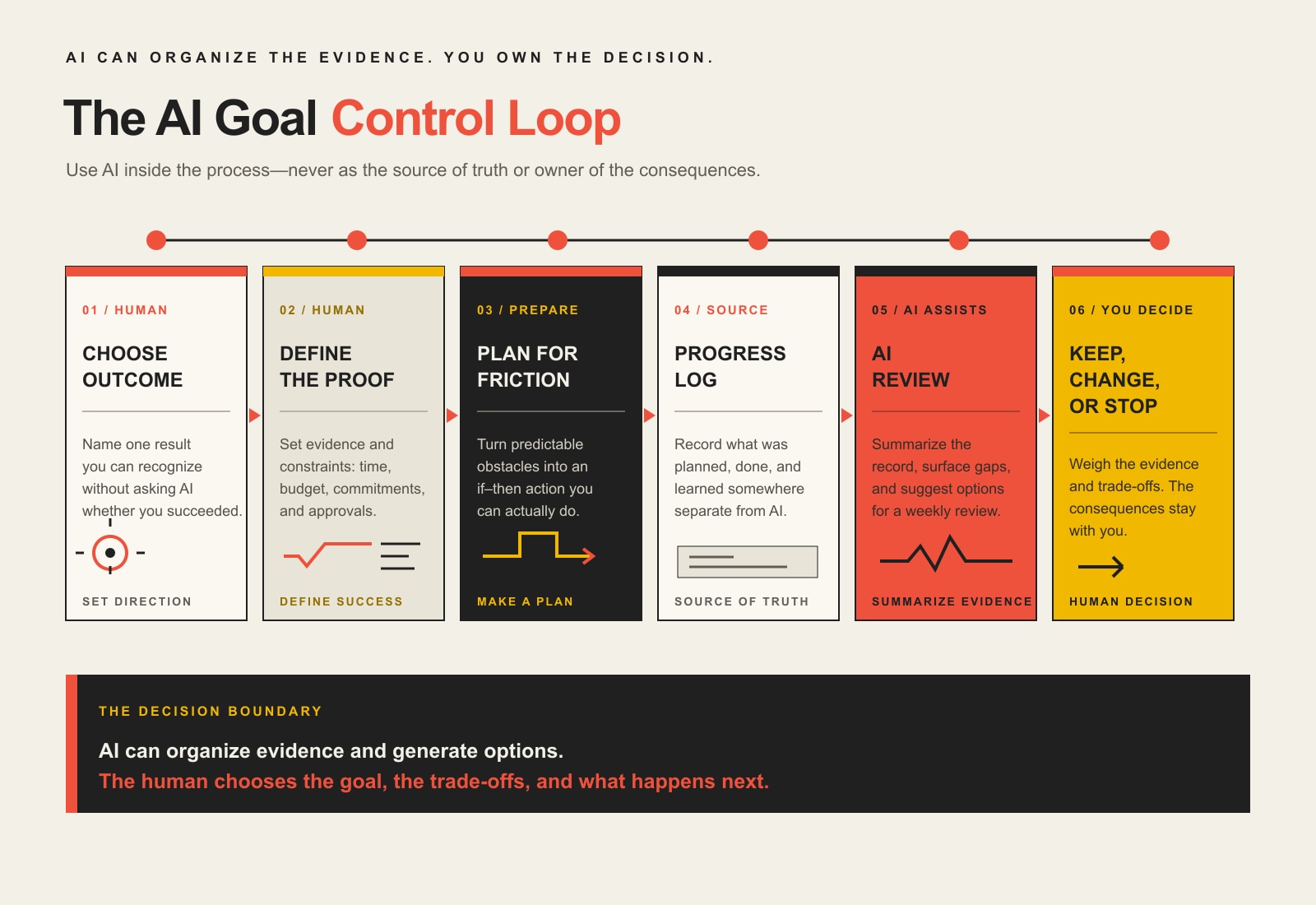
A more useful model is an AI-assisted goal control loop:
Choose the outcome yourself.
Define the evidence that would prove progress.
Plan for likely obstacles with if-then rules.
Record what actually happened.
Let AI summarize the evidence and surface gaps.
Make the decision yourself: keep, change, or stop.
AI is useful inside the loop because it is fast at restructuring information, comparing a log against criteria, and generating options. It is weak at owning consequences. That is why the decision boundary stays human.
The science underneath the system
Three well-established findings are especially useful for designing an AI goal setting workflow. None requires AI. That is exactly the point: use AI to reduce the effort of applying mechanisms that already have evidence behind them.
1. A goal needs specificity, challenge, feedback, and commitment
In their influential review of 35 years of goal-setting research, Edwin Locke and Gary Latham summarized evidence showing why specific, appropriately challenging goals can outperform vague “do your best” instructions under the right conditions. They also emphasized important moderators such as commitment, feedback, ability, and task complexity. In other words, specificity helps, but a goal is not a magic sentence. See the Locke and Latham review in American Psychologist.
AI can help here by interrogating fuzzy language. If your goal is “grow the business,” ask the model to identify what would be observable at the end of the period: qualified opportunities, recurring revenue, margin, retention, delivery capacity, or another measure that actually matches your objective. You choose which measure matters.
2. “If X, then I will Y” plans help close the intention-action gap
Implementation intentions turn a general intention into a pre-decided response: if a specific situation occurs, then I will take a specific action. A 2006 meta-analysis by Peter Gollwitzer and Paschal Sheeran covered 94 independent tests and reported a medium-to-large positive effect on goal attainment (d = .65). Read the implementation-intentions meta-analysis.
This is a natural job for AI because the model can help you brainstorm likely failure points without pretending it knows the future. For example:
If a client emergency takes the morning block, then I will move the goal task to the 2:00 PM recovery block.
If I do not have the data needed for a decision by Wednesday, then I will ask the owner directly instead of waiting for another meeting.
If a planned action misses twice, then I will review whether the action is unrealistic, underspecified, or no longer relevant.
The useful output is not the AI’s prose. It is a decision rule you are willing to follow.
3. Monitoring progress improves goal attainment
A 2016 meta-analysis led by Benjamin Harkin examined 138 randomized studies with 19,951 participants. Interventions designed to increase progress monitoring improved goal attainment on average (d+ = .40). Effects were larger when outcomes were reported or made public and when progress information was physically recorded. Read the progress-monitoring meta-analysis in Psychological Bulletin.
This is the strongest reason not to make your chatbot the source of truth. Keep the progress record somewhere explicit: a spreadsheet, project board, CRM, task system, journal, or other log. Then give AI the record to analyze. If the model can invent the history, you no longer have monitoring; you have storytelling.
The AI goal setting control loop
Step 1: Choose one observable outcome
Start with a result you can recognize without asking AI whether you succeeded. “Publish the new service site with the five required pages, functioning forms, analytics, and approved launch checklist by October 15” is observable. “Improve our online presence” is not.
For AI goal setting to be useful, ask AI to challenge ambiguity, not to pick your values. A useful request is: “List the terms in this goal that could be interpreted two different ways. Ask me questions until the finish line could be verified by another person.”
Step 2: Define evidence and constraints before generating a plan
In AI goal setting, tell the model what counts as evidence and what it may not optimize away. Constraints might include budget, available hours, required approvals, legal requirements, brand standards, existing commitments, or a hard deadline.
This prevents a common AI failure mode: producing a theoretically efficient plan that ignores the environment in which the work has to happen.
Step 3: Turn predictable friction into implementation intentions
Now ask AI to identify likely obstacles from the information you provide. For each obstacle, create an if-then response. Keep only the rules that are specific enough to trigger an action and realistic enough that you will use them.
For a sales goal, “If there are fewer than five qualified opportunities in the pipeline on Friday, then Monday’s first 45 minutes becomes outbound follow-up” is much more useful than “stay consistent with prospecting.”
Step 4: Record what happened in a separate progress log
In an AI goal setting system, your progress log can be simple. At minimum, record the date, planned action, completed action, result, blocker, and any evidence that changed your understanding of the goal. The point is not to create a perfect dashboard. The point is to leave a trail that can be reviewed without relying on memory.
Do not ask AI to “remember” the week unless the underlying record is available in the conversation or connected system. Your review should be grounded in the actual log.
Step 5: Use AI for the weekly review
At review time, AI goal setting becomes most useful when the model acts as an analyst. Give it the goal, evidence criteria, constraints, if-then rules, and progress log. Ask it to separate facts from inferences, compare the evidence with the target, identify repeated misses, and suggest a small number of adjustments.
Limiting the number of recommendations matters. A model can generate twenty plausible ideas in seconds. That is not the same as making the next decision easier.
Step 6: Keep the decision human
The review ends with a choice: keep, change, or stop. Keep the current plan when the evidence supports it. Change an action or assumption when the evidence says the plan is not working. Stop when the goal no longer deserves the cost, even if a model can invent a clever way to continue.
That last category is important. Goal systems become unhealthy when “achievement” is defined as never abandoning a goal. Good judgment includes recognizing when new evidence changes the decision.
What AI should not decide
A safe AI goal setting workflow can help structure a decision, but it should not be allowed to quietly become the decision-maker. Keep these responsibilities on the human side of the boundary:
Which goal is worth pursuing. A model does not bear the opportunity cost.
Which tradeoffs are acceptable. Speed, money, quality, relationships, reputation, and risk are value judgments.
Whether the evidence is trustworthy. AI can summarize bad data perfectly.
Whether a recommendation is ethical, legal, or appropriate. High-stakes decisions need the right qualified human review.
Whether to persist or quit. The model can surface consequences; you own them.
A useful rule is: AI may propose; evidence must support; a human approves.
A copyable AI goal setting review prompt
This AI goal setting prompt is deliberately stricter than “How am I doing?” It forces the model to work from the record instead of rewarding confident improvisation.
Act as a review analyst, not a goal chooser.

GOAL OUTCOME:
[Paste the observable outcome.]

EVIDENCE OF SUCCESS:
[Paste the measures or completion criteria.]

CONSTRAINTS:
[Paste budget, time, approvals, non-negotiables, and other limits.]

IF-THEN PLANS:
[Paste the implementation intentions I committed to.]

PROGRESS LOG:
[Paste this week's actual record.]

Review the material using only the evidence provided.
1. Summarize what happened in no more than five bullets.
2. Separate facts from your inferences.
3. Compare actual progress with the success evidence.
4. Identify repeated blockers or missed implementation intentions.
5. Propose no more than three adjustments, each with a tradeoff.
6. Flag any conclusion that cannot be supported by the log.
7. End by asking me to choose: keep, change, or stop.

Do not rewrite my goal, invent missing progress, or make the final decision for me.
If the output is generic, the first thing to improve is usually the input evidence, not the prompt.
How this fits a 90-day execution system
An AI goal setting workflow does not need a magical planning horizon. This article intentionally does not turn “90 days” into another scientific claim. A quarter is simply a useful planning container for many business goals: long enough to produce meaningful work, short enough to review before assumptions get stale. If you want the broader planning structure—outcome, milestones, checkpoints, and execution rhythm—use Scope Design’s 90-day goal-setting framework, then use the AI control loop here for planning friction, progress analysis, and review.
For a business, the same idea can eventually move beyond a personal chat into a repeatable workflow: data comes from the systems where work happens, AI summarizes or routes exceptions, and a person remains accountable for decisions. If that is the stage you are at, see our guide to AI automation for business.
Frequently asked questions about AI goal setting
Can AI actually help me achieve my goals?
AI goal setting can help with parts of goal execution: clarifying an outcome, generating if-then plans, organizing a progress log, comparing evidence with a target, and proposing adjustments. The evidence cited in this article supports those underlying self-regulation practices, not a blanket claim that using AI itself causes goal achievement.
How do I use ChatGPT for AI goal setting?
For AI goal setting, use ChatGPT or another capable model as a structured thought partner. Give it one observable goal, the evidence of success, your constraints, likely obstacles, and your actual progress record. Ask it to identify ambiguity, create candidate if-then plans, and perform a weekly evidence review. Do not let it invent the goal or progress history.
What is the best AI goal setting tool?
The best AI goal setting tool is the one that fits the workflow; the workflow matters more than a particular brand. A useful tool needs enough context to read your goal criteria and progress log, produce structured output, and fit your privacy and data-handling requirements. If your system only generates motivational language but never reviews evidence, changing models will not fix the design.
Should I track my goals with AI?
For AI goal setting, track progress in a durable source of truth, then let AI analyze it. A spreadsheet, project tool, CRM, or journal can hold the record. AI can summarize patterns and exceptions, but the underlying log should remain reviewable without trusting the model’s memory.
Can AI replace an accountability partner or manager?
Not completely. AI can make review more consistent and reduce administrative work, but it does not share the consequences of the decision and cannot provide the same social accountability, authority, domain responsibility, or human judgment. Use it to improve the review process, not to erase responsibility.
The bottom line
AI goal setting does not make goal achievement scientific. Good goal execution already has a research base: define the outcome clearly, plan responses to predictable situations, monitor real progress, and use feedback to adjust. AI earns its place when it makes those behaviors easier to perform without taking ownership away from the person who has to live with the result.
Start with one goal. Define what evidence would prove progress. Write two or three if-then rules for the friction you already expect. Keep an honest log. Then use AI once a week to compare the evidence with the target—and make the final decision yourself.
Remote work productivity improves when the work has a clear outcome, attention is protected, communication rules are explicit, and the day has an actual stopping point. It drops when “productivity” means staying green in chat, attending every meeting, answering every notification, and performing frantic little keyboard noises so nobody wonders whether you are alive.
The location is not the operating system. Your home office can support excellent work or industrial-grade procrastination. The difference is not a motivational quote taped above the monitor. It is whether the workday has been designed.
TL;DR: Remote productivity is an operating system, not a vibe
Choose one valuable outcome before opening the inbox.
Protect at least one uninterrupted focus window for the work that requires a functioning brain.
Make your physical environment support the task instead of fighting it.
Set communication expectations so every notification is not treated like a small electrical fire.
Measure completed, useful work, not hours online, messages sent, or mouse movement.
Review the system weekly and fix the actual constraint.
End the workday deliberately. Living at work is not the same as working effectively from home.
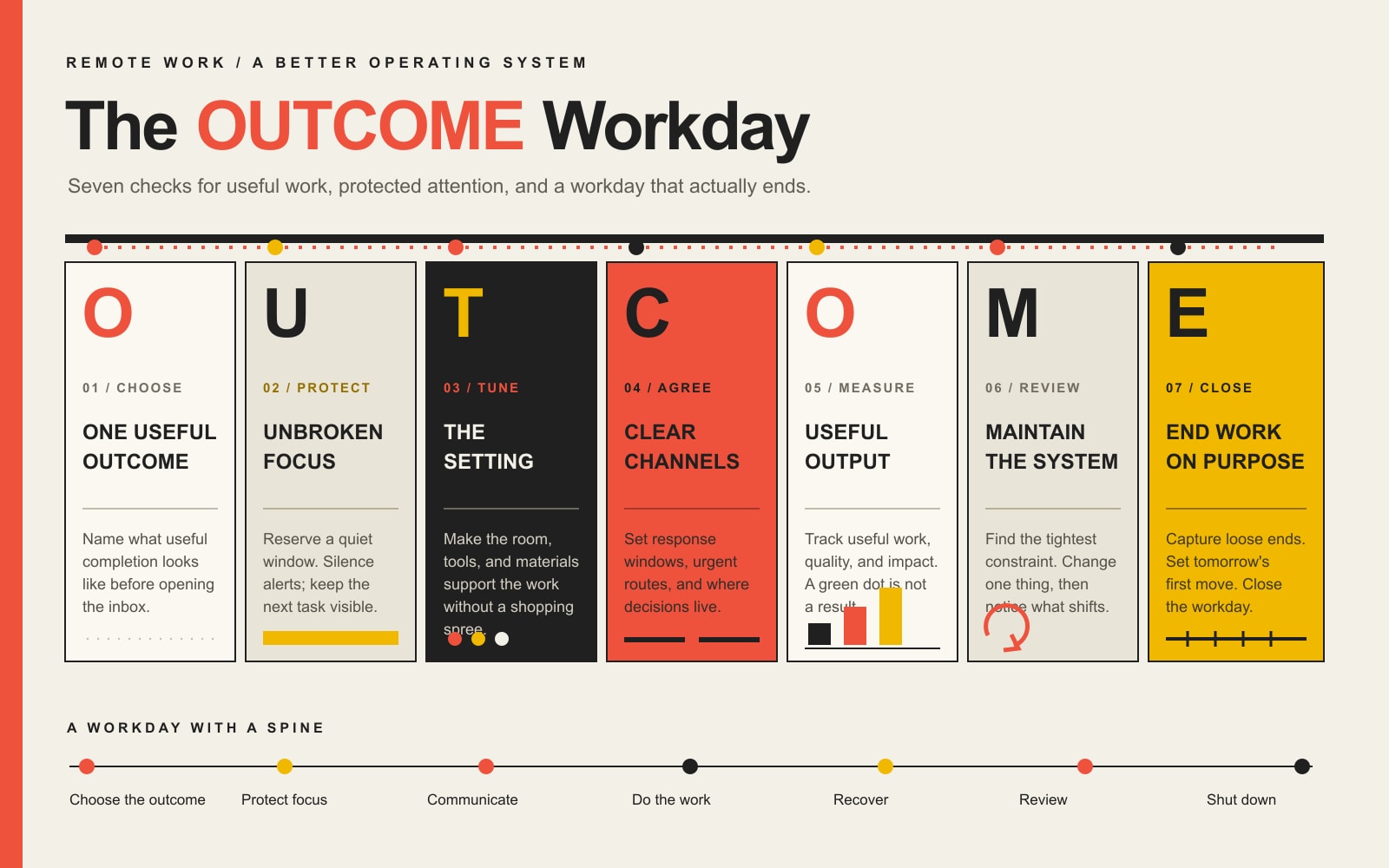
Scope Design’s framework is the OUTCOME Workday System: One useful outcome, Uninterrupted focus, Tune the environment, Communication contract, Output over online theater, Maintenance review, and End work on purpose.
In this remote-work productivity guide
Are remote workers actually more productive?
Sometimes. That is the honest answer, which is less exciting than the internet’s usual cage match between “the office is dead” and “everyone working from home is secretly folding laundry.”
The U.S. Bureau of Labor Statistics found that the relationship depends on the work, technology, home environment, motivation, and management practices. Its industry analysis found a positive association between growth in remote work and total-factor productivity during parts of the pandemic period, but it also notes other research finding little aggregate relationship and mixed results at individual firms. Association is not magic, and a Zoom license is not a productivity strategy.
A six-month randomized trial published in Nature followed 1,612 employees. Working from home two days a week did not damage performance reviews, promotion rates, or lines of code, while attrition fell by one-third and job satisfaction improved. That is strong evidence for one hybrid arrangement at one company, not a permission slip to declare every remote setup superior.
Fully remote work can behave differently. Stanford’s review of the evolution of working from home reports that fully remote arrangements have often been associated with lower productivity than fully in-person work, with communication, mentoring, culture, and self-motivation among the likely factors. Meanwhile, newer Stanford research found that work-from-home levels stabilized rather than disappeared.
So no, remote work is not automatically productive or unproductive. It amplifies the quality of the system around it. Clear work gets clearer. Chaotic work becomes a Slack notification wearing sweatpants.
Why working from home goes sideways
Most remote-productivity problems fall into one of five buckets:
The outcome is vague. The day fills with activity because nobody defined what useful completion looks like.
Attention is treated as public property. Email, chat, meetings, alerts, and household interruptions compete continuously.
The environment fights the work. The chair hurts, the display is wrong, the room is noisy, or the laptop lives beside three obvious distractions.
Communication has no contract. Every channel feels urgent because response times, escalation rules, and documentation habits are undefined.
The workday leaks into everything. Without a commute or shutdown ritual, “I could finish one more thing” becomes an all-evening hostage situation.
Buying another app does not repair those problems. It gives the problems another place to send notifications.
The OUTCOME Workday System
The OUTCOME Workday System is a practical test for a remote day that produces useful work without requiring surveillance, martyrdom, or twelve productivity subscriptions.
The OUTCOME Workday System: seven checks for a productive remote workday.
O: One useful outcome
Start with the most valuable result the day needs to produce.
Not “work on the proposal.” Not “do marketing.” Not “catch up.” Those are vague activity buckets where hours go to die.
A useful outcome is observable:
Send the approved proposal with final pricing by 3 p.m.
Finish and test the checkout-error fix.
Draft the article section that answers the buyer’s pricing objection.
Review ten customer interviews and document the three repeated problems.
One outcome does not mean doing only one thing. It means the workday has a spine. Email, administration, and small tasks can happen around it without pretending they are equally important.
If everything is a priority, congratulations: management has invented a list.
U: Uninterrupted focus window
Reserve a block of time for the outcome before reactive work consumes the day. The right length depends on the task and your capacity; the point is not to worship a perfect number. The point is to prevent every other person and application from renting your attention by the minute.
During the window:
close inboxes and chat;
silence nonessential alerts;
keep only the required files and applications open;
put the phone outside immediate reach;
tell collaborators when you will check messages again;
write down stray tasks instead of switching into them.
You do not need a four-hour cinematic “deep work” ritual with rain sounds and a hand-thrown ceramic mug. You need a protected interval long enough to finish a meaningful unit of work.
T: Tune the environment
Your workspace is part of the workflow. It changes what is easy, visible, comfortable, and distracting.
The CDC’s National Institute for Occupational Safety and Health notes that workstation and chair adjustability, the placement of equipment and work materials, lighting, and the design and organization of tasks all affect comfort. It also recommends breaking up long computer sessions with frequent rest breaks or other tasks that use different movements. That is not glamorous. Neither is a headache at 2 p.m., but here we are.
Tune the environment in layers:
Layer
Question
Practical fix
Body
Can you work without accumulating pain or eye strain?
Adjust the chair and display, change posture, take brief movement and screen breaks.
Attention
What steals focus without permission?
Remove visual clutter, silence alerts, use a door or visible signal, move the phone.
Access
Is required information easy to reach?
Prepare files, credentials, references, and tools before the focus window.
Boundary
Does the space tell your brain when work begins and ends?
Use a dedicated area when possible and close or reset it during shutdown.
Do not turn this into a shopping spree. A folded towel can improve a chair. A box can raise a monitor. The goal is a usable environment, not a home-office influencer sponsorship.
C: Communication contract
Remote teams need explicit rules for how information moves. Office habits relied on proximity, overheard context, and walking over to somebody’s desk. Remote work exposes how much of that system was undocumented improvisation.
A communication contract defines:
which channel owns which kind of message;
expected response windows;
what counts as urgent;
how urgent issues are escalated;
where decisions are recorded;
when a meeting is justified;
what information must accompany a handoff;
when people are expected to be unavailable for focus.
The contract might say that project decisions live in the project system, normal chat receives a response within four working hours, true emergencies use a phone call, and nobody schedules over protected focus blocks without a damn good reason.
The team-level version belongs in our companion guide to managing and connecting a remote team. If every question still requires an immediate response from one specific person, you do not have collaboration. You have a human API with no rate limit.
O: Output over online theater
Measure the result that matters. Do not substitute visible activity because it is easy to count.
Microsoft described the gap between employees who report being productive and leaders who struggle to trust what they cannot see as productivity paranoia. Its recommendation is the useful one: judge the quality and impact of outcomes rather than emails sent or early-morning activity.
Good measures depend on the job:
approved deliverables;
completed customer outcomes;
resolved defects;
cycle time;
accuracy or rework;
qualified opportunities;
service-level performance;
revenue, margin, retention, or cost avoided when the work genuinely controls them.
Bad measures include green status lights, keystrokes, screenshots, time online, raw message counts, and meeting attendance without a decision or action attached.
Surveillance software can measure motion. It cannot tell you whether the motion was intelligent. Worse, it teaches people to optimize for looking active instead of solving the problem. That is management theater with an invoice.
M: Maintenance review
Review the work system once a week. The goal is not to grade your personality. It is to identify the tightest constraint and change one thing.
Ask:
Which useful outcomes were completed?
What important work kept slipping?
Where did attention get fragmented?
Which meeting or communication loop created avoidable work?
Which tool, permission, file, or decision was missing?
What should be eliminated, documented, delegated, or automated?
What one adjustment will we test next week?
This is where the Scope Design point of view matters: stop worshiping busywork and design the machine. Consistent small improvements beat downloading a new “life-changing” system every Tuesday.
When repetitive administration is the real constraint, use our business automation and AI services or the broader OWNED automation framework to decide what is safe and worthwhile to automate. Automating a broken process only helps it fail before lunch.
E: End work on purpose
Remote work needs a finish line because the building does not provide one.
A useful shutdown takes ten minutes:
Capture unfinished tasks and loose commitments.
Record the next action for the primary project.
Send any promised update.
Check tomorrow’s first outcome and calendar.
Close work applications and clear the physical workspace.
Use a consistent transition: walk, exercise, music, changing rooms, or anything that tells your brain the workday is done.
Detachment is not laziness. It protects tomorrow’s attention. Working until the laptop slides off your chest is not a competitive advantage.
A practical remote-work schedule
There is no universally perfect schedule. Use the shape below as a starting point, then adapt it to the work, team coverage, time zone, health, and household reality.
Workday phase
Purpose
Example
Startup
Select the outcome and prepare the environment
Review commitments, choose the day’s result, open required materials.
Focus block
Produce the hardest useful work
60–120 protected minutes before routine messages.
Communication window
Unblock people and process decisions
Email, chat, approvals, short calls, documented updates.
Lunch away from the screen, movement, daylight, brief breaks.
Review and shutdown
Capture, communicate, and end
Record progress, define next action, close the workday.
If your role requires immediate customer response, the same principles still apply. Rotate coverage, use shifts, define escalation, or protect smaller focus windows. “Our work is reactive” is a design constraint, not proof that everyone must remain interruptible all day.
How managers can improve remote work productivity
Managers control much of the environment employees are being told to overcome with personal discipline.
Define outcomes and decision rights
Every recurring responsibility needs an owner, a usable definition of done, and clarity about which decisions that person may make. Otherwise, employees spend their days asking permission and managers spend theirs complaining that nobody takes ownership. Beautiful system.
Replace constant availability with predictable availability
Establish response windows, office hours, escalation rules, and focus blocks. People can be reliably reachable without being continuously interruptible.
Reduce meeting debt
Before scheduling, ask whether the work requires live discussion, shared creation, conflict resolution, or a decision that cannot be handled asynchronously. If not, document it. When a meeting is warranted, use an agenda, pre-work, a decision owner, action owners, and deadlines. Our guide to virtual meeting best practices owns the mechanics.
Fix the work before adding software
Define the behavior first: how tasks enter, where work is tracked, where files live, how decisions are recorded, and how people escalate. Then choose the smallest tool set that supports it. The remote-work tools guide covers the stack decision without pretending a list of logos is a strategy.
Watch for system failures, not personality defects
Late work may be a capability or effort problem. It may also be unclear scope, too many concurrent priorities, missing access, dependency delays, nonstop meetings, or slow approvals. Diagnose before prescribing. That is the same discipline behind effective website strategy: the requested fix is not necessarily the actual constraint.
How to diagnose your remote-productivity problem
Use the symptom to find the likely system failure.
Symptom
Likely constraint
First test
Busy all day, little finished
No priority or work-in-progress limit
Choose one daily outcome and cap concurrent work for a week.
Cannot focus for more than a few minutes
Notifications, environment, unclear next action, fatigue
Prepare one specific task and run a protected 45-minute window.
Constant messages and status checks
No communication contract or trust
Define channel purpose, response windows, escalation, and output measures.
Too many meetings
Decisions and documentation have no home
Audit recurring meetings; require purpose, owner, and expected decision.
Work expands into evenings
No shutdown boundary or unrealistic load
Add a shutdown ritual and compare committed work with actual capacity.
Tools create duplicate work
Stack overlap and weak ownership
Map each tool to one capability and remove or integrate redundant paths.
Work is completed but misses the mark
Weak definition of done or late feedback
Add acceptance criteria and an earlier review point.
Do not change seven variables at once. Run a small test, observe the effect, and keep what works. Productivity advice becomes useless when it turns into a second full-time job.
The bottom line
Remote work productivity does not come from proving that home is better than the office. It comes from designing work that can succeed wherever it happens.
Define the outcome. Protect attention. Make the environment usable. Establish communication rules. Measure useful output. Review the system. End the day.
That is less exciting than buying a dashboard that records mouse movement. It is also how actual work gets done.
Frequently asked questions about remote work productivity
What is remote work productivity?
Remote work productivity is the useful output produced in relation to the time, effort, and resources required while working away from a central office. It should be measured through job-relevant outcomes, quality, timeliness, customer impact, and sustainable capacity, not visibility or online activity alone.
Are remote workers actually more productive?
Research is mixed because jobs, arrangements, management, and measurement differ. A major randomized hybrid-work trial found no performance damage and lower attrition, while research on fully remote arrangements has found productivity challenges in some contexts. Remote work is not automatically better or worse; system quality matters.
How can I be more productive while working from home?
Choose one useful outcome, prepare the required materials, protect an uninterrupted focus window, silence nonessential alerts, use defined communication windows, take physical and screen breaks, and end with a short review and shutdown routine.
How do I stay focused when working from home?
Make the next action specific, remove visible and digital distractions, work in a defined location, use a timed focus block, and tell others when you will be available again. If focus repeatedly fails, check sleep, workload, stress, pain, unclear expectations, and environmental constraints instead of blaming willpower by default.
What is the 3-3-3 rule for productivity?
One popular version recommends spending three hours on an important project, completing three shorter tasks, and handling three maintenance activities. It is a planning heuristic, not a scientific law. Use it if that shape fits your work; discard it if it creates another arbitrary scorecard.
What are the biggest remote-work time wasters?
Common time wasters include unclear priorities, unnecessary meetings, constant notifications, repeated status requests, searching for information, tool switching, vague tasks, slow approvals, and work that must be redone because “done” was never defined.
How should managers measure remote employee productivity?
Use role-specific outcomes such as completed deliverables, quality, cycle time, customer results, resolved issues, rework, and reliable commitments. Pair quantitative measures with context. Avoid using presence, keystrokes, green status, or message volume as substitutes for value.
Does employee-monitoring software improve productivity?
It can verify limited security or compliance requirements, but activity monitoring is a poor proxy for knowledge-work value and can encourage performance theater. If monitoring is necessary, define the legitimate purpose, minimize collection, communicate it clearly, protect the data, and never pretend mouse movement measures judgment.
How many breaks should remote workers take?
The right cadence depends on the work and the person. NIOSH recommends breaking up long computer sessions with frequent rest breaks or other tasks that use different movements. Use breaks to restore attention and physical comfort, not as a rigid productivity contest.
Is remote work dying?
No. It has receded from pandemic peaks, but Stanford’s multinational and U.S. research found work-from-home levels stabilized after the initial decline. Specific employers may change policies, but remote and hybrid work remain durable parts of the labor market.
Is hybrid work more productive than fully remote work?
There is no universal answer. A large randomized trial found that two work-from-home days did not damage performance and improved retention. Other research has identified communication, mentoring, and motivation challenges in fully remote arrangements. The work type and operating system matter more than the label.
Does music help remote-work focus?
It can help some people mask distracting noise or establish a focus cue, but lyrics, novelty, and volume can interfere with language-heavy or complex work. Test it against a real outcome. “Focus music” is useful only if you focus.
Do I need a dedicated home office?
No, but a consistent work-ready area helps. Control noise and glare where possible, support your posture, position the display comfortably, keep required materials accessible, and create a visible boundary that can be reset when work ends.
Which tools improve remote work productivity?
Use the smallest set that reliably covers communication, work tracking, documentation, files, meetings, security, and any role-specific work. Add a tool only when it fixes a defined gap, has an owner, fits the workflow, and does not create more duplication than it removes.
What should I do when remote productivity suddenly drops?
Check for changes in workload, clarity, health, sleep, workspace, tools, dependencies, meeting load, household demands, and team expectations. Find the first broken constraint, run one small adjustment, and review the result. A sudden drop is evidence to investigate, not a moral verdict.
A re-engagement email is a targeted message or short sequence for people who previously had a legitimate relationship with your email program but have stopped taking the actions you reasonably expect. The useful goal is not to force an open. It is to get one meaningful signal that tells you whether to restore the relationship, change the message, or stop sending.
AI can make that process faster, but only when it works inside clear rules. Use it to segment, prioritize, generate controlled variations, and analyze results. Do not let it invent why somebody disappeared, manufacture consent, or keep hammering a cold list because the automation has nowhere else to go.
TL;DR:
Define “inactive” from your real buying cycle and meaningful behavior, not a universal 30-, 60-, or 90-day rule.
Do not rely on opens alone. Clicks, replies, purchases, logins, preference changes, and other first-party actions are usually more useful signals.
Run a bounded re-engagement sequence with a job for each email: restore value, diagnose the mismatch, then ask for a clear stay-or-go decision.
Use AI for classification, prioritization, variants, and analysis. Keep permission, legal rules, suppression, and acceptable risk human-owned.
Measure reactivation and business outcomes. If nobody responds, suppression can be a successful result because you learned who no longer belongs in the active send pool.
What Is a Re-Engagement Email?
A re-engagement email is sent to a subscriber, lead, or customer whose expected interaction has gone quiet. Depending on the business, that may mean they stopped clicking useful content, replying to sales follow-ups, logging in, booking, renewing, buying, or visiting a resource they once used.
That is different from a normal newsletter, which speaks to the active audience, and it is narrower than a full email customer retention strategy, which can include onboarding, adoption, service recovery, renewal, and customer win-back. This article owns one specific job: deciding what to do with people who have gone quiet and using AI without turning that decision into automated guesswork.
The “previous relationship” part matters. HubSpot’s current re-engagement guidance is explicit that a re-engagement campaign should confirm or restore a relationship with contacts who previously gave verifiable permission, not create permission where it never existed. If the address came from a purchased list, scraped directory, mystery spreadsheet, or some other source you cannot defend, “AI-powered re-engagement” is just a shinier label for a bad idea.
Define Inactive Before You Automate Anything
The biggest mistake is treating inactivity as a timer. A coffee subscription, seasonal landscaping service, annual insurance renewal, B2B equipment purchase, and one-time website project do not share the same healthy purchase cycle. “No purchase in 60 days” could mean churn in one business and completely normal behavior in another.
Start with the behavior that would reasonably indicate the relationship is still alive. Then define how long that behavior can disappear before the contact deserves a different message.
Signal type
Examples
How much should it influence inactivity?
Strong positive signal
Purchase, qualified reply, booking, login, preference update, meaningful link click
High. These usually show real intent or continued use.
Weak or noisy signal
Email open by itself, passive page view, old demographic field
Low. Use supporting context before making a decision.
Negative signal
Hard bounce, spam complaint, unsubscribe, explicit “stop” request
Very high. These can require immediate suppression or other handling.
High. This keeps a normal customer from being mislabeled as dormant.
Open data deserves special skepticism. Apple Mail Privacy Protection prevents senders from seeing whether protected users opened a message. That does not make every open-rate trend useless, but it does make “has not opened in 60 days” a weak definition of a dead relationship. Mailchimp makes a similar practical distinction between inactive contacts and stale addresses and warns that people who look inactive in email may still be interacting with a brand elsewhere.
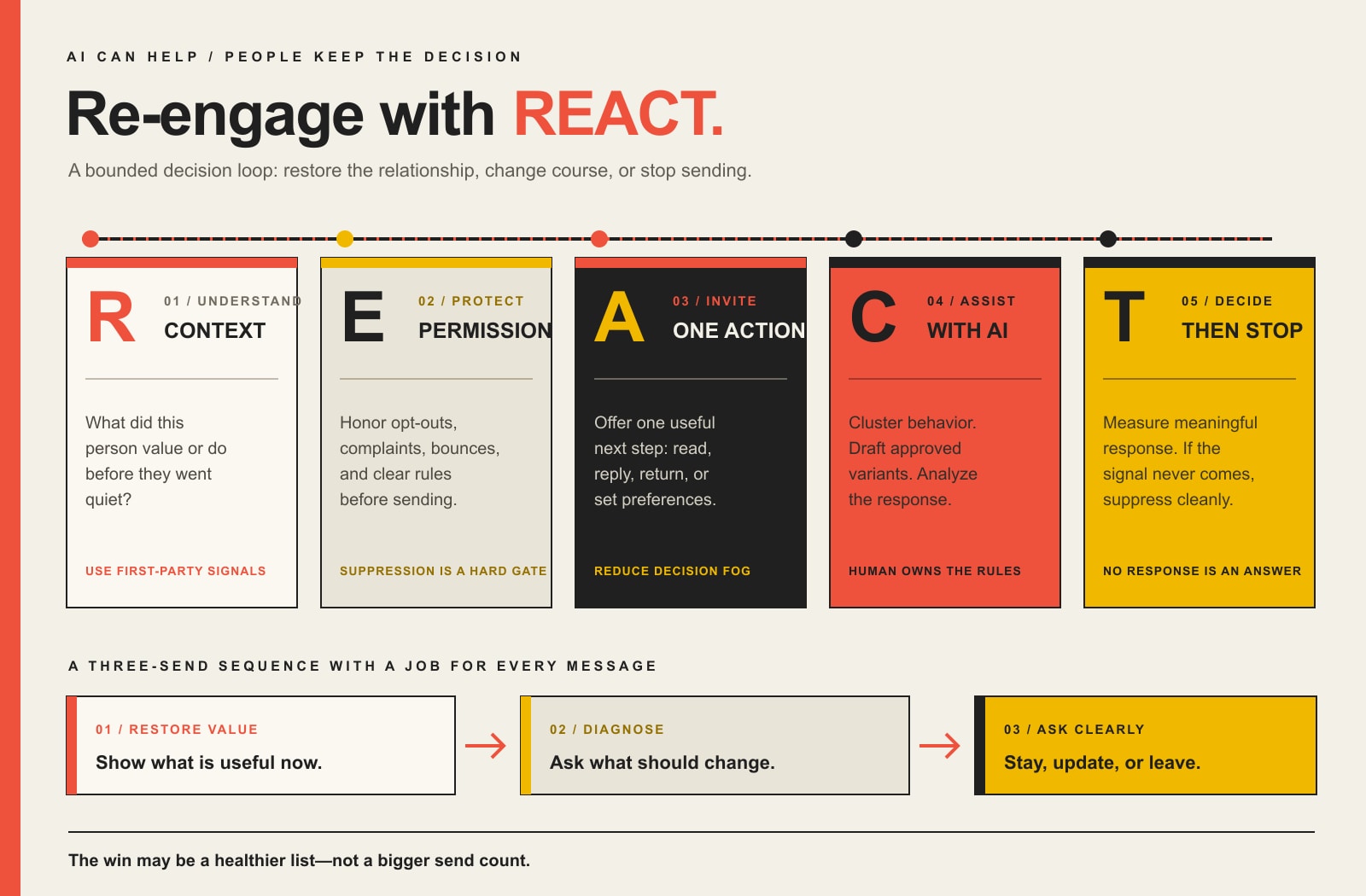
The Scope Design REACT Framework for Email Re-Engagement
Scope Design’s REACT framework treats re-engagement as a decision loop instead of a canned autoresponder. It keeps the useful parts of automation while making the exit condition explicit.
R – Read the relationship
Do not start with copy. Start with what this person used to do and what changed. Separate at least four states when your data allows it: people who subscribed but never really activated, formerly engaged subscribers, past customers whose normal buying cycle has lapsed, and high-value relationships that may deserve a human check-in instead of another automated email.
This is where first-party data matters. A click on a pricing page, a completed purchase, a support interaction, a product category, or a previous service can give the next message a legitimate reason to exist. “AI says this person has an 83% chance of returning” means nothing if the model is scoring bad inputs and nobody can explain what success looks like.
E – Establish permission and risk
Before you send a win-back message, remove the people who should not receive it. Hard bounces, unsubscribes, complaints, legal suppressions, and contacts without a defensible permission history do not belong in a “maybe AI can save them” segment.
If you send significant volume to Gmail, review Google’s current email sender guidelines. Google recommends keeping user-reported spam below 0.1% and preventing it from reaching 0.3% or higher for bulk-sender traffic, and covered marketing messages need one-click unsubscribe. In the U.S., the FTC’s CAN-SPAM guidance requires commercial-email opt-out requests to be honored within 10 business days. Platform rules can be stricter than the legal floor, so “technically allowed” is not the same thing as “smart to send.”
A – Assign one useful next action
Each email needs one job. Ask the subscriber to read one useful update, choose a preference, reply with what changed, return to a product, book a conversation, or confirm that they still want the emails. Five buttons, three offers, a survey, a coupon, and a social follow all crammed into one message is not generosity. It is decision fog.
The lowest-friction action is often best first. A click to a genuinely useful resource may be enough to prove the relationship is alive. A preference update can tell you that the problem was frequency or topic, not the subscriber. A reply can reveal context no predictive score would have guessed.
C – Calibrate with AI
Now AI earns its keep. It can rank contacts by observable behavior, cluster likely reasons for inactivity, generate subject-line and body variants from approved facts, recommend which content or product category to show, and summarize experiment results. Those are useful jobs because they reduce repetitive analysis without changing the rules of the relationship.
Keep the automation governed. Scope Design’s broader AI automation framework uses the same principle: an automation that touches customer data or public communication needs ownership, monitoring, override, and a safe way to stop. Do not let an LLM invent a customer problem, imply it knows why somebody left, create fake scarcity, or override a suppression rule because the predicted conversion score looks tempting.
T – Track the outcome and terminate when appropriate
Define “reactivated” before you launch. It might mean a qualified reply, a preference confirmation, a product return, a booking, a purchase, or a meaningful click followed by renewed behavior. An open alone is rarely strong enough to carry the decision.
Then define the exit. If a bounded re-engagement effort produces no meaningful signal, suppressing that contact can be the right outcome. You are not “losing the list.” You are reducing the active pool to people who still have a reason to hear from you.
A Three-Email Re-Engagement Sequence That Earns Each Send
You do not need a universal six-email marathon. For many businesses, three messages are enough to learn what you need without turning a cold segment into an inbox endurance test. Timing should follow your normal send cadence and buying cycle, not somebody else’s template.
Email 1: Restore value
Remind the subscriber why the relationship existed without shaming them for going quiet. Lead with something useful that has changed: a new guide, solved problem, improved service, product update, relevant resource, or timely reason to return.
Possible subject: “Still useful? Here’s what changed.” Primary action: View the update, resource, product, or service that matches prior interest.
Email 2: Diagnose the mismatch
If the first message produces no meaningful action, ask for a preference rather than shouting louder. Frequency, topic, timing, role changes, finished projects, budget, or a different need may explain the silence. Give the person a simple way to tell you.
Possible subject: “Want fewer emails instead?” Primary action: Update frequency/topics or answer one short question.
Email 3: Ask for the decision
The final message should make staying and leaving equally clear. Do not hide the unsubscribe link in six-point gray type and call that retention. Tell the subscriber what they will continue receiving, give them one obvious way to stay, and make the exit easy.
Possible subject: “Still want these emails?” Primary action: Confirm continued interest, change preferences, or unsubscribe.
If someone re-engages, route them back into the appropriate active journey. If the relationship is actually a customer-retention problem, move them into the right customer win-back path. If they stay silent, honor the exit rule you decided before the campaign started.
Re-Engagement Email Examples by Job
The best re-engagement email example is not the cleverest “we miss you” joke. It is the message that matches why the contact might reasonably come back.
Message job
Example subject line
Useful next action
Best fit
Restore value
Still useful? Here’s what changed.
Read one relevant update
Subscribers who once clicked or consumed content
Reset preferences
Want fewer emails instead?
Choose topics or frequency
Newsletter subscribers with declining engagement
Replenishment or return
Ready for your next [product/service]?
Reorder, book, or review options
Businesses with a defensible repeat cycle
Resolved problem
We fixed the thing that used to be annoying.
See the change
Former users affected by a known product/service issue
Human check-in
Has your need changed?
Reply
High-value B2B leads or past clients
Final choice
Still want these emails?
Confirm, change preferences, or unsubscribe
Contacts who ignored the bounded sequence
Discounts are optional. They make sense when price is a legitimate barrier and margin can support the offer. They are a lousy default when the real problem is irrelevant content, a completed buying cycle, poor service, or no current need. Train every dormant contact to expect a coupon and you may reactivate bargain hunting rather than a healthy relationship.
What AI Should Automate – and What It Should Not
AI is most useful when it compresses analysis and production work while leaving policy decisions explicit.
Good AI job
Why it helps
Human-owned boundary
Score or cluster contacts from approved first-party behavior
Finds patterns across more records than a human will review manually
Define which data is allowed and what the score may trigger
Generate controlled subject/body variants
Speeds testing and reduces repetitive drafting
Approve facts, tone, offers, claims, and prohibited language
Recommend content or product categories from known history
Makes the message more relevant
Do not infer sensitive facts or pretend to know why the person disappeared
Analyze replies and experiment results
Surfaces recurring objections and useful segments
Review edge cases and anything that changes customer status
Suggest send timing from observed behavior
Reduces manual scheduling work
Respect frequency caps, quiet periods, suppression, and campaign limits
If you already use a welcome email series, the same principle applies at the other end of the lifecycle: automation should deliver a clear promise and respond to behavior. The difference is that re-engagement also needs a clean stop condition.
Protect Deliverability While You Wake Up a Cold Segment
A dormant list is not free inventory. It is a deliverability risk if you wake everybody at once, especially when some addresses are stale, permission is unclear, or recipients barely remember the brand.
Start with permission and list quality. Exclude hard bounces, complaints, unsubscribes, and contacts you cannot legitimately defend.
Segment before sending. Formerly engaged subscribers deserve a different treatment from stale addresses that have not heard from you in years.
Use meaningful engagement signals. Apple privacy protections make open-only logic weak; clicks, replies, purchases, logins, and preference updates are stronger evidence.
Make leaving easy. A hidden unsubscribe does not save the relationship. It increases the chance that a frustrated recipient uses the spam button instead.
Watch complaints and bounces during the test. Stop or narrow the campaign when the risk signal is rising. “The workflow was scheduled” is not a defense.
This is also why an email unsubscribe rate is not automatically a failure metric. A re-engagement campaign that helps uninterested people leave cleanly can improve the quality of the active audience. Mailchimp’s guidance similarly recommends re-engaging inactive contacts and then archiving or unsubscribing the people who remain inactive.
Measure Re-Engagement Like a Business Outcome
Do not end the report at open rate. Measure the chain from eligible inactive contact to meaningful action and, when the business has the data, to revenue or retained value.
Eligible inactive contacts: the people who passed your permission, data-quality, and lifecycle rules.
Delivered messages: the actual denominator after bounces and send exclusions.
Meaningful response rate: clicks, replies, preference changes, logins, bookings, purchases, or another pre-defined reactivation signal.
Reactivated contacts: people who resume the behavior that matters after the campaign.
Incremental revenue or gross margin: revenue attributable to reactivated contacts when your tracking supports that conclusion.
List-health outcome: unsubscribes, suppressions, complaints, and bounces that reduce future waste or risk.
When your list is large enough, keep a small holdout group so you can compare what happened without the re-engagement sequence. That is much stronger evidence than claiming every purchase after an email was “recovered revenue.” If you use customer lifetime value in the business case, use a defensible model rather than multiplying one reactivated purchase by a fantasy retention number.
Mailchimp says its most successful re-engagement emails typically reactivate about 10% of inactive subscribers. Treat that as a platform benchmark, not a promise. Your definition of inactive, audience source, buying cycle, brand recognition, offer, deliverability, and measurement window can move the result dramatically.
Re-Engagement Campaign Implementation Checklist
Define the business behavior that means a relationship is active.
Choose an inactivity threshold that matches the real buying or engagement cycle.
Exclude bounces, complaints, unsubscribes, unsupported permission, and other suppression states.
Separate never-activated contacts from formerly engaged subscribers and lapsed customers.
Choose one meaningful reactivation action for each segment.
Build a bounded sequence, usually two or three messages before the decision point.
Give AI only approved data and explicit instructions about what it may personalize.
Review every generated claim, offer, subject line, and inferred reason before launch.
Verify authentication, unsubscribe handling, frequency caps, and deliverability monitoring.
Track meaningful reactivation, revenue where defensible, and list-health outcomes.
Suppress or reroute nonresponders according to the rule you set before the campaign started.
Save what you learned so the next re-engagement campaign starts smarter instead of from another template.
Frequently Asked Questions About Re-Engagement Email Campaigns
How long should a subscriber be inactive before a re-engagement email?
There is no universal number. Match the threshold to normal send frequency, buying cycle, seasonality, renewal timing, and meaningful customer behavior. A weekly newsletter may need a different threshold from an annual service or seasonal product.
How many re-engagement emails should I send?
Use the smallest sequence that can answer the decision. Two or three messages are often enough for value reminder, preference/diagnosis, and final confirmation. High-value B2B relationships may deserve a human follow-up instead of more automation.
What is a good re-engagement rate?
A universal “good” rate is misleading because the denominator and definition of reactivated vary. Mailchimp says its most successful re-engagement emails typically re-engage about 10% of inactive subscribers. Use your own baseline and a consistent definition of meaningful reactivation, then compare segments and, when possible, a holdout group.
Should a re-engagement email include a discount?
Only when price is a plausible barrier and the economics make sense. A relevant update, resolved problem, preference choice, useful resource, replenishment reminder, or direct human check-in may be stronger. Discounting every dormant contact can train people to wait for a coupon.
Can AI write re-engagement email subject lines?
Yes. AI is useful for generating variants from a clearly defined message job and approved facts. It should not invent urgency, claim to know why a subscriber disappeared, or personalize from data you would not be comfortable explaining to the recipient.
When should I remove or suppress inactive subscribers?
Immediately honor bounces, complaints, opt-outs, and other mandatory suppression states. For valid but inactive subscribers, run a bounded re-engagement or preference-confirmation effort when the relationship still has a legitimate reason to continue. If there is still no meaningful signal, suppression is often the cleanest decision.
Does CAN-SPAM require an unsubscribe option in re-engagement emails?
In the United States, commercial email is subject to CAN-SPAM requirements, including a clear opt-out mechanism and honoring opt-out requests within 10 business days. Platform sender rules may be stricter. This article is general marketing guidance, not individualized legal advice.
Turn a Dormant List Into a Decision, Not a Guess
A dormant email list is not automatically hidden revenue. It is unresolved information. Some people still want what you send. Some need a different message. Some finished the relationship successfully. Some forgot who you are. Some should never receive another marketing email.
The job of a good re-engagement system is to tell those states apart with as little friction and risk as possible. AI can help you do that at scale, but the value comes from the rules, evidence, and decisions around the model.
If your list is large enough to matter but messy enough that nobody trusts the segments, triggers, attribution, or suppression rules, talk to Scope Design. We can help audit the email and automation system, decide what should be automated, and build a workflow that knows when to send, when to change course, and when to stop.
The best AI content creation workflow is human-led and AI-assisted: start with a real business question and actual subject expertise, research what people need to know, document the evidence, give AI bounded production tasks, then have a human verify, challenge, edit, optimize, publish, and measure the result. If AI chooses the topic, invents the expertise, writes the article, approves its own claims, and hits Publish, you have not built a content engine. You have built an extremely efficient beige-sludge machine.
TL;DR: The seven-step content creation workflow
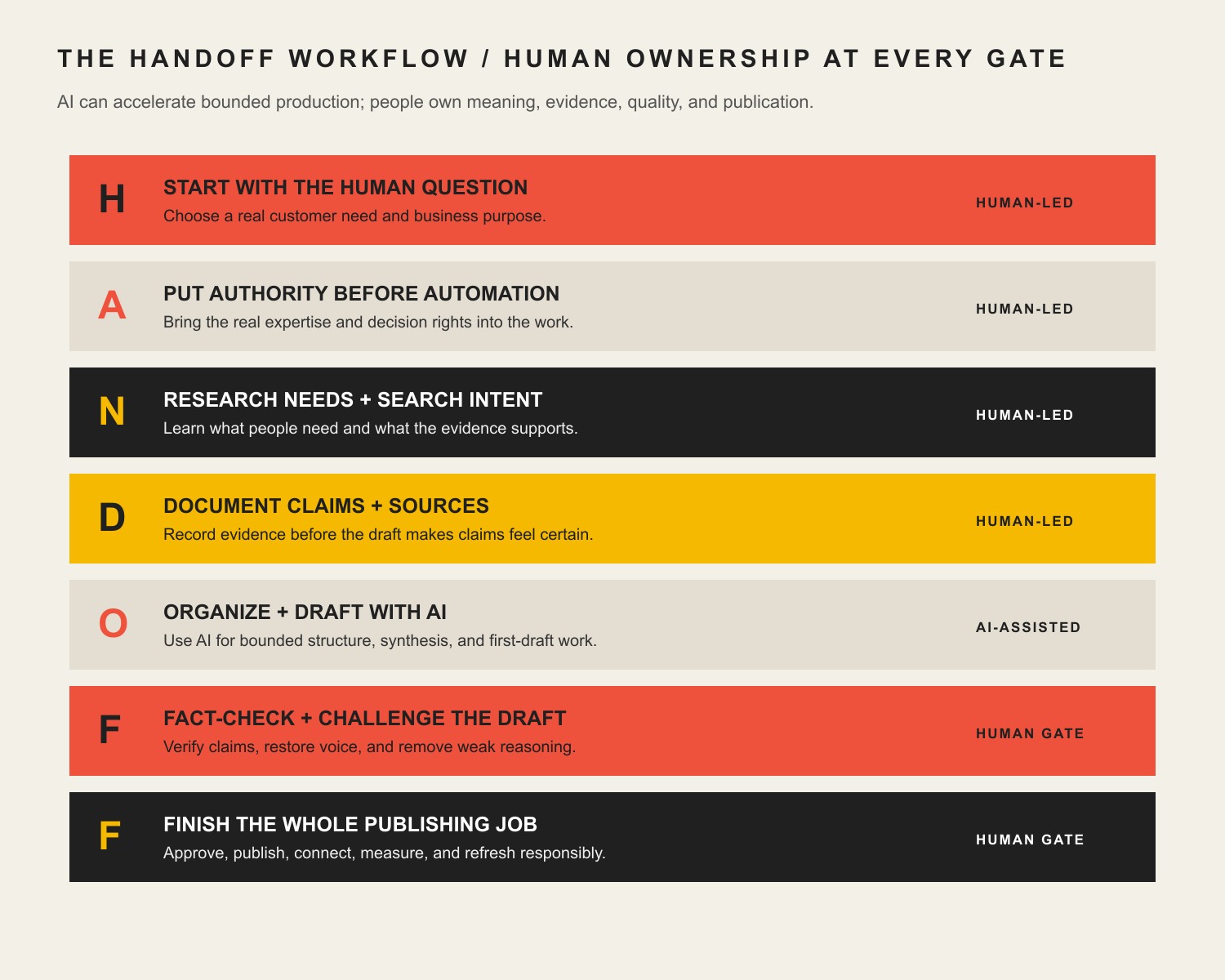
Use the Scope Design HANDOFF Workflow:
Human question: Define the business purpose, audience, problem, and useful outcome.
Authority before automation: Gather firsthand expertise, original examples, internal knowledge, and credible external sources.
Needs and search-intent research: Study queries, People Also Ask questions, search results, AI answers, and existing performance data.
Document claims and sources: Build a claim ledger before drafting so facts do not magically appear from the model’s imagination.
Organize and draft with AI: Use AI for bounded work such as synthesis, outlining, gap detection, and first-pass drafting.
Fact-check, voice-edit, and challenge: Let a responsible human verify every meaningful claim, add the point of view, and remove generic mush.
Finish and learn: Complete links, graphics, metadata, schema, accessibility, publication QA, distribution, measurement, and future refreshes.
The order matters. Expertise before keywords. Evidence before prose. Editing before optimization. Publishing before celebrating.
What is a content creation workflow?
A content creation workflow is the repeatable system that moves an idea from a business question to a researched, reviewed, published, and measured asset. It defines the stages, owners, inputs, approval gates, and definition of done.
That last part is where many content workflows go to die.
A checklist that ends at “draft complete” is not a publishing workflow. An editorial calendar filled with titles is not a strategy. A folder containing 40 AI-generated documents is not a content library. Those are inventories of unfinished intentions.
A useful workflow answers five practical questions:
Why should this content exist?
Who supplies the expertise and evidence?
What can AI safely accelerate?
Who is accountable for accuracy and quality?
How will we know whether the published asset did its job?
The point is not to manufacture more words. The point is to create useful intellectual property that earns attention, explains your expertise, helps buyers make better decisions, and supports an actual business outcome.
Why most AI content workflows produce more content and less authority
AI makes production easier. That is useful. It is also dangerous, because it makes weak decisions cheaper to repeat.
Give a capable model a vague prompt and it can produce a plausible article in seconds. The prose may be clean. The headings may look sensible. The facts may even be mostly right. But “plausible” is a rotten editorial standard when your name, company, and search visibility are attached to the page.
NIST describes confident false output as confabulation, sometimes called hallucination. It is not a rare personality defect that one clever prompt permanently cures. Generative models produce statistically likely output, which means a polished sentence can still contain a fabricated source, stale detail, false certainty, or invented experience.
The larger problem is not only factual error. AI-first workflows routinely produce four quieter failures:
Commodity thinking
If the model selects the topic from a keyword, summarizes the existing search results, and writes the same safe advice everybody else already published, the finished article has no reason to exist. It may be correct and still be useless.
Google’s current guidance for generative search explicitly favors unique viewpoints and non-commodity content over warmed-over summaries. That is not mysterious GEO wizardry. It is the shocking discovery that a source is more citable when it contributes something worth citing.
Borrowed authority
AI can imitate the surface patterns of expertise. It cannot retroactively give your company experience it never had. Claims such as “our proven method,” “our clients typically see,” or “industry-leading results” need evidence. Without it, the model is not strengthening your authority. It is forging a little costume for it.
Voice flattening
Models tend toward the statistical middle unless given strong constraints and strong source material. That means every company becomes “passionate,” every solution becomes “innovative,” and every conclusion invites the reader to “unlock their full potential.” Nobody talks like that except copy assembled during a hostage situation.
Output as the goal
Teams celebrate time saved per draft while ignoring whether the content was indexed, cited, read, trusted, linked, or used by sales. Speed is only valuable when it accelerates a sound process. Otherwise, you are reaching irrelevance more efficiently.
The Scope Design HANDOFF Workflow
The HANDOFF Workflow is designed around a simple rule: do not hand AI the keys; hand it bounded tasks. Each stage produces an input for the next stage and ends with a human-owned gate.
The HANDOFF Workflow keeps consequential decisions human-owned while AI accelerates bounded production tasks.
H — Start with the human question
Every article should begin with a question a real person needs answered and a reason your business is qualified to answer it.
Before researching keywords, define:
The audience and the moment that brought them here
The problem they are trying to solve
The decision the article should help them make
The commercial job the article performs
The knowledge your organization can contribute that is not already everywhere
The commercial job may be to attract qualified search traffic, reduce a recurring sales objection, help existing clients use a service, support a pillar topic, or establish a point of view. Those are all legitimate. “We need to post twice a week” is not a purpose. It is a recurring appointment with mediocrity.
At Scope Design, we also ask what the content should repel. An article can clarify who is not a fit, challenge a bad industry habit, or make a costly tradeoff visible. Useful content does not have to charm everyone. It has to be clear enough that the right reader recognizes the value.
Human gate: A named person can explain why the article should exist, what business outcome it supports, and what the reader should understand or do afterward.
A — Put authority before automation
The next step is not “open ChatGPT.” It is “find the person who knows something.”
Authority can come from:
A subject-matter expert interview
A client story with permission or careful anonymization
Internal procedures, audits, proposals, support logs, or sales questions
Original analysis of first-party data
Hands-on product or service experience
Credible primary research and official documentation
A clearly argued professional opinion grounded in experience
This is where a knowledge system such as Open Brain becomes valuable. It gives the writer and the model access to the company’s accumulated decisions, frameworks, examples, preferences, and language. But a knowledge base is not a vending machine. Old notes still need context, conflicts must be resolved, and private or client-specific details must be handled deliberately.
Interview the expert before the first full draft whenever possible. Ask what most articles get wrong, what clients misunderstand, what the expert refuses to recommend, what changed their mind, and which example proves the point. Those answers create the material that generic competitors cannot reproduce by reading the same ten search results.
Human gate: The source package contains real expertise, usable examples, clear permissions, and enough substance to make an original contribution.
N — Research needs and search intent
Keyword research belongs in the workflow. It just does not get to impersonate strategy.
We use search data to understand the language people use, the questions surrounding the topic, and the formats already competing for attention. A serious research pass can include:
Primary and secondary keyword demand
Search intent and the current results page
People Also Ask questions
Related queries and competing page structures
Google Search Console and Bing Webmaster Tools performance
Analytics and conversion behavior
AI-search questions and the sources cited in generated answers
Sales-call, support-ticket, and on-site-search language
People Also Ask is especially useful because it exposes the follow-up questions behind the head term. It is not an instruction to staple every visible question into a bloated FAQ. We keep the questions that serve the reader’s real decision, combine duplicates, and reject irrelevant bait.
AI-query research has a similar purpose. Ask the questions a buyer might ask ChatGPT, Copilot, Gemini, or another answer engine. Then inspect which subtopics the answer covers, which entities it mentions, where it is vague, and which sources it trusts. The AI answer is research about coverage and retrieval behavior; it is not evidence for the article’s claims.
The result should be a search brief, not a keyword casserole. One page needs a clear owner topic, a primary intent, useful supporting questions, and a defined relationship to the rest of the site’s content cluster.
Human gate: The planned article matches a real reader need, owns a distinct place in the content cluster, and will not cannibalize another page.
D — Document claims and sources before drafting
This is the unsexy step that prevents most AI content disasters.
Create a claim ledger before asking for polished prose. It can be a simple table:
Proposed claim
Evidence and status
Publication rule
Generative AI can confidently output false information
NIST AI RMF Generative AI Profile; primary authority
State the known risk, but do not invent a failure rate. Editorial lead reviews.
This client workflow reduced review time
Internal project records; first-party evidence
Use only if the measurement and permission are documented. Project owner approves.
Google rewards AI content
Unsupported and misleading
Do not publish it.
Google permits AI-assisted content that provides value
Google Search documentation; primary authority
Explain the policy accurately and never promise rankings. SEO lead reviews.
The ledger forces useful distinctions:
A fact is not the same as an opinion.
A customer anecdote is not a universal benchmark.
A correlation is not a causal result.
A vendor study is not independent evidence.
An AI answer is not a source.
A source link does not support whatever sentence happens to sit beside it.
It also makes later refreshes much easier. When a regulation, product feature, benchmark, or search policy changes, you know which claims need review instead of rereading the entire internet with a flashlight.
Human gate: Every material factual claim has appropriate evidence or has been rewritten as clearly identified professional judgment.
O — Organize and draft with AI
Now AI gets invited into the room.
At this stage, it has something useful to work with: a reader question, business purpose, expert source package, research brief, claim ledger, internal-link plan, and voice guide. This is the difference between using a model as an assistant and asking it to perform an elaborate séance with your brand strategy.
AI is particularly useful for:
Clustering related research and interview notes
Comparing the brief against the current search landscape
Proposing outlines around the reader’s decision
Identifying missing objections or unanswered questions
Turning structured evidence into a first draft
Producing alternate explanations for technical concepts
Checking whether every documented claim appears accurately
Repurposing an approved article into derivative formats
The prompt should define constraints, not just enthusiasm. Use the BRIEF Prompt Test for ChatGPT prompt engineering to specify the business job, approved sources, prohibited claims, intended reader, house voice, evaluation criteria, and what the model must flag rather than invent.
A useful instruction is: “If the evidence package does not support a factual claim, insert [EVIDENCE NEEDED] instead of completing the sentence.” That tiny rule is worth more than 700 words about acting as a world-class copywriter.
Draft in sections when the subject is complex. Review the argument before polishing the introduction. Check the evidence before generating the FAQ. Keep research, drafting, and approval as separate modes so the model is not grading its own homework in the same breath.
Human gate: The draft faithfully uses the supplied evidence, follows the intended argument, and visibly flags gaps instead of filling them with fiction.
F — Fact-check, voice-edit, and challenge the draft
The first F is where the article becomes yours.
Fact-check every number, named study, date, product capability, legal assertion, quotation, and strong causal claim against the original source. Open the link. Read the surrounding context. Confirm that the source still says what the draft claims it says.
Then perform a separate expert review. The expert should challenge the article, not merely scan it for typos:
Is the recommendation actually how we work?
What important exception is missing?
Is this advice safe in the reader’s context?
Are we pretending a judgment call is a universal rule?
Would we defend this claim in front of a client or peer?
Where can a real example replace abstract advice?
Finally, perform the voice edit. For Scope Design, that means direct, irreverent, mildly profane when useful, anti-mediocrity, and extremely clear about business outcomes. Snark should sharpen the point, not turn the article into an open-mic audition. If the joke makes the instruction harder to understand, the joke loses.
We also remove common AI residue: symmetrical three-item lists everywhere, throat-clearing introductions, fake quotations, needless restatement, arbitrary line breaks, and conclusions that announce a “rapidly evolving landscape” before saying absolutely nothing.
Run a readability pass, but do not confuse readability with treating readers like idiots. Clear sentences, descriptive headings, defined terminology, examples, tables, and intentional repetition help both humans and retrieval systems understand the page. Our guide to content readability and comprehension explains why clarity is a commercial feature, not cosmetic cleanup.
Human gate: A responsible expert signs off on accuracy, usefulness, voice, permissions, and the final recommendation.
F — Finish the whole publishing job
The second F exists because content teams love declaring victory while the article is still stranded in a document.
Finishing includes:
A direct answer near the top
Descriptive title and heading hierarchy
Useful original graphics with accurate alt text
Contextual internal links to the pillar, supporting articles, and relevant service pages
Helpful external citations to primary sources
Complete SEO title, meta description, canonical URL, and social metadata
Appropriate structured data that matches the visible page
Accessible tables, links, contrast, and mobile layout
Redirects from replaced URLs
Live checks for broken links, bad formatting, duplicate headings, and cache problems
Sitemap discovery or IndexNow submission where appropriate
Distribution through the channels the audience actually uses
A measurement and refresh plan
This is also where the article is connected to the larger knowledge cluster. A content silo is not a folder label. It is a network of purposeful relationships. The pillar explains the broad subject, supporting articles answer narrower questions, and links help readers and search systems understand how the knowledge fits together.
Human gate: The public page works, the metadata and schema match it, its content-cluster relationships are intentional, and measurement is active.
What AI should do—and what a human must own
Workflow decision
AI may assist with
Human ownership and gate
Topic selection
Cluster questions and expose gaps
Choose the business question and page owner; confirm audience need and cluster ownership.
Expertise
Organize notes and transcripts
Supply experience, examples, and judgment; approve the source package and permissions.
Research
Summarize supplied material and compare coverage
Select credible sources, interpret them, and approve the claim ledger.
Drafting
Outline, synthesize, rephrase, and produce first passes
Decide the argument and recommendation against an approved brief.
Accuracy
Flag inconsistencies and unsupported statements
Verify claims against original sources and retain a fact-check record.
Voice
Apply a documented style guide
Decide what sounds authentic and appropriate during editorial review.
SEO and AI visibility
Suggest headings, metadata, questions, and entities
Prevent stuffing and protect search ownership using SERP and performance evidence.
Publication
Prepare blocks, links, fields, and derivatives
Approve, publish, inspect, accept accountability, and complete live QA.
The dividing line is accountability. AI can perform work. It cannot be professionally embarrassed, legally responsible, or called into a client meeting to explain why it invented a benchmark. The person publishing the page owns the result.
How to optimize AI-assisted content for Google, Bing, and AI search
There is no magic “GEO schema” that makes an answer engine cite you. There is no guaranteed prompt that secures an AI Overview. There is definitely no need to publish 40 near-duplicate pages for every conversational variation of a query.
Bing’s AI Performance documentation points publishers toward clear headings, tables, FAQs, supporting evidence, current information, and subject depth. Bing now reports cited pages and the grounding queries that led to those citations, which means AI visibility can increasingly be measured instead of discussed through scented candles and vibes.
For practical optimization:
Answer the core question immediately. Do not make the reader survive an origin story before receiving the answer.
Make the page’s ownership unambiguous. One primary topic, descriptive headings, consistent terminology, and a canonical URL help retrieval.
Contribute original information. Expert judgment, firsthand examples, frameworks, and first-party analysis create citable units.
Support claims at the point of use. Link to the primary source and explain what it proves.
Use extractable structures naturally. Definitions, steps, comparison tables, and focused FAQs make complex knowledge easier to understand and quote accurately.
Build the surrounding cluster. Contextual internal links reinforce relationships and let readers continue from broad concepts to specific decisions.
Keep the page technically accessible. Indexability, rendering, mobile usability, image context, metadata, and structured data still matter.
Measure both visits and citations. Track rankings, qualified organic behavior, conversions, Bing citations, cited pages, and grounding queries.
The goal is not to write for robots. It is to make expert knowledge so clear, specific, supported, and accessible that humans understand it and machines are less likely to mangle it.
What should you automate in a content production workflow?
Automate stable, repeatable handoffs after the manual workflow works.
Good candidates include transcript cleanup, file naming, task creation, approved-template population, image resizing, metadata validation, broken-link checks, schema testing, publication checklists, reporting, and distributing already-approved derivatives.
Be cautious with automatic topic creation, unsupported research summaries, unsupervised claims, legal or medical advice, automatic publication, and mass page generation. The higher the reputational or factual risk, the stronger the review gate should be.
An automation that saves 20 minutes but creates a new verification problem is not automatically useful. It has simply moved the labor into a less visible room.
For a solo operator, one person may own every gate, but the stages should still be separate. Research, draft, fact-check, and final edit at different times or with distinct checklists. For a team, assign a named owner to each gate and make the handoff criteria visible in the project system.
How to measure whether the workflow is working
Production volume is a capacity metric, not proof of value.
Measure the outcome closest to money that the content can reasonably influence. Depending on the article, that could include qualified organic leads, assisted pipeline, product adoption, reduced support demand, sales-cycle acceleration, newsletter growth, or a specific conversion action.
Use supporting metrics to diagnose movement:
Search impressions, clicks, and qualified landing-page sessions
Bing AI citations, cited pages, and grounding queries
Engagement with the direct answer, framework, or relevant call to action
Internal-link paths into pillar, service, and decision pages
Sales usage and recurring objections answered
Backlinks, mentions, and references from credible sources
Refresh triggers such as declining performance or outdated evidence
Do not update the date just to cosplay freshness. Google’s people-first guidance specifically warns against changing dates when content has not substantially changed. Refresh because the evidence, question, product, market, or performance changed—and record what you improved.
Common AI content workflow mistakes
Starting with a tool instead of a problem
“We bought an AI platform” is not a content strategy. Start with the audience and business constraint, then select tools that support the workflow.
Asking AI to research from memory
A model can help organize sources. It should not be treated as the source. Require links, open them, and verify the claim in context.
Optimizing before adding value
Keywords cannot rescue an article that contributes nothing. Build the expert answer first, then make it discoverable.
Publishing an unedited first draft
The first draft is raw material. It has not been fact-checked, challenged, made specific, or made yours.
Counting every PAA question as mandatory
Search research reveals possibilities. Editorial judgment decides which questions belong. Relevance beats FAQ acreage.
Letting AI approve AI
Using a second model can expose gaps, but it does not replace a responsible human reviewer with access to the underlying evidence.
Automating publication too early
Fix the manual process first. Otherwise, automation turns every missing step into a repeatable system defect.
Treating the article as an isolated page
Connect it to the pillar, supporting knowledge, services, and future articles. Otherwise, even good content becomes an intellectual cul-de-sac.
Frequently asked questions about AI content creation workflows
What are the seven steps of content creation?
The seven steps are: define the human question, gather authority, research audience and search needs, document claims and sources, organize and draft with AI, fact-check and voice-edit, then finish publication, optimization, measurement, and refresh. Scope Design calls this the HANDOFF Workflow.
What are the five pillars of content creation?
A useful five-pillar model is purpose, expertise, evidence, production, and distribution. Purpose defines why the content exists; expertise supplies the original value; evidence supports its claims; production turns knowledge into a usable asset; and distribution makes sure the intended audience can find it.
What are the five basic steps in a workflow?
At the highest level, most workflows contain intake, planning, production, review, and delivery. A responsible AI content workflow needs more explicit gates because research, factual verification, search optimization, and live publication checks should not be collapsed into a vague “review” box.
How can AI be used for content creation?
Use AI for bounded tasks such as clustering research, summarizing supplied documents, proposing outlines, detecting gaps, producing first drafts, generating alternate explanations, checking consistency, and repurposing approved content. Humans should own strategy, expertise, source selection, factual verification, voice, judgment, and publication approval.
What is human-in-the-loop AI content creation?
Human-in-the-loop content creation means a responsible person makes or approves the consequential decisions in an AI-assisted workflow. The human supplies context and expertise, verifies evidence, reviews risk, edits the final work, and remains accountable for what is published.
What is the best AI for content creation?
There is no universally best tool. The right choice depends on the task, required context, privacy constraints, integrations, output quality, and review burden. A tool that drafts beautifully but cannot work safely with your sources or workflow may be worse than a simpler tool with reliable controls.
Can AI-generated content rank in Google?
AI-assisted content can rank, but AI use is not a ranking advantage. Google evaluates whether content is helpful, reliable, original, accurate, and created for people. Mass-producing low-value pages with AI can violate Google’s scaled-content abuse policies.
How do you make AI content citable in AI search?
You cannot guarantee a citation. Improve the odds by publishing unique expert knowledge, answering questions directly, defining terms clearly, supporting claims with primary sources, using helpful headings and tables, keeping the page current and indexable, and building strong topical relationships through internal links.
Should AI-generated content be disclosed?
Disclose AI use when it helps the audience understand how the work was created, when automation materially shaped the output, or when law, policy, or industry expectations require it. Regardless of disclosure, the publisher remains responsible for accuracy, permissions, and harm.
How do you maintain a consistent brand voice with AI?
Give the model real examples, a specific voice guide, prohibited phrases, audience context, and a defined business purpose. Then have a human voice-edit the draft. A prompt can guide tone; it cannot decide whether the result genuinely sounds like your company.
How do you fact-check AI-written content?
Extract every meaningful factual claim, open the original source, verify the claim in context, confirm dates and units, and remove or qualify unsupported certainty. Check citations independently rather than trusting links generated by the model. Keep a claim ledger for high-value or frequently refreshed content.
What parts of content creation should be automated?
Automate repeatable, low-risk handoffs such as transcription cleanup, task creation, approved templates, image sizing, metadata checks, link validation, reporting, and distribution of approved assets. Keep human approval around topic ownership, claims, regulated advice, expert interpretation, brand voice, and publication.
Is content creation still worth it?
Yes, when it reduces a real business constraint or creates durable authority. Content that answers sales questions, attracts qualified demand, documents expertise, improves onboarding, earns citations, or supports customer decisions can compound in value. Publishing generic filler simply to maintain a schedule is mostly an expensive way to make the internet heavier.
How should a beginner start a content creation workflow?
Start with one recurring customer question. Interview the person who answers it best, collect two or three credible sources, write down the claims you can support, use AI to organize a simple outline, draft the answer, verify every fact, edit it in your own voice, and publish it with one clear next step. Repeat before adding more tools or automation.
Build a content system that deserves to scale
AI should reduce the cost of organizing knowledge, not reduce the amount of knowledge required.
The strongest content systems make expertise easier to capture, evidence easier to audit, quality easier to repeat, and published knowledge easier to find. They do not remove humans from the loop. They remove avoidable bullshit from the humans’ path.
If your current process is producing a mountain of drafts but very little authority, Scope Design can help diagnose the workflow, map the content cluster, and build the publishing system around the business outcome. Talk with Scope Design about your content and website strategy.