Scope Design
  • 0 Shopping Cart
  • Home
  • Store
    • Browse All
    • Hosting
    • Website Care Plans
    • Niche Websites
    • WordPress Plugins
    • WHMCS Add Ons
    • Website as a Service Bundle
    • Register a New Domain
    • Transfer Domains to Us
  • Announcements
  • Knowledgebase
  • Network Status
  • Contact Us
  • More
  • Account
    • Login
    • Register
    • Forgot Password?
  1. Portal Home
  2. Knowledgebase
  3. Plesk
  4. CloudLinux (Plesk)
  5. How to Change the PHP Version via CloudLinux Selector in Plesk

  Categories

Backup/Restore
4
CloudLinux (cPanel)
10
cPanel - Control Panel
24
Databases
11
DirectAdmin
48
DNS - Nameservers
6
Domain Management
12
Email
17
FTP
9
Installing a Control Panel
6
Mail Filters & SPAM
8
Mobile
11
Others
3
PayPal
7
Plesk
47
Security
10
SiteWorx/InterWorx
58
Softaculous
69
SolusVM
18
SSL
5
Virtualizor
19
WHM
18
WordPress
17

  Categories

  Support

My Support Tickets
Announcements
Knowledgebase
Downloads
Network Status
Open Ticket

How to Change the PHP Version via CloudLinux Selector in Plesk Print

  • 0


You can use CloudLinux's Select PHP Version to change your website's PHP Version. CloudLinux provides various PHP Versions to choose from.


1. Log in to your Plesk account.


2. Click on the Pull icon in the right sidebar and choose PHP Selector.
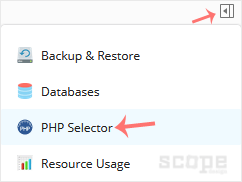
plesk-cl-php-selector-menu.gif


3. To the right side of the Current PHP version, click on the drop-down menu and choose the version you want to use.
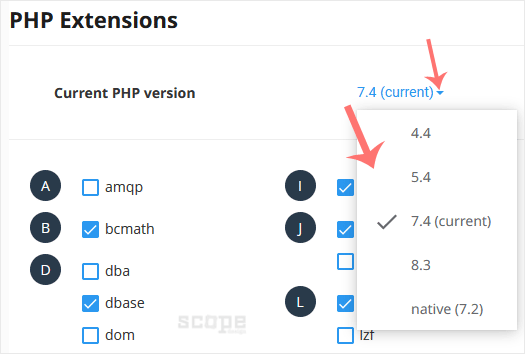
plesk-da-cl-change-php-version.gif


4. Click Apply.

cl-set-as-php-version.gif


Was this answer helpful?

Related Articles

How to Enable ionCube Loader Using CloudLinux Selector in Plesk   You can use CloudLinux Selector to enable ionCube Loader in Plesk.   1. Log in to your... How to Enable the GD Extension of PHP Using CloudLinux Selector in Plesk   You can use CloudLinux Selector to enable GD extension in PHP via Plesk.   1. Log in to... How to Enable the Mailparse Extension of PHP Using CloudLinux Selector in Plesk   You can use CloudLinux Selector to enable the Mailparse extension in PHP via Plesk.   1.... How to Enable or Disable PHP Extensions Using the CloudLinux Selector in Plesk   You can use CloudLinux Selector to enable or disable available PHP extensions in Plesk.  ... How to Enable or Disable PHP's allow_url_fopen Using CloudLinux Selector in Plesk   You can use CloudLinux Selector to enable or disable the allow_url_fopen directive in Plesk....
« Back

  Support

My Support Tickets
Announcements
Knowledgebase
Downloads
Network Status
Open Ticket
  • Contact Us

Copyright © 2026 Scope Design. All Rights Reserved.


Loading...
Loading...

Generate Password

Enter a number between 12 and 64 for the password length.