Scope Design
  • 0 Shopping Cart
  • Home
  • Store
    • Browse All
    • Hosting
    • Website Care Plans
    • Niche Websites
    • WordPress Plugins
    • WHMCS Add Ons
    • Website as a Service Bundle
    • Register a New Domain
    • Transfer Domains to Us
  • Announcements
  • Knowledgebase
  • Network Status
  • Contact Us
  • More
  • Account
    • Login
    • Register
    • Forgot Password?
  1. Portal Home
  2. Knowledgebase
  3. Databases
  4. How to Delete a Database in cPanel

  Categories

Backup/Restore
4
CloudLinux (cPanel)
10
cPanel - Control Panel
24
Databases
11
DirectAdmin
48
DNS - Nameservers
6
Domain Management
12
Email
17
FTP
9
Installing a Control Panel
6
Mail Filters & SPAM
8
Mobile
11
Others
3
PayPal
7
Plesk
47
Security
10
SiteWorx/InterWorx
58
Softaculous
69
SolusVM
18
SSL
5
Virtualizor
19
WHM
18
WordPress
17

  Categories

  Support

My Support Tickets
Announcements
Knowledgebase
Downloads
Network Status
Open Ticket

How to Delete a Database in cPanel Print

  • 0

1. Log in to your cPanel account.


2. In the Databases section, click on MySQL Databases.


3. Under Current Databases, you can see a list of all your databases. Locate the database you want to remove and click on Delete.
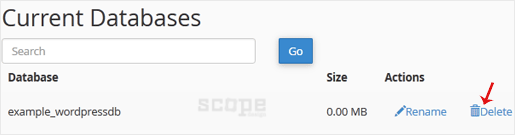

4. Click on Delete Database.


Was this answer helpful?

Related Articles

How to Create a Database in cPanel 1. Log in to your cPanel account.2. In the Databases section, click on MySQL Databases. 3. In the... How to Rename a Database in cPanel 1. Log in to your cPanel account. 2. In the Databases section, click on MySQL Databases. 3.... How to Add a User to a Database and Grant Privileges 1. Log in to your cPanel account. 2. In the Databases section, click on MySQL Databases. 3.... How to Optimize a Database via phpMyAdmin in cPanel 1. Log in to your cPanel account.2. In the Databases section, click on phpMyAdmin. 3. Click on... How to Repair a Database via phpMyAdmin in cPanel 1. Log in to your cPanel account.2. In the Databases section, click on phpMyAdmin.3. Click the...
« Back

  Support

My Support Tickets
Announcements
Knowledgebase
Downloads
Network Status
Open Ticket
  • Contact Us

Copyright © 2026 Scope Design. All Rights Reserved.


Loading...
Loading...

Generate Password

Enter a number between 12 and 64 for the password length.